10 beste ClickUp-konkurrenter og alternativer: vurdert i 2026

10 Beste alternativer til ClickUp – kortliste


De beste alternativene til ClickUp tilbyr mer oversiktlige grensesnitt, mer forutsigbar ytelse og enklere konfigurering – i tillegg til priser som ofte skalerer bedre for team som ikke trenger hele funksjonssettet til ClickUp. Enten du ser etter raskere innlastingstider, bedre tidsregistrering eller mer intuitive dashbord, finnes det sannsynligvis et bedre alternativ for teamet ditt.
ClickUp tilbyr et bredt spekter av funksjoner, men for noen brukere blir kompleksiteten en hindring i stedet for en hjelp. Hvis du opplever treg ytelse, en bratt læringskurve eller verktøy teamet ditt ikke bruker, kan det å bytte til en mer fokusert plattform forbedre produktiviteten og redusere friksjonen.
Jeg har brukt de siste årene på å teste og vurdere verktøy for prosjektstyring, inkludert ClickUp og dusinvis av konkurrentene deres. I denne veiledningen går jeg gjennom de beste alternativene til ClickUp som er tilgjengelige i dag – med fokus på hva hver plattform gjør bra, hva som skiller dem fra hverandre, og hvilke typer team de passer best for.
Hvorfor du kan stole på våre programvareanbefalinger
Teamet vårt har testet og anmeldt programvare siden 2012. Vi er selv prosjektledere, så vi vet hvor vanskelig og hvor viktig det er å velge riktig programvare.
I denne guiden har vi vurdert verktøyene gjennom praktisk testing og uavhengig research og gitt dem poeng ut fra våre utvelgelseskriterier. Vi bygger også på innsikt fra ledende eksperter i bransjen og erfarne prosjektledere.
Anmeldelsene våre bygger på vår egen redaksjonelle vurdering. De er ikke et salgsargument.
Ekspertanmeldere:
Hva er alternativer til ClickUp?
Alternativer til ClickUp er verktøy for prosjektstyring som tilbyr lignende funksjoner for oppgavesporing, teamsamarbeid og arbeidsflytstyring.
Disse verktøyene brukes av team som ser etter andre prismodeller, enklere grensesnitt eller spesifikke funksjoner som passer bedre til behovene deres. Mange alternativer tilbyr tilpassbare visninger, integrasjoner og automatisering – noe som hjelper virksomheter med å styre prosjekter mer effektivt og skalere på en enkel måte.
Sammenligningstabell for alternativer til ClickUp
Her er en tabell der du kan sammenligne verktøyene vi nettopp gikk gjennom i oversiktene.
| Tool | Best For | Trial Info | Price | ||
|---|---|---|---|---|---|
| 1 | Best for agile design and marketing teams | 14-day free trial | Pricing upon request | Website | |
| 2 | Best for quick setup and easy onboarding | Free plan + 14-day trial available | From $9/user/month (billed annually) | Website | |
| 3 | Best for enterprise marketing & creative ops | Free demo available | Pricing upon request | Website | |
| 4 | Best for drag-and-drop automation | Free plan + 15-day free trial + free demo available | From $4/user/month (billed annually) | Website | |
| 5 | Best for deeply nested task hierarchies | Free plan + 30-day free trial available | From $7.65/user/month (billed annually) | Website | |
| 6 | Best for client management tools | 14-day free trial | From $10/user/month (billed annually) | Website | |
| 7 | Best for agile and large-scale team delivery | Free plan + 7-day free trial available | From $8.48/user/month | Website | |
| 8 | Best for extensive customization options | Free plan available | From $4/user/month (billed annually) | Website | |
| 9 | Best for full project lifecycle delivery | Not available | Pricing upon request | Website | |
| 10 | Best for flexibility and customization | Free plan + 14-day free trial available | From $8/user/month (billed annually) | Website |


De 10 beste alternativene til ClickUp sammenlignet
I denne oversikten går vi gjennom fordeler og ulemper, priser, prøveinformasjon og ekspertvurderinger for hvert av verktøyene. Vi sammenligner også hver løsning med ClickUp, slik at du kan forstå om den er et bedre valg for teammedlemmene dine og de spesifikke prosjektbehovene dine.

Wrike
Best for agile design and marketing teams
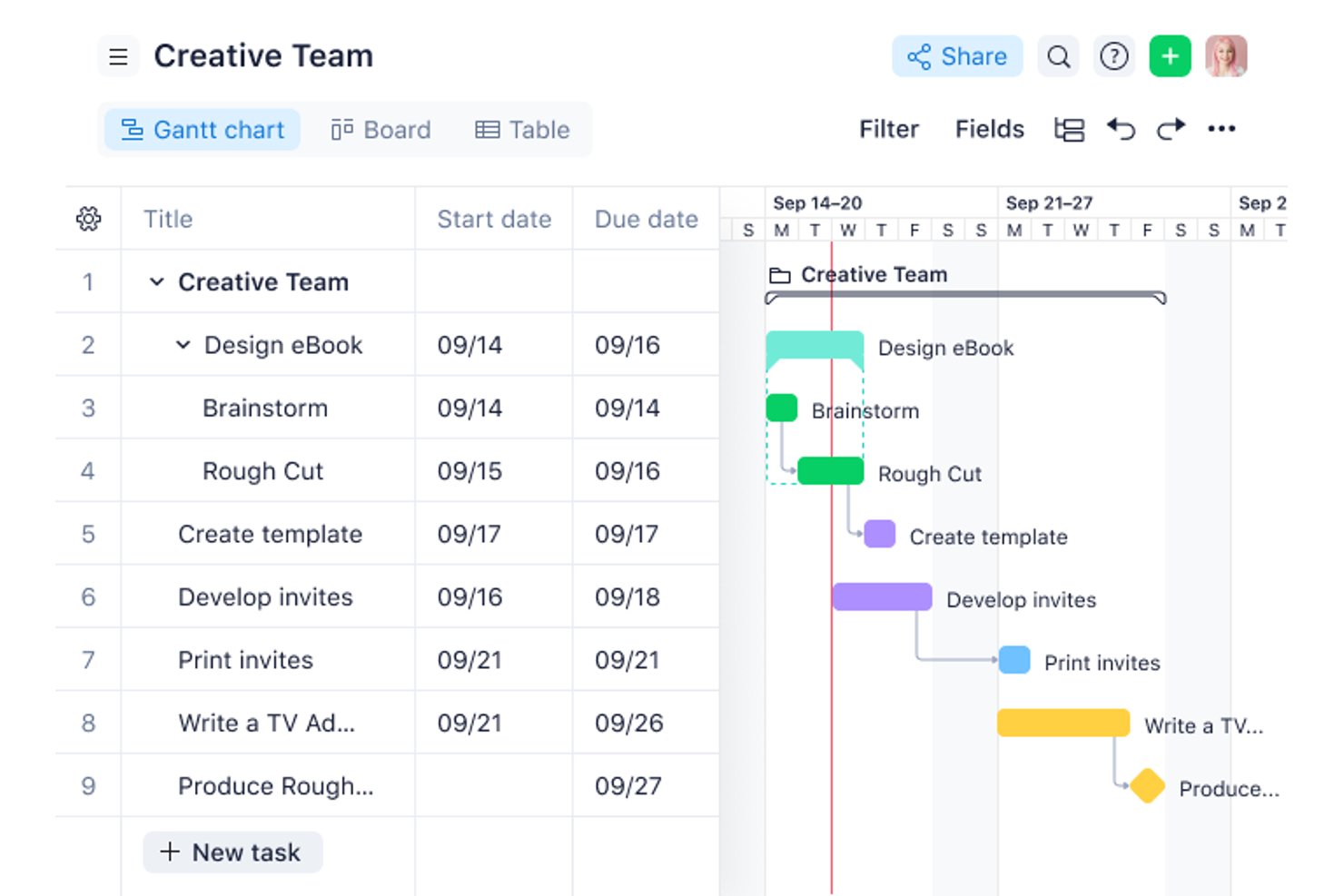
Wrike is project management software that helps product, design, and marketing teams coordinate tasks, manage timelines, and keep cross-functional work visible as priorities shift.
Who Is Wrike Best For?
Wrike is a good fit for design and marketing teams managing iterative campaigns, creative reviews, and frequent changes to delivery plans.
Why I Picked Wrike
I picked Wrike as Best for agile design and marketing teams because proofing lets reviewers annotate creative files and keep feedback tied to the work. Request forms turn campaign briefs into trackable tasks, giving teams a clear path from intake through review.
Wrike Key Features
- Gantt charts: Map project timelines, task dependencies, and milestones on a visual schedule.
- Dashboards: Create views of project tasks, status, and metrics using customizable widgets.
- Workload charts: View team members’ assigned work to assess capacity across projects.
- Time tracking: Log time against tasks and review recorded hours in timesheets.
Wrike Integrations
Wrike’s integrations directory lists 60 options, including Slack, Salesforce, Microsoft Teams, Office 365, Google Sheets, Google Drive, and Miro. It also supports Zapier and offers a REST API for custom integrations.
Pros and Cons
Pros:
- Forms turn briefs into trackable tasks
- Linked task dependencies recalculate downstream dates
- Proofing keeps creative feedback tied to files
Cons:
- Mobile performance can lag on large projects
- Complex permissions make access harder to manage
New Product Updates from Wrike

Wrike Redesigns AI Agent Builder
Wrike redesigns its AI Agent Builder with a side-by-side setup, Scopes, sentence-style triggers and actions, and clearer filters. These changes make it easier to configure, test, and manage agent behavior. For more information, visit Wrike’s official site.

Best for quick setup and easy onboarding
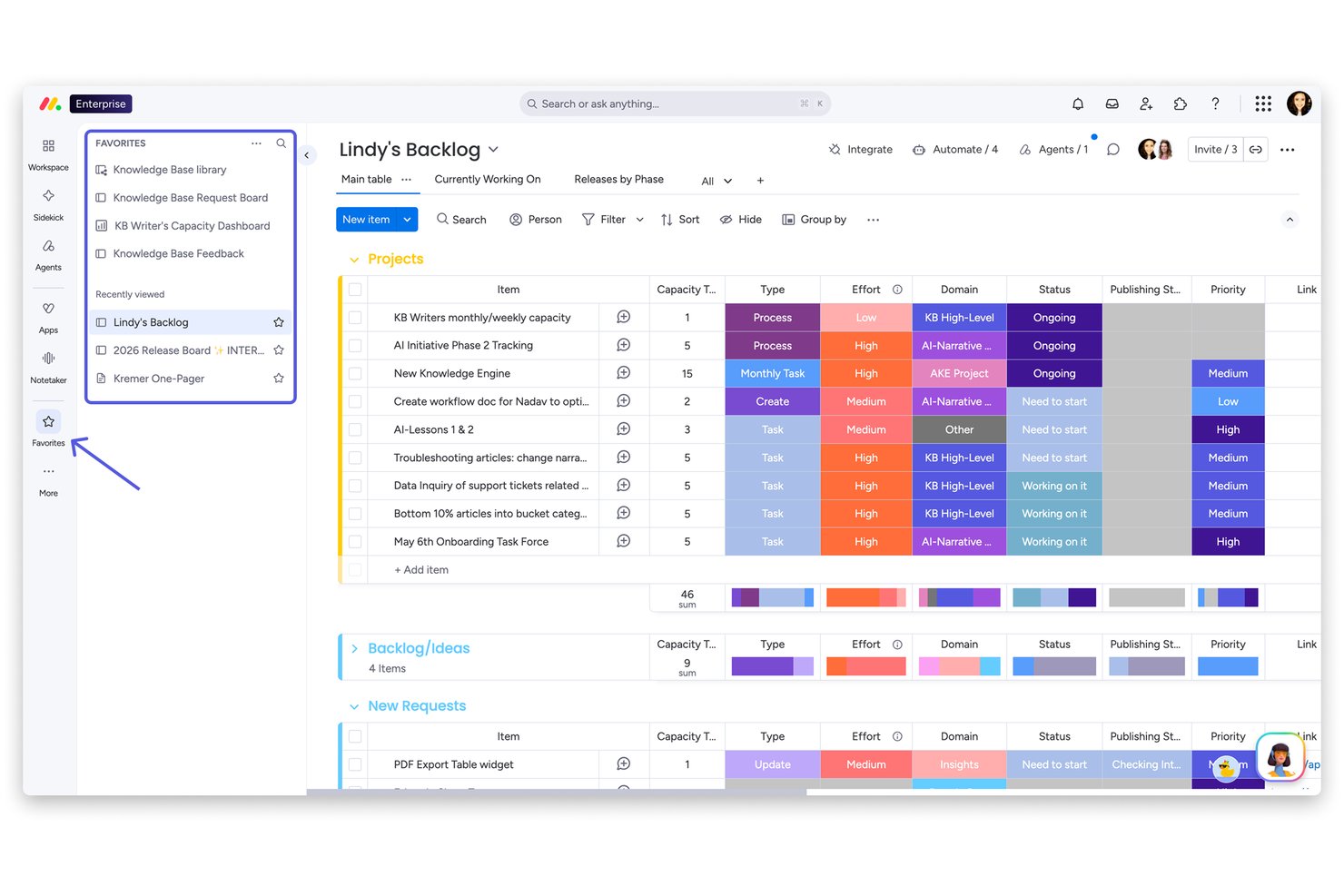
monday AI Workspace is a visual work management platform built for cross-functional teams in marketing, operations, and product who need a structured way to plan projects, automate repetitive work, and keep stakeholders aligned without the complexity of heavier tools.
Who Is monday AI Workspace Best For?
It's a strong fit for mid-sized teams in marketing, operations, or project management who need a polished, low-friction platform they can roll out quickly across departments.
Why monday AI Workspace Is the Best ClickUp Alternative
monday AI Workspace earns its spot on my shortlist because its onboarding experience is one of the fastest I've seen in this category. I love how the 200+ pre-built templates let my team deploy a working project board in minutes, covering everything from sprint planning to campaign tracking, without building anything from scratch. The AI Sidekick compounds that by surfacing contextual suggestions directly inside boards, so new users aren't left guessing what to do next.
monday AI Workspace Key Features
- AI Sidekick: Provides contextual task suggestions, draft updates, and automates repetitive work directly in your workspace.
- Integrated docs and whiteboards: Allows your team to create documents and brainstorm visually without leaving the platform.
- Advanced resource management: Displays real-time workload capacity to help balance tasks and avoid team overload.
- Custom automation builder: Lets you automate multi-step workflows dynamically using conditional logic and triggers, all with a no-code interface.
monday AI Workspace Integrations
monday AI Workspace offers hundreds of native integrations through its built-in integrations and marketplace, including Slack, Google Workspace, Microsoft 365, Jira, Dropbox, Zoom, HubSpot, Salesforce, GitHub, and Outlook. It also supports Zapier and provides an API for custom integrations.
Pros and Cons
Pros:
- AI Sidekick automates repetitive task management
- Clean visual boards suit non-technical project managers
- Fast setup with 200+ ready-made templates
Cons:
- Gantt views locked behind higher pricing tiers
- Automation limits apply on lower-tier plans
New Product Updates from monday AI Workspace
monday AI Workspace Adds Human Approval Routing
monday AI Workspace adds a human-in-the-loop approval block to AI Workflows, sending approval requests and routing workflow paths based on responses. For more information, visit monday AI Workspace's official site.

Best for enterprise marketing & creative ops
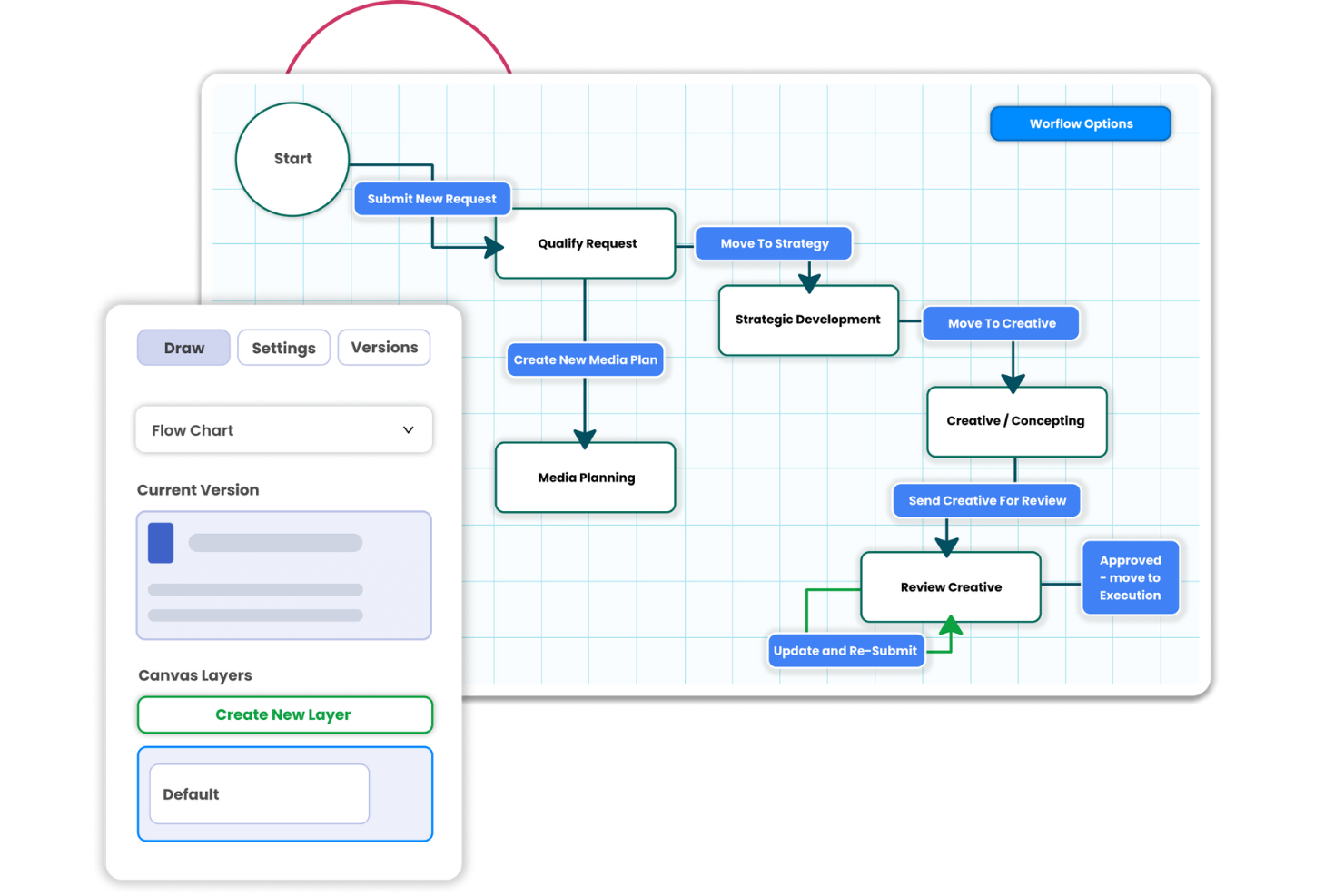
Screendragon is a work management platform that helps marketing and creative teams coordinate campaign projects, manage approvals, and track work across departments.
Who Is Screendragon Best For?
Screendragon fits enterprise marketing and creative operations leaders managing complex campaign production across large, cross-functional teams.
Why I Picked Screendragon
I picked Screendragon as a ClickUp alternative for enterprise marketing & creative ops because its no-code workflow builder routes campaign briefs through conditional stages and sequential or parallel approvals. I like that reviewers can mark up artwork and video, compare versions side by side, and keep decisions attached to each asset, which suits cross-market campaigns with brand or compliance checks.
Screendragon Key Features
- Project views: Track work in Gantt charts, Kanban boards, or list views.
- Resource planning: Assign work by skills and availability, with team capacity snapshots.
- Budget tracking: Link campaign budgets and spend to project plans.
- Analytics dashboards: View timelines, budgets, resource use, and campaign KPIs.
Screendragon Integrations
Screendragon lists pre-built integrations with Aprimo, Google Cloud Storage, Slack, HubSpot, Microsoft Teams, Microsoft Power BI, Amazon S3, Sitecore, Ziflow, and Brandfolder. Its Connection Manager and REST API support custom connections to other systems.
Pros and Cons
Pros:
- Resource and budget views connect plans to delivery
- Asset proofing keeps feedback tied to versions
- Conditional routing handles complex campaign approvals
Cons:
- Large projects can feel slow to navigate
- Workflow setup and configuration take time
New Product Updates from Screendragon
Screendragon Unveils New AI Hub
Screendragon introduced AI Hub, a new capability that lets teams build and manage AI agents directly within workflows. The update helps marketing teams automate tasks, maintain governance controls, and scale AI-driven operations more efficiently. For more information, visit Screendragon's official site.

Best for drag-and-drop automation

Zoho Projects is a solid ClickUp alternative for teams that want strong project tracking without an overloaded setup. It’s a good fit for enterprises, educational institutions, and teams in industries like construction and software development, especially when you need reliable task management, time tracking, and collaboration features in one platform. Zoho Projects also supports integration with other tools, so it can slot into an existing workflow without requiring a full reset.
Why I Picked Zoho Projects
I picked Zoho Projects as a ClickUp alternative because it gives teams more control over how projects are structured. You can automate repeatable steps using drag-and-drop workflows, which helps reduce manual follow-ups as work moves through different stages. It also includes strong customization options, letting you adjust fields, layouts, and workflows to match your team’s process instead of forcing everyone into the same setup.
Zoho Projects Key Features
Along with automation and customization, Zoho Projects offers:
- Gantt Charts: Visualize project timelines and dependencies to better plan and manage tasks.
- Issue Tracking: Log, track, and resolve project issues quickly, ensuring nothing falls through the cracks.
- Document Management: Organize and share project-related documents within the platform for easy access and collaboration.
- Team Collaboration Tools: Use features like in-app chat, forums, and feeds to facilitate communication and teamwork.
Zoho Projects Integrations
Integrations include Google Drive, Slack, GitHub, Dropbox, Zapier, Microsoft Teams, Zoho CRM, Zoho Books, Zoho Desk, and Zoho Analytics. An API is available for custom integrations.
Pros and Cons
Pros:
- Affordable pricing for growing teams
- Built-in time tracking and billing
- Strong automation and workflow customization
Cons:
- Mobile experience less fully featured
- Interface has steeper learning curve
New Product Updates from Zoho Projects
Zoho Projects Adds CodeX Scripts for Custom Modules
Zoho Projects now supports CodeX Scripts for custom modules, enabling conditional logic and rules for creating, updating, and deleting records. For more information, visit Zoho Projects' official site.
 .

Quire
Best for deeply nested task hierarchies
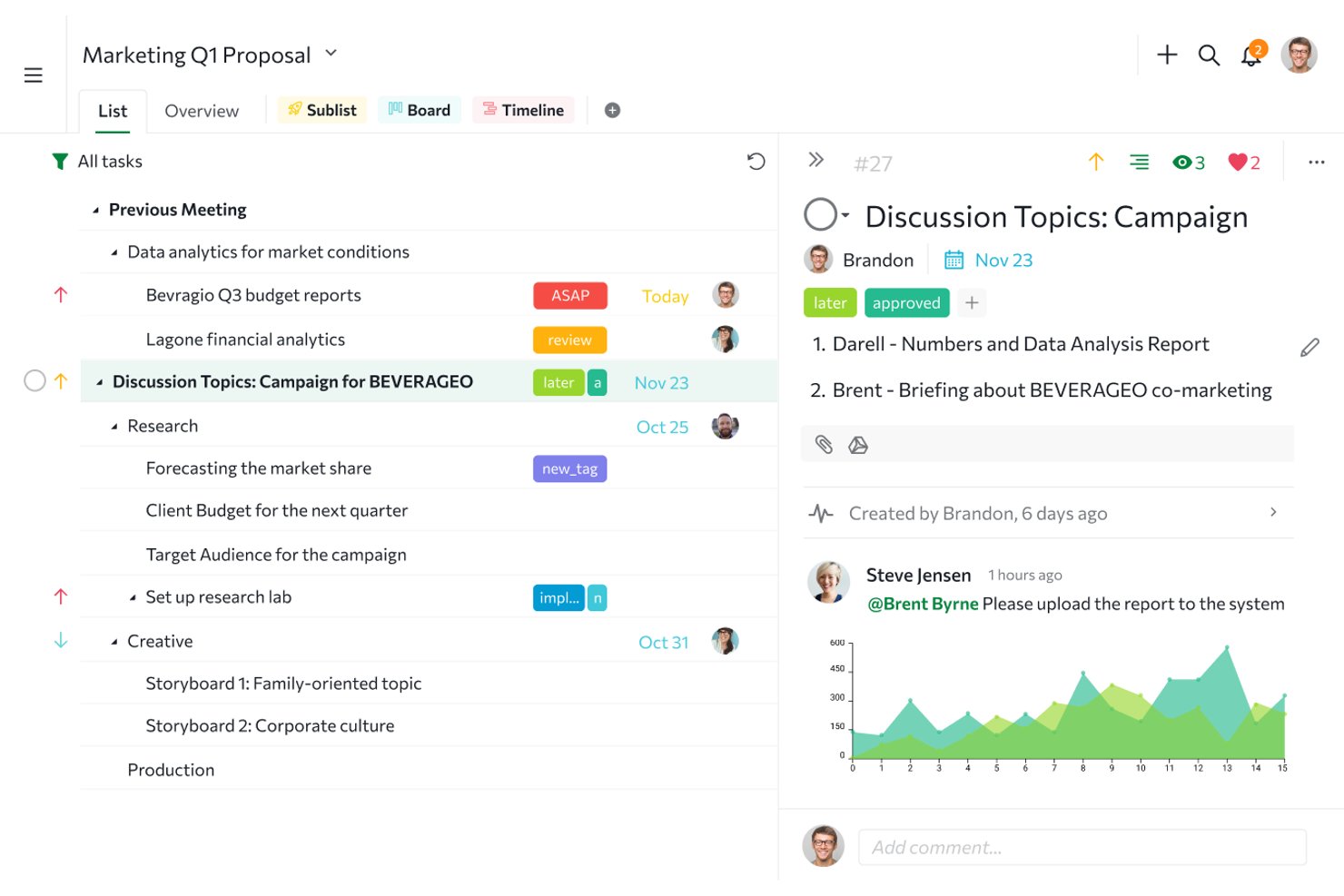
Quire is project management software for cross-functional teams that pairs task planning with Kanban boards, helping you coordinate day-to-day work and track progress across projects.
Who Is Quire Best For?
Quire suits project managers coordinating cross-functional work across product, engineering, and design teams.
Why I Picked Quire
I include Quire as a ClickUp alternative because it’s Best for deeply nested task hierarchies. Tasks can contain subtasks across multiple levels, while Task Bundle keeps child tasks attached to parent cards on the Kanban board. I like this for breaking a product launch into design, engineering, and QA work without losing the parent-child structure.
Quire Key Features
- Timeline view: Visualize task schedules and adjust dates on a Gantt-style timeline.
- Calendar view: See dated tasks and reschedule them by dragging on the calendar.
- Time tracking: Record task time with a stopwatch, Pomodoro timer, or manual entries.
- Smart Folders: Group projects from multiple organizations in one folder.
Quire Integrations
Quire lists integrations with Google Drive, OneDrive, Microsoft Teams, Slack, n8n, GitHub, Google Calendar, Dropbox, and Box; Dropbox and Box are available on paid plans, and it connects with Zapier. Quire also provides an API for custom integrations.
Pros and Cons
Pros:
- Task comments keep project discussions attached
- Switch between outline, Kanban, and timeline
- Deep subtasks preserve parent-child structure
Cons:
- Mobile apps need internet for many actions
- Advanced reporting remains limited for larger teams
New Product Updates from Quire
Quire Adds Custom Field Locking and Comment Reaction API Support
Quire adds custom field locking and API support for reading and setting emoji reactions on comments. These updates give teams more control over field data and expand comment interaction options for developers. For more information, visit Quire’s official site.
 .

Celoxis
Best for client management tools
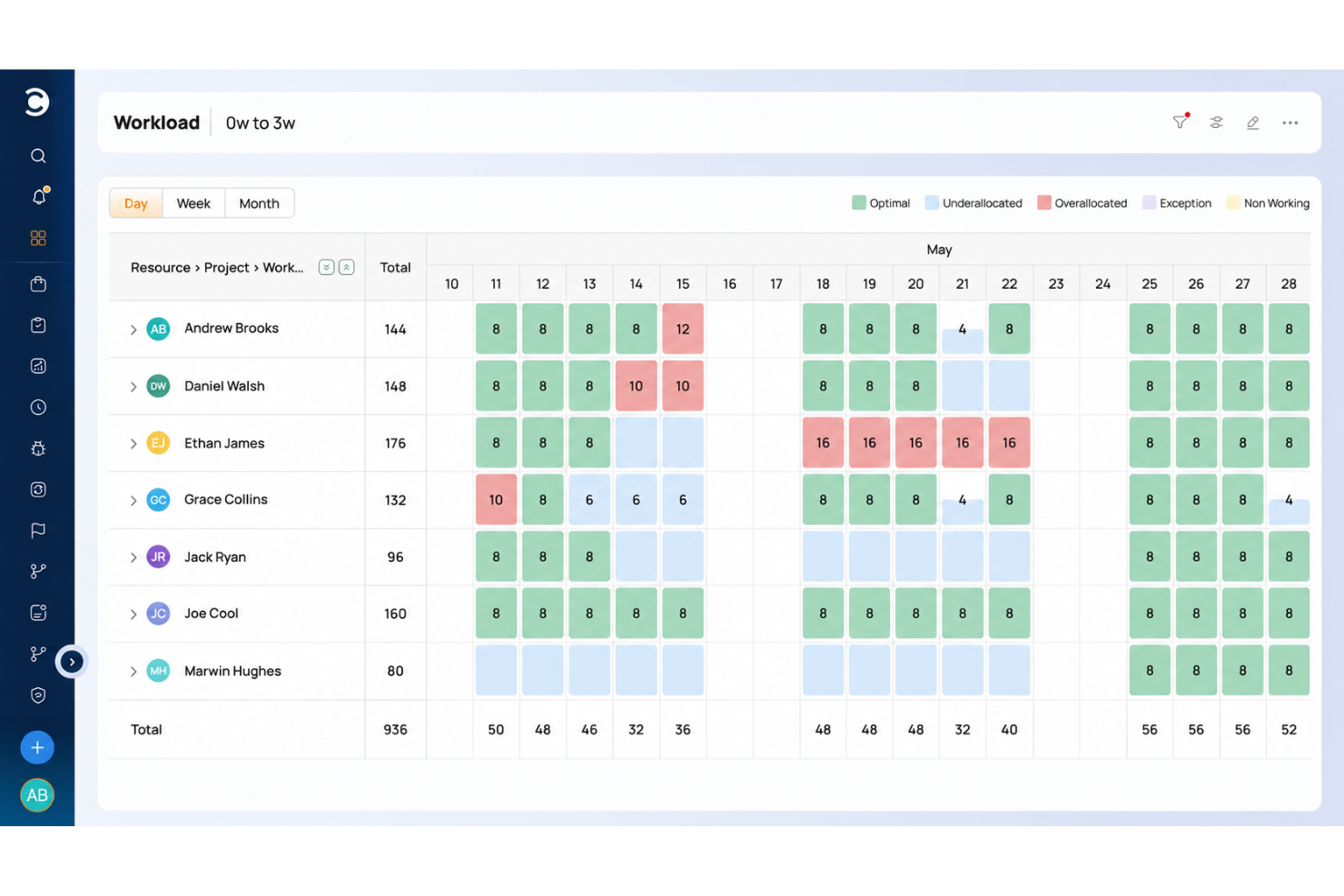
Celoxis is a project management platform for service businesses that need to plan work, allocate resources, track budgets, and coordinate client projects across teams.
Who Is Celoxis Best For?
Celoxis suits project managers at client-facing service businesses who coordinate deliverables, budgets, and resources across client projects.
Why I Picked Celoxis
I picked Celoxis as a ClickUp alternative for client-facing project work. Its customizable, branded client portal lets customers view and collaborate on permitted projects and tasks, with permissions controlling what they can access. I also like that teams can share project progress and turn approved time and expenses into invoices.
Celoxis Key Features
- Gantt scheduling: Plan tasks with dependencies, critical paths, and automatic scheduling.
- Resource capacity planning: Allocate work by availability, demand, and skills across projects.
- Custom workflows: Configure fields, states, routing, and escalation policies for work items.
- Portfolio dashboards: Build report widgets with charts, filters, and drill-downs to records.
Celoxis Integrations
Celoxis offers 21 native integrations, including Jira, GitHub, Azure DevOps, Slack, Salesforce, Microsoft 365 and Outlook, Google Drive, QuickBooks Online, Trello, and Zendesk. It also supports Zapier and a REST API for custom integrations.
Pros and Cons
Pros:
- Cross-project capacity and budget visibility
- Approved time and expenses support billing
- Client portal shares live project updates
Cons:
- Mobile app trails the desktop experience
- Advanced reports require setup and configuration

Jira
Best for agile and large-scale team delivery
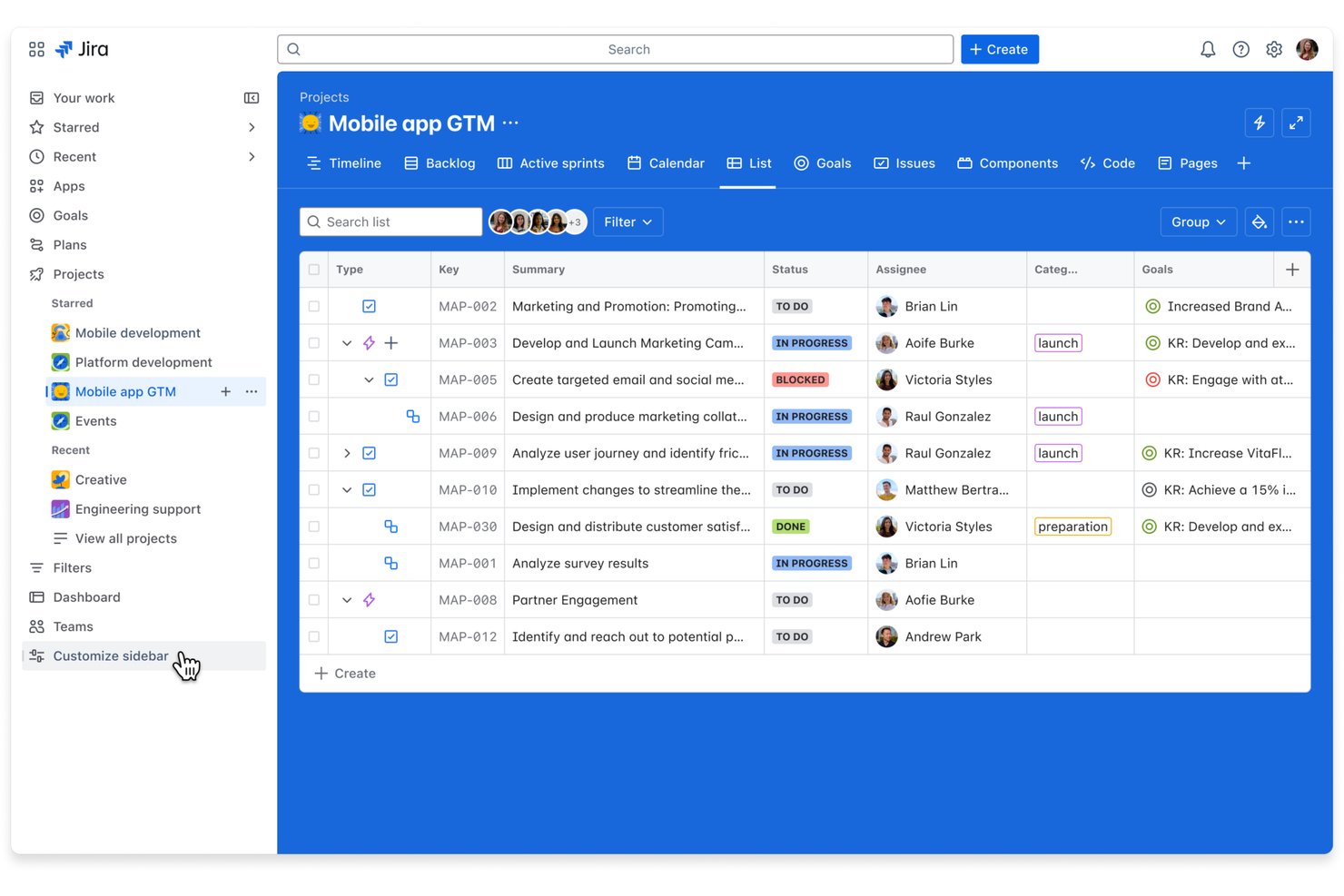
Jira is a project management platform for product and engineering teams that need to plan releases, track work, and manage shifting dependencies, making it best for agile and developer team workflows.
Who Is Jira Best For?
Product owners and engineering leads who run Scrum or Kanban can use Jira to connect team backlogs with day-to-day issue tracking.
Why I Picked Jira
I picked Jira for this ClickUp alternatives list because it’s Best for agile and developer team workflows. Scrum and Kanban boards connect sprint backlogs to issue tracking, while release planning and issue links help engineering leads track dependencies and spot blocked work before a launch.
Jira Key Features
- Custom workflows: Configure statuses and transitions to match your team’s process.
- Automation rules: Trigger actions when issues meet specified conditions.
- Custom fields: Add fields to capture project-specific information on issues.
- Dashboards: Build views with gadgets for tracking project metrics and activity.
Jira Integrations
Jira offers 3,000+ installable Atlassian Marketplace apps and integrations with Slack, Microsoft Teams, GitHub, Bitbucket, and Confluence. It also provides APIs for custom integrations.
Pros and Cons
Pros:
- Dashboards track ownership, priorities, and progress
- Issue links expose blocked release dependencies
- Sprint boards connect backlogs to issues
Cons:
- Dense ticket views clutter large projects
- Workflow setup demands significant admin time

GoodDay
Best for extensive customization options
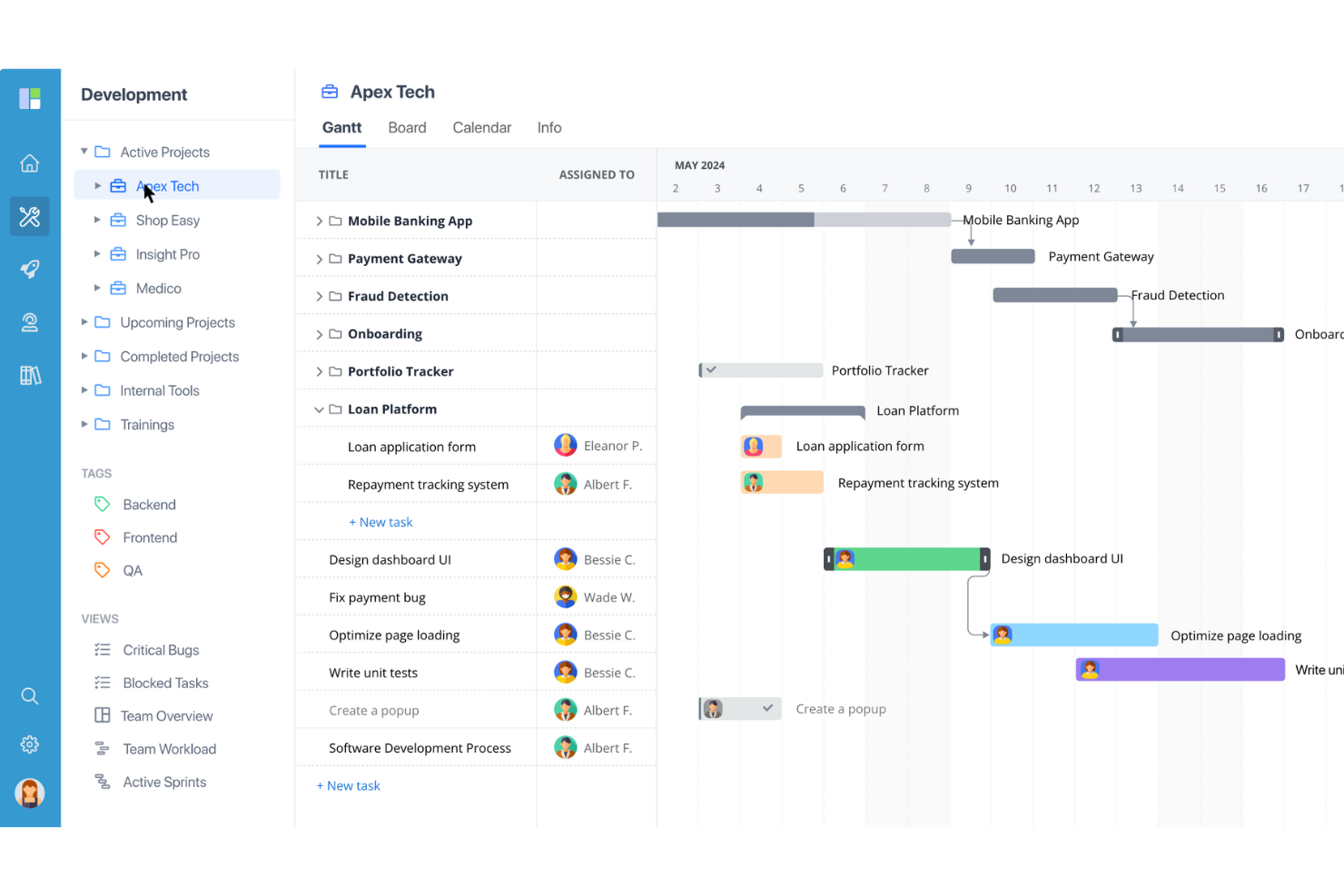
GoodDay is a project management platform for tech and digital teams that brings task planning, project tracking, and collaboration into one workspace, helping teams coordinate dependencies and keep changing work visible.
Who Is GoodDay Best For?
GoodDay suits project managers on tech and digital teams who need to tailor workflows, views, and project structures to different workstreams.
Why I Picked GoodDay
GoodDay is my pick for Best for extensive customization options because I can set task types with distinct workflows and custom fields. I can then track engineering bugs on a board and map launch tasks on a Gantt chart, tailoring project views to each workstream.
GoodDay Key Features
- Time tracking: Log time against tasks and projects.
- Workflow automation: Set rules to trigger actions when work changes.
- Goals and OKRs: Create objectives and track key results.
- Reports and analytics: Generate reports on project and team activity.
GoodDay Integrations
GoodDay offers native integrations with Google Workspace, Slack, Dropbox, Box, GitHub, and GitLab. It also connects with Zapier and provides an API for custom integrations.
Pros and Cons
Pros:
- Built-in time tracking ties effort to tasks
- Gantt, board, and workload views share plans
- Custom task types fit distinct engineering workflows
Cons:
- Reports can’t be emailed from the platform
- Mobile app trails desktop task management

Kantata
Best for full project lifecycle delivery
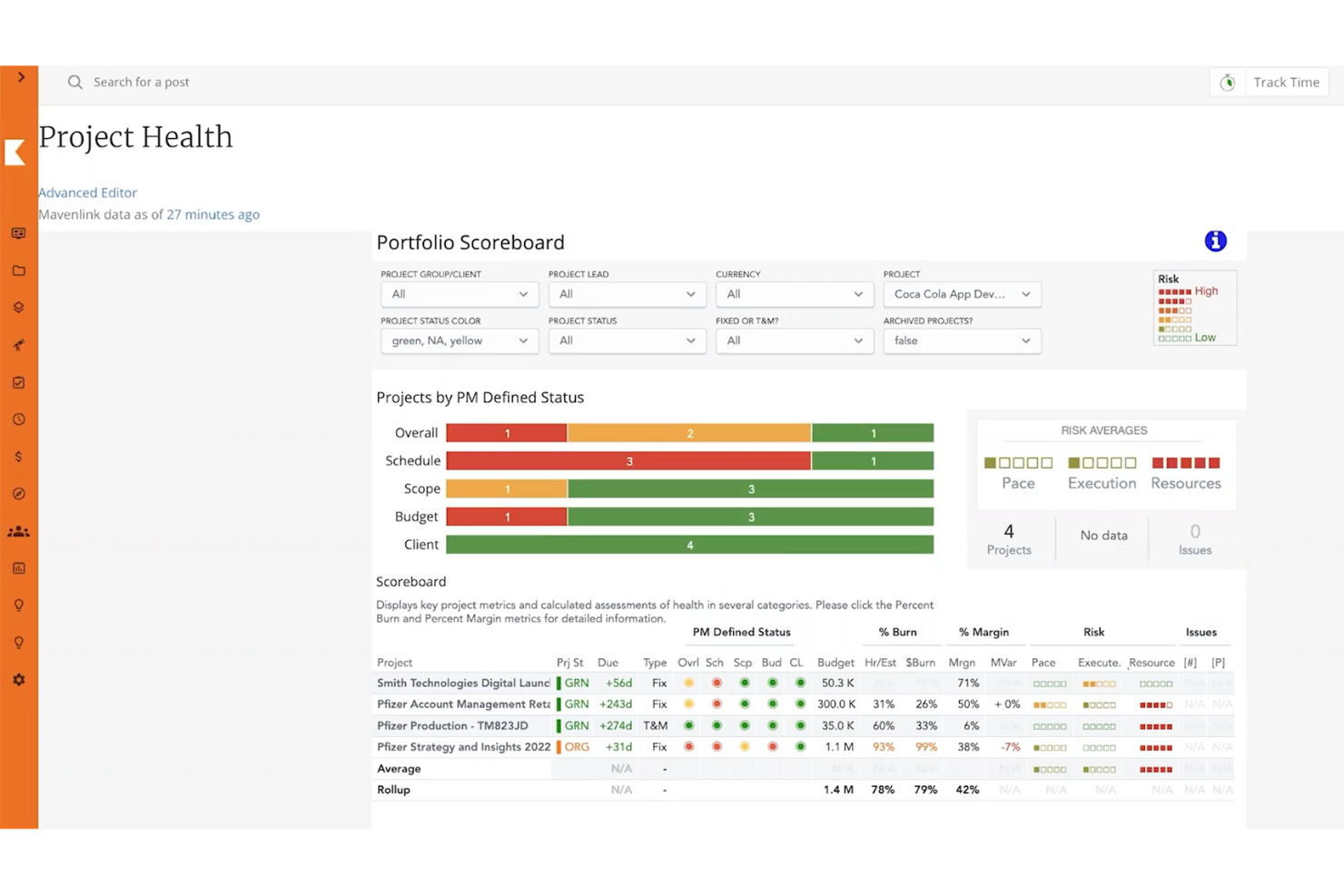
Kantata is a professional services automation platform for consulting and other service teams, connecting project work with resourcing and financial visibility to help managers coordinate delivery and control margins.
Who Is Kantata Best For?
Kantata suits professional services project managers who need to coordinate client delivery, staffing, and financial performance across engagements.
Why I Picked Kantata
I picked Kantata as a ClickUp alternative because it fits “Best for full project lifecycle delivery,” connecting project work with resourcing and financial visibility. I like that managers can coordinate client engagements and monitor margins as staffing or delivery needs shift.
Kantata Key Features
- Project estimation: Use performance data to estimate work and adjust project plans.
- Time tracking: Log hours against clients and projects.
- Expense tracking: Track expenses across client projects.
- Kantata Pulse: Collect client and employee feedback during delivery.
Kantata Integrations
Kantata documents integrations with Salesforce, QuickBooks Online and Desktop, Google Workspace, Jira, Slack, Microsoft Teams, HubSpot, NetSuite, and Sage Intacct, and lists Kantata OX on Zapier. It also offers secure APIs and more than 1,200 prebuilt connectors for connecting systems and building workflows.
Pros and Cons
Pros:
- Centralizes client collaboration and project updates
- Tracks utilization and capacity across engagements
- Connects delivery, staffing, and project margins
Cons:
- Custom reporting takes admin expertise
- Complex setup can overwhelm smaller teams
New Product Updates from Kantata

Kantata Adds Access Group Change History
Kantata adds Access Groups History, letting account administrators track changes to group details, membership, and permissions in Recent History. The update also makes these events available through the Subscribed Events API for broader monitoring. For more information, visit Kantata’s official site.
 .
Miro
Best for flexibility and customization
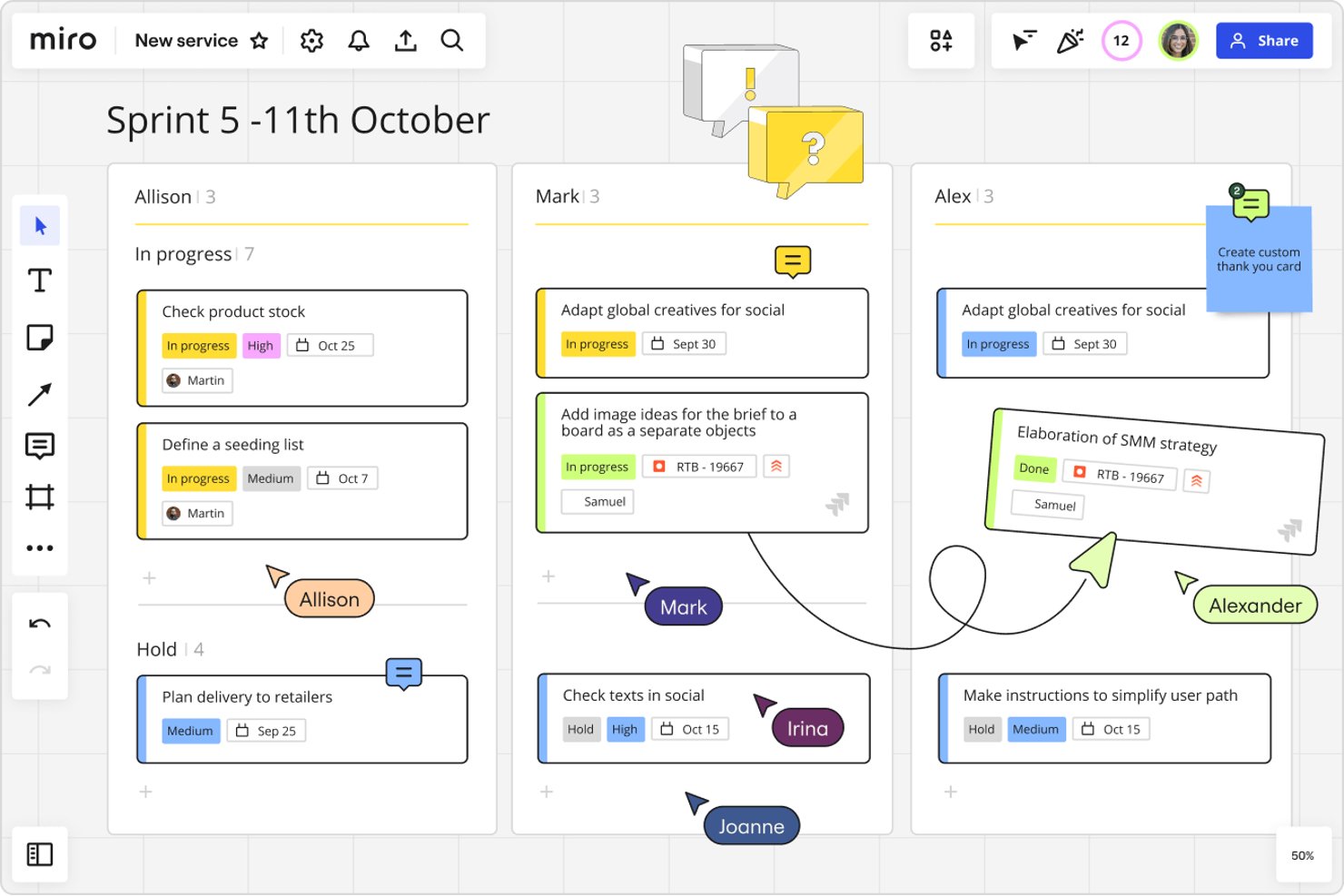
Miro gives product, engineering, and design teams a visual workspace to plan projects, map workflows, and keep cross-functional work aligned as requirements change.
Who Is Miro Best For?
Miro suits project managers at tech organizations that need to tailor workflows and templates to different teams and delivery methods.
Why I Picked Miro
I picked Miro for “Best for flexibility and customization” because its visual canvas lets me shape project workflows around how teams deliver. I use customizable boards and templates to map sprint plans, dependencies, and handoffs, then adjust them as requirements change.
Miro Key Features
- Jira integration: Add Jira cards to boards and view issue details.
- Voting: Let participants vote on ideas or options directly on a board.
- Comments: Attach comments to board content for project discussions and feedback.
- Timer: Set a countdown for workshops, planning sessions, or team exercises.
Miro Integrations
Miro’s Marketplace offers 160+ app integrations, including Jira, Confluence, Slack, Microsoft Teams, Trello, Asana, Google Drive, and Zoom. Miro also supports Zapier and provides an API for custom integrations.
Pros and Cons
Pros:
- Templates speed repeatable planning sessions
- Live cursors and comments aid workshops
- Infinite canvas supports flexible project mapping
Cons:
- Large boards can lag and become cluttered
- Task ownership and reporting remain comparatively limited
New Product Updates from Miro
Miro Adds Japan Data Residency for Enterprise Customers
Miro has introduced Japan data residency for enterprise customers, offering in-region storage for production data, backups, and metadata, plus in-region compute infrastructure. For more information, visit Miro's official site.
Andre alternativer til ClickUp
Her er noen flere alternativer til ClickUp som ikke kom med på kortlisten min, men som likevel er verdt å undersøke:
- Asana
For a simple, collaborative to-do list
- Ravetree
For resource management
- Smartsheet
For spreadsheet-style project tracking
- MeisterTask
For Kanban teams moving away from complexity
- Scoro
For KPI dashboards across client work
- Accelo
For client work invoicing and billing
- Productive
For agency time tracking and billing
- Process Street
For recurring process and compliance ops
- Hive
For bringing email and chat into tasks
- Workzone
For non-technical teams needing intake forms


Om ClickUp
ClickUp er en programvare for prosjektstyring med avanserte funksjoner for å administrere og fullføre alle prosjektene til teamet ditt på én plattform. Brukere kan planlegge prosjekter, bruke egendefinerte felt, planlegge oppgaver, angi oppgaveavhengigheter, opprette automatiseringer og administrere ressurser i et sentralisert arbeidsområde, samt kommunisere og samarbeide med teammedlemmer og gjester.
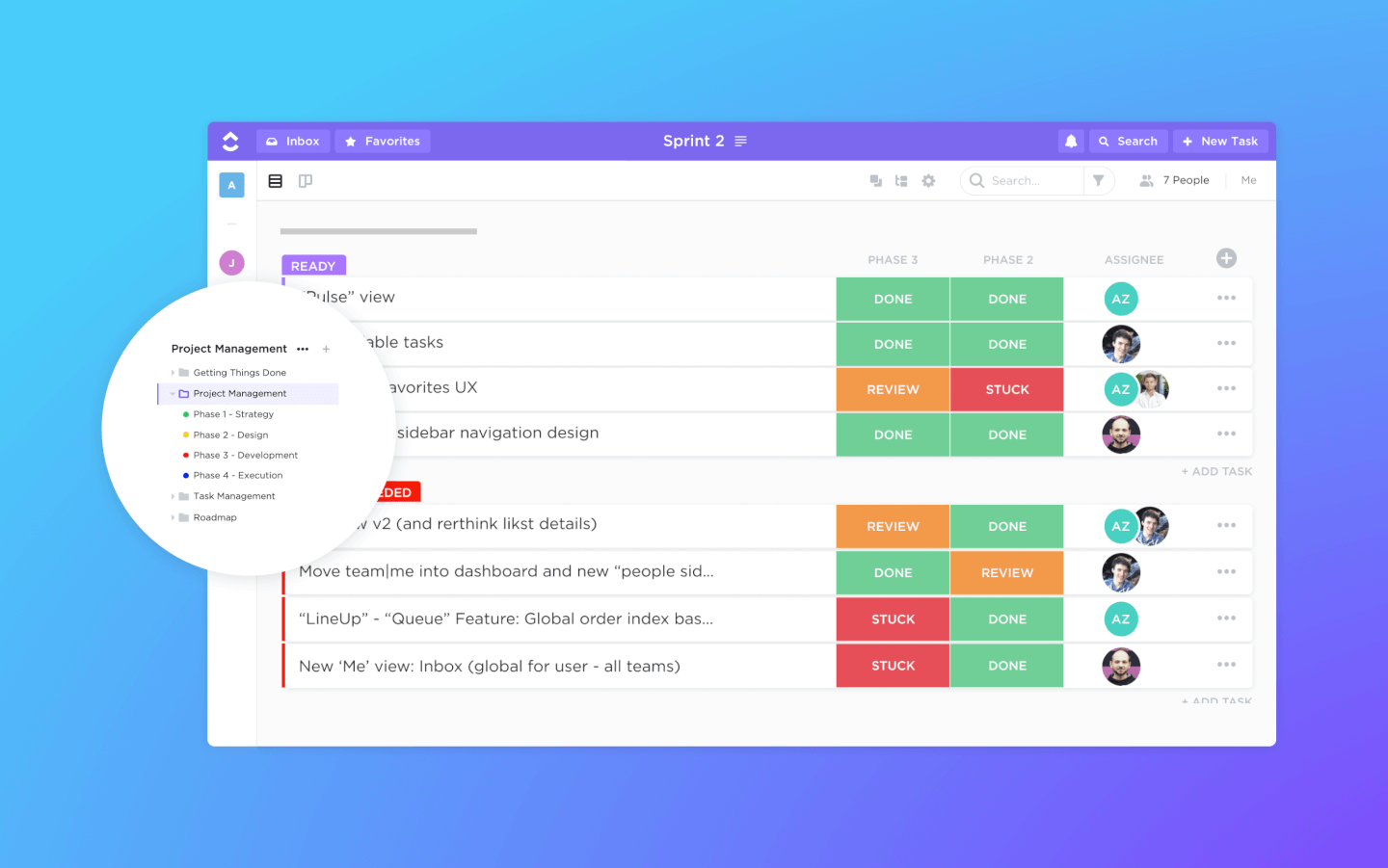
Funksjonene for oppgavehåndtering omfatter sjekklister for oppgaver, underoppgaver og oppgavemaler. I tillegg kan du filtrere, sortere, søke etter, endre rekkefølgen på og vise oppgaver på den måten som er mest praktisk for teamet. Brukere kan også opprette Gantt-diagrammer og få tilgang til kalendervisninger, tavlevisninger og mer enn 10 andre måter å visualisere informasjon på.
ClickUp inneholder også utmerkede funksjoner for fildeling og samarbeidende redigering i wikier og nettbaserte dokumenter. Brukere kan kommentere dokumenter og oppgaver, omtale kolleger og chatte med andre teammedlemmer for bedre kommunikasjon og samarbeid. Rapporteringsfunksjonene omfatter muligheten til å opprette egendefinerte dashbord samt seks innebygde rapporttyper for teamrapportering.
ClickUp tilbyr integrasjoner direkte med Slack, G Suite, Airtable, Basecamp, Dropbox, Jira og mange flere verktøy, samt over 1 000+ integrasjoner gjennom Zapier.
ClickUps gratisabonnement uten tidsbegrensning er omfattende og inkluderer alle de viktigste funksjonene. Denne gratisversjonen har imidlertid bruksbegrensninger og ber deg oppgradere når du når dem. Ubegrenset-abonnementet starter på $5/user/month og tilbyr ytterligere funksjonalitet.
How I Evaluate ClickUp Alternatives
I split my evaluation into three parts. Core functionality carries the most weight: a tool must let you create, assign, and track tasks across projects and offer multiple views like boards, lists, and timelines. I also look for standout features like workload visibility and built-in docs, then consider onboarding ease and pricing value.
Core Functionality (Table Stakes For This List)
When I'm selecting tools for my list, I score each one on a scale from 0 (does not offer the functionality) to 5 (excels in this area) for each core functionality listed below. I then convert the total into a percentage to help assess each tool's overall fit, with extra weight on any functionalities I’ve deemed essential.
- Task & Project Tracking (Essential): I look for task assignment, subtasks, status tracking, dependencies, and recurring work across projects with shifting timelines.
- Multiple Views (Essential): I assess how easily you can switch between lists, boards, calendars, and timelines while keeping project details and updates in context.
- Team Collaboration: I check whether comments, mentions, and file sharing stay attached to tasks, so decisions and feedback are easy to follow.
- Workflow Automation: I evaluate triggers for routine work, such as assigning an owner after a status change or notifying reviewers when an approval is due.
- Third-Party Integrations: I look for connections to tools teams use for chat, file storage, and calendars, helping keep project information accessible across systems.
- Reporting & Dashboards: I assess whether dashboards show project progress, task status, and workload across teams, giving leads visibility into delivery risks.
Once I have a list of tools that meet the criteria, I consider what sets each platform apart.
Differentiating Factors (What Sets Vendors Apart)
Here's how I compare and contrast different vendors:
Standout Features
I look for built-in docs and wikis so teams can keep briefs, specs, and decisions next to the tasks they belong to—tools like Notion and ClickUp handle this differently, and the gap matters when you're tired of linking out to a separate doc tool. I also evaluate workload and capacity views, because knowing who's overloaded before a sprint starts beats finding out after a deadline slips. Goal and OKR tracking is another differentiator: I check whether a platform can link daily tasks back to quarterly objectives without a workaround.
Beyond Features
I evaluate how quickly a team can get started without heavy admin setup. Some platforms, like monday.com, offer guided onboarding flows for marketing or agile teams, while others assume you'll build everything from scratch. I also check performance under load—if a board with 500+ tasks lags or crashes, that's a dealbreaker for delivery leads tracking real projects. Pricing transparency matters too: I look for clear per-seat costs and whether essentials like automations or guest access require paid add-ons.
Hvorfor kan du trenge et alternativ til ClickUp?
Du ønsker et enklere verktøy (og du vil ikke erstatte de andre verktøyene dine)
Et enkelt dra-og-slipp-grensesnitt kan gjøre en stor forskjell. ClickUp er en stor, kompleks og kraftig produktivitetsplattform. Det er gode grunner til å tro at den kan erstatte mange av de andre verktøyene dine. Samtidig gjør dette det vanskeligere å lære opp noen du holder på å introdusere for plattformen.
I tillegg kan det hende at du ikke ønsker eller trenger at ClickUp skal erstatte alle de andre prosjekt- eller arbeidsstyringsverktøyene dine, hvis du allerede har mange av dem og er fornøyd med dem. Kanskje du bare ønsker å integrere dem med det du allerede har.
Du sender mange fakturaer
ClickUp er ikke en komplett prosjektstyringsplattform. Manglende funksjoner, som fravær av alternativer for fakturering og betaling, betyr at du må fullføre prosjektene dine i et annet prosjektstyringsverktøy.
Du trenger mer avanserte rapporteringsfunksjoner
Selv om ClickUp tilbyr rapportering til en viss grad, gir det vanligvis grunnleggende innsikt i stedet for å bruke forretningsanalyse eller maskinlæring til å forbedre informasjonsresultatet.
Det kan hende du ønsker et enklere grensesnitt
Den enorme mengden funksjoner denne prosjektstyringsappen leveres med, innebærer at du får et grensesnitt som er rotete og forvirrende for nybegynnere. Det finnes også bare to abonnementstyper, gratis og betalt, noe som betyr at du ikke kan velge bort funksjoner du ikke trenger, med et abonnement på mellomnivå.
Viktige funksjoner i ClickUp
Her er noen av de viktigste funksjonene i ClickUp, slik at du kan sammenligne hva alternative løsninger tilbyr:
- Integrasjoner: Koble til andre verktøy og plattformer for å utvide funksjonaliteten og effektivisere arbeidsflyter på tvers av ulike applikasjoner. Det virker som om meldingen din var tom. Når du ser etter et alternativ, bør du sørge for at funksjonen for oppgavehåndtering er intuitiv, støtter beskrivelser med rik tekst og inkluderer robuste oppgaveavhengigheter for å håndtere komplekse arbeidsflyter på en effektiv måte.
- Oppgavehåndtering: Opprett, tildel og følg opp oppgaver enkelt med detaljert informasjon som forfallsdatoer og beskrivelser, slik at du kan holde prosjektene dine organiserte. Et alternativ bør tilby fleksible visninger som enkelt kan veksles mellom, slik at team med ulike preferanser kan samarbeide effektivt. Sørg også for at det støtter Gantt-diagrammer eller tidslinjevisninger for avansert planlegging.
- Flere oppgavevisninger: Velg mellom ulike visninger, som liste, tavle eller kalender, for å håndtere oppgaver på den måten som passer best til teamets arbeidsflyt.
- Automatiseringer: Sett opp automatiseringer for å håndtere repetitive oppgaver, spare tid og sikre en konsekvent prosjektgjennomføring. Se etter alternativer med tilpassbar automatisering uten kode som integreres sømløst med arbeidsflytene dine og minimerer behovet for manuell inngripen.
- Egendefinerte felt: Bruk egendefinerte felt for å legge til spesifikk informasjon i oppgaver, slik at du kan tilpasse verktøyet til teamets unike behov. Sørg for at alternativet støtter et bredt utvalg av felttyper (f.eks. rullegardinlister, datoer og tall), og at du kan filtrere, sortere og rapportere på dem uten problemer.
- Dashbord: Opprett dashbord for å visualisere prosjektdata og følge fremdriften, slik at du får innsikt som holder alle samkjørte. Dashbord i alternative verktøy bør støtte oppdateringer i sanntid, tilpassbare widgeter og muligheten til å hente data fra flere prosjekter for en overordnet oversikt.
- Maler: Bruk maler for oppgaver og prosjekter for å komme raskt i gang og opprettholde enhetlighet i teamets arbeid. Et godt alternativ bør tilby et bibliotek med ferdiglagde maler og la deg opprette og lagre dine egne, slik at de kan tilpasses ulike prosjekttyper.
- Digitale tavler: Samarbeid visuelt med teammedlemmer ved å bruke digitale tavler til idémyldring og interaktiv prosjektplanlegging. Undersøk om tavlefunksjonen i alternativene tillater samarbeid i sanntid, dra-og-slipp-elementer og enkel konvertering av ideer til konkrete oppgaver.
- Ressursstyring: Administrer teamets arbeidsbelastning og ressurser effektivt, og sørg for optimal utnyttelse av tilgjengelig kapasitet. Se etter detaljerte diagrammer for arbeidsbelastning og verktøy for ressursallokering i alternativene, og sørg for at de gir innsikt i både nåværende kapasitet og fremtidig planlegging.
- Delte dokumenter: Opprett og del dokumenter på plattformen for å holde all prosjektrelatert informasjon samlet på ett tilgjengelig sted.
- Et alternativ bør tilby et redigeringsverktøy for rik tekst med versjonskontroll og samarbeidende redigering, slik at dokumenter kan fungere som en pålitelig kilde til sannhet.
- Integrasjoner: Koble til andre verktøy og plattformer for å utvide funksjonaliteten og effektivisere arbeidsflyter på tvers av ulike applikasjoner. Sørg for at alternativet støtter integrasjoner med verktøyene du bruker mest, eller tilbyr et åpent API for tilpassede tilkoblinger som passer til din unike teknologistakk.
Når du leter etter et alternativ til ClickUp, bør du prioritere et verktøy som tilbyr fleksibilitet, tilpasningsmuligheter og funksjoner som samsvarer med teamets unike behov. Enten det gjelder robust oppgavehåndtering, intuitiv automatisering eller sømløse integrasjoner, bør det riktige alternativet forbedre arbeidsflytene dine, fremme samarbeid og kunne skaleres i takt med prosjektene dine.
Slik velger du et alternativ til ClickUp
Det er lett å gå seg vill i lange funksjonslister og komplekse prismodeller. For å hjelpe deg med å holde fokus mens du går gjennom din unike prosess for valg av programvare, har vi laget en sjekkliste over faktorer du bør ha i mente:
| Faktor | Hva du bør vurdere |
|---|---|
| Skalerbarhet | Sørg for at verktøyet kan vokse med teamet ditt og håndtere flere prosjekter og brukere. |
| Integrasjoner | Se etter kompatibilitet med verktøyene teamet ditt allerede bruker, slik at arbeidsflyten blir sømløs. |
| Tilpasningsmuligheter | Velg en plattform som lar deg tilpasse funksjoner og arbeidsflyter etter behovene dine. |
| Brukervennlighet | Velg intuitiv programvare for å minimere læringskurven for teamet ditt. |
| Budsjett | Finn en løsning som tilbyr de beste funksjonene innenfor dine økonomiske rammer. |
| Sikkerhetstiltak | Prioriter plattformer med robuste sikkerhetstiltak for å beskytte dataene dine. |
| Samarbeidsfunksjoner | Sørg for at verktøyene støtter effektiv teamkommunikasjon og prosjektsamarbeid. |
| Støtte og opplæring | Undersøk hvilken kundestøtte og hvilke opplæringsressurser som er tilgjengelige for å hjelpe teamet ditt. |
Ærlig talt er det mye å ta inn over seg – og det er stort press for å få det riktig, så jeg vil foreslå at du bruker vår rådgivningstjeneste for prosjektstyringsprogramvare for å få hjelp til å lage en kortliste over prosjektstyringsverktøy som passer godt til dine og organisasjonens spesifikke behov.