

10 software di gestione dei progetti per organizzazioni non profit del 2026

10 I migliori software di gestione dei progetti per organizzazioni non profit: selezione


Scegliere il software di gestione dei progetti più adatto alla tua organizzazione non profit è il modo migliore per gestire risorse limitate, budget ridotti e team distribuiti. Ma da dove iniziare?
Ecco le mie scelte per i migliori software di gestione dei progetti per organizzazioni non profit. Ho attinto alla mia esperienza come responsabile di progetto per testare e valutare le opzioni più popolari e aiutarti a trovare quella più adatta alle esigenze specifiche della tua organizzazione non profit.
Perché fidarsi dei nostri consigli sui software
Il nostro team testa e recensisce software dal 2012. In quanto project manager noi stessi, sappiamo quanto sia difficile — e importante — scegliere il software giusto.
Per questa guida, abbiamo valutato gli strumenti attraverso test pratici e ricerche indipendenti, assegnando un punteggio agli strumenti in base ai nostri criteri di selezione. Ci basiamo inoltre sulle competenze di leader di pensiero del settore e di professionisti attivi nella gestione dei progetti.
Le nostre recensioni riflettono il nostro giudizio editoriale umano, non un discorso di vendita.
Revisori esperti:
Tabella comparativa: software di gestione dei progetti per organizzazioni non profit
Questa tabella comparativa include prezzi, periodi di prova gratuiti e disponibilità di demo per i miei principali software di gestione dei progetti per organizzazioni non profit.
| Tool | Best For | Trial Info | Price | ||
|---|---|---|---|---|---|
| 1 | Ideale per la reportistica a livello di portafoglio progetti | Prova gratuita + demo gratuita disponibili | Da $10/utente/mese (fatturato annualmente) | Website | |
| 2 | Ideale per la collaborazione di team | Prova gratuita di 15 giorni + piano gratuito + demo gratuita disponibili | A partire da $4/utente/mese (fatturato annualmente) | Website | |
| 3 | Ideale per il project management visivo e la collaborazione | È disponibile un piano gratuito | Da $8/membro/mese (fatturato annualmente) | Website | |
| 4 | Ideale per l'organizzazione gerarchica delle attività | Prova gratuita di 30 giorni + piano gratuito disponibile | Da $7.65/membro/mese (fatturazione annuale) | Website | |
| 5 | Ideale per monitorare gli obiettivi di finanziamento e gestire i budget | Piano gratuito + demo gratuita disponibile | Da $7/utente/mese (fatturato annualmente) | Website | |
| 6 | Ideale per team cross-funzionali | Piano gratuito disponibile | Da $39/mese (fatturazione annuale) | Website | |
| 7 | Ideale per convenienza economica | Prova gratuita di 14 giorni | Da $1.49/utente/mese (fatturato annualmente) + piano gratuito disponibile | Website | |
| 8 | Ideale per la gestione del ciclo di vita dei progetti | Prova gratuita di 14 giorni + demo gratuita disponibile | Da $8/utente/mese (fatturato annualmente) | Website | |
| 9 | Ideale per progetti centralizzati | Prova gratuita di 14 giorni + demo gratuita disponibile | A partire da $45/mese (fatturazione annuale) | Website | |
| 10 | Ideale per l'archiviazione cloud | Prova gratuita di 14 giorni + piano gratuito + demo gratuita disponibile | Da $5/utente/mese (fatturazione annuale) | Website |


Recensioni dei migliori software di gestione dei progetti per organizzazioni non profit
Ecco la mia recensione di ogni principale strumento di gestione dei progetti pensato per le organizzazioni non profit. Ogni recensione offre uno sguardo dettagliato a funzionalità, vantaggi e casi d’uso specifici.

Celoxis
Ideale per la reportistica a livello di portafoglio progetti
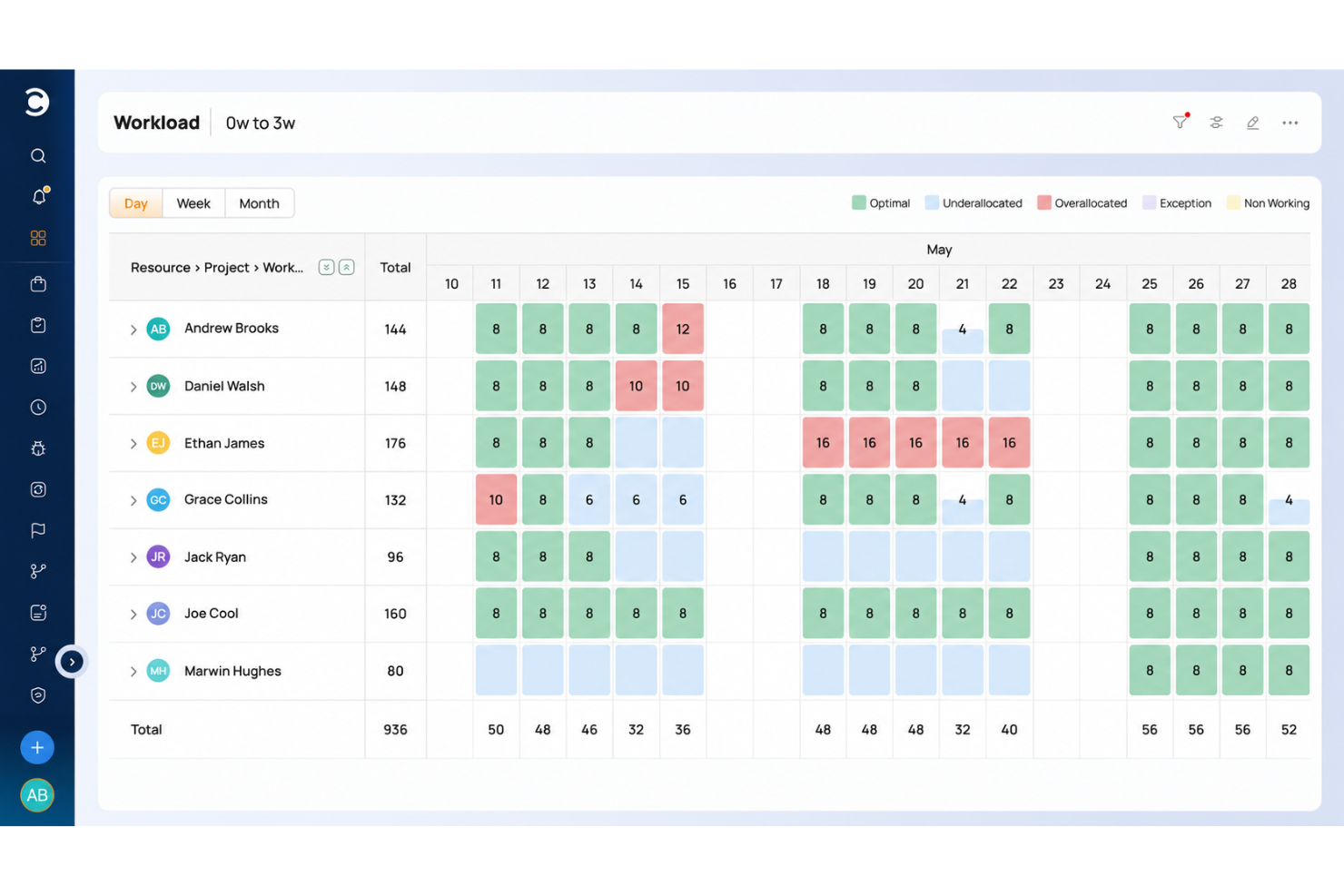
Celoxis è una piattaforma di gestione del portafoglio progetti che combina pianificazione multi-progetto, allocazione delle risorse, monitoraggio del budget, gestione di tempi e spese e reportistica trasversale in un unico luogo.
Per Chi è Meglio Celoxis?
Celoxis è adatto a organizzazioni non profit di medie e grandi dimensioni che gestiscono più programmi o sovvenzioni contemporaneamente e che necessitano di visibilità su progetti, budget e team in un unico ambiente.
Perché Ho Scelto Celoxis
Ho incluso Celoxis tra le mie scelte principali perché le sue capacità di reportistica a livello di portafoglio vanno ben oltre una semplice visualizzazione elenco dei progetti. I dashboard del portafoglio completamente personalizzabili aggregano in tempo reale l’avanzamento, i budget e gli indicatori di rischio di tutti i programmi attivi, permettendo così al gruppo dirigente dell’organizzazione di vedere la spesa delle sovvenzioni, la salute dei progetti e lo stato di avanzamento in un’unica schermata senza dover estrarre manualmente i dati. Mi piace anche che i report possano essere pianificati per la consegna tramite email e scaricati in formato PDF, così le relazioni per il consiglio e i donatori non richiedono preparazione aggiuntiva.
Caratteristiche Principali di Celoxis
- Pianificazione con diagramma di Gantt: Crea cronoprogrammi multi-progetto con dipendenze tra attività, traguardi e pianificazione automatica tra programmi.
- Monitoraggio tempi e spese: Registra ore fatturabili e non fatturabili su ogni attività con flussi di approvazione configurabili.
- Monitoraggio del budget: Monitora costi pianificati e reali a livello di attività, progetto e programma.
- Portale clienti: Consenti a membri del consiglio o donatori di accedere gratuitamente in sola lettura allo stato dei progetti senza necessità di una licenza a pagamento.
Integrazioni di Celoxis
Celoxis offre integrazioni native con Google Drive, Microsoft Excel, Microsoft Project, Salesforce, Jira, Zendesk, Slack, QuickBooks Online e altre ancora. Si collega anche con Zapier ed è disponibile un’API per integrazioni personalizzate.
Pros and Cons
Pros:
- Monitoraggio integrato di budget e costi per progetto
- Diagrammi di Gantt interattivi con mappatura delle dipendenze
- Opzioni di implementazione on-premise e cloud
Cons:
- L’interfaccia risulta datata e ricca di menu
- Richiede un minimo di cinque utenti per iniziare

Ideale per la collaborazione di team

Zoho Projects è uno strumento di gestione progetti online progettato per aiutare i team a pianificare, monitorare e collaborare sui progetti.
Perché ho scelto Zoho Projects: Ho scelto Zoho Projects per questa lista perché supporta la collaborazione dei team in modo dinamico ed efficiente. La sua capacità di gestire requisiti di progetto complessi mantenendo la facilità d'uso lo rende una scelta eccezionale per i team che desiderano migliorare i propri sforzi collaborativi.
Credo che Zoho Projects sia ideale per la collaborazione di team perché offre una piattaforma centralizzata su cui i membri possono interagire, condividere documenti e rimanere aggiornati sull'avanzamento dei progetti.
Funzionalità e integrazioni principali:
Le funzionalità includono automazione delle attività, flussi di lavoro personalizzabili e strumenti di reportistica approfonditi.
Le integrazioni includono Zoho CRM, Zoho Analytics, Zoho Sprints, Microsoft Teams, Slack, GitHub e Dropbox.
Pros and Cons
Pros:
- Può adattarsi a diversi flussi di lavoro
- Ampia gamma di integrazioni con altri strumenti
- Funzionalità di gestione progetti complete
Cons:
- Il piano gratuito è molto limitato
- Può risultare complesso per i nuovi utenti a causa delle numerose funzionalità
New Product Updates from Zoho Projects
Zoho Projects Adds CodeX Scripts for Custom Modules
Zoho Projects now supports CodeX Scripts for custom modules, enabling conditional logic and rules for creating, updating, and deleting records. For more information, visit Zoho Projects' official site.
 .
.
Miro
Ideale per il project management visivo e la collaborazione
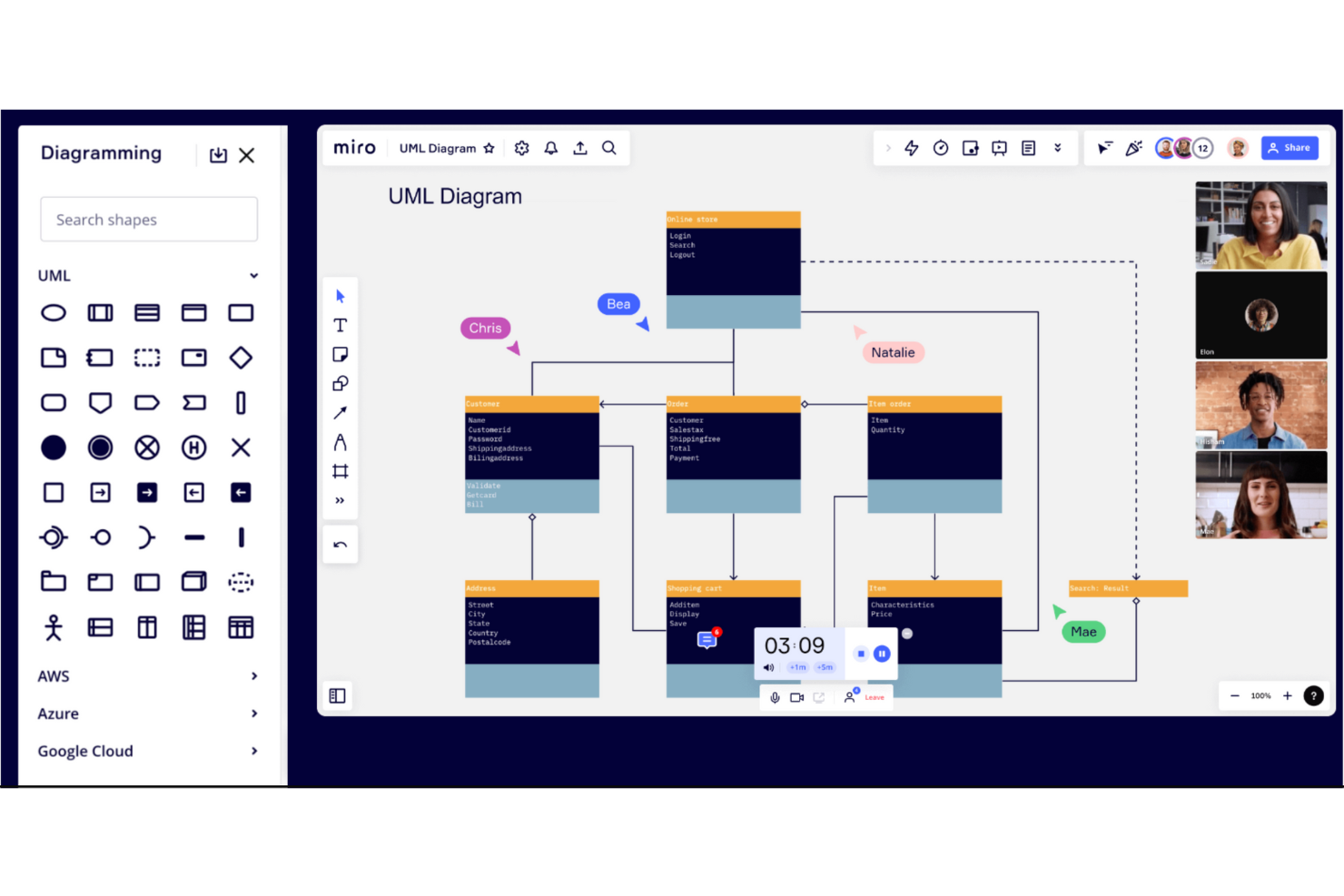
Miro è uno spazio di lavoro collaborativo online progettato per facilitare il brainstorming, la gestione dei progetti, la creazione di diagrammi, la mappatura dei processi e la visualizzazione dei contenuti. Offre una suite di strumenti che consente ai team di passare dall'ideazione all'esecuzione all'interno di un'unica piattaforma.
Perché ho scelto Miro: Miro è un software di project management visivo che offre una varietà di strumenti per le organizzazioni non profit, tra cui diagrammazione, mappatura dei processi, visualizzazione di contenuti e dati, e strumenti di collaborazione asincroni. Offre uno spazio di lavoro di livello aziendale con attenzione a sicurezza e accessibilità, permettendo ai team di fare brainstorming ed eseguire attività in un unico posto.
Miro è una scelta popolare tra le organizzazioni non profit, offrendo capacità per strategie e pianificazione, progettazione di soluzioni incentrate sull’utente finale e sviluppo di prodotti e servizi. Permette inoltre cicli di feedback più rapidi e automazione per attività ripetitive. Le non profit possono inoltre beneficiare di uno sconto del 30% su qualsiasi piano a pagamento, rendendola una soluzione conveniente per gestire progetti e collaborare in tempo reale in un canvas infinito.
Caratteristiche principali e integrazioni:
Le caratteristiche includono strumenti di project management visivo, ausili visivi dinamici come le Miro Cards, Kanban e Flow Chart, flussi di lavoro per lo sviluppo di prodotti e Miro Assist, un assistente AI che aiuta ad automatizzare attività e stimolare il pensiero durante ideazione e creazione.
Le integrazioni includono Zoom, Google Workspace, Asana, Trello, Confluence, Jira, Adobe Creative Cloud, Dropbox, Microsoft Teams e Slack.
Pros and Cons
Pros:
- Gli utenti possono creare presentazioni interattive
- Offre una varietà di template integrati
- Utile per team distribuiti
Cons:
- Controlli e moderazione utente limitati
- L’ampia varietà di funzionalità può risultare opprimente
New Product Updates from Miro
Miro Adds Japan Data Residency for Enterprise Customers
Miro has introduced Japan data residency for enterprise customers, offering in-region storage for production data, backups, and metadata, plus in-region compute infrastructure. For more information, visit Miro's official site.

Quire
Ideale per l'organizzazione gerarchica delle attività
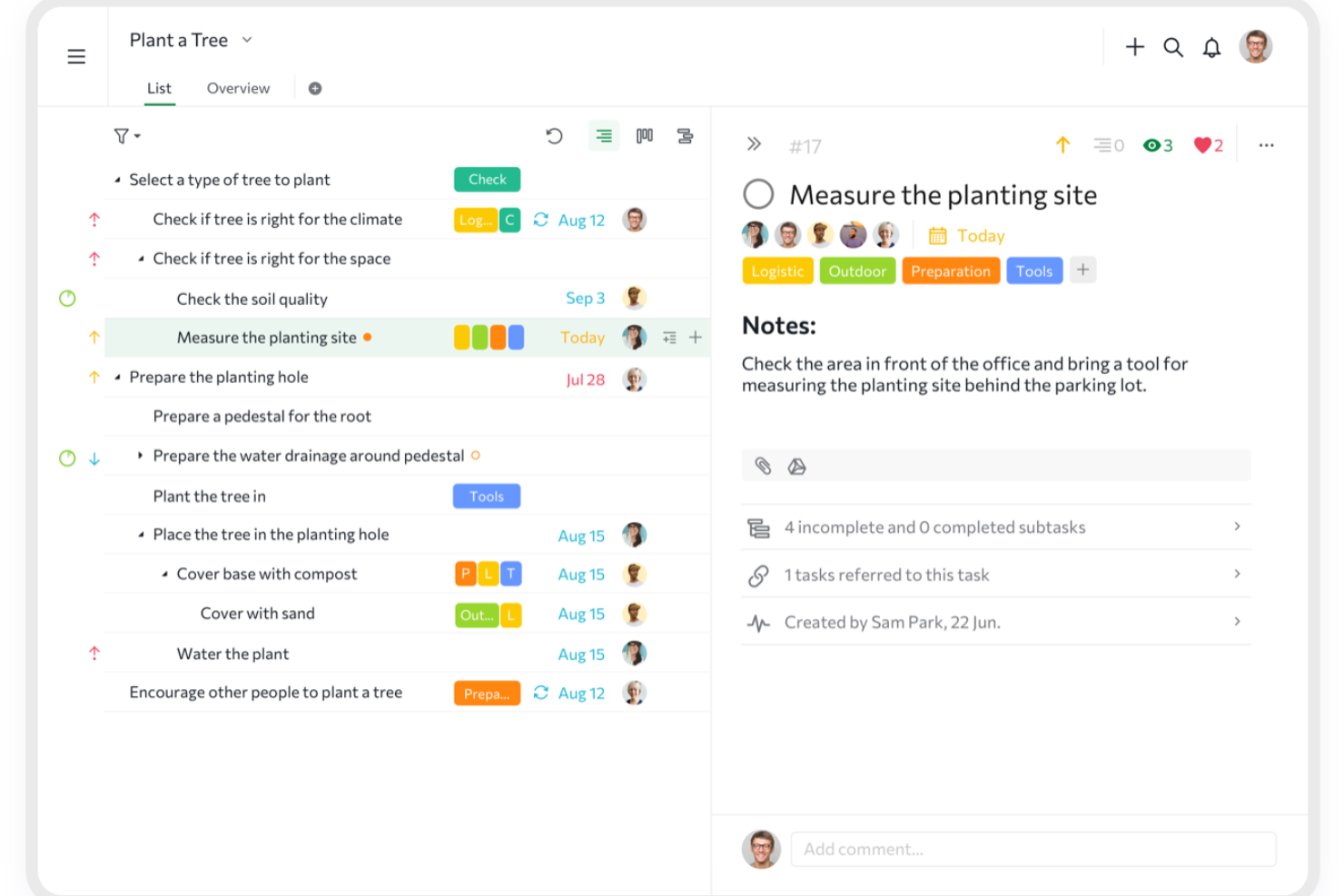
Quire è uno strumento di gestione progetti basato su cloud che aiuta i team a organizzare, pianificare e monitorare il proprio lavoro. Consente agli utenti di suddividere progetti complessi in attività più piccole e gestibili utilizzando una struttura di liste annidate.
Perché ho scelto Quire: Il sistema di gestione gerarchica delle attività di Quire è particolarmente vantaggioso per le organizzazioni nonprofit che gestiscono progetti complessi. La possibilità di creare attività e sottoattività annidate permette ai team di delineare ogni aspetto di un progetto, assicurando che nulla venga trascurato.
Inoltre, Quire offre una serie di funzionalità che supportano ambienti di lavoro collaborativi. Aggiornamenti in tempo reale, commenti sulle attività e notifiche riguardanti assegnazioni e scadenze tengono tutti i membri del team informati e coinvolti.
Funzionalità principali & integrazioni:
Funzionalità comprendono la possibilità di stabilire dipendenze tra le attività, garantendo un flusso di lavoro regolare e una programmazione accurata. Questo aiuta i team a prevenire possibili colli di bottiglia e a ottimizzare le tempistiche dei progetti. Quire offre anche una panoramica generale, che consente agli utenti di vedere tutte le attività di tutti i progetti all'interno dell'organizzazione, offrendo una visione completa del carico di lavoro del team per una pianificazione strategica.
Integrazioni includono Google Calendar, Gmail, Slack, Outlook, Zoho Flow, GitHub, Apple Calendar Sync, Box, Dropbox, Google Drive e Microsoft Teams.
Pros and Cons
Pros:
- Possibilità di creare attività e sottoattività annidate, consentendo una suddivisione dettagliata dei progetti
- Molteplici viste dei progetti, tra cui elenchi, bacheche e timeline
- Facile collaborazione con i membri del team
Cons:
- Possibile sovraccarico di notifiche, soprattutto lavorando con team numerosi
- La versione mobile non offre alcune funzionalità disponibili su desktop
New Product Updates from Quire

Quire Adds Task and Standalone Reminders
Quire adds task reminders and standalone reminders with shared notifications, recurring schedules, and automatic date tracking. These updates help teams stay ahead of deadlines and manage reminders that do not need a task. For more information, visit Quire’s official site.
 .
.
ClickUp
Ideale per monitorare gli obiettivi di finanziamento e gestire i budget
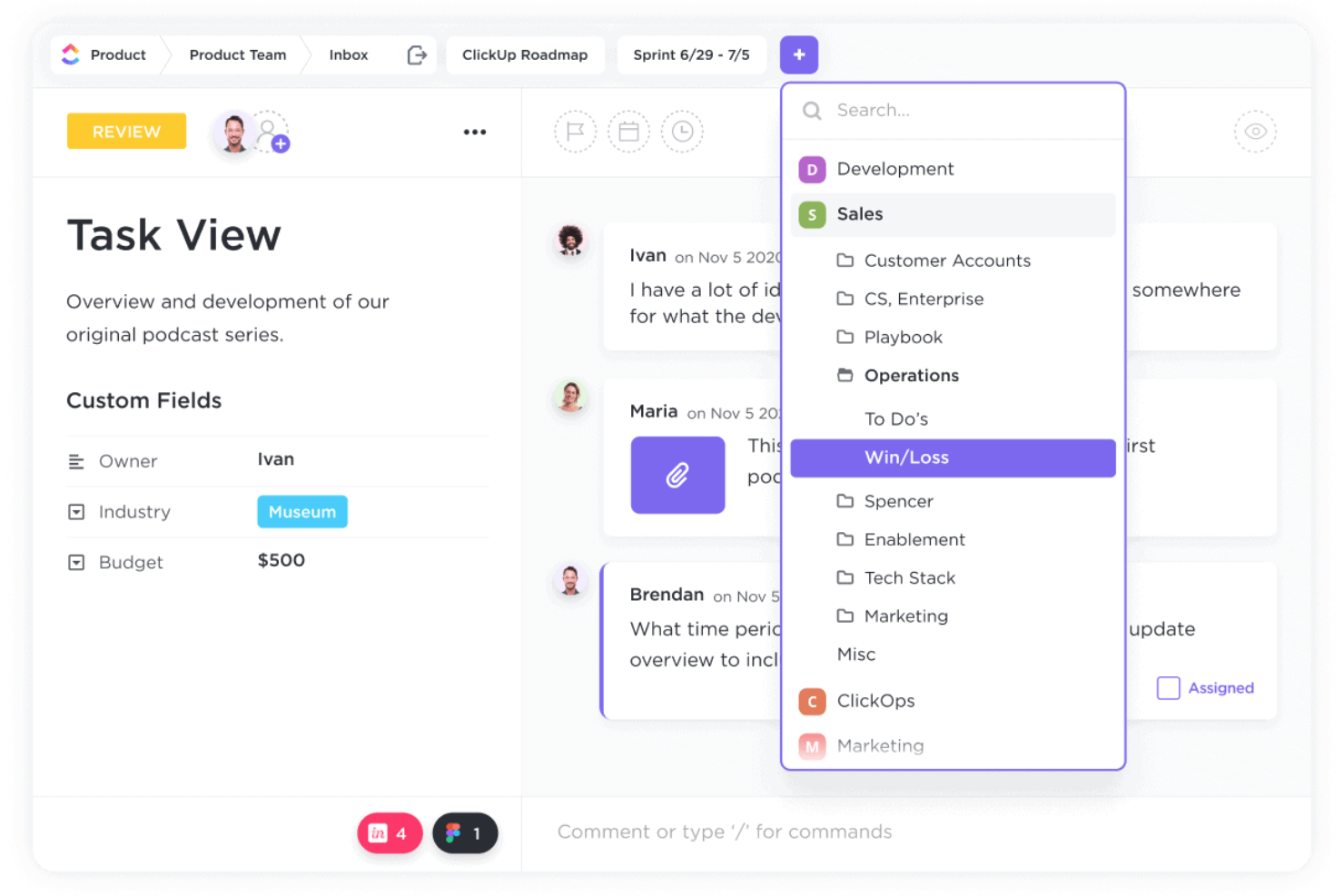
ClickUp è uno strumento completo di gestione dei progetti che offre un'ampia gamma di funzionalità per migliorare i processi di lavoro e incentivare la collaborazione tra i team.
Perché ho scelto ClickUp: Uno dei vantaggi più significativi di ClickUp è la sua capacità di monitorare gli obiettivi di finanziamento e gestire efficacemente i budget. Le organizzazioni non profit spesso operano con budget limitati e devono rendicontare ogni dollaro speso. I campi personalizzati e le funzioni formula di ClickUp permettono alle organizzazioni di calcolare le donazioni, monitorare le ore dedicate alle varie attività e generare report dettagliati per i donatori.
Un'altra caratteristica chiave che rende ClickUp ideale per le organizzazioni non profit è la sua solida gestione di attività e risorse. ClickUp semplifica i processi con la sua visualizzazione a calendario drag-and-drop, che consente di programmare facilmente le attività dei volontari e condividere pubblicamente questi calendari.
Funzionalità e integrazioni principali:
Le funzionalità includono gestione documentale, reportistica e analisi, strumenti di collaborazione, automazioni, monitoraggio del tempo e gestione di attività e risorse.
Le integrazioni includono Slack, GitHub, GitLab, Webhooks, HubSpot, Everhour, Toggl, Harvest, Google Drive, OneDrive, Dropbox, Outlook, Google Calendar e Figma.
Pros and Cons
Pros:
- Flussi di lavoro personalizzabili
- Ampia gamma di strumenti di collaborazione
- Buone funzionalità di monitoraggio del tempo
Cons:
- Le numerose funzionalità possono risultare impegnative per i nuovi utenti
- La piattaforma può essere difficile da navigare inizialmente
New Product Updates from ClickUp
ClickUp Adds Meetings Hub, Super Agent Templates, and ZoomInfo Integration
ClickUp adds a searchable Meetings Hub, new ways to clone and template Super Agents, and a ZoomInfo integration through the App Center. These updates improve meeting retrieval, agent reuse, and access to sales intelligence. For more information, visit ClickUp’s official site.

Nifty
Ideale per team cross-funzionali
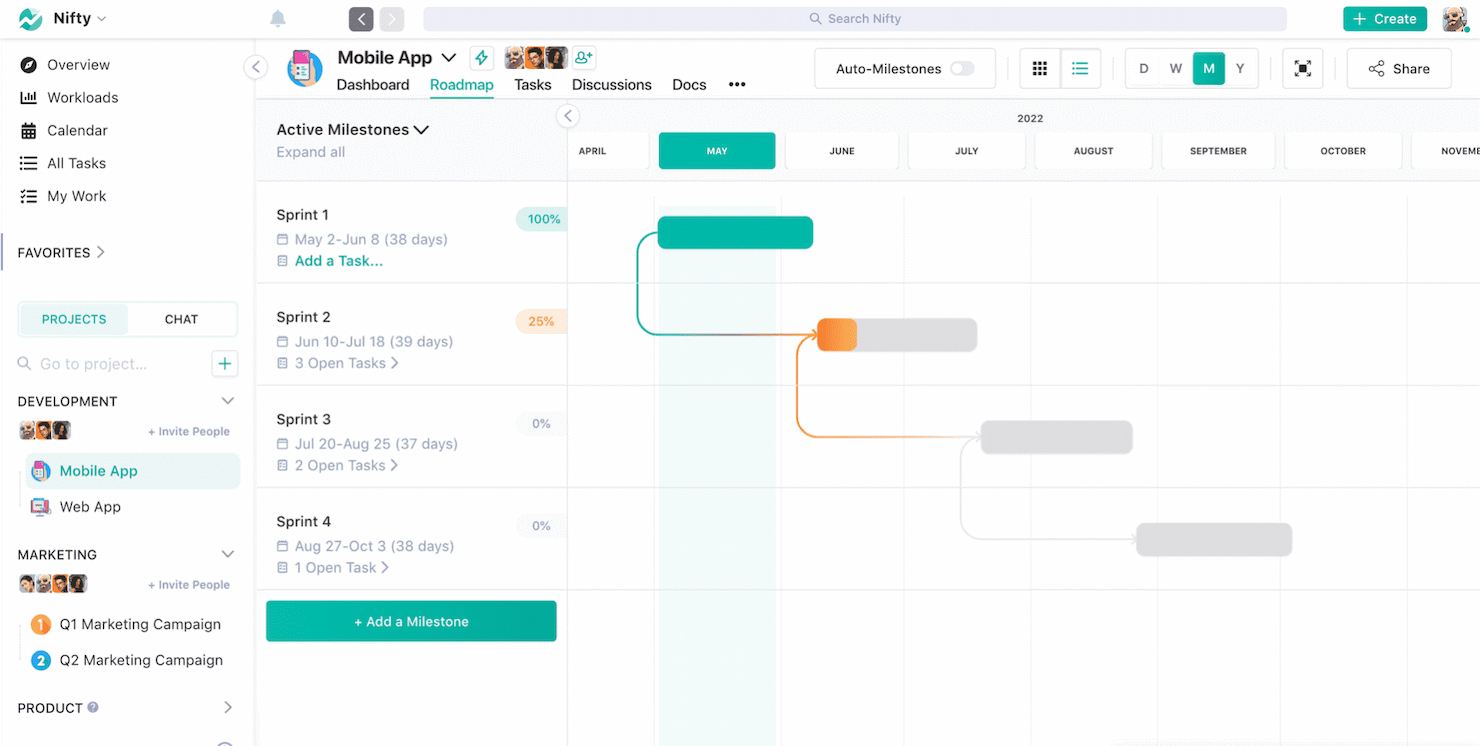
Nifty semplifica la gestione dei progetti per i team cross-funzionali, integrando attività, cronologie e comunicazione in un unico posto.
Perché ho scelto Nifty: Ho selezionato Nifty perché combina in modo unico vari strumenti di project management in un’unica piattaforma coesa, particolarmente vantaggiosa per i team cross-funzionali. Questa integrazione di funzionalità lo distingue da altri software che potrebbero non offrire una soluzione così completa.
Nifty è la scelta ideale per i team cross-funzionali grazie al suo approccio centralizzato. Facilita la collaborazione efficace e mantiene la visibilità dei progetti per i membri del team provenienti da diversi reparti.
Funzionalità principali & integrazioni:
Le funzionalità includono gestione delle attività, traguardi, discussioni, documenti e file, e monitoraggio del tempo, tutte progettate per migliorare la collaborazione nel team e la supervisione dei progetti.
Le integrazioni includono Google Drive, Zoom, Slack, Dropbox, Trello, Asana, GitHub, GitLab e Bitbucket.
Pros and Cons
Pros:
- Piattaforma centralizzata per diversi aspetti del progetto
- Più viste per il monitoraggio dei progetti
- Interfaccia utente intuitiva
Cons:
- Mancanza di integrazioni complete
- Numero limitato di template

Ideale per convenienza economica
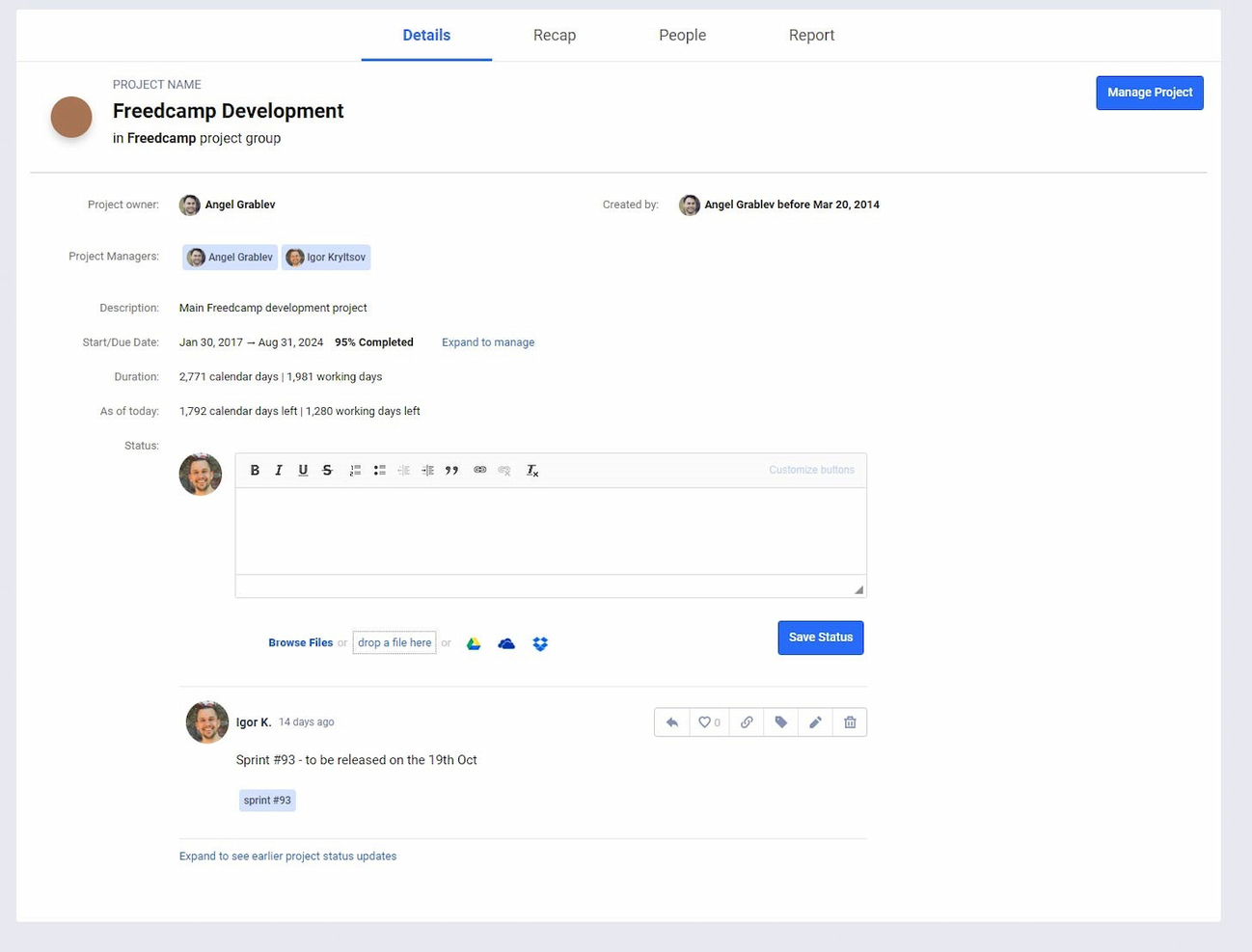
Freedcamp è uno strumento di gestione progetti versatile che si adatta sia alle esigenze personali che professionali. Freedcamp si distingue come la miglior scelta per uso personale grazie al suo piano gratuito. Include progetti, attività e spazio di archiviazione illimitati, rendendolo accessibile agli utenti individuali che gestiscono progetti personali o a piccoli team.
Perché ho scelto Freedcamp: Ho selezionato Freedcamp per questa lista perché offre una vasta gamma di funzionalità senza un costo elevato. La sua capacità di gestire utenti e progetti illimitati gratuitamente lo differenzia da altri strumenti che spesso pongono dei limiti su questi aspetti nelle loro versioni gratuite. Inoltre, l'interfaccia intuitiva e la flessibilità di Freedcamp lo rendono una scelta eccellente per chi desidera organizzare attività e progetti in modo efficiente.
Freedcamp è la soluzione ideale per uso personale poiché offre una soluzione gratuita per individui e piccoli team per gestire il proprio lavoro. La scalabilità della piattaforma e l'inclusione delle funzionalità essenziali di project management nel piano gratuito lo rendono perfetto per progetti personali, freelance e piccole organizzazioni non profit.
Funzionalità e integrazioni di rilievo:
Le funzionalità comprendono gestione delle attività, monitoraggio del tempo, impostazione delle milestone e archiviazione dei file, tutti elementi essenziali per un'efficace gestione dei progetti. La piattaforma offre inoltre bacheche di discussione per la comunicazione del team, un calendario per la pianificazione e un sistema di gestione delle segnalazioni per prioritizzare e gestire efficacemente eventuali problemi.
Le integrazioni includono Google Drive, Dropbox, OneDrive, Zapier, Google Calendar, Outlook e Slack.
Pros and Cons
Pros:
- Ampia gamma di integrazioni con strumenti e servizi popolari
- Interfaccia intuitiva adatta a uso personale e per piccoli team
- Progetti, attività e spazio di archiviazione illimitati anche nel piano gratuito
Cons:
- Alcuni utenti potrebbero aver bisogno di formazione aggiuntiva per sfruttare tutte le funzionalità
- Il piano gratuito ha un limite di dimensione file di 10MB, che può essere restrittivo per alcuni utenti

Workzone
Ideale per la gestione del ciclo di vita dei progetti

Workzone è una piattaforma di gestione dei progetti particolarmente adatta alle organizzazioni non profit che devono ottenere il massimo con risorse limitate. Copre l'intero ciclo di vita dei progetti, dalla pianificazione al completamento, con strumenti di collaborazione e funzionalità di reportistica che mantengono i team allineati e gli stakeholder aggiornati.
Perché ho scelto Workzone
Ho scelto Workzone per la sua capacità di rispondere alle esigenze specifiche delle organizzazioni non profit grazie alle funzionalità per la gestione del ciclo di vita dei progetti. Questo strumento consente al tuo team di monitorare e gestire i progetti dalla fase iniziale fino al termine, assicurando che nulla venga trascurato. Inoltre, gli strumenti di collaborazione facilitano una comunicazione fluida tra i membri del team, aspetto cruciale per organizzazioni con risorse limitate e stakeholder diversificati. Infine, le solide capacità di reportistica offrono informazioni in tempo reale sull'andamento dei progetti, aiutandoti a prendere decisioni informate e a dimostrare l'impatto a donatori e stakeholder.
Funzionalità principali di Workzone
Oltre alla gestione del ciclo di vita dei progetti e agli strumenti di collaborazione, ho riscontrato altre funzionalità particolarmente utili per le organizzazioni non profit:
- Revisione dei documenti: Questa funzione consente al team di revisionare e approvare i documenti in modo efficiente, riducendo i ritardi e garantendo coerenza.
- Gestione del budget: Tieni traccia delle spese e assegna le risorse in modo oculato grazie agli strumenti integrati di gestione del budget.
- Monitoraggio del tempo: Controlla come viene impiegato il tempo nelle diverse attività per ottimizzare la produttività e giustificare l'allocazione dei fondi.
- Modelli predefiniti: Con oltre 1.000 modelli disponibili, il tuo team può avviare rapidamente nuovi progetti senza partire da zero.
Integrazioni di Workzone
Le integrazioni native includono Slack, Google Drive, Dropbox, Box, Microsoft Outlook, Microsoft Excel, Microsoft Word, Microsoft PowerPoint e SharePoint.
Pros and Cons
Pros:
- Reportistica sullo stato di avanzamento in tempo reale
- Collaborazione centralizzata
- Gestione integrata di sovvenzioni e raccolta fondi
Cons:
- Curva di apprendimento ripida per i piccoli team
- Il costo può rappresentare un ostacolo per le piccole organizzazioni non profit
New Product Updates from Workzone

Workzone Enterprise Adds Multi-Stage Approval Workflows
Workzone Enterprise now includes Approval Workflows, enabling multi-stage document approvals to standardize complex processes and reduce manual effort. For more information, visit Workzone's official site.
 .
.
ProofHub
Ideale per progetti centralizzati

ProofHub è uno strumento di gestione dei progetti e collaborazione di squadra progettato per centralizzare i progetti e semplificare i flussi di lavoro. È ideale per progetti centralizzati perché offre funzionalità che permettono ai team di pianificare, collaborare, organizzare e consegnare i progetti in modo efficiente in uno spazio unificato.
Perché ho scelto ProofHub: Ho scelto ProofHub per questa lista grazie al suo completo set di strumenti di gestione dei progetti e al modello di prezzo fisso, che è conveniente per i team che desiderano una soluzione centralizzata.
Credo che ProofHub sia la scelta migliore per progetti centralizzati perché può combinare diversi aspetti della gestione dei progetti e della collaborazione in un unico posto, riducendo la necessità di utilizzare più strumenti e piattaforme.
Funzionalità principali & integrazioni:
Le funzionalità includono gestione delle attività, diagrammi di Gantt, visualizzazione a bacheca, visualizzazione a tabella, calendario, monitoraggio del tempo, discussioni, revisione dei documenti e chat.
Le integrazioni includono Slack, Box, Dropbox, Google Calendar, Google Drive, One Drive, FreshBooks e QuickBooks.
Pros and Cons
Pros:
- Ampia gamma di integrazioni con strumenti popolari per ottimizzare i flussi di lavoro
- Un set completo di funzionalità per la gestione dei progetti e la collaborazione in team
- Prezzo fisso senza tariffa per utente, rendendolo conveniente per team di tutte le dimensioni
Cons:
- Alcuni utenti potrebbero aver bisogno di più spazio di archiviazione rispetto ai 15GB previsti dal piano Essential
- La piattaforma può avere una curva di apprendimento per i nuovi utenti

Box
Ideale per l'archiviazione cloud
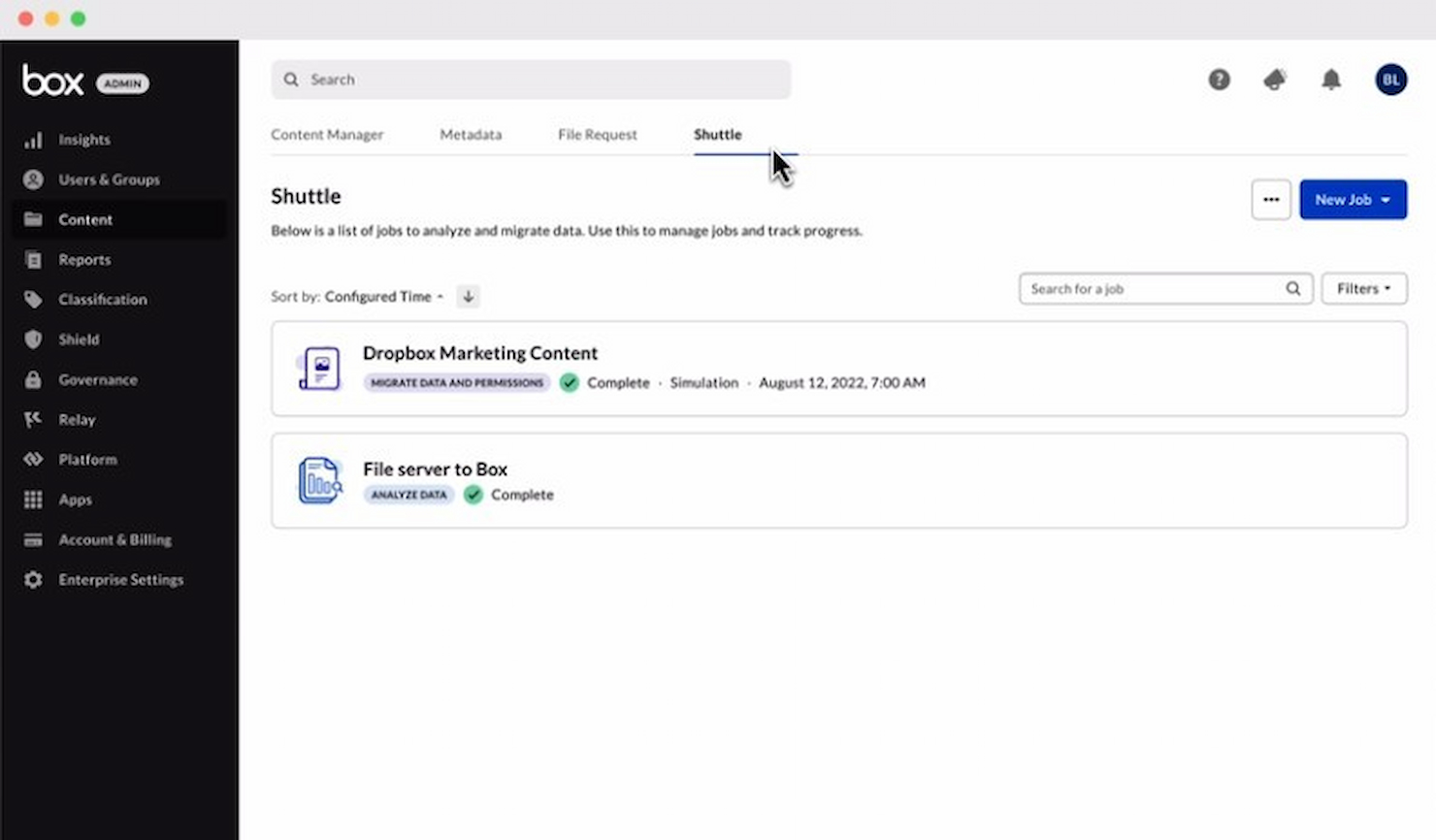
Box è un servizio di gestione dei contenuti cloud e condivisione di file per aziende. È la soluzione migliore per l'archiviazione cloud perché offre un'opzione sicura e scalabile.
Perché ho scelto Box: Ho inserito Box in questa lista per le sue funzionalità di sicurezza e la capacità di adattarsi alle esigenze delle organizzazioni non profit. Le sue capacità di archiviazione cloud consentono anche una posizione centralizzata per i file.
Box è la migliore opzione per l'archiviazione cloud perché garantisce la sicurezza dei dati sensibili e migliora l'accessibilità e la collaborazione tra i team.
Funzionalità e integrazioni principali:
Le funzionalità includono condivisione sicura dei file, strumenti di collaborazione, automazione dei flussi di lavoro con Box Relay e capacità di firma elettronica native con Box Sign. Offre anche misure di sicurezza come la protezione dalla perdita di dati e la conformità alle normative del settore.
Le integrazioni includono Microsoft Office e Teams, Salesforce, Google Workspace e Slack.
Pros and Cons
Pros:
- Funzionalità di sicurezza e conformità robuste
- Soluzioni di archiviazione scalabili per diversi tipi di file
- Ampie capacità di integrazione con strumenti aziendali popolari
Cons:
- Interfaccia utente scadente
- Alcuni utenti segnalano problemi di prestazioni
Altri software di gestione dei progetti per organizzazioni non profit
Di seguito trovi un elenco di ulteriori software di gestione dei progetti per organizzazioni non profit da consultare se non hai trovato quello che cercavi sopra.
- Podio
Ideale per l'automazione dei flussi di lavoro
- nTask Manager
Ideale per la gestione delle attività
- ReptonPOD
Ideale per le fasi di progetto strutturate
- Smartsheet
Il migliore per chi utilizza fogli di calcolo
- Lucidchart
Ideale per le esigenze di diagrammazione
- Hive
Ideale per i team di marketing
- Keela
Ideale per la gestione di volontari e donatori
- GoodDay
Ideale per spazi di lavoro personalizzabili
- TaskRay
Ottimale con integrazione nativa Salesforce


Software di gestione dei progetti correlati
Se non hai ancora trovato quello che cerchi, dai un'occhiata a queste altre recensioni di strumenti di gestione dei progetti che abbiamo selezionato.
- Creazione di diagrammi di Gantt
- Strumenti per la produttività
- Software per il monitoraggio dei progetti
- Software per la pianificazione dei progetti
- Software di gestione dei progetti
- Software per la gestione delle risorse
Come valuto il software di gestione progetti per organizzazioni non profit
Quando un responsabile dei finanziamenti gestisce cinque finanziatori e una dozzina di traguardi, suddivido la mia valutazione in due livelli: funzionalità di base che ogni strumento deve avere, e fattori differenzianti che li distinguono.
Funzionalità di base (Requisiti minimi per questa lista)
Quando seleziono gli strumenti per la mia lista, valuto ciascuno su una scala da 0 (non offre la funzionalità) a 5 (eccelle in quest'area) per ogni funzionalità di base elencata qui sotto. Successivamente, calcolo il punteggio totale dello strumento in una percentuale. Ogni strumento deve raggiungere un punteggio totale minimo del 65% per essere considerato per l'inclusione.
- Tracciamento delle attività e dei progetti: Verifico se uno strumento può gestire più programmi contemporaneamente con assegnazioni di compiti chiare, scadenze e visualizzazione dello stato—ad esempio monitorando un'iniziativa di alfabetizzazione e una raccolta alimentare fianco a fianco.
- Collaborazione tra team e volontari: Spazi di lavoro condivisi, accesso per ospiti e permessi basati sui ruoli sono fondamentali perché le organizzazioni non profit coinvolgono regolarmente volontari e membri del consiglio che necessitano di accesso limitato ma significativo.
- Gestione delle risorse e del budget: Cerco la possibilità di allocare il tempo del personale e i budget dei progetti per singolo programma, soprattutto quando un unico team suddivide le ore tra progetti finanziati da sovvenzioni e attività operative generali.
- Gestione delle sovvenzioni e delle tappe fondamentali: Gli strumenti dovrebbero permettere di raggruppare le consegne per finanziatore e monitorare le scadenze dei report—ad esempio rapporti trimestrali di avanzamento per una sovvenzione federale insieme alle presentazioni annuali per le fondazioni.
- Prezzi o sconti per enti non profit: Valuto se il fornitore propone uno sconto verificato per non profit, un piano gratuito per le piccole organizzazioni o collaborazioni con piattaforme come TechSoup che rendono i prezzi accessibili ai budget guidati dalla missione.
- Reportistica e dashboard per stakeholder: I consigli direttivi e i finanziatori si aspettano aggiornamenti sui progressi in formati facilmente fruibili, quindi cerco dashboard personalizzabili e report esportabili che un direttore di programma possa condividere senza dover reinventare i dati in una presentazione.
Una volta che ho una lista di strumenti che rispettano questi criteri, considero cosa distingue ogni piattaforma.
Fattori differenzianti (Cosa distingue i fornitori)
Ecco come confronto e metto a confronto i diversi fornitori:
Funzionalità principali
Il monitoraggio degli esiti e dell'impatto è un vero elemento distintivo—quando un responsabile di programma può collegare direttamente le consegne ai risultati misurabili, i report per i finanziatori si scrivono quasi da soli. I portali per consigli e comitati sono utili perché permettono ai membri della governance di visualizzare lo stato del progetto senza necessitare una licenza completa o dover cercare tra le liste di attività. Inoltre, cerco la connettività con i CRM come Salesforce NPSP o Bloomerang, così le campagne di raccolta fondi e le tempistiche dei progetti rimangono sincronizzate.
Oltre alle funzionalità
Lo stack tecnologico delle organizzazioni non profit spesso include Google Workspace for Nonprofits o Microsoft 365 Nonprofit insieme a strumenti come QuickBooks o Xero, quindi valuto quanto bene ogni piattaforma si integra con questi sistemi senza bisogno di soluzioni manuali. La scalabilità è un'altra considerazione importante: un'organizzazione che oggi gestisce tre filiali locali potrebbe espandersi fino a dieci, e lo strumento deve supportare questa crescita senza dover ristrutturare tutto. Verifico anche la conformità SOC 2 e i permessi basati sui ruoli, poiché le organizzazioni non profit trattano dati sensibili di donatori e beneficiari che richiedono rigidi controlli di accesso.
Come scegliere un software di gestione dei progetti per organizzazioni non profit
È facile perdersi tra lunghi elenchi di funzionalità e strutture tariffarie complesse. Per aiutarti a rimanere concentrato mentre affronti il processo di selezione del software più adatto alle tue esigenze, ecco un elenco di fattori da tenere a mente:
| Fattore | Cosa considerare |
|---|---|
| Scalabilità | Scegli un software che cresca insieme alla tua organizzazione non profit. Cerca prezzi flessibili, la possibilità di aggiungere utenti e funzionalità che supportino sia i team piccoli sia quelli grandi. |
| Integrazioni | Assicurati che lo strumento si colleghi ai sistemi esistenti, come il software per la gestione dei donatori, gli strumenti di contabilità e le piattaforme di posta elettronica, per semplificare i flussi di lavoro. |
| Personalizzazione | Le esigenze della tua organizzazione non profit sono uniche. Cerca un software che ti consenta di adattare flussi di lavoro, dashboard e report in base ai tuoi processi. |
| Facilità d'uso | Uno strumento complicato fa perdere tempo. Dai priorità a interfacce intuitive, tempi di apprendimento ridotti e risorse formative accessibili per il tuo team e i tuoi volontari. |
| Budget | Le organizzazioni non profit spesso lavorano con budget limitati. Cerca un software con prezzi trasparenti, sconti per le organizzazioni non profit e piani che bilancino costi e funzionalità. |
| Misure di sicurezza | Proteggi i dati dei donatori e dell'organizzazione con solide funzionalità di sicurezza, tra cui crittografia, autorizzazioni basate sui ruoli e conformità alle normative sulla protezione dei dati. |
| Funzionalità di collaborazione | Il tuo team deve lavorare insieme in modo efficiente. Cerca elenchi di attività condivisi, messaggistica del team e collaborazione sui file in tempo reale. |
| Assistenza e formazione | Un'assistenza affidabile è essenziale. Verifica la disponibilità di supporto 24 ore su 24, 7 giorni su 7, materiali formativi e un team del servizio clienti reattivo che aiuti la tua organizzazione non profit a sfruttare al meglio il software. |
Tendenze nei software di gestione dei progetti per le organizzazioni non profit
Nella mia ricerca, ho raccolto innumerevoli aggiornamenti dei prodotti, comunicati stampa e registri delle versioni di diversi fornitori di software di gestione dei progetti per organizzazioni non profit. Ecco alcune delle tendenze emergenti che sto tenendo d'occhio:
- Integrazione con le piattaforme di raccolta fondi: I software di gestione dei progetti per le organizzazioni non profit si integrano sempre più con le piattaforme di raccolta fondi. Ciò consente di monitorare le attività di raccolta fondi rispetto ai budget e alle tempistiche dei progetti. È importante perché colma il divario tra i team finanziari e quelli dei progetti.
- Maggiore attenzione alle funzionalità di gestione dei volontari: Oggi i software includono spesso funzionalità per la gestione dei volontari. Questi strumenti aiutano le organizzazioni non profit a programmare, monitorare e comunicare con i volontari in modo efficiente. Questa tendenza è fondamentale per le organizzazioni che dipendono fortemente dal lavoro dei volontari.
- Report avanzati per le richieste di sovvenzioni: Funzionalità di reportistica migliori possono aiutare con le richieste di sovvenzioni. Puoi generare report dettagliati a sostegno delle richieste di finanziamento, contribuendo direttamente a ottenere le risorse necessarie per i progetti fondamentali per la missione dell'organizzazione.
- Miglioramenti nell'accessibilità da dispositivi mobili: I miglioramenti nell'accessibilità da dispositivi mobili rappresentano una tendenza significativa. I team delle organizzazioni non profit dovrebbero poter accedere ai dati dei progetti e collaborare da qualsiasi luogo. Questo è importante per le organizzazioni con progetti sul campo o team distribuiti da remoto.
- Personalizzazione e scalabilità: La personalizzazione e la scalabilità stanno diventando più sofisticate e spesso puoi adattare il software alle tue esigenze e ampliarlo insieme alla crescita della tua organizzazione. Questa tendenza è positiva perché consente flessibilità e un'utilità a lungo termine.
Che cos'è un software di gestione dei progetti per le organizzazioni non profit?
Il software di gestione dei progetti per le organizzazioni non profit è uno strumento specializzato progettato per supportare le esigenze specifiche degli enti di beneficenza nella pianificazione, nell'esecuzione e nel monitoraggio dei progetti. Viene utilizzato dal personale e dai volontari delle organizzazioni non profit per gestire eventi, campagne di raccolta fondi e altre iniziative orientate alla missione. Ti aiuta inoltre a gestire efficacemente le risorse limitate.
Le funzionalità del software includono la gestione delle attività, la pianificazione, l'allocazione delle risorse e le capacità di reportistica, per offrirti una panoramica chiara dell'avanzamento dei progetti, facilitare la comunicazione tra i membri del team e aiutarti ad assicurarti che i progetti vengano completati nei tempi previsti e nel rispetto del budget.
Funzionalità dei software di gestione dei progetti per le organizzazioni non profit
Quando scegli un software di gestione dei progetti per le organizzazioni non profit, è importante cercare funzionalità specificamente adatte alle esigenze uniche delle organizzazioni non profit. Ecco alcune funzionalità chiave da considerare.
- Monitoraggio del budget: questa funzionalità consente di monitorare le risorse finanziarie. Le organizzazioni non profit devono mantenere la trasparenza e assicurarsi che i fondi siano utilizzati in modo efficace e in linea con i propri obiettivi.
- Gestione delle attività: questa funzionalità offre un modo per assegnare le attività e verificarne l'avanzamento. Aiuta i membri del team a conoscere le proprie responsabilità e a rispettare gli incarichi assegnati.
- Strumenti di collaborazione: questi strumenti facilitano la comunicazione tra i membri del team. Per le organizzazioni non profit, in cui il lavoro di squadra è spesso fondamentale, la collaborazione è essenziale per il successo.
- Monitoraggio del tempo: questa funzionalità consente al team di registrare il tempo dedicato ai progetti. Le organizzazioni non profit devono rendicontare l'impiego del tempo, soprattutto quando contabilizzano attività finanziate da sovvenzioni.
- Report e analisi: questa funzionalità offre informazioni sulle prestazioni dei progetti. Le organizzazioni non profit possono trarre vantaggio dalla comprensione dei propri progressi e dall'adozione di decisioni basate sui dati per migliorare il proprio impatto.
- Gestione dei donatori: questa funzionalità aiuta a monitorare e coinvolgere i donatori. Poiché i finanziamenti sono essenziali per la sopravvivenza di un'organizzazione non profit, gestire efficacemente i rapporti con i donatori è fondamentale per la sostenibilità.
- Gestione dei volontari: questa funzionalità aiuta a coordinare le attività dei volontari. Le organizzazioni non profit fanno grande affidamento sui volontari, quindi gestire efficacemente il loro contributo è fondamentale per il successo operativo.
- Monitoraggio delle sovvenzioni: questa funzionalità aiuta a gestire le richieste e le assegnazioni di sovvenzioni. Tenere sotto controllo scadenze e requisiti è fondamentale per le organizzazioni non profit che dipendono dalle sovvenzioni.
- Condivisione e archiviazione dei file: questa funzionalità consente di accedere facilmente ai documenti. La gestione centralizzata dei documenti aiuta a mantenere coerenza e organizzazione.
- Personalizzazione: questa funzionalità consente di adattare il software alle proprie esigenze. Ogni organizzazione non profit è diversa e la possibilità di personalizzare il software garantisce che possa adattarsi a requisiti organizzativi specifici.
Vantaggi del software di gestione dei progetti per le organizzazioni non profit
Di seguito sono riportati cinque vantaggi principali che il software di gestione dei progetti per le organizzazioni non profit può offrire agli utenti e alle organizzazioni del settore.
- Migliore collaborazione: utilizzando un software di gestione dei progetti, i team delle organizzazioni non profit possono collaborare in modo più efficace e condividere informazioni in tempo reale.
- Migliore allocazione delle risorse: è possibile utilizzare un software di gestione dei progetti per monitorare efficacemente le risorse e il budget e assicurarsi che ogni dollaro venga speso con criterio.
- Maggiore responsabilità: questo software aiuta ad assegnare le attività, impostare le scadenze e monitorare i progressi. Ciò aumenta la responsabilità individuale e aiuta a garantire che i progetti procedano secondo i piani.
- Migliori report e analisi: il software di gestione dei progetti può generare report e analisi che aiutano a prendere decisioni informate, comprendere l'impatto del proprio lavoro e comunicare i risultati agli stakeholder.
- Attività di raccolta fondi più efficaci: le organizzazioni non profit possono utilizzare gli strumenti di gestione dei progetti per pianificare, eseguire e monitorare le attività di raccolta fondi, rendendo più facile raggiungere gli obiettivi finanziari e sostenere le proprie attività.
Costi e prezzi del software di gestione dei progetti per le organizzazioni non profit
Di seguito è riportata una tabella riepilogativa delle opzioni di piano e dei prezzi per il software di gestione dei progetti adatto alle organizzazioni non profit.
| Tipo di piano | Prezzo medio | Funzionalità comuni |
|---|---|---|
| Opzione gratuita | $0 | Gestione di base delle attività, utenti limitati, integrazioni essenziali |
| Base/iniziale | $5 - $10/ utente/mese | Assegnazione delle attività, scadenze, condivisione dei file, alcune integrazioni, spazio di archiviazione limitato |
| Standard | $10 - $15/ utente/mese | Strumenti di collaborazione migliori, report, integrazioni aggiuntive, maggiore spazio di archiviazione |
| Premium | $15 - $25/ utente/mese | Report avanzati, monitoraggio del tempo, gestione del budget, maggiore spazio di archiviazione |
| Aziendale | Preventivo personalizzato | Funzionalità personalizzate, integrazioni complete, assistenza dedicata, spazio di archiviazione illimitato |
Domande frequenti sul software di gestione dei progetti per organizzazioni non profit
Le organizzazioni benefiche possono permettersi un software di gestione dei progetti per organizzazioni non profit?
Sì, molti fornitori di software di gestione dei progetti offrono prezzi speciali per le organizzazioni non profit. Alcuni forniscono persino versioni gratuite con funzionalità essenziali, mentre altri possono offrire sconti significativi sui loro piani tariffari standard.
È difficile implementare un software di gestione dei progetti per organizzazioni non profit?
La complessità dell’implementazione varia a seconda del software scelto. Tuttavia, molti strumenti di gestione dei progetti sono facili da usare e includono risorse di assistenza e formazione per aiutarti nella transizione.
Come si possono gestire i volontari utilizzando un software di gestione dei progetti per organizzazioni non profit?
Il software di gestione dei progetti può aiutarti a gestire i volontari grazie a funzionalità per assegnare attività, monitorare le loro ore e facilitare la comunicazione. Alcuni software offrono anche l’accesso da dispositivi mobili, rendendo più semplice per i volontari rimanere connessi e informati.
Il software di gestione dei progetti per organizzazioni non profit aiuta con la reportistica e la conformità?
Sì, il software di gestione dei progetti può aiutarti a elaborare report sulle metriche e sui risultati dei progetti. Questi dati possono essere utilizzati per generare report per gli stakeholder e assicurarti di rispettare i requisiti di finanziamento.