

I 10 migliori software di gestione dei progetti con dipendenze 2026

Selezione dei migliori software di gestione dei progetti con dipendenze


Il software di gestione dei progetti con dipendenze è il modo più semplice per tenere traccia delle dipendenze nei tuoi progetti e gestirle. Hai bisogno di uno strumento che possa aiutarti a gestire pianificazioni di progetto complesse e ad allineare le attività in modo efficace, così da rispettare le scadenze critiche.
Ecco le mie scelte per i migliori software di gestione dei progetti con dipendenze. Ho utilizzato la mia esperienza come responsabile di progetto per esaminare e testare ogni strumento software, così puoi trovare quello più adatto per visualizzare le dipendenze tra le attività, mantenere i progetti in linea e prevenire i colli di bottiglia.
Perché fidarsi dei nostri consigli sui software
Il nostro team testa e recensisce software dal 2012. In quanto project manager noi stessi, sappiamo quanto sia difficile — e importante — scegliere il software giusto.
Per questa guida, abbiamo valutato gli strumenti attraverso test pratici e ricerche indipendenti, assegnando un punteggio agli strumenti in base ai nostri criteri di selezione. Ci basiamo inoltre sulle competenze di leader di pensiero del settore e di professionisti attivi nella gestione dei progetti.
Le nostre recensioni riflettono il nostro giudizio editoriale umano, non un discorso di vendita.
Revisori esperti:
Tabella comparativa: software di gestione dei progetti con dipendenze
Confronta fianco a fianco i dettagli sui prezzi e la disponibilità di prove gratuite o demo con questa tabella.
| Tool | Best For | Trial Info | Price | ||
|---|---|---|---|---|---|
| 1 | Ideale per visualizzare le tempistiche dei progetti | Prova gratuita di 14 giorni + demo gratuita disponibile | Da $10/mese (fatturazione annuale) | Website | |
| 2 | Ideale per team in crescita | Prova gratuita di 14 giorni + piano gratuito disponibile | Da $10/utente/mese (fatturato annualmente) | Website | |
| 3 | Ideale per la pianificazione di progetti basata sulle dipendenze | Prova gratuita di 15 giorni + piano gratuito + demo gratuita disponibile | A partire da $4/utente/mese (fatturazione annuale) | Website | |
| 4 | Ideale per gerarchie di attività nidificate e pianificazione visiva | Piano gratuito disponibile | A partire da $7/utente/mese | Website | |
| 5 | Ideale per la gestione di progetti aziendali | Prova gratuita di 30 giorni | Da $10/utente/mese (fatturazione annuale) | Website | |
| 6 | Ideale per visualizzare le dipendenze tra le attività | Prova gratuita di 14 giorni + demo gratuita disponibile | Da $8/utente/mese (fatturato annualmente) | Website | |
| 7 | Ideale per la collaborazione di squadra | Prova gratuita di 14 giorni + demo gratuita disponibile | Da $45/mese (fatturato annualmente) | Website | |
| 8 | Ideale per flussi di lavoro aziendali semplificati | Prova gratuita di 30 giorni + piano gratuito + demo gratuita disponibile | Da $11.20/utente/mese (fatturazione annuale) | Website | |
| 9 | Ideale per la gestione del lavoro aziendale | Demo gratuita disponibile | Prezzo su richiesta | Website | |
| 10 | Ideale per una pianificazione di progetto solida | Prova gratuita di 30 giorni + demo gratuita disponibile | Da $15/utente/mese (fatturazione annuale) | Website |


Recensioni dei migliori software di gestione dei progetti con dipendenze
Ecco le mie panoramiche dei migliori software di gestione dei progetti progettati per gestire le dipendenze tra le attività. Per ogni strumento illustro il caso d’uso più adatto, le funzionalità e i pro e i contro.

Ideale per visualizzare le tempistiche dei progetti
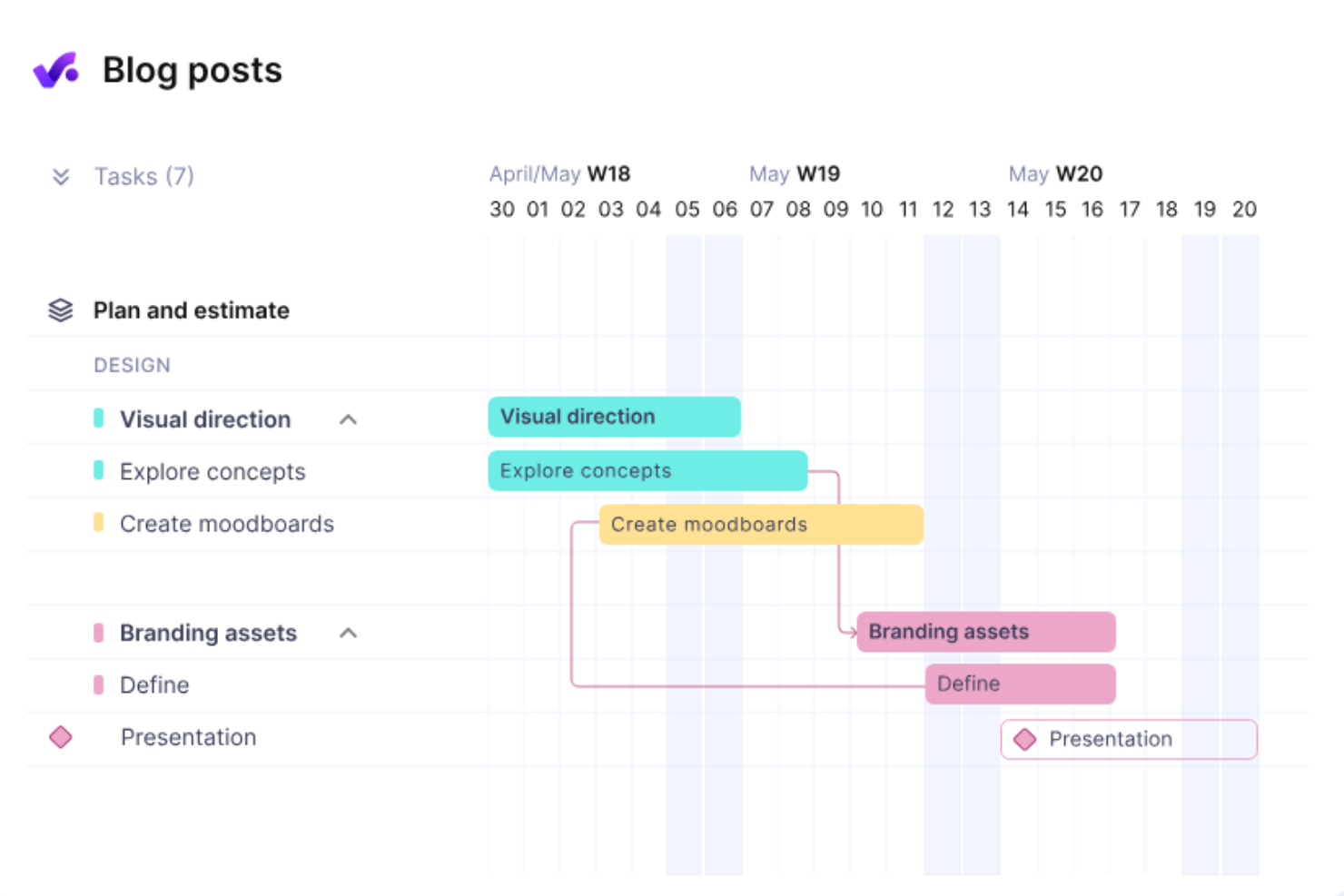
Productive è un sistema di gestione all-in-one per agenzie, progettato per servizi professionali come team di sviluppo software, agenzie di marketing e studi di design. Puoi utilizzarlo per la pianificazione delle risorse, la gestione dei progetti e la gestione finanziaria al fine di migliorare l'efficienza e la redditività dei progetti.
Perché ho scelto Productive: Il diagramma di Gantt di Productive può aiutarti a identificare e monitorare le dipendenze e a migliorare il flusso di lavoro del tuo team. Fornisce una visione visiva delle tempistiche dei progetti e di come i compiti si collegano tra loro. Puoi vedere come tutto è connesso, il che ti aiuta a pianificare e modificare i programmi secondo necessità. La funzione di pianificazione delle risorse di Productive ti aiuta anche a gestire il carico di lavoro del tuo team, mostrandoti chi è disponibile e quando, così puoi assicurarti che le persone giuste siano assegnate a ciascun compito.
Funzionalità principali e integrazioni:
Le funzionalità includono dipendenze illimitate e la possibilità di impostare dipendenze anche a livello di sotto-attività. Puoi inoltre assegnare tipi a ciascuna dipendenza per gestire e controllare meglio il loro potenziale impatto sul tuo progetto.
Le integrazioni includono Jira, HubSpot, Xero, Google Calendar, Sage, Outlook, Slack, BugHerd, HiBob, Personio, BambooHR e QuickBooks.
Pros and Cons
Pros:
- Unisce risorse, progetti e gestione finanziaria
- Buona gestione visiva delle attività
- Funzionalità per la pianificazione dei carichi di lavoro e delle capacità
Cons:
- Potrebbe non essere ideale per chi cerca solo funzionalità di project management
- La configurazione iniziale può richiedere tempo
New Product Updates from Productive
Productive Adds Voice Dictation, Slack Connector, Proposals, and Overtime
Productive adds voice dictation, a Slack Connector, proposal controls, and overtime tracking. These updates support faster AI interactions, client proposals, and time management. For more information, visit Productive’s official site.

Wrike
Ideale per team in crescita

Wrike è un software di gestione progetti basato su cloud, progettato per aiutare i team a pianificare, eseguire e monitorare il proprio lavoro in un unico posto. Offre una gamma di strumenti per gestire progetti, rispettare le scadenze e mantenere il team allineato. Puoi utilizzare Wrike per organizzare le attività, monitorare i progressi e mantenere la comunicazione chiara, il tutto all'interno di un'unica piattaforma.
Perché ho scelto Wrike: Il tuo team può stabilire dipendenze tra le attività, come le relazioni fine-inizio, assicurando che le attività vengano completate nell'ordine corretto. Il cronoprogramma dinamico di Wrike, o diagramma di Gantt, ti permette di monitorare visivamente come le attività dipendono l'una dall'altra e di regolare i programmi se necessario. La piattaforma è anche scalabile, quindi, all'aumentare del tuo team, puoi aggiungere più utenti, progetti e dipendenze tra le attività senza perdere efficienza.
Funzionalità e integrazioni principali:
Le funzionalità includono assistenza AI, automazione, flussi di lavoro personalizzati, monitoraggio del tempo, modelli di progetto, moduli di richiesta, versionamento dei documenti, condivisione di file, assegnazione delle risorse, collaborazione tra team, prioritizzazione delle attività e dashboard di progetto.
Le integrazioni includono Salesforce, Power BI, Tableau, Google Drive, Microsoft SharePoint, OneDrive, Microsoft Teams, Zoom e Slack.
Pros and Cons
Pros:
- Flussi di lavoro automatizzati
- Dashboard altamente personalizzabili
- Funzionalità di pianificazione capacità e risorse
Cons:
- Nessuna chat integrata per la collaborazione interna
- Può richiedere tempo per imparare a usare la piattaforma
New Product Updates from Wrike

Wrike Adds Quick Search to Table View
Wrike adds Quick Search to Table View with full-table search across titles, descriptions, and fields, plus highlighted matches. This helps users find tasks faster in large tables. For more information, visit Wrike’s official site.

Ideale per la pianificazione di progetti basata sulle dipendenze
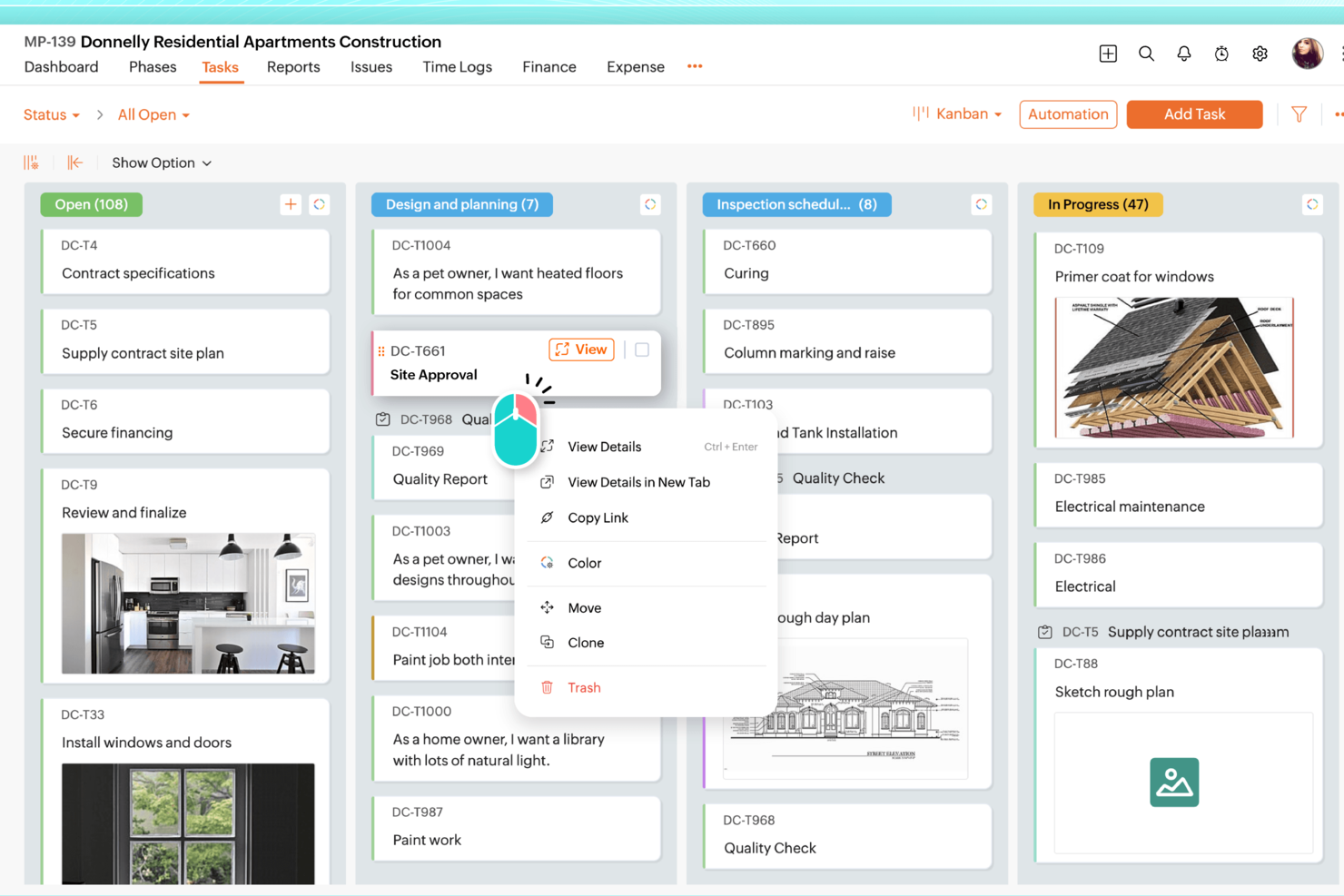
Per i team che cercano una soluzione di project management in grado di gestire le dipendenze tra le attività, Zoho Projects si distingue come un'opzione versatile. Che tu stia gestendo progetti complessi in ambito edilizio, IT o marketing, questo strumento offre la flessibilità per organizzare attività e tempistiche secondo le tue esigenze specifiche. Puoi affrontare le comuni sfide di pianificazione impostando le dipendenze tra le attività, assicurando che i tuoi progetti rispettino le scadenze e i requisiti previsti. Questo rende Zoho Projects particolarmente interessante per i settori che richiedono una pianificazione e un coordinamento accurati.
Perché ho scelto Zoho Projects
Ho scelto Zoho Projects perché offre un supporto solido per la gestione delle dipendenze tra le attività, fondamentale per mantenere in linea i progetti complessi. Puoi configurare facilmente le dipendenze tra le attività, garantendo che ogni fase del progetto sia perfettamente allineata con la successiva. Inoltre, Zoho Projects mette a disposizione diagrammi di Gantt che visualizzano la cronologia del progetto, offrendo una panoramica chiara della sequenza delle attività e delle scadenze. Questo facilita la coordinazione tra i membri del team e aiuta a evitare colli di bottiglia, un problema spesso presente nella gestione dei progetti.
Funzionalità principali di Zoho Projects
Oltre all'attenzione dedicata alle dipendenze tra le attività, Zoho Projects offre altre funzionalità che migliorano la gestione dei progetti:
- Automazione delle attività: Automatizza le attività ripetitive per risparmiare tempo e concentrarti su attività più strategiche.
- Monitoraggio del tempo: Registra le ore fatturabili e non fatturabili per gestire meglio risorse e budget di progetto.
- Strumenti di collaborazione: Favorisci una comunicazione fluida fra i membri del team con chat integrate e forum.
- Zia Intelligence: Utilizza insight basati sull'IA per migliorare le decisioni e i risultati dei progetti.
Integrazioni di Zoho Projects
Le integrazioni includono Slack, Microsoft Teams, Google Drive, Dropbox, Evernote, GitHub, Bitbucket, Microsoft Outlook, Zapier e Zoho CRM. È disponibile anche un'API per integrazioni personalizzate.
Pros and Cons
Pros:
- Automazione potente e personalizzazione dei flussi di lavoro
- Monitoraggio integrato del tempo e fatturazione
- Prezzi accessibili per team in crescita
Cons:
- Interfaccia con una curva di apprendimento più ripida
- Esperienza mobile meno completa
New Product Updates from Zoho Projects
Zoho Projects Adds CodeX Scripts for Custom Modules
Zoho Projects now supports CodeX Scripts for custom modules, enabling conditional logic and rules for creating, updating, and deleting records. For more information, visit Zoho Projects' official site.
 .
.
Quire
Ideale per gerarchie di attività nidificate e pianificazione visiva
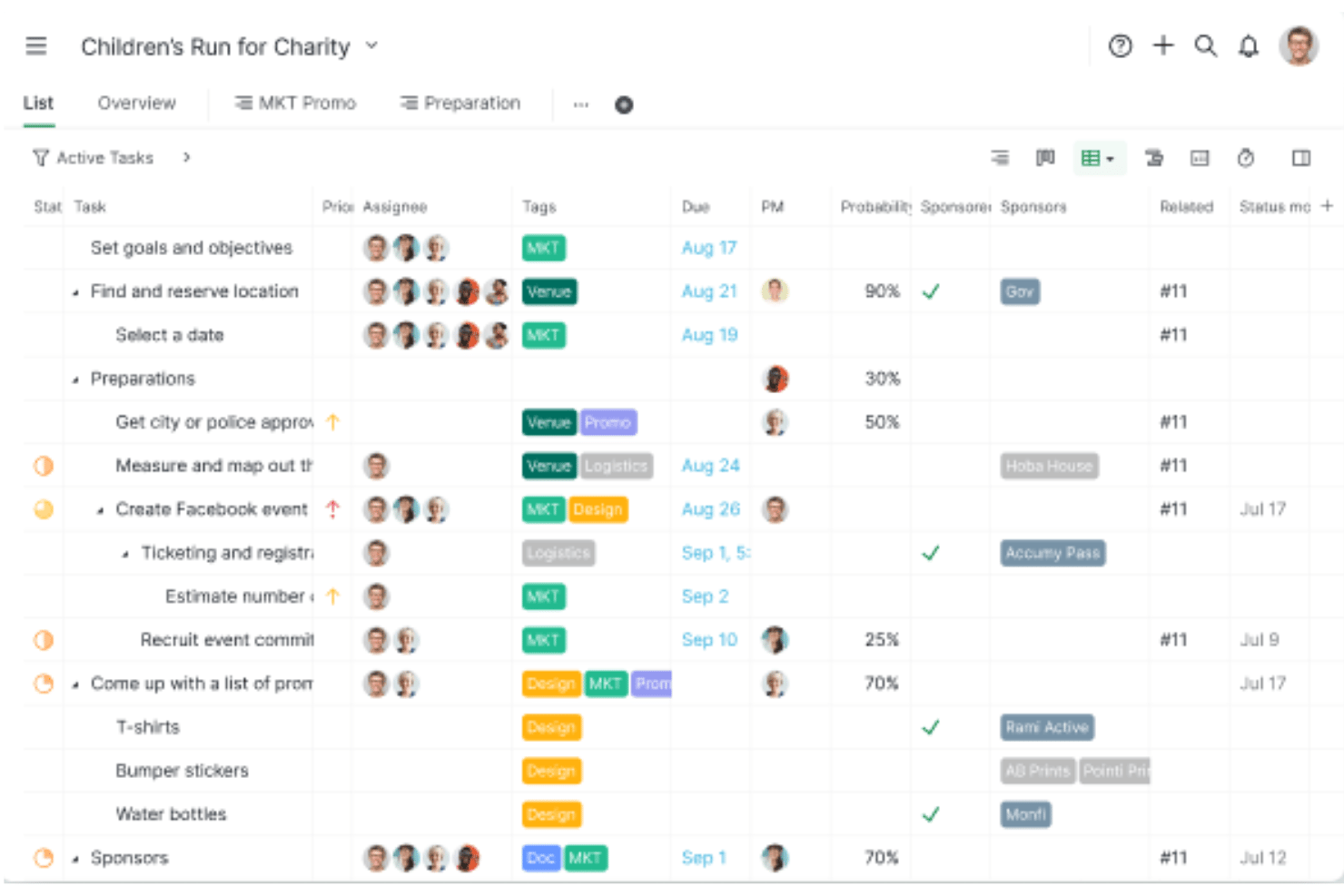
Quire è uno strumento di gestione dei progetti basato su una gerarchia infinita di attività nidificate, che offre viste Kanban, Cronologia (Gantt) e Tabella, oltre al collegamento delle dipendenze, al monitoraggio del tempo e all'aggregazione di più progetti tramite Cartelle intelligenti.
Per chi è più adatto Quire?
Quire è ideale per i team di piccole e medie dimensioni che hanno bisogno di gerarchie di attività flessibili e di una pianificazione visiva senza l'eccessiva complessità degli strumenti di gestione dei progetti destinati alle aziende.
Perché ho scelto Quire
Quire si è guadagnato un posto nella mia rosa dei preferiti grazie al modo naturale in cui gestisce le gerarchie di attività nidificate insieme alla pianificazione visiva. Mi piace il fatto che si possa suddividere un progetto in un numero infinito di livelli di sottoattività e poi passare alla vista Cronologia, dove è possibile trascinare le linee di collegamento direttamente tra le attività per impostare le dipendenze senza uscire dal diagramma di Gantt. Anche il widget delle attività bloccate nel pannello di controllo offre al mio team una visione chiara e aggiornata delle attività bloccate a causa di predecessori incompleti.
Funzionalità principali di Quire
- Aggregazione tramite Cartelle intelligenti: Raggruppa le attività di più progetti in un'unica vista filtrata, offrendo una panoramica unificata dei flussi di lavoro senza dover passare da un progetto all'altro.
- Più assegnatari: Consente di assegnare una singola attività a più membri del team, mantenendo visibili e sotto controllo i passaggi di consegne tra funzioni diverse.
- Campi personalizzati: Aggiunge ai task campi dati strutturati, così il team può tenere traccia delle informazioni specifiche del progetto insieme ai dettagli standard delle attività.
- Widget delle attività bloccate: Mostra direttamente nel pannello di controllo un elenco aggiornato delle attività bloccate a causa di predecessori incompleti, evitando che i colli di bottiglia passino inosservati.
Integrazioni di Quire
Quire offre integrazioni native con GitHub, Slack, Microsoft Teams, Google Calendar, Google Drive e Power BI. Fornisce inoltre un'API REST, webhook e Zapier per collegamenti personalizzati.
Pros and Cons
Pros:
- Collegamento delle dipendenze tramite trascinamento nella Cronologia interattiva
- Gerarchia infinita delle attività per suddivisioni complesse
- Il widget delle attività bloccate evidenzia il lavoro in stallo
Cons:
- Supporta solo le dipendenze Fine-Inizio
- Nessun supporto per il percorso critico o per i ritardi/anticipi
New Product Updates from Quire

Quire Adds Task and Standalone Reminders
Quire adds task reminders and standalone reminders with shared notifications, recurring schedules, and automatic date tracking. These updates help teams stay ahead of deadlines and manage reminders that do not need a task. For more information, visit Quire’s official site.
 .
.
Ideale per la gestione di progetti aziendali

Microsoft Project è una soluzione completa per la gestione dei progetti, progettata per le imprese. Eccelle nella gestione di progetti complessi e nell'allineamento con gli obiettivi strategici aziendali, rendendolo la scelta migliore per la gestione di progetti aziendali.
Perché ho scelto Microsoft Project: Ho selezionato Microsoft Project per questa lista grazie alle sue capacità di gestione delle dipendenze tra le attività. È possibile collegare attività dipendenti all'interno del diagramma di Gantt, così come nei calendari, nei diagrammi di rete e in altre visualizzazioni. Lo strumento consente anche di inserire ulteriori dipendenze tra attività già collegate, il che significa che è adattabile a cambiamenti improvvisi nel piano di progetto. Microsoft Project può collegare automaticamente le attività per te, oppure puoi aggiungerle e impostare manualmente le dipendenze tra loro.
Funzionalità principali e integrazioni:
Le funzionalità includono la possibilità di configurare un progetto principale, che permette di collegare le attività al completamento di un progetto specifico (anziché a una singola attività). Puoi anche definire i tipi di dipendenze, facilitando il loro monitoraggio.
Integrazioni includono Microsoft Teams, OneDrive, Power BI, SharePoint, Dynamics 365, Azure DevOps, Microsoft Excel, Microsoft Power Automate, Microsoft Power Apps e Outlook.
Pros and Cons
Pros:
- Funzioni complete di gestione delle risorse e del portafoglio
- Integrazione con altri servizi e prodotti Microsoft
- Funzionalità avanzate di reportistica e business intelligence
Cons:
- Può risultare complesso da apprendere per i nuovi utenti
- Progettato principalmente per grandi imprese, potrebbe non essere adatto a team più piccoli

Workzone
Ideale per visualizzare le dipendenze tra le attività
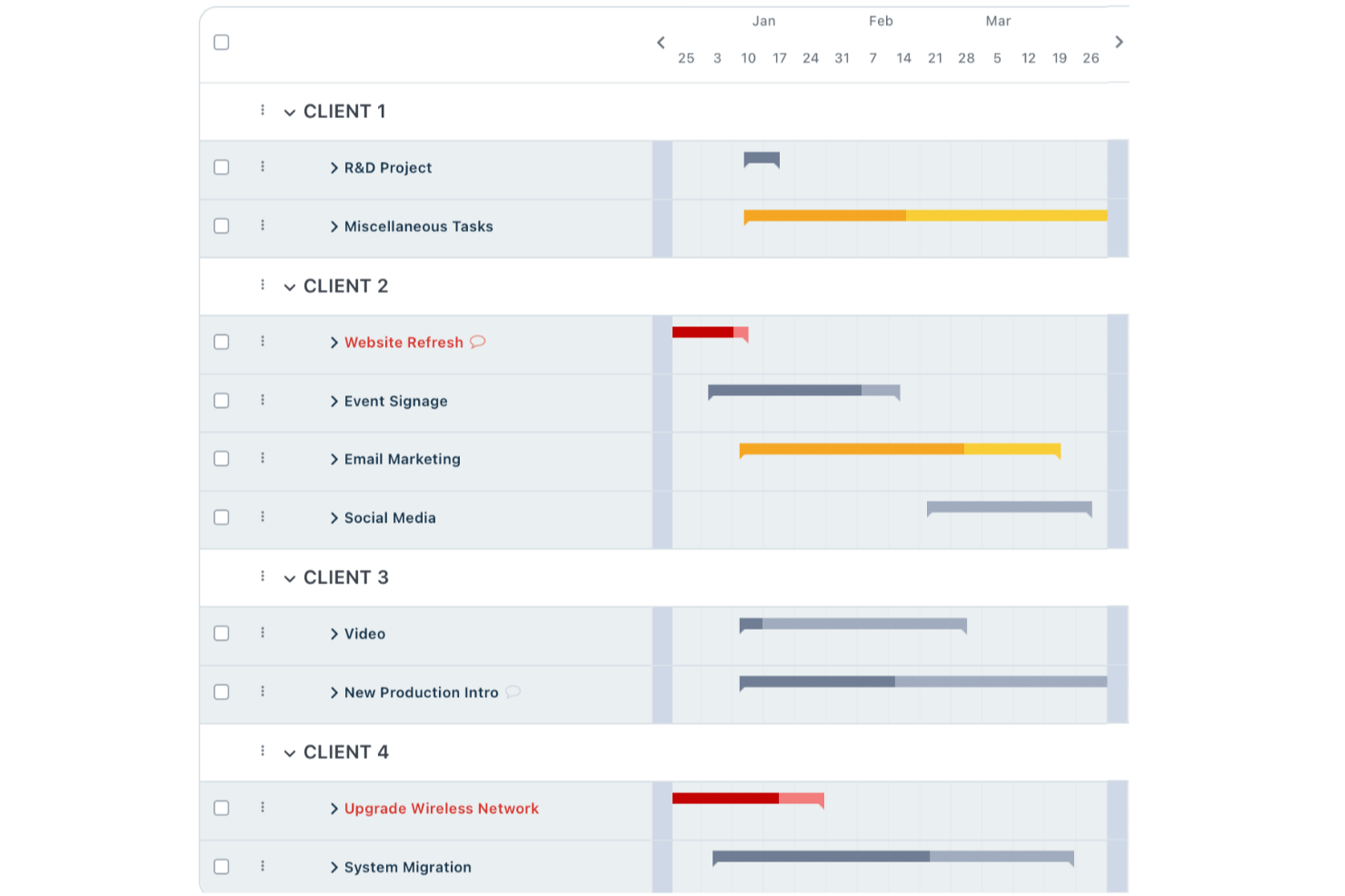
Per i team che necessitano di uno strumento di gestione dei progetti che gestisca bene le dipendenze, Workzone è un'opzione pratica e flessibile. È progettato per supportare la collaborazione e una comunicazione chiara, il che lo rende una scelta solida per settori come marketing, sanità ed educazione. Con Workzone, puoi affrontare problemi comuni come bilanciare i carichi di lavoro, gestire le scadenze e mantenere la comunicazione centralizzata, così il tuo team rimane allineato e i progetti proseguono senza intoppi.
Perché ho scelto Workzone
Ho scelto Workzone per le sue solide funzionalità di gestione delle attività, specialmente per quanto riguarda la gestione delle dipendenze. I diagrammi di Gantt offrono una chiara rappresentazione visiva di come le attività dipendano l'una dall'altra e di come si inseriscano nella tempistica complessiva del progetto. Workzone include anche report in tempo reale, che facilitano il monitoraggio dei progressi e l'adattamento dei piani secondo necessità. Questo aiuta a garantire il rispetto delle scadenze senza compromettere la qualità.
Funzionalità principali di Workzone
Oltre alle capacità di gestione delle attività e di reporting, Workzone offre diverse altre funzioni:
- Visibilità sul portafoglio: Permette di visualizzare tutti i progetti e i loro stati in un'unica dashboard completa, agevolando la pianificazione strategica e l'allocazione delle risorse.
- Strumenti per la revisione creativa: Rende più snello il processo di revisione e approvazione dei progetti creativi, garantendo feedback tempestivi e collaborazione.
- Template personalizzabili: Offre modelli preimpostati che possono essere adattati ai flussi di lavoro specifici del tuo team, risparmiando tempo e mantenendo la coerenza.
- Processo centralizzato per le richieste: Facilita la gestione delle richieste di lavoro in arrivo, assicurando che tutte le attività vengano considerate e prioritarizzate in modo appropriato.
Integrazioni di Workzone
Le integrazioni includono Slack, Microsoft Teams, Google Drive, Dropbox, Box, Tableau, Salesforce e QuickBooks. È disponibile un'API per integrazioni personalizzate.
Pros and Cons
Pros:
- Eccellente visibilità di progetto in tempo reale
- Approvazioni integrate per la revisione dei documenti
- Formazione illimitata e supporto dal vivo
Cons:
- Funzionalità di budgeting avanzate limitate
- Prezzi meno adatti ai team piccoli
New Product Updates from Workzone

Workzone Enterprise Adds Multi-Stage Approval Workflows
Workzone Enterprise now includes Approval Workflows, enabling multi-stage document approvals to standardize complex processes and reduce manual effort. For more information, visit Workzone's official site.
 .
.
ProofHub
Ideale per la collaborazione di squadra
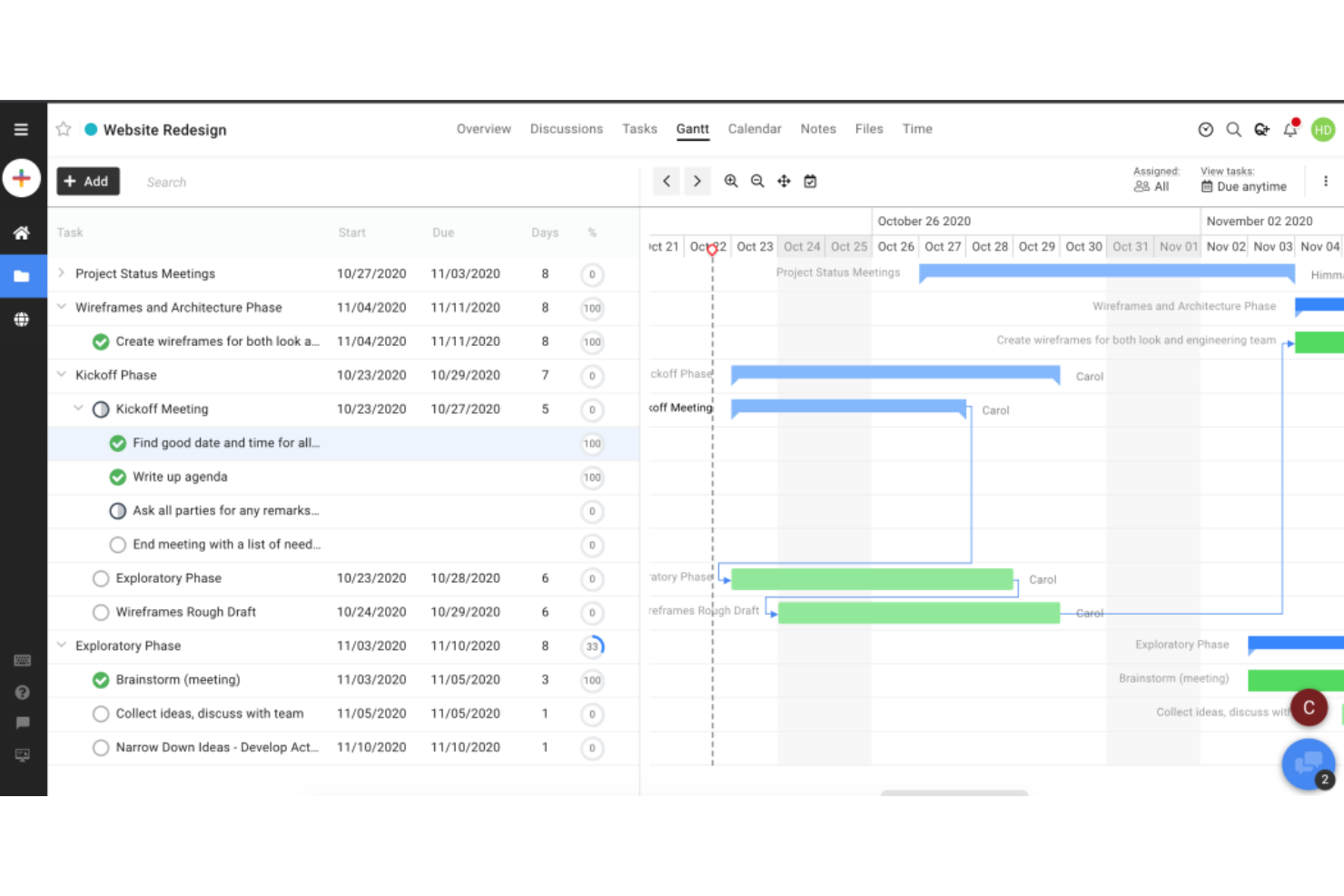
ProofHub è un software di gestione progetti progettato per aiutare i team a collaborare e gestire attività, dipendenze e progetti in modo efficiente. Centralizza tutte le informazioni importanti così da poter pianificare, eseguire, monitorare e gestire i progetti dall'inizio alla fine in un unico posto.
Perché ho scelto ProofHub: Ho scelto ProofHub perché offre una suite completa di funzionalità per la gestione delle dipendenze delle attività, del calendario di progetto e delle milestone. Puoi impostare e collegare le dipendenze direttamente dalla vista del diagramma di Gantt, così come monitorare le dipendenze e come esse vengono influenzate dalle modifiche al programma. Le dipendenze possono essere classificate come predecessori o successori e lo strumento può anche regolare automaticamente le dipendenze a valle quando si apportano modifiche al calendario di progetto.
Funzionalità e integrazioni principali:
Funzionalità includono notifiche di completamento attività per i membri del team assegnati a compiti dipendenti e successivi, oltre alla creazione di dipendenze tramite trascinamento.
Integrazioni includono Dropbox, Google Drive, Box e OneDrive
Pros and Cons
Pros:
- Utenti illimitati con prezzo forfettario
- Ampia gamma di funzionalità per gestione dei progetti e collaborazione
- Integrazioni con strumenti di terze parti popolari
Cons:
- Spazio di archiviazione limitato nel piano Essential
- L'accesso alle funzionalità avanzate può risultare costoso per le piccole imprese
Podio
Ideale per flussi di lavoro aziendali semplificati
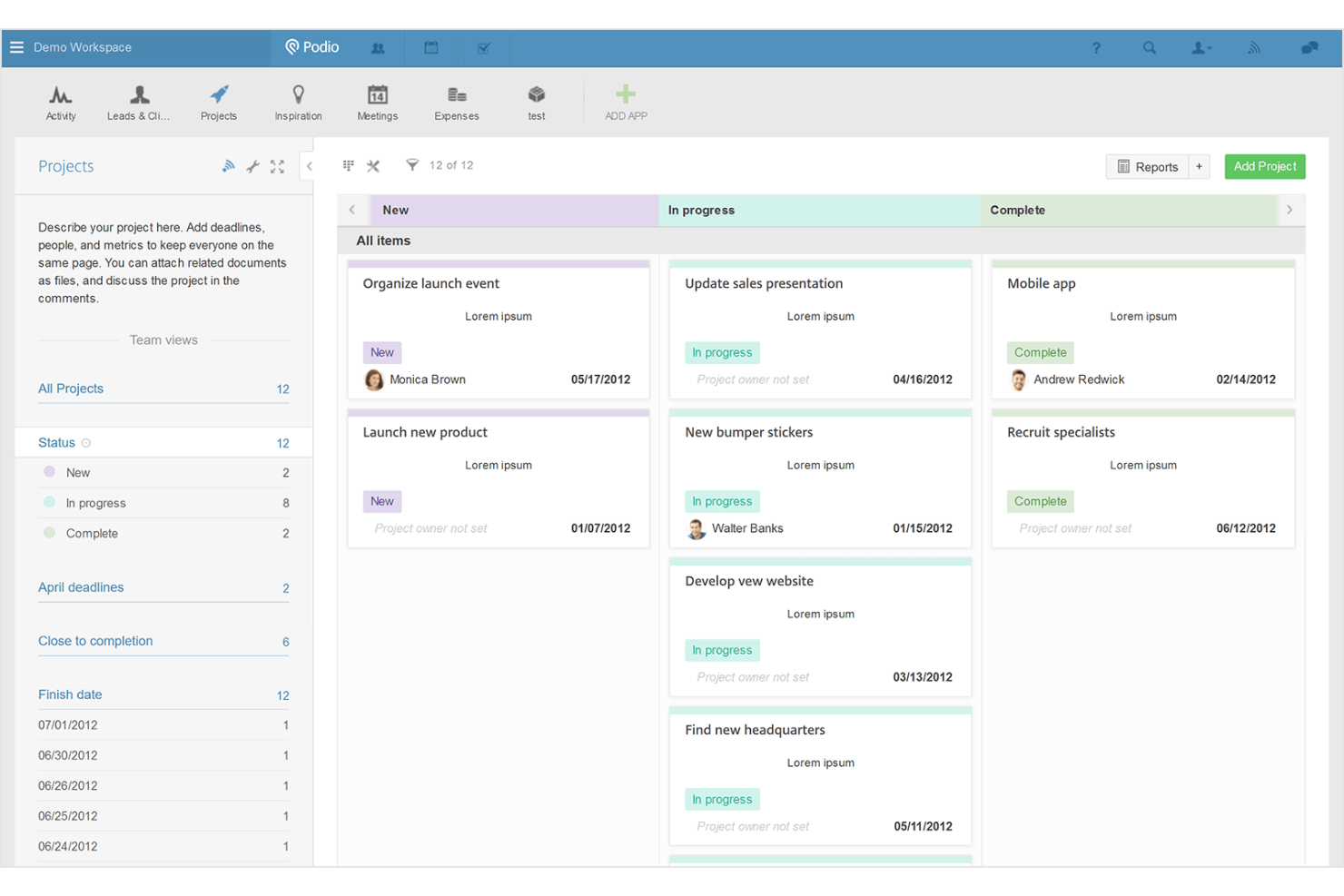
Podio è una piattaforma di gestione progetti versatile, progettata per migliorare i flussi di lavoro della tua azienda. È l’ideale per creare un ambiente di lavoro altamente personalizzabile che si adatta alle esigenze e ai processi specifici del tuo team.
Perché ho scelto Podio: Ho scelto Podio per questa lista grazie alla sua eccezionale flessibilità e alle opzioni di personalizzazione. Puoi usarlo per creare le tue app tramite una semplice interfaccia drag-and-drop. Lo strumento ti consente di adattarlo ai tuoi flussi di lavoro specifici, così puoi gestire le dipendenze nel modo che meglio si adatta alle tue modalità operative esistenti, invece di costringerti ad un set specifico di funzionalità.
Caratteristiche principali e integrazioni:
Caratteristiche includono opzioni di reportistica per monitorare l’avanzamento delle milestone e l’utilizzo del budget di progetto, oltre ad automazioni che possono migliorare i tuoi flussi di lavoro e ridurre i processi manuali.
Integrazioni includono Google Drive, Dropbox, ShareFile, Box, HighTail, OneDrive, Zendesk, Campaign Monitor, Evernote e FreshBooks.
Pros and Cons
Pros:
- Altamente personalizzabile con creazione di app tramite drag-and-drop
- Si integra con i principali servizi di condivisione file e altre piattaforme
- Offre flussi di lavoro automatizzati e opzioni di reportistica avanzate
Cons:
- Potrebbe presentare una curva di apprendimento a causa dell’elevata personalizzazione
- Il piano gratuito è limitato a cinque dipendenti e 100 elementi per organizzazione

Ideale per la gestione del lavoro aziendale
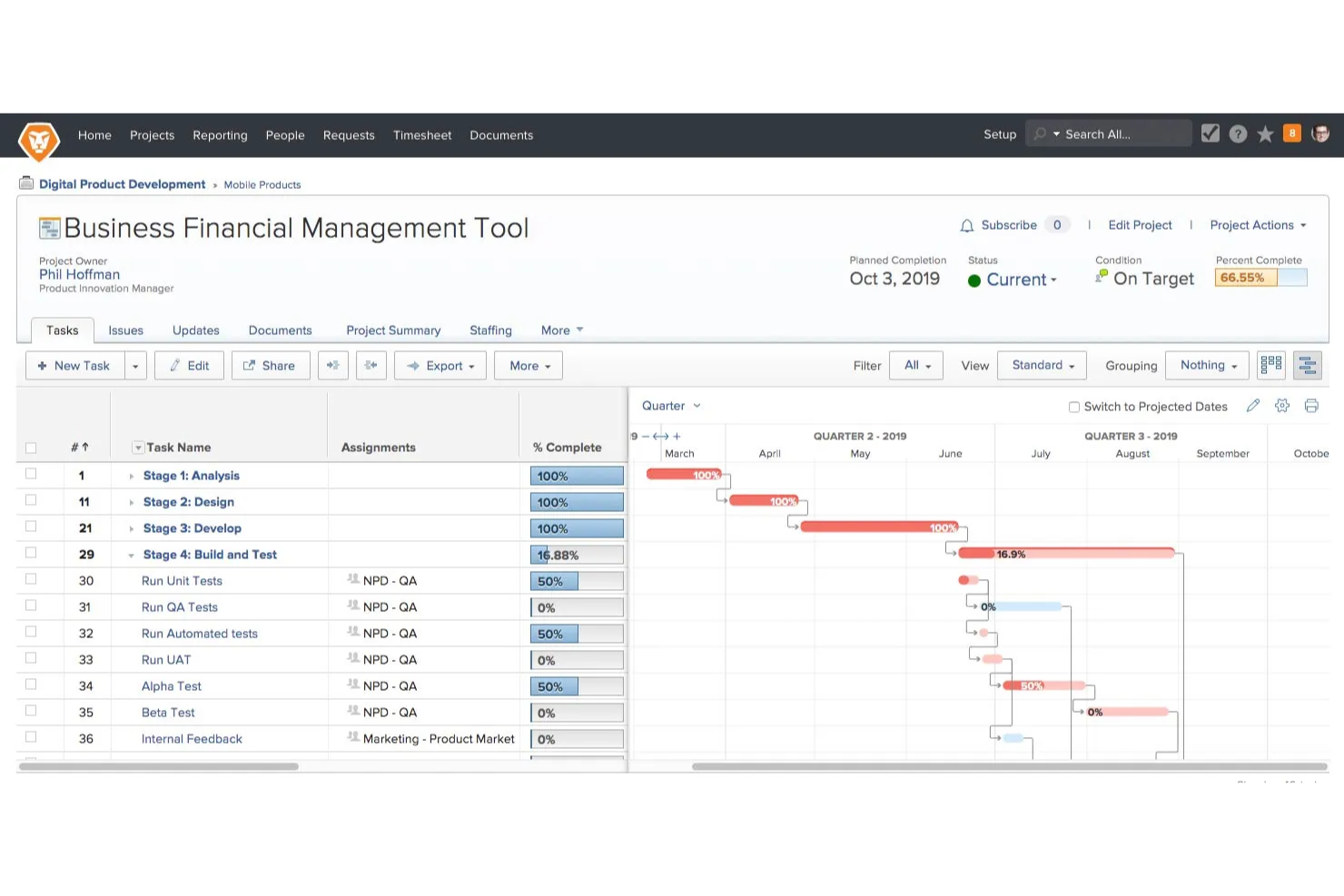
Adobe Workfront è un software di gestione che ti consente di stabilire e monitorare le dipendenze tra le attività all'interno e tra i progetti, utilizzando una varietà di tipi di dipendenza per garantire che le attività vengano eseguite in una sequenza specifica e migliorare la pianificazione e l'esecuzione dei progetti.
Perché ho scelto Workfront: Ho selezionato Workfront per le sue capacità nella gestione delle complessità delle dipendenze nei progetti a livello aziendale. Puoi impostare tipi per ogni dipendenza, inclusi fine-inizio, fine-fine e inizio-inizio, oltre a un ritardo—la quantità specifica di tempo che deve trascorrere tra le attività dipendenti. Lo strumento ti permette anche di impostare dipendenze tra diversi progetti quando hai un portafoglio di progetti interrelati, così come di gestire la timeline del tuo progetto insieme a tutte le dipendenze in essa contenute.
Funzionalità principali e integrazioni:
Funzionalità includono la prevenzione automatica dei loop di dipendenza tra le attività e la possibilità di imporre le dipendenze affinché il team non possa avviare attività dipendenti fino al completamento di tutte le attività precedenti.
Integrazioni includono Adobe Creative Cloud, Jira, Microsoft Teams, Slack, Salesforce, ServiceNow, Google Workspace, Box, Dropbox e Oracle.
Pros and Cons
Pros:
- Dashboard centralizzata per la gestione dei progetti
- Aggiornamenti in tempo reale sull'avanzamento dei progetti
- Allineamento strategico con gli obiettivi organizzativi
Cons:
- Mancanza di trasparenza sui prezzi
- Può risultare complesso da implementare per organizzazioni di piccole dimensioni

Ideale per una pianificazione di progetto solida

ProjectManager.com è uno strumento completo per la gestione dei progetti, progettato per aiutare i team a pianificare, monitorare e collaborare online. Si distingue per una pianificazione di progetto solida e la gestione delle dipendenze grazie alla vasta gamma di funzionalità che rispondono a esigenze progettuali dettagliate e alla sua capacità di crescere con la complessità dei progetti.
Perché ho scelto ProjectManager.com: Ho scelto ProjectManager.com per il suo ampio set di funzionalità per la gestione delle dipendenze, essenziali per affrontare progetti complessi con numerose variabili. Lo strumento offre funzionalità di reportistica che forniscono approfondimenti sui progressi delle milestone e identificano dove le dipendenze o i colli di bottiglia stanno rallentando il progetto. Puoi utilizzare il trascinamento per modificare le dipendenze e il programma del progetto, e tutte le dipendenze successive nel progetto verranno aggiornate automaticamente di conseguenza.
Funzionalità e integrazioni di rilievo:
Le funzionalità includono diagrammi di Gantt per impostare le milestone e monitorare i progressi, oltre a strumenti per definire e monitorare il percorso critico e tutte le dipendenze coinvolte. Lo strumento può anche definire automaticamente il percorso critico per te.
Le integrazioni includono Google Workspace, Microsoft 365, Zapier, Salesforce, Slack e Jira.
Pros and Cons
Pros:
- Propone una vasta gamma di funzionalità di project management adatte a diversi settori
- Si integra con oltre 1.000 app, ampliando le sue funzionalità e flessibilità
- Offre diversi piani per soddisfare le esigenze di team piccoli, medi e grandi.
Cons:
- Il prezzo può risultare un po' alto per team piccoli o startup
- Il passaggio dalla prova gratuita a un piano a pagamento può richiedere un intervento manuale per evitare il downgrade
Altri software di gestione dei progetti con dipendenze
Ecco un elenco di altri software di gestione dei progetti con dipendenze che non sono entrati nella mia selezione, ma che vale la pena prendere in considerazione.
- Tempo Portfolio Manager
Ideale per la gestione dinamica dei progetti
- Ravetree
Ideale per metodologie di progetto flessibili
- Teamwork Projects
Ideale per la gestione del lavoro per i clienti
- Jira
Ideale per i team di sviluppo software
- Clarizen
Ideale per la pianificazione di progetti su larga scala
- ReptonPOD
Ideale per flussi di lavoro intricati
- Celoxis
Ideale per il monitoraggio avanzato del portafoglio
- Accelo
Ideale per automatizzare flussi di lavoro end-to-end


Recensioni correlate sulla gestione dei progetti
Se non hai ancora trovato quello che cerchi, dai un'occhiata a queste altre recensioni di strumenti per la gestione dei progetti che abbiamo selezionato per te:
- Creatore di diagrammi di Gantt
- Strumenti per la produttività
- Software per il monitoraggio dei progetti
- Software per la pianificazione dei progetti
- Software di gestione dei progetti
- Software per la gestione delle risorse
Comment j'évalue les logiciels de gestion documentaire d'ingénierie
Je divise mon évaluation en deux couches : les critères de base que chaque plateforme doit remplir—gestion des versions, prise en charge CAD/BIM et workflows d'approbation—et les éléments différenciateurs qui distinguent les meilleurs outils.
Fonctionnalités de base (Prérequises pour cette liste)
Lorsque je sélectionne des outils pour ma liste, j'attribue à chacun une note de 0 (ne propose pas la fonctionnalité) à 5 (excellent dans ce domaine) pour chaque fonctionnalité de base énumérée ci-dessous. Ensuite, je calcule le score total de l'outil en pourcentage. Chaque outil doit obtenir un score total minimum de 65 % pour être pris en compte.
- Gestion des versions & révisions : Je vérifie si une plateforme trace chaque itération de document grâce à un historique automatisé des révisions, la restauration et le verrouillage des fichiers remplacés pour que les équipes ne travaillent jamais à partir de plans obsolètes.
- Prise en charge des fichiers CAD/BIM : La possibilité de visualiser et d’annoter des fichiers DWG, RVT ou IFC sans lancer le logiciel auteur natif est primordiale—j’évalue la prise en charge des formats, le rendu dans le navigateur et l’extraction des métadonnées.
- Workflows contrôlés & approbations : Je recherche des workflows multi-étapes configurables qui reflètent les vrais processus d’ingénierie comme les validations de diffusion, les soumissions d'entrepreneurs et les cycles de revue pluridisciplinaire.
- Contrôle d’accès & permissions : Les projets d’ingénierie impliquent des propriétaires, concepteurs et sous-traitants qui nécessitent chacun une visibilité différente—j’évalue la granularité des restrictions d’accès par projet, discipline ou rôle.
- Piste d’audit & conformité : J’examine si la plateforme enregistre chaque action documentaire d’une manière qui soutient les exigences ISO 19650, ISO 9001 ou FDA 21 CFR Part 11, avec des relevés exportables.
- Organisation centrée sur le projet : Un dépôt de fichiers à plat n’est pas adapté aux projets d’investissement comportant des milliers de livrables—j’évalue la structuration des métadonnées, les schémas de numérotation personnalisés et les capacités de recherche par facettes.
Une fois que j'ai une liste d’outils qui répondent aux critères, j’examine ce qui distingue chaque plateforme.
Facteurs différenciants (Ce qui distingue les fournisseurs)
Voici comment je compare et distingue les différents fournisseurs :
Fonctionnalités remarquables
Les outils de comparaison de plans font gagner un temps réel aux réviseurs—les vues en superposition et côte à côte facilitent l'identification des changements entre révisions, sans devoir alterner entre les fichiers. J’évalue aussi les fonctionnalités d’environnement commun de données alignées à l’ISO 19650, qui structurent la façon dont propriétaires, concepteurs et entrepreneurs échangent l’information tout au long des phases du projet. L’automatisation des transferts et des soumissions est aussi un domaine que j’examine de près, notamment les plateformes qui génèrent automatiquement des lots, suivent l’état de livraison et lient les échéances aux jalons contractuels.
Au-delà des fonctionnalités
La profondeur d’intégration compte—je vérifie si la plateforme se connecte nativement à des outils CAD comme AutoCAD ou Revit et offre une synchronisation bidirectionnelle avec des systèmes de gestion de projet tels que Procore ou Primavera P6. Les modèles de licences méritent aussi une attention particulière, notamment la façon dont les fournisseurs gèrent les collaborateurs externes comme les entrepreneurs ou consultants qui ont besoin d’accès sans faire grimper les coûts par utilisateur. J’évalue aussi la flexibilité du déploiement, car de nombreux bureaux d’ingénierie exigent des options sur site ou hybrides pour respecter la résidence des données et les politiques de sécurité informatique.
Come scegliere un software di gestione dei progetti con dipendenze
È facile perdersi in lunghi elenchi di funzionalità e strutture tariffarie complesse. Per aiutarti a rimanere concentrato mentre affronti il tuo processo di selezione del software, unico per le tue esigenze, ecco una lista di controllo dei fattori da tenere a mente:
| Fattore | Cosa considerare |
|---|---|
| Scalabilità | Assicurati che il software sia in grado di gestire la crescita del tuo team. Cerca strumenti che supportino progetti illimitati, un numero crescente di utenti e il monitoraggio avanzato delle dipendenze man mano che le tue esigenze evolvono. |
| Integrazioni | Il software dovrebbe connettersi agli strumenti che già utilizzi, come Slack, Jira, Trello o Google Drive. Le integrazioni native e l'accesso API rendono i flussi di lavoro più fluidi. |
| Personalizzazione | Ogni team lavora in modo diverso. Scegli uno strumento che ti consenta di modificare i flussi di lavoro, le dipendenze tra le attività e le visualizzazioni dei progetti in base ai tuoi processi. |
| Semplicità d'uso | Un'interfaccia chiara e intuitiva riduce i tempi di inserimento iniziale e la frustrazione degli utenti. Cerca funzionalità per la gestione delle dipendenze tramite trascinamento e il monitoraggio visivo delle attività. |
| Budget | Considera i costi totali, inclusi i prezzi per utente, le limitazioni delle funzionalità nei piani di livello inferiore e i possibili componenti aggiuntivi. Una prova gratuita o una versione gratuita con funzionalità limitate ti aiuta a effettuare dei test prima di impegnarti. |
| Misure di sicurezza | Assicurati di poter proteggere i dati sensibili dei progetti con la crittografia, l'accesso basato sui ruoli e la conformità a standard come il GDPR o SOC 2. Verifica in che modo le autorizzazioni degli utenti stabiliscono chi può modificare le dipendenze. |
| Automazione | Un'automazione intelligente può farti risparmiare tempo regolando automaticamente le attività dipendenti quando cambiano le tempistiche. Cerca funzionalità come gli attivatori basati su regole e la pianificazione basata sull'intelligenza artificiale. |
| Funzionalità di collaborazione | Il tuo team ha bisogno di una comunicazione fluida. Cerca funzionalità di chat integrate, aggiornamenti in tempo reale e notifiche che mantengano tutti allineati sulle dipendenze che cambiano. |
Tendenze nei software di gestione dei progetti con dipendenze
Il software di gestione dei progetti è in continua evoluzione. Ecco le ultime tendenze che ne stanno plasmando il futuro.
- Integrazione con l'intelligenza artificiale e l'apprendimento automatico: Gli strumenti di gestione dei progetti fanno sempre più uso dell'intelligenza artificiale. Ciò consente di eseguire analisi predittive e di allocare le risorse in modo più intelligente, migliorando significativamente i risultati e l'efficienza dei progetti.
- Più funzionalità di collaborazione: Le funzionalità di collaborazione in tempo reale facilitano la comunicazione e gli aggiornamenti istantanei, fondamentali per i team remoti e distribuiti. Questa tendenza supporta ambienti di lavoro dinamici e può portare a decisioni migliori.
- Maggiore utilizzo dell'automazione: L'automazione all'interno dei software di gestione dei progetti è in aumento. Semplifica le attività ripetitive, aiuta a mantenere le scadenze dei progetti e libera tempo da dedicare ad attività più strategiche.
- Maggiore attenzione alla personalizzazione e alla flessibilità: Si registra una tendenza crescente verso soluzioni di gestione dei progetti personalizzabili, che consentono di adattare il software alle proprie esigenze specifiche. Questa tendenza aiuta a soddisfare requisiti e flussi di lavoro unici dei progetti.
- Espansione della gestione mobile dei progetti: Sempre più strumenti di gestione dei progetti offrono l'accesso da dispositivi mobili. Questo consente a te e ai tuoi team di rimanere connessi ai progetti ovunque vi troviate e supporta la crescente mobilità della forza lavoro.
Che cos'è un software di gestione dei progetti con dipendenze?
Il software di gestione dei progetti con dipendenze è uno strumento specializzato progettato per gestire e monitorare le attività interconnesse all'interno di un progetto. Viene utilizzato da responsabili di progetto, responsabili dei team e altri professionisti coinvolti nella pianificazione e nell'esecuzione di progetti complessi. Puoi utilizzarlo per identificare e monitorare le relazioni tra le attività e assicurarti che quelle sequenziali vengano completate nell'ordine corretto.
I componenti di questo software includono funzionalità di gestione delle attività che consentono di creare e monitorare le attività, insieme alle dipendenze che le collegano. Include anche funzionalità di pianificazione per assicurarti che le attività dipendenti siano programmate in modo da rispettarne la sequenza e le interconnessioni.
Funzionalità dei software di gestione dei progetti con dipendenze
Ecco le principali funzionalità da cercare in un software di gestione dei progetti con dipendenze:
- Diagrammi di Gantt: Visualizza le tempistiche del progetto. I diagrammi di Gantt sono indispensabili per delineare la sequenza delle attività e comprenderne le interdipendenze all'interno della tempistica.
- Monitoraggio delle dipendenze: Monitora le relazioni tra le attività. Questa funzione consente di tenere sotto controllo il modo in cui le attività si influenzano a vicenda, così da assicurarsi che le modifiche apportate in un'area vengano riflesse nell'intero progetto.
- Analisi del percorso critico: Individua le attività chiave. Identificando le attività che influiscono direttamente sulla data di completamento del progetto, puoi allocare le risorse in modo più efficace ed evitare potenziali ritardi.
- Riprogrammazione automatica: Modifica dinamicamente le tempistiche. Quando un'attività subisce un ritardo, il software aggiorna automaticamente le attività dipendenti, contribuendo a mantenere l'integrità del progetto.
- Gestione delle risorse: Alloca e monitora le risorse. Una gestione efficace delle risorse garantisce l'assegnazione alle attività del personale e dei materiali necessari, soprattutto quando le attività sono interdipendenti.
- Definizione delle priorità delle attività: Classifica le attività in base all'importanza. Questo aiuta a concentrarsi sul completamento delle attività fondamentali per l'avanzamento delle attività dipendenti.
- Strumenti di collaborazione: Favoriscono la comunicazione del team. Questi strumenti sono essenziali per coordinare gli sforzi quando sono coinvolte più attività e dipendenze.
- Aggiornamenti in tempo reale: Rimani informato sui cambiamenti. Gli aggiornamenti immediati consentono di reagire tempestivamente ai cambiamenti nel contesto del progetto, soprattutto quando si lavora con attività dipendenti.
- Viste personalizzabili: Personalizza il modo in cui vengono visualizzate le informazioni. Le viste personalizzate consentono di concentrarsi sulle dipendenze più importanti per il proprio ruolo o per il successo del progetto.
- Report e analisi: Ottieni informazioni sull'avanzamento. Grazie a report completi, puoi monitorare l'impatto delle dipendenze sul progetto e prendere decisioni consapevoli.
Vantaggi del software di gestione dei progetti con dipendenze
Ecco cinque vantaggi principali dell'implementazione di un software di gestione dei progetti con dipendenze:
- Collaborazione migliore: Il software di gestione dei progetti con dipendenze facilita un migliore lavoro di squadra. Offrendo una piattaforma centralizzata per la comunicazione e la condivisione delle informazioni, i membri del team possono collaborare in modo più efficace, indipendentemente dalla loro posizione.
- Pianificazione migliorata: Ottieni tempistiche accurate del progetto grazie al monitoraggio delle dipendenze. Il software consente di creare pianificazioni dettagliate del progetto che tengono conto delle dipendenze tra le attività, affinché il progetto proceda senza intoppi e le scadenze vengano rispettate.
- Mitigazione dei rischi: Identifica e gestisci in modo proattivo i potenziali rischi del progetto. Il monitoraggio delle dipendenze aiuta a prevedere i colli di bottiglia e i potenziali ritardi, consentendo di mitigare i rischi prima che influiscano sul progetto.
- Ottimizzazione delle risorse: Alloca e utilizza le risorse in modo efficiente. Grazie alla visibilità sulle dipendenze tra le attività, puoi allocare le risorse in modo più efficace, evitare un utilizzo eccessivo o insufficiente e assicurarti che le attività critiche ricevano il supporto necessario.
- Informazioni in tempo reale: Accedi a informazioni e metriche aggiornate sul progetto. Puoi monitorare l'avanzamento del progetto in tempo reale, semplificando l'adozione di decisioni consapevoli e l'apporto degli adeguamenti necessari.
Costi e prezzi del software di gestione dei progetti con dipendenze
Di seguito è riportata una tabella riepilogativa delle opzioni dei piani e dei relativi prezzi per il software di gestione dei progetti con dipendenze:
| Tipo di piano | Prezzo medio | Funzioni comuni |
|---|---|---|
| Gratuito | $0 | Progetti e attività limitati, monitoraggio di base delle dipendenze, strumenti di collaborazione e spazio di archiviazione limitato |
| Team | $10 - $13/utente/mese | Attività e sottoattività illimitate; viste Gantt, foglio, bacheca, elenco e calendario; spazio aggiuntivo per l'archiviazione dei file |
| Business | $20 - $24/utente/mese | Gestione avanzata di progetti, portafogli e risorse; flussi di lavoro e automazione; spazio di archiviazione aggiuntivo |
| Enterprise | Prezzi personalizzati | Funzioni di livello aziendale, progetti illimitati, accesso API, SSO/SAML, spazio di archiviazione dei file illimitato |
Domande frequenti sul software di gestione dei progetti con dipendenze
In che modo le dipendenze influiscono sulla pianificazione del progetto?
Le dipendenze hanno un impatto significativo sulla pianificazione del progetto, poiché determinano la sequenza delle attività. Se un’attività da cui dipendono altre attività subisce un ritardo, questo può influire sugli orari di inizio e di fine delle attività successive. Ciò può creare un effetto domino che potrebbe posticipare ulteriormente la data di completamento del progetto.
Il software di gestione dei progetti può modificare automaticamente le pianificazioni in base alle dipendenze?
Sì, molte soluzioni software per la gestione dei progetti possono modificare automaticamente le pianificazioni quando si verificano cambiamenti nelle dipendenze tra le attività. Quando un’attività viene riprogrammata, il software ricalcola di conseguenza la tempistica delle attività dipendenti. Questo consente di mantenere una pianificazione aggiornata senza dover modificare manualmente ogni attività.
Qual è il modo migliore per visualizzare le dipendenze nel software di gestione dei progetti?
Il modo migliore per visualizzare le dipendenze nel software di gestione dei progetti è utilizzare un diagramma di Gantt. Questo strumento visivo mostra le attività lungo una sequenza temporale e rappresenta la relazione tra di esse. Consente di vedere come si sovrappongono le attività, la sequenza delle operazioni e il percorso critico del progetto.
In che modo le dipendenze influiscono sull'allocazione delle risorse?
Le dipendenze influiscono direttamente sull’allocazione delle risorse, definendo l’ordine e la tempistica dell’assegnazione delle attività. Se un’attività che richiede risorse specifiche dipende dal completamento di un’altra attività, tali risorse non possono essere assegnate finché l’attività precedente non è terminata. Ciò richiede un’attenta pianificazione, in modo che le risorse siano disponibili quando necessario e non rimangano inattive.
È possibile modificare le dipendenze una volta avviato un progetto?
Le dipendenze possono essere modificate dopo l’avvio di un progetto, ma ciò dovrebbe essere fatto con cautela. La modifica delle dipendenze può influire sulla pianificazione del progetto, sull’allocazione delle risorse e sul piano complessivo del progetto. Valuta le implicazioni della modifica delle dipendenze e comunica eventuali variazioni a tutte le parti interessate coinvolte.
Cosa succede se una dipendenza viene omessa nel piano del progetto?
Se una dipendenza viene omessa nel piano del progetto, ciò può causare conflitti nella pianificazione, un’allocazione eccessiva delle risorse e potenziali ritardi. È importante individuare e correggere il prima possibile eventuali dipendenze omesse, così da ridurre al minimo l’impatto sulla tempistica e sul budget del progetto.
In che modo il software di gestione dei progetti può aiutare a gestire le dipendenze tra progetti?
Il software di gestione dei progetti può essere estremamente utile per gestire le dipendenze tra progetti, fornendo una piattaforma centralizzata in cui sono visibili tutti i progetti e le attività a essi associate. Ciò consente un migliore coordinamento tra i progetti, poiché le dipendenze che si estendono tra più progetti possono essere monitorate e gestite efficacemente. Il software può avvisare l’utente di potenziali conflitti e contribuire a garantire un utilizzo efficiente delle risorse in tutti i progetti.