10 migliori alternative a Trello nel 2026 (opzioni gratuite & a pagamento)

10 Elenco delle migliori alternative a Trello


Trello è un popolare strumento di gestione dei progetti, ma non è la soluzione perfetta per ogni squadra. Che tu abbia superato i suoi semplici pannelli, abbia bisogno di report più completi o desideri integrazioni più approfondite, esistono numerose alternative a Trello che offrono funzionalità avanzate e flussi di lavoro flessibili per supportare meglio i tuoi progetti.
Ho testato e recensito le principali piattaforme di gestione dei progetti pensando agli utenti di Trello, concentrandomi su facilità d'uso, collaborazione tra squadre, personalizzazione e rapporto qualità-prezzo. Che tu stia gestendo flussi di lavoro agili, progetti per clienti o squadre interne, qui troverai uno strumento in grado di portare la tua produttività a un livello superiore.
Che cos'è Trello?
Trello è uno strumento visivo per la gestione dei progetti che aiuta singoli utenti e squadre a organizzare le attività, monitorare i progressi e collaborare in tempo reale.
Grazie a un sistema basato su pannelli, liste e schede, Trello semplifica la pianificazione dei progetti, l'assegnazione delle attività e il monitoraggio dei flussi di lavoro. È popolare tra responsabili di progetto, professionisti del marketing e sviluppatori per la sua flessibilità, facilità d'uso e capacità di semplificare il coordinamento della squadra.
Perché usare un'alternativa a Trello
Potresti cercare un'alternativa a Trello se:
- Hai bisogno di report e analisi avanzati, ad esempio per un monitoraggio dettagliato dei progetti e per ottenere informazioni utili.
- Richiedi migliori opzioni di integrazione.
- Hai bisogno di flussi di lavoro e funzionalità altamente personalizzabili.
- Hai bisogno di un accesso costante al tuo software di gestione dei progetti anche senza connessione Internet.
- Richiedi funzionalità di sicurezza complete.
Le alternative a Trello offrono spesso funzionalità che risolvono queste limitazioni. Mettono a disposizione strumenti avanzati di reportistica per analisi approfondite, numerose opzioni di integrazione con una gamma più ampia di software e una maggiore personalizzazione per adattarsi a flussi di lavoro specifici.
Le funzionalità offline avanzate garantiscono l'accesso alle informazioni sui progetti anche senza Internet, mentre le migliori funzioni di sicurezza offrono una protezione più efficace per i dati sensibili. Queste alternative si rivolgono agli utenti che cercano soluzioni più complete e maggiormente in linea con le proprie esigenze specifiche di gestione dei progetti e collaborazione.
Perché fidarsi dei nostri consigli sui software
Il nostro team testa e recensisce software dal 2012. In quanto project manager noi stessi, sappiamo quanto sia difficile — e importante — scegliere il software giusto.
Per questa guida, abbiamo valutato gli strumenti attraverso test pratici e ricerche indipendenti, assegnando un punteggio agli strumenti in base ai nostri criteri di selezione. Ci basiamo inoltre sulle competenze di leader di pensiero del settore e di professionisti attivi nella gestione dei progetti.
Le nostre recensioni riflettono il nostro giudizio editoriale umano, non un discorso di vendita.
Revisori esperti:
Tabella comparativa delle alternative a Trello
Questa tabella comparativa riassume i dettagli dei prezzi delle migliori alternative a Trello che ho selezionato:
| Tool | Best For | Trial Info | Price | ||
|---|---|---|---|---|---|
| 1 | Migliori approfondimenti sui progetti grazie all'IA integrata | 14 giorni di prova gratuita | A partire da $6/utente/mese | Website | |
| 2 | Ideale per l'integrazione con Google Workspace | Piano gratuito + prova gratuita di 14 giorni disponibile | A partire da $3/utente/mese (fatturato annualmente) | Website | |
| 3 | Ideale per gerarchie nidificate di attività | Piano gratuito disponibile | Da $7.65/utente/mese (con fatturazione annuale) | Website | |
| 4 | Il miglior prezzo per freelance e piccoli team | Prova gratuita di 10 giorni. Nessuna carta di credito richiesta | A partire da $4/utente/mese fatturati annualmente. Dispone anche di una versione gratuita fino a 3 utenti e 2 progetti | Website | |
| 5 | Ideale per la gestione visiva dei progetti | Prova gratuita di 14 giorni | Da $5/utente/mese | Website | |
| 6 | La migliore combinazione con una suite completa per la gestione dei progetti | Prova gratuita di 14 giorni | A partire da $29/utente/mese | Website | |
| 7 | Ideale per le funzionalità di automazione | Prova gratuita + piano gratuito + demo gratuita disponibili | Da $8.25/utente/mese | Website | |
| 8 | Miglior piano gratuito come alternativa a Trello | Piano gratuito + demo gratuita disponibile | Gratuito per sempre con piani a pagamento a partire da $5/mese | Website | |
| 9 | Miglior onboarding e formazione personalizzati | Prova gratuita di 14 giorni + demo gratuita disponibile | Da $8/utente/mese (fatturazione annuale) | Website | |
| 10 | Migliore bacheca Kanban cross-portfolio | 30 giorni di prova gratuita | A partire da $5/licenza/mese e $0 per visualizzatori/iscritti | Website |


Recensioni delle migliori alternative a Trello
Ecco alcune delle migliori alternative a Trello e una descrizione di ciò che le rende speciali.

Migliori approfondimenti sui progetti grazie all'IA integrata
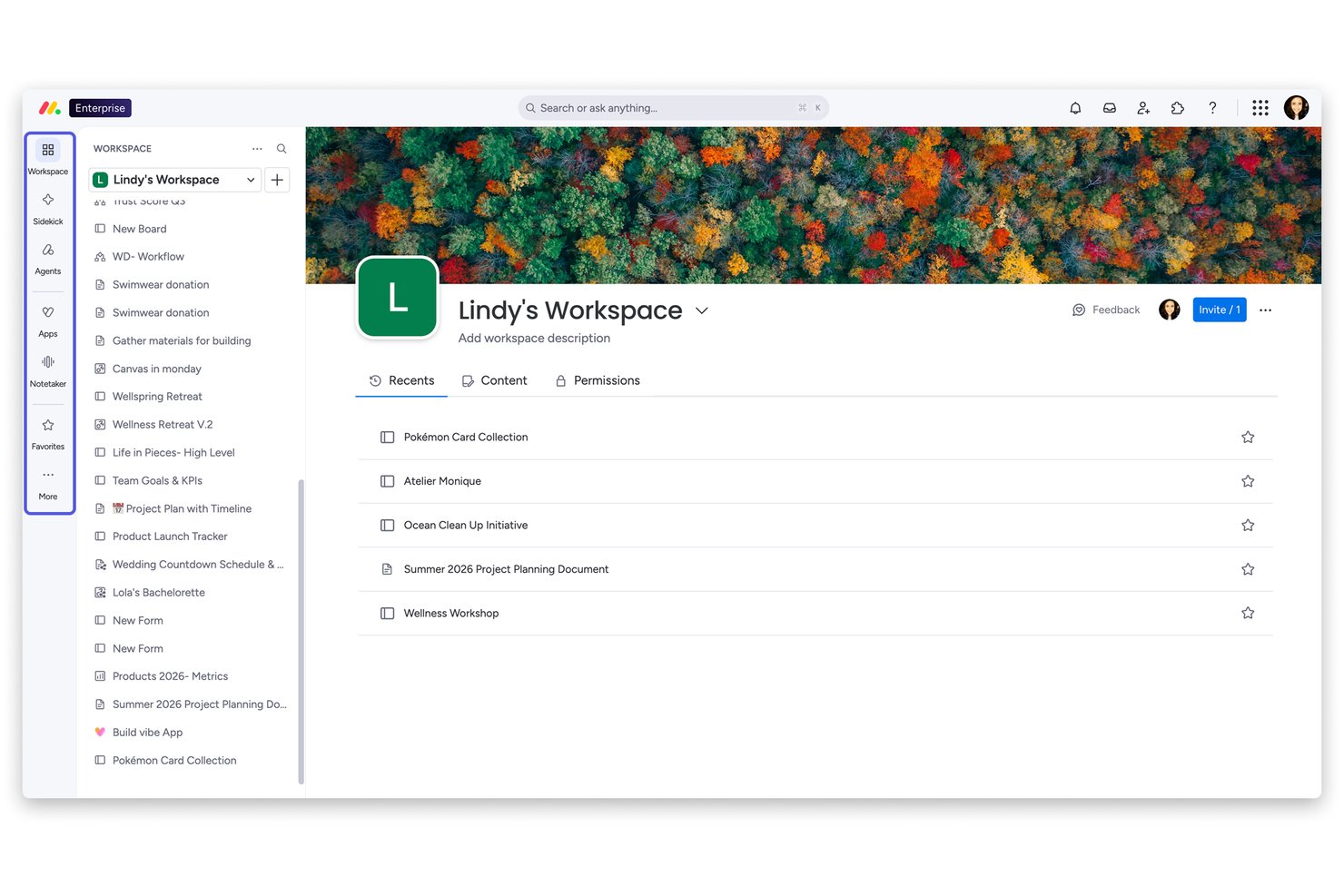
monday AI Workspace è una piattaforma flessibile di gestione dei progetti pensata per i team che hanno superato strumenti Kanban semplici e necessitano di una pianificazione multi-vista, collaborazione trasversale e automazione guidata dall'IA in un'unica soluzione.
Per chi è più indicato monday AI Workspace?
È particolarmente adatto a team di medie e grandi dimensioni, dove project manager e responsabili PMO necessitano di una visione a livello di portafoglio su più flussi di lavoro.
Perché monday AI Workspace è una delle migliori alternative a Trello (opzioni gratuite e a pagamento)
Ho scelto monday AI Workspace tra i migliori perché il suo livello di IA fa qualcosa che Trello semplicemente non può: monitora attivamente i progetti e segnala i rischi prima che mettano a repentaglio le tempistiche. Il Project Analyzer individua i colli di bottiglia in tempo reale, mentre AI Blocks automatizza lavori ripetitivi come la categorizzazione delle attività e il riepilogo degli aggiornamenti su tutte le bacheche. Apprezzo anche come le dashboard dal vivo attingano da più progetti contemporaneamente, offrendo una visibilità completa sul portafoglio senza bisogno di report manuali.
Funzionalità principali di monday AI Workspace
- Vista carico di lavoro: Visualizza la capacità del team a colpo d'occhio per bilanciare le assegnazioni ed evitare il sovraccarico di lavoro.
- Viste Gantt e timeline: Pianifica i progetti visivamente con timeline drag-and-drop e controllo del percorso critico.
- Documenti e lavagne: Collabora su documenti e fai brainstorming con strumenti whiteboard integrati direttamente nello spazio di lavoro.
- Monitoraggio nativo del tempo: Registra il tempo sulle attività e genera report per ore fatturabili o revisioni di produttività.
Integrazioni di monday AI Workspace
monday AI Workspace offre centinaia di integrazioni native, tra cui Slack, Google Workspace, Microsoft 365, Salesforce, HubSpot, Jira, GitHub, Zoom, Dropbox e Zendesk. Supporta anche Zapier e offre un'API per integrazioni personalizzate.
Pros and Cons
Pros:
- Individuazione dei rischi di progetto tramite IA integrata
- Dashboard di portafoglio su più progetti contemporaneamente
- Più viste progetto rispetto a Trello
Cons:
- I limiti di automazione vengono raggiunti rapidamente nei piani base
- Può risultare troppo complesso per i team piccoli
New Product Updates from monday AI Workspace
monday AI Workspace Adds Human Approval Routing
monday AI Workspace adds a human-in-the-loop approval block to AI Workflows, sending approval requests and routing workflow paths based on responses. For more information, visit monday AI Workspace's official site.

GQueues
Ideale per l'integrazione con Google Workspace
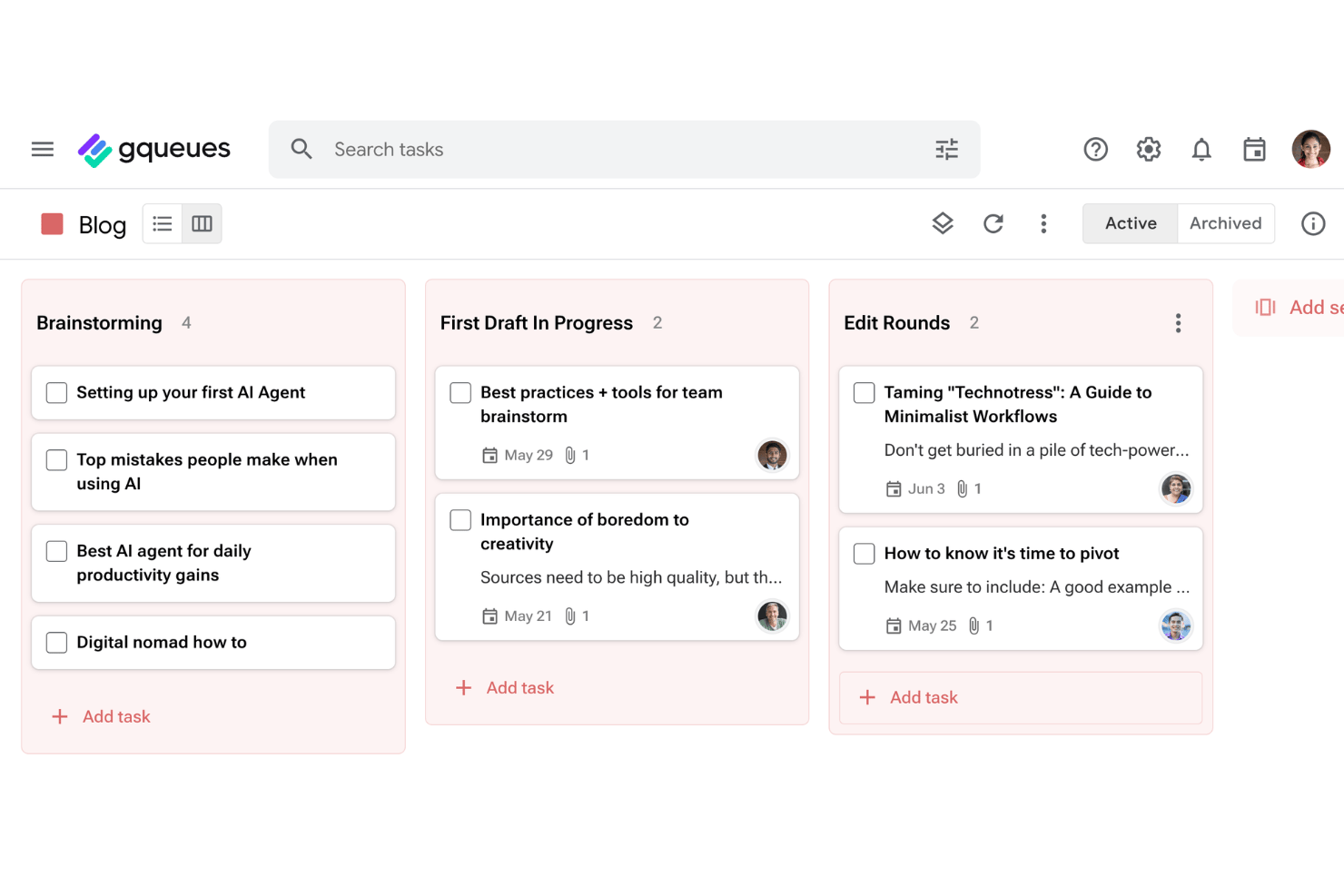
GQueues è uno strumento di gestione delle attività pensato per team e singoli professionisti che svolgono il proprio lavoro all'interno di Google Workspace, consentendo di monitorare le attività, gestire i progetti e mantenere l'organizzazione senza uscire dagli strumenti Google che già utilizzano.
A chi è più adatto GQueues?
GQueues è adatto a piccoli team e professionisti autonomi che utilizzano già Google Workspace e desiderano una gestione delle attività compatibile con gli strumenti che stanno già usando.
Perché GQueues è una buona alternativa a Trello
Ho scelto GQueues perché la sincronizzazione bidirezionale con Google Calendar è davvero utile nella pratica: riprogrammando un'attività nel Calendario, questa viene aggiornata istantaneamente in GQueues, mantenendo precisa la cronologia del progetto senza dover effettuare riconciliazioni manuali. Apprezzo anche il fatto che progetti separati possano essere sincronizzati con calendari separati, così posso tenere distinti il lavoro per i clienti, i progetti interni e le attività personali. Il componente aggiuntivo di Gmail mi consente di trasformare direttamente una conversazione email in un'attività, eliminando un passaggio che prima eseguivo manualmente ogni giorno.
Caratteristiche principali di GQueues
- Code intelligenti e ricerca avanzata: Crea visualizzazioni dinamiche e aggiornate automaticamente delle attività utilizzando filtri avanzati e ricerche salvate.
- Azioni collettive e tavolozza dei comandi: Apporta modifiche su larga scala o accedi rapidamente ai comandi con gli strumenti di modifica collettiva e le scorciatoie da tastiera.
- Integrazione con Gmail e l'estensione Chrome: Crea attività direttamente da email o pagine web senza dover passare da un'app all'altra.
- App mobili e accesso a Google Workspace: Accedi alle attività su iOS o Android e utilizza l'accesso singolo di Google per un accesso sicuro e pratico.
Integrazioni di GQueues
GQueues offre un'integrazione nativa con Google Workspace, tra cui Google Calendar, Google Drive, Gmail e Google Contacts.
Pros and Cons
Pros:
- Sottoattività con livelli gerarchici illimitati
- Trasformare le email in attività richiede un solo clic
- Il prezzo conveniente è ideale per i piccoli team
Cons:
- Nessuna visualizzazione Gantt o della cronologia per i progetti complessi
- Funzionalità limitate per gli utenti che non utilizzano Google

Quire
Ideale per gerarchie nidificate di attività
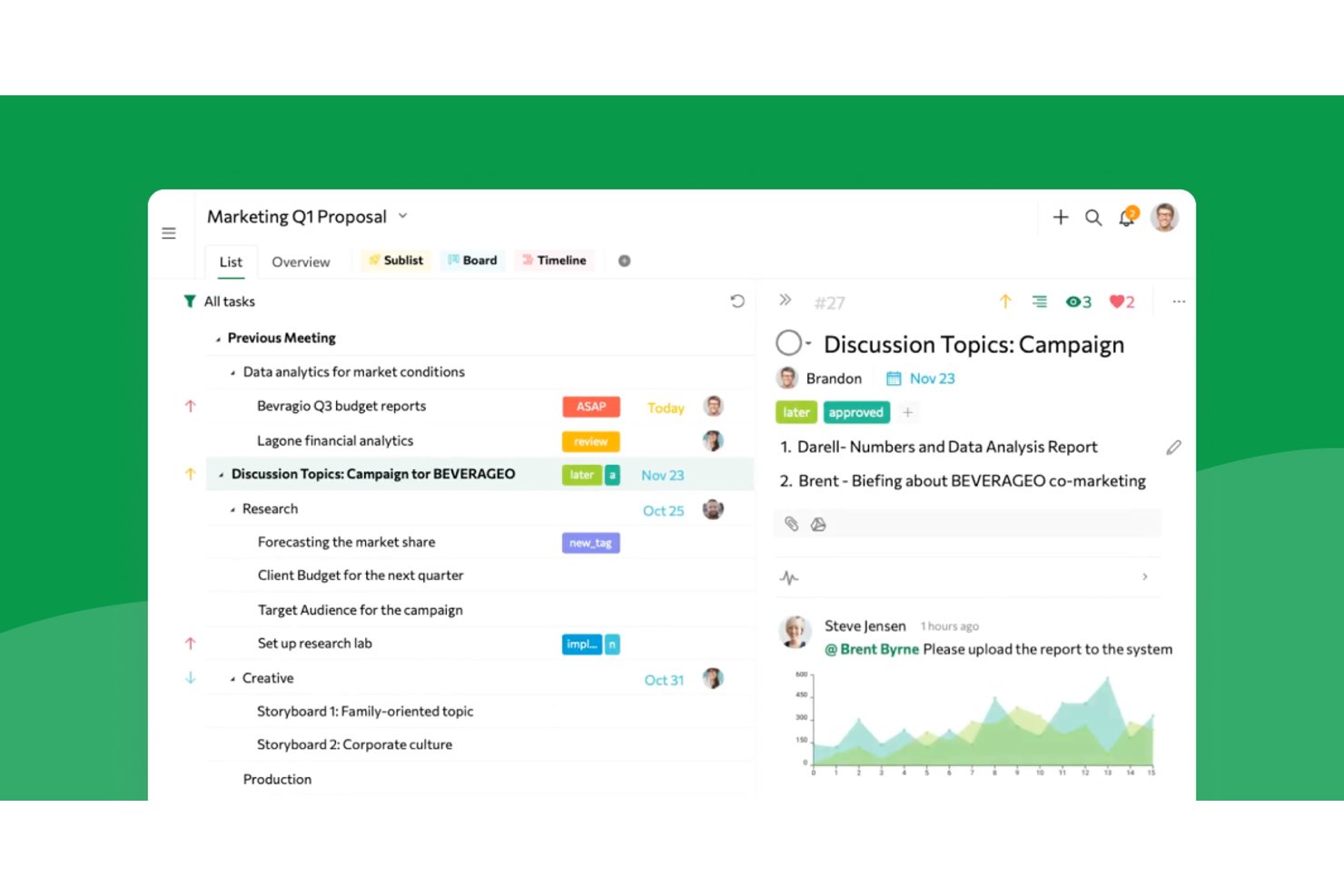
Quire offre ai team di prodotto, ai designer e alle agenzie uno spazio di lavoro visivo per gestire progetti complessi, suddividere le attività e migliorare la collaborazione tra team senza perdere di vista priorità o scadenze.
Per chi è più adatto Quire?
Responsabili di progetto che devono suddividere iniziative complesse in gerarchie dettagliate di attività e mantenere allineati i team tra i vari reparti.
Perché Quire è una valida alternativa a Trello (opzioni gratuite e a pagamento)
Ho scelto Quire perché gestisce le gerarchie di attività profonde meglio di quasi tutti gli altri strumenti che ho provato. Uso le sue visualizzazioni ibride ad albero e kanban per suddividere i progetti complessi in attività gestibili e mantenere chiare le dipendenze mentre i team aggiungono, riorganizzano e assegnano priorità alle sottoattività tra i vari reparti.
Funzionalità principali di Quire
- Visualizzazioni multiple dei progetti: Passa dalla visualizzazione a bacheca kanban a quella con sequenza temporale o elenco per un monitoraggio dei progetti personalizzato.
- Modifica collaborativa in tempo reale: Modifica attività e note contemporaneamente con i membri del team senza conflitti tra versioni.
- Attività ricorrenti automatizzate: Imposta la ripetizione delle attività secondo una pianificazione personalizzata per gestire il lavoro continuativo con meno configurazione manuale.
- Organizzazione intelligente in cartelle: Raggruppa progetti e attività correlate in cartelle per una gestione ordinata dello spazio di lavoro.
Integrazioni di Quire
Quire offre integrazioni native con Slack, Google Drive e GitHub ed è disponibile su Zapier. È disponibile anche un'API per le integrazioni personalizzate.
Pros and Cons
Pros:
- Gestisce senza difficoltà gerarchie profonde di attività nidificate
- Combina le visualizzazioni kanban e ad albero in un'unica soluzione
- Supporta la modifica collaborativa in tempo reale per i team
Cons:
- Opzioni integrate limitate per report e analisi
- Meno funzionalità avanzate di automazione rispetto ai principali concorrenti
New Product Updates from Quire

Quire Adds Task and Standalone Reminders
Quire adds task reminders and standalone reminders with shared notifications, recurring schedules, and automatic date tracking. These updates help teams stay ahead of deadlines and manage reminders that do not need a task. For more information, visit Quire’s official site.
 .
.
Il miglior prezzo per freelance e piccoli team
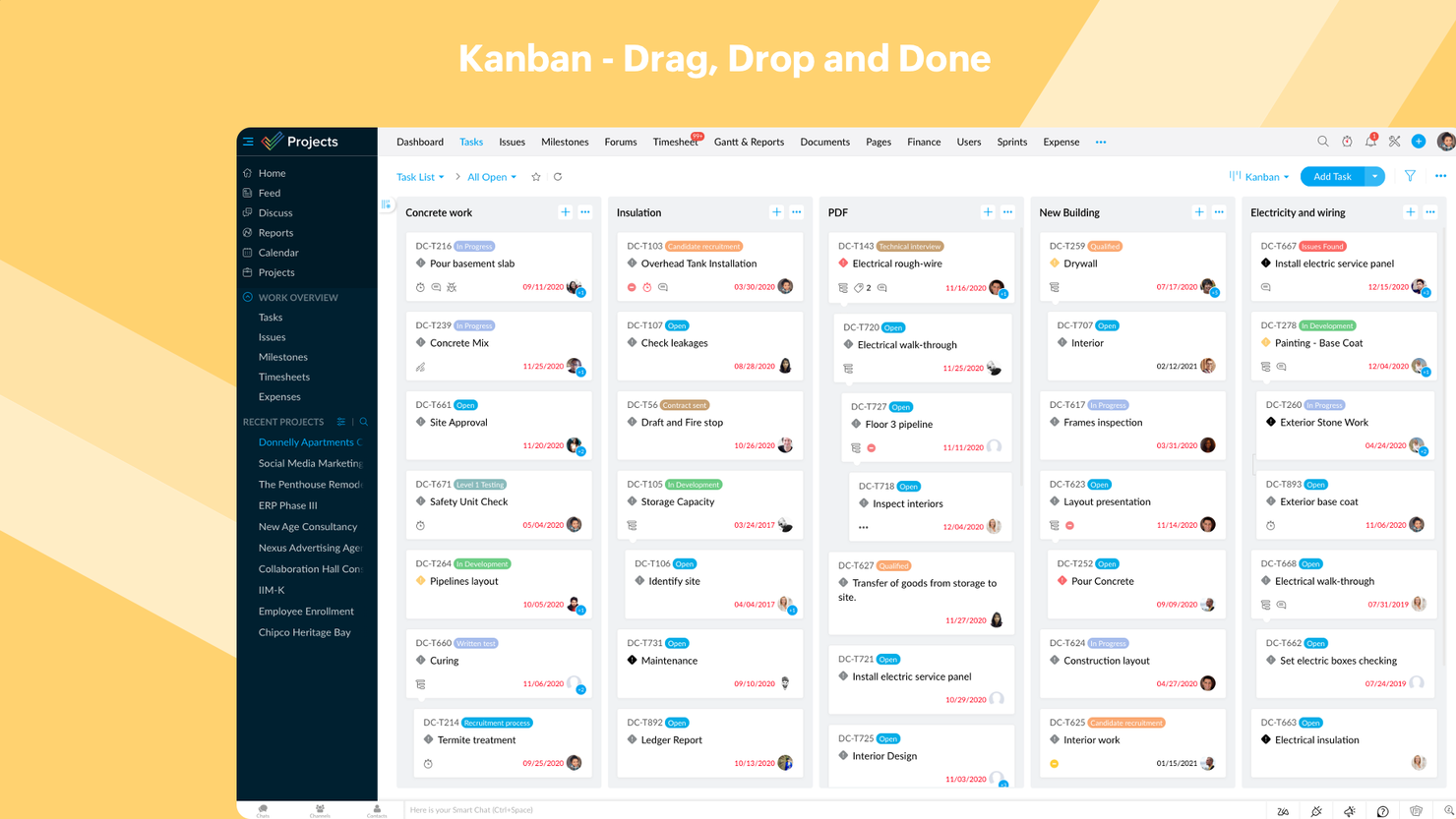
Zoho Projects è uno strumento di gestione progetti online pensato per team e freelance che desiderano pianificare, monitorare e collaborare in modo efficace sui progetti. Offre una soluzione conveniente per la gestione di compiti, tempistiche e flussi di lavoro del team.
Perché Zoho Projects è una valida alternativa a Trello: Zoho Projects include funzionalità di monitoraggio del tempo che permettono al tuo team di tenere traccia delle ore di lavoro e assicurarsi che le attività rimangano nei tempi previsti e nel budget. Inoltre, i dettagliati report sullo stato dei progetti offrono una panoramica chiara dell'avanzamento, aiutando a individuare ritardi e ottimizzare i flussi di lavoro. Lo strumento offre anche dipendenze tra le attività, per gestire strutture progettuali complesse in modo più efficiente.
Funzionalità e integrazioni principali di Zoho Projects:
Le funzionalità includono il monitoraggio delle milestone, che garantisce che il team resti allineato con gli obiettivi e le scadenze di progetto. Il modulo di tracciamento delle segnalazioni permette inoltre di registrare e risolvere i problemi, migliorando la consegna dei progetti. Inoltre, la registrazione delle ore è integrata direttamente nei flussi di lavoro delle attività per semplificare il monitoraggio delle ore lavorate su compiti specifici.
Integrazioni: Essendo parte dell'ecosistema Zoho, Projects può collegarsi a diversi servizi interni come Zoho Books, Zoho CRM e la suite finanziaria di Zoho. Il nuovo marketplace Zoho consente anche integrazioni di terze parti. Sono inoltre supportate integrazioni tramite Zapier e Zoho Flow.
Pros and Cons
Pros:
- Include diagrammi di Gantt per la gestione della timeline
- Si integra bene con altre app e strumenti Zoho
- Conveniente per freelance e piccoli team
Cons:
- La personalizzazione dei report può richiedere più tempo
- La personalizzazione della dashboard è limitata in alcune aree
New Product Updates from Zoho Projects
Zoho Projects Adds CodeX Scripts for Custom Modules
Zoho Projects now supports CodeX Scripts for custom modules, enabling conditional logic and rules for creating, updating, and deleting records. For more information, visit Zoho Projects' official site.
 .
.
Ideale per la gestione visiva dei progetti
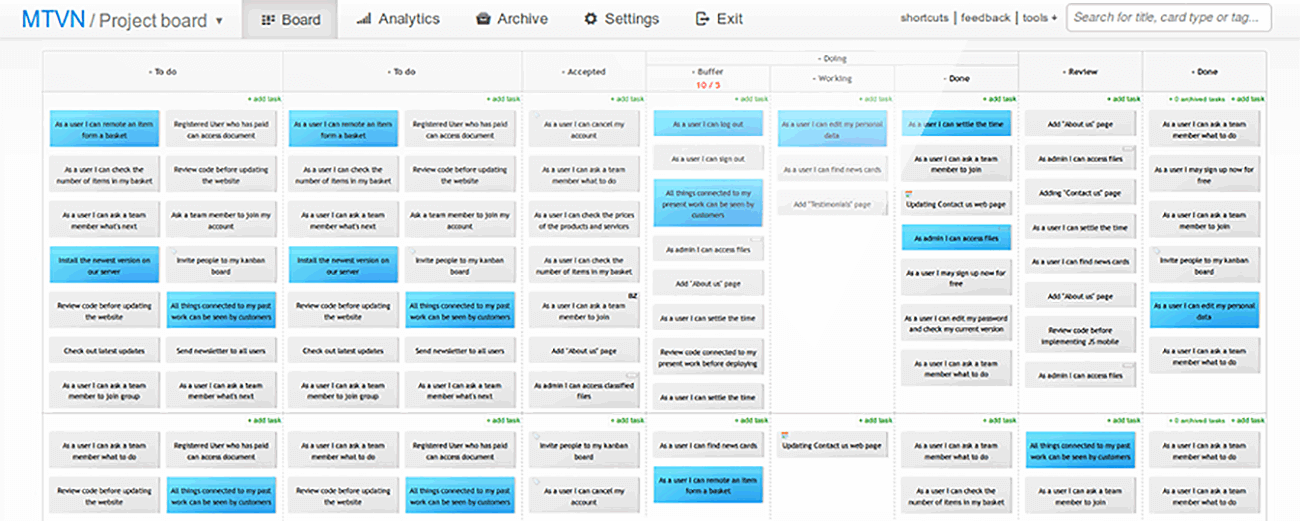
Kanban Tool è una piattaforma di gestione progetti che aiuta i team a visualizzare i flussi di lavoro, monitorare i progressi e migliorare la produttività. È ideale per le aziende che cercano un modo semplice ma efficace per gestire le attività e potenziare la collaborazione tra i membri del team.
Perché Kanban Tool è una valida alternativa a Trello: Kanban Tool si distingue per offrire bacheche visive intuitive che semplificano l'organizzazione delle attività e il monitoraggio dell'avanzamento. La funzione di rilevamento del tempo aiuta il team a monitorare la produttività direttamente dalla bacheca attività. Inoltre, gli strumenti di analisi forniscono informazioni utili sulle performance del team e sui colli di bottiglia del flusso di lavoro. La piattaforma è anche facile da personalizzare, rendendola particolarmente adatta ai team con esigenze progettuali specifiche.
Funzionalità principali e integrazioni di Kanban Tool:
Le funzionalità includono una visualizzazione integrata del calendario che offre una chiara panoramica delle attività e delle scadenze, per aiutare il team a pianificare in modo efficace. La funzione WIP (Work in Progress) limita anche il numero di attività in corso in ogni fase del flusso di lavoro, assicurando che il team rimanga concentrato e non sia sovraccaricato. Inoltre, la possibilità di accesso offline permette al team di aggiornare le bacheche anche senza connessione internet, garantendo la continuità del lavoro.
Le integrazioni includono Slack, Zapier, Dropbox, Google Drive, Microsoft Teams, Jira, GitHub, Trello, Asana e Salesforce.
Pros and Cons
Pros:
- Offre swimlane per un'organizzazione dettagliata delle attività
- Supporta l'automazione dei task per ridurre il lavoro manuale
- Adatto sia per piccoli team che per grandi organizzazioni
Cons:
- Gli strumenti di reportistica richiedono configurazione iniziale
- Minor flessibilità nella gestione dettagliata di portafogli progetti

Breeze
La migliore combinazione con una suite completa per la gestione dei progetti
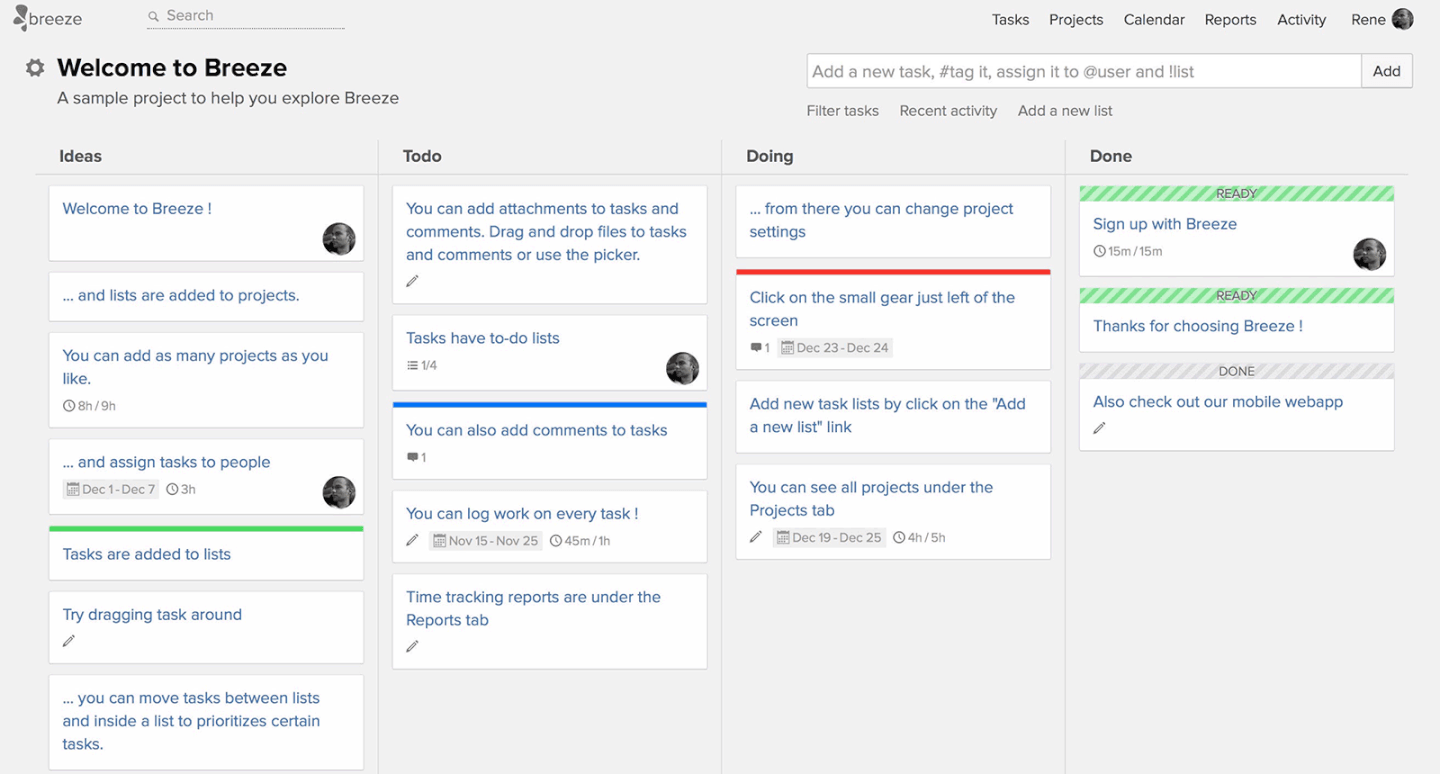
Breeze è uno strumento di gestione dei progetti che aiuta i team a monitorare le attività, gestire i flussi di lavoro e supervisionare i progetti in modo efficiente. È ideale per le organizzazioni che cercano una piattaforma completa per gestire tutti gli aspetti della gestione dei progetti.
Perché Breeze è una buona alternativa a Trello: Breeze combina la gestione delle attività con funzionalità come il monitoraggio del tempo e l'allocazione delle risorse, per dare al tuo team un maggiore controllo sui progetti. Le sue bacheche visive ti aiutano a organizzare i flussi di lavoro e a garantire la trasparenza tra le attività. La piattaforma include inoltre strumenti di reportistica integrati per aiutare il tuo team ad analizzare le prestazioni e prendere decisioni informate. Inoltre, Breeze supporta le tempistiche dei progetti e la definizione del budget, caratteristiche che lo rendono uno strumento adatto a progetti complessi e articolati.
Funzionalità e integrazioni distintive di Breeze:
Le funzionalità includono strumenti avanzati per la definizione del budget dei progetti, che consentono al tuo team di pianificare e monitorare le risorse finanziarie. La funzionalità di monitoraggio del carico di lavoro garantisce inoltre che i membri del team non siano sovraccarichi e che le risorse siano bilanciate. Breeze offre anche un sistema centralizzato di gestione dei file per mantenere tutti i documenti dei tuoi progetti accessibili in un unico luogo.
Le integrazioni includono Slack, Trello, Google Drive, Dropbox, Microsoft Teams, GitHub, Zapier, Salesforce, Asana e QuickBooks.
Pros and Cons
Pros:
- Supporta le attività ricorrenti per flussi di lavoro coerenti
- Migliora la collaborazione con la gestione condivisa dei documenti
- Fornisce panoramiche visive dei progetti con bacheche Kanban
Cons:
- Modelli predefiniti limitati per una configurazione rapida
- Non è ideale per i team che non necessitano di funzionalità di gestione del budget

Ideale per le funzionalità di automazione

MeisterTask è uno strumento di gestione dei progetti progettato per aiutare i team ad automatizzare i flussi di lavoro e organizzare le attività in modo efficace. Si rivolge ai team che cercano un approccio snello alla gestione dei progetti con un intervento manuale minimo.
Perché MeisterTask è una valida alternativa a Trello: MeisterTask semplifica la gestione dei progetti grazie a funzionalità di automazione che riducono le attività manuali ripetitive. Le sue bacheche Kanban completamente personalizzabili consentono al tuo team di adattare i flussi di lavoro alle specifiche esigenze progettuali. Inoltre, i widget di monitoraggio del progresso offrono aggiornamenti in tempo reale sullo stato del progetto, mantenendo tutti allineati.
Caratteristiche e integrazioni principali di MeisterTask:
Le caratteristiche includono permessi basati sui ruoli che permettono al tuo team di controllare l'accesso alle attività e ai progetti per una maggiore sicurezza e organizzazione. La vista agenda può aiutare gli utenti a gestire le priorità personali raggruppando i compiti provenienti da più progetti in un unico posto. MeisterTask offre anche checklist all'interno delle attività per suddividere compiti complessi in passaggi più piccoli e gestibili, migliorando chiarezza ed esecuzione.
Le integrazioni includono Slack, Google Drive, Dropbox, Microsoft Teams, GitHub, Zapier, Salesforce, Asana, Trello e Outlook.
Pros and Cons
Pros:
- Include relazioni tra attività per gestire le dipendenze dei progetti
- Offre il monitoraggio del tempo integrato per tenere sotto controllo la produttività
- Semplifica la creazione delle attività con template e automazioni
Cons:
- Non ideale per i team che utilizzano metodologie tradizionali
- Le relazioni tra le attività possono risultare complesse per i principianti

ClickUp
Miglior piano gratuito come alternativa a Trello

ClickUp è un software di gestione dei progetti e uno strumento Kanban con funzionalità avanzate per gestire e portare a termine tutti i progetti del tuo team su un'unica piattaforma. Gli utenti possono pianificare i progetti, programmare le attività e gestire le risorse in uno spazio di lavoro centralizzato su bacheche Kanban, oltre che su calendari, diagrammi di Gantt, cronologie e altro ancora.
Le funzionalità di gestione delle attività includono check-list di attività, sotto-attività e modelli di attività, oltre alla possibilità di filtrare, ordinare, cercare, riordinare facilmente e visualizzare le attività nel modo più comodo per il team. Gli utenti possono anche creare diagrammi di Gantt, calendari e cronologie per visualizzare le attività.
ClickUp include inoltre funzionalità per la creazione, condivisione e modifica collaborativa di Wiki e documenti. Gli utenti possono commentare documenti e attività, assegnare commenti e chattare con altri membri del team per aumentare la comunicazione e la collaborazione. Le funzionalità di reportistica includono la possibilità di creare dashboard personalizzate, oltre a sei tipi di report integrati per la reportistica del team.
ClickUp offre integrazioni native con Slack, G Suite, Dropbox e molti altri strumenti, oltre a oltre 1.000 integrazioni tramite Zapier.
Il piano gratuito di ClickUp è completo e include tutte le funzionalità principali. Il piano illimitato parte da $5 al mese per utente e offre funzionalità aggiuntive.
New Product Updates from ClickUp
ClickUp Adds Meetings Hub, Super Agent Templates, and ZoomInfo Integration
ClickUp adds a searchable Meetings Hub, new ways to clone and template Super Agents, and a ZoomInfo integration through the App Center. These updates improve meeting retrieval, agent reuse, and access to sales intelligence. For more information, visit ClickUp’s official site.

Workzone
Miglior onboarding e formazione personalizzati
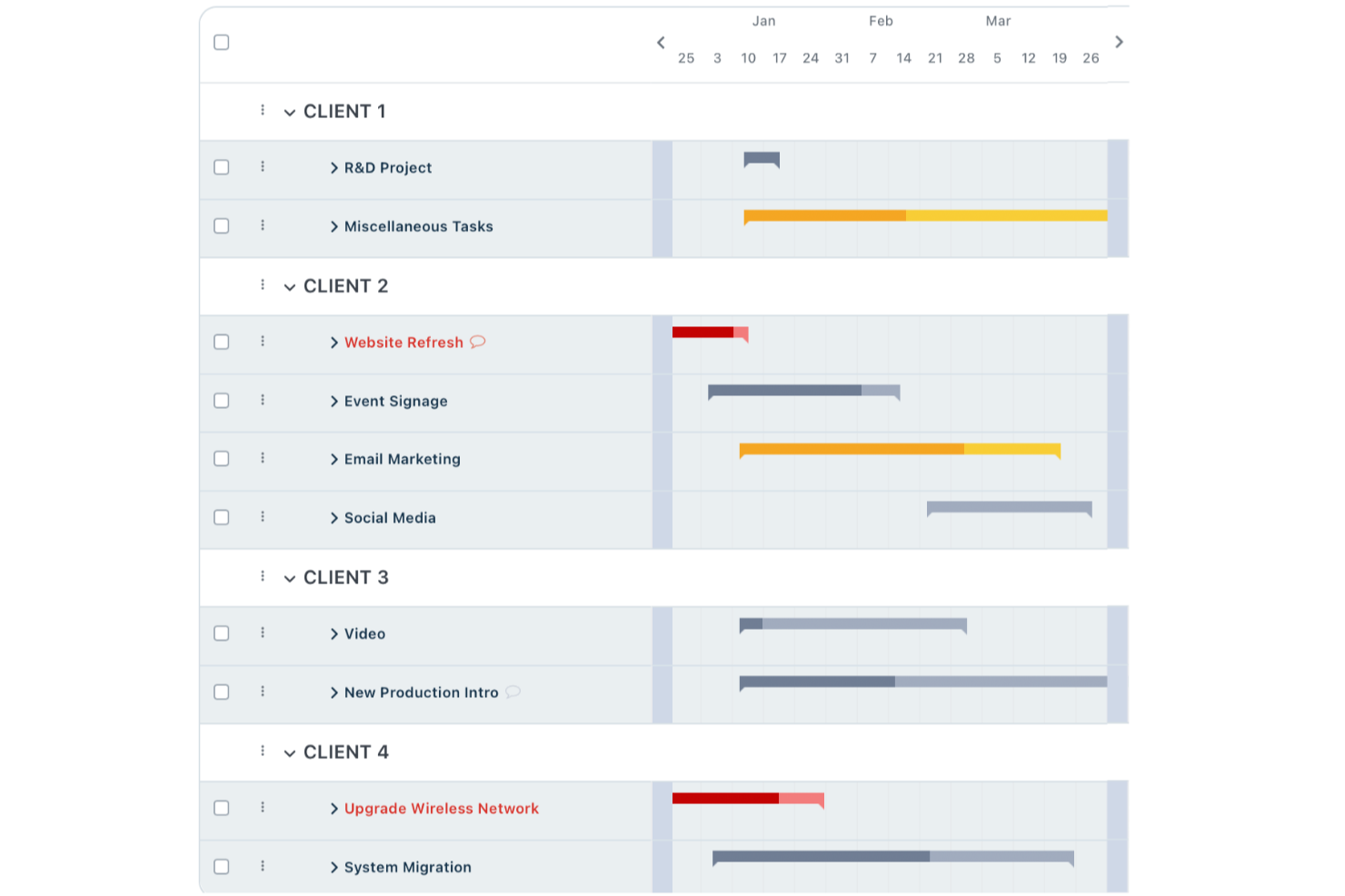
Workzone è una piattaforma di gestione dei progetti pensata per i team che necessitano di maggiore struttura e controllo rispetto a quanto offerto da semplici kanban board. È una soluzione ideale per team di marketing, operazioni o servizi professionali che desiderano gestire progetti complessi, monitorare i progressi e migliorare la visibilità inter-funzionale.
Per chi è ideale Workzone?
Aziende di medie dimensioni nei settori marketing, operazioni o team creativi che hanno bisogno di struttura nei progetti e supporto personalizzato per l’onboarding.
Perché Workzone è una buona alternativa a Trello (opzioni gratuite e a pagamento)
Ho scelto Workzone perché offre molto più di quanto offra Trello ai team che necessitano di un vero supporto all’onboarding. Quando il mio team ha iniziato a utilizzarlo, abbiamo avuto accesso a uno specialista dedicato che ci ha guidati nell’implementazione, nelle procedure operative e nelle migliori pratiche per il nostro specifico caso d’uso. Apprezzo che non si tratti di una sola sessione: Workzone fornisce risorse di formazione continuativa così che i nuovi membri del team possano aggiornarsi senza rallentare il lavoro degli altri. Per i team che migrano da Trello, questo tipo di supporto strutturato rende l’adozione molto meno complicata.
Funzionalità principali di Workzone
- Moduli di richiesta progetti: Invia e monitora le nuove richieste di lavoro tramite un modulo standardizzato collegato direttamente al flusso dei progetti.
- Strumenti di revisione creativa: Rivedi e annota asset creativi in tempo reale, con i feedback centralizzati all’interno dell’attività in modo che i cicli di revisione restino organizzati.
- Template di progetto: Crea template di progetto riutilizzabili per avviare workflow coerenti senza dover ricostruire ogni volta la struttura da zero.
- Gestione del carico di lavoro: Visualizza la capacità del team sui compiti e i progetti in corso per individuare conflitti di risorse prima che queste influenzino le tempistiche di consegna.
Integrazioni di Workzone
Workzone offre integrazioni native con Slack, Microsoft Teams, Dropbox, Box e Google Drive, e mette a disposizione una API per integrazioni personalizzate.
Pros and Cons
Pros:
- Sessioni di onboarding personalizzate per i nuovi team
- Opzioni dettagliate di report su progetti e task
- Avanzati strumenti di gestione portfolio e risorse
Cons:
- Nessun piano gratuito per i team piccoli
- L’interfaccia appare datata rispetto agli strumenti più recenti
New Product Updates from Workzone

Workzone Enterprise Adds Multi-Stage Approval Workflows
Workzone Enterprise now includes Approval Workflows, enabling multi-stage document approvals to standardize complex processes and reduce manual effort. For more information, visit Workzone's official site.
 .
.
Kanban Zone
Migliore bacheca Kanban cross-portfolio
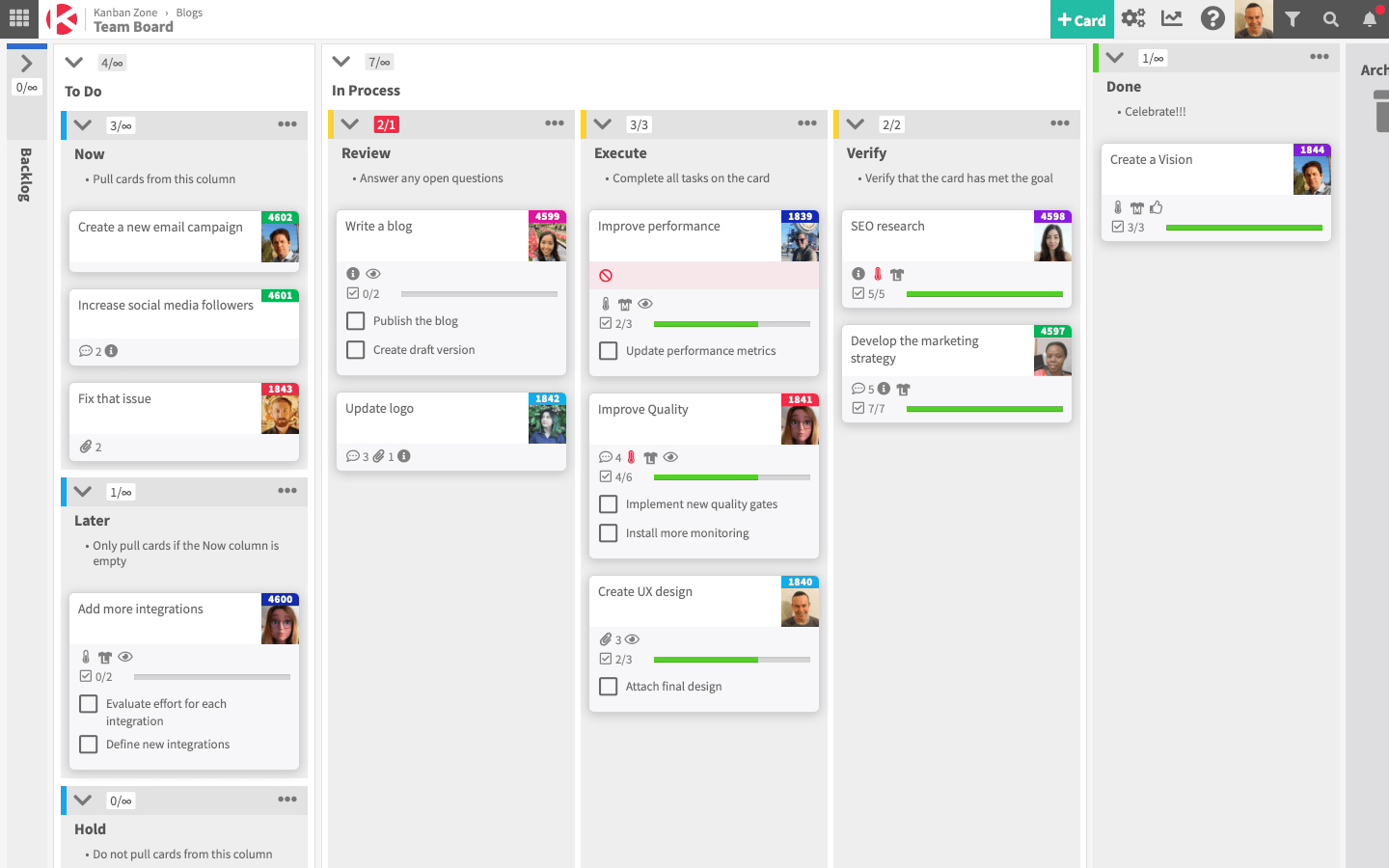
Kanban Zone è uno strumento di gestione progetti progettato per team e organizzazioni che gestiscono più progetti all'interno di portafogli. Fornisce un monitoraggio visivo delle attività per migliorare l'efficienza dei flussi di lavoro e la collaborazione del team.
Perché Kanban Zone è una buona alternativa a Trello: Kanban Zone offre bacheche Kanban altamente personalizzabili che permettono al tuo team di monitorare attività e progetti attraverso diversi portafogli. La funzione di gerarchia delle schede consente anche di suddividere progetti complessi in attività più piccole, rendendoli più facili da gestire. Inoltre, grazie a layout di bacheca flessibili, puoi adattare i flussi di lavoro in base alle esigenze di diversi team e progetti.
Funzionalità e integrazioni distintive di Kanban Zone:
Le funzionalità includono uno strumento di mappatura delle dipendenze che aiuta il team a identificare e risolvere le dipendenze tra le attività per evitare ritardi. La funzionalità swimlane consente di categorizzare le attività per priorità, team o fase di progetto, migliorando così la visibilità. Inoltre, le funzionalità di collaborazione in tempo reale assicurano che aggiornamenti e modifiche siano riflessi istantaneamente su tutte le bacheche per un allineamento del team.
Le integrazioni includono Jira, Slack, Google Drive, Microsoft Teams, GitHub, Trello, Dropbox, Salesforce, Asana e Zapier.
Pros and Cons
Pros:
- Supporta layout di bacheca altamente personalizzabili
- Consente aggiornamenti in tempo reale per una collaborazione immediata
- Gestisce efficacemente i flussi di lavoro di più team
Cons:
- Richiede tempo per personalizzare e configurare le bacheche
- Può risultare eccessivo per progetti di un solo team
Altri strumenti alternativi a Trello
Ecco un elenco di alcune altre alternative a Trello che vale la pena prendere in considerazione.
- Shortcut
Ideale per team di sviluppo
- Hygger
Ideale per lo sviluppo software
- Bonsai Agency Software
Ideale per agenzie
- Taskworld
Ideale per la grande varietà di funzionalità
- Kissflow Workflow
Migliore strumento Kanban collaborativo
- Zenhub
Ideale per la gestione agile dei progetti all'interno di GitHub
- ProjectManager
Migliore strumento Kanban con funzionalità di reporting
- Planview LeanKit
Ideale per la gestione progetti in ottica lean
- Businessmap
Ideale per la gestione agile del portafoglio
- Pneumatic Workflow
Ideale per ottimizzare i progetti digitali


Software correlati per la gestione dei progetti
Se non hai ancora trovato quello che stai cercando, dai un'occhiata a questi altri strumenti correlati che abbiamo testato e valutato:
- Software per la gestione dei progetti
- Software per la gestione delle attività
- Strumenti di collaborazione
- Strumento per creare diagrammi di Gantt
- Software per il monitoraggio dei progetti
- Software per la pianificazione dei progetti
Come Valuto le Alternative a Trello
Analizzo le alternative a Trello su due livelli: una base che ogni strumento deve raggiungere e fattori distintivi—come le visualizzazioni Gantt, la profondità dell'automazione e il monitoraggio del carico di lavoro—che determinano la soluzione più adatta per il tuo team.
Funzionalità di Base (Requisiti Fondamentali per Questa Lista)
Quando seleziono gli strumenti per la mia lista, valuto ciascuno su una scala da 0 (non offre la funzionalità) a 5 (eccelle in quest’area) per ogni funzione principale elencata di seguito. Successivamente, calcolo il punteggio totale dello strumento in percentuale. Ogni strumento deve raggiungere un punteggio totale minimo del 75% per essere incluso.
- Bacheche Visive delle Attività: Valuto se uno strumento offre bacheche Kanban drag-and-drop con colonne personalizzabili, filtri sulle card e opzioni di raggruppamento—la flessibilità che i team utilizzano quotidianamente.
- Visualizzazioni Multiple di Progetto: Oltre alla bacheca base, verifico la presenza di viste elenco, calendario, Gantt/timeline e tabella, affinché i team possano cambiare prospettiva durante uno sprint senza dover cambiare strumento.
- Nozioni Essenziali di Gestione Attività: Ogni strumento dovrebbe supportare assegnatari, scadenze, sotto-attività, dipendenze, allegati e campi personalizzati—attributi fondamentali che impediscono alle card di diventare semplici post-it digitali.
- Automazione del Flusso di Lavoro: Valuto se i trigger basati su regole gestiscono scenari reali, come assegnare automaticamente una card quando cambia colonna o creare attività ricorrenti per i meeting settimanali.
- Strumenti di Collaborazione per il Team: Spazi di lavoro condivisi, @menzioni, feed di attività e notifiche in tempo reale sono elementi chiave—soprattutto per team distribuiti che coordinano da diversi fusi orari.
- Integrazioni & Accesso API: Controllo se sono presenti connettori nativi per strumenti come Slack, GitHub, Google Workspace e Figma, e se la piattaforma offre un’API pubblica e supporta strumenti iPaaS come Zapier o Make.
Dopo aver individuato gli strumenti che soddisfano questi criteri, considero ciò che distingue ogni piattaforma.
Fattori Differenzianti (Cosa Distingue i Fornitori)
Ecco come confronto e metto a confronto i diversi fornitori:
Funzionalità Speciali
Presto particolare attenzione alle visualizzazioni del carico di lavoro perché indicano se un PM può individuare sovraccarichi prima che compromettano uno sprint. Dashboard e report sono altrettanto importanti: valuto se uno strumento permette di visualizzare metriche sulla salute del progetto e dati di burndown senza dover esportare tutto su un foglio di calcolo. Il monitoraggio del tempo integrato è un altro elemento distintivo, soprattutto per i team che devono registrare le ore sulle attività per fatturazione o pianificazione della capacità.
Oltre le Funzionalità
L’esperienza di migrazione conta molto quando si passa da Trello—valuto se una piattaforma offre un’importazione nativa da Trello che mantiene bacheche, card e allegati senza dover ricostruire manualmente. La struttura dei prezzi è altrettanto importante, in particolare se il piano gratuito è davvero utilizzabile o solo una demo travestita. Valuto anche la scalabilità dello strumento; un team di cinque persone non dovrebbe sentirsi sopraffatto, ma la stessa piattaforma deve reggere quando i progetti aumentano e il personale cresce fino a cinquanta o oltre.
Funzionalità principali di Trello
Ecco alcune funzionalità principali di Trello che il tuo software alternativo dovrebbe essere in grado di replicare o migliorare per essere una soluzione adatta:
- Bacheche: le bacheche visive di Trello offrono una panoramica chiara dei diversi progetti e aiutano a mantenere organizzate le attività all'interno di contesti specifici.
- Elenchi: gli elenchi all'interno delle bacheche consentono agli utenti di categorizzare le attività in base a fasi o tipologie, facilitando la gestione dei flussi di lavoro e l'individuazione di ciò che richiede attenzione.
- Schede: ogni attività è rappresentata da una scheda, che può essere spostata tra gli elenchi per mostrare i progressi, aiutando a monitorare visivamente lo stato di ogni attività.
- Etichette: le etichette aggiungono alle schede contrassegni con colori distintivi, consentendo agli utenti di identificare rapidamente le categorie delle attività, le priorità o i reparti coinvolti.
- Elenchi di controllo: gli elenchi di controllo all'interno delle schede suddividono le attività in passaggi più piccoli, assicurando che gli utenti non trascurino alcun dettaglio e possano monitorare facilmente le sottoattività.
- Scadenze: impostare le scadenze sulle schede aiuta gli utenti a tenere sotto controllo le scadenze e garantisce il completamento puntuale delle attività.
- Allegati: aggiungere allegati alle schede consente di conservare tutti i documenti e i file pertinenti in un unico luogo, facilitando l'accesso e la collaborazione tra i membri del team.
- Commenti: la funzione dei commenti sulle schede consente ai membri del team di comunicare direttamente su attività specifiche, migliorando la collaborazione e mantenendo tutte le discussioni nel loro contesto.
- Integrazioni: Trello si integra con diversi strumenti come Slack, Google Drive e altri, ampliando le funzionalità e ottimizzando il flusso di lavoro grazie alla connessione con altri software che utilizzo.
- Power-Up: questi componenti aggiuntivi estendono le funzionalità di Trello, offrendo funzioni aggiuntive come viste calendario, automazione e campi personalizzati per adattare lo strumento alle tue esigenze specifiche.
FAQ su Trello
Ecco alcune domande comuni su Trello a cui abbiamo pensato di rispondere.
A cosa serve Trello?
Ecco 10 cose per cui viene utilizzato Trello:
- Gestione dei progetti
- Gestione e automazione dei flussi di lavoro
- Pianificazione degli eventi
- Gestione delle attività personali
- Monitoraggio del tempo
- Gestione di siti web e blog
- Organizzazione di file o raccolte digitali
- Assunzione e inserimento dei dipendenti
- Archiviazione e condivisione dei file
- Pianificazione dei prodotti e definizione della tabella di marcia
Trello è un'app per Windows?
Trello funziona su tutti i dispositivi web e mobili e offre app mobili per Android e iOS, oltre ad app desktop per macOS e Windows.
Trello è open source?
No. Trello è un SaaS a codice sorgente chiuso. Le alternative a codice sorgente aperto simili a Trello includono Taiga, Kanboard, Wekan, TaskBoard e Restyaboard.
Che cos'è Kanban?
Kanban è un metodo di gestione dei progetti e dei flussi di lavoro basato su un sistema di gestione del lavoro sviluppato negli stabilimenti Toyota negli anni ’60. Il metodo Kanban consente di ridurre al minimo l’esecuzione simultanea di più attività, semplificare la gestione del lavoro in corso e migliorare la velocità e la qualità del lavoro prodotto dai team collaborativi e autogestiti.
Trello si basa su Kanban?
Il software di collaborazione Trello si basa sul metodo Kanban e utilizza bacheche Kanban, schede e strutture a corsie, caratteristiche di questo metodo.
E se volessi alternative ad altri strumenti?
Se vuoi trovare alternative ad altri tuoi strumenti, puoi consultare alcuni dei nostri altri elenchi di alternative: