

I 10 migliori strumenti alternativi a TeamGantt per la pianificazione nel 2026

Elenco delle migliori alternative a TeamGantt


TeamGantt è uno strumento di gestione dei progetti che offre una sequenza temporale visiva per pianificare e monitorare le attività, aiutando i team a pianificare i progetti in modo efficace e a mantenere una comunicazione chiara. Tuttavia, alcuni utenti potrebbero cercare alternative per avere funzionalità, prezzi o interfacce utente differenti.
Grazie alla mia vasta esperienza nella gestione dei progetti e nel software digitale, ho individuato e testato diverse alternative a TeamGantt. Che si tratti di una piccola impresa o di una grande azienda, sono certo che le mie recensioni dettagliate ti aiuteranno a trovare la soluzione ideale per te e il tuo team.
Cos'è TeamGantt?
TeamGantt è un software di gestione dei progetti progettato per aiutare i team a pianificare e realizzare i progetti tramite un'interfaccia intuitiva con diagrammi di Gantt. Viene utilizzato frequentemente per allineare i membri del team sulle tempistiche e sui risultati finali dei progetti, assicurando che questi vengano completati nei tempi previsti e rispettando l'ambito stabilito.
Perché fidarsi dei nostri consigli sui software
Il nostro team testa e recensisce software dal 2012. In quanto project manager noi stessi, sappiamo quanto sia difficile — e importante — scegliere il software giusto.
Per questa guida, abbiamo valutato gli strumenti attraverso test pratici e ricerche indipendenti, assegnando un punteggio agli strumenti in base ai nostri criteri di selezione. Ci basiamo inoltre sulle competenze di leader di pensiero del settore e di professionisti attivi nella gestione dei progetti.
Le nostre recensioni riflettono il nostro giudizio editoriale umano, non un discorso di vendita.
Revisori esperti:
Tabella comparativa delle alternative a TeamGantt
| Tool | Best For | Trial Info | Price | ||
|---|---|---|---|---|---|
| 1 | Ideale per funzionalità di livello enterprise | Prova gratuita di 30 giorni | Da $10/utente/mese (fatturato annualmente) | Website | |
| 2 | Ideale per i puristi del Kanban | Prova gratuita di 14 giorni + piano gratuito disponibile | Da $6/utente/mese | Website | |
| 3 | Ideale per la pianificazione orientata alle tappe fondamentali | Piano gratuito disponibile | Da $39/mese (fatturazione annuale) | Website | |
| 4 | Ideale per il controllo unificato dei progetti | Prova gratuita di 14 giorni + demo gratuita disponibile | Da $45/mese (fatturazione annuale) | Website | |
| 5 | Ideale per team orientati al cliente | Prova gratuita di 30 giorni + demo gratuita disponibile | A partire da $9.99/utente/mese (fatturazione annuale) | Website | |
| 6 | Ideale per la personalizzazione dei flussi di lavoro | Prova gratuita di 30 giorni + piano gratuito + demo gratuita disponibile | A partire da $11.20/utente/mese (fatturazione annuale) | Website | |
| 7 | Ideale per il monitoraggio in tempo reale dell'avanzamento dei lavori | Prova gratuita di 30 giorni + demo gratuita disponibile | Da $15/utente/mese (fatturato annualmente) | Website | |
| 8 | Ideale per l'integrazione con il CRM | Prova di 15 giorni + piano gratuito + demo gratuita disponibili | Da $49/organizzazione/mese (fatturato annualmente) | Website | |
| 9 | Ideale per la pianificazione dinamica | Prova gratuita disponibile | Prezzo su richiesta | Website | |
| 10 | Ideale per la gestione progetti open source | Piano gratuito per sempre disponibile | Utilizzo gratuito | Website |
Recensioni delle migliori alternative a TeamGantt
Di seguito ti guiderò attraverso un’analisi e una panoramica dettagliate di ciascuna alternativa a TeamGantt. Esaminerò vantaggi e svantaggi, analizzerò le loro funzionalità e illustrerò gli scenari in cui danno il meglio di sé.

Ideale per funzionalità di livello enterprise
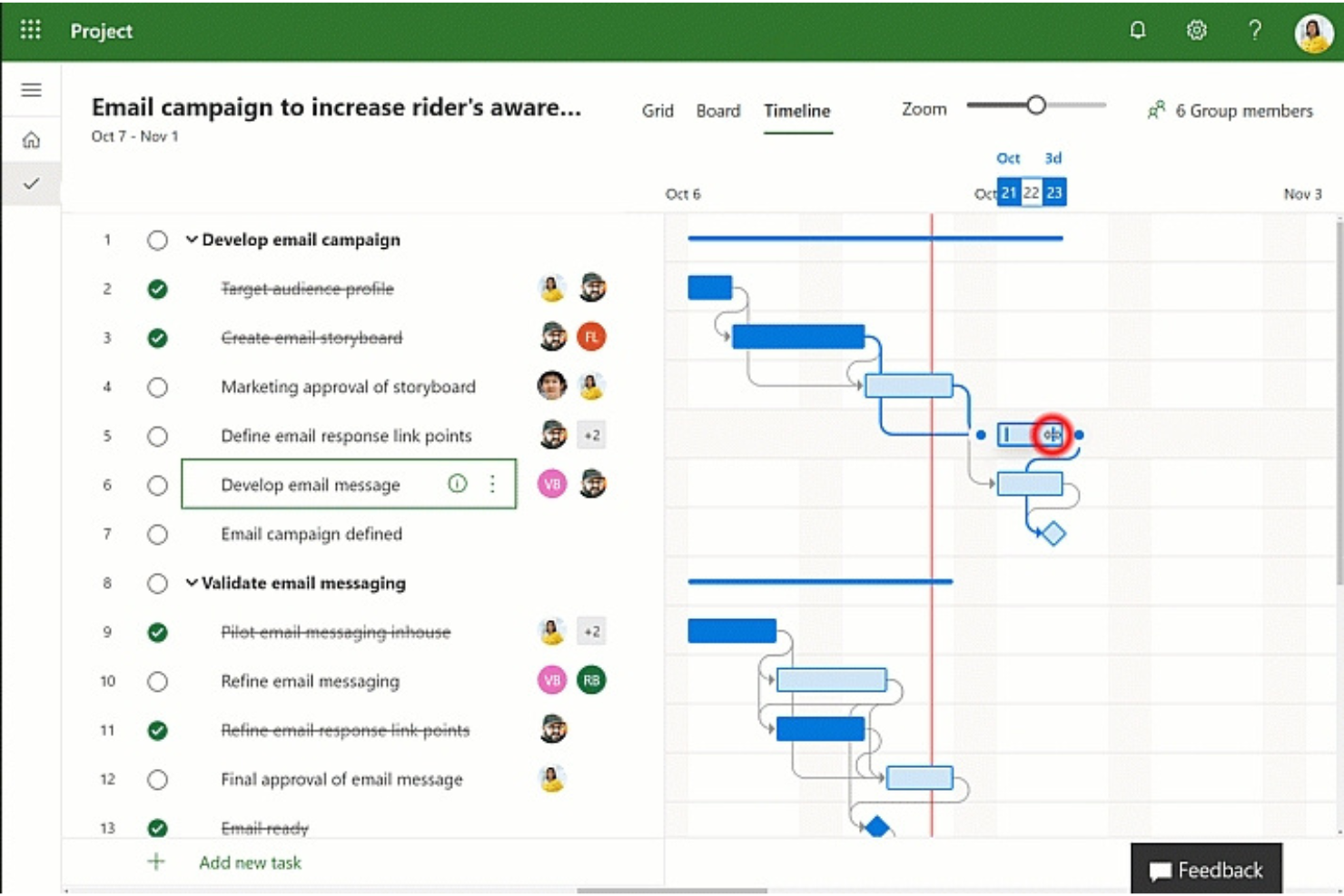
Microsoft Project è uno strumento avanzato di gestione dei progetti progettato per soddisfare le esigenze di aziende di ogni dimensione. È particolarmente adatto alle organizzazioni che cercano funzionalità di project management di livello enterprise.
Perché è una valida alternativa a TeamGantt: Microsoft Project offre una vasta gamma di strumenti in grado di gestire le complessità della gestione di progetti su larga scala. Le sue funzionalità di livello enterprise lo rendono una solida alternativa a TeamGantt, soprattutto per le organizzazioni che necessitano di pianificazione avanzata dei progetti e gestione delle risorse.
Caratteristiche principali & integrazioni:
Caratteristiche includono programmazione dei progetti, gestione delle risorse, gestione del budget, reportistica, analisi, integrazione con Microsoft 365 Suite, modelli personalizzabili, cronologie di progetto, gestione del portafoglio, analisi dei rischi e strumenti di collaborazione.
Integrazioni includono Microsoft Teams, Microsoft Power BI, Microsoft Planner, SharePoint, OneDrive for Business, Microsoft Dynamics 365, Azure DevOps, Microsoft Excel, Microsoft Power Automate e Microsoft Power Apps.
Pros and Cons
Pros:
- Funzionalità avanzate di project management
- Strumenti avanzati di gestione delle risorse
- Forte integrazione con altri prodotti Microsoft
Cons:
- Potrebbe essere complesso per progetti di piccole dimensioni
- Curva di apprendimento elevata a causa delle numerose funzionalità

Ideale per i puristi del Kanban
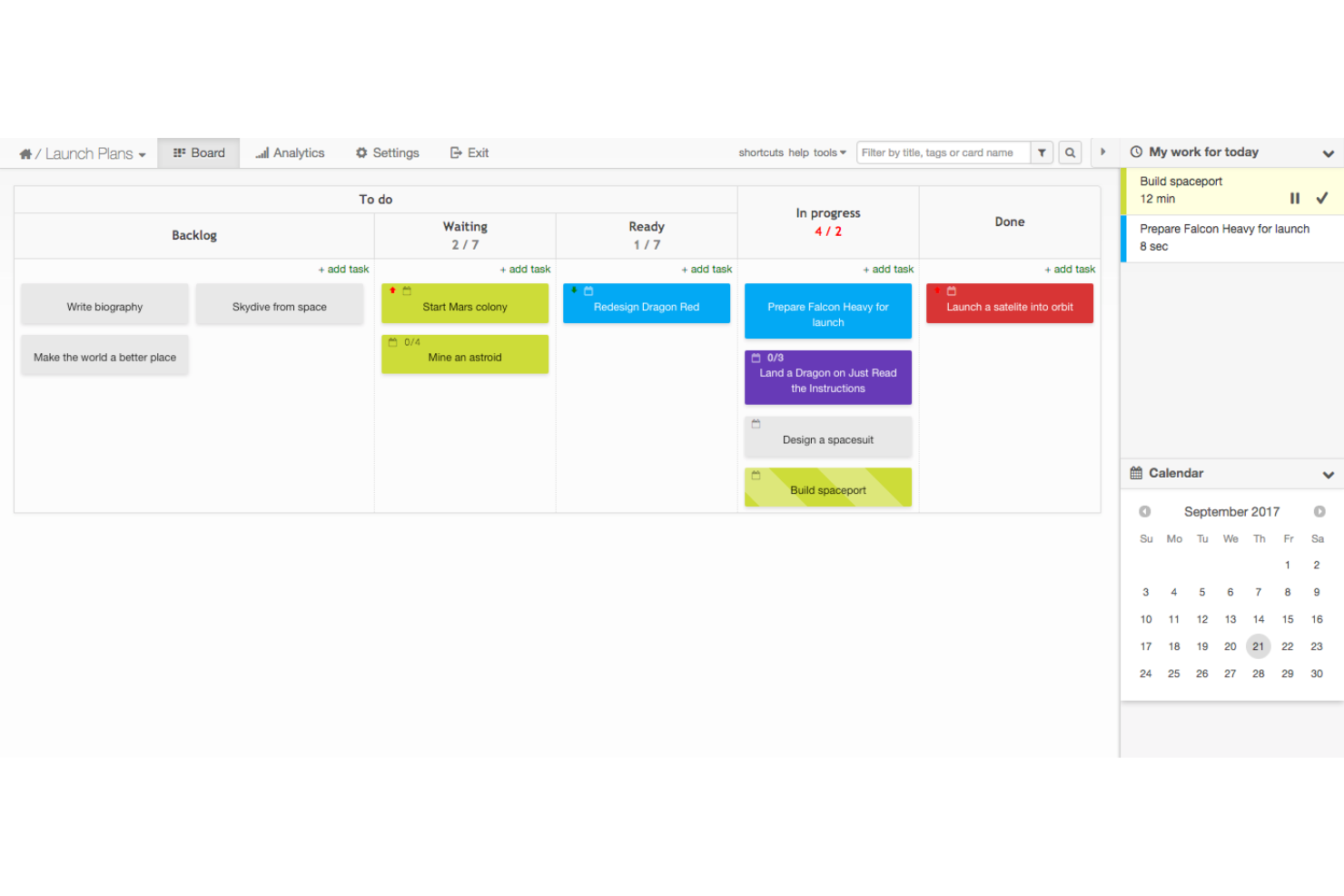
Kanban Tool è un software di gestione visiva online che semplifica la visualizzazione del flusso di lavoro. È ideale per i puristi del Kanban grazie al suo focus sui principi fondamentali del metodo Kanban, offrendo un'esperienza pura e senza complicazioni.
Perché è una buona alternativa a TeamGantt: Kanban Tool offre un approccio dedicato e incentrato sul Kanban per la gestione dei progetti, ideale per i team che cercano un'esperienza Kanban semplice e focalizzata. La sua semplicità e aderenza ai principi Kanban lo rendono una valida alternativa a TeamGantt.
Funzionalità e integrazioni principali:
Funzionalità includono collaborazione in tempo reale sui board Kanban, layout personalizzabili con swimlane, assegnazione dei compiti, promemoria delle scadenze, limiti per il lavoro in corso, automazione dei processi, monitoraggio del tempo, reportistica e funzionalità di import/export dei dati.
Integrazioni includono App Android, App iOS, API/SDK per la programmazione, Zapier, Google Drive, OneDrive, Box, Dropbox, Chromecast, Outlook, ActiveCampaign, Apiant, estensioni Chrome, Bitium e truDigital Signage.
Pros and Cons
Pros:
- Interfaccia dedicata e incentrata sul Kanban
- Oltre 100 funzionalità e integrazioni
- Piano gratuito disponibile
Cons:
- Limitato alla metodologia Kanban
- La versione on-site richiede un minimo di 10 utenti

Nifty
Ideale per la pianificazione orientata alle tappe fondamentali
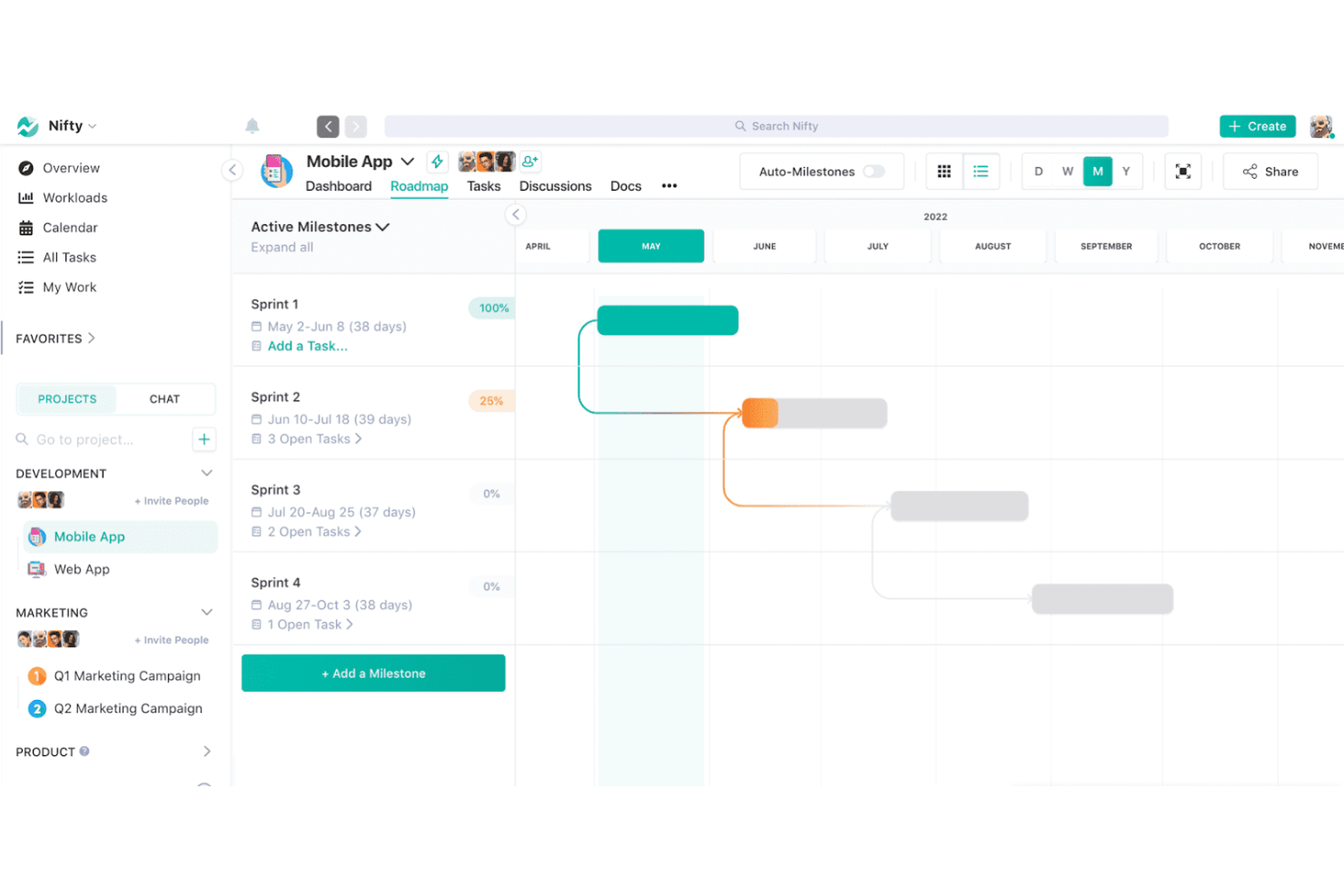
Nifty è una piattaforma di gestione dei progetti che centralizza la comunicazione, la pianificazione e il monitoraggio dei progetti in un unico spazio di lavoro collaborativo. È ideale per la pianificazione orientata alle tappe fondamentali perché automatizza l’avanzamento man mano che le attività vengono completate, allineando gli sforzi del team alle tappe chiave del progetto.
Perché è una valida alternativa a TeamGantt: Nifty offre un mix equilibrato di gestione delle attività, monitoraggio delle tappe e strumenti di collaborazione, rendendola una solida alternativa a TeamGantt. Il suo punto di forza è mantenere le tempistiche dei progetti facilitando al contempo la comunicazione del team.
Funzionalità principali & integrazioni:
Funzionalità includono project management, automazione delle attività, monitoraggio delle tappe, collaborazione su documenti, gestione del tempo, diagrammi di Gantt, bacheche Kanban, integrazione con il calendario, strumenti di reportistica e chat di team.
Integrazioni includono Google Drive, Slack, Zoom, Dropbox, Trello, Asana, Basecamp, GitHub, GitLab e Bitbucket.
Pros and Cons
Pros:
- Offre un piano gratuito con funzionalità essenziali
- Fornisce una timeline visiva per la definizione degli obiettivi e il monitoraggio dei progressi
- Supporta la collaborazione e comunicazione in tempo reale all’interno della piattaforma
Cons:
- Limitazioni e funzionalità ridotte nell’app mobile
- Processo di configurazione iniziale complesso

ProofHub
Ideale per il controllo unificato dei progetti

ProofHub è uno strumento di gestione progetti e collaborazione di squadra. È l'ideale per un controllo unificato dei progetti perché offre un'ampia suite di funzionalità che consentono ai team di pianificare, collaborare, monitorare e consegnare i progetti in modo efficiente.
Perché è una valida alternativa a TeamGantt: ProofHub offre un modello di prezzo a tariffa fissa senza costi per utente, il che può essere particolarmente conveniente per team di qualsiasi dimensione. Le sue funzionalità avanzate e la capacità di gestire utenti illimitati lo rendono un'alternativa di rilievo a TeamGantt, soprattutto per le aziende che cercano una soluzione unificata per gestire i propri progetti.
Caratteristiche salienti e integrazioni:
Le funzionalità includono gestione delle attività, flussi di lavoro personalizzati, monitoraggio del tempo, condivisione di file, collaborazione in tempo reale, diagrammi di Gantt, bacheche Kanban, calendario, presa di appunti, bacheche di discussione, report personalizzati e modelli di progetto.
Le integrazioni includono Slack, Box, Dropbox, Google Calendar, Google Drive, One Drive, FreshBooks e QuickBooks.
Pros and Cons
Pros:
- Prezzo fisso senza costi per utente
- Set completo di funzionalità per la gestione progetti e la collaborazione
- Offre una prova gratuita di 14 giorni
Cons:
- Personalizzazione limitata
- Nessun monitoraggio del tempo nativo

Ideale per team orientati al cliente
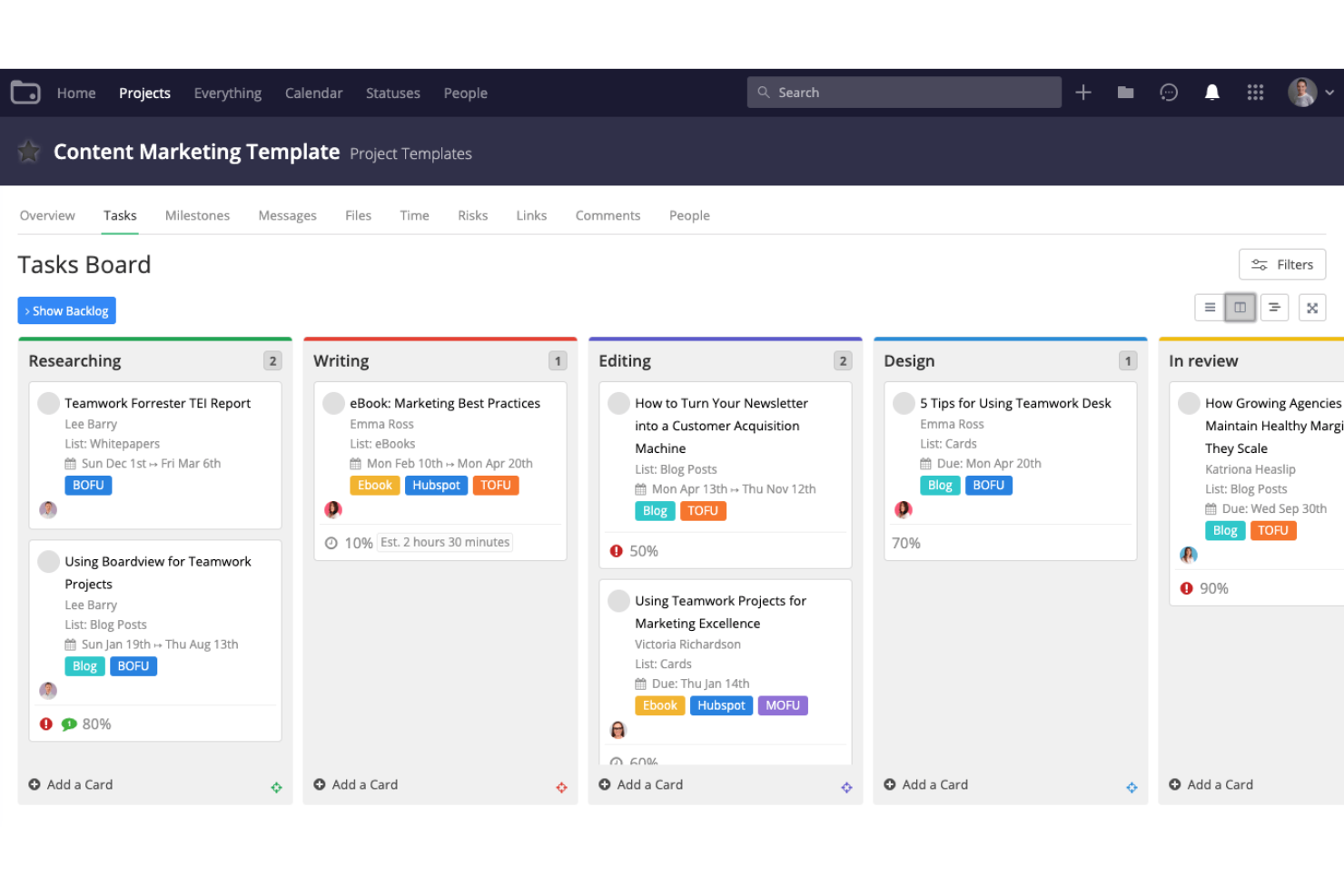
Teamwork è una piattaforma di gestione dei progetti progettata per aiutare i team a gestire facilmente i propri progetti. È ideale per i team orientati al cliente perché offre una suite di funzionalità pensate per soddisfare le esigenze di agenzie, servizi di consulenza, servizi IT e altre aziende di servizi ai clienti.
Perché è una buona alternativa a TeamGantt: Teamwork offre ampie capacità di monitoraggio delle attività e del tempo, rendendolo perfetto per i team che hanno bisogno di un controllo preciso sull'avanzamento e sulle scadenze dei progetti. Questo focus sul monitoraggio dettagliato lo rende una valida alternativa a TeamGantt, soprattutto per i team che danno priorità all'accountability e a una supervisione dettagliata dei progetti.
Funzionalità principali & integrazioni:
Le funzionalità includono diagrammi di Gantt drag-and-drop, monitoraggio delle attività e delle milestone, gestione delle risorse, collaborazione in tempo reale, visualizzazione multipla dei progetti come calendario, elenco, lavagna Kanban e visualizzazioni a portafoglio, oltre a modelli di progetto per una configurazione semplice.
Le integrazioni comprendono Slack, Zapier, Microsoft Teams, Google Drive, Microsoft Office, QuickBooks, HubSpot, Dropbox, Box e OneDrive Personal.
Pros and Cons
Pros:
- Pensato per le aziende di servizi ai clienti
- Offre un piano gratuito con funzionalità essenziali
- Si integra con i principali strumenti per un flusso di lavoro senza interruzioni
Cons:
- Può risultare complesso per i nuovi utenti
- Alcune integrazioni richiedono una configurazione aggiuntiva
Podio
Ideale per la personalizzazione dei flussi di lavoro
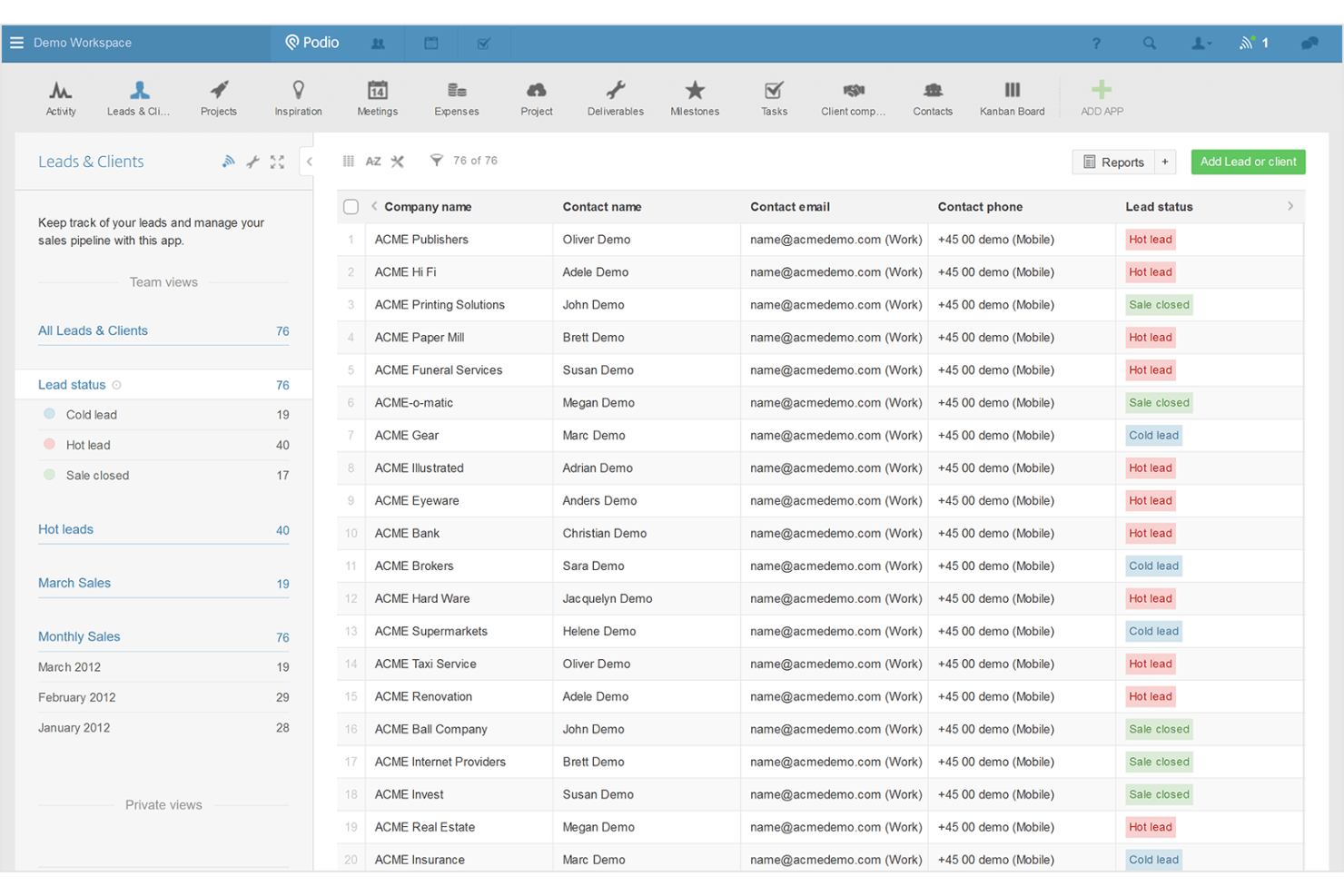
Podio è una piattaforma basata su cloud per ottimizzare il lavoro di squadra e la comunicazione. È l'ideale per la personalizzazione dei flussi di lavoro perché permette ai team di adattare i propri processi alle esigenze e alle fasi specifiche, garantendo efficienza ed efficacia in un unico luogo.
Perché è una valida alternativa a TeamGantt: Podio offre agli utenti un alto grado di personalizzazione dei flussi di lavoro, essenziale per i team che hanno processi specifici e necessitano di uno strumento che si adatti al proprio modo di lavorare. Questa flessibilità la rende un'ottima alternativa a TeamGantt, soprattutto per i team che cercano una soluzione di gestione progetti più su misura.
Funzionalità principali & integrazioni:
Le funzionalità includono spazi di lavoro personalizzabili, automazione delle attività, chat integrata, automazione dei flussi di lavoro, condivisione di file, linee temporali di progetto, monitoraggio dei progetti, accesso API e accesso mobile.
Le integrazioni includono Google Drive, Google Calendar, Dropbox, Evernote, Zendesk, GoToMeeting, FreshBooks, Microsoft Exchange, Box, OneDrive e ShareFile.
Pros and Cons
Pros:
- Flussi di lavoro altamente personalizzabili
- Capacità avanzate di reportistica
- Piano gratuito disponibile per piccoli team
Cons:
- Curva di apprendimento più ripida per i nuovi utenti
- Funzionalità offline limitate

Ideale per il monitoraggio in tempo reale dell'avanzamento dei lavori

ProjectManager è un software per la gestione di progetti e attività lavorative. È ideale per il monitoraggio in tempo reale dell'avanzamento dei lavori grazie ai suoi dashboard e alle funzionalità di reportistica in tempo reale, che offrono visibilità immediata sullo stato di tutte le attività e progetti.
Perché è una buona alternativa a TeamGantt: ProjectManager è un'eccellente alternativa a TeamGantt grazie alla sua gamma più ampia di funzionalità, tra cui dashboard in tempo reale che forniscono aggiornamenti istantanei sullo stato dei progetti e sulle prestazioni del team, migliorando così il processo decisionale. Inoltre, la possibilità di integrarsi senza problemi con varie altre piattaforme significa che gli aggiornamenti sono sincronizzati su tutti i sistemi, garantendo che le informazioni più recenti siano sempre disponibili.
Funzionalità e integrazioni principali:
Le funzionalità includono gestione delle attività, diagrammi di Gantt, bacheche Kanban, monitoraggio del tempo, dashboard in tempo reale, pianificazione dei progetti, aggiornamenti automatici, gestione delle risorse, gestione del portafoglio e strumenti di collaborazione.
Le integrazioni includono Jira, Slack, Google Drive, Microsoft Teams, Trello, Asana, Dropbox, Salesforce, HubSpot e Zapier.
Pros and Cons
Pros:
- Dashboard e report in tempo reale per il monitoraggio live dell'avanzamento
- Ampia gamma di funzionalità tra cui diagrammi di Gantt, bacheche Kanban e automazione dei flussi di lavoro
- Si integra con oltre 1.000 app aziendali e di gestione progetti
Cons:
- Capacità offline limitate
- L'interfaccia può essere complessa per i principianti
Bitrix24
Ideale per l'integrazione con il CRM

Bitrix24 è una suite avanzata di strumenti aziendali. Offre un potente sistema CRM con gestione delle vendite, un contact center e automazione del marketing.
Perché è una buona alternativa a TeamGantt: Bitrix24 combina la gestione dei progetti con strumenti CRM e di comunicazione, offrendo un set di funzionalità più ampio rispetto a TeamGantt. Questo lo rende un'alternativa adatta per i team che necessitano di una piattaforma tutto-in-uno per diverse operazioni aziendali.
Caratteristiche principali e integrazioni:
Le funzionalità includono CRM, gestione delle vendite, gestione di attività e progetti, strumenti di collaborazione, creazione di siti web, social selling, marketing online, gestione delle risorse umane e automazione tramite IA.
Le integrazioni includono Gmail, Google Calendar, Google Drive, Microsoft Office, Office 365, Microsoft Outlook, Microsoft OneDrive, Microsoft Exchange, Dropbox e Box.
Pros and Cons
Pros:
- Sistema CRM avanzato con gestione delle vendite e automazione del marketing
- Ampia gamma di strumenti per la gestione dei progetti
- Un elenco molto ampio di integrazioni native con servizi popolari
Cons:
- La piattaforma può avere una curva di apprendimento ripida a causa delle sue numerose funzionalità
- Alcuni utenti potrebbero trovare alcune funzionalità ridondanti o eccessivamente complesse
Ideale per la pianificazione dinamica
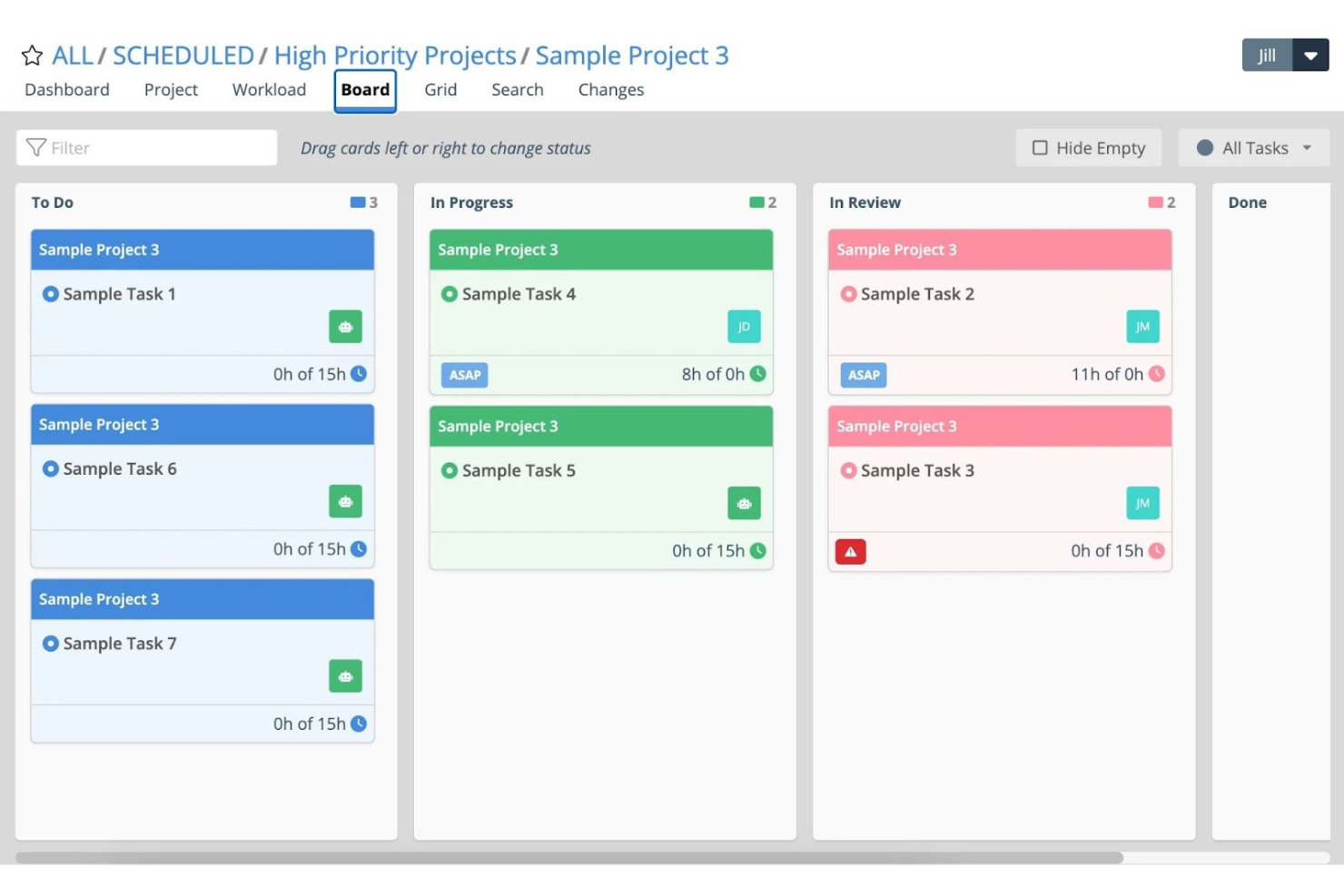
Tempo Portfolio Manager è uno strumento di gestione progetti che si adatta ai cambiamenti e gestisce l'incertezza. È ideale per la pianificazione dinamica grazie alla programmazione predittiva per più progetti, che aiuta i team a pianificare, prevedere ed eseguire con sicurezza.
Perché è una valida alternativa a TeamGantt: Tempo Portfolio Manager offre agli utenti un approccio unico alla gestione dei progetti, concentrandosi su adattabilità e previsione. Il suo motore di pianificazione dinamica lo distingue come alternativa a TeamGantt, poiché può adattarsi automaticamente ai cambiamenti delle condizioni di progetto, consentendo ai team di restare in carreggiata anche quando si verificano imprevisti.
Funzionalità principali & integrazioni:
Le funzionalità includono pianificazione predittiva, allocazione delle risorse in tempo reale, prioritizzazione delle attività, monitoraggio dei progetti, diagrammi di Gantt, rilevamento del tempo, dashboard personalizzabili, gestione del portafoglio, analisi dei rischi e strumenti di collaborazione per il team.
Le integrazioni includono Slack, Google Drive, Dropbox, Jira, Microsoft Teams, Salesforce, Trello, Zapier, GitHub e Asana.
Pros and Cons
Pros:
- La pianificazione predittiva si adatta ai cambiamenti di progetto
- Livellamento automatico delle risorse tra i progetti
- Pianificazione basata sulle priorità allinea il focus del team
Cons:
- Opzioni di personalizzazione dei report limitate
- Le prestazioni possono essere lente con grandi insiemi di dati
Redmine
Ideale per la gestione progetti open source

Redmine è un'applicazione web per la gestione dei progetti flessibile, open source e rilasciata sotto la GNU General Public License v2 (GPL). È ideale per le organizzazioni che cercano una soluzione di project management personalizzabile e scalabile senza i costi associati ai software commerciali.
Perché è una buona alternativa a TeamGantt: Redmine offre supporto per più progetti, un controllo degli accessi basato su ruoli flessibile e un potente sistema di gestione dei ticket. La sua natura open source consente un'ampia personalizzazione, rendendolo una valida alternativa a TeamGantt per i team con esigenze specifiche di workflow.
Funzionalità principali & integrazioni:
Le funzionalità includono gestione dei ticket, project management, monitoraggio del tempo, visualizzazione a calendario e diagrammi di Gantt per la rappresentazione visiva dei progetti, workflow personalizzabili, supporto a più progetti, controllo accessi basato su ruoli, sistema di gestione dei ticket flessibile, forum, news, gestione dei documenti e notifiche email.
Le integrazioni includono SVN, CVS, Git, Mercurial e Bazaar.
Pros and Cons
Pros:
- Strumento di gestione dei progetti flessibile e personalizzabile
- Supporta più progetti con ruoli e permessi unici
- Software open source con una grande community di utenti e sviluppatori
Cons:
- Opzioni di supporto clienti limitate rispetto agli strumenti commerciali
- L'interfaccia potrebbe non essere moderna o intuitiva quanto alcune alternative proprietarie
Altre alternative a TeamGantt
Di seguito trovi un elenco di ulteriori alternative a TeamGantt che ho selezionato. Anche se non sono rientrate nelle prime 10, restano valide e meritano ulteriori approfondimenti.


Recensioni correlate sui software di gestione dei progetti
Se non hai ancora trovato quello che cerchi, dai un'occhiata a questi altri strumenti correlati che abbiamo testato e valutato:
- Software di gestione dei progetti
- Software di gestione delle risorse
- Software di automazione dei flussi di lavoro
- Software per il monitoraggio del tempo
- Software di gestione delle attività
- Strumenti di collaborazione
- Creazione di diagrammi di Gantt
- Strumenti per la produttività
- Software per il monitoraggio dei progetti
- Software per la pianificazione dei progetti
- Alternative a Office Timeline
Come valuto le alternative a TeamGantt
Divido la mia valutazione in due livelli: le funzionalità principali di pianificazione Gantt e gestione delle dipendenze su cui un project manager o producer di agenzia conta ogni giorno, e i fattori differenzianti che giustificano un eventuale cambio di piattaforma.
Funzionalità principali (requisiti indispensabili per questa lista)
Quando seleziono gli strumenti per la mia lista, valuto ciascuno su una scala da 0 (non offre la funzionalità) a 5 (eccelle in quest’area) per ogni funzionalità principale indicata qui sotto. In seguito, calcolo il punteggio totale dello strumento in percentuale. Ogni software deve raggiungere un punteggio totale minimo del 65% per essere considerato per l’inclusione.
- Visualizzazione Gantt: verifico se la vista Gantt supporta la modifica tramite drag-and-drop, i livelli di zoom e le barre colorate—elementi indispensabili quando si presenta una timeline di lancio agli stakeholder.
- Dipendenze e pianificazione delle attività: ogni strumento dovrebbe gestire tipi di dipendenze come finish-to-start e start-to-start, oltre a riprogrammare automaticamente le attività a valle quando si verifica un ritardo nel percorso critico.
- Milestone e baseline: controllo la possibilità di impostare baseline e confrontare le tempistiche previste rispetto a quelle effettive, così che i team possano individuare lo scope creep prima di una revisione sprint o di un aggiornamento con il cliente.
- Gestione delle risorse e del carico di lavoro: lo strumento deve mostrare chi è sovraccarico e chi ha disponibilità, soprattutto quando si gestiscono più progetti con designer o ingegneri condivisi.
- Collaborazione e condivisione: valuto le discussioni nei commenti, gli allegati e l’accesso per ospiti affinché clienti esterni o collaboratori possano visionare le timeline senza richiedere una licenza completa a pagamento.
- Viste multiple dei progetti: oltre a Gantt, cerco anche viste Kanban, calendario ed elenco in modo che il team possa cambiare prospettiva—ad esempio passando da una visuale di portafoglio ad alto livello a una bacheca delle attività giornaliere.
Una volta ottenuto un elenco di strumenti che soddisfano questi criteri, considero ciò che distingue ogni piattaforma.
Fattori differenzianti (cosa distingue i fornitori)
Ecco come confronto e metto a confronto i diversi fornitori:
Funzionalità distintive
La gestione del portafoglio è fondamentale quando si supervisionano più progetti contemporaneamente: cerco viste riepilogative che permettano ai responsabili PMO di individuare conflitti di risorse su un programma senza dover entrare ogni volta nel dettaglio dei singoli progetti. Il monitoraggio del tempo è un altro elemento distintivo, soprattutto per le agenzie che fatturano ai clienti a ore. I timesheet integrati che registrano le ore sulle attività evitano di dover passare continuamente dallo strumento di PM a un tracker separato. Valuto anche automazioni e modelli predefiniti, poiché piani progetto riutilizzabili e aggiornamenti di stato automatizzati riducono i tempi di configurazione su attività ricorrenti.
Oltre le funzionalità
La struttura dei prezzi è un fattore determinante quando si passa da TeamGantt. Controllo se i posti per ospiti sono gratuiti o a pagamento, dato che questo incide sul costo totale quando si condividono timeline con clienti o collaboratori. Anche la profondità delle integrazioni è importante: il tuo strumento Gantt deve connettersi con Slack, Jira o Google Drive senza soluzioni alternative. Valuto quanto sia semplice per un team importare progetti già esistenti durante l’onboarding, perché la migrazione di centinaia di attività da una piattaforma all’altra può rallentare l’adozione se lo strumento non supporta l’importazione da CSV o MS Project.
Perché cercare un'alternativa a TeamGantt
TeamGantt è uno strumento valido e generalmente offre i maggiori vantaggi ai team che gestiscono progetti su larga scala. Tuttavia, potrebbe non essere la soluzione più adatta per ogni team. Ecco alcuni motivi per cui potresti cercare un'alternativa a TeamGantt:
- Problemi di costo: Il modello di prezzo di TeamGantt potrebbe essere proibitivo, soprattutto per i team più piccoli o le startup con un budget limitato. Se il costo è difficile da giustificare, valutare alternative con strutture tariffarie più flessibili potrebbe essere vantaggioso.
- Insieme di funzionalità: Sebbene TeamGantt offra una vasta gamma di funzionalità, potrebbe non adattarsi perfettamente ai requisiti specifici dei tuoi progetti o ai flussi di lavoro del tuo team. Questo può spingere a cercare alternative che offrano funzionalità più adatte alle tue esigenze di gestione dei progetti.
- Esperienza utente: Un'interfaccia poco intuitiva può influire sulla produttività e causare frustrazione tra i membri del team. Se l'interfaccia utente di TeamGantt non rispecchia le preferenze o lo stile di lavoro del tuo team, potrebbe valere la pena prendere in considerazione altri strumenti con design più facili da usare.
- Esigenze di integrazione: TeamGantt potrebbe non supportare le integrazioni con altri strumenti e software importanti utilizzati dal tuo team, limitandone l'efficacia all'interno di un ecosistema tecnologico integrato. Trovare un'alternativa che si integri perfettamente con gli strumenti esistenti può migliorare l'efficienza e semplificare i processi di gestione dei progetti.
- Scalabilità: Man mano che le organizzazioni crescono, le loro esigenze di gestione dei progetti diventano più complesse, superando potenzialmente le capacità di TeamGantt. In questi casi, cercare una soluzione progettata per progetti più grandi o complessi può garantire che lo strumento di gestione dei progetti cresca insieme all'organizzazione.
Esplorare le alternative a TeamGantt può aiutare ad affrontare sfide specifiche relative a costi, funzionalità, esperienza utente, capacità di integrazione e scalabilità che TeamGantt potrebbe non soddisfare pienamente. Considerando altre opzioni, puoi trovare uno strumento di gestione dei progetti che non solo rientri nel tuo budget, ma migliori anche l'efficienza del tuo team e si adatti perfettamente alle tue esigenze operative.
Funzionalità principali delle alternative a TeamGantt
Ecco alcune funzionalità principali di TeamGantt che il tuo software alternativo dovrebbe essere in grado di replicare o migliorare per adattarsi alle tue esigenze:
- Semplicità del trascinamento: La funzione di trascinamento consente di apportare rapidamente modifiche alle tempistiche dei progetti, semplificando la riprogrammazione delle attività e lo spostamento delle scadenze con il minimo sforzo. Questa semplicità è fondamentale per mantenere la flessibilità dei progetti e adattarsi ai cambiamenti senza complicare il processo di pianificazione.
- Visualizzazioni di più progetti: La possibilità di visualizzare tutti i progetti contemporaneamente su un'unica schermata consente ai responsabili di supervisionare in modo efficiente più iniziative, aiutando a individuare i conflitti relativi alle risorse e ad allineare le pianificazioni dei vari progetti. Questa visibilità è essenziale per una gestione efficace delle risorse e una pianificazione strategica.
- Carichi di lavoro e disponibilità del team: Questa funzionalità consente ai responsabili di bilanciare il carico di lavoro tra i membri del team, assicurandosi che nessuno sia sovraccaricato e ottimizzando al contempo la produttività complessiva. Una distribuzione efficace delle attività contribuisce a mantenere alto il morale e a prevenire il burnout, aspetti fondamentali per sostenere le prestazioni del team.
- Strumenti di collaborazione: Gli strumenti di collaborazione integrati facilitano la comunicazione fluida tra i membri del team e gli stakeholder, consentendo di condividere documenti e aggiornamenti direttamente all'interno della piattaforma. Questa connettività rafforza il lavoro di squadra e garantisce che tutte le parti siano informate e coinvolte durante l'intero ciclo di vita del progetto.
- Visualizzazioni e report del portafoglio: Le visualizzazioni del portafoglio offrono una panoramica di alto livello di tutti i progetti in corso, consentendo valutazioni rapide dei progressi complessivi e l'identificazione dei progetti in ritardo. Queste informazioni sono importanti per una gestione proattiva e decisioni tempestive, così da mantenere i progetti in linea con gli obiettivi.
- Visualizzazioni calendario, elenco e bacheca: Offrire diverse visualizzazioni, come calendari, elenchi e bacheche Kanban, consente ai team di gestire le attività nel formato più adatto alle loro preferenze di flusso di lavoro. Questa versatilità aiuta a ottimizzare l'organizzazione e ad aumentare la produttività, adattandosi a diversi stili di lavoro e tipologie di progetto.
- Tempistiche pianificate rispetto a quelle effettive: Confrontare le tempistiche pianificate con i progressi effettivi aiuta a individuare le discrepanze e a identificare le aree che richiedono attenzione. Questa funzionalità è essenziale per valutare le prestazioni del progetto e attuare misure correttive per rispettare le scadenze.
- App mobile: La disponibilità di un'app mobile consente ai responsabili di progetto e ai membri del team di rimanere connessi ai propri progetti da qualsiasi luogo, garantendo un accesso continuo agli strumenti e alle informazioni. Questa mobilità è importante per mantenere i progressi e la collaborazione al di fuori dei tradizionali ambienti d'ufficio.
- Modelli di piano di progetto: I modelli di progetto riutilizzabili fanno risparmiare tempo fornendo una struttura standardizzata per i nuovi progetti, accelerando il processo di configurazione iniziale e garantendo coerenza tra i progetti. Questa efficienza è vantaggiosa per i team che gestiscono numerosi progetti simili o devono avviarne rapidamente di nuovi.