

10 beste RescueTime-Alternativen für mehr Produktivität im Jahr 2026

Die besten RescueTime-Alternativen im Überblick


Als Projektmanager wissen Sie, dass die Erfassung von Arbeitszeit und Produktivität für den Erfolg Ihres Teams entscheidend ist. Vielleicht haben Sie jedoch festgestellt, dass RescueTime Ihre Anforderungen nicht ganz erfüllt. Ob fehlende Funktionen, eingeschränkte Anpassungsmöglichkeiten oder eine mangelnde Kompatibilität mit Ihrem Arbeitsablauf – Sie sind nicht allein auf der Suche nach Alternativen.
Bei meinen Tests und Bewertungen von Software habe ich erlebt, welchen Unterschied das richtige Tool machen kann. Sie benötigen etwas, das auf Ihre Geschäftsziele abgestimmt ist und Ihre individuellen Herausforderungen bewältigt.
In diesem Artikel stelle ich Ihnen meine besten RescueTime-Alternativen vor. Ich gebe Ihnen einen unvoreingenommenen Überblick über jede Option, damit Sie die beste Lösung für Ihr Team finden können. Sehen wir uns Zeiterfassungslösungen an, mit denen Sie Ihre Projekte effektiver verwalten können.
Was ist RescueTime?
RescueTime ist eine Software zur Zeiterfassung und Produktivitätssteigerung, mit der Sie überwachen können, wie Sie Ihre Arbeitszeit verbringen. Sie wird von Freiberuflern, Remote-Mitarbeitern und Teams genutzt, die ihre Produktivität steigern möchten. Die Software liefert Einblicke in Ihre täglichen Gewohnheiten und ermöglicht es Ihnen, fundierte Entscheidungen über Ihr Zeitmanagement zu treffen.
Funktionen wie die automatische Zeiterfassung, detaillierte Berichte und die Festlegung von Zielen helfen dabei, Ihre Arbeitsmuster zu verstehen und Ihre Effizienz zu verbessern. Insgesamt bietet RescueTime den Nutzern wertvolle Daten, um ihren Arbeitstag zu optimieren und ihre Produktivität zu steigern.
Vergleichstabelle der RescueTime-Alternativen
Diese Vergleichstabelle fasst die Preisinformationen meiner besten RescueTime-Alternativen zusammen:
| Tool | Best For | Trial Info | Price | ||
|---|---|---|---|---|---|
| 1 | Am besten für Abrechnung und die Zuordnung von Projektzeiten | 14-tägige kostenlose Testversion | Ab $3.99/Nutzer/Monat (jährlich abgerechnet) | Website | |
| 2 | Am besten für die plattformübergreifende Zeiterfassung in Teams geeignet | Kostenloser Tarif + 7-tägige kostenlose Testversion verfügbar | Ab $3.99/Benutzer/Monat (jährliche Abrechnung) | Website | |
| 3 | Am besten für die automatische Zeiterfassung geeignet | Kostenlose 14-tägige Testversion + kostenlose Demo verfügbar | Ab $9/Nutzer/Monat (jährlich abgerechnet) | Website | |
| 4 | Am besten für die Zeiterfassung mit nur einem Klick geeignet | 14-tägige kostenlose Testversion + kostenloser Tarif + kostenlose Demo verfügbar | Ab $3.99/Benutzer/Monat (jährlich abgerechnet) | Website | |
| 5 | Ideal für Budgetierung und Berichterstattung | Kostenloser Tarif verfügbar | Ab $8.50/Benutzer/Monat (jährlich abgerechnet) | Website | |
| 6 | Am besten für die detaillierte Erfassung des Arbeitstags geeignet | Kostenloser Tarif verfügbar + 14-tägige kostenlose Testversion | Ab $5.83/Nutzer/Monat (jährlich abgerechnet) | Website | |
| 7 | Am besten für die Produktivität verteilter Teams geeignet | 14-tägige kostenlose Testversion + kostenlose Demo verfügbar | Ab $6.67/Benutzer/Monat (jährlich abgerechnet) | Website | |
| 8 | Am besten für private Zeiterfassung | 14-tägige kostenlose Testversion | Ab $14/Monat (jährlich abgerechnet) | Website | |
| 9 | Am besten für Freiberufler und Agenturen | 7-tägige kostenlose Testversion | Ab $9/Benutzer/Monat (jährlich abgerechnet) | Website | |
| 10 | Am besten für integrierte Rechnungsstellung | 30-tägige kostenlose Testversion + kostenloser Tarif + kostenlose Demo verfügbar | Ab 9 $ pro Nutzer und Monat (jährlich abgerechnet) | Website |

Warum Sie unseren Software-Empfehlungen vertrauen können
Unser Team testet und bewertet Software seit 2012. Als Projektmanager wissen wir selbst, wie schwierig – und wichtig – es ist, die richtige Software auszuwählen.
Für diesen Leitfaden haben wir Tools mithilfe von praktischen Tests und unabhängiger Recherche bewertet und dabei unsere Bewertungskriterien angewendet. Zudem greifen wir auf Erkenntnisse von Branchenvordenkern und praktizierenden Projektmanagement-Experten zurück.
Unsere Bewertungen spiegeln unser menschliches redaktionelles Urteilsvermögen wider, keine Verkaufsstrategie.
Expertenprüfer:
Bewertungen der besten RescueTime-Alternativen
Nachfolgend finden Sie meine ausführlichen Zusammenfassungen der besten RescueTime-Alternativen, die es in meine Auswahl geschafft haben. Meine Bewertungen bieten einen detaillierten Überblick über die wichtigsten Funktionen, Vor- und Nachteile, Integrationen und idealen Anwendungsfälle jedes Tools, damit Sie die beste Lösung für sich finden können.

Am besten für Abrechnung und die Zuordnung von Projektzeiten
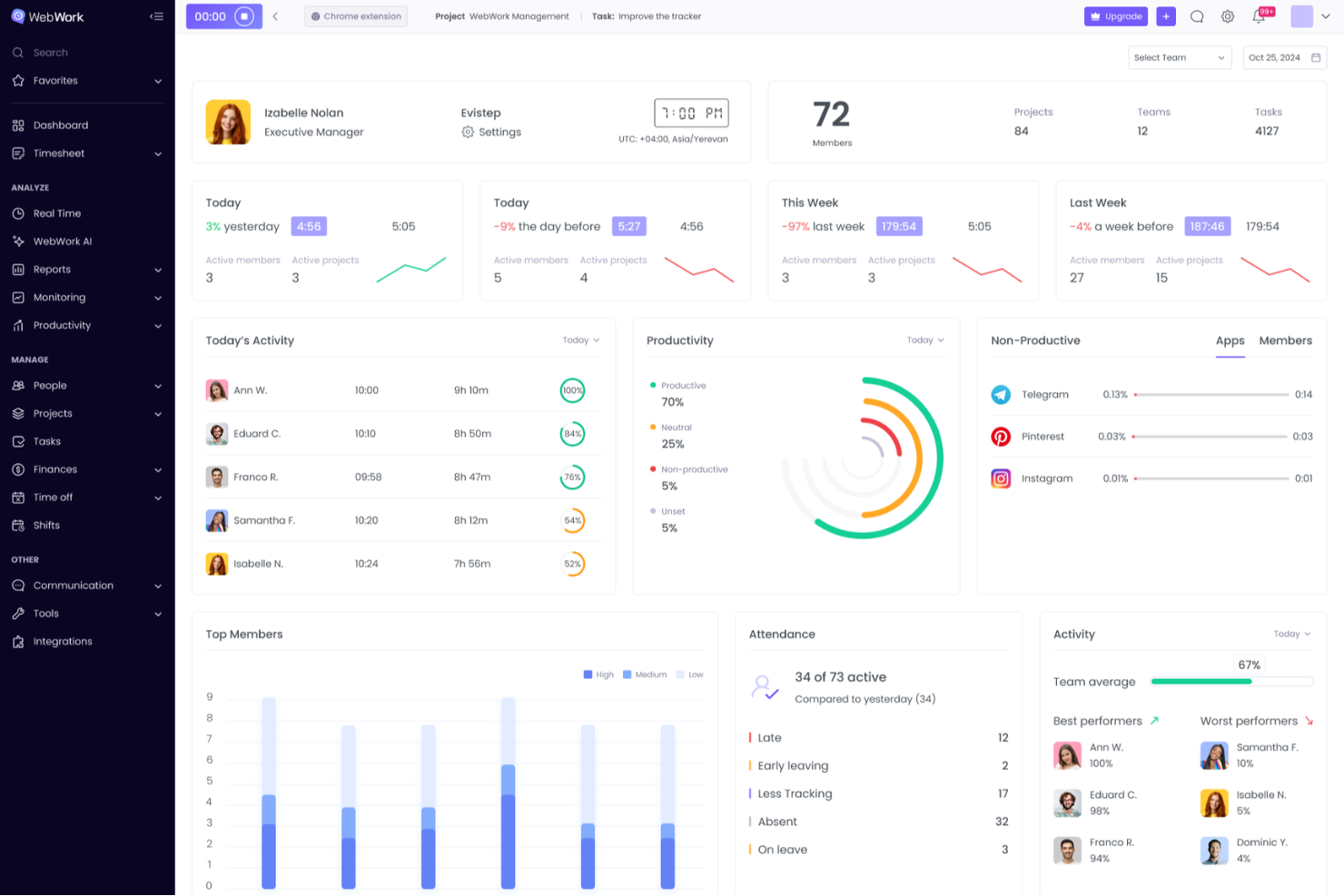
WebWork Time Tracker ist eine Zeiterfassungssoftware für Agenturen, Freiberufler und verteilte Teams, die eine bessere Übersicht über die Arbeit, eine umfassende Projektkontrolle und genaue Aufzeichnungen für die Kundenarbeit benötigen.
Für wen eignet sich WebWork Time Tracker am besten?
WebWork Time Tracker eignet sich für Agenturen, Freiberufler und verteilte Teams, die genaue abrechenbare Stunden benötigen, die Kundenprojekten zugeordnet sind.
Warum ich WebWork Time Tracker ausgewählt habe: Eine gute Alternative zu RescueTime im Test
Ich habe WebWork Time Tracker wegen seines Fokus auf Abrechnung und der Zuordnung von Projektzeiten ausgewählt. Ich verwende projektbasierte Timer, Abrechnungssätze und detaillierte Zeitberichte, um Arbeitsstunden mit bestimmten Kundenergebnissen zu verknüpfen. Dadurch kann mein Team abrechenbare und nicht abrechenbare Aktivitäten trennen, bevor es Kundenrechnungen erstellt oder die Rentabilität von Projekten überprüft.
Die wichtigsten Funktionen von WebWork Time Tracker
- Bildschirmaufnahmen: Erstellt während erfasster Arbeitssitzungen regelmäßig Bildschirmaufnahmen.
- Nutzung von Anwendungen und Websites: Erfasst die in Anwendungen und auf Websites verbrachte Zeit.
- Aktivitätsniveaus: Misst die Tastatur- und Mausaktivität während der Arbeitszeiten.
- Anwesenheitserfassung: Zeichnet Arbeitsbeginn, Pausen und Arbeitsende auf.
Integrationen von WebWork Time Tracker
WebWork Time Tracker bietet direkte Integrationen mit Slack, Trello, Asana, Jira, ClickUp, Teamwork, Todoist, Wrike, Zoho Projects und Bitbucket sowie Zapier. Außerdem lässt es sich mit Make verbinden und stellt eine API und Webhooks für benutzerdefinierte Integrationen bereit.
Pros and Cons
Pros:
- Abrechnungssätze verknüpfen Stunden mit Projekten
- Berichte unterstützen die Kundenabrechnung und die Überprüfung der Rentabilität
- Bildschirmaufnahmen dokumentieren die Aktivität während erfasster Sitzungen
Cons:
- Die Überwachung durch Bildschirmaufnahmen kann Datenschutzbedenken aufwerfen
- Die Aktivitätserfassung kann sich für Mitarbeiter überwachend anfühlen

Clockify
Am besten für die plattformübergreifende Zeiterfassung in Teams geeignet
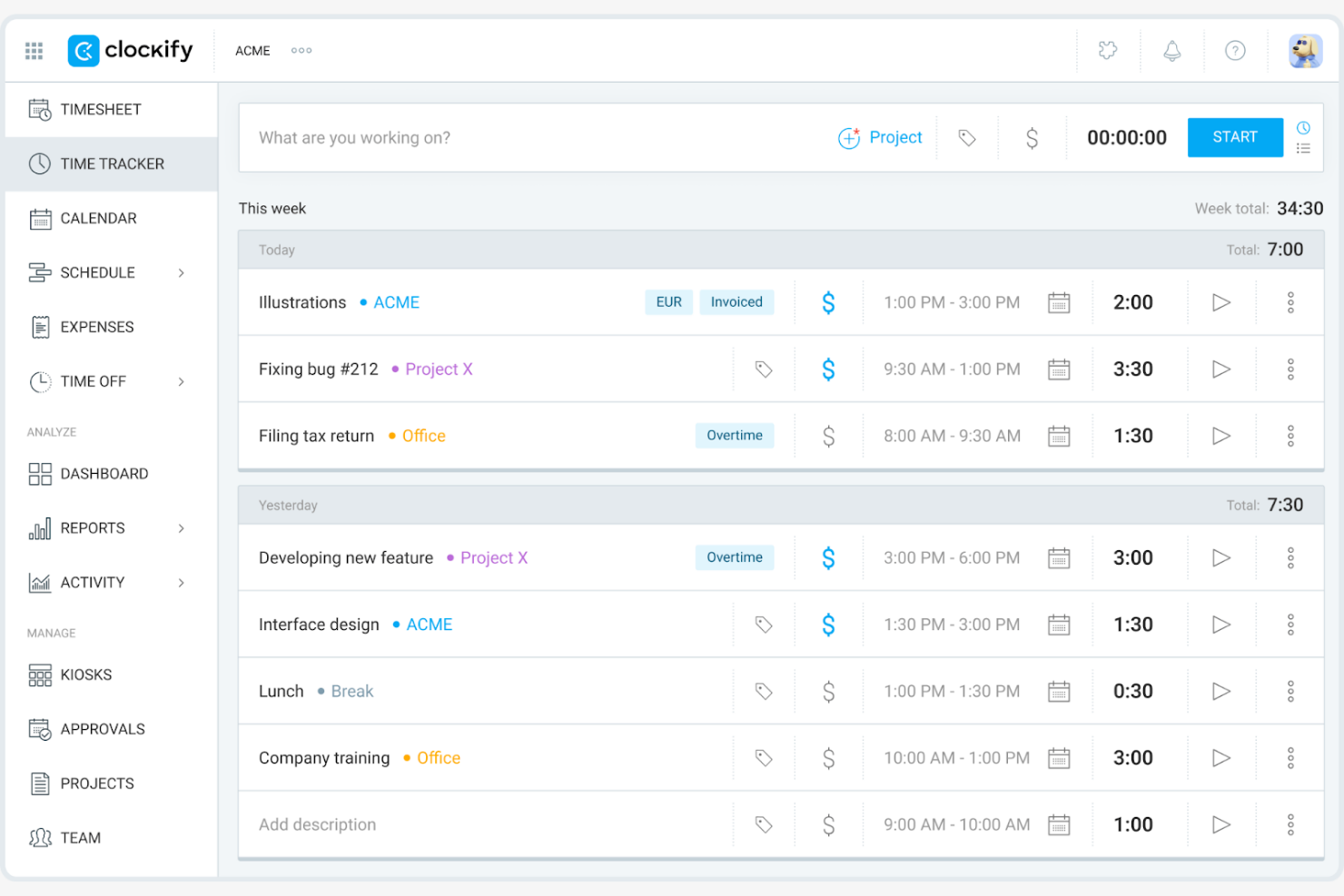
Clockify ist eine Zeiterfassungssoftware, die Freiberufler, kleine Unternehmen und große Teams unterstützt, indem sie Tools zur Erfassung von Arbeitszeiten und Verwaltung von Projekten bereitstellt. Sie hilft Ihnen, die Produktivität zu überwachen, Ressourcen zuzuweisen und Berichte zu erstellen.
Warum es eine gute RescueTime-Alternative ist: Ich habe Clockify ausgewählt, weil es Ihnen vollständige Transparenz über die Zeiteinträge von Teams auf jedem Betriebssystem und Gerät bietet. Die Lösung erfüllt plattformübergreifende Anforderungen an die Zeiterfassung durch native Apps für Windows, Mac, Linux, iOS, Android und Webbrowser, einschließlich Unterstützung für die Offline-Erfassung. Dadurch kann Ihr verteiltes Team unabhängig von der bevorzugten Arbeitsumgebung Arbeitszeiten genau erfassen, den Projektfortschritt in Echtzeit überwachen und sicherstellen, dass Kundenleistungen planmäßig fertiggestellt werden.
Herausragende Funktionen und Integrationen:
Funktionen umfassen Organisationstools, mit denen Sie Aufgaben effizient kategorisieren und priorisieren können. Sie können abrechenbare Sätze für verschiedene Projekte festlegen und auf Grundlage der erfassten Stunden Rechnungen erstellen. Clockify bietet außerdem ein visuelles Dashboard, das einen Überblick über die Zeitnutzung und Produktivitätstrends gibt.
Integrationen umfassen Asana, Trello, Jira, QuickBooks Online, monday.com, GitHub und weitere.
Pros and Cons
Pros:
- Unterstützt fünf kostenlose Benutzer
- Unterstützt große Teams
- Flexible Projektverwaltung
Cons:
- Grundlegende Anpassung von Benachrichtigungen
- Schwache Funktionen zur Dashboard-Konfiguration

Timely
Am besten für die automatische Zeiterfassung geeignet

Timely ist eine Zeiterfassungssoftware, die mithilfe von KI Stunden automatisch protokolliert und sich an Fachkräfte und Teams richtet, die eine genaue und einfache Zeiterfassung bevorzugen. Sie kann Ihnen dabei helfen, Projekte zu verwalten, die Produktivität zu verfolgen und Ressourcen zuzuweisen.
Warum es eine gute RescueTime-Alternative ist: Timely bietet eine Funktion zur automatischen Erfassung, die Ihre Arbeitsaktivitäten ohne manuelle Eingaben protokolliert. Diese Funktion hilft Ihnen, alle abrechenbaren Stunden zu erfassen, und verringert das Risiko fehlender Einträge. Timely bietet außerdem eine Projektübersicht, mit der Sie nachvollziehen können, wie die Zeit auf Aufgaben und verschiedene Projekte verteilt ist. Der Fokus auf Automatisierung und Genauigkeit macht die Lösung für alle geeignet, die den manuellen Erfassungsaufwand minimieren möchten.
Hervorstechende Funktionen und Integrationen:
Zu den Funktionen gehören visuelle Projektzeitpläne, mit denen Sie bestimmte Aufgaben für ein Projekt planen können. Die App bietet detaillierte Berichte zur Analyse der Zeitnutzung und von Produktivitätstrends. Sie können außerdem Projektbudgets festlegen und den Fortschritt in Echtzeit verfolgen, damit Sie Ihre Ziele erreichen.
Zu den Integrationen gehören Asana, Trello, Slack, Google Calendar, QuickBooks Online, Xero und weitere.
Pros and Cons
Pros:
- Automatische Zeiterfassung mit KI
- Visuelle Projektzeitpläne
- Echtzeit-Überwachung des Budgets
Cons:
- Begrenzte Anpassungsmöglichkeiten für Berichte
- Keine Funktionen für Aufgabenabhängigkeiten

TimeCamp
Am besten für die Zeiterfassung mit nur einem Klick geeignet
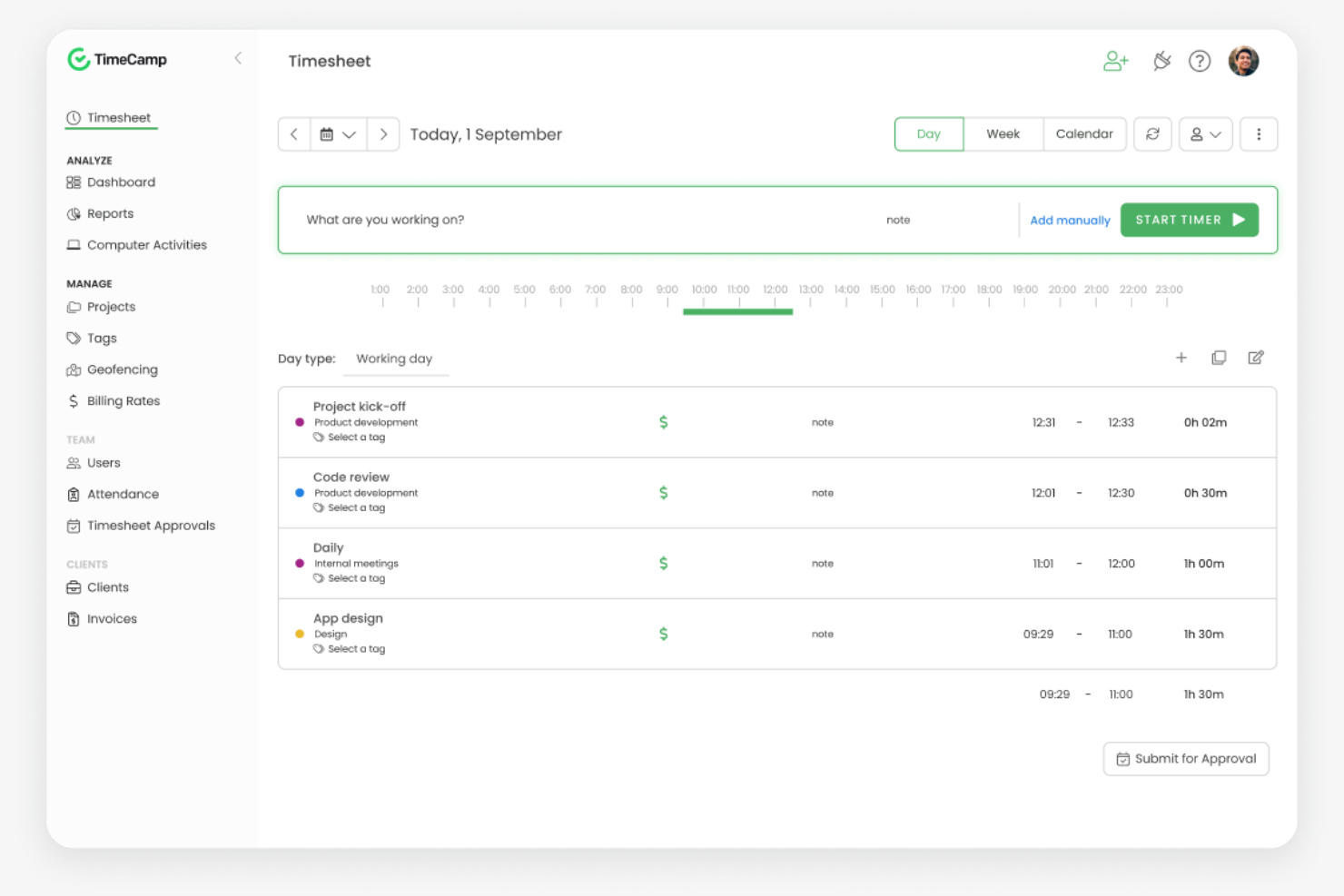
TimeCamp ist eine Software zur Zeiterfassung und Projektverwaltung für Freiberufler, kleine Unternehmen und größere Teams. Sie hilft Ihnen, Arbeitszeiten zu erfassen, Projekte zu verwalten und die Produktivität zu analysieren.
Warum es eine gute RescueTime-Alternative ist: TimeCamp bietet eine Zeiterfassung mit nur einem Klick, sodass Sie Timer problemlos starten und stoppen können. Die automatische Zeiterfassung mit Überwachung der Computeraktivität liefert Ihnen detaillierte Einblicke, wie Sie Ihre Zeit verbringen. Außerdem können Sie detaillierte Berichte erstellen, um die Produktivität und den Projektfortschritt zu analysieren. Der Fokus von TimeCamp auf Benutzerfreundlichkeit und detaillierte Erfassung macht die Lösung zu einer guten Wahl für Teams, die eine unkomplizierte Zeitverwaltung suchen.
Besondere Funktionen und Integrationen:
Zu den Funktionen gehören benutzerdefinierte Rechnungsvorlagen, die den Abrechnungsprozess optimieren. Sie können Projektbudgets festlegen und Ausgaben erfassen, um die finanzielle Kontrolle zu unterstützen. TimeCamp bietet außerdem eine Anwesenheitserfassung, mit der Sie die Anwesenheit und Abwesenheitszeiten von Mitarbeitern überwachen können.
Zu den Integrationen gehören Asana, Trello, Slack, Jira, QuickBooks Online, Xero, monday.com und weitere.
Pros and Cons
Pros:
- Zeiterfassung mit nur einem Klick
- Automatische Aktivitätsüberwachung
- Einfache Einrichtung und Nutzung
Cons:
- Eingeschränkte Timer-Benachrichtigungen
- Eingeschränkte Möglichkeiten zur Projektplanung

Everhour
Ideal für Budgetierung und Berichterstattung
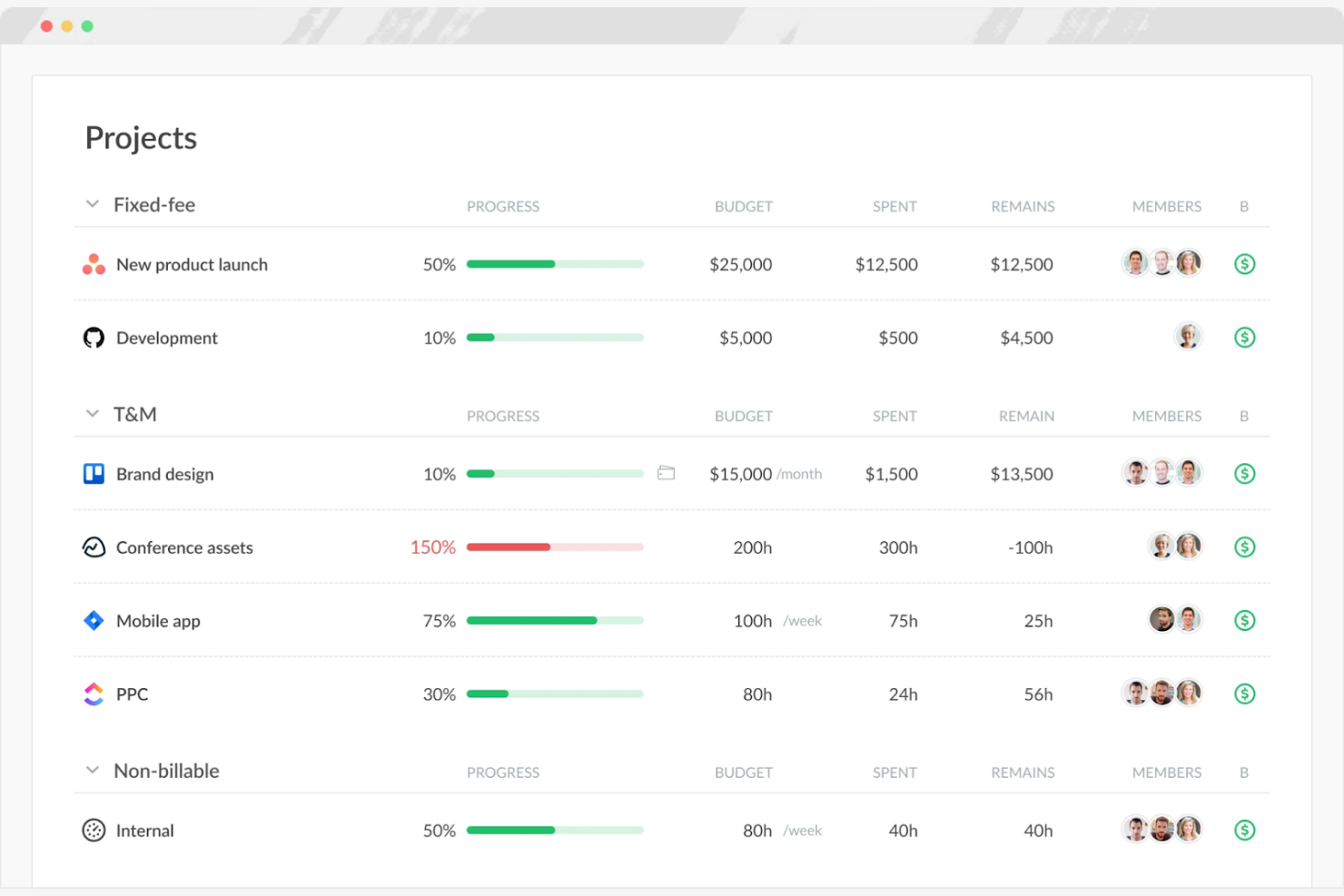
Everhour ist ein Zeiterfassungs- und Projektmanagement-Tool für Teams, die detaillierte Budgetierungs- und Berichtsfunktionen benötigen. Es unterstützt Sie bei der Zeiterfassung, der Verwaltung von Budgets und der Erstellung von Stundenzetteln.
Warum Everhour eine gute RescueTime-Alternative ist: Everhour bietet erweiterte Budgetierungs- und Berichtsfunktionen, die für projektbasierte Teams geeignet sind. Sie können Projektbudgets festlegen und überwachen und so sicherstellen, dass Sie innerhalb der finanziellen Grenzen bleiben. Die Berichtstools von Everhour liefern Einblicke in die Teamleistung und den Projektfortschritt, die Ihnen helfen können, fundierte Entscheidungen zu treffen. Der Schwerpunkt auf Finanzverwaltung macht Everhour zu einer guten Wahl für Teams, die umfassende Budgetierungslösungen benötigen.
Herausragende Funktionen und Integrationen:
Zu den Funktionen gehören die Erstellung von Rechnungen auf Grundlage der erfassten Zeit, um Abrechnungsprozesse zu optimieren, sowie PTO-Berechnungen, die anzeigen, wie viel Zeit Teammitglieder angesammelt haben. Sie können Kosten- und Abrechnungssätze für verschiedene Projekte und Aufgaben verfolgen, um unterschiedliche Kundenanforderungen zu verwalten. Everhour bietet außerdem ein visuelles Dashboard, das einen Überblick über die Zeitnutzung und den Budgetstatus gibt.
Zu den Integrationen gehören Asana, Trello, Jira, Slack, Basecamp, GitHub, ClickUp und weitere.
Pros and Cons
Pros:
- Unterstützt projektbasierte Teams
- Unterstützt bei der Einhaltung finanzieller Grenzen
- Visuelles Dashboard für die Zeitnutzung
Cons:
- Keine GPS- oder Standortverfolgung
- Einfache Warnmeldungen zu Projektbudgets

TMetric
Am besten für die detaillierte Erfassung des Arbeitstags geeignet
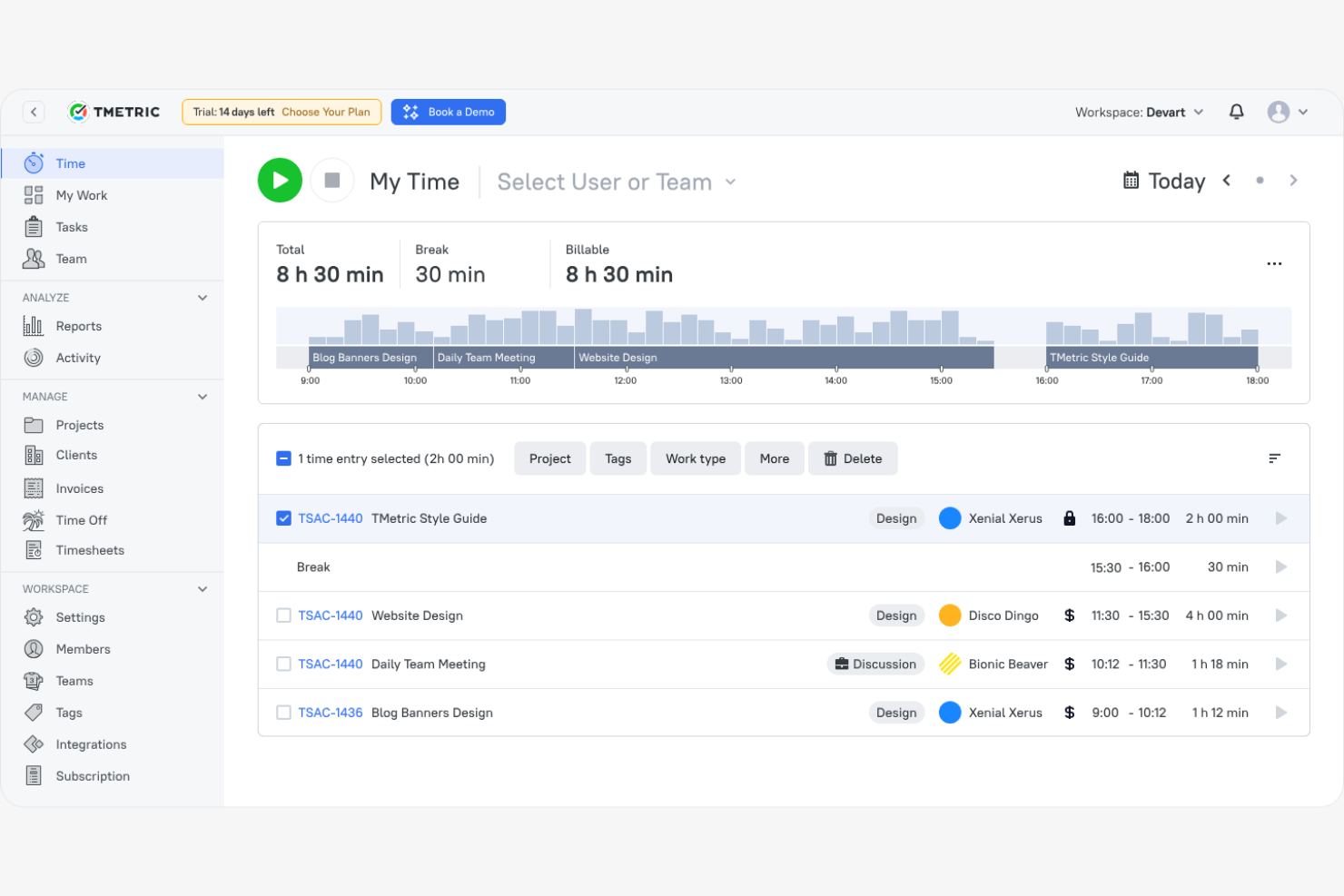
TMetric ist eine Zeiterfassungssoftware, die für Freiberufler, kleine Unternehmen und große Teams entwickelt wurde, um Arbeitszeiten und Produktivität zu verwalten. Sie hilft Ihnen, Zeit zu erfassen, Projekte zu verwalten und detaillierte Berichte zu erstellen.
Warum TMetric eine gute RescueTime-Alternative ist: TMetric bietet eine detaillierte Erfassung des Arbeitstags mit Funktionen wie der Erfassung abrechenbarer Zeiten und Aufgabenverwaltung. Sie können die Arbeitszeiten Ihres Teams einfach verwalten und Aufgaben zuweisen und erhalten so Einblick in den Projektfortschritt. Die Berichtsfunktionen von TMetric ermöglichen es Ihnen, die Produktivität zu analysieren und fundierte Entscheidungen zu treffen.
Hervorstechende Funktionen und Integrationen:
Zu den Funktionen gehören Funktionen zur Projektbudgetierung und Ausgabenüberwachung zur Unterstützung des Finanzmanagements. TMetric bietet außerdem Anwesenheitserfassung, mit der Sie die Anwesenheit von Mitarbeitenden überwachen und Abwesenheiten verwalten können, sowie eine Übersicht zur Teamproduktivität, die Ihnen helfen kann, die Arbeitsverteilung zu optimieren.
Zu den Integrationen gehören Asana, Trello, Jira, Slack, QuickBooks Online, GitHub, monday.com und weitere.
Pros and Cons
Pros:
- Detaillierte Erfassung des Arbeitstags
- Unterstützt Aufgabenverwaltung
- Flexibel für verschiedene Teamgrößen
Cons:
- Keine erweiterten Analysen
- Eingeschränkter Offline-Modus

Am besten für die Produktivität verteilter Teams geeignet

Time Doctor ist eine Zeiterfassungs- und Produktivitätssoftware für verteilte Teams und Unternehmen, die ihre Produktivität und Verantwortlichkeit verbessern möchten. Sie kann Ihnen helfen, Arbeitszeiten zu überwachen, Aufgaben zu verwalten und die Produktivität zu analysieren.
Warum es eine gute RescueTime-Alternative ist: Time Doctor bietet detaillierte Funktionen zur Mitarbeiterüberwachung, einschließlich Bildschirmaufnahmen und Aktivitätsverfolgung, mit denen Sie die Leistung verteilter Teams überwachen können. Sie können die für Projekte aufgewendete Zeit erfassen und Produktivitätsziele festlegen, was eine bessere Verwaltung der Arbeitsauslastung ermöglicht.
Herausragende Funktionen und Integrationen:
Zu den Funktionen gehören Ablenkungswarnungen, die Ihr Team konzentriert halten, indem sie es benachrichtigen, wenn es von der Aufgabe abweicht. Die Software bietet außerdem eine Lohn- und Gehaltsabrechnung, wodurch die Abwicklung von Zahlungen auf Grundlage der erfassten Arbeitszeiten erleichtert wird.
Zu den Integrationen gehören Asana, Trello, Jira, Salesforce, Basecamp, GitHub und weitere.
Pros and Cons
Pros:
- Ablenkungswarnungen verbessern die Konzentration
- Unterstützt die Festlegung von Produktivitätszielen
- Funktionen zur Lohn- und Gehaltsabrechnung
Cons:
- Eingeschränkte Werkzeuge für die schichtbasierte Planung
- Die Übersichtsseite kann durch die Datenfülle überwältigend sein

Memtime
Am besten für private Zeiterfassung
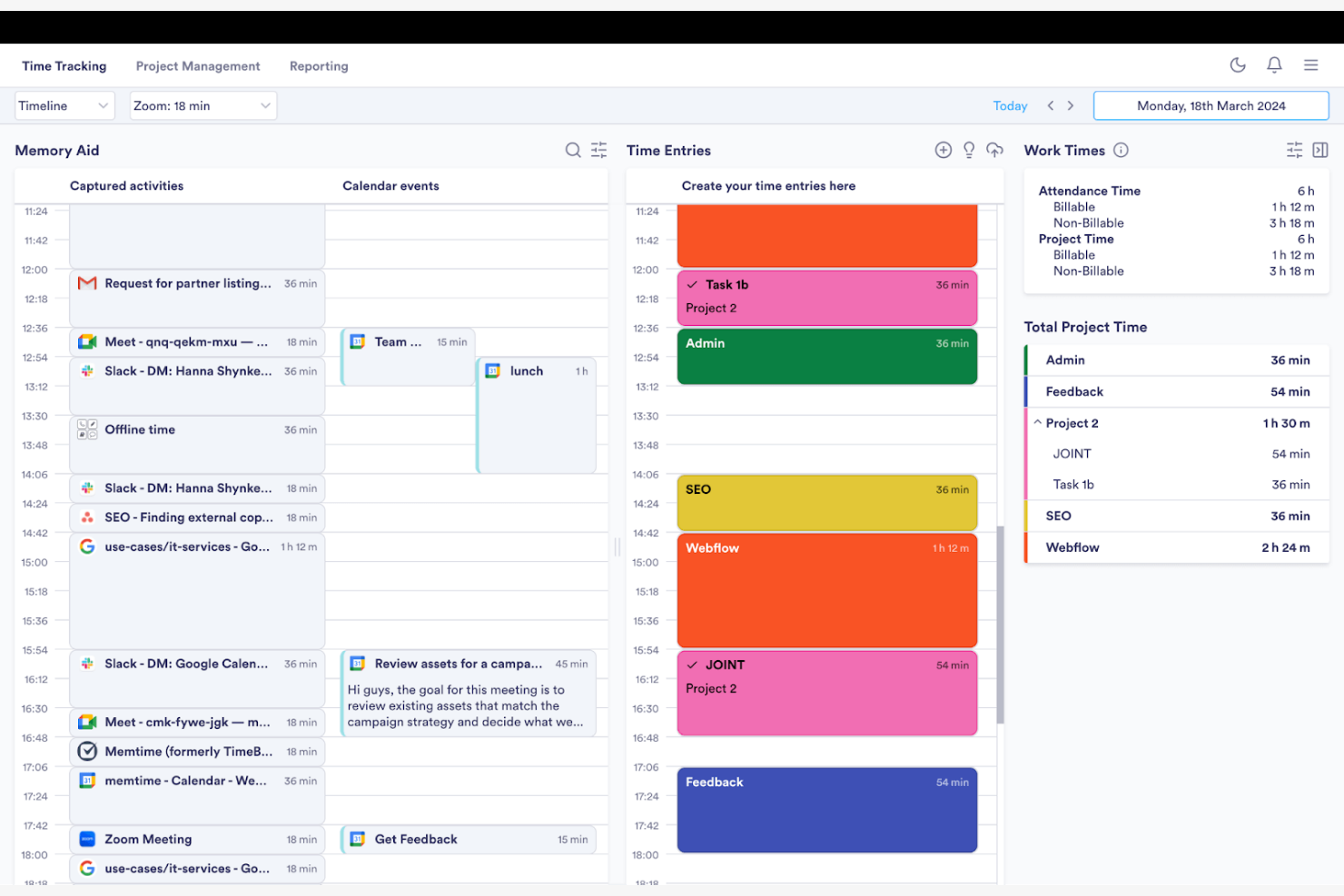
Memtime ist eine Zeiterfassungssoftware für Fachkräfte und Teams, die Arbeitsstunden ohne manuelle Eingabe erfassen möchten. Sie hilft Ihnen, die Zeit automatisch zu erfassen und die Produktivität zu analysieren.
Warum es eine gute RescueTime-Alternative ist: Memtime konzentriert sich auf die automatische Zeiterfassung und macht manuelle Eingaben überflüssig. Die Software läuft im Hintergrund, während sie Ihre Aktivitäten und die in Programmen verbrachte Zeit aufzeichnet, und erstellt anschließend detaillierte Berichte, die Einblicke in die Nutzung Ihrer Zeit geben.
Besondere Funktionen und Integrationen:
Zu den Funktionen gehört die passive Zeiterfassung, die Ihre Aktivitäten während der Arbeit erfasst. Sie können individuelle Stundenzettel mit unbegrenzten historischen Daten erstellen, um Ihre Produktivitätsmuster zu verstehen und Verbesserungsbereiche zu erkennen.
Zu den Integrationen gehören Google Kalender, Microsoft Teams, Asana, Jira Cloud, ClickUp und weitere.
Pros and Cons
Pros:
- Passive Zeiterfassung
- Umfangreiche Integrationsmöglichkeiten
- Einfaches System zum Exportieren von Berichten
Cons:
- Begrenzte Projektintegrationen
- Grundlegende Exportformatierung

Bonsai
Am besten für Freiberufler und Agenturen

Bonsai ist eine umfassende Anwendung zur Geschäftsverwaltung, die bei Verträgen, Angeboten, der Zeiterfassung und der Rechnungsstellung unterstützt. Sie wurde für Freiberufler und Agenturen entwickelt, die ihre Arbeitsabläufe optimieren und Projekte effizient verwalten möchten.
Warum es eine gute Alternative zu RescueTime ist: Bonsai bietet umfassende Tools zur Verwaltung von Kundenbeziehungen, einschließlich Vertragsvorlagen und Angebotserstellung. Es bietet integrierte Rechnungsstellung und Zahlungsabwicklung, sodass Sie Ihre Abrechnung problemlos verwalten können. Mit der Zeiterfassungsfunktion von Bonsai können Sie abrechenbare Stunden protokollieren und Arbeitszeitnachweise erstellen.
Besondere Funktionen und Integrationen:
Funktionen umfassen automatische Erinnerungen, mit denen Sie Fristen und die Kommunikation mit Kunden im Blick behalten können. Sie können Vorlagen für Formulare, Angebote und Rechnungen erstellen und anpassen, wodurch Sie Zeit bei der Büroarbeit sparen können. Bonsai bietet außerdem Kanban-, Gantt- und Kalenderfunktionen, mit denen Sie Projektzeitpläne verfolgen können.
Integrationen umfassen QuickBooks Online, Zapier, Calendly, Xero, HiBob und weitere.
Pros and Cons
Pros:
- Unterstützt Freiberufler und Agenturen
- Vielseitige Funktionen zur Aufgabenverwaltung
- Anpassbare Dokumentvorlagen
Cons:
- Begrenzte Funktionen für fortgeschrittenes Projektmanagement
- Aufgabenabhängigkeiten werden nicht unterstützt

Harvest
Am besten für integrierte Rechnungsstellung

Harvest ist eine Software zur Zeiterfassung und Rechnungsstellung, die sich an Freiberufler, kleine Unternehmen und Teams richtet, die Projekte und Abrechnungen verwalten möchten. Sie kann Ihnen helfen, die Zeit zu erfassen, Rechnungen zu erstellen und Projektkosten zu analysieren.
Warum es eine gute RescueTime-Alternative ist: Harvest bietet eine integrierte Rechnungsstellung, die den Abrechnungsprozess vereinfacht, da Sie Rechnungen direkt aus den erfassten Zeiteinträgen erstellen und versenden können. Harvest stellt außerdem Berichte zur Analyse der Projektrentabilität bereit, die Ihnen helfen, fundierte finanzielle Entscheidungen zu treffen.
Herausragende Funktionen und Integrationen:
Zu den Funktionen gehört die Ausgabenverfolgung, um Projektkosten zu erfassen und genaue Rechnungen zu erstellen. Sie können Projektbudgets festlegen und den Fortschritt in Echtzeit verfolgen, damit Sie innerhalb der finanziellen Grenzen bleiben.
Zu den Integrationen gehören Asana, Slack, QuickBooks Online, Xero, Trello, Basecamp und mehr.
Pros and Cons
Pros:
- Integrierte Funktion zur Rechnungsstellung
- Möglichkeiten zur Ausgabenverfolgung
- Einfache Analyse der Projektkosten
Cons:
- Begrenzte erweiterte Projektmanagement-Tools
- Begrenzte Protokolle der Teamaktivitäten
Weitere RescueTime-Alternativen
Hier sind einige weitere RescueTime-Alternativen, die es nicht in meine Auswahl geschafft haben, aber dennoch einen Blick wert sind:
- Rize
Am besten für Konzentration und Produktivitätsanalysen geeignet
- Toggl
Am besten für intuitive Zeiterfassung geeignet
- Connecteam
Am besten für die Verwaltung einer mobilen Belegschaft geeignet
- EARLY
Am besten für ein Integrationsökosystem geeignet


Wie ich RescueTime-Alternativen bewerte
Ich betrachte diese Tools auf zwei Ebenen: die grundlegenden Anforderungen – wie passive App-Überwachung und die Zuordnung zu Projekten –, durch die ein Tool in die Liste aufgenommen wird, sowie die Unterscheidungsmerkmale, durch die sie sich voneinander abheben.
Grundlegende Funktionen (Voraussetzungen für diese Liste)
Bei der Auswahl der Tools für meine Liste bewerte ich jedes einzelne für jede unten aufgeführte Kernfunktionalität auf einer Skala von 0 (bietet die Funktionalität nicht) bis 5 (zeichnet sich in diesem Bereich aus). Anschließend rechne ich die Gesamtpunktzahl des Tools in einen Prozentsatz um. Jedes Tool muss eine Mindestgesamtpunktzahl von 65 % erreichen, um für die Aufnahme berücksichtigt zu werden.
- Automatische Zeiterfassung: Ich prüfe, ob das Tool die Nutzung von Apps, Websites und Dokumenten passiv protokolliert – damit ein PM bei der Überprüfung seines Tages tatsächliche Daten sieht und nicht das, woran er sich zu erinnern glaubt.
- Produktivitätskategorisierung: Jedes Tool sollte die Möglichkeit bieten, Aktivitäten als produktiv oder ablenkend zu klassifizieren und diese Bezeichnungen je nach Rolle anzupassen, da Slack für ein Team zur Kernarbeit gehören und für ein anderes eine Ablenkung darstellen kann.
- Zuordnung zu Projekten und Aufgaben: Ich bewerte, wie die erfasste Zeit bestimmten Projekten oder Kunden zugeordnet wird. Das ist vor allem für Berater und Agenturteams wichtig, die ihre Stunden mit den gelieferten Ergebnissen abgleichen.
- Berichts- und Analyse-Dashboards: Die Berichte müssen Trends sowohl auf individueller als auch auf Teamebene sichtbar machen – etwa wöchentliche Muster der Fokuszeit oder Aufschlüsselungen der Zeit pro Projekt, die PMs der Führungsebene tatsächlich präsentieren.
- Ablenkungs- und Fokusmanagement: Ich achte auf integrierte Tools wie Website-Blocker, Fokussitzungen oder Erinnerungsbenachrichtigungen, die Mitarbeitenden helfen, während des Tages Zeitfenster für konzentriertes Arbeiten zu schützen.
- Transparenz für Teams und mehrere Benutzer: Dashboards auf Führungsebene mit rollenbasiertem Zugriff sind hier wichtig, insbesondere für Leiter entfernter Teams, die aggregierte Ansichten benötigen, ohne in den Bereich der Überwachung vorzudringen.
Sobald ich eine Liste von Tools zusammengestellt habe, die diese Kriterien erfüllen, prüfe ich, wodurch sich die einzelnen Plattformen voneinander abheben.
Unterscheidungsmerkmale (wodurch sich Anbieter abheben)
So vergleiche ich die verschiedenen Anbieter:
Herausragende Funktionen
Die Kalenderintegration ist für mich ein wichtiger Punkt – ich möchte Besprechungen aus Google oder Outlook über der erfassten Zeit sehen, damit PMs geplante Stunden mit der tatsächlich geleisteten konzentrierten Arbeit abgleichen können. Auch KI-gestützte Vorschläge für Zeiterfassungsbögen fallen besonders auf, vor allem für Berater, die sonst Freitagnachmittage damit verbringen würden, wöchentliche Einträge manuell aus dem Gedächtnis zu erstellen. Ich bewerte auch Funktionen zur Zielsetzung und achte auf Tools, mit denen sich tägliche Fokusziele definieren und Benachrichtigungen senden lassen, wenn man vom Kurs abzukommen droht.
Über die Funktionen hinaus
Ich prüfe, wie gut sich jedes Tool mit PM-Plattformen wie Jira, Asana oder ClickUp verbinden lässt – denn erfasste Zeit ist nur dann hilfreich, wenn sie zurück in die Tools fließt, in denen das Team seine Arbeit bereits verwaltet. Datenschutzkontrollen sind ebenso wichtig. Die Einführung eines Überwachungstools in einem verteilten Team verläuft reibungsloser, wenn Mitarbeitende ihre eigenen Daten einsehen und die Erfassung während der persönlichen Zeit pausieren können. Außerdem bewerte ich die Preisstrukturen und achte auf Modelle pro Benutzerplatz, die sich vorhersehbar skalieren lassen, wenn die PMO oder Agentur von einer Handvoll Mitarbeitender auf Dutzende wächst.
Warum nach einer RescueTime-Alternative suchen?
RescueTime ist zwar eine gute Wahl für Zeiterfassung und Produktivitätssteigerung, aber es gibt mehrere Gründe, warum manche Nutzer nach alternativen Lösungen suchen. Vielleicht suchen Sie nach einer RescueTime-Alternative, weil …
- Sie mehr Anpassungsmöglichkeiten benötigen
- Ihr Team eine Offline-Funktion benötigt
- Sie integrierte Funktionen zur Rechnungsstellung wünschen
- Ihr Unternehmen erweiterte Analysen benötigt
- Sie bessere Integrationsmöglichkeiten benötigen
- Sie ein Tool für größere Teams benötigen
Wenn Sie sich darin wiedererkennen, sind Sie hier richtig. Meine Liste enthält mehrere Softwareoptionen, die besser für Teams geeignet sind, die mit diesen Herausforderungen von RescueTime konfrontiert sind und nach alternativen Zeiterfassungstools suchen.
Die wichtigsten Funktionen von RescueTime
Hier sind einige der wichtigsten Funktionen von RescueTime, die Ihnen dabei helfen, sie den Angeboten alternativer Lösungen gegenüberzustellen und zu vergleichen:
- Automatische Zeiterfassung: Erfasst die für Anwendungen und Websites aufgewendete Zeit, um Ihnen einen genauen Überblick über Ihren Tag zu geben.
- Detaillierte Berichte: Liefert Einblicke, an welchen Anwendungen, Websites und Dateien Sie gearbeitet haben und wie sich Ihre Produktivität im Laufe der Zeit entwickelt.
- Blockierung von Websites und Apps: Hilft Ihnen, konzentriert zu bleiben, indem ablenkende Websites und Apps während Arbeitssitzungen blockiert werden.
- Zielverfolgung: Ermöglicht es Ihnen, individuelle Ziele festzulegen und Ihren Fortschritt mit Echtzeitaktualisierungen und wöchentlichen Berichten zu verfolgen.
- Fokus-Sitzungen: Ermöglichen es Ihnen, einen Timer einzustellen, der Ablenkungen blockiert und die Konzentration auf die Arbeit unterstützt.
- Intelligente Ausfüllhinweise: Schlägt Zeiteinträge auf Grundlage Ihrer Aktivitäten vor, um die Erfassung zu vereinfachen.
- Flexible Berichterstattung: Bietet anpassbare Berichte, die auf Ihre spezifischen Anforderungen zugeschnitten sind.
- Rollenbasierte Zugriffskontrolle: Bietet Teammitgliedern unterschiedliche Zugriffsebenen, um Projekte und Aufgaben effizient zu verwalten.
- Bericht zu täglichen Mustern: Zeigt Muster bei Produktivität und Konzentration auf, damit Sie Ihren Arbeitstag optimieren können.