
27 Best Scrum Software Tools & Scrum Boards for 2026

10 Best Scrum Software List
Here's my pick of the 10 best software from the 27 tools reviewed.


Scrum software helps teams plan sprints, manage backlogs, and stay aligned through fast, iterative development cycles. Whether you're tracking velocity, facilitating daily standups, or organizing sprint reviews, the right tool can bring structure to Agile workflows and help your team ship better, faster.
I’ve tested and reviewed leading Scrum platforms across dozens of projects to highlight the ones that actually support Agile teams. From sprint planning and task boards to burndown charts and collaboration features, each tool in this guide offers functionality designed to keep your team moving with clarity and speed.
Why You Can Trust Us
The Best Scrum Software Comparison Chart
| Tool | Best For | Trial Info | Price | ||
|---|---|---|---|---|---|
| 1 | Best Scrum board for real-time collaboration | 15-day free trial | From $1/user/month (12 user minimum) | Website | |
| 2 | Best for Scrum and agile templates | Free plan + free demo + 14-day free trial available | From $10/user/month (billed annually) | Website | |
| 3 | Best for custom workflow automation | 30-day free trial | From $35/user/month (billed annually, min 20 users) | Website | |
| 4 | Best scrum tool with built-in video conferencing | Free trial + free plan available | From $8/member/month | Website | |
| 5 | Best for API documentation | 30-day free trial + free plan + free demo available | From $10.99/user/month (billed annually) | Website | |
| 6 | Best scrum software for enterprises | 14-day free trial + free plan available | From $7.91/user/month | Website | |
| 7 | Best scrum software for sprint retrospectives | Free trial available | Pricing upon request | Website | |
| 8 | Best Scrum software for app integrations | Free plan available (request via email) | From $12.49 project-planning/user/month (billed annually) | Website | |
| 9 | Best for small teams and startups | 7-day free trial | From $96 (one time fee for 10 users) | Website | |
| 10 | Best Scrum tool for engineering | 30 days free trial | From $15/month | Website |


-

Insightful
Visit WebsiteThis is an aggregated rating for this tool including ratings from Crozdesk users and ratings from other sites.4.8 -
Accelo
Visit WebsiteThis is an aggregated rating for this tool including ratings from Crozdesk users and ratings from other sites.4.4 -
Forecast
Visit WebsiteThis is an aggregated rating for this tool including ratings from Crozdesk users and ratings from other sites.4.6




Best Scrum Software Reviews
Here’s a brief description of each of the scrum tools on my list showing what it does best, plus screenshots to showcase some of the features.
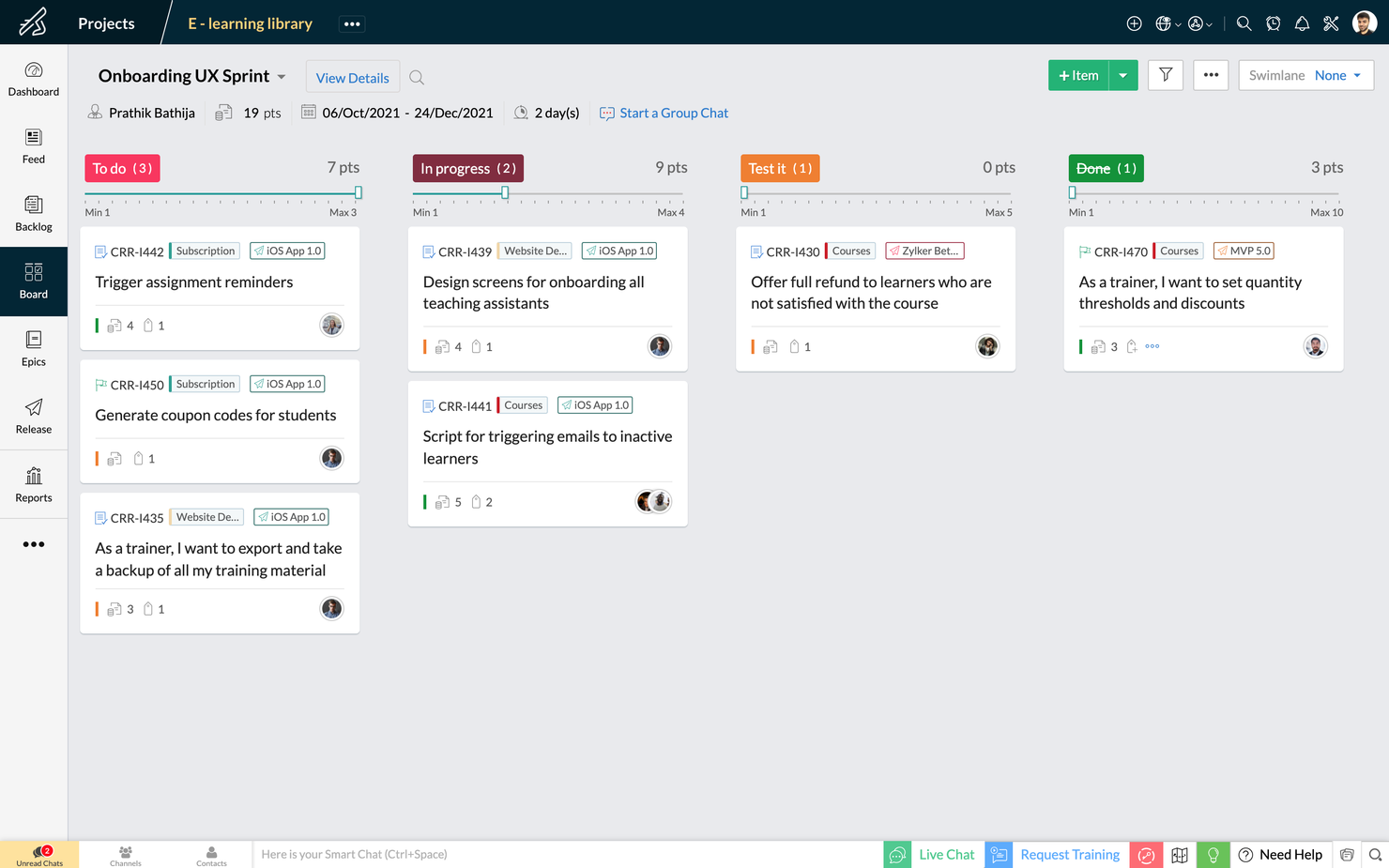
Zoho Sprints is an agile project management tool that helps Scrum teams organize user stories, manage backlogs, and track progress on Scrum Boards. It’s a simple and clutter-free Scrum software that helps teams to focus on shipping great quality work.
The drag and drop planning builder helps teams plan their upcoming sprints by moving items from their project backlog to their sprint backlog. The project backlog serves as the repository of all user stories, tasks, and bugs. The dedicated planning center equips teams to refine their project backlog with options to filter, sort and search items across default and custom parameters.
The Scrum Board in Zoho Sprints is highly customizable and provides visibility and transparency of everyone’s progress. It is effortless to drag-and-drop stories into completion, create custom statuses and set WIP limits. Teams can sort work items into swimlanes based on priority, story, or estimation points, and track the progress of sprints in an exclusive sprint dashboard.
Zoho Sprints provides real-time reports and insights into the overall progress. The Velocity Chart calculates the amount of work delivered in each sprint and helps teams to plan and estimate future sprints. Meanwhile, Burndown and Burnup charts help teams to track the pace at which they are burning estimation points by comparing the current and ideal progress line.
Communication and collaboration are crucial in every aspect of life, and
they're especially critical when you're working with cross-functional teams. With Zoho Sprints, product teams can collaborate within the context of their work through features like built-in chat, virtual meetings, and an interactive project feed.
Zoho Sprints integrates well with popular code repository management tools like GitHub, GitLab, Bitbucket. DevOps teams can also automate their CI/CD pipelines by integrating with developer tools like Jenkins and Azure DevOps. Teams can leverage webhooks and APIs to build their integrations or browse through a growing library of apps listed on Zoho's marketplace.
Zoho Sprints starts at $6/user/month (billed annually). They offer a freemium version for up to 3 users for 3 projects. Zoho Sprints offers a free trial for 15 days (no credit card required).
New Product Updates from Zoho Sprints

Zoho Sprints Introduces Test Management Feature
Zoho Sprints introduces Test Management capabilities within projects. This update enables teams to create, manage, and execute tests directly in their workflow. For more information, visit Zoho Sprints’ official site.
 .
.

Wrike is a project management software suitable for teams of five or more. It includes Scrum tools and features, and is highly configurable, allowing users to customize workflows, dashboards, reports, and request forms.
Wrike enables users to switch between Agile Kanban boards, one-click Gantt charts, and traditional workload views. The tool also comes with a number of pre-built Agile templates, and features task lists, subtasks, schedules, shared workflows, file sharing, and real-time collaboration. Automatically prioritize your backlog, plan sprints with Gantt charts and Kanban boards, and track your sprint success with reports.
Wrike has an easy-to-use, intuitive interface and navigation with distinct spaces, folders, and tasks. Users can toggle between the home screen and timesheets, dashboards, calendars, reports, and an activity stream. Wrike has a dedicated help center with interactive training, videos, a ‘Getting Started’ guide, and a thriving community.
Wrike offers 400+ pre-built native integrations, including integrations with the most popular file management software from Microsoft, Google, and Dropbox, along with sales and marketing software from Salesforce and Marketo.
Pros and Cons
Pros:
- Excellent email integration
- View projects and tasks in different views (list, table, Kanban, Gantt)
- User-friendly and intuitive for all skill levels
- Users have access to a variety of fully customizable dashboards
Cons:
- No alerts to warn against unassigned/untagged tasks
- No task prioritization levels, high priority flags only
- Time tracking is included in Business/Enterprise plans only
New Product Updates from Wrike

Streamlining Workspaces with New Updates
Wrike announces custom space templates, AI Agents in Wrike Labs, and a new Guage widget to improve project management. For more information, visit Wrike's official site.


QuickBase is a cloud-based application development platform that enables users to create custom business applications without the need for coding expertise. Its platform can also be adapted for use as scrum software, supporting agile project management methodologies. This allows teams to manage sprints, backlogs, and user stories within a customizable framework.
QuickBase's flexibility in application design and data management additionally allows scrum teams to configure the system to their specific workflow requirements, facilitating the iterative development and continuous improvement central to scrum practices.
QuickBase integrates with Microsoft Teams, Tableau, Slack, Salesforce, NetSuite, QuickBooks, Dropbox, Google Drive, Marketo, and Zendesk.
QuickBase costs from $35/user/month (billed annually) and comes with a 30-day free trial.
Pros and Cons
Pros:
- Can scale with growing businesses
- Provides excellent customer support for users
- Intuitive interface
Cons:
- Some issues with slow loading times
- Lacks easily formattable reports


Miro is a collaborative online whiteboard with built-in video conferencing widely used across various industries, including major Fortune 100 companies. It offers an extensive array of templates and formats, from Kanban boards to flowcharts.
As a scrum software tool, Miro includes interactive collaboration features like stickies and comments, enabling dynamic discussions during scrum sessions. Its integration with project management tools like Jira and Asana centralizes task tracking within the scrum framework. Additionally, Miro's planner tool assists in visualizing and organizing tasks, aiding teams in maintaining a clear overview of their projects and sprints.
Miro has integrations with a whole suite of tools, including Zoom, Figma, Confluence, Asana, monday.com, Microsoft Teams, Jira, Slack, Google Drive, Box, Airtable, Notion, Azure, and Webex. Some integrations are limited to paid plans only.
Pros and Cons
Pros:
- Built-in communication features for streamlined collaboration
- Intuitive and easy setup
- Free forever plan available
Cons:
- Free version does not allow high-quality export to pdf
- Zooming can be jumpy on larger projects
- Visitor/guest accounts locked to paid plans only
New Product Updates from Miro

Miro Enhances AI Workflows and Tables for Task Planning
Miro enhances AI workflows and Tables with AI-generated planning boards and web-aware automation. These updates help teams organize tasks faster and analyze external content within workflows. For more information, visit Miro’s official site.


Used by over 20K companies, Teamwork is a project management tool that highlights accountability and collaboration with time tracking, workload management, and templates and automation. Teamwork's API is flexible and accessible with different self-help modules for manipulating data, building integrations, customizing product development workflows, and visualizing your content. Scrum-oriented cross-functional teams will love this adaptability.
Teamwork costs from $10/user/month and they also offer a freemium version of the tool for up to 5 users. They also offer a 30-day free trial for all paid plans.
Pros and Cons
Pros:
- Easy to communicate task status with clients or team
- Easy zoom in/zoom out on project plans
- Features can be turned on/off (tasks, messages, time, risks, billing)
Cons:
- No easy way to measure your team’s capacity
- No industry-specialized project templates or formats
- No CSS template option for advanced customization

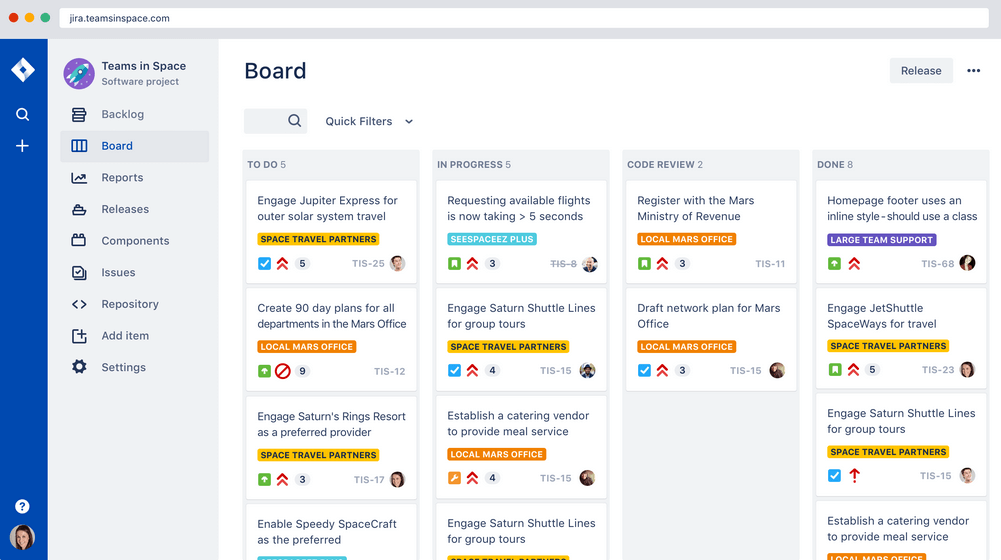
Jira Scrum board takes this workflow software powerhouse and hones it around team collaboration and incremental delivery starts. A few features scrum masters will find handy are their printable agile user story cards, 25+ agile extensions and filters, and a robust project template manager. Atlassian owns Jira, Confluence, Trello, BitBucket, SourceTree, Bamboo—making it great for enterprises who want everything in a single ecosystem.
Jira costs from $7/month for up to 10 users. They also offer free licensing for groups of 10 users or less.
Pros and Cons
Pros:
- Centralized administration across all Atlassian Cloud products
- Houses all historical works for future reference
- Can create tasks, sub-tasks, spikes, and epics
- Single view for all user stories
Cons:
- No mass-editing and scripting (rename a whole set of labels, etc.)
- Needs better linking within stories and tasks
- Limited collaboration features

Targetprocess is a Scrum team management app with tailored solutions for product owners, release train engineers, portfolio managers, and agile coaches. They make sprint retrospectives simple with built-in tools to check team happiness, organize feedback, or just record a high-level summary of a project. Targetprocess has board tags for "worked well," "didn't work well," and "improvement ideas", making collaborative retrospectives even easier.
Targetprocess offers customized pricing upon request.
Pros and Cons
Pros:
- Robust graphical and custom reports to pinpoint trends
- Responsive customer support team
- Can choose between unique or standard views per user
Cons:
- Can be tricky to move entities into different levels of the hierarchy
- Does not include iteration tracking
- No means to reuse steps

Nutcache is a Scrum project management tool with the ability to measure task progress, set a business value to cards (ROI), assign complexity points to cards, display real-time sprint statistics, and use acceptance tests to set cards as completed. Nutcache has a healthy list of third-party integration options and also works with a paid Zapier plan to unlock thousands more. They also offer a flexible API to connect Nutcache to your existing tools and workflow.
Nutcache costs from $6/user/month with a “Pro” plan that requires 5 users.
Pros and Cons
Pros:
- Easy to integrate new employees (scalable)
- Great time and expense tracking
- Intuitive to learn and use
- Robust project dashboards
Cons:
- Need more third party integrations
- Complicated security levels for employees
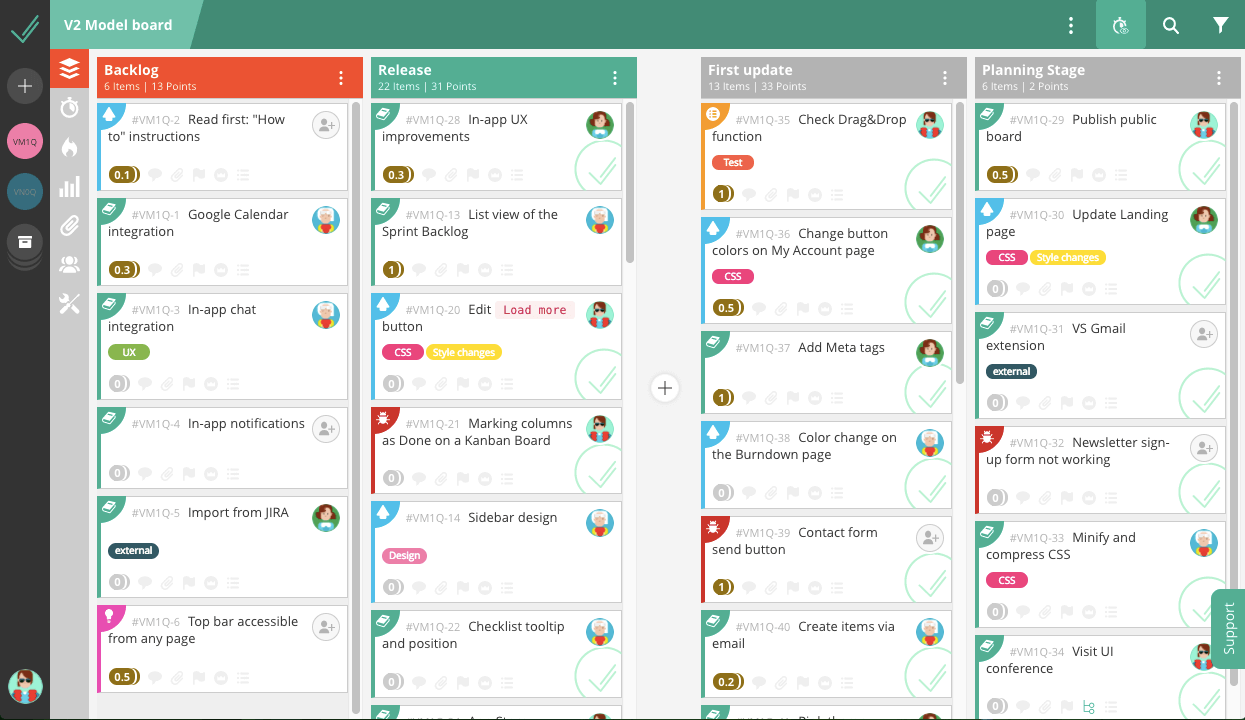
VivifyScrum is a web-based project management tool that comes with free Scrum training via their VivifySCrum EDU course—just one of the many added benefits that small teams and startups will appreciate. They also have fixed price licensing for SMBs trying to navigate the growing world of monthly workflow app subscriptions. Additionally, teams of all sizes will appreciate their flexible agile boards, burndown charts, and Scrum metrics graphs.
VivifyScrum costs from $96 as a one-time fee for 10 users and offers a 7-day free trial as well as a 30-day refund policy upon purchase.
Pros and Cons
Pros:
- Helpful shortcuts to quickly assign, label, type tasks
- Labels and card types work well for added organization
- Easy to add and rearrange tasks on board
Cons:
- Gitlab connection could be better
- Can’t sort backlog items in dashboard view
- Lacking in 3rd party integrations
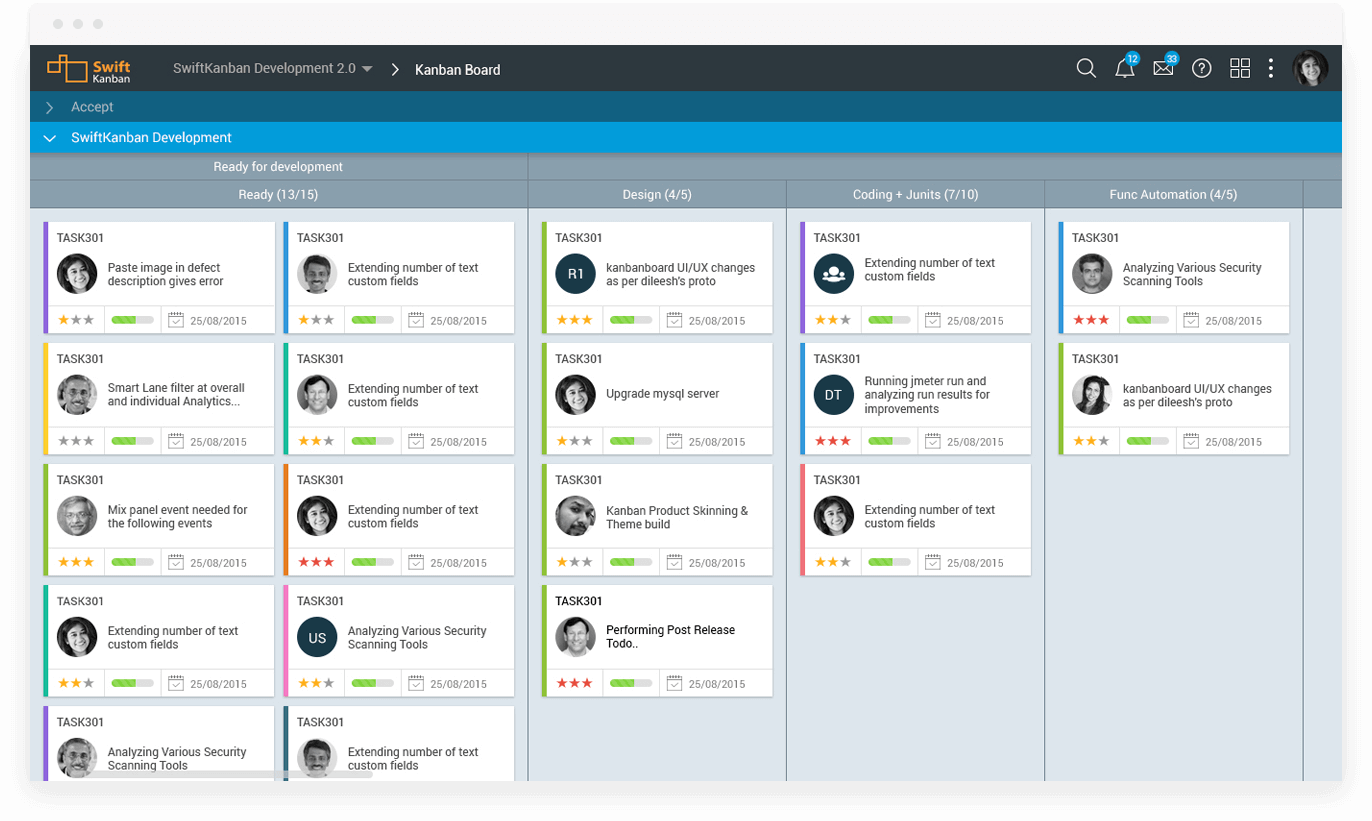
SwiftKanban is one of the many X tools that are part of the Digité family and so are very easy to connect with their other solutions, like marketing, machine learning, and QA management. Features include task boards and visual project management, Scrum and Scrumban capabilities, and predictive flow metrics. Engineers will appreciate their SwiftESP tools for robust predictive analytics and risk management solutions.
SwiftKanban costs from $7/user/month but also has a freemium plan for up to 10 users and 4 boards. You can try their paid plans free for 30 days.
Pros and Cons
Pros:
- Unique “Board Playback” feature for analysis and review
- UI is very intuitive and user-friendly
- Excellent visualizations and analytics
Cons:
- Best Scrumban features not included in free plan
- Custom templates are limited to Group plan and above
- No bulk options for various operations
Other Scrum Software
Here’s a few more that didn’t make the top list.
- Height
Efficient Agile development made simple.
- Axosoft
Sprint dashboard
- Orangescrum
Scrum software with resource management
- ClickUp
For freelancers &
- monday.com
For highly collaborative Scrum teams
- Celoxis
For resource management
- Lucidspark
Scrum board for integrations and collaboration
- Bonsai Agency Software
For agencies and consultancies
- Hubstaff
Free scrum software
- GoodDay
For backlog prioritization
- Asana
Free Scrum software
- Basecamp
Scrum tool for non-software projects
- Scoro
Agile Scrum software
- Trello
Widely-used Scrum board software
- SprintGround
For web developers
- Zoho Sprints
Scrum software within a connected suite of other business tools
- Scrumdesk
Objectives and key results (OKR) planning


Selection Criteria for Scrum Software
When selecting the best Scrum software to include in this list, I considered common buyer needs and pain points like the need for real-time collaboration and seamless sprint planning. I also used the following framework to keep my evaluation structured and fair:
Core Functionality (25% of total score)
To be considered for inclusion on this list, each solution had to fulfill these common use cases:
- Managing sprints
- Creating and assigning tasks
- Tracking progress with boards
- Visualizing project timelines
- Real-time collaboration
Additional Standout Features (25% of total score)
To help further narrow down the competition, I also looked for unique features, such as:
- Built-in retrospective tools
- Customizable reporting dashboards
- AI-powered task predictions
- Integration with time-tracking tools
- Automated notifications for deadlines
Usability (10% of total score)
To get a sense of the usability of each system, I considered the following:
- How easy it is to navigate the interface
- How much training the system requires
- How quickly users can complete tasks
- Whether the layout is intuitive and organized
- How cluttered or clean the interface looks
Onboarding (10% of total score)
To evaluate the onboarding experience for each platform, I considered the following:
- Availability of step-by-step tutorials
- Access to training videos and webinars
- Interactive product tours during setup
- Templates for faster project setup
- Whether live chat or chatbot support is offered
Customer Support (10% of total score)
To assess each software provider’s customer support services, I considered the following:
- Response time for support tickets
- Availability of 24/7 support options
- Quality of self-service resources like FAQs
- Access to a dedicated account manager
- Level of community or forum support
Value For Money (10% of total score)
To evaluate the value for money of each platform, I considered the following:
- How the pricing compares to similar tools
- Availability of a free trial or free tier
- Whether the platform charges per user or per project
- Flexibility of contract lengths and renewals
- Access to premium features in the lower pricing tiers
Customer Reviews (10% of total score)
To get a sense of overall customer satisfaction, I considered the following when reading customer reviews:
- Common praise or complaints across multiple reviews
- How users rate the overall ease of use
- Whether customers mention frequent downtime or bugs
- How well customer service resolves issues
- How satisfied users are with the value for the price
How to Choose Scrum Software
It’s easy to get bogged down in long feature lists and complex pricing structures. To help you stay focused as you work through your unique software selection process, here’s a checklist of factors to keep in mind:
| Factor | What to Consider |
| Scalability | Will this tool grow with your team as your needs expand? You have to look at pricing plans and features to see if the tool can grow with you. |
| Integrations | Does the software integrate with your team’s existing tools? For example, some companies specifically look for project management software that integrates with Jira. |
| Customizability | Can you tailor the software to fit your workflows? |
| Ease of Use | Is the tool's interface intuitive enough for your team to learn quickly? |
| Budget | Does the pricing fit within your team's financial limits? |
| Security Safeguards | Does the software offer robust security features to protect your data? |
| Collaboration | Will the software improve how your team collaborates on projects? |
| Reporting Tools | Does the software offer reports that meet your team's needs? This one is often overlooked and many tools do not have strong reporting modules. |
Trends in Scrum Software for 2025
In my research, I sourced countless product updates, press releases, and release logs from different Scrum software vendors. Here are some of the emerging trends I’m keeping an eye on:
- AI-Powered Sprint Planning: Vendors are starting to integrate AI into sprint planning software to predict task durations and automatically assign team members based on past performance data. This makes planning more efficient and reduces human error, helping teams move faster overall.
- Gamification for Engagement: Scrum master tools are incorporating gamification to keep team members motivated. By rewarding progress with badges or points, these features make the use of scrum task boards more engaging and help boost productivity during sprints.
- Focus on Remote Collaboration: Scrum board online platforms are improving their virtual collaboration features, offering real-time updates and embedded communication tools to better connect remote teams. Some scrum apps now include built-in video conferencing or chat, making remote collaboration smoother.
- Advanced Reporting and Analytics: More scrum management tools are providing detailed insights into sprint velocity, task completion rates, and bottlenecks. Teams using these agile boards can now make more data-driven decisions and track performance trends over time with greater precision.
- Visual Sprint Tracking: Scrum whiteboards and scrum design are evolving into more visual, interactive platforms. Vendors are incorporating drag-and-drop interfaces, color-coded task prioritization, and dynamic charts into their scrum systems, making it easier to track sprint progress at a glance.
What is Scrum Software?
Scrum software is a project management tool that helps teams implement the Scrum framework by organizing work into short, iterative sprints.
Commonly used in Agile software development, it includes features for sprint planning, backlog management, task tracking, and daily stand-ups. Scrum tools improve team collaboration, increase transparency, and support continuous delivery by helping teams respond quickly to change.
Features of Scrum Software
When selecting Scrum software, keep an eye out for the following key features:
- Sprint planning: Helps teams plan and break down work into manageable sprints using a sprint planning tool, ensuring timely delivery.
- Backlog management: Allows for easy prioritization and organization of tasks within the product backlog, essential for agile scrum management.
- Burndown charts: Provides a visual representation of work progress on an agile scrum board, helping teams track their velocity and predict completion.
- User story mapping: Enables teams to structure user stories efficiently within agile scrum software development, aligning work with customer needs.
- Customizable workflows: Adapts to specific team processes in agile scrum tool systems, allowing flexibility in how work is tracked and completed, ideal for scrum workflows.
- Collaboration tools: Facilitates team communication with features like chat, comments, and file sharing.
- Retrospective tools: Encourages continuous improvement by offering structured ways to review and discuss completed sprints.
- Reporting and analytics: Delivers insights into team performance, aiding in process optimization for scrum projects.
- Role-based permissions: Ensures that team members have access to the appropriate tools and information, protecting sensitive data, critical for managing scrum teams and workflows.
- Integration capabilities: Connects with other tools in the project management ecosystem, streamlining workflows across platforms.
Benefits of Scrum Software
Implementing Scrum software provides several benefits for your team and your business. Here are a few you can look forward to:
- Increased collaboration: Scrum tools make it easy for teams to communicate and work together through shared boards and task lists.
- Faster delivery: Teams can deliver projects faster by using sprint planning apps to break down large tasks into smaller, manageable sprints.
- Better transparency: Scrum board software allows everyone to see the progress of tasks in real time, so there’s no confusion about who’s doing what.
- Improved flexibility: Agile software tools let teams adapt to changes quickly without losing sight of project goals.
- Easier prioritization: Tools for scrum masters, such as sprint software, help teams rearrange tasks based on importance, ensuring the focus is on what needs to get done first.
- More accountability: Scrum master software provides clear assignments and deadlines, making it easier to track who’s responsible for each task.
- Reduced bottlenecks: By using tools like an agile sprint board to visualize workflow, teams can spot and resolve issues that slow down progress.
Costs & Pricing for Scrum Software
Selecting Scrum software requires an understanding of the various pricing models and plans available. Costs vary based on features, team size, add-ons, and more. The table below summarizes common plans, their average prices, and typical features included in Scrum software solutions:
Plan Comparison Table for Scrum Software
| Plan Type | Average Price | Common Features |
| Free Plan | $0-$10/user/month | Basic task management, limited projects, basic reporting, and limited integrations. |
| Personal Plan | $0-$10/user/month | Advanced task tracking, custom workflows, reporting tools, and access to standard integrations. |
| Business Plan | $15-$50/user/month | Project templates, detailed reporting, custom dashboards, and team collaboration features. |
| Enterprise Plan | $30-$100/user/month | Unlimited projects, priority support, advanced security features, and enterprise-level integrations. |
FAQs
What is Scrum Methodology?
What are the values associated with Scrum?
What are the components of the Scrum framework?
What is the difference between Scrum and Kanban?
What is a Scrum Sprint Review?
What is the Scrum of Scrums technique?
What are the challenges associated with the Scrum methodology?
Similar Tool Reviews
I’ve also written about similar tools, such as alternatives similar to Trello and agile project management tools in a more general sense.
What Next?
If you're in the process of researching scrum software, connect with a SoftwareSelect advisor for free recommendations.
You fill out a form and have a quick chat where they get into the specifics of your needs. Then you'll get a shortlist of software to review. They'll even support you through the entire buying process, including price negotiations.