

2026’da Proje Yönetimi İçin En İyi 10 Çevrim İçi Çevik Araç

10 En İyi Çevik Araçlar Listesi


En iyi çevik araçlar, ekibinizin daha az zahmetle odaklanmış ve üretken kalmasını sağlamak için sprintleri sorunsuz bir şekilde planlamanıza, zamanlamanıza ve yürütmenize yardımcı olur. Doğru araç olmadan ekip hızını izlemekte, olası darboğazları belirlemekte ve paydaşlarla iletişim kurmakta zorlanırsınız.
Proje yönetimindeki 15 yıllık deneyimimi kullanarak 35'ten fazla çevik aracı değerlendirdim. Her aracın analizini, temel özelliklerini ve kullanım alanlarını aşağıda okuyabilirsiniz. Ekibinizin önündeki engelleri kolayca kaldırmanızı, yazılım geliştirme projelerinizde görünürlüğü ve iş birliğini artırmanızı ve ekip iş yüklerini takip etmenizi sağlayacak doğru aracı bulmanıza yardımcı olacağım.
Why Trust Our Software Recommendations
Our team has been testing and reviewing software since 2012. As project managers ourselves, we know how difficult—and important—it is to choose the right software.
For this guide, we evaluated tools using hands-on testing and independent research, scoring tools using our selection criteria. We also draw on insights from industry thought leaders and practicing project management experts.
Our reviews reflect our human editorial judgment, not a sales pitch.
Expert reviewers:
Çevik Araçlar Karşılaştırma Tablosu
Bu karşılaştırma tablosu, en iyi çevik araç seçimlerim için fiyatlandırma ayrıntılarını özetlemektedir:
| Tool | Starting Price | Website | |
|---|---|---|---|
| Best with customizable AI-powered workflows | 4.6 out of 5 | $9/user/month Free plan + 14-day trial available | Book Demo |
| Best for backlog prioritization & release management | 4.4 out of 5 | $1/user/month Free plan available | Website |
| Best for scaling organizations | 4.3 out of 5 | $10/user/month Free plan + 14-day trial + demo available | Book Demo |
| Best for advanced resource management | 4.5 out of 5 | $10/user/month 14-day free trial | Website |
| Best agile tool with Kanban boards | 4.7 out of 5 | €17.50/user/month Free plan + 14-day free trial available | Website |
| Best for building custom agile workflows | 4.6 out of 5 | $24/user/month 30-day free trial + free demo available | Website |
| Best for card-based task lists | 4.5 out of 5 | $5/user/month Free plan + free trial available | Website |
| Best for story, epic, and milestone organization | 4.5 out of 5 | $8.50/user/month Free plan available | Website |
| Best for software development for agile teams | 4.4 out of 5 | $8.48/user/month Free plan + 7-day free trial available | Website |
| Best for flexibility to various agile methodologies | 4.4 out of 5 | $12.49 project-planning/user/month Free plan available | Website |
En İyi Çevik Araçlara Genel Bakış
Piyasada onlarca harika çevik proje yönetimi aracı olsa da, listeme giren her çevik proje yönetimi aracının ayrıntılı incelemesini burada bulabilirsiniz:

Best with customizable AI-powered workflows
monday AI Workspace is a highly configurable work management platform that combines agile boards, sprint planning, backlog management, and AI-powered workflow automation across development and cross-functional teams.
Who Is monday AI Workspace Best For?
It's a strong fit for mid-sized to enterprise product and development teams that need agile project management alongside cross-functional visibility in a single platform.
Why I Picked monday AI Workspace
monday AI Workspace earns its spot on my shortlist because the AI workflow builder genuinely changes how sprint cycles run. I use it to trigger automations based on task status changes, which keeps board updates from falling on individual team members. The AI sprint summary is another feature I rely on, pulling auto-generated recaps directly from sprint activity so retrospectives start with real data, not manual notes.
monday AI Workspace Key Features
- Sprint management boards: Teams can run iterative sprints, track commitments, and set sprint goals using configurable workflows.
- Hierarchy support for epics and stories: Organize work with nested epics, user stories, tasks, and subtasks, linking dependencies as needed.
- Agile performance dashboards: Visualize burndown charts, velocity metrics, and cumulative flow diagrams in real time.
- Portfolio and roadmap views: Plan releases, manage multiple teams, and visualize project timelines across portfolios.
monday AI Workspace Integrations
monday AI Workspace offers 200+ native integrations, including Jira, GitHub, Slack, Google Workspace, Microsoft Teams, Salesforce, Zendesk, GitLab, Bitbucket, and Gmail. An API is available for custom integrations.
Pros and Cons
Pros:
- Built-in agile dashboards with burndown charts
- Multi-level hierarchy for epics and stories
- Automated sprint boards with AI recommendations
Cons:
- Limitation on custom board views per user
- Lacks advanced SAFe or LeSS modules
New Product Updates from monday AI Workspace
monday AI Workspace Adds Human Approval Routing
monday AI Workspace adds a human-in-the-loop approval block to AI Workflows, sending approval requests and routing workflow paths based on responses. For more information, visit monday AI Workspace's official site.
 .

Best for backlog prioritization & release management
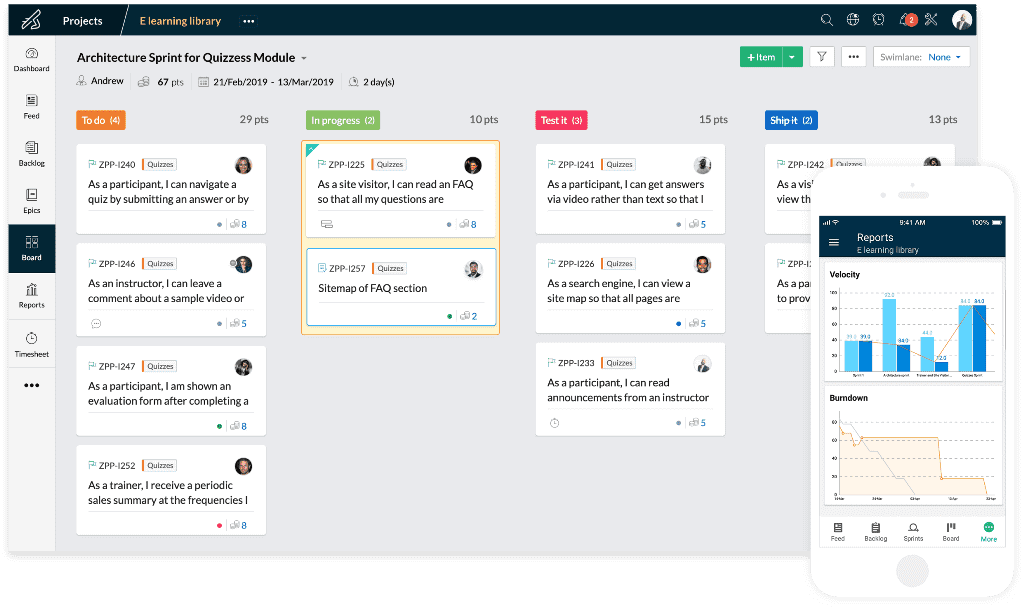
Uncertainty is one of the few certainties in business. Zoho recognized the need for a tool that helps teams embrace change. Zoho Sprints is a product management tool that empowers agile teams to plan, track, and ship the best products to their customers. Whether you are a seasoned agile practitioner or just starting out, Zoho Sprints can fit your needs.
Zoho Sprints helps product teams maintain an organized product backlog and simplifies sprint planning. The drag and drop planning interface allows scrum teams to move work items from the product backlog to the sprint backlog with ease. In keeping with the pioneering spirit of agile, their Scrum Board is highly customizable.
With Zoho Sprints, teams can stay release-ready at all times. From planning to deployment, the tool helps teams navigate the interdependencies of their release cycles. Product managers can track the progress of their epics, sprints, and releases through customizable reports and dashboards. Actionable insights from velocity charts, burnup and burndown reports, and cumulative flow diagrams help teams iterate sprint planning.
Communication and collaboration are crucial in every aspect of life, and they're especially critical when you're working with cross-functional teams. With Zoho Sprints, product teams can collaborate within the context of their work through features like built-in chat, virtual meetings, and an interactive project feed.
Zoho Sprints integrates well with popular code repository management tools like GitHub, GitLab, Bitbucket. DevOps teams can also automate their CI/CD pipelines by integrating with developer tools like Jenkins and Azure DevOps. Teams can leverage webhooks and APIs to build their integrations or browse through a growing library of apps listed on Zoho's marketplace.
The pricing for Zoho Sprints starts at $6 per user (billed monthly). They also offer a free trial and a free forever plan for up to 3 users.
Pros and Cons
Pros:
- Easily turn feed messages into a work item
- Easily schedule meetings for sprint reviews and daily stand-ups
- Robust customization options
Cons:
- WIP settings in Premier plan only
- Doesn’t integrate well with other Zoho apps
- No cumulative by-project timesheets for a user
New Product Updates from Zoho Sprints

Zoho Sprints Adds ServiceDesk Plus Integration
Zoho Sprints now offers Zoho Sprints for ServiceDesk Plus in Zoho Marketplace, enabling IT teams to send requests, changes, and releases to developers and track progress in SDP. For more information, visit Zoho Sprints' official site.
 .

Wrike
Best for scaling organizations

Wrike is an award-winning collection of agile tools for project management suitable for teams of five or more. This highly configurable agile project management software allows users to customize workflows, dashboards, and reports.
Wrike’s simple interface enables users to switch between Kanban boards, interactive drag-and-drop Gantt charts, and workload views to visualize priorities. Wrike features a number of easy-to-use agile templates, backlog management functionalities, spaces for collaboration and feedback, and agile reporting and analytics. Other features include agile folder organization and automated task management.
Wrike’s features can be configured for each individual team’s needs, and the tool also offers a variety of different yet specific solutions depending on the type of team or organization, including solutions for marketing teams and professional service teams.
The software offers more than 400 pre-built native integrations, including popular file management software from Microsoft, Google, and Dropbox, along with sales and marketing software from Salesforce and Marketo.
Pros and Cons
Pros:
- Community feedback voting for roadmap features
- Loads of configurable features
- Holistic, comprehensive task modeling
Cons:
- Commenting system could be better
- Not tailored for small organizations
New Product Updates from Wrike

Wrike Redesigns Workspace Search With New Filters
Wrike introduces a redesigned Workspace Search interface with recent search shortcuts, item type and location filters, and parent-task context. These updates help users find relevant work items and navigate search results efficiently. For more information, visit Wrike’s official site.
 .

Celoxis
Best for advanced resource management

Celoxis is an enterprise project portfolio management (PPM) platform that supports agile and hybrid project delivery with sprint planning, Kanban boards, Gantt scheduling, resource capacity planning, risk tracking, and real-time dashboards.
Celoxis is a strong fit for mid-size to enterprise teams managing multiple projects across departments that require portfolio visibility along with agile delivery.
Why I Picked Celoxis
I picked Celoxis as one of the best agile tools because its resource management goes well beyond basic assignment. The interactive workload chart lets my team see allocation across every active project simultaneously, so we can catch overloads before they derail a sprint. What I find especially useful is the skill-based allocation combined with capacity planning that compares planned vs. actual effort in real time. Celoxis also accounts for exceptions like vacations and part-time schedules automatically, which means sprint resourcing stays accurate without manual recalculation every cycle.
Celoxis Key Features
- Kanban boards: Visualize and manage sprint tasks across customizable columns with drag-and-drop card movement.
- Interactive Gantt chart: Adjust task timelines and dependencies in real time, with automatic schedule updates when changes are made.
- Inter-project dependency tracking: Link tasks across multiple projects and update schedules automatically when timelines shift.
- Integrated time tracking: Log hours directly against tasks and sprints using built-in timesheets with approval workflows.
Celoxis Integrations
Celoxis offers native integrations with Jira, Salesforce, Trello, Zendesk, Okta, Microsoft Project, Slack, Outlook, Google Drive, and more, with an API available for custom integrations.
Pros and Cons
Pros:
- Supports waterfall, hybrid, and agile workflows
- Offers both cloud and on-premise deployment
- Built-in what-if scenario and trend analysis
Cons:
- Steep learning curve for teams
- Mobile app lacks full desktop feature parity
Best agile tool with Kanban boards
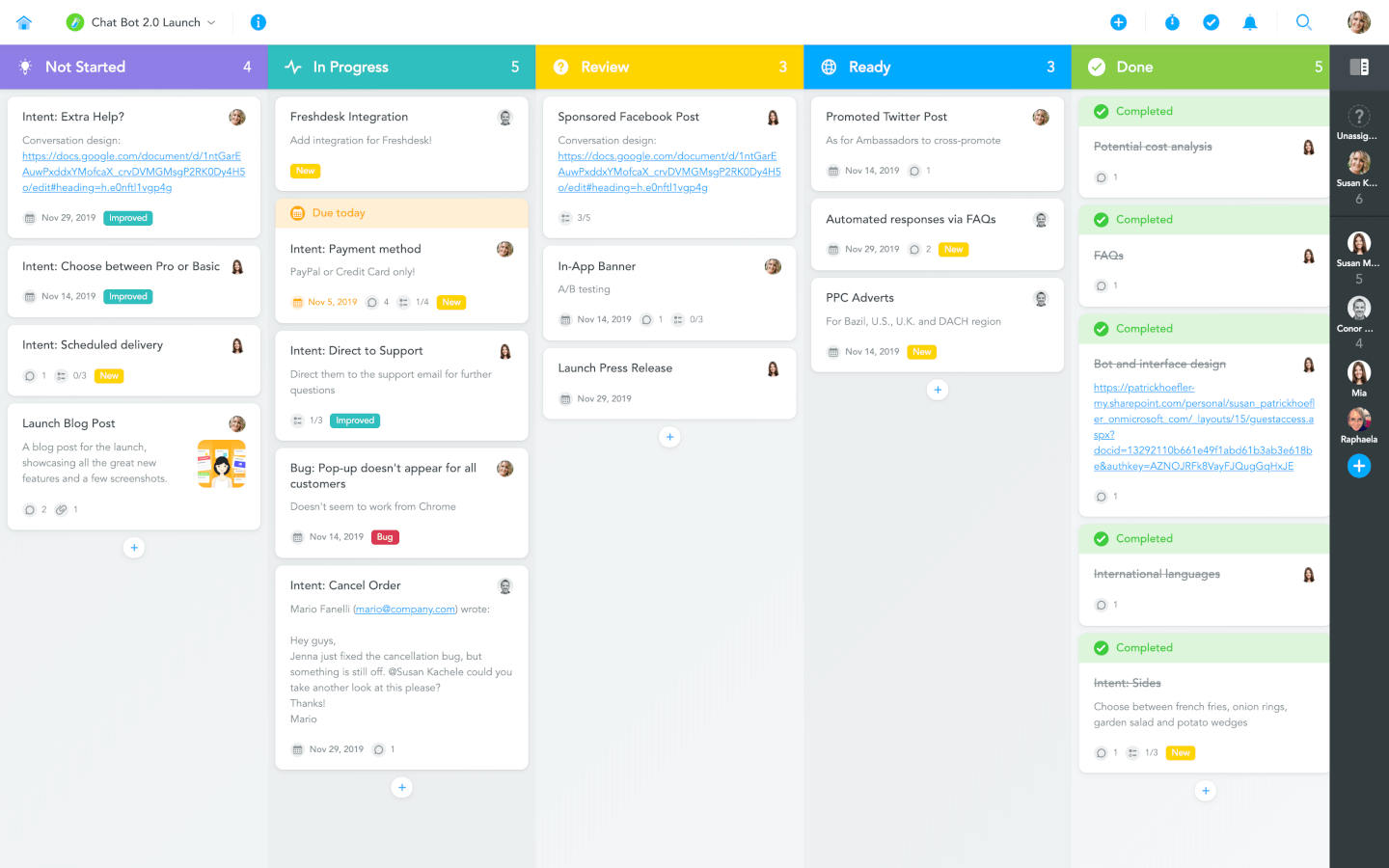
MeisterTask is a beautifully designed and incredibly intuitive Kanban tool. Its Kanban boards can be customized to fit any workflow, from software sprints to sales funnels, and from editorial calendars to your company’s onboarding process. Teams can collaborate on one simple platform, where they can communicate, work together on tasks, and easily track the time they spend on them.
With MeisterTask, you can not only visualize processes but also automate them in various ways. Creating recurring tasks, adding predefined checklists, notifying stakeholders when a task is completed, or ensuring that tasks are assigned and tagged correctly when they are moved to a specific section — all of this can be done automatically. Larger teams will find MeisterTask’s sophisticated roles and permissions management as well as the insights gained through various statistics and reports particularly useful.
MeisterTask offers an extensive online help center, free webinars for new users, and fast email support in case you need to talk to a real person. However, thanks to MeisterTask’s focus on simplicity, even companies who are just getting started on their journey to digital organization are usually able to get productive within minutes after signing up.
MeisterTask integrates with the mind mapping app MindMeister where you can brainstorm and plan with a mind map and then export it onto a Kanban board. MeisterTask comes readily integrated with popular tools such as Slack, Microsoft Teams, GitHub, Zendesk, Harvest, and various email apps. In addition to these native integrations, you can use Zapier or IFTTT to connect your projects with hundreds of other tools.
MeisterTask costs from $8.25/user/month. They also offer a free plan with limited functionality.
Pros and Cons
Pros:
- Easy to create and assign tasks
- Useful, user-friendly dashboard
- Great mobile app
Cons:
- Does not interface with Gmail
- Lack of internal calendar
Kintone
Best for building custom agile workflows

Kintone is an agile project management tool used by teams at Volvo, Japan Airlines, Shiseido, LiveWell Colorado, and over 23,000 organizations worldwide. Their unique approach to project and task management lets you build a wide variety of customizable “apps” using a flexible drag-and-drop interface that lets you easily make changes and improvements to your apps as you go.
Apps can be built either from scratch, using templates, or from existing spreadsheets for data management, business processes, and workflow purposes. Kintone apps can be customized for project management, sales CRM, customer databases, expense reports, shared to-do lists, equipment management, product feedback, and much more.
Kintone lets you build agile project management apps by dragging and dropping elements that you want to see onto the page: rich text fields, date fields, drop-down menus, number fields with built-in calculations, spaces for attachments, user or group selection menus, related data from other apps, tables, and more. Your agile project management solution can look and work however you want it to.
What makes Kintone particularly great for agile project management is that it empowers project managers to track all facets of their project, from individual tasks and project data to workflows and communication—and then use their findings to rapidly improve their processes as they go. Because the end-users are also the app designers, feedback loops are instant, continuous, and actionable.
Kintone lets you expand its capabilities with both free native plugins built by the Kintone team as well as integrations with other tools like Slack, Gmail, Google Calendar, Outlook, Tableau, Dropbox, Salesforce, HubSpot, Eventbrite, WordPress, QuickBooks, MailChimp, and many more through a paid plan with Zapier or via API integrations.
Kintone costs $24/user/month with a minimum requirement of 5 users. They offer a 30-day free trial (no credit card required) and discounted prices for nonprofits and educators. Kintone’s team also offers a free custom app build as part of the free trial process.
Pros and Cons
Pros:
- Data is easy to pull and manipulate into good looking reports
- Admin accounts have access to tons of customization tools
- Flexible pricing that includes special deals for schools and NPOs
Cons:
- No native templates for common project types or documents
- Limited to 5GB/user storage on every pricing tier
- No single-user plan available (minimum 5 users)
Trello
Best for card-based task lists
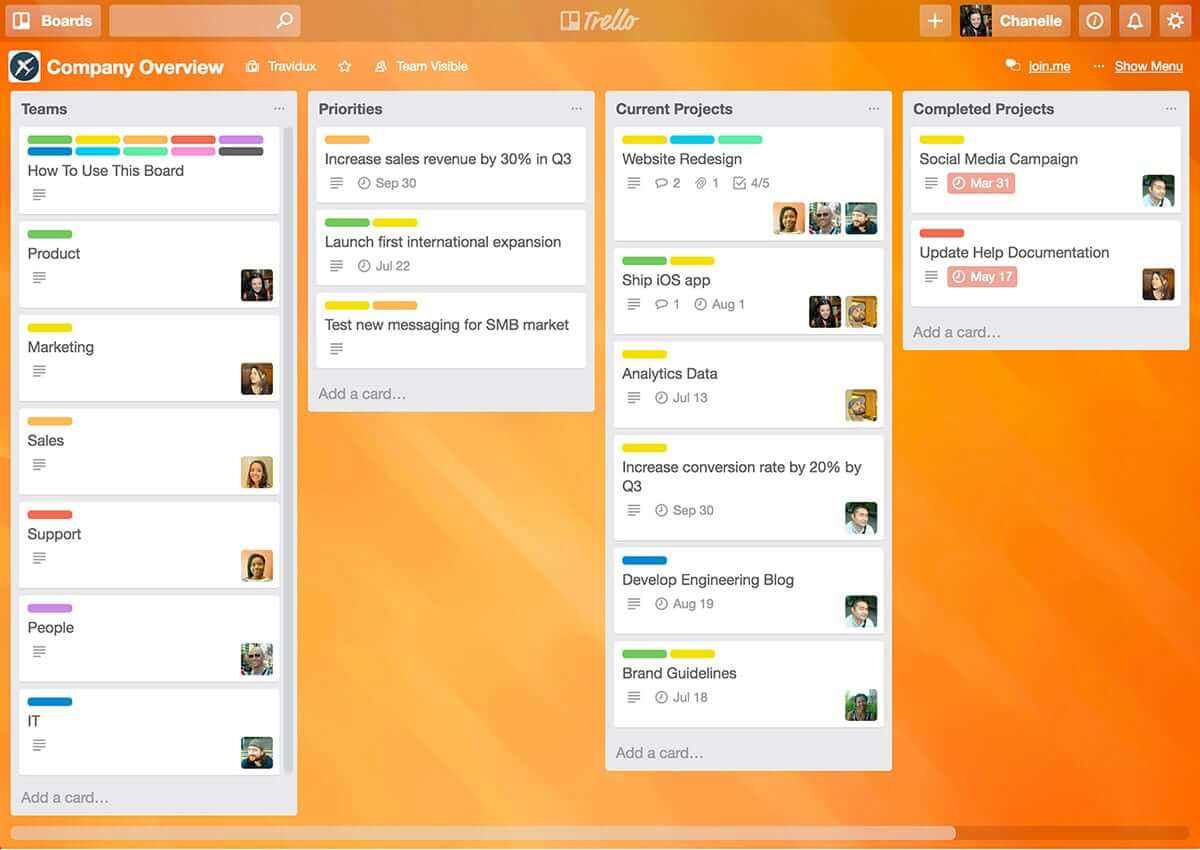
Trello is a simple but powerful agile Kanban tool. If you’re looking for an easy entry into the world of agile tools, Trello is a great option as it’s one of the easiest agile tools to learn and it’s free (or at least it’s freemium!) and has to be considered one of the best free agile tools because it’s so intuitive and simple to use.
Being simple also means that it’s also limited in features and functionality. Out of the box, with the free version, Trello has task management and team collaboration, but it’s pretty limited.
For richer functionality you have to start paying for it – The Business class version gives you app integrations or “Power-Ups" which enable you to bolt on additional functionality such as Github integration, SalesForce, Slack, Gantt charts, timesheets, reporting, and analytics.
Trello is a free agile tool but paid versions cost $9.99/user/month.
Pros and Cons
Pros:
- Color coding of cards according to priority
- Vast capability to customize each card
- Excellent communication and collaboration tracking
Cons:
- No native support for calendar integrations
- Not well suited for large or overly complicated projects
- Board management customization could be improved

Shortcut
Best for story, epic, and milestone organization

Shortcut is an online project management tool designed with software teams in mind. It helps you manage tasks, track progress, and collaborate more effectively. With its roots in agile methodologies, Shortcut focuses on flexibility and efficiency, making it easier for your team to manage projects, sprints, and releases.
One of the key features of Shortcut is its support for agile workflows through its stories, epics, and milestones features. Stories allow your team to break down tasks into manageable pieces, while epics help group related stories together for bigger goals. Milestones give you an easy way to track project phases and major deadlines. This structure gives your team clear visibility into progress and priorities at every level of the project.
Shortcut also provides burndown charts and iteration planning tools, which are vital for teams working in sprints. With burndown charts, you can monitor how much work remains in your sprint and make adjustments as needed. The iteration planning tools let you organize and adjust work on the go, ensuring your team is always ready for the next sprint.
Integrations include Slack, GitHub, GitLab, Figma, Codestream, Bitbucket, Notion, Loom, Dailybot, Plecto, LinearB, Lambda Test, Testlodge, Google Calendar, Sentry, FireHydrant, and Vanta.
Pros and Cons
Pros:
- Automates and manages workflows
- Provides clear visualization of project progress
- Supports real-time collaboration
Cons:
- Fewer options for teams not using Agile, Scrum, or Kanban methodologies
- May be too feature-rich for less complex projects
Jira
Best for software development for agile teams

Jira is a household name, and arguably the big daddy in the world of agile tools. What started out as a bug and issue tracking system is now complete with features to make Jira a fully-fledged agile tool offering fully-featured task management with agile task boards, team collaboration, and reporting.
With Jira you can manage a variety of different projects (e.g. Scrum, Kanban, Traditional project management for non-development projects), and Jira is flexible in how it can be configured allowing for unique workflows and processes so you’re able to use an out-of-the-box workflow or create one to match the way your team works.
The power of Jira is its flexibility and integrations. With the suite of other Atlassian tools, including Confluence and HipChat you can connect Jira to Bitbucket or GitHub and provide your team with end-to-end traceability, from backlog to deployment. With more than 2,000 add-ons in the Atlassian Marketplace, you can find just about any customization and extension for Jira to fit just about any use case.
Pros and Cons
Pros:
- Houses all historical works for future reference
- Can create tasks, sub-tasks, spikes, and epics
- Single view for all user stories
Cons:
- No mass-editing and scripting (rename a whole set of labels, etc.)
- Needs better linking within stories and tasks
- Limited collaboration features
Nutcache
Best for flexibility to various agile methodologies
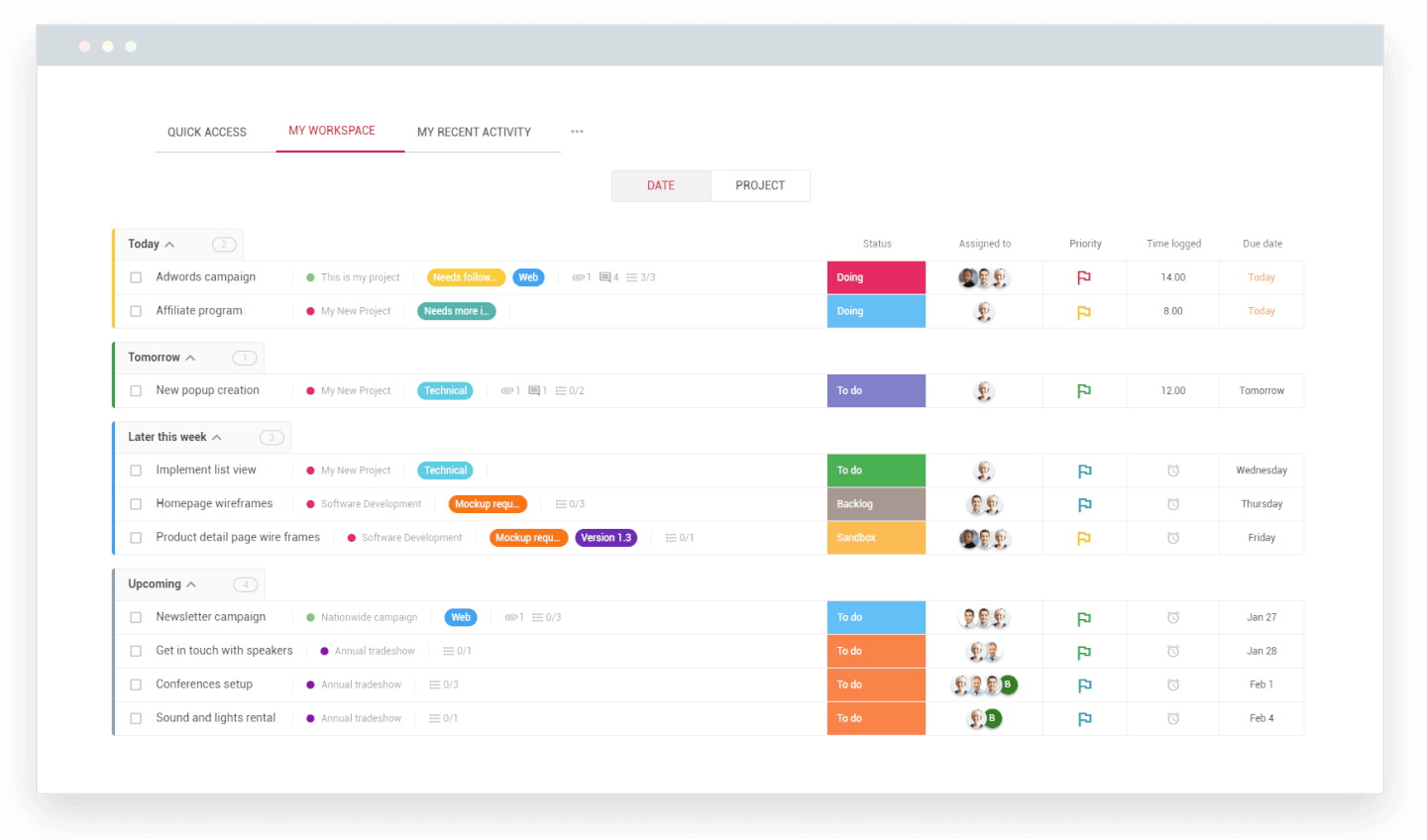
Nutcache is a project management tool designed to plan, track, and manage all aspects of your project using a sophisticated toolbox of color-coded schedules, task organization queues, and data reporting. Users can organize with Agile or Scrum project management, depending on your preferences.
Use the Gantt chart to plan, track, and visually organize your tasks with easy drag-drop-and-click editing techniques. Nutcache offers tools to prioritize and focus on critical tasks: build custom workflows and attach multiple assignees to a task, break down each phase of your project, make adjustments to reschedule your tasks, and visualize project deadlines.
Integrations include Dynacom Accounting, PayPal, 2Checkout, Stripe, Authorized.Net, QuickBooks Online, Google Sign In, Google Drive, GitHub, Slack, and hundreds of other apps through Zapier.
Nutcache costs from $6/user/month with a “Pro” plan that requires 5 users.
Pros and Cons
Pros:
- Easy to integrate new employees
- Great time tracking functionality
- Easy to use
Cons:
- Need more third party integrations
- Complicated security levels for employees
Diğer Çevik Araçlar
İlk sıralarda yer almayan ancak yine de değerlendirilmeye değer diğer bazı araçlar burada.
- Taiga.io
Agile tool for user experience and interface
- Planview AdaptiveWork
For hybrid methodologies
- Easy8
For built-in financial management features
- ProjectManager
Agile reporting tool
- Favro
For team collaboration
- Businessmap
For project portfolio software
- Ravetree
For enterprises
- SAM9000
For AI-powered agile features
- Miro
For a highly flexible whiteboard platform
- ClickUp
For visual sprint planning
- Smartsheet
For managing agile workflows
- Hubstaff
For project tracking
- Hive
For flexible views
- Lucidspark
For agile planning on an infinite canvas
- airfocus
For prioritizing agile projects
- GoodDay
For blending flexibility with structure
- Yanado
For team productivity
- Forecast
For Scrum methodologies
- Scoro
For general business management software
- Hygger
For making product roadmaps
- Zenhub
For integration with GitHub
- OpenProject
For open source agile project management software
- Kanbanchi
For integration with Google Drive
- Conceptboard
For keeping teams in sync across time zones and departments
- GoodDay
For tracking work in progress
- AgileCRM
One of the few agile tools not designed for software dev teams—this is a CRM, project management, marketing, and customer support tool combined into one and designed to support agile practices across a variety of industries
- GitScrum
A simple low-cost agile management software for growing businesses
- Hansoft
For portfolio and product backlog management tools
- Phabricator
For code reviews and testing


How I Evaluate Agile Tools
I look at every agile tool in two passes: first, whether it can actually run a sprint—backlog, boards, burndowns—then what sets it apart for scaled teams or engineering-heavy workflows.
Core Functionality (Table Stakes For This List)
When I'm selecting tools for my list, I rank each one on a scale from 0 (does not offer the functionality) to 5 (excels in this area) for each core functionality listed below. Then, I calculate the tool's total score into a percentage. Each tool needs to achieve a minimum total score of 65% to be considered for inclusion.
- Backlog Management: I evaluate how each tool handles backlog creation, ranking, and grooming—like dragging stories into priority order before sprint planning or bulk-editing story points across an epic.
- Sprint Planning & Execution: Each tool should let teams define sprint goals, set capacity, and commit to a scope of work, similar to how Jira and Azure DevOps structure their sprint workflows.
- Agile Boards (Scrum/Kanban): I look for configurable boards with custom columns, WIP limits, and swimlanes—the kind of setup a team needs to run Kanban for ops work and Scrum for product delivery side by side.
- Agile Reporting & Metrics: The tool should offer burndown charts, velocity tracking, and cumulative flow diagrams so a Scrum Master can spot scope creep mid-sprint or a PMO director can compare velocity across squads.
- User Story & Epic Hierarchy: I check whether work items support multi-level structures—epics containing features containing stories—with dependency links that surface blockers across teams.
- Release & Roadmap Planning: Teams need to map sprints to releases and visualize delivery timelines, so I look for version management and roadmap views that connect daily sprint work to quarterly goals.
Once I have a list of tools that meet this criteria, I consider what sets each platform apart.
Differentiating Factors (What Sets Vendors Apart)
Here's how I compare and contrast different vendors:
Standout Features
Developer tool integrations matter a lot here. A two-way sync between your board and GitHub or GitLab means commits and pull requests automatically update story status—no manual tab-switching. Workflow automation is another area I evaluate closely, since rules that auto-assign stories or transition cards on merge save Scrum Masters hours of housekeeping each sprint. For larger organizations, I also check whether the tool natively supports scaled frameworks like SAFe, where teams need shared backlogs and program increment planning across multiple squads.
Beyond Features
Scalability is one of the first things I evaluate. A tool that works for a single Scrum team of eight may fall apart when you're coordinating 20 squads across a portfolio. Pricing structure matters just as much—some vendors lock sprint reporting or advanced boards behind enterprise tiers, which changes the math for mid-size teams. I also consider security and compliance posture, especially SSO support, role-based permissions, and audit logging, since PMO directors in regulated industries need those controls before they'll even run a pilot.
Çevik Araçlar Nasıl Seçilir
Uzun özellik listeleri ve karmaşık fiyatlandırma yapıları içinde kaybolmak kolaydır. Kendinize özgü yazılım seçimi sürecinizi yürütürken odağınızı korumanıza yardımcı olmak için göz önünde bulundurmanız gereken faktörlerin bir kontrol listesi aşağıdadır:
| Faktör | Dikkat Edilmesi Gerekenler |
|---|---|
| Ölçeklenebilirlik | Aracın ekibinizin ihtiyaçlarıyla birlikte büyüdüğünden emin olun. İş akışlarınız genişledikçe proje kapasitesi, gelişmiş raporlama ve büyük ekip desteği gibi özellikleri arayın. |
| Entegrasyonlar | İş akışınızı kolaylaştırmak için aracın Jira, Slack veya Trello gibi hâlihazırda kullandığınız platformlara sorunsuz şekilde bağlandığını kontrol edin. |
| Özelleştirilebilirlik | İş akışlarını, gösterge panellerini ve raporları ekibinizin belirli süreçleri ve hedefleriyle uyumlu olacak şekilde özelleştirmenize olanak tanıyan araçları seçin. |
| Kullanım Kolaylığı | Ekibinizin aracı uzun öğrenme süreçleri veya kapsamlı eğitimler olmadan hızlıca benimseyebilmesi için arayüz sezgisel olmalıdır. |
| Bütçe | Sabit ücret, kullanıcı başına maliyet veya ölçeklenebilir kademeli planlar gibi mali kısıtlarınıza uyan şeffaf fiyatlandırma seçeneklerini arayın. |
| Güvenlik Önlemleri | Hassas bilgileri korumak için veri şifreleme, rol tabanlı erişim ve ISO veya GDPR gibi standartlara uyumluluk özelliklerine sahip araçlara öncelik verin. |
| İş Birliği Özellikleri | Herkesin aynı doğrultuda kalmasını sağlamak için aracın ekip panoları, paylaşılan görev görünümleri ve yorum yapma gibi gerçek zamanlı iş birliği özellikleri sunduğundan emin olun. |
| Raporlama Olanakları | Ekip performansını, görev ilerlemesini ve son teslim tarihlerini etkili şekilde takip etmek için yerleşik analiz veya raporlama özelliklerini arayın. |
Çevik Araçlardaki Trendler
Araştırmam sırasında farklı çevik araç sağlayıcılarından sayısız ürün güncellemesi, basın bülteni ve sürüm günlüğü derledim. Gözlem altında tuttuğum yeni ortaya çıkan trendlerden bazıları şunlar:
- Yapay Zekâ Destekli İçgörüler: Araçlar ekip performansını analiz etmek, darboğazları öngörmek ve iş akışlarını iyileştirmeye yönelik öneriler sunmak için yapay zekâ kullanıyor. Örneğin bazı platformlar, geçmiş verilere dayanarak sprint planlama önerileri sunuyor.
- Gelişmiş Sprint Retrospektifleri: Retrospektif araçları daha etkileşimli hâle geliyor; ekiplerin kalıpları belirlemesine ve gelecekteki sprintleri iyileştirmesine yardımcı olmak için analizler ve görsel içgörüler sunuyor. Sağlayıcılar, retrospektifleri daha etkili hâle getirmek için şablonlar, anketler ve duygu takibi ekliyor.
- Hibrit İş Akışlarına Odaklanma: Araçlar, hibrit iş akışlarını destekleyerek hem çevik hem de çevik olmayan ekiplerin ihtiyaçlarını karşılıyor. Örneğin platformlar artık farklı proje gereksinimlerine uyum sağlamak için kullanıcıların Kanban, Gantt ve liste görünümleri arasında geçiş yapmasına olanak tanıyor.
- Gerçek Zamanlı İş Birliği Özellikleri: Çevik iş birliği araçları, ekiplerin araç değiştirmeden uyum içinde çalışmasını sağlamak için uygulama içi beyaz tahtalar, gerçek zamanlı görev düzenleme ve canlı yorumlar gibi özelliklerle canlı iş birliğine daha fazla ağırlık veriyor.
- Sürdürülebilirlik Takibi: Bazı sağlayıcılar artık projeler kapsamında enerji kullanımı, atık veya kaynak tüketimi gibi sürdürülebilirlik ölçütlerini takip etmeye yönelik özellikler sunuyor ve çevik uygulamaları kuruluşun sürdürülebilirlik hedefleriyle uyumlu hâle getiriyor.
Çevik Araçlar Nedir?
Çevik araçlar, ekiplerin Scrum veya Kanban gibi çevik yöntemleri kullanarak projeleri yönetmesine yardımcı olan bir proje yönetimi yazılımı türüdür. Bu araçlar görev panoları, iş listesi takibi, sprint planlama ve ilerleme güncellemeleri gibi özellikler sunar. Proje yöneticileri, geliştiriciler ve ürün ekipleri; işleri düzenli tutmak, değişikliklere hızlıca uyum sağlamak ve daha iyi iletişim kurmak için çevik araçları (veya belirli Scrum araçlarını) kullanır.
Projelerin sorunsuz ilerlemesini sağlamanız ve işler değiştiğinde hızlı tepki vermeniz gerekiyorsa, çevik proje yönetimi yazılımı bunu çok daha kolay hâle getirir.
Çevik Araçların Özellikleri
Çevik araçları seçerken aşağıdaki temel özelliklere dikkat edin:
- Sprint planlama: Hedeflerin net ve ulaşılabilir olmasını sağlamak için ekiplerin her sprint için görevleri planlamasına, önceliklendirmesine ve atamasına olanak tanır.
- Kanban panoları: İş akışlarını ve görevlerin ilerlemesini görselleştirerek ekiplerin devam eden işleri yönetmesine ve darboğazları belirlemesine yardımcı olur. Daha fazla Kanban yazılımını ve Trello alternatifini burada bulabilirsiniz.
- Burn-down grafikleri: Ekiplerin ilerlemeyi ölçmesine ve sprintin tamamlanmasını öngörmesine yardımcı olmak için kalan işi zamana göre takip eder.
- İş listesi yönetimi: Projenin hedeflerle uyumlu kalmasını sağlamak için görevleri, kullanıcı hikâyelerini ve sorunları düzenler ve önceliklendirir.
- Hız takibi: İş yüklerini planlamaya ve gerçekçi beklentiler belirlemeye yardımcı olmak için ekip performansını sprintler genelinde analiz eder. Hızı hesaplamak ve takip etmek için çevik takip araçlarını kullanın.
- Gerçek zamanlı iş birliği: Ekip üyelerinin canlı güncellemeler, görev düzenlemeleri ve yorumlar aracılığıyla birlikte çalışmasına olanak tanır.
- Özel iş akışları: Ekiplerin görev aşamalarını ve süreçlerini kendi proje gereksinimlerine uyacak şekilde özelleştirmesine olanak tanır.
- Bağımlılık haritalama: Kritik bağımlılıkların etkili bir şekilde yönetilmesini sağlamak için görevler arasındaki ilişkileri öne çıkarır.
- Retrospektif araçları: Tamamlanan sprintleri değerlendirmek ve iyileştirme alanlarını belirlemek için yapılandırılmış yöntemler sunar.
- Kaynak tahsisi: İş yüklerini dengelerken ve aşırı görevlendirmeden kaçınırken ekip üyelerini görevlere atamaya yardımcı olur.
Çevik Araçların Faydaları
Çevik araçları uygulamak ekibiniz ve işletmeniz için çeşitli faydalar sağlar. Yararlanmayı bekleyebileceğiniz faydalardan bazıları şunlardır:
- Geliştirilmiş ekip iş birliği: Herkesin proje hedefleriyle uyumlu kalmasını sağlamak için gerçek zamanlı iletişim ve görev paylaşımını mümkün kılar.
- Daha hızlı proje teslimi: Ekiplerin çalışmayı sprint'lere bölmesine ve son teslim tarihlerine verimli bir şekilde ulaşmak için ilerlemeyi takip etmesine yardımcı olur.
- Daha iyi görev önceliklendirme: İş listesi yönetimi gibi özellikler, ekiplerin yüksek değerli görevlere odaklanmasını ve boşa harcanan çabayı azaltmasını sağlar.
- Geliştirilmiş görünürlük: Kanban panoları ve kalan iş grafikleri gibi araçlar, görevlerin ilerlemesi ve darboğazlar hakkında net bilgiler sunar.
- Artırılmış esneklik: Özelleştirilebilir iş akışları, ekiplerin süreçleri proje gereksinimlerine ve değişikliklere uyacak şekilde ayarlamasına olanak tanır.
- Veriye dayalı kararlar: Analiz ve raporlama özellikleri, ekiplerin performansı takip etmesine ve iyileştirme alanlarını belirlemesine yardımcı olur.
- Dengeli iş yükleri: Kaynak tahsisi araçları, ekip üyelerinin aşırı çalıştırılmamasını sağlayarak üretkenliği ve motivasyonu artırır.
Çevik Araçların Maliyetleri ve Fiyatlandırması
Çevik araçları seçmek, mevcut çeşitli fiyatlandırma modellerinin ve planların anlaşılmasını gerektirir. Maliyetler özelliklere, ekip büyüklüğüne, eklentilere ve daha fazlasına göre değişir. Aşağıdaki tablo, çevik araç çözümlerinde yaygın olarak sunulan planları, ortalama fiyatlarını ve tipik özelliklerini özetlemektedir:
Çevik Araçlar İçin Plan Karşılaştırma Tablosu
| Plan Türü | Ortalama Fiyat | Yaygın Özellikler |
|---|---|---|
| Ücretsiz Plan | $0/user/month | Temel görev takibi, Kanban panoları, sınırlı entegrasyonlar ve ekip iş birliği araçları |
| Kişisel Plan | $5-$15/user/month | Görev yönetimi, özel iş akışları, iş listesi düzenleme, sınırlı raporlama ve öncelikli destek |
| İşletme Planı | $15-$35/user/month | Sprint planlama, gelişmiş raporlama, kaynak tahsisi, bağımlılık haritalama ve üçüncü taraf araçlarla entegrasyonlar |
| Kurumsal Plan | $35+/user/month | Gelişmiş güvenlik özellikleri, role dayalı izinler, büyük ekipler için ölçeklenebilirlik, özelleştirilebilir analizler ve özel destek |
Çevik Araçlar Hakkında Sıkça Sorulan Sorular
Bu konu hakkında diğer kişilerin sorduğu yaygın soruların yanıtlarını bulun.
Çevik yöntem şelale yönteminden daha mı iyidir?
Bu soruyu soran ilk kişi siz değilsiniz; çünkü bu, proje yönetimi topluluğundaki büyük tartışmalardan biridir. Birinin diğerinden daha iyi olduğunu söylemek yerine, her ikisinin de en uygun olduğu proje türleri vardır.
Şelale yöntemi, projenin başında gereksinimleri tanımlamanızı ve ardından projeyi baştan sona yürütmenizi gerektirir. Çevik yöntem ise daha küçük iş parçalarına ve müşteriden gelen geri bildirimlerle sürekli beslenen yinelemelere odaklanır.
Bu nedenle, yürüttüğünüz projenin türünü analiz etmeniz ve hangi yöntemin buna en uygun olduğuna karar vermeniz gerekir. Bir geliştirme projesini yönetiyorsanız muhtemelen çevik yönteme yöneleceksiniz. Bir sosyal medya pazarlama kampanyası ise muhtemelen şelale yaklaşımından fayda sağlayacaktır.
Çevik yöntem nedir?
Çevik aslında bir yöntem değil, yazılım geliştirmeye yönelik bir dizi ilkedir. Çevik ilkeler şunlardır:
- Süreçler ve araçlar yerine bireyler ve etkileşimler
- Kapsamlı dokümantasyon yerine çalışan yazılım
- Sözleşme müzakeresi yerine müşteri iş birliği
- Bir planı takip etmek yerine değişime yanıt verme
Çevik yöntemlere Scrum, Kanban, Scrumban ve yalın yöntem örnek verilebilir. Bunların tümü bu ilkeleri izlese de işe nasıl yaklaşılacağı konusunda kendilerine özgü bir bakış sunar.
Scrum yöntemi nedir?
Çevik araçlar, ekiplerin Scrum veya Kanban gibi çevik yöntemleri kullanarak projeleri yönetmesine yardımcı olan bir proje yönetimi yazılımı türüdür. Scrum, teslimatı iyileştirmeye yönelik bir dizi ilke ve süreç içeren bir yöntemdir. Yazılım geliştirmede Scrum, çevik ilkeleri uygulayan en popüler çerçevelerden biridir. Süreci desteklemek için bir dizi Scrum seremonisi ve rolü içerir. Amaç iletişimi, ekip çalışmasını ve geliştirme hızını iyileştirmektir. Sprintler, Scrum’lar (veya ayakta yapılan toplantılar), retrospektifler, iş listeleri ve tamamlanma grafikleri Scrum’ın parçalarının tümüdür.
SAFe çerçevesi nedir?
Resmi olarak 2007’de tanıtılan Ölçeklendirilmiş Çevik Çerçeve (SAFe), çevik, yalın ve DevOps uygulamalarını büyük ölçekte hayata geçirmeye yönelik bir sistemdir. Scrum veya yalın yöntem gibi çevik çerçeveleri kullanan kuruluşlar ya da kuruluşlarını desteklemek üzere DevOps süreçlerini ölçeklendirmenin bir yolunu arayan kuruluşlar tarafından kullanılabilir.
Çevik yöntemlerde kullanılan araçlar nelerdir?
Çevik yöntemlere yönelik araçlar, çevik odaklı yaklaşımınızı nasıl uyguladığınıza bağlı olarak çeşitli şekillerde kullanılabilir. Araçlarınız şunları içerebilir:
- İş listeleri: Sürükleyip bırakarak iş listesi kartlarıyla kullanıcı hikâyelerine ve hatalara öncelik verin veya önceliklerini yeniden belirleyin.
- Kanban veya Scrum panoları: Bir sprintteki görevleri, atanan kişileri ve durumları gösteren kartlarla tüm kullanıcı hikâyelerini görselleştirin.
- Görev kulvarları veya sütunları: Sürükleyip bırakma kartlarını kulvarlar arasında taşıyarak destanları, atanan kişileri, projeleri ve daha fazlasını ayırın.
- İş akışları: Belirli olaylara göre sorunları otomatik olarak güncelleyen özel iş akışları oluşturun. iş akışı diyagramı yazılımına göz atın.
- Sprintler: Hikâyeleri tahmin etmek ve sprint görevleriyle önceliklerini belirlemek için iş listesini kullanın.
- Günlük Scrum’lar veya ayakta toplantılar: Scrum’lara veya ayakta toplantılara hazırlanmak için ilerlemenin anlık görüntüsünü almak üzere gösterge tablosunu kullanın.
- Tamamlanma grafiği: Sprintte veya destanda kalan toplam işi takip ederek proje ilerlemesini yönetin.
- Hız grafiği: Her sprintte tamamlanan iş miktarını takip ederek ekibinizin hızını izleyin ve doğru tahminler yapın.
- Çevik yazılım geliştirme araçları: Jira, GitHub ve Linx gibi geliştirme platformları.
Jira en iyi çevik araç mıdır?
Hayır. Jira’nın (dropdown#toggle” data-dropdown-placement-param=”top” data-term-id=”287933594″>Atlassian‘ın bir parçası) en popüler araç olduğuna, ancak en iyisi olmadığına inanıyorum. Bunun temel nedeni, aracın çevik yöntem için tasarlanmamış olmasıdır. Başlangıçta yazılım geliştiricileri için bir sorun takip aracı olarak tasarlanmış, daha sonra bir proje yönetimi aracına dönüşmüştür.
Ne yazık ki herkesin ihtiyaçları farklı olduğundan bu sorunun kesin bir yanıtı yoktur. Bu nedenle en iyi çevik araç, ihtiyacınız olan özelliklere sahip olan araç olacaktır.