2026’da Küçük Ekipler İçin En İyi 10 Ücretsiz İş Akışı Yazılımı

10 En İyi Ücretsiz İş Akışı Yazılımları Kısa Listesi


En iyi ücretsiz iş akışı yazılımı, görevleri görselleştirmenize, ekip üyeleri atamanıza ve ilerlemeyi tek bir yerde ve hiçbir ücret ödemeden takip etmenize olanak tanır. Elektronik tablolara, e-posta zincirlerine veya birbirinden kopuk görev listelerine güvenmek bütçe dostu görünebilir; ancak bu yöntemler genellikle görünürlüğü azaltır ve ekibinizin uyum içinde kalmasını zorlaştırır.
Birçok araç sınırlı ücretsiz planlar sunar; bu da görev bağımlılıkları, otomasyon ve gerçek zamanlı iş birliği gibi temel işlevlerle kullanılabilirliği dengede tutan bir seçenek bulmayı zorlaştırabilir. Dijital proje yönetiminde 20 yılı ve yazılım incelemecisi olarak geçirdiğim on yılı aşkın deneyimimle, en güvenilir ücretsiz seçenekleri kısa listeye almak için nelere bakılması gerektiğini biliyorum.
Bu kapsamlı listeyi oluşturmak için 40'tan fazla ücretsiz iş akışı aracını test ettim. Bu makalede, günümüzde kullanılabilen en iyi ücretsiz iş akışı araçlarını inceleyerek öne çıkan özelliklerini, zayıf yönlerini ve ekibiniz için en uygun seçeneği belirlemeye yönelik ipuçlarını aktaracağım.
Why Trust Our Software Recommendations
Our team has been testing and reviewing software since 2012. As project managers ourselves, we know how difficult—and important—it is to choose the right software.
For this guide, we evaluated tools using hands-on testing and independent research, scoring tools using our selection criteria. We also draw on insights from industry thought leaders and practicing project management experts.
Our reviews reflect our human editorial judgment, not a sales pitch.
Expert reviewers:
Ücretsiz İş Akışı Yazılımları Karşılaştırma Tablosu
Bu karşılaştırma tablosu, yukarıda ele alınan ücretsiz iş akışı yazılımlarını hızlıca karşılaştırmanıza yardımcı olur.
| Tool | Starting Price | Website | |
|---|---|---|---|
| Best for clear data collection processes | 4.7 out of 5 | $19.50/month Free plan available | Website |
| Best for customization | 4.6 out of 5 | $9/user/month Free plan + 14-day trial available | Book Demo |
| Best for collaboration | 4.6 out of 5 | $12/user/month Free plan + free demo available | Book Demo |
| Best for built-in chat and automation on a free plan | 4.5 out of 5 | $5/user/month Free plan + 14-day trial + demo available | Website |
| Best for secure client-facing workflows | 4.4 out of 5 | $5,000/year Free trial + free demo available | Book Demo |
| Best for scalable workflow automation | 4.5 out of 5 | $19/user/month 15-day free trial | Website |
| Best for intelligent document processing | 4.9 out of 5 | Pricing upon request Free trial available + free demo | Website |
| Best for flexibility and user-friendliness | 4.7 out of 5 | $3/user/month Free plan available | Website |
| Best for no-code workflow automation | 4.7 out of 5 | Pricing upon request 14-day free trial; free demo available | Website |
| Best open-source tool | 4.5 out of 5 | €5.95/user/month Free plan available; 14-day free trial available for Enterprise Cloud and on-premises | Website |
En İyi Ücretsiz İş Akışı Yazılımları İncelemeleri
Her ücretsiz iş akışı platformunun en uygun kullanım alanını ve dikkat çeken özelliklerini göstermek için her bir aracın kısa bir açıklamasını burada bulabilirsiniz.

Best for clear data collection processes

Jotform Workflows gives small teams in any industry a simple way to automate repetitive tasks and manage approvals using customizable forms and drag-and-drop workflow tools.
Who Is Jotform Workflows Best For?
Jotform Workflows is a strong fit for small teams that rely on form-based data collection to trigger approvals, route requests, or manage recurring processes.
Why I Picked Jotform Workflows
Jotform Workflows earns its spot on my shortlist because of how tightly it connects form-based data collection to automated process flows. I like that every workflow is triggered by a form submission, which means data collection and the workflow happen in the same step. My team uses conditional logic to split workflows based on what a form respondent submits—so purchase requests over a certain amount automatically route to a different approver than smaller requests. The parallel processing feature also helps when multiple team members need to review the same submission simultaneously, without waiting for one another.
Jotform Workflows Key Features
- Workflow templates: Choose from 200+ pre-built templates covering use cases like employee onboarding, expense reimbursement, and order processing.
- E-signature collection: Request legally binding e-signatures directly within a workflow, without needing a separate signing tool.
- Task assignment with comments: Assign checklist-style tasks to team members, who can comment and upload documents directly on the task page.
- Automated reminders and due dates: Set due dates and automatic email reminders for pending approvals or tasks so nothing gets missed.
Jotform Workflows Integrations
Integrations include Google Drive, Slack, Airtable, Dropbox, Microsoft Teams, Square, PayPal, Stripe, Authorize.Net, and Box.
What's Free?
Jotform Workflows offers a free-forever plan that includes up to 5 forms, 100 monthly submissions, and 1,000 monthly form views. The free plan also limits storage and access to some advanced features.
New Product Updates from Jotform Workflows
Jotform Workflows Adds Wait Element for Timed Automation
Jotform Workflows introduces a Wait element for pausing and resuming workflows based on dates and times. This helps teams automate time-sensitive actions without manual follow-ups. For more information, visit Jotform’s official site.
 .

Best for customization
monday AI Workspace is a highly configurable work management platform that combines task tracking, workflow automation, multi-view project visualization, and team collaboration tools across a customizable, template-driven workspace.
Who Is monday AI Workspace Best For?
monday AI Workspace is a strong fit for small teams in marketing, operations, or product that need to manage multiple workflows across functions without rigid, one-size-fits-all tooling.
Why I Picked monday AI Workspace
monday AI Workspace earns its spot on my shortlist because no other free tool I've used gives you this level of structural control over how you build workflows. I can configure separate board architectures for a content calendar, a sprint backlog, and an onboarding tracker, each with its own custom statuses and column types. The 200+ templates make it practical to start fast and customize from there, rather than building from scratch every time a new workflow type comes up.
monday AI Workspace Key Features
- Kanban and table views: Choose between two core visualization modes for managing and organizing your workflows.
- Comments and : Collaborate on specific tasks with threaded discussions and team notifications.
- Document attachment: Add key files or documents directly to tasks to centralize project information.
- Board-level permissions: Control access and editing rights at the board level to maintain oversight and data consistency.
monday AI Workspace Integrations
monday AI Workspace offers native integrations with Slack, Microsoft Teams, Google Drive, Dropbox, Jira, GitHub, Trello, Zoom, HubSpot, and Salesforce. It also supports Zapier and provides an API for custom integrations.
What's Free?
monday AI Workspace offers a free-forever plan for up to 2 seats, which includes unlimited docs, 200+ templates, and up to 3 boards. Automations and integrations are not available on the free plan, and storage is capped at 500MB.
Pros and Cons
Pros:
- Multiple views available on free plan
- 200+ templates speed up workflow setup
- Highly customizable board and column structure
Cons:
- Automations locked behind paid tiers
- Free plan capped at two seats
New Product Updates from monday AI Workspace
monday AI Workspace Adds Human Approval Routing
monday AI Workspace adds a human-in-the-loop approval block to AI Workflows, sending approval requests and routing workflow paths based on responses. For more information, visit monday AI Workspace's official site.
 .

ClickUp
Best for collaboration

ClickUp gives small teams in tech, marketing, and creative fields a flexible workspace to organize tasks, manage projects, and keep everyone aligned without hitting paywalls for core workflow features.
Who Is ClickUp Best For?
ClickUp is a good fit for small, cross-functional teams that need a single place to manage tasks, docs, and communication across product, design, and engineering work.
Why I Picked ClickUp
ClickUp earns its spot on my shortlist because of how well it handles team collaboration without requiring a paid plan to unlock the features that actually matter. I like that my team can leave threaded comments directly on tasks, tag teammates, and resolve threads to keep feedback loops tight and traceable. ClickUp Docs also lets us draft briefs, specs, or meeting notes and link them directly to related tasks, so context never gets lost in a separate tool. For small teams juggling multiple workstreams, that kind of connected collaboration is hard to replicate at no cost.
ClickUp Key Features
- Custom workflow statuses: Define your own task statuses to match exactly how your team moves work through a pipeline.
- Multiple project views: Switch between list, board, Gantt, and calendar views to see work in whatever format fits the task.
- Built-in time tracking: Log time directly on tasks without needing a third-party timer tool.
- Recurring tasks: Set tasks to repeat on a schedule so routine work gets created automatically.
ClickUp Integrations
Integrations include Slack, GitHub, HubSpot, Google Drive, OneDrive, Dropbox, Outlook, Google Calendar, Figma, and Zoom.
What's Free?
ClickUp offers a free-forever plan with unlimited tasks and members. Some advanced features, like custom permissions and advanced reporting, are only available on paid plans.
New Product Updates from ClickUp
ClickUp Adds List Automations, Time Off Scheduling, and Org Charts
ClickUp adds template-based List automations, personal time off scheduling, a unified picker, automatic task date syncing, and Org Charts. These updates help teams automate project setup, manage availability, and organize work. For more information, visit ClickUp’s official site.
 .
Hive
Best for built-in chat and automation on a free plan
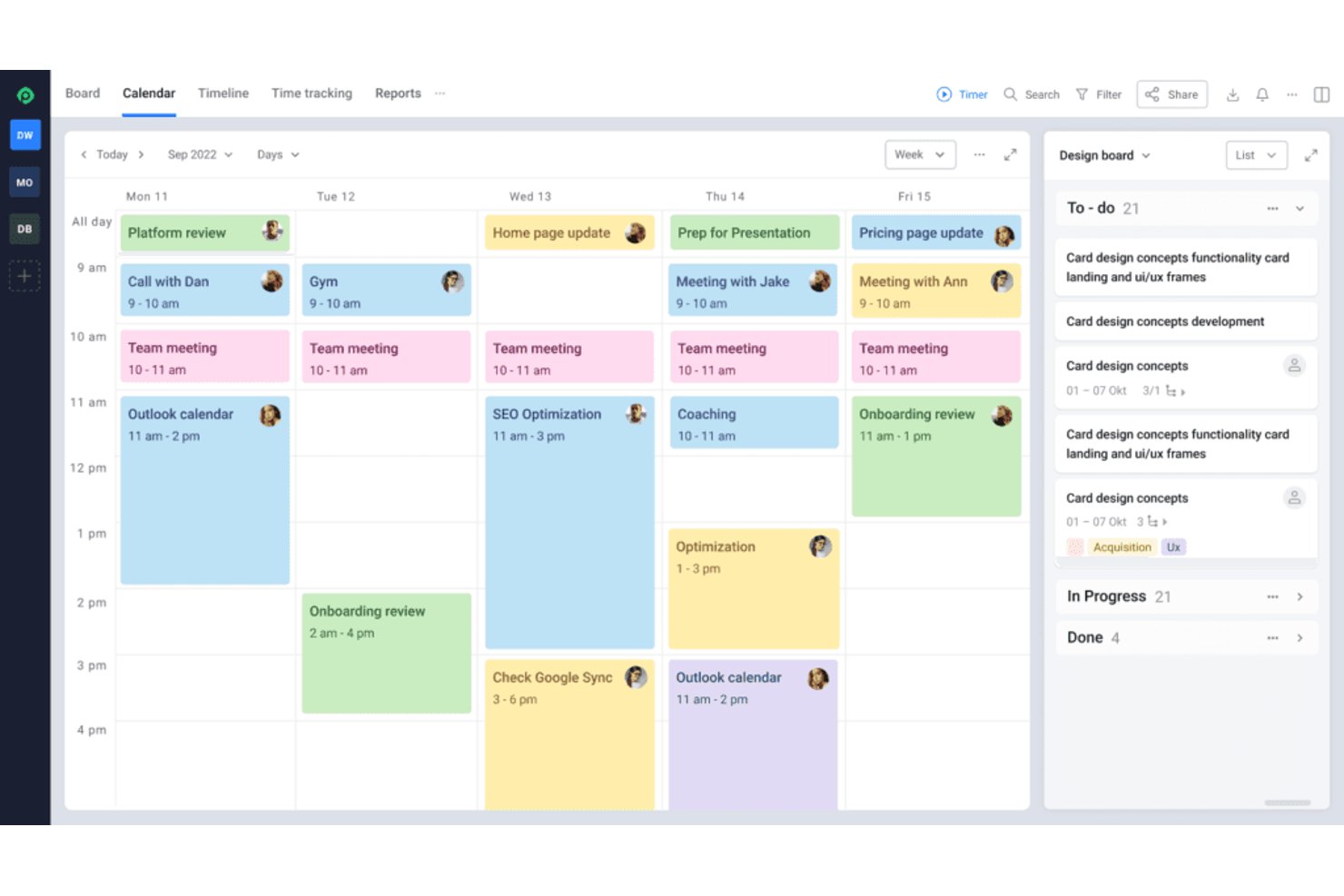
Hive is a workflow management platform for small teams that combines task and project planning, dependencies, multiple work views, shared notes, built-in chat, email, and no-code workflow automation.
Who Is Hive Best For?
Hive suits small cross-functional teams that need built-in chat, task management, and no-code automation on a free plan.
Why I Picked Hive
I picked Hive because its built-in chat and automation on a free plan keep small teams aligned without splitting work across tools. I use Workflows to route tasks after status changes, apply templates, and update assignees automatically. Shared Notes, email, and keep handoffs visible alongside task dependencies.
Hive Key Features
- Task templates: Pre-fill subtasks, assignees, dates, and dependencies for repeatable projects.
- Multiple project views: Switch between Status, Calendar, Table, Gantt, and List views.
- Custom statuses: Define workflow stages and labels for project-specific processes.
- Recurring actions: Schedule tasks to repeat automatically at set intervals.
Hive Integrations
Hive offers 14 documented native integrations, including Google Drive, Google Calendar, Slack, Microsoft Teams, Jira, GitHub, Zoom, and Outlook Calendar. It also provides a public API and supports Zapier.
What's Free?
Hive offers a free-forever plan for up to 10 workspace members, with unlimited tasks and collaborative notes, native chat, email integration, and 200MB of storage. It also offers a 14-day trial of paid features, while the free plan excludes features such as Gantt views, cloud storage integrations, and in-app calendars.
Pros and Cons
Pros:
- Dependencies support four scheduling relationships
- Automation routes status changes into tasks
- Built-in chat keeps project conversations attached
Cons:
- Deep automation requires substantial initial configuration
- View limits restrict free-plan planning flexibility

Moxo
Best for secure client-facing workflows

Moxo is a workflow platform designed around external process orchestration, combining a flow builder, approvals, eSignatures, forms, and file requests in a single client-facing environment.
Who Is Moxo Best For?
Moxo is a strong fit for service-based businesses—think financial services, legal, or consulting firms—that need to manage structured workflows with external clients and partners.
Why I Picked Moxo
I've included Moxo in my top picks because it handles client-facing workflows with a level of security I haven't seen in many free tools. Every flow runs on SOC 2 Type II certified infrastructure, with data encrypted in transit and at rest, plus a 7+ year audit trail built specifically for regulated industries. I also like that Moxo supports role-based access controls and GDPR compliance out of the box, so when my team runs an onboarding or approval flow with an external client, there's a clear, auditable record of every action taken.
Moxo Key Features
- AI Copilot: Use Moxo's built-in AI to generate and configure workflow steps from a plain-language prompt.
- eSignature collection: Request legally binding signatures from clients directly within a workflow step, without a third-party tool.
- Flow template gallery: Start new workflows from a library of pre-built templates instead of building from scratch.
- Conditional branching: Set logic that routes a workflow down different paths based on client responses or form inputs.
Moxo Integrations
Moxo offers data sync connectors with Salesforce, HubSpot, Microsoft Dynamics, Zoho, Wealthbox, Redtail, Filevine, Global Relay, Smarsh, Xero, and Follow Up Boss. It also supports file uploads from Google Drive, Dropbox, Box, and OneDrive, and includes native calendar integrations with Google Calendar and Outlook. Moxo provides a REST API and webhooks for custom integrations, and it connects with Zapier.
What's Free?
Moxo offers a free-forever plan that includes 2 flows per month and 500 AI credits per month. The free tier covers the workflow builder, AI Copilot, branching, forms, eSignatures, file requests, and third-party integrations, but it doesn't include portals, custom domains, reporting dashboards, or API access.
Pros and Cons
Pros:
- External stakeholders act inside workflows via magic links
- Reusable workflow templates with conditional logic
- SOC 2 and GDPR-compliant security built in
Cons:
- Creating flows can feel overcomplicated
- No built-in time tracking for tasks

Qntrl
Best for scalable workflow automation
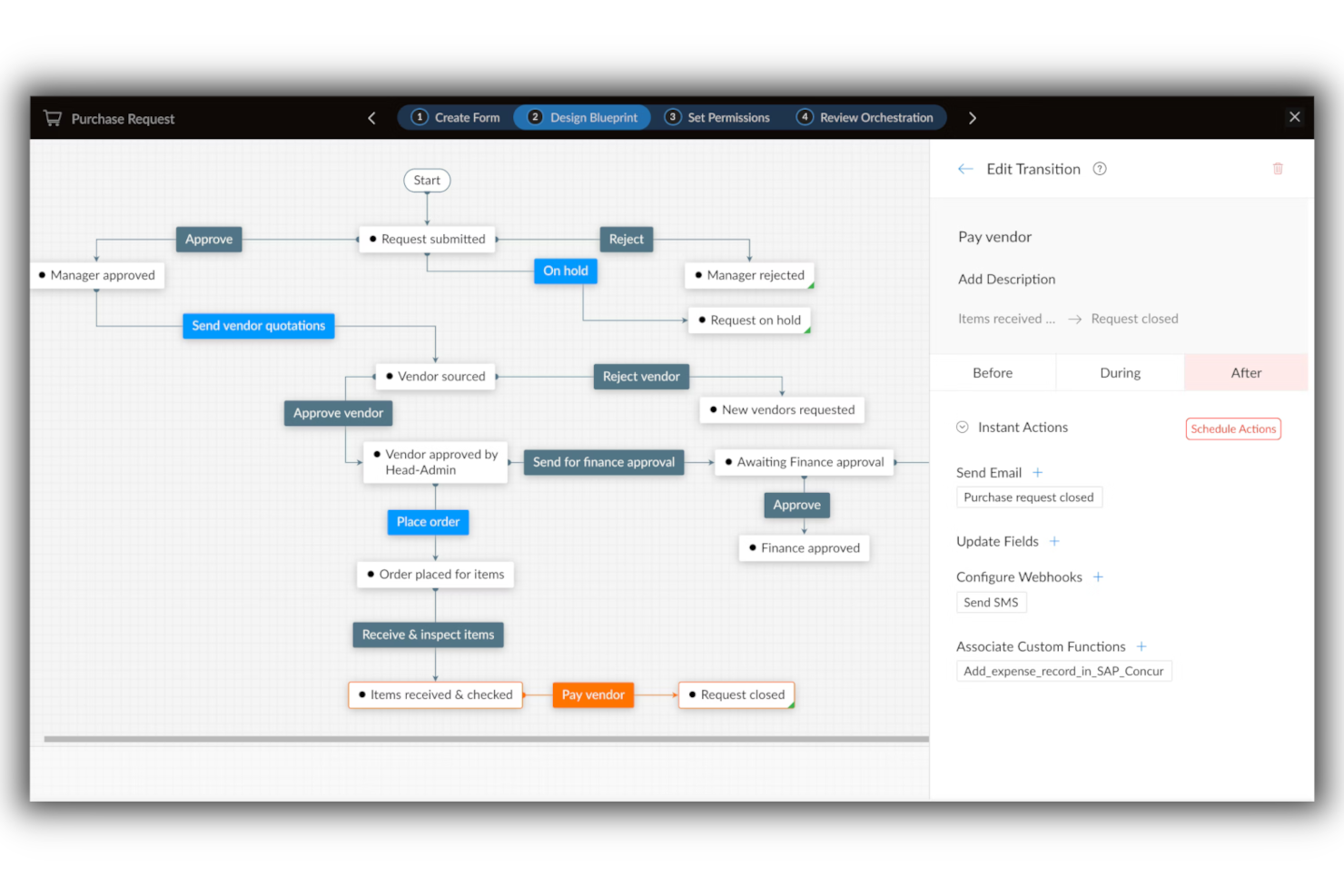
Qntrl lets small teams in tech, operations, and project management automate and track workflows with customizable forms, process mapping, and role-based controls, helping teams organize requests and approvals without complex setup.
Who Is Qntrl Best For?
Qntrl is a strong fit for small operations and project management teams that need structured process automation and expect their workflow complexity to grow over time.
Why I Picked Qntrl
Qntrl earns its spot on my shortlist because it's built specifically around process orchestration, not just task tracking. I like how you can design multi-stage workflows with conditional branching, so a single intake form can automatically route requests to different team members based on the response. My team is able to start with a simple approval flow and layer in additional stages, roles, and automation rules as our processes get more complex. That incremental scalability is rare in free-tier tools.
Qntrl Key Features
- Centralized request submission: A single portal where team members submit all work requests, keeping intake organized across functions.
- Real-time status updates: Live visibility into where each request sits in the workflow, so no one needs to chase updates manually.
- SLA tracking: Built-in service level agreement monitoring flags overdue tasks and helps teams stay on top of deadlines.
- Custom reports: Generate workflow duration and usage reports to identify bottlenecks and measure process performance over time.
Qntrl Integrations
Integrations include Zoho CRM, Zoho Books, Zoho People, Zoho Desk, Google Drive, Dropbox, SAP, Oracle, Active Directory, and Slack.
What's Free?
Qntrl offers a free demo, but the site doesn't list a free-forever plan or free trial, or details about user or feature restrictions.

TrailHQ
Best for intelligent document processing

Nanonets is an AI-driven automation platform designed for small teams and businesses that need to streamline document-heavy workflows and reduce manual data entry.
Who Is Nanonets Best For?
Nanonets is a strong fit for small teams in finance, operations, or logistics that process high volumes of documents like invoices, receipts, or forms.
Why I Picked Nanonets
I picked Nanonets because it handles intelligent document processing well for small teams overwhelmed by manual data entry. It uses AI-powered OCR to automatically extract structured data from invoices, purchase orders, and receipts, and doesn't require a developer to set it up. My team is able to build custom document workflows that validate extracted data against predefined rules before routing it for approval. Pre-trained document models run accurately out of the box on common document types.
Nanonets Key Features
- Human-in-the-loop approval workflows: Add manual review and approval stages at any point in a document workflow to catch errors before they move downstream.
- No-code workflow builder: Use natural language to build and configure automated workflows without writing any code.
- Multi-source data ingestion: Pull in documents from emails, databases, and file uploads into a single unified workflow.
- Support for 300+ document types: Process a wide range of document formats out of the box, from bank statements to purchase orders.
Nanonets Integrations
Integrations include SAP, QuickBooks, Salesforce, Microsoft Dynamics 365, NetSuite, Zoho, FreshBooks, Xero, HubSpot, and Oracle.
What's Free?
Nanonets offers a free-forever plan that includes $200 in credits when you sign up, allowing you to use all core features until the credits run out. Some premium features and integrations require a paid plan or additional credits.
Pros and Cons
Pros:
- Enterprise-grade compliance
- Template-free data extraction
- No-code automation
Cons:
- Custom integrations available on higher-tier plans
- Limited offline functionality

FigJam
Best for flexibility and user-friendliness
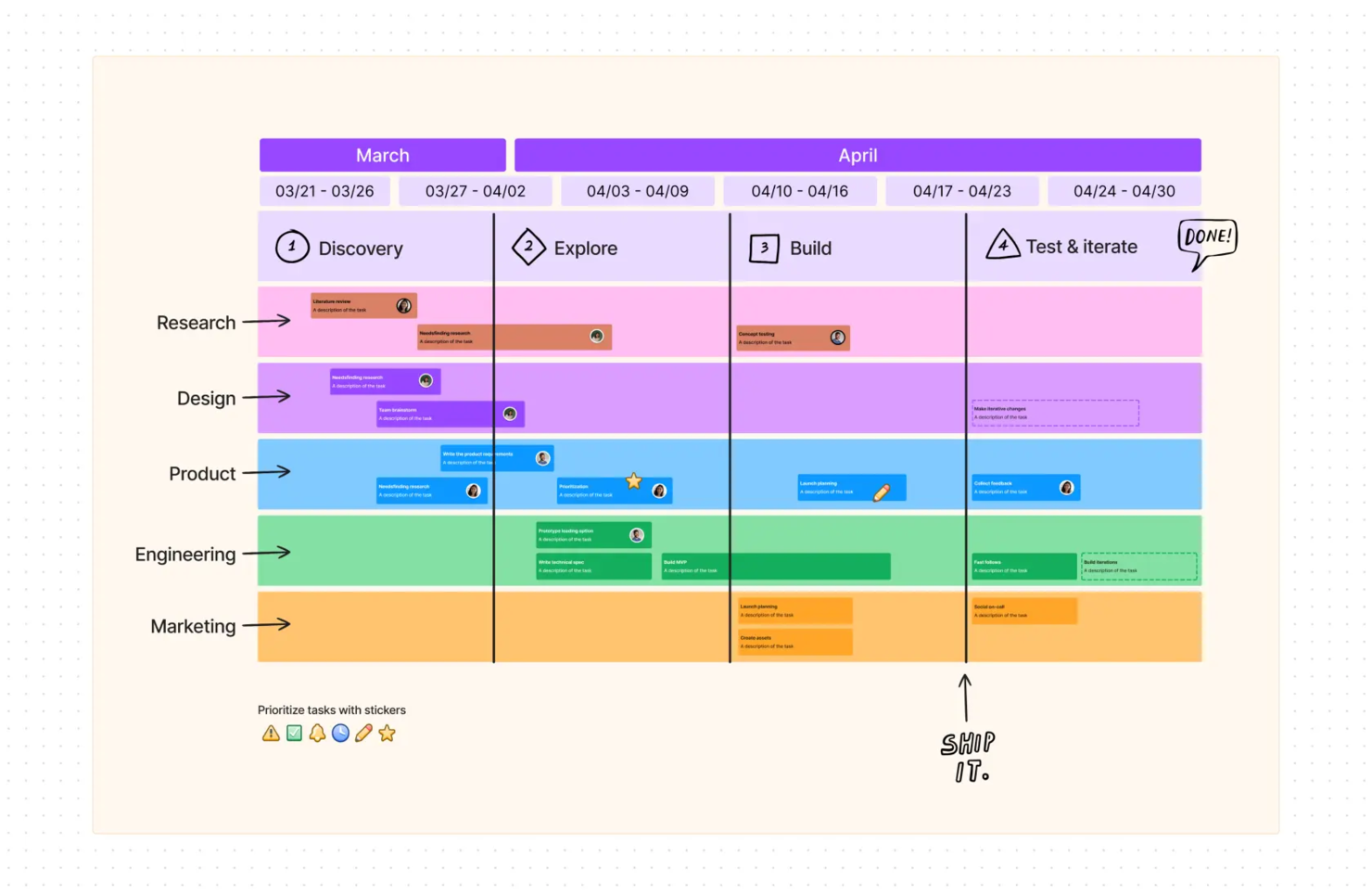
FigJam gives small teams in tech, design, and digital spaces a collaborative online whiteboard to map workflows, brainstorm ideas, and organize projects visually in real time.
Who Is FigJam Best For?
FigJam is a great fit for small product, design, and engineering teams that need a lightweight, visual space for planning and collaboration.
Why I Picked FigJam
FigJam is on my shortlist because of how much it lets you do without locking you into a rigid structure. I love that the canvas adapts to whatever my team needs—whether we're mapping a sprint workflow with snap-to-grid connectors and shapes, or running a retro with sticky notes and voting. The 300+ ready-made templates mean I can spin up a project kickoff, a flowchart, or a roadmap review in seconds, without starting from scratch. FigJam's AI features let me sort sticky notes into themes or generate a custom template from a single prompt, keeping sessions moving.
FigJam Key Features
- Section frames: Organize your canvas into distinct zones to separate workstreams, teams, or project phases within a single board.
- Cursor chat: Team members type messages directly on the canvas during live sessions without switching to a separate chat tool.
- Embed support: Drop in live links, files, and media from external tools directly onto the board to keep reference materials in context.
- Timer widget: Run time-boxed activities like standups or brainstorms with a built-in countdown timer visible to all participants.
FigJam Integrations
Integrations include Asana, Jira, Slack, GitHub, Microsoft Teams, Zoom, Dropbox, Google Drive, Trello, and Miro.
What's Free?
FigJam offers a free-forever Starter plan with unlimited drafts and up to 3 FigJam files per user. Advanced features and unlimited files require a paid plan.

Best for no-code workflow automation
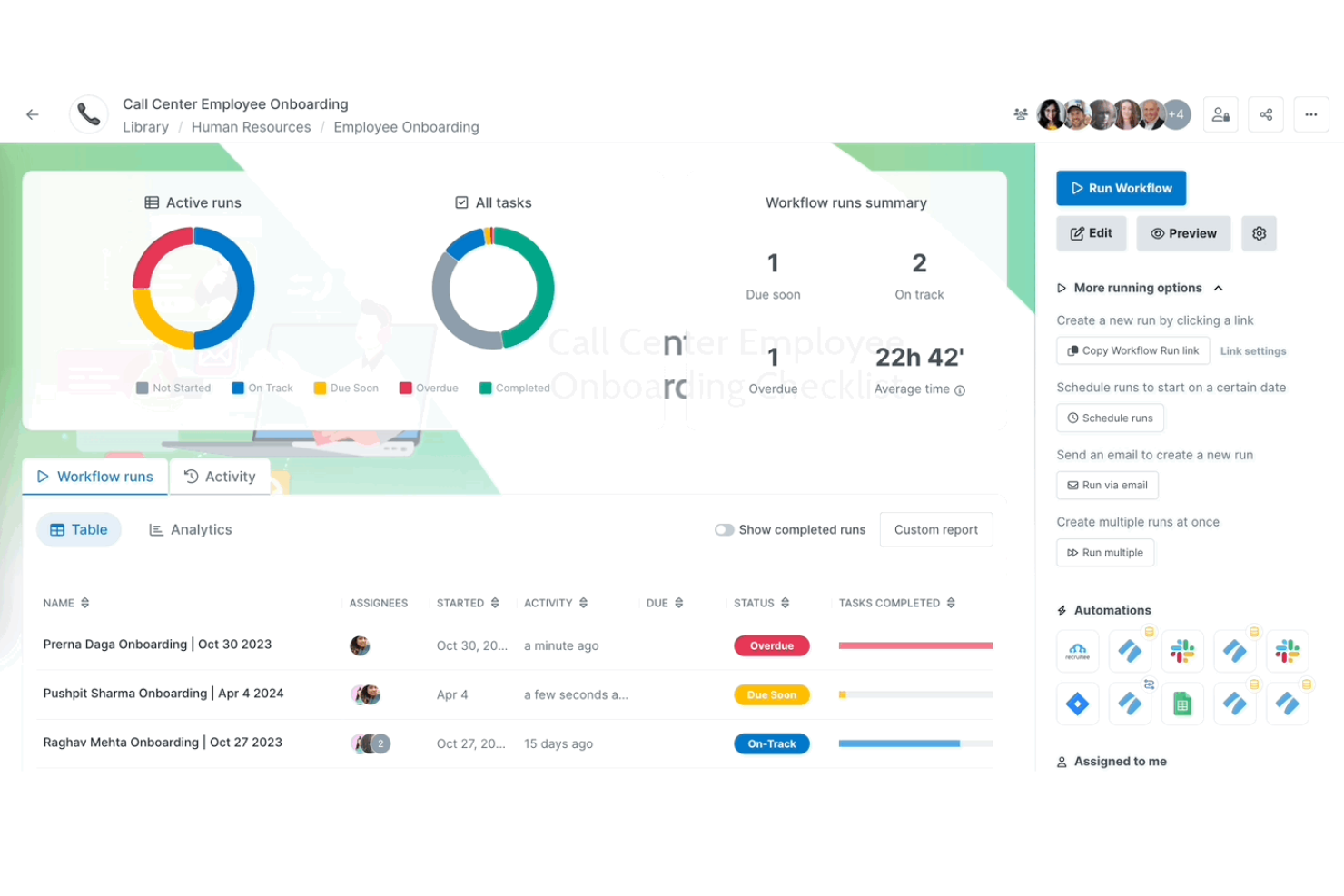
Process Street gives small teams in tech, operations, and service-based businesses a way to organize, automate, and track recurring workflows using simple checklists and collaborative process templates.
Who Is Process Street Best For?
Process Street suits small operations and customer success teams that need to standardize and manage repeatable processes without relying on a developer.
Why I Picked Process Street
Process Street earns its spot as one of the best on my shortlist because of how well its no-code workflow builder handles recurring processes without requiring any technical setup. I like that you can build a fully automated workflow—complete with conditional logic, task assignments, and approval steps—just by filling out a form-style editor. For example, my team can automate a client onboarding process, where tasks are routed to the right person based on responses collected earlier in the workflow. The AI workflow generator is also a real time-saver: you describe the process you need, and it builds out the full workflow structure, including due dates and stop tasks, in seconds.
Process Street Key Features
- Pre-built workflow templates: Access a library of ready-made process templates for common workflows like employee onboarding, client onboarding, and SOPs that you can deploy immediately.
- Process dashboard: Monitor real-time workflow run status, task completion rates, and team performance across all active processes from a single customizable view.
- Data sets: Collect and manage structured data across workflows using forms with linked dropdowns, saved views, and system-of-record sync to keep inputs consistent.
- Projects: Track execution across multiple workflow runs, manage task dependencies, and surface bottlenecks before they stall delivery.
Process Street Integrations
Integrations include Salesforce, Slack, Microsoft Teams, Google Sheets, Jira, DocuSign, HubSpot, Mailchimp, Stripe, and Greenhouse.
What's Free?
Process Street offers a free-forever plan for up to 5 active workflows and unlimited users. Some advanced features and most integrations are only available on paid plans.

OpenProject
Best open-source tool

OpenProject is open-source project management software. Download the software and install it on Linux distributions or Docker containers to provide your entire team or organization with access.
Why I picked OpenProject: You can create projects for each of your teams or departments. You can create hierarchies to structure projects in a way that makes sense. You can then break a project down into smaller tasks and start to create plans and workflows that help you complete them.
Additionally, you can view these projects in a Gantt chart to visualize how work is progressing and identify and remove bottlenecks. You can also create dependencies, milestones, tasks, and phases to further organize each project. All this information is displayed in the Gantt chart. You can also view it as calendar or task lists.
The downside to OpenProject is that you are in charge of maintaining your software installation. And while it’s free, you will need to pay for servers or use existing ones. OpenProject does provide the option to install and host the software for you.
OpenProject Standout Features & Integrations
Features include a team planner with workload information, custom fields, help texts for additional information about features, placeholder users, and advanced agile boards.
Integrations can be built using its API. This can help you connect to any other tool on your tech stack.
Ücretsiz İş Akışı Yazılımı Ne Zaman Kullanılmalı?
Ücretsiz iş akışı yazılımı, kurumsal araçların getirdiği yük veya başlangıç maliyetleri olmadan ekiplerin tekrarlayan görevleri düzenlemesine, otomatikleştirmesine ve takip etmesine yardımcı olur. Aşağıdaki senaryolardan herhangi biri size tanıdık geliyorsa, bu yazılım tam olarak ekibinizin ihtiyaç duyduğu şey olabilir:
- Ekibiniz işleri çok fazla araç üzerinden takip ediyor: Kimin ne yaptığını yönetmek için Slack konuşmaları, e-posta zincirleri ve ortak bir elektronik tablo arasında gidip geliyorsunuz. Ücretsiz iş akışı yazılımı görevleri ve iş devirlerini tek bir yerde toplar; böylece hiçbir şey gözden kaçmaz.
- Onay döngüleri projeleri geciktiriyor: Bir blog yazısı veya tasarım dosyası gibi basit bir içerik, net bir süreç olmadan üç paydaşın onayını bekliyor. İş akışı otomasyonu, onayları otomatik olarak yönlendirir ve tamamlanma süresini günlerden saatlere indirir.
- Yeni ekip üyelerini tekrar tekrar işe alıştırıyorsunuz: Her biri katıldığında aynı kontrol listesini sıfırdan oluşturuyor ve görevleri manuel olarak atıyorsunuz. Tekrarlanabilir bir iş akışı şablonu süreci standartlaştırır; böylece yeni çalışanlar daha hızlı bir şekilde işe uyum sağlar.
- Müşteri teslimatlarını yönetmek kaotik bir hâl alıyor: Beş aktif projeniz, birden fazla tedarikçiniz ve neyin ne zaman teslim edileceğini ya da kimin sorumlu olduğunu gösteren tek bir görünüm yok. Ücretsiz iş akışı yazılımı, kapsamlı bir proje yönetimi paketi için ödeme yapmadan tüm bunları görünür hâle getirir.
- İşlerin nerede tıkandığını fark etmek çok uzun sürüyor: Darboğazlar, bir son tarih çoktan kaçırılana kadar görünmez kalıyor. İş akışı araçları engelleri gerçek zamanlı olarak ortaya çıkarır; böylece işler kontrolden çıkmadan önce görevleri yeniden atayabilir veya zaman çizelgelerini düzenleyebilirsiniz.
Diğer Ücretsiz İş Akışı Yazılımları
En iyi listeye giremeyen, ancak araştırmanızı genişletmek istiyorsanız değerlendirmeye değer birkaç ücretsiz iş akışı yönetimi çözümünü burada bulabilirsiniz.
- DocuWare
For document workflows
- Jira
For business and software teams
- Camunda Platform
Cross-system workflow integrations
- Nutcache
For freelancers
- Next Matter
For handling complex workflows
- Bitrix24
For multiple project views
- ProjectLibre
For unlimited Gantt charts
- nTask Manager
For unlimited workspaces
- Pneumatic Workflow
Free plan with unlimited workflows
- PivotalTracker
For agile projects
- Tom’s Planner
For simple Gantt charts
- Miro
For mind maps and flowcharts
- Lucidchart
For real-time workflow collaboration
- Wrike
For unlimited users
- altaFlow
For smart document routing
- Asana
For integrations
- Podio
Low-code tool builder
- Agantty
Unlimited free software
- dotProject
Volunteer supported open source tool
- TeamGantt
For powerful Gantt charts
- GanttProject
Desktop app


How I Evaluate Free Workflow Software
First, I define what counts as free. For workflow software, a permanent free plan is non-negotiable—one that handles real work like sprint tracking, approval routing, or cross-team handoffs, not just a 14-day trial. From there, I evaluate two layers: baseline functionality to qualify, and differentiators that separate the best options.
Core Functionality (Table Stakes For This List)
In addition to my free offer requirements, I also use a scoring system to select tools for my list. Here's how it works:
I rank each one on a scale from 0 (does not offer the functionality) to 5 (excels in this area) for each core functionality listed below. Then, I calculate the tool's total score into a percentage. Each tool needs to achieve a minimum total score of 65% to be considered for inclusion.
- Free Plan Availability: I check whether the tool offers a genuinely free tier that supports real project work over time, not just a 14-day trial that cuts off mid-sprint.
- Workflow Automation: I look for rule-based automations that handle routine moves like advancing a task to "In Review" when a subtask is completed or notifying a stakeholder on status change.
- Task & Project Management: Each tool should support structured task creation with assignees, due dates, and subtasks grouped into projects that reflect how teams actually deliver work.
- Custom Workflow Stages: I evaluate whether you can define your own statuses and pipeline stages per project, like tailoring a content production board versus a bug triage workflow.
- Multiple Workflow Views: Having at least two views matters. I look for options like Kanban for daily standups, list view for backlog grooming, and calendar or timeline for deadline planning.
- Team Collaboration Features: Shared workspaces, task comments, and @mentions should all work within the free tier so distributed teams can coordinate without upgrading just to loop in a teammate.
Once I have a list of tools that meet this criteria, I consider what sets each platform apart.
Differentiating Factors (What Sets Vendors Apart)
Here's how I compare and contrast different vendors:
Standout Features
Pre-built workflow templates matter when you're on a free plan. A solid template library lets you launch a sprint board or client onboarding pipeline in minutes instead of building from scratch. I also look for intake forms that auto-create tasks when someone submits a design request or project brief, since this keeps work from getting buried in email threads. Dashboards round things out by surfacing bottleneck data and progress metrics so PMOs can report on project health without exporting to spreadsheets.
Beyond Features
Free plan generosity is a big differentiator. I look at how many users and projects a tool supports before requiring an upgrade, since a five-person agency team shouldn't hit a paywall just to add a contractor. Integrations also carry weight—your workflow tool needs to connect to where your team already works, whether that's Slack for standups, Google Drive for deliverables, or GitHub for dev handoffs. I also check whether role-based permissions and data export are available on the free tier, because even small teams handle sensitive client data and need the option to migrate without losing project history.
Ücretsiz İş Akışı Yazılımı Nasıl Seçilir?
Uzun özellik listeleri ve karmaşık fiyatlandırma yapıları içinde kaybolmak kolaydır. Benzersiz yazılım seçim süreciniz üzerinde çalışırken odaklanmanızı korumanıza yardımcı olmak için aklınızda bulundurmanız gereken faktörlerin bir kontrol listesi aşağıda yer alıyor:
| Faktör | Dikkat Edilmesi Gerekenler |
|---|---|
| Ölçeklenebilirlik | Bu yazılım ekibinizin ihtiyaçlarıyla birlikte büyüyebilir mi? |
| Entegrasyonlar | Ekibinizin halihazırda kullandığı araçlarla bağlantı kurabiliyor mu? |
| Özelleştirilebilirlik | İş akışlarını ekibinizin süreçlerine uyacak şekilde düzenleyebilir misiniz? |
| Kullanım Kolaylığı | Ekibiniz yazılımı hızlı bir şekilde benimseyebilir mi? |
| Bütçe | Yazılım uzun vadede maliyet kısıtlamalarınızı karşılıyor mu? |
| Güvenlik Önlemleri | Yazılım verileriniz için gerekli korumayı sağlıyor mu? |
| İş Birliği Özellikleri | Yazılım sorunsuz ekip çalışmasını ve iletişimi destekliyor mu? |
| Mobil Erişim | İş akışlarını hareket halindeyken yönetebilir misiniz? |
| Değer | Yazılımın ücretsiz sürümü ihtiyacınız olan tüm özellikleri sunuyor mu? |
Yazılım seçim sürecinizi düzenli ve odaklanmış tutmak için bu kontrol listesini kullanın.
Ücretsiz İş Akışı Yazılımlarındaki Trendler
Araştırmam sırasında farklı ücretsiz iş akışı yazılımı sağlayıcılarından sayısız ürün güncellemesi, basın bülteni ve sürüm günlüğü inceledim. Takip ettiğim yeni ortaya çıkan trendlerden bazıları şunlar:
- Yapay Zeka Destekli Görev Önerileri: İş akışı yönetimi yazılımları, geçmiş veriler ve kalıplara dayalı olarak görev önceliklendirmesi, son teslim tarihleri ve ekip atamaları önermek için giderek daha fazla yapay zekadan yararlanıyor. Bu, ekiplerin iş akışlarını optimize etmesine ve daha hızlı şekilde daha doğru kararlar almasına yardımcı olabilir.
- Düşük Kodlu İş Akışı Oluşturucuları: Ücretsiz iş akışı yönetimi araçları genellikle kullanıcıların ileri düzey teknik becerilere ihtiyaç duymadan özel iş akışları oluşturmasına olanak tanıyan düşük kodlu veya kodsuz iş akışı tasarım araçları sunar. Bu trend, daha fazla ekibin kendi benzersiz süreçlerine uygun özel iş akışları oluşturmasını sağlar.
- Veriye Dayalı İçgörüler: Dijital süreç otomasyonu yazılımları, üretkenlik darboğazları, kaynak tahsisi ve görev tamamlanma oranları hakkında içgörüler sağlamak için veri analitiğiyle giderek daha fazla entegre oluyor. Bu, ekiplerin gerçek zamanlı verileri kullanarak iş akışı yönetimlerini optimize etmelerine yardımcı olur.
- Departmanlar Arası İş Birliği: Daha fazla ücretsiz iş akışı çözümü, pazarlama iş akışı yönetimi yazılımlarının, içerik iş akışı yazılımlarının ve proje yönetimi araçlarının tek bir platformda birlikte kullanılmasını sağlayan özellikler sunarak departmanlar arasındaki bilgi adalarını ortadan kaldırmaya odaklanıyor.
- Oyunlaştırma Unsurları: Bazı iş akışı otomasyonu yazılım platformları, iş akışı takip araçlarını kullanan ekipler arasında katılımı teşvik etmek ve daha dinamik bir çalışma ortamı oluşturmak için görev tamamlama ödülleri ve ekip performans ölçümleri gibi oyunlaştırma özelliklerini kullanmaya başladı.
Ücretsiz İş Akışı Yazılımı Nedir?
Ücretsiz iş akışı yazılımı, ekiplerin çok adımlı süreçleri ücretsiz olarak oluşturmasına, yönetmesine ve takip etmesine olanak tanıyan bir araçtır. Bu tür araçlar açık kaynaklı bir ürün veya ücretli bir aracın en düşük paketi olarak sunulur.
Genellikle proje yöneticileri, operasyon yöneticileri ve ekip yöneticileri tarafından tekrarlayan görevleri kolaylaştırmak, sorumlulukları atamak, devir süreçlerini otomatikleştirmek ve hiçbir işin gözden kaçmamasını sağlamak için kullanılır. Bu araçlar işlerin nasıl yapıldığını standartlaştırmaya yardımcı olarak ekiplerin süreçleri ölçeklendirmesini, gecikmeleri azaltmasını ve genel hesap verebilirliği iyileştirmesini sağlar.
Ücretsiz İş Akışı Yazılımının Özellikleri
Ücretsiz iş akışı yazılımı seçerken aşağıdaki temel özelliklere dikkat edin:
- Görev otomasyonu: Bu özellik, yazılımın görevleri sizin için otomatik olarak ilerlettiği, sorumlulukları atadığı veya anımsatıcıları tetiklediği tekrarlanabilir süreçler oluşturmanızı sağlar; böylece insanların peşinden koşmanız veya her küçük adımı hatırlamanız gerekmez.
- Görsel iş akışı tasarımcısı: Sezgisel, sürükle ve bırak arayüzüyle süreçlerinizi görsel olarak haritalandırabilir ve kafa karıştırıcı olabilecek bir listeyi, ekibinizdeki herkesin saniyeler içinde anlayabileceği net ve kolay takip edilen bir akışa dönüştürebilirsiniz.
- İş birliği araçları: İş birliği özellikleri, sizin ve ekip arkadaşlarınızın görevler hakkında doğrudan yorum yapmasına, birbirinizi etiketlemesine ve güncellemeleri paylaşmasına olanak tanır; böylece bitmek bilmeyen e-posta zincirleri azalır ve herkes aynı bilgilerden haberdar olur.
- Son tarih ve bildirim yönetimi: Son tarihler belirleyebilir ve otomatik bildirimler alabilirsiniz; böylece görevlerin kontrolünü elinizde tutar ve hiçbir şeyin gözden kaçmasına izin vermezsiniz. Bunu, tavrı olmayan kişisel dırdır asistanınız gibi düşünebilirsiniz.
- Belge ekleme ve paylaşma: Dosyaları doğrudan iş akışı görevlerine ekleyin; böylece siz ve ekibiniz gerekli belgelere her zaman bağlam içinde sahip olun, e-posta yazışmalarında veya bulut sürücülerinde arama yapmanız gerekmesin.
- Role dayalı izinler: Bu özellik, her iş akışını veya görevi kimlerin görebileceğini ya da düzenleyebileceğini seçmenizi sağlar; hassas projeleri korur ve doğru kişilerin doğru işe odaklanmasını sağlar.
- Raporlama ve analiz: Yerleşik raporlar ve panolarla süreçlerinizin nasıl işlediğine dair içgörüler elde edin; nelerin işe yaradığını, nerelerde darboğaz oluştuğunu ve verimliliği nerelerde daha da artırabileceğinizi görün.
- Entegrasyon seçenekleri: İş akışı yazılımınızı e-posta, takvimler veya proje yönetimi uygulamaları gibi kullandığınız diğer araçlara bağlayın; böylece sekmeler veya platformlar arasında sürekli geçiş yapmak zorunda kalmazsınız.
Yapay Zekâ Özellikleri
Günümüzde birçok ücretsiz iş akışı yazılımı, daha akıllı çalışmanıza yardımcı olacak yapay zekâ destekli özellikler içerir:
- Akıllı görev önerileri: Yapay zekâ, iş akışı geçmişinizi analiz ederek sonraki adımları önerebilir veya rutin görevleri otomatikleştirebilir; böylece tekrarlayan işlerde zaman kazanırsınız.
- Doğal dil işleme: Talimatlarınızı yazmanız veya söylemeniz yeterlidir; görevleri oluşturabilir ya da güncelleyebilirsiniz. Yapay zekâ, günlük dildeki ifadelerinizi uygulanabilir öğelere dönüştürür.
- Tahmine dayalı analiz: Yapay zekâ destekli içgörüler sayesinde proje zaman çizelgeleri hakkında öngörüler elde edin veya olası darboğazları sorun hâline gelmeden önce fark edin.
- Otomatik önceliklendirme: Yapay zekâ, hangi görevlerin en acil veya önemli olduğunu belirlemenize yardımcı olabilir ve en önemli konulara odaklanmanızı kolaylaştırır.
- Akıllı bildirimler: Yapay zekâ, genel anımsatıcılar göndermek yerine bildirimleri alışkanlıklarınıza ve iş yükünüze göre uyarlar; böylece yalnızca gerçekten önemli olduğunda size hatırlatma yapılır.
Ücretsiz İş Akışı Yazılımının Faydaları
Ücretsiz iş akışı yazılımını uygulamak, ekibiniz ve işletmeniz için çeşitli faydalar sağlayabilir. Yararlanabileceğiniz birkaç avantaj şunlardır:
- Geliştirilmiş görev düzeni: İş akışı araçları, görevleri ve projeleri tek bir yerde düzenli tutmanıza yardımcı olabilir; ilerlemeyi ve son tarihleri takip etmenizi kolaylaştırır.
- Artan ekip iş birliği: İş akışı yönetimi yazılımıyla ekipler, güncellemeleri, dosyaları ve yorumları gerçek zamanlı olarak paylaşarak kolayca iş birliği yapabilir.
- Zaman kazandıran otomasyon: Birçok iş akışı programı, tekrarlayan görevleri yerine getiren temel otomasyon özellikleri içerir; böylece zamandan tasarruf edilir ve manuel iş azalır.
- Daha kolay proje takibi: Çevrim içi iş akışı yönetim sistemleri, proje zaman çizelgelerini net bir şekilde görmenizi sağlar; böylece ilerlemeyi takip edebilir ve olası sorunları erkenden fark edebilirsiniz.
- Her yerden erişim: Çevrim içi iş akışı yazılımı, ekibinizin uzaktan çalışmasına ve projeleri yönetmesine olanak tanır; dağınık ekipler için esnekliği artırır.
- Uygun maliyetli çözüm: İş akışı yönetimi uygulamalarının ücretsiz sürümleri, ücretli bir plana ihtiyaç duymadan temel araçları sunar; küçük ekiplerin veya yeni girişimlerin maliyetleri azaltmasına yardımcı olur.
- Büyüyen ekipler için ölçeklenebilirlik: İş akışı yönetimi yazılımının ücretsiz sürümü bile ekibinizle birlikte büyüyebilir ve platform değiştirmenize gerek kalmadan daha fazla kullanıcıyı ve görevi destekleyebilir.
İş akışı yazılımının ücretli sürümleri genellikle ücretsiz sürümlerde bulunmayan gelişmiş özellikler sunar. Bunlar arasında sınırsız kullanıcı, daha fazla depolama alanı ve CRM'ler ile muhasebe araçları gibi üçüncü taraf uygulamalarla premium entegrasyonlar yer alır. Ücretli planlar ayrıca gelişmiş otomasyon, ayrıntılı analizler ve öncelikli müşteri desteği sağlar. Geliştirilmiş güvenlik, özel markalama ve daha ayrıntılı izinler de bu planları, verimli bir şekilde ölçeklenmek isteyen daha büyük ekipler için daha uygun hâle getirebilir.
İş Akışı Yazılımının Maliyetleri ve Fiyatlandırması
Ücretsiz planlar iyi bir başlangıç noktası olsa da ücretli sürümlerin ihtiyaçlarınıza göre ne kadara mal olabileceğini burada bulabilirsiniz. Aşağıdaki tablo, iş akışı yazılımı çözümlerinde yaygın planları, ortalama fiyatlarını ve genellikle sunulan özellikleri özetlemektedir:
İş Akışı Yazılımı için Plan Karşılaştırma Tablosu
| Plan Türü | Ortalama Fiyat | Yaygın Özellikler |
|---|---|---|
| Ücretsiz Plan | $0 | Temel görev yönetimi, sınırlı kullanıcı sayısı, sınırlı entegrasyonlar ve topluluk desteği. |
| Kişisel Plan | $5-$15/kullanıcı/ay | Görev yönetimi, sınırlı otomasyon, özel iş akışları ve temel entegrasyonlar. |
| İşletme Planı | $20-$40/kullanıcı/ay | Gelişmiş otomasyon, ekip iş birliği, raporlama araçları ve üst düzey destek. |
| Kurumsal Plan | $50-$100/kullanıcı/ay | Tam otomasyon, kurumsal düzeyde güvenlik, gelişmiş raporlama ve özel destek. |
Ücretsiz İş Akışı Yazılımı SSS
Bu konu hakkında diğer kişilerin sorduğu yaygın soruların yanıtlarını bulun.
Ücretsiz iş akışı yazılımı araçları hangi özellikleri içermez?
Ücretsiz iş akışı yazılımları genellikle kullanıcı, depolama, gelişmiş otomasyon ve entegrasyonları sınırlar. Ayrıntılı analizlere, özel markalama seçeneklerine veya öncelikli desteğe erişemeyebilirsiniz. Birçok küçük proje veya basit iş akışı için bu ücretsiz seçenekler iyi çalışır; ancak ekibiniz büyüdükçe veya süreçleriniz daha karmaşık hâle geldikçe yalnızca ücretli planlarda bulunan özelliklere ihtiyaç duyabilirsiniz.
Ekibim için doğru ücretsiz iş akışı yazılımını nasıl seçerim?
Kullanıcı rolleri, bildirimler ve entegrasyonlar gibi ekibinizin olmazsa olmazlarını listeleyerek başlayın. Her aracın arayüzünü gerçek bir iş akışıyla test edin ve mevcut süreçlerinize uyup uymadığını kontrol edin. Benzer sektörlerdeki diğer proje yöneticilerinin yorumlarını okuyun. İhtiyaçlarınızın büyümesi ihtimaline karşı yükseltme seçenekleri sunan yazılımlara öncelik verin.
Ücretsiz iş akışı yazılımı işletmemle birlikte ölçeklenebilir mi?
Ücretsiz iş akışı yazılımı, küçük işletmeleri ve büyüyen ekipleri belirli bir noktaya kadar destekleyebilir. Süreçleriniz daha karmaşık hâle geldikçe veya ekibiniz büyüdükçe özellik ya da kullanıcı sınırlarına ulaşmanız muhtemeldir. Çoğu platform, araç değiştirmenize gerek kalmadan ölçeklenebilmeniz için ücretli yükseltmeler sunar; ancak karar vermeden önce yükseltme maliyetlerini ve geçiş seçeneklerini kontrol ettiğinizden emin olun.
Hangi ücretsiz iş akışı araçları popüler proje yönetimi uygulamalarıyla en iyi şekilde entegre olur?
Birçok ücretsiz iş akışı aracı, popüler uygulamalarla temel entegrasyonlar sunar; ancak entegrasyonların kapsamı değişir. Kısa listenizdeki her araç için entegrasyon listelerini kontrol edin ve en çok kullanacağınız özellikleri test edin. Bazı durumlarda daha kapsamlı entegrasyonlar ücretli plan gerektirir.
Ücretsiz iş akışı araçları mobil erişim sunar mı?
Evet, çoğu ücretsiz iş akışı aracının mobil uygulamaları veya mobil uyumlu web siteleri vardır. Ancak bazı özellikler masaüstündekilere kıyasla sınırlı olabilir veya daha az kullanışlı olabilir. Ekibiniz mobil erişime güveniyorsa, herhangi bir aracı kullanmaya başlamadan önce temel görevler için mobil sürümü test ettiğinizden emin olun.
Ücretsiz iş akışı araçları karmaşık onayları veya çok adımlı süreçleri yönetebilir mi?
Bazı ücretsiz iş akışı yazılımları basit çok adımlı onayları yönetebilir; ancak koşullu mantık veya çok seviyeli imza onayları gibi gelişmiş özellikler genellikle sınırlıdır. Karmaşık yönlendirmelere ihtiyacınız varsa, gereksinimlerinizi karşılayıp karşılamadığını görmek için önce aracın ücretsiz planını deneyin veya ücretli sürümünün deneme sürümünü değerlendirin.
Ücretsiz iş akışı yazılımı kullanırken verilerim güvende mi?
Saygın ücretsiz iş akışı araçlarının çoğu, verilerinizi korumak için standart şifreleme ve güvenlik uygulamalarını kullanır. Ancak ücretsiz katmanlar, tek oturum açma veya denetim günlükleri gibi gelişmiş korumaları içermeyebilir. Her zaman sağlayıcının güvenlik belgelerini inceleyin ve politikalarından memnun olmadığınız sürece hassas işletme verilerini saklamayın.