

2026’da İncelenen En İyi 10 Yapay Zekâ Görev Yöneticisi Yazılımı

En İyi Yapay Zekâ Görev Yöneticisi Araçları Kısa Listesi


Birden fazla proje için görevleri ve birden çok teslim tarihini aynı anda yönetmek kaotik olabilir. Kendinizi, görevleri gerçekten tamamlamaktan çok onları düzenlemeye zaman ayırırken bulabilirsiniz. Yapay zekâ görev yöneticileri; iş yükünüzü yönetmek, görevleri önceliklendirmek, tekrarlayan işlemleri otomatikleştirmek ve ekibinizin aynı hedef doğrultusunda ilerlemesini sağlamak için daha akıllı bir yol sunar.
Bu makalede, en iyi yapay zekâ görev yöneticileri arasından seçtiklerimi paylaşacağım. Her öneri, kapsamlı araştırma ve testlere dayanmaktadır. Bu araçların özellikleri, artıları ve eksileri ile en önemli sorunlarınızı nasıl çözebilecekleri hakkında bilgi edineceksiniz.
Why Trust Our Software Recommendations
Our team has been testing and reviewing software since 2012. As project managers ourselves, we know how difficult—and important—it is to choose the right software.
For this guide, we evaluated tools using hands-on testing and independent research, scoring tools using our selection criteria. We also draw on insights from industry thought leaders and practicing project management experts.
Our reviews reflect our human editorial judgment, not a sales pitch.
Expert reviewers:
Yapay Zekâ Görev Yöneticisi Yazılımları Karşılaştırma Tablosu
En iyi yapay zekâ görev yöneticisi yazılımı seçimlerim için fiyatlandırma ayrıntılarını bu karşılaştırma tablosunda özetledim:
| Tool | Best For | Trial Info | Price | ||
|---|---|---|---|---|---|
| 1 | Best for visual project management | Free plan + 14-day trial available | From $9/user/month (billed annually) | Website | |
| 2 | Best for project tracking | Free plan + 14-day trial + demo available | From $5/user/month | Website | |
| 3 | Best for automating routine tasks | Free plan + 14-day trial + demo available | From $10/user/month (billed annually) | Website | |
| 4 | Best for AI-powered project insights | Free plan + 15-day trial + demo available | Pricing upon request | Website | |
| 5 | Best for AI access via Claude or ChatGPT | Free plan + 30-day free trial available | From $7.65/user/month (billed annually) | Website | |
| 6 | Best for task prioritization | Free plan + trial + demo available | From $10.99/user/month (billed annually) | Website | |
| 7 | Best for automated scheduling | Free trial available | From $19/user/month (billed annually) | Website | |
| 8 | Best for app integration | Free plan available | From $19.99/month (billed annually) | Website | |
| 9 | Best for individual task scheduling | Free plan available and 7-day free trial | From $5/month (billed annually) | Website | |
| 10 | Best for simple task management | Free demo available | Pricing upon request | Website |


En İyi Yapay Zekâ Görev Yöneticisi İncelemeleri
Aşağıda, kısa listeme giren en iyi yapay zekâ görev yöneticisi yazılımlarının ayrıntılı özetlerini bulabilirsiniz. Doğru seçimi yapmanıza yardımcı olmak için her aracın temel özelliklerine, artılarına ve eksilerine, entegrasyonlarına ve ideal kullanım alanlarına ayrıntılı bir şekilde göz atın.

Best for visual project management
monday AI Workspace is a visual work management platform that combines AI agents, smart task generation, and workflow automation to help teams plan, assign, and track work across boards, timelines, and portfolios.
Who Is monday AI Workspace Best For?
It's a strong fit for mid-size to enterprise teams managing complex, cross-functional projects across product, engineering, and operations.
Why I Picked monday AI Workspace
monday AI Workspace earns its spot on my shortlist because of how well it layers AI directly into a visual board interface. I particularly like AI Blocks, which auto-populate boards with status updates, deadlines, and assignees based on project context, cutting out the manual data entry that slows teams down. I also use the AI Sidekick within board views to generate task updates and surface next steps without switching context or tools.
monday AI Workspace Key Features
- AI meeting notetaker: Transcribes meetings in real time, identifies speakers, and creates structured summaries.
- Custom AI agents: Allows you to configure agents that autonomously execute recurring project management tasks.
- Integration with 200+ tools: Natively connects with platforms like Slack, GitHub, Google Drive, Salesforce, and HubSpot.
- Portfolio dashboards: Lets you visualize, track, and report on multiple projects using customizable live dashboards.
monday AI Workspace Integrations
monday AI Workspace offers hundreds of native integrations, including Slack, Google Workspace, Microsoft 365, Salesforce, Jira, GitHub, Zoom, Dropbox, HubSpot, and Zendesk. It also supports Zapier and provides an API for custom integrations.
Pros and Cons
Pros:
- Strong portfolio-level tracking across multiple projects
- AI agents automate repetitive task management work
- Visual boards make project status instantly clear
Cons:
- Board setup can get cluttered at scale
- AI features locked behind higher-tier plans
New Product Updates from monday AI Workspace
monday AI Workspace Adds Human Approval Routing
monday AI Workspace adds a human-in-the-loop approval block to AI Workflows, sending approval requests and routing workflow paths based on responses. For more information, visit monday AI Workspace's official site.
Hive
Best for project tracking
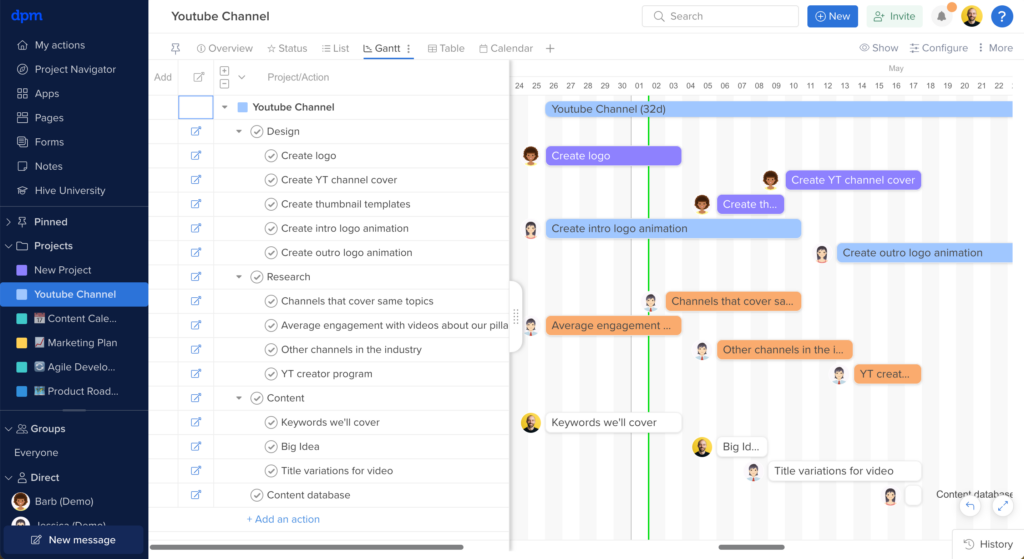
Hive is an AI-powered project and task management platform that brings together automated task creation, workflow optimization, project tracking, and team collaboration in one workspace.
Who Is Hive Best For?
Hive is a good fit for mid-sized teams in tech, marketing, and creative industries that need a centralized workspace for managing tasks, projects, and cross-functional collaboration.
Why I Picked Hive
I picked Hive as one of the best for project tracking because it gives you a flexible way to monitor work across every stage of a project. I like that you can switch between Gantt, Kanban, timeline, portfolio, and summary views without rebuilding anything—my team can track the same project from whatever angle makes sense for the work at hand. The portfolio view is especially useful when I'm juggling multiple projects at once, since it surfaces status across all of them in a single glance. Hive's customizable dashboards pull real-time data from across your workspace, so I can build a project-level view for my team and a high-level summary for leadership without duplicating any effort.
Hive Key Features
- Hive AI: Automatically generate tasks, write action items, and summarize project updates.
- Time tracking: Log hours directly on tasks and actions, with timesheets that roll up across projects for reporting.
- Proofing and approvals: Review and annotate files directly inside Hive, with approval workflows to move assets through sign-off stages.
- Resourcing: View team workload across projects to see who has capacity and reassign tasks based on availability.
Hive Integrations
Hive offers native integrations with Slack, Zoom, Google Drive, Dropbox, Box, Jira, Salesforce, GitHub, OneDrive, and Microsoft Teams. It also connects with Zapier and provides an API for custom integrations.
Pros and Cons
Pros:
- Suitable for large teams
- Comprehensive time tracking
- Customizable project views
Cons:
- Limited offline capabilities
- Can be complex for new users

Wrike
Best for automating routine tasks

Wrike is an AI-powered work management platform for teams that want to automate task workflows, manage projects, and centralize collaboration in one place.
Who Is Wrike Best For?
Wrike is a good fit for mid-size to enterprise teams in marketing, product, and professional services who need structured project workflows and cross-functional task visibility.
Why I Picked Wrike
Wrike earns its spot on my shortlist because its automation goes beyond simple rule-based triggers. I use Wrike's natural language automation builder to describe a workflow in plain English and watch it generate the full rule set—no manual configuration required. The AI agent layer is especially useful: agents parse intake form submissions, auto-populate custom fields, and score incoming tasks based on criteria like effort and impact, without manual intervention. Wrike Copilot lets me query an entire project folder and surface risks or status updates within seconds.
Wrike Key Features
- Custom project views: Toggle between Gantt, Board, Table, Calendar, and Chart views to match how your team tracks and visualizes task progress.
- Effort management: Assign effort estimates directly to tasks so you can forecast workload and choose the right assignee before work begins.
- AI insights: Wrike surfaces patterns and priorities from your project data, turning raw task activity into clear signals about what needs attention.
- Scrum boards: Run Agile sprints with backlog prioritization, real-time collaboration, and dashboards built directly into the platform.
Wrike Integrations
Wrike offers hundreds of integrations via its marketplace, including tools like Google Workspace, Microsoft 365, Salesforce, and Slack. It also supports Zapier and provides an API for custom integrations.
Pros and Cons
Pros:
- Predicts project risks proactively
- Generative AI drafts and edits
- Conversational Copilot answers instantly
Cons:
- Privacy concerns with AI data
- Advanced AI requires paid plan
New Product Updates from Wrike

Wrike Redesigns Workspace Search With New Filters
Wrike introduces a redesigned Workspace Search interface with recent search shortcuts, item type and location filters, and parent-task context. These updates help users find relevant work items and navigate search results efficiently. For more information, visit Wrike’s official site.

Best for AI-powered project insights
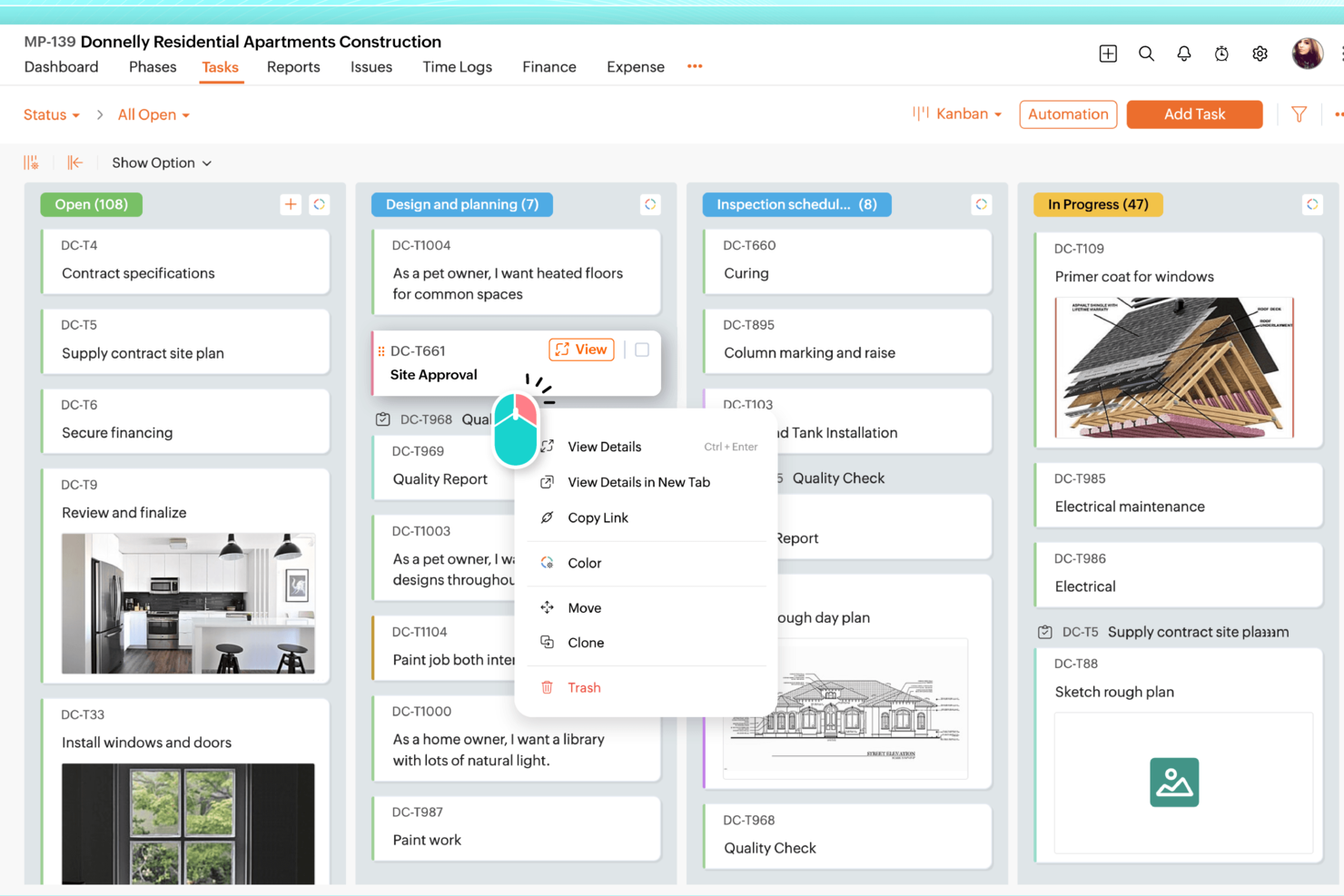
Zoho Projects is a project management platform for teams that want AI-driven task tracking, workflow automation, resource planning, and project analytics in one place.
Who Is Zoho Projects Best For?
Zoho Projects is a good fit for small to mid-sized teams already working within the Zoho ecosystem who need structured project management with built-in AI capabilities.
Why I Picked Zoho Projects
Zoho Projects earns its spot on my shortlist because of how Zia, its built-in AI assistant, surfaces project insights without requiring you to dig through reports manually. I particularly like Zia's data analytics feature, which breaks down task and project metrics into plain-language takeaways—so when a sprint is running behind, I can see exactly where the bottleneck is rather than piecing it together from raw charts. I also use Zia's AI-powered task creation, which generates task lists from a project description or milestone details, cutting down the time I'd otherwise spend on initial project setup.
Zoho Projects Key Features
- Blueprint workflow automation: Design step-by-step workflows that automatically update task fields, assign the right team members, and trigger alerts as task statuses change.
- Gantt chart with dependency tracking: Visualize task sequences, set finish-to-start or start-to-start dependencies, and reschedule tasks directly from the chart view.
- Resource management: View each team member's workload in real time and reassign tasks when someone is over- or under-allocated.
- Earned Value Management: Compare planned vs. actual schedule, cost, and time metrics to measure project performance and forecast outcomes.
Zoho Projects Integrations
Zoho Projects offers native integrations with Zoho CRM, Zoho Desk, Zoho Analytics, Google Drive, Microsoft Teams, Slack, GitHub, Bitbucket, Dropbox, and Zapier. An API is available for custom integrations.
Pros and Cons
Pros:
- Affordable pricing for growing teams
- Built-in time tracking and billing
- Strong automation and workflow customization
Cons:
- Mobile experience less fully featured
- Interface has steeper learning curve
New Product Updates from Zoho Projects
Zoho Projects Adds CodeX Scripts for Custom Modules
Zoho Projects now supports CodeX Scripts for custom modules, enabling conditional logic and rules for creating, updating, and deleting records. For more information, visit Zoho Projects' official site.
 .

Quire
Best for AI access via Claude or ChatGPT

Quire is a project management tool built around infinite nested task hierarchies, with multiple view types—Kanban, Timeline, Calendar, Table, and Dashboard—and an AI integration layer powered by a first-party Model Context Protocol (MCP) server that connects directly to Claude or ChatGPT.
Who Is Quire Best For?
Quire is a strong fit for tech-savvy project managers and Scrum teams who already use Claude or ChatGPT and want their AI to read and write directly to their project data.
Why I Picked Quire
I picked Quire as one of the best because it's the only major project management tool with a first-party MCP server, meaning Claude or ChatGPT can read and write directly to your live project data. I've used the MCP prompts to turn raw meeting notes into structured task hierarchies, with assignees and due dates, before approving a single write. The AI can also draft weekly status reports by pulling live task states grouped by assignee, no manual compilation needed.
Quire Key Features
- Infinite nested task list: Break projects into unlimited levels of subtasks, preserving the full parent-child hierarchy across all views and AI interactions.
- Kanban board with WIP controls: Manage workflow stages visually with swim lanes and work-in-progress limits to keep sprint capacity in check.
- Dynamic timeline view: Schedule tasks and milestones across dates with dependency tracking to keep sequencing visible across the full project.
- Workload flagging via MCP prompts: Ask your connected AI to list each team member's open tasks for the week and surface anyone exceeding a defined task threshold.
Quire Integrations
Quire has native integrations with Slack, Microsoft Teams, Google Calendar, Google Drive, GitHub, Microsoft OneDrive, Dropbox, and Box. Its first-party MCP server connects Claude and ChatGPT, while n8n, a REST API, and Zapier support custom workflows.
Pros and Cons
Pros:
- Human-in-the-loop approval for all AI actions
- Infinite task hierarchies with full parent-child structure
- AI reads and writes live project data
Cons:
- No built-in AI assistant for quick actions
- Requires connecting external AI like ChatGPT
New Product Updates from Quire
Quire Adds Custom Field Locking and Comment Reaction API Support
Quire adds custom field locking and API support for reading and setting emoji reactions on comments. These updates give teams more control over field data and expand comment interaction options for developers. For more information, visit Quire’s official site.
 .
Asana
Best for task prioritization

Asana is a work management platform for teams that combines AI-powered task management, workflow automation, project tracking, and customizable views for organizing and managing tasks.
Who Is Asana Best For?
Asana is a good fit for mid-size to enterprise teams in tech and digital industries that need a structured way to manage cross-functional projects and workloads.
Why I Picked Asana
Asana earns its spot as one of the best on my shortlist because of how well it handles task prioritization at scale. The My Tasks view consolidates every assignment in one place, and I like that you can sort by due date, priority, or custom fields, then lock that order in with automation rules so tasks move to the right section without any manual sorting. When my team is juggling a sprint alongside a product launch, that kind of automatic organization keeps everyone focused on what actually needs to happen next. On top of that, Asana's AI auto-generates custom priority fields for a project the moment you name it, which cuts down the setup time when a new workstream kicks off.
Asana Key Features
- AI Teammates: Add AI agents directly into your workflows to take action on tasks, follow up on assignments, and move work forward autonomously.
- Reporting dashboards: Visualize project status and workload data with real-time charts built from live task and field data across projects.
- Portfolios: Monitor multiple connected projects from a single view, tracking status, progress, and dependencies across teams.
- Workflow rules: Set trigger-based automation rules that move tasks, update fields, or notify teammates when specific conditions are met.
Asana Integrations
Asana offers hundreds of native integrations, including Slack, Google Drive, Microsoft Teams, Jira, GitHub, Salesforce, Zoom, Dropbox, Figma, Zendesk, and ServiceNow. It also connects with Zapier and provides an API for custom integrations.
Pros and Cons
Pros:
- Team workload management
- Task dependencies management
- Visual project timeline
Cons:
- Limited offline capabilities
- Requires setup and configuration

Motion
Best for automated scheduling

Motion is an AI-powered task manager that combines intelligent scheduling, automated prioritization, and calendar management for teams and individuals.
Who Is Motion Best For?
Motion is a good fit for individual professionals and small teams who manage heavy workloads and need AI to handle scheduling decisions automatically.
Why I Picked Motion
Motion earns its spot on my shortlist because of how it handles automated scheduling—it's genuinely unlike anything else I've used. When I add a task with a deadline and estimated duration, Motion's AI automatically time-blocks it on my calendar and re-optimizes the entire schedule if something changes. I especially like the "Do Date vs. Due Date" distinction, where Motion proactively flags at-risk tasks days in advance rather than waiting for a deadline to slip. The AI Calendar Assistant also schedules meetings at times that protect focus blocks, so my deep work time doesn't get fragmented by back-to-back calls.
Motion Key Features
- AI Workflows: Build reusable templates for repeatable projects and SOPs so Motion can auto-assign and sequence tasks each time a new project kicks off.
- AI Gantt chart: Visualize project timelines with auto-scheduling built in, so the chart updates automatically as tasks shift or deadlines change.
- AI capacity planning: See each team member's workload in real time and let Motion balance task assignments based on available capacity across the team.
- AI Meeting Notetaker: Auto-captures meeting notes and summaries so action items get logged without anyone manually writing them up after a call.
Motion Integrations
Motion offers native integrations with Google Calendar, Outlook, Gmail, Zoom, Google Meet, Siri, HubSpot, Salesforce, Microsoft Teams, and Slack. It also connects with Zapier and provides an API for custom integrations.
Pros and Cons
Pros:
- Improves focus with time-blocking
- Provides detailed time analytics
- Adapts to changing schedules
Cons:
- Limited customization options
- Can be complex to set up


Zapier is an AI-powered task automation platform that connects and manages workflows across thousands of apps, letting you automate repetitive tasks and coordinate actions between different tools.
Who Is Zapier Best For?
Zapier is a strong fit for project managers and operations teams who need to automate task workflows across multiple apps without writing code.
Why I Picked Zapier
I've included Zapier in my top picks because no other tool comes close to its app integration depth for task automation. With connections to 8,000+ apps, my team uses Zapier to wire together tools like Jira, Asana, Slack, and Google Workspace into a single automated workflow—without writing a line of code. I particularly like the Paths feature, which lets you route tasks to different teams based on if/then logic, so a high-priority bug report in Jira can automatically trigger a Slack alert and create a follow-up task in Asana. The Zapier Agents feature takes this further, letting you build AI-powered agents that monitor activity and take action across your connected apps on command.
Zapier Key Features
- Zap templates: Pre-built automation workflows you can activate instantly to connect common app combinations without building from scratch.
- Multi-step Zaps: Chain multiple actions across different apps in a single automated workflow triggered by one event.
- Tables: A built-in database feature that stores, tracks, and triggers task data directly within your Zapier workflows.
- Task history: A log of every automated action Zapier has run, so you can audit, troubleshoot, and replay failed tasks.
Zapier Integrations
Zapier offers native integrations with over 8,000 apps, including Google Workspace, Slack, Asana, Trello, Jira, Salesforce, HubSpot, Microsoft 365, Airtable, and Dropbox. An API is available for custom integrations.
Pros and Cons
Pros:
- Multi-step automation
- No coding skills needed
- Extensive app library
Cons:
- Advanced features need higher plans
- Can be complex for beginners


Trevor AI is an AI-powered task management platform that helps you organize, schedule, and prioritize tasks using automated daily planning and smart time blocking.
Who Is Trevor AI Best For?
Trevor AI is a strong fit for individual contributors and freelancers who need to manage personal task loads and daily schedules without team collaboration features.
Why I Picked Trevor AI
Trevor AI earns its spot on my shortlist because of how well it handles individual task scheduling through AI-driven time blocking. I like that it lets you drag tasks from a connected to-do list directly onto your calendar, and the AI suggests the best available time slots based on your existing schedule. The one-day-at-a-time planning view keeps daily priorities clear without the noise of a full project board. For solo task management, that focused approach is genuinely hard to replicate in more team-oriented tools.
Trevor AI Key Features
- Focus mode: Lets you work on one task at a time using a built-in timer, note field, and AI-generated five-step task breakdown.
- Recurring tasks: Set both scheduled and unscheduled tasks to repeat, so you can track ongoing work and build consistent habits.
- Smart scheduling queue: Add tasks or entire lists to a prioritized queue that Trevor proactively helps you schedule, including in bulk.
- Personal AI model: Adapts to your scheduling patterns over time to improve the accuracy of task duration predictions and time-slot suggestions.
Trevor AI Integrations
Trevor AI offers native integrations with Google Calendar, Outlook Calendar, Todoist, and Google Tasks. An API is available for custom integrations.
Pros and Cons
Pros:
- Personalized AI suggestions
- Strong focus on user privacy
- Intuitive interface
Cons:
- No team collaboration features
- Pro plan required for advanced features


Taskaid is an AI-powered task management platform that uses natural language input, automated prioritization, and smart reminders to help you organize and manage tasks.
Who Is Taskaid Best For?
Taskaid is a good fit for individuals and small teams who want a lightweight, AI-assisted task manager without the complexity of full project management tools.
Why I Picked Taskaid
Taskaid is one of my top picks because I love how it strips task management down to what actually matters—getting things done without a steep learning curve. I use it to capture tasks in plain language and let the AI handle context and prioritization, which means I'm not spending time setting up elaborate project structures just to track my to-dos. The AI-first approach uses LLMs to understand what a task actually involves, so the suggestions it surfaces feel relevant rather than generic. It's a solid pick for anyone who wants AI working in the background without needing to configure it.
Taskaid Key Features
- Chat with your tasks: Ask Taskaid questions about your task list in plain language and get back a prioritized plan for your day, week, or month.
- Voice input: Tap the mic and speak your tasks aloud—Taskaid captures the task, sets the date, and adds it to your list using OpenAI's Whisper engine.
- AI-driven task breakdown: Paste in a complex project and Taskaid splits it into subtasks with time estimates and a suggested order of completion.
- Pomodoro timer: A built-in Pomodoro tool lets you time-box focused work sessions directly within the platform without switching to a separate app.
Taskaid Integrations
Native integrations are not clearly documented. Taskaid offers an API for custom integrations.
Pros and Cons
Pros:
- Strong focus on data privacy
- High-quality user experience
- Simple task creation process
Cons:
- Limited advanced features
- No free plan available
Diğer Yapay Zekâ Görev Yöneticisi Yazılım Araçları
Kısa listeme girmeyen ancak yine de incelemeye değer bazı ek yapay zekâ görev yöneticisi seçenekleri şunlardır:
- EchoPal
For voice-activated tasks
- Slack
For team collaboration
- ClickUp
For customizable tasks
- GoodDay
For automating time estimates
- TaskRay
For Salesforce-native project workflows
- Any.do
For task reminders
- Easy8
For project templates
- AutoGPT
For autonomous task execution
- Twos
For note-taking tasks
- DeskSense
For desktop task management


How I Evaluate AI Task Managers
Every tool here needs to deliver real AI value—like auto-generating tasks from meeting notes or flagging schedule risks before they stall a sprint. I split my evaluation into two layers: the core functionality a tool must have to qualify and the differentiators that separate one option from another.
Core Functionality (Table Stakes For This List)
When I'm selecting tools for my list, I rank each one on a scale from 0 (does not offer the functionality) to 5 (excels in this area) for each core functionality listed below. Then, I calculate the tool's total score into a percentage. Each tool needs to achieve a minimum total score of 65% to be considered for inclusion.
- AI Task Generation: I check whether the tool can turn unstructured inputs—like a Slack thread, meeting transcript, or project brief—into organized tasks, subtasks, and checklists with minimal manual cleanup.
- Smart Prioritization & Scheduling: I look for AI that factors in deadlines, dependencies, and workload to sequence and schedule tasks, not just sort them by due date.
- Intelligent Assignment & Routing: I evaluate how the tool recommends or auto-assigns task owners—whether it accounts for team capacity, relevant skills, or past work patterns.
- AI Summaries & Status Reporting: I look for tools that generate project summaries and status updates from live task data, the kind you'd send to a stakeholder or share in a standup.
- Predictive Insights & Risk Detection: The tool should flag at-risk tasks and forecast potential delays based on historical and real-time data, giving you time to adjust before a sprint goes sideways.
- Workflow Automation & Integrations: I evaluate whether the tool connects to the platforms teams already use—like Slack, Jira, GitHub, or Confluence—and supports AI-driven automations across those systems.
Once I have a list of tools that meet the criteria, I consider what sets each platform apart.
Differentiating Factors (What Sets Vendors Apart)
Here's how I compare and contrast different vendors:
Standout Features
Meeting-to-task capture is a big differentiator—I look for tools that pull action items, owners, and due dates straight from a call transcript without someone manually writing them up after the fact. Cross-project dependency mapping matters too, especially for program managers juggling multiple workstreams where a delay in one project can cascade across others. I also evaluate whether a tool supports custom AI agents that teams can configure to handle recurring workflows like sprint triage or follow-up reminders.
Beyond Features
I pay close attention to AI transparency—whether the tool explains why it flagged a task as at-risk or recommended a specific assignee. That visibility matters when you're accountable for delivery decisions in front of stakeholders. Data security and AI governance are equally important, especially around whether customer data is used to train models. I also evaluate the integration ecosystem, checking for two-way sync with tools like Jira, Slack, and Confluence so the AI has enough context to generate accurate outputs.
Yapay Zekâ Görev Yöneticisi Aracı Nasıl Seçilir?
Uzun özellik listeleri ve karmaşık fiyatlandırma yapılarına kendinizi kaptırmanız kolaydır. Kendinize özgü yazılım seçim sürecinizi yürütürken odağınızı korumanıza yardımcı olmak için göz önünde bulundurmanız gereken faktörleri aşağıda bir kontrol listesi hâlinde bulabilirsiniz:
| Faktör | Dikkat Edilmesi Gerekenler |
|---|---|
| Ölçeklenebilirlik | Aracın ekibinizle birlikte büyüyebildiğinden emin olun. İhtiyaçlarınız geliştikçe daha büyük ekipleri ve daha karmaşık iş akışlarını destekleyen özellikleri arayın. |
| Entegrasyonlar | İş akışlarınızı platform değiştirmeden kolaylaştırmak için aracın Slack, Google Workspace veya Salesforce gibi hâlihazırda kullandığınız uygulamalarla entegre olup olmadığını kontrol edin. |
| Özelleştirilebilirlik | Verimliliği ve üretkenliği artırmak amacıyla iş akışlarını ve arayüzleri ekibinizin kendine özgü ihtiyaçlarına uyarlayabileceğiniz seçenekleri arayın. |
| Kullanım Kolaylığı | Kullanıcı arayüzünü ve gezinmeyi değerlendirin. Kullanımı kolay bir araç, kapsamlı bir eğitim gerektirmeden ekibinizin aracı hızla benimsemesine yardımcı olur. |
| Bütçe | Maliyeti sunulan özelliklere kıyasla değerlendirin. Fiyatlandırmanın bütçenize uygun olduğundan emin olun ve yıllık faturalandırmanın tasarruf sağlayıp sağlamadığını inceleyin. |
| Güvenlik Önlemleri | Hassas bilgilerinizi korumak için aracın veri şifreleme ve sektör standartlarına uyumluluk gibi güvenlik özellikleri sunup sunmadığını kontrol edin. |
| Destek Seçenekleri | Ekibinizin ihtiyaçlarına yardımcı olmak için 7/24 sohbet, e-posta ve topluluk forumları gibi kapsamlı destek seçeneklerini arayın. |
| Özellik Seti | Proje yönetimi ihtiyaçlarınızla örtüşen özellikleri belirleyin ve aracın temel gereksinimlerinizi karşıladığından emin olun. |
Yapay Zekâ Görev Yöneticisi Yazılımındaki Trendler
Araştırmam sırasında farklı yapay zekâ görev yöneticisi sağlayıcılarından sayısız ürün güncellemesi, basın bülteni ve sürüm kaydı derledim. Takip ettiğim yükselen trendlerden bazıları şunlar:
- Sesli komut entegrasyonu: Daha fazla araç, kullanıcıların görevleri ellerini kullanmadan yönetebilmesi için sesli komut özellikleri ekliyor. Bu özellik, görevleri manuel giriş yapmadan hızlıca güncellemesi gereken yoğun profesyonellerin ihtiyaçlarını karşılıyor.
- Kişiselleştirilmiş kullanıcı deneyimleri: Yapay zekâ, arayüzleri ve özellikleri kullanıcı davranışına göre uyarlamak ve araçları daha sezgisel hâle getirmek için kullanılıyor. Kişiselleştirilmiş panolar ve uyarlanabilir görev önerileri daha yaygın hâle geliyor.
- Uzaktan iş birliğinde iyileştirmeler: Uzaktan çalışma daha yaygın hâle geldikçe yapay zekâ görev yöneticileri, sanal beyaz tahtalar ve geliştirilmiş video konferans araçları gibi sanal ekip iş birliğini destekleyen özellikler ekliyor.
Yapay Zekâ Görev Yöneticisi Nedir?
Yapay zekâ görev yöneticisi, görevleri yönetmeye, önceliklendirmeye ve otomatikleştirmeye yardımcı olmak için yapay zekâ kullanan bir yazılım aracıdır. Verimliliği artırmak ve düzenli kalmak isteyen proje yöneticileri, ekip liderleri ve serbest çalışanlar tarafından yaygın olarak kullanılır.
Görev otomasyonu, yapay zekâ tarafından oluşturulan içgörüler ve kişiselleştirilmiş öneriler gibi özellikler iş akışlarınızı optimize etmenize, iş birliğini desteklemenize ve bireysel çalışma biçimlerine uyum sağlamanıza yardımcı olur. Bu araçlar zamandan tasarruf sağlar ve görev yönetimini daha verimli hâle getirir.
Yapay Zekâ Görev Yöneticisi Yazılımının Özellikleri
Bir yapay zekâ görev yöneticisi seçerken aşağıdaki temel özelliklere dikkat edin:
- Görev otomasyonu: Zamandan tasarruf etmek ve manuel çabayı azaltmak için tekrarlayan görevleri otomatikleştirir. Bu özellikler genellikle görev otomasyonu yazılımı ile ortak olarak sunulur; bu da yapay zekâ görev yöneticilerini hem görevlerin yürütülmesi hem de iş akışlarının kolaylaştırılması açısından değerli kılar.
- Yapay zekâ destekli içgörüler: Verimlilikle ilgili içgörüler sunmak ve verimsizlikleri belirlemek için verileri analiz eder.
- Sesli komut entegrasyonu: Sesli girişler aracılığıyla eller serbest görev yönetimi sağlar.
- Özelleştirilebilir iş akışları: Görev yönetimi süreçlerini ekibinizin ihtiyaçlarına uyacak şekilde uyarlamanıza olanak tanır.
- Kişiselleştirilmiş kullanıcı deneyimleri: Daha sezgisel bir deneyim için kullanıcı davranışına dayalı arayüzler ve özellikler sunar.
- Zaman bloklama özellikleri: Odaklanmayı ve verimliliği artırmak için görevlere belirli zaman aralıkları ayırmaya yardımcı olur.
- Görsel zaman çizelgeleri: Proje ilerlemesine ve teslim tarihlerine ilişkin net bir genel bakış sunar.
- Görev önceliklendirme: Önemli görevlerin öne çıkarılmasını ve önce tamamlanmasını sağlar.
- İş birliği araçları: Ekip üyeleri arasındaki iletişimi ve iş birliğini kolaylaştırır.
- Güvenlik önlemleri: Hassas bilgileri veri şifreleme ve uyumluluk standartlarıyla korur.
Yapay Zekâ Görev Yöneticisi Araçlarının Faydaları
Bir yapay zekâ görev yöneticisi aracını uygulamak, ekibiniz ve işletmeniz için çeşitli faydalar sağlar. Yararlanabileceğiniz bazı faydalar şunlardır:
- Artan verimlilik: Görev otomasyonu ve önceliklendirme, ekibinizin etkisi yüksek faaliyetlere odaklanmasına yardımcı olur.
- Geliştirilmiş iş birliği: İş birliği araçları iletişimi kolaylaştırır ve herkesin aynı hedef doğrultusunda ilerlemesini ve bilgilenmesini sağlar.
- Daha iyi zaman yönetimi: Zaman bloklama özellikleri zamanı etkili bir şekilde ayırmaya ve dikkat dağıtıcı unsurları azaltmaya yardımcı olur.
- Veriye dayalı kararlar: Yapay zekâ destekli içgörüler değerli veriler sunar ve bilinçli kararlar vermenize yardımcı olur.
- Uyarlanabilir iş akışları: Özelleştirilebilir iş akışları, süreçleri ekibinizin özel ihtiyaçlarına uyacak şekilde düzenlemenize olanak tanır.
- Geliştirilmiş kullanıcı deneyimi: Kişiselleştirilmiş arayüzler ve özellikler, ekip üyelerinin araçta gezinmesini ve aracı verimli bir şekilde kullanmasını kolaylaştırır.
- Güvenli veri işleme: Güvenlik önlemleri hassas bilgilerinizi korur ve içinizin rahat olmasını sağlar.
Yapay Zekâ Görev Yöneticisi Yazılımının Maliyetleri ve Fiyatlandırması
Aşağıdaki tablo, yapay zekâ görev yöneticisi çözümlerinde bulunan yaygın planları, bu planların ortalama fiyatlarını ve tipik özelliklerini özetlemektedir:
| Plan Türü | Ortalama Fiyat | Yaygın Özellikler |
|---|---|---|
| Ücretsiz Plan | $0 | Temel görev yönetimi, sınırlı entegrasyonlar ve temel iş birliği araçları. |
| Kişisel Plan | $5 - $15/kullanıcı/ay | Görev önceliklendirme, özelleştirilebilir iş akışları ve temel analizler. |
| İşletme Planı | $20 - 40/kullanıcı/ay | Gelişmiş otomasyon, daha iyi iş birliği özellikleri ve kişiselleştirilmiş kullanıcı deneyimleri |
| Kurumsal Plan | $50 - $100/kullanıcı/ay | Kapsamlı güvenlik önlemleri, özel destek ve geniş özelleştirme seçenekleri. |
Yapay Zekâ Görev Yöneticileri Hakkında SSS
Yapay zekâ görev yöneticisi araçları hakkında sık sorulan bazı soruların yanıtları burada yer alıyor:
Yapay zekâ görevleri önceliklendirmeme yardımcı olabilir mi?
Evet, yapay zekâ tabanlı görev yöneticileri teslim tarihlerini, önemi ve çalışma alışkanlıklarınızı analiz ederek görevleri düzenlemenize ve önceliklendirmenize yardımcı olabilir. Görev listenizi inceler ve önce hangi görevlerle ilgilenmeniz gerektiğini önerir; böylece zamanınızı daha verimli yönetebilir ve yüksek öncelikli işleri zamanında tamamlayabilirsiniz.
Yapay zekâ görev yöneticileri ne kadar güvenlidir?
Yapay zekâ görev yöneticileri, bilgilerinizi korumak için genellikle veri şifreleme ve sektör standartlarına uygunluk gibi güçlü güvenlik özellikleri sunar. Özellikle hassas verilerle çalışıyorsanız güvenliğe öncelik veren bir araç seçin. Bir aracı kullanmaya karar vermeden önce güvenlik politikalarını mutlaka inceleyin.
Yapay zekâ görev yöneticileri diğer araçlarla nasıl entegre olur?
Yapay zekâ görev yöneticilerinin çoğu Slack, Google Workspace ve Trello gibi diğer üretkenlik araçlarıyla sorunsuz bir şekilde entegre olur. Bu sayede tüm görevlerinizi ve iletişimlerinizi tek bir yerden yönetebilir, verimliliği artırabilir ve uygulamalar arasında geçiş yapma ihtiyacını azaltabilirsiniz.
Yapay zekâ görev yöneticilerinin öğrenme eğrisi nasıldır?
Öğrenme eğrisi, aracın karmaşıklığına ve ekibinizin benzer yazılımlara aşinalığına bağlı olarak değişir. Birçok yapay zekâ görev yöneticisi, hızlı bir şekilde başlamanıza yardımcı olmak için sezgisel arayüzler ve eğitimler sunar. Geçişi kolaylaştırmak için kapsamlı başlangıç kaynaklarına sahip araçları tercih edin.
Yapay zekâ görev yöneticileri değişen programlara uyum sağlayabilir mi?
Evet, \u003ca href=\u0022https://thedigitalprojectmanager.com/tools/ai-scheduling-assistant/\u0022\u003eYapay zekâ planlama asistanları\u003c/a\u003e da dâhil olmak üzere birçok yapay zekâ görev yöneticisi, programınızı dinamik olarak ayarlamak için algoritmalar kullanır. Bu araçlar, iş akışınızı verimli tutmak amacıyla yeni önceliklere veya beklenmedik değişikliklere göre görevleri otomatik olarak yeniden planlayabilir. Bu uyarlanabilirlik, yapay zekâ destekli araçları kullanmanın önemli bir avantajıdır.
Yapay zekâ görev yöneticileriyle ilişkili maliyetler nelerdir?
Maliyetler; özelliklere, ekip büyüklüğüne ve abonelik planlarına bağlı olarak büyük ölçüde değişebilir. Birçok araç temel özelliklere sahip ücretsiz planlar sunarken daha gelişmiş özellikler ücretli planlarda kullanılabilir. Doğru dengeyi bulmak için ekibinizin ihtiyaçlarını ve bütçesini değerlendirmeniz önemlidir.