

2026’da İncelenen En İyi 10 İnşaat Gantt Çizelgesi Yazılımı

En İyi İnşaat Gantt Şeması Yazılımları Kısa Listesi


En iyi inşaat Gantt şeması yazılımını seçmek göz korkutucu olabilir. Proje zaman çizelgelerini daha verimli hâle getirmek ve her görevin planlandığı gibi ilerlemesini sağlamak istiyorsunuz, ancak seçeneklerin çokluğu bunaltıcı olabilir. Proje yönetiminin inceliklerini ve özel ihtiyaçlarınıza uygun doğru aracı seçmenin önemini anlıyorum. Çeşitli dijital proje yönetimi araçlarıyla edindiğim kapsamlı deneyimden yararlanarak bu seçimi sizin için kolaylaştırabilirim. İşte en iyi inşaat Gantt şeması yazılımı seçimlerim.
Why Trust Our Software Recommendations
Our team has been testing and reviewing software since 2012. As project managers ourselves, we know how difficult—and important—it is to choose the right software.
For this guide, we evaluated tools using hands-on testing and independent research, scoring tools using our selection criteria. We also draw on insights from industry thought leaders and practicing project management experts.
Our reviews reflect our human editorial judgment, not a sales pitch.
Expert reviewers:
İnşaat Gantt Şeması Yazılımları Karşılaştırma Tablosu
Aşağıdaki tablo, en iyi inşaat Gantt şeması yazılımı seçimlerimin fiyatlandırma ayrıntılarını karşılaştırır.
Score legend (out of 5)
- Excellent 4.5–5
- Good 4–4.4
- Average 3–3.9
- Below average 2–2.9
- Poor 1–1.9
| Tool | Starting Price | Website | |||||||||||||
|---|---|---|---|---|---|---|---|---|---|---|---|---|---|---|---|
| Best for turning schedules into site routines | — | 4 | 4 | 2 | 2 | 3 | 3 | — | — | — | — | — | — | $610/project/month Free trial + demo available | Website |
| Best for robust project analytics | — | — | — | — | — | — | — | 4 | 4 | 4 | 1 | 5 | 1 | £679.99 one-time purchase Not available | Website |
| Best for Gantt chart perfectionists | — | — | — | — | — | — | — | 4 | 3 | 3 | 1 | 4 | 3 | $15/user/month 30-day free trial + demo available | Website |
| Best for Gantt chart collaboration | — | — | — | — | — | — | — | 4 | 4 | 4 | 2 | 4 | 3 | $59/month 14-day free trial | Website |
| Best for real-time data | — | — | — | — | — | — | — | 4 | 3 | 4 | 1 | 3 | 3 | $7/user/month 14-day free trial + demo available | Website |
| Best for customizable task views | — | — | — | — | — | — | — | 4 | 2 | 3 | 3 | 4 | 3 | $10/user/month Free plan + free demo available | Book Demo |
| Best for spreadsheet-style Gantt scheduling | — | — | — | — | — | — | — | 4 | 3 | 3 | 2 | 4 | 3 | $9/user/month 30-day free trial + demo available | Website |
| Best for comprehensive reporting | — | — | — | — | — | — | — | 4 | 4 | 4 | 1 | 4 | 3 | $10/user/month 14-day free trial | Website |
| Best for interactive Gantt charts | — | — | — | — | — | — | — | 4 | 3 | 3 | 2 | 4 | 4 | $10/user/month Free plan + 14-day trial available | Book Demo |
| Best for versatile project tracking | — | — | — | — | — | — | — | 4 | 3 | 4 | 3 | 4 | 3 | Pricing upon request Free plan + 15-day trial + demo available | Website |


En İyi İnşaat Gantt Şeması Yazılımları İncelemeleri
Bu listedeki her yazılım hakkındaki ayrıntılı görüşlerim, güçlü yönleri ve her biri için en uygun kullanım senaryoları burada yer alıyor.

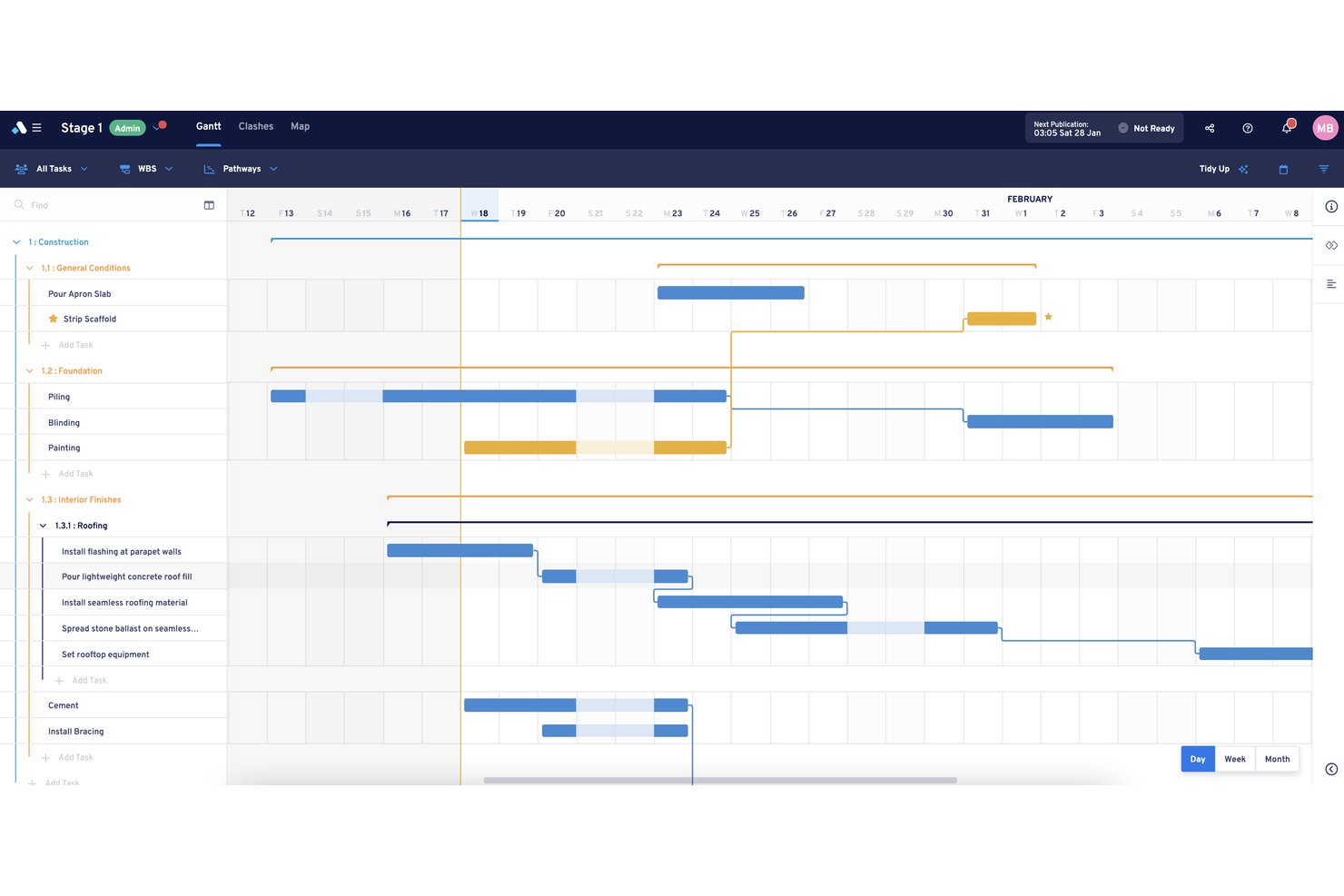
Aphex is a construction planning platform built around collaborative short-term scheduling, offering Gantt, map, board, and list views alongside lookahead planning, task dependency mapping, and site coordination tools purpose-built for construction teams.
Who Is Aphex Best For?
Aphex suits construction planners and site teams at Tier 1 and Tier 2 contractors who need to turn a master schedule into a living, weekly site routine.
Why I Picked Aphex
I picked Aphex as one of the best because it's the only tool on this list built specifically around converting a master schedule into a repeating weekly site routine. I love how the lookahead and board views work together: planners pull tasks from the Gantt into a rolling short-term plan, run daily coordination meetings from that live view, and publish a timestamped snapshot at the end of each cycle. The dependency engine reinforces this by cascading reschedules in real time when a driving task moves, so the weekly plan stays honest.
Aphex Key Features
- Master schedule import: Pull tasks and milestones directly from Primavera P6, Microsoft Project, PowerProject, or Asta into your live Aphex plan.
- Relationship links with real-time cascading: Set Start-to-Start, Finish-to-Start, and other dependency types with lag, and watch dependent tasks reschedule automatically when a driving task moves.
- Spatial map view: Plot planned tasks on site maps, floor plans, or aerial basemaps to coordinate work areas and spot location-based clashes.
- Board view for daily coordination: Group, filter, and rearrange task cards by trade, subcontractor, or shift in a full-screen board built for running daily site meetings.
Aphex Integrations
Aphex supports connections with Primavera P6, Microsoft Project, PowerProject, Asta, Power BI, Tableau, ArcGIS, Propeller, Nearmap, and DroneDeploy. It also provides Version, Work Area, and Plan APIs for custom integrations.
Pros and Cons
Pros:
- Map views expose location-based work clashes
- Linked tasks reschedule when predecessors move
- Live weekly plans keep crews aligned
Cons:
- No consolidated cross-project scheduling view
- Critical paths stop at milestone-level visibility
Best for robust project analytics

Microsoft Project is a project management software that offers detailed analytics and management tools.
Why I Picked Microsoft Project:
I selected Microsoft Project for its exceptional analytical capabilities, which are crucial for managing complex projects. Its comprehensive feature set distinguishes it from other project management tools, particularly in terms of project analytics. I judge Microsoft Project to be best for robust project analytics due to its ability to provide deep insights into project performance, facilitating data-driven decision-making.
Standout features & integrations:
Microsoft Project's standout features include its Gantt Chart view, which is instrumental for project scheduling and understanding dependencies. The software's resource management and progress-tracking tools are also noteworthy. Additionally, Microsoft Project offers extensive customization options for Gantt charts, improving project visualization and management.
Microsoft Project integrates with a suite of Microsoft 365 apps, including Microsoft Teams, OneDrive for Business, and SharePoint Online. These integrations support enhanced collaboration and document management. It also connects with Power BI for comprehensive analytics, Microsoft Power Automate for process automation, and Microsoft Power Apps for building custom applications.
Pros and Cons
Pros:
- Integration with Microsoft 365 suite
- Customizable Gantt chart features
- In-depth analytics and reporting
Cons:
- Complexity may be overkill for smaller projects
- Potentially steep learning curve
- Relatively expensive

Best for Gantt chart perfectionists

GanttPRO is an online Gantt chart tool for detailed project planning and management. It excels for Gantt chart perfectionists with its precision and comprehensive planning features.
Why I Picked GanttPRO:
I selected GanttPRO for the list because of its focus on detailed Gantt chart creation, which stands out among other project management tools. It is best for Gantt chart perfectionists due to its meticulous approach to project planning, allowing users to fine-tune every aspect of their project timelines and resources.
Standout features & integrations:
GanttPRO's standout features include robust Gantt chart capabilities, task management, resource allocation, deadline tracking, and progress monitoring. It also offers collaboration tools, advanced reporting, and customizable templates. The tool integrates natively with JIRA, Microsoft Excel, Google Drive, Slack, Trello, Dropbox, and more, facilitating a connected project management environment.
Pros and Cons
Pros:
- Customizable templates and advanced reporting
- Resource management and allocation tools
- Detailed Gantt chart creation and editing
Cons:
- Limited information on integration specifics without direct inquiry
- Higher-tier plans are required for full-feature access
- Annual billing may not be preferred by all users

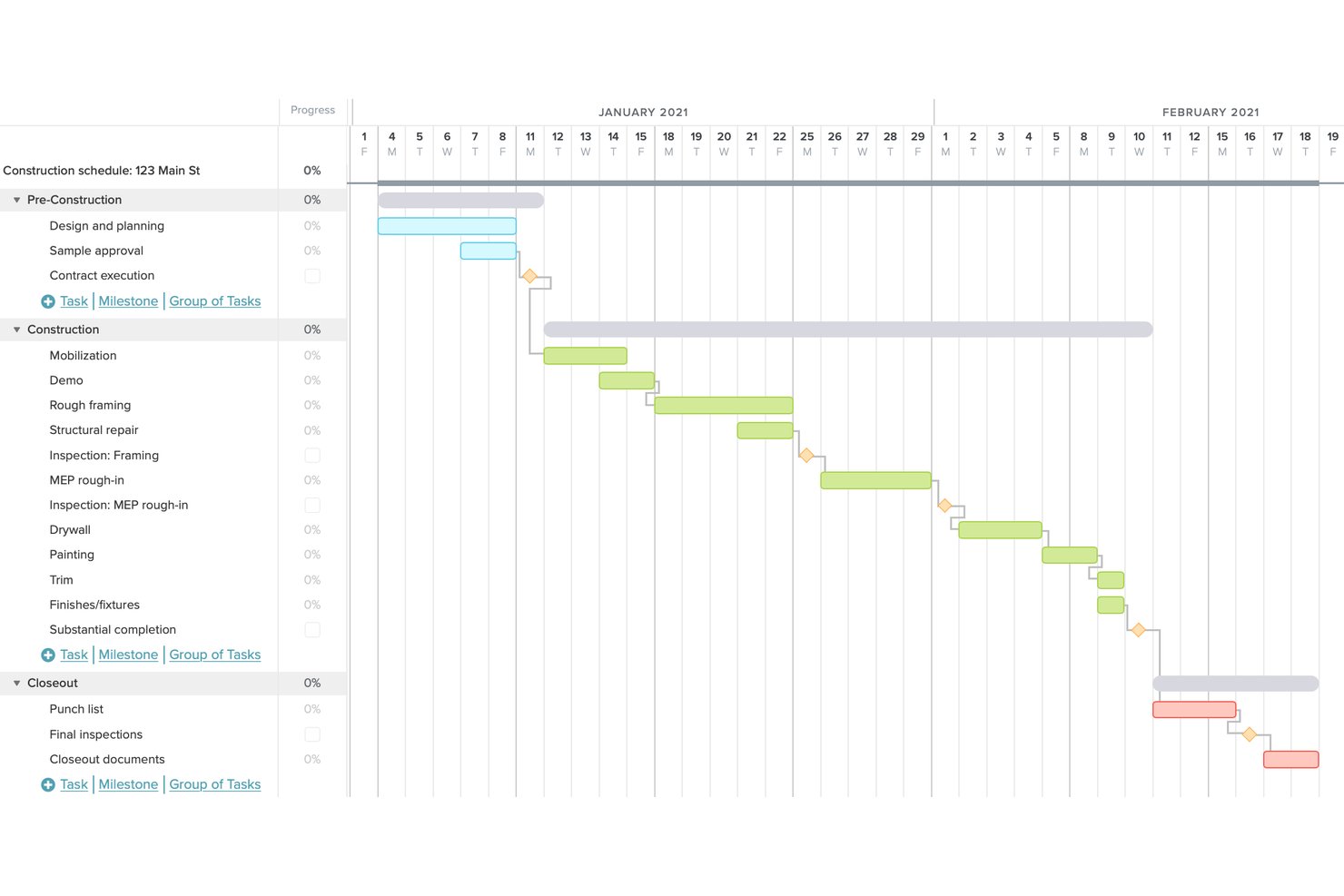
TeamGantt is a web-based Gantt chart scheduling tool built for construction teams, offering drag-and-drop scheduling, CPM dependency tracking, baseline comparisons, crew workload management, and subcontractor coordination.
Who Is TeamGantt Best For?
TeamGantt is a strong fit for construction schedulers and project managers who want clear, visual Gantt-based scheduling without the complexity of a full construction management suite.
Why I Picked TeamGantt
TeamGantt earns its spot on my shortlist because it keeps Gantt chart collaboration genuinely simple without stripping out the scheduling depth construction teams need. I love how subcontractors can confirm or flag schedule conflicts directly from an email or text, no login required, with their status showing live on the Gantt. Pair that with unlimited toggleable baselines and CPM dependency support across all four dependency types, and you get a scheduling tool that's easy to share but serious about accuracy.
TeamGantt Key Features
- Cost-loaded scheduling: Assign cost data to individual tasks so project expenses roll up automatically for cash-flow and billable-work forecasting.
- Primavera P6 and MS Project import: Bring existing schedules into TeamGantt directly from .mpp or P6 files without manual re-entry.
- Material lead-time tracking: Link long-lead materials to their install tasks and get automatic alerts if orders fall behind the master schedule.
- Global workloads view: See crew availability and spot overbooking conflicts across all active projects before assignments are locked in.
TeamGantt Integrations
TeamGantt documents integrations with Procore, Trello, Slack, Dropbox, and Basecamp, plus Microsoft Project and Primavera P6 schedule imports. It also offers a public API, calendar feeds, and Zapier.
Pros and Cons
Pros:
- Unlimited baselines support schedule comparisons
- All four dependency types with critical paths
- Clear visual schedules for complex builds
Cons:
- Mobile Gantt views remain difficult onsite
- No daily logs, RFIs, or punch lists

GanttPRO
Best for real-time data

ProjectManager.com is a cloud-based project management software designed to provide real-time data for managing projects effectively.
Why I Picked ProjectManager.com:
I chose ProjectManager.com for this list because it offers a unique combination of real-time data tracking and comprehensive project management tools. Its ability to provide instant updates and live data ensures that project managers and teams can make informed decisions quickly. I believe ProjectManager.com is best for real-time data because it allows for immediate insight into project progress, resource allocation, and potential bottlenecks, which is essential for timely project delivery and dynamic decision-making.
Standout features & integrations:
ProjectManager.com's Gantt chart maker is a standout feature, offering interactive project planning, real-time project tracking, and team collaboration features. Users can set milestones, link task dependencies, and identify the critical path, all within a dynamic and user-friendly interface. The software also includes project management reports, dashboards, and the ability to import and export data seamlessly.
The tool integrates natively with over 1,000 business and project management apps, including Google (Gmail, Drive, Calendar), Microsoft (Project, Excel, CSV files), Zapier, Slack, and Jira, and offers a custom API for more advanced integrations.
Pros and Cons
Pros:
- Wide range of integrations with over 1,000 apps and a custom API
- Comprehensive Gantt chart maker with interactive planning and scheduling
- Real-time data and live dashboards for up-to-date project tracking
Cons:
- Limited file storage in the base plan compared to some alternatives
- Some advanced features are only available in higher-priced plans
- The starting price may be higher than some competitors for small teams

ClickUp
Best for customizable task views
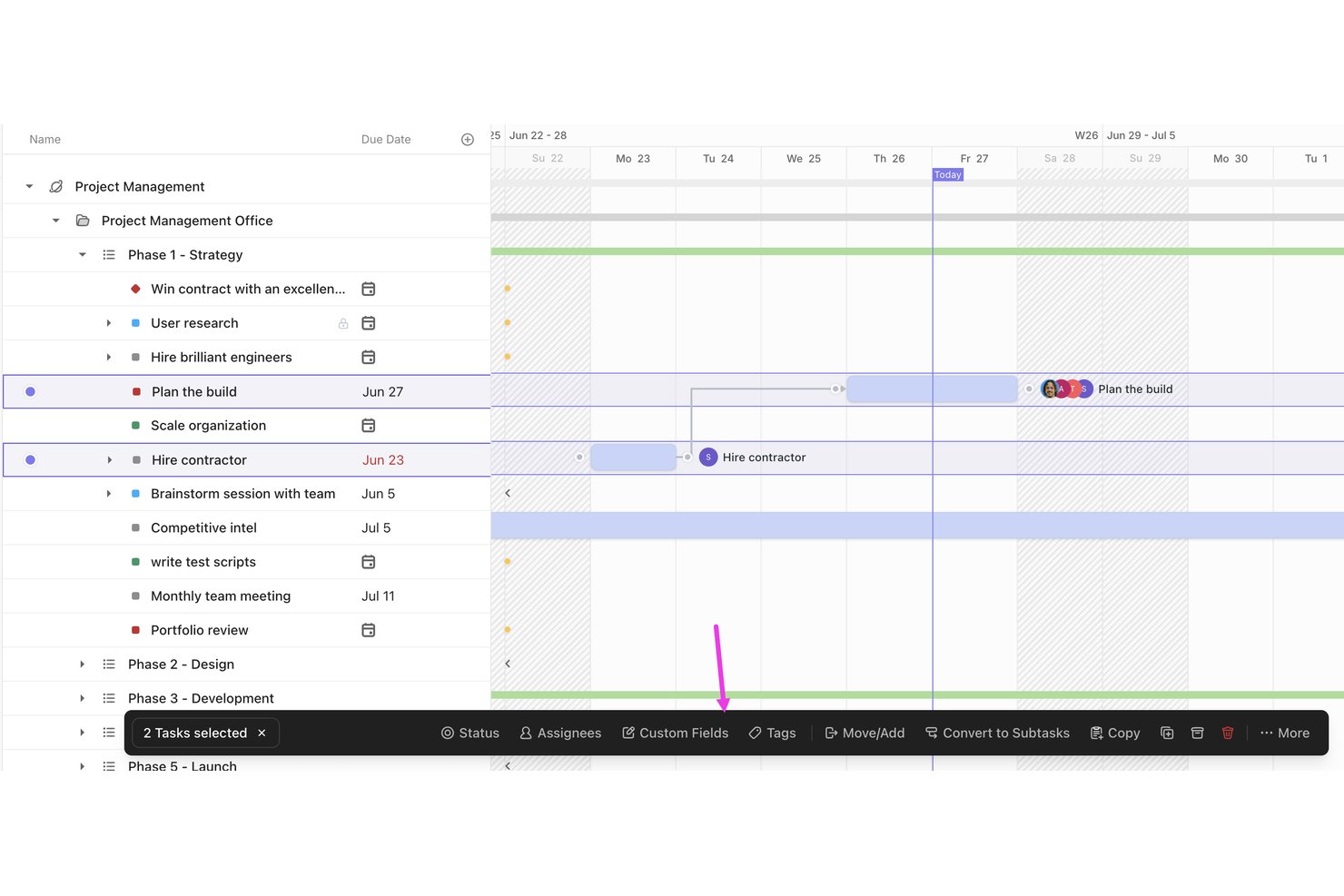
ClickUp is a horizontal work management platform that offers Gantt chart scheduling, task dependencies, critical path tracking, and customizable workflow views for construction project planning.
Who Is ClickUp Best For?
ClickUp works well for PMO directors and owner's reps who need flexible, dashboard-driven oversight across multiple construction projects without committing to a purpose-built vertical tool.
Why I Picked ClickUp
I picked ClickUp as one of the best because its customizable task views genuinely shine when you're juggling multiple construction phases at once. I like that you can toggle between Gantt, Workload, and List views on the same project, and the Critical Path tool highlights in red exactly which tasks will push your end date if they slip. The dedicated construction Gantt template organizes builds into phases with connected milestones, so I can start tracking dependencies without building the structure from scratch.
ClickUp Key Features
- Baseline snapshots: ClickUp's Gantt view lets you capture a project baseline to compare planned vs. actual progress at any point in the schedule.
- Workload view: Visualizes each team member's capacity by day, week, or month so you can rebalance task assignments before a phase gets overloaded.
- Custom fields and forms: Build RFI submissions, approval requests, and estimate tracking directly into your workflows using configurable fields and forms.
- Real-time proofing and annotation: Reviewers can mark up drawings, submittals, and documents directly in ClickUp without leaving the platform.
ClickUp Integrations
ClickUp lists 1,000+ native integrations, including Slack, Microsoft Teams, Google Drive, OneDrive, Outlook, GitHub, Dropbox, Box, and Zoom. It also offers a public API and Zapier integrations, but no native Procore, Autodesk Construction Cloud, or Bluebeam connections.
Pros and Cons
Pros:
- Workload view exposes user capacity gaps
- Baseline snapshots compare planned and actual progress
- Custom views adapt across construction phases
Cons:
- Offline mobile support limits field updates
- No native crew or equipment resources
New Product Updates from ClickUp
ClickUp Adds List Automations, Time Off Scheduling, and Org Charts
ClickUp adds template-based List automations, personal time off scheduling, a unified picker, automatic task date syncing, and Org Charts. These updates help teams automate project setup, manage availability, and organize work. For more information, visit ClickUp’s official site.
Best for spreadsheet-style Gantt scheduling
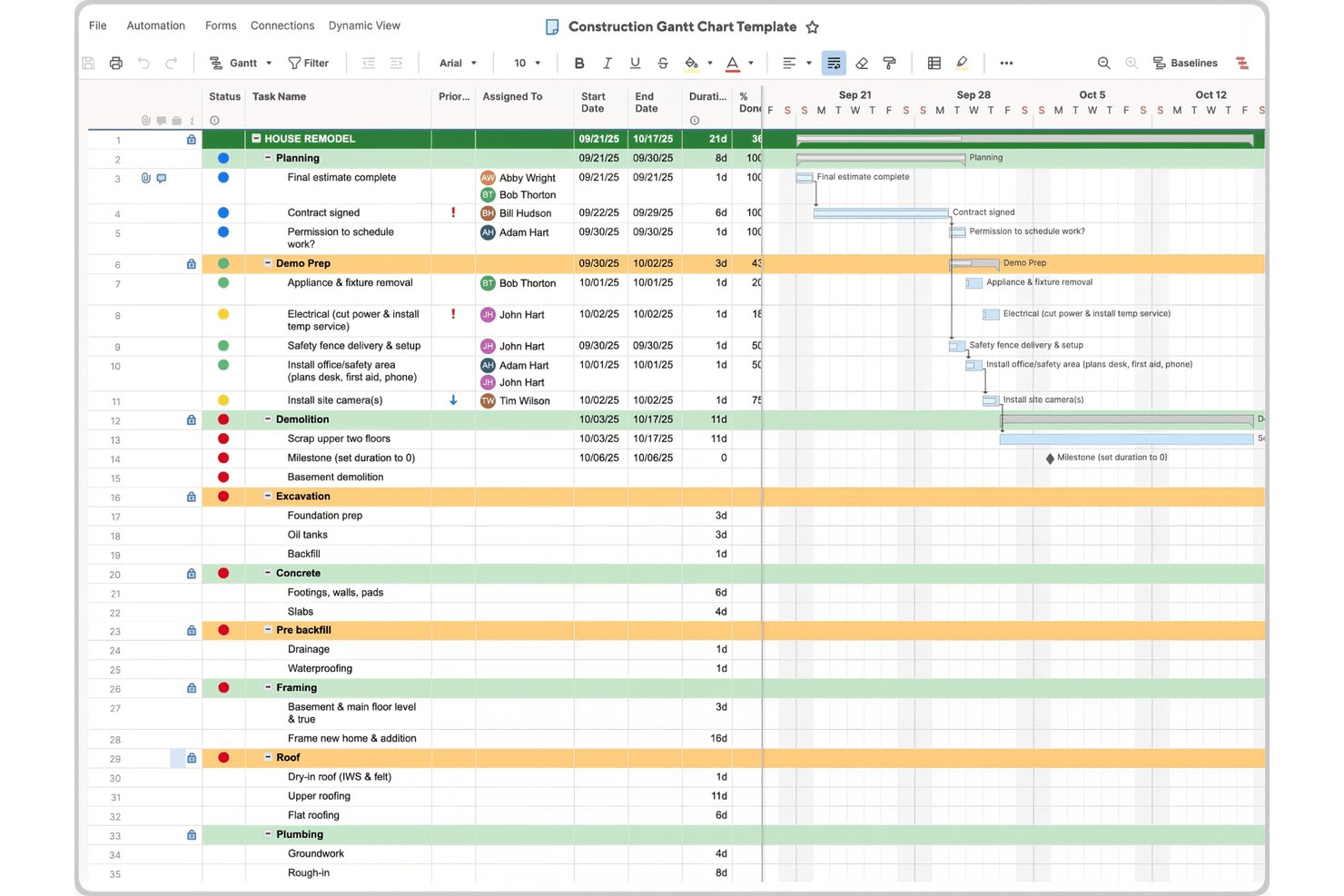
Smartsheet is a cloud-based work management platform that combines Gantt chart scheduling, task dependencies, critical path tracking, resource workload visibility, and real-time collaboration across Grid, Card, Calendar, and Timeline views.
Who Is Smartsheet Best For?
Smartsheet is a strong fit for construction PMOs and owner's reps who want enterprise-grade reporting and familiar spreadsheet-style scheduling without the steep learning curve of traditional tools like MS Project.
Why I Picked Smartsheet
I picked Smartsheet as one of the best because its Grid view feels like a natural upgrade from the spreadsheets most construction teams already live in, with real Gantt logic layered on top. I love that you can color-code task bars by phase (framing, MEP, punch list) and auto-recalculate timelines the moment a dependency shifts. The critical path highlighting and predecessor/successor logic make it genuinely useful for sequencing trade work without rebuilding your whole schedule from scratch.
Smartsheet Key Features
- Baseline snapshot: Save a project baseline to compare planned vs. actual dates and surface schedule variances directly in your dashboards.
- Procore sync: A bi-directional integration keeps your Smartsheet schedules and Procore project data in sync without manual data entry.
- Workload tracking: The Business tier and above lets you view resource availability and allocation tied directly to Gantt tasks.
- Mobile forms with offline mode: Field teams can complete and submit forms without a connection, with data syncing automatically once they're back online.
Smartsheet Integrations
Smartsheet offers 175+ integrations, including bi-directional Sync for Procore, Jira, Power BI, Tableau, Microsoft Teams, Slack, SAP, and ServiceNow. It also connects with Zapier, Microsoft Power Automate, Workato, and other automation platforms.
Pros and Cons
Pros:
- Baselines expose planned-versus-actual variance
- Critical path recalculates after dependency changes
- Spreadsheet-style Gantt eases schedule adoption
Cons:
- Offline access excludes full Gantt editing
- Construction workflows require DIY sheet building
New Product Updates from Smartsheet

Smartsheet Adds Claude Sheets Export Integration
Smartsheet introduces Send to Smartsheet in Claude Sheets (beta), allowing users to transfer AI-generated plans into Smartsheet with rows, dates, numbers, and dropdowns preserved. This helps teams turn AI-generated plans into collaborative workflows. For more information, visit Smartsheet’s official site.
 .

Celoxis
Best for comprehensive reporting

Celoxis is an all-in-one platform for project management and work collaboration. It stands out for its comprehensive reporting capabilities, offering in-depth insights into project performance.
Why I Picked Celoxis:
I selected Celoxis for its robust reporting and analytics, which are essential for managing complex projects. Its ability to deliver detailed, customizable reports makes it the best choice for comprehensive reporting. I believe it excels in this area because it provides real-time insights and a high level of customization, allowing for detailed tracking and analysis of project data.
Standout features & integrations:
Celoxis is equipped with a range of standout features, including advanced scheduling, resource management, time and expense tracking, and project financials.
It also boasts a rich set of integrations, seamlessly connecting with QuickBooks Online, Salesforce, Google Drive, Microsoft Excel, Microsoft Project, Box, and more.
Pros and Cons
Pros:
- Advanced scheduling and resource management capabilities
- A wide array of integrations with popular tools
- Extensive reporting and dashboard customization
Cons:
- The Complexity of features can be overwhelming for beginners
- Minimum seat requirement may not be ideal for smaller teams
- Higher starting price point

Wrike
Best for interactive Gantt charts

Wrike is a versatile project management and collaboration tool designed to help teams manage tasks, projects, and workflows efficiently.
Why I Picked Wrike:
I chose Wrike for its interactive Gantt charts, which allow users to create detailed project schedules, visualize task dependencies, and set milestones. The drag-and-drop interface makes it easy to reschedule tasks in bulk, ensuring that project timelines can be adjusted quickly and efficiently. This feature is particularly beneficial in construction projects, where timelines are often subject to change due to various unforeseen circumstances.
Standout features & integrations:
Wrike's key features include AI and Automation capabilities, powered by Work Intelligence, dynamic request forms that streamline the intake process with custom forms and conditional logic, and custom item types, which allow teams to tailor their workspace to fit specific organizational needs.
Wrike integrations include Power BI, Tableau, Salesforce, Google Drive, Microsoft SharePoint, Microsoft OneDrive, MediaValet, Microsoft Teams, Zoom, and Miro.
Pros and Cons
Pros:
- Flexible project templates
- Enterprise-grade security
- Real-time project visibility
Cons:
- Limited free plan
- Steep learning curve
- Unchangeable task status filter
New Product Updates from Wrike

Wrike Adds Advanced Filters to Chart View
Wrike introduces new default filters in Chart view, including relative dates, exclusion conditions, multiple filters per field, and status group filtering. These updates help teams refine project data and reporting. For more information, visit Wrike’s official site.

Best for versatile project tracking

Zoho Projects is a comprehensive tool for managing work and tracking progress. It is best for versatile project tracking because it offers a range of features that cater to different project management needs.
Why I Picked Zoho Projects:
I selected Zoho Projects for its extensive project-tracking capabilities that accommodate a variety of management styles and requirements. What makes it stand out is its adaptability to various project scenarios, providing teams with the tools they need to stay on top of their work. I determined Zoho Projects to be best for versatile project tracking due to its ability to handle complex project timelines and dependencies, making it a suitable choice for teams that manage multifaceted projects.
Standout features & integrations:
Zoho Projects excels with its Gantt chart capabilities, allowing users to visualize project timelines and dependencies effectively. The software's task automation and time tracking features streamline project management processes, while detailed reporting tools help keep all stakeholders informed. Additionally, Zoho Projects offers customization options to tailor the project tracking experience to specific team needs.
Zoho Projects integrates with a range of other tools, including Google Drive, Google Calendar, Slack, Microsoft Teams, Dropbox, GitHub, Bitbucket, Crashlytics, Zendesk, Zoho CRM, Zoho Invoice, Zoho Books, and Zoho Desk.
Pros and Cons
Pros:
- A wide array of integrations with popular tools
- Customizable to fit various project management needs
- Robust Gantt chart and project tracking features
Cons:
- Higher-tier plans required for advanced features
- Free plan limitations could be restrictive for growing teams
- Initial setup and customization may be complex for some users
New Product Updates from Zoho Projects
Zoho Projects Adds CodeX Scripts for Custom Modules
Zoho Projects now supports CodeX Scripts for custom modules, enabling conditional logic and rules for creating, updating, and deleting records. For more information, visit Zoho Projects' official site.
 .
Dikkate Alınabilecek Diğer İnşaat Gantt Şeması Yazılımları
Aşağıda, kısa listemize aldığımız ancak en iyi listeye giremeyen ek inşaat Gantt şeması yazılımlarının bir listesi yer alıyor. Göz atmaya değer.
- Instagantt
For Asana integration
- Asana
For workflow customization
- Basecamp
For team communication
- Paymo
For freelancers and SMEs
- monday AI Workspace
With AI-powered risk detection
- ProofHub
For all-in-one project control
- Easy Projects
Good for budget tracking
- Trello
For visual task planning
- Project Insight
For intelligent scheduling
- Tempo Portfolio Manager
Good for dynamic scheduling


How I Evaluate Construction Gantt Chart Software
I split my evaluation into two layers: the baseline CPM scheduling a tool must offer, and the differentiators—like subcontractor portals and Procore integration—that set the best options apart.
Core Functionality (Table Stakes For This List)
When I'm selecting tools for my list, I rank each one on a scale from 0 (does not offer the functionality) to 5 (excels in this area) for each core functionality listed below. Then, I calculate the tool's total score into a percentage. Each tool needs to achieve a minimum total score of 55% to be considered for inclusion.
- Gantt Chart Scheduling: I look for interactive, drag-and-drop Gantt timelines that let you group tasks by construction phase—like sitework, framing, or MEP rough-ins—not just flat task lists.
- Dependencies & Critical Path: Each tool should support all four dependency types (FS, SS, FF, SF) with lag and lead times, plus automatic CPM calculations that update when tasks shift.
- Baseline & Progress Tracking: I check whether you can save baseline snapshots and compare planned vs. actual timelines, which matters when an owner asks why concrete pours slipped two weeks.
- Resource & Crew Management: Assigning labor, subs, and equipment to Gantt tasks with workload visibility is key—especially when you're juggling multiple trades on the same jobsite.
- Construction-Specific Workflows: Tools that include WBS structures, RFI tracking, submittals, or punch lists score higher than generic project management platforms repurposed for construction.
- Field Collaboration & Mobile Access: I evaluate whether field teams can view and update the Gantt schedule from the jobsite via mobile apps, including offline access for remote builds with limited connectivity.
Once I have a list of tools that meet this criteria, I consider what sets each platform apart.
Differentiating Factors (What Sets Vendors Apart)
Here's how I compare and contrast different vendors:
Standout Features
Look-ahead scheduling is a major differentiator. I check whether a tool can generate 3-week pull-planning views from the master Gantt, since that's what most field teams rely on in weekly coordination meetings. Subcontractor portals also matter because they let subs confirm schedules and log progress without needing full licenses. I evaluate cost-to-schedule linking too, where Gantt tasks tie directly to budget line items or cost codes so PMs can forecast spend as the timeline shifts.
Beyond Features
Integration with tools like Procore, Autodesk Construction Cloud, and accounting platforms matters because most construction teams already run on these systems. I also evaluate pricing models, particularly whether a vendor offers free viewer access for subs and owners who just need to check the schedule. Export compatibility is another big one—many GCs and owners require XER or MPP file submittals, so a tool that only exports PDFs can create real friction during bid coordination and schedule reviews.
İnşaat Gantt Şeması Yazılımı Nasıl Seçilir
Kendinize özgü yazılım seçim sürecinizde ilerlerken aşağıdaki noktaları göz önünde bulundurun:
- Kullanım Kolaylığı: Yazılım, ekip üyelerinin kapsamlı bir eğitim almadan özelliklerini hızlıca anlamalarına ve kullanmalarına olanak tanıyan sezgisel bir arayüze sahip olmalıdır. Zamanın büyük önem taşıdığı inşaat sektöründe, dik bir öğrenme eğrisi proje takvimlerini geciktirebilir. Örneğin, görevleri planlamak için sürükle ve bırak işlevi süreci basitleştirebilir ve zamandan tasarruf sağlayabilir.
- Özelleştirme Olanakları: İnşaat projeleri kapsam ve karmaşıklık açısından büyük farklılıklar gösterir; bu nedenle Gantt şeması yazılımı, belirli proje ihtiyaçlarını karşılayabilecek kadar esnek olmalıdır. Özelleştirme; özel alanlar ekleme, farklı görevler için renk kodlarını değiştirme veya farklı ekip rolleri için görünümleri ayarlama olanağını içerebilir. Bu özellik, benzersiz aşamalara ve kilometre taşlarına sahip olabilecek büyük ölçekli inşaat projeleri için özellikle önemlidir.
- Diğer Araçlarla Entegrasyon: Yazılım; CAD yazılımı, proje yönetimi araçları veya finansal sistemler gibi inşaat yönetiminde kullanılan diğer araç ve sistemlerle sorunsuz biçimde entegre olmalıdır. Bu entegrasyon, Gantt şemasındaki güncellemelerin tüm platformlara yansıtılmasını sağlayarak veri siloları ve iletişim kopukluğu riskini azaltır. Örneğin, gerçek zamanlı güncellemeler kaynak tahsisine ve bütçe takibine yardımcı olabilir.
- Kaynak Yönetimi Özellikleri: İş gücü ve malzemelerin dikkatle tahsis edilmesi ve takip edilmesi gereken inşaat sektöründe etkili kaynak yönetimi kritik öneme sahiptir. Doğru Gantt şeması yazılımı, iş yükü görünümleri ve uygunluk takibi gibi kaynakların verimli biçimde yönetilmesine yardımcı olan özellikleri içerecektir. Bu, aşırı kaynak tahsisini önlemesi ve kaynakların en iyi şekilde kullanılmasını sağlaması gereken proje yöneticileri için büyük önem taşır.
- İş Birliği ve İletişim Araçları: İnşaat projelerinde yükleniciler, mimarlar ve müşteriler de dahil olmak üzere birden fazla paydaş yer alır. Yazılım; dosya paylaşımı, yorum yapma ve gerçek zamanlı bildirimler gibi iş birliği özellikleri sunmalıdır. Bu araçlar, açık iletişimi kolaylaştırır ve tüm tarafların proje güncellemeleri ile değişikliklerinden haberdar olmasını sağlar; bu da proje uyumunu korumak ve son teslim tarihlerine uymak için hayati önem taşır.
2025'te İnşaat Gantt Şeması Yazılımındaki Trendler
İnşaat Gantt şeması yazılımı teknolojisinde fark ettiğim güncel ve ilginç trendlerden bazıları şunlardır.
- Gerçek Zamanlı Analitikle Entegrasyon: Gantt şeması yazılımları artık gerçek zamanlı analitikle entegre olarak proje ilerlemesine ilişkin anlık bilgiler sunuyor. Bu trend, proaktif ayarlamalara olanak tanıyarak projelerin planlandığı şekilde ilerlemesini sağlıyor. Karmaşık zaman çizelgelerini ve kaynakları verimli biçimde yönetmek için kritik önem taşıyor.
- Geliştirilmiş Mobil Erişilebilirlik: Gantt şeması yazılımlarında mobil erişilebilirlik, 2025'te oyunun kurallarını değiştiren bir özellik haline geldi. Saha personeli, proje zaman çizelgelerini hareket halindeyken güncelleyip görüntüleyerek iş birliğini geliştiriyor. Bu trend, inşaat sahalarının dinamik yapısı açısından önemlidir.
- Yapay Zekâ Destekli Tahmin Araçları: Yapay zekâ, öngörücü proje yönetimi için Gantt şeması yazılımlarına dahil edildi. Yapay zekâ algoritmaları, olası gecikmeleri tahmin etmek ve iyileştirmeler önermek için geçmiş projeleri analiz eder. Bu trend, proje yöneticilerinin inşaat projelerini planlama ve yürütme biçimini yeniden şekillendiriyor.
- Sanal Gerçeklik (VR) Entegrasyonu: VR teknolojisi artık Gantt şeması yazılımlarıyla entegre edilerek sürükleyici proje planlama deneyimleri sunuyor. Paydaşlar proje zaman çizelgelerinde sanal olarak gezinebilir; bu da anlayışı ve katılımı geliştirir. Bu trend, müşteri sunumlarında ve ekip toplantılarında devrim yaratma potansiyeli açısından ilgi çekicidir.
- Sürdürülebilirlik Takibi Özellikleri: Sürdürülebilirlik takibi, inşaat sektörünün yeşil yapılaşmaya verdiği önemi yansıtan, Gantt şeması yazılımlarındaki benzersiz bir trenddir. Yazılımlar artık geleneksel proje ölçütlerinin yanı sıra çevresel etkiyi izlemeye yönelik özellikler de içeriyor. Bu özellik, mevzuat gerekliliklerini ve kurumsal sosyal sorumluluk hedeflerini karşılamak açısından önemlidir.
Bu trendler, 2025'te Gantt şeması yazılımı teknolojisinin geliştirilmesinde atılan yenilikçi adımları öne çıkarıyor.
İnşaat Gantt Şeması Yazılımı Nedir?
İnşaat Gantt şeması yazılımı, inşaat sektöründe proje zaman çizelgelerini planlamak ve takip etmek için tasarlanmış özel bir araçtır. Proje yöneticileri, yükleniciler ve inşaat ekipleri tarafından yapı projelerini planlamak, koordine etmek ve yürütmek amacıyla kullanılır. Yazılım; inşaat faaliyetlerinin sırasını haritalandırmaya, proje zaman çizelgesini görselleştirmeye ve görevlerin doğru sırada ve zaman aralığında tamamlanmasını sağlamaya yarar.
Özellikler
İnşaat Gantt şeması yazılımı seçerken, proje yönetimini kolaylaştıracak ve üretkenliği artıracak özellikleri dikkate almak önemlidir. Bu araçlar bir proje zaman çizelgesinin görsel bir temsilini sunmak üzere tasarlanmıştır; ancak en iyi yazılımlar temel şema oluşturmanın ötesine geçer. Aranması gereken en önemli özellikler şunlardır:
- Sürükleyip Bırakarak Düzenleme: Bu özellik, proje zaman çizelgesinde hızlı ayarlamalar yapılmasını sağlar. İnşaat projelerinin sürekli değişen dinamiklerine uyum sağlamak için kritik öneme sahiptir.
- Kilometre Taşı Takibi: Kilometre taşları, proje zaman çizelgesindeki önemli noktaları belirtir. Ekibin temel teslimatlara ve son teslim tarihlerine odaklanmasına yardımcı olurlar.
- Bağımlılık Takibi: Görevlerin birbiriyle nasıl bağlantılı olduğunu anlamak hayati önem taşır. Bu özellik, bir görevdeki değişikliklerin ona bağlı görevlere yansıtılmasını ve proje takviminin bütünlüğünün korunmasını sağlar.
- Kaynak Yönetimi: Kaynakların verimli şekilde tahsis edilmesi, aşırı ve yetersiz kullanımın önüne geçer. Doğru kaynakların doğru zamanda kullanılabilir olmasını sağlamak önemlidir.
- Kritik Yol Yöntemi: Bu yöntem, projenin son teslim tarihine kadar tamamlanabilmesi için zamanında bitirilmesi gereken kritik görevler dizisini belirlemeye yardımcı olur. Görevlere öncelik vermek ve zamanı etkili şekilde yönetmek için gereklidir.
- İş Birliği Araçları: Bu araçlar, ekip üyeleri arasındaki iletişimi kolaylaştırır. Herkesin aynı bilgiye sahip olmasını ve ortak kararlar alınmasını sağlamak açısından önemlidirler.
- Özel Görünümler: Görünümleri özelleştirme olanağı, farklı paydaşların kendileri için en önemli bilgileri görmesini sağlar. Açıklığı ve odağı korumak için önemlidir.
- İlerleme Takibi: Planlanan ilerlemeye göre gerçek zamanlı takip yapılması önemlidir. Projenin yolunda ilerlemesini sağlamak için zamanında müdahalelerde bulunulmasına olanak tanır.
- Risk Yönetimi: Potansiyel riskleri sorunlara dönüşmeden önce belirlemek ve yönetmek kritik öneme sahiptir. Bu özellik, projenin proaktif şekilde yönetilmesine yardımcı olur.
- Raporlama ve Analiz: Raporlar oluşturmak ve verileri analiz etmek, bilinçli kararlar alınmasına yardımcı olur. Proje performansını değerlendirmek ve gelecekteki projeleri planlamak için önemlidir.
- Gantt Şeması Şablonları: Kullanıcıların proje zaman çizelgelerini hızlı bir şekilde oluşturmasına ve yönetmesine yardımcı olan, yazılımda önceden tasarlanmış çerçeveler.
- Proje Görevleri: Bir projenin parçası olarak tamamlanması gereken bireysel faaliyetler veya eylemler.
- Alt Görevler: Daha büyük bir proje görevinin bileşenleri olan, daha küçük ve daha kolay yönetilebilir görevler.
- İş Birliğine Dayalı Çalışma Alanı: Ekiplerin iş birliği yapabildiği, dosya paylaşabildiği ve projeleri yönetebildiği, yazılım içindeki sanal alan.
- Çevik İş Akışları: Esnekliği, yinelemeli ilerlemeyi ve iş birliğini vurgulayan bir yazılım geliştirme metodolojisi.
- Atananlar: Belirli görevleri veya projeleri tamamlamak üzere görevlendirilen kişiler ya da ekipler.
- Son Teslim Tarihleri: Görevlerin veya projelerin tamamlanması gereken belirlenmiş tarihler.
- Bitiş Tarihleri: Görevlerin veya projelerin fiilen tamamlandığı tarihler.
- Kullanıcı Arayüzü: Kullanıcıların etkileşimde bulunduğu; yazılımı kullanılabilir kılan tasarım ve düzen öğelerinden oluşan bölüm.
- Takvim Görünümü: Görevlerin, etkinliklerin veya son teslim tarihlerinin tarihe göre düzenlenmiş görsel gösterimi.
- Yol Haritaları: Bir projenin zaman içindeki vizyonunu, yönünü ve ilerlemesini ana hatlarıyla ortaya koyan stratejik planlar.
Bu özellikler, proje yönetimi verimliliğini önemli ölçüde artırabilen güçlü bir Gantt şeması yazılımının oluşturulmasına toplu olarak katkıda bulunur.
Avantajlar
Gantt şeması yazılımı, proje zaman çizelgesinin görsel bir temsilini sunarak ve proje yönetimi yeteneklerini önemli ölçüde geliştirerek inşaat sektöründe vazgeçilmez bir araç hâline gelmiştir. İnşaat Gantt şeması yazılımının sağladığı beş temel avantaj şunlardır:
- Geliştirilmiş Proje Görselleştirme: Gantt şeması yazılımı, her aşama ve görev de dahil olmak üzere tüm projenin net bir görsel zaman çizelgesini sunar. Proje programının grafiksel bir gösterimini sağlayarak paydaşların faaliyetlerin sırasını, sürelerini ve birbirleriyle nasıl bağlantılı olduklarını kolayca anlamasına olanak tanır; bu da daha iyi planlama ve iletişim sağlar.
- Geliştirilmiş Kaynak Yönetimi: Yazılım; iş gücü, malzeme ve ekipman gibi kaynakların verimli bir şekilde tahsis edilmesine ve izlenmesine olanak tanır. Bu özellik, kaynakların aşırı tahsis edilmesini veya yetersiz kullanılmasını önlemeye yardımcı olur ve doğru kaynakların doğru zamanda kullanılabilir olmasını sağlar; bu da maliyet tasarrufu ve artan verimlilik sağlayabilir.
- Daha İyi İş Birliği ve İletişim: Gerçek zamanlı güncellemeler ve Gantt şemasına paylaşılan erişim, ekip çalışmasını ve bilgi paylaşımını kolaylaştırır. Ekip üyeleri görev atamalarını, son teslim tarihlerini ve ilerlemeyi görüntüleyebilir; bu da şeffaflığı teşvik eder, herkesin aynı bilgiye sahip olmasını sağlar ve yanlış anlamalarla gecikmeleri azaltır.
- Artırılmış Esneklik ve Uyum Sağlama Yeteneği: Kullanıcılar, değişikliklere veya öngörülemeyen olaylara yanıt olarak proje planlarını ve programlarını hızla ayarlayabilir. Gerektiğinde Gantt şemasını kolayca değiştirebilme olanağı, inşaat projelerinin dinamik yapısını yönetmeye yardımcı olur ve projeyi planlandığı şekilde ilerleten zamanında düzenlemeler yapılmasını sağlar.
- Ayrıntılı İlerleme Takibi: Yazılım, her görevin planlanan programa göre ilerlemesini izlemek için araçlar sunar. Bu, proje yöneticilerinin gecikmeleri veya sorunları erkenden tespit etmesine ve düzeltici önlemler almasına olanak tanır; bu da projenin zaman çizelgesi ve bütçesi içinde kalması açısından kritik öneme sahiptir.
İnşaat proje yönetiminde Gantt şeması yazılımı, manuel yöntemlerin karşılayamayacağı düzeyde kontrol ve içgörü sunarak oyunun kurallarını değiştiren bir araçtır. İnşaat profesyonelleri bu avantajlardan yararlanarak projeleri daha verimli, zamanında ve bütçe dahilinde tamamlayabilir; bu da nihayetinde daha yüksek müşteri memnuniyeti ve ticari başarı sağlar.
Maliyetler & Fiyatlandırma
İnşaat Gantt şeması yazılımını kullanmaya karar verirken mevcut çeşitli planları ve fiyatlandırma seçeneklerini anlamak önemlidir. Fiyatlandırma; kullanıcı sayısına, özelliklerin karmaşıklığına ve gereken destek düzeyine göre değişebilir.
Aşağıda, inşaat Gantt şeması yazılımı için plan seçeneklerinin ve fiyatlandırmalarının özeti yer almaktadır.
İnşaat Gantt Şeması Yazılımı için Plan Karşılaştırma Tablosu
| Plan Türü | Ortalama Fiyat | Yaygın Özellikler |
| Ücretsiz Seçenek | $0 (Ücretsiz) | Temel Gantt şeması işlevleri, sınırlı sayıda görev ve proje, topluluk desteği |
| Temel Plan | $15 kullanıcı başına/ay | Gantt şemaları, görev yönetimi, dosya paylaşımı, bazı entegrasyon özellikleri |
| Profesyonel Plan | $25 kullanıcı başına/ay | Gelişmiş Gantt şeması özellikleri, ekip iş birliği araçları, daha fazla entegrasyon |
| Premium Plan | $35 kullanıcı başına/ay | Kaynak yönetimi, iş yükü planlama, gelişmiş raporlama, tam entegrasyon |
| Kurumsal Plan | Özel fiyatlandırma | Özel özellikler, kişiselleştirilmiş destek, eğitim ve kullanıma hazırlama, API erişimi |
Yazılım alıcıları, Gantt şeması yazılımı planı seçerken inşaat projelerinin ölçeğini ve ekiplerinin büyüklüğünü göz önünde bulundurmalıdır. Proje yönetimi süreçleriniz için ihtiyaç duyduğunuz karmaşıklık ve destek düzeyini de değerlendirmek önemlidir.
İnşaat Gantt Şeması Yazılımı Hakkında SSS
İşte müşteriler için inşaat Gantt şeması yazılımı hakkında sıkça sorulan bazı sorular
Gantt şeması nedir ve inşaat proje yönetiminde nasıl kullanılır?
Gantt şeması, bir proje takvimini gösteren bir çubuk grafik türüdür. İnşaat proje yönetiminde, bir projenin çeşitli unsurlarının başlangıç ve bitiş tarihlerini göstermek için kullanılır. Şemadaki her çubuk, belirli bir inşaat görevini veya aşamasını gösterir ve proje yöneticilerinin görevlerin sırasını, sürelerini ve örtüşmelerini görselleştirmesine yardımcı olur. Bu, kaynakların etkili bir şekilde koordinasyonunu sağlar ve tüm paydaşların proje takvimi hakkında net bir anlayışa sahip olmasına yardımcı olur.
İnşaat Gantt şeması yazılımı kaynak yönetimine yardımcı olabilir mi?
Evet, inşaat Gantt şeması yazılımı genellikle kaynak yönetimi özelliklerini içerir. Yöneticilerin iş gücü, malzeme ve ekipman gibi kaynakları proje takvimi içindeki belirli görevlere tahsis etmesini sağlar. Yazılım, kaynakların kullanılabilirliğini ve kullanımını izleyerek aşırı tahsisi önlemeye yardımcı olur ve yöneticilerin proje boyunca kaynakların dağıtımı hakkında bilinçli kararlar almasını sağlar.
İnşaat Gantt şeması yazılımı küçük inşaat projeleri için uygun mudur?
İnşaat Gantt şeması yazılımı ölçeklenebilirdir ve her büyüklükteki proje için yararlı olabilir. Küçük inşaat projelerinde planlama sürecini basitleştirebilir, proje takvimine genel bir bakış sunabilir ve ilerlemenin plana göre izlenmesine yardımcı olabilir. Ayrıca projenin durumunu görsel olarak sunarak ekip üyeleri ve paydaşlar arasındaki iletişimi kolaylaştırabilir. Bütçeleri sınırlı olan küçük inşaat projeleri için, \u003ca href=\u0022https://thedigitalprojectmanager.com/tools/best-free-construction-project-management-software/\u0022\u003eücretsiz inşaat proje yönetimi yazılımı\u003c/a\u003e da genellikle Gantt şeması özelliklerini içerir.
İnşaat Gantt şeması yazılımı diğer proje yönetimi araçlarıyla nasıl entegre olur?
İnşaat Gantt şeması yazılımı, kapsamlı bir proje yönetimi çözümü sunmak için genellikle diğer proje yönetimi araçlarıyla entegre olur. Bu entegrasyon; belge yönetimi sistemlerini, finans yazılımlarını, iletişim platformlarını ve diğer özel inşaat yönetimi uygulamalarını kapsayabilir. Entegrasyon, sistemler arasında kesintisiz veri akışı sağlayarak manuel veri girişi ihtiyacını azaltır ve genel proje verimliliğini artırır.
İnşaat Gantt şeması yazılımına mobil cihazlardan erişebilir miyim?
Birçok inşaat Gantt şeması yazılımı çözümü, mobilite göz önünde bulundurularak tasarlanır ve uygulamalar veya mobil cihazlara uyumlu web arayüzleri sunar. Bu, proje yöneticilerinin ve ekip üyelerinin proje bilgilerine erişmesine, görev durumlarını güncellemesine ve değişiklikleri her yerden iletmesine olanak tanır; bu özellik özellikle inşaat sahalarında kullanışlıdır. Bu \u003ca href=\u0022https://thedigitalprojectmanager.com/tools/best-gantt-chart-software-mac/\u0022\u003eGantt şeması araçlarının birçoğu Mac için de özel destek sunar\u003c/a\u003e ve sahada Apple donanımı kullanan ekipler için özellikle önemli olan iPhone, iPad ve MacBook’lar arasında kesintisiz proje takibi sağlar.
İnşaat Gantt şeması yazılımı gerçek zamanlı ortak çalışmayı destekler mi?
Evet, modern inşaat Gantt şeması yazılımlarının çoğu gerçek zamanlı ortak çalışmayı destekler. Ekip üyeleri görevleri güncelleyebilir, belgeleri paylaşabilir ve değişiklikleri anında iletebilir. Bu, projeye dahil olan herkesin en güncel bilgilere erişmesini sağlar; bu da proje takvimlerini korumak ve beklenmedik değişiklikleri yönetmek için kritik öneme sahiptir.
İnşaat Gantt şeması yazılımı proje takvimindeki değişiklikleri nasıl ele alır?
İnşaat Gantt şeması yazılımı genellikle proje takviminde kolayca ayarlama yapılmasına olanak tanır. Kullanıcılar görevleri yeniden planlamak için sürükleyip bırakabilir ve görevler arasındaki bağımlılıklar otomatik olarak güncellenir. Yazılım ayrıca değişiklikler meydana geldiğinde uyarılar ve bildirimler sağlayarak bu değişikliklerin genel proje takvimi ve kaynak tahsisi üzerindeki etkisinin yönetilmesine yardımcı olabilir.