2026 İçin İncelenen En İyi 10 Ücretsiz Proje Yönetimi Yazılımı

10 En İyi Ücretsiz Proje Yönetimi Yazılımları Kısa Listesi


Ücretsiz proje yönetimi yazılımları, ekiplerin başlangıç maliyeti olmadan temel planlama, takip ve iş birliği araçlarına erişmesini sağlar. İster küçük bir işletme, girişim, kâr amacı gütmeyen kuruluş veya kurum içi ekip için görevleri yönetiyor olun, bu araçlar bütçenizi zorlamadan düzenli kalmanıza, son teslim tarihlerine uymanıza ve ekip iletişimini geliştirmenize yardımcı olabilir.
Doğru seçeneği bulmanıza yardımcı olmak için düzinelerce ücretsiz proje yönetimi platformunu test edip inceledim; kullanılabilirlik, özellik sınırlamaları, ölçeklenebilirlik ve entegrasyonlar açısından değerlendirdim. Bu rehber, 2026 yılında kullanılabilen en iyi ücretsiz proje yönetimi yazılımlarını kapsar; böylece iş akışınızı destekleyen ve ekibinizle birlikte ölçeklenebilen bir araç bulabilirsiniz.
Why Trust Our Software Recommendations
Our team has been testing and reviewing software since 2012. As project managers ourselves, we know how difficult—and important—it is to choose the right software.
For this guide, we evaluated tools using hands-on testing and independent research, scoring tools using our selection criteria. We also draw on insights from industry thought leaders and practicing project management experts.
Our reviews reflect our human editorial judgment, not a sales pitch.
Expert reviewers:
Ücretsiz Proje Yönetimi Yazılımları Karşılaştırma Tablosu
Bu karşılaştırma tablosu, en iyi ücretsiz proje yönetimi yazılımı seçeneklerim için fiyatlandırma ayrıntılarını özetler:
Score legend (out of 5)
- Excellent 4.5–5
- Good 4–4.4
- Average 3–3.9
- Below average 2–2.9
- Poor 1–1.9
| Tool | Starting Price | Website | |||||||
|---|---|---|---|---|---|---|---|---|---|
| Best for customizable workflows | 2.8 out of 5 | 4 | 1 | 2 | 3 | 4 | 3 | $9/user/month Free plan + 14-day trial available | Book Demo |
| Best free project management for customizable views | 3.2 out of 5 | 4 | 4 | 3 | 3 | 3 | 2 | $10/user/month Free plan + 14-day trial + demo available | Book Demo |
| Best for custom workflows | 1.5 out of 5 | 2 | 2 | 1 | 1 | 2 | 1 | $35/user/month 30-day free trial | Website |
| Best for native time tracking tools | 3.7 out of 5 | 5 | 4 | 4 | 3 | 3 | 3 | $5/user/month Free plan + 14-day trial + demo available | Website |
| Best for scalability & flexibility | 3.7 out of 5 | 4 | 4 | 3 | 4 | 4 | 3 | Pricing upon request Free plan + 15-day trial + demo available | Website |
| Best for unlimited free projects | 3.8 out of 5 | 4 | 4 | 5 | 4 | 3 | 3 | $2.49/user/month Free plan + 14-day trial available | Website |
| Best for freelancers who track time and bill clients | 3.8 out of 5 | 4 | 2 | 3 | 5 | 4 | 5 | $39.97/month 14-day free trial + free plan + free demo available | Website |
| Best for agile project management | 4.0 out of 5 | 5 | 3 | 4 | 5 | 5 | 2 | $8.48/user/month Free plan + 7-day free trial available | Website |
| Best for combining essential tools | 3.7 out of 5 | 4 | 4 | 3 | 4 | 4 | 3 | $25/month Free plan + 30-day free trial + free demo available | Website |
| Best for task management capabilities | 3.5 out of 5 | 4 | 4 | 3 | 4 | 4 | 2 | $14/user/month Free plan + 30-day free trial + free demo available | Website |
En İyi Ücretsiz Proje Yönetimi Yazılımları İncelemeleri
Aşağıda proje yönetimi yazılımı karşılaştırmalarımızı ve her aracın nasıl göründüğünü gösteren ekran görüntülerini bulabilirsiniz. Daha fazla seçenek ve sık sorulan sorular için aşağı kaydırın.

Best for customizable workflows
monday.com gives teams in tech, marketing, and operations a flexible platform to organize projects, manage tasks, and collaborate in real time, allowing workflows to adapt as needs change.
Who Is monday.com Best For?
monday.com is a strong fit for small to mid-sized teams that need a visual, adaptable way to manage projects without heavy setup or technical overhead.
Why I Picked monday.com
monday.com earns its spot on my shortlist because of how far its workflow customization goes. I like that you can build boards from scratch or start from one of hundreds of templates, then layer in custom columns, status labels, and conditional logic to match exactly how your team tracks work. The no-code automation builder is where it clicks—you can set up rules like "when status changes to In Review, notify the assignee and move the item to the QA board" without writing a single line of code. I also use the multiple view options (Gantt, Kanban, calendar, timeline) to switch context depending on whether I'm planning a sprint or reporting to stakeholders.
monday.com Key Features
- Workload view: See each team member's assigned tasks and capacity in a single visual dashboard to spot over-allocation at a glance.
- Task dependencies: Link related tasks so that when one item is delayed, dependent tasks automatically shift to reflect the updated timeline.
- Guest access: Invite external collaborators like clients or contractors to specific boards without giving them access to your full workspace.
- Dashboard reporting: Aggregate data from multiple boards into a single high-level dashboard to track progress across projects simultaneously.
monday.com Integrations
Integrations include Slack, Gmail, Google Calendar, Outlook, Microsoft Teams, Salesforce, QuickBooks, HubSpot, Zendesk, and GitHub.
What's Free?
monday.com offers a free-forever plan for up to 2 users. This plan includes 3 boards, 1,000 items, and limited access to integrations and automation.
Pros and Cons
Pros:
- Integrations include Slack Google Drive
- Customizable workflows using numerous columns
- Multiple views support varied management
Cons:
- Free plan limits users features
- Advanced features restricted to higher-tier
New Product Updates from monday AI Workspace
monday AI Workspace Adds Human Approval Routing
monday AI Workspace adds a human-in-the-loop approval block to AI Workflows, sending approval requests and routing workflow paths based on responses. For more information, visit monday AI Workspace's official site.
 .

Wrike
Best free project management for customizable views
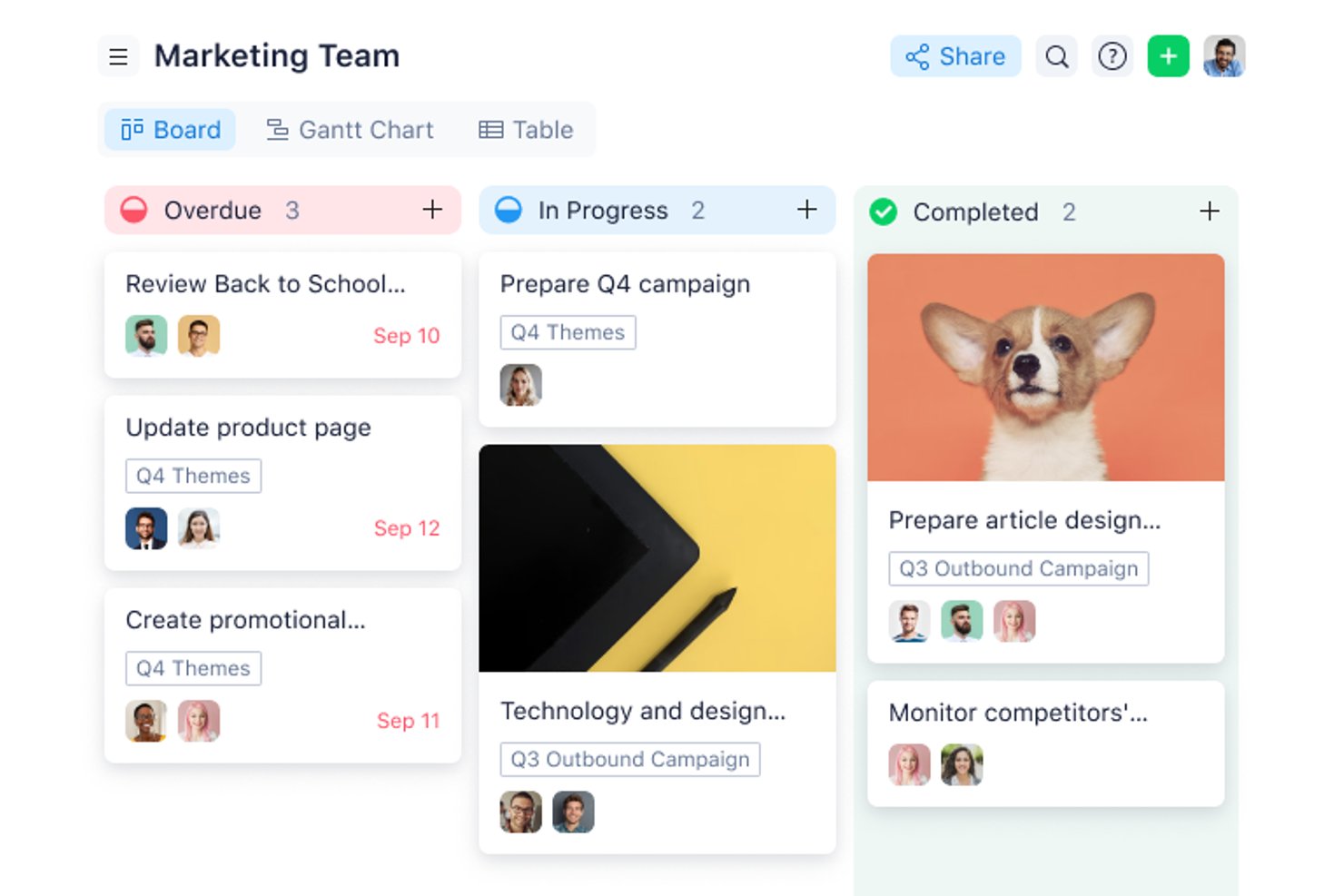
Wrike gives project managers and teams in tech, marketing, and professional services a flexible workspace to organize tasks, manage deadlines, and collaborate on projects—all without upfront costs.
Who Is Wrike Best For?
Wrike suits growing teams and mid-size organizations seeking a structured yet adaptable project management tool across marketing, product, and IT.
Why I Picked Wrike
I chose Wrike for its view flexibility, available right out of the box even on the free plan. You can toggle between list, board (Kanban), and table views depending on how your team thinks about work—so a developer tracking sprint tasks and a marketer managing a campaign calendar aren't forced into the same layout. The Gantt chart view is available on paid plans, giving teams a clear upgrade path as their needs grow. The cross-tagging feature is particularly useful: you can add a single task to multiple folders or projects so it appears in the right view for each team without duplication.
Scott Crosby, a Technical Project Manager, highlighted how Wrike delivers in real-world scenarios: “Wrike's strength is its visual project timelines and dependency tracking. When we were rolling out our client portal system, Wrike made it easy to see how backend development delays would impact frontend testing phases. The Gantt charts were intuitive enough that even our non-technical team members could understand project bottlenecks.”
Wrike Key Features
- Custom work views: Toggle between List, Board (Kanban), and Table views to organize work in different ways.
- Task and subtask management: Create tasks, break them into subtasks, and cross-tag them across multiple folders or projects without duplicating entries.
- Use case project templates: Start projects using prebuilt structures rather than building every workflow from scratch.
- AI Essentials: Use AI tools for content drafting and editing, comment summaries, and onboarding assistance.
Wrike Integrations
The Free plan includes cloud storage integrations and access to Wrike’s open REST API. Additional native integrations become available on paid tiers, including productivity apps on Team, Salesforce and Adobe Creative Cloud on Business, and QuickBooks, Power BI, and Tableau on Pinnacle. Wrike Integrate is available as an add-on for connecting systems without a native connector, such as NetSuite.
What's Free?
Wrike offers a free-forever plan with unlimited users and 2 GB of storage per account. It includes task and subtask management, folder hierarchy, custom work views such as Table and Kanban, cloud storage integrations, and open API access. Gantt charts, dashboards, custom fields, and request forms require a paid plan.
Pros and Cons
Pros:
- Wrike's task integration enhances visibility and organization
- The mobile app allows quick task management and real-time updates
- Effective for content creation and collaboration among remote teams
Cons:
- Users may face a learning curve
- Gantt charts require a paid plan
New Product Updates from Wrike

Wrike Redesigns Workspace Search With New Filters
Wrike introduces a redesigned Workspace Search interface with recent search shortcuts, item type and location filters, and parent-task context. These updates help users find relevant work items and navigate search results efficiently. For more information, visit Wrike’s official site.
 .

Best for custom workflows
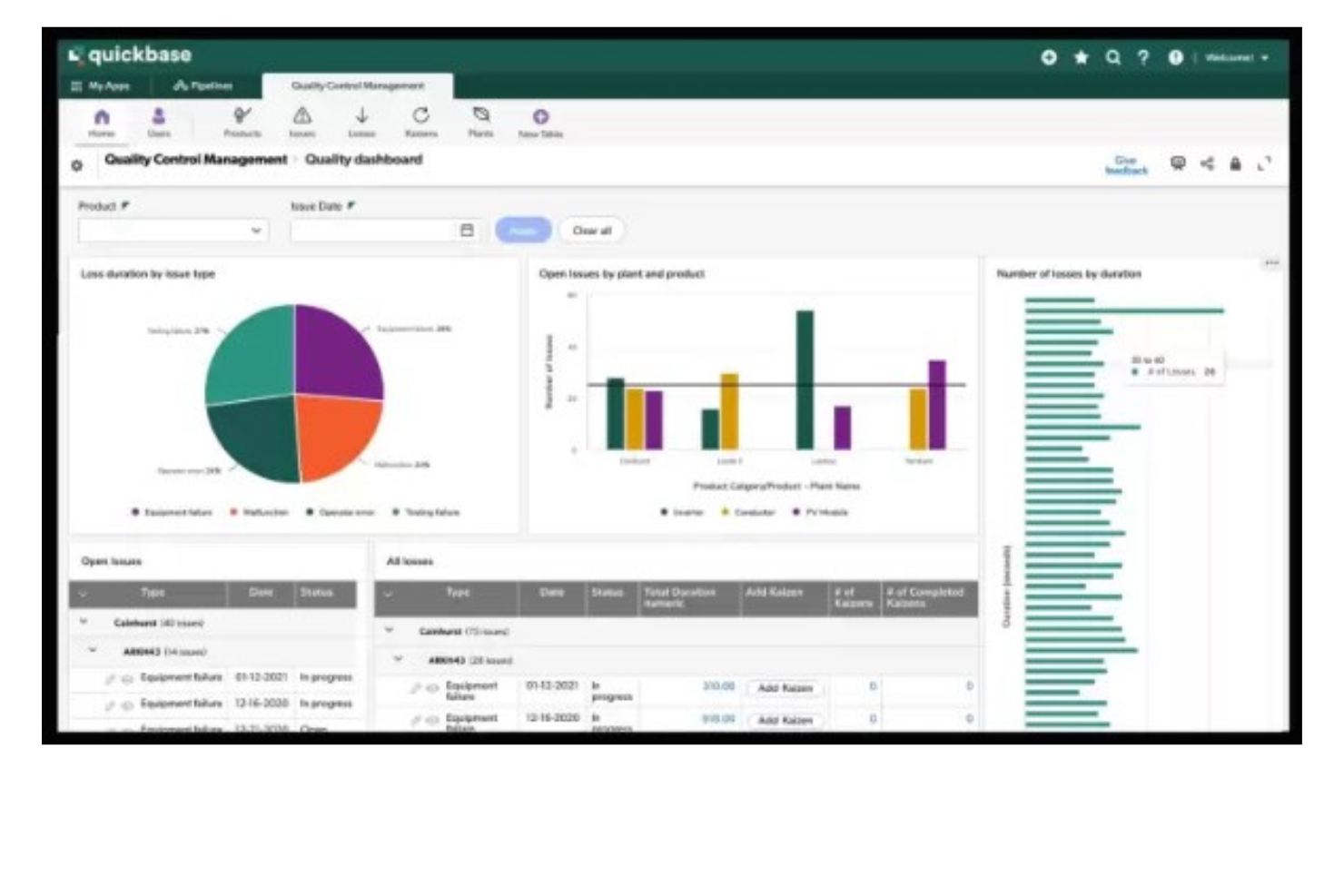
Quickbase gives teams in industries like construction, manufacturing, and IT a way to build custom project management apps that fit their unique workflows, helping them organize tasks, automate processes, and collaborate without relying on rigid, one-size-fits-all tools.
Who Is Quickbase Best For?
Quickbase is a strong fit for mid-size to large teams in operations-heavy industries like construction, manufacturing, and logistics who need project management tools tailored to their specific processes.
Why I Picked Quickbase
I've included Quickbase in my top picks because its no-code app builder lets teams design project management workflows from scratch rather than adapting to a fixed structure. I like that you can configure custom stage gates and approval routing directly in the workflow builder—so when a construction team needs a permit sign-off before moving to the next phase, that logic is built right into the app. Quickbase's Pipelines feature also lets you automate task handoffs between teams using drag-and-drop logic, so my team doesn't have to chase status updates across departments. The budget vs. actuals tracking with real-time alerts is another feature I find genuinely useful for keeping multi-phase projects from quietly going over budget.
Sergio Oliveira, Director of Development at DesignRush, shared his experience: “Quickbase enabled us to quickly consolidate our project data, even on the free plan. It allows us to track tasks, write reports, and ensure accountability without worrying about managing different spreadsheets.”
Quickbase Key Features
- Dynamic reports and dashboards: Build real-time reports with filters, groupings, and charts to track project status across multiple apps.
- Role-based permissions: Control who can view, edit, or manage data at the field, table, or app level.
- Mobile app access: Access and update project data from iOS and Android devices while working in the field.
- Gantt chart views: Visualize project timelines, task dependencies, and milestones in a drag-and-drop Gantt interface.
Quickbase Integrations
Integrations include Salesforce, SAP, Oracle, Microsoft Teams, SharePoint, Google Drive, and an API is available for custom integrations.
What's Free?
Quickbase offers a free trial, but there is no free-forever plan. The trial allows you to test the platform’s features, but user limits and integration access are restricted during the trial period.
Pros and Cons
Pros:
- Highly scalable for both small and large teams
- Integrates with a range of external tools
- Low-code customizable workflows
Cons:
- Limited ready-made templates
- Not ideal for those who want a quick-start solution
Hive
Best for native time tracking tools
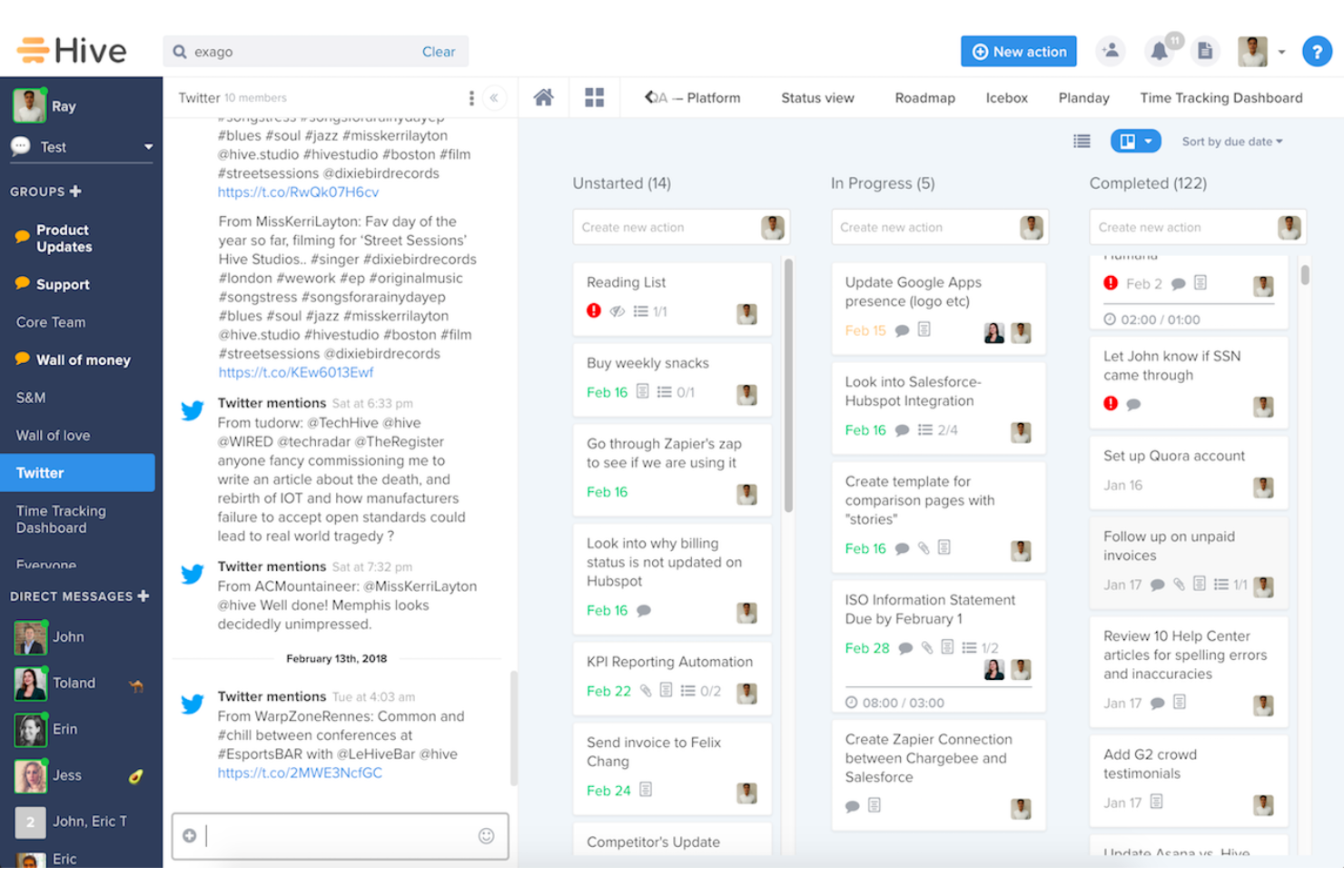
Hive helps small teams and freelancers manage projects without paying for a full project management suite. It combines task tracking, multiple project views, team messaging, native email, collaborative notes, and proofing tools in one workspace, making it easier to stay organized and keep work moving.
Hive is Best for
Hive works well for small cross-functional teams that need project management, communication, and file review tools without juggling multiple platforms.
Why I Picked Hive
I picked Hive because its native time tracking tools let your team log time directly from action cards without switching to a separate app. You can start timers, enter manual time, and compare tracked hours against estimated time to better understand workload and project costs. I also like that logged time feeds into team timesheets, giving managers a clearer view of individual and team bandwidth. This makes Hive a strong fit for teams that want free project management software with built-in time tracking instead of relying on disconnected add-ons.
Hive Key Features
- Multiple project views: Switch between Gantt, Kanban, calendar, table, and list views without recreating project data.
- Action cards: Keep subtasks, assignees, due dates, attachments, and comments together in one task card.
- Team messaging: Connect direct messages and group chats to specific projects or action cards.
- Collaborative notes: Create shared notes in real time and link them to projects or action cards for added context.
Hive Integrations
Integrations include Google Drive, Gmail, Box, Freshdesk, ActiveCampaign, Harvest, Marketo, Pipedrive, Jira, and Salesforce.
Pros and Cons
Pros:
- Native chat and notes reduce tool switching for teams
- Multiple views support Kanban, calendar, table, and list workflows
- Built-in timers connect task work to team timesheets
Cons:
- Advanced dashboards and automations require paid add-ons
- Time tracking is not included in the Free plan

Best for scalability & flexibility
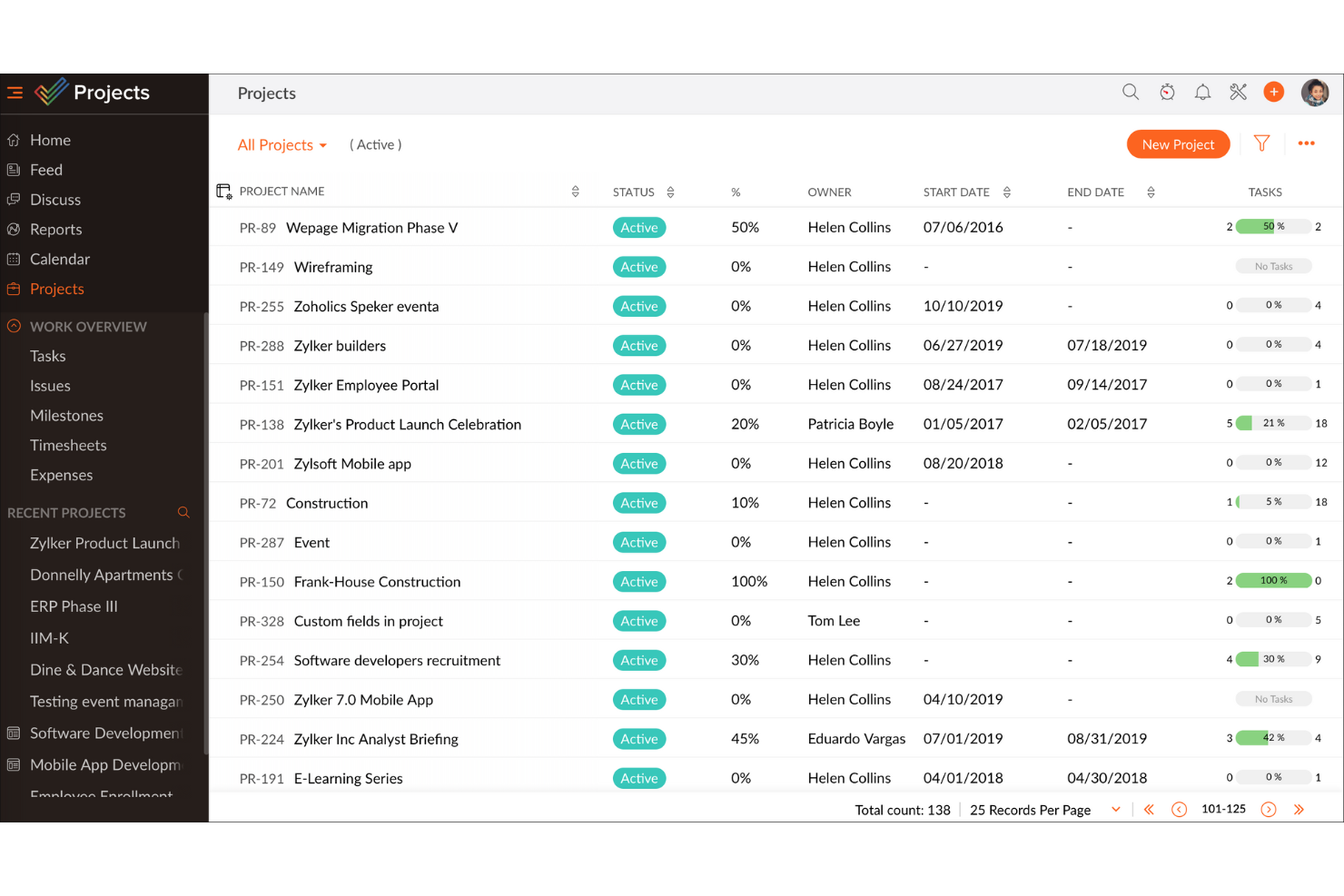
Zoho Projects gives teams in tech, marketing, and service-based businesses a flexible way to organize tasks, track progress, and collaborate on projects without upfront costs, making it a practical choice for those seeking a free project management platform that can grow with them.
Who Is Zoho Projects Best For?
Zoho Projects is a strong fit for small to mid-sized teams that need a free starting point but expect their project management needs to grow over time.
Why I Picked Zoho Projects
Zoho Projects earns its spot on my shortlist because it's one of the few free project management tools that genuinely scales with your team without forcing you to rebuild your workflow every time you grow. I like that the free plan gives you real task management capabilities—milestones, task lists, subtasks, and Gantt charts—so you're not stuck with a stripped-down experience just because you haven't paid yet. When your team is ready to move up, the Blueprint feature lets you design automated task workflows that trigger status changes, field updates, and team alerts, which is something I've found makes a real difference when managing multiple concurrent projects. The custom layouts and custom fields also mean you can shape the tool around how your team actually works, rather than adapting your process to fit the software.
Michael Alexander, Managing Director at Tangible Digital, explained: “The flexibility of Zoho Projects is what makes it stand apart, as it has enabled us to tailor task views and reporting hierarchy based on our operational requirements."
Zoho Projects Key Features
- Issue tracking: Log bugs and issues directly within a project, assign them to team members, and monitor resolution progress in one place.
- Resource management: View each team member's workload and reassign tasks when someone is over- or under-allocated.
- Project baseline: Capture a snapshot of your project plan at any point and compare it against actual progress to spot schedule drift early.
- Timesheet management: Log time manually or via task timers, with admin controls to approve or reject entries for payroll and client billing.
Zoho Projects Integrations
Integrations include Zoho CRM, Zoho Desk, Zoho Analytics, Zoho Books, Google Calendar, Microsoft Teams, Dropbox, Github, Slack, and Zendesk.
What's Free?
Zoho Projects offers a free-forever plan for up to 5 users and 3 projects, with 5 GB of storage and limited workflow actions. Integrations are limited to Google apps and Office 365 on the free plan.
Pros and Cons
Pros:
- Easily integrates with other Zoho apps and third-party tools, improving workflow continuity.
- Provides precise tracking of time spent on tasks, aiding productivity analysis.
- Offers detailed task breakdowns and organization, enhancing clarity.
Cons:
- Customization options are not as extensive as some competitors, which may hinder tailored solution.
- The mobile app lacks some functionalities available on the desktop version, affecting on-the-go management.
New Product Updates from Zoho Projects
Zoho Projects Adds CodeX Scripts for Custom Modules
Zoho Projects now supports CodeX Scripts for custom modules, enabling conditional logic and rules for creating, updating, and deleting records. For more information, visit Zoho Projects' official site.
 .

Best for unlimited free projects
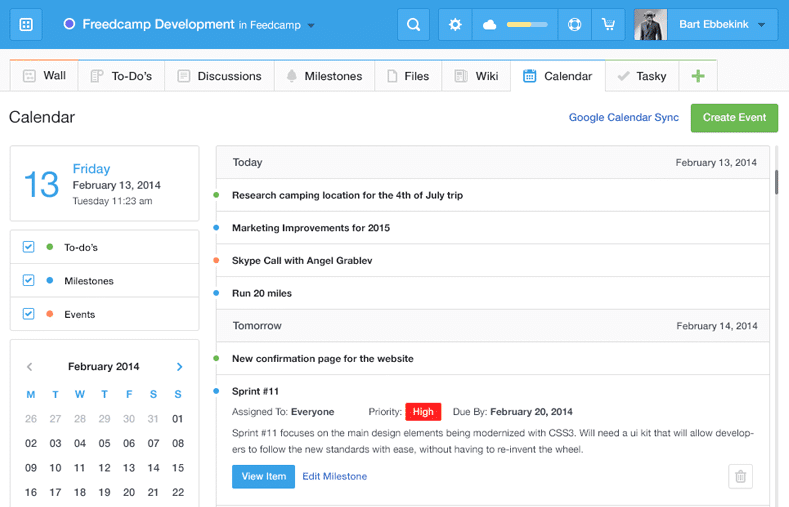
Freedcamp gives startups, agencies, and small businesses a flexible project management platform with task lists, kanban boards, and collaboration tools that help teams organize work and manage multiple projects without hitting usage limits.
Who Is Freedcamp Best For?
Freedcamp is a great fit for small teams and freelancers who need to manage multiple projects simultaneously without paying for a premium plan.
Why I Picked Freedcamp
Freedcamp earns its spot on my shortlist because it's one of the few tools that genuinely doesn't cap the number of projects or users on its free plan. I like that my team can run as many concurrent projects as needed without hitting a paywall—something most free tiers quietly restrict. The Task Board is a feature I use regularly; it pulls tasks from every active project into a single view, which makes it easy to spot bottlenecks across workstreams without jumping between projects. I also rely on the milestones feature to group related tasks under a target date, which keeps larger initiatives from drifting.
Freedcamp Key Features
- Time tracking: Log hours directly against tasks and projects from within the platform.
- File storage: Attach and organize files at the task or project level, keeping assets easy to find.
- Discussion boards: Create threaded conversations tied to specific projects to keep team communication organized.
- Password manager: Store and share project-related login credentials securely across your team.
Freedcamp Integrations
Integrations include Google Calendar, Google Drive, Dropbox, and more.
What's Free?
Freedcamp offers a free-forever plan with unlimited projects, tasks, storage, and users. The main restriction is a 10MB maximum file upload size per file.
Pros and Cons
Pros:
- Affordable pricing for additional features and users.
- Offers collaborative tools like discussions and calendars.
- Extensive free plan supports unlimited projects and users.
Cons:
- May not meet the needs of enterprises requiring high customization.
- Mobile app is less polished than the desktop version.

Best for freelancers who track time and bill clients
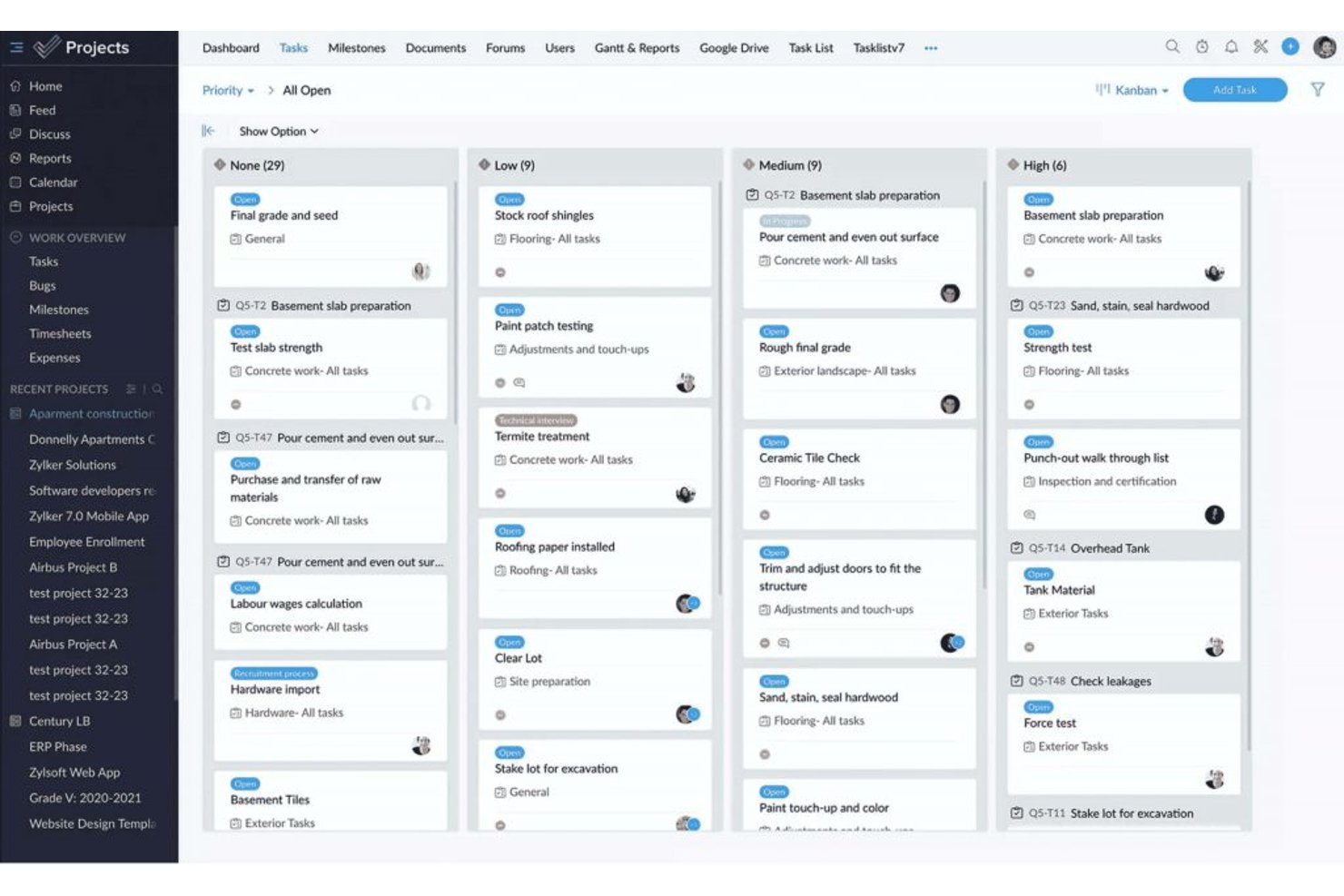
ProProfs Project is project management software with task tracking, List, Kanban, Gantt, and Calendar views, collaboration, automations, time tracking, invoicing, and AI reports available on its free plan.
Who Is ProProfs Project Best For?
ProProfs Project is best for freelancers who track time and bill clients, especially those managing a small number of client projects.
Why I Picked ProProfs Project
I picked ProProfs Project, “Best for freelancers who track time and bill clients,” for its free plan’s built-in timers, timesheets, estimates, and invoicing. I can log billable hours against client work and turn them into invoices without separate billing software. The free plan also includes List, Kanban, Gantt, and Calendar views, with up to three users.
ProProfs Project Key Features
- Task dependencies and baselines: Set task relationships and compare schedules against a baseline.
- Workflow customization: Create custom stages, fields, statuses, and priorities.
- Automations: Set rules for task assignments, status changes, and notifications.
- AI reports: Generate reports with project progress and risk insights.
ProProfs Project Integrations
Native integrations include Google Drive, Dropbox, Box, and more. Zapier is also supported.
What’s Free?
ProProfs Project offers a free plan for up to three users, alongside a 14-day free trial. The free plan doesn’t include API access or webhooks.
Pros and Cons
Pros:
- Free plan includes Gantt and calendar views
- Timesheets and invoices keep billing together
- Built-in timers simplify billable hour tracking
Cons:
- Open-task limit remains unclear
- Three seats constrain client collaboration

Jira
Best for agile project management

Jira gives software teams and digital project managers a flexible platform to organize tasks, track progress, and manage complex workflows, making it a popular choice for teams looking for a free project management solution with agile capabilities.
Who Is Jira Best For?
Jira is a strong fit for software development and product teams that work in agile or scrum environments and need structured issue tracking alongside sprint planning.
Why I Picked Jira
Jira earns its spot as one of the best on my shortlist because it's one of the few free project management tools built specifically around agile delivery. I use scrum boards and sprint planning to break work into focused two-week cycles, which keeps my team moving without losing sight of the backlog. I also rely on Jira's dependency mapping to coordinate releases across product, engineering, and design—especially when one team's work is blocking another's. The burndown charts and cycle time reports give me real data on team performance, not just a status update.
Jira Key Features
- Customizable workflows: Build and modify issue workflows to match how your team actually moves work from start to finish.
- Roadmaps: Visualize work across multiple sprints and teams on a timeline to track progress against delivery goals.
- Automation rules: Set trigger-based automation to handle repetitive tasks like assigning issues or updating statuses.
- Reporting dashboard: Access built-in reports including velocity charts and cumulative flow diagrams to monitor team output.
Jira Integrations
Integrations include Confluence, Trello, Bitbucket, Slack, Microsoft Teams, Google Workspace, Zoom, Tempo Timesheets, Zephyr, and Loom.
What's Free?
Jira offers a free-forever plan for up to 10 users. The free plan includes basic project management features but limits storage to 2 GB and does not include advanced admin controls or premium support.
Pros and Cons
Pros:
- Excellent issue management capabilities for bug tracking and problem-solving.
- Supports Agile methodologies, ideal for software development teams.
- Highly customizable and scalable to fit different project needs and team sizes.
Cons:
- Occasional slow performance with large projects
- May be too feature-rich for teams managing simple projects

Basecamp
Best for combining essential tools
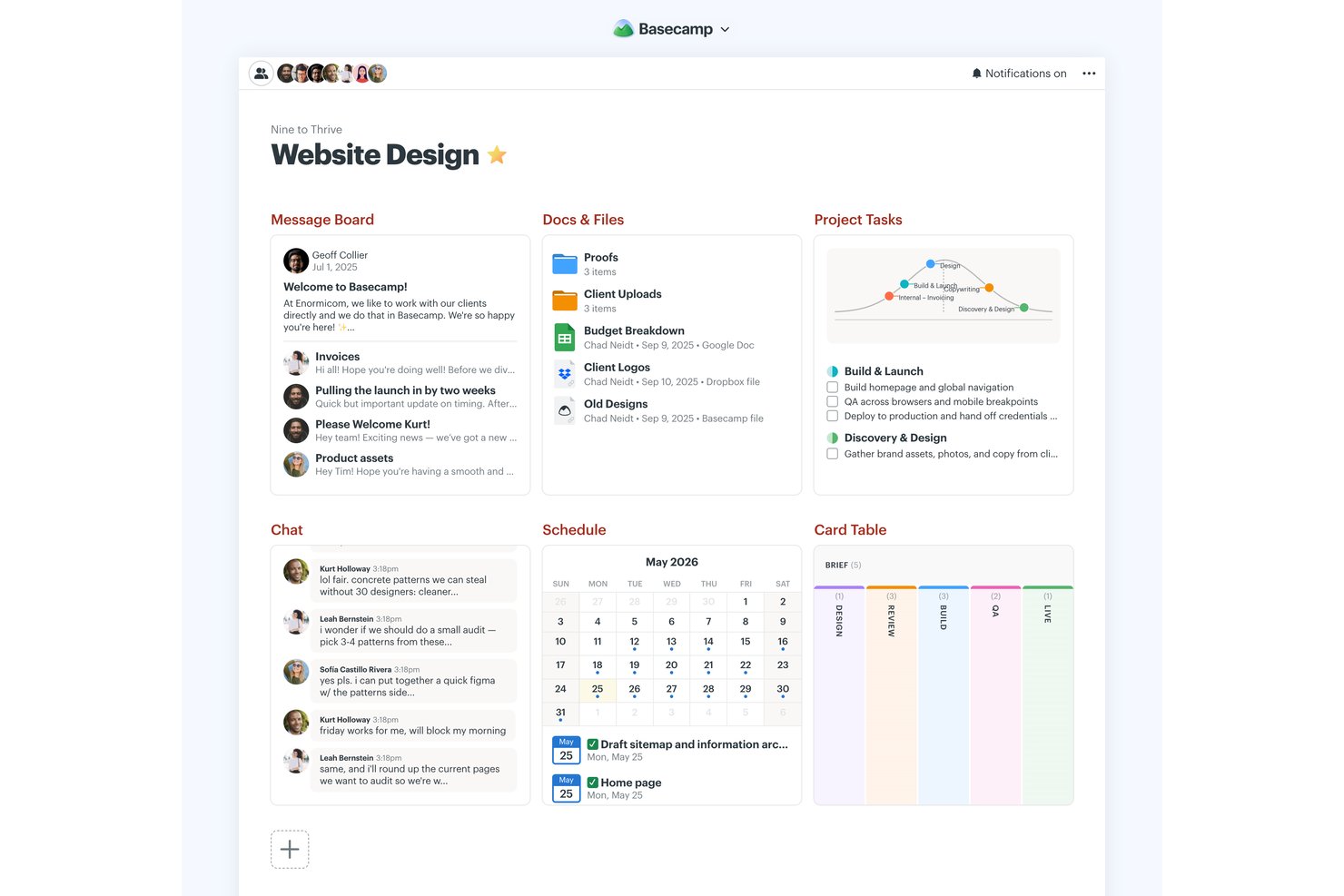
Basecamp is a project management platform with a permanent free plan for one project and five users, combining to-do lists, Kanban-style Card Tables, messaging, scheduling, file storage, reports, and Hill Charts.
Who Is Basecamp Best For?
Basecamp suits small business owners and team leads coordinating straightforward projects who need shared visibility without Gantt charts or dependency planning.
Why I Picked Basecamp
I picked Basecamp for “Best for combining essential tools” because its free project brings to-dos, Card Tables, Campfire chat, and scheduling together. I use Hill Charts to show whether launch tasks are still being figured out or have moved into execution, then check Reports for overdue assignments. The permanent free plan is limited to one active project, five users, and 1 GB of storage.
Basecamp Key Features
- Message boards: Post project updates and keep replies attached to each discussion.
- Pings: Send direct messages to teammates.
- My Assignments: View your tasks sorted by due date, including overdue items.
- Docs & Files: Organize documents and uploads with folders, previews, and version tracking.
Basecamp Integrations
Basecamp has built-in connections for Google Docs, Figma, Dropbox, Google, Outlook, Apple, and HEY calendars, plus Zoom and Microsoft Teams meeting links. It also offers an API and ChatGPT and Claude connectors, and is available on Zapier.
What's Free?
Basecamp’s free plan is free forever and includes one project, up to five users, and 1 GB of storage. It combines core project tools, but the project and user limits can restrict larger teams.
Pros and Cons
Pros:
- Automatic check-ins reduce status-meeting overhead
- Hill Charts show discovery versus execution
- Permanent free plan includes core collaboration tools
Cons:
- No dependencies or Gantt charts
- Five users and one project restrict scale
Podio
Best for task management capabilities

Podio is a customizable project management platform designed for teams and small businesses who want to organize projects, manage tasks, and collaborate in one place without upfront costs.
Who Is Podio Best For?
Podio is a strong fit for small to mid-sized teams that need a flexible, low-cost way to manage projects and workflows across departments.
Why I Picked Podio
Podio earns its spot on my shortlist because its task management goes well beyond basic to-do lists. I like that tasks in Podio connect directly to the apps and workflows you've built, so when a project item changes status, related tasks can trigger automatically through auto-tasks. You can set reminders, create recurring tasks, and attach files and comments directly to each task, which keeps conversations and context in one place instead of scattered across email threads. The free plan includes these task management features, making it a genuinely useful starting point for small teams.
Podio Key Features
- Customizable workspaces: Build project workspaces with custom fields, categories, and layouts tailored to your team's specific workflow.
- In-app chat: Send direct messages or group chats within Podio without leaving the platform.
- File sharing: Attach and share files directly on items, tasks, and workspaces to keep project assets organized.
- App marketplace: Access pre-built workflow apps created by the Podio community to extend your workspace without building from scratch.
Podio Integrations
Integrations include Google Drive, Dropbox, Box, Microsoft Exchange, Evernote, Zendesk, FreshBooks, ShareFile, GoToMeeting, and Microsoft OneDrive.
What's Free?
Podio offers a free-forever plan for up to five users. The free plan includes basic task management and workspace features but does not support user management or advanced workflow automation.
Pros and Cons
Pros:
- Offers a variety of apps to extend functionality
- Supports workflow automation
- Allows creation of tailored workspaces for different teams
Cons:
- Limited advanced reporting features
- Most workflow features are limited to higher-tier plans
Diğer Ücretsiz Proje Yönetimi Yazılımları
Bunlar son listeme giremeyen ancak yukarıda uygun bir seçenek bulamadıysanız değerlendirmeniz için hâlâ iyi alternatifler olan bazı ek araçlardır.
- ClickUp
For growing teams
- Project.co
For client-facing project communication
- GoodDay
For task visualization
- Teamwork.com
For Kanban boards
- Airtable
For its free plan with unlimited bases
- Miro
For pre-built templates
- Bitrix24
For teams replacing multiple tools with one
- Notion
For docs, wikis, and tasks in one workspace
- FigJam
For freeform visual planning and brainstorming
- Plaky
For teams that need unlimited free users


İlgili Proje Yönetimi Yazılımı İncelemeleri
Burada hâlâ aradığınızı bulamadıysanız, test edip değerlendirdiğimiz diğer ilgili araçlara göz atın:
- Proje Yönetimi Yazılımı
- Ücretsiz Müşteri Takip Yazılımı
- Halkla İlişkiler Proje Yönetimi Yazılımı
- Kaynak Yönetimi Yazılımı
- İş Akışı Otomasyonu Yazılımı
- Zaman Takibi Yazılımı
- Görev Yönetimi Yazılımı
- İş Birliği Araçları
- Windows için Proje Yönetimi Yazılımı
- Paymo Alternatifleri
- Redmine Alternatifleri
How I Evaluate Free Project Management Software
First, I define what counts as free. A permanent plan must support ongoing projects; a time-limited trial alone doesn’t qualify, even if free plans have user or feature limits. From there, I split my evaluation into three parts: core functionality, which carries the most weight, like assigning tasks and tracking deadlines; standout features, like workflow automations; and what a tool offers beyond its feature set, like how its free plan scales as a team grows.
Core Functionality (Table Stakes For This List)
In addition to my free plan requirements, I use a scoring system to select tools for my list. I score each one on a scale from 0 (does not offer the functionality) to 5 (excels in this area) for each core functionality listed below, based on what's available on the free plan. I then convert the total into a percentage to help assess each tool's overall fit, with extra weight on any functionalities I've deemed essential.
- Task Management (Essential): I look for free-tier task assignment, due dates, and status updates that help a small team track work from intake through completion.
- Project Views: Check whether free plans include functional ways to view work, such as lists and boards, or a calendar for deadline planning.
- Team Collaboration: I assess whether teammates can join projects, receive assignments, and discuss task details without leaving the workspace.
- Files and Comments: Check whether free users can attach relevant project files and leave task comments, such as feedback on a design handoff.
- Progress Tracking: I look for status summaries or simple progress indicators that help you see what’s moving and where work is stuck.
Once I have a list of tools that meet the criteria, I consider what sets each platform apart.
Differentiating Factors (What Sets Vendors Apart)
Here's how I compare and contrast different vendors:
Standout Features
I look for free-tier automation recipes that handle repetitive admin, like auto-assigning tasks when a status changes. Templates matter too, especially for teams without formal PM training who need a ready-made starting point for common workflows. I also check whether guest or client access is included free, since agencies and freelancers regularly need external stakeholders reviewing work without burning a paid seat.
Beyond Features
I check whether free plans include native integrations with tools like Slack or Google Workspace, since missing connections force manual copy-paste that eats into any time you saved. Data portability matters too—I look for CSV or PDF export so you're not locked in if you outgrow the tool. Finally, I evaluate each vendor's upgrade path, because a free plan that artificially cripples usability pushes you into paid tiers before you're ready.
Ücretsiz Proje Yönetimi Yazılımı Nasıl Seçilir?
Ücretsiz proje yönetimi yazılımlarını kısa listeye alırken, denerken ve seçerken aşağıdakileri göz önünde bulundurun:
- Hangi sorunu çözmeye çalışıyorsunuz? İhtiyaç duyduğu özellikleri ve işlevleri netleştirmek için, ücretsiz proje yönetimi yazılımının karşılaması gereken proje yönetimi özelliği eksikliğini belirleyerek başlayın.
- Kimlerin kullanması gerekecek? Yazılımı kimlerin kullanacağını ve kaç lisansa ihtiyaç duyacağınızı değerlendirin. Erişimin yalnızca proje yöneticileriniz için mi yoksa tüm kuruluş için mi gerekli olacağını belirleyin. Bu netleştiğinde, herkes için kullanım kolaylığına mı yoksa deneyimli kullanıcılarınız için hıza mı öncelik verdiğinizi değerlendirmeye değer.
- Hangi diğer araçlarla birlikte çalışması gerekiyor? Hangi araçların yerine geçeceğini, hangi araçların kullanılmaya devam edeceğini ve muhasebe, CRM veya İK yazılımı gibi hangi araçlarla entegre olması gerektiğini netleştirin. Birden fazla aracı tek bir birleştirilmiş ücretsiz proje yönetimi aracıyla değiştirip değiştiremeyeceğinizi belirleyin.
- Hangi sonuçlar önemli? Başarılı kabul edilebilmesi için yazılımın sunması gereken sonucu, kazanmak istediğiniz yeteneği, geliştirmek istediğiniz alanı ve başarıyı nasıl ölçeceğinizi değerlendirin. Örneğin bir sonuç, performans hakkında daha fazla görünürlük elde etme becerisi olabilir.
- Kuruluşunuz içinde nasıl çalışacak? Yazılım seçimini iş akışlarınız ve uygulama metodolojinizle birlikte değerlendirin. Nelerin iyi çalıştığını ve hangi alanların sorunlara yol açtığını inceleyin. Her işletme farklıdır—bir aracın popüler olması, kuruluşunuzda da işe yarayacağını varsaymayın. Zengin bir özellik seti sunan ve ihtiyaçlarınız arttıkça işlevsellik açısından ölçeklenebilen ücretsiz yazılımları arayın.
Ücretsiz Proje Yönetimi Yazılımlarındaki Eğilimler
Ücretsiz proje yönetimi araçlarını şekillendirmeye devam edecek birkaç temel eğilim aşağıda yer alıyor.
- Yapay zekâ ve makine öğrenimi özellikleri: En iyi ücretsiz proje yönetimi uygulamalarından bazıları yapay zekâ destekli analizleri, tahmine dayalı görev yönetimini ve otomatik risk değerlendirmesini kullanmaya başladı. Bu gelişmiş özellikler, daha önce yalnızca ücretli araçlarda bulunan içgörüleri ve otomasyonu sunuyor.
- Proje görselleştirme için sanal gerçeklik (VR) ve artırılmış gerçeklik (AR): Öncü birkaç ücretsiz proje planlama aracı, etkileyici proje planlama ve görselleştirme deneyimleri sunmak için VR ve AR teknolojilerini deniyor. Teknolojinin bu yeni kullanımı, ekip üyelerinin proje planları ve tasarımlarıyla daha etkileşimli ve sezgisel bir şekilde çalışmalarını sağlıyor.
- Bulut tabanlı platformların yaygınlaşması: Bulut tabanlı proje yönetimi çözümlerine (yani çevrim içi ücretsiz proje yönetimi yazılımlarına) doğru önemli bir geçiş yaşanıyor; bu da daha iyi erişilebilirlik, ölçeklenebilirlik ve iş birliği anlamına geliyor. Ekip üyeleri proje yönetimi aracına ve proje verilerine her yerden, her zaman erişebildiği için bu eğilim uzaktan çalışma olanaklarına yönelik artan ihtiyacı karşılıyor.
- Gelişmiş güvenlik önlemleri: Ücretsiz proje yönetimi araçları işletmelerin günlük faaliyetlerine daha fazla entegre oldukça, güvenlik ve veri korumasına verilen önem de arttı. Uçtan uca şifreleme, iki faktörlü kimlik doğrulama ve gelişmiş erişim denetimleri gibi özellikler, veri ihlalleri ve yetkisiz erişimle ilgili endişeleri gidermek için standart hâle geliyor.
Ücretsiz Proje Yönetimi Yazılımı Nedir?
Ücretsiz proje yönetimi yazılımı; bireylerin ve ekiplerin görevleri, son tarihleri ve iş birliğini planlamasına, takip etmesine ve yönetmesine yardımcı olan, herhangi bir ücret gerektirmeyen bir araçtır.
Genellikle web, masaüstü veya mobil uygulama olarak sunulan bu araçlar; görev atama, zamanlama ve ilerleme takibi gibi özellikleri içerir. Ücretli araçların maliyetine katlanmadan düzenli kalması ve planına uygun ilerlemesi gereken yeni girişimler, serbest çalışanlar veya küçük ekipler için idealdir. Ücretsiz proje yönetimi yazılımı genellikle açık kaynaklıdır veya ücretsiz-ücretli modeli izleyen ücretli bir araçtır.
Ücretsiz Proje Yönetimi Yazılımının Özellikleri
Ücretsiz proje yönetimi yazılımı seçerken aşağıdaki temel özelliklere dikkat edin:
- Otomatik görev önerileri: Yapay zekâ, iş akışınızı analiz ederek proje geçmişine ve ekip alışkanlıklarına göre yeni görevler, son tarihler veya öncelikler önerebilir.
- Akıllı zamanlama: Yapay zekâ araçları en uygun zaman çizelgelerini önerebilir, kaynakları atayabilir ve çakışmalar veya gecikmeler ortaya çıktığında zamanlamaları otomatik olarak ayarlayabilir.
- Tahmine dayalı analizler: Potansiyel riskler, proje gecikmeleri veya bütçe aşımları gerçekleşmeden önce bunlar hakkında içgörüler elde edin; böylece erken harekete geçebilirsiniz.
- Doğal dil işleme: Basit bir dil kullanarak görevleri hızla oluşturun, hatırlatıcılar ayarlayın veya bilgi arayın—isteğinizi yazmanız ya da söylemeniz yeterlidir.
- Yapay zekâ destekli raporlama: İlerleme raporlarını, performans özetlerini veya proje güncellemelerini otomatik olarak oluşturarak manuel takip için harcadığınız zamandan tasarruf edin.
- Akıllı bildirimler: İlginizi gerektiren görevler, yaklaşan son tarihler veya çalışmanızı etkileyen değişiklikler hakkında kişiselleştirilmiş uyarılar alın.
- Akıllı belge yönetimi: Yapay zekâ, belgeleri daha hızlı kategorilere ayırmanıza, etiketlemenize ve bulmanıza yardımcı olabilir; böylece ekibiniz aramaya daha az, çalışmaya daha fazla zaman ayırır.
- Otomatik toplantı notları: Bazı araçlar toplantıları yazıya dökmek, önemli noktaları özetlemek ve eylem maddeleri atamak için yapay zekâ kullanır; bu da herkesin aynı doğrultuda ilerlemesini kolaylaştırır.
Ücretsiz Proje Yönetimi Yazılımlarındaki AI Özellikleri
Birçok ücretsiz proje yönetimi yazılımı seçeneği, ekiplerin daha akıllı ve verimli çalışmasına yardımcı olmak için AI destekli özellikler sunmaya başladı. Aranabilecek bazı AI özellikleri şunlardır:
- Otomatik görev önerileri: AI, iş akışınızı analiz edebilir ve proje geçmişine ve ekip alışkanlıklarına göre yeni görevler, son tarihler veya öncelikler önerebilir.
- Akıllı planlama: AI araçları, en uygun zaman çizelgelerini önerebilir, kaynakları atayabilir ve çakışmalar veya gecikmeler ortaya çıktığında programları otomatik olarak ayarlayabilir.
- Öngörücü analiz: Gerçekleşmeden önce olası riskler, proje gecikmeleri veya bütçe aşımları hakkında bilgi edinin; böylece erkenden harekete geçebilirsiniz.
- Doğal dil işleme: Basit bir dil kullanarak görevleri hızla oluşturun, hatırlatıcılar ayarlayın veya bilgi arayın—isteğinizi yazmanız ya da söylemeniz yeterlidir.
- AI destekli raporlama: İlerleme raporlarını, performans özetlerini veya proje güncellemelerini otomatik olarak oluşturun ve manuel takip için harcadığınız zamandan tasarruf edin.
- Akıllı bildirimler: Dikkatinizi gerektiren görevler, yaklaşan son tarihler veya çalışmanızı etkileyen değişiklikler hakkında kişiselleştirilmiş uyarılar alın.
- Akıllı belge yönetimi: AI, belgeleri daha hızlı kategorilere ayırmanıza, etiketlemenize ve bulmanıza yardımcı olabilir; böylece ekibiniz aramaya daha az, çalışmaya daha fazla zaman ayırır.
- Otomatik toplantı notları: Bazı araçlar toplantıları yazıya dökmek, önemli noktaları özetlemek ve eylem maddeleri atamak için AI kullanır; bu da herkesin uyum içinde kalmasını kolaylaştırır.
Ücretsiz Proje Yönetimi Yazılımının Faydaları
Ücretsiz proje yönetimi yazılımının kullanıcılara ve kuruluşlara sunduğu beş temel fayda şunlardır:
- Maliyet verimliliği: Operasyonel maliyetleri büyük ölçüde azaltır. Yazılıma finansal yatırım yapma ihtiyacını ortadan kaldırarak işletmeler, bütçelerini daha acil ihtiyaç duyulan diğer alanlara ayırabilir; bu da genel kaynak yönetimini ve finansal esnekliği iyileştirir.
- Geliştirilmiş iş birliği: Daha iyi ekip çalışmasını ve iletişimi kolaylaştırır. Ücretsiz proje yönetimi yazılımı, ekip üyelerinin gerçek zamanlı olarak iş birliği yapabileceği, belgeleri paylaşabileceği ve ilerleme hakkında birbirlerini bilgilendirebileceği bir platform sağlar; böylece iş akışları ve üretkenlik iyileşir.
- Gelişmiş organizasyon: Görevleri ve son tarihleri açıkça yapılandırılmış halde tutar. Kullanıcılar, projeleri daha etkili bir şekilde düzenlemeye ve tüm ekip üyelerinin sorumluluklarının ve zaman çizelgelerinin farkında olmasını sağlamaya yardımcı olan görev listeleri, takvimler ve Kanban panoları gibi özelliklerden yararlanır.
- Erişilebilirlik: Esneklik ve kolaylık sunar. Ücretsiz proje yönetimi araçlarının çoğu çevrim içi ve bulut tabanlıdır; bu nedenle ekip üyeleri internet bağlantısı olan herhangi bir cihazı kullanarak proje bilgilerine her yerden ve her zaman erişebilir. Bu, uzaktan veya hareket hâlindeyken çalışmayı kolaylaştırır.
- Risk azaltma: Olası proje risklerini erkenden belirlemeye ve ele almaya yardımcı olur. İlerlemeyi takip etme ve raporlar oluşturma olanağı, darboğazları veya gecikmeleri kritik sorunlara dönüşmeden önce fark etmeye yardımcı olur; böylece projeleri plan doğrultusunda tutmak için zamanında ayarlamalar yapılabilir ve kararlar alınabilir.
Proje Yönetimi Yazılımı Maliyetleri ve Fiyatlandırması
Ücretsiz planlar, özellikle küçük ekipler, yeni girişimler ve kâr amacı gütmeyen kuruluşlar için harika bir başlangıç noktası olsa da piyasada bulunan ücretli planlar ve bunlarla ilişkili özellikler hakkında bilgi sahibi olmak yine de iyi bir fikirdir.
Aşağıda, karar verme sürecinize yardımcı olmak amacıyla tipik plan seçenekleri, ortalama fiyatlandırma ve her plana dâhil edilen yaygın özellikler açıklanmaktadır.
Proje Yönetimi Yazılımı İçin Plan Karşılaştırma Tablosu
| Plan Türü | Ortalama Fiyat | Yaygın Özellikler |
|---|---|---|
| Ücretsiz | $0 | Görev ve proje yönetimi, temel iş birliği araçları, sınırlı depolama |
| Temel | $5-10 kullanıcı/ay | Gelişmiş görev yönetimi, zaman takibi, ek depolama, temel raporlama |
| Standart | $10-25 kullanıcı/ay | Tam proje planlama ve zamanlama, gelişmiş iş birliği özellikleri, diğer araçlarla entegrasyonlar, gelişmiş güvenlik seçenekleri |
| Premium | $25-50 kullanıcı/ay | Kaynak yönetimi, gelişmiş raporlama ve analiz, özelleştirilebilir panolar, öncelikli destek |
| Kurumsal | Özel fiyatlandırma | Sınırsız proje ve kullanıcı, özel destek ve eğitim, gelişmiş güvenlik ve uyumluluk, özelleştirilebilir özellikler ve entegrasyonlar |
Kâr amacı gütmeyen kuruluşlar için daha fazla proje yönetimi yazılımını burada bulabilirsiniz.
Ücretsiz Proje Yönetimi Yazılımı Sıkça Sorulan Sorular
Bu konu hakkında diğer kişilerin sorduğu sorulara verilen yaygın yanıtları bulun.
Ücretsiz proje yönetimi yazılımlarında genellikle hangi özellikler sınırlıdır?
Ücretsiz proje yönetimi yazılımlarının çoğu, kullanıcıları ücretli planlara geçmeye teşvik etmek için gelişmiş özellikleri sınırlar. Genellikle Gantt şemaları, zaman takibi, gelişmiş raporlama veya yerleşik bütçe yönetimi gibi özelliklerde kısıtlamalar görürsünüz. Kullanıcı sınırları yaygındır; bu nedenle yalnızca birkaç ekip üyesi ücretsiz olarak iş birliği yapabilir. Ayrıca premium uygulamalar (Slack, Salesforce veya CRM araçları gibi) yerine daha az dosya depolama alanı, daha az proje şablonu ve temel entegrasyon seçenekleri sunulabilir. Otomasyon, role dayalı izinler veya ayrıntılı panolar gibi özelliklere ihtiyacınız varsa bunların ücretli planın arkasında olmasını bekleyin. Ekibinizi sisteme dahil etmeden önce ücretsiz planın ayrıntılarını mutlaka inceleyerek temel iş akışlarınızı kapsadığından emin olun.
Ücretsiz proje yönetimi araçları müşteri verileri veya hassas bilgiler için güvenli midir?
Ücretsiz proje yönetimi araçlarının çoğu SSL şifrelemesi, parola koruması ve düzenli yazılım güncellemeleri gibi temel düzeyde güvenlik sunar. Ancak bu araçlar iki faktörlü kimlik doğrulama, denetim günlükleri, şifrelenmiş dosya depolama veya SOC 2 ya da HIPAA gibi uyumluluk sertifikaları gibi gelişmiş güvenlik özelliklerini sunmayabilir. Genel dahili projelerin çoğu için ücretsiz araçlar genellikle yeterlidir; ancak gizli müşteri verileri, sözleşmeler veya düzenlemeye tabi bilgilerle çalışıyorsanız aracın gizlilik politikasını ve güvenlik uygulamalarını doğrulamak istersiniz. Veri gizliliği hakkında bilgi almak için destek ekibiyle de iletişime geçebilir ve daha güçlü korumalara ihtiyacınız varsa ücretli planlara geçebilirsiniz.
Ücretsiz bir Microsoft proje yönetimi yazılımı var mı?
Evet, Microsoft temel proje yönetimi için birkaç ücretsiz ve hafif seçenek sunar. Microsoft Planner, ücretsiz Microsoft 365 hesaplarına dahildir ve görevleri düzenlemenize, basit panolar oluşturmanıza ve küçük ekiplerle iş birliği yapmanıza olanak tanır. Microsoft To Do da bireysel görev takibi için kullanılabilir. Microsoft ekosistemini zaten kullanan bir kuruluşun parçasıysanız bu araçlar basit iş akışlarını yönetmenize yardımcı olabilir. Zaman çizelgesi görünümleri, gelişmiş raporlama veya kaynak yönetimi gibi daha güçlü özellikler için ayrı bir ücretli abonelik gerektiren Microsoft Project’e ihtiyacınız olacaktır.
Google'ın ücretsiz bir proje yönetimi yazılımı var mı?
Hayır, Google Trello veya Monday.com gibi amaca özel bir proje yönetimi aracı sunmaz; ancak Google Workspace uygulamalarını kullanarak temel sistemler oluşturabilirsiniz. Örneğin proje takip tabloları oluşturmak için Google Sheets’i, toplantı notları için Google Docs’u ve son tarih hatırlatıcıları için Takvim’i kullanabilirsiniz. Ayrıca Google Drive’da paylaşılan klasörler oluşturabilir ve ekip üyelerine görevler atayabilirsiniz. Bu yaklaşım daha fazla kurulum gerektirse de ücretsiz ve esnek bir seçenek istiyorsanız ve ekibiniz zaten Google araçlarını kullanıyorsa iyi çalışır. Daha düzenli bir yapıya ihtiyacınız varsa proje yönetimi için üçüncü taraf şablonlar, eklentiler ve Google entegrasyonları da mevcuttur.
Ücretsiz açık kaynaklı proje yönetimi yazılımı seçeneklerinden bazıları nelerdir?
İncelenebilecek birkaç güvenilir açık kaynaklı proje yönetimi aracı vardır. Taiga, panolar, sprintler ve sorun takibi sunmasıyla çevik ekipler arasında popülerdir. OpenProject, Gantt şemaları, görev bağımlılıkları ve zaman takibi içerir; bu da onu daha geleneksel veya hibrit iş akışları için uygun kılar. ProjectLibre, özellikle planlama ve zamanlama açısından Microsoft Project’e ücretsiz bir alternatif olarak çalışır. Açık kaynaklı yazılımlarla kodu özelleştirebilir ve yazılımı kendi sunucunuzda barındırıyorsanız verileriniz üzerinde tam kontrol sahibi olabilirsiniz. Ancak teknik destek daha sınırlı olabileceğinden kurulum, bakım ve zaman zaman sorun giderme için daha fazla zaman ayırmayı bekleyin.
Ücretsiz çevik proje yönetimi yazılımı kullanmalı mıyım?
Evet; yeni başlıyorsanız veya daha küçük çevik projeleri yönetiyorsanız Jira’nın ücretsiz planı, Taiga veya ClickUp gibi ücretsiz araçlar sprintler, iş listeleri, kullanıcı hikâyeleri ve Kanban panoları gibi temel ihtiyaçları karşılayabilir. Bu araçlar genellikle hafif Scrum veya Kanban ekipleri için yeterli işlevselliği içerir ve mali bir taahhütte bulunmadan önce çevik iş akışlarını denemenize olanak tanır. Projelerinizin karmaşıklığı arttıkça kullanıcı sayısı, analizler veya entegrasyon özellikleri konusunda sınırlamalarla karşılaşabilirsiniz; bu noktada yükseltme yapıp yapmayacağınıza veya araçları değiştirip değiştirmeyeceğinize karar verebilirsiniz. Birçok ekip ücretsiz sürümlerde düzenli günlük toplantıları, sprint sonu değerlendirmelerini ve sprint planlamasını başarıyla yürütür.
Ücretsiz proje yönetimi yazılımından ücretli yazılıma nasıl geçebilirim?
Ücretsiz plandan ücretli plana geçiş genellikle basittir; hesap panonuzdan veya faturalandırma bölümünden yalnızca birkaç tıklama yapmanız yeterlidir. Çoğu sağlayıcı mevcut verilerinizi, projelerinizi, eklerinizi ve kullanıcı izinlerinizi korur; gelişmiş raporlar, entegrasyonlar veya daha fazla depolama alanı gibi premium özelliklerin kilidini anında açarsınız. Yükseltme yapmadan önce önemli proje verilerinin yedek kopyasını dışa aktarmak, hangi yeni özelliklere sahip olacağınızı incelemek ve kullanıcı rollerinde veya faturalandırma dönemlerinde herhangi bir değişiklik olup olmadığını kontrol etmek akıllıca olacaktır. Platformları tamamen değiştiriyorsanız veri içe/dışa aktarmayı destekleyen veya geçişi kolaylaştırmak için bir geçiş kılavuzu sunan araçları tercih edin.