

10 Best Restoration Project Management Software For 2026

Best Restoration Project Management Software Shortlist


The best restoration project management software helps you coordinate teams, schedule tasks, and track progress so you can complete projects on time and make sure nothing slips through the cracks. Without the right tool, you’ll lose track of work orders, miss scheduling updates, or struggle with team communication, which slows down restoration efforts and frustrates clients.
The right restoration project management software lets you assign and monitor tasks, log inspections and photos, manage equipment and compliance records, and keep clients informed.
I’ve used my experience in project management and 3+ years of testing software tools to review dozens of platforms and identify the best ones so you can find the right fit to simplify your workflows and keep restoration projects moving. Each review includes key features, pros and cons, and what makes the tool stand out.
Why Trust Our Software Recommendations
Our team has been testing and reviewing software since 2012. As project managers ourselves, we know how difficult—and important—it is to choose the right software.
For this guide, we evaluated tools using hands-on testing and independent research, scoring tools using our selection criteria. We also draw on insights from industry thought leaders and practicing project management experts.
Our reviews reflect our human editorial judgment, not a sales pitch.
Expert reviewers:
Restoration Project Management Software Comparison Table
This comparison table summarizes pricing details for my top restoration project management software selections:
| Tool | Best For | Trial Info | Price | ||
|---|---|---|---|---|---|
| 1 | Best for field management | Free plan available | From $14/month (billed annually) | Website | |
| 2 | Best for large construction projects | Free demo available | From $10,000/year (billed annually) | Website | |
| 3 | Best for budget tracking | 30-day free trial + free demo available | From $39/month (billed annually) | Website | |
| 4 | Best for client communication | Free demo available | Pricing upon request | Website | |
| 5 | Best for on-site coordination | Free plan available | From $39/user/month (billed annually) | Website | |
| 6 | Best for design collaboration | Free demo available | From $29/user/month (billed annually) | Website | |
| 7 | Best for compliance checks | Free demo available | Pricing upon request | Website | |
| 8 | Best for mobile inspections | Free demo available | From $270/user/month | Website | |
| 9 | Best for job costing | Free demo available | Pricing upon request | Website | |
| 10 | Best for small restoration teams | Free demo available | Pricing upon request | Website |
Best Restoration Project Management Software Review
Here are my detailed summaries of the best restoration project management software. I cover key features, pros & cons, integrations, and ideal use cases for each tool.
Best for field management

Contractor+ is a project management software for contractors, restorers, and field service teams focused on managing on-site operations and team coordination. It helps teams track projects, manage tasks, and improve field operations.
Why I picked Contractor+: Contractor+’s GPS time tracking tools are built for field management. You can create and manage restoration work orders from the field and track materials and supplies with ease. The mobile app makes sure your team has project info handy on the job site.
Standout Features & Integrations:
Features include a photo and video capture tool that helps document work progress. The software's estimate builder lets you generate quotes quickly and accurately. Contractor+ also offers a client management feature to keep track of customer interactions and history.
Integrations include QuickBooks, Stripe, Square, PayPal, Google Calendar, and Outlook.
Pros and Cons
Pros:
- Materials management feature
- Comprehensive work order management
- GPS time tracking
Cons:
- May not suit larger enterprises
- Limited advanced customization

Procore
Best for large construction projects

Procore is a construction management software for large construction teams focused on improving project efficiency and collaboration. It serves general contractors, specialty contractors, and project owners with tools for managing construction projects effectively.
Why I picked Procore: Procore is built for large construction projects where you need strong project management. You and your team can use it to keep communication in one place and track progress. Document management features make files easy to find, and scheduling tools help you stay on top of complex timelines.
Standout Features & Integrations:
Features include a customizable project dashboard that gives you an overview of ongoing projects. The software offers a tool that simplifies the bidding process for new projects. Procore also has a quality and safety management feature to help you maintain high standards on-site.
Integrations include Microsoft Project, Docusign, Bluebeam, and Primavera P6.
Pros and Cons
Pros:
- Handles complex schedules
- Comprehensive document management
- Centralized communication platform
Cons:
- Not suitable for small projects
- Can be resource-intensive

Best for budget tracking
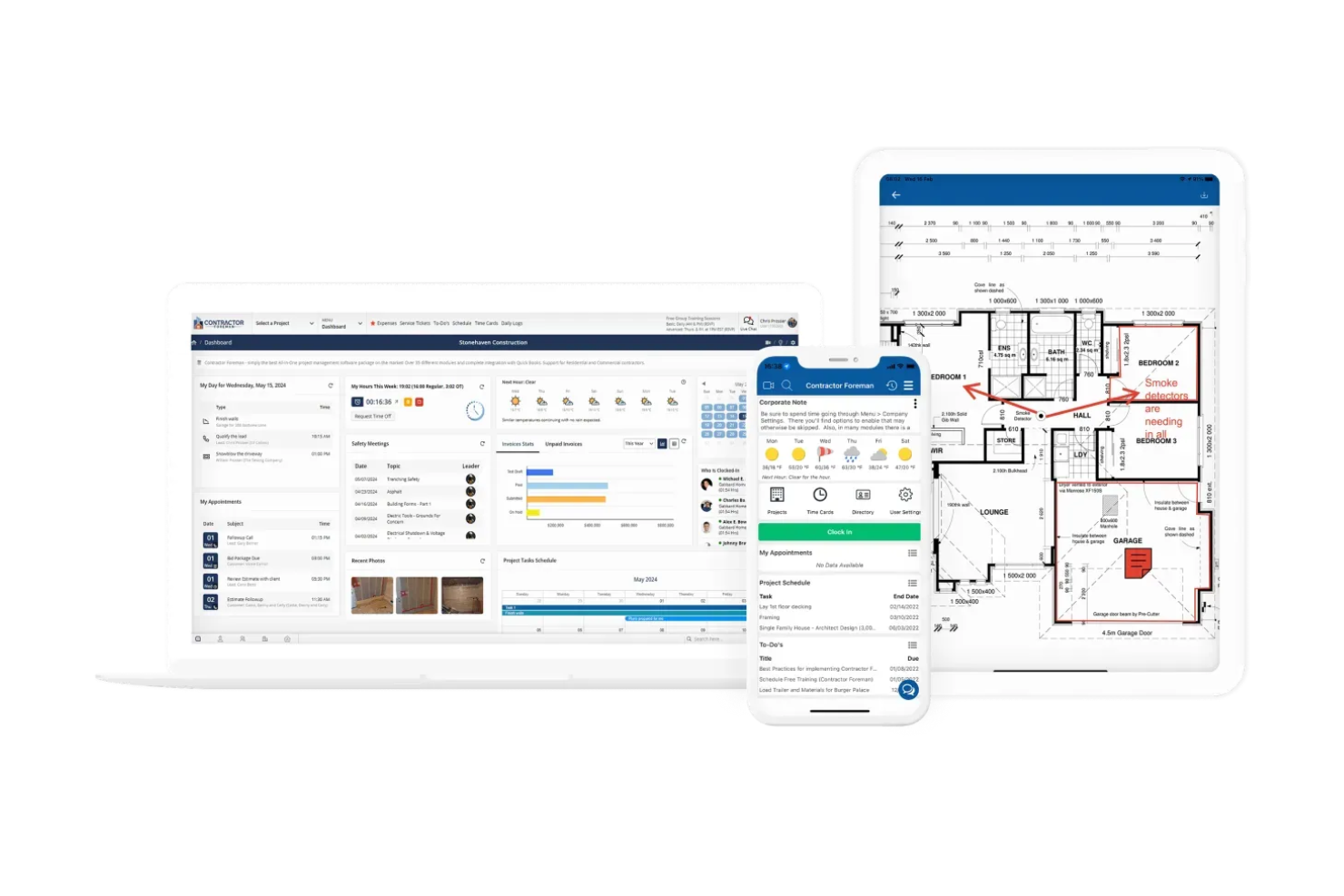
Contractor Foreman is a construction management software for restoration contractors and small to mid-sized construction companies. It helps manage projects, track budgets, and maintain timely project delivery.
Why I picked Contractor Foreman: Contractor Foreman is a strong pick for budget tracking with cost estimation and expense tools. You can watch project costs in real time and use reports to see how your finances are doing. It also includes change order management, so your team can handle project adjustments without confusion.
Standout Features & Integrations:
Features include a time card feature that helps you track labor hours accurately. The equipment management tool ensures you know where resources are at all times. Contractor Foreman also offers a client portal so clients can access project updates and communicate with your team.
Integrations include QuickBooks, Google Calendar, Outlook, Stripe, Gusto, and Zapier.
Pros and Cons
Pros:
- Accurate time card tracking
- Comprehensive reporting tools
- Real-time expense tracking
Cons:
- May not suit very large projects
- Learning curve for new users

Best for client communication

Buildertrend is a construction management software for builders and remodelers focused on project scheduling and client communication. It helps teams manage projects from start to finish and keep clients in the loop.
Why I picked Buildertrend: Buildertrend helps keep clients in the loop with portals and messaging. You can share updates and photos directly with clients, so they always know what’s happening. The scheduling tools help you stay organized, and financial features make it easy to keep projects on budget.
Standout Features & Integrations:
Features include a daily logs feature that helps you keep track of daily activities on-site. The software's bid management tool streamlines the process of obtaining and managing bids. Buildertrend also offers a warranty management feature to handle post-project client needs.
Integrations include QuickBooks, Xero, and Gusto.
Pros and Cons
Pros:
- Warranty management feature
- Bid management capabilities
- Daily logs for activity tracking
Cons:
- Can be resource-intensive
- Steep learning curve

Best for on-site coordination

Fieldwire is a construction management software for field teams that focuses on task management and on-site coordination. Construction professionals can use it to improve communication and keep projects on track.
Why I picked Fieldwire: Fieldwire’s real-time task assignments and updates make on-site coordination easier. You can assign tasks straight from the field so everyone knows what they need to do. Your team can access and edit blueprints on-site, and instant photo capture with markup tools helps improve communication and documentation.
Standout Features & Integrations:
Features include the ability to manage punch lists efficiently so tasks are completed before project handover. Custom forms help you gather specific information needed for compliance and reporting. The tool also has a scheduling feature that helps keep your team aware of deadlines.
Integrations include Dropbox, Box, OneDrive, and Google Drive.
Pros and Cons
Pros:
- Comprehensive scheduling features
- Custom forms for data collection
- Effective blueprint management
Cons:
- Not ideal for non-construction industries
- Initial setup complexity


Autodesk Construction Cloud is a construction management platform for architects, engineers, and construction professionals. It helps you collaborate on design and construction projects and keep stakeholders aligned.
Why I picked Autodesk Construction Cloud: Autodesk Construction Cloud works well for design collaboration and lets you connect design and construction in one place. You can manage documents in the cloud and work on designs together in real time, which cuts down on errors and rework. Its visual dashboards also let you track progress and see clear updates.
Standout Features & Integrations:
Features include advanced building information modeling capabilities that improve project visualization. The request for information tool improves communication, and the mobile app lets your team access project data from anywhere.
Integrations include Microsoft Teams, Airtable, BIMLancher, and Jira.
Pros and Cons
Pros:
- Mobile app for remote access
- Streamlined RFI process
- Advanced BIM capabilities
Cons:
- Resource-intensive for older hardware
- Learning curve for complex features


Restoration Manager is a job management software for property restoration businesses that offers project management and compliance tracking. It helps teams manage projects and meet regulatory requirements.
Why I picked Restoration Manager: Restoration Manager helps you conduct compliance checks and offers tools like Gantt charts, scheduling, and task tracking. You can manage photos and documents, and keep compliance records organized. The reporting features let you create reports for audits, and real-time tracking gives you insight into project status and compliance.
Standout Features & Integrations:
Features include informative dashboards for performance tracking and work order management via an Xactimate integration. This helps your team maintain oversight and compliance. Restoration job budgeting and equipment tracking features are also available.
Integrations include Xactimate and QuickBooks.
Pros and Cons
Pros:
- Reduces data entry
- Supports team collaboration
- Customizable reporting
Cons:
- Limited offline functionality
- Initial setup complexity


Encircle is a restoration software designed for field documentation. It’s used by restoration professionals and helps document projects, capture visual evidence, and generate reports.
Why I picked Encircle: Encircle makes mobile inspections easier by letting you capture photos and videos right from the field. You can use digital drying logs and property sketches to document quickly without extra steps. You can build custom digital forms to gather the data you need, and instant report generation lets you create professional documents while on-site.
Standout Features & Integrations:
Features include the ability to capture 360-degree images, manage content efficiently, and communicate with stakeholders.The software also allows for in-field payment collection, which makes it easier for your team to manage transactions on the go.
Integrations include Xcelerate, PSA, Kahi, and Phoenix.
Pros and Cons
Pros:
- Custom digital forms
- Instant professional report generation
- Quick photo and video capture
Cons:
- Limited customization options
- Initial setup can be complex


Xcelerate Restoration Software is for restoration companies focused on project management and job costing. It helps manage projects, keep track of financials, and maintain profitability.
Why I picked Xcelerate Restoration Software: Xcelerate Restoration Software’s job costing feature stands out for its ability to give you clear financial insights on every project. You can track budgets, manage expenses, and log time to calculate labor costs accurately. Your team can also use customizable reports to get the data needed for smarter decisions.
Standout Features & Integrations:
Features include scheduling tools that help you manage project timelines. The document management system keeps project files organized and accessible. Xcelerate also offers a customer portal, so clients can view project updates and communicate with your team.
Integrations include QuickBooks, Xactimate, and Matterport.
Pros and Cons
Pros:
- Customizable financial reports
- Accurate labor cost calculations
- Detailed financial insights
Cons:
- Limited offline functionality
- May not suit smaller teams


Albi is a project management software designed specifically for small restoration teams. It simplifies project tracking, communication, and resource management.
Why I picked Albi: Albi’s simple, user-friendly interface and easy project management tools work well for small teams. You can track job costs and time to make sure you’re staying on budget and schedule. Project templates help your team save time on setup, and built-in communication features make it easier for everyone to stay connected.
Standout Features & Integrations:
Features include automated job costing, which helps you keep financials accurate. Customizable dashboards provide insights into your team's performance. The software also supports document management, so you can store and access files easily.
Integrations include QuickBooks, Xactimate, Kahi, and Mailchimp.
Pros and Cons
Pros:
- Automated job costing
- Effective project templates
- Simple user interface
Cons:
- Limited scalability for larger teams
- Limited advanced features
Other Restoration Project Management Software
Here are some additional restoration job management software options that didn’t make my shortlist, but which are still worth checking out if you didn’t find what you were looking for above:
- Ontraccr
For custom workflows
- Jobber
For service scheduling
- GoodDay
For unlimited project hierarchy
- monday AI Workspace
With AI-powered workflow automation
- Productive
For agency use
- Float
For resource scheduling
- PSA
For insurance compliance
- DASH
For job management
- iRestore
For equipment tracking


How I Evaluate Restoration Project Management Software
I split my evaluation into baseline criteria—like Xactimate sync and moisture logging—and differentiators that set the best tools apart for restoration crews managing active loss sites.
Core Functionality (Table Stakes For This List)
When I'm selecting tools for my list, I rank each one on a scale from 0 (does not offer the functionality) to 5 (excels in this area) for each core functionality listed below. Then, I calculate the tool's total score into a percentage. Each tool needs to achieve a minimum total score of 55% to be considered for inclusion.
- Restoration Job Management: I look for job workflows built around restoration loss types—water, fire, mold, storm—with fields for cause of loss, room-level tracking, and category/class designations.
- Xactimate & Claims Integration: Each tool's connection to Xactimate, XactAnalysis, or Symbility matters. I check whether assignments and estimate data sync both ways or require manual re-entry.
- Moisture & Drying Documentation: I evaluate how each platform handles daily moisture readings, psychrometric logs, and equipment placement—the documentation that adjusters and TPAs actually review.
- Mobile Field Documentation: Field techs need to capture photos, signatures, and notes on-site. I look at whether the mobile app works offline, since many loss sites have no connectivity.
- Equipment & Asset Tracking: Restoration companies deploy dozens of air movers and dehumidifiers per job. I check whether each tool tracks placement, duration, and billing per piece of equipment.
- Scheduling & Crew Dispatch: I evaluate how each platform handles crew assignment and emergency dispatch, especially the visibility it gives project managers into technician availability across active jobs.
Once I have a list of tools that meet the criteria, I consider what sets each platform apart.
Differentiating Factors (What Sets Vendors Apart)
Here's how I compare and contrast different vendors:
Standout Features
Contents pack-out tracking is a big differentiator—barcode-based inventory for cleaning, storing, and returning personal belongings adds real accountability on contents jobs. I also evaluate program compliance automation, since restorers on Contractor Connection or Code Blue need milestone alerts and deadline tracking baked in. Subcontractor management matters too, especially for companies coordinating reconstruction subs and specialty vendors who each need their own compliance docs on file.
Beyond Features
Scalability matters a lot in this space. A solo mitigation shop and a multi-branch franchise with separate contents and reconstruction divisions have very different needs, so I check whether pricing and structure flex across business sizes. Implementation support is another factor I weigh—onboarding teams with actual restoration backgrounds get crews productive faster than generic SaaS support. I also consider tech stack fit, especially QuickBooks or Sage integrations, since job costing accuracy depends on clean data flowing between the field and accounting.
How to Choose Restoration Project Management Software
It’s easy to get bogged down in long feature lists and complex pricing structures. To help you stay focused as you work through your unique software selection process, here’s a checklist of factors to keep in mind:
| Factor | What to Consider |
|---|---|
| Scalability | Can the software grow with your business? Consider whether it can handle an increased number of projects and users without significant performance issues. |
| Integrations | Does it integrate with tools you’re already using like accounting or customer relationship management (CRM) systems? Check for native integrations to avoid relying heavily on manual data entry. |
| Customizability | Can you tailor the software to fit your specific workflows? Make sure it allows flexibility in creating custom fields and reports to match your processes. |
| Ease of Use | Is the interface intuitive for your team? Avoid tools with steep learning curves that require extensive training, which can slow down adoption. |
| Implementation and Onboarding | How quickly can your team get up and running? Consider the availability of training resources like tutorials and support during the transition phase. |
| Cost | Are the pricing plans within your budget? Evaluate the cost against the benefits provided, and consider any hidden fees that might arise as you scale. |
| Security Safeguards | Does the software protect your data? Look for encryption, regular security updates, and compliance with relevant data protection regulations. |
| Support Availability | Is customer support readily accessible? Consider the availability of live chat, phone support, and response times to make sure you get help when needed. |
What Is Restoration Project Management Software?
Restoration project management software is a tool designed to help you organize and oversee projects that involve repairs and maintenance on buildings and other structures (i.e. restoration jobs). Project managers, contractors, and restoration specialists use these tools to coordinate tasks, manage resources, and communicate with teams.
Scheduling, budget tracking, and document management features help you organize projects, maintain timelines, and control costs so you can keep projects moving on time and on budget (and without stress).
Features of Restoration Project Management Software
When selecting restoration project management software, keep an eye out for the following key features:
- Scheduling: Helps you plan and allocate resources efficiently to keep projects on track and meet deadlines.
- Budget tracking: Lets you monitor expenses in real-time, stay within budget, and make informed financial decisions.
- Document management: Organizes and stores important project files and makes it easy to access and share documents with your team.
- Task management: Lets you assign and prioritize tasks and make sure team members know their responsibilities so work can be completed efficiently.
- Client communication: Facilitates direct communication with clients so you can keep them informed about project progress and address their concerns.
- Mobile access: Provides on-the-go access to project information so team members can update and retrieve data from the field.
- Compliance tracking: Makes sure projects meet restoration industry standards and regulations and reduces the risk of non-compliance issues.
- Customizable dashboards: Lets you tailor the interface to display relevant project metrics and provides a clear overview of progress and performance.
- Time tracking: Monitors labor hours so you can accurately calculate costs and improve productivity.
- Real-time notifications: Keeps your team informed of important updates and changes so you can provide timely responses and make adjustments.
Benefits of Restoration Project Management Software
Implementing restoration project management software provides several benefits for your team and your business. Here are a few you can look forward to:
- Improved efficiency: Improves scheduling and task management so your team can complete projects faster and with fewer errors.
- Cost control: Provides budget tracking and expense monitoring and lets you manage finances effectively and avoid overspending.
- Enhanced communication: Facilitates client and team communication so you can make sure everyone is informed and aligned with project goals.
- Better organization: Offers document management and customizable dashboards to keep important information accessible and organized.
- Increased mobility: Enables mobile access so team members can update and retrieve project data from anywhere, which maintains flexibility in operations.
- Compliance assurance: Supports compliance tracking, which helps you meet industry standards and avoid potential legal issues.
Costs and Pricing of Restoration Project Management Software
Selecting restoration project management software requires an understanding of the various pricing models and plans available. Costs vary based on features, team size, add-ons, and more.
Here’s a summary of common plans, average prices, and typical features included in restoration project management software:
Plan Comparison Table for Restoration Project Management Software
| Plan Type | Average Price | Common Features |
|---|---|---|
| Free Plan | $0 | Basic task management, limited document storage, and basic reporting. |
| Personal Plan | $10 - $30/user/month | Task management, basic scheduling, document storage, and simple reporting. |
| Business Plan | $40 - $70/user/month | Project scheduling, budget tracking, document management, and team collaboration. |
| Enterprise Plan | $80 - $150/user/month | Advanced analytics, compliance tracking, custom integrations, and dedicated support. |
Restoration Project Management Software FAQs
Here are some answers to common questions about restoration project management software:
What kind of support can I expect from software providers?
Most providers offer customer support via various channels like live chat, email, or phone. Response times can vary, so look for providers that offer comprehensive support, including help with onboarding and troubleshooting.
How do these tools handle data security?
Data security is a priority for restoration project management software. Providers typically use encryption and regular security updates to protect your data. Make sure the software complies with relevant data protection regulations.
Can these tools integrate with my existing systems?
Yes, many restoration project management software solutions offer integrations with popular tools like QuickBooks, Dropbox, and CRM systems. Check whether the software offers an open API for custom integrations, which can also improve workflow efficiency.
How customizable are these software solutions?
Customization options vary by provider, but many offer custom fields, reports, and dashboards. Choose software that allows you to tailor it to fit your specific workflows and business needs.
What should I consider during the onboarding process?
Consider the availability of training resources like tutorials and webinars during onboarding. Make sure the provider offers support to help your team transition smoothly, and evaluate the time and effort required to get your team up and running with the new system.