

10 Best Pomodoro Timer Apps Reviewed in 2026

Best Pomodoro Timer Apps Shortlist


Feeling overwhelmed by endless tasks and looming due dates? You're not alone. As a project manager, balancing priorities and maintaining team focus can be a real challenge. That's where a Pomodoro timer app comes in handy. Italian Francesco Cirillo invented the Pomodoro Technique using a tomato-shaped kitchen timer. It helps you break work into manageable chunks, boosting productivity and reducing burnout.
In my experience, finding the right tool can make a world of difference. I've independently tested and reviewed various Pomodoro apps to give you an unbiased look at the best options available.
In this article, you'll discover top picks that cater to different needs and preferences. Whether you're looking for simplicity or advanced features, there's something here for you and your team.
Why Trust Our Software Recommendations
Our team has been testing and reviewing software since 2012. As project managers ourselves, we know how difficult—and important—it is to choose the right software.
For this guide, we evaluated tools using hands-on testing and independent research, scoring tools using our selection criteria. We also draw on insights from industry thought leaders and practicing project management experts.
Our reviews reflect our human editorial judgment, not a sales pitch.
Expert reviewers:
Pomodoro Timer App Comparison Table
This comparison table summarizes pricing details for my top Pomodoro timer app selections.
| Tool | Best For | Trial Info | Price | ||
|---|---|---|---|---|---|
| 1 | Best for gamified productivity | Free plan available | Free to download | Website | |
| 2 | Best for simple and clean design | 7-day free trial + free plan available | From $3/month | Website | |
| 3 | Best for Android users | Free plan available | From $0/month | Website | |
| 4 | Best for iOS device compatibility | Free plan available | From $1.99 | Website | |
| 5 | Best for browser-based use | Free plan available | Free forever | Website | |
| 6 | Best for Chrome integration | Free plan available | Free forever | Website | |
| 7 | Best for focus and mindfulness | 7-day free trial available | From $3.33/month (billed annually) | Website | |
| 8 | Best for task management integration | Free plan available | From $2.16/month (billed annually) | Website | |
| 9 | Best for personalized dashboards | Free plan available | From $0.10/day | Website | |
| 10 | Best for timeline visualization | 14-day free trial available | From $5/month | Website |
Best Pomodoro Timer Apps Review
Below are my detailed summaries of the best Pomodoro timer apps that made it onto my shortlist. My reviews offer a detailed look at the key features, pros and cons, integrations, and ideal use cases for each tool to help you find the best one for you.

Forest
Best for gamified productivity
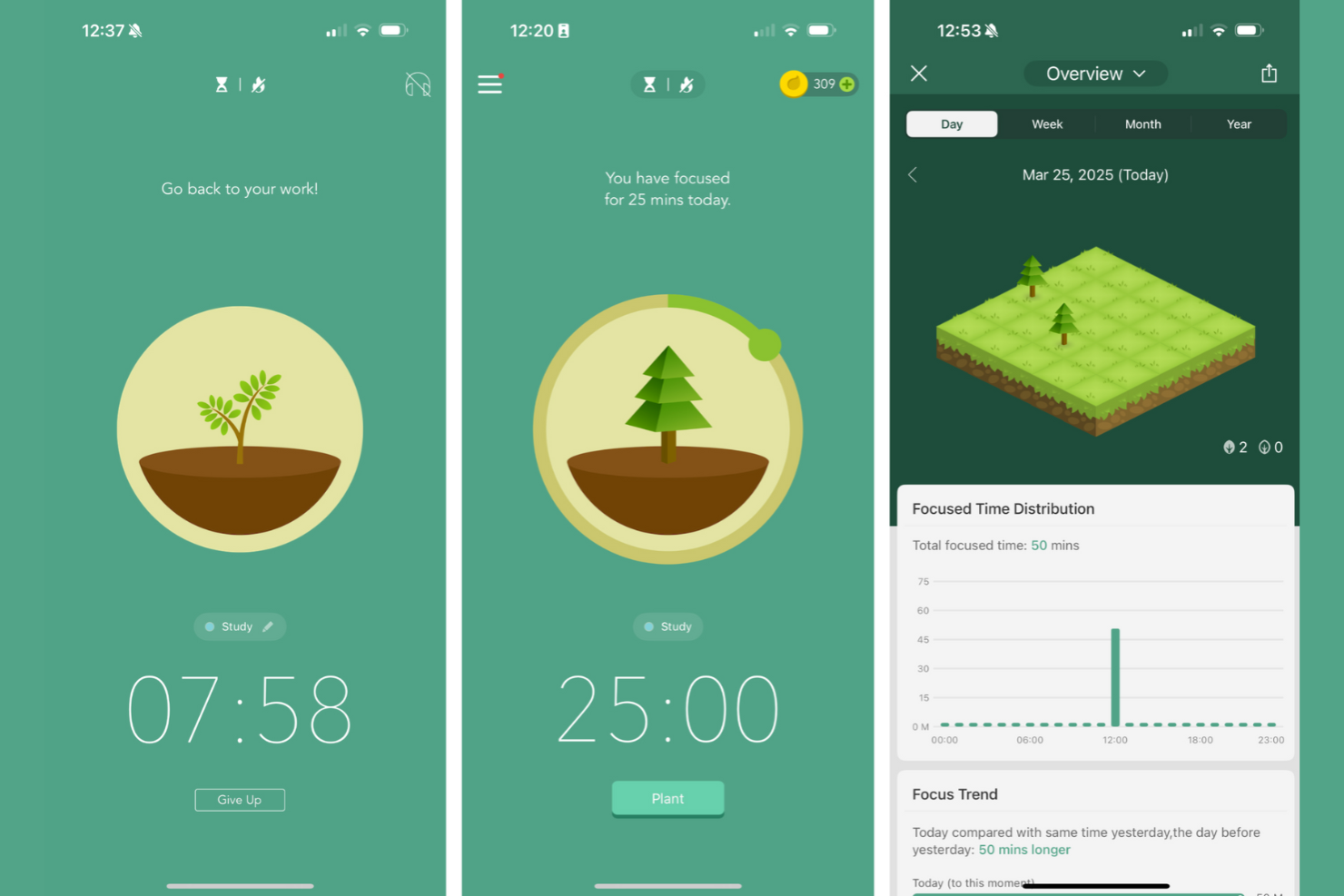
Forest stands out for me because it’s the first Pomodoro app I’ve seen that fully gamifies your focus. I like recommending Forest to anyone tired of traditional timers and looking for a real incentive to stay off their phone or computer.
When I use Forest, the virtual tree-planting mechanic really keeps me present—if I give in to distraction, my tree withers. The blend of focus sessions with visual growth and rewards adds a playful accountability I haven’t found anywhere else.
Forest’s Best For
- People who want a motivational, game-like approach to Pomodoro sessions
- Individuals who struggle with smartphone distractions and want visual accountability
Forest’s Not Great For
- Teams that need detailed time reporting, analytics, or collaboration features
- People looking for advanced customization of Pomodoro intervals and productivity settings
What Sets Forest Apart
Forest takes a completely different approach from most standard Pomodoro timers like Focus Booster or Be Focused. It treats productivity as something that can be reinforced with positive feedback and visual progress, not just tracked by the clock. Forest doesn’t just ask you to start a timer—it connects each focus session to growing a digital tree or even planting a real one, so your work feels part of an ongoing narrative. This model rewards staying present and taps into your motivation in a way I never see with timer-only apps.
Tradeoffs With Forest
Forest optimizes for habit-building and motivation through visual feedback, but that means it sacrifices things like granular time data or robust work tracking. When all the emphasis is on growing your “forest,” you give up the in-depth reporting or customization that more analytics-focused apps provide.
Pros and Cons
Pros:
- Includes visual progress tracking
- Supports real tree planting
- Encourages focus with gamification
Cons:
- Not highly customizable
- Can be distracting for some


I included Pomofocus because it’s the one Pomodoro timer I recommend when teams are feeling overwhelmed by all-in-one productivity platforms and want something that’s just a timer, presented in a focused layout.
What stands out to me is how Pomofocus puts every control—start, pause, reset, and session customization—right on the single dashboard, with nowhere extra to click. I appreciate how your workflow is never interrupted by pop-ups, ads, or unnecessary widgets. If you want a Pomodoro timer that fades into the background and lets you settle into deep work, this is a great option.
Pomofocus’s Best For
- Individuals who want a distraction-free, minimalist Pomodoro timer
- People who need quick, one-click session management without extra features
Pomofocus’s Not Great For
- Teams needing collaboration, reporting, or task-tracking integrations
- Users who expect advanced automation, analytics, or customization options
What Sets Pomofocus Apart
Pomofocus stands out because it strips away every distraction and leans into the pure core of the Pomodoro technique. While other apps like Focus Booster or Toggl Track try to layer on analytics and integration features, Pomofocus bets everything on visual clarity and keeping your timer always front and center.
Instead of helping you track tasks across projects or handle collaboration, Pomofocus expects you to come with your priority already set and just focus on the work session itself. It approaches productivity more like a single-use tool—closer to a kitchen timer than an all-in-one work manager.
Tradeoffs with Pomofocus
By centering everything around simplicity, Pomofocus gives up on serving more organized workflows or deep customization. What usually happens is you get great focus in the moment, but you lose visibility or accountability over bigger-picture goals and outcomes.
Pros and Cons
Pros:
- Includes visual reports for tracking
- Offers integration with Todoist
- Simple and user-friendly interface
Cons:
- Alarm sound issues on iOS
- Has limited free features

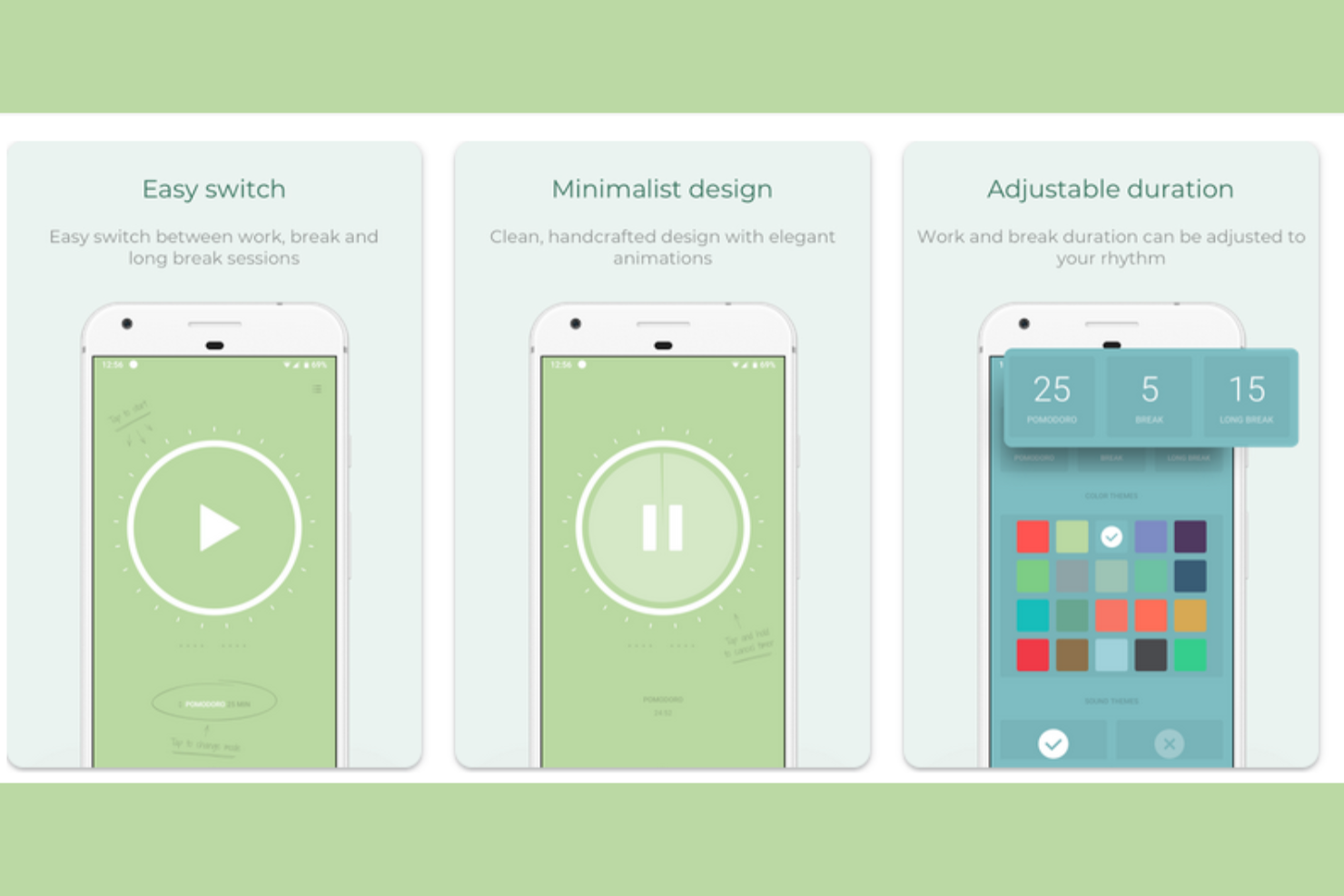
I put Pomodoro Timer on the list because it’s one of the few timer apps that really nails the Android experience. When someone asks me for a timer that blends nicely with Android notifications and widgets, this is the one I point people towards.
The standout is how smoothly it lets me launch and control sessions right from my lock screen or notification shade. I also appreciate its focus on minimalist design without giving up helpful features like customizable intervals.
Pomodoro Timer’s Best For
- Android users who want deep integration with native notifications and widgets
- Individuals who need customizable intervals and a minimalist mobile experience
Pomodoro Timer’s Not Great For
- Teams that want a shared or cloud-synced Pomodoro system
- Users on iOS or those who need built-in cross-device support
What Sets Pomodoro Timer Apart
What I notice about Pomodoro Timer is how tightly it’s designed around Android’s strengths, instead of just being a generic session timer. This app expects you’ll want Pomodoro sessions woven into your phone’s ecosystem—widgets, lock screen controls, persistent notifications—all show that it’s thinking about work as something you manage in quick glances, not by diving into an app every time.
Unlike cross-platform options like Focus Booster, Pomodoro Timer doesn't pretend to be a productivity hub. It's lean, highly mobile-focused, and expects you to value native integration over extra bells and whistles.
Tradeoffs With Pomodoro Timer
Since it optimizes for simplicity and deep Android integration, the trade-off is that you lose out on syncing across devices or rich analytics. What usually happens is it works brilliantly when you’re all-in on a single Android device, but feels limiting if you want broader data or collaboration.
Pros and Cons
Pros:
- Ad-free experience
- Has a minimalistic design
- Includes customizable themes
Cons:
- No iOS or MacOS version
- Limited advanced features

I picked Pomodoro - Focus Timer because it nails the experience for people who care about Apple device syncing. Any time a team needs to switch between iPhone, iPad, and Mac and keep their timers in sync, this is where I send them.
What I appreciate most is how the app uses Apple’s notification features and widgets to keep you connected with your focus goals—no matter which device is in your hand. In practice, this makes it easy to start a focus session on your phone and finish it on your laptop, which helps avoid all the friction that usually comes with context-switching.
Pomodoro - Focus Timer’s Best For
- People who want consistent Pomodoro timing and reminders across iPhone, iPad, and Mac
- Individuals or teams who rely on Apple ecosystem features like widgets and native notifications
Pomodoro - Focus Timer’s Not Great For
- Anyone using Android or looking for cross-platform compatibility outside Apple devices
- Teams that need advanced analytics, reporting, or customization beyond session timing
What Sets Pomodoro - Focus Timer Apart
What jumps out for me with Pomodoro - Focus Timer is how tightly it’s woven into the Apple device ecosystem. Instead of spreading energy across every platform, it assumes you want a unified timer experience on iPhone, iPad, and Mac, so everything feels native and familiar. Where a cross-platform option like Focus To-Do tries to cover Android or web, Pomodoro - Focus Timer leans into Apple’s features—quick syncing, rich notifications, and widget support—so the Pomodoro approach never feels bolted on.
Tradeoffs with Pomodoro - Focus Timer
Focusing on a seamless Apple experience means it doesn’t stretch to serve people outside that ecosystem. This works great for folks all-in on Apple, but the moment someone needs to collaborate across Windows or Android, the workflow just doesn’t keep up.
Pros and Cons
Pros:
- Supports Siri shortcuts
- Includes built-in analytics
- Includes iOS widget support
Cons:
- Not highly customizable
- No desktop or Android version

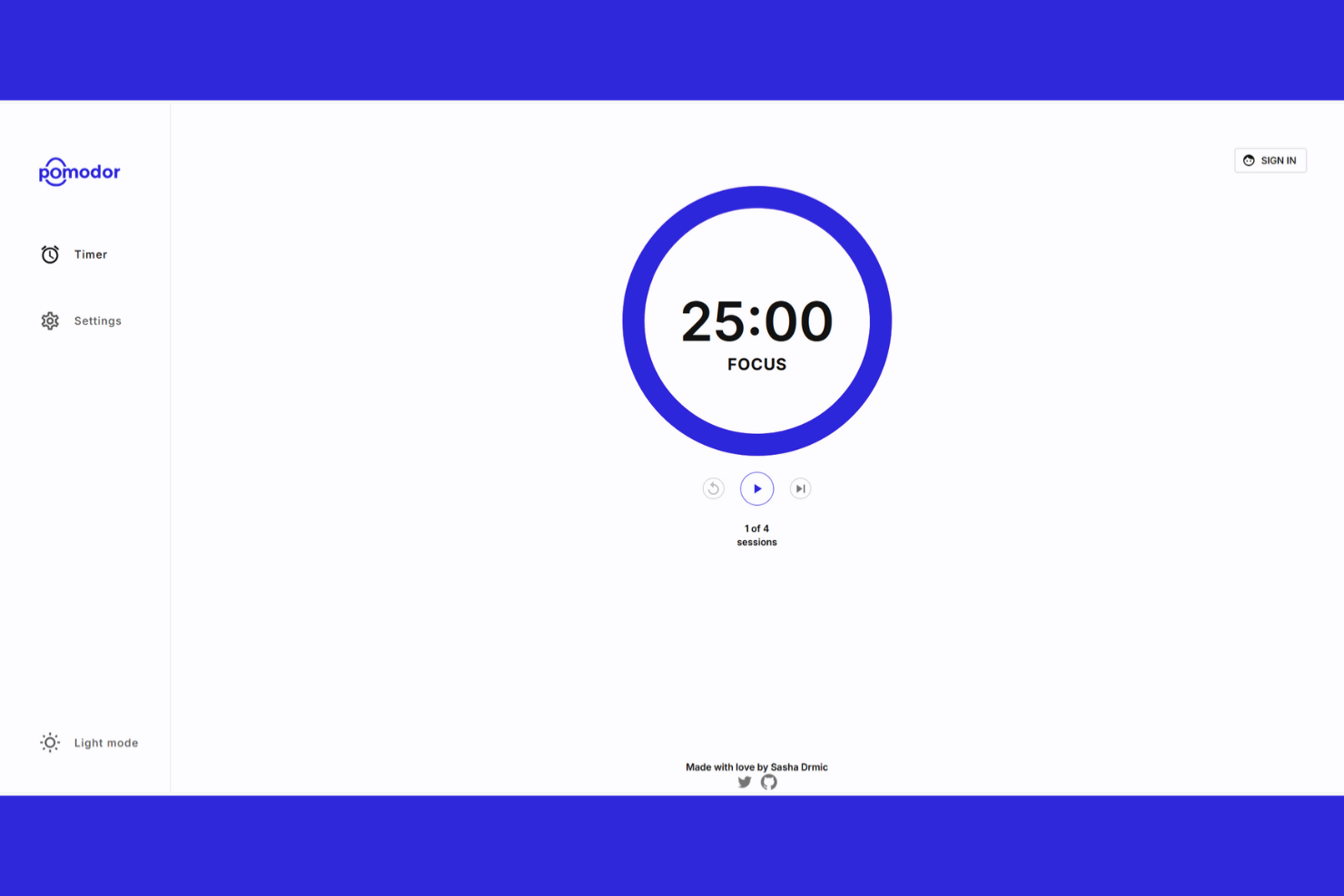
Pomodor makes my shortlist because it’s hands-down the most frictionless option for browser-based pomodoro tracking. I like that you can just open a tab and instantly start timing sessions—no setup or downloads slowing you down.
My favorite part is how you can customize your session and break lengths right from the browser. It’s a good go-to if you want a simple, accessible timer on any device without leaving your workflow.
Pomodor’s Best For
- People who want an instant, browser-based pomodoro timer with no install required
- Anyone who works across multiple devices or doesn’t want to manage another app
Pomodor’s Not Great For
- Teams looking for advanced reporting, analytics, or productivity insights
- Anyone who needs collaboration features or built-in task management
What Sets Pomodor Apart
Pomodor approaches focus work as something that should be instantly accessible, wherever you are and on any device. Unlike apps like Focus To-Do that wrap time tracking inside a to-do list or require downloads, Pomodor strips everything back to its purest form—a lightweight browser tab providing just enough structure for pomodoro, and nothing extra.
I think this design is intentional: it assumes people want to dip in and out without tying themselves to a specific app ecosystem. That kind of lightweight, web-first thinking makes it feel more like a tool you bring into your existing workflow, not one that tries to replace how you organize work.
Tradeoffs with Pomodor
Pomodor prioritizes minimalism above all else, which means there’s no integration with external calendars or daily planning. What usually happens is you get less cohesion between your timed sessions and your overall workflow if you want to track deeper productivity patterns.
Pros and Cons
Pros:
- Quick setup process
- Works on any browser
- No installation needed
Cons:
- No official mobile app for iOS/Android
- Very few features beyond a basic timer

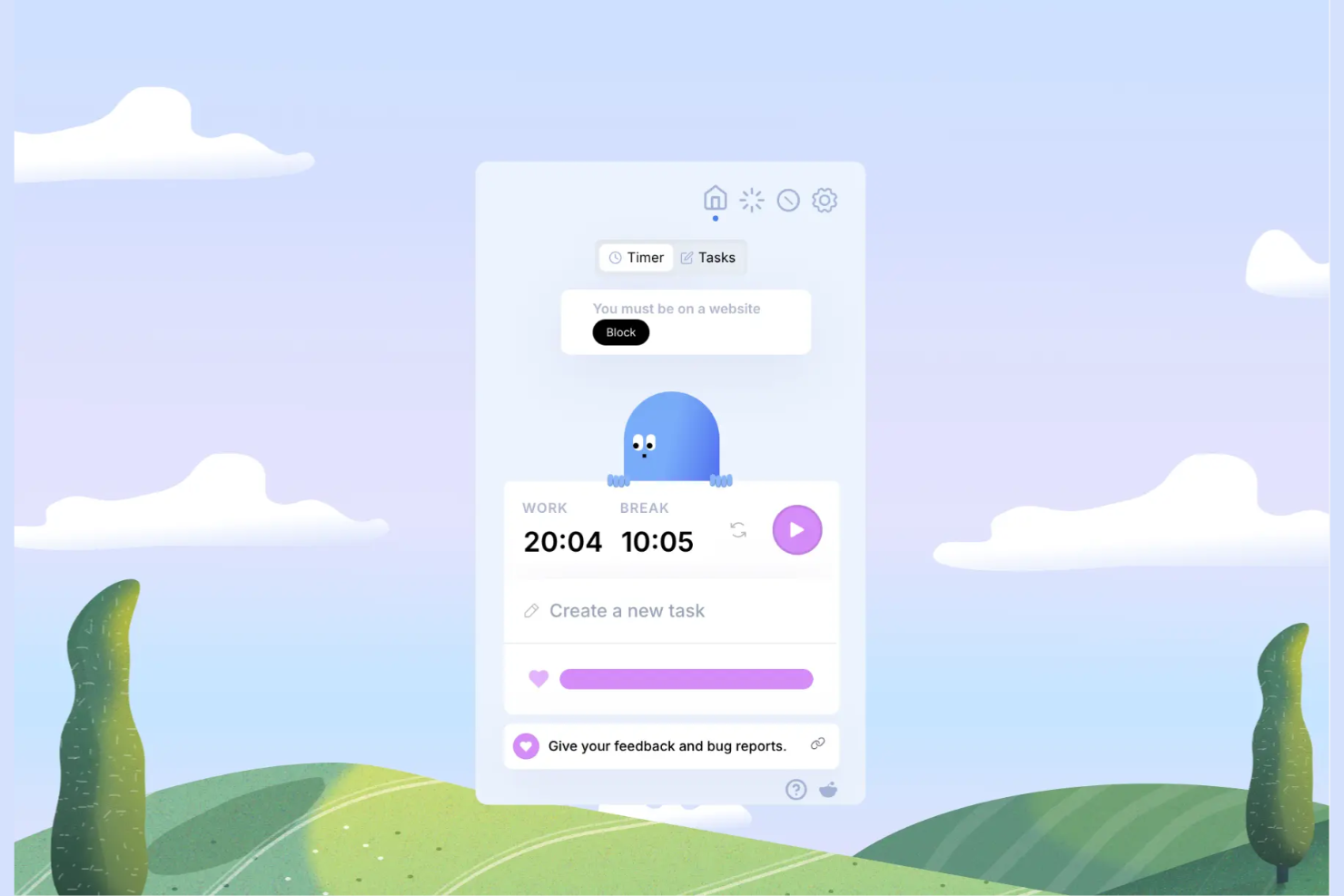
Otto makes my shortlist because its Chrome integration turns the browser into a minimalist Pomodoro workspace with zero friction. It stands out when I need to quickly set intervals, track cycles, and stay in my workflow without switching to a separate app.
What I appreciate is how Otto anchors the timer right in the browser and syncs it with my tabs, letting me see my focus session at a glance. I reach for Otto when jumping between research sites and code repos—there’s no faster way to keep the timer front and center while I work.
Otto’s Best For
- Anyone who works primarily in Google Chrome and wants a timer built into their browsing workflow
- Individuals who need lightweight Pomodoro tracking visible alongside research or web-based tasks
Otto’s Not Great For
- Teams that need shared Pomodoro cycles or collaborative task coordination
- People looking for feature-rich tracking, analytics, or mobile and desktop integration beyond Chrome
What Sets Otto Apart
Otto approaches time management by making the Pomodoro method part of your daily browser use, not a separate context. Unlike classic timer apps like Focus To-Do, Otto assumes your workflow is web-based and keeps everything right in Chrome—no extra windows or distractions. It doesn’t try to build in fancy analytics or multi-device sync. Otto just wants the timer where your attention already is: your browser tabs.
Tradeoffs with Otto
Because Otto is all about simplicity within Chrome, you give up advanced features like reporting or mobile syncing. In practice, this means if you want complex data or access outside your browser, it’s not the right fit.
Pros and Cons
Pros:
- Includes scheduled website blocking
- Lightweight design
- Easy to access in Chrome
Cons:
- Only includes customer support on its Pro plan
- Limited offline use
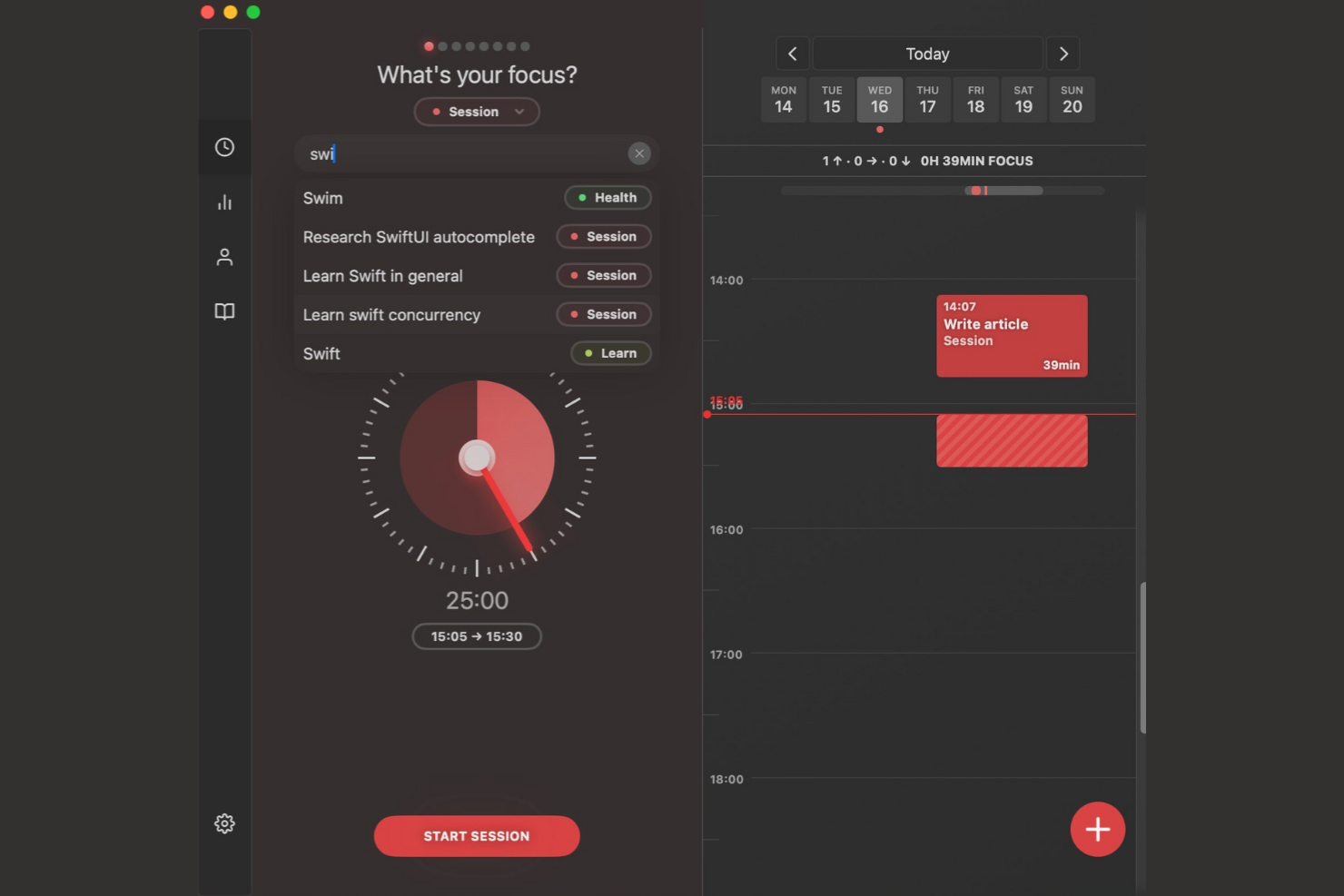
Session Pomodoro makes my shortlist because it’s one of the few Pomodoro timers that prioritizes mindful work and intentional breaks. I pick it when teams—or individuals—struggle to manage distractions and need help building real focus habits, not just tracking intervals.
Where Session stands out is how it weaves in reflection prompts and mood tracking at the end of each session, in a way that actually reinforces healthy work rhythms. I appreciate how the analytics visualize focus patterns and show where breaks make the biggest difference, especially after a week of heavy context switching.
Session Pomodoro’s Best For
- Individuals and teams focused on building mindful work habits
- People who want to track focus patterns and reflect on productivity sessions
Session Pomodoro’s Not Great For
- Users looking for advanced task or project management features
- Teams that need strict scheduling or integration with external platforms
What Sets Session Pomodoro Apart
What stands out to me about Session Pomodoro is how much it prioritizes intentionality around the act of focusing, instead of just tracking sprints. Where most Pomodoro timers are about starting and stopping the clock, Session wraps every work session in a mindfulness loop—prompting reflection, mood logging, and personal check-ins that reinforce the idea of purposeful work.
Compared to something minimalist like Focus Booster, Session is deliberately hands-on with the process, asking you to actively engage with your headspace before and after each session. It doesn’t just want you to finish tasks—it’s framing productivity as a mindful practice.
Tradeoffs with Session Pomodoro
Session leans all-in on focus rituals, which means it can feel slow or unnecessary if you just want a quick Pomodoro timer for blocking work. You trade raw, fast time tracking for a system that expects you to pause, reflect, and make your state of mind part of the workflow.
Pros and Cons
Pros:
- Promotes work-life balance
- Syncs across Apple devices
- Combines focus with mindfulness
Cons:
- Strictly limited free version
- Subscription model for core features


RoundPie makes my shortlist because it stands out when you need Pomodoro tracking to work directly with task management platforms you already use. I always turn to RoundPie when my workflow depends on syncing tasks from Trello or Google Tasks, and I can’t afford to constantly switch between apps.
What I appreciate most is how seamlessly RoundPie pulls tasks into its focus timer, so I see my priorities without extra setup. When I’m balancing sprint work with deep focus, that direct integration is what lets me stay on track and avoid duplication.
RoundPie's Best For
- Task-oriented users who want Pomodoro timers synced with Trello, Google Tasks, or similar tools
- Individuals or teams whose daily workflow depends on deep integration with external task managers
RoundPie's Not Great For
- People who only want a simple, standalone Pomodoro timer without extra features
- Users looking for advanced team analytics or robust reporting built into their focus timer
What sets RoundPie apart
RoundPie approaches the Pomodoro method as a layer added to your existing task management habits instead of building yet another to-do list. What I notice most is how it expects tasks will live elsewhere—like Trello or Google Tasks—and brings focus sessions to those platforms without forcing you to duplicate work or manually sync changes. Unlike apps designed to be self-contained productivity islands, RoundPie assumes people want one timer that fits around their current routines and tools.
Rather than pushing you to adopt a new workflow, it lets you pull focus and time tracking directly into the core systems your team already maintains. This makes it feel lighter and more integrated than something like Focus To-Do, which requires you to manage a separate task list.
Tradeoffs with RoundPie
RoundPie is all about tight integration with external task managers, but that reliance means it’s less useful if you want everything in a single app. If your workflow isn’t built around third-party tools, you end up with more fragmentation than focus.
Pros and Cons
Pros:
- Integrates with various collaboration platforms
- Easy to learn and use
- Encourages quiet team focus time
Cons:
- Pricing details aren't transparent
- Limited offline use


Momentum Dash makes the list because it stands out when motivation and focus need to come from both structure and personal inspiration. I reach for it when a simple Pomodoro timer isn’t enough and I want a workspace that greets me with goal-tracking, daily priorities, and just the right amount of encouragement.
What I appreciate here is how each new tab puts a personalized dashboard front and center—with Pomodoro sessions integrated alongside to-dos and habit reminders. Teams tend to see the biggest value when they crave a focused, visually calming interface that’s more about setting the tone for deep work than just running a timer.
Momentum Dash’s Best For
- Individuals who want both Pomodoro timing and a personalized, inspiring workspace
- Remote workers or freelancers who thrive on daily goal tracking and positive reinforcement
Momentum Dash’s Not Great For
- Teams that need collaborative Pomodoro tracking or shared task management
- People looking for advanced reporting, productivity analytics, or deep customization options
What Sets Momentum Dash Apart
Momentum Dash is designed for people who want their workspace to feel personal, rooted in daily rituals and mood—rather than strict productivity metrics. Where a classic Pomodoro tool like Focus To-Do is all about tracking intervals, Momentum Dash blends timing with daily goals, affirmations, and habit cues right on every new tab.
Unlike utility-heavy timers that sit in the background, Momentum puts inspiration and focus at the center of your browser. It expects you to treat focus as an experience, not just a process, and organizes the workday around that mindset.
Tradeoffs with Momentum Dash
Momentum Dash optimizes for individual motivation and visual inspiration, which means it skips deeper functionality around team coordination or performance tracking. What usually happens in practice is that accountability and advanced workflow features take a back seat, so it’s not a fit once you need structured collaboration.
Pros and Cons
Pros:
- Encourages goal setting
- Displays your to-do list on your homepage
- Inspiring visual design
Cons:
- The Pomodoro timer isn't available in the free plan
- Can be slow on older computers

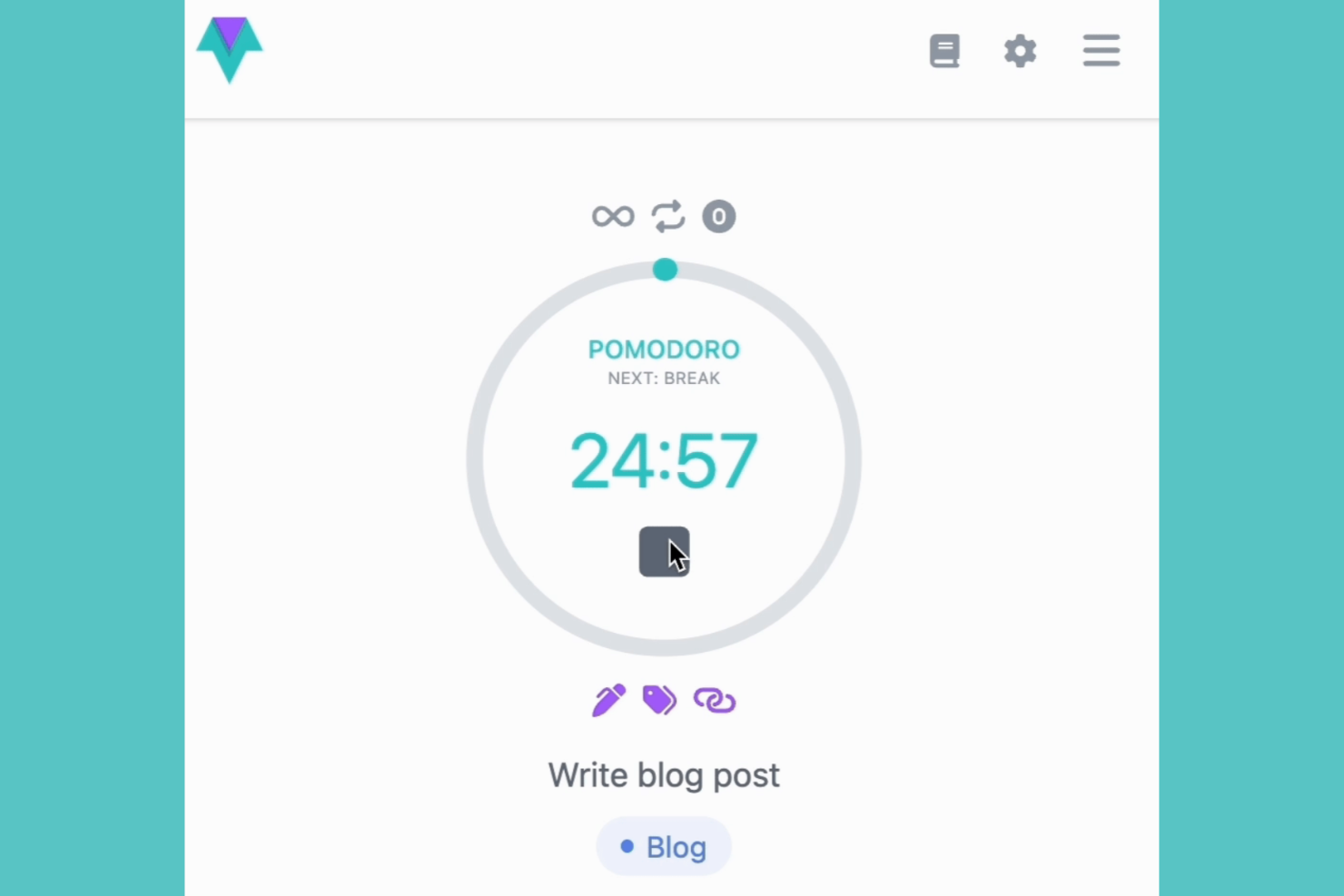
I picked Time Stream for this list after seeing how well it lets you manage focus blocks visually. When I tested it, I noticed that timeline visualization isn't just a cosmetic feature—it's a huge help when you're planning multiple Pomodoro cycles or want to compare work sessions across days.
What stands out to me is the way Time Stream maps each work session and break right onto a visual timeline, making productivity patterns clear at a glance. I think this option is best when you want to see not only when you focus, but the rhythm of your work throughout the day or week.
Time Stream’s Best For
- People who want a clear, visual timeline of their Pomodoro sessions and breaks
- Professionals tracking productivity patterns across multiple days or projects
Time Stream’s Not Great For
- Anyone wanting minimalist, distraction-free Pomodoro timers without extra data
- Users who don’t care about reviewing historical focus trends or time analytics
What Sets Time Stream Apart
Time Stream approaches focus tracking with the philosophy that how and when you work matters as much as what you get done. Unlike most Pomodoro apps that offer simple start-stop timers, Time Stream visualizes each session in a chronological flow, letting you spot trends and context across days. This timeline design reminds me more of time tracking tools like RescueTime, but applied to short work sprints rather than passive monitoring. I notice teams gravitate to Time Stream when they want to actively analyze the rhythm and distribution of their focus in a way that’s just not possible in minimalist timer apps.
Tradeoffs with Time Stream
What usually happens is that Time Stream’s visual approach adds extra complexity, especially if all you need is a fast, lightweight Pomodoro timer. Because it optimizes for insight and visual feedback, it can feel overkill for anyone just looking to hit “start” and work without thinking about the data.
Pros and Cons
Pros:
- Data stays secure with local-only storage
- Helps you reflect on your focus habits
- Provides a clear visual history of your work
Cons:
- No free plan is available
- Limited team features
Other Pomodoro Timer App
Here are some additional Pomodoro tracker app options that didn’t make it onto my shortlist but are still worth checking out:
- Paymo
For time tracking integration
- Reclaim
For automated scheduling
- Pomodoro Grande
For advanced customization


How I Evaluate Pomodoro Timer Apps
I split my evaluation into baseline criteria—things like proper Pomodoro cycle automation and session logging—and differentiators that matter to PMs, like Jira integrations.
Core Functionality (Table Stakes For This List)
When I'm selecting tools for my list, I rank each one on a scale from 0 (does not offer the functionality) to 5 (excels in this area) for each core functionality listed below. Then, I calculate the tool's total score into a percentage. Each tool needs to achieve a minimum total score of 65% to be considered for inclusion.
- Configurable Pomodoro Intervals: I check whether you can adjust work and break durations beyond the standard 25/5, since sprint-heavy days often call for longer 50/10 sessions.
- Automated Break Cycling: The app should auto-trigger short and long breaks in sequence, so you're not manually restarting timers between every Pomodoro during a busy workday.
- Audio and Visual Notifications: I evaluate whether alerts are clear enough to pull your attention back when you're deep in a requirements doc or reviewing a backlog.
- Task-Level Session Tracking: Linking Pomodoros to specific tasks or tickets matters—I look for the ability to tag sessions to items like individual user stories or deliverables.
- Session History and Reporting: I look for logged focus data you can review by day, week, or project, which helps PMs understand where their time actually goes across workstreams.
- Cross-Device Availability: Whether you start a session on your laptop and pick up on mobile between meetings, I check that the app syncs across platforms without losing data.
Once I have a list of tools that meet this criteria, I consider what sets each platform apart.
Differentiating Factors (What Sets Vendors Apart)
Here's how I compare and contrast different vendors:
Standout Features
Calendar integration is a big one—I look for apps that sync focus blocks with Google Calendar or Outlook so your team can see when you're heads-down and avoid scheduling over protected time. Team focus sessions also matter for distributed PMs who want shared Pomodoro sprints across time zones. Built-in distraction blocking during work intervals adds real value, especially during deep planning work where a single Slack ping can derail your flow.
Beyond Features
Pricing structure matters here. Many Pomodoro apps offer free tiers that work for solo use, but I check whether team plans scale reasonably as you add Scrum Masters or coordinators. I also evaluate how each app connects to your existing PM stack—native integrations with Jira, Asana, or ClickUp let you tie focus data directly to sprint work. For teams handling client-sensitive deliverables, data privacy practices like encryption and clear data ownership policies deserve a close look before committing.
How To Choose a Pomodoro Timer App
It's easy to get bogged down in long feature lists and complex pricing structures. To help you stay focused as you work through your unique software selection process, here's a checklist of factors to keep in mind:
| Factor | What To Consider |
|---|---|
| Scalability | Will the tool grow with your team? Consider if it supports increasing users and complex workflows as your needs expand. |
| Integrations | Does it connect with your existing tools? Check for compatibility with your task managers and calendars to ensure a smooth workflow. |
| Customizability | Can you tailor it to your needs? Look for adjustable settings that let you change session lengths and notifications to fit your work style. |
| Ease of Use | Is it intuitive for everyone? Ensure the interface is user-friendly so your team can start using it without a steep learning curve. |
| Implementation and Onboarding | Will your team get up to speed quickly? Look for tools offering tutorials and support to help with the initial setup and adoption. |
| Cost | Does it fit your budget? Compare pricing plans and check for hidden fees to ensure it aligns with your financial constraints. |
| Security Safeguards | Are your data protected? Verify that the app uses encryption and complies with security standards to keep your information safe. |
| Support Availability | Will help be there when needed? Consider the availability of customer support channels such as chat, email, or phone to resolve issues promptly. |
What Is a Pomodoro Timer App?
A Pomodoro timer app is a digital tool that helps users manage their time using the Pomodoro technique, which involves breaking work into intervals with short breaks. Professionals such as project managers, writers, and students can use these tools to boost focus and productivity. Customizable timers, notifications, and reporting features help users track their work sessions and maintain concentration. Overall, these tools provide a structured approach to managing tasks and improving work efficiency.
Features of Pomodoro Timer Apps
When selecting a Pomodoro timer app, keep an eye out for the following key features:
- Customizable timers: Set work and break intervals to fit your unique workflow and preferences.
- Notifications: Get notified when it's time to switch between work and break sessions, helping you stay on track.
- Task management: Organize and prioritize tasks within the app, simplifying your workflow.
- Progress tracking: See reports and analytics on your productivity, helping you understand your focus patterns.
- Integration capabilities: Connect with other tools, such as calendars and task managers, to boost overall productivity.
- Focus mode: Minimize distractions by blocking certain apps or notifications during work sessions.
- Gamification elements: Feel motivated to consistently engage through fun and rewarding activities.
- User-friendly interface: Navigate with ease with an intuitive, user-friendly design.
- Security safeguards: Protect your data with encryption and compliance with security standards, ensuring privacy.
Benefits of Pomodoro Timer Apps
Implementing a Pomodoro timer app provides several benefits for your team and your business. Here are a few you can look forward to:
- Improved focus: You can break tasks into manageable intervals, helping maintain concentration and reduce procrastination.
- Increased productivity: Encourage efficient work habits by setting structured work and break periods.
- Better time management: You can gain insight into how your time is spent, allowing for more effective scheduling and planning.
- Reduced burnout: You can schedule regular breaks to help prevent fatigue, promoting a healthier work-life balance.
- Improved task prioritization: Integrate with task management features to help organize and prioritize your work effectively.
Costs and Pricing of Pomodoro Timer App
Selecting a Pomodoro timer app requires an understanding of the various pricing models and plans available. Costs vary based on features, team size, add-ons, and more. The table below summarizes common plans, their average prices, and typical features included in Pomodoro time tracker app solutions:
Plan Comparison Table for Pomodoro Timer App
| Plan Type | Average Price | Common Features |
|---|---|---|
| Free Plan | $0 | Basic timers, simple task management, and limited reporting. |
| Personal Plan | $5-$10/user/month | Customizable timers, integration options, and basic analytics. |
| Business Plan | $10-$25/user/month | Advanced reporting, team collaboration tools, and security features. |
| Enterprise Plan | $25-$50/user/month | Extensive analytics, priority support, and full customization capabilities. |
Pomodoro Timer App FAQs
Here are some answers to common questions about Pomodoro timer apps:
Can I use a Pomodoro timer app offline?
Yes, some Pomodoro timer apps offer offline functionality, but it varies by app. If offline use is important for you, check whether the app stores data locally and syncs once you’re back online. This is useful if you’re working in areas with poor internet connectivity or if you want to conserve data usage.
Are Pomodoro timer apps suitable for team use?
Yes, many Pomodoro timer apps are designed for both individual and team use. Look for features such as shared task lists, team reporting, and collaborative tools. These capabilities can help teams coordinate their work sessions and breaks, improving overall productivity and communication.
How can a Pomodoro timer app boost my team's productivity?
A Pomodoro timer app helps your team stay focused by breaking work into short bursts, usually 25 minutes, with planned breaks in between. This keeps everyone energized and reduces distractions. These focused sessions allow you to move through tasks faster and manage your team’s time more effectively.
How do Pomodoro timer apps integrate with other tools?
Pomodoro timer apps often integrate with task management tools, calendars, and communication platforms. These integrations help simplify workflows by allowing you to track time directly within your existing software ecosystem. Check the app’s integration options to ensure compatibility with your current tools.
How do Pomodoro timer apps help prevent burnout during long projects?
Pomodoro timers encourage regular breaks, which help prevent mental fatigue. By reminding your team to step away and recharge, these apps lower stress and keep everyone motivated for the duration of the project.
Is data security a concern with Pomodoro timer apps?
Yes, data security should be a consideration when choosing a Pomodoro timer app. Ensure that the app uses encryption and follows security best practices to protect your data. Check for compliance with standards like GDPR, especially if you’re handling sensitive information.