

10 Best Office Space Management Software in 2026

Best Office Space Management Software Shortlist


Office space management software gives you a single place to allocate desks, plan moves, and oversee your workplace and real estate costs. If you’re managing shifting teams, hybrid schedules, or growing portfolios, the right tool helps you adapt quickly and keep compliance in check. This guide breaks down the best office space management software, so you can see which solutions tackle floor plan management, ESG reporting, and analytics—and find the right fit for your mix of workspace, compliance, and reporting needs.
Why Trust Our Software Recommendations
Our team has been testing and reviewing software since 2012. As project managers ourselves, we know how difficult—and important—it is to choose the right software.
For this guide, we evaluated tools using hands-on testing and independent research, scoring tools using our selection criteria. We also draw on insights from industry thought leaders and practicing project management experts.
Our reviews reflect our human editorial judgment, not a sales pitch.
Expert reviewers:
Office Space Management Software Comparison Table
This comparison table summarizes pricing details for my top office space management software selections:
| Tool | Best For | Trial Info | Price | ||
|---|---|---|---|---|---|
| 1 | Best for ESG reporting tied to real estate spend | Free demo available | Pricing upon request | Website | |
| 2 | Best for unified space analytics and IoT sensor data | Free demo available | Pricing upon request | Website | |
| 3 | Best for real estate portfolio cost and lease tracking | Free demo available | Pricing upon request | Website | |
| 4 | Best for move management and rent proration | Free demo available | Pricing upon request | Website | |
| 5 | Best for floor plan-led workplace management | Free demo available | Pricing upon request | Website | |
| 6 | Best for visitor and delivery management built in | Free demo available | Pricing upon request | Website | |
| 7 | Best for FedRAMP-authorized workplace IWMS | Free demo available | Pricing upon request | Website | |
| 8 | Best for IWMS-grade real estate portfolio management | Free demo available | Pricing upon request | Website | |
| 9 | Best for space cost and chargeback reporting | Free demo available | Pricing upon request | Website | |
| 10 | Best for regulated-industry workplace management | Free demo available | Pricing upon request | Website |
Office Space Management Software Reviews
Below are my detailed summaries of the best office space management software that made it onto my shortlist. My reviews offer a detailed look at the features, best use cases, and capabilities of each platform to help you find the best one for you.
Best for ESG reporting tied to real estate spend
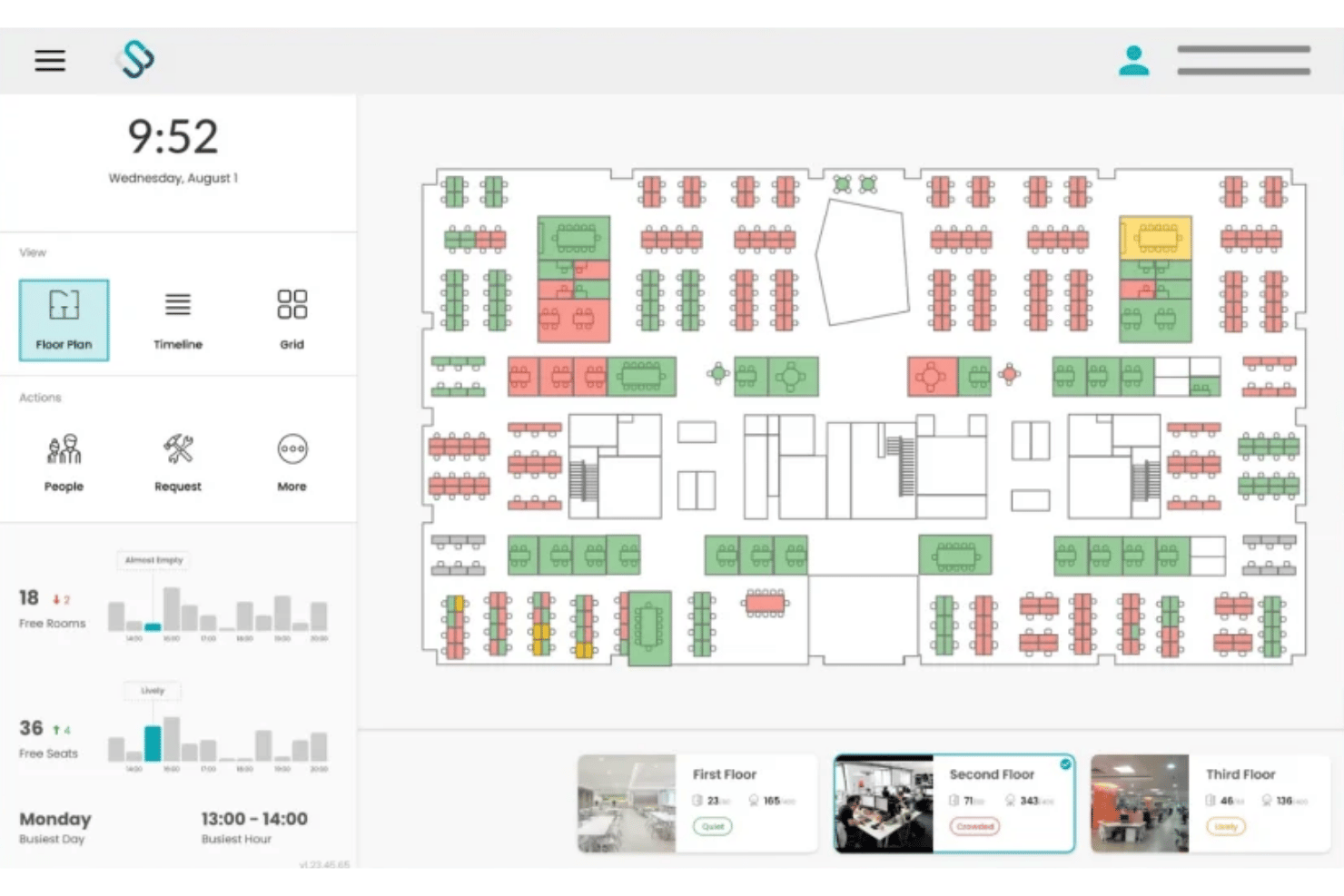
Spacewell is a workplace management platform that combines desk and room booking, interactive floor plan visualization, IoT-based occupancy analytics, and ESG energy reporting across multi-site real estate portfolios.
Who Is Spacewell Best For?
Spacewell is a strong fit for enterprise real estate and facilities teams managing multi-site portfolios where space costs, energy consumption, and ESG reporting need to connect in a single system.
Why I Picked Spacewell
Spacewell earns its spot on my shortlist because the Energy module connects carbon reporting, PV analytics, and ESG dashboards directly to cost centre data across every desk and room reservation. I love that when a real estate director needs to justify consolidating two floors, the platform surfaces both the energy spend and the per-seat cost data in the same view. Space simulations let you model densification or consolidation scenarios before committing, so the ESG case is backed by actual utilization numbers.
Spacewell Key Features
- AI conversational booking: A built-in AI assistant lets users book desks or rooms using natural language across 30+ languages, learning from past booking behaviour to surface relevant suggestions.
- Indoor air quality monitoring: Sensors track CO2, VOC levels, temperature, and humidity in real time, with IAQ data displayed directly on interactive floor plans alongside occupancy status.
- Colleague finder: From the Advanced plan, employees can search for teammates and see their current seat assignments on a live floor plan to coordinate in-office days.
- IoT sensor integration: Spacewell connects to a hardware-agnostic sensor network—including VergeSense, XY Sense, and Cisco Spaces—pulling motion, people-counting, and environmental data into a single occupancy view.
Spacewell Integrations
Spacewell offers native integrations with Microsoft 365, Outlook, Teams, Google Workspace, Zoom, SAP, Oracle, ServiceNow, Workday, VergeSense, XY Sense, and Cisco Spaces. An API is available for custom integrations.
Pros and Cons
Pros:
- Monitors indoor air quality metrics
- Sensor-agnostic platform supports large portfolios
- Connects ESG and space costs
Cons:
- Limits independent mobile app access
- Lacks outdoor parking space tracking

HubStar
Best for unified space analytics and IoT sensor data
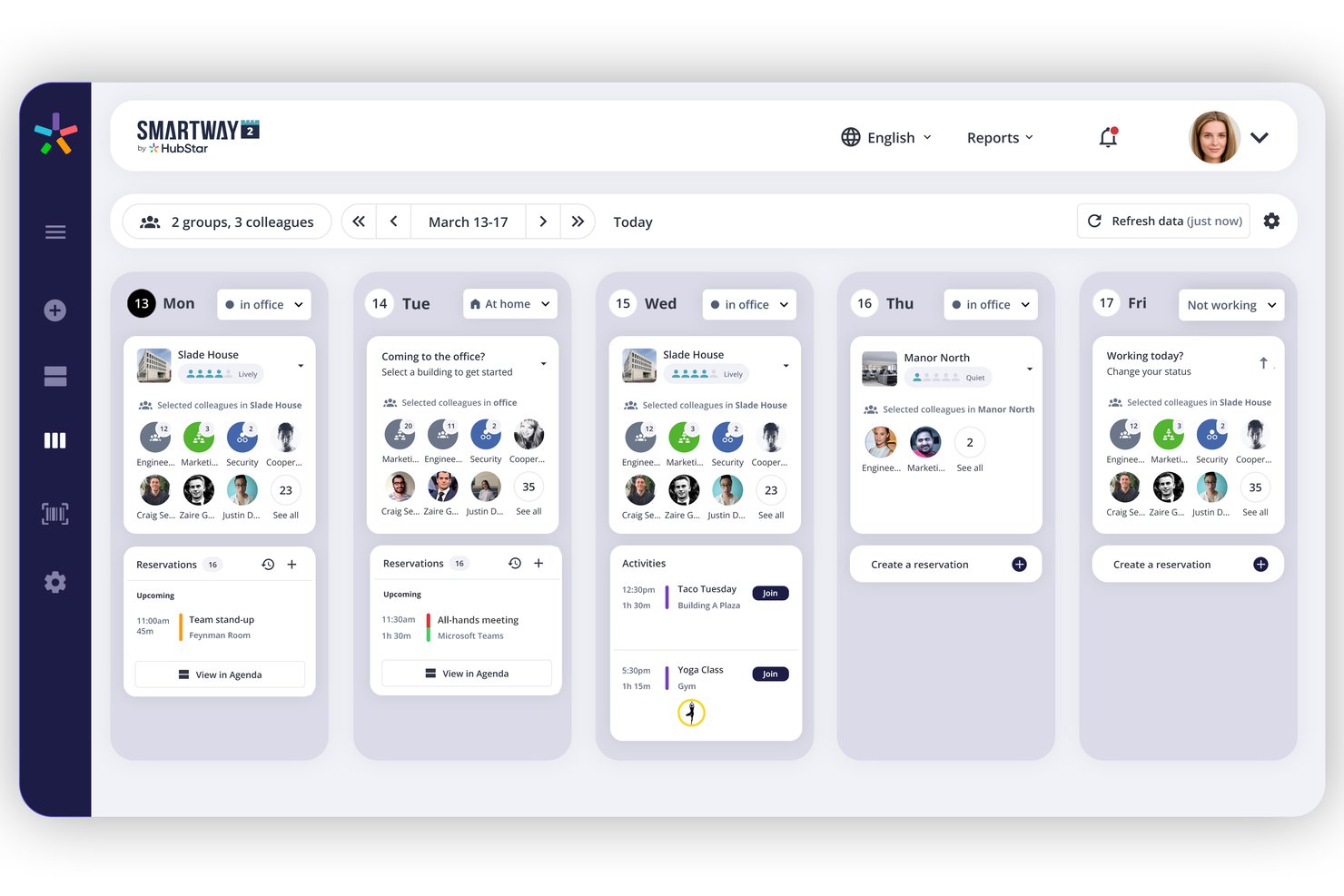
HubStar is a modular workplace management platform that combines desk and room booking, IoT sensor-driven occupancy analytics, interactive floor plan management, and visitor management across multi-site office portfolios.
Who Is HubStar Best For?
HubStar is a strong fit for enterprise facilities and workplace teams managing multi-site portfolios who need occupancy data from IoT sensors, Wi-Fi, and badge systems unified in one platform.
Why I Picked HubStar
HubStar earns its spot on my shortlist because no other platform I've tested pulls occupancy data from this many sources into a single analytics layer. PresenceIQ combines Wi-Fi access point data (Aruba, Cisco), badge scans, proprietary sensors, and third-party IoT devices like VergeSense and Butlr to give you a genuinely complete picture of how space is used. I also like that the analytics aren't just descriptive: the prescriptive tier surfaces specific recommendations for right-sizing neighbourhoods and reconfiguring zones based on real attendance patterns.
HubStar Key Features
- AI digital assistant: Recommends optimal office days per employee based on preferences and history, then auto-books the best available desk or room.
- Visitor management: Handles self-service kiosk check-in, photo capture, NDA signing, badge printing, and real-time visitor tracking within the same platform.
- Neighbourhood and zone management: Assigns teams to specific floor plan zones with configurable booking policies, seating ratios, and booking rules down to individual workstation level.
- BI platform data export: Pushes occupancy and utilization data directly to Power BI, Tableau, Qlik, and ThoughtSpot for external reporting and analysis.
HubStar Integrations
HubStar offers native integrations across the Microsoft ecosystem (Teams, Outlook, Exchange, Azure AD), plus Zoom, Workday, PeopleSoft, Rippling, Okta, Ping Identity, VergeSense, and Wi-Fi providers like Cisco and Aruba, along with BI exports to Power BI, Tableau, Qlik, and ThoughtSpot. An open API is available for custom integrations.
Pros and Cons
Pros:
- Machine learning supports floor plan editing
- AI assistant auto-books optimal desks and rooms
- Aggregates occupancy data from sensors and Wi-Fi
Cons:
- Limits independent mobile app access
- No dedicated move management workflow

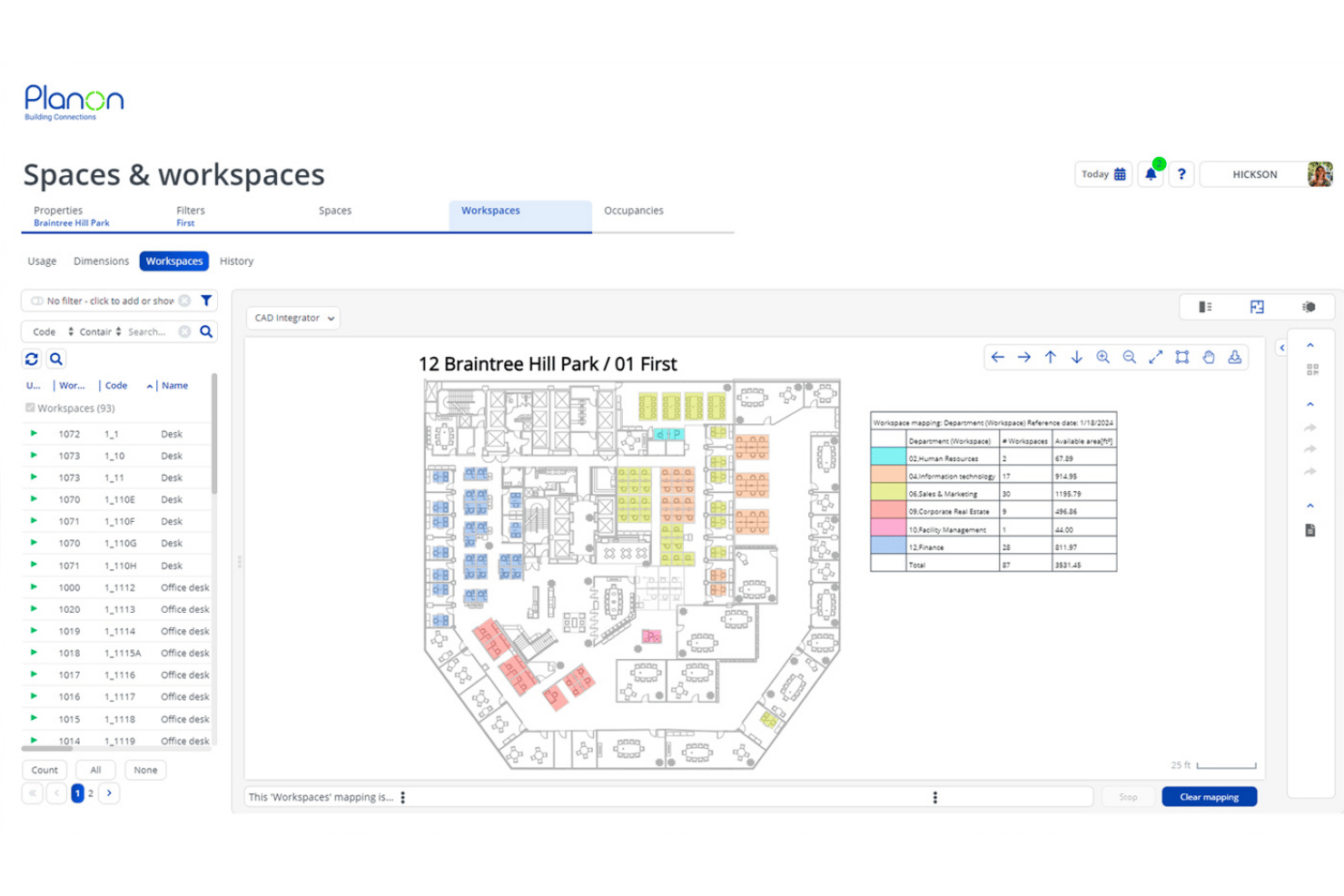
Planon is an enterprise IWMS platform that combines space and desk booking, CAD/BIM-integrated floor plan management, IoT-driven occupancy analytics, lease accounting, and real estate portfolio tracking across multi-site global operations.
Who Is Planon Best For?
Planon is built for enterprise real estate and facilities teams managing large, multi-site portfolios with complex lease accounting and cost tracking requirements.
Why I Picked Planon
Planon earns its spot on my shortlist because no other platform I've tested matches its depth on real estate portfolio cost visibility and lease accounting. I particularly like how it combines IFRS 16/ASC 842-compliant lease tracking with cost-per-seat chargeback analytics, so finance and facilities teams are working from the same numbers. Layer in scenario planning tied directly to CAD floor plans, and you can model a full-floor restack against live lease cost data before a single desk moves.
Planon Key Features
- IoT sensor integration: Connect occupancy sensors, air quality monitors, and building management systems to feed real-time data into utilization dashboards.
- Neighbourhood zoning: Assign teams to defined floor zones with configurable booking policies and departmental capacity caps.
- Visitor management: Self-service visitor check-in, host notifications, and secure visitor flow tracking are built directly into the platform.
- Connect for Analytics: Export workplace data to BI tools like Power BI, Tableau, or Snowflake via API for custom reporting.
Planon Integrations
Planon offers native integrations with Microsoft Outlook, Microsoft Teams, Microsoft Places, Google Calendar, SAP, Oracle, AutoCAD, and Autodesk Revit. An API is available for custom integrations.
Pros and Cons
Pros:
- Built-in scenario planning for space moves
- Advanced occupancy analytics using IoT sensors
- Real-time floor plans with CAD/BIM integration
Cons:
- Lacks outdoor parking space tracking
- Excludes custom-branded visitor badges

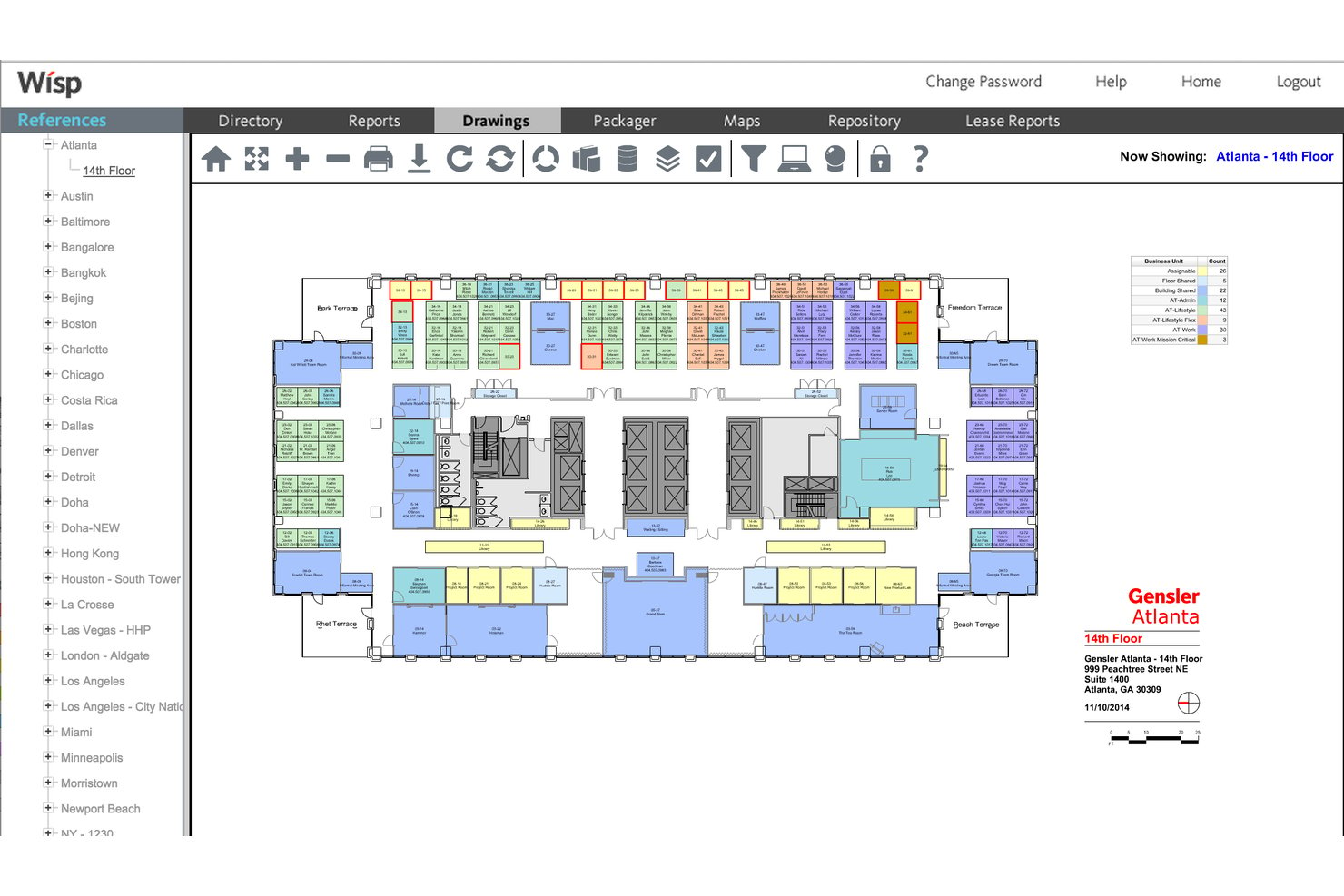
Wisp by Apex42 is an office space management platform built around interactive floor plans, move management, desk reservations, utilization analytics, and multi-site rent proration and chargeback reporting.
Who Is Wisp by Apex42 Best For?
Wisp is a strong fit for enterprise facilities and corporate real estate teams managing multi-site portfolios with high seat churn and complex internal cost allocation needs.
Why I Picked Wisp by Apex42
I've included Wisp by Apex42 in my top picks because its move management and rent proration capabilities are the most developed I've seen in this category. The configurable MAC workflow handles move requests, approvals, and automated floor plan updates end-to-end, and unlimited scenario-based space planning lets teams model full restacks without touching live data. On the cost side, 27-level rent proration means you can charge individual departments for their exact footprint across a multi-site portfolio.
Wisp by Apex42 Key Features
- Interactive floor plans: View and edit multi-site floor plans built from CAD drawings, with colour-coding via Colorizers™ to visualize departments, vacancy, and occupancy across your portfolio.
- Space utilization reporting: Access 50+ pre-built reports with real-time drill-down from portfolio level to individual seat, including sensor-based heatmaps displayed directly on floor plans.
- Desk reservations: Book desks via any device with QR code check-in, auto-release for no-shows, recurring reservation options, and neighbourhood-based restrictions.
- Service request workflow: Submit and manage facilities work orders tied directly to specific spaces on your floor plans, with configurable routing to the appropriate facilities technician.
Wisp by Apex42 Integrations
Wisp offers native integrations with ADP Workforce Now, UKG, Microsoft Entra ID, Brivo, Google Calendar, Microsoft Outlook, Microsoft Teams, and Slack. An API is available for custom integrations.
Pros and Cons
Pros:
- 27-level internal rent proration capability
- Industry-leading move management automation tools
- Unlimited CAD updates provided by the vendor team
Cons:
- Limited custom report-building tools
- Native room booking is less visible than peers
Best for floor plan-led workplace management
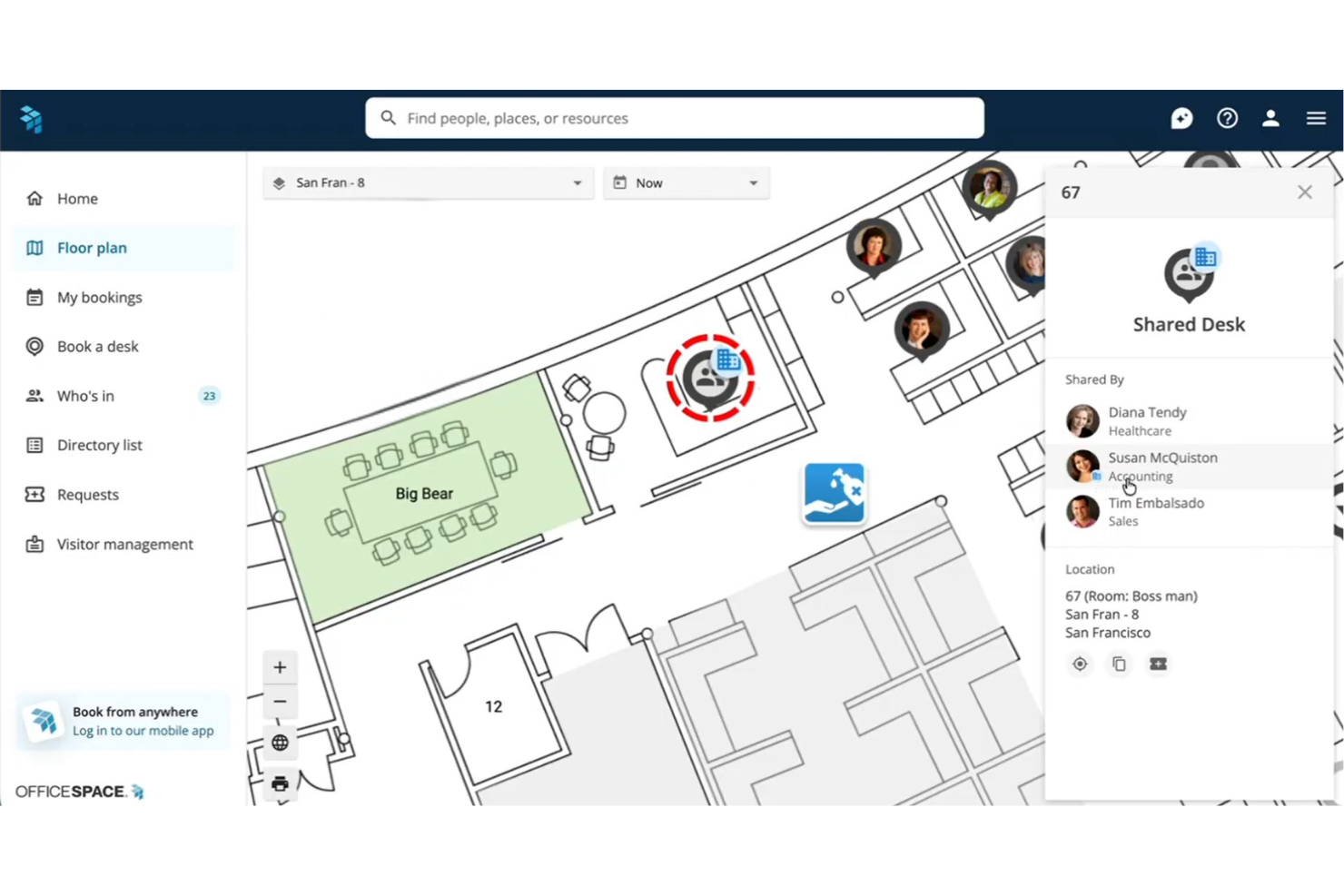
OfficeSpace is a workplace management platform built around interactive floor plans, combining desk and room booking, move management, space utilization analytics, and AI-driven scenario planning across multi-site office portfolios.
Who Is OfficeSpace Best For?
OfficeSpace is a strong fit for enterprise facilities and real estate teams managing complex, multi-site office portfolios who need floor plan-based space planning at the core of their workflow.
Why I Picked OfficeSpace
OfficeSpace earns its spot on my shortlist because the floor plan sits at the center of everything, not as a visual add-on, but as the actual interface for booking desks, planning moves, and reading utilization data. I love how OfficeSpace Studio lets facilities teams edit seat assignments, neighbourhood zones, and room layouts directly in-browser, without filing a support ticket. The block and stack scenario planning is where it really shines: you can model a full restack across multiple floors, compare versions, and merge the best elements before committing to a single change.
OfficeSpace Key Features
- Neighbourhood captain controls: Assign department leads to manage zone-specific booking policies, capacity caps, and access permissions within their assigned areas.
- Greetly visitor management: Check in guests via branded tablet kiosks with QR code self-check-in, NDA collection, and host notifications through Slack, Teams, or email.
- AI workplace agents: A suite of purpose-built agents handles facility requests, hybrid day recommendations, and natural-language utilization queries via the Insights Agent.
- Sensor and badge data integration: Connect IoT sensors, Wi-Fi presence data, and badge systems from providers like VergeSense and Cisco Meraki to capture real-time occupancy beyond booking records.
OfficeSpace Integrations
OfficeSpace offers native integrations with Slack, Zoom, Google Meet, Workday, ADP, BambooHR, Okta, VergeSense, Cisco Meraki, and Jira, plus native integrations across the Microsoft ecosystem, including Microsoft 365, Teams, Outlook, and Azure AD. A full REST API and advanced webhooks are available for custom integrations on the Pro Plus tier.
Pros and Cons
Pros:
- Scenario modelling for move management projects
- Advanced AI agents for space planning
- Real-time interactive floor plans for all sites
Cons:
- Complex admin interface noted by reviewers
- No native package delivery tracking
New Product Updates from OfficeSpace

OfficeSpace Adds Work Order Status and Cost Reports
OfficeSpace adds Work Order Status and Work Order Cost reports for built-in maintenance reporting. These reports help facilities teams track work order activity and costs without relying on manual spreadsheets. For more information, visit OfficeSpace’s official site.
 .
.
Robin
Best for visitor and delivery management built in
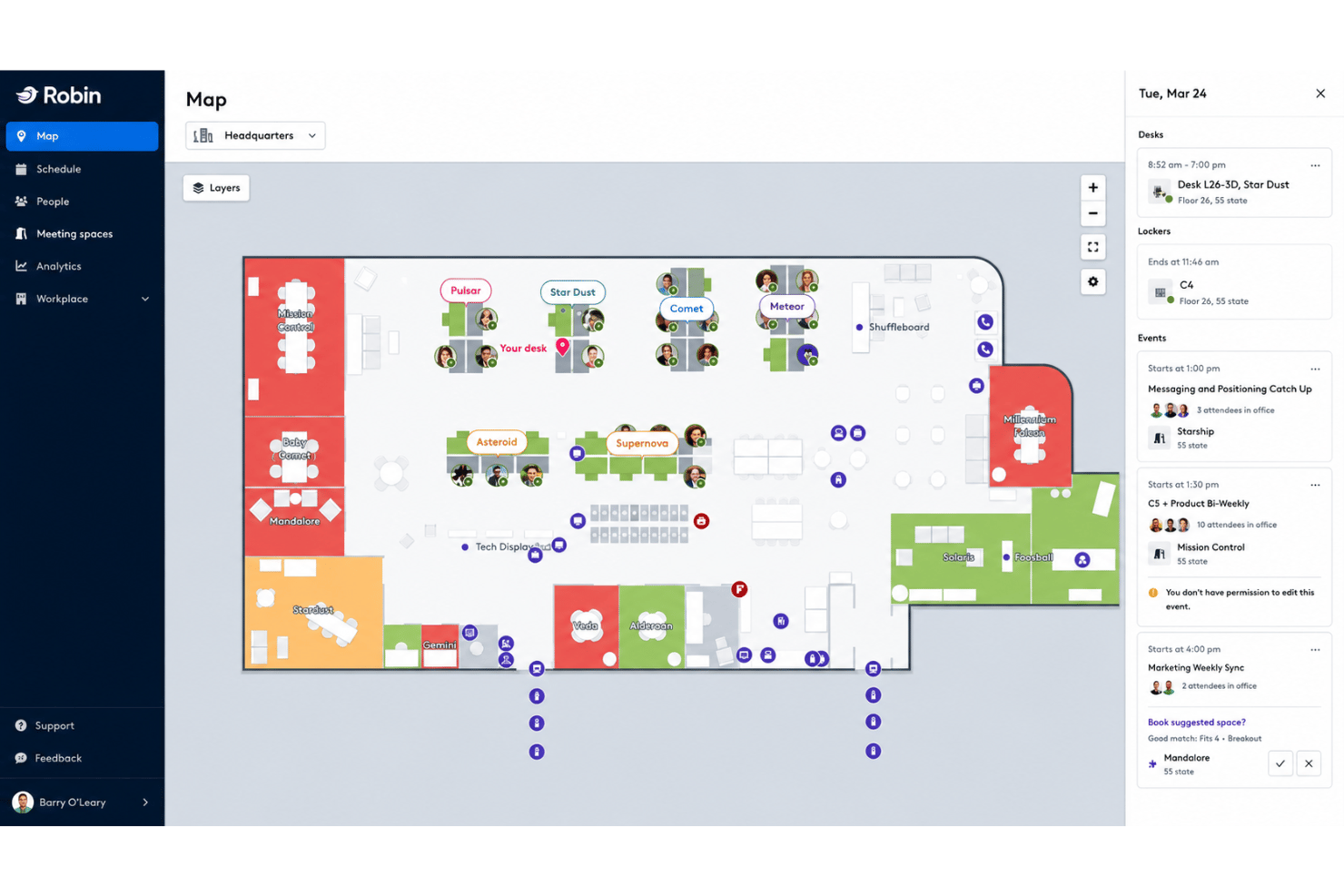
Robin is a workplace management platform that combines desk and room booking, interactive floor plans, space utilization analytics, visitor and delivery management, and hybrid scheduling tools.
Who Is Robin Best For?
Robin is a strong fit for mid-to-large enterprises managing hybrid teams across multiple offices who need visitor and delivery management built into the same platform as their desk and room booking.
Why I Picked Robin
Robin earns its spot on my shortlist because no other platform I've tested wraps visitor and delivery management this tightly into the same workspace. Pre-registration, self-check-in, badge printing, and host notifications via Slack or Teams are all native, and incoming package tracking sits in the same dashboard as your desk and room bookings. I also like that visitor logs and delivery records are searchable alongside booking data, so nothing lives in a separate tool.
Robin Key Features
- AI-suggested desk and room booking: Robin automatically recommends and reserves desks and rooms based on your past booking patterns and team proximity.
- Neighbourhood and zoning controls: Admins can assign teams to specific desk zones and configure department-level booking permissions and capacity rules.
- Multi-source occupancy analytics: Robin pulls data from badge swipes, occupancy sensors, Wi-Fi check-ins, and calendar bookings into a single utilization dashboard.
- Workweek coordination: A team scheduling view shows who's working in-office on which days across the week, synced with Google Calendar working location.
Robin Integrations
Robin offers native integrations with Microsoft 365, Outlook, Teams, Google Calendar, Slack, Zoom, VergeSense, Avigilon, Brivo, Kisi, Okta, OneLogin, and Rippling. An API is available for custom integrations.
Pros and Cons
Pros:
- Multi-source occupancy analytics and scenario planning
- AI-suggested desk booking and auto-reservations
- Visitor and delivery management built-in dashboard
Cons:
- Analytics add-ons require separate purchase
- Floor plan edits can require Robin support

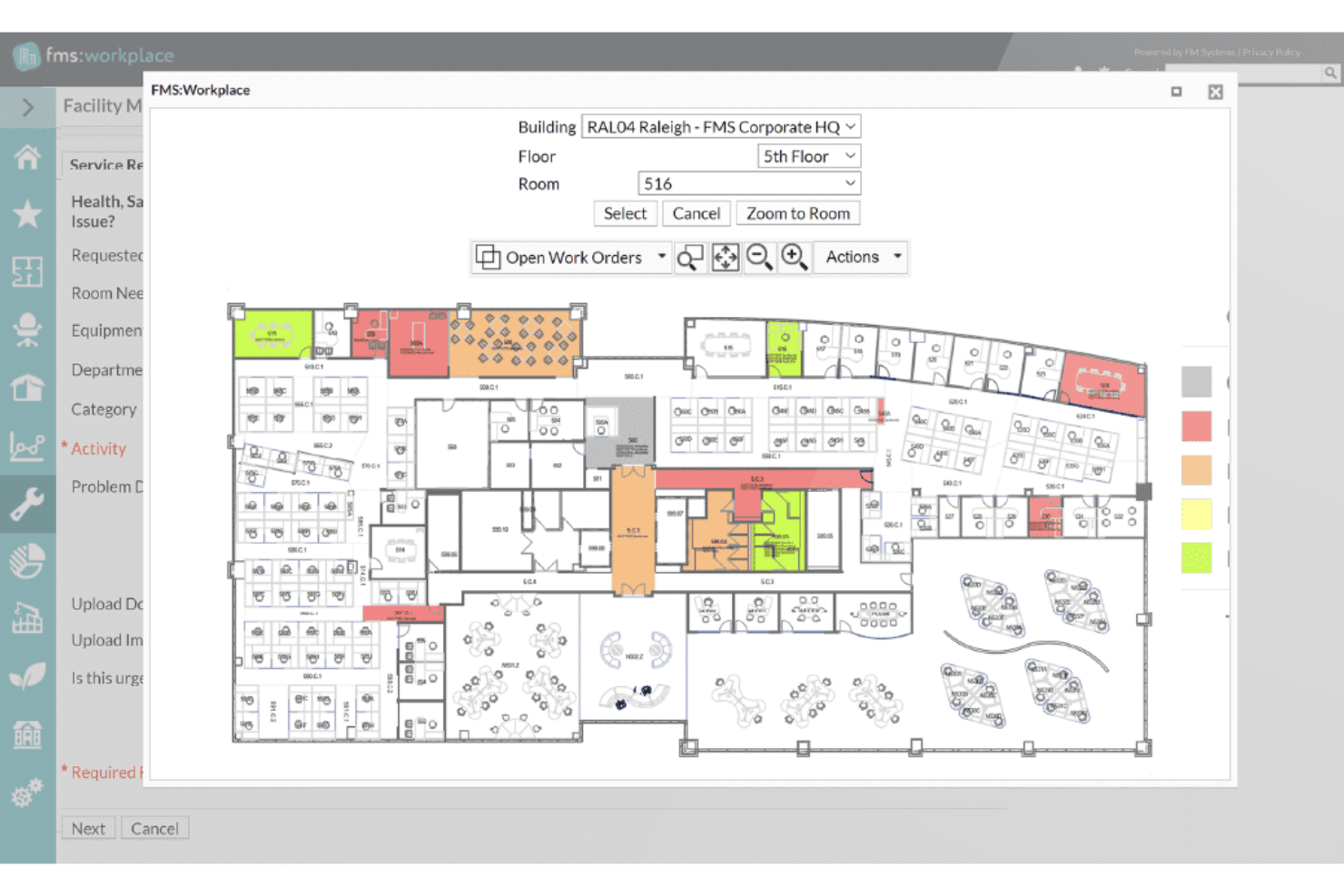
FM:Systems is a modular IWMS platform covering desk and room booking, interactive floor plans, move management, space utilization analytics, visitor management, and IoT sensor integration across single and multi-site portfolios.
Who Is FM:Systems Best For?
FM:Systems is a strong fit for enterprise facilities and real estate teams—especially in government, healthcare, and higher education—that need a FedRAMP-authorized IWMS with built-in sensor integration and multi-site portfolio management.
Why I Picked FM:Systems
FM:Systems earns its spot on my shortlist because it's one of the only office space management platforms with FedRAMP Authority to Operate, making it a legitimate option for federal agencies and regulated environments where most tools simply can't qualify. I'm particularly drawn to its native IoT sensor ecosystem, which feeds real-time occupancy data directly into FMS:Insights without requiring a third-party sensor platform. The strategic scenario planning module is also genuinely impressive, letting facilities teams build drag-and-drop stack plans with cost analysis before committing to a restack or consolidation.
FM:Systems Key Features
- Desk and room booking: Reserve desks, rooms, and services via web, mobile app, Outlook, or physical kiosks, with QR code and sensor-based check-in and auto-release for no-shows.
- Visitor management: Pre-register visitors, enable self-service kiosk check-in, trigger host notifications on arrival, and print badges automatically through the built-in visitor module.
- Multi-source occupancy analytics: FMS:Insights pulls data from sensors, bookings, badge readers, Cisco Spaces Wi-Fi, and financial systems into a single configurable dashboard with weighted KPI scoring.
- AutoCAD and Revit integration: Sync bi-directionally with CAD drawings and BIM models to keep floor plans accurate across space planning, move management, and utilization reporting.
FM:Systems Integrations
FM:Systems offers native integrations with Microsoft 365, Outlook, Teams, AutoCAD, Autodesk Revit, Google Workspace, Slack, Cisco Spaces, Cisco WebEx, and Crestron Fusion. An API is available for custom integrations.
Pros and Cons
Pros:
- FedRAMP authorization for regulated environments
- Strategic scenario planning with cost modelling
- Native sensors for real-time space analytics
Cons:
- Limited custom report building tools
- Excludes built-in physical sensors

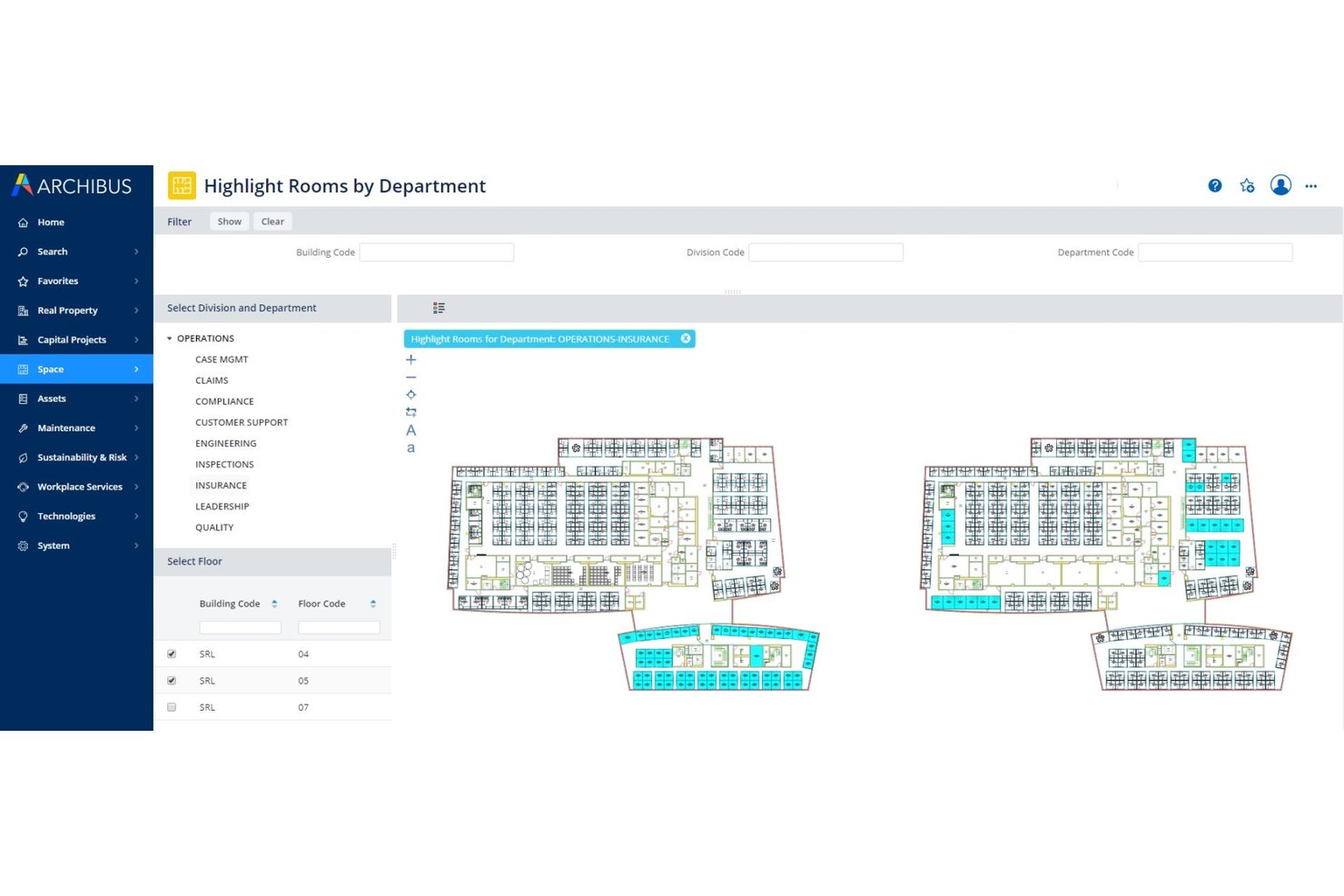
Archibus by Eptura is a full IWMS platform covering space planning, move management, lease administration, asset tracking, and real estate portfolio management across multi-site enterprise environments.
Who Is Archibus by Eptura Best For?
Archibus is built for enterprise facilities and real estate teams managing complex, multi-site portfolios where lease administration, space planning, and move management all need to live in one system.
Why I Picked Archibus by Eptura
Archibus by Eptura earns its spot on my shortlist because no other tool in this category matches its depth for managing a large real estate portfolio end to end. I'm particularly impressed by the lease administration module, which centralizes contract data with automated alerts and interactive portfolio dashboards across global multi-site footprints. Pair that with scenario-based block and stack planning, where you can model full restacks and compare what-if configurations before a single desk moves, and you have a genuine IWMS built for complexity at scale.
Archibus by Eptura Key Features
- BIM viewer: View and interact with Autodesk Revit and BIM 360 models directly within the platform, no Revit expertise required.
- IoT utilization reporting: Pulls real-time occupancy data from VergeSense sensors to generate heat maps and peak utilization reports by room and floor.
- Capital project tracking: Monitors budgets, schedules, and milestones for workplace fit-out and infrastructure projects from within the same platform.
- Sustainability module: Tracks energy usage and emissions across your portfolio with dedicated reporting tools tied to space and asset data.
Archibus by Eptura Integrations
Archibus by Eptura offers native integrations with VergeSense, Autodesk Revit, Autodesk BIM 360, AutoCAD, Workday, Okta, ServiceNow, Snowflake, and has native integrations across the Microsoft ecosystem, including Microsoft 365, Teams, Outlook, Copilot, Places, Power BI, and Azure AD. An open API is available for custom integrations.
Pros and Cons
Pros:
- Real-time occupancy heat maps with sensors
- Industry-leading BIM and CAD plan integration
- Monitors capital project delivery timelines
Cons:
- Lacks native campus exterior mapping
- Partner-only purchasing and support network required

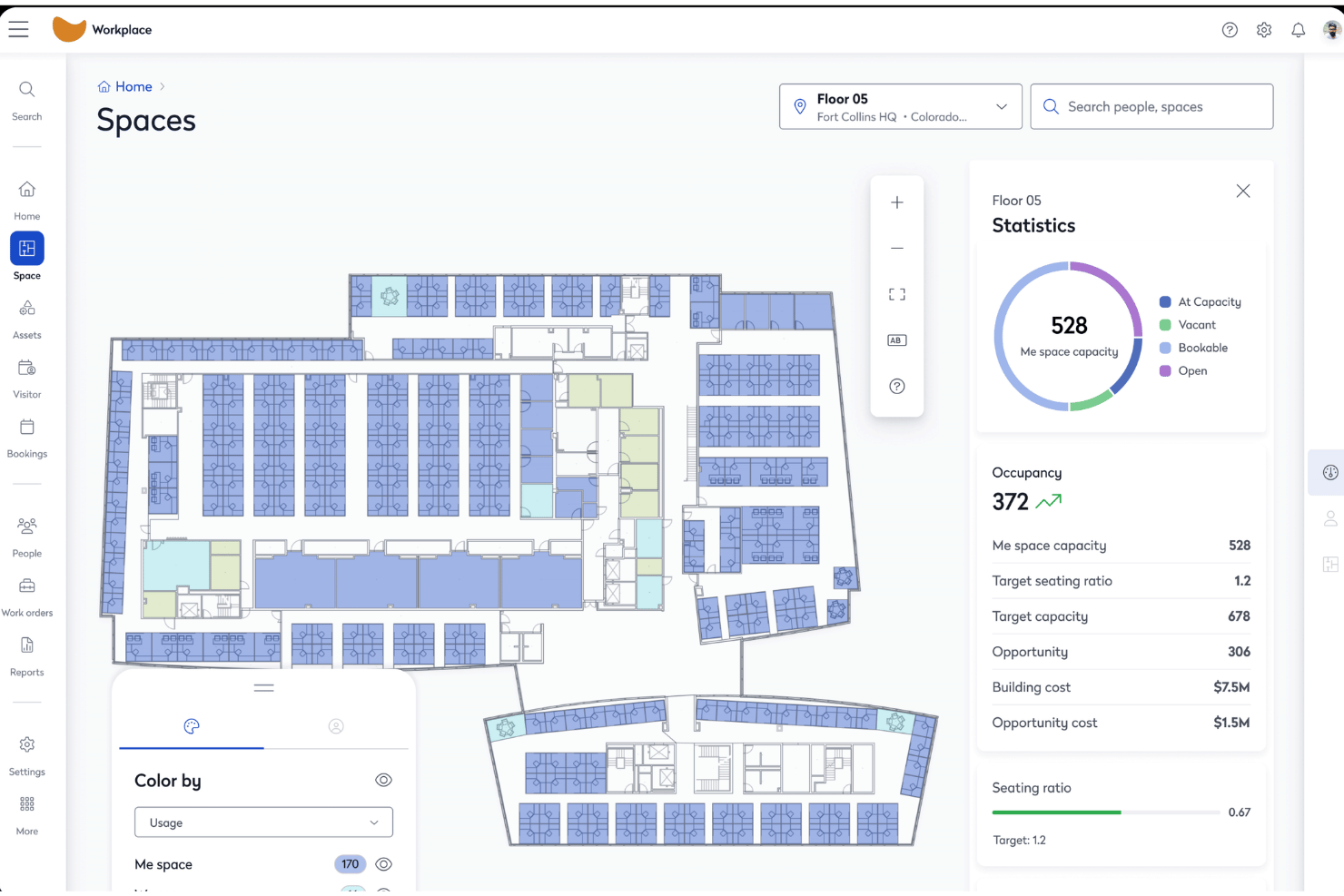
Eptura Workplace is an enterprise office space management platform that combines interactive floor plans, desk and room booking, move management, space utilization analytics, and visitor management across single and multi-site portfolios.
Who Is Eptura Workplace Best For?
Eptura Workplace is a strong fit for enterprise real estate and facilities teams managing large, multi-site portfolios where space cost accountability and chargeback reporting are central to operations.
Why I Picked Eptura Workplace
Eptura Workplace earns its spot on my shortlist because of how well it handles space cost accountability at the portfolio level. I love that it combines lease data management, cost-per-seat tracking, and chargeback reporting in one place, so finance and real estate teams can tie space consumption directly to business units. The Portfolio Insights Agent surfaces these numbers automatically, and Power BI connectors let you pipe them into executive dashboards without manual data pulls.
Eptura Workplace Key Features
- Block and stack planning: Drag-and-drop visual planning tools let you assign teams to floors and zones, model restack scenarios, and compare layout options before committing to any moves.
- Multi-source occupancy tracking: Pulls occupancy data from badge readers, WiFi presence detection, and sensor platforms like VergeSense and Relogix to give you a passive, accurate picture of how space is actually used.
- Visitor management: Pre-registration, on-site check-in, custom badge printing, eSignature capture, watchlists, and emergency roll calls are all handled through the integrated visitor module.
- AI Space Planning Agent: Automatically generates stack plans from real occupancy and headcount data, then surfaces scenario comparisons so your team can act on data rather than guesswork.
Eptura Workplace Integrations
Eptura Workplace offers native integrations with Microsoft 365, Outlook, Teams, Google Calendar, Okta, AutoCAD, Autodesk Revit, VergeSense, Relogix, CoWorkr, ServiceNow, Tableau, and Snowflake. An API is available for custom integrations.
Pros and Cons
Pros:
- Advanced chargeback and cost reporting built-in
- Combines sensor, badge, and booking occupancy data
- Visual block and stack planning enables restacks
Cons:
- No native Slack integration documented
- Admin portal navigation is complex

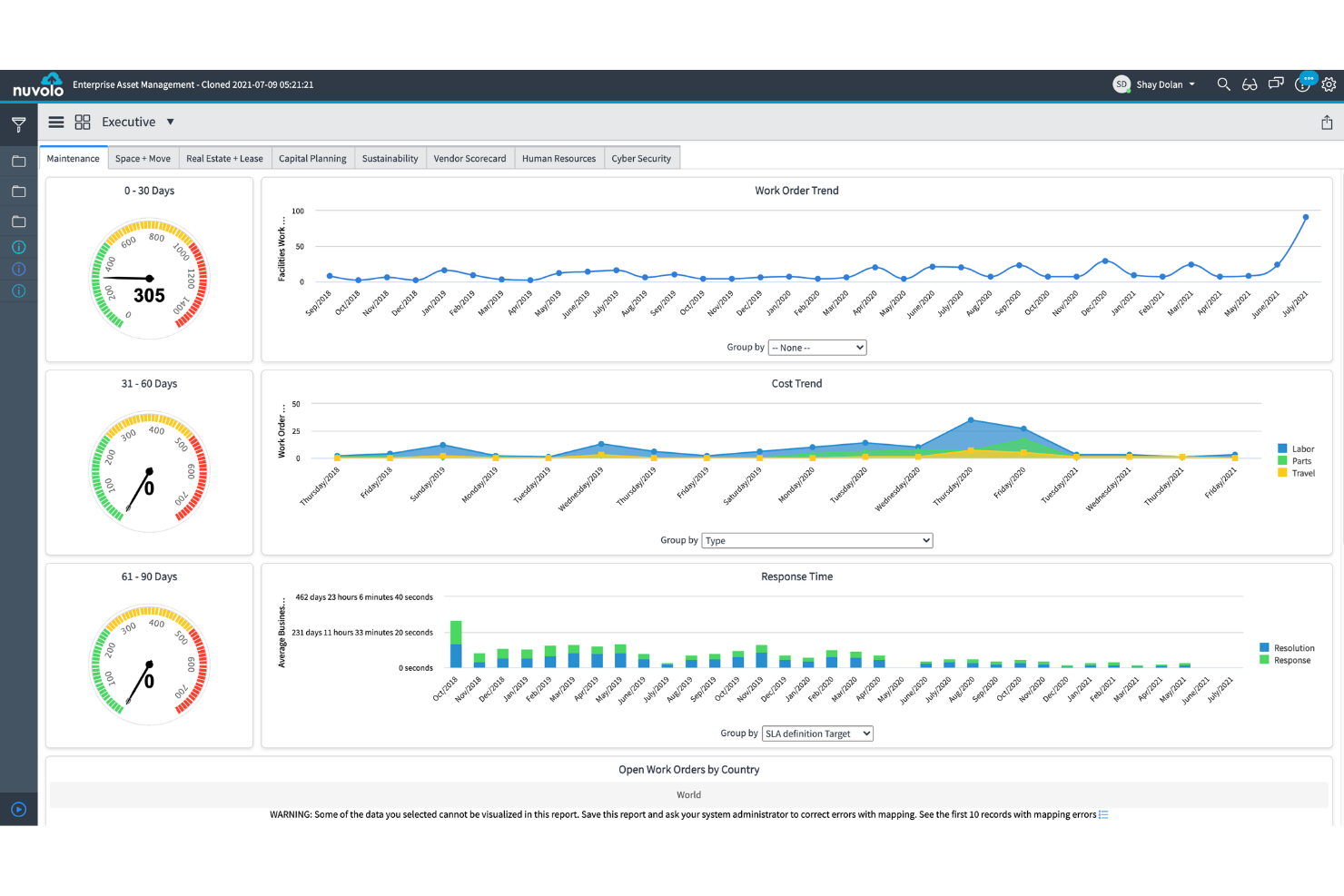
Nuvolo is an IWMS platform built natively on ServiceNow that combines space management, desk and room booking, move management, real estate portfolio tracking, and sustainability reporting in a single connected suite.
Who Is Nuvolo Best For?
Nuvolo is a strong fit for large enterprises in regulated industries—healthcare, life sciences, and government—that are already on ServiceNow and need a fully integrated IWMS with lease accounting, move management, and compliance-grade security in one platform.
Why I Picked Nuvolo
I've included Nuvolo in my top picks because it's purpose-built for large enterprises in regulated industries that need more than a basic booking tool. Its patented CAD interpretation engine syncs directly with AutoCAD and Revit, which means floor plan onboarding at scale (think 3,500+ locations) doesn't require endless manual uploads. Pair that with a dedicated Move Management module that supports multi-scenario campus relocations and automated work order dispatch, and you've got a platform that handles the complexity most workplace tools simply can't.
Nuvolo Key Features
- Lease accounting compliance: Manages owned and leased properties with built-in ASC 842 and IFRS 16 compliance, including critical date alerts and automated renewal notifications.
- Space demand forecasting: Projects future space needs using headcount growth data and sharing ratio tracking to support consolidation or expansion decisions.
- IoT and occupancy sensor integration: Connects to building sensors and IoT devices to feed real-time occupancy data directly into utilization dashboards.
- Visitor management: Handles onsite visitor workflows, kiosk-based check-in, and host notifications within the same reservation management interface.
Nuvolo Integrations
Nuvolo offers native integrations with AutoCAD, Revit, Workday, Oracle PeopleSoft, Microsoft Teams, Slack, Microsoft 365, and Outlook. An API is available for custom integrations.
Pros and Cons
Pros:
- Compliance modules for healthcare and government
- Full move management for complex relocations
- Native CAD sync for automated floor plans
Cons:
- Does not track hardware assets
- Requires separate ServiceNow licensing to use
Other Office Space Management Software
Here are some additional office space management software options that didn’t make it onto my shortlist, but are still worth checking out:
- Kadence
For AI-driven move planning and hybrid scheduling
- Tactic
For visitor and workspace booking in one place
- Skedda
For self-serve desk and room booking rules
- deskbird
For hybrid office booking via Slack and Teams
- OfficeRnD Workplace
For hybrid team scheduling and booking
- Appspace
For kiosk and mobile office wayfinding
- Envoy Workplace
For visitor and desk booking in one platform
- Gable
For on-demand coworking and office booking
- Yoffix
For Microsoft 365-native desk and room booking
- Mri Manhattan
For enterprise real estate portfolio management


How I Evaluate Office Space Management Software
My evaluation splits into two layers: the baseline functionality a tool must offer—floor plans, booking, utilization analytics—and the differentiators that separate a niche desk-booking app from a platform that handles portfolio-scale move management and compliance.
Core Functionality (Table Stakes For This List)
When I'm selecting tools for my list, I rank each one on a scale from 0 (does not offer the functionality) to 5 (excels in this area) for each core functionality listed below. I then calculate the tool's total score as a percentage, using 65% as a benchmark to help assess its overall fit for the list.
- Interactive floor plans: I look for multi-site, layered floor plans with CAD or BIM import support and live seat status—not just static images uploaded as PNGs.
- Desk and room booking: Self-service reservation for desks, rooms, and extras like parking or lockers matters, along with mobile check-in and policy controls for neighbourhoods or zones.
- Space utilization analytics: I evaluate whether the platform combines booking data with sensor, badge, or Wi-Fi signals to show real occupancy trends, not just reservation counts.
- Move management: Drag-and-drop stack planning with scenario comparison is what I check for, especially for teams running restacks or multi-floor relocations on tight timelines.
- Employee directory and wayfinding: The directory should sync with your HRIS and link people to their seat assignments on the map so anyone can find a colleague without sending a message first.
- Hybrid scheduling integration: Two-way sync with Outlook, Google Calendar, Teams, or Slack is the baseline, but I also look for team-day coordination views and SSO support.
Once I have a list of tools that meet the criteria, I consider what sets each platform apart.
Differentiating Factors (What Sets Vendors Apart)
Here's how I compare and contrast different vendors:
Standout Features
Scenario planning tools matter most when you're weighing a restack or consolidation. I look for what-if modelling that lets you test hybrid ratio changes against cost and headcount data before committing. Sensor and IoT integration is equally important—I evaluate whether a platform pulls passive occupancy data from badges or Wi-Fi signals, not just reservation counts. Visitor and delivery management rounds out the picture, replacing standalone lobby apps with built-in check-in, host alerts, and package tracking.
Beyond Features
I evaluate how quickly a vendor can digitize your floor plans—some offer full CAD/BIM conversion services, while others expect you to self-serve, which can stall rollout by weeks. Integration depth matters just as much: I check for bidirectional sync with Microsoft 365, Google Workspace, and HRIS platforms like Workday so user provisioning and booking stay automatic. Security posture is another filter, especially SOC 2 Type II certification and data residency options for teams operating across regions. Finally, I look at analytics export—whether dashboards connect to Power BI or Tableau so utilization data feeds into broader portfolio reporting without manual pulls.
How to Choose Office Space Management Software
The right office space management software depends on which workplace headaches you want to fix first:
| If your priority is... | Look for... |
|---|---|
| Managing hybrid schedules and bookings | Calendar sync and real-time seat status on the map |
| Tracking real estate spend and chargebacks | Built-in space cost allocation and occupancy reporting |
| Handling compliance or regulated settings | Vendor support for FedRAMP, SOC 2, or similar documentation |
| Coordinating large moves or restacks | Scenario modelling tools for multi-floor planning |
| Unifying visitor, delivery, and booking workflows | Integrated check-in and host notification features |
How to Vet Your Shortlist
- Test floor plan digitization: Upload a sample layout and time their live turnaround or support for CAD/BIM files.
- Validate analytics depth: Run a real occupancy analysis using your booking plus badge or sensor data.
- Request compliance proof: Ask for the most recent SOC 2 Type II audit or FedRAMP status in writing.
- Trial a move scenario: Use their platform to restack three teams in a test environment and export before/after cost projections.
- Pick your tradeoff: Decide between speed of rollout (self-service tools) and breadth of integrations plus compliance (enterprise-grade solutions).
What Is Office Space Management Software?
Office space management software is a digital platform that centralizes how you allocate desks, manage floor plans, schedule workspace usage, and monitor real estate costs. It helps teams coordinate hybrid work, track occupancy, and ensure compliance by providing interactive maps, booking tools, and analytics. This type of software supports facilities, IT, and project managers in keeping workplace resources visible and adaptable as team needs change.
Features of Office Space Management Software
When selecting office space management software, keep an eye out for the following key features:
- Interactive floor plans: View, edit, and manage digital floor maps showing seat allocation, amenities, and real-time occupancy updates. This helps teams visualize and plan workspaces across multiple sites.
- Desk and room booking: Enable staff to reserve desks, meeting rooms, or collaboration areas through self-service tools, often including mobile check-in, booking policies, and neighbourhood controls.
- Space utilization analytics: Monitor real and reserved workspace usage by tracking reservation data, sensors, Wi-Fi, or badge activity to inform decisions about space needs and layouts.
- Move management: Plan office moves and restacks with scenario modelling, drag-and-drop floor plan editing, and before/after visualizations, making it easier to adjust workspace allocation as teams change.
- Employee directory and wayfinding: Connect people to their seat assignments, display contact details, and provide interactive maps for employees to find colleagues, meeting rooms, or amenities.
- Hybrid work scheduling: Integrate with calendar platforms and offer team-based scheduling that shows when individuals or groups plan to work on-site, coordinating presence and reducing conflicts.
- Visitor management: Register guests, issue digital passes, notify hosts, and track visitor logs within the same platform, replacing standalone lobby tools.
- Integration with HR and IT systems: Sync employee data, seat assignments, and user permissions with tools like Active Directory, Google Workspace, or your HRIS to keep information updated automatically.
- Space cost tracking and reporting: Allocate occupancy costs to cost centers or teams, generate usage reports, and export data for finance and facilities stakeholders.
- Security and compliance controls: Protect sensitive data through SSO, role-based permissions, audit trails, and adherence to security standards such as SOC 2 or FedRAMP, supporting regulatory and privacy needs.
Common Office Space Management Software AI Features
Beyond the standard office space management software features listed above, many of these solutions are incorporating AI with features like:
- AI-powered occupancy forecasting: Uses historical usage data and real-time sensor inputs to predict future workspace demand, helping you optimize desk allocation and reduce unused space.
- AI-driven space optimization recommendations: Analyzes booking patterns, team schedules, and movement data to suggest layout changes or seat reassignments that improve collaboration and space efficiency.
- Automated anomaly detection: Monitors occupancy and booking data to flag unusual patterns—like persistent no-shows or overcrowding—so you can address issues before they disrupt operations.
- Natural language query assistants: Let you ask questions about space usage, availability, or booking policies in plain language, with AI surfacing answers and insights instantly from your data.
- Predictive maintenance alerts: Uses AI to analyze sensor and usage data, identifying when meeting rooms or shared spaces may need cleaning, repairs, or restocking before issues arise.
Benefits of Office Space Management Software
Implementing office space management software provides several benefits for your team and your business. Here are a few you can look forward to:
- Centralized workspace allocation: Coordinate desk assignments, room bookings, and floor plans in one platform, so your team always knows which spaces are available and who’s sitting where.
- Data-driven utilization insights: Combine occupancy analytics, sensor data, and booking records to track real workspace usage, helping you pinpoint underused areas and justify footprint decisions.
- Integrated move and scenario planning: Use drag-and-drop tools and what-if modelling to plan office moves, restacks, or hybrid transitions without relying on static spreadsheets.
- Hybrid work coordination: Sync schedules with calendar tools like Outlook or Google Calendar, enabling your team to plan on-site days and reduce seat conflicts.
- Visitor and delivery management: Register guests, issue digital passes, and notify hosts directly within the platform, replacing standalone sign-in and notification apps.
- Automated cost tracking and reporting: Allocate occupancy and workspace expenses to cost centers or teams, and export usage data for finance or facilities reporting.
- Security and compliance assurance: Manage who can access floor plans and booking data with SSO, permission controls, and support for standards like SOC 2 or FedRAMP where required.
Costs and Pricing of Office Space Management Software
Selecting office space management software requires an understanding of the various pricing models and plans available. Costs vary based on features, team size, add-ons, and more. The table below summarizes common plans, their average prices, and typical features included in office space management software solutions:
Plan Comparison Table for Office Space Management Software
| Plan Type | Average Price | Common Features |
|---|---|---|
| Free Plan | $0 | Basic floor plan viewing, limited desk and room booking, simple analytics, and email support. |
| Personal Plan | $5–$25/user/month | Interactive floor plans, standard desk and room booking, usage reports, mobile check-in, and basic integrations. |
| Business Plan | $8–$40/user/month | Advanced booking policies, space utilization analytics, move management, HR and IT integrations, and directory sync. |
| Enterprise Plan | $30–$120/user/month | Portfolio-wide analytics, scenario planning, custom integrations, SSO, compliance controls, and dedicated support. |
Office Space Management Software FAQs
Here are some answers to common questions about office space management software:
How does office space management software help with hybrid work schedules?
Office space management software connects booking systems with calendars in a user-friendly iOS or Android app to let you see who plans to work onsite. This helps teams coordinate presence, avoid double-booking desks, and support rotating schedules in a hybrid workplace. Many tools show real-time seat availability and sync with Outlook or Google Calendar for easy planning, boosting employee experience.
Can office space management software handle complex floor plans across multiple sites?
Yes, many office space management software platforms support multi-site and multi-floor plans with layered mapping and CAD or BIM imports to track every square foot. This visibility helps facilities management and project managers optimize space allocation, assign seats, plan moves, and keep layouts updated in growing organizations or across several work environments.
What integrations should I look for in office space management software?
Look for an all-in-one platform with integrations for your primary calendar (Google Workspace, Microsoft 365), HRIS, identity management, and sensors to track office occupancy. Deep integrations automate user provisioning, sync schedules, and surface real usage data through workplace analytics. This helps you make informed decisions for better space planning.
How secure is office space management software for confidential office data?
Most established platforms secure your office environment by offering SSO, granular permissions, and audit logging. For regulated resource management, check for SOC 2 Type II, ISO 27001 certifications, or data residency controls. Before you choose a vendor or adopt new features, ask for their most recent compliance reports to clarify how they protect data across locations.
Can I use office space management software for short-term or flexible workspace booking?
Yes, you can use most space booking software to set policies for hot desks, meeting room reservations, parking, and other office resources. Staff can easily book spaces while mobile booking, QR check-ins, conference room displays, and real-time mapping support short-term reservations and daily changes in seat allocation.
What’s involved in digitizing existing floor plans with office space management software?
You’ll usually upload layouts in PDF, CAD, or BIM formats. Some vendors offer a concierge service to create interactive maps from your files to improve the workplace experience, while others require self-service uploads. I recommend sending in a sample plan to test quality. This ensures maps align with your workplace strategy, especially if you need multi-floor or customized maps.