

10 Meta Workplace Alternatives for Internal Comms in 2026

Meta Workplace Alternatives Shortlist


collaboration features that fit your workflows and scale with your business. If you’re searching for Meta Workplace alternatives, you’re likely dealing with shifting requirements, the need for better integration, or a push for tools that match your team’s unique way of working.
The right solution can help you manage employee communication, coordinate projects, and improve employee engagement and overall employee experience—without the friction that comes from outgrowing your current platform.
Many modern employee experience platforms also include AI-powered communication tools, advanced analytics, and content engagement features designed to support frontline workers and distributed teams.
In this list, you’ll find options used by both growing companies and large enterprises that address real-world collaboration challenges and support the way modern teams actually work.
What is Meta Workplace?
Workplace from Meta is a collaboration software platform developed by Meta that combines messaging, video calls, groups, and file sharing for business teams. It also includes features like news feeds and knowledge base capabilities that help organizations share updates and resources across the company.
The platform functions as an intranet solution designed to streamline communication in the digital workplace, helping teams connect, manage projects, and stay aligned within a modern work environment.
Workplace from Meta is used by companies to improve internal communication, support remote work, and strengthen company culture through familiar social networking features tailored for the workplace. It also supports deep integration with other business tools and features such as employee recognition.
As organizations evaluate tools like Staffbase and other platforms, many consider them among the best alternatives for building a connected employee experience.
Best Meta Workplace Alternatives Summary
This comparison chart summarizes pricing details for my top Meta Workplace alternative selections to help you find the best one for your budget and business needs.
| Tool | Best For | Trial Info | Price | ||
|---|---|---|---|---|---|
| 1 | Best for all-in-one productivity | Free plan + free demo available | From $7/user/month (billed annually) | Website | |
| 2 | Best for task tracking workflows | Free plan available | From $10.99/user/month (billed annually) | Website | |
| 3 | Best for client project management | 14-day free trial | From $9.99/user/month (billed annually) | Website | |
| 4 | Best for workflow automation flexibility | 30-day free trial + free plan + free demo available | From $11.20/user/month (billed annually) | Website | |
| 5 | Best for organizing conversations by topic | 5 free licenses available | From $29/user/month | Website | |
| 6 | Best for software development teams | Free plan available | From $7/user/month (billed annually) | Website | |
| 7 | Best for visual project boards | Free plan available | From $5/user/month (billed annually) | Website | |
| 8 | Best for integrated office suite | 15-day free trial available | From $1/user/month (billed annually) | Website | |
| 9 | Best for shared inbox collaboration | 30-day free trial | From $24/user/month (billed annually) | Website | |
| 10 | Best for real-time team messaging | Free plan available | From $7.25/user/month (billed annually) | Website |

Why Trust Our Software Recommendations
Our team has been testing and reviewing software since 2012. As project managers ourselves, we know how difficult—and important—it is to choose the right software.
For this guide, we evaluated tools using hands-on testing and independent research, scoring tools using our selection criteria. We also draw on insights from industry thought leaders and practicing project management experts.
Our reviews reflect our human editorial judgment, not a sales pitch.
Expert reviewers:
Meta Workplace Alternatives Reviews
Below are my detailed summaries of the Meta Workplace alternatives that made it onto my shortlist. My reviews offer a detailed look at the features, best use cases, and integrations of each platform to help you find the best one for your team.

ClickUp
Best for all-in-one productivity
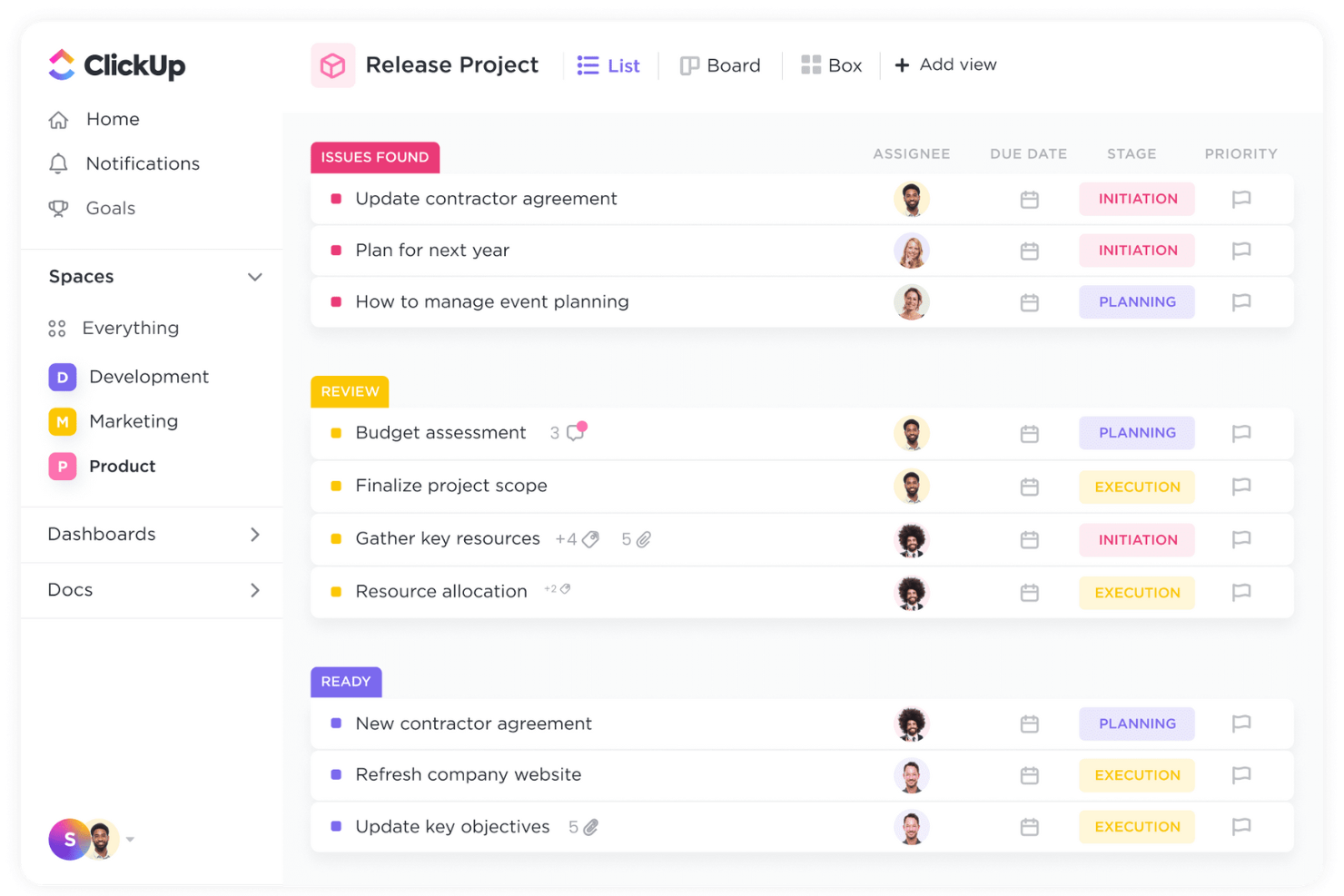
If you’re looking for a single platform to manage tasks, docs, goals, and chat, ClickUp brings everything together in one place. It’s especially useful for project managers, product teams, and agencies who want to replace multiple disconnected tools with a unified workspace. ClickUp stands out from Meta Workplace by offering deep task management, built-in document editing, and goal tracking all within the same interface.
Why ClickUp Is a Good Meta Workplace Alternative
ClickUp is a strong Meta Workplace alternative because it combines project management, document collaboration, and team communication in one platform. I picked ClickUp for its all-in-one approach, which means you can manage tasks, create and share docs, and chat with your team without switching tools. The platform’s goal tracking and workload management features help teams stay aligned and accountable across projects. This makes ClickUp especially appealing if you want to consolidate your work into a single, unified workspace.
ClickUp Key Features
Some other features in ClickUp that help teams collaborate include:
- Whiteboards: Map out ideas visually and connect them directly to tasks.
- Custom Views: Switch between list, board, calendar, and Gantt views for different project needs.
- Mind Maps: Build and organize project structures or workflows visually within the platform.
- Native Time Tracking: Log time spent on tasks without needing third-party tools.
ClickUp Integrations
Integrations include Slack, Google Drive, Dropbox, Zoom, Microsoft Teams, GitHub, Toggl, Evernote, HubSpot, Outlook, and more.
Pros and Cons
Pros:
- Goal tracking improves project visibility
- Custom views tailor team processes
- Docs and whiteboards enable collaboration
Cons:
- Chat lacks threaded conversations
- Large workspaces load slowly
New Product Updates from ClickUp
ClickUp Adds Meetings Hub, Super Agent Templates, and ZoomInfo Integration
ClickUp adds a searchable Meetings Hub, new ways to clone and template Super Agents, and a ZoomInfo integration through the App Center. These updates improve meeting retrieval, agent reuse, and access to sales intelligence. For more information, visit ClickUp’s official site.

Asana
Best for task tracking workflows
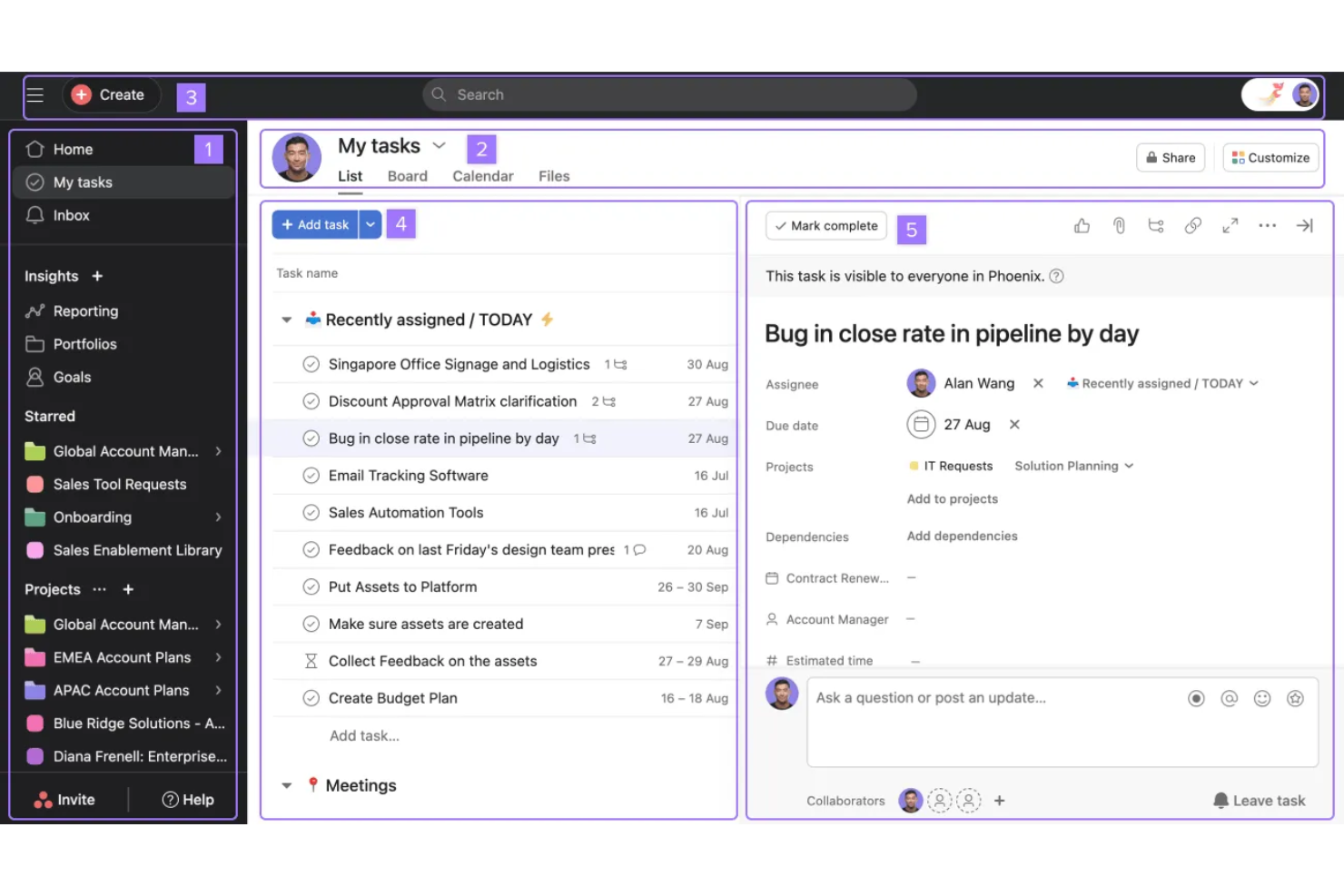
If your team needs a clear way to organize and track work, Asana is worth a look. This platform is especially useful for project managers, product teams, and operations leads who need to coordinate tasks, deadlines, and dependencies across multiple projects. Asana stands out for its flexible task tracking workflows, which help teams visualize progress and keep everyone aligned without the clutter of traditional chat-based tools.
Why Asana Is a Good Meta Workplace Alternative
When you need more than just chat to keep projects moving, Asana’s task tracking workflows offer a clear advantage over Meta Workplace. I picked Asana because its platform lets you break work into tasks, assign owners, set deadlines, and visualize progress in multiple views like lists, boards, and timelines. Features like task dependencies and custom fields help teams manage complex projects without losing track of priorities. This makes Asana a strong fit for teams that need structured coordination rather than just conversation.
Asana Key Features
Some other features in Asana that help teams coordinate work include:
- Project Templates: Start new projects quickly with pre-built templates for common workflows.
- Workload Management: View team capacity and balance assignments to avoid overloading anyone.
- Automated Rules: Set up triggers and actions to automate routine steps in your workflows.
- Milestones: Mark key points in your projects to track progress toward major goals.
Asana Integrations
Integrations include Slack, Google Drive, Microsoft Teams, Zoom, Dropbox, Salesforce, Jira Cloud, Adobe Creative Cloud, Outlook, Gmail, and more.
Pros and Cons
Pros:
- Automation rules reduce repetitive work
- Multiple views include list and timeline
- Task assignment supports clear accountability
Cons:
- Guest access is restrictive for partners
- No built-in chat or threads

Best for client project management
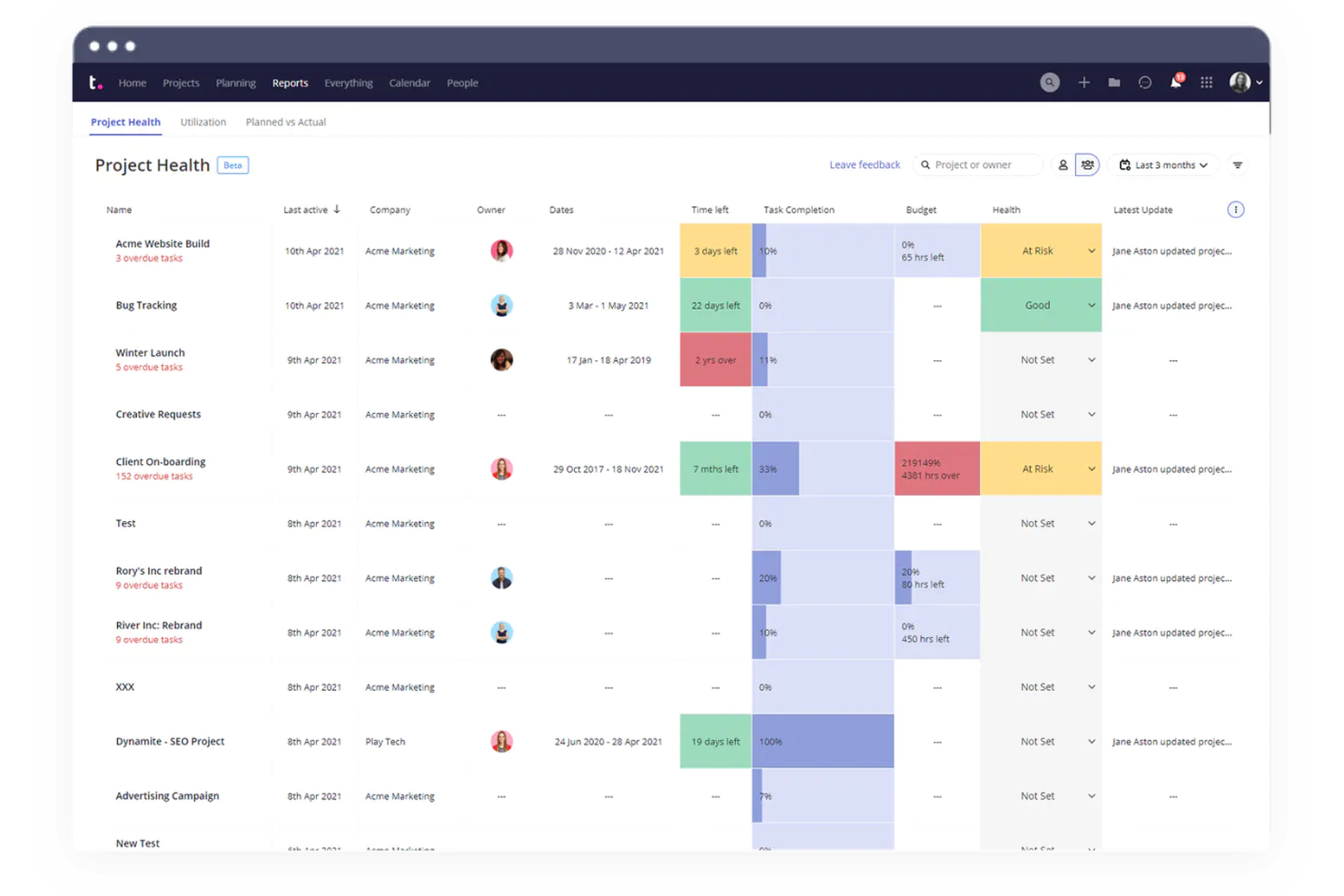
Agencies and client-facing teams looking for a collaboration platform built around client project delivery will find Teamwork.com especially relevant. The platform is designed to help manage client projects, track billable hours, and handle client communications in one place. Unlike Meta Workplace, Teamwork.com includes built-in tools for client permissions, invoicing, and project profitability tracking.
Why Teamwork.com Is a Good Meta Workplace Alternative
For teams that manage client projects from start to finish, Teamwork.com offers features that Meta Workplace doesn’t address. I picked Teamwork.com because it includes client-specific permissions, project billing, and time tracking built directly into the platform. You can invite clients to view project progress, share files, and approve deliverables without exposing internal discussions. This focus on client project management makes Teamwork.com a strong choice for agencies and service-based businesses.
Teamwork.com Key Features
Some other features that make Teamwork.com useful for collaboration-focused teams include:
- Task Dependencies: Set up relationships between tasks to manage project sequencing.
- Gantt Chart View: Visualize project timelines and adjust schedules with drag-and-drop tools.
- Document Management: Store, organize, and share project files within each workspace.
- Teamwork.com Chat Integration: Communicate in real time with team members directly from the platform.
Teamwork.com Integrations
Integrations include Slack, Google Drive, Dropbox, Microsoft Teams, HubSpot, QuickBooks, Xero, Zapier, GitHub, Evernote, and more.
Pros and Cons
Pros:
- Task templates support repeatable workflows
- Client users invited with restricted access
- Built-in time tracking monitors billable hours
Cons:
- File storage limits require external tools
- Interface updates disrupt workflows
Podio
Best for workflow automation flexibility
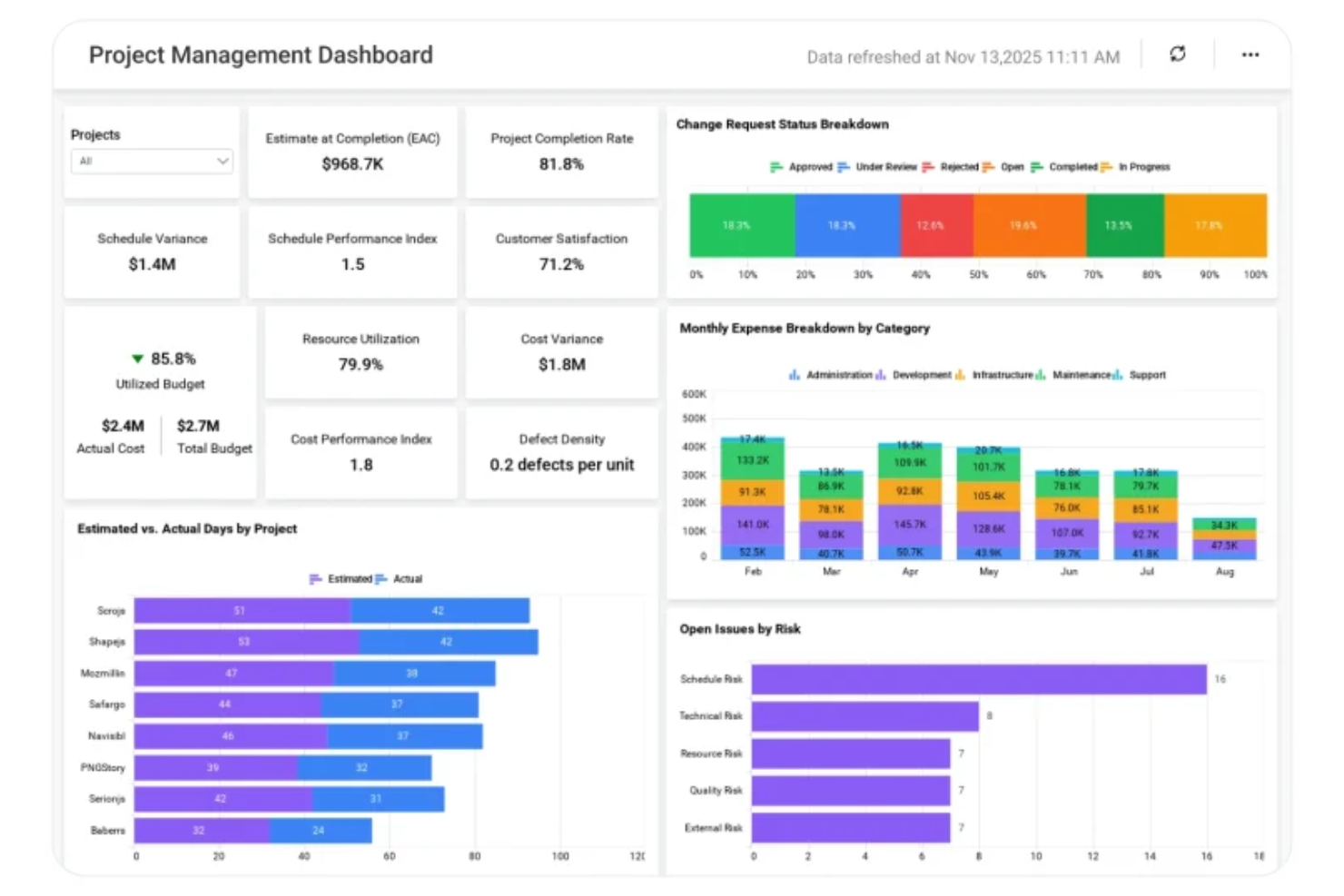
For teams that need to tailor workflows to fit unique processes, Podio offers a highly customizable platform for collaboration and automation. It’s a strong fit for project managers and operations teams who want to design their own apps, automate repetitive tasks, and centralize project data. Unlike Meta Workplace, Podio lets you build and automate workflows without heavy reliance on IT or external tools.
Why Podio Is a Good Meta Workplace Alternative
If your team needs more control over how work gets done, Podio stands out for its workflow automation flexibility. I picked Podio because it lets you build custom apps, automate multi-step processes, and trigger actions based on project activity—all without coding. You can design workflows that match your team’s exact needs, from task assignments to approval chains. This level of customization goes far beyond what Meta Workplace offers for process automation.
Podio Key Features
Some other features that make Podio useful for collaboration-focused teams include:
- Granular User Permissions: Set detailed access levels for workspaces, apps, and items.
- Integrated Chat and Comments: Communicate directly within tasks, projects, and files.
- Calendar Sync: Connect Podio calendars with Google Calendar or Outlook for unified scheduling.
- Podio Mobile App: Access and update projects, tasks, and conversations from iOS and Android devices.
Podio Integrations
Native integrations are not currently listed.
Pros and Cons
Pros:
- Workspaces separate projects and teams
- Automation supports multi-step triggers
- Custom app builder designs unique workflows
Cons:
- Bulk editing unavailable for some data types
- Mobile app limited versus desktop

Clariti
Best for organizing conversations by topic

If you’re looking for a way to keep project conversations organized by topic, Clariti offers a unique approach. It’s built for teams who want to connect emails, chats, files, and tasks into threaded discussions around specific subjects. Unlike Meta Workplace, Clariti automatically links related messages and documents, so you don’t have to dig through scattered channels to find context.
Why Clariti Is a Good Meta Workplace Alternative
What sets Clariti apart as a Meta Workplace alternative is its focus on organizing conversations by topic, not just by channel or group. I picked Clariti because it automatically threads emails, chats, files, and tasks into subject-based discussions, so your team always has the full context in one place. You can start a new topic thread from any message or file, and Clariti will keep all related communication and documents linked together. This structure helps teams avoid scattered information and makes it much easier to track progress on specific projects or issues.
Clariti Key Features
In addition to topic-based threading, Clariti offers several other features that support team collaboration:
- Built-In Audio Calling: Start audio calls directly from any conversation thread without switching apps.
- Integrated Cloud Storage: Connect and access files from Google Drive, OneDrive, and Dropbox within Clariti.
- Task Management: Create, assign, and track tasks linked to specific conversations or topics.
- Calendar Integration: Sync your calendar to schedule meetings and view upcoming events alongside your discussions.
Clariti Integrations
Integrations include Slack, Microsoft Teams, Zapier, and more.
Pros and Cons
Pros:
- Cloud storage connects Google Drive
- Tasks integrated within conversation topics
- Built-in audio calling for quick discussions
Cons:
- Limited support for external guests
- No built-in video conferencing
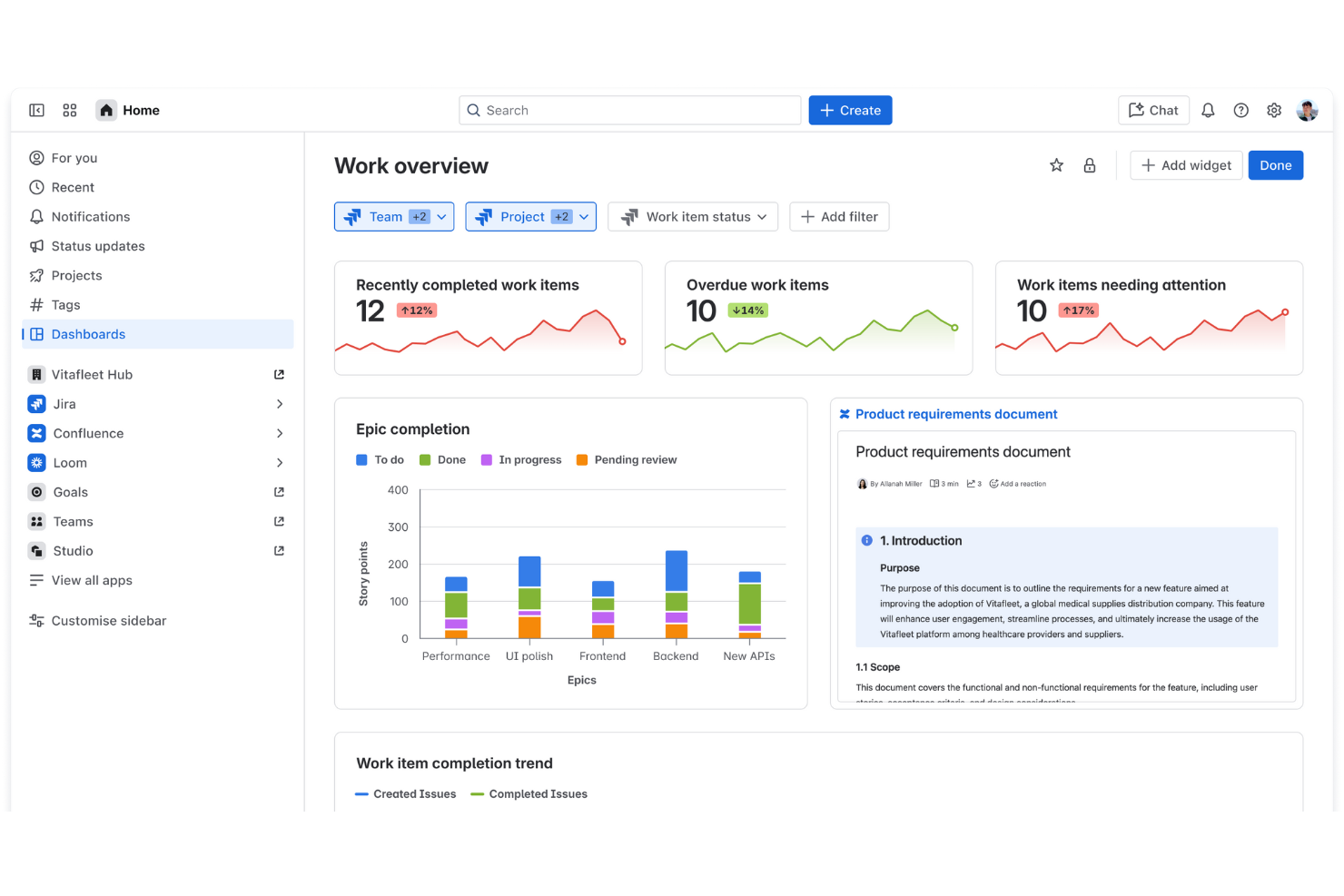
Software development teams looking for a purpose-built collaboration platform often turn to Atlassian. Its suite of tools is designed to support agile workflows, code management, and technical project tracking in ways that general collaboration platforms like Meta Workplace don’t address. Atlassian stands out by connecting issue tracking, documentation, and code repositories in a single ecosystem tailored for engineering teams.
Why Atlassian Is a Good Meta Workplace Alternative
For software development teams, Atlassian offers a level of project visibility and technical collaboration that Meta Workplace doesn’t match. I picked Atlassian because its tools, like Jira and Bitbucket, are purpose-built for managing code, tracking issues, and supporting agile sprints. You can link code commits directly to tasks, automate deployment workflows, and keep documentation connected to your projects with Confluence. This makes Atlassian a strong fit for engineering teams who need more than just chat and file sharing.
Atlassian Key Features
Some other features that make Atlassian appealing for technical teams include:
- Advanced Permission Controls: Set granular access levels for projects, repositories, and documentation.
- Customizable Workflows: Design and automate workflows to match your team’s unique processes.
- Built-In Reporting and Dashboards: Visualize project progress, sprint velocity, and team workload with real-time charts.
- Marketplace Add-Ons: Extend functionality with a wide range of third-party and Atlassian-built apps from the Atlassian Marketplace.
Atlassian Integrations
Integrations include Jira, Confluence, Bitbucket, Trello, Slack, Microsoft Teams, Rovo, and more.
Pros and Cons
Pros:
- Automation rules reduce repetitive tasks
- Agile boards support Scrum and Kanban
- Advanced issue tracking prioritizes work
Cons:
- Interface fragmented across Atlassian products
- Collaboration focuses on technical teams
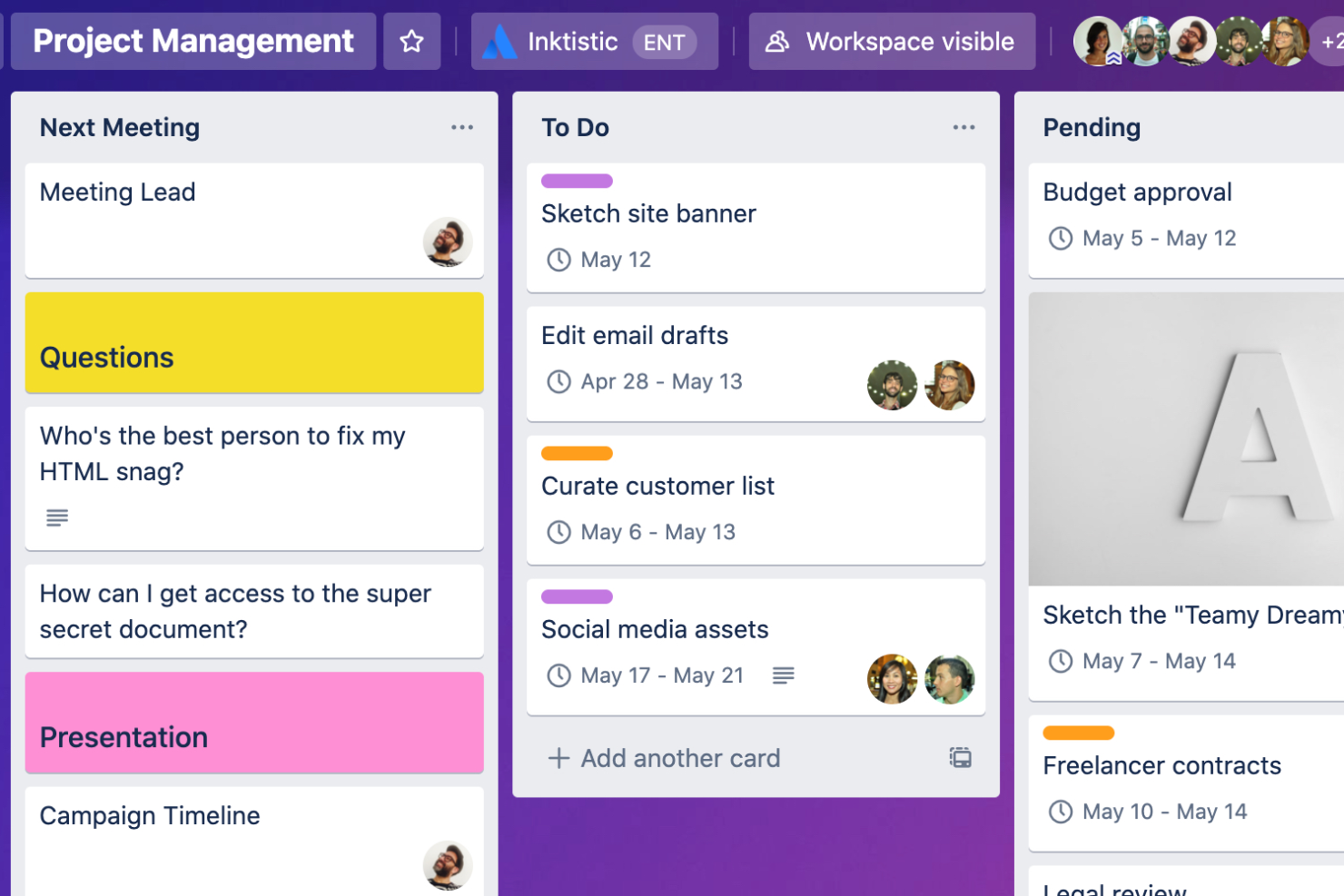
For teams that need a highly visual way to organize projects, Trello offers a flexible board-and-card system. It’s especially useful for product managers, marketing teams, and agencies who want to map out workflows, track progress, and manage tasks at a glance. Trello stands apart from Meta Workplace—now shut down—by letting you customize boards with drag-and-drop cards, labels, automations, and APIs that adapt to almost any process. Teams can also use it to support content creation and lightweight content management workflows, even though it isn’t designed as a full social intranet.
Why Trello Is a Good Meta Workplace Alternative
If you’re looking for a collaboration tool that makes project progress visible at a glance, Trello’s visual project boards are a strong alternative to Meta Workplace. I picked Trello because its board-and-card layout lets teams organize tasks, assign owners, and move work through custom stages with simple drag-and-drop actions. Features like color-coded labels and checklists help teams quickly spot priorities and track details without digging through chat threads. This approach is especially helpful for teams that want to manage workflows visually rather than through conversation feeds.
Trello Key Features
Some other features in Trello that help teams collaborate include:
- Power-Ups: Add extra functionality to boards, like calendar views or voting, with a wide range of Power-Ups.
- Card Attachments: Attach files, images, and documents directly to cards for easy reference.
- Butler Automation: Automate repetitive actions on boards using Trello’s built-in Butler automation tool.
- Activity Feed: Track all board activity and updates in a centralized feed for better visibility.
Trello Integrations
Integrations include Slack, Google Drive, Dropbox, Microsoft Teams, Jira, GitHub, Evernote, Salesforce, Zoom, Mailchimp, and more.
Pros and Cons
Pros:
- Butler automation handles repetitive tasks
- Power-Ups add calendars and reporting
- Visual boards clearly show project status
Cons:
- Document collaboration limited to attachment
- Reporting requires paid Power-Ups
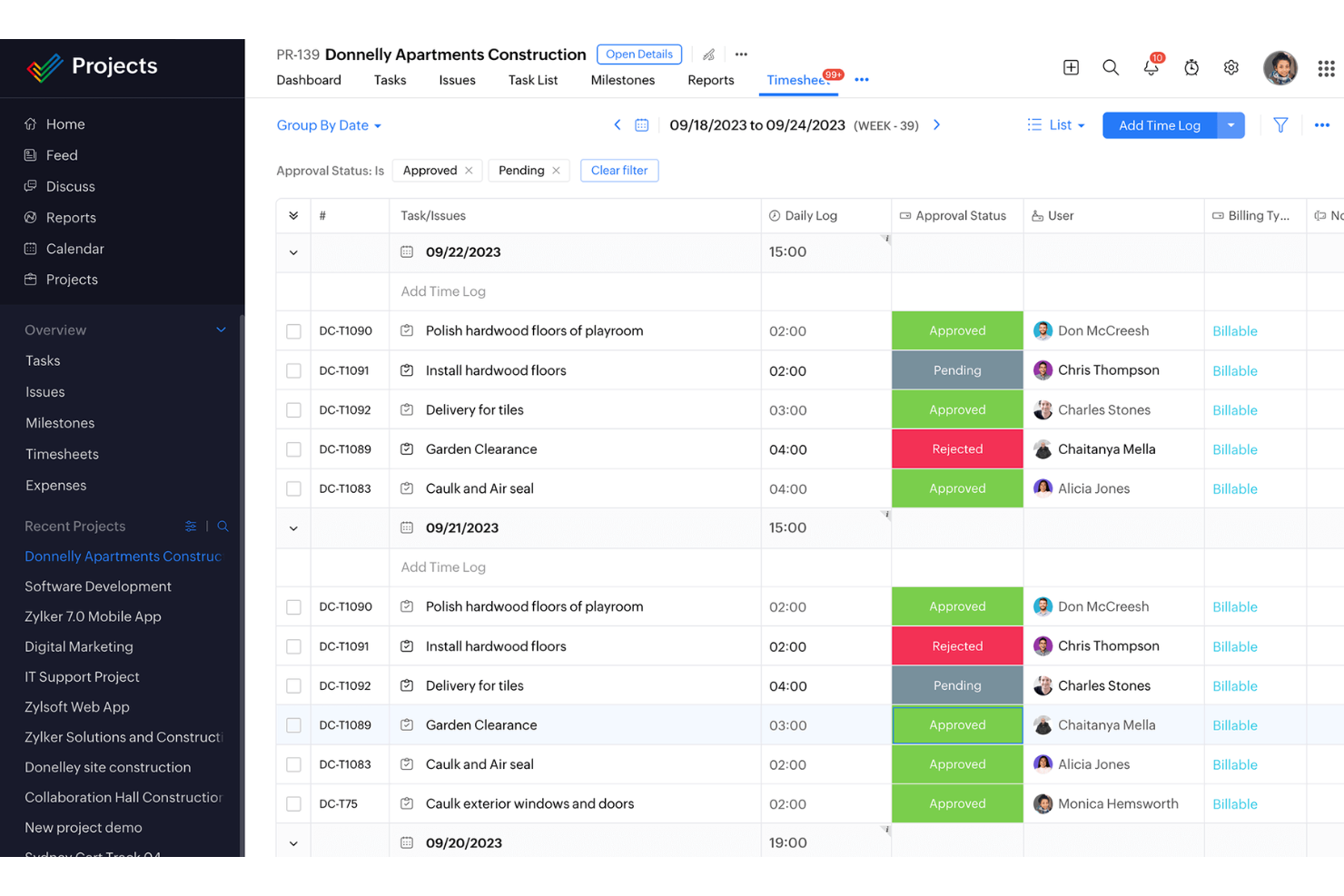
If your team needs a unified suite for documents, email, and collaboration, Zoho Workplace brings everything together in one platform. It’s especially useful for businesses that want office tools, file storage, and team communication tightly integrated without relying on multiple vendors. Unlike Meta Workplace, Zoho Workplace combines word processing, spreadsheets, presentations, and team chat in a single environment designed for seamless workflow.
Why Zoho Workplace Is a Good Meta Workplace Alternative
Unlike Meta Workplace, Zoho Workplace is built as a fully integrated office suite, making it a strong choice for teams that want all their productivity tools in one place. I picked Zoho Workplace because it combines document editing, spreadsheets, presentations, and team chat within a single platform. You can create, share, and collaborate on files without switching between separate apps or services. This approach helps teams keep their communication and content tightly connected, which is something Meta Workplace doesn’t offer natively.
Zoho Workplace Key Features
Some other features that make Zoho Workplace appealing for teams looking for an integrated suite include:
- Zoho Mail: Manage business email with custom domains and built-in collaboration tools.
- Zoho Cliq: Use real-time team messaging with channels, bots, and file sharing.
- Zoho WorkDrive: Store, organize, and collaborate on files with team-based cloud storage.
- Zoho Connect: Build internal social networks, create forums, and manage company-wide announcements.
Zoho Workplace Integrations
Integrations include Zoho CRM, Zoho Projects, Zoho Desk, Zoho Meeting, Zoho Mail, Zoho Cliq, Zoho Connect, Google Workspace, Microsoft Office 365, and Dropbox.
Pros and Cons
Pros:
- WorkDrive manages files with permissions
- Integrated chat and email tools
- Real-time collaboration supports shared editing
Cons:
- Sync issues between desktop and cloud
- Interface inconsistent across suite apps
Missive
Best for shared inbox collaboration
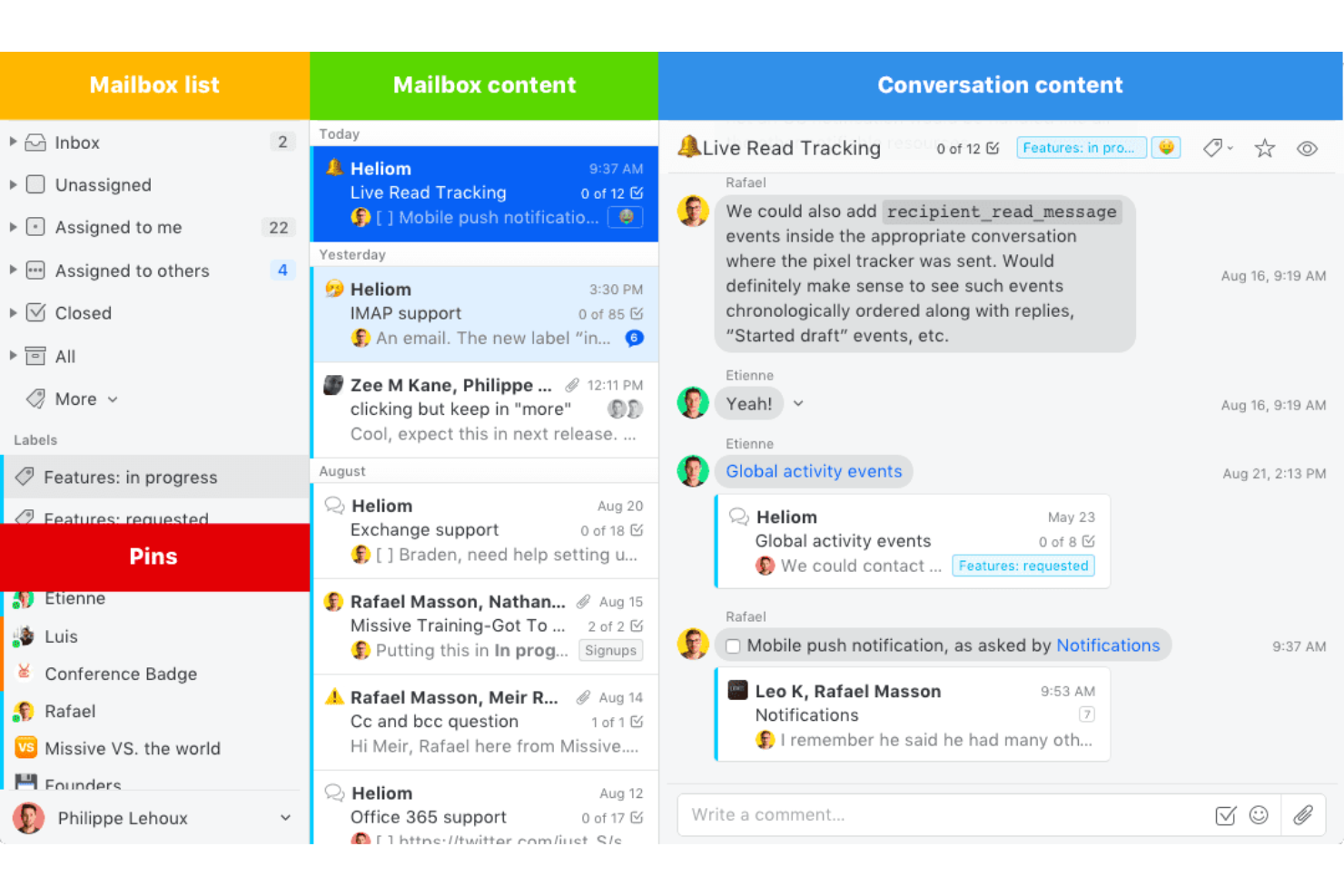
Teams that need to manage high volumes of email and chat in one place will find Missive especially useful. It’s designed for customer support, sales, and operations teams who want to collaborate directly inside a shared inbox. Unlike Meta Workplace, Missive lets you assign, comment on, and organize conversations without leaving your email client.
Why Missive Is a Good Meta Workplace Alternative
Missive stands out as a Meta Workplace alternative by focusing on shared inbox collaboration, which is essential for teams handling group email accounts. I picked Missive because it lets you assign conversations, chat internally about specific emails, and manage multiple channels—like email, SMS, and social media—within a single interface. The ability to comment directly on messages and create team chat threads inside the inbox keeps all communication contextually linked to the work at hand. This approach helps teams avoid scattered conversations and ensures everyone stays aligned on customer or project communications.
Missive Key Features
Some other features in Missive that help teams collaborate include:
- Shared Labels: Organize conversations across teams using color-coded, shared labels.
- Canned Responses: Save and insert pre-written replies to speed up repetitive communication.
- Rules and Automation: Set up custom rules to automatically assign, archive, or tag messages.
- Calendar Integration: Connect calendars to schedule meetings and manage events directly from the inbox.
Missive Integrations
Integrations include Slack, Dropbox, Google Drive, Trello, Zoom, Asana, Todoist, Pipedrive, HubSpot, Mailchimp, and more.
Pros and Cons
Pros:
- Assignable conversations clarify ownership
- Internal chat links discussions to messages
- Shared inboxes enable team email management
Cons:
- Search filters are less advanced
- Document editing is limited
New Product Updates from Missive
Missive Adds Conversation Pins
Missive now lets you pin key links, decisions, and notes inside a conversation, keeping them accessible in a dedicated Pins section in the Details sidebar. For more information, visit Missive's official site.
 .
.
Slack
Best for real-time team messaging

If your team needs fast, organized conversations, Slack is worth a look. This platform stands out for its real-time messaging channels, making it easy for distributed teams to keep discussions focused and searchable. Slack’s integrations and flexible notification settings help tech teams, agencies, and growing businesses simplify internal comms and stay aligned on projects. Its user-friendly, mobile-first design supports modern workplace customers, and it can connect with intranet tools and live streams to support broader team communication and updates.
Why Slack Is a Good Meta Workplace Alternative
What sets Slack apart as a Meta Workplace alternative is its focus on real-time team messaging. I picked Slack for teams that need instant communication and organized channels to keep projects moving. Features like threaded conversations and channel-based discussions help teams separate topics and avoid message overload. Slack’s searchable message history also makes it easy to find past decisions and keep everyone in the loop.
Slack Key Features
Some other features in Slack that support team collaboration include:
- Workflow Builder: Automate routine tasks and processes with custom workflows that connect messages, forms, and third-party apps.
- Huddles: Start quick, audio-first conversations directly in any channel or direct message for spontaneous discussions.
- File Sharing: Upload, share, and comment on documents, images, and files directly within conversations.
- App Directory: Access a large library of integrations with tools like Google Drive, Asana, and Jira to connect your workflows.
Slack Integrations
Integrations include Google Drive, Microsoft 365, Salesforce, Dropbox, Zoom, Asana, Trello, GitHub, Zendesk, Box, and more.
Pros and Cons
Pros:
- Workflow automation reduces repetitive tasks
- Searchable history finds past discussions
- Real-time notifications enable quick responses
Cons:
- File storage limits require cleanup
- Built-in video features relatively limited
Other Meta Workplace Alternatives
Here are some additional meta workplace alternatives that didn’t make it onto my shortlist, but are still worth checking out:
- monday AI Workspace
For customizable workspaces
- Zoom
For video meeting reliability
- Basecamp
For simple team coordination
- Wrike
For advanced reporting tools
- Notion
For combining docs and databases


How I Evaluate Meta Workplace Alternatives
When a team loses Workplace—its announcement feed, project groups, and company-wide visibility—I look at two things: whether a replacement clears the baseline, and what actually sets it apart.
Core Functionality (Table Stakes For This List)
When I'm selecting tools for my list, I rank each one on a scale from 0 (does not offer the functionality) to 5 (excels in this area) for each core functionality listed below. Then, I calculate the tool's total score into a percentage. Each tool needs to achieve a minimum total score of 65% to be considered for inclusion.
- Team Messaging & Channels: I check whether a platform supports structured channels with threading and search, so project teams can separate sprint discussions from general updates.
- Social Feed & Announcements: A good alternative needs a company-wide feed where leadership can post org announcements and teams can react, comment, and stay aligned without email chains.
- Groups & Communities: I look for the ability to create public and private groups with membership controls, similar to how Workplace let you spin up a group per project, department, or initiative.
- File Sharing & Collaboration: Each tool should let you share files in context—attaching a design spec directly to a thread, for example—with previews and basic version tracking.
- Project & Task Integration: Whether it's native task boards or connectors to tools like Jira, Asana, or Monday, I evaluate how well the platform ties conversations back to actual project work.
- Video & Voice Meetings: I look at whether a platform supports group video calls and screen sharing natively, since Workplace's live video and room-based calls were a daily habit for distributed teams.
Once I have a list of tools that meet this criteria, I consider what sets each platform apart.
Differentiating Factors (What Sets Vendors Apart)
Here's how I compare and contrast different vendors:
Standout Features
Migration tools matter a lot right now. I look at whether a platform can bulk-import Workplace groups, posts, and user directories so your team doesn't start from zero. Beyond the move itself, I evaluate built-in knowledge base or wiki features that let you turn project threads into lasting, searchable documentation. AI assistants are another differentiator—platforms that can auto-summarize long discussion threads or surface missed updates save project managers real time during busy sprints.
Beyond Features
Integration ecosystem is a big one—I check whether a platform connects natively to tools like Jira, Asana, or Monday so project updates flow between your communication hub and your task boards. Pricing structure also shapes the decision, especially for teams with a mix of desk and frontline workers who need different access levels. I evaluate security certifications and admin controls too, since any platform replacing Workplace will hold sensitive project data and org-wide communications.
Why Look For a Meta Workplace Alternative?
While Meta Workplace is a good choice of collaboration software, there are a number of reasons why some users seek out alternative solutions. You might be looking for a Meta Workplace alternative because…
- You need more advanced project management features
- Your team requires built-in client access or billing tools
- You want a platform with stronger data privacy controls
- Your organization operates in regions where Meta Workplace is restricted
- You prefer a tool with more flexible integration options
If any of these sound like you, you’ve come to the right place. My list contains several collaboration software options that are better suited for teams facing these challenges with Meta Workplace and looking for alternative solutions.