

10 Best Meeting Room Booking Software in 2026

Best Meeting Room Booking Software Shortlist


Meeting room booking software lets your team reserve, manage, and track rooms and resources for in-person or hybrid meetings. If you’re drowning in double-bookings, last-minute scrambles for space, or manual calendar chaos, these tools are built to bring order and visibility. In this guide, you’ll find top options designed for tech-driven workplaces where reliable scheduling and real-time room data actually matter. You’ll get a clear look at what each option does best, so you can pick the right fit for your team’s workspace and workflow.
Why Trust Our Software Recommendations
Our team has been testing and reviewing software since 2012. As project managers ourselves, we know how difficult—and important—it is to choose the right software.
For this guide, we evaluated tools using hands-on testing and independent research, scoring tools using our selection criteria. We also draw on insights from industry thought leaders and practicing project management experts.
Our reviews reflect our human editorial judgment, not a sales pitch.
Expert reviewers:
Best Meeting Room Booking Software Summary
This comparison chart summarizes pricing details for my top meeting room booking software selections to help you find the best one for your budget and business needs.
| Tool | Best For | Trial Info | Price | ||
|---|---|---|---|---|---|
| 1 | Best for visual workspace management | Free demo available | From $3000/year | Website | |
| 2 | Best for floor plan-based interactive scheduling | Free plan + free demo available | From $500/month | Website | |
| 3 | Best for on-the-go mobile booking | Free trial + free demo available | From $5/user/month (billed annually) | Website | |
| 4 | Best for single sign-on support | 30-day free trial + free demo available | From $13.50/month (billed annually) | Website | |
| 5 | Best for all-in-one desk, parking, and room booking | Free plan available | From €5.50/month (billed annually) | Website | |
| 6 | Best for workplace security integrations | Free demo available | From $5/bookable resource/month (billed annually) | Website | |
| 7 | Best for interactive floor plan visualization | Free demo available | Pricing upon request | Website | |
| 8 | Best for carbon footprint reporting | Free demo available | From $99/month | Website | |
| 9 | Best for wireless room display integration | 30-day free trial available | From $51/month | Website | |
| 10 | Best for Microsoft Outlook integration | Free demo available | From $5,149/year | Website |


Best Meeting Room Booking Software Reviews
Below are my detailed summaries of the best meeting room booking software that made it onto my shortlist. My reviews offer a detailed look at the features, integrations, and best use cases of each platform to help you find the best one for you.
Tactic
Best for visual workspace management
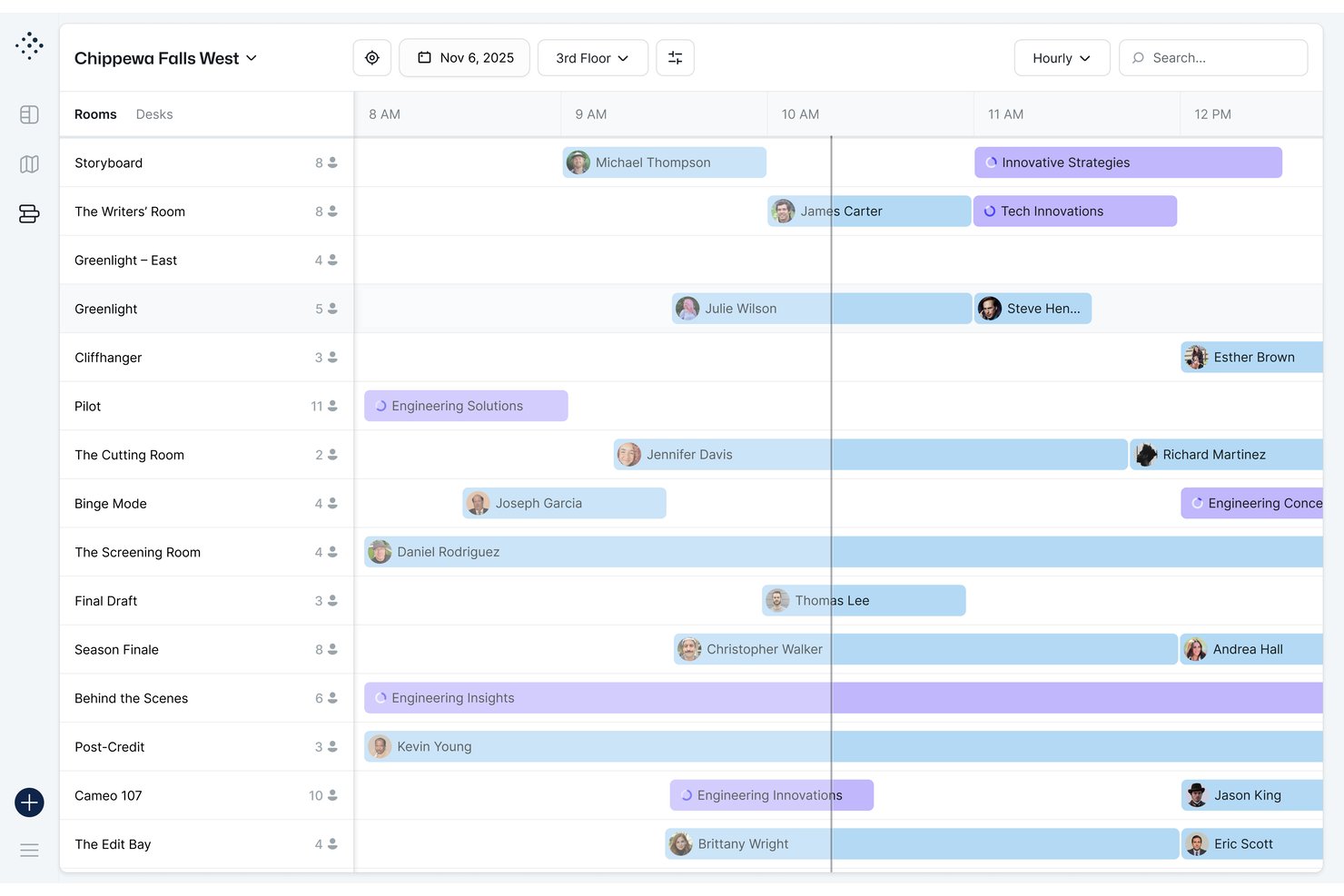
Tactic is a modular workplace management platform that covers meeting room booking, desk reservations, visitor management, and space analytics through interactive floor maps and calendar-connected booking workflows.
Who Is Tactic Best For?
Tactic is a strong fit for midsize companies managing hybrid workforces, particularly facilities and IT operations teams coordinating shared spaces across multiple office locations.
Why I Picked Tactic
Tactic earns its spot on my shortlist because the interactive floor maps show live room status directly on the floor plan, so my team can instantly spot open rooms, check capacity, and see exactly where they're located. I also like the Tessa AI assistant, which lets you book a room by describing what you need in plain language, skipping the manual filter search entirely. The Managed Rooms feature rounds it out, letting you bundle AV or catering into one booking request rather than coordinating that separately.
Tactic Key Features
- Two-way calendar sync: Integrates with Google Calendar and Outlook so reservations update automatically across platforms.
- Role-based permissions: Lets you assign different access levels and booking rights by team, department, or location.
- Office insights dashboard: Reports on room usage patterns, occupancy rates, and peak booking times.
- Visitor management: Handles guest check-in, badge printing, and host notifications from one interface.
Tactic Integrations
Tactic provides native integrations with Google Workspace, Microsoft 365, Outlook, Slack, Microsoft Teams, and Zoom. An API is available for custom integrations.
Pros and Cons
Pros:
- Combines desk and room booking natively
- AI assistant handles natural language booking requests
- Interactive floor maps show live room status
Cons:
- Setup requires manual floor plan digitization
- Analytics reporting less advanced than competitors

elia
Best for floor plan-based interactive scheduling
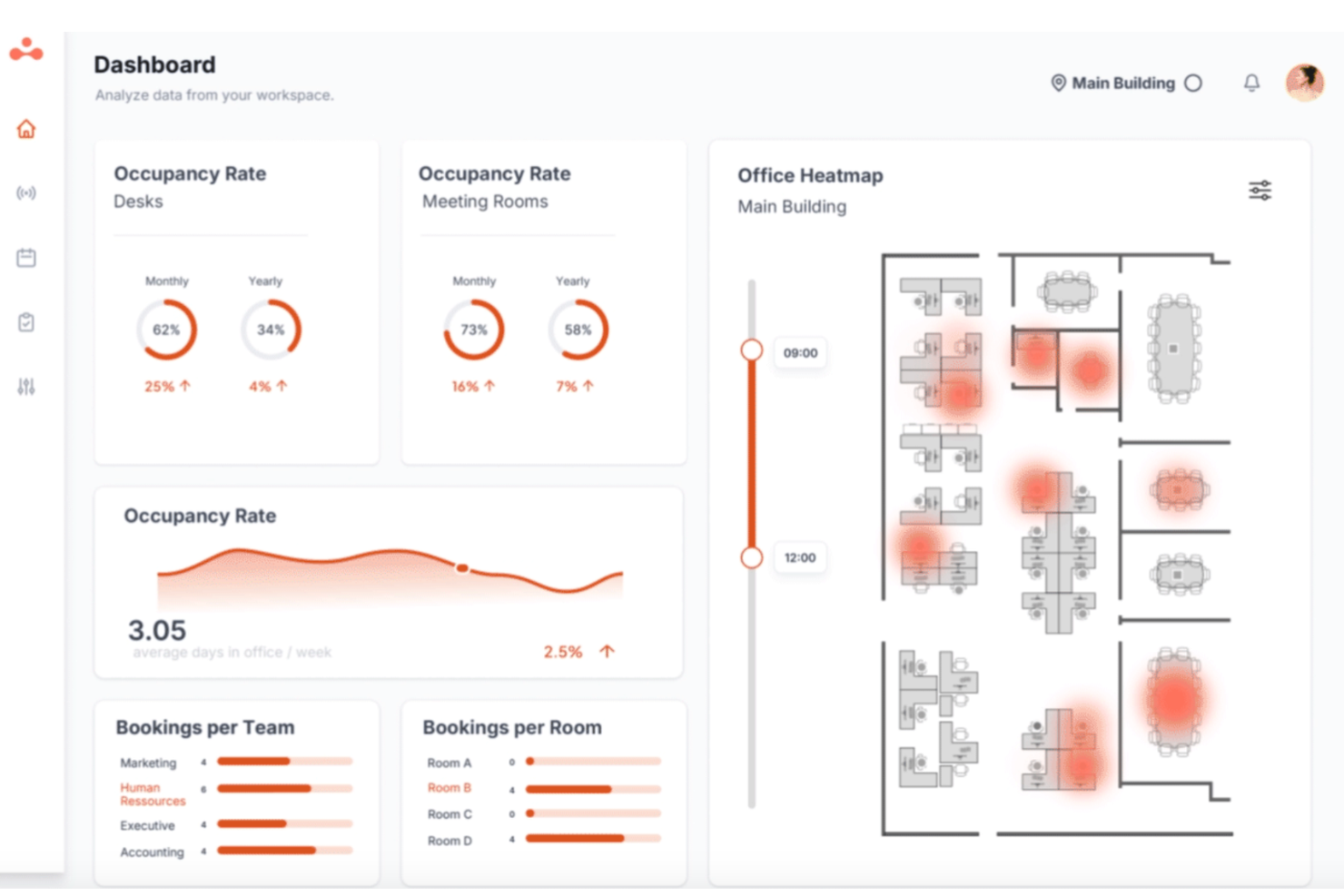
elia is a modular workplace management platform that combines meeting room booking, desk reservations, visitor management, occupancy sensing, and service requests into one system built around interactive floor plans.
Who Is elia Best For?
elia is a strong fit for facilities and office managers who need a single platform to handle room booking, desk reservations, visitor tracking, and space analytics across a physical office.
Why I Picked elia
I picked elia as one of the best because its floor plan-based booking experience is genuinely different from the typical list-and-calendar interfaces most tools offer. I love that admins build drag-and-drop floor plans without any coding, and employees book by clicking directly on a visual map filtered by capacity, equipment, and location. The system also auto-releases rooms when nobody shows up, using occupancy sensors that count entries and exits anonymously, which I find far more reliable than relying on people to cancel.
elia Key Features
- Two-way calendar sync: elia connects with Microsoft 365/Outlook and Google Workspace to keep room bookings updated across both platforms in real time.
- Check-in via multiple methods: Users can confirm a booking through email, Slack, Teams, or by tapping the door display, with badge-linked reservations available to reduce anonymous no-shows.
- Service request linking: Catering, AV setup, and room configuration requests can be attached directly to a booking from within the platform.
- Tiered utilization reporting: Reporting scales by plan, from basic usage summaries on Basic to custom dashboards on Business and AI-driven analytics on Enterprise.
elia Integrations
elia offers native integrations with Microsoft 365/Outlook and Google Workspace/Google Calendar, plus Slack notifications. Its Microsoft Teams app is available through Microsoft Marketplace, while Enterprise customers get API access for custom integrations.
Pros and Cons
Pros:
- Users report quick support responses
- No-show auto-release reduces wasted room time
- Interactive floor plans simplify room finding
Cons:
- Hardware requirements raise implementation complexity
- Recurring booking controls remain unclear

deskbird
Best for on-the-go mobile booking
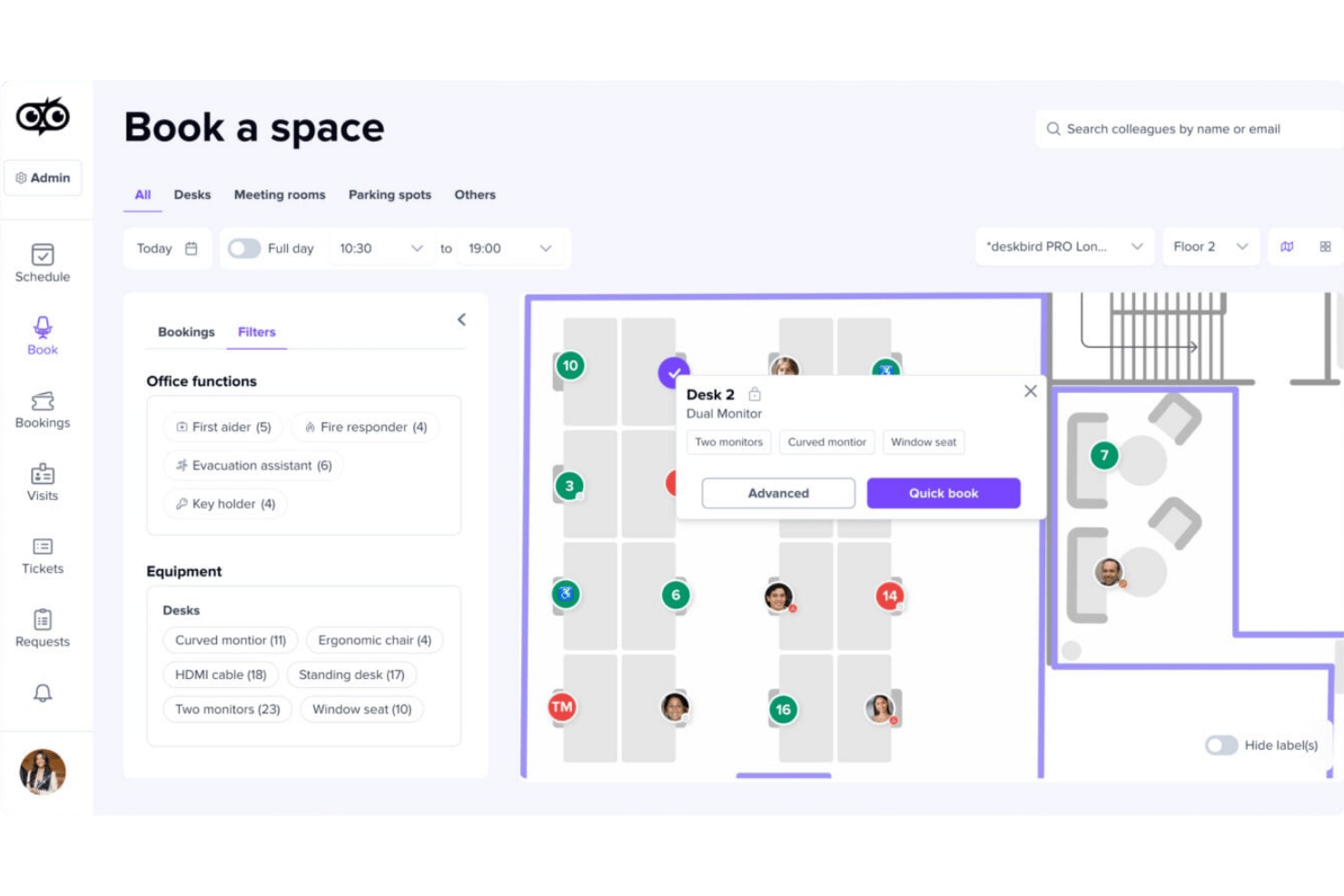
deskbird is a hybrid workplace management platform that combines meeting room booking, desk and parking reservations, interactive floor plans, calendar sync, and room utilization analytics.
Who Is deskbird Best For?
deskbird suits facilities and IT teams at mid-size to enterprise organizations managing hybrid workforces across multiple office locations.
Why I Picked deskbird
deskbird earns its spot on my shortlist because of how many ways it lets me book a room without sitting at a desk. I can grab a room through the native iOS or Android app, check in via QR code at the door, or book directly inside Teams or Outlook on my phone. What I especially like is Kiosk Mode, which runs on any commercial tablet and lets me walk up to a room entrance and book on the spot.
deskbird Key Features
- Recurring meeting room reservations: Schedule and manage repeating bookings for ongoing project meetings directly in the platform.
- Interactive floor plans: View and select available rooms on visual maps with details like capacity and amenities.
- No-show prevention with auto-release: Rooms are released if attendees don’t check in, reducing unused reservations.
- Room utilization analytics: Access dashboards tracking occupancy, booking frequency, and usage data to support workspace planning.
deskbird Integrations
deskbird offers native integrations with Microsoft Outlook, Microsoft Teams, Google Calendar, Slack, BambooHR, HiBob, Personio, and SAP SuccessFactors HCM. An API is available for custom integrations.
Pros and Cons
Pros:
- Tracks parking space data
- Supports instant QR check-in
- Mobile app supports full room booking workflow
Cons:
- Some users report occasional double bookings
- Recurring bookings have limited customization options
Best for single sign-on support
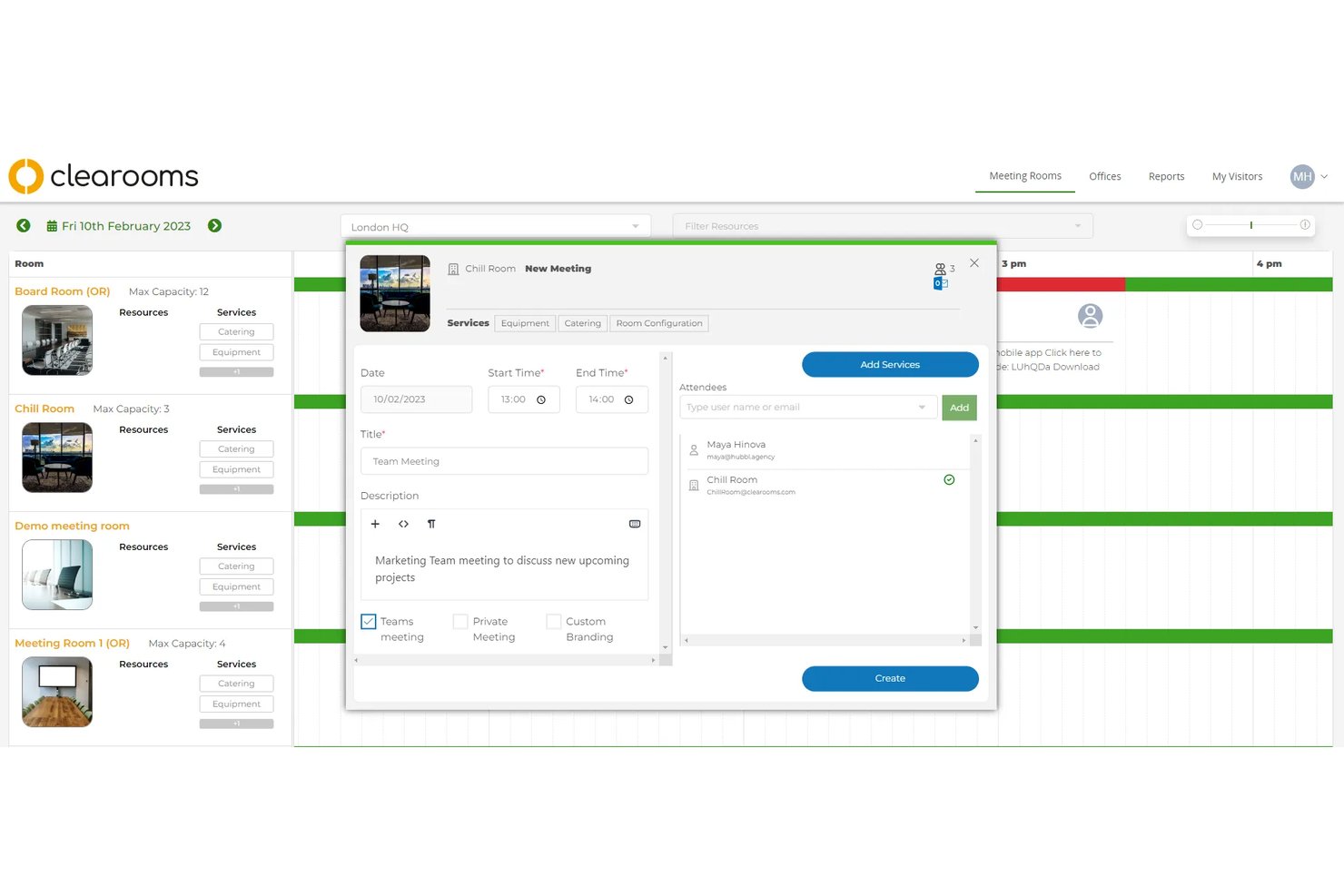
Clearooms is a hybrid workspace booking platform that covers meeting room reservations, hot desk management, visitor check-in, and parking allocation from a single interface with interactive floor plans and calendar sync.
Who Is Clearooms Best For?
Clearooms is a strong fit for IT operations managers and facilities teams at mid-sized companies that need SSO-integrated workspace booking without enterprise-level complexity or pricing.
Why I Picked Clearooms
I've included Clearooms in my top picks because its SSO support covers all the major identity providers (Azure, Okta, JumpCloud, and OneLogin) without gating that access behind a premium tier. In practice, that means my team can roll out room booking across the whole organization without managing a separate login layer. The SCIM provisioning support also makes user lifecycle management automatic, so new hires get access, and departures are removed without any manual updates inside Clearooms.
Clearooms Key Features
- Linked Rooms booking: Book multiple meeting rooms at once for larger or connected events.
- Customizable approval workflows: Designate approvers for specific meeting rooms to review or provide feedback on booking requests.
- Interactive floor plans: Visual floor plans with traffic-light indicators show live room and desk availability.
- Room services module: Add and track catering or refreshment orders for meetings directly in the platform.
Clearooms Integrations
Clearooms offers native integrations with Microsoft 365, Google Workspace, Microsoft Teams, Okta, JumpCloud, OneLogin, Salto, Paxton Net2, and Slack. An API is available for custom integrations.
Pros and Cons
Pros:
- Interactive floor plans support multiple locations
- Automatic user provisioning and deprovisioning via SCIM
- SSO included with no premium tier required
Cons:
- Room sensor integrations not currently supported
- No 3D navigation or wayfinding features

Dibsido
Best for all-in-one desk, parking, and room booking
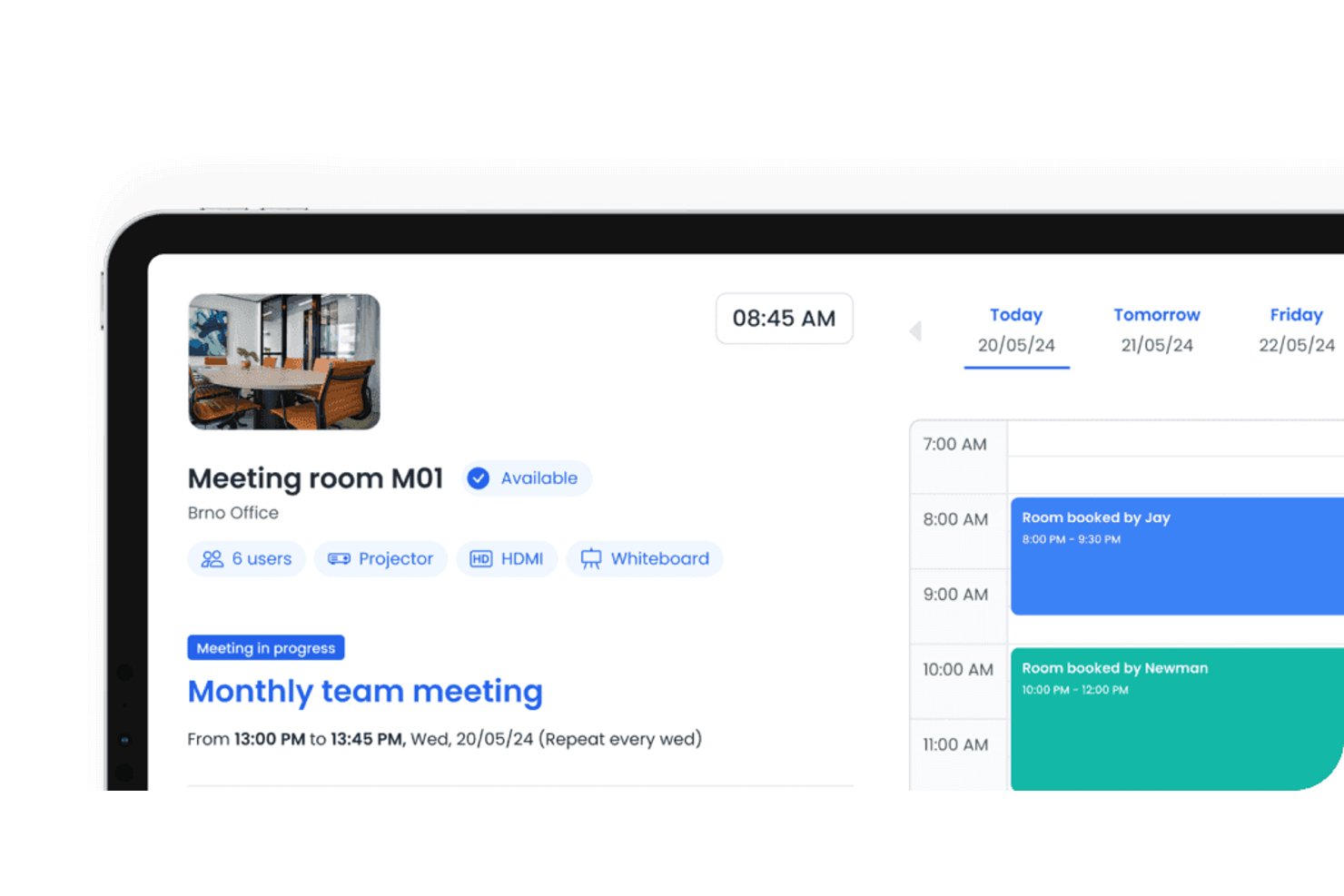
Dibsido is a hybrid workplace booking platform that combines meeting room reservations, desk booking, and parking management in a single app with interactive floor plans, calendar sync, and utilization analytics.
Who Is Dibsido Best For?
Dibsido is a strong fit for office and facilities managers at small to mid-size companies who need desk, parking, and meeting room booking in one place.
Why I Picked Dibsido
I've included Dibsido in my top picks because it's the only tool on this list that manages desks, parking, and meeting rooms from a single interactive floor plan. I particularly like how recurring room reservations work: you set a weekly standup once, and the series extends automatically as your booking window rolls forward, which removes a real administrative headache. Analytics 2.0 adds heatmaps and plain-language recommendations, so you can see which rooms go unused and act on it without digging through raw data.
Dibsido Key Features
- Two-way calendar sync: Dibsido connects with Google Calendar and Microsoft Outlook so bookings made in either platform reflect instantly in both.
- SSO and SCIM provisioning: Supports Microsoft Entra ID, Okta, and SAML 2.0 login, with automatic user setup and removal through SCIM.
- Service requests on bookings: Attach catering or IT support requests directly to a room reservation, with automatic notifications sent to the assigned team.
- QR code check-in and booking: Place a QR code outside any room so people can check in or book on the spot without opening the app.
Dibsido Integrations
Dibsido offers native integrations with Google Calendar, Microsoft Outlook/365, Microsoft Teams, and Slack. It also supports a public API for custom integrations and Zapier.
Pros and Cons
Pros:
- Heatmaps reveal underused meeting spaces
- QR check-in supports room-side booking
- Recurring series suit weekly stand-ups
Cons:
- Room search lacks capacity and amenity filters
- No sensor-based occupancy verification
Envoy
Best for workplace security integrations
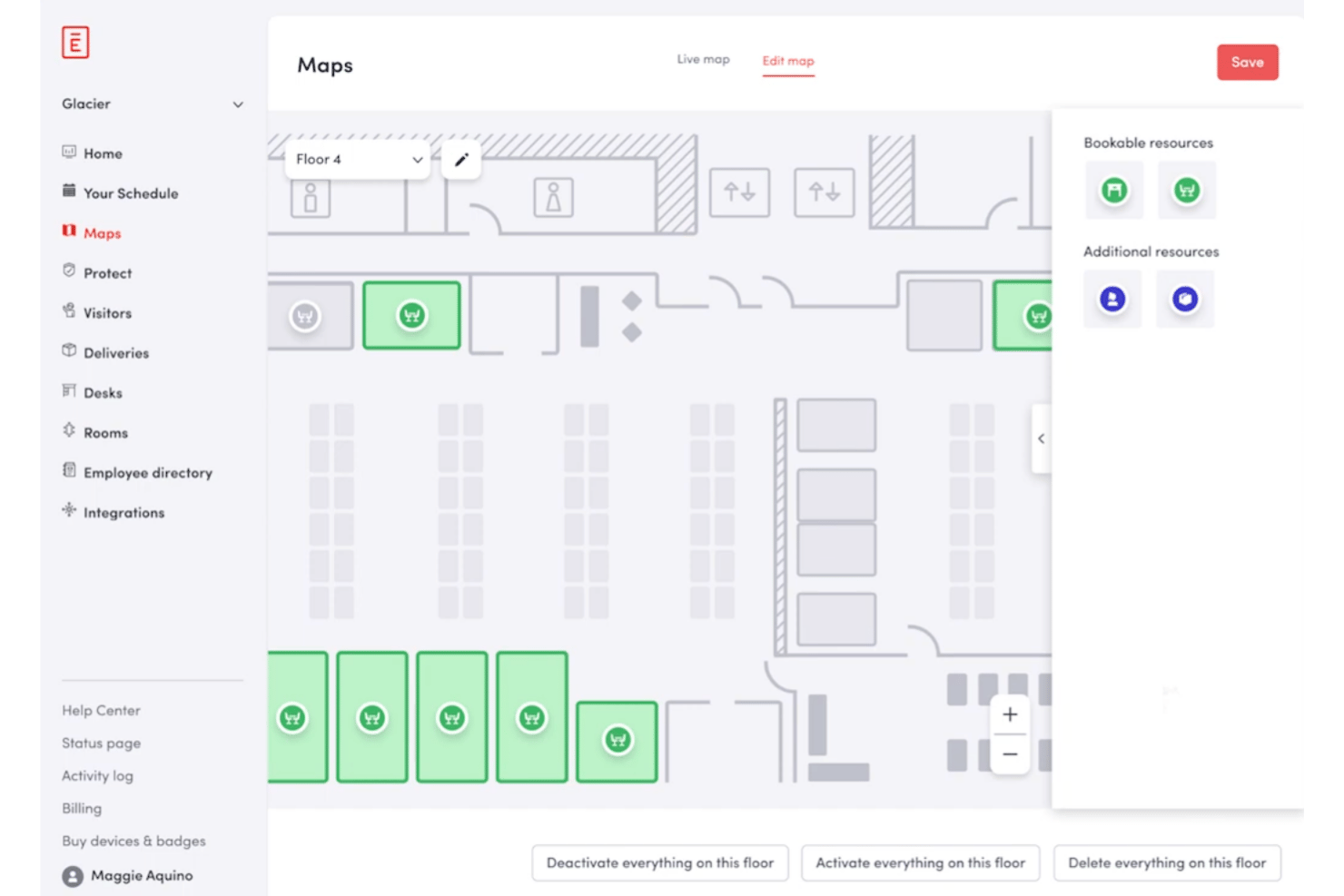
Envoy is a workplace management platform that combines conference room scheduling, desk booking, and visitor management with deep integrations into access control systems, identity providers, and calendar tools like Google Workspace and Microsoft 365.
Who Is Envoy Best For?
Envoy is a strong fit for IT operations and facilities teams at mid-to-large organizations that need room booking connected to access control, SSO, and security infrastructure.
Why I Picked Envoy
I picked Envoy as one of the best because no other room booking tool connects the calendar layer to the physical security layer as tightly. When my team books a conference room, Envoy can trigger door access permissions through systems like Kisi, Brivo, or Verkada, so only listed attendees can physically enter. On the identity side, SSO via Okta or Microsoft Entra ID means room access rights stay in sync with directory provisioning automatically.
Envoy Key Features
- Real-time room availability indicators: Status lights outside each room show if spaces are free, reserved, or occupied.
- Interactive workplace floor maps: Visual maps let users locate and book available rooms by capacity and amenities.
- Automated check-in and end meeting workflows: Check in or end meetings from tablets, Slack, Teams, or the Envoy mobile app.
- Detailed utilization analytics dashboards: Built-in dashboards report on booking frequency, occupancy, and overall room usage data.
Envoy Integrations
Envoy offers native integrations with Google Workspace, Microsoft 365, Slack, Teams, Okta, Kisi, Brivo, Genetec, LenelS2, and Cisco Meraki. An API is available for custom integrations.
Pros and Cons
Pros:
- Auto-release of unclaimed room reservations
- Interactive maps for locating available rooms
- Connects bookings to physical access control
Cons:
- Reporting features locked behind higher plans
- Room panels require iPad hardware

Robin
Best for interactive floor plan visualization
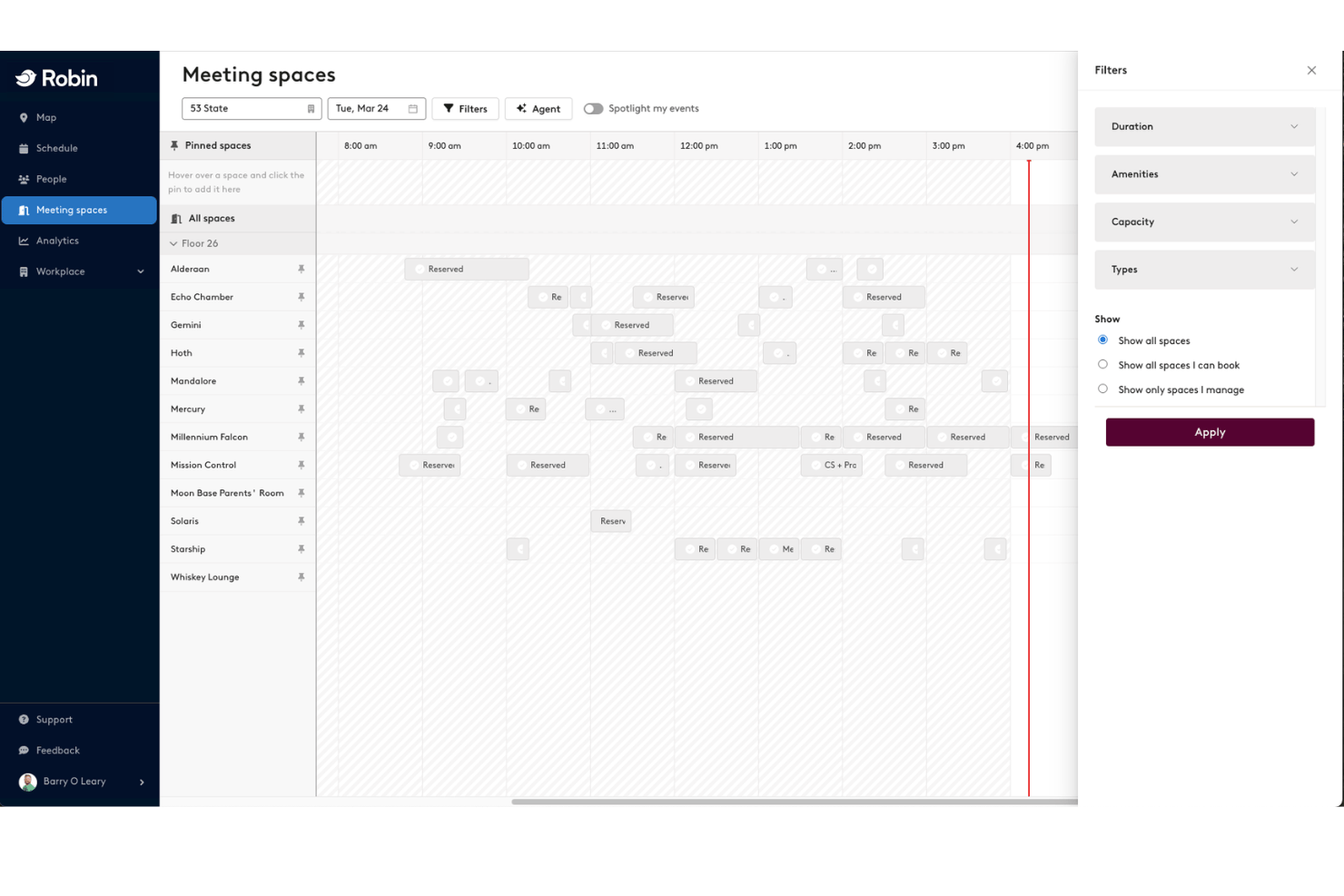
Robin is a workplace scheduling platform that combines meeting room booking, desk reservations, interactive floor maps, visitor management, and space utilization analytics across multi-floor and multi-location office environments.
Who Is Robin Best For?
Robin is a strong fit for facilities and IT teams at mid-market to enterprise organizations managing hybrid workforces across multiple office floors or locations.
Why I Picked Robin
Robin earns its spot on my shortlist because the interactive floor map visualization is genuinely the best I've seen in this category. In practice, my team can view live room availability directly on a visual floor plan, filter by capacity or amenity, and book the right room without leaving the map view. Robin also pushes real-time availability to hallway displays and in-room tablets, so wayfinding is handled at the physical level, not just digitally.
Robin Key Features
- Bidirectional calendar integration: Syncs meetings automatically with Google Workspace, Microsoft 365, and Outlook calendars.
- Automated room release: Frees up reserved rooms when users do not check in via mobile, panel, or badge.
- Custom booking policies: Allow admins to set rules for booking windows, meeting durations, and advance reservations.
- Space utilization analytics: Provides dashboards with occupancy trends, booking data, and exportable reports.
Robin Integrations
Robin offers native integrations with Google Workspace, Microsoft 365, Outlook, Microsoft Teams, Slack, Okta, Crestron, Logitech, and Kisi. An API is available for custom integrations.
Pros and Cons
Pros:
- Abandoned meetings auto-release booked spaces
- Visual room selection directly from map view
- Connects with badge readers
Cons:
- No built-in shift management
- Recurring reservations can create orphaned bookings
YAROOMS
Best for carbon footprint reporting
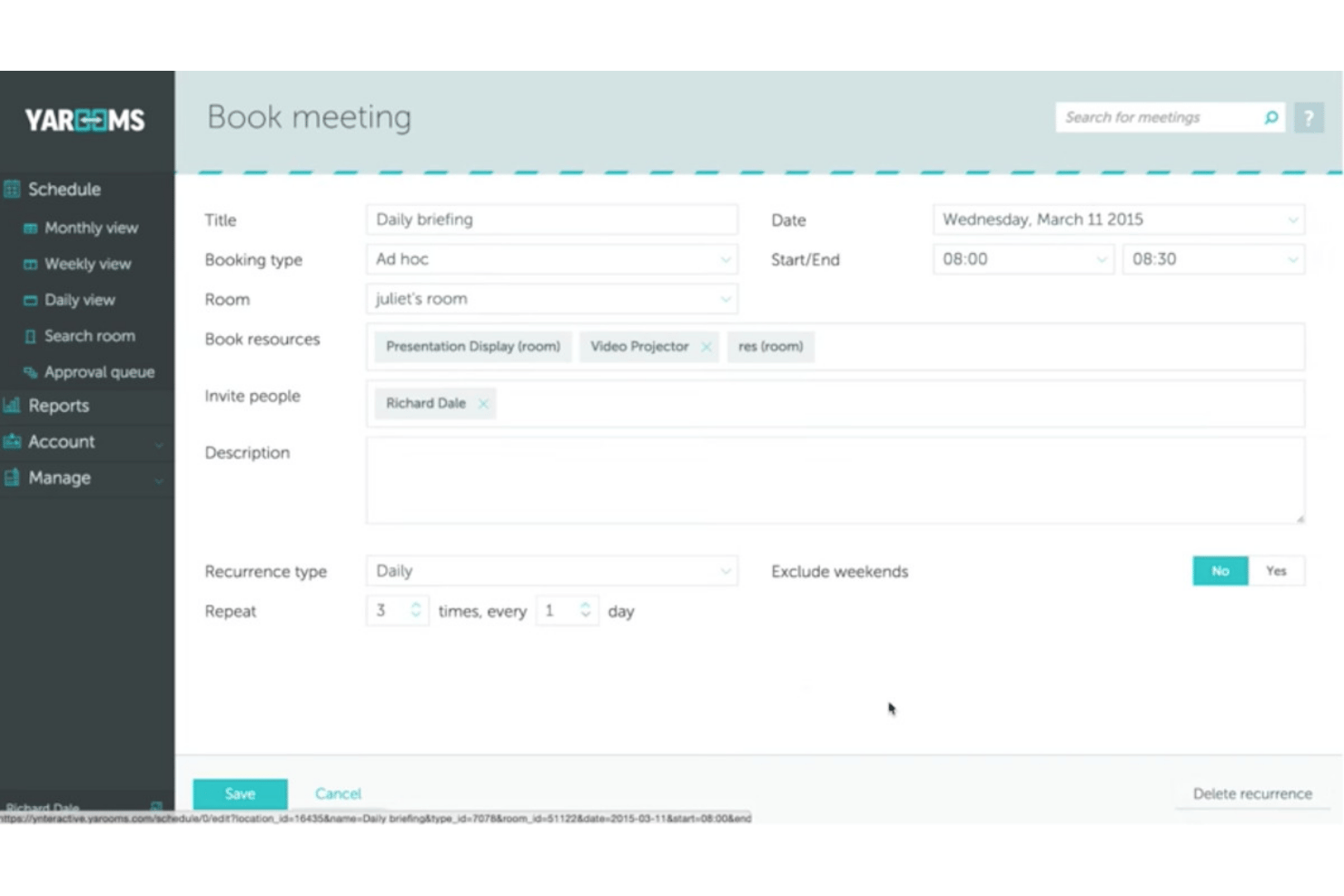
YAROOMS is a meeting room booking platform that combines interactive floor maps, AI-assisted scheduling through Microsoft Teams and Slack, digital door displays, and built-in workplace sustainability tracking.
Who Is YAROOMS Best For?
YAROOMS is a strong fit for facilities and IT operations teams managing hybrid workplaces across multiple office locations.
Why I Picked YAROOMS
I picked YAROOMS as one of the best because it's the only meeting room booking tool I've found that tracks Scope 2 and Scope 3 CO2 emissions directly from room and workspace usage. I can monitor my office's carbon footprint over time and track progress toward net-zero targets, all within the same platform I use to book rooms. The no-show auto-release feature also keeps that data accurate, since unclaimed rooms are freed automatically rather than sitting empty and skewing utilization reports.
YAROOMS Key Features
- Interactive floor maps: Browse, filter, and select rooms by location, amenities, or size using live office maps.
- YARVIS AI assistant: Reserve rooms, find colleagues, or adjust meetings directly from Microsoft Teams or Slack chat.
- Digital room signage: Display real-time room status and manage bookings with hardware-agnostic digital displays.
- Approval workflows: Set custom booking approval rules for rooms based on user, time, or location.
YAROOMS Integrations
YAROOMS offers native integrations with Microsoft 365, Google Workspace, Microsoft Teams, Zoom, Slack, and Google Meet. An API is available for custom integrations.
Pros and Cons
Pros:
- Generates automated sustainability metrics
- Auto-release for unused room reservations
- Tracks Scope 2 and 3 emissions data
Cons:
- Occasional syncing delays with some calendars
- Limited floor plans on base plans

Joan
Best for wireless room display integration
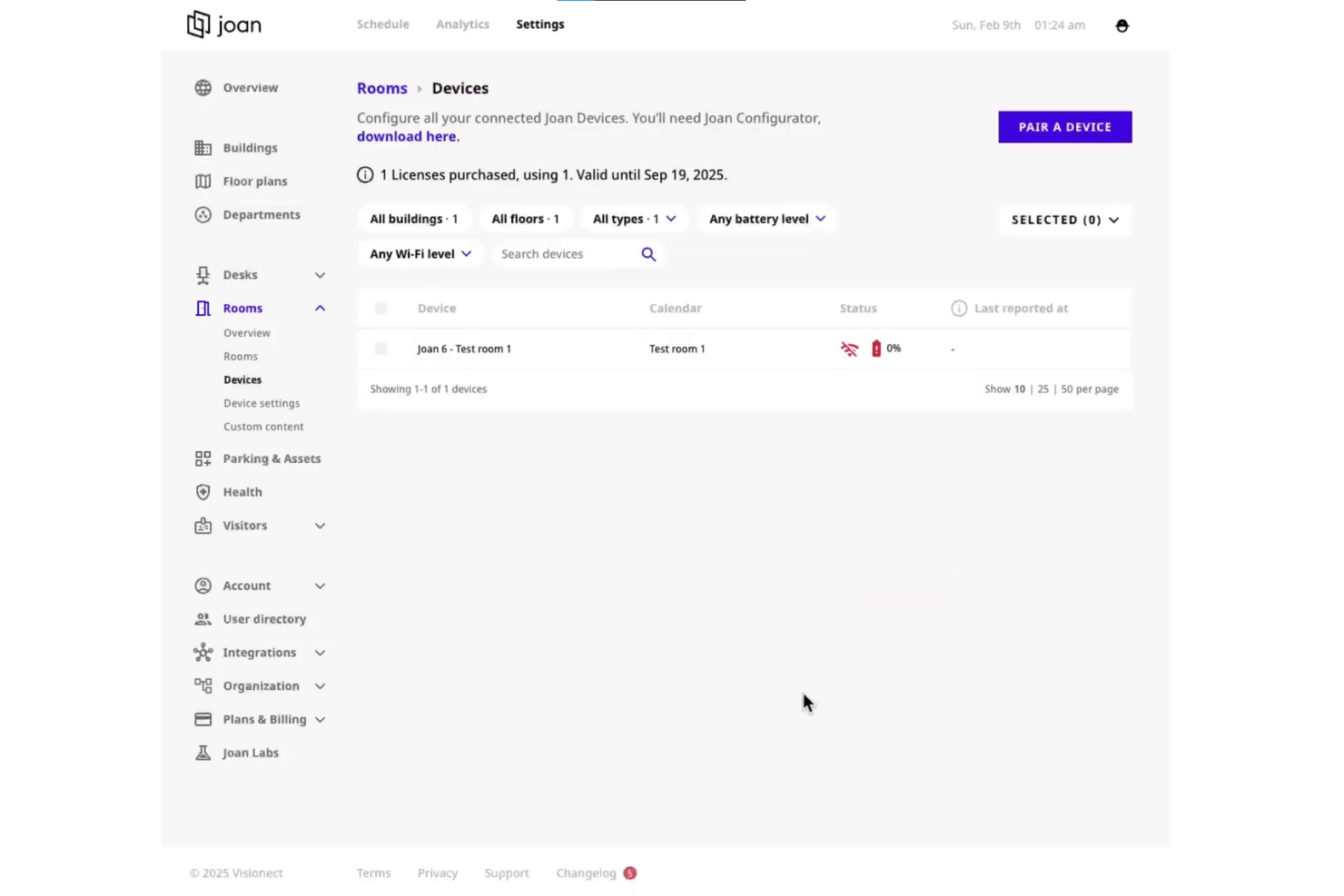
Joan is a meeting room booking platform that pairs scheduling software with wireless e-paper door displays to support room reservations, desk booking, visitor management, and utilization analytics.
Who Is Joan Best For?
Joan is a strong fit for office and facilities managers in mid-sized to enterprise organizations running hybrid work environments across multiple locations.
Why I Picked Joan
Joan earns its spot on my shortlist because its cable-free ePaper displays are genuinely unlike anything else in this category. I love that the Joan 6 Pro mounts anywhere with a self-adhesive magnet (no drilling, no power outlets), and its LED traffic-light ring signals room status from across a hallway without anyone needing to check a screen. The auto-release feature clears unclaimed rooms automatically, so the door display stays accurate without manual intervention.
Joan Key Features
- Calendar sync with Outlook and Google: Instantly updates bookings across all major calendar systems so schedules stay unified.
- Multi-location and multi-floor support: Lets admins manage bookings for several sites and buildings from a central dashboard.
- Mobile app for booking and check-in: Users can reserve rooms or check in using the iOS or Android app, from anywhere.
- Meeting room analytics dashboard: Tracks usage patterns, room occupancy, and booking trends for workspace optimization.
Joan Integrations
Joan offers native integrations with Google Workspace, Microsoft 365, Outlook, Exchange, Microsoft Teams, Slack, Cisco Webex, Okta, Azure Active Directory, and Zapier. An API is available for custom integrations.
Pros and Cons
Pros:
- Hybrid desk and room booking in one platform
- Automatic release of no-show bookings
- Wireless e-paper door displays for rooms
Cons:
- Room analytics customization is limited
- Requires hardware for full functionality

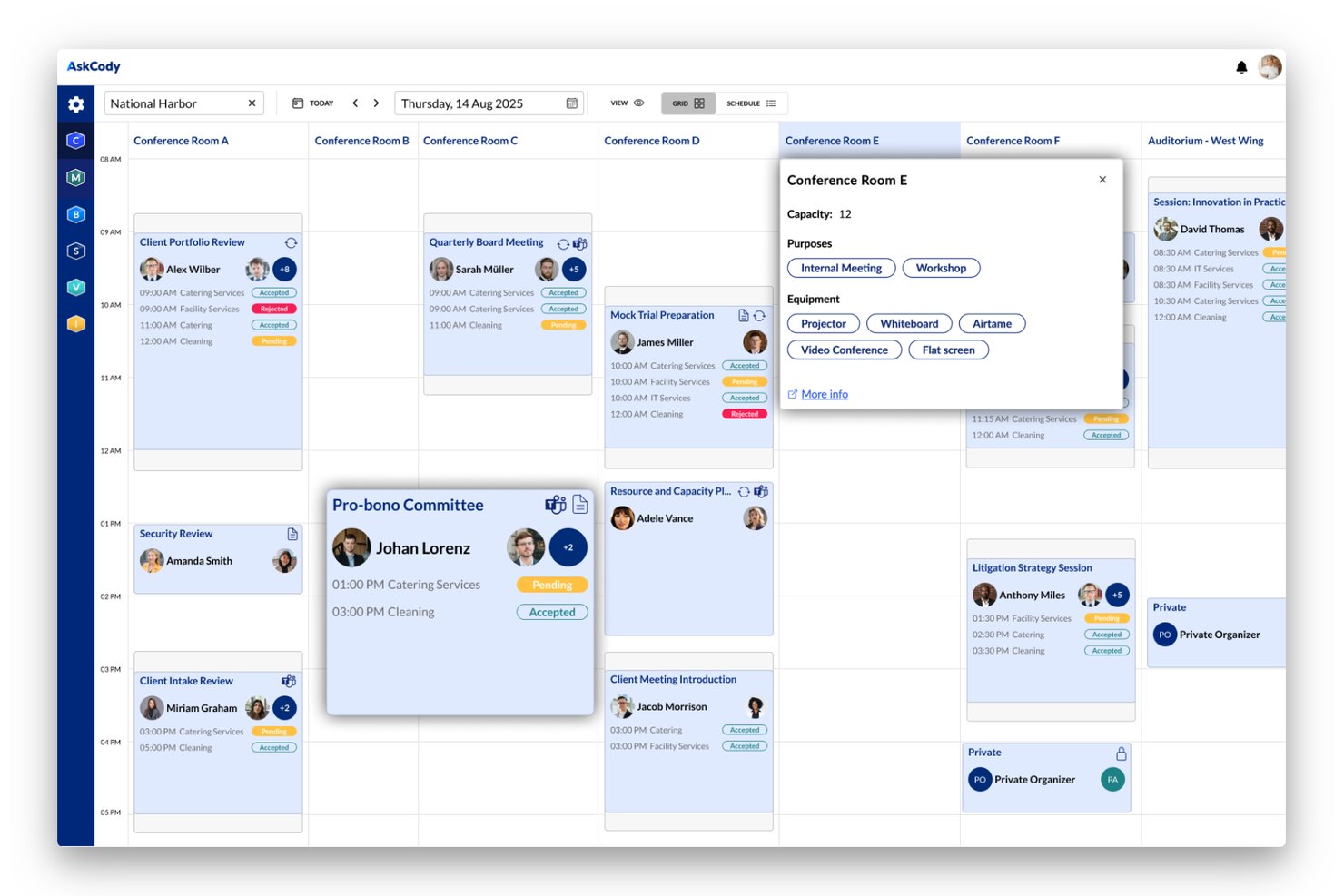
AskCody is a meeting room booking and workspace scheduling platform built natively for Microsoft 365, combining room and desk reservations, visitor management, service coordination, and utilization analytics.
Who Is AskCody Best For?
AskCody is a strong fit for IT and facilities managers at mid-to-large enterprises already standardized on Microsoft 365 and Exchange.
Why I Picked AskCody
AskCody earns its spot on my shortlist because of how deeply it lives inside Microsoft Outlook. You can book rooms, request catering, and manage visitor arrivals without ever leaving the Outlook interface. What I find particularly useful is follow-the-meeting intelligence: when you reschedule a meeting, all attached service requests (catering, AV equipment) update automatically to match the new time.
AskCody Key Features
- Interactive floor maps: Visual maps let users find and reserve rooms or desks with filters for location, capacity, and amenities.
- Room displays: Digital panels outside meeting spaces show current bookings, availability, and support room check-in workflows.
- Utilization analytics: Detailed dashboards provide reporting on space occupancy, booking patterns, and workplace usage trends.
- Visitor management: The system handles guest pre-registration, host notifications, and visitor badge printing for secure access.
AskCody Integrations
AskCody has native integrations across the Microsoft ecosystem, including Microsoft 365, Outlook, Exchange, Teams, Power BI, and Azure Active Directory. An API is available for custom integrations.
Pros and Cons
Pros:
- Powerful analytics for space utilization tracking
- Built-in visitor and facilities management tools
- Deep Microsoft Outlook and Exchange integration
Cons:
- Recurring meeting booking can be inflexible
- Limited support for non-Microsoft environments
Other Meeting Room Booking Software
Here are some additional meeting room booking software options that didn’t make it onto my shortlist, but are still worth checking out:
- Eptura Engage
For advanced analytics and reporting
- Accruent EMS
For large enterprise implementations
- Tidaro
For comprehensive visitor management
- Skedda
For customizable booking policies
- Kadence
For hybrid work coordination
- OfficeSpace
For interactive booking kiosks
- Spacewell
For IoT sensor-driven availability
- Archie
For coworking space management
- Officely
For Slack-based room reservations
- DeskFlex
For custom recurring bookings


How I Evaluate Meeting Room Booking Software
I evaluate meeting room booking tools in two layers: the core workflows every platform must handle—like real-time availability and auto-release—and the differentiators that set the best apart.
Core Functionality (Table Stakes For This List)
When I'm selecting tools for my list, I rank each one on a scale from 0 (does not offer the functionality) to 5 (excels in this area) for each core functionality listed below. Then, I calculate the tool's total score as a percentage. Each tool needs to achieve a minimum total score of 65% to be considered for inclusion.
- Real-Time Availability: I look for live room status that updates instantly, so someone booking a sprint planning room doesn't collide with another team's standup.
- Calendar Integration: Two-way sync with Outlook and Google Calendar matters most—teams should book rooms without leaving their existing calendar workflow.
- Recurring Reservations: I check whether the tool handles repeating bookings with flexibility, like editing a single instance of a weekly sprint ceremony without breaking the series.
- Interactive Floor Maps: Visual floor plans that show room location, capacity, and amenities help teams in multi-floor offices pick the right space without guesswork.
- Check-In & Auto-Release: I evaluate how the platform handles no-shows—tools that auto-release unclaimed rooms after a set window keep ghost bookings from wasting space.
- Utilization Analytics: Reporting on occupancy rates and booking patterns tells you which rooms sit empty and which need to be split or expanded for better use.
Once I have a list of tools that meet the criteria, I consider what sets each platform apart.
Differentiating Factors (What Sets Vendors Apart)
Here's how I compare and contrast different vendors:
Standout Features
Digital room displays mounted outside conference rooms let teams see at a glance whether a space is open and book it on the spot without pulling out a phone. Hybrid meeting support matters too—I look for auto-provisioning of video links for Zoom or Teams the moment a booking is created, so organizers don't scramble for URLs. Smart check-in through sensors or badge taps also separates vendors, since it releases no-show rooms faster than manual confirmation alone.
Beyond Features
Hardware compatibility is a big one—I check whether a platform supports third-party room panels like Crestron or Logitech Tap instead of locking you into proprietary devices. Scalability also matters for teams managing rooms across multiple offices and time zones from one admin console. I look at security posture too, including SSO support via SAML or Azure AD and clear data governance policies around occupancy sensor data.
How to Choose Meeting Room Booking Software
It’s easy to get bogged down in long feature lists and complex pricing structures. To help you stay focused as you work through your unique software selection process, here’s a checklist of factors to keep in mind:
| Factor | What to Consider |
|---|---|
| Scalability | Can the tool handle your needs as you grow—adding new locations, users, or rooms? Look for flexible admin controls and multi-site support for future expansion. |
| Integrations | Does the software connect to your existing calendars, communication platforms, or access control systems? Prioritize options that fit cleanly into your workflows. |
| Customizability | Can you adjust booking policies, approval flows, and user roles? Consider tools that support your organization’s unique meeting culture and hierarchy. |
| Ease of use | Is the interface intuitive for both booking professionals and occasional users? Complexity can kill adoption—test with a few typical users before roll-out. |
| Implementation and onboarding | What resources are required to get started? Ask about training, migration assistance, and timeline, especially if rolling out to multiple offices or regions. |
| Cost | Are fees based on users, rooms, locations, or features? Factor in both short-term budget fit and how costs might change as your needs evolve. |
| Security safeguards | Does the solution support SSO, data encryption, and clear privacy policies? Make sure the provider matches your organization’s security and compliance standards. |
| Support availability | What’s the provider’s response time and support channel coverage? Consider SLAs, global support hours, and escalation paths if offices work across time zones. |
What Is Meeting Room Booking Software?
Meeting room booking software is a digital platform that lets you reserve, manage, and track meeting spaces and resources within your workplace. These systems give your team a real-time view of room availability, prevent double-booking, and simplify recurring or hybrid meeting setup—while helping facilities teams track usage patterns and optimize space allocation.
Features of Meeting Room Booking Software
When selecting meeting room booking software, keep an eye out for the following key features:
- Real-time availability: See up-to-date status of every meeting room, so you can find and reserve open spaces instantly without overlapping bookings.
- Calendar integration: Sync bookings with Outlook, Google Calendar, or Microsoft 365 to unify scheduling and avoid double-booking across platforms.
- Recurring reservation support: Set up repeating meetings—such as project stand-ups or sprint reviews—without re-entering each booking.
- Interactive floor maps: View visual layouts that show exactly where rooms are, what amenities they offer, and which are available.
- Check-in and auto-release: Require attendees to check in, automatically releasing rooms if not claimed by a set time to reduce wasted space.
- Usage analytics: Track room occupancy, booking patterns, and peak demand periods to help optimize space allocation and inform real estate planning.
- Mobile access: Book, modify, or cancel reservations on the go, giving teams flexibility when moving between locations or working remotely.
- Role-based permissions: Control who can reserve, approve, or manage spaces to fit your organization’s policies and security needs.
- Visitor management: Register guests and link them to meeting room bookings for a smooth check-in process at reception.
- Integration with room displays: Connect to digital signage outside rooms, showing real-time status and enabling on-the-spot booking or check-in.
Common Meeting Room Booking Software AI Features
Beyond the standard meeting room booking software features listed above, many of these solutions are incorporating AI with features like:
- Smart room recommendations: AI analyzes meeting size, attendee preferences, and past booking patterns to suggest the most suitable available rooms for each meeting.
- Predictive no-show detection: Machine learning models flag likely no-shows based on historical attendance data, enabling proactive room release or reminders.
- Automated conflict resolution: AI identifies and resolves booking conflicts by suggesting alternative times or spaces, reducing manual intervention for admins.
- Dynamic capacity optimization: Algorithms monitor usage trends and automatically adjust room availability or suggest space reconfigurations to maximize occupancy.
- Natural language booking assistants: AI-powered chatbots or voice assistants let users book or modify rooms using conversational language within chat or calendar apps.
Benefits of Meeting Room Booking Software
Implementing meeting room booking software provides several benefits for your team and your business. Here are a few you can look forward to:
- Reduced scheduling conflicts: Real-time availability and two-way calendar integrations prevent double-booking and eliminate confusion over room status.
- Improved space utilization: Usage analytics and auto-release features ensure rooms don’t sit empty because of ghost meetings or inefficient allocation.
- Time savings for employees: Interactive maps, smart recommendations, and mobile access make finding and reserving the right space quick and hassle-free.
- Better support for hybrid work: Integration with video conferencing tools and AV filtering helps teams coordinate in-person and virtual meetings.
- Simplified visitor management: Built-in visitor registration and check-in tools connect guest arrival with meeting logistics, creating a smoother front desk experience.
- Enhanced workplace insights: Data on occupancy, demand peaks, and user patterns inform facilities planning and long-term real estate decisions.
- Greater security and compliance: SSO, role-based access, and clear data governance keep user data safe and align with organizational policies.
Costs and Pricing of Meeting Room Booking Software
Selecting meeting room booking software requires an understanding of the various pricing models and plans available. Costs vary based on features, team size, add-ons, and more. The table below summarizes common plans, their average prices, and typical features included in meeting room booking software solutions:
Plan Comparison Table for Meeting Room Booking Software
| Plan Type | Average Price | Common Features |
|---|---|---|
| Free Plan | $0 | Basic booking tools, limited rooms, simple calendar integration, and standard support. |
| Personal Plan | $5-$15/user/month | Single-user access, advanced recurring reservations, mobile access, and integration with personal calendars. |
| Business Plan | $10-$25/user/month | Multi-user management, interactive floor maps, room display integration, analytics, and support for integrations. |
| Enterprise Plan | $20-$50/user/month | Custom roles, multi-location support, SSO and security controls, API access, dedicated onboarding, and premium support. |
Meeting Room Booking Software FAQs
Here are some answers to common questions about meeting room booking software:
Can meeting room booking software sync with existing calendar systems?
Yes, a modern meeting room booking system offers integration with your Outlook calendar, Google Calendar, or Microsoft 365. This helps you avoid double bookings, lets users manage reservations from familiar scheduling tools, and keeps schedules aligned across your organization.
How do usage analytics help optimize office space?
Analytics tracking room usage shows which rooms are being used most, highlights no-shows, and monitors space utilization. Facilities teams can use this data to identify underused available spaces, adjust layouts, and make informed decisions on long-term space management.
What is needed to implement digital room displays?
You’ll need compatible hardware like tablets, mounts, and reliable Wi-Fi where you plan to display room status. Many platforms support third-party displays, but it’s important to check compatibility before deploying at scale.
How do check-in and auto-release features work?
Check-in features require users to confirm their presence, either through an app, QR code, or badge tap. If attendees don’t check in within a set time, the system automatically frees up the room so others can reserve it.
Is it possible to manage bookings across multiple offices?
Yes, many platforms offer centralized admin controls, location-based permissions, and user roles so you can manage spaces across cities or countries from one dashboard. This is especially useful for global or hybrid teams.
What should I look for regarding security and privacy?
Prioritize solutions with SSO support, data encryption, and clear compliance with standards like SOC 2 or GDPR. Make sure there are transparent policies on sensor data collection and role-based controls to protect employee privacy.