

10 Best Meeting Management Software in 2026

Best Meeting Management Software Shortlist


Meeting management software helps you organize, schedule, and document meetings so your team can stay aligned and focused. If you’re searching for the best meeting management solutions, you’re probably juggling packed calendars, scattered agendas, and too many follow-ups that slip through the cracks.
The right tool can reduce confusion, improve collaboration, use automated workflows to handle repetitive tasks, and keep meetings actionable.
Why Trust Our Software Recommendations
Our team has been testing and reviewing software since 2012. As project managers ourselves, we know how difficult—and important—it is to choose the right software.
For this guide, we evaluated tools using hands-on testing and independent research, scoring tools using our selection criteria. We also draw on insights from industry thought leaders and practicing project management experts.
Our reviews reflect our human editorial judgment, not a sales pitch.
Expert reviewers:
Best Meeting Management Software Summary
This comparison chart summarizes pricing details for my meeting management software to help you find the best one for your budget and business needs.
| Tool | Best For | Trial Info | Price | ||
|---|---|---|---|---|---|
| 1 | Best for collaborative agenda creation | Free plan available | From $7/user/month (billed annually) | Website | |
| 2 | Best for agile team retrospective meetings | Free version available | From $8/active user/month | Website | |
| 3 | Best for instant call highlights and summaries | Free plan + free demo available | From $16/user/month (billed annually) | Website | |
| 4 | Best for AI-powered conversation insights | 14-day free trial + free demo available | From $19/user/month (billed annually) | Website | |
| 5 | Best for live meeting note capture | Free plan available | From $16.99/user/month | Website | |
| 6 | Best for automatic voice transcription | Free plan + free demo available | From $10/user/month (billed annually) | Website | |
| 7 | Best for sharing searchable meeting transcripts | Free plan available | From $8.17/month (billed annually) | Website | |
| 8 | Best for structured meeting workflows | Free trial available | Pricing upon request | Website | |
| 9 | Best for timestamped video meeting notes | Free plan + free trial + free demo available | From $18/user/month (billed annually) | Website | |
| 10 | Best for integrating notes with project tools | Free plan available | From $19/user/month (billed annually) | Website |
Best Meeting Management Software Reviews
Below are my detailed summaries of the best meeting management software that made it onto my shortlist. My reviews offer a detailed look at the features, integrations, and best use cases of each platform to help you find the best one for you.

Fellow
Best for collaborative agenda creation
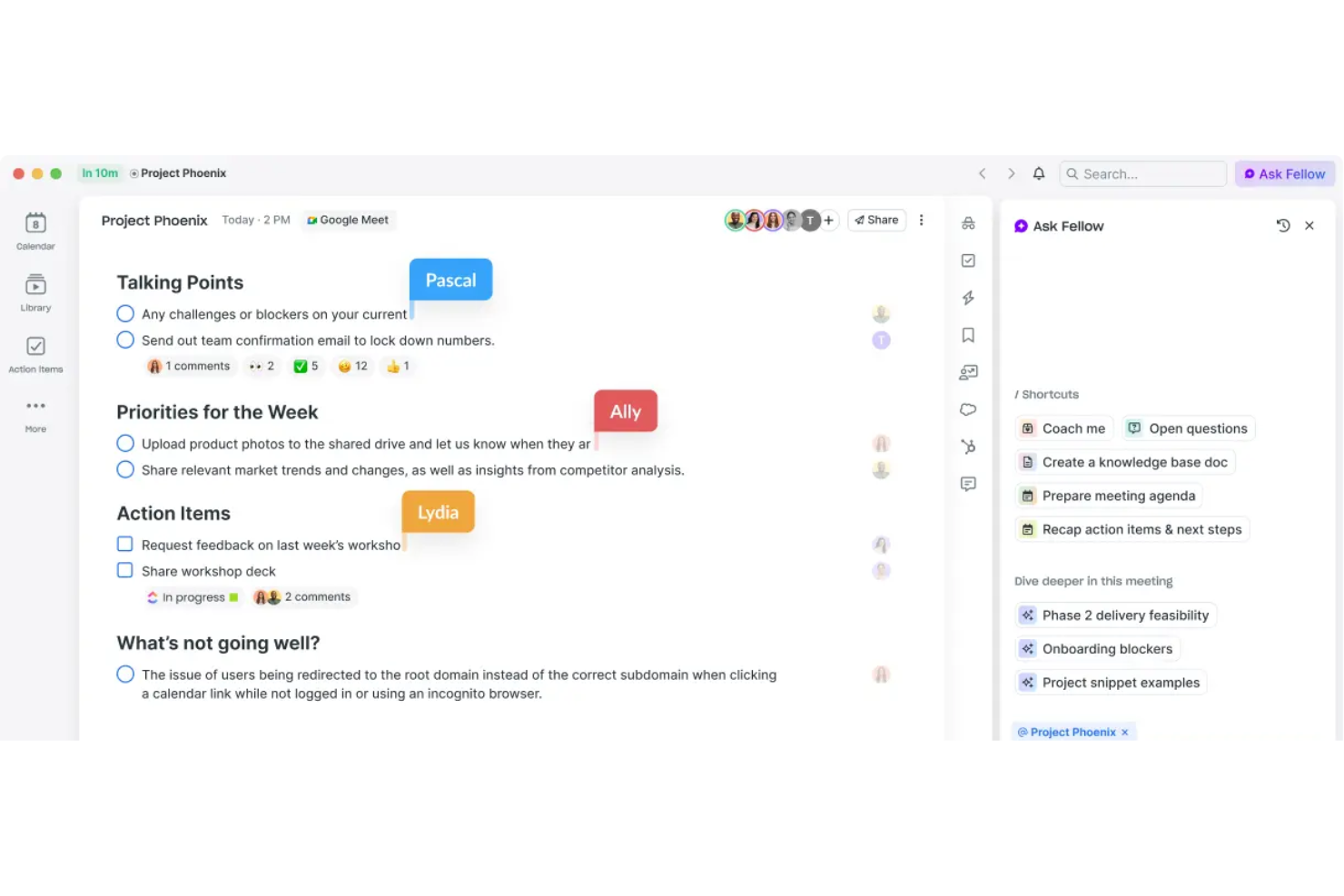
Fellow is an AI meeting assistant that records, transcribes, and summarizes meetings across Zoom, Google Meet, Microsoft Teams, and Slack, while also supporting collaborative agenda creation and action item tracking.
Who Is Fellow Best For?
Fellow is a good fit for managers and team leads at mid-sized tech companies who need to schedule meetings, run frequent one-on-ones, and manage cross-functional syncs.
Why I Picked Fellow
I picked Fellow as one of the best because its collaborative agenda feature genuinely changes how meetings start. Before a meeting, every attendee can contribute talking points directly to a shared agenda, so no one shows up empty-handed.
I also like the pre-meeting briefs, which pull context together automatically, so you walk in prepared. Pair that with action item tracking that syncs to tools like Asana and Jira, and follow-ups actually get done.
Fellow Key Features
- Meeting automations: Automatically record selected meetings, prompt attendees to add agenda items, and send pre-meeting reminders without any manual setup.
- 500+ meeting templates: Access a library of agenda templates for any meeting type, and customize your own to match your team's recurring formats.
- AI recording library: Store all recorded meetings in a centralized, searchable library with role-based access controls so the right people can find the right content.
- Cross-meeting intelligence: Use Fellow's Ask Fellow AI agent to search across all past transcripts and summaries and pull up decisions or context from any previous meeting.
Fellow Integrations
Fellow offers 50+ native integrations, including Slack, Zoom, Google Meet, Microsoft Teams, Asana, Jira, Linear, Salesforce, HubSpot, and Confluence. It connects with Zapier and has an API for custom integrations.
Pros and Cons
Pros:
- Strong one-on-one meeting tracking tools
- Action items auto-distribute after meetings end
- Shared agendas keep every attendee prepared
Cons:
- Templates can be unintuitive to customize
- Searching past meeting notes feels clunky

Parabol
Best for agile team retrospective meetings
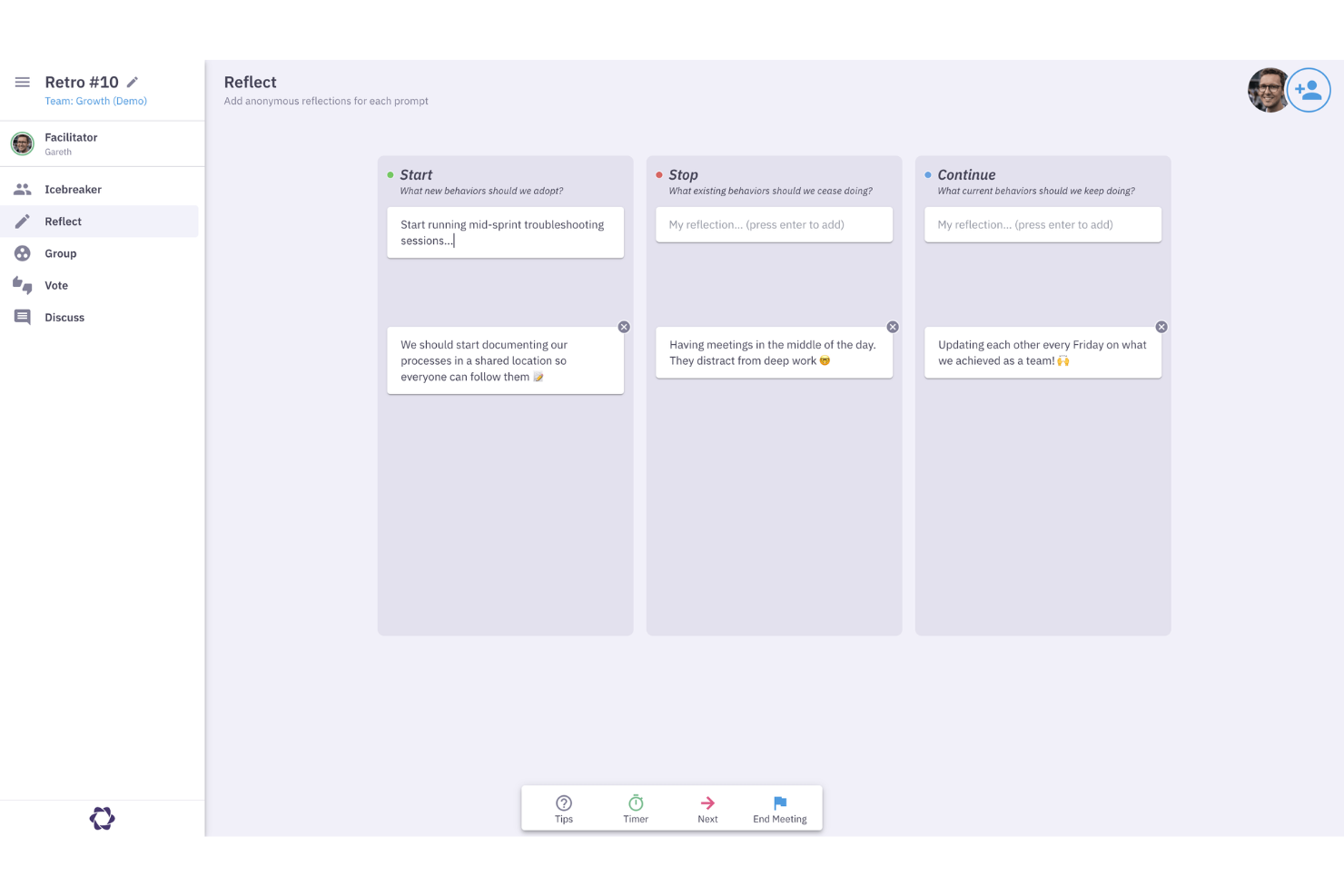
Parabol is an agile meeting tool that structures retrospectives, sprint poker sessions, standups, and team check-ins, with built-in templates, anonymous input, and task capture directly in your backlog management tool.
Who Is Parabol Best For?
Parabol is a natural fit for scrum teams and agile coaches who run regular retrospectives, sprint reviews, and planning sessions across distributed or hybrid environments.
Why I Picked Parabol
I've included Parabol in my top picks because it's the only meeting tool I know that was built specifically around agile ceremonies rather than bolted onto them. I like how the retrospective format enforces structured phases: anonymous input collection, grouping similar reflections, discussion, and task capture, all in one flow.
What gets me is the sprint poker feature, which syncs directly with your backlog tool and updates story points in real time as your team estimates, so you're not duplicating work after the session ends.
Parabol Key Features
- 40+ meeting templates: Choose from pre-built formats for retrospectives and estimation meetings, or build your own from scratch.
- Automated meeting summaries: Parabol generates a summary at the end of every meeting automatically, without manual note-taking.
- Built-in discussion timers: Set time limits on agenda topics to keep conversations focused during live sessions.
- Team health check: Run an anonymous pulse poll at the start of a meeting to capture team sentiment before the discussion begins.
Parabol Integrations
Parabol offers a small set of native integrations focused on backlog management and team communication, including Jira, GitHub, GitLab, Linear, Azure DevOps, Slack, Microsoft Teams, Mattermost, Zoom, and Google Calendar. Jira Server integration is available on the Enterprise tier.
Pros and Cons
Pros:
- Open-source with a self-hosting option available
- Full meeting history stored per team
- Anonymous reflections prevent groupthink during retros
Cons:
- Email summaries are sent regardless of attendance
- Interface only available in English
Fathom
Best for instant call highlights and summaries
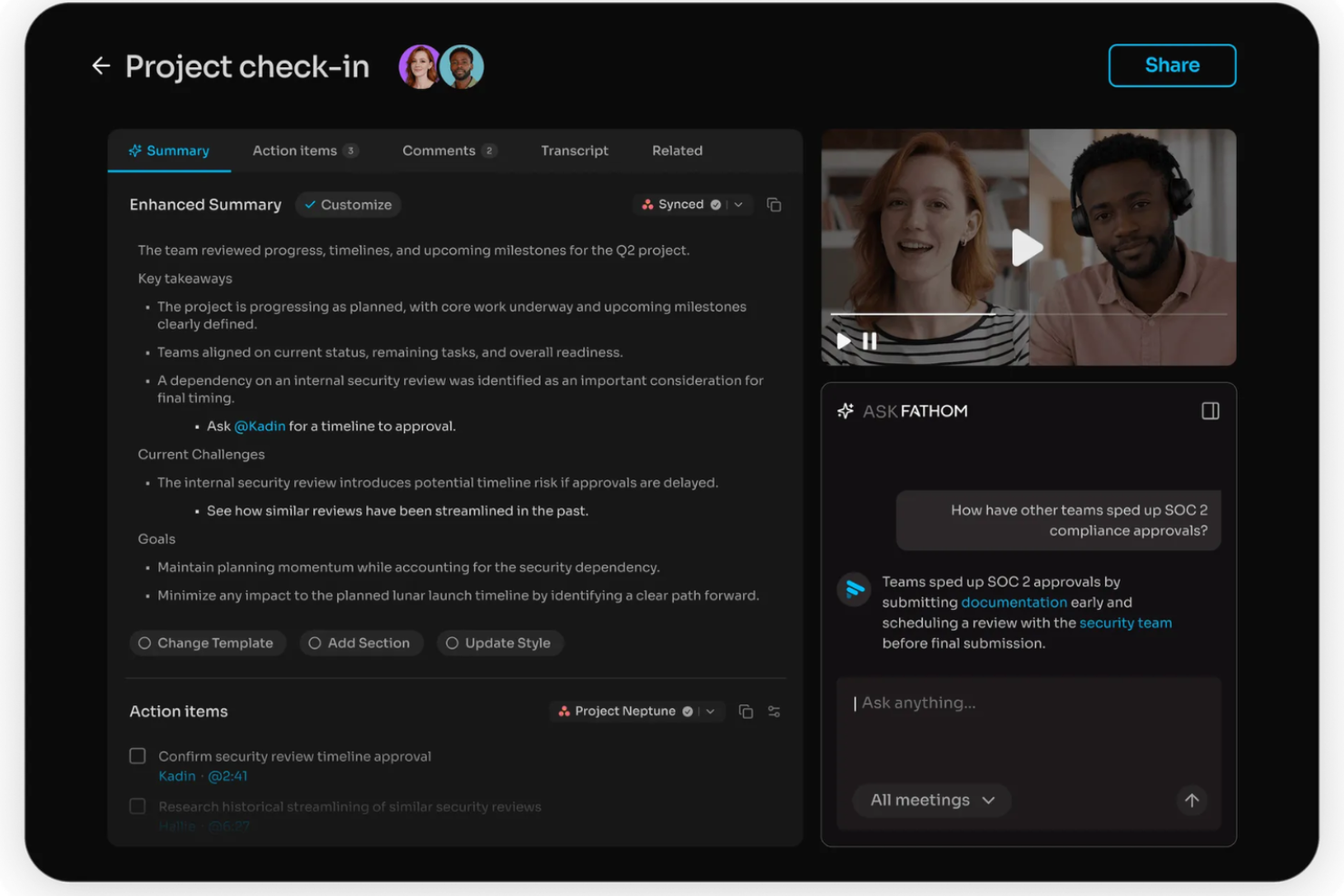
Fathom is an AI notetaker that automatically records, transcribes, and summarizes video calls and extracts action items from every meeting.
Who Is Fathom Best For?
Fathom is a natural fit for sales and customer success teams who run high volumes of video calls or webinars and need a fast, accurate record of each conversation.
Why I Picked Fathom
I picked Fathom as one of the best because it delivers meeting summaries the moment a call ends, with no waiting around. What I really like is the "Ask Fathom" feature, which lets you query past meetings in plain language to pull context fast.
I also find the bot-free recording option genuinely useful: Fathom can capture calls without dropping a visible bot into the meeting.
Fathom Key Features
- In-call highlight marking: Flag key moments during a live call so they're instantly clipped and retrievable after the meeting ends.
- CRM auto-sync: Push meeting notes and summaries directly to connected CRMs like Salesforce and HubSpot without manual data entry.
- Speaker-labeled transcripts: Transcripts identify each speaker by name, making it easy to track who said what across a full conversation.
- Team call library: Store and organize all recorded calls in a shared workspace so your whole team can search and review past meetings.
Fathom Integrations
Fathom offers native integrations with HubSpot, Salesforce, Close CRM, Slack, Asana, Google Meet, Zoom, and Microsoft Teams, along with partner integrations from tools like Pylon, Twine, and GetAccept. It also connects with Zapier and provides an API for custom integrations.
Pros and Cons
Pros:
- HIPAA, SOC 2 Type II, and GDPR compliant
- Shareable clips from any recorded meeting
- Generous free plan with unlimited recordings
Cons:
- Cannot process uploaded audio or video files
- The mobile app is iOS only

Avoma
Best for AI-powered conversation insights
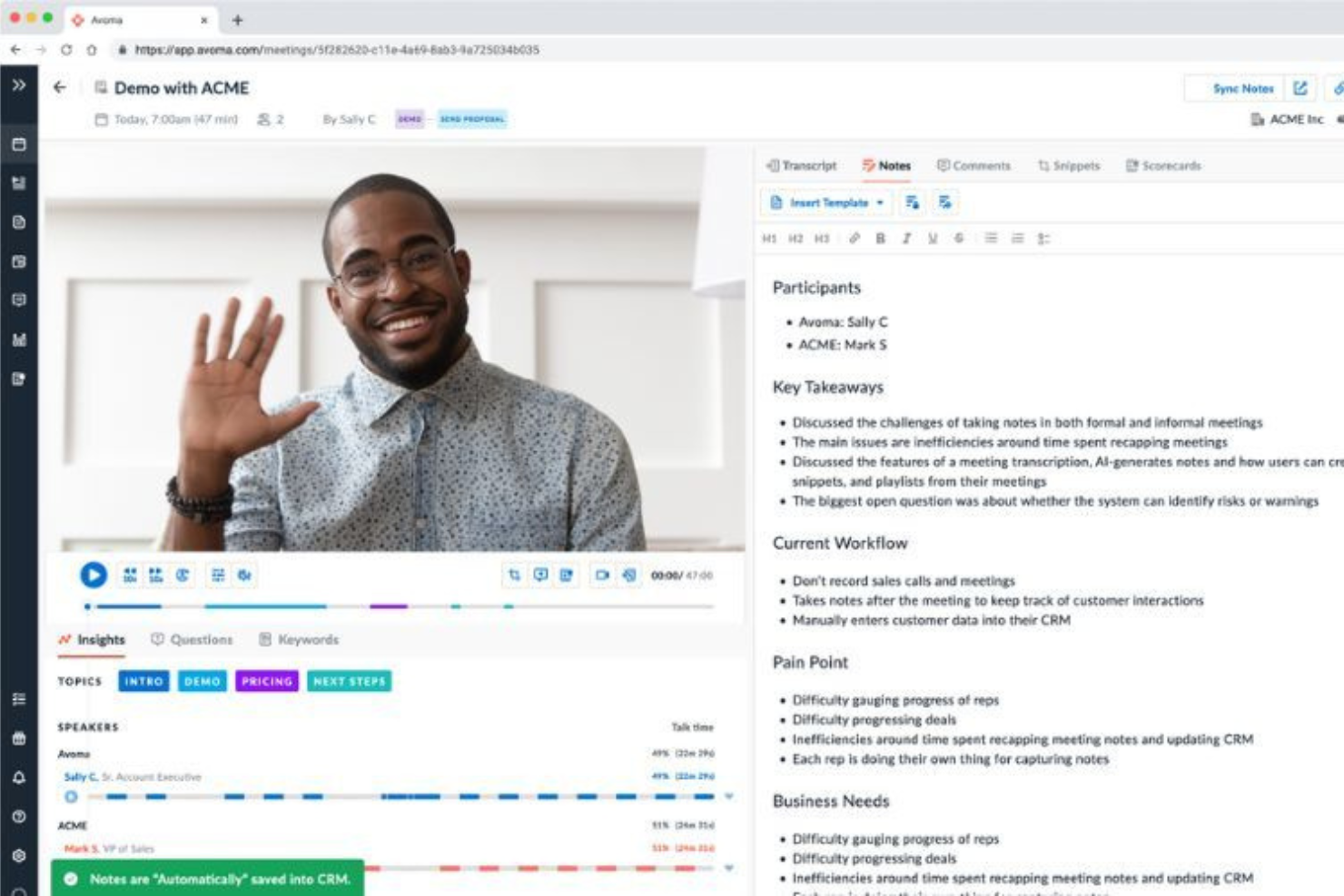
Avoma is an AI meeting assistant that combines call recording, agenda management, automated note-taking, and talk-pattern analysis into one connected workspace.
Who Is Avoma Best For?
Avoma is a strong fit for B2B sales and customer success teams who need structured conversation intelligence across the full deal cycle.
Why I Picked Avoma
I've included Avoma in my top picks because its conversation intelligence goes deeper than most meeting tools. The AI call scoring runs across 100% of recorded calls automatically, which means sales managers get consistent, unbiased coaching data without manually reviewing recordings.
I also really like the custom Smart Trackers, which use semantic matching to track keywords and topics accurately across calls. That kind of nuance makes it much more useful than tools that rely on exact keyword matching.
Avoma Key Features
- AI-generated follow-up emails: Automatically drafts follow-up emails after each recorded meeting, pulling from the transcript and meeting notes.
- Live answer assistant: Surfaces real-time suggested responses during active calls to help reps handle objections on the spot.
- AI sales methodology scoring: Automatically scores calls against frameworks like MEDDIC and SPICED without manual rep input.
- Talk-pattern insights: Breaks down metrics like talk-to-listen ratios and topic trends across your team's recorded calls.
Avoma Integrations
Avoma offers native integrations with Zoom, Google Meet, Microsoft Teams, Salesforce, HubSpot, Pipedrive, Slack, Aircall, RingCentral, and Salesloft. It also connects with Zapier and provides an API for custom integrations.
Pros and Cons
Pros:
- Modular pricing so you buy only what's needed
- Transcription available in 75+ languages
- Automatic CRM field updates after calls
Cons:
- Speaker attribution in transcripts needs improvement
- Primarily built for customer-facing teams

Otter.ai
Best for live meeting note capture
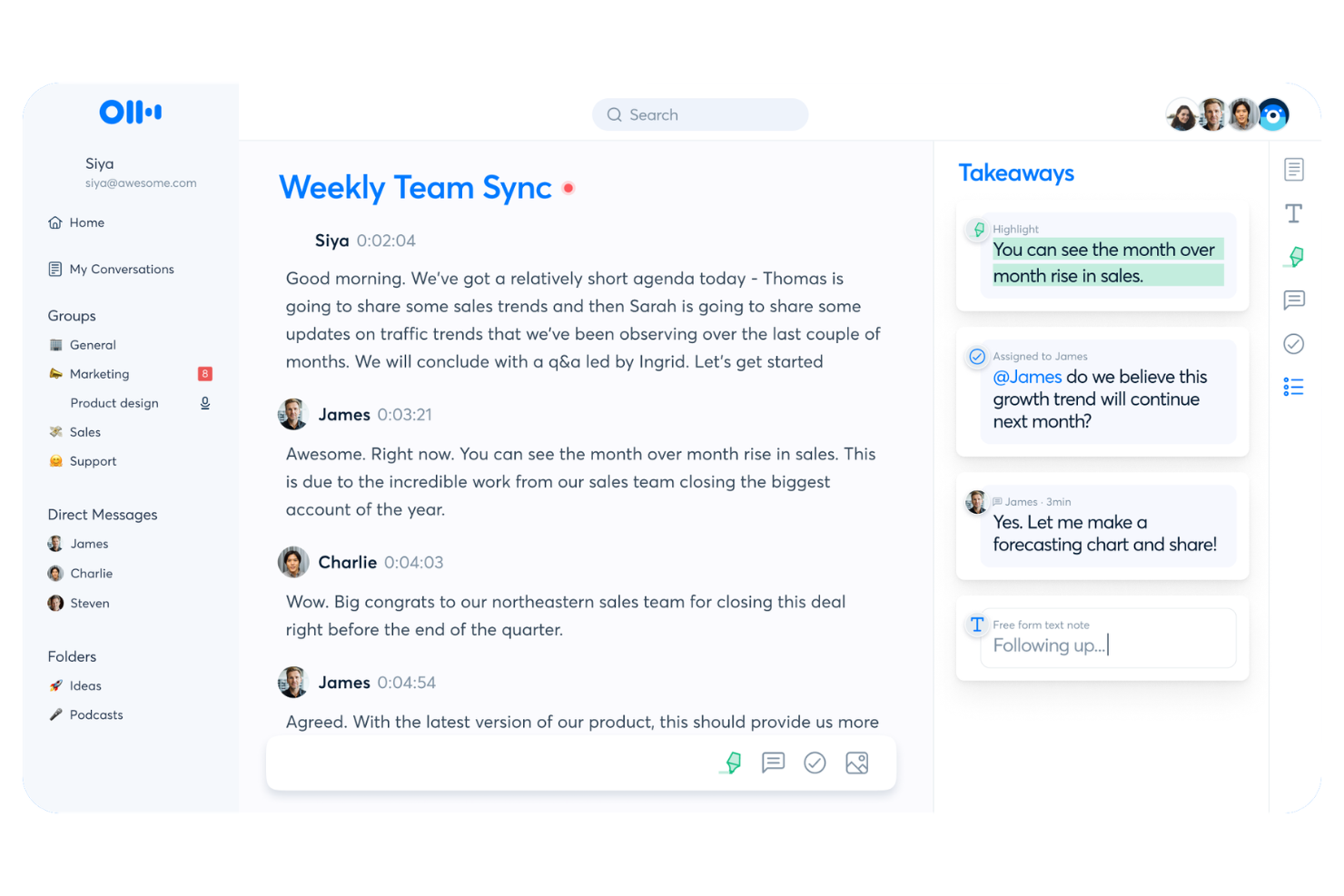
Otter.ai is a meeting notes platform that captures live transcriptions, generates real-time summaries, and lets attendees collaborate on notes directly during the call.
Who Is Otter.ai Best For?
Otter.ai is a strong fit for teams in fast-moving meetings who need to accelerate decision making with a live, shared record of decisions and action items.
Why I Picked Otter.ai
Otter.ai earns its spot on my shortlist because live transcription is where it genuinely shines. While most tools transcribe after the fact, Otter renders words on screen as they're spoken, with speaker labels attached in real time.
I also like the OtterPilot feature, which joins calls automatically and lets attendees read, highlight, and comment on the live transcript mid-meeting. That makes it especially useful for distributed teams where not everyone can follow audio closely.
Otter.ai Key Features
- Automated action item detection: Otter identifies and extracts action items from the transcript so nothing gets lost after the call.
- AI meeting summaries: Generates a condensed summary of the full conversation after each meeting ends.
- Otter AI Chat: Lets you ask questions about past meeting content and pull answers directly from stored transcripts.
- Shared workspace: Organizes all meeting notes into a team workspace where members can search and access past meetings.
Otter.ai Integrations
Otter.ai offers 30+ native integrations, including Zoom, Google Meet, Microsoft Teams, Slack, HubSpot, Salesforce, Notion, Jira, Google Docs, and Asana. It also connects with Zapier and provides an API for custom integrations.
Pros and Cons
Pros:
- Custom vocabulary improves transcription accuracy
- Searchable transcript archive across all meetings
- Mobile app captures in-person meetings
Cons:
- OtterPilot bot visibly joins calls
- Limited post-meeting task automation options

Best for automatic voice transcription
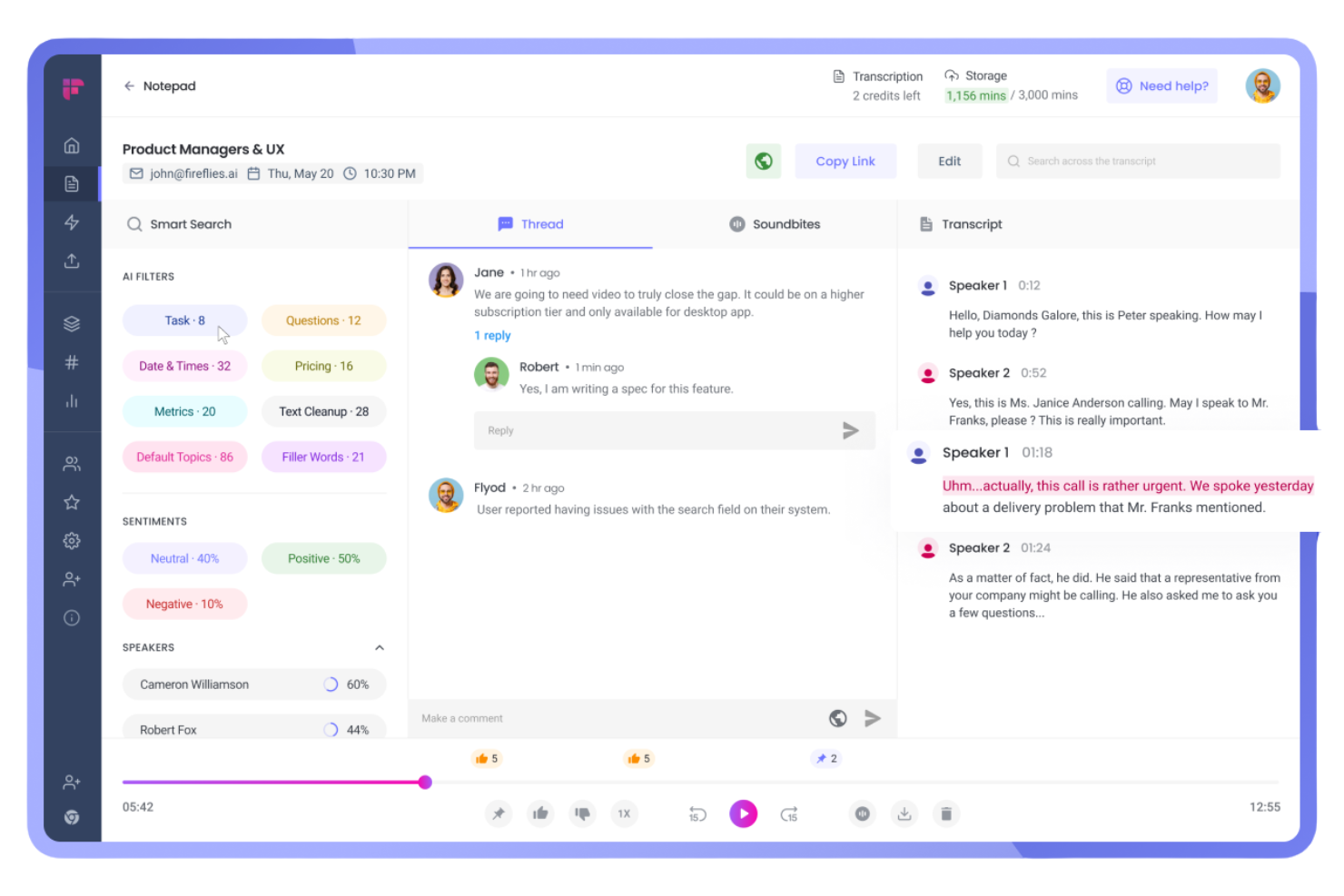
Fireflies.ai is a voice intelligence platform that automatically joins your meetings to record, transcribe, and analyze conversations, with searchable transcripts, topic detection, and AI-generated summaries built in.
Who Is Fireflies.ai Best For?
Fireflies.ai is a strong fit for distributed sales, customer support, and customer success teams who need accurate, searchable records of every client conversation.
Why I Picked Fireflies.ai
I picked Fireflies.ai as one of the best because its transcription accuracy is genuinely hard to beat. It claims 95% accuracy across 100+ languages, with automatic speaker recognition that labels who said what throughout the transcript.
I also like the auto-language detection, which switches languages between meetings without any manual configuration. For teams running back-to-back calls, the AskFred feature lets you query past transcripts by asking plain-language questions instead of scrolling through raw notes.
Fireflies.ai Key Features
- AI meeting summaries: Automatically generate condensed meeting summaries with key discussion points after each call ends.
- Topic tracker: Flags and categorizes specific words or phrases across transcripts so you can filter meetings by subject.
- Soundbites: Lets you clip short audio or video segments from any recorded meeting to share standalone moments.
- Inline collaboration: Add comments and reactions directly on transcript lines so teammates can annotate without leaving the platform.
Fireflies.ai Integrations
Fireflies.ai offers native integrations with 100+ apps, including Zoom, Google Meet, Microsoft Teams, Slack, HubSpot, Salesforce, Notion, Confluence, Asana, and Linear. It also connects with Zapier and provides an API for custom integrations.
Pros and Cons
Pros:
- Sentiment analysis flags meeting tone shifts
- Clips shareable audio soundbites from recordings
- Transcription supports 100+ languages natively
Cons:
- Accuracy drops with overlapping speakers
- Feature density can feel overwhelming

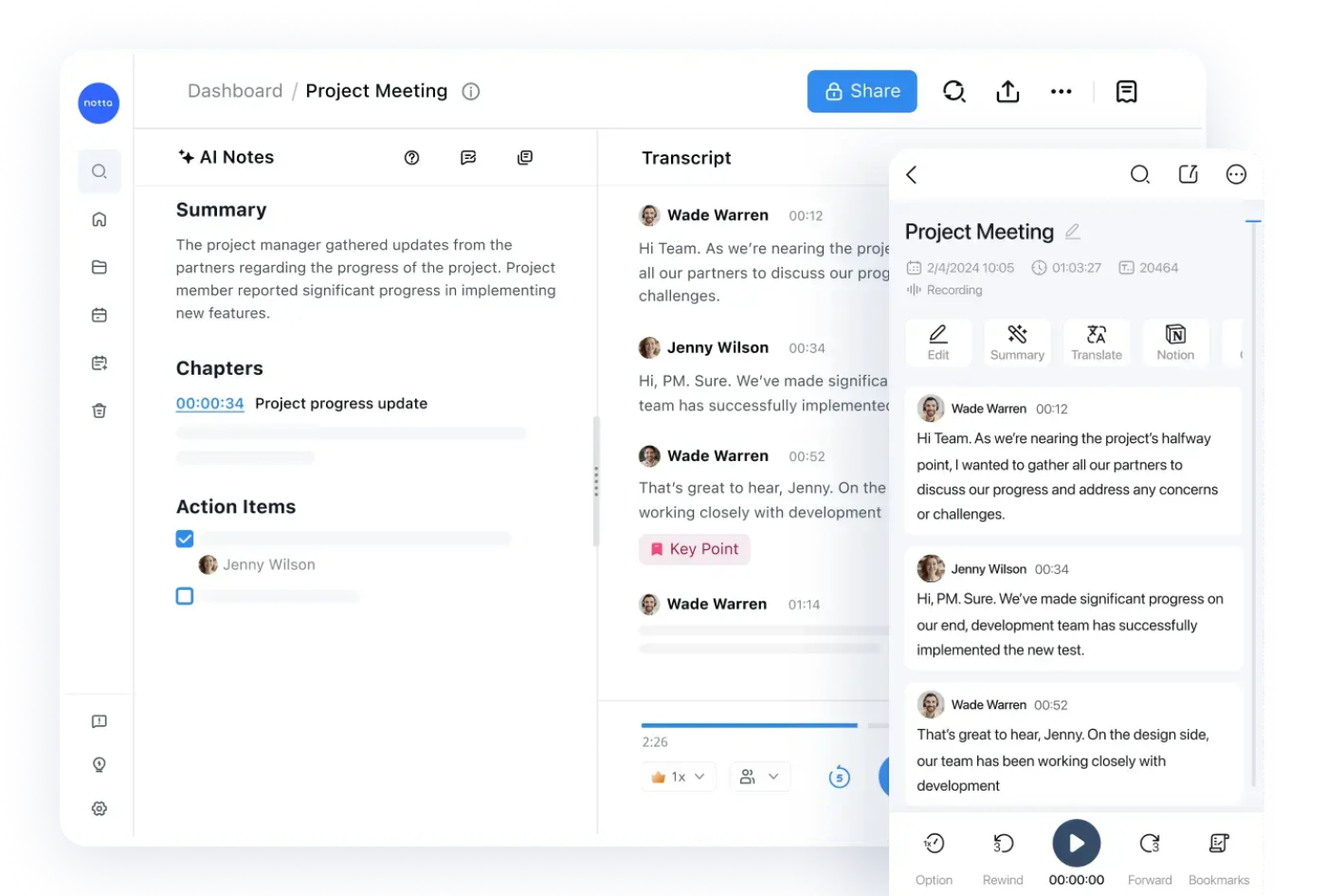
Notta is an AI meeting assistant that records and transcribes live meetings and audio files, then organizes the output into shareable, searchable transcripts with AI-generated summaries and action items.
Who Is Notta Best For?
Notta is a strong fit for async-first teams that need non-attendees to quickly search and reference what was discussed or decided in meetings they missed.
Why I Picked Notta
I've included Notta in my top picks because of how well it handles the entire transcript lifecycle, from capture to sharing. Transcripts are keyword-searchable and timestamped, so anyone who missed a meeting can jump directly to the exact moment something was said.
I also like that you can bookmark specific lines as key points, to-dos, or project notes, and share the transcript with those highlights already visible to recipients.
Notta Key Features
- AI-generated meeting summaries: Notta automatically produces condensed summaries after each meeting, so you don't have to read the full transcript.
- Action item extraction: The AI identifies and pulls action items directly from the transcript into a separate list.
- Multi-language transcription: Notta supports transcription in 58+ languages, including real-time switching between languages mid-meeting.
- Auto-join meeting bot: Notta's bot joins scheduled calls on your behalf and begins recording automatically via calendar sync.
Notta Integrations
Notta offers 20+ native integrations, including Zoom, Google Meet, Microsoft Teams, Webex, Slack, Notion, Google Docs, Salesforce, HubSpot, and ClickUp. It also connects with Zapier and supports calendar syncing with Google Calendar and Outlook Calendar for automated meeting recording.
Pros and Cons
Pros:
- Bilingual transcription for multilingual meetings
- Converts notes into infographics and tables
- Mind map feature aids brainstorming sessions
Cons:
- Free plan limits recordings to three minutes
- Accuracy drops with overlapping speech
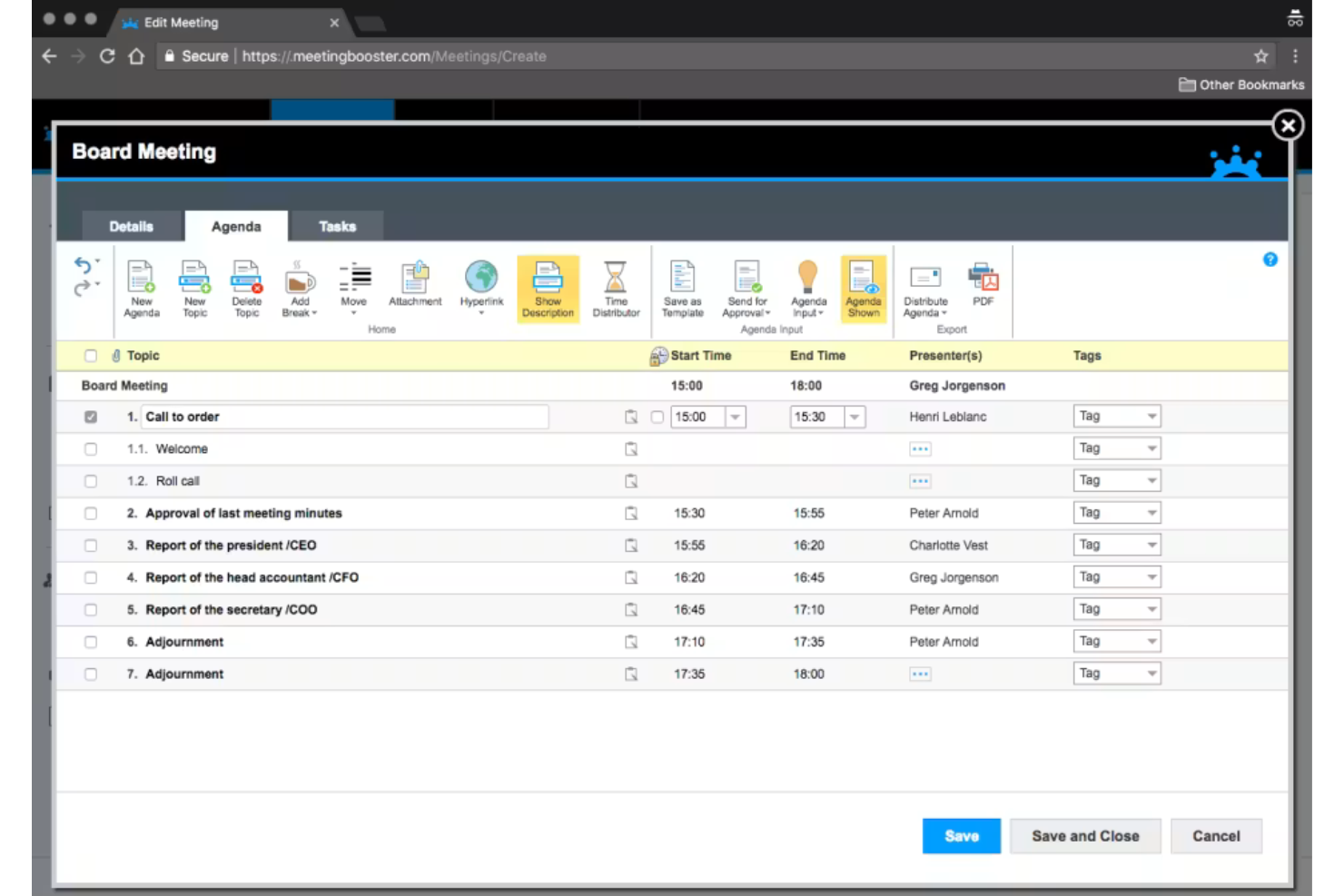
MeetingBooster is a meeting management platform built around agenda creation, structured note-taking, and formal minutes generation, with built-in task tracking and meeting series management for recurring meetings.
Who Is MeetingBooster Best For?
MeetingBooster is a strong fit for organizations in governance-heavy environments, like municipal governments, boards, and committees, where formal minutes, documented decisions, and structured agendas are a standard requirement.
Why I Picked MeetingBooster
I picked MeetingBooster as one of the best because no other tool I've used enforces meeting structure quite this deliberately. I love the Notecard feature, which guides you through a live meeting step by step, capturing notes, decisions, and action items directly against each agenda item in real time.
When the meeting ends, I can select a minutes style, review the draft, and distribute finalized minutes in minutes, without any reformatting. It's the only tool I've used where the agenda, notes, and minutes are truly one connected workflow.
MeetingBooster Key Features
- Agenda approval process: Run agendas through a version-controlled approval workflow before meetings start, so all stakeholders sign off on the structure in advance.
- Meeting analytics: Track attendance, meeting costs, task completion rates, and status reports across meetings to surface patterns over time.
- Attendee-specific note-taking: Assign note-taking responsibilities to specific attendees, with each person capturing notes tied directly to their role in the meeting.
- Decision tools: Use built-in voting, pro/con analysis, and rating tools during a meeting to reach and formally record group decisions.
MeetingBooster Integrations
MeetingBooster integrates natively with Microsoft Outlook, Microsoft Teams, SharePoint, Google Calendar, and Active Directory. It also supports integrations with Jira, Microsoft Planner, Trello, and Slack through its API, and connects with Zapier and Microsoft Power Automate. An API is available for custom integrations.
Pros and Cons
Pros:
- Cross-meeting task tracking with due dates
- Formal minutes auto-generated from notes
- Built-in voting and decision-tracking tools
Cons:
- Sharing roles between the presenter and the note-taker is difficult
- Limited flexibility for posting action items

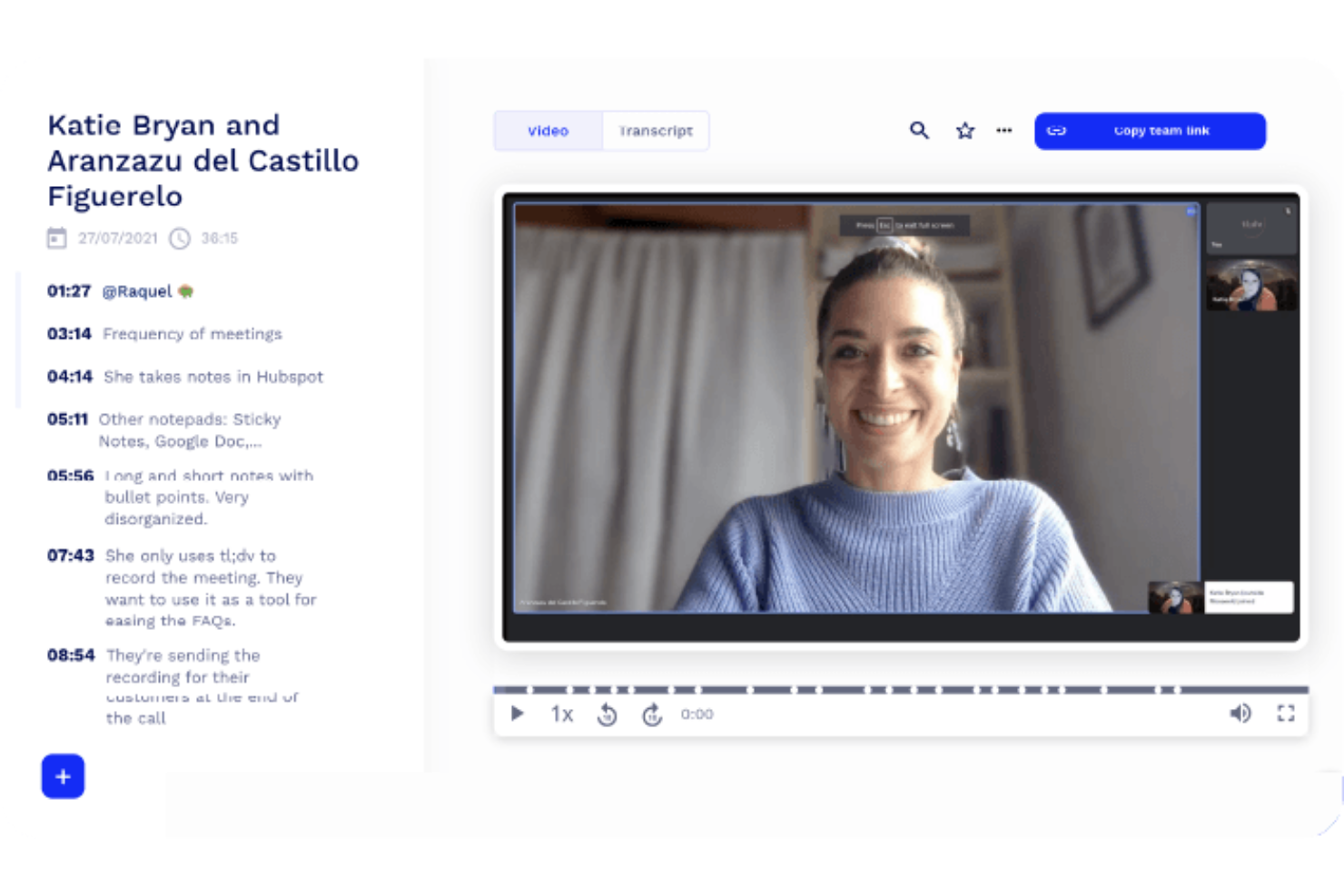
tl;dv is a meeting recorder and note-taking tool that lets you capture video meetings with timestamped highlights, AI-generated summaries, and shareable clips from Zoom, Google Meet, and Microsoft Teams calls.
Who Is tl;dv Best For?
tl;dv is a natural fit for product and research teams who need to clip, timestamp, and share key meeting moments without sitting through full recordings.
Why I Picked tl;dv
tl;dv earns its spot on my shortlist because its timestamped notes are genuinely more usable than what most meeting recorders produce. I like that every AI-generated note links directly to the exact moment in the video, so anyone reviewing the recording can jump straight to context instead of scrubbing through footage.
The clip and reel features let my team cut specific moments and share them async, which I find especially useful when surfacing user research insights for stakeholders who weren't in the room.
tl;dv Key Features
- Multi-meeting AI reports: Query and summarize insights across multiple recorded meetings at once, spotting trends without reviewing individual recordings.
- Customizable note templates: Set up structured summary formats, including sales methodologies like MEDDIC, in your team's preferred language.
- Automatic CRM logging: Pushes call notes and deal outcomes directly to your CRM after each meeting without manual data entry.
- Multilingual transcription: Transcribes and translates meetings in 30+ languages, with full localization available in 7 of them.
tl;dv Integrations
tl;dv offers native integrations with Zoom, Google Meet, Microsoft Teams, Salesforce, HubSpot, Pipedrive, Zoho, Slack, Google Docs, and Notion, with 6,000+ additional apps available through Zapier. An API is also available for custom integrations.
Pros and Cons
Pros:
- Multi-meeting search across all recordings
- Clips and reels from recorded meetings
- One-click timestamps during live calls
Cons:
- Limited quantitative analytics on call data
- Free plan deletes recordings after 3 months
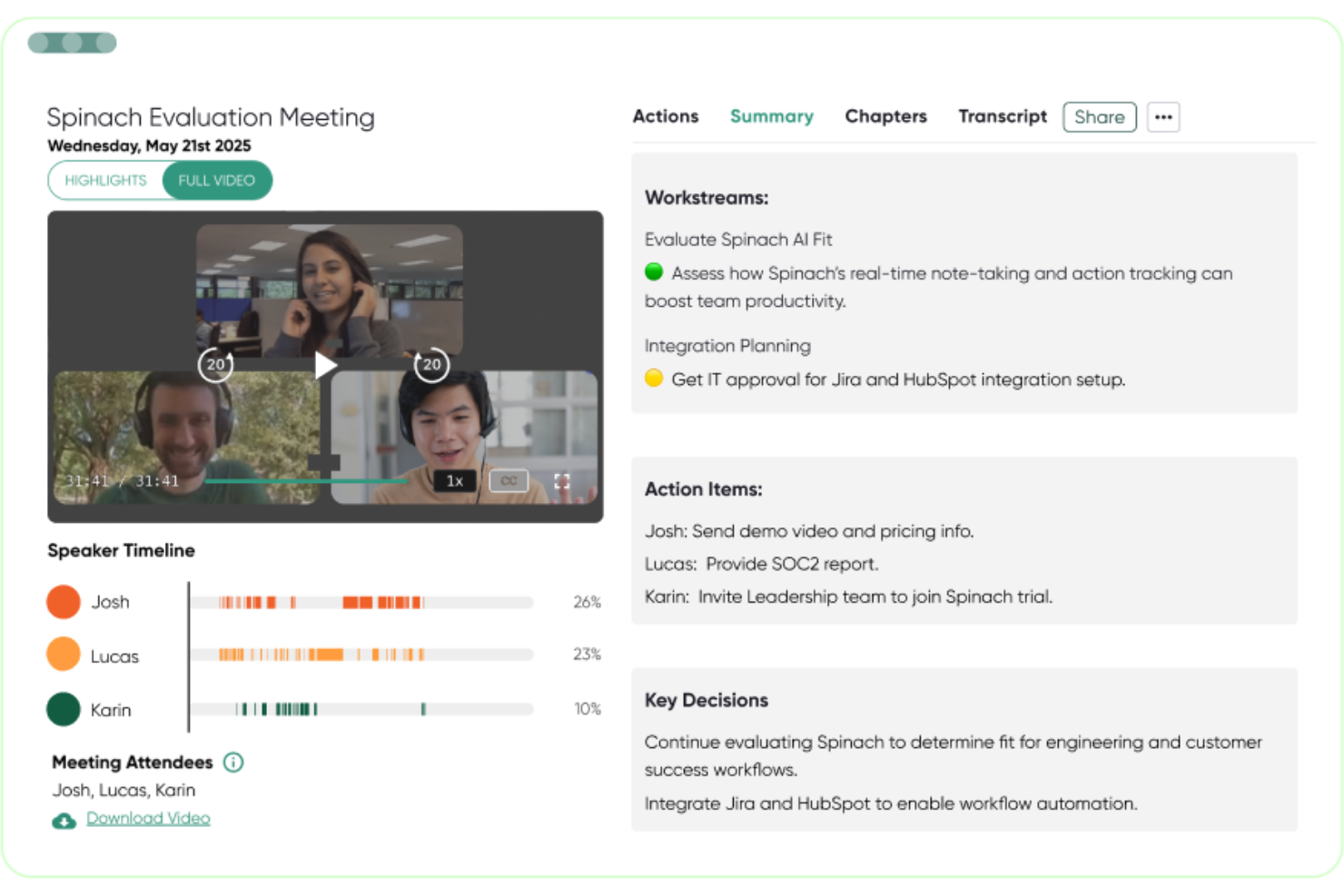
Spinach AI is an AI meeting assistant that automatically records, transcribes, and summarizes meetings, then pushes action items, decisions, and follow-ups directly into your project management tools.
Who Is Spinach AI Best For?
Spinach AI is a strong fit for product and engineering teams who run frequent standups, sprint reviews, and cross-functional syncs inside tools like Jira or Linear.
Why I Picked Spinach AI
Spinach AI earns its spot on my shortlist because of how it closes the gap between what gets discussed in a meeting and what actually gets done. I love that when Spinach AI detects an action item, it can create a ticket in Jira, Linear, or Asana automatically, without anyone copying notes after the call ends.
I also really like the CRM auto-update feature: sales and customer success calls push follow-ups directly into HubSpot or Salesforce the moment the meeting wraps.
Spinach AI Key Features
- Multi-language transcription: Spinach AI transcribes meetings in 100 languages, making it usable across globally distributed teams.
- Recap email generation: At the end of each meeting, Spinach AI drafts and sends a summary email to all participants automatically.
- AI meeting coach: Spinach AI analyzes meeting patterns and surfaces insights to help managers run more effective one-on-ones and team syncs.
- Shared agenda builder: Teams can collaboratively build and contribute to a meeting agenda before the call starts.
Spinach AI Integrations
Spinach AI offers native integrations with Jira, Asana, Trello, Linear, ClickUp, monday.com, Notion, Confluence, Slack, HubSpot, Salesforce, Zoho, and Attio. It also works with Google Meet, Microsoft Teams, and Zoom as meeting sources. Spinach AI connects with Zapier and provides an API for custom integrations.
Pros and Cons
Pros:
- No custom AI agent creation needed
- Tailored specifically for agile meeting types
- Summaries organized by decisions and action items
Cons:
- No option to build AI agents from scratch
- Summary output format can be inconsistent
Other Meeting Management Software
Here are some additional meeting management software options that didn’t make it onto my shortlist, but are still worth checking out:


How I Evaluate Meeting Management Software
My evaluation runs two layers deep: the baseline every tool must clear—agenda building, action tracking, PM tool sync—and the differentiators that set the best apart for cross-functional teams.
Core Functionality (Table Stakes For This List)
When I'm selecting tools for my list, I rank each one on a scale from 0 (does not offer the functionality) to 5 (excels in this area) for each core functionality listed below. Then, I calculate the tool's total score into a percentage. Each tool needs to achieve a minimum total score of 65% to be considered for inclusion.
- Agenda Building & Sharing: I look for tools that let teams collaboratively build and distribute agendas before the meeting—like adding timed discussion items to a weekly sprint planning session so everyone shows up prepared.
- Real-Time Collaborative Notes: The tool should support multiple participants capturing notes simultaneously, similar to how a Scrum Master and product owner might tag-team documenting decisions during a backlog grooming session.
- Action Item Tracking: I evaluate how well each platform handles assigning tasks with owners and due dates during a meeting, then surfaces incomplete items in follow-up meetings so nothing falls through the cracks.
- Calendar Integration: Two-way sync with Google Calendar and Outlook is what I check for, ensuring meetings auto-populate with agendas and context without requiring manual setup each time.
- Project Tool Integrations: Each tool's ability to push action items directly into platforms like Jira, Asana, or Monday matters here—I look at whether the sync is bidirectional and whether it pulls in relevant project context.
- Meeting Recording & Transcription: I evaluate whether the tool captures recordings and generates searchable transcripts, making it easy to revisit what was discussed during a stakeholder review or sprint retrospective weeks later.
Once I have a list of tools that meet this criteria, I consider what sets each platform apart.
Differentiating Factors (What Sets Vendors Apart)
Here's how I compare and contrast different vendors:
Standout Features
AI-generated summaries matter because they spare project managers from writing recap emails after every standup or stakeholder sync—I look for tools that automatically extract decisions and next steps. Recurring meeting continuity is another factor I evaluate closely. When unresolved items carry forward from last week's sprint review into this week's agenda, accountability stays visible without manual effort. Meeting analytics also help PMO leaders spot patterns like meeting overload or low action item completion rates across teams.
Beyond Features
Pricing structure is one of the first things I check—specifically whether external stakeholders like clients or vendors can join meetings without eating into paid seats. Integration ecosystem depth also weighs heavily, since a tool that syncs with Jira but not Asana limits its fit for mixed-methodology teams. I evaluate scalability too, looking at whether a platform supports role-based permissions and workspace hierarchies that grow from a single agile squad to a full PMO with multiple programs running in parallel.
How to Choose Meeting Management Software
It’s easy to get bogged down in long feature lists and complex pricing structures. To help you stay focused as you work through your unique software selection process, here’s a checklist of factors to keep in mind:
| Factor | What to Consider |
|---|---|
| Scalability | Will the tool support your team as it grows, and can it handle multiple projects or recurring meetings across departments? |
| Integrations | Does it reliably connect to your calendar, video, chat, and project management tools to fit your workflow without manual workarounds? |
| Customizability | Can you shape meeting templates, permissions, and reporting to match your team’s processes or compliance needs? |
| Ease of use | Is the interface intuitive enough for mixed technical skill sets? Will stakeholders actually adopt it in their daily routines? |
| Implementation and onboarding | How much time and support will you need to launch and onboard your whole team? Are training resources accessible to all users? |
| Cost | How do pricing tiers fit your user count, projected growth, and feature needs? Watch for hidden fees around storage, compliance, or analytics. |
| Security safeguards | Does the platform meet your data protection, access control, and privacy requirements, especially for confidential or regulated content? |
| Support availability | When issues arise, can you access timely assistance in your primary working hours and preferred channels? |
What Is Meeting Management Software?
Meeting management software helps teams organize, run, and document meetings by centralizing agendas, notes, action items, and follow-ups. These tools streamline scheduling, encourage collaboration, and ensure accountability by keeping important decisions and tasks visible across projects.
Meeting management software often integrates with calendars, video platforms, and project management systems so that meetings stay actionable and outcomes don’t get lost.
Features
When selecting meeting management software, keep an eye out for the following key features:
- Agenda building: Create, share, and collaboratively edit agendas ahead of meetings so everyone is clear on topics, objectives, and responsibilities.
- Collaborative note-taking: Capture meeting minutes and discussion points in real-time with multiple contributors, ensuring nothing critical gets missed.
- Action item tracking: Assign follow-ups with owners and due dates during the meeting and track completion across future sessions.
- Decision logging: Record agreements and key decisions in an accessible, organized log for easy reference and accountability.
- Calendar integration: Sync with Google, Outlook, or other calendars to simplify scheduling and keep meetings visible to all relevant participants.
- Video conferencing integration: Directly join video calls from the app and pull in details from platforms like Zoom, Teams, or Meet.
- Recurring meeting templates: Standardize standups, project reviews, or retros using pre-built templates to save time and drive consistency.
- Document attachments: Add relevant files, presentations, or supporting documents to agendas or meeting notes for easy access before, during, and after meetings.
- Permissions and access control: Control who can view, edit, or share agendas and notes, preserving confidentiality where required.
- Searchable archives: Quickly find past discussions, decisions, or notes so team members can reference historical context and avoid duplicating conversations.
Common Meeting Management Software AI Features
Beyond the standard meeting management software features listed above, many of these solutions are incorporating AI with features like:
- Automated meeting transcription: AI listens to your meetings and generates accurate, searchable transcripts so you can review discussions or share notes with absent team members.
- AI-generated summaries: Instantly receive concise recaps of key points, decisions, and action items, saving time on manual note-taking and follow-up documentation.
- Smart action item extraction: AI identifies and assigns action items from conversations, reducing the risk of missed tasks and ensuring accountability without extra admin work.
- Intelligent agenda suggestions: Based on previous meetings and project context, AI recommends relevant topics or agenda items to keep meetings focused and productive.
- Speaker identification: AI distinguishes between participants in transcripts, attributing comments and decisions to the correct individuals for better clarity and accountability.
- Sentiment analysis: AI evaluates the tone and engagement level of discussions, helping leaders spot potential issues or team morale trends over time.
Benefits
Implementing meeting management software provides several benefits for your team and your business. Here are a few you can look forward to:
- Improved organization: Centralizes agendas, notes, and action items so teams can track decisions and tasks across all meetings and projects.
- Greater accountability: Assigns follow-ups and logs outcomes, making it clear who is responsible for each task or decision and reducing missed commitments.
- Time savings: Uses templates, integrations, and sometimes AI features to automate repetitive prep and follow-up work, freeing up time for actual project delivery.
- Consistent meeting outcomes: Standardizes meeting formats and processes, helping teams avoid missed agendas and ensuring important topics are covered.
- Enhanced project alignment: Syncs meeting results with project management tools, so action items and decisions flow directly into team workflows for seamless execution.
- Simplified compliance: Offers permission controls and searchable archives, supporting requirements for transparency, record keeping, or governance where needed.
- Better meeting insights: Provides analytics and dashboards to help leaders right-size meeting frequency, manage engagement, and reduce meeting overload.
Costs and Pricing
Selecting meeting management software requires an understanding of the various pricing models and plans available. Costs vary based on features, team size, add-ons, and more. The table below summarizes common plans, their average prices, and typical features included in meeting management software solutions:
Plan Comparison Table for Meeting Management Software
| Plan Type | Average Price | Common Features |
|---|---|---|
| Free Plan | $0 | Basic agendas, limited collaborative note-taking, single user access, limited meeting templates, and basic integration. |
| Personal Plan | $5-$15/user/month | Unlimited meetings, personal agenda library, advanced search, calendar sync, and simple action item tracking. |
| Business Plan | $15-$30/user/month | Team workspaces, recurring meeting automation, project management integrations, reporting dashboards, and permissions control. |
| Enterprise Plan | $30-$50/user/month | Advanced security, compliance support, granular admin controls, dedicated support, custom roles, and audit logs. |
Meeting Management Software FAQs
Here are some answers to common questions about meeting management software:
Can meeting management software help reduce unnecessary meetings?
Yes, many platforms offer analytics and recurring meeting tools so you can spot low-value sessions, track attendance, and streamline meeting frequency. This helps teams reclaim time and focus on discussions that drive outcomes.
How does meeting management software support distributed teams?
Cloud-based solutions allow remote or hybrid teams to collaborate on agendas, notes, and action items in real time. Integrations with video conferencing and chat apps keep everyone connected before, during, and after meetings.
What should I look for in terms of security and compliance?
Check for features like granular permissions, data encryption, audit trails, and compliance with standards such as SOC 2 and GDPR. This is especially important for confidential HR, legal, or board meetings.
Can these tools work with our existing project management system?
Yes, most leading options offer native integrations with popular platforms like Asana, Jira, or monday.com. This ensures that action items flow from meetings into your team’s task management process for consistent follow-up.
Are there free or lower-cost options for smaller teams or startups?
Yes, most vendors provide free plans or affordable personal tiers with core functionality. As your organization grows, you can often upgrade to add advanced features, security, and admin controls needed for larger teams.