

10 Best Invoice Automation Software in 2026

Best Invoice Automation Software Shortlist


Invoice automation software digitizes and simplifies the entire invoicing process, from data capture to approval and payment. If you’re searching for the best invoice automation software, you’re likely looking to reduce manual work, cut down on errors, and gain better visibility into your accounts payable. With so many options out there, it’s tough to know which tools actually deliver on speed, accuracy, and integration with your existing systems. This guide will help you compare top solutions, so you can find the right fit for your team’s workflow and business goals in 2026.
Why Trust Our Software Recommendations
Our team has been testing and reviewing software since 2012. As project managers ourselves, we know how difficult—and important—it is to choose the right software.
For this guide, we evaluated tools using hands-on testing and independent research, scoring tools using our selection criteria. We also draw on insights from industry thought leaders and practicing project management experts.
Our reviews reflect our human editorial judgment, not a sales pitch.
Expert reviewers:
Invoice Automation Software Comparison Table
This comparison table summarizes pricing details for my top invoice automation software selections:
| Tool | Best For | Trial Info | Price | ||
|---|---|---|---|---|---|
| 1 | Best for collaborative invoice processing | Free demo available | Pricing upon request | Website | |
| 2 | Best for global payables automation | Free demo available | From $99/month | Website | |
| 3 | Best for real-time invoice automation | Demo available upon request | From £129 | Website | |
| 4 | Best for spend and invoice management | Free plan available | From $12/user/month | Website | |
| 5 | Best for mid-market invoice automation | Free demo available | Pricing upon request | Website | |
| 6 | Best for AI invoice data capture | 14-day free trial + free demo available | From $18,000/year | Website | |
| 7 | Best for cloud-based AP automation | Free demo available | Pricing upon request | Website | |
| 8 | Best for AI invoice processing | Free demo available | Pricing upon request | Website | |
| 9 | Best for AP automation with analytics | Free demo available | Pricing upon request | Website | |
| 10 | Best for small business invoice management | Free plan + free demo available | From $49/user/month | Website |
Invoice Automation Software Reviews
Below are my detailed summaries of the best invoice automation software that made it onto my shortlist. My reviews offer a detailed look at the features, integrations, and pricing of each platform to help you find the best one for you.

Stampli
Best for collaborative invoice processing
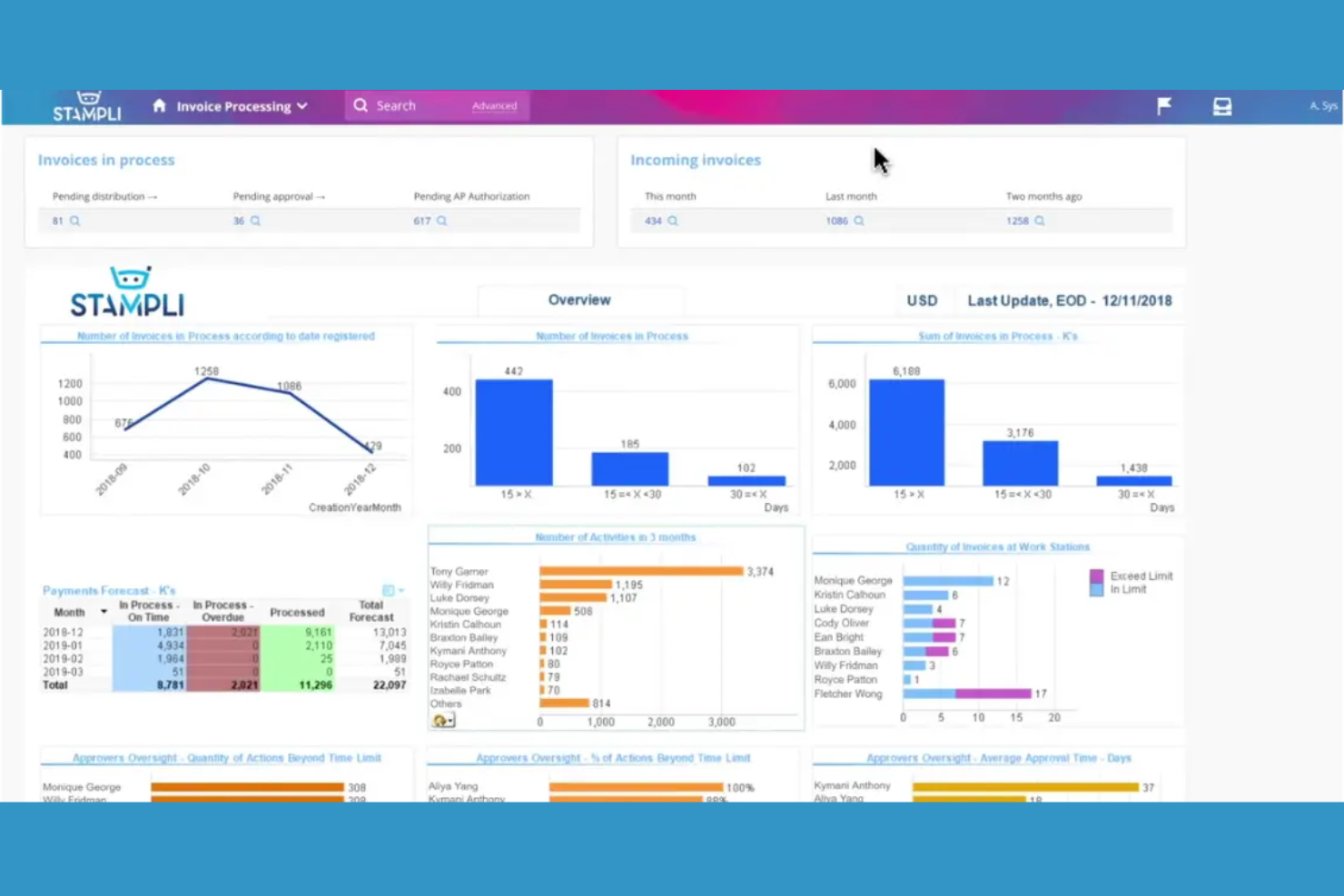
Stampli is an invoice automation platform that combines AP workflow management, team collaboration, AI-driven invoice coding, and document capture in one system.
Who Is Stampli Best For?
AP teams at mid-sized and enterprise companies that need collaborative invoice management and AI-powered coding.
Why I Picked Stampli
I picked Stampli as one of the best because I rely on its collaborative invoice management features to keep AP, procurement, and department heads in sync on every invoice. I like how the AI-powered coding automatically suggests GL codes and flags anomalies, which saves my team time on manual review. My team also uses the built-in communication threads to resolve invoice questions directly within the platform.
Stampli Key Features
- Vendor portal: Lets vendors submit invoices and check payment status online.
- Duplicate invoice detection: Flags potential duplicate invoices before processing.
- Audit trail: Tracks every action taken on invoices for compliance.
- Mobile app: Allows invoice review and approval from any device.
Stampli Integrations
Stampli offers native integrations with Oracle NetSuite, Sage Intacct, QuickBooks Online, Microsoft Dynamics 365, SAP, Acumatica, and more. An API is available for custom integrations.
Pros and Cons
Pros:
- Duplicate invoice detection with audit trails
- Direct integration with major ERP platforms
- Flexible approval routing by department
Cons:
- No support for cross-border invoice payments
- Vendor portal lacks advanced self-service options
Tipalti
Best for global payables automation
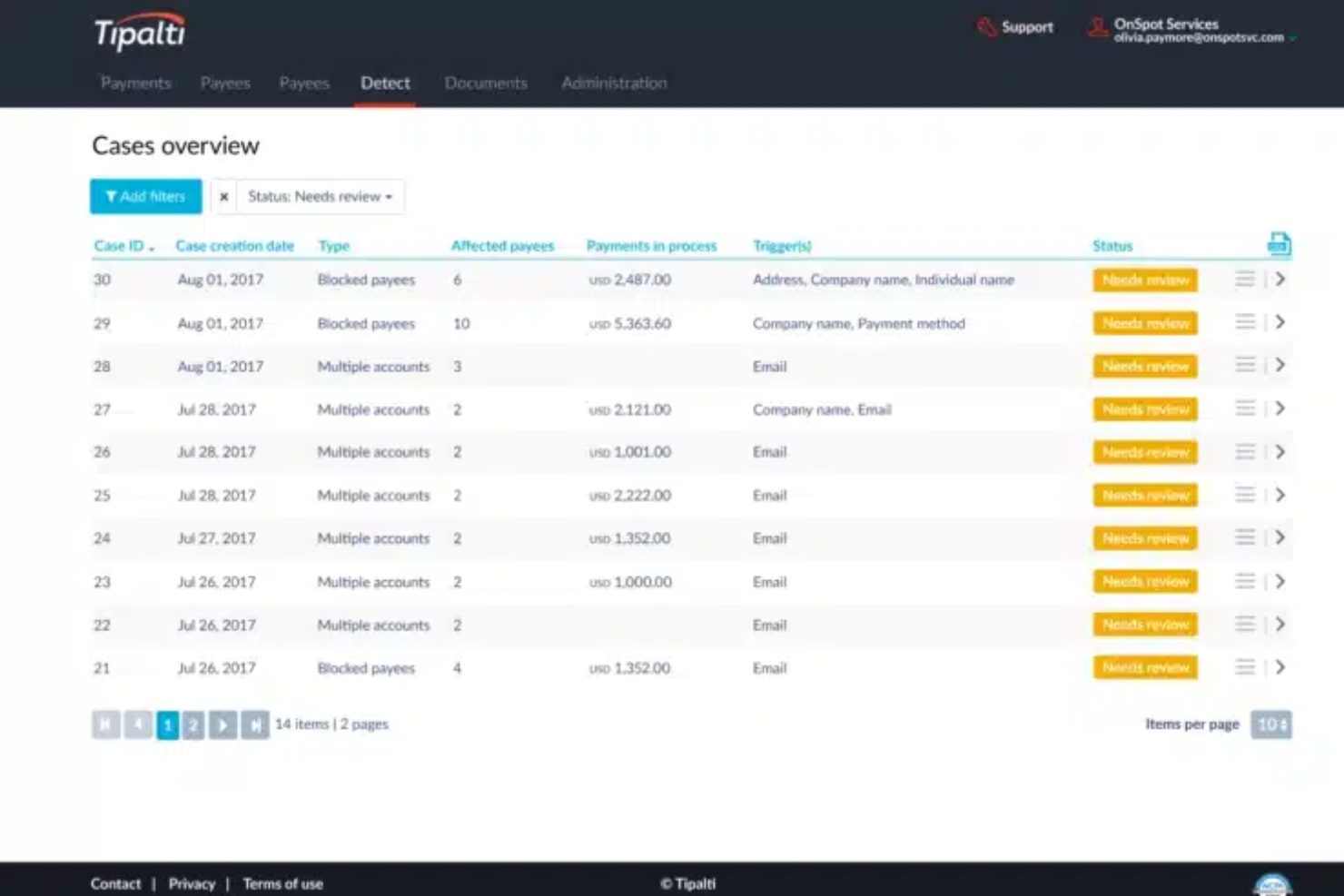
Tipalti is an invoice automation software platform that combines global invoice processing, supplier management, tax compliance, and payment reconciliation in one system.
Who Is Tipalti Best For?
Finance teams at multinational companies that need automated invoice processing and built-in tax compliance.
Why I Picked Tipalti
I picked Tipalti as one of the best because I rely on its built-in tax compliance to handle global supplier payments without manual intervention. I use the platform’s automated invoice capture and validation to process high volumes of invoices across multiple entities. The system’s end-to-end audit trail lets my team track every approval and payment for compliance reporting.
Tipalti Key Features
- PO matching: Matches invoices to purchase orders and receipts automatically.
- Supplier portal: Lets vendors submit invoices and track payment status.
- Multi-currency support: Processes invoices and payments in over 120 currencies.
- Automated approval workflows: Routes invoices for approval based on custom rules.
Tipalti Integrations
Tipalti offers native integrations with Oracle NetSuite, QuickBooks Online, Xero, Sage Intacct, Oracle, Microsoft Dynamics 365, SAP, Workday, Slack, and more. An API is available for custom integrations.
Pros and Cons
Pros:
- Mobile app for invoice capture and approvals
- AI-driven data extraction from multiple sources
- Real-time fraud detection on invoice processing
Cons:
- Limited flexibility for custom approval workflows
- ACH and wire transfer fees can add up

Yooz
Best for real-time invoice automation
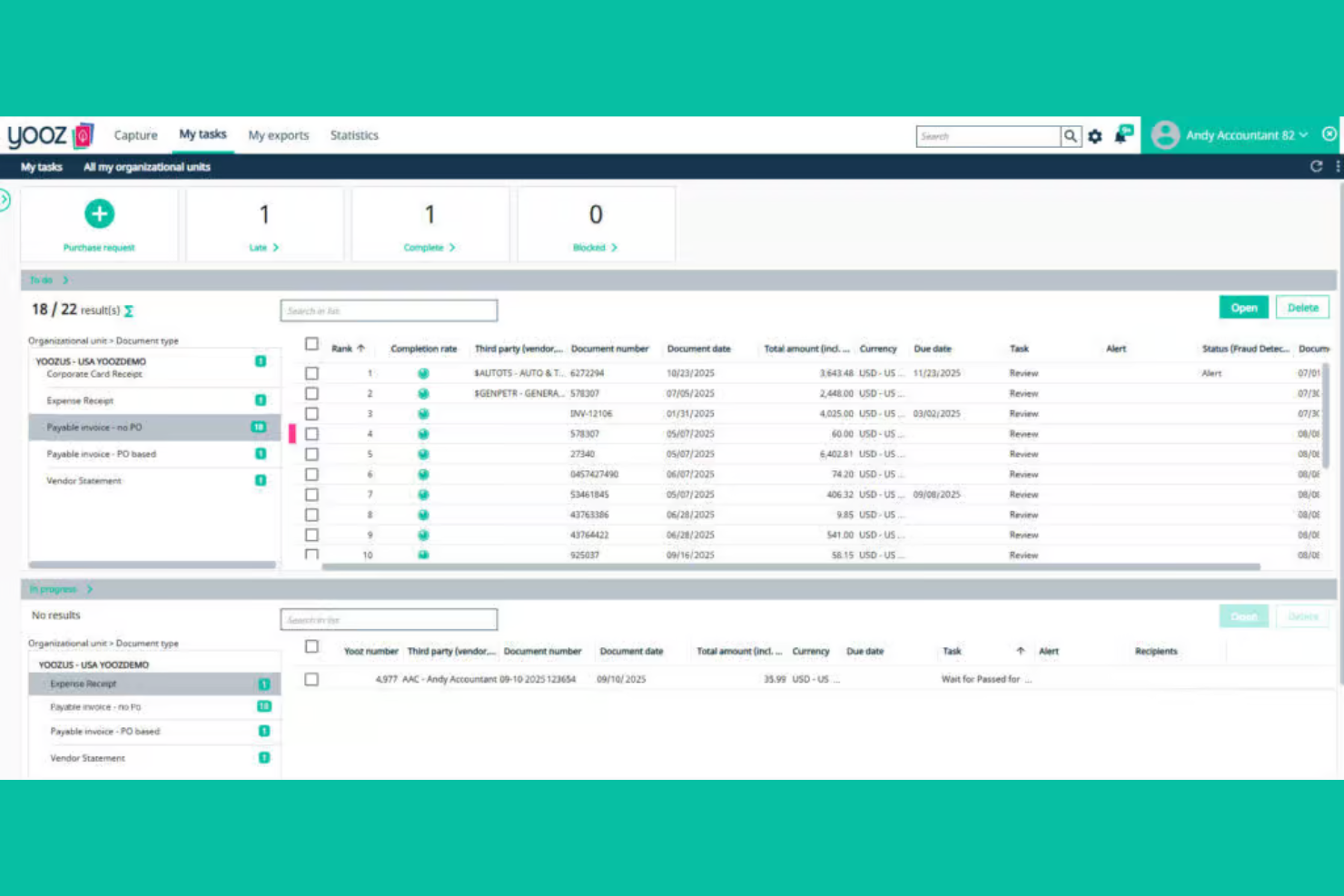
Yooz is an invoice automation software platform that combines AI-driven data capture, real-time invoice processing, fraud detection, and customizable approval workflows for accounts payable teams.
Who Is Yooz Best For?
Accounts payable teams in mid-sized to large organizations that need real-time invoice processing and advanced fraud detection.
Why I Picked Yooz
I picked Yooz as one of the best because I like how its real-time invoice automation flags suspicious transactions instantly, which helps my team catch fraud before it hits our books. I use the AI-driven data extraction to process invoices from email, scan, or mobile upload without manual entry. The customizable approval workflows let me set up multi-level reviews that fit our internal controls.
Yooz Key Features
- Mobile invoice capture: Snap and upload invoices directly from your phone.
- Duplicate invoice detection: Automatically flags potential duplicate submissions for review.
- Purchase order matching: Matches invoices to purchase orders and receipts for validation.
- Audit trail: Maintains a detailed log of all invoice actions and approvals.
Yooz Integrations
Yooz offers 250+ native integrations, including Sage Intacct, QuickBooks, Microsoft Dynamics 365, SAP, Oracle NetSuite, Xero, Blackbaud, Sage 50, and more. An API is available for custom integrations.
Pros and Cons
Pros:
- Strong multi-entity and multi-currency support
- Real-time duplicate invoice detection
- Fast invoice capture with OCR and mobile app
Cons:
- Vendor portal lacks self-service features
- Advanced analytics require higher-tier plans

Brex
Best for spend and invoice management
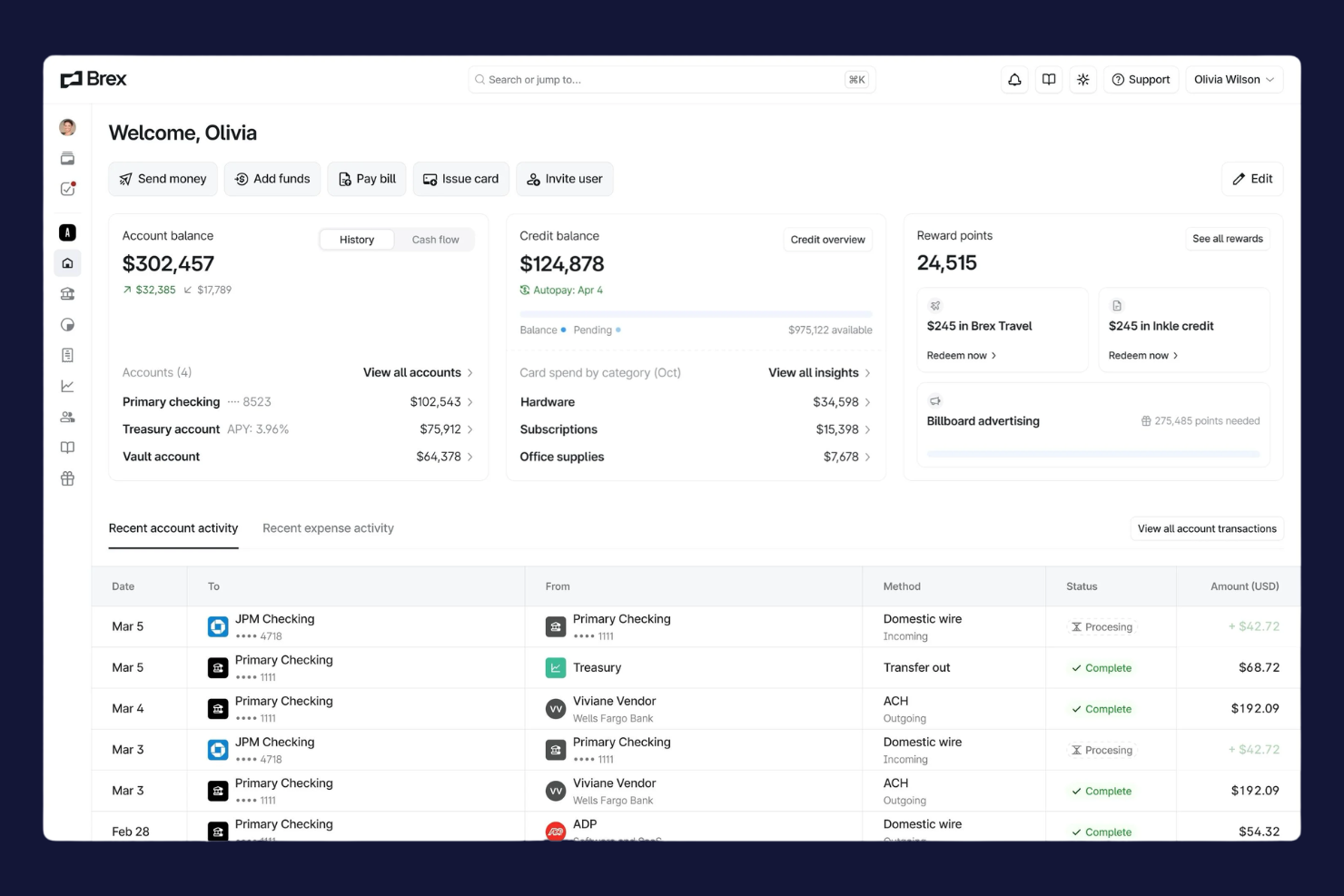
Brex is a spend management platform for finance teams that combines corporate cards, invoice automation, bill pay, and real-time expense tracking in one system.
Who Is Brex Best For?
Finance teams at fast-growing startups and global companies that need unified spend, card, and invoice management.
Why I Picked Brex
I picked Brex as one of the best because I use its real-time spend controls and global payments to manage invoices and expenses across multiple entities. I like that I can issue virtual cards for vendors and automate invoice approvals in one dashboard. My team is able to sync transactions instantly with our accounting system, which keeps our books up to date.
Brex Key Features
- Automated invoice capture: Extracts invoice data from uploads and emails for processing.
- Multi-entity management: Lets you manage invoices and payments across subsidiaries in one platform.
- Custom approval workflows: Allows you to set up multi-level invoice approval chains.
- Audit-ready reporting: Generates detailed reports for compliance and audit requirements.
Brex Integrations
Brex offers native integrations with QuickBooks Online, NetSuite, Xero, Sage Intacct, Rippling, Gusto, Slack, and Plaid, and connects with Zapier. An API is available for custom integrations.
Pros and Cons
Pros:
- Fast ACH and wire payment processing
- Built-in spend controls for each department
- Multi-entity support for global teams
Cons:
- No advanced purchase order matching
- Limited support for non-US bank accounts
Best for mid-market invoice automation
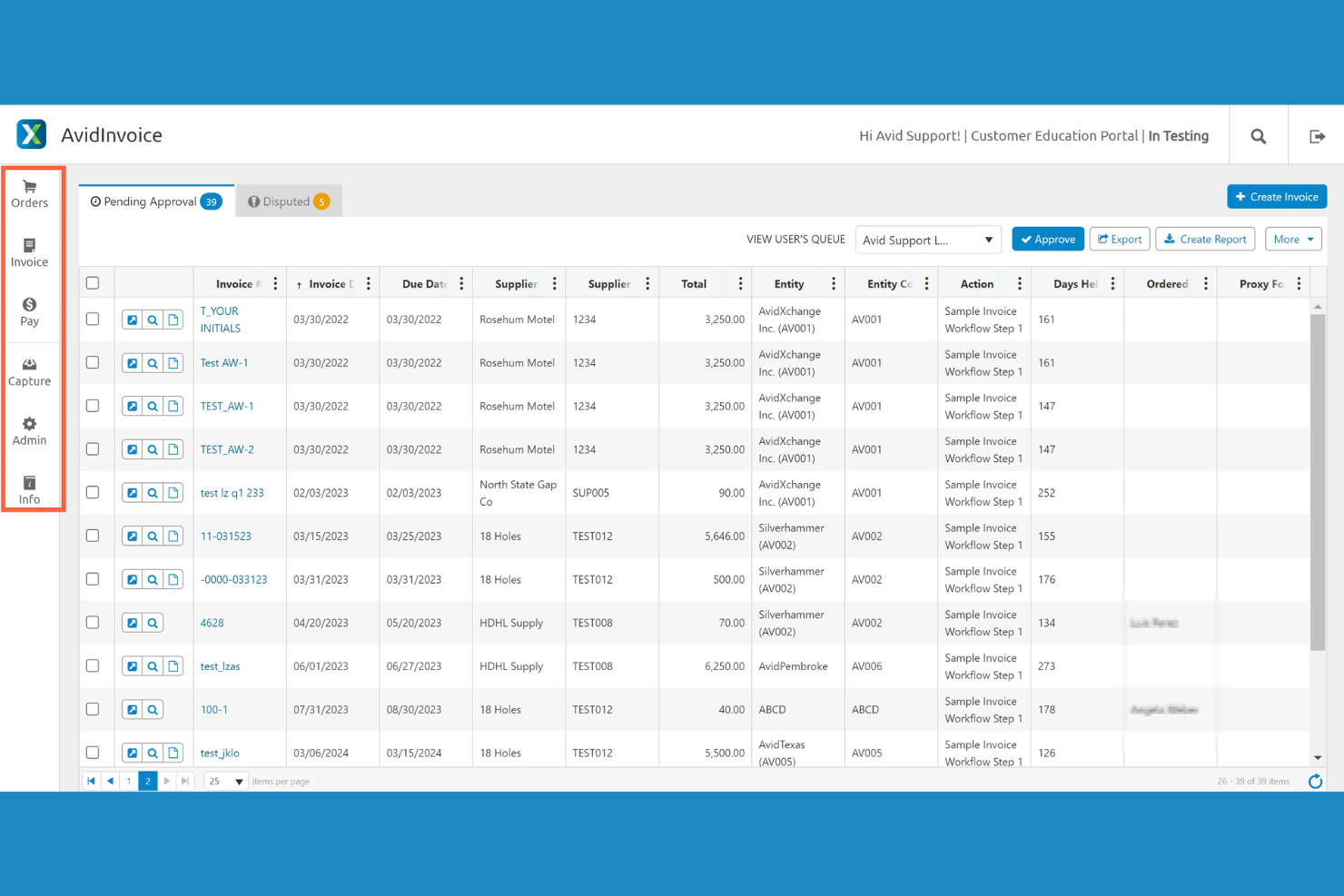
AvidXchange is an invoice automation software platform that digitizes invoice capture, automates approval workflows, and connects with accounting systems for mid-market businesses.
Who Is AvidXchange Best For?
Accounts payable teams at mid-market companies in real estate, construction, or community management.
Why I Picked AvidXchange
I picked AvidXchange as one of the best because I rely on its invoice automation software to handle high invoice volumes for mid-market businesses. I use its configurable approval workflows to match our internal controls, and the platform’s deep integrations with industry-specific accounting systems let my team keep everything in sync without manual entry.
AvidXchange Key Features
- Invoice capture automation: Digitizes and extracts data from invoices using OCR technology.
- Supplier portal: Lets vendors submit invoices and check payment status online.
- Audit trail tracking: Records every action taken on each invoice for compliance.
- Customizable notifications: Send alerts for pending approvals and status changes.
AvidXchange Integrations
AvidXchange offers native integrations with Oracle NetSuite, QuickBooks, Sage Intacct, Microsoft Dynamics 365, MRI Software, Yardi, RealPage, Oracle, SAP, TimberScan, and Viewpoint, and provides an API for custom integrations.
Pros and Cons
Pros:
- Flexible payment options including virtual cards
- Centralized dashboard for invoice status tracking
- Automated invoice approval routing for large teams
Cons:
- Some users report duplicate invoice notifications
- Invoice search functionality can be slow

Rossum
Best for AI invoice data capture
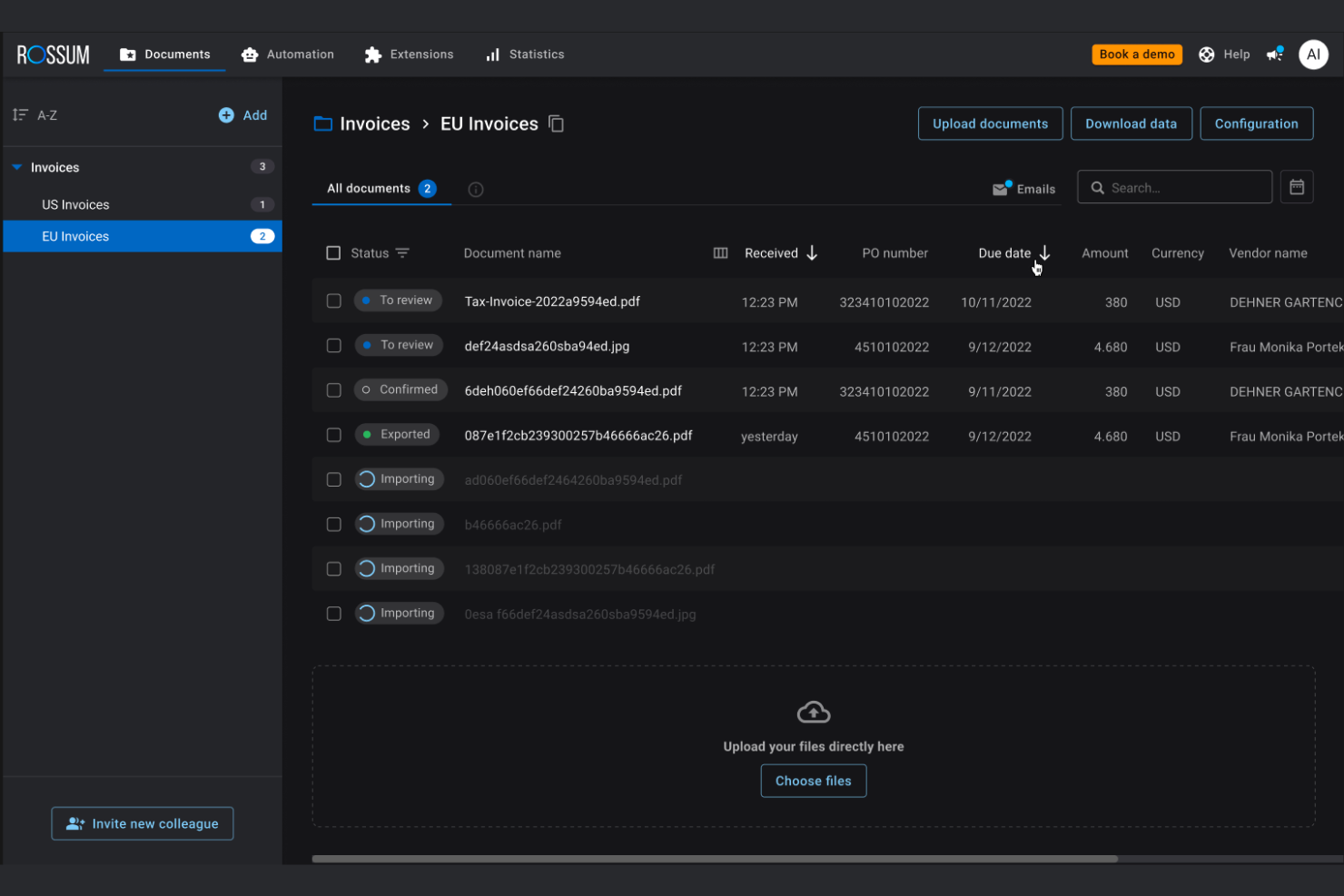
Rossum is an invoice automation platform that uses AI to extract, validate, and organize invoice data from multiple formats and integrates with your existing accounts payable systems.
Who Is Rossum Best For?
Large accounts payable teams in finance, logistics, or retail that need AI-powered data capture for high invoice volumes.
Why I Picked Rossum
I picked Rossum as one of the best because its AI-powered data capture stands out for handling complex, multi-format invoices without heavy template setup. I like how it learns from corrections, so my team can process new invoice layouts quickly. The validation engine flags anomalies and missing fields, which helps us catch issues before approval.
Rossum Key Features
- Custom workflow builder: Design and automate multi-step invoice approval processes tailored to your team’s needs.
- Role-based access controls: Set granular permissions for users across different departments and locations.
- Audit trail: Track every action taken on an invoice with a detailed, time-stamped log.
- API integrations: Connect Rossum with ERP, accounting, and procurement systems for smooth data flow.
Rossum Integrations
Rossum offers native integrations with SAP, Oracle NetSuite, Microsoft Dynamics 365, Coupa, Blue Prism, UiPath, and connects with Zapier. An API is available for custom integrations.
Pros and Cons
Pros:
- Detailed audit trail for compliance tracking
- Integrates with major ERP and RPA tools
- AI learns from user corrections over time
Cons:
- Processing speed slows with very large batches
- Customization requires technical expertise
Medius
Best for cloud-based AP automation
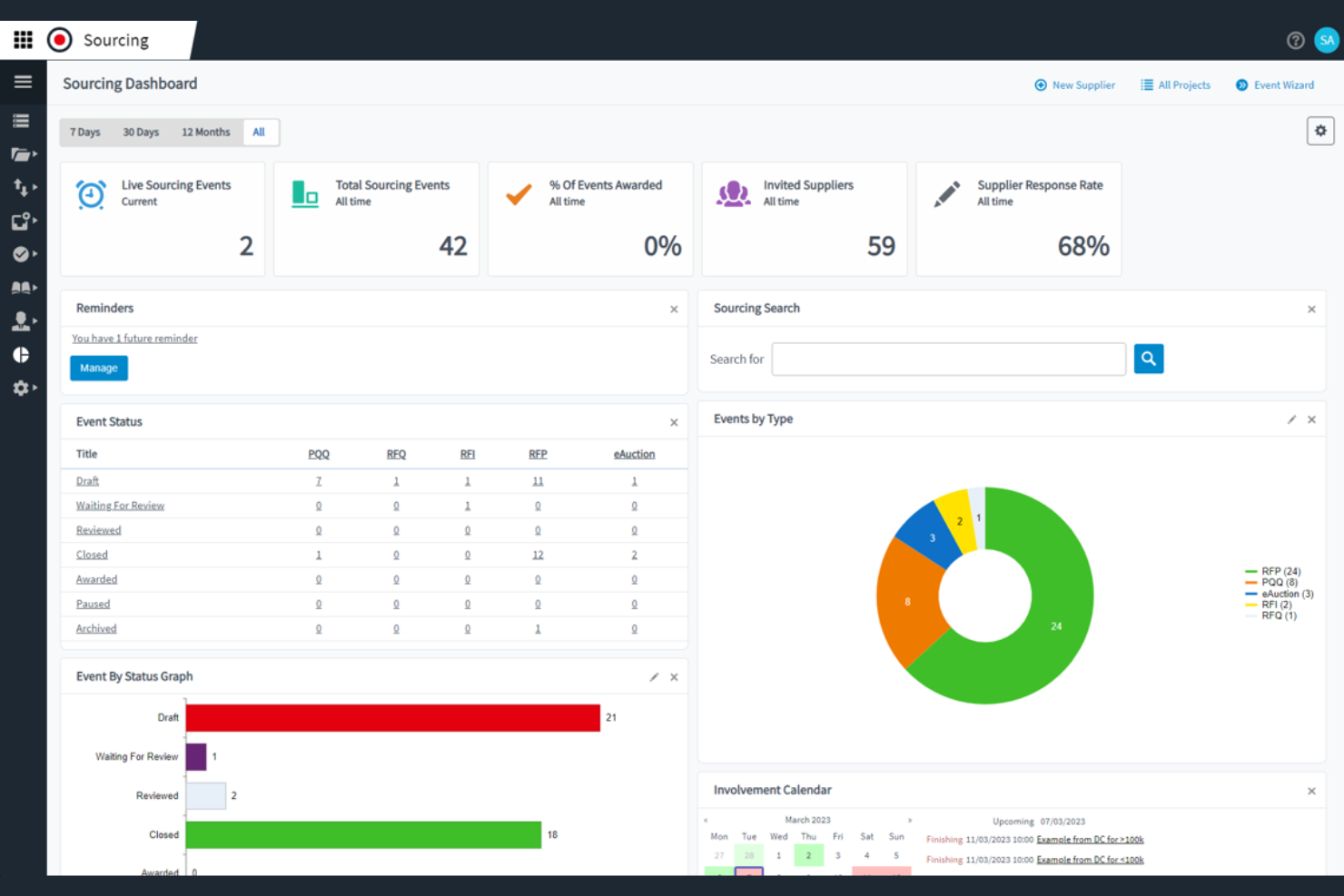
Medius is an invoice automation platform for finance teams that combines AP workflow automation, spend analytics, fraud detection, and supplier management in one system.
Who Is Medius Best For?
Medius is a strong fit for enterprise finance teams that need advanced AP automation and spend analytics.
Why I Picked Medius
I picked Medius as one of the best because I rely on its advanced spend analytics and fraud detection to spot unusual invoice activity before it becomes a problem. I like how the platform automates AP workflows and provides real-time visibility into spend patterns. My team uses the audit trail and exception handling features to keep our compliance tight and our processes transparent.
Medius Key Features
- Invoice capture automation: Uses AI to extract and enter invoice data automatically.
- PO matching engine: Matches invoices to purchase orders and receipts for validation.
- Supplier self-service portal: Lets suppliers submit invoices and track payment status online.
- Multi-currency support: Handles invoices and payments in multiple currencies for global operations.
Medius Integrations
Medius offers native integrations with SAP, Microsoft Dynamics 365, Oracle, Infor M3, Sage, and more, and provides an API for custom integrations.
Pros and Cons
Pros:
- Vendor portal for real-time invoice status
- Centralized communication threads for invoice questions
- AI-driven invoice coding suggestions save time
Cons:
- Limited language support for global teams
- No built-in payment processing feature

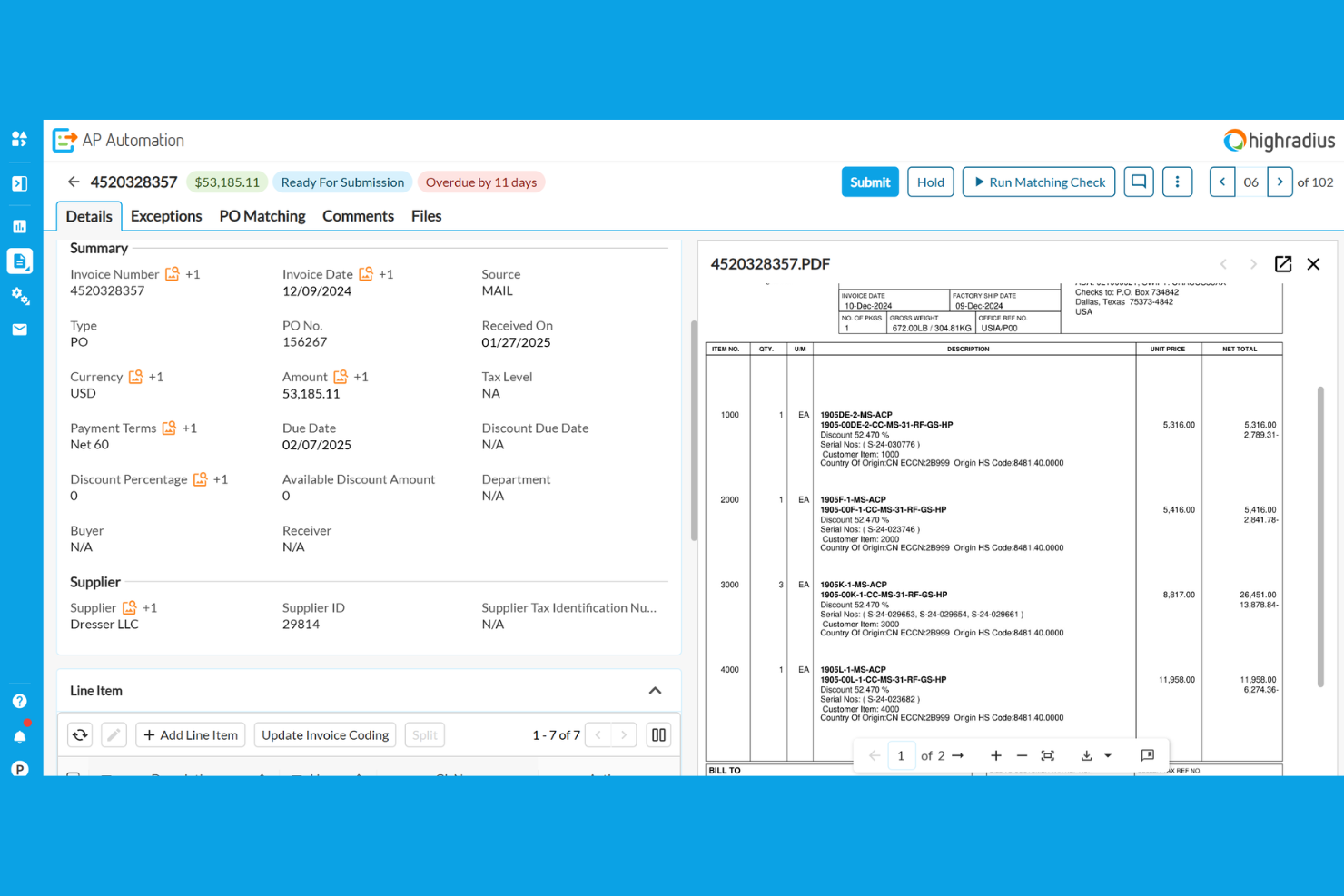
HighRadius is an invoice automation platform for finance teams that combines AI-powered invoice processing, cash application, credit management, and collections in one system.
Who Is HighRadius Best For?
HighRadius is a strong fit for large enterprise finance teams in manufacturing, distribution, and retail sectors.
Why I Picked HighRadius
I picked HighRadius as one of the best because I rely on its AI-powered invoice automation and cash application to handle high transaction volumes with minimal manual intervention. I like how the platform uses machine learning to match payments to invoices and flag exceptions for review. My team uses its real-time dashboards to monitor receivables and automate dispute management, which keeps our process moving fast.
HighRadius Key Features
- Automated invoice delivery: Sends invoices to customers through email or customer portals automatically.
- Customer self-service portal: Lets customers view, download, and pay invoices online.
- Configurable approval workflows: Allows you to set up multi-level invoice approval processes.
- ERP integration connectors: Connects directly with SAP, Oracle, Microsoft Dynamics, and other major ERP systems.
HighRadius Integrations
HighRadius offers native integrations with SAP, Oracle, Microsoft Dynamics 365, NetSuite, Sage, Infor, Workday, and Salesforce, and provides an API for custom integrations.
Pros and Cons
Pros:
- Customizable dashboards for invoice analytics
- Automated matching with purchase orders
- AI-powered invoice data extraction accuracy
Cons:
- Mobile app functionality is not fully developed
- Occasional sync delays with ERP systems
Quadient
Best for AP automation with analytics

Quadient is an invoice automation software platform that combines document management, digital workflow routing, and automated invoice capture for accounts payable teams.
Who Is Quadient Best For?
Accounts payable teams in mid-sized and large organizations that need advanced document management and workflow controls.
Why I Picked Quadient
I picked Quadient as one of the best because I rely on its advanced document management to organize, store, and retrieve invoices with granular access controls. I use its workflow designer to build multi-step approval processes that match our internal policies. The platform’s audit-ready tracking lets my team monitor every document change and approval in real time.
Quadient Key Features
- Automated invoice capture: Uses OCR to extract data from scanned and emailed invoices.
- Supplier portal: Lets vendors submit invoices and track payment status online.
- Duplicate invoice detection: Flags potential duplicate invoices before processing.
- Multi-currency support: Handles invoices and payments in multiple currencies.
Quadient Integrations
Quadient offers native integrations with Oracle NetSuite, Microsoft Dynamics 365, Sage, QuickBooks, Xero, and provides an API for custom integrations.
Pros and Cons
Pros:
- Detailed audit trails for compliance tracking
- Cloud-based platform with remote access
- Automated three-way matching for invoices
Cons:
- Supplier onboarding tools are basic
- Limited language support for global teams


BILL is an invoice automation platform for finance teams that handles accounts payable, accounts receivable, digital payments, and document management in one system.
Who Is BILL Best For?
Accounts payable and receivable teams at mid-sized businesses that need automated workflows and deep accounting integrations.
Why I Picked BILL
I picked BILL as one of the best because I rely on its automated AP and AR workflows to handle high invoice volumes without manual entry. I like that I can set up custom approval chains and sync transactions directly with QuickBooks or NetSuite. My team uses the document management feature to keep all invoice records organized and audit-ready.
BILL Key Features
- Vendor management: Lets you store and manage vendor details and payment preferences.
- Recurring payments: Schedule and automate recurring invoice payments to vendors.
- Mobile app: Approve, pay, and track invoices from your phone.
- Audit trail: Tracks every action taken on invoices for compliance and transparency.
BILL Integrations
BILL offers native integrations with QuickBooks, Xero, Oracle NetSuite, Sage Intacct, Microsoft Dynamics 365, Acumatica, and more. An API is available for custom integrations.
Pros and Cons
Pros:
- Vendor network for faster electronic payments
- ACH, check, and international payment options
- Approval workflows with role-based permissions
Cons:
- Batch payment processing can experience delays
- International payments have limited currency support
Other Invoice Automation Software
Here are some additional invoice automation software options that didn’t make it onto my shortlist, but are still worth checking out:
- Rillion
For user-friendly invoice automation
- Concur Invoice
For compliant invoice processing
- FreshBooks
For small business invoicing
- Sage Intacct
For cloud financial management
- Coupa
For spend and AP management
- Xero
For cloud accounting and invoicing
- Docsumo
For AI invoice data extraction
- Order.co
For automated purchasing and invoicing
- Lido
For spreadsheet-based invoice automation


How I Evaluate Invoice Automation Software
I evaluate these tools in two layers: the core capabilities—like milestone-based invoicing and accounting sync—every tool must have, and the differentiators that set the best options apart.
Core Functionality (Table Stakes For This List)
When I'm selecting tools for my list, I rank each one on a scale from 0 (does not offer the functionality) to 5 (excels in this area) for each core functionality listed below. Then, I calculate the tool's total score into a percentage. Each tool needs to achieve a minimum total score of 65% to be considered for inclusion.
- Project-Based Invoice Generation: I check whether a tool can produce invoices tied to milestones, deliverables, or retainer schedules rather than forcing you to build each invoice from scratch.
- Time & Expense Billing: Approved timesheets and logged expenses should flow into invoices with the correct rates applied, so I look at how each tool handles role-based or client-specific billing rules.
- Recurring & Scheduled Invoicing: For retainer clients or phased engagements, I evaluate whether the tool supports automated invoice runs on custom schedules or event-based triggers.
- Accounting & ERP Integration: I look for native, bidirectional sync with platforms like QuickBooks, Xero, or NetSuite so invoice and payment data stays consistent across systems.
- Payment Tracking & AR Management: Each tool should surface real-time invoice status, aging balances, and outstanding receivables at the project level rather than only at the account level.
- Approval Routing & Tax Compliance: I evaluate how the tool handles multi-step invoice approvals across project teams and whether it supports multi-currency and regional tax configurations.
Once I have a list of tools that meet the criteria, I consider what sets each platform apart.
Differentiating Factors (What Sets Vendors Apart)
Here's how I compare and contrast different vendors:
Standout Features
Budget burn alerts are a big differentiator. I look for tools that flag when billable spend trends past a set threshold so billing conversations happen before margin erosion sets in. Client-facing portals also matter, especially for agencies managing multiple accounts where clients expect to review and approve invoices on their own. For longer engagements, I evaluate whether a tool supports revenue recognition methods like percentage-of-completion, which keeps financials accurate across multi-phase projects.
Beyond Features
I evaluate how well each tool connects to the project management platforms teams already use, like Jira, Asana, or monday.com. A tool with deep native integrations cuts down on manual data handoffs between delivery and finance. Pricing transparency is another focus area. I check whether costs scale predictably as headcount or project volume grows, since hidden fees for payment processing or premium connectors can erode the ROI quickly. Reporting also matters. Project profitability dashboards that tie invoiced revenue back to logged effort help PMs prove margin health to leadership.
How to Choose Invoice Automation Software
It’s easy to get bogged down in long feature lists and complex pricing structures. To help you stay focused as you work through your unique software selection process, here’s a checklist of factors to keep in mind:
| Factor | What to Consider |
|---|---|
| Scalability | Will the software handle your invoice volume as your business grows? Ask about user limits and transaction caps. |
| Integrations | Does it connect natively to your accounting, ERP, and procurement systems? Check for compatibility with your tech stack. |
| Customizability | Can you tailor workflows, approval rules, and notifications to match your processes? Avoid rigid systems that force workarounds. |
| Ease of use | Will your team adopt it quickly? Look for intuitive navigation and minimal training requirements. Request a demo to test the interface. |
| Implementation and onboarding | How long will setup take, and what support is provided? Ask about migration help, training resources, and typical go-live timelines. |
| Cost | Are pricing tiers clear and predictable? Watch for extra fees for integrations, users, or advanced features. Compare the total cost of ownership. |
| Security safeguards | Does the vendor offer encryption, audit logs, and access controls? Ensure compliance with your company’s data protection standards. |
| Support availability | What support channels are offered, and during what hours? Consider if you need 24/7 help or dedicated account management. |
What Is Invoice Automation Software?
Invoice automation software is an accounts payable automation and invoice automation solution that helps streamline invoice capture, approval, and processing. It replaces manual processes and manual tasks with an automation solution that reduces processing time and eliminates time-consuming workflows. These tools apply business rules to manage the full invoice lifecycle, improve the payable process, and support better vendor relationships. Many platforms also include features for forecasting, handling payments like credit card, and capturing opportunities such as early payment discounts. By automating invoice workflows, finance teams can optimize efficiency, reduce errors, and gain better visibility into accounts payable operations.
Features
Here are the core features any great invoice automation software should have:
- Invoice capture: Digitizes incoming invoices from email, PDF, or scanned documents, making them searchable and ready for processing.
- Approval workflows: Automates routing of invoices to the right people for review and sign-off, reducing bottlenecks and manual follow-ups.
- Purchase order matching: Compares invoices to purchase orders and receipts to ensure accuracy and prevent overpayments or fraud.
- Duplicate detection: Flags potential duplicate invoices to help prevent double payments and maintain clean records.
- Audit trail: Tracks every action taken on an invoice, providing a transparent record for compliance and internal reviews.
- Supplier portal: Allows vendors to submit invoices, check payment status, and communicate directly with your accounts payable team.
- ERP and accounting integrations: Connects directly to your existing financial systems to sync data and reduce manual entry.
- Customizable notifications: Send alerts and reminders to approvers or finance staff when action is needed, or deadlines are approaching.
- Reporting and analytics: Provides dashboards and exportable reports to monitor invoice status, approval times, and spending trends.
- User permissions: Lets you control who can view, edit, or approve invoices, supporting internal controls and security policies.
Common Invoice Automation Software AI Features
Beyond the standard invoice automation software features listed above, many of these solutions are incorporating AI with features like:
- Intelligent data extraction: Uses AI to recognize and extract key invoice details—such as vendor name, invoice number, and amounts—from a wide range of formats, reducing manual entry and errors.
- Automated GL coding: Applies AI to suggest or assign general ledger codes based on invoice content and historical coding patterns, speeding up classification and reducing mistakes.
- Anomaly detection: Leverages AI to flag unusual invoice amounts, duplicate submissions, or suspicious vendors, helping teams catch fraud or compliance issues early.
- Predictive approval routing: Uses AI to learn from past approval behaviors and automatically route invoices to the most appropriate approvers, minimizing delays.
- Smart exception handling: Applies AI to identify and categorize exceptions—such as missing purchase orders or mismatched amounts—and recommend next steps for resolution.
Benefits
Implementing invoice automation software provides several benefits for your team and your business. Here are a few you can look forward to:
- Faster invoice approvals: Automated workflows and notifications help invoices move quickly through the review and approval process (dedicated invoice approval tools can provide more focused support for this step).
- Reduced manual data entry: Digital capture and AI-powered extraction eliminate repetitive typing and lower the risk of human error.
- Improved compliance and audit readiness: Built-in audit trails and permission controls make it easier to meet regulatory requirements and prepare for audits.
- Better visibility into payables: Real-time dashboards and reporting give finance teams a clear view of invoice status, spending trends, and bottlenecks.
- Lower risk of duplicate or fraudulent payments: Duplicate detection and anomaly alerts help catch issues before payments are made.
- Easier supplier collaboration: Supplier portals and automated status updates keep vendors informed and reduce back-and-forth communication.
- Smooth integration with financial systems: Direct connections to ERP and accounting platforms ensure data consistency and reduce reconciliation work.
Costs and Pricing
Selecting invoice automation software requires an understanding of the various pricing models and plans available. Costs vary based on features, team size, add-ons, and more. The table below summarizes common plans, their average prices, and typical features included in invoice automation software solutions:
Plan Comparison Table for Invoice Automation Software
| Plan Type | Average Price | Common Features |
|---|---|---|
| Free Plan | $0 | Basic invoice capture, limited approval workflows, restricted integrations, and basic reporting. |
| Personal Plan | $10-$30/user/month | Unlimited invoices, standard approval workflows, email support, and export to accounting software. |
| Business Plan | $30-$80/user/month | Advanced approval routing, purchase order matching, audit trails, ERP integrations, and analytics. |
| Enterprise Plan | $80-$200/user/month | Custom workflows, multi-entity support, advanced security, dedicated support, and compliance tools. |
FAQs
Here are some answers to common questions about invoice automation software:
Can invoice automation software integrate with my existing accounting system?
Yes, most invoice automation software offers integrations with popular accounting and ERP systems. Before choosing a solution, check for compatibility with your current tech stack and ask about available connectors or APIs.
How long does it take to implement invoice automation software?
Implementation time varies, but most teams can get up and running within a few weeks. Factors like data migration, workflow customization, and user training can affect the timeline, so clarify expectations with your vendor early on.
Is invoice automation software secure for sensitive financial data?
Yes, reputable solutions use encryption, access controls, and audit logs to protect your data. Always review a vendor’s security certifications and compliance standards to ensure they meet your organization’s requirements.
What types of invoices can be processed with automation software?
Most platforms handle a wide range of invoice formats, including PDFs, scanned images, and electronic invoices. Some solutions also support international invoices and multi-currency processing.
Do I need technical expertise to use invoice automation software?
No, most modern invoice automation tools are designed for non-technical users. Look for intuitive interfaces, onboarding resources, and customer support to help your team get started quickly.