

10 Best Hot Desk Booking Software in 2026

Best Hot Desk Booking Software Shortlist


Hot desk booking software lets your team reserve desks and workspaces on demand, making it easier to manage flexible office setups. If you’re searching for the best hot desk booking software, you’re likely juggling hybrid schedules, shifting team needs, and the pressure to keep your workspace efficient and fair.
The right tool can help you avoid double bookings, give everyone visibility into desk availability, and support a smooth return-to-office experience.
In this guide, you’ll find a clear comparison of top hot desk booking platforms so you can pick the one that fits your team’s workflow and space management goals.
Why Trust Our Software Recommendations
Our team has been testing and reviewing software since 2012. As project managers ourselves, we know how difficult—and important—it is to choose the right software.
For this guide, we evaluated tools using hands-on testing and independent research, scoring tools using our selection criteria. We also draw on insights from industry thought leaders and practicing project management experts.
Our reviews reflect our human editorial judgment, not a sales pitch.
Expert reviewers:
Best Hot Desk Booking Software Summary
This comparison chart summarizes pricing details for my top hot desk booking software selections to help you find the best one for your budget and business needs.
| Tool | Best For | Trial Info | Price | ||
|---|---|---|---|---|---|
| 1 | Best for delegating guest desks | Free demo available | Pricing upon request | Website | |
| 2 | Best for booking desks by team neighborhood | Free demo available | From $3000/year | Website | |
| 3 | Best for AI-powered desk recommendations | Free plan + free demo available | From $500/month | Website | |
| 4 | Best for occupancy monitoring by zone | Free demo available | Pricing upon request | Website | |
| 5 | Best for automated desk assignment rules | Free demo available | From $5/bookable resource/month (billed annually) | Website | |
| 6 | Best for access to global coworking locations | Free version available | From $32.47/user/month (billed annually) | Website | |
| 7 | Best for interactive floor plan visualization | 30-day free trial + free demo available | From $13.50/month (billed annually) | Website | |
| 8 | Best for instant desk booking with one tap | Free plan available | From €5.50/month (billed annually) | Website | |
| 9 | Best for advanced analytics and reporting | Free demo available | From £99/month | Website | |
| 10 | Best for mobile-first desk reservations | Free demo available | Pricing upon request | Website |

Hot Desk Booking Software Reviews
Below are my detailed summaries of the hot desk booking software that made it onto my shortlist. My reviews offer a detailed look at the features, best use cases, and integrations of each platform to help you find the best one for you.
Best for delegating guest desks
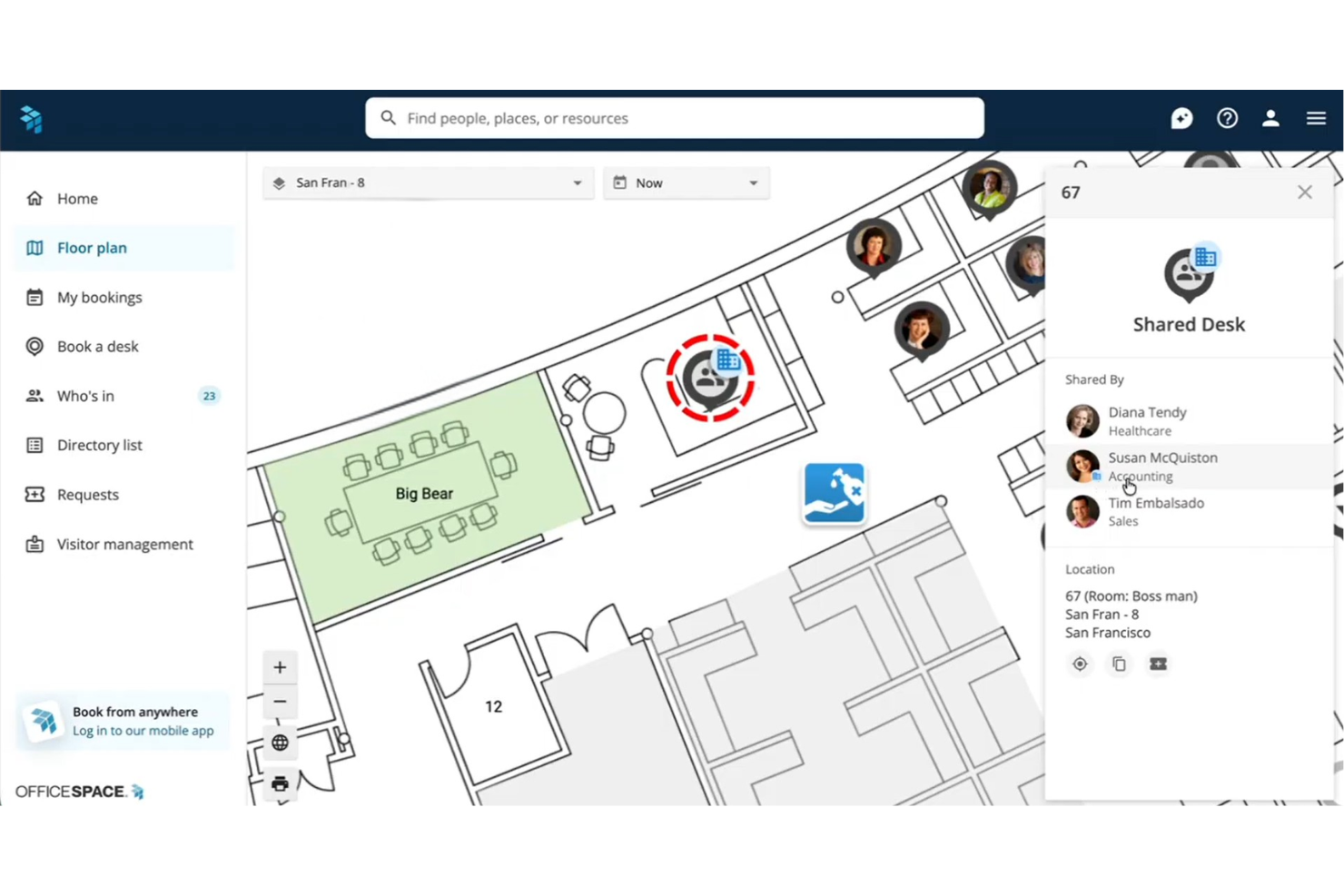
OfficeSpace is an enterprise hot desk booking platform that combines interactive floor plan navigation, neighborhood-based desk assignments, delegate booking controls, and utilization analytics across single and multi-site offices.
Who Is OfficeSpace Best For?
It's a strong fit for enterprise workplace and facilities teams managing hybrid seating across large, multi-location offices with complex permission and capacity needs.
Why I Picked OfficeSpace
OfficeSpace earns its spot on my shortlist because of how granularly it handles guest desk permissions. I love that you can designate Neighborhood Captains, specific team members who can book and manage desks on behalf of visitors without needing full admin access. You can also configure per-group advanced booking windows, so VIP guests or project cohorts get priority access before the general desk pool opens up.
OfficeSpace Key Features
- Interactive floor plans: Browse dynamic, multi-site office maps with real-time desk availability and wayfinding.
- Utilization analytics: Access dashboards tracking desk occupancy, booking patterns, and workspace trends with IoT and sensor data.
- Calendar integrations: Sync bookings with Google Calendar, Office 365, Outlook, Slack, Teams, and more.
- Automated check-ins: Trigger desk check-in via badge scans or WiFi presence to help automate attendance and release unused spaces.
OfficeSpace Integrations
OfficeSpace offers native integrations with Microsoft 365, Google Workspace, Slack, Microsoft Teams, Zoom, Okta, Workday, ADP, and PeopleSoft. An API is available for custom integrations.
Pros and Cons
Pros:
- Strong utilization reporting with sensor data support
- Wayfinding helps teams navigate large offices
- Granular desk permission controls per user group
Cons:
- Floor plan configuration can be slow to update
- Implementation requires significant IT setup time
New Product Updates from OfficeSpace

OfficeSpace Adds Work Order Status and Cost Reports
OfficeSpace adds Work Order Status and Work Order Cost reports for built-in maintenance reporting. These reports help facilities teams track work order activity and costs without relying on manual spreadsheets. For more information, visit OfficeSpace’s official site.
 .
.
Tactic
Best for booking desks by team neighborhood
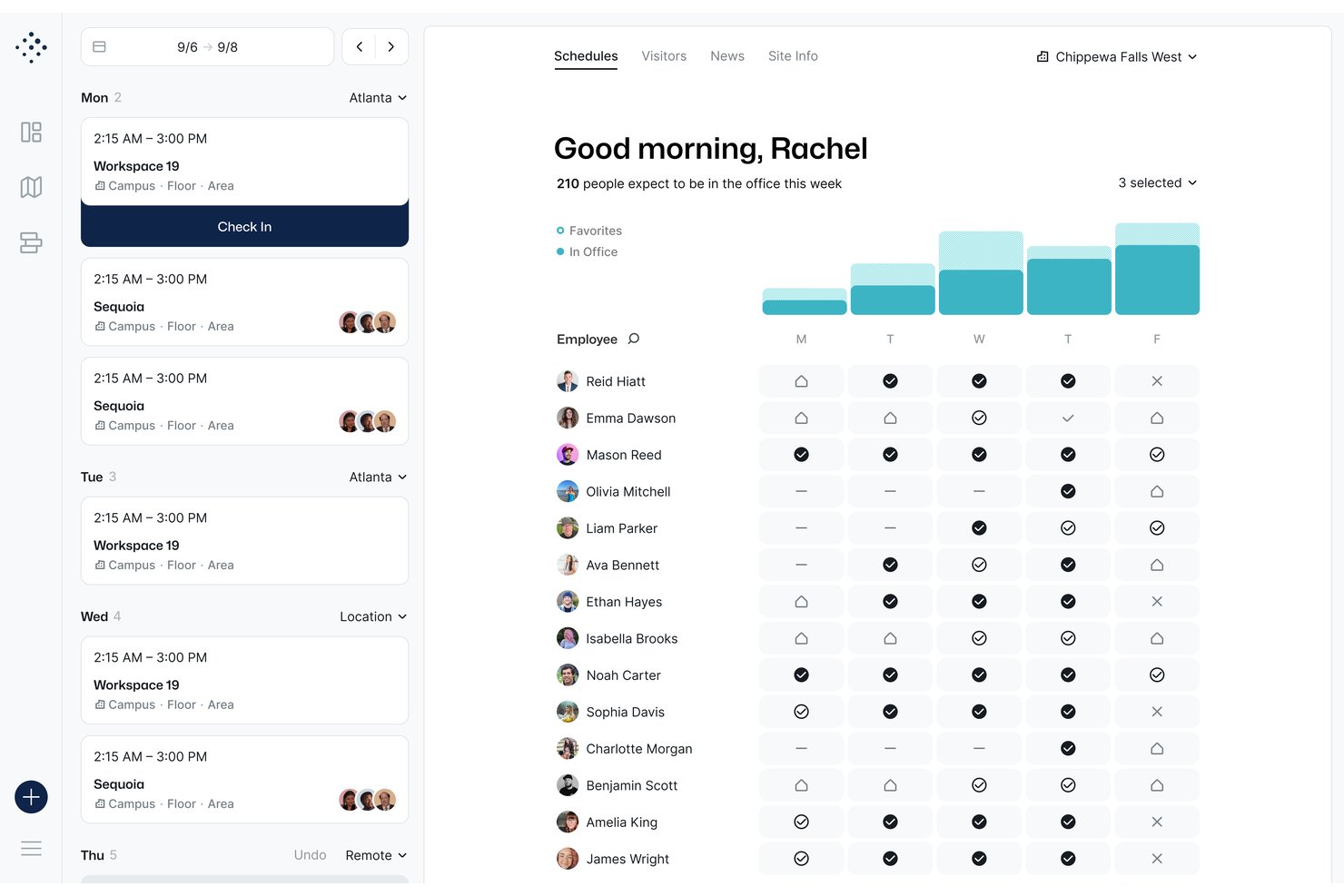
Tactic is a hot desk booking platform that combines interactive floor plan booking, team neighborhood grouping, AI-assisted reservation, and workplace analytics across desks, rooms, and custom resources.
Who Is Tactic Best For?
Tactic is a strong fit for small to mid-sized companies managing hybrid teams who need a simple, low-friction way to coordinate on-site seating without complex admin overhead.
Why I Picked Tactic
Tactic earns its spot on my shortlist because of how it handles team neighborhoods. I can filter the interactive floor map by team zone, see exactly where teammates are sitting, and book a desk right next to them in a few clicks. On top of that, Tessa, Tactic's AI assistant, lets me search for available desks near my team using plain language, which cuts the time I'd otherwise spend hunting through an availability grid.
Tactic Key Features
- Delegated booking: Admins and executive assistants can reserve desks or rooms on behalf of other users or guests.
- Automated desk check-in: Users can check in via QR codes, Slack, Teams, Wi-Fi, or in-app, with no-shows automatically released.
- Two-way calendar integration: Bookings sync in real time with both Google Calendar and Outlook for seamless workplace coordination.
- Custom resource management: Reserve parking, lockers, or equipment alongside desks from a single interface.
Tactic Integrations
Tactic offers native integrations with Google Calendar, Outlook, Slack, Microsoft Teams, Microsoft 365, Microsoft Entra, and supports SSO and SCIM. An API is available for custom integrations.
Pros and Cons
Pros:
- Colleague locator shows real-time teammate seating
- AI assistant simplifies desk search
- Team neighborhood booking is uniquely intuitive
Cons:
- Mobile app experience lags behind desktop version
- Analytics reporting lacks depth for large teams

elia
Best for AI-powered desk recommendations

elia is a workplace operations platform that covers desk and room booking, occupancy management, service requests, visitor management, and hybrid office coordination through an interactive floor plan interface.
Who Is elia Best For?
elia is well-suited for mid-size to large enterprises managing hybrid work across multiple office locations that need centralized control over workspace resources.
Why I Picked elia
I picked elia as one of the best because its AI Analytics & Recommendations feature goes beyond basic reporting to actively surface desk suggestions based on usage patterns and occupancy data. This is particularly useful in large offices where employees struggle to find the right desk for the day without manually scanning the floor plan. Pair that with occupancy sensor data feeding directly into the analytics engine, and the recommendations become grounded in real, anonymous usage signals rather than guesswork.
elia Key Features
- Interactive floor plan: Browse real-time desk availability directly on a visual map of your office and book a specific desk in a few clicks.
- Neighborhood booking: Assign teams to designated office zones so colleagues can book desks within the same area on shared in-office days.
- Automated check-in/check-out: Trigger desk check-ins via QR code or mobile app, with auto-release for no-shows to free up unused desks.
- Colleague booking: Reserve desks on behalf of teammates or invite colleagues to book alongside you for coordinated in-office days.
elia Integrations
elia offers native integrations with Microsoft 365, Google Workspace, and Slack, with meeting room booking synced with Outlook and Google Calendar. API access and a custom integration builder for IoT and software are available on the Enterprise plan.
Pros and Cons
Pros:
- Free plan includes unlimited users
- Anonymized occupancy sensor data collection
- Built-in floor plan builder for layouts
Cons:
- Mobile app less polished than desktop
- Limited scheduling status options available

Best for occupancy monitoring by zone

Hybrid Hero is a hot desk booking platform that combines interactive floor plans, neighbourhood-based workspace configuration, QR code check-in, and zone-level occupancy analytics across single and multi-site offices.
Who Is Hybrid Hero Best For?
Hybrid Hero is a good fit for mid-size to enterprise companies managing hybrid work schedules across multiple office locations or floors.
Why I Picked Hybrid Hero
I've included Hybrid Hero in my top picks because its zone-level occupancy data is genuinely granular. Rather than showing a single utilisation number for an entire floor, Hybrid Hero breaks down occupancy heat maps by neighbourhood or zone, so I can see which sections of the office are overloaded on a Tuesday and which sit empty all week. That kind of visibility is what makes a real estate conversation with a COO or CFO actually defensible. Pair that with no-show tracking and peak day trend reporting, and you've got a clear picture of how each zone performs over time.
Hybrid Hero Key Features
- Interactive floor plan: View real-time desk availability across your office layout and book directly from the map.
- QR code check-in: Employees check in at their desk via QR code, and unclaimed desks are automatically released back into the pool.
- Amenity-based desk search: Filter available desks by specific amenities like monitors, standing desks, or phone booths.
- Recurring desk booking: Set up repeating bookings across multiple days or weeks without re-booking each session manually.
Hybrid Hero Integrations
Hybrid Hero offers native integrations across the Microsoft ecosystem, including Microsoft Outlook, Microsoft Teams, and Azure AD, as well as Google Workspace, Okta, and Slack. It also provides a REST API and webhooks for connecting to HRIS, access control, and other internal systems. Zapier support is not clearly documented.
Pros and Cons
Pros:
- Per-desk pricing suits high desk-to-employee ratios
- AI booking via natural language requests
- Unified platform covers desks, rooms, and parking
Cons:
- Mobile app can feel slow to load
- No free trial or free plan available
Envoy
Best for automated desk assignment rules
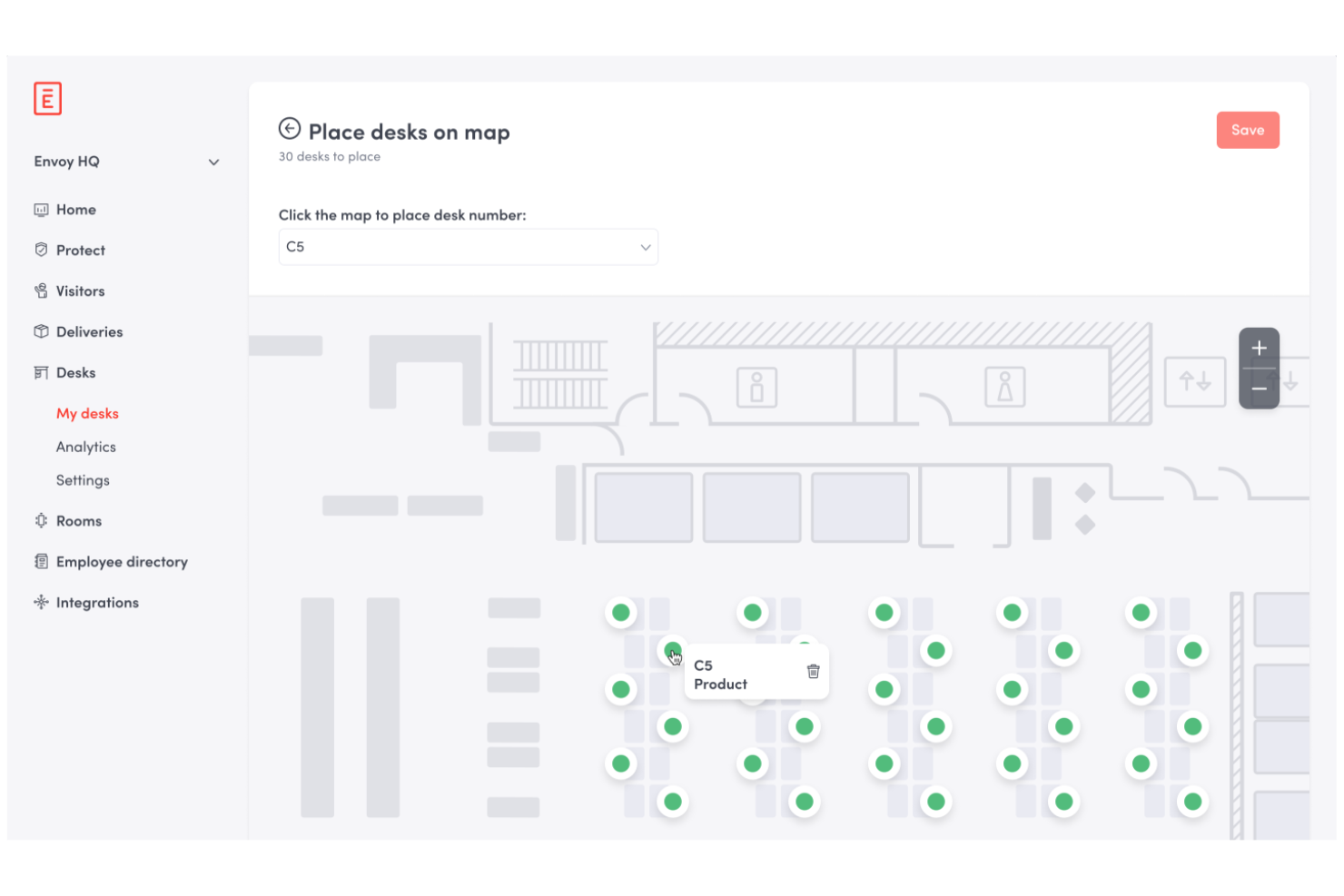
Envoy is a workplace management platform for hot desk booking that lets you automate desk assignments, manage reservations, set booking policies, and monitor office occupancy from a centralized dashboard.
Who Is Envoy Best For?
Office managers at mid-size and large companies who need automated desk assignment and centralized workspace management.
Why I Picked Envoy
I picked Envoy as one of the best because I can set up automated desk assignment rules that match my team's policies and preferences. I like how I can configure neighborhoods, restrict bookings by team or schedule, and automatically assign desks based on employee needs. My team uses the analytics dashboard to monitor occupancy and adjust our space planning in real time.
Envoy Key Features
- Interactive floor plan visualization: See available desks and bookings on a live office map.
- Mobile app booking: Reserve desks and manage bookings directly from your phone.
- Visitor management integration: Track and manage guest access alongside desk reservations.
- Health and safety screening: Require employees to complete health checks before booking a desk.
Envoy Integrations
Envoy offers native integrations with Google Workspace, Microsoft 365, Slack, Zoom, Okta, Cisco Meraki, Aruba, Salesforce, and has an API for custom integrations.
Pros and Cons
Pros:
- Strong visibility into office usage trends
- Centralized workplace and occupancy management
- Automated desk assignment based on policies
Cons:
- Limited flexibility in custom booking logic
- Dashboard usability can be inconsistent
Best for access to global coworking locations
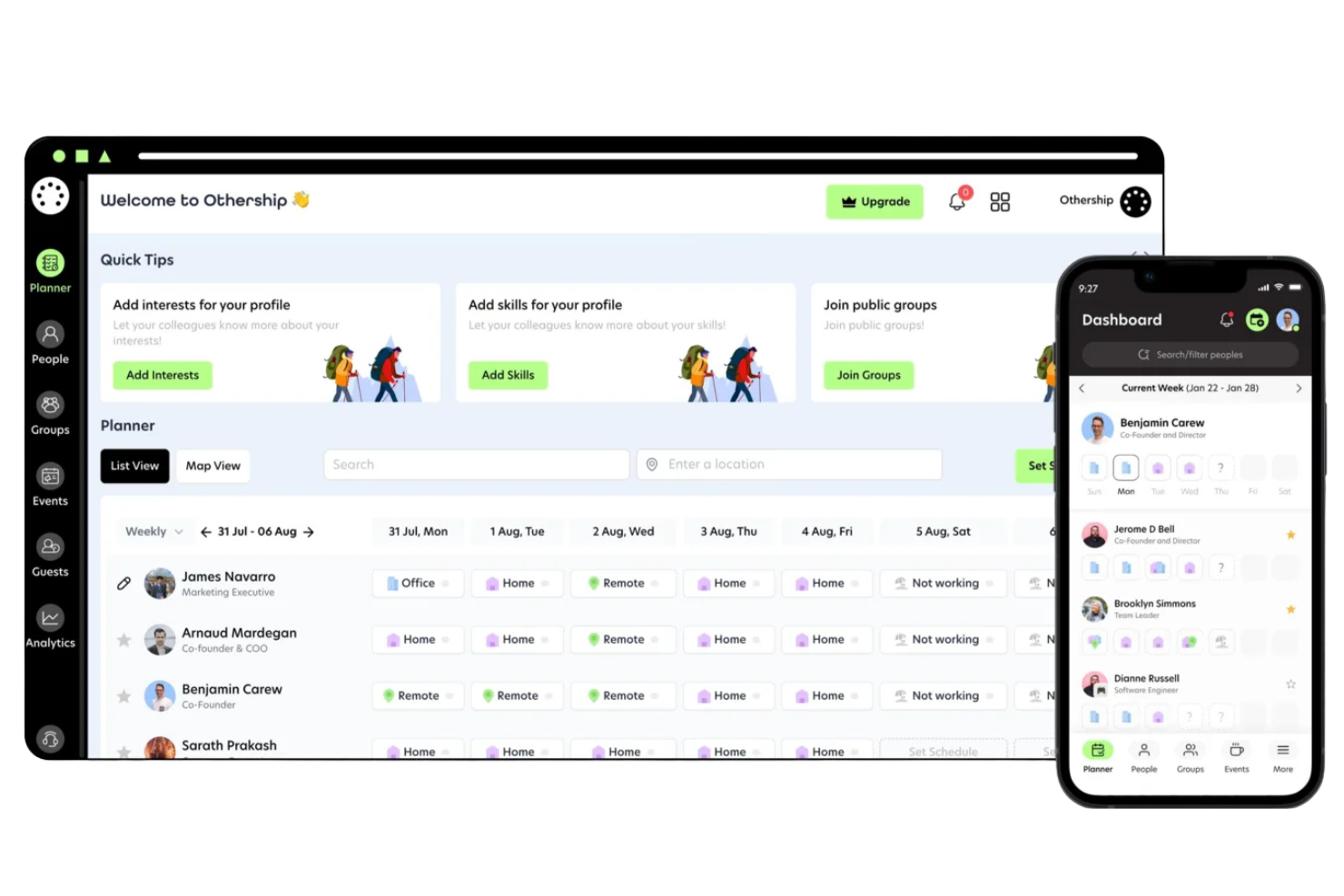
Othership is a workspace booking platform that lets you reserve desks, meeting rooms, and private offices across a curated network of coworking locations in multiple countries.
Who Is Othership Best For?
Remote professionals and distributed teams who need flexible workspace options across multiple cities or countries.
Why I Picked Othership
I picked Othership as one of the best because I can access a curated network of coworking spaces in dozens of cities worldwide. I like that I can search by location, amenities, or workspace type and instantly book desks or meeting rooms. My team uses the platform to coordinate in-person workdays when traveling or working remotely across different countries.
Othership Key Features
- Team management dashboard: Manage team members, permissions, and workspace usage from a central dashboard.
- Workspace access controls: Set who can book, check in, or access specific locations.
- Booking history export: Download detailed booking records for reporting or expense tracking.
- Mobile app support: Book, check in, and manage reservations directly from your phone.
Othership Integrations
Native integrations are not clearly documented. The tool supports integrations via API for custom integrations.
Pros and Cons
Pros:
- Mobile-friendly reservation management
- Simple booking across multiple cities
- Curated global coworking location access
Cons:
- No built-in visitor management features
- Limited reporting and usage insights
Best for interactive floor plan visualization
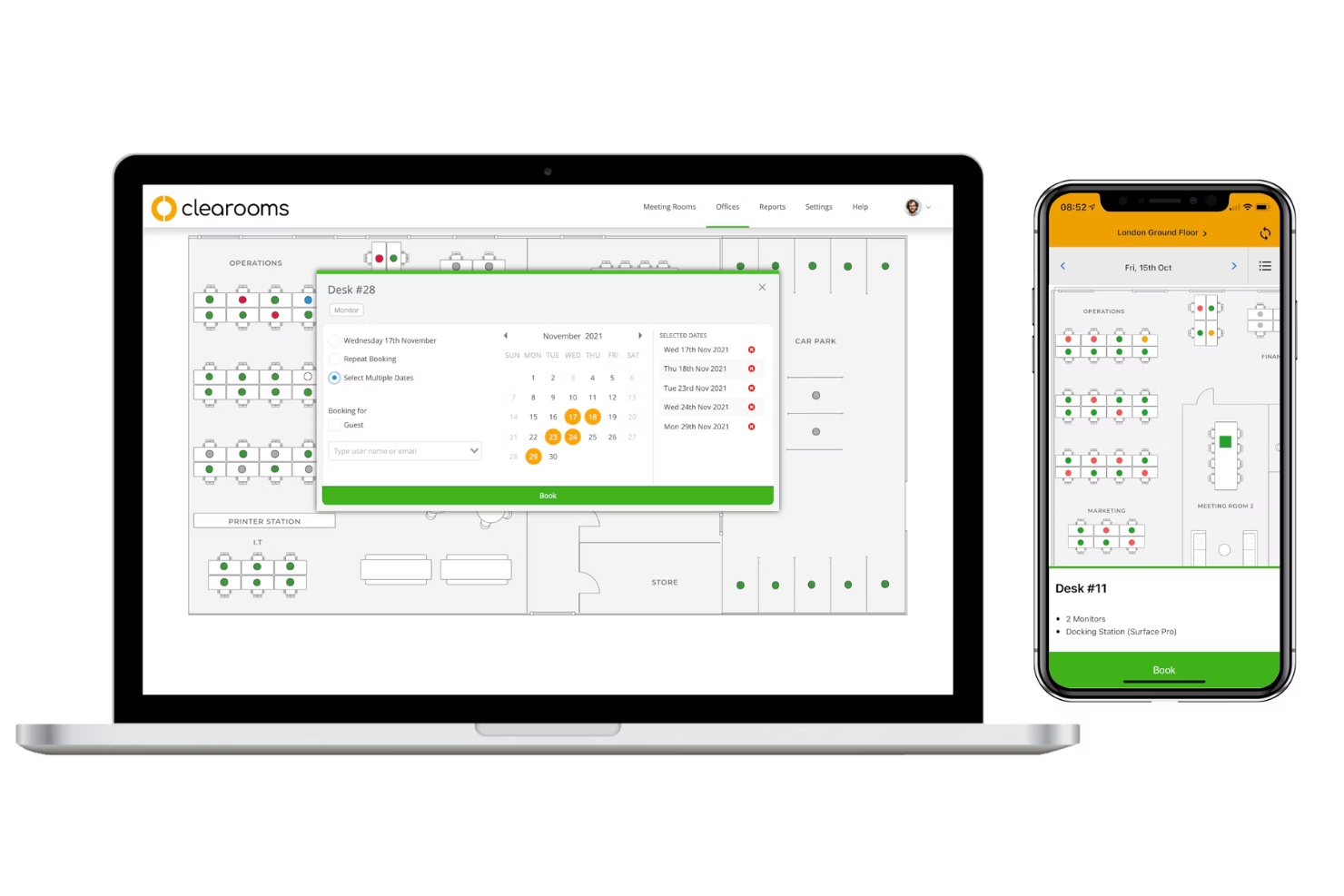
Clearooms is a hot desk booking platform that lets you manage desk reservations, meeting room scheduling, and interactive floor plans for flexible office environments.
Who Is Clearooms Best For?
Facilities managers at mid-size and large offices who need detailed, interactive floor plan management for desk and room bookings.
Why I Picked Clearooms
I picked Clearooms as one of the best because I can upload detailed office floor plans and create interactive maps for desk and room booking. I like how I can assign amenities and resources to each space, making it easy for my team to find the right spot. My team uses the drag-and-drop editor to update layouts as our needs change.
Clearooms Key Features
- Desk booking via mobile app: Book desks and rooms directly from your smartphone.
- Visitor management: Register and track guests entering the office.
- Outlook and Google Calendar integration: Sync bookings with your existing calendar tools.
- Contactless check-in: Use QR codes for touch-free desk and room check-in.
Clearooms Integrations
Clearooms offers native integrations with Google Calendar, Office 365, Microsoft Teams, Slack, Paxton Access, and supports single sign-on with Azure, Google Workspace, JumpCloud, Microsoft AD FS, Okta, and OneLogin. An API is available for custom integrations.
Pros and Cons
Pros:
- Built-in visitor tracking and management
- Easy desk and room booking via mobile
- Highly visual and interactive floor plan editor
Cons:
- Limited customization for booking rules
- Interface may feel overwhelming initially

Dibsido
Best for instant desk booking with one tap
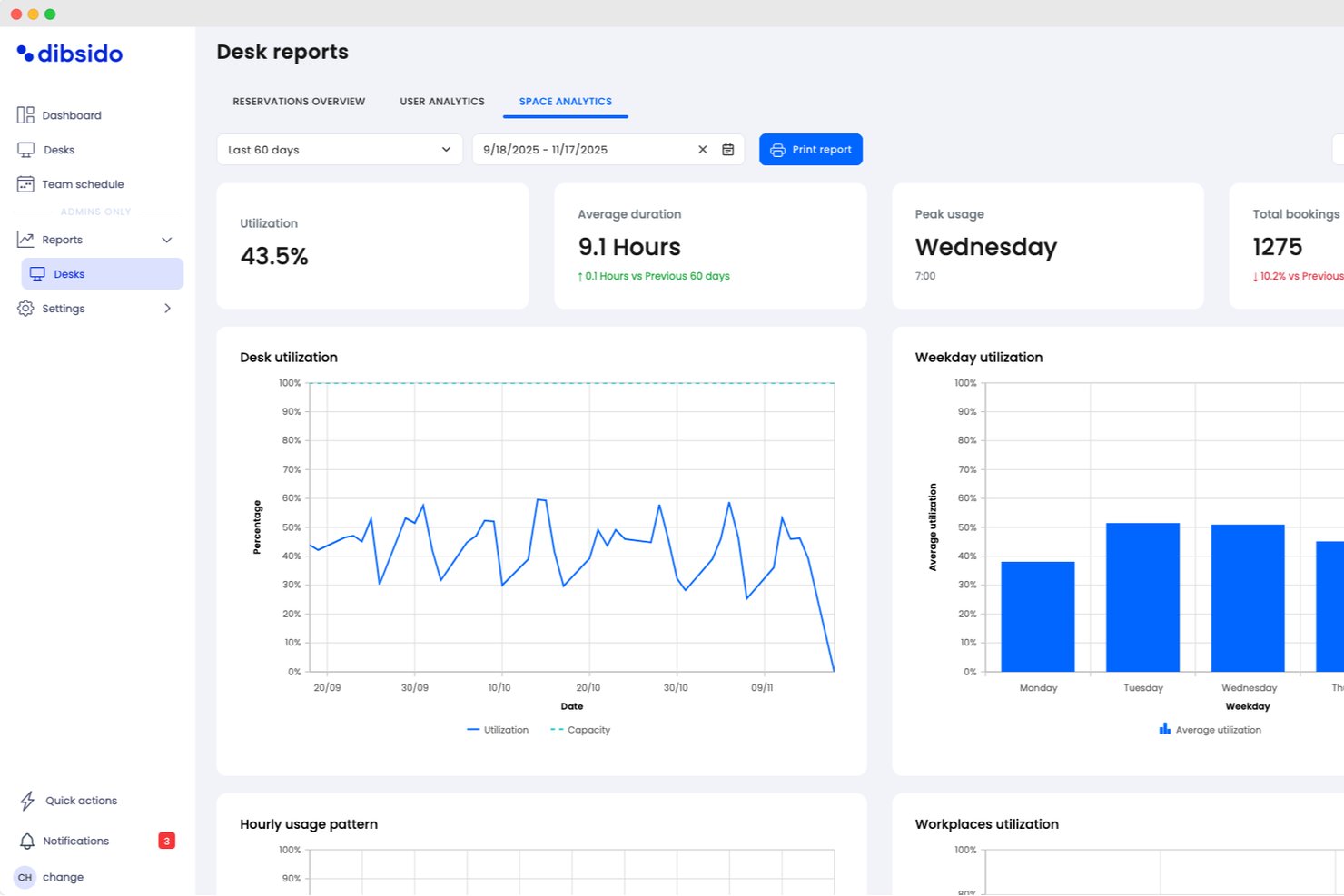
Dibsido is a hot desk booking platform designed for quick, one-tap reservations across desks, meeting rooms, and parking spots, with visual floor plans and mobile app support.
Who Is Dibsido Best For?
Hot desk coordinators and office managers at small to midsize businesses looking for rapid, app-based workspace booking.
Why I Picked Dibsido
I picked Dibsido as one of the best because I can book any available desk instantly with a single tap, even from my phone. The interactive office map and one-tap reservation feature make it incredibly fast to grab a space as soon as I need one.
Dibsido Key Features
- Multi-language interface: Users can switch between 11 supported languages within the app.
- Admin analytics dashboard: Track booking patterns and workspace usage with visual reports.
- Microsoft Teams integration: Reserve workspaces directly from the Teams interface.
- Parking spot management: Automate reservations with waitlists that instantly assign freed-up spots, priority rules for company cars, and quick spot transfers to colleagues.
Dibsido Integrations
Dibsido offers native integrations with Microsoft Teams and Slack, plus two-way calendar sync with Microsoft Outlook and Google Calendar. Enterprise SSO is supported through Microsoft Entra ID, Google Workspace, and SAML 2.0, with an API available for custom integrations.
Pros and Cons
Pros:
- Built-in QR codes for check-ins
- Floor plan view for workspace selection
- Auto-cancels unused hot desk reservations
Cons:
- Basic analytics and reporting functionality
- Limited advanced admin controls
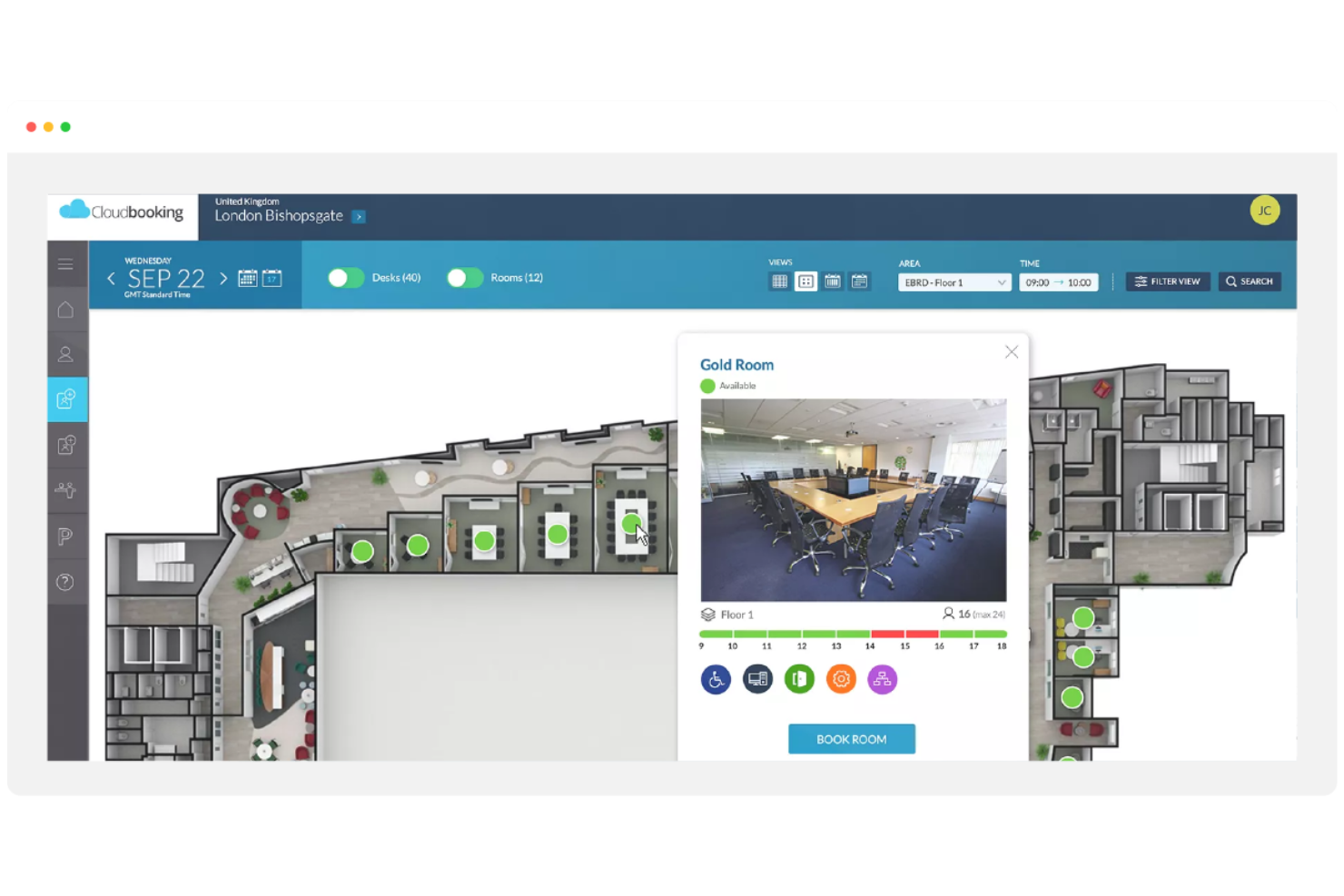
Cloudbooking is a workplace management platform for hot desk booking that offers desk reservations, meeting room scheduling, visitor management, and advanced analytics tools for tracking workspace usage.
Who Is Cloudbooking Best For?
Facilities managers at large enterprises who need detailed workspace analytics and centralized desk booking.
Why I Picked Cloudbooking
I picked Cloudbooking as one of the best because I can access granular workspace usage data and generate custom reports for different departments. I like how the platform lets me visualize occupancy trends and export analytics for leadership. My team uses the dashboard to monitor desk utilization and optimize our office layout based on real-time insights.
Cloudbooking Key Features
- Desk booking portal: Users can reserve desks through a web-based interface.
- Interactive floor plans: Visual maps display available and booked desks in real time.
- Visitor management integration: Manage guest check-ins alongside workspace reservations.
- Mobile app access: Book desks and manage reservations from any mobile device.
Cloudbooking Integrations
Cloudbooking offers native integrations with Microsoft 365, Outlook, Google Workspace, and Active Directory, and provides an API for custom integrations.
Pros and Cons
Pros:
- Centralized control for desk and room
- Clear visualization of workspace occupancy
- Advanced reporting with detailed usage insights
Cons:
- Customization options for booking rules are limited
- Interface may require onboarding to fully use


Eptura Engage is a workplace management platform for hot desk booking that offers desk reservations, interactive floor plans, visitor management, and mobile app access for on-site and hybrid teams.
Who Is Eptura Engage Best For?
Workplace managers at mid-size and large organizations who need mobile-first desk booking for hybrid teams.
Why I Picked Eptura Engage
I picked Eptura Engage as one of the best because I can manage desk reservations directly from my phone, which is perfect for hybrid teams on the move. I like the interactive floor plans and QR code check-in that make booking and finding desks quick. My team uses the mobile app to coordinate in-office days and reserve spaces without needing to log in from a desktop.
Eptura Engage Key Features
- Visitor management integration: Manage guest check-ins alongside workspace reservations.
- Outlook and Google Calendar sync: Sync desk bookings with your existing calendar tools.
- Space utilization analytics: Track workspace usage with built-in reporting dashboards.
- Access control integration: Connect with building access systems for secure entry.
Eptura Engage Integrations
Eptura Engage offers native integrations across the Microsoft ecosystem, including Microsoft 365 and Outlook, as well as access control, visitor management, video meeting rooms, and HR systems. An API is available for custom integrations.
Pros and Cons
Pros:
- Interactive floor plans for quick booking
- Strong support for hybrid workplace coordination
- Mobile-first experience for desk reservations
Cons:
- Dashboard can feel complex for new users
- Limited flexibility in booking rule configuration
Other Hot Desk Booking Software
Here are some additional hot desk booking software options that didn’t make it onto my shortlist, but are still worth checking out:
- Robin
For managing hybrid workplace schedules
- Zynq
For integrating desk and meeting room booking
- Ronspot
For customizable booking policies
- HotDesk+
For on-demand workspace access
- Deskfound
For Slack integration
- deskbird
For flexible booking durations
- Officely
For Slack-based desk reservations
- DeskFlex
With visitor management integration
- FloorPlanMapper
For interactive office mapping


How I Evaluate Hot Desk Booking Software
I evaluate these platforms in two layers: the baseline booking, floor plan, and admin controls a tool must have, then the differentiators like team clustering and project tool sync that matter most.
Core Functionality (Table Stakes For This List)
When I'm selecting tools for my list, I rank each one on a scale from 0 (does not offer the functionality) to 5 (excels in this area) for each core functionality listed below. Then, I calculate the tool's total score into a percentage. Each tool needs to achieve a minimum total score of 65% to be considered for inclusion.
- Real-Time Desk Reservation: I check whether users can book, modify, and cancel desks on their own across locations—say, grabbing a desk at the London office before a Wednesday stand-up.
- Interactive Floor Plan Views: Visual maps with live availability matter here. I look for click-to-book maps where a project lead can scan a floor and pick desks near a huddle room.
- Team Booking & Grouping: For sprint weeks or cross-functional workshops, I evaluate whether the tool lets a manager reserve a block of desks for a project team in one action.
- Calendar & Collaboration Integrations: I look for native sync with Google Calendar, Microsoft 365, Slack, or Teams so desk bookings show up where your team already plans its day.
- Admin Booking Rules & Policies: The ability to set booking windows, enforce check-ins, cap daily capacity, or restrict certain zones to specific teams is something I evaluate closely.
- Workspace Utilization Analytics: Dashboards that surface occupancy trends, no-show rates, and peak-day patterns help justify real estate decisions—I look for filters by team, floor, and date range.
Once I have a list of tools that meet the criteria, I consider what sets each platform apart.
Differentiating Factors (What Sets Vendors Apart)
Here's how I compare and contrast different vendors:
Standout Features
A colleague locator is a feature I value highly. When a delivery manager needs to pull scattered team members into an impromptu retro, seeing who's seated where on a live map saves real time. I also look for meeting room bundling, which lets you reserve a desk and an adjacent huddle space in one booking flow for full working sessions. Automated check-in through QR codes or geofencing is another differentiator, since it frees no-show desks back into the pool and keeps utilization data accurate.
Beyond Features
Integration depth matters here. I evaluate whether a platform connects with SSO providers and HRIS systems so IT doesn't have to manage another standalone login. Security certifications like SOC 2 and GDPR readiness are also something I check, especially for teams operating across multiple regions with employee location data flowing through the system. Pricing flexibility rounds things out—I look for per-user or per-desk models that let you pilot with a single project team before committing org-wide.
How to Choose Hot Desk Booking Software
It’s easy to get bogged down in long feature lists and complex pricing structures. To help you stay focused as you work through your unique software selection process, here’s a checklist of factors to keep in mind:
| Factor | What to Consider |
|---|---|
| Scalability | Will the software handle your current and future office size, locations, and user growth? |
| Integrations | Does it connect natively with your collaboration tools, HR systems, or calendar platforms? |
| Customizability | Can you tailor booking rules, approval workflows, and floor plans to match your company policies? |
| Ease of use | Will employees adopt the tool quickly, or will they need extensive training to make reservations? |
| Implementation and onboarding | How long will the setup take, and what resources or support does the vendor provide for rollout? |
| Cost | Are pricing tiers clear, and do they align with your usage patterns and budget constraints? |
| Security safeguards | Does the tool offer SSO, data encryption, and access controls to protect sensitive workspace data? |
| Support availability | What support channels are offered, and are response times fast enough for your business needs? |
What Is Hot Desk Booking Software?
Hot desk booking software is a desk booking solution that enables desk hoteling and desk sharing within flexible office environments. It allows teams to reserve coworking office space booking tools and manage flexible desk usage with real-time visibility into availability and occupancy.
These tools support desk management by helping organizations create a more user-friendly Wi-Fi work environment and workplace experience, especially for hybrid teams balancing in-office and remote work.
Features
When selecting hot desk booking software, keep an eye out for the following key features:
- Desk reservation system: Lets users book, modify, or cancel desk reservations for specific dates and times, ensuring workspace availability and reducing scheduling conflicts.
- Interactive floor plans: Provide a visual map of the office layout, allowing users to select specific desks or areas based on location and amenities.
- Real-time availability: Displays up-to-date information on which desks are free or occupied, helping employees make informed booking decisions.
- Recurring bookings: Supports scheduling regular reservations for users who need a consistent workspace on certain days or weeks.
- Neighborhood or zone booking: Allows teams or departments to reserve blocks of desks within designated office zones for better collaboration.
- Mobile app access: Enables users to manage bookings, check availability, and receive notifications from their smartphones or tablets.
- Check-in and check-out: Requires users to confirm their arrival and departure, helping organizations track actual desk usage and prevent no-shows.
- Admin analytics dashboard: Offers reporting tools to monitor workspace utilization, booking trends, and occupancy rates for data-driven decision-making.
- Integration with collaboration tools: Connects with platforms like Microsoft Teams or Slack to streamline booking workflows and notifications.
- Visitor management integration: Coordinates guest access and desk assignments for external visitors, enhancing security and front-desk operations.
Hot desk booking software solutions do not typically include AI as part of their feature offering.
Benefits
Implementing hot desk booking software provides several benefits for your team and your business. Here are a few you can look forward to:
- Optimized space utilization: Real-time desk availability and analytics dashboards help you make the most of your office footprint.
- Improved hybrid work coordination: Desk reservation systems and interactive floor plans make it easier for teams to plan in-office days together.
- Reduced scheduling conflicts: Booking and cancellation features prevent double-booking and ensure everyone has access to a workspace when needed.
- Enhanced employee experience: Mobile app access and integrations with collaboration tools simplify the booking process for users.
- Data-driven decision-making: Utilization reports and occupancy analytics provide insights for future office planning and resource allocation.
- Streamlined visitor management: Integration with visitor management tools ensures guests have assigned workspaces and a smooth check-in process.
- Increased workplace flexibility: Recurring and neighborhood booking options support a variety of work styles and team needs.
Costs and Pricing
Selecting hot desk booking software requires an understanding of the various pricing models and plans available. Pricing ranges from free hot desk booking software to paid plans that scale based on features, team size, add-ons, and more. The table below summarizes common plans, their average prices, and typical features included in hot desk booking software solutions:
Plan Comparison Table for Hot Desk Booking Software
| Plan Type | Average Price | Common Features |
|---|---|---|
| Free Plan | $0 | Basic desk booking, limited users, simple floor plan view, and email support. |
| Personal Plan | $5-$15/user/month | Individual reservations, mobile app access, real-time availability, and basic reporting. |
| Business Plan | $15-$30/user/month | Team bookings, interactive floor plans, integrations with collaboration tools, admin controls, and analytics. |
| Enterprise Plan | $30-$50/user/month | Custom workflows, advanced security, API access, dedicated support, and advanced reporting. |
Hot Desk Booking Software FAQs
Here are some answers to common questions about hot desk booking software:
How does hot desk booking software support hybrid work models?
Hot desk booking software lets employees reserve desks only when they plan to be in the office, making it easier to coordinate hybrid schedules and avoid wasted space. This flexibility helps teams manage fluctuating attendance and supports a mix of remote and in-office work.
Can hot desk booking software integrate with our existing tools?
Yes, most hot desk booking software integrates with collaboration platforms like Microsoft Teams, Slack, and Google Workspace. These integrations help streamline booking workflows, sync calendars, and send notifications where your team already works.
What security features should I look for in hot desk booking software?
Look for features like single sign-on (SSO), data encryption, and role-based access controls. These safeguards help protect sensitive workspace data and ensure only authorized users can make or manage bookings.
How long does it take to implement hot desk booking software?
Implementation time varies, but many solutions offer quick setup with templates, product tours, and onboarding support. For most teams, you can expect to be up and running within a few days to a couple of weeks, depending on office size and customization needs.
Is hot desk booking software suitable for small offices?
Yes, hot desk booking software can be a good fit for small offices that want to maximize space and offer flexible seating. Many vendors offer free or low-cost plans designed for smaller teams with basic booking needs.