

10 Best Free Hot Desk Booking Software in 2026

Free Hot Desk Booking Software Shortlist


Free hot desk booking software lets your team reserve workspaces without paying for a subscription, giving you access to essential desk management features through a free plan or trial. If you’re searching for ways to manage flexible seating, avoid double bookings, and keep your hybrid office running smoothly—without adding to your budget—this list is for you.
I’ll walk you through the top free hot desk booking tools available, so you can compare options and pick the right fit for your team’s needs.
Why Trust Our Software Recommendations
Our team has been testing and reviewing software since 2012. As project managers ourselves, we know how difficult—and important—it is to choose the right software.
For this guide, we evaluated tools using hands-on testing and independent research, scoring tools using our selection criteria. We also draw on insights from industry thought leaders and practicing project management experts.
Our reviews reflect our human editorial judgment, not a sales pitch.
Expert reviewers:
Free Hot Desk Booking Software Comparison Table
This comparison table summarizes pricing details for my top free hot desk booking software selections:
| Tool | Best For | Trial Info | Price | ||
|---|---|---|---|---|---|
| 1 | Best for touchless desk reservations | 30-day free trial available | From $51/month | Website | |
| 2 | Best for unlimited desk bookings | Free plan available | From €5.50/month (billed annually) | Website | |
| 3 | Best for real-time desk availability | Free plan + free demo available | From $4.60/user/month | Website | |
| 4 | Best for Slack-based desk booking workflows | Free trial + free demo available | From $2.50/user/month (billed annually) | Website | |
| 5 | Best for mobile-first desk booking experiences | 14-day free trial + free demo available | From $1.50/user/month (billed annually) | Website | |
| 6 | Best for visual floor plan desk selection | Free plan + free demo available | From €1.99/user/month (billed annually) | Website | |
| 7 | Best for predictive AI booking | Free plan + free demo available | From €30/user/year | Website | |
| 8 | Best for managing multiple office locations | 30-day free trial available | Pricing upon request | Website | |
| 9 | Best for GDPR-compliant workspace management | Free plan + free demo available | From €1.65/user/month | Website | |
| 10 | Best for integrated parking space management | Free plan available | From €2/place/month | Website |
Free Hot Desk Booking Software Reviews
Below are my detailed summaries of the free hot desk booking software that made it onto my shortlist. My reviews offer a detailed look at the features, best use cases, and pricing of each platform to help you find the best one for you.

Joan
Best for touchless desk reservations
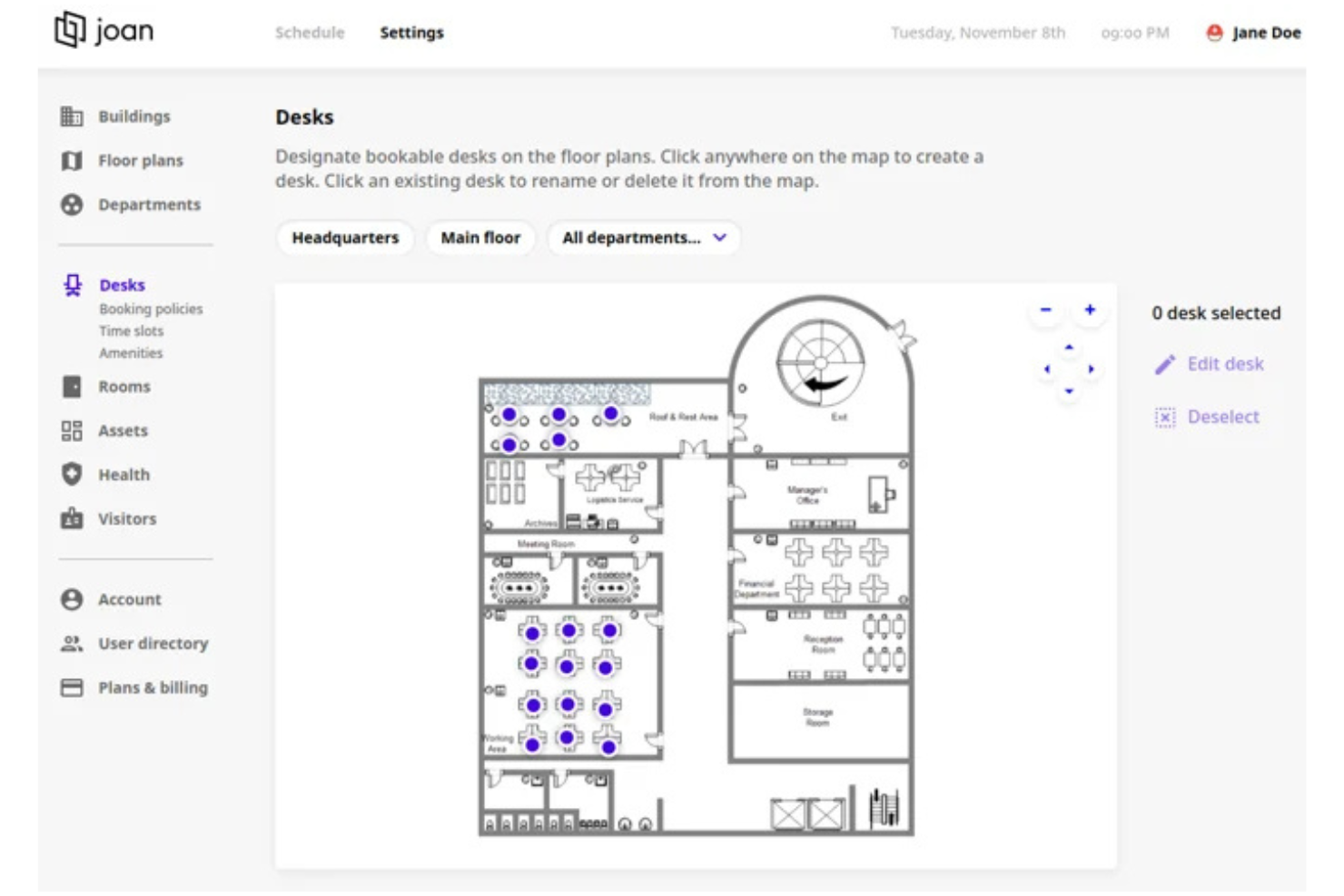
Joan is a hot desk booking app that offers touchless reservations, interactive floor plans, mobile access, and real-time desk availability for teams managing flexible workspaces.
Who Is Joan Best For?
Joan is a good fit for facilities managers and IT teams in mid-sized to large organizations seeking contactless desk booking solutions.
Why I Picked Joan
I picked Joan as one of the best because I like how it enables touchless desk reservations using QR codes and wireless Joan devices. My team is able to manage workspace occupancy in real time and set up interactive floor plans for easy navigation. I also appreciate that Joan’s hardware displays sync instantly with booking changes, which helps us keep everything up to date.
Joan Key Features
- Calendar integrations: Syncs with Google Workspace and Microsoft 365 calendars for unified scheduling.
- Custom booking rules: Lets admins set booking policies and restrictions for desks.
- Occupancy analytics: Tracks workspace usage and generates occupancy reports.
- Mobile app: Allows users to book desks and manage reservations from their phones.
Joan Integrations
Joan offers native integrations with Microsoft Active Directory, Google Calendar, Microsoft Teams, and Slack. An API is available for custom integrations.
Pros and Cons
Pros:
- Custom booking rules for workspace management
- Hardware displays sync instantly with bookings
- Touchless desk booking with QR code support
Cons:
- Hardware devices require separate purchase
- No free plan for unlimited users

Dibsido
Best for unlimited desk bookings
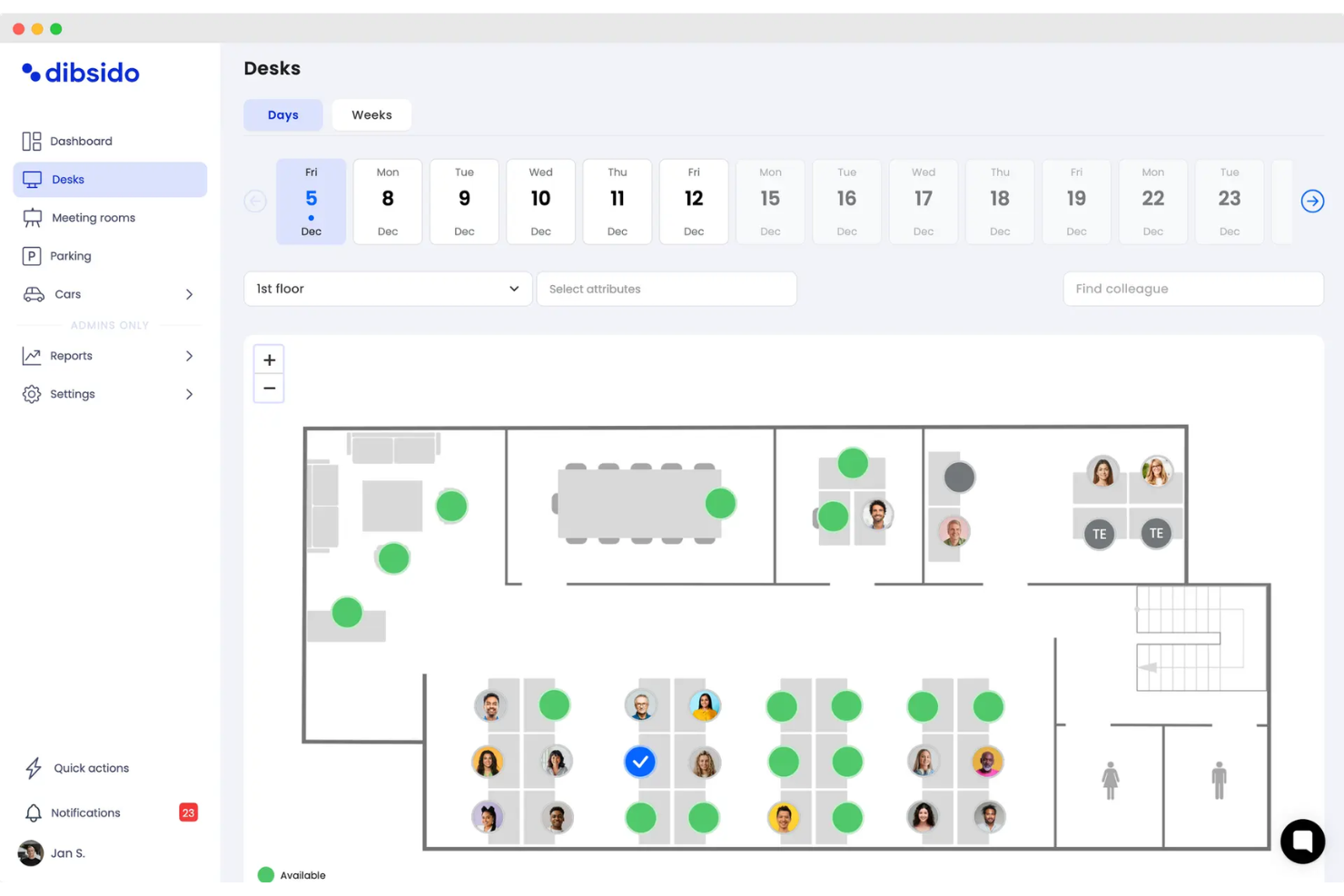
Dibsido is a desk booking software platform for managing workspace reservations, recurring bookings, and resource scheduling with unlimited desks and users.
Who Is Dibsido Best For?
Dibsido is a good fit for small to midsize businesses that need flexible desk and resource booking without user or desk limits.
Why I Picked Dibsido
I picked Dibsido as one of the best because it lets my team book unlimited desks and users without hitting artificial caps. I like that I can set up recurring bookings for regular schedules and manage multiple resources beyond just desks. The platform’s admin dashboard gives me a clear view of all reservations and resource usage in one place.
Dibsido Key Features
- Custom booking forms: Collect specific information from users when they reserve a desk.
- Calendar sync: Connect bookings with Google Calendar or Outlook for scheduling visibility.
- Role-based permissions: Assign different access levels for admins, managers, and users.
- Email notifications: Send automated booking confirmations and reminders to users.
Dibsido Integrations
Integrations include Slack, Microsoft Teams, Google Calendar, Outlook, and Microsoft Entra ID. An API is available for custom integrations.
Pros and Cons
Pros:
- SAML 2.0 SSO and Google Workspace SSO
- Recurring bookings for regular schedules
- Unlimited desks and users on the free plan
Cons:
- Limited analytics on the free plan
- No mobile app for on-the-go booking

PULT
Best for real-time desk availability
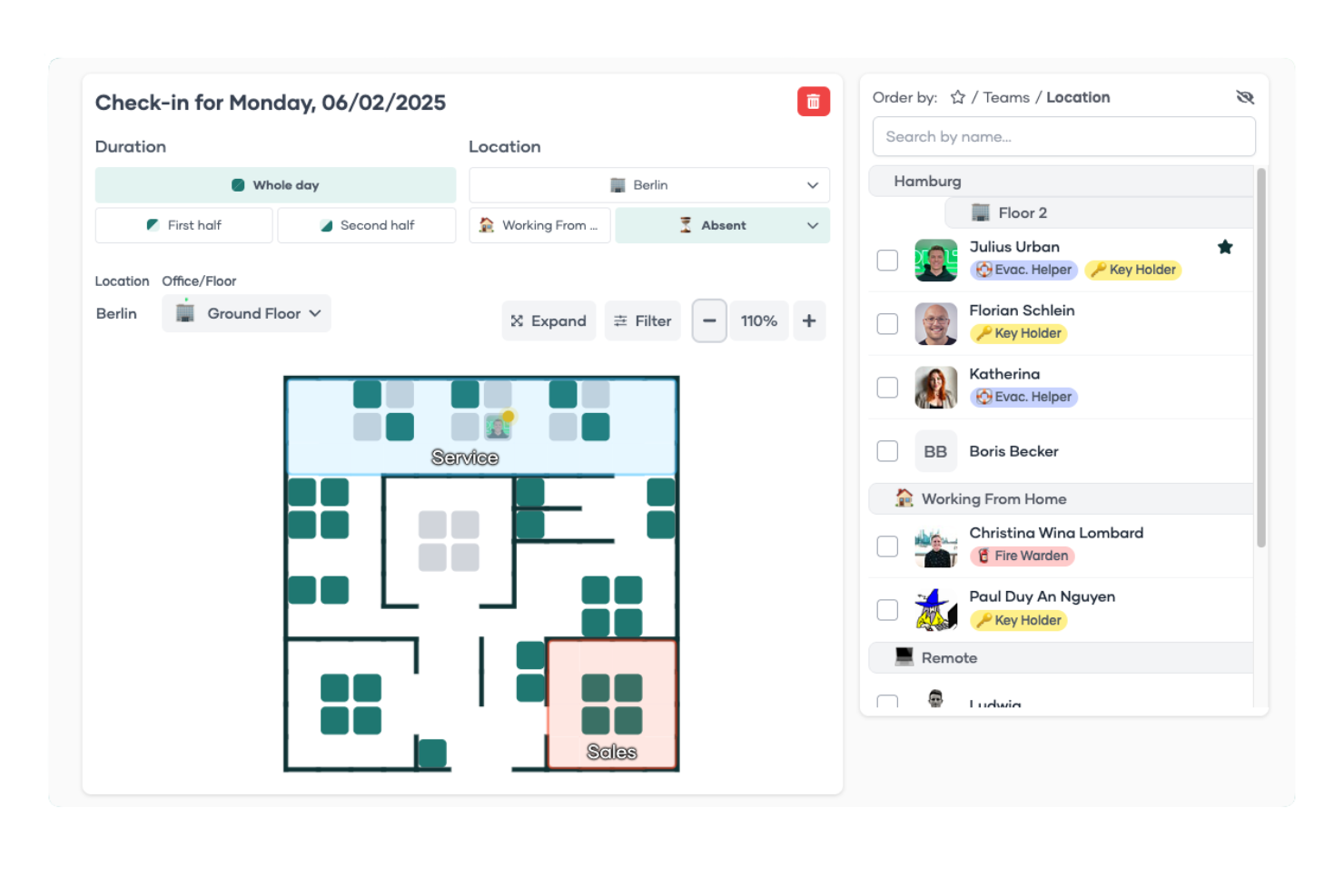
PULT is a desk booking platform for hybrid offices that lets you manage office space reservations, monitor occupancy, and set up interactive floor plans for your team.
Who Is PULT Best For?
PULT is a good fit for hybrid office managers and workplace teams who need to coordinate desk usage across multiple locations.
Why I Picked PULT
I picked PULT as one of the best because I can see real-time desk availability across all office locations, which helps my team avoid double bookings. I like that the interactive floor plan updates instantly as desks are reserved or released. My team also uses the occupancy analytics to spot usage trends and adjust our workspace setup as needed.
PULT Key Features
- Desk check-in via QR code: Users can check in to their reserved desks by scanning a QR code at the workspace.
- Custom booking rules: Admins can set booking restrictions, approval flows, and time limits for reservations.
- Mobile app access: Teams can book, modify, or cancel desk reservations directly from their smartphones.
- Visitor management: The platform includes tools for registering and tracking office visitors.
PULT Integrations
PULT offers native integrations with Slack, Microsoft Teams, Google Calendar, Microsoft Outlook, Personio, HRworks, Workday, BambooHR, Okta, Cisco Meraki, and Fortinet. An API is available for custom integrations.
Pros and Cons
Pros:
- Custom booking rules for admin control
- QR code check-in for reserved desks
- Real-time desk availability updates across locations
Cons:
- No built-in support for parking space booking
- Limited reporting customization options

Officely
Best for Slack-based desk booking workflows
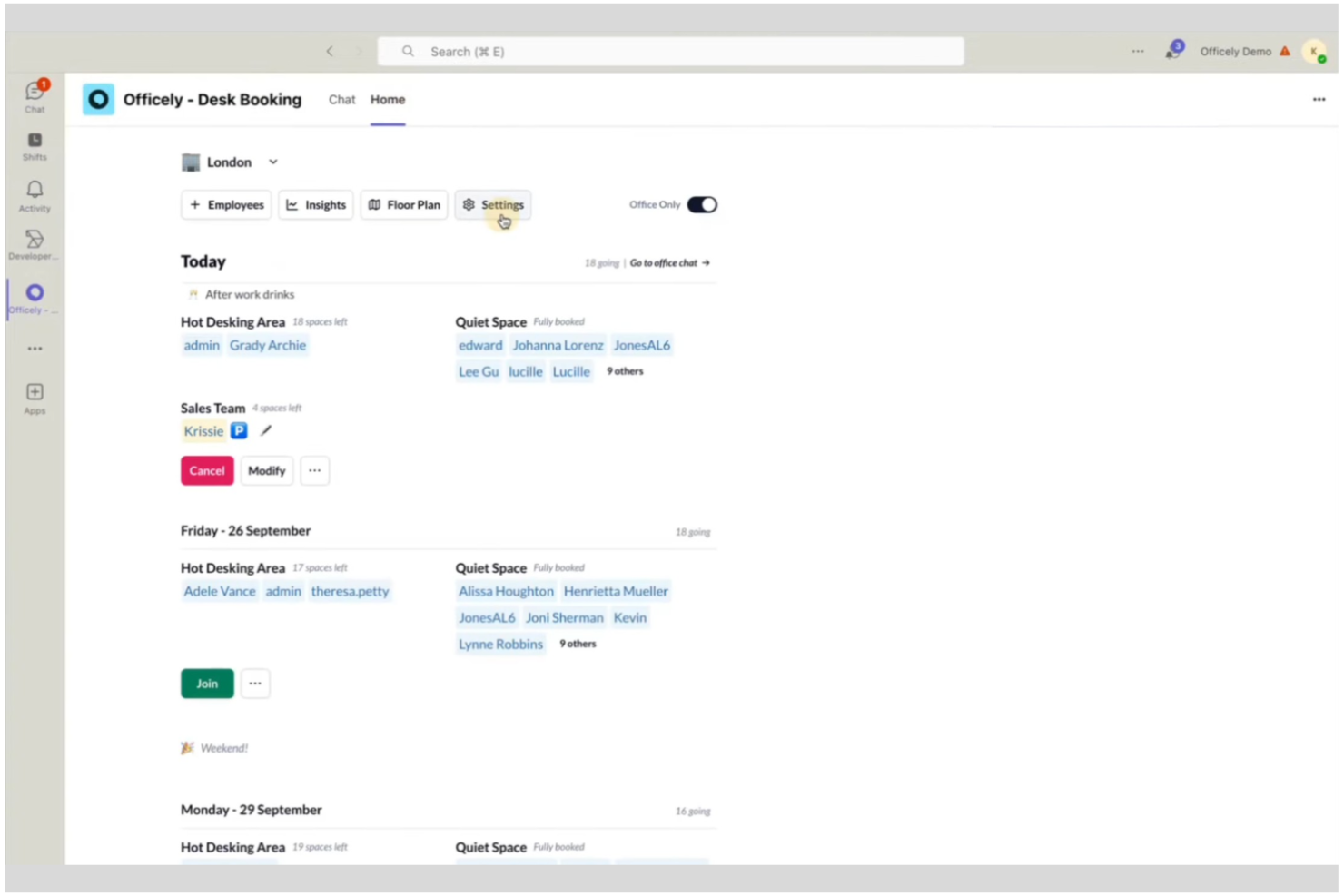
Officely is a desk booking software solution that lets teams reserve desks, manage office attendance, and coordinate hybrid work schedules directly within Slack.
Who Is Officely Best For?
Officely is a good fit for small to midsize teams that already use Slack as their primary communication platform.
Why I Picked Officely
I picked Officely as one of the best because it lets my team book desks, manage office attendance, and coordinate hybrid schedules directly inside Slack. I like that I can set up recurring office days and see who else is coming in, all without leaving Slack. The integration with Slack channels means my team gets real-time updates and reminders about their bookings.
Officely Key Features
- Desk check-in via Slack: Users confirm their desk bookings directly in Slack each day.
- Office capacity controls: Admins set limits on how many people can book desks per day.
- Visitor management: Track and approve external visitors coming into the office.
- Health screening surveys: Collect health declarations from users before they come into the office.
Officely Integrations
Officely offers native integrations with Google Calendar, Microsoft Outlook, and Slack, and provides an API for custom integrations.
Pros and Cons
Pros:
- Real-time office attendance visibility in Slack
- Supports recurring and one-off desk reservations
- Fully integrated with Slack for desk booking
Cons:
- Limited customization of booking rules
- Requires Slack for core functionality

FLYDESK
Best for mobile-first desk booking experiences

FLYDESK is a workspace management platform for hot desk booking that offers mobile apps, interactive floor plans, and real-time availability for flexible work environments.
Who Is FLYDESK Best For?
FLYDESK is a good fit for distributed teams and hybrid workplaces that prioritize mobile access to desk booking and workspace management.
Why I Picked FLYDESK
I picked FLYDESK as one of the best desk booking software because its mobile-first approach lets my team book desks and meeting rooms directly from their phones. I like how the interactive floor plans update in real time, so we always know which spaces are available. The check-in feature using QR codes is especially useful for hybrid teams moving between locations.
FLYDESK Key Features
- Multi-location management: Manage bookings across multiple offices or coworking spaces from one dashboard.
- Role-based access control: Set permissions for admins, managers, and regular users.
- Calendar sync: Connect bookings with Google Calendar and Microsoft Outlook.
- Booking analytics: View usage statistics and booking trends for desks and rooms.
FLYDESK Integrations
FLYDESK offers native integrations with Google Calendar and Microsoft Outlook. An API is available for custom integrations.
Pros and Cons
Pros:
- Role-based permissions for user access control
- Multi-location management from a single dashboard
- QR code check-in for workspace access
Cons:
- Free plan restricts advanced booking options
- Analytics are basic compared to competitors

Best for visual floor plan desk selection
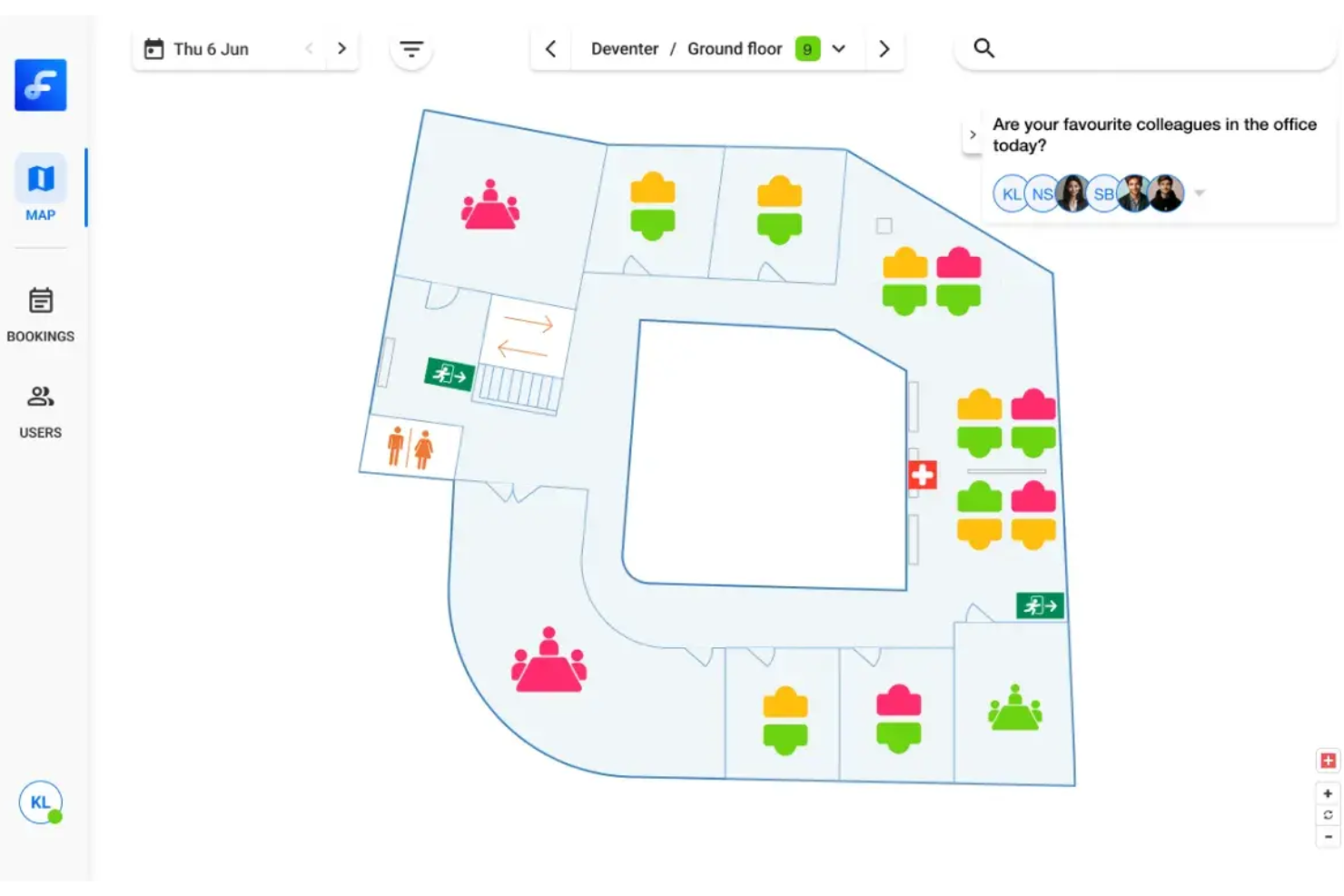
Flexwhere is a desk booking software platform that lets you manage workspace reservations, visualize office layouts, and monitor desk occupancy using interactive floor plans and real-time availability.
Who Is Flexwhere Best For?
Facilities managers and office administrators in mid-sized organizations who need to manage and visualize desk bookings across dynamic office layouts.
Why I Picked Flexwhere
I picked Flexwhere as one of the best because I can quickly select desks from a detailed, interactive floor plan, which is perfect for visualizing office layouts. I like that my team can see real-time desk availability and book spaces directly from the map. The platform also lets us monitor occupancy trends, so we can adjust our workspace setup as needs change.
Flexwhere Key Features
- Mobile app: Book desks and manage reservations from your phone.
- Outlook integration: Sync desk bookings with your Outlook calendar.
- Visitor registration: Register and track office visitors within the platform.
- Custom booking rules: Set booking restrictions and permissions for different user groups.
Flexwhere Integrations
Integrations include Outlook, Microsoft Teams, Google Calendar, and TopDesk.
Pros and Cons
Pros:
- Support for 25 free users
- Real-time colleague location tracking
- Interactive visual floor plan maps
Cons:
- Eight-day booking limit
- One floor plan limit
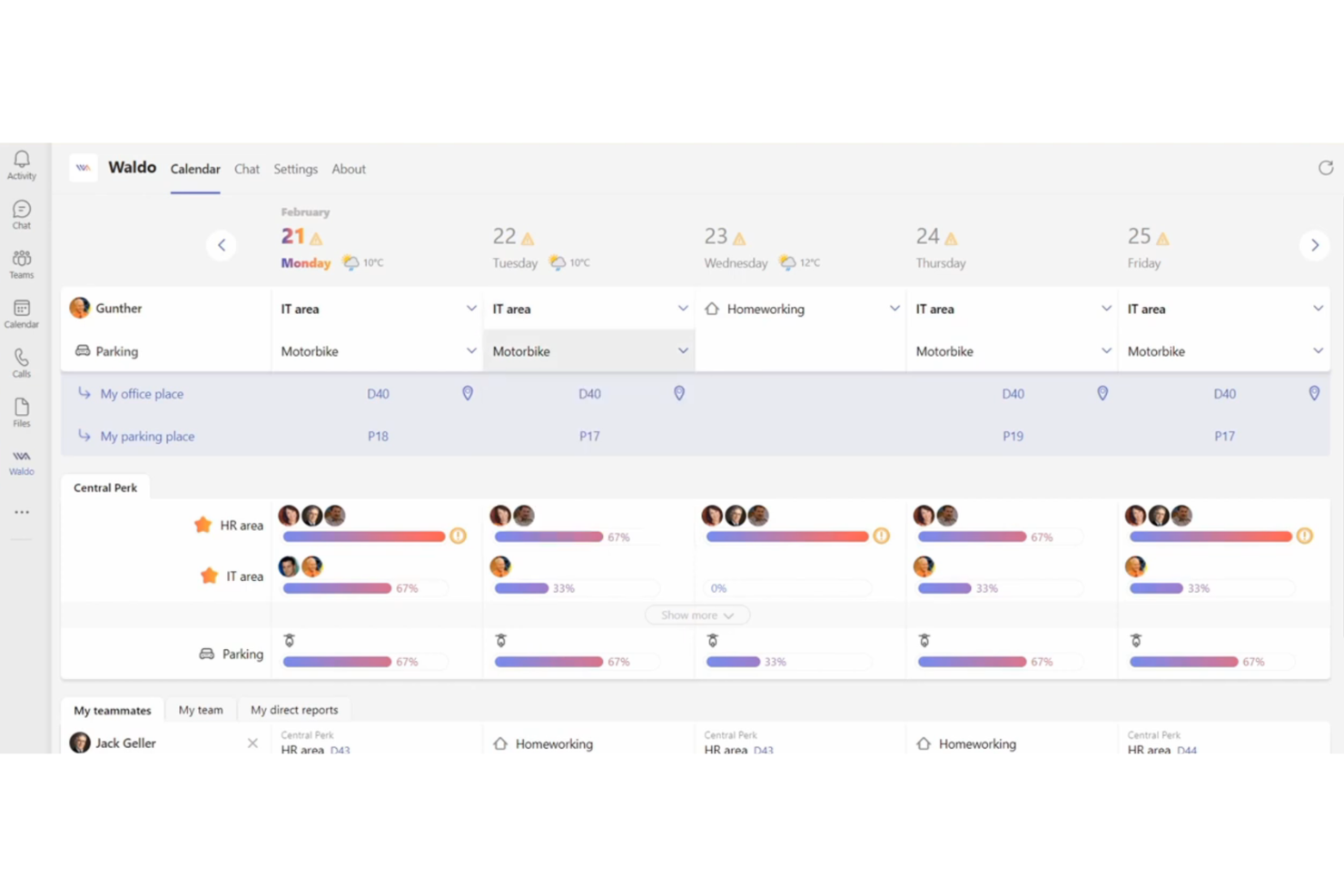
Waldo is a desk booking platform that uses AI to automate workspace reservations, manage meeting rooms, and optimize office layouts for hybrid teams.
Who Is Waldo Best For?
Waldo is a good fit for hybrid teams and office managers at mid-sized companies who want AI-driven desk and meeting room booking.
Why I Picked Waldo
I picked Waldo as one of the best because its predictive AI booking engine automatically suggests and reserves desks based on team schedules and preferences. I like that my team can manage both desk and meeting room bookings in one place. The platform’s smart recommendations help us optimize space usage without manual planning.
Waldo Key Features
- Interactive floor plans: Users can select and book desks directly from a visual office map.
- Mobile app: Book desks and manage reservations from iOS or Android devices.
- Neighborhoods management: Group desks into zones for team-based booking.
- Access control integration: Connects with building systems to manage entry permissions.
Waldo Integrations
Waldo offers native integration with Microsoft Teams and is managed through the Microsoft 365 administration portal. Native integrations with other platforms are not clearly documented.
Pros and Cons
Pros:
- Supports meeting room and desk booking together
- Visual floor plans for easy desk selection
- Predictive AI suggests optimal desk bookings
Cons:
- No public API for custom integrations
- Limited native integrations

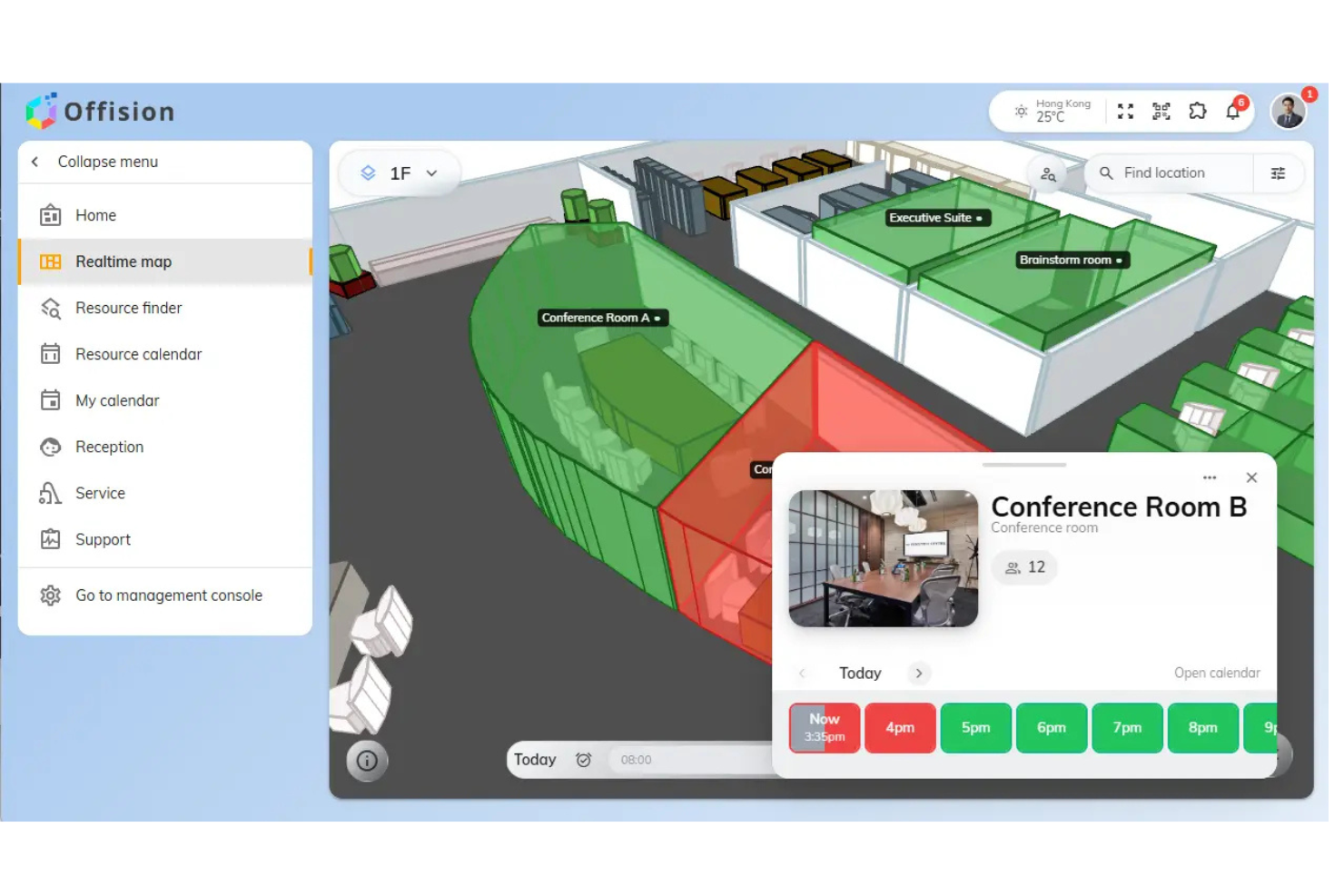
Offision is a workspace management platform for booking desks, meeting rooms, and parking spaces, with features for managing multiple office locations and setting custom booking rules.
Who Is Offision Best For?
Facility managers and admins at organizations with multiple office locations needing centralized desk and space booking.
Why I Picked Offision
I picked Offision as one of the best because I can manage multiple office locations from a single dashboard, which is rare among free hot desk booking tools. I like that I can set custom booking rules for each location and assign different admins to manage specific spaces. My team is able to handle desk, meeting room, and parking reservations across several offices without switching platforms.
Offision Key Features
- Interactive floor plans: Users can select and book desks directly from a visual map.
- Mobile booking app: Book desks and spaces from iOS or Android devices.
- Check-in and check-out system: Track desk usage with QR code or manual check-in.
- Booking history export: Download reservation data for reporting or analysis.
Offision Integrations
Offision offers native integrations with Zoom, Microsoft Teams, Outlook, Microsoft 365, Google Workspace, and Webex.
Pros and Cons
Pros:
- Allows custom booking rules per location
- Manages multiple office locations centrally
- Supports booking desks, rooms, and parking
Cons:
- No free plan, only a free trial
- Pricing is not transparently listed online
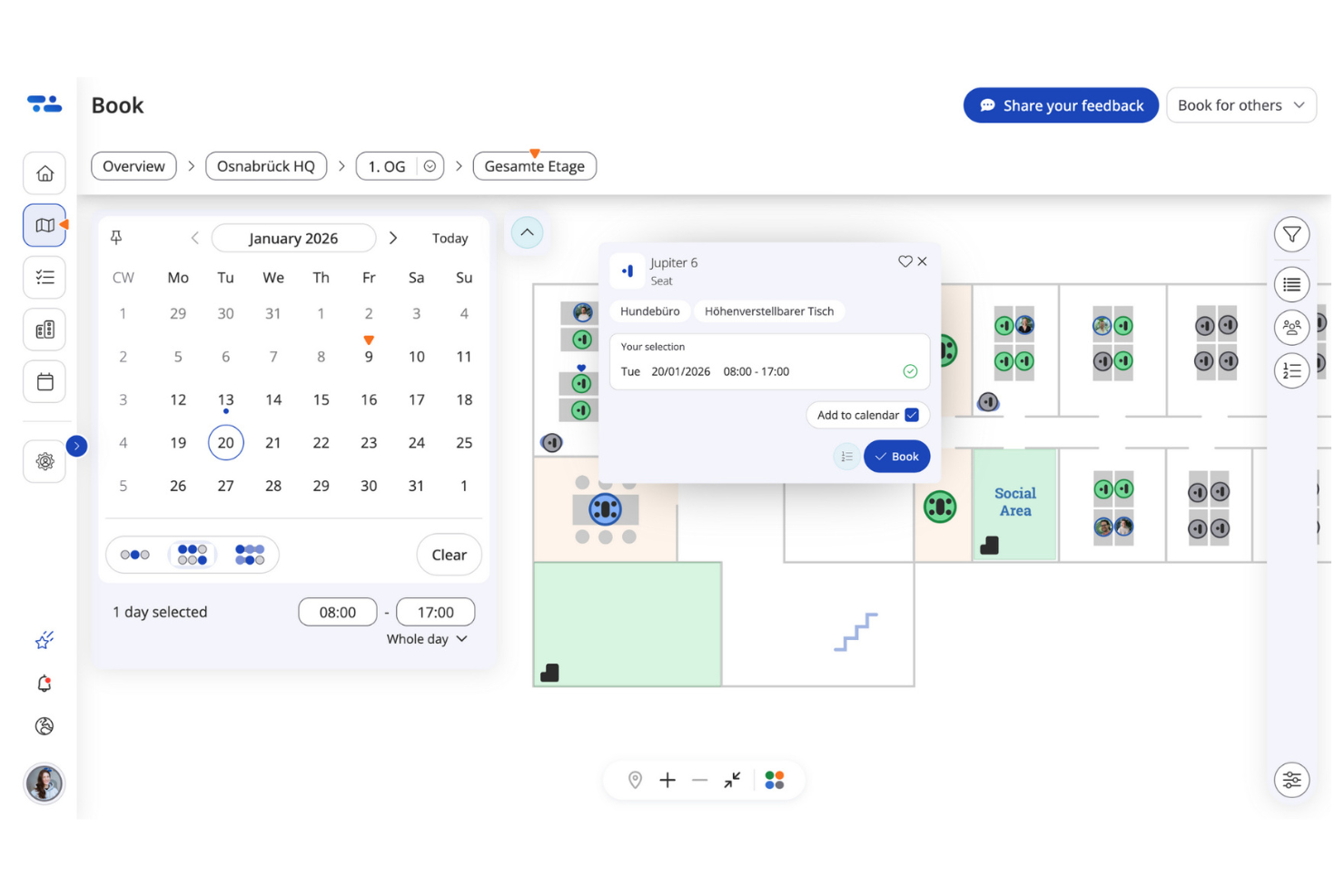
desk.ly is a workspace management platform for booking desks, rooms, and parking spaces, offering interactive floor plans, user management, and compliance features for organizations managing flexible office environments.
Who Is desk.ly Best For?
desk.ly is a good fit for European organizations and HR teams that require GDPR-compliant workspace management and flexible desk booking.
Why I Picked desk.ly
I picked desk.ly as one of the best because it’s built with GDPR compliance at its core, which is essential for European organizations. I like that my team can manage workspace bookings with granular user permissions and anonymized data handling. The interactive floor plan editor lets us visually assign and monitor desks while staying compliant with strict privacy standards.
desk.ly Key Features
- Mobile booking app: Reserve desks and rooms directly from your smartphone.
- QR code check-in: Scan QR codes at desks for fast, contactless check-in.
- Resource booking: Book parking spaces, lockers, and meeting rooms alongside desks.
- Team booking mode: Reserve workspaces for entire teams in one action.
desk.ly Integrations
Desk.ly offers native integrations with Microsoft Outlook, Google Calendar, Microsoft Teams, Personio, and Slack, and provides an API for custom integrations.
Pros and Cons
Pros:
- Native Microsoft Teams booking interface
- Integrated parking space reservation system
- GDPR-compliant data handling
Cons:
- Lack of 3D floor plans
- Limited automated hardware integrations


Sharvy is a workspace and desk booking platform that lets you manage hot desks, meeting rooms, and parking spaces in one system.
Who Is Sharvy Best For?
Facilities managers at midsize companies who need to coordinate both desk and parking space bookings.
Why I Picked Sharvy
I picked Sharvy as one of the best because it’s the only hot desk booking tool I’ve used that also manages parking spaces in the same platform. I like that I can allocate both desks and parking spots to employees from a single dashboard. My team is able to automate space allocation rules and set up booking quotas for different resources, which is especially useful when coordinating hybrid work schedules.
Sharvy Key Features
- Mobile booking app: Reserve desks and spaces directly from your phone.
- Interactive floor plans: Visualize and select available workstations on a digital map.
- Access control integration: Connects with badge systems for automated entry management.
- Automated waitlists: Automatically manage requests when spaces are fully booked.
Sharvy Integrations
Sharvy offers native integrations with Kelio, Lucca, Cegedim, SAP, Power BI, and Tableau. It also connects with access control systems, RFID readers, and Microsoft Teams. An API is available for custom integrations.
Pros and Cons
Pros:
- Integrates with Google Workspace
- Supports automated booking rules and quotas
- Manages both desks and parking spaces
Cons:
- Custom branding options are restricted
- Limited analytics on space utilization trends
Other Free Hot Desk Booking Software
Here are some additional free hot desk booking software options that didn’t make it onto my shortlist, but are still worth checking out:
- Deskfound
For visual desk planning
- Whatspot
For quick bookings via QR code scanning
- Skedda
For advanced access control settings
- deskbird
For customizable booking rules
- Clearooms
For simple visual overviews
- Archie
For automated check-ins
- Envoy
For visitor management integration
- anny
For modular booking workflows
- Flexopus
For multilingual user interface
- Tidaro
For recurring desk reservations


How I Evaluate Free Hot Desk Booking Software
First, I define what counts as free. For hot desk booking software, I only consider tools with a free-forever plan—coordinating hybrid in-office days for project teams is an ongoing need, not a short-term experiment. I then evaluate each option against the core functionality required to make this list and the differentiators that separate the best from the rest.
Core Functionality (Table Stakes For This List)
In addition to my free offer requirements, I also use a scoring system to select tools for my list. Here's how it works:
I rank each one on a scale from 0 (does not offer the functionality) to 5 (excels in this area) for each core functionality listed below. Then, I calculate the tool's total score into a percentage. Each tool needs to achieve a minimum total score of 65% to be considered for inclusion.
- Desk Reservation System: I check whether users can browse available desks and book them for specific dates and time slots, like reserving a cluster of seats for a sprint week.
- Interactive Floor Maps: A visual map showing real-time availability helps teams pick desks near each other. I look for clickable layouts over static images.
- Calendar & Scheduling Integration: Syncing with Google Calendar or Outlook keeps desk bookings visible alongside standups and retros. I evaluate how well the sync works both ways.
- Team Coordination Visibility: I look for the ability to see which teammates are booked in on a given day, so a scrum master can confirm the whole squad will be co-located.
- Multi-User Access on Free Plan: The free tier needs to support enough seats for a real project team. I evaluate how many users can book independently before an upgrade is required.
- Mobile Booking Access: Plans shift fast, and teams need to book or cancel from a phone. I look for native apps or responsive mobile experiences with full booking capability.
Once I have a list of tools that meet the criteria, I consider what sets each platform apart.
Differentiating Factors (What Sets Vendors Apart)
Here's how I compare and contrast different vendors:
Standout Features
I look for tools that let teams book desks directly from Slack or Microsoft Teams, since that's where most coordination already happens. Recurring reservations are a big plus for teams with set hybrid rhythms, like booking every Wednesday for a weekly planning session. Check-in and auto-release is another feature I evaluate closely—it frees up no-show desks automatically, which keeps space available when someone's plans change last-minute.
Beyond Features
Free plan user limits matter a lot—I check whether the cap supports a full project squad or just a handful of admins. Setup speed is another factor I evaluate, especially for project coordinators who need to upload a floor plan and get the team booking within a day, not weeks. Since desk booking involves employee location data, I also consider how each vendor handles privacy, including GDPR compliance and admin controls over who can see colleague booking details.
How to Choose Free Hot Desk Booking Software
It’s easy to get bogged down in long feature lists and complex pricing structures. To help you stay focused as you work through your unique software selection process, here’s a checklist of factors to keep in mind:
| Factor | What to Consider |
|---|---|
| Scalability | Will the tool support your team size and future growth? Check user and location limits on the free plan. |
| Integrations | Does it connect with your existing calendars or collaboration tools? Confirm native integrations and API access. |
| Customizability | Can you adapt booking rules, permissions, or workspace layouts to fit your policies and workflows? |
| Ease of use | Will your team adopt it quickly? Look for clear navigation, mobile access, and minimal training needs. |
| Implementation and onboarding | How long will setup take? Assess the availability of guides, templates, and support for a smooth rollout. |
| Cost | Are there hidden costs or upgrade triggers? Review what’s included in the free plan and when fees apply. |
| Security safeguards | Does the tool protect user data and privacy? Look for encryption, access controls, and compliance with relevant standards. |
| Support availability | What support channels are available on the free plan? Consider response times and access to help resources. |
What Is Free Hot Desk Booking Software?
Free hot desk booking software is a digital tool that lets teams reserve shared workspaces without paying for a subscription. These platforms help manage desk availability, support flexible seating arrangements, and track workspace usage.
They’re designed for organizations with hybrid work model or dynamic office environments that need a simple way to coordinate who sits where, when, and for how long.
Features
Let’s go over the features commonly found in hot desk booking software, and which ones are usually included in free vs. paid plans.
Typically Free Hot Desk Booking Software Features
- Desk booking calendar: Lets users reserve desks for specific dates and times, helping teams plan their office visits and avoid double-booking.
- Real-time availability: Shows which desks are open or occupied, so users can make informed booking decisions on the spot.
- Basic user management: Allows admins to add, remove, or assign roles to users, ensuring only authorized people can book desks.
- Mobile access: Provides a mobile-friendly interface or app, making it easy to book desks from anywhere.
- Booking notifications: Sends email or in-app alerts to confirm bookings, remind users of reservations, or notify them of changes.
- Simple floor plan view: Displays a basic map or list of available desks, helping users visualize workspace options.
- Booking history: Lets users and admins review past and upcoming reservations for better planning and accountability.
- Self-service cancellation: Allows users to cancel or modify their bookings without admin intervention.
Typically Paid Hot Desk Booking Software Features
- Advanced analytics and reporting: Offers detailed insights into desk usage, occupancy trends, and space optimization opportunities.
- Integration with calendar tools: Syncs bookings with Google Calendar, Microsoft Outlook, or other scheduling platforms for smoother coordination.
- Multi-location management: Supports booking and administration across multiple offices or buildings from a single dashboard.
- Custom booking rules: Enables organizations to set policies like booking windows, approval workflows, or recurring reservations.
- Visitor management: Tracks external guests, issues visitor passes, and integrates with front desk systems for added security.
- Touchless or QR code check-in: Lets users check in to their reserved desks using QR codes or mobile devices, reducing physical contact.
- Role-based access control: Provides granular permissions for different user groups, such as admins, managers, and regular users.
- Integration with hardware sensors: Connects to occupancy sensors or IoT devices to automate desk status updates and improve accuracy.
- Priority booking or waitlists: Allows certain users to book desks ahead of others or join waitlists for high-demand spaces.
- Dedicated customer support: Offers priority support channels, onboarding assistance, and service-level agreements for paid users.
Benefits
Implementing free hot desk booking software provides several benefits for your team and your business. Here are a few you can look forward to:
- Cost savings: Avoids subscription fees while still providing essential desk management features for hybrid or flexible teams.
- Improved workspace visibility: Real-time availability and floor plan views help everyone see which desks are open before heading to the office.
- Simplified booking process: Self-service reservations and mobile access make it easy for users to book, modify, or cancel desks on their own.
- Better space utilization: Booking history and usage data help you understand workspace demand and adjust layouts or policies as needed.
- Faster onboarding: Intuitive interfaces and basic user management let new users get started with minimal training or IT support.
- Enhanced accountability: User roles and booking records ensure only authorized team members reserve desks and provide a clear audit trail.
- Support for hybrid work: Flexible booking tools help teams coordinate in-office days and adapt to changing schedules without manual tracking.
Costs and Pricing
I realize you came to this article looking for the best hot desk booking software options that are available for free. However, since free plans only offer limited features, there's a good chance you'll need to scale your plan up in the future.
The table below summarizes common plans, their average prices, and typical features included in hot desk booking software:
Plan Comparison Table for Hot Desk Booking Software
| Plan Type | Average Price | Common Features |
|---|---|---|
| Free Plan | $0 | Basic desk booking, real-time availability, simple floor plan view, mobile access, and booking notifications. |
| Personal Plan | $5-$10/user/month | All free features, calendar integrations, limited analytics, priority support, and custom booking rules. |
| Business Plan | $10-$25/user/month | All personal features, multi-location management, advanced analytics, visitor management, and role-based access control. |
| Enterprise Plan | $25-$50/user/month | All business features, custom integrations, API access, hardware sensor support, dedicated onboarding, and advanced security controls. |
Free Hot Desk Booking Software FAQs
Here are some answers to common questions about free hot desk booking software:
Can I manage multiple office locations with free hot desk booking software?
No, most free plans offered by desk booking systems limit you to a single location. If you need to manage bookings across multiple offices, you’ll usually need to upgrade to a paid plan.
Are integrations with calendar tools available on free plans?
No, integrations with tools like Google Calendar or Outlook are typically reserved for paid plans. Free versions usually offer only basic booking and notification features.
How many users can access a free hot desk booking software plan?
Most free plans support between 5 and 10 users. If your team is larger, you’ll likely need to consider a paid tier or look for a provider with a higher free user limit.
Is my data secure on a free hot desk booking software plan?
Yes, reputable providers still offer basic security measures on free plans, such as encrypted connections and user authentication. However, advanced security features are usually only available on paid plans.
Can I customize booking rules or permissions on a free plan?
No, customization options for booking rules and user permissions are generally limited or unavailable on free plans. Paid plans typically unlock more granular controls.