
18 Best Facilities Project Management Software For 2026

Best Facilities Project Management Software Shortlist
Here’s my shortlist of the best facilities project management software:


The best facilities project management software helps you track maintenance requests, manage assets, and coordinate teams in one place so nothing slips through the cracks.
Without it, requests get lost in emails, technicians waste time waiting for assignments, and leaders lack visibility into costs or timelines. A centralized platform helps you improve task management, schedule preventive maintenance, and get reporting that aids decision-making.
Having tested and reviewed multiple tools using my expertise as a project manager, I’ve identified the most reliable options. Here are my picks for solutions that will help you reduce downtime, cut miscommunication, and simplify facility operations so you can find the right fit for your needs.
Why You Can Trust Us
Best Facilities Project Management Software Summary
Compare specs and pricing for my facilities project management software selections below.
| Tool | Best For | Trial Info | Price | ||
|---|---|---|---|---|---|
| 1 | Best for user-friendly setup | Free plan available | From $28/user/month | Website | |
| 2 | Best for customizable reporting | Free demo available | From $35/user/month | Website | |
| 3 | Best for AI-driven insights | Free demo available | From $45/user/month | Website | |
| 4 | Best for work order management | Free trial + free demo available | From $20/user/month | Website | |
| 5 | Best for field service management | Free demo available | Pricing upon request | Website | |
| 6 | Best for real-time asset tracking | Free consultation available | Pricing upon request | Website | |
| 7 | Best for property management integration | Free demo available | Pricing upon request | Website | |
| 8 | Best for easy-to-use interface | Free demo available | Pricing upon request | Website | |
| 9 | Best for energy management | Free demo available | Pricing upon request | Website | |
| 10 | Best for mobile access capabilities | Free demo available | Pricing upon request | Website |
-

Insightful
Visit WebsiteThis is an aggregated rating for this tool including ratings from Crozdesk users and ratings from other sites.4.8 -
Accelo
Visit WebsiteThis is an aggregated rating for this tool including ratings from Crozdesk users and ratings from other sites.4.4 -
Forecast
Visit WebsiteThis is an aggregated rating for this tool including ratings from Crozdesk users and ratings from other sites.4.6




Best Facilities Project Management Software Reviews
Read my detailed summary of each of the best facilities project management software on my list. I cover key features, pros & cons, integrations, and use cases so you can find the best fit.


Limble is a computerized maintenance management system for small to mid-sized businesses in manufacturing, healthcare, and facilities management. It helps you manage work orders, track assets, and schedule preventive maintenance.
Why I picked Limble: Limble has a user-friendly setup and is accessible for teams without extensive technical knowledge. You can quickly implement and start using the system without a steep learning curve. The software's intuitive navigation makes it easy for your team to manage maintenance tasks.
Standout Features & Integrations:
Features include work order management, asset tracking, and maintenance scheduling. You can also generate comprehensive reports on maintenance activities and performance.
Integrations include Netsuite, Outlook, Slack, and Google Calendar.
Pros and Cons
Pros:
- Mobile access for remote management
- Intuitive navigation
- Quick implementation
Cons:
- Basic customization options
- Limited advanced features


eWorkOrders is a cloud-based maintenance management software for industries like property management, healthcare, and manufacturing. It provides tools for work order management, asset tracking, and maintenance scheduling to help teams maintain operational efficiency.
Why I picked eWorkOrders: eWorkOrders focuses on customizable reporting, so you can shape reports to fit your exact needs. You can track maintenance trends, highlight the metrics that matter, and pull clear insights your team can act on.
Standout Features & Integrations:
Features include preventive maintenance scheduling, inventory management, and mobile access. You can easily manage your inventory levels to prevent stockouts.
Integrations include QuickBooks, Microsoft Power BI, and Sage.
Pros and Cons
Pros:
- Mobile access for remote tasks
- Effective inventory management
- Detailed customizable reports
Cons:
- Limited offline functionality
- Initial setup can be time-consuming

Fiix is a cloud-based maintenance management software for manufacturing, energy, and other heavy industries. It helps manage work orders and schedule preventive maintenance.
Why I picked Fiix: Fiix’s AI-driven insights provide a competitive edge for optimizing maintenance processes. You can analyze maintenance data to uncover trends and predict failures before they happen. This helps you make data-driven decisions to improve efficiency. The platform also offers tools to automate work orders and monitor asset health closely.
Standout Features & Integrations:
Features include custom dashboards for visualizing key performance indicators. The software also offers mobile access, so your team can manage tasks from anywhere.
Integrations include NetSuite, MachineMetrics, Weever, and XMPro.
Pros and Cons
Pros:
- Predictive maintenance capabilities
- Customizable dashboards
- AI-driven maintenance insights
Cons:
- Learning curve for AI features
- Requires internet for full functionality

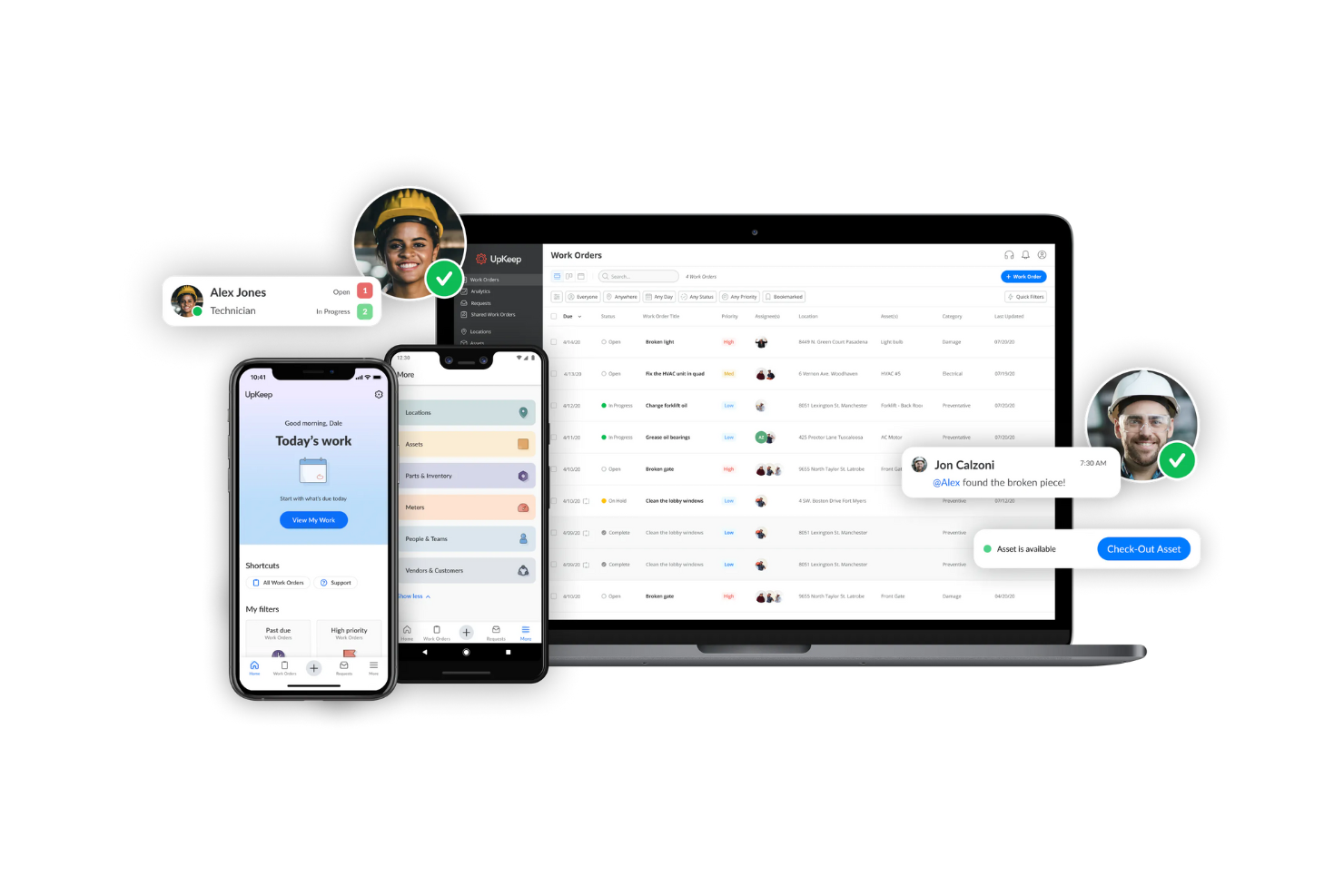
UpKeep is a mobile-first maintenance management software for industries like manufacturing, property management, and facilities management. It helps you streamline work order processes, track assets, and schedule preventive maintenance.
Why I picked UpKeep: UpKeep’s work order management tools make it effective for handling maintenance tasks. You can create, assign, and track work orders from your mobile device, with quick updates that keep your team informed. This improves uptime and productivity.
Standout Features & Integrations:
Features include asset tracking, inventory management, and the ability to monitor asset performance over time. The inventory management feature helps track parts and supplies.
Integrations are not listed publicly on the UpKeep website.
Pros and Cons
Pros:
- Inventory management tools
- Quick work order updates
- Mobile-first design
Cons:
- Learning curve for new users
- Requires internet for full features

Simpro is a field service management software for service-based industries like electrical, plumbing, and HVAC. It helps manage job scheduling, quoting, and invoicing.
Why I picked Simpro: Simpro's specialization in field service management makes it a great tool for teams on the go. You can schedule jobs and dispatch technicians easily. The software provides quoting and invoicing tools, so billing processes are simplified.
Standout Features & Integrations:
Features include real-time job progress tracking, which helps you manage field operations effectively. The software also offers a mobile app so technicians can access job details on site.
Integrations include QuickBooks, Xero, MYOB, Sage, and Outlook.
Pros and Cons
Pros:
- Streamlined quoting and invoicing
- Efficient job scheduling
- Real-time job tracking
Cons:
- Limited offline capabilities
- Learning curve for new users


Corrigo is a cloud-based computerized maintenance management system (CMMS) for facility managers. It helps you manage work orders, assets, and vendors, and it’s ideal for industries like healthcare, retail, and multifamily housing.
Why I picked Corrigo: Corrigo lets you track your assets in real time, which reduces downtime and costs. Your team can also manage work orders and connect with a verified vendor network, so you’re getting the most out of your resources.
Standout Features & Integrations:
Features include business intelligence and automations for maintenance tasks, which saves time and reduces costs. Corrigo also offers mobility solutions for managing tasks on the go.
Integrations include Sage, Avalara, and Infogrid.
Pros and Cons
Pros:
- Mobility solutions for on-the-go management
- Maintenance task automation
- Verified vendor network
Cons:
- Limited customization options
- Learning curve for new users


Yardi Facility Manager is a facility management software for property management firms. It helps with work order management and task scheduling.
Why I picked Yardi Facility Manager: Yardi Facility Manager makes handling maintenance requests and tracking asset performance efficient. You can schedule tasks, so your team doesn't overlook anything. The property management function makes it ideal if you’re managing multiple properties.
Standout Features & Integrations:
Features include the ability to generate reports to analyze maintenance activities and performance. The software also offers a mobile app for managing tasks on the go.
Integrations are not listed publicly on the Yardi website.
Pros and Cons
Pros:
- Handles multiple property operations
- Efficient task scheduling
- Property management features
Cons:
- Occasional system performance issues
- Requires internet for full functionality
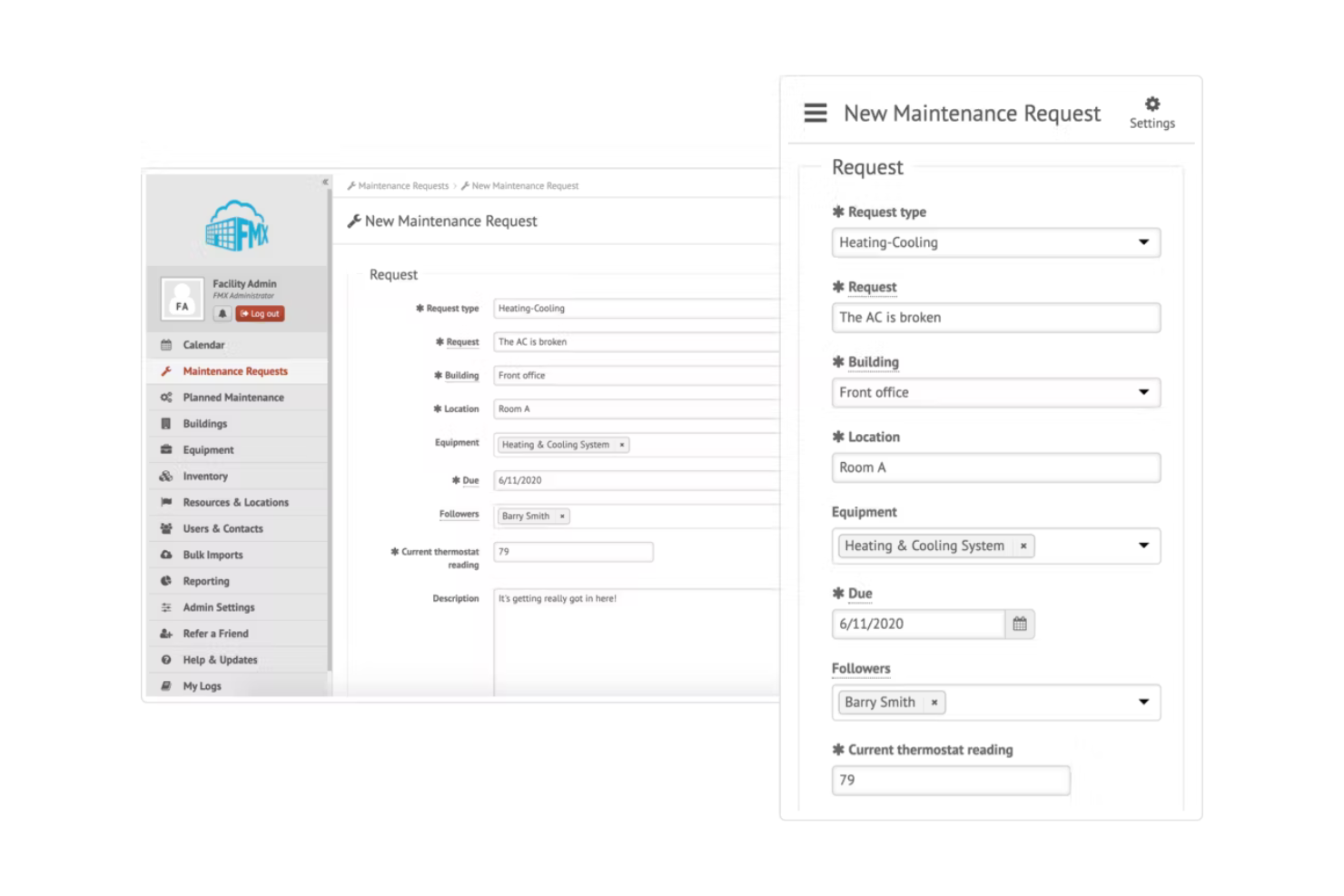
FMX is a facilities management software for schools, manufacturing plants, and property management. It simplifies maintenance scheduling, asset tracking, and resource management.
Why I picked FMX: FMX features an easy-to-use interface that your team can learn quickly. You can schedule facility maintenance tasks with ease, and the calendar view lays out upcoming work so nothing falls through the cracks. This keeps your team organized and on track.
Standout Features & Integrations:
Features include maintenance request management, asset tracking, and the ability to customize workflows. The reporting tools help analyze performance and optimize operations.
Integrations include QuickBooks and Slack.
Pros and Cons
Pros:
- Detailed reporting tools
- Clear calendar view
- Customizable workflows
Cons:
- Basic mobile app functionality
- Limited offline access


Brightly is a facility management software for organizations focused on sustainability and energy efficiency. It supports asset management, maintenance scheduling, and energy tracking.
Why I picked Brightly: Brightly focuses on energy management, which makes it a great choice for teams that want to reduce their carbon footprint. You can monitor energy consumption and identify areas for improvement. The software provides tools to track asset performance and schedule maintenance.
Standout Features & Integrations:
Features include reporting and insights that help you optimize energy use and reduce waste. The software also offers a dashboard for a comprehensive overview of facility operations.
Integrations include Microsoft Dynamics, BlueBeam, LaserFiche, and Carma.
Pros and Cons
Pros:
- Effective asset tracking
- Comprehensive dashboards
- Energy consumption insights
Cons:
- Occasional data syncing issues
- Requires internet for full functionality


Maintenance Care is a facility management software for industries like healthcare, education, and hospitality. It lets you manage work orders, preventive maintenance, and asset tracking.
Why I picked Maintenance Care: Maintenance Care offers mobile access, so your team can handle tasks wherever they are. You can create and update work orders from your phone, track assets, and schedule preventive maintenance from anywhere. This keeps your team productive in the field or at their desks.
Standout Features & Integrations:
Features include asset tracking, detailed reporting for maintenance activities, and a user-friendly dashboard that provides a quick overview of operations.
Integrations include Google Calendar, Microsoft Excel, and Survey Monkey.
Pros and Cons
Pros:
- Efficient asset tracking
- Easy work order creation
- Mobile app for remote access
Cons:
- Limited advanced features
- Basic customization options
Other Facilities Project Management Software
Here are some additional facilities project management software options that didn’t make it onto my shortlist, but which are still worth checking out:
- Freshservice
For IT service management
- Click Maint CMMS
For preventive maintenance planning
- GoodDay
For customizable workspaces
- Wrike
For cross-team collaboration
- OfficeSpace
For workspace optimization
- monday.com
For visual project tracking
- Ecotrak
For vendor management
- Coast
For team communication


Facilities Project Management Software Selection Criteria
When selecting the best facilities project management software to include in this list, I considered common buyer needs and pain points like asset tracking and maintenance scheduling. I also used the following framework to keep my evaluation structured and fair:
Core Functionality (25% of total score)
To be considered for inclusion in this list, each solution had to fulfill these common use cases:
- Work order management
- Asset tracking
- Maintenance scheduling
- Inventory management
- Vendor management
Additional Standout Features (25% of total score)
To help further narrow down the competition, I also looked for unique features, such as:
- Mobile access
- Predictive maintenance capabilities
- Customizable dashboards
- Real-time data analytics
Usability (10% of total score)
To get a sense of the usability of each system, I looked for the following:
- Intuitive interface design
- Ease of navigation
- Accessibility on multiple devices
- Minimal learning curve
- Customization options
Onboarding (10% of total score)
To evaluate the onboarding experience for each platform, I looked for the following:
- Availability of training videos
- Interactive product tours
- Access to templates
- Support through webinars
- Presence of chatbots for assistance
Customer Support (10% of total score)
To assess each software provider’s customer support services, I looked for the following:
- 24/7 support availability
- Response time to queries
- Access to a knowledge base
- Availability of live chat
- Multiple support channels
Value For Money (10% of total score)
To evaluate the value for money of each platform, I looked for the following:
- Competitive pricing
- Features offered for the price
- Scalability of pricing plans
- Availability of discounts
- Cost compared to similar tools
Customer Reviews (10% of total score)
To get a sense of overall customer satisfaction, I considered the following when reading customer reviews:
- Overall satisfaction ratings
- Comments on software reliability
- Feedback on feature usefulness
- Reports on customer service experience
- Insights on ease of use
How to Choose Facilities Project Management Software
It’s easy to get bogged down in long feature lists and complex pricing structures. To help you stay focused during the selection process, here’s a checklist of factors to keep in mind:
| Factor | What to Consider |
|---|---|
| Scalability | Can the software grow with your business? Consider future expansion and whether the tool can handle increased users and data without a hitch. |
| Integrations | Does it connect with your existing tools? Make sure it integrates with your current systems like ERP or CRM to avoid data silos. |
| Customizability | Can you tailor the software to your workflows? Look for flexible settings that let you adapt the tool to your specific processes and needs. |
| Ease of Use | Is the interface intuitive for your team? Users should be able to navigate easily without extensive training to reduce time spent learning the tool. |
| Implementation and Onboarding | How smooth is the setup process? Assess the resources needed and whether the vendor offers support like training sessions or setup assistance to get you started quickly. |
| Cost | What’s the total cost of ownership? Consider not just the subscription price, but additional fees for support, training, or upgrades that may affect your budget. |
| Security Safeguards | How does the software protect your data? Look for features like encryption, user access controls, and compliance with data protection regulations to maintain security. |
| Support Availability | Is help readily accessible? Check whether the vendor offers 24/7 support, multiple contact methods, and a comprehensive knowledge base to assist when issues arise. |
What Is Facilities Project Management Software?
Facilities project management software is a tool that helps you manage the maintenance and operations of facilities. Facility managers, maintenance teams, and operations professionals generally use these tools to organize tasks and optimize resource use.
Work order management, asset tracking, and maintenance scheduling features help organize daily operations, improve facility performance, boost efficiency, and reduce operational costs.
Features of Facilities Project Management Software
When selecting facilities project management software, look for the following key features:
- Work order management: Organizes and tracks maintenance tasks, so nothing falls through the cracks.
- Asset tracking: Monitors the condition and location of assets to help extend their lifespan.
- Maintenance scheduling: Plans regular maintenance activities to prevent unexpected breakdowns.
- Inventory management: Keeps track of parts and supplies to reduce the risk of stockouts.
- Vendor management: Lets you manage relationships and contracts with service providers for efficient collaboration.
- Mobile access: Lets teams manage tasks on the go, which boosts flexibility and productivity.
- Customizable dashboards: Provides visual, actionable insights into key performance indicators to help make informed decisions.
- Security safeguards: Protects sensitive data with features like encryption and user access controls.
Benefits of Facilities Project Management Software
Implementing facilities project management software provides several benefits for your facilities team and your business. Here are a few you can look forward to:
- Increased efficiency: Automates and organizes tasks like work orders to reduce time spent on manual processes.
- Cost savings: Preventive maintenance scheduling minimizes unexpected repairs, extends asset life, and saves money.
- Improved resource management: Tracks inventory and assets to help you use resources more effectively.
- Better decision-making: Customizable dashboards and reports provide insights into operations to help with strategic planning.
- More collaboration: Vendor management tools facilitate smoother interactions with service providers.
- Improved flexibility: Mobile access lets your team manage tasks from anywhere, which means more flexibility.
- Increased data security: Protects sensitive information with security measures like encryption and access controls.
Costs and Pricing of Facilities Project Management Software
Costs for facilities project management software vary based on features, team size, add-ons, and more. The table below summarizes common plans, their average prices, and typical features included in facilities project management software solutions:
Plan Comparison Table for Facilities Project Management Software
| Plan Type | Average Price | Common Features |
|---|---|---|
| Free Plan | $0 | Basic work order management, limited asset tracking, and basic reporting |
| Personal Plan | $5 - $25/user/month | Work order management, asset tracking, maintenance scheduling, and mobile access. |
| Business Plan | $30 - $60/user/month | Advanced reporting, vendor management, inventory management, and customizable dashboards. |
| Enterprise Plan | $70 - $100/user/month | Comprehensive security features, integration capabilities, predictive maintenance, and full access to customer support. |
Facilities Project Management Software FAQs
Here are some answers to common questions about facilities project management software:
How long does it take to implement facilities project management software?
Implementation time can vary based on the complexity of your current systems and the software you choose. Typically, it ranges from a few weeks to several months. Plan for data migration and training to maintain a smooth transition for your team.
Can facilities project management software integrate with existing systems?
Most facilities project management software can integrate with other systems like ERP, CRM, or accounting software. Check whether the tool offers APIs or pre-built integrations that connect with your existing technology stack.
Is facilities project management software suitable for small businesses?
Yes, many facilities project management tools are scalable and offer plans tailored for small businesses. They provide essential features like work order management and asset tracking, so small teams can manage facilities efficiently without needing complex solutions.
How does cloud-based facilities project management software work?
Cloud-based solutions store your data on remote servers and allow access from anywhere with an internet connection. This provides flexibility so your team can manage tasks on the go and maintain data security with regular updates and backups.
What security measures should I look for in facilities project management software?
Look for features like data encryption, user access controls, and compliance with data protection regulations. These measures help protect sensitive information so only authorized users can access critical data.
What’s Next?
If you're in the process of researching facilities project management software, connect with a SoftwareSelect advisor for free recommendations. You fill out a form and have a quick chat where they get into the specifics of your needs. Then you'll get a shortlist of software to review. They'll even support you through the entire buying process, including price negotiations.