

10 Best Enterprise Requirements Management Tools Reviewed in 2026

Best Enterprise Requirements Management Tools Shortlist


Managing project requirements can be a headache. You’re juggling deadlines, team inputs, and client demands, all while trying to keep everything on track. That’s where enterprise requirements management tools come in. They help you organize, track, and manage all your project details, so nothing falls through the cracks.
In my experience, finding the right tool is essential for boosting your team’s productivity and reducing stress. I’ve tested and reviewed many options to bring you an unbiased list of the best tools out there.
In this article, I’ll guide you through my top picks, highlighting features that can make your job easier. You’ll find options tailored to different needs, whether you’re working in a small team or a large organization.
Why Trust Our Software Recommendations
Our team has been testing and reviewing software since 2012. As project managers ourselves, we know how difficult—and important—it is to choose the right software.
For this guide, we evaluated tools using hands-on testing and independent research, scoring tools using our selection criteria. We also draw on insights from industry thought leaders and practicing project management experts.
Our reviews reflect our human editorial judgment, not a sales pitch.
Expert reviewers:
Enterprise Requirements Management Tools Comparison Table
The table below compares pricing details for my top enterprise requirements management tool selections.
| Tool | Best For | Trial Info | Price | ||
|---|---|---|---|---|---|
| 1 | Best for electronics design-linked requirements | 30-day free trial + free demo available | From $995/year (billed annually) | Website | |
| 2 | Best for medical device regulatory compliance | Free demo available | Pricing upon request | Website | |
| 3 | Best for open-source projects | 14-day free trial + free plan available | From $7.25/user/month (billed annually) | Website | |
| 4 | Best for product roadmaps | 30-day free trial + free demo available | From $9/user/month | Website | |
| 5 | Best for test management | Free trial available | Pricing upon request | Website | |
| 6 | Best for large teams | Free 30-day trial available + free demo available | Pricing upon request | Website | |
| 7 | Best for agile projects | Free demo + 30-day free trial available | From $6/month | Website | |
| 8 | Best for agile teams | Free plan + 14-day free trial available | From $7.91/user/month | Website | |
| 9 | Best for compliance needs | Free demo available | Pricing upon request | Website | |
| 10 | Best for cross-functional teams | Free 30-day trial available | From $41.20/user/month (billed annually) | Website |
Best Enterprise Requirements Management Tool Reviews
Below are my detailed summaries of the best enterprise requirements management tools that made it onto my shortlist. My reviews offer a detailed look at the key features, pros and cons, integrations, and ideal use cases of each tool to help you find the best one for you.

Best for electronics design-linked requirements
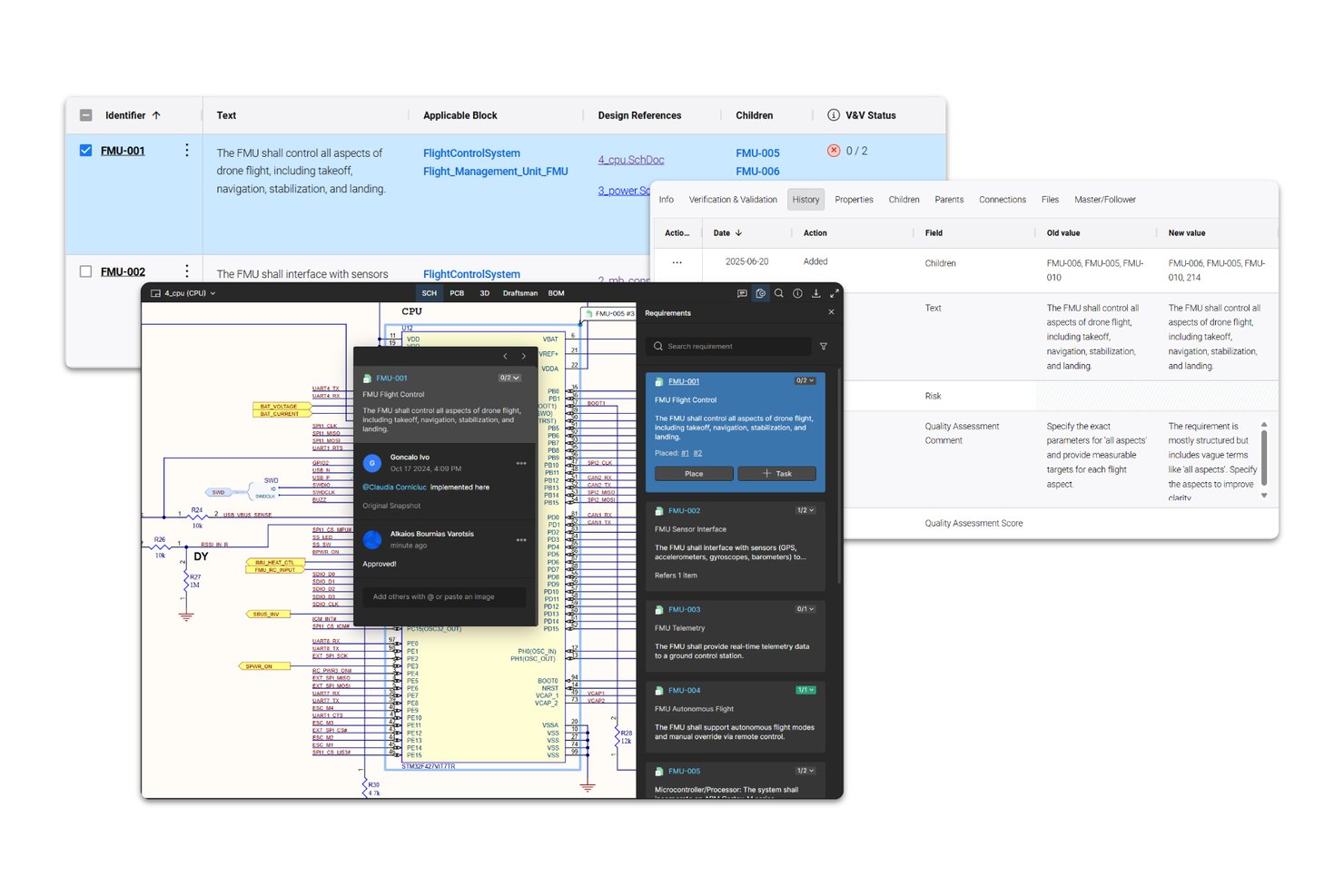
Requirements Portal is Altium's requirements management tool for engineering teams that links requirements directly to electronics designs, schematics, PCB layouts, and BOM components, with built-in traceability, AI-assisted authoring, and collaborative review workflows.
Who Is Requirements Portal Best For?
Requirements Portal fits hardware and systems engineering teams that work in Altium's ECAD ecosystem and need requirements tied directly to schematics, PCB layouts, and BOM components.
Why I Picked Requirements Portal
I picked Requirements Portal because no other tool on this list connects requirements directly to schematics, PCB layouts, and BOM components the way it does. If your team is building electronics and you need a requirement traced to a specific board layout or component, that link exists natively here. I also like the ValiAssistant, which can flag contradictions and gaps in your requirement text using INCOSE quality rules, catching authoring problems before they become design problems.
Requirements Portal Key Features
- Review Center: Assign moderators, reviewers, and approvers to requirements reviews with configurable due dates and per-requirement rating statuses.
- Time Machine: Compare requirements and system-design data across any two points in time or named baselines to surface changed values.
- Requirements reuse wizard: Copy requirements across projects using connected-copy or master-follower options that flag field changes when the source is updated.
- V&V matrix export: Generate a verification-and-validation matrix document that maps requirements to their means of compliance and corresponding evidence references.
Requirements Portal Integrations
Requirements Portal has a native integration with Altium Designer and Altium ECAD projects, linking requirements to schematics, PCB layouts, and BOM components. It also provides REST and Python APIs for custom integrations.
Pros and Cons
Pros:
- Cross-project reuse flags changed master fields
- AI checks requirement quality against INCOSE rules
- Reviewers praise centralized requirements organization
Cons:
- Audit history lacks retention and revert clarity
- No documented standards-specific compliance mappings
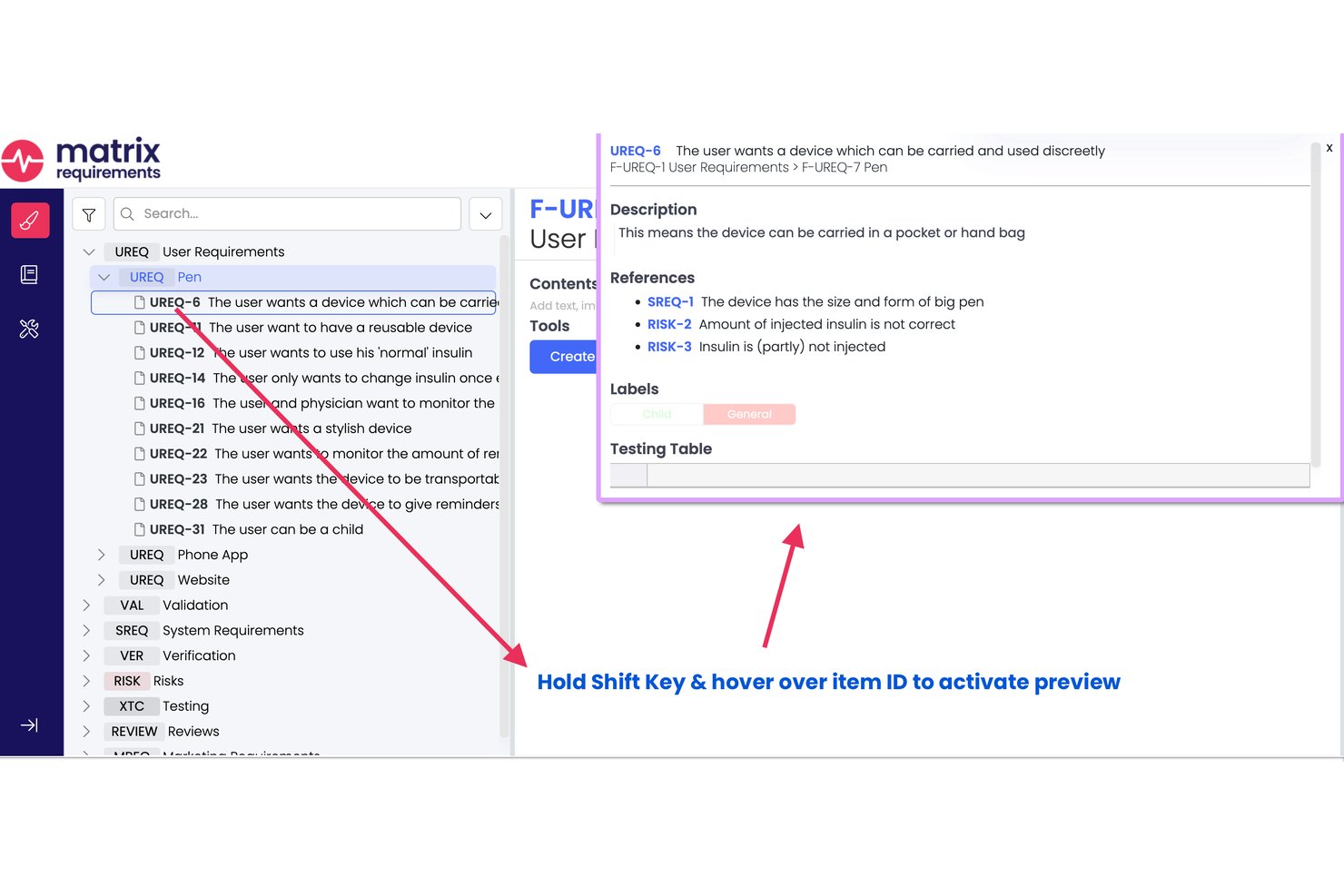
Matrix Req is a requirements management and design control platform built specifically for medical device and life sciences teams, combining requirements authoring, end-to-end traceability, risk management, and V&V tracking in a single compliance-ready environment.
Who Is Matrix Req Best For?
Matrix Req is a strong fit for regulatory affairs and QA leads at medical device companies navigating FDA submissions, CE marking, or ISO 13485 certification.
Why I Picked Matrix Req
Matrix Req earns its spot on my shortlist because its traceability runs at the item level across the full V-model, so I can trace a single requirement through risk analysis, design outputs, and executed tests in one live view. I also like the Compliance Checker, which auto-generates audit checklists from standards like ISO 13485 and FDA 21 CFR 820 rather than forcing my team to build them manually. The vendor's own ISO 13485 certification also matters when validating the tool under a CSV process.
Matrix Req Key Features
- Compose module: Build and manage a shared requirements library for reuse across multiple projects and teams.
- Risk management module: Use dedicated FMEA and hazard analysis tools to track risk matrices within your requirements workflow.
- Automated technical documentation: Generate regulatory-ready PDF and Word files for design history, risk, and test documentation.
- Native Jira and Azure DevOps integration: Sync requirements, traceability, and defects with leading ALM and test management platforms.
Matrix Req Integrations
Matrix Req offers native integrations with Jira, Azure DevOps, GitHub, GitLab, Confluence, Slack, YouTrack, and Rally. An API is available for custom integrations.
Pros and Cons
Pros:
- In-tool risk analysis module included
- FDA and ISO certification support pre-built
- Item-level traceability across requirements and tests
Cons:
- No ReqIF or OSLC standard file support
- Document approval workflow is admin-limited
Best for open-source projects

OpenProject is a project management tool designed for teams that prefer open-source solutions. It serves a wide range of industries, providing features for planning, tracking, and reporting on projects.
Why I picked OpenProject: Its open-source nature allows your team to customize and extend the tool to fit your specific needs. You can manage tasks, timelines, and resources effectively with its intuitive interface. The tool's Gantt charts help in visualizing project schedules and dependencies. Additionally, its community-driven development ensures that it evolves with user needs.
Standout features and integrations:
Features include Gantt charts that allow you to visualize project timelines and dependencies. The tool offers agile boards for managing workflows and tasks efficiently. You can also utilize time tracking features to monitor project progress and resource allocation.
Integrations include GitHub, GitLab, Bitbucket, Slack, Excel, LDAP, REST API, Jira, Trello, and more.
Pros and Cons
Pros:
- Suitable for agile teams
- Strong community support
- Open-source customization
Cons:
- May need dedicated resources
- Requires technical expertise

Aha!
Best for product roadmaps

Aha! is a product management tool designed for teams looking to create detailed product roadmaps. It's used by product managers to plan, prioritize, and track product development efforts.
Why I picked Aha!: Its focus on product roadmaps makes it a top choice for teams needing to visualize their product strategy. You can use its roadmap features to outline your product requirements and align your team on goals. The tool’s idea management capabilities help you capture and prioritize user feedback. Additionally, its integration with development tools ensures a smooth transition from planning to execution.
Standout features and integrations:
Features include idea management that helps you capture and prioritize user feedback. You can create visual roadmaps to align your team on product strategy. The tool also offers goal-setting features to keep your team focused on achieving key objectives.
Integrations include Jira, Slack, Salesforce, GitHub, Azure DevOps, Trello, Asana, Zendesk, Microsoft Teams, Rally, and more.
Pros and Cons
Pros:
- Goal-setting features
- Visual roadmap creation
- Strong product roadmap capabilities
Cons:
- Resource-intensive for basic needs
- Requires time for customization

Reqtest
Best for test management

ReQtest is a cloud-based test management tool tailored for software engineering and development teams. It aids in managing test cases, tracking bugs, and checking for requirements validation.
Why I picked ReQtest: Its test management capabilities make it an excellent choice for teams focused on software quality assurance. You can track and manage bugs effectively, ensuring your team addresses issues promptly. The tool's requirements management features help in aligning your development efforts with business goals. Its user-friendly interface makes it accessible for teams of all sizes and technical expertise.
Standout features and integrations:
Features include a bug tracking system that allows your team to identify and resolve issues quickly. The tool offers requirement management features to align the development processes with business objectives. You can also standardize your implementations and scale your projects.
Integrations include Jira, Azure DevOps, Microsoft Excel, Microsoft Word, ServiceNow, and more.
Pros and Cons
Pros:
- Supports requirements management
- Effective bug tracking
- Strong test management features
Cons:
- Not ideal for complex projects
- Limited customization options


Jama Connect is a requirements management software designed for large teams working in complex environments like aerospace, automotive, and healthcare. Jama software can help your team manage requirements, risks, and test cases efficiently.
Why I picked Jama Connect: It's tailored for large teams, offering features like real-time collaboration and traceability. The platform's review center facilitates team discussions and decision-making. Risk management capabilities ensure compliance with industry standards. Dashboards and reports help you track project progress and identify potential issues early on.
Standout features and integrations:
Features include real-time requirements gathering and collaboration tools that keep everyone on the same page. The review center allows for structured feedback and approvals, making it easier for your team to align on requirements. Advanced reporting tools provide insights into project health and potential risks.
Integrations include Jira, Azure DevOps, GitHub, MATLAB, LDRA, Parasoft, Capella, Siemens ENCO, Ansys, Excel, and more.
Pros and Cons
Pros:
- Supports large-scale teams
- Strong risk management tools
- Real-time traceability
Cons:
- May be resource-intensive
- Complex setup process

Best for agile projects

Visual Paradigm is a modeling and design tool built for agile teams. It's used across industries like software development and business analysis to create visual models and manage project requirements.
Why I picked Visual Paradigm: It excels in agile project environments with its user story mapping and sprint management features. You can visualize complex workflows and track progress with ease. The tool's support for various diagram types helps your team communicate ideas clearly. It has a wide range of formatting options and includes the ability to reuse requirements to improve efficiency.
Standout features and integrations:
Features include user story mapping that helps your team plan sprints effectively. The tool supports a wide range of diagram types, allowing you to visualize different aspects of your project. You can also manage tasks and track progress through its Kanban board feature.
Integrations include Jira, Confluence, Microsoft Teams, Jenkins, Bitbucket, Visual Studio, and more.
Pros and Cons
Pros:
- User story mapping feature
- Effective for agile workflows
- Supports many diagram types
Cons:
- Resource-intensive for small teams
- Initial setup can be complex


Jira by Atlassian is a project management tool tailored for agile teams across various industries. It helps your team plan, track, and manage software development projects with ease.
Why I picked Jira: Its agile-focused features make it ideal for teams following Scrum or Kanban methodologies. You can create and manage user stories, plan sprints, and distribute tasks across your team. The tool's customizable workflows help your processes align with your team's needs. Additionally, real-time reporting and dashboards provide insights into project progress and team performance.
Standout features and integrations:
Features include customizable workflows that adapt to your team's processes. You can use real-time reporting to track project progress and identify bottlenecks. The tool supports sprint planning, allowing your team to manage tasks and deadlines effectively.
Integrations include Confluence, Bitbucket, Slack, Microsoft Teams, GitHub, Jenkins, Zendesk, Trello, Salesforce, Asana, Visure, and more.
Pros and Cons
Pros:
- Real-time reporting
- Customizable workflows
- Supports agile methodologies
Cons:
- Complex for small projects
- Can be overwhelming for new users


IBM Engineering Requirements Management DOORS solution is a requirements management tool tailored for industries with strict compliance needs, such as aerospace and defense. It helps your team manage complex data and maintain traceability across the project lifecycle.
Why I picked IBM Engineering Requirements Management DOORS: Its focus on compliance makes it invaluable for industries with rigorous standards. You can use its traceability features to ensure every requirement is met. The tool's ability to handle large datasets is perfect for projects with extensive documentation. Its audit capabilities help you maintain compliance with industry regulations.
Standout features and integrations:
Features include advanced traceability to improve efficiency and risk mitigation. You can handle large volumes of data, making it suitable for complex projects and systems engineering. The tool also offers audit trails that support compliance with industry and ISO standards.
Integrations include IBM Engineering Lifecycle Management, IBM Rational Quality Manager, IBM Rational Team Concert, Microsoft Excel, Microsoft Word, MATLAB, Simulink, GitHub, Jira, and more.
Pros and Cons
Pros:
- Extensive traceability features
- Handles large datasets
- Strong compliance support
Cons:
- Requires technical expertise
- Complex setup process


SpiraTeam by Inflectra is a project management and requirements tracking tool designed for cross-functional teams. It supports managing requirements, tasks, bugs, and issues in one platform, making it ideal for teams needing versatile project oversight.
Why I picked SpiraTeam: It excels in supporting cross-functional teams with its customizable workflows and agile project planning features. Your team can benefit from its real-time dashboards that provide instant visibility into project status. The tool's test management capabilities improve quality control throughout the project lifecycle. Additionally, its customizable reporting allows you to tailor insights to your team's specific needs.
Standout features and integrations:
Features include live dashboards that offer insights into project progress. Customizable workflows let your team adapt the tool to fit specific processes. Built-in test management ensures your projects maintain high quality from start to finish.
Integrations include Jira, Microsoft TFS, GitHub, Jenkins, Eclipse, Selenium, Java, ClickUp, Git, and more.
Pros and Cons
Pros:
- Versatile across projects
- Real-time project insights
- Customizable workflows
Cons:
- Initial onboarding can be lengthy
- Complex for small teams
Other Enterprise Requirements Management Tools
Here are some additional enterprise requirements management tools options that didn’t make it onto my shortlist, but are still worth checking out:
- ReqView
For ease of use
- Enterprise Architect
For model-driven design
- Modern Requirements4DevOps
For DevOps integration
- Dimensions RM
For end-to-end traceability
- codebeamer
For application lifecycle management
- Polarion Requirements
For auditing
- CaseComplete
For use cases


How I Evaluate Enterprise Requirements Management Tools
I split my evaluation into two layers: baseline criteria every tool must meet—like traceability and baselining—and differentiators that reveal the best fit for your team.
Core Functionality (Table Stakes For This List)
When I'm selecting tools for my list, I rank each one on a scale from 0 (does not offer the functionality) to 5 (excels in this area) for each core functionality listed below. Then, I calculate the tool's total score into a percentage. Each tool needs to achieve a minimum total score of 65% to be considered for inclusion.
- Requirements Authoring & Management: I check whether a tool provides structured authoring with custom attributes, hierarchy, and modules—like managing thousands of requirements across subsystems in a single repository.
- End-to-End Traceability: Bidirectional links from requirements to tests, risks, and design artifacts matter here. I evaluate how well a tool surfaces coverage gaps and downstream impact when a requirement changes.
- Baselining & Version Control: I look for formal baselines, version comparison, and audit-grade history. For regulated programs, teams need to compare baselines across releases and prove exactly what changed and when.
- Compliance & Audit Support: Standards-aligned templates, electronic signatures, and exportable audit trails are what I evaluate. Tools like Polarion and Jama Connect each approach this differently depending on the regulatory domain.
- Collaboration & Review Workflows: I look at how each tool handles formal review cycles, role-based approvals, and change requests—especially for distributed teams coordinating sign-offs across engineering, quality, and product stakeholders.
- Enterprise Toolchain Integration: The tool's connector library and standards support (ReqIF, OSLC, REST APIs) are what I evaluate, since most teams need live sync with ALM, PLM, or test management platforms already in their stack.
Once I have a list of tools that meet this criteria, I consider what sets each platform apart.
Differentiating Factors (What Sets Vendors Apart)
Here's how I compare and contrast different vendors:
Standout Features
AI-assisted quality checks are a real differentiator. I look for tools that flag ambiguous, incomplete, or duplicative requirements before they reach a formal review cycle. Variant and reuse management also matters—teams building product families need to configure requirement sets across variants without duplicating entire projects. I evaluate visual modeling integration too, since MBSE-driven teams benefit when SysML or UML diagrams link directly to requirement artifacts, keeping architecture and specs in sync.
Beyond Features
Deployment flexibility is something I always evaluate. Teams in defense or aerospace often need air-gapped or on-premise installations, while others prefer cloud-native setups. Implementation support also weighs heavily—migrating from a legacy platform like DOORS Classic to a modern tool is a major undertaking, so I check for migration tooling and professional services. I also consider interoperability standards like ReqIF and OSLC, since multi-supplier programs depend on clean requirements exchange between organizations using different toolchains.
How to Choose an Enterprise Requirements Management Tool
It’s easy to get bogged down in long feature lists and complex pricing structures. To help you stay focused as you work through your unique software selection process, here’s a checklist of factors to keep in mind:
| Factor | What to Consider |
|---|---|
| Scalability | Will the tool grow with your team? Consider future project sizes and user numbers. Look for solutions that can scale up without requiring major changes. |
| Integrations | Does the tool work with your current software? Check for compatibility with existing tools to avoid workflow disruptions. |
| Customizability | Can you tailor the tool to fit your processes? Look for options that allow easy adjustments to workflows and templates. |
| Ease of use | Is the tool user-friendly for your team? Avoid tools with steep learning curves that could slow down adoption. |
| Implementation and onboarding | How long will the setup take? Ensure the vendor provides resources like training videos and product tours for smooth onboarding. |
| Cost | Does the pricing fit your budget? Compare plans and consider any hidden costs such as setup fees or premium support. |
| Security safeguards | Are your data protected? Look for encryption, regular audits, and compliance with industry standards. |
| Compliance requirements | Does the tool meet industry regulations? Make sure it supports necessary compliance standards, especially for regulated industries. |
What Are Enterprise Requirements Management Tools?
Enterprise requirements management tools are software solutions that help organizations manage and track project requirements across their lifecycle. These tools are generally used by project managers, business analysts, and development teams to provide an entity with a single source of truth, establish goals, and improve collaboration. Traceability, change management, and reporting capabilities help with maintaining project clarity, adapting to changes, and providing insights. Overall, these tools enhance project organization and assist businesses in meeting requirements efficiently.
Features
When selecting enterprise requirements management tools, keep an eye out for the following key features:
- Traceability: Tracks requirements throughout the project lifecycle, ensuring all changes are documented and aligned with business goals.
- Change management: Manages revisions and updates to requirements, helping teams adapt to project changes efficiently.
- Collaboration tools: Facilitate communication and teamwork among project members, improving alignment and reducing misunderstandings.
- Reporting and analytics: Provides insights into project progress and potential issues, supporting informed decision-making.
- Customizable workflows: Allow teams to tailor processes to fit their specific project needs, enhancing flexibility and efficiency.
- Integration capabilities: Connects with existing software tools, ensuring smooth workflows and data consistency.
- Document versioning: Maintains a clear history of changes to requirements documents, preventing data loss and confusion.
- Security safeguards: Protects sensitive project data with encryption and compliance with industry standards.
- User-friendly interface: Ensures ease of use and quick adoption by team members, reducing training time.
- Compliance support: Assists in meeting industry regulations, particularly for projects in regulated sectors.
Benefits
Implementing enterprise requirements management tools provides several benefits for your team and your business. Here are a few you can look forward to:
- Improved traceability: Keeps track of requirements from start to finish, leading to fewer overlooked issues and helping to align with business goals.
- Efficient change management: Helps your team adapt to project changes quickly, reducing delays and maintaining project momentum.
- Enhanced collaboration: Facilitates better communication within your team, leading to better collaboration and improved project outcomes.
- Informed decision-making: Offers insights through reporting and analytics, helping you make better decisions based on real-time data.
- Customization flexibility: Allows you to adjust workflows to fit your specific project needs, increasing efficiency and adaptability.
- Regulatory compliance: Assists in meeting industry regulations that are especially important for projects in sectors with strict compliance requirements.
- Data security: Protects project information with strong security measures, giving you peace of mind about the safety of your data.
Costs & Pricing
Selecting enterprise requirements management tools requires an understanding of the various pricing models and plans available. Costs vary based on features, team size, add-ons, and more. The table below summarizes common plans, their average prices, and typical features included in enterprise requirements management tools solutions:
Plan Comparison Table for Enterprise Requirements Management Tools
| Plan Type | Average Price | Common Features |
|---|---|---|
| Free Plan | $0 | Basic requirements tracking, limited storage, and community support. |
| Personal Plan | $5-$25/user/month | Requirements management, basic reporting, collaboration tools, and email support. |
| Business Plan | $30-$50/user/month | Advanced reporting, integrations with third-party tools, enhanced security, and priority support. |
| Enterprise Plan | $60-$100/user/month | Customizable workflows, dedicated account manager, compliance features, and 24/7 premium support. |
Enterprise Requirements Management Tools FAQs
Here are some answers to common questions about enterprise requirements management tools:
How do you compare the total cost of ownership (TCO) for different requirements-management tools?
When you’re comparing tools, include not just the license cost but also training, onboarding, customization, integration with your existing stack, and ongoing maintenance. Look at how much effort your team will spend adapting workflows and migrating data from existing systems. Don’t forget to account for upgrade cycles and potential vendor lock-in. A tool with a higher upfront cost might save you time and money if it reduces rework or administrative overhead.
What factors determine how well a tool supports traceability requirements?
Traceability depends on how well your tool links requirements to design artifacts, test cases, code changes, and defects, ideally both forwards and backwards. You’ll want to check how granular the trace links are (e.g., individual requirements or entire documents), whether automated updates happen when linked artifacts change, and whether traceability reports meet your audit or compliance needs.
How should you assess integration capability with your existing development and test environment?
You’ll want a tool that plugs into your current toolchain, version control, issue tracking, CI/CD, and test management, rather than forcing you to switch everything. Ask whether the tool has standard APIs or open services (like OSLC) and whether the vendor or community offers ready connectors for your ecosystem. Integration effort can significantly affect your rollout timeline and team adoption.
How can you evaluate whether a tool will scale for enterprise-level complexity?
Scaling means more than supporting thousands of requirements. You should consider branching/versioning, multi-project portfolios, distributed teams, and regulatory environments. Consider whether the tool supports repositories, baselines, audits, multiple domains or business units, and whether performance stays acceptable at high volume. Also, look at how change control and governance functions operate across multiple and various teams.
What best practices should you follow when migrating legacy requirements into a new tool?
Start by cleaning up and standardising your existing requirements (remove duplicates, merge variants, fix ambiguous items). Map out how your current artifacts will translate into the new structure (folders, attributes, trace links). Define a migration plan with phases (e.g., pilot group → extended rollout). You’ll also need to train stakeholders on new workflows and archive prior tools if appropriate. Planning the human side of the migration is as vital as the technology.
How do you ensure long-term adoption and user engagement with a requirements management tool?
Even the best tool can fail if users don’t adopt it. Make sure you involve users early — business analysts, testers, developers, QA, etc. Tailor the tool’s setup (templates, fields, views) to fit their roles rather than forcing them into a generic workflow. Provide role-based training, embed the tool into existing processes (not as an add-on), and define clear ownership and governance (who maintains the tool, who audits use, how feedback is handled). Regularly review usage metrics and re-tune as you grow.