

10 Enterprise Knowledge Base Software in 2026

Top Enterprise Knowledge Base Software Shortlist


An Enterprise knowledge base is a digital platform that helps large organizations optimize, store, and share internal information across teams. If you’re searching for the best enterprise knowledge base software, you’re likely looking to reduce information silos, make onboarding easier, and improve search functionality to give your teams quick access to the answers they need. Choosing the right tool can help you keep documentation up to date, support collaboration, and ensure everyone stays aligned—even as your company grows and changes. In this guide, you’ll find a curated shortlist of top solutions, each with unique strengths to fit different enterprise needs.
Why Trust Our Software Recommendations
Our team has been testing and reviewing software since 2012. As project managers ourselves, we know how difficult—and important—it is to choose the right software.
For this guide, we evaluated tools using hands-on testing and independent research, scoring tools using our selection criteria. We also draw on insights from industry thought leaders and practicing project management experts.
Our reviews reflect our human editorial judgment, not a sales pitch.
Expert reviewers:
Best Enterprise Knowledge Base Software Comparison Table
This comparison table summarizes pricing details for my top enterprise knowledge base software selections:
| Tool | Best For | Trial Info | Price | ||
|---|---|---|---|---|---|
| 1 | Best for advanced content versioning | Free demo available | Pricing upon request | Website | |
| 2 | Best for collaborative team documentation | Free demo + 14-day free trial available | From $10/user/month (billed annually) | Website | |
| 3 | Best with real-time editing for fast-moving teams | Free plan available | From $6/user/month (billed annually) | Website | |
| 4 | Best with AI-powered search capabilities | Free demo available | Pricing upon request | Website | |
| 5 | Best for multi-format content publishing | Free trial + free demo available | From $185/month | Website | |
| 6 | Best for API documentation management | 14-day free trial available | From $80/month | Website | |
| 7 | Best for Slack-integrated knowledge sharing | 30-day free trial | From $8/user/month (billed annually) | Website | |
| 8 | Best for Microsoft 365 ecosystem compatibility | 30-day free trial | From $5.00/user/month (billed annually) | Website | |
| 9 | Best for integration with Atlassian tools | Free trial + free plan available | From $5.42/user/month | Website | |
| 10 | Best for customizable access permissions | 30-day free trial | From $100/month | Website |
Enterprise Knowledge Base Software Reviews
Below are my detailed summaries of the best enterprise knowledge base software that made it onto my shortlist. My reviews offer a detailed look at the features, integrations, and best use cases of each platform to help you find the best one for you.

Best for advanced content versioning

Document360 is a knowledge base platform built for product teams, SaaS companies, and customer support teams who need to create, manage, and publish detailed documentation for both internal and external audiences.
Who Is Document360 Best For?
Large product and support teams in SaaS or tech who need granular control over documentation versions and workflows.
Why I Picked Document360
I picked Document360 as one of the best because I can track every change with advanced versioning, making it easy to roll back or compare edits across multiple documentation projects. I like that my team can set up step-by-step, granular workflows for content review and publishing, so nothing goes live without the right approvals. Document360 also gives me a clear record of who changed what and when, which is essential for compliance and accountability.
Document360 Key Features
- Category manager: Organize articles into nested categories for easy navigation.
- Custom branding: Apply your company’s logo, colors, and domain to your knowledge base.
- AI-powered search: Surface relevant articles quickly with intelligent search suggestions.
- Private documentation: Restrict access to internal knowledge bases with user roles and permissions.
Document360 Integrations
Document360 offers native integrations with Slack, Microsoft Teams, Zendesk, Freshdesk, Intercom, Google Analytics, Disqus, Segment, and Zapier. An API is available for custom integrations.
Pros and Cons
Pros:
- Markdown editor supports technical documentation needs
- Article templates speed up content creation
- Advanced versioning tracks every document change
Cons:
- Search relevance can be inconsistent for large bases
- Limited analytics for article engagement
New Product Updates from Document360

Document360 Adds Bulk Mirroring, Eddy AI Citations, and Unified SSO
Document360 adds bulk article mirroring, citations in Eddy AI chatbot responses, and a unified Enterprise SSO setup. These updates improve content reuse, answer verification, and access management. For more information, visit Document360’s official site.
 .
.
Slite
Best for collaborative team documentation
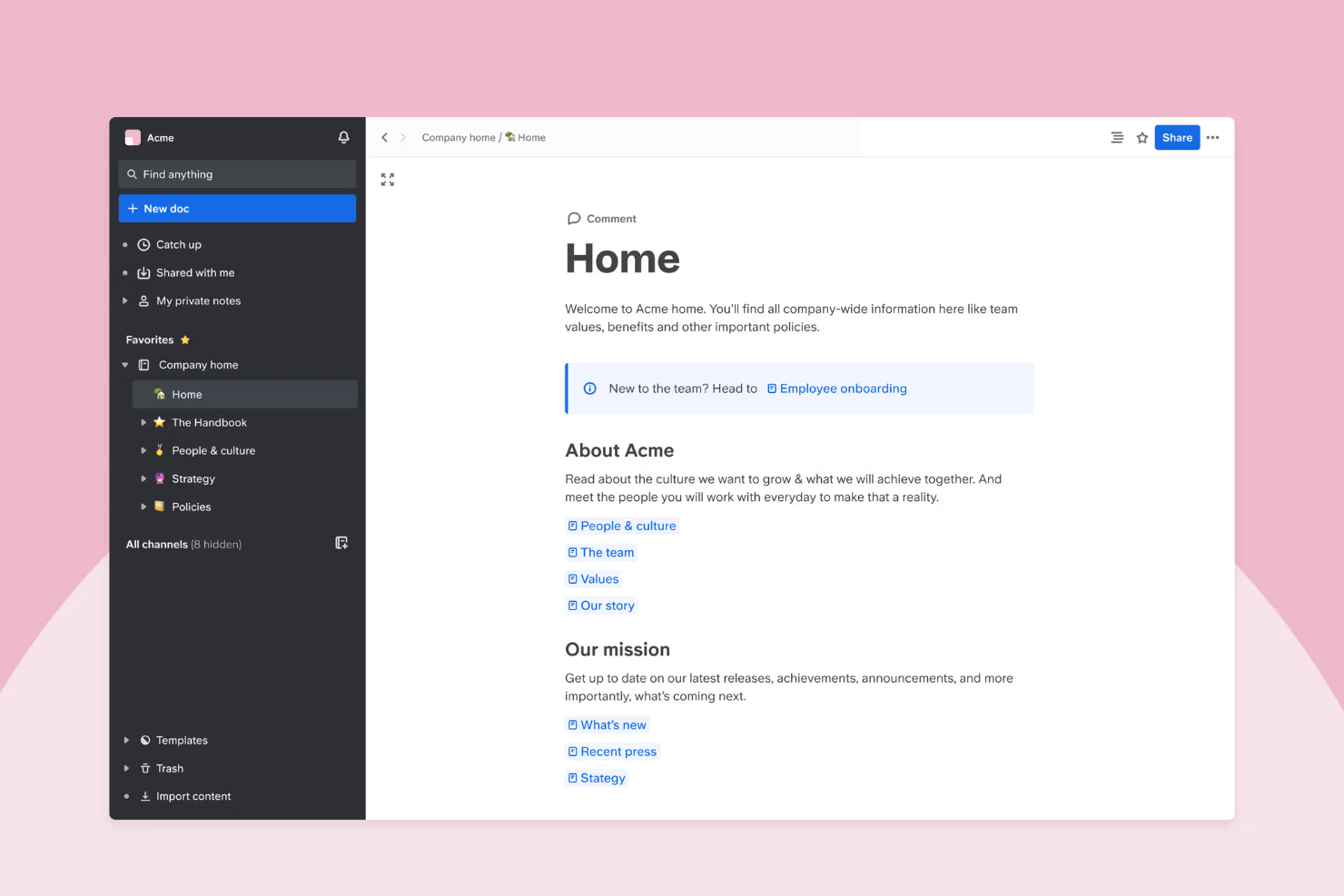
Slite is a knowledge base platform designed for fast-growing teams and enterprises that need a central place to capture, organize, and share internal documentation as their business scales.
Who Is Slite Best For?
Distributed teams and remote-first companies that need to keep documentation accessible and collaborative.
Why I Picked Slite
I picked Slite as one of the best knowledge management systems because it’s built for teams that need to co-author and update documentation together in real time. I like how channels and threads keep conversations tied to specific docs, so my team never loses context. Collaborative editing and commenting make it easy for everyone to contribute and refine knowledge as projects evolve, and version control means details don’t get lost with updated versions. This makes it easy to find related docs that can act as a single source of truth when troubleshooting, and for self-service, as team members can type in natural language to find related documentation when they need a quick answer or to look up company policies.
Slite Key Features
- Knowledge base templates: Choose from a library of ready-made templates for policies, onboarding, and project docs.
- Advanced search: Quickly find documents, pages, or keywords across your entire workspace.
- Access permissions: Set granular permissions for teams, guests, or individuals to control who can view or edit content.
- Version history: Track changes and restore previous versions of any document.
Slite Integrations
Slite offers native integrations with Slack, Google Drive, GitHub, Figma, Loom, and Zapier. An API is available for custom integrations.
Pros and Cons
Pros:
- User-friendly templates for onboarding and policies
- Threaded comments keep discussions organized in docs
- Real-time collaborative editing for distributed teams
Cons:
- No built-in workflow automation for approvals
- Limited advanced analytics for content usage

Nuclino
Best with real-time editing for fast-moving teams
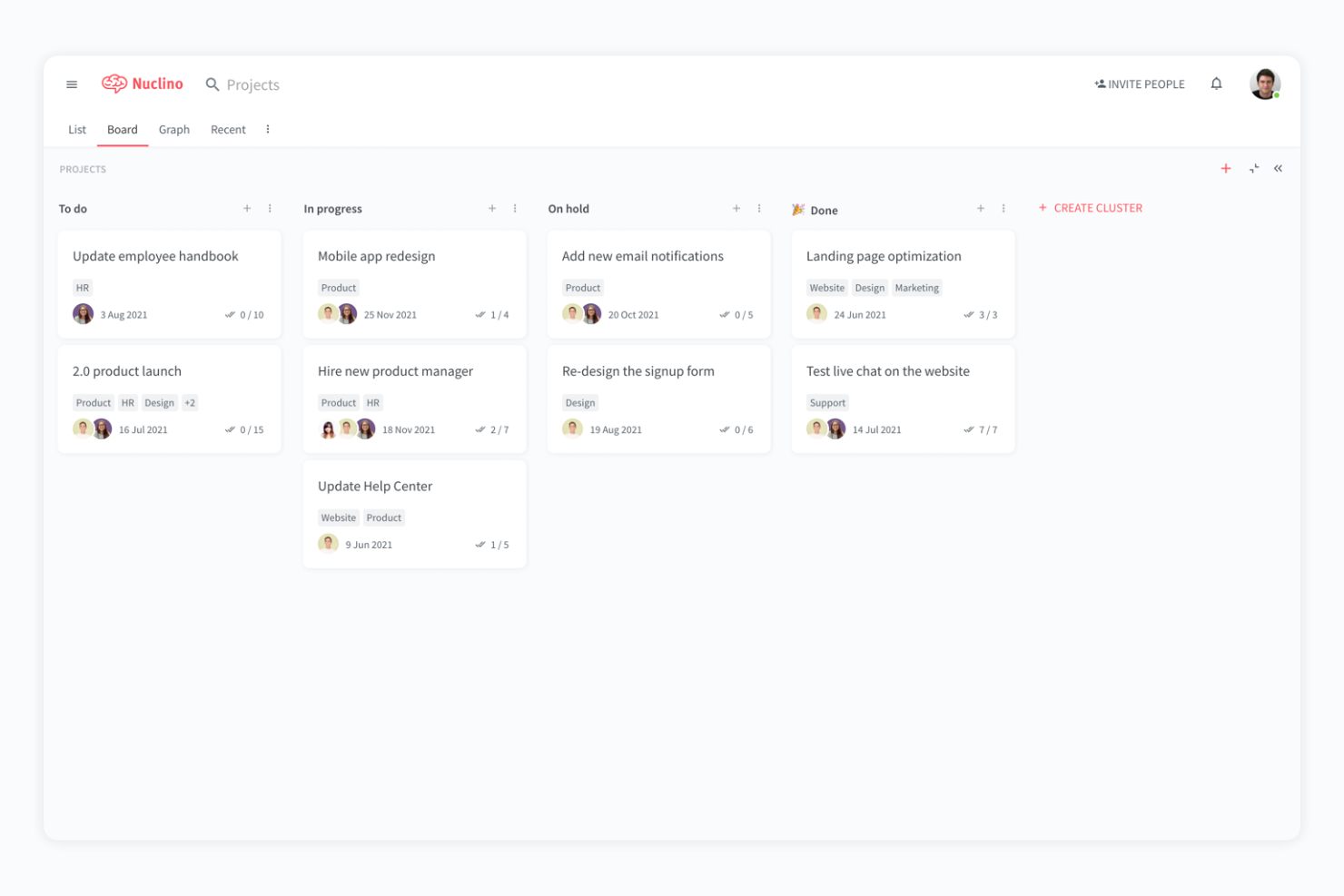
Nuclino is a unified workspace for teams in tech, product, and operations who need to organize knowledge, manage projects, and collaborate on documentation without the clutter of traditional wikis or the complexity of legacy intranets.
Who Is Nuclino Best For?
Fast-growing tech teams and startups that need to capture, update, and share knowledge as projects evolve.
Why I Picked Nuclino
I picked Nuclino as one of the best because I can watch my team edit and update content together in real time, which is essential when we’re moving fast on product launches or sprint planning. I like how every page auto-saves and instantly syncs changes, so there’s never confusion about which version is current. The visual graph view helps us map out relationships between topics, making it easy to connect related knowledge as our documentation grows.
Nuclino Key Features
- Hierarchical workspace organization: Structure content in workspaces, clusters, and items for clear navigation.
- Markdown support: Format text quickly using markdown syntax within every document.
- Instant search: Find pages, files, or keywords across all workspaces in seconds.
- Access permissions: Set granular read or edit rights for teams and individuals.
Nuclino Integrations
Nuclino offers native integrations with Google Drive, Slack, Microsoft Teams, YouTube, Vimeo, Miro, Lucidchart, Figma, and Zapier. An API is available for custom integrations.
Pros and Cons
Pros:
- Threaded comments keep discussions organized in docs
- Visual graph view maps knowledge relationships
- Real-time editing supports fast-paced collaboration
Cons:
- Fewer native integrations than major competitors
- Limited analytics for content engagement tracking

Best with AI-powered search capabilities
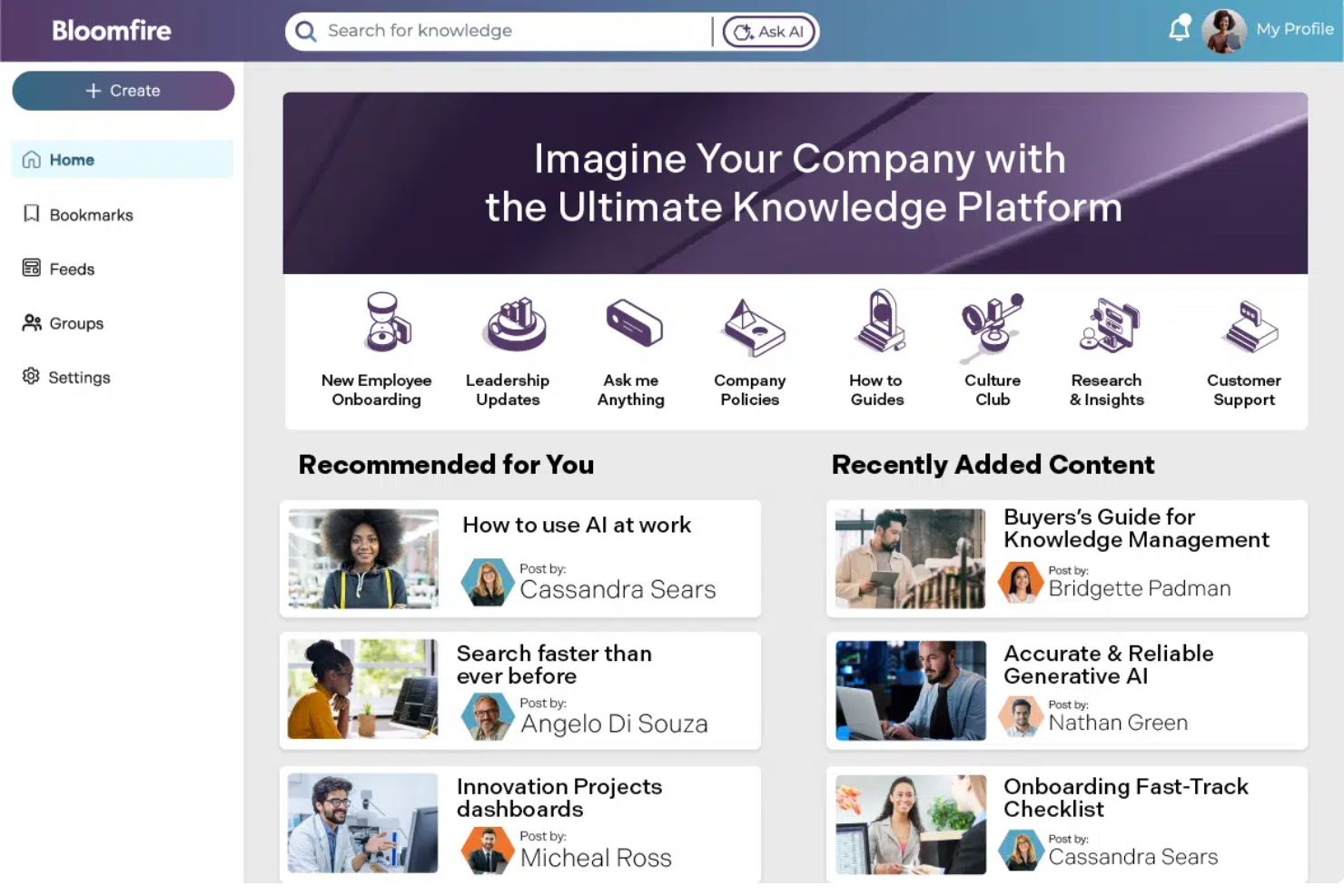
Bloomfire is an enterprise knowledge base platform built for customer support, sales, and operations teams who need to centralize company knowledge, make information easily searchable, and keep content organized as their business grows.
Who Is Bloomfire Best For?
Large customer support and operations teams who need fast, AI-driven access to company knowledge.
Why I Picked Bloomfire
I picked Bloomfire as one of the best because I can rely on its AI-powered search to surface relevant answers from across our knowledge base, even in video and audio files. I like using the automated tagging and content recommendations to keep information organized as our library grows. My team uses Bloomfire’s Q&A feature to capture tribal knowledge and make it accessible for everyone.
Bloomfire Key Features
- Content scheduling: Schedule posts to publish at specific times for planned knowledge sharing.
- Custom branding: Apply your company’s logo, colors, and themes to the knowledge base.
- Analytics dashboard: Track user engagement and content performance with built-in analytics.
- Permission management: Set granular access controls for users and groups.
Bloomfire Integrations
Bloomfire offers native integrations with Slack, Salesforce, Microsoft Teams, Google Drive, Dropbox, Box, Zendesk, and Zapier. An API is available for custom integrations.
Pros and Cons
Pros:
- Automated tagging improves content organization
- Q&A module captures tribal knowledge
- AI search indexes video, audio, and text
Cons:
- Limited export options for content migration
- No built-in workflow automation tools

Best for multi-format content publishing
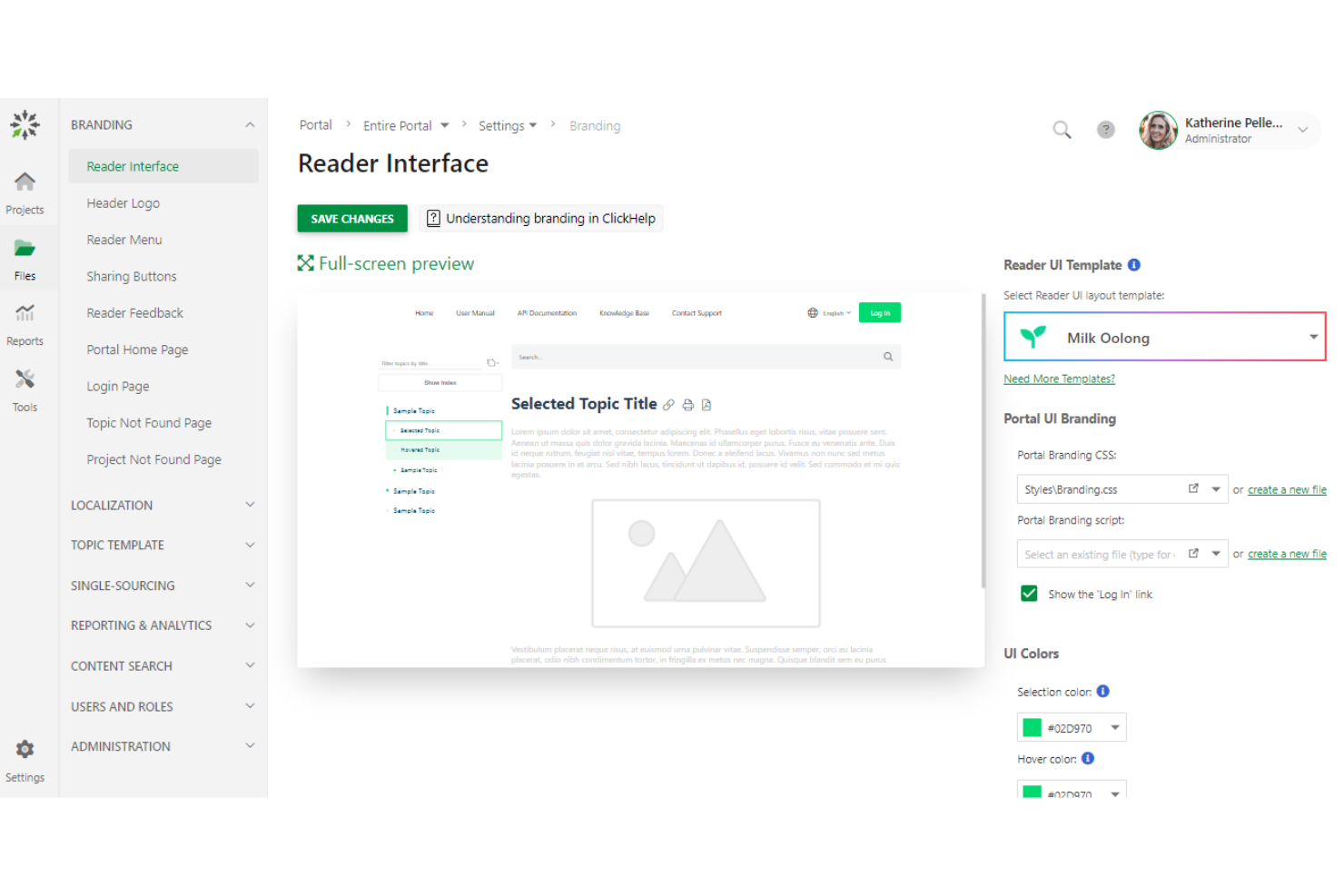
ClickHelp is a cloud-based documentation platform designed for technical writers, software companies, and support teams who need to create, manage, and publish knowledge bases and user guides for both internal and external audiences.
Who Is ClickHelp Best For?
Technical writers and documentation teams in software, SaaS, and IT companies needing to publish content in multiple formats.
Why I Picked ClickHelp
I picked ClickHelp because my team needs to publish knowledge base content in multiple formats like HTML5, PDF, and Word without extra conversion steps. I like that we can manage single-source content and push updates across all formats at once. In practice, that means we keep our documentation consistent for both internal and external users, no matter how they access it.
ClickHelp Key Features
- Role-based access control: Assign user roles and permissions for secure collaboration.
- Context-sensitive help widgets: Embed interactive help directly into your web applications.
- Versioning and branching: Manage multiple documentation versions and track changes over time.
- Full-text search: Enable users to quickly find relevant content across all documentation.
ClickHelp Integrations
ClickHelp offers native integrations with Google Analytics, Zendesk, Salesforce, Freshdesk, and Jira, and connects with Zapier. An API is available for custom integrations.
Pros and Cons
Pros:
- Context-sensitive help delivers support within applications
- Single-source authoring keeps content consistent across outputs
- Multi-format publishing supports diverse documentation needs
Cons:
- Customization options can be restrictive for advanced layouts
- Interface feels dated compared to newer tools
Archbee
Best for API documentation management

Archbee is a documentation platform built for software teams and SaaS companies who need to centralize technical knowledge, onboard developers, and manage complex product documentation in one place.
Who Is Archbee Best For?
Software teams and SaaS companies that need to document APIs, onboarding guides, and technical processes for internal or external audiences.
Why I Picked Archbee
I picked Archbee because my team needs a knowledge base that handles API documentation with built-in Swagger/OpenAPI support and live code samples. I like that we can embed interactive API explorers directly into our docs, so developers can test endpoints without leaving the page. In practice, that means our technical documentation is always up to date and actionable for both internal and external users.
Archbee Key Features
- Custom doc portals: Publish branded, public, or private documentation sites for your organization.
- Real-time collaboration: Multiple users can edit and comment on docs simultaneously.
- Granular access controls: Set permissions at the workspace, collection, or document level.
- Content blocks: Use pre-built blocks for diagrams, tables, code, and rich media in documentation.
Archbee Integrations
Archbee offers native integrations with Slack, GitHub, Google Analytics, Figma, Loom, and Zapier. An API is available for custom integrations.
Pros and Cons
Pros:
- Custom portals allow flexible documentation publishing
- Real-time collaboration enables faster content updates
- Built-in API documentation tools support technical teams
Cons:
- UI can feel limited for non-developer documentation needs
- Better suited for technical teams than general business users

Tettra
Best for Slack-integrated knowledge sharing
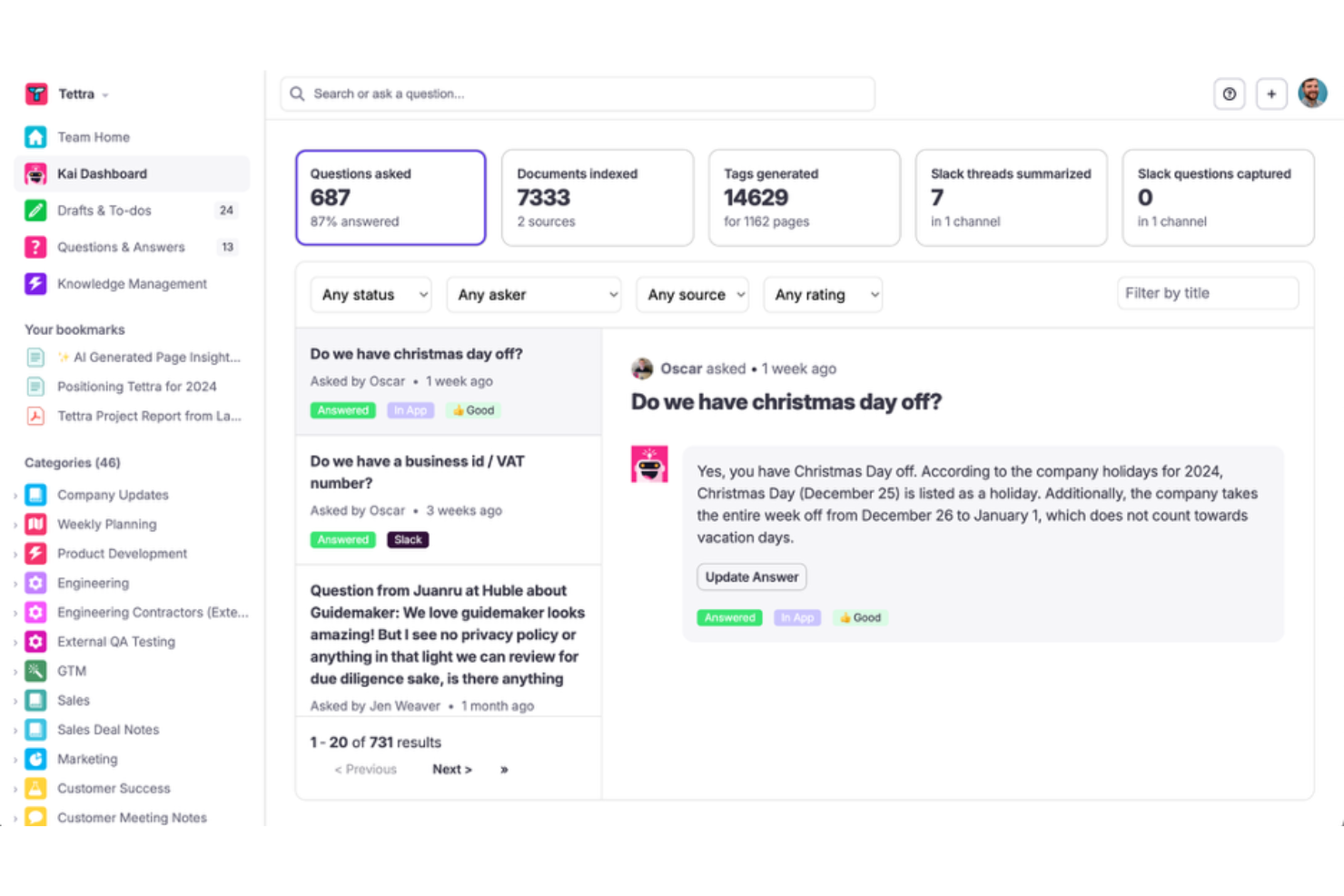
Tettra is a knowledge management platform designed for fast-moving teams who want to document, organize, and share company knowledge directly within their existing chat and collaboration workflows.
Who Is Tettra Best For?
Small to midsize teams who rely on Slack for daily communication and knowledge sharing.
Why I Picked Tettra
I picked Tettra as one of the best because I can answer questions from Slack and turn them into reusable knowledge articles without leaving the chat. I like how Tettra’s Slack integration lets my team quickly search, suggest, and update content right from our daily workflow. I also use the built-in knowledge request feature to crowdsource answers from subject matter experts when gaps come up.
Tettra Key Features
- Page version history: Track and restore previous versions of any knowledge page.
- Content verification: Assign experts to review and verify information for accuracy.
- Permissions management: Control access to spaces and pages by user or group.
- Templates library: Use pre-built templates to standardize documentation across your team.
Tettra Integrations
Tettra offers native integrations with Slack, Google Workspace, Microsoft Teams, GitHub, Zapier, and provides an API for custom integrations.
Pros and Cons
Pros:
- Knowledge requests streamline expert Q&A
- Content verification workflow supports information accuracy
- Slack integration enables instant knowledge sharing
Cons:
- Export options for content are limited
- Limited analytics for content engagement tracking

Best for Microsoft 365 ecosystem compatibility
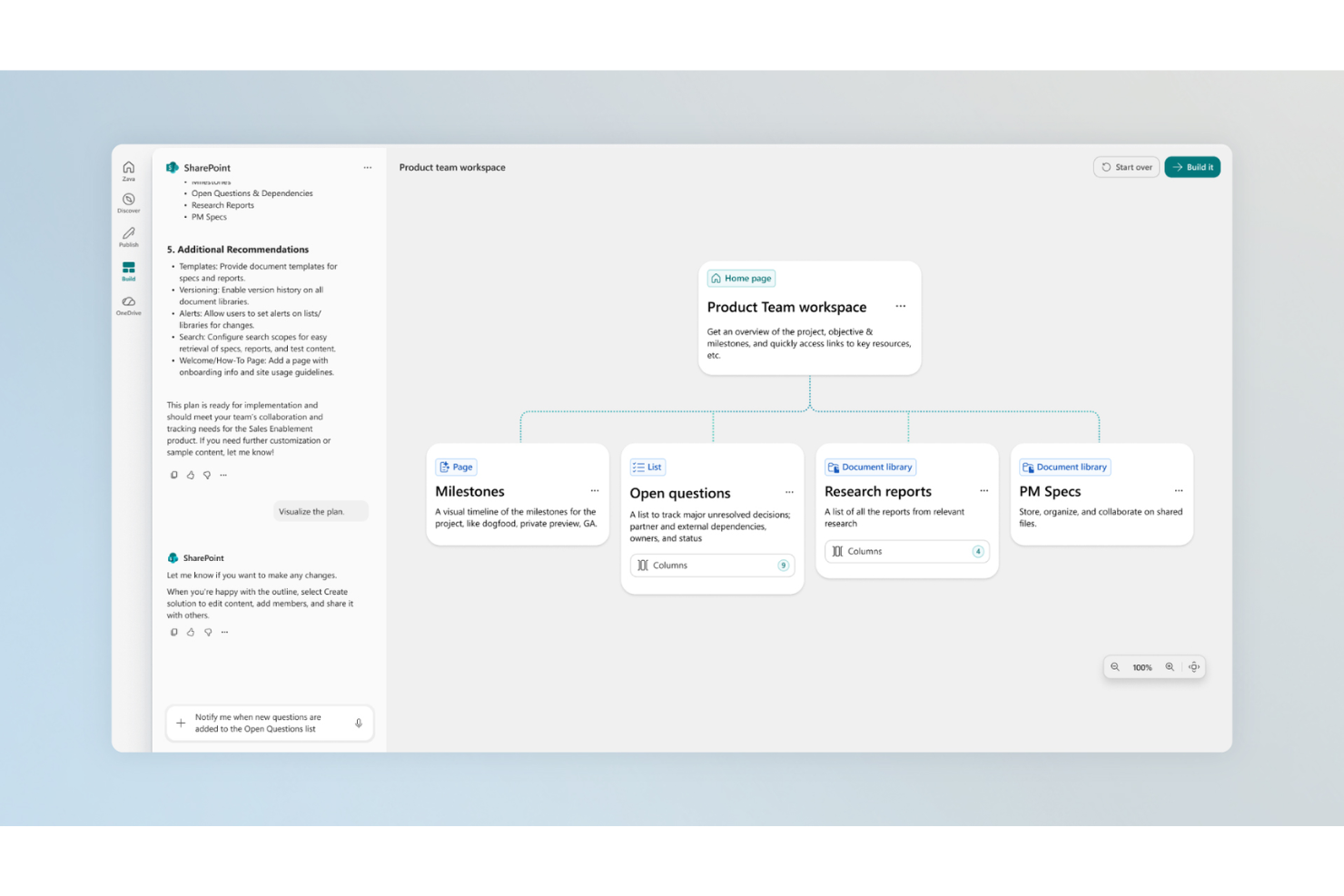
SharePoint is a document management and collaboration platform used by enterprises and government organizations to centralize knowledge, manage content, and enable secure information sharing across distributed teams.
Who Is SharePoint Best For?
Large organizations and government agencies that need secure, centralized document management across multiple departments or locations.
Why I Picked SharePoint
I picked SharePoint because my team needs a knowledge base that fits tightly with Microsoft 365 apps like Outlook, Teams, and OneDrive. I like that we can set up document libraries with custom metadata and automate workflows using Power Automate. In practice, that means we keep everything in sync across our organization and control access with Azure Active Directory.
SharePoint Key Features
- Version history: Track and restore previous versions of documents.
- Enterprise search: Search across sites, libraries, and lists for content.
- Custom site templates: Build and deploy branded knowledge base sites.
- Permissions management: Assign granular access controls to users and groups.
SharePoint Integrations
SharePoint has native integrations across the Microsoft ecosystem, including Microsoft 365, Azure, and core business applications, and also offers an API for custom integrations.
Pros and Cons
Pros:
- Flexible customization supports varied organizational needs
- Advanced versioning helps maintain content history and control
- Centralized document management supports large organizations
Cons:
- Search relevance sometimes misses key documents
- Navigation can be confusing for new users

Best for integration with Atlassian tools
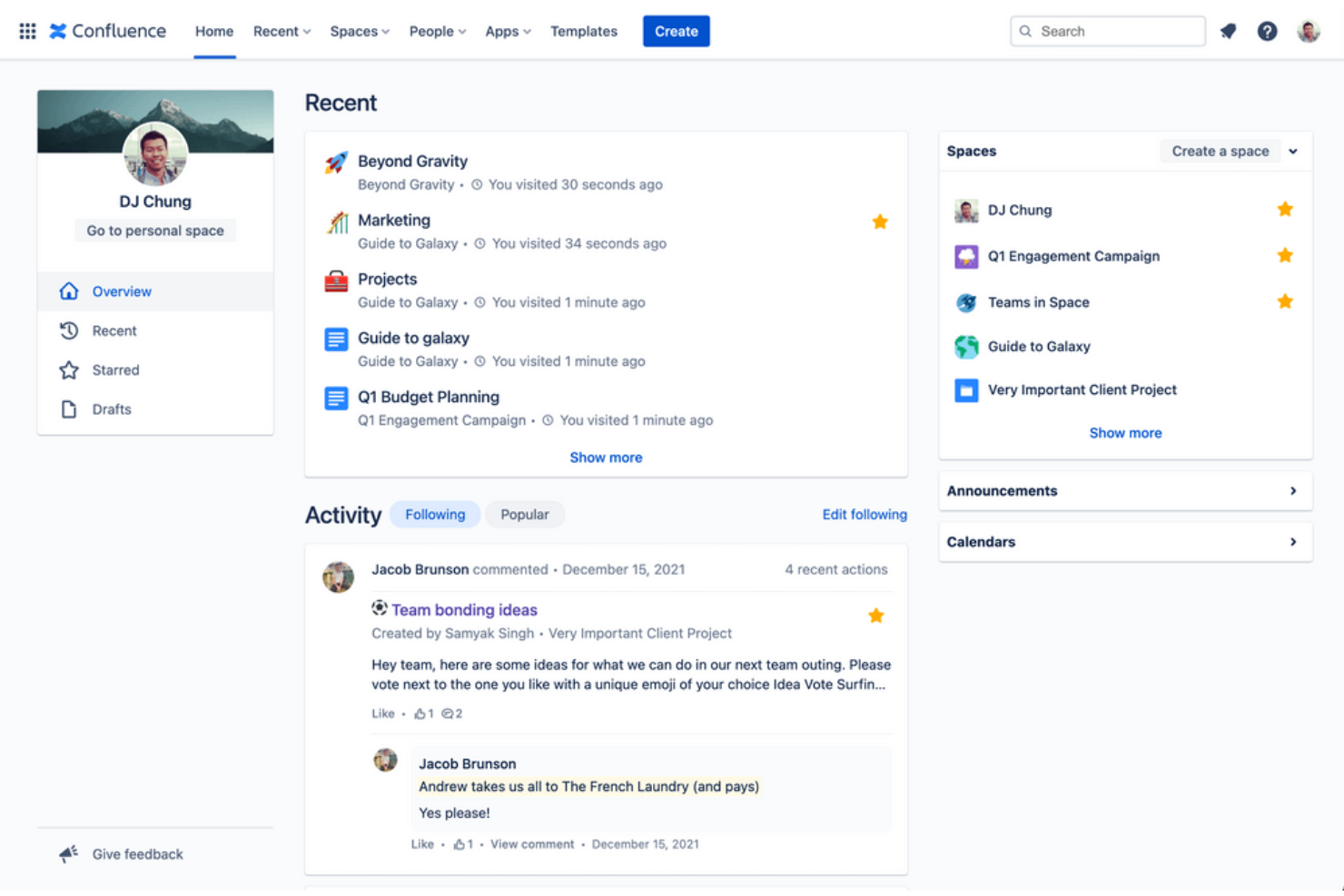
Confluence is a collaborative workspace used by product, engineering, and IT teams to organize, document, and share knowledge across fast-moving organizations that need a centralized, searchable knowledge base.
Who Is Confluence Best For?
Large product and engineering teams who need a centralized knowledge base tightly integrated with their project management tools.
Why I Picked Confluence
I picked Confluence because my team relies on its deep integration with Jira and Trello to keep project documentation and tickets tightly linked. I like that we can embed Jira issues directly into knowledge base pages and automate updates as work progresses. In practice, that means our documentation always reflects the latest project status without manual updates.
Confluence Key Features
- Page version history: Track and restore previous versions of any page.
- Advanced permissions: Set granular access controls for spaces, pages, and users.
- Templates library: Use pre-built templates for meeting notes, product requirements, and more.
- Inline comments: Add feedback and questions directly on specific sections of a page.
Confluence Integrations
Confluence offers 3,000+ native integrations through the Atlassian Marketplace, including Jira, Trello, Slack, Microsoft Teams, Google Drive, Dropbox, GitHub, Salesforce, ServiceNow, and Zapier. An API is available for custom integrations.
Pros and Cons
Pros:
- Extensive template library accelerates documentation creation
- Granular permissions support controlled content access
- Deep connection with project workflows keeps documentation relevant
Cons:
- Requires ongoing maintenance to prevent content sprawl
- Interface can feel cluttered for non-technical users

KnowledgeOwl
Best for customizable access permissions

KnowledgeOwl is a flexible knowledge base platform designed for teams in regulated industries or complex organizations who need to organize, manage, and securely share internal and external documentation.
Who Is KnowledgeOwl Best For?
Knowledge managers and compliance teams in regulated industries who need granular control over documentation access.
Why I Picked KnowledgeOwl
I picked KnowledgeOwl as one of the best because I can set up detailed access permissions for every article, category, or collection, which is essential when my team needs to restrict sensitive content. I like that I can create custom user roles and groups, so only the right people see specific documentation. I also use the IP whitelisting feature to limit access to internal knowledge bases for extra security.
KnowledgeOwl Key Features
- Custom branding: Add your company logo, colors, and domain to match your brand.
- Article versioning: Track changes and restore previous versions of any article.
- Search analytics: View reports on what users search for and which articles they access.
- Feedback collection: Let readers rate articles and submit comments or suggestions.
KnowledgeOwl Integrations
Integrations include Disqus, Google Analytics, Salesforce, and Zapier. A custom API is available for custom integrations.
Pros and Cons
Pros:
- Built-in versioning helps track and manage content updates
- Flexible categorization supports complex documentation structures
- Granular permissions allow precise control over content access
Cons:
- Customization requires manual setup for advanced use cases
- Interface can feel outdated compared to newer tools
Other Enterprise Knowledge Base Software
Here are some additional enterprise knowledge base software options that didn’t make it onto my shortlist, but are still worth checking out:


How I Evaluate Enterprise Knowledge Base Software
I split my evaluation into two layers: the baseline each tool must clear and the differentiators that separate a solid PMO wiki from a truly enterprise-grade knowledge platform.
Core Functionality (Table Stakes For This List)
When I'm selecting tools for my list, I rank each one on a scale from 0 (does not offer the functionality) to 5 (excels in this area) for each core functionality listed below. Then, I calculate the tool's total score into a percentage. Each tool needs to achieve a minimum total score of 65% to be considered for inclusion.
- Centralized Content Repository: I look for structured, multi-level workspaces where PMOs can organize playbooks, SOPs, and project templates by portfolio, program, or team.
- Enterprise Search: Finding a specific retrospective in a sea of project docs matters, so I evaluate full-text search quality, filtering by tags, and AI-assisted retrieval.
- Access Controls & Permissions: I check for granular RBAC, SSO/SAML support, and audit trails—especially how well a tool locks down sensitive program data from guest users.
- Collaborative Authoring & Versioning: Real-time co-editing and version history are key, like when multiple PMs update a shared RAID log and need to track who changed what.
- PM Tool Integrations: The knowledge base should connect with platforms like Jira, Asana, or Monday so teams can link project artifacts without constant context-switching.
- Content Governance & Analytics: I evaluate whether tools support review cycles, content ownership, and expiration alerts to prevent stale process docs from misleading teams.
Once I have a list of tools that meet the criteria, I consider what sets each platform apart.
Differentiating Factors (What Sets Vendors Apart)
Here's how I compare and contrast different vendors:
Standout Features
An AI knowledge assistant can save PMs hours by answering process questions directly from stored docs instead of forcing them to dig through nested pages. I also look for prebuilt template libraries—things like project charters, RAID logs, and retrospective formats—that help PMOs standardize delivery practices without building everything from scratch. Automated content verification matters too, since stale runbooks quietly become a liability across large programs.
Beyond Features
Security and compliance certifications like SOC 2 Type II and ISO 27001 carry real weight when a PMO handles sensitive program data across business units. I also evaluate licensing models closely—specifically whether a vendor offers read-only or guest seats for external stakeholders like contractors or sponsors who need visibility but not editing access. Implementation support is another factor I consider, especially migration tooling for teams moving off legacy wikis or SharePoint into a new platform.
How to Choose Enterprise Knowledge Base Software
It’s easy to get bogged down in long feature lists and complex pricing structures. To help you stay focused as you work through your unique software selection process, here’s a checklist of factors to keep in mind:
| Factor | What to Consider |
|---|---|
| Scalability | Will the platform handle your documentation volume and user growth over time without performance issues? |
| Integrations | Does it connect natively to your core tools (e.g., ticketing, CRM, SSO) or require workarounds? |
| Customizability | Can you tailor workflows, branding, and permissions to match your organization’s structure and needs? |
| Ease of use | Will your teams adopt it quickly, or will training and support be a constant drain on resources? |
| Implementation and onboarding | How long will it take to migrate content, set up users, and get teams productive? Are migration tools or services available? |
| Cost | Are pricing tiers clear and predictable as your usage grows? Watch for hidden fees or user-based pricing spikes. |
| Security safeguards | Does the tool offer enterprise-grade security, such as SSO, encryption, and audit logs, to meet your compliance needs? |
| Support availability | Will you have access to responsive support during your business hours and in your preferred channels? |
What Is Enterprise Knowledge Base Software?
Enterprise knowledge base software is a digital platform that helps organizations create, organize, and share internal or external documentation at scale. These systems support multiple user roles, advanced permissions, and advanced search to ensure teams and customers can quickly find accurate information. They’re designed to handle large volumes of content, complex workflows, and integration with other business systems.
Features of Enterprise Knowledge Base Software
When selecting enterprise knowledge base software, keep an eye out for the following key features:
- Role-based access control: Assign different permissions to users, such as authors, editors, and readers, to protect sensitive content and manage collaboration.
- Full-text search: Allow users to quickly find relevant articles or documents by searching across all content, including attachments and metadata.
- Version history: Track changes to articles over time, restore previous versions, and audit who made specific edits for compliance and quality control.
- Multi-format publishing: Publish content in various formats like HTML, PDF, and Word to meet different audience needs and distribution channels.
- Content categorization: Organize articles into categories, tags, or folders, making it easier for users to browse and locate information.
- Analytics and reporting: Monitor usage patterns, search queries, and article performance to identify knowledge gaps and improve documentation.
- Workflow management: Set up review, approval, and publishing workflows to ensure content accuracy and consistency before it goes live.
- Integration capabilities: Connect with other business tools such as ticketing systems, CRM platforms, or chat apps to streamline knowledge sharing.
- Custom branding: Tailor the look and feel of your knowledge base to match your organization’s branding and user experience standards.
- Context-sensitive help: Embed help widgets or tooltips directly into your applications, providing users with relevant information right where they need it.
Benefits of Enterprise Knowledge Base Software
Implementing enterprise knowledge base software provides several benefits for your team and your business. Here are a few you can look forward to:
- Faster information access: Full-text search and content categorization help users quickly find the answers they need without digging through emails or files.
- Consistent documentation: Version history and workflow management ensure that only approved, up-to-date content is published across your organization.
- Improved collaboration: Role-based access control and multi-user editing make it easy for teams to co-author and review documentation securely.
- Scalable knowledge sharing: Multi-format publishing and integration capabilities allow you to distribute information across multiple channels and platforms as your business grows.
- Actionable insights: Analytics and reporting features highlight knowledge gaps and popular topics, helping you continuously improve your documentation.
- Enhanced security: Advanced permissions and audit trails protect sensitive information and support compliance with internal and external standards.
- Better user experience: Custom branding and context-sensitive help deliver relevant information in a familiar, accessible format right where users need it.
Costs and Pricing of Enterprise Knowledge Base Software
Selecting enterprise knowledge base software requires an understanding of the various pricing models and plans available. Costs vary based on features, team size, add-ons, and more. The table below summarizes common plans, their average prices, and typical features included in enterprise knowledge base software solutions:
Plan Comparison Table for Enterprise Knowledge Base Software
| Plan Type | Average Price | Common Features |
|---|---|---|
| Free Plan | $0 | Basic article creation, limited storage, simple search, and community support. |
| Personal Plan | $5-$15/user/month | Single user access, basic analytics, limited integrations, and email support. |
| Business Plan | $15-$40/user/month | Multi-user collaboration, advanced permissions, workflow management, integrations, and reporting tools. |
| Enterprise Plan | $40-$100/user/month | Custom branding, SSO, API access, advanced security, dedicated support, and compliance features. |
Enterprise Knowledge Base Software FAQs
Here are some answers to common questions about enterprise knowledge base software:
How does enterprise knowledge base software support large organizations?
Enterprise knowledge base software supports large organizations by offering advanced permissions, scalable content management, and integration with other business systems. This ensures teams can manage high volumes of documentation, control access, and maintain consistency across departments.
Can you migrate existing documentation into enterprise knowledge base software?
Yes, most enterprise knowledge base software includes import tools or migration services. These help you transfer articles, files, and metadata from legacy systems or other platforms, reducing manual work and minimizing downtime during the transition.
What security features should I look for in enterprise knowledge base software?
Look for features like SSO, role-based access control, encryption, and audit logs. These help protect sensitive information, ensure only authorized users can access certain content, and support compliance with internal and external standards.
How do integrations enhance the value of enterprise knowledge base software?
Integrations connect your knowledge base to tools like ticketing systems, CRM platforms, and chat apps. This streamlines workflows, reduces duplicate work, and ensures information is accessible where your teams already work.
Is it possible to customize the look and feel of an enterprise knowledge base?
Yes, most enterprise knowledge base platforms offer custom branding options. You can adjust logos, colors, and layouts to match your organization’s identity and provide a consistent user experience. Teams that need deeper control over the platform itself can also consider open-source knowledge base options.