

10 Best Decision-Making Software Reviewed in 2026

Best Decision-Making Software Shortlist


Managing projects is tough, especially when you're juggling deadlines, resources, and team dynamics. You need to make quick, informed decisions to keep everything on track. That's where decision-making software comes in. It helps you analyze data and make choices that benefit your team and project outcomes.
I've spent years testing and reviewing software, and I understand the challenges you face. In this article, I'll share my top picks for decision-making tools that can ease your workload and make your team more efficient. This unbiased, well-researched review can help you find the right fit for your needs.
Why Trust Our Software Recommendations
Our team has been testing and reviewing software since 2012. As project managers ourselves, we know how difficult—and important—it is to choose the right software.
For this guide, we evaluated tools using hands-on testing and independent research, scoring tools using our selection criteria. We also draw on insights from industry thought leaders and practicing project management experts.
Our reviews reflect our human editorial judgment, not a sales pitch.
Expert reviewers:
Best Decision-Making Software Summary
This comparison chart summarizes pricing details for my top decision-making software selections to help you find the best one for your budget and business needs.
| Tool | Best For | Trial Info | Price | ||
|---|---|---|---|---|---|
| 1 | Best for strategic execution | Free trial + free demo available | Pricing upon request | Website | |
| 2 | Best for financial forecasting | Free demo available | Pricing upon request | Website | |
| 3 | Best for process automation | 14-day free trial + free plan + free demo available | From $14/user/month (billed annually) | Website | |
| 4 | Best for complex modeling | Free plan available | From $1,000/year | Website | |
| 5 | Best for qualitative analysis | Free demo available | Pricing upon request | Website | |
| 6 | Best for academic use | 15-day free trial + free demo available | Pricing upon request | Website | |
| 7 | Best for large enterprises | 30-day free trial + free demo available | Pricing upon request | Website | |
| 8 | Best for strategic planning | Free demo available | Pricing upon request | Website | |
| 9 | Best for pairwise comparison | Free demo available | From $660/month | Website | |
| 10 | Best for group decision-making | 14-day free trial + free demo available | Pricing upon request | Website |
Best Decision-Making Software Review
Below are my detailed summaries of the best decision-making software that made it onto my shortlist. My reviews offer a detailed look at the key features, pros and cons, integrations, and ideal use cases of each tool to help you find the best one for you.

Cascade
Best for strategic execution
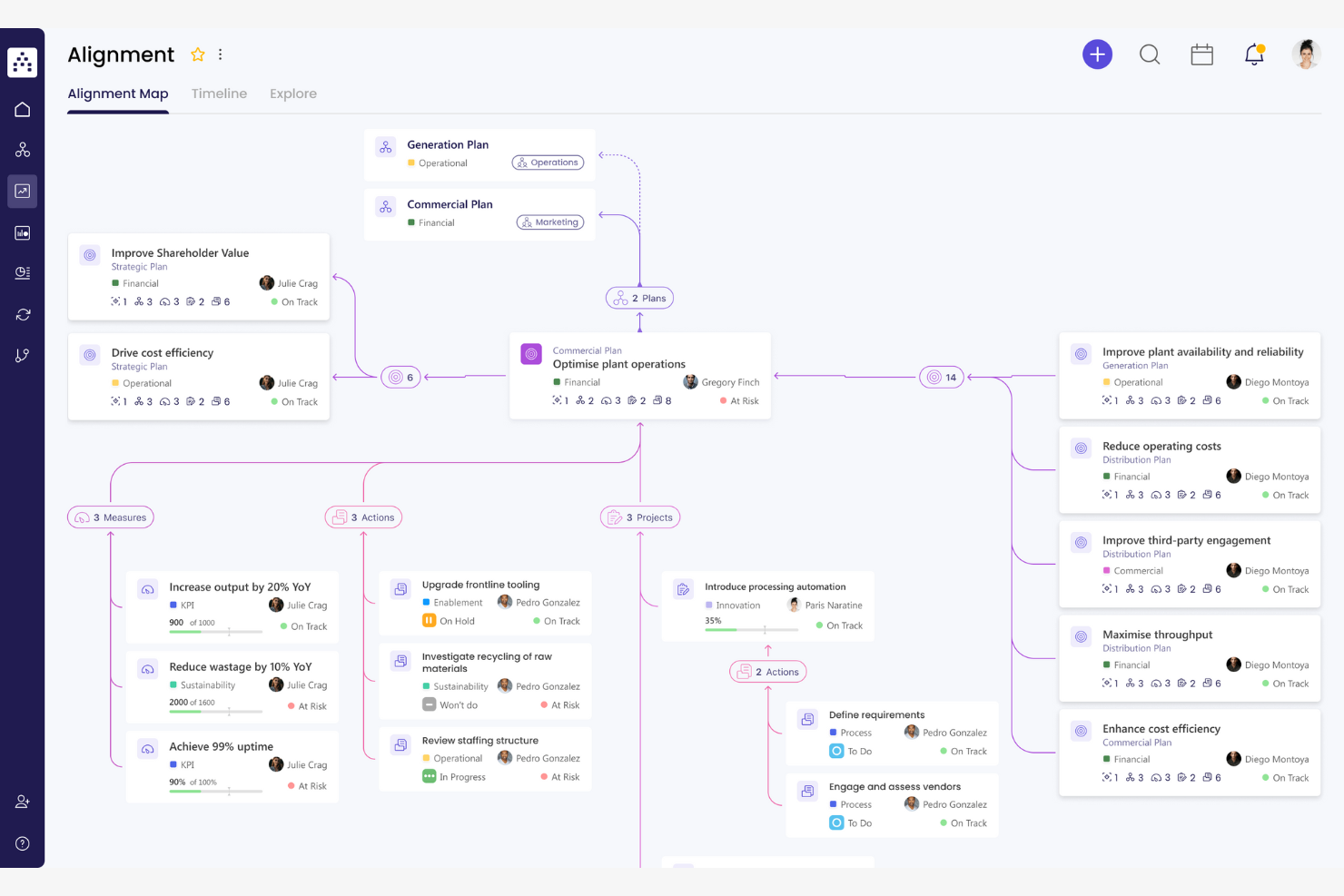
Cascade is a strategic planning software that helps businesses align their team’s efforts with organizational goals. It is designed for managers and teams who want to track performance and meet strategic objectives.
Why I picked Cascade: Cascade focuses on strategic execution, providing tools that align your team’s tasks with broader organizational goals. The strategy planner lets you set and track key objectives and results, and the performance dashboard shows your progress in real time, helping your team stay on track. With Cascade’s goal-setting features, you can ensure everyone is working toward the same targets.
Standout Features and Integrations:
Features include customizable dashboards that display strategic initiatives and their progress, a goal alignment tool that syncs your team’s objectives with company goals, and reporting tools that help you analyze performance metrics and adjust strategies accordingly.
Integrations include Microsoft Teams, Slack, Jira, Asana, Trello, monday.com, Google Workspace, Microsoft Office, Salesforce, HubSpot, and more.
Pros and Cons
Pros:
- Rapid onboarding and support
- Multi-level organizational cascade
- Visual dashboards for execution metrics
Cons:
- Dated UI and occasional glitches
- English-only interface

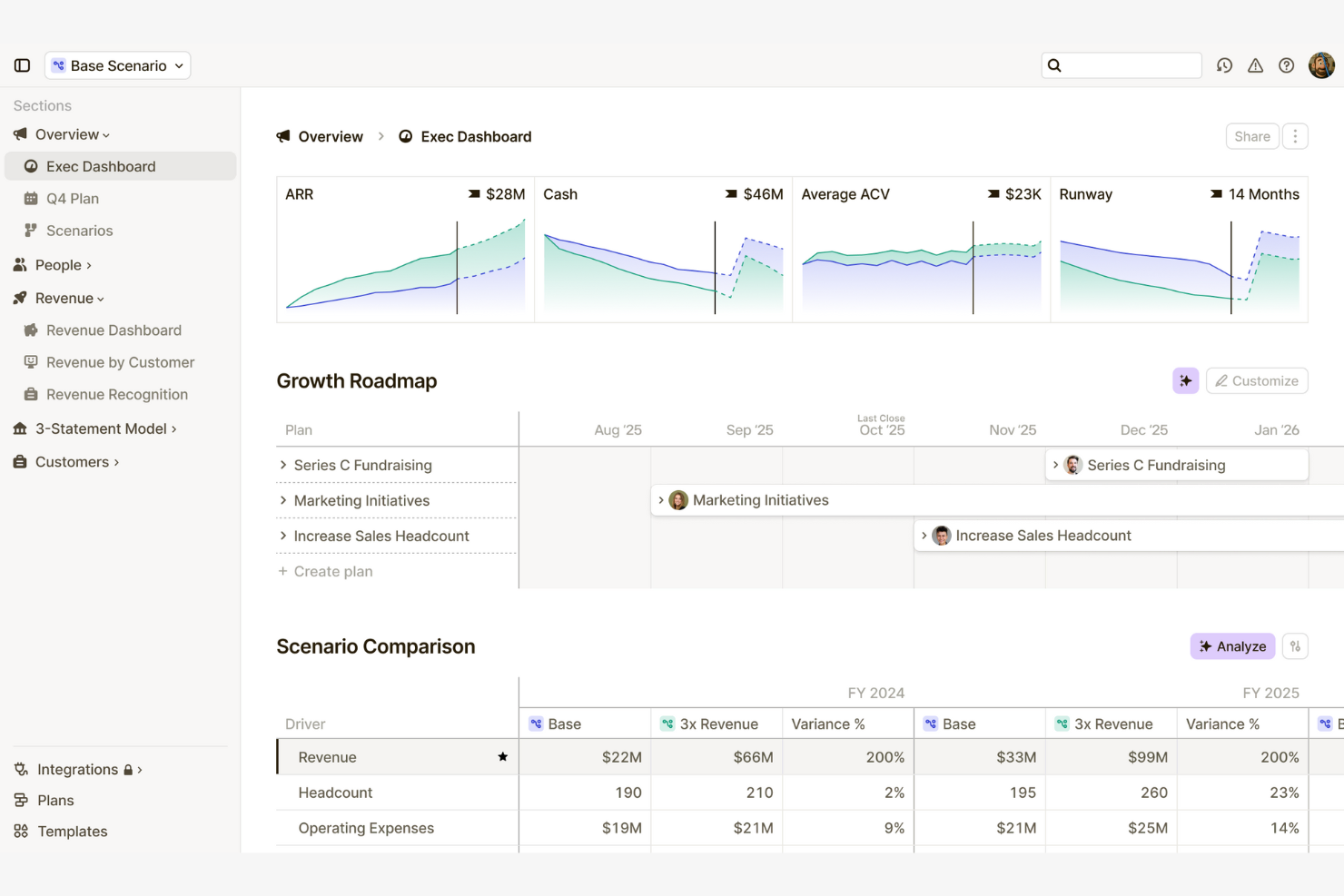
Runway is a financial forecasting software designed for businesses that need to manage budgets and track financial performance. It's particularly useful for accounting teams that require detailed insights into cash flow and financial planning.
Why I picked Runway: Runway’s financial forecasting tools offer real-time insights into cash flow and budget management. The budgeting feature helps you set financial goals and track progress effectively. Also, the intuitive interface ensures that even complex financial data is accessible to all team members.
Standout Features and Integrations:
Features include a drag-and-drop interface for resource management, scenario planning tools, and live reports that let you manipulate data and see the effects of your decisions in real time.
Integrations include Rippling, Xero, HubSpot CRM, NetSuite, QuickBooks, Gusto, Stripe, EastMate AI, ClipZap, and more.
Pros and Cons
Pros:
- Collaborative access controls
- "What-if" analysis and variance insights
- Flexible, spreadsheet-style modeling
Cons:
- Limited scalability for enterprises
- Advanced builds need support

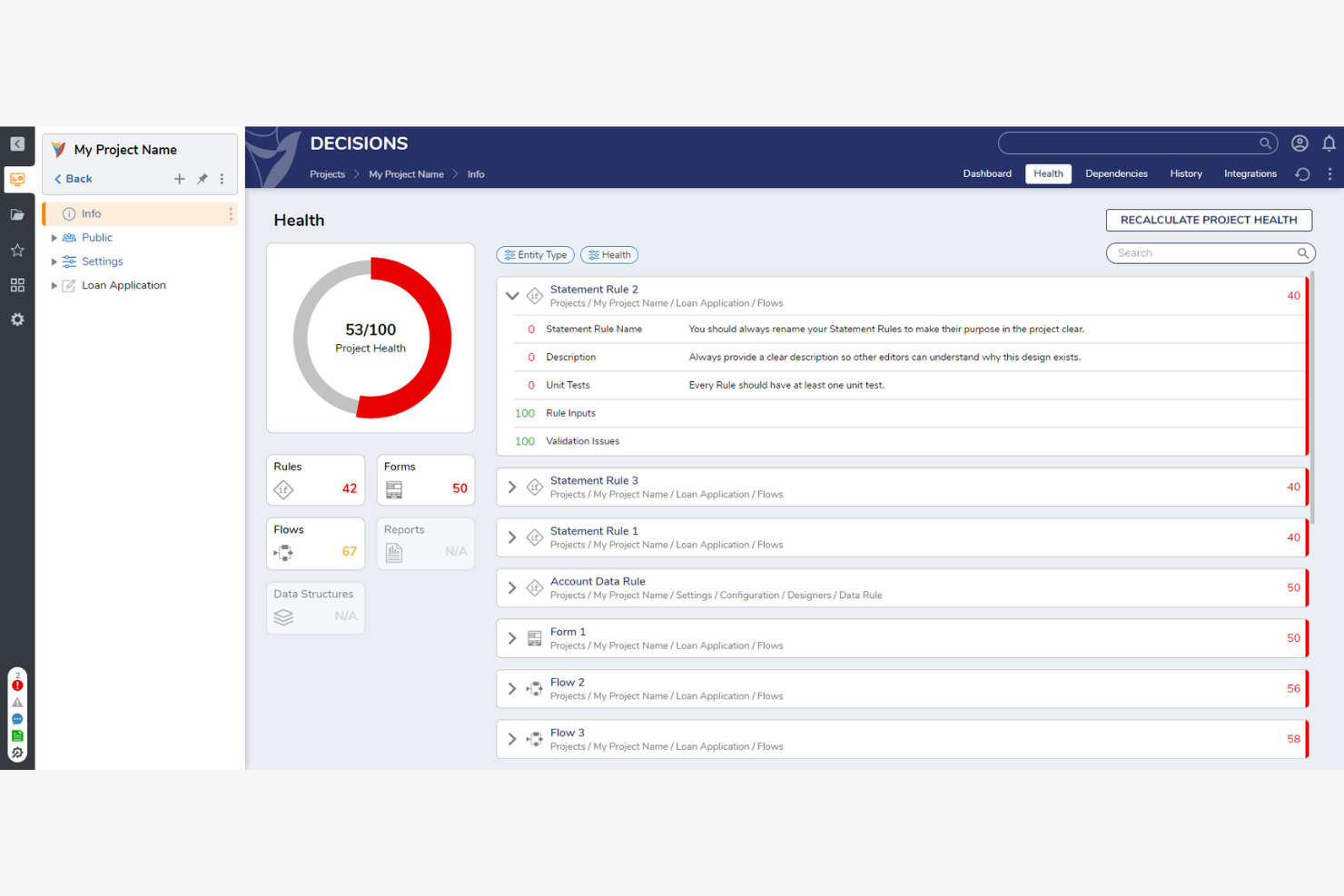
Decisions is a business process management software that helps organizations automate and optimize their workflows. It's designed for teams looking to improve efficiency and maintain control over complex processes.
Why I picked Decisions: Decisions excels in process automation, enabling your team to automate repetitive tasks and simplify operations. The workflow designer’s visual drag-and-drop interface simplifies process creation, while the rules engine lets you define complex business logic without coding. With built-in reporting and analytics, you can monitor your processes and make data-driven decisions.
Standout Features and Integrations:
Features include a custom form designer, a task management system that keeps your team organized and accountable, and an auditing feature that tracks changes for compliance purposes.
Integrations include Microsoft 365, Twitter, Blackbaud Award Management, and more.
Pros and Cons
Pros:
- Scalable automation
- Integrates with Microsoft 365
- Integrated process mining and auditing
Cons:
- Mandatory technical training
- Occasional performance lag

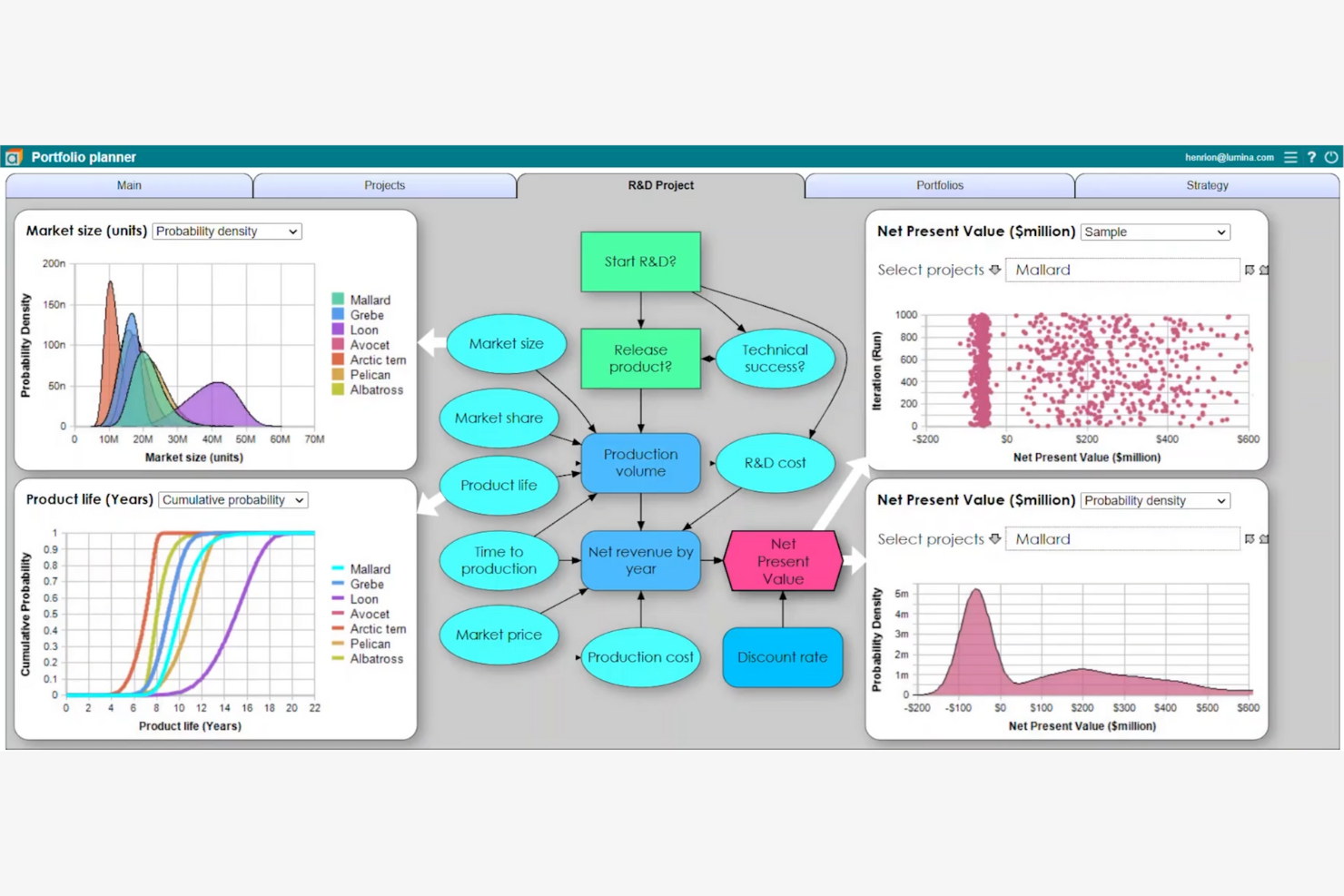
Analytica is a decision-making software designed for business analysts who need to model complex data efficiently. It serves the energy, finance, and healthcare industries, providing tools to visualize problems and make informed decisions.
Why I picked Analytica: Analytica is ideal for complex modeling thanks to its visual tools. These features help you manage models without needing previous coding skills. Its visual approach is clearer and more flexible than traditional spreadsheets, and the software supports various industries, letting you build models quickly and improve productivity.
Standout Features and Integrations:
Features include visual modeling tools for complex data analyses, influence diagrams for a clear overview of decision factors, and Monte Carlo simulations to assess risks and uncertainties effectively.
Integrations are not publicly listed.
Pros and Cons
Pros:
- Built-in Monte Carlo simulation
- Handles multi-dimensional data
- Visual influence diagrams
Cons:
- Needs an annual license
- Limited support for Mac users
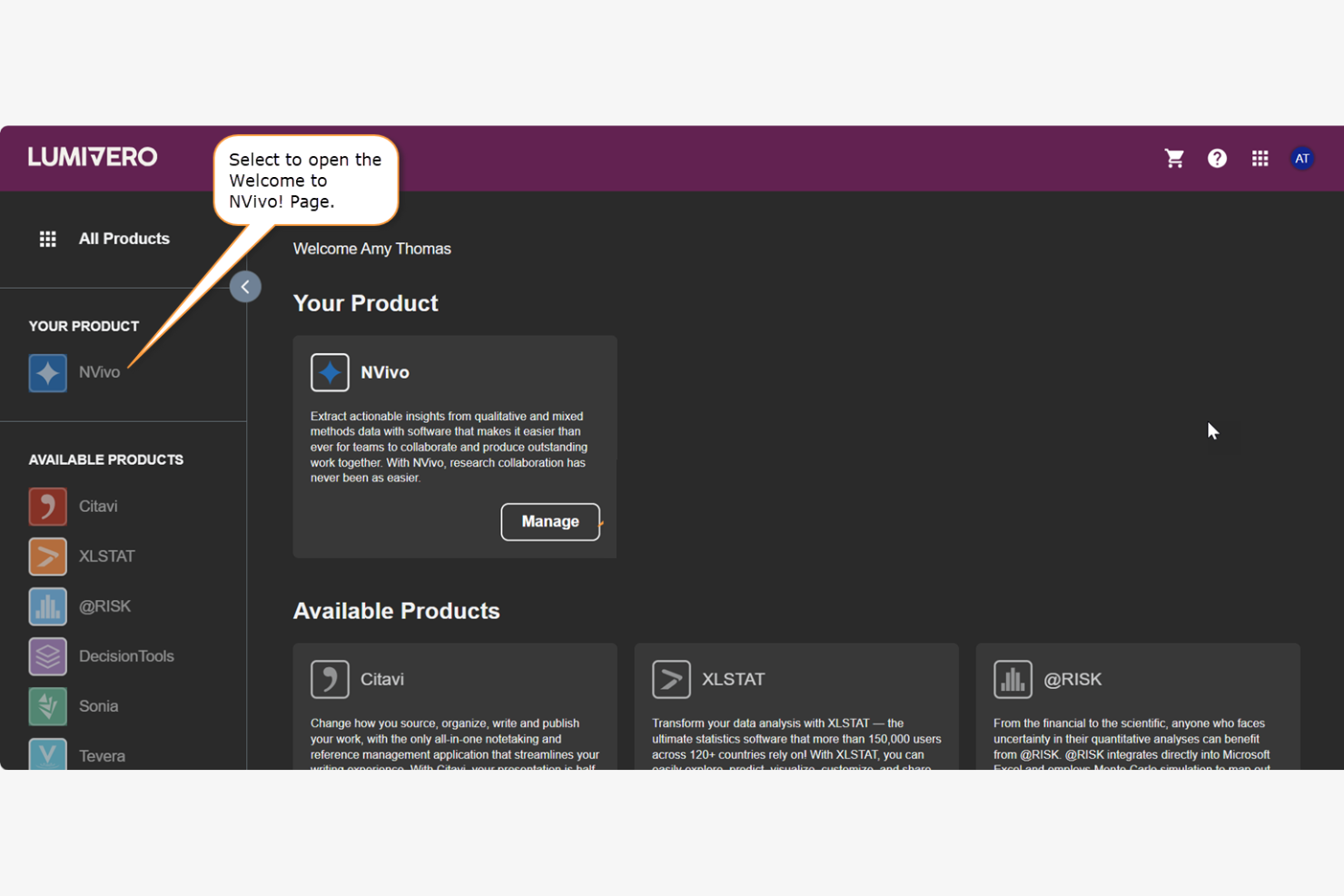
Lumivero is a decision-making software that caters to healthcare, financial services, and higher education. It focuses on data analysis, risk management, and qualitative research to help decision-makers choose the best options.
Why I picked Lumivero: Lumivero is tailored for qualitative analysis, offering tools such as Monte Carlo simulations to help your team assess risks effectively. Also, its user-friendly interface makes complex data accessible to diverse users.
Standout Features and Integrations:
Features include advanced statistical tools to analyze complex datasets, AI-assisted qualitative analysis tools, and decision trees that visualize possible outcomes.
Integrations are not publicly listed.
Pros and Cons
Pros:
- Strong visualization and reporting
- Covers simulation, optimization, and trees
- Excel integration for risk modeling
Cons:
- Requires statistical knowledge
- Excel dependency

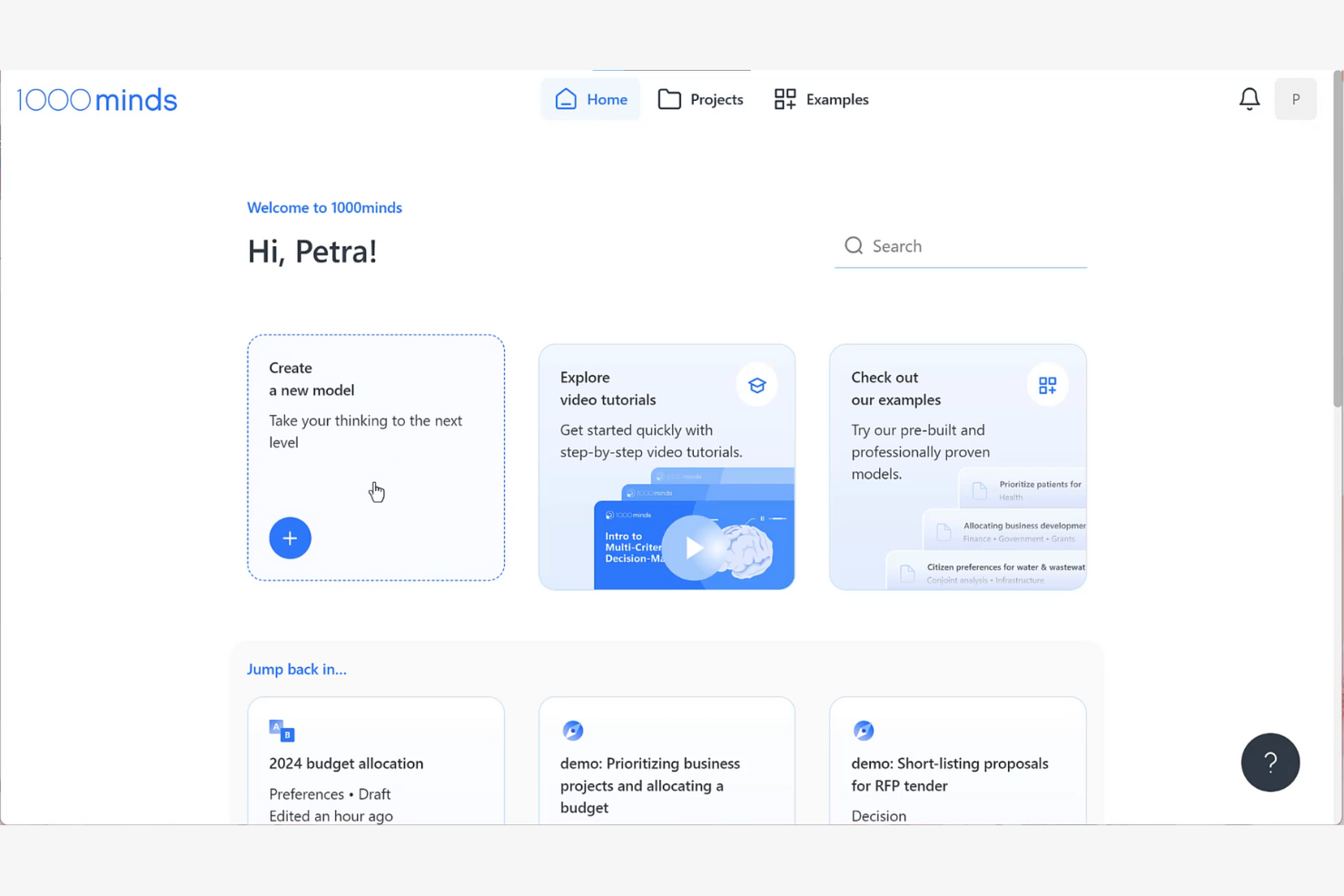
1000minds is a decision-making and conjoint analysis software used by businesses, healthcare organizations, and academic institutions. It analyzes preferences and priorities to help users make informed decisions.
Why I picked 1000minds: With its focus on research and educational applications, this tool is ideal for academia. It uses the PAPRIKA method to streamline complex decision-making. By asking one question at a time, 1000minds ensures high-quality responses and accurate preference modeling. The scalable software also includes a market simulator for conjoint analysis, making it a versatile choice for both academic and organizational needs.
Standout Features and Integrations:
Features include customizable models to tailor the decision-making processes and a user-friendly interface that helps you navigate complex analyses. The software's scalability supports both individual and group decision-making scenarios.
Integrations include Microsoft Excel, Google Sheets, and more.
Pros and Cons
Pros:
- Smooth group decision-making options
- Bias-minimized, quantifiable rankings
- No coding skills required
Cons:
- Complex custom integrations
- Partial profiles for conjoint analyses

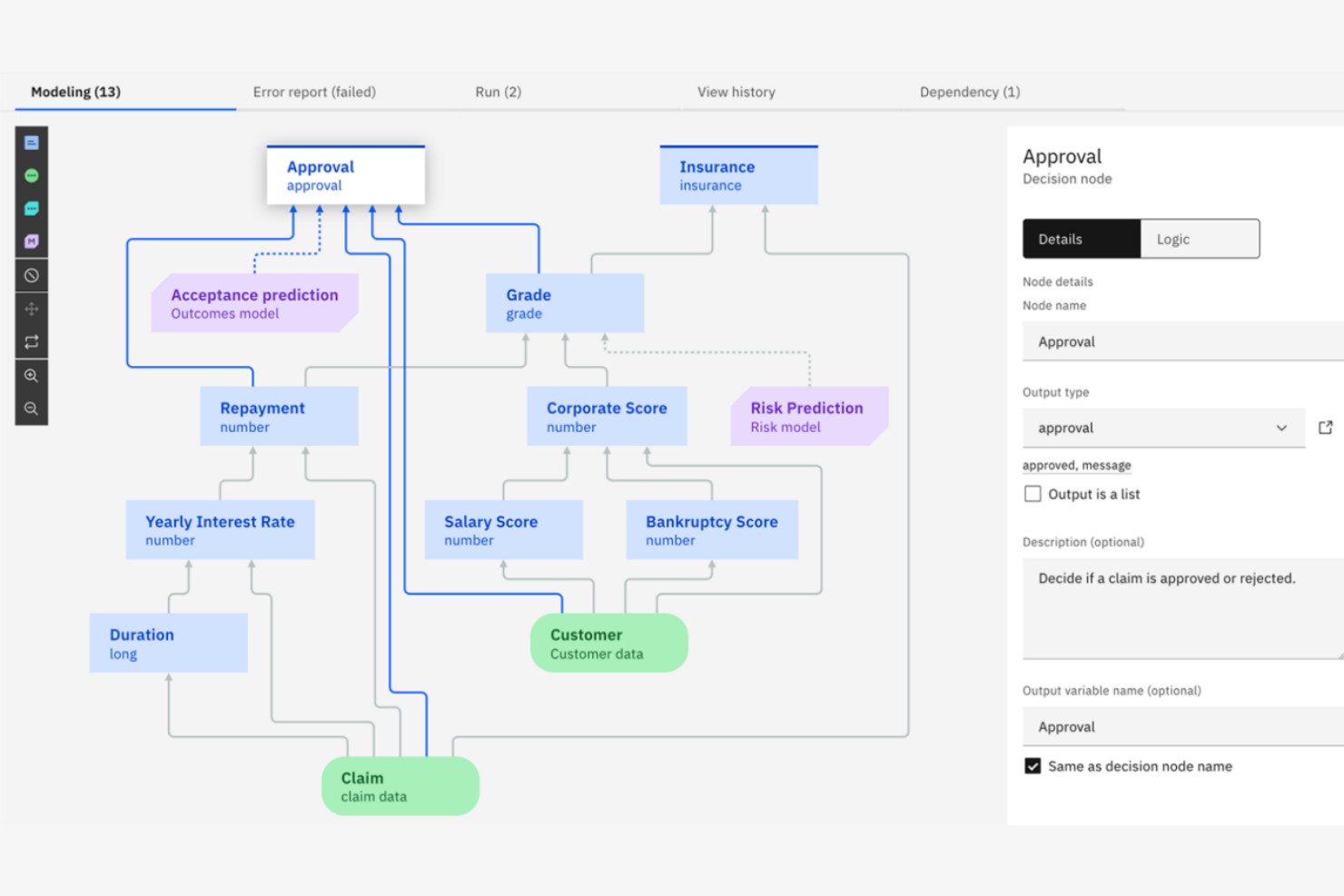
IBM Decision Management uses advanced analytics and AI to automate and manage business decisions for large enterprises. It’s ideal for businesses looking to optimize decision processes and improve operational efficiency.
Why I picked IBM Decision Management: IBM Decision Management automates complex decisions for large enterprises. The platform includes features such as Operational Decision Manager, which lets you model and manage business logic independently. Thanks to its low-code environment, your team can make precise decisions without extensive coding knowledge, and with real-time analytics, you can optimize customer experience and adapt quickly to changing demands.
Standout Features and Integrations:
Features include machine learning and automation for repeatable decisions, a user-friendly environment, and real-time analytics to optimize your customer experience and operational efficiency.
Integrations are not publicly listed.
Pros and Cons
Pros:
- Strong focus on AI integration
- High-volume capacity for large enterprises
- Advanced machine learning logic modeling
Cons:
- High cost for small businesses
- Requires enterprise server architecture

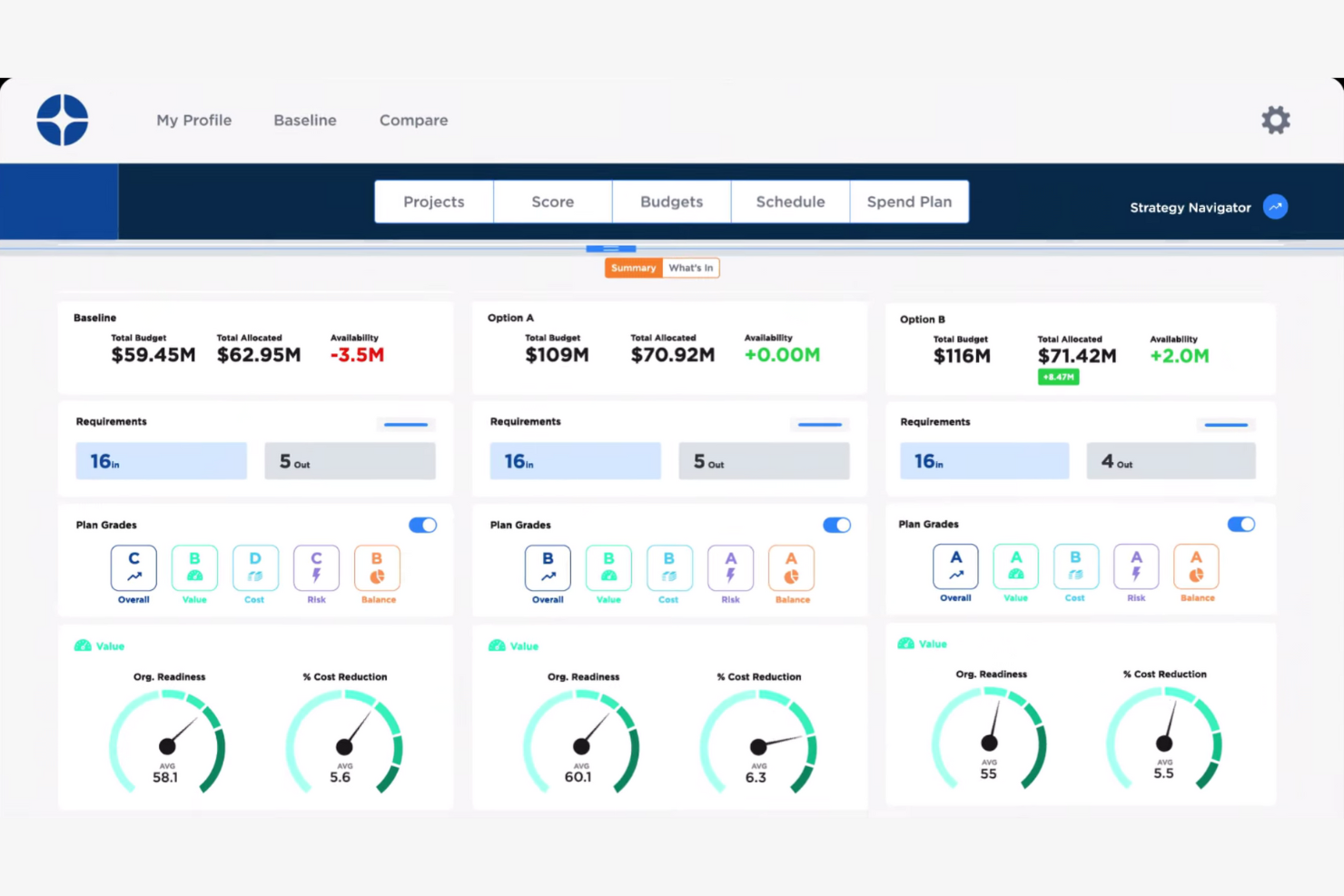
Decision Lens is a decision-making software aimed at organizations that need to align their strategic plans with operational goals. It helps defense, transportation, and public-sector entities prioritize resources and optimize outcomes.
Why I picked Decision Lens: Decision Lens focuses on strategic planning by offering tools that organize projects and allocate resources efficiently. Its features let your team visualize outcomes and make informed decisions. The software also includes a unique prioritization engine that adapts to changing needs and constraints.
Standout Features and Integrations:
Features include resource optimization tools to allocate assets effectively and scenario planning to visualize multiple outcomes. Real-time collaboration ensures your team stays aligned and informed throughout the decision-making process.
Integrations are not publicly listed.
Pros and Cons
Pros:
- End-to-end portfolio tracking
- Resource optimization engine
- Enterprise-grade AHP
Cons:
- Primarily enterprise-focused
- Heavy reliance on structured AHP


Expert Choice is a decision-making software that helps businesses and organizations make informed decisions through pairwise comparison and the Analytic Hierarchy Process (AHP). It's ideal for teams that need to evaluate complex decisions involving multiple criteria.
Why I picked Expert Choice: Expert Choice specializes in pairwise comparison, letting your team break down complex decisions into simpler, more manageable parts. With AHP, the software also helps you prioritize and allocate resources effectively. You can weigh options against each other to ensure you’re picking the right one. Additionally, real-time collaboration features let your team work together efficiently, even on complex tasks.
Standout Features and Integrations:
Features include sensitivity analysis tools to test the impact of changes in criteria weights, detailed reports, and visualization tools to present findings and insights to stakeholders.
Integrations are not publicly listed.
Pros and Cons
Pros:
- Flexible for vendor evaluation
- Real-time team collaboration
- AHP engine with ratio-scale priorities
Cons:
- Subscription-based pricing for teams
- Lacks intuitiveness for scaling

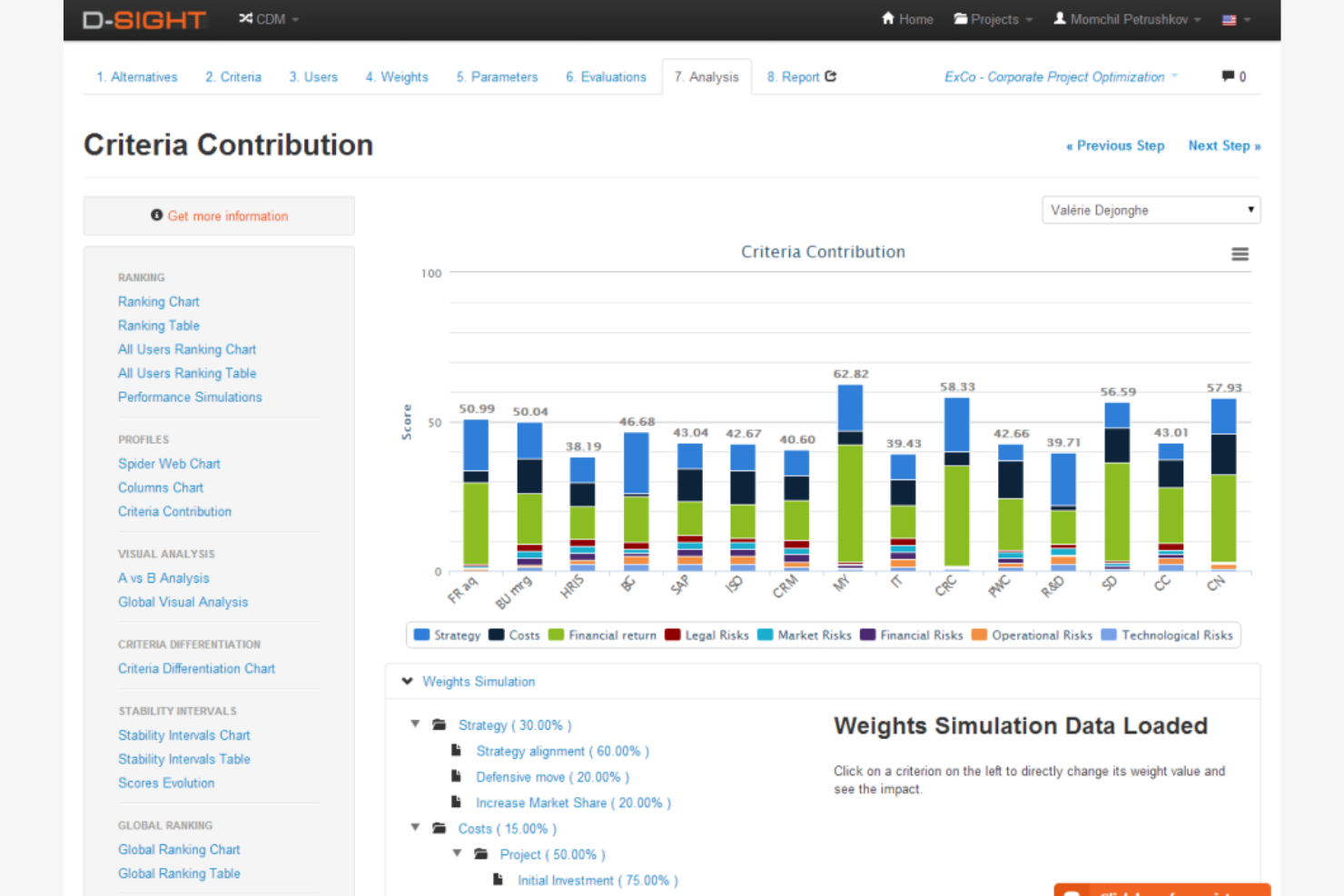
D-Sight is a decision-making software that supports group communication, making it ideal for organizations that need to collaborate on complex decisions. Teams in the energy, transport, and public administration industries use D-Sight CDM to evaluate options and reach consensus.
Why I picked D-Sight: D-Sight excels in group decision support by offering features that facilitate collaboration and consensus-building. The software lets you structure choices clearly to help your team align on priorities. It provides several methods to evaluate options effectively, such as multi-criteria analysis. With its user-friendly interface, team members can readily contribute to decision processes, ensuring that everyone’s voice is heard.
Standout Features and Integrations:
Features include customizable dashboards to view different scenarios, analysis tools to explore different outcomes, and in-depth reporting capabilities to document decisions and share insights with stakeholders.
Integrations are not publicly listed.
Pros and Cons
Pros:
- Supports global collaboration
- Real-time portfolio scenario comparison
- Automated multi-criteria analysis
Cons:
- Manual multi-criteria attribute data entry
- Limited advanced statistical modeling
Other Decision-Making Software
Here are some additional decision-making software options that didn’t make it onto my shortlist, but are still worth checking out:
- DecideIT
For risk analysis
- DMS
For team collaboration
- GroupMap
For collaborative brainstorming
- Loomio
For democratic decision-making
- SharpCloud
For visual storytelling
- TransparentChoice
For project prioritization
- DecisionHub
For small team decisions


How I Evaluate Decision Making Software
I split my evaluation into baseline criteria—like weighted scoring and decision audit trails—and differentiators that separate tools built for PMO-level governance from basic pros/cons tools.
Core Functionality (Table Stakes For This List)
When I'm selecting tools for my list, I rank each one on a scale from 0 (does not offer the functionality) to 5 (excels in this area) for each core functionality listed below. Then, I calculate the tool's total score into a percentage. Each tool needs to achieve a minimum total score of 65% to be considered for inclusion.
- Multi-Criteria Decision Analysis: I look for weighted scoring models that let you evaluate options against custom criteria—like comparing three vendors on cost, risk, and timeline fit in a single matrix.
- Collaborative Decision Workflows: Teams rarely make project decisions solo, so I evaluate whether stakeholders can vote, rank, or comment within the tool rather than over scattered email threads.
- Scenario & Risk Modeling: I check whether a tool lets you model what-if scenarios—for example, comparing the downstream impact of descoping a feature vs. extending a deadline.
- Decision Documentation & Audit Trail: Good governance means knowing who decided what and why. I look for auto-captured rationale, timestamps, and participant records you can pull up months later.
- Prioritization & Ranking Outputs: The output matters as much as the input. I evaluate whether ranked results surface as visual dashboards, matrices, or reports you can share with leadership.
- Project Data & Tool Integration: I check for native connections with tools like Jira, Asana, or Smartsheet so decision inputs pull from live project data instead of stale spreadsheets.
Once I have a list of tools that meet this criteria, I consider what sets each platform apart.
Differentiating Factors (What Sets Vendors Apart)
Here's how I compare and contrast different vendors:
Standout Features
Prebuilt decision templates make a real difference when your PMO runs recurring decisions like go/no-go gates or vendor evaluations—you skip the setup and jump straight into scoring. I also look for portfolio-level roll-ups that aggregate individual project decisions into a single executive view, which matters when leadership wants to see how trade-offs across projects connect to strategic goals. Decision retrospectives are another differentiator I value. Tools that track outcomes against original forecasts help teams refine how they make calls over time.
Beyond Features
Governance and compliance readiness matters when decisions carry audit exposure. I check for SSO/SAML support, role-based access controls, and immutable logs that satisfy SOC 2 or ISO 27001 requirements. Scalability is another factor I evaluate closely—some tools work well for a single project team but fall apart when you need structured decision cadences across a portfolio. I also consider implementation support, especially whether the vendor offers onboarding tailored to PMO adoption rather than generic self-serve docs that leave facilitators to figure out MCDA methods on their own.
How To Choose Decision-Making Software
It’s easy to get bogged down in long feature lists and complex pricing structures. To help you stay focused as you work through your unique software selection process, here’s a checklist of factors to keep in mind:
| Factor | What To Consider |
|---|---|
| Scalability | Can the software grow with your team and project demands? Consider future needs and ensure the tool can handle increased data and user load without performance lag. |
| Integrations | Does it connect with your existing tools? Check for compatibility with your current software stack to avoid disruptions in your workflow. |
| Customizability | Can you tailor it to fit your processes? Look for options that let you adjust settings and workflows to match your team’s unique needs. |
| Ease of use | Is the interface intuitive for all users? A steep learning curve can slow down adoption, so test the user experience with potential team members. |
| Implementation and onboarding | How long will it take to get started? Assess the setup time and support offered during onboarding to ensure a smooth transition. |
| Cost | Does the pricing fit your budget? Compare plans and consider total costs, including any add-ons or hidden fees, to avoid surprises later. |
| Security safeguards | Is your data protected? Verify the tool’s data protection measures and compliance with relevant security standards to safeguard sensitive information. |
What Is Decision-Making Software?
Decision-making software is a tool that helps organizations analyze options and make informed choices. Professionals such as project managers, analysts, and executives use these tools to increase decision efficiency and accuracy. Data visualization, scenario analysis, and collaborative features support improved decision-making processes and align team efforts. Overall, these tools help users make better decisions by providing clear insights and structured evaluation methods.
Features
When selecting decision-making software, keep an eye out for the following key features:
- Data visualization: Transforms complex data into easy-to-understand charts and graphs, helping users interpret information quickly.
- Scenario analysis: Allows users to explore different outcomes by changing variables, aiding in risk assessment and planning.
- Collaborative tools: Enable team members to share insights and work together so everyone's input is considered.
- Customizable dashboards: Let users tailor their dash to focus on relevant metrics and track progress toward goals.
- Real-time data syncing: Ensures that all users can access the most current information.
- Goal alignment: Helps teams align their objectives with organizational goals, promoting coherence in strategy execution.
- Sensitivity analysis: Tests the impact of changes in variables to provide insights into how different factors affect outcomes.
- Integration capabilities: Connects with existing software tools to create a smooth workflow and reduce data silos.
- Security safeguards: Protects sensitive data with encryption and compliance measures.
- User-friendly interface: Simplifies navigation and reduces the learning curve to increase accessibility for users of all skill levels.
Benefits
Implementing decision-making software provides several benefits for your team and your business. Here are a few you can look forward to:
- Improved efficiency: Automates data analysis and decision processes, saving time and reducing manual effort.
- Improved accuracy: Provides precise insights through data visualization and scenario analysis.
- Increased collaboration: Facilitates teamwork with collaborative tools so all relevant perspectives can be considered.
- Better risk management: Uses sensitivity and scenario analysis to anticipate potential challenges and prepare effective responses.
- Goal alignment: Ensures that team efforts are in sync with organizational objectives, promoting focused and coherent strategies.
- Real-time insights: Keeps everyone updated with real-time data syncing, reducing errors and improving decision quality.
- Customizable solutions: Offers customizable dashboards and settings to meet specific user needs.
Costs and Pricing
Selecting decision-making software requires an understanding of the various pricing models and plans available. Costs vary based on features, number of users, deployment type (cloud vs. on-premise), AI capabilities, integrations, and support levels. The table below summarizes common plans, their average prices, and typical features included in decision-making software solutions:
Plan Comparison Table for Decision-Making Software
| Plan Type | Average Price | Common Features |
|---|---|---|
| Free Plan | $0 | Basic decision trees, limited collaboration tools, simple reporting, and restricted user access. |
| Personal Plan | $75–$150/user/month | Advanced analytics, scenario planning, AI-assisted insights, workflow automation, customizable dashboards, and priority support. |
| Business Plan | $200–$500/month | Cross-department collaboration, advanced data integrations, risk analysis tools, governance controls, and role-based permissions. |
| Enterprise Plan | $1,000–$5,000+/month | Full-feature access, predictive analytics, enterprise-grade security, API access, and SLA-backed support. |
Decision-Making Software FAQs
Here are some answers to common questions about decision-making software:
Can decision-making software help digital project managers simplify project workflows?
Yes, decision-making software can help digital project managers simplify workflows. These tools analyze project data, identify bottlenecks, and suggest actionable next steps. This lets you make faster decisions, reduce manual tasks, and keep your team aligned on project priorities.
Can decision-making software integrate with other tools we use?
Yes, most decision-making software can integrate with popular tools such as project management platforms and data visualization software. Check each software to ensure it connects with your existing tools. This will simplify your workflow and reduce manual data entry.
Is decision-making software secure?
Yes, most decision-making software comes with security measures to protect your data. Look for software that offers encryption, compliance with industry standards, and regular security updates. It’s essential to choose a provider that prioritizes data security to keep your information safe.
Does decision-making software support remote or distributed teams?
Yes, many decision-making tools are cloud-based and designed for remote collaboration. They let team members share inputs, access dashboards, and track decisions from anywhere, making them great for distributed or hybrid teams.
What kind of support is available for decision-making software?
Most providers offer various support options, including email, chat, and phone support. Some even provide dedicated account managers for personalized assistance. Check the support channels available and consider software that offers extensive resources, such as knowledge bases, tutorials, and community forums, to help you get the most out of the tool.
What’s Next:
If you're in the process of researching decision-making software, connect with a SoftwareSelect advisor for free recommendations.
You fill out a form and have a quick chat where they get into the specifics of your needs. Then you'll get a shortlist of software to review. They'll even support you through the entire buying process, including price negotiations.