

10 Best AI Electronic Signature Software Reviewed in 2026

Best AI Electronic Signature Software Shortlist


Signatures might sound simple — until you’re chasing them across contracts, emails, and reminders. AI electronic signature software tackles that pain head-on. It doesn’t just digitize your signature; it uses automation and intelligence to detect missing fields, guide signers, and cut down the endless back-and-forth.
As someone who independently reviews software, I’ve seen how AI is redefining digital signing — making it faster, safer, and smarter for teams of all sizes.
In this article, you’ll find my top picks for AI electronic signature software in 2026, along with what makes each one stand out so you can choose the right fit for your workflow.
Why Trust Our Software Recommendations
Our team has been testing and reviewing software since 2012. As project managers ourselves, we know how difficult—and important—it is to choose the right software.
For this guide, we evaluated tools using hands-on testing and independent research, scoring tools using our selection criteria. We also draw on insights from industry thought leaders and practicing project management experts.
Our reviews reflect our human editorial judgment, not a sales pitch.
AI Electronic Signature Software Comparison Table
This comparison table summarizes pricing details for my top AI electronic signature software selections:
| Tool | Best For | Trial Info | Price | ||
|---|---|---|---|---|---|
| 1 | Best for small businesses | 14-day free trial | From $10/user/month (billed annually) | Website | |
| 2 | Best for legal teams | Free demo available | Pricing upon request | Website | |
| 3 | Best for global compliance | Free plan available | From $10/month (billed annually) | Website | |
| 4 | Best for secure cloud storage | Free plan available | Pricing upon request | Website | |
| 5 | Best for contract lifecycle managemen | Free demo available | Pricing upon request | Website | |
| 6 | Best for mobile PDF document signing | Free plan available | From $4.99/month | Website | |
| 7 | Best for PDF editing | Free plan available | From $9/user/month (billed annually) | Website | |
| 8 | Best for contract simplicity | Free demo available | From $3/contract | Website | |
| 9 | Best for team collaboratio | 21-day free trial | From $200/user/month | Website | |
| 10 | Best with no-code drag-and-drop workflow builder | Free plan available | From $19.50/month (billed annually) | Website |
Best AI Electronic Signature Software Review
Below are my detailed summaries of the best AI electronic signature software that made it onto my shortlist. My reviews offer a detailed look at the key features, pros & cons, integrations, and ideal use cases of each tool to help you find the best one for you.

Signeasy
Best for small businesses

Signeasy is an e-signature platform tailored for small businesses seeking simplicity and efficiency in document handling. It offers reusable templates and facilitates quick signing and sending of documents, making it ideal for teams that need straightforward e-signature software without unnecessary complexity.
Why I picked Signeasy: Signeasy is designed with small businesses in mind, focusing on ease of use and rapid deployment for signature requests. The intuitive interface requires minimal training, allowing your team to get started quickly.
The platform’s features, like document templates and offline signing, make it versatile for various needs. It’s perfect for businesses that need a straightforward, no-fuss electronic signature tool for faster signed agreements.
Standout features & integrations:
Features include an intuitive drag-and-drop interface for easy document setup. The offline signing feature allows you to collect signatures without an internet connection. Additionally, the app supports multiple file formats to accommodate different document types.
Integrations include Google Workspace, Microsoft 365, Dropbox, Box, Evernote, Slack, Zoho CRM, Salesforce, HubSpot, and OneDrive.
Pros and Cons
Pros:
- Accommodates various file formats
- Versatile document templates
- Quick setup and deployment
Cons:
- Customization options are minimal
- No bulk sending options

Juro
Best for legal teams

Juro is a contract management platform designed for legal teams seeking efficiency in drafting, managing, and executing contracts. It caters to businesses that require a streamlined approach to contract workflows and collaboration.
Why I picked Juro: Juro is tailored to meet the needs of legal teams with its intuitive contract editor and automation capabilities. Its browser-native platform allows for easy access and editing from anywhere.
The software’s collaborative features also enable multiple stakeholders to work on documents simultaneously, reducing back-and-forth emails. It’s an excellent choice for legal teams aiming to enhance productivity and reduce contract turnaround times.
Standout features & integrations:
Features include a real-time editor that lets your team make changes instantly. The automated approval workflows ensure contracts move quickly through the necessary stages. Additionally, the contract analytics provide insights into contract performance and bottlenecks.
Integrations include Salesforce, Slack, Google Drive, Zapier, HubSpot, Microsoft Teams, Dropbox, Greenhouse, Okta, and Workday.
Pros and Cons
Pros:
- Browser-native for easy access
- Automated approval workflows
- Intuitive contract editor
Cons:
- It can be complex initially for new users
- Requires internet for full functionality
Docusign
Best for global compliance

Docusign is an electronic signature tool widely used by businesses of all sizes to facilitate secure and efficient document signing. It’s particularly favored by industries requiring strict compliance with global regulations.
Why I picked Docusign: Docusign excels in ensuring compliance with a variety of international standards, making it ideal for businesses operating globally. It supports a range of document types and provides a detailed audit trail for each transaction.
The tool’s security features include advanced encryption and multi-factor authentication. These features collectively cater to organizations needing to meet stringent legal and regulatory requirements.
Standout features & integrations:
Features include custom workflows that allow your team to automate document signing processes. The in-person signing feature is great for face-to-face interactions, and the mobile app sends you live notifications while letting you manage documents on the go.
Integrations include Salesforce, Microsoft 365, Google Workspace, Dropbox, SAP, Oracle, Box, Evernote, Workday, and NetSuite.
Pros and Cons
Pros:
- Multi-factor authentication
- Advanced encryption security
- Detailed audit trails
Cons:
- Customer support can be slow
- Occasional mobile app issues

Box
Best for secure cloud storage

Box AI (with Box Sign) brings intelligence to every stage of your content lifecycle — from document creation and signing to secure storage and workflow automation. It’s built for teams that want to handle e-signatures within a broader, AI-powered content management ecosystem that prioritizes security, compliance, and insight.
Why I picked Box AI: Box AI goes beyond standard e-signature capabilities by combining Box Sign with powerful AI-driven features that extract insights, automate document routing, and secure every interaction. Instead of switching between apps, you can create, sign, analyze, and store contracts directly in Box — all within a single governed platform.
It’s ideal for organizations that need more than just signatures. Box AI helps unlock the value hidden in your documents by summarizing content, identifying missing fields, and maintaining airtight security standards. Whether it’s automating approvals or detecting anomalies in signer behavior, it’s designed to make every step faster, safer, and smarter.
Standout features & integrations:
Features include AI-powered data extraction that pulls structured information from contracts and forms, helping users quickly find key details. Intelligent signature workflows automatically detect where signatures and initials are needed, flag missing fields, and route documents to the right people. Advanced access controls and threat detection features protect sensitive information, while detailed audit trails maintain accountability and compliance.
Integrations include Microsoft 365, Google Workspace, Salesforce, Slack, Okta, Zoom, Docusign, Adobe Acrobat, Apple iWork, and IBM.
Pros and Cons
Pros:
- Integrated with the Box cloud platform
- Advanced access controls
- Secure document storage
Cons:
- Some advanced features need extra setup
- Limited offline capabilities

Ironclad
Best for contract lifecycle managemen

Ironclad is a contract lifecycle management tool designed for legal teams and businesses that handle complex agreements. It helps automate and manage the entire contract process, from creation to execution and beyond.
Why I picked Ironclad: Ironclad excels in managing the full lifecycle of contracts, making it ideal for organizations with complex legal needs. Its automated contract workflows and customizable templates simplify contract management.
The platform also offers real-time collaboration, allowing multiple stakeholders to work on contracts simultaneously. It’s especially beneficial for teams that need a comprehensive solution to streamline contract processes.
Standout features & integrations:
Features include an intuitive dashboard that provides a clear overview of contract statuses. The analytics feature offers insights into contract performance and trends. Additionally, the platform supports electronic signatures, making contract execution quick and efficient.
Integrations include Salesforce, Docusign, Adobe Sign, Microsoft 365, Google Workspace, Slack, Box, Dropbox, SAP, and Oracle.
Pros and Cons
Pros:
- Customizable contract templates
- Real-time collaboration capabilities
- Detailed contract lifecycle management
Cons:
- Customer support can be slow
- Requires training for full utilization


Sign AI is a mobile-based digital signature app built for users who handle documents on the go. It focuses on providing a fast way for people to sign, edit, and save PDF files using their mobile devices.
Why I picked Sign AI: Sign AI is specifically designed for mobile signing and editing of PDFs, making it a solid choice for individuals who need to mark up or sign documents away from their desks. You can import documents straight from your phone, apply a signature with one tap, and share the file immediately.
It also allows you to write text directly on the PDF, highlight sections, or draw using a digital pen. Everything runs within the app, eliminating the need for additional tools. That’s what makes it ideal for quick edits and approvals on mobile.
Standout features & integrations:
Features include tools to crop, rotate, and reorder pages within PDF documents. You can use different pen styles and colors to draw or annotate. The app also includes basic file organization features, allowing you to manage documents within folders.
Integrations include Google Drive, Dropbox, OneDrive, Box, Gmail, and WhatsApp.
Pros and Cons
Pros:
- Built-in document organizer
- Easy pen tools for markup
- Works offline without issue
Cons:
- No desktop version available
- Limited security settings


Lumin PDF is a document management tool designed for individuals and businesses that require efficient editing and management of PDFs. It offers a range of tools for annotating, editing, and sharing PDF documents, making it useful for teams that handle a large number of PDF files.
Why I picked Lumin PDF: Lumin PDF provides extensive PDF editing capabilities, which are helpful for teams needing to modify and collaborate on documents. The tool enables real-time collaboration, allowing your team to work together from different locations.
You can annotate documents directly within the platform, making it easy to highlight important information. It’s particularly beneficial for teams that frequently edit and share PDF files.
Standout features & integrations:
Features include a user-friendly interface that simplifies the editing process. The real-time collaboration allows your team to work on documents simultaneously. Additionally, the platform offers tools for annotating and highlighting text, making it easier to convey important points in documents.
Integrations include Google Drive, Dropbox, OneDrive, Box, Evernote, Slack, Microsoft 365, Salesforce, HubSpot, and Asana.
Pros and Cons
Pros:
- Supports multiple file formats
- Easy document sharing
- Extensive annotation tools
Cons:
- Occasional performance issues with large files
- Some features need a premium subscription

Best for contract simplicity

ContractCrab is a contract management tool designed for small to medium-sized businesses that need a straightforward approach to handling contracts. It focuses on simplifying the process of creating, managing, and executing contracts without unnecessary complexity.
Why I picked ContractCrab: ContractCrab is built for businesses that want to manage contracts with ease and efficiency. It offers a simple interface that requires minimal training, allowing your team to get started quickly.
The software’s customizable templates and basic automation help streamline contract workflows. It’s a great fit for companies looking for a no-fuss contract management solution.
Standout features & integrations:
Features include user-friendly document templates that make contract creation quick and easy. The automated reminders help your team stay on top of deadlines. Additionally, the platform supports electronic signatures, which simplifies the execution process.
Integrations include Salesforce, Google Workspace, Microsoft 365, Dropbox, Box, Slack, HubSpot, QuickBooks, Xero, and Trello.
Pros and Cons
Pros:
- Supports electronic signatures
- Automated reminders for deadlines
- Customizable contract templates
Cons:
- Customization options are minimal
- No bulk sending options


Aline is a contract management software designed for teams in legal, procurement, finance, and sales to efficiently manage contracts. It offers tools for drafting, negotiating, and signing contracts, making it ideal for collaborative environments.
Why I picked Aline: Aline is tailored for teams needing collaboration during the contract lifecycle. Its AI-driven workflows and electronic signatures enhance efficiency, while robust collaboration tools ensure everyone stays informed.
The tool’s ability to integrate with multiple platforms makes it versatile for different team needs. It’s ideal for teams seeking to enhance contract management through effective collaboration.
Standout features & integrations:
Features include AI-driven playbooks that guide you through contract creation. The redlining tool allows your team to make and track changes easily. Additionally, the AI Repository centralizes all contract data for quick access and analysis.
Integrations include Salesforce, HubSpot, Google Drive, Dropbox, Microsoft 365, Slack, Box, Adobe Sign, Docusign, and SAP.
Pros and Cons
Pros:
- Unlimited electronic signatures
- Centralized contract repository
- AI-driven contract workflows
Cons:
- Some features need customization
- Slight learning curve for new users

Best with no-code drag-and-drop workflow builder
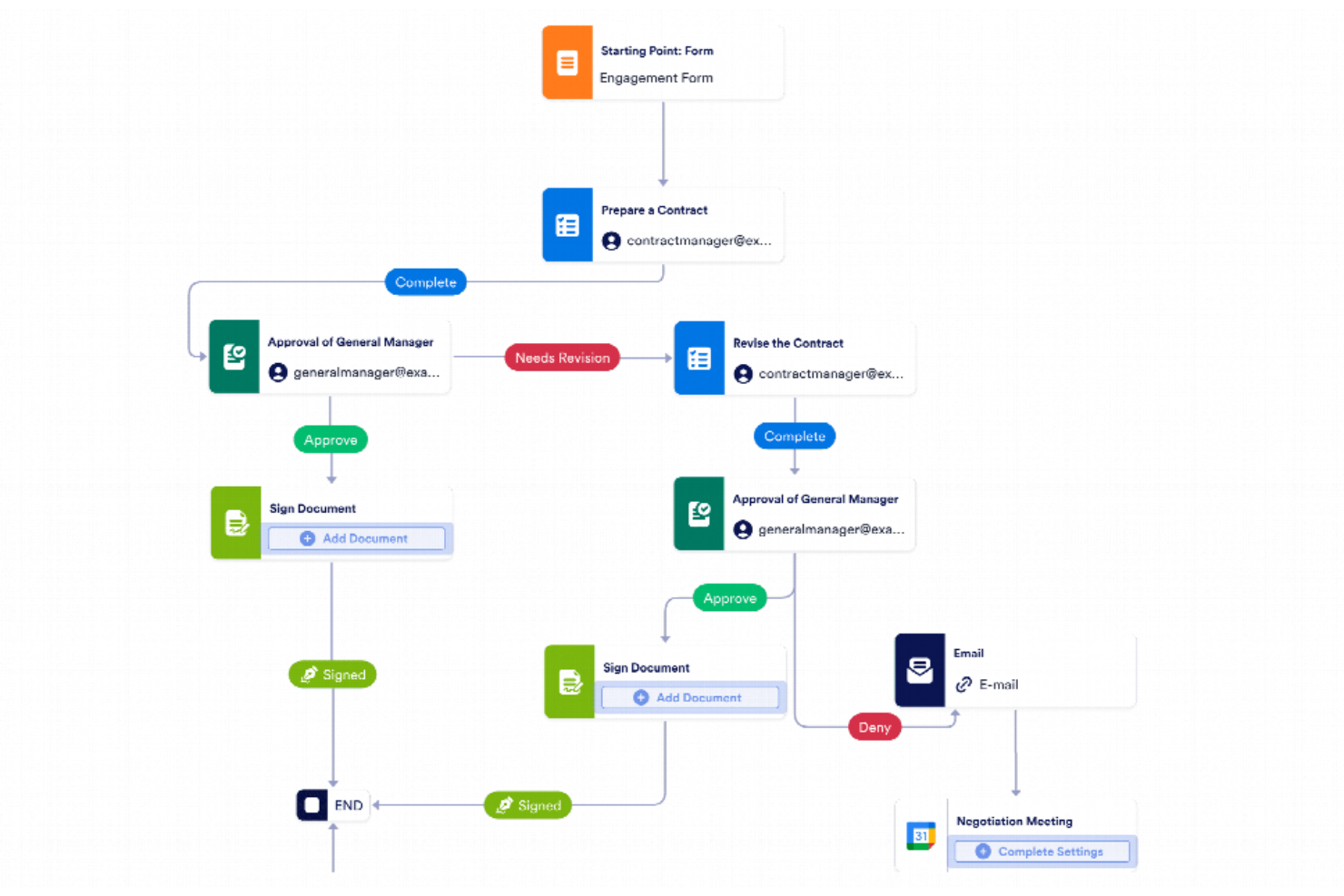
Jotform Workflows gives teams in any industry a way to automate document approvals and collect electronic signatures as part of custom, no-code workflows.
Who Is Jotform Workflows Best For?
Small to midsize businesses and teams that need to automate document approvals and collect signatures without coding.
Why I Picked Jotform Workflows
I picked Jotform Workflows as one of the best because I can build signature collection and approval flows visually using its no-code drag-and-drop builder. My team is able to map out multi-step document processes, assign signers, and automate reminders without writing a single line of code. I like that we can quickly adapt workflows as requirements change, making it easy to keep up with shifting project needs.
Jotform Workflows Key Features
- E-signature fields: Add legally binding signature fields to any document or form step.
- Conditional logic: Set up rules to route documents or trigger actions based on responses.
- Automated notifications: Send email alerts to signers and approvers at each workflow stage.
- Audit trail: Track every action and signature with a detailed activity log.
Jotform Workflows Integrations
Integrations include Google Drive, Dropbox, Slack, Microsoft Teams, Airtable, Square, PayPal, Stripe, Authorize.Net, and OneDrive.
Pros and Cons
Pros:
- Automated reminders for pending signature requests
- Conditional logic for multi-step approvals
- Native e-signature field for document signing
Cons:
- Bulk sending of signature requests not supported
- Lacks built-in identity verification for signers
New Product Updates from Jotform Workflows
Jotform Workflows Adds Wait Element for Timed Automation
Jotform Workflows introduces a Wait element for pausing and resuming workflows based on dates and times. This helps teams automate time-sensitive actions without manual follow-ups. For more information, visit Jotform’s official site.
 .
.


How I Evaluate AI Electronic Signature Software
Every tool here needs to deliver real AI value—I look for AI that saves PMs time, like auto-detecting fields in a 40-page SOW or flagging risky clauses before routing to stakeholders. I split my evaluation into core functionality a tool must have to make the list and differentiating factors that separate the strongest options.
Core Functionality (Table Stakes For This List)
When I'm selecting tools for my list, I rank each one on a scale from 0 (does not offer the functionality) to 5 (excels in this area) for each core functionality listed below. Then, I calculate the tool's total score into a percentage. Each tool needs to achieve a minimum total score of 65% to be considered for inclusion.
- Electronic Signature Execution: I check for legally binding e-signatures with signer authentication—think multi-factor ID verification before a contractor signs a change order.
- AI Field Detection: Smart field placement matters. I look for AI that scans a 30-page SOW and accurately tags signature, date, and initial fields on its own.
- AI Contract Intelligence: I evaluate whether the AI can extract key clauses, flag risk areas, or summarize obligations—useful when reviewing vendor agreements mid-project.
- Automated Approval Workflows: Multi-party routing with conditional logic is what I look for, like sequencing sign-offs from a project sponsor before reaching legal.
- PM Tool Integrations: The tool should connect with platforms like Asana, Jira, or Smartsheet so signing requests trigger directly from project milestones.
- Audit Trail & Compliance: Full activity logs and compliance with e-signature laws like ESIGN, UETA, and eIDAS are what I evaluate to confirm global team readiness.
Once I have a list of tools that meet this criteria, I consider what sets each platform apart.
Differentiating Factors (What Sets Vendors Apart)
Here's how I compare and contrast different vendors:
Standout Features
AI-powered smart reminders stand out because they predict the right time to nudge a signer—helpful when a delayed approval is blocking a sprint. I also look for AI template generation that learns from repeated documents like SOWs or NDAs and builds reusable templates automatically. An AI analytics dashboard adds real value too, giving PMs visibility into signing bottlenecks and average turnaround times so they can forecast approval delays before they ripple into the schedule.
Beyond Features
Pricing and scalability matter a lot here—I check whether AI features are bundled into standard plans or locked behind premium tiers, since project teams often scale up with external contractors and consultants. Vendor transparency around AI is another factor I evaluate closely, especially whether documents are used to train models. Implementation speed also weighs in; a tool that takes weeks to configure across your PM stack delays the value you're trying to capture in the first place.
How to Choose AI Electronic Signature Software
It’s easy to get bogged down in long feature lists and complex pricing structures. To help you stay focused as you work through your unique software selection process, here’s a checklist of factors to keep in mind:
| Factor | What to Consider |
|---|---|
| Scalability | Can the software grow with your business? Consider whether it can handle increased document volume and additional users without any issues. |
| Integrations | Does it connect with tools you already use? Check for native integrations with your CRM, cloud storage, and other essential platforms. |
| Customizability | Can you tailor the solution to fit your workflows? Look for options to customize templates, workflows, and user permissions. |
| Ease of use | Is the interface intuitive? Ensure your team can use it without extensive training or support, saving time and reducing frustration. |
| Implementation and onboarding | How quickly can you get started? Consider the availability of training resources, support during setup, and the learning curve for new users. |
| Cost | What are the total costs beyond the subscription? Evaluate pricing models, including any extra fees for premium features or additional users. |
| Security safeguards | How does it protect your data? Look for encryption, compliance with data protection regulations, and secure access controls. |
| Compliance requirements | Does it meet industry-specific regulations? Ensure it supports compliance with legal standards relevant to your sector, like HIPAA or GDPR. |
What Is AI Electronic Signature Software?
AI electronic signature software is a tool that enables the digital signing of documents using artificial intelligence to enhance efficiency and security. Professionals like legal teams, HR departments, and salespeople use these tools to speed up document processes and reduce paperwork.
At its core, AI signature software is the next evolution of electronic signature tools like Docusign or Adobe Sign. Traditionally, eSignature tools just help you digitally place a signature. But now, with AI baked in, they go beyond simple signing — they can:
- Automatically detect where signatures or initials are needed.
- Flag missing fields or incomplete documents.
- Suggest the right signers or routing order.
- Verify signer identities or anomalies for security.
- Generate signing insights, like how long someone spent reviewing a document.
So it’s not just about signing anymore — it’s about removing the friction in the entire document workflow.
Features
When selecting AI electronic signature software, look for features that not only simplify signing but also eliminate common workflow bottlenecks:
- Automated workflows: AI helps reduce manual back-and-forth by automating routine approvals, identifying bottlenecks, and ensuring documents move smoothly through each stage — without endless email nudges.
- Smart document detection: Forget hunting for signature spots. AI can automatically recognize where initials, dates, or fields belong, flagging any missing information before docs are sent.
- Real-time tracking: Get instant visibility into document status (when it’s opened, viewed, or signed) and receive intelligent reminders or escalations if someone’s taking too long to respond.
- Secure authentication: Beyond simple email verification, AI-driven tools can detect anomalies, verify identities, and enhance security through behavioral analysis and multi-factor authentication.
- Customizable and adaptive templates: Save time with templates that not only standardize your documents but also adapt based on previous signing patterns or frequently used fields.
- Audit trails and compliance: Maintain a detailed, AI-generated record of document activity, from who signed to when and where, ensuring transparency for audits, legal reviews, and compliance reporting.
- Integrations and data sync: Connects with CRMs, project management tools, or cloud storage to create a single source of truth. AI can help match contacts, route approvals, and auto-fill data fields to reduce duplication.
- Collaborative editing: Enable teams to edit, comment, and finalize documents in real time. AI can flag conflicting edits or out-of-date versions, keeping collaboration clean and efficient.
- Mobile accessibility: Review, sign, and manage contracts on any device. Many AI tools optimize layouts or field visibility automatically for smaller screens.
- AI-driven insights: Turn signature data into action. Analyze turnaround times, identify recurring bottlenecks, and uncover ways to improve your signing and approval processes.
- In-person and hybrid signing: Support both remote and face-to-face signings with the same level of verification and audit tracking, giving flexibility to teams that operate in mixed environments.
Benefits
Implementing AI electronic signature software provides several benefits for your team and your business. Here are a few you can look forward to:
- Time savings: Automated workflows and real-time tracking reduce the time spent on manual document handling and follow-ups.
- Enhanced security: Secure authentication and audit trails protect sensitive information and ensure compliance with data regulations.
- Improved collaboration: Real-time collaboration features let multiple stakeholders work together, reducing miscommunication and speeding up approvals.
- Increased flexibility: Mobile accessibility and in-person signing options offer convenience for users in different locations or situations.
- Cost reduction: By eliminating paper-based processes, you save on printing, storage, and mailing costs.
- Scalability: Easily accommodate business growth with scalable solutions that can handle increased document volumes and users.
- Better decision-making: AI-driven insights provide valuable data analysis, helping you make informed business decisions.
Costs and Pricing
Selecting AI electronic signature software requires an understanding of the various pricing models and plans available. Costs vary based on features, team size, add-ons, and more. The table below summarizes common plans, their average prices, and typical features included in AI electronic signature software solutions:
Plan Comparison Table for AI Electronic Signature Software
| Plan Type | Average Price | Common Features |
|---|---|---|
| Free Plan | $0 | Basic electronic signing, limited document storage, and standard support. |
| Personal Plan | $5-$25/user/month | Unlimited document signing, document templates, and mobile app access. |
| Business Plan | $25-$50/user/month | Advanced security features, integration capabilities, and team collaboration tools. |
| Enterprise Plan | $50-$100+/user/month | Custom workflows, a dedicated account manager, and enterprise-level support. |
AI Electronic Signature Software FAQs
Here are some answers to common questions about AI electronic signature software:
Can the Docusign AI features be disabled?
Yes, you can disable Docusign AI features through the AI Data Controls in the account settings. This gives you control over how AI is used in your document processes. Adjusting these settings enables you to tailor the AI involvement to your team’s specific needs and preferences.
Can AI recognize a signature?
AI can help verify electronic signatures by checking for authenticity and consistency (not by storing or copying your signature). It analyzes metadata and signing behavior (like timestamps or document context) to confirm that each signature is legitimate. This enhances the accuracy and security of the signing process without compromising your privacy or personal information.
What are the cons of an electronic signature?
While electronic signatures offer numerous benefits, they also have some drawbacks. Security concerns, such as hacking and data breaches, are potential risks. It’s essential to implement measures such as encryption and multi-factor authentication to protect your documents and maintain trust.
How secure is AI electronic signature software?
AI electronic signature software is generally secure, employing encryption and other safeguards to protect your data. However, you should evaluate each tool’s security protocols. Look for features such as audit trails, secure storage, and compliance with industry standards to ensure the safety of your data.
How does AI improve electronic signature processes?
AI improves electronic signature processes by automating tasks and providing insights through data analysis. It helps reduce manual errors and speeds up workflows. By learning from past actions, AI can offer suggestions and streamline your team’s document signing activities.
Is AI electronic signature software legally binding?
Yes, in many jurisdictions, most contracts with electronic signatures from both parties are legally binding. Electronic signatures comply with regulations like the eIDAS in Europe and the ESIGN Act in the US. However, you should verify the legal requirements in your specific location to ensure full compliance with local laws.