

Os 10 Melhores Softwares de Gestão de Recursos para Agências em 2026

10 Lista restrita do melhor software de gestão de recursos para agências


Gerir os recursos da sua agência é difícil sem software — terá dificuldades em gerir eficazmente a equipa e os orçamentos, o que significa mais projetos falhados e uma menor rentabilidade. Existem inúmeras ferramentas de software de gestão de recursos para agências, e escolher a opção certa pode ser complicado.
Vou ajudá-lo a escolher facilmente, partilhando as minhas escolhas do melhor software de gestão de recursos para agências, bem como as minhas experiências pessoais com dezenas de diferentes ferramentas de gestão de recursos em várias agências.
O que é um software de gestão de recursos para agências?
O software de gestão de recursos para agências é uma ferramenta que ajuda as agências a gerir eficazmente os seus recursos internos. Isto inclui organizar a distribuição de tarefas pelos colaboradores, acompanhar o tempo e os orçamentos, supervisionar o progresso dos projetos e facilitar uma melhor colaboração entre as equipas.
Essencialmente, é uma solução abrangente para as agências otimizarem as suas operações, desde a alocação de recursos até à entrega dos projetos, garantindo que todos os aspetos do trabalho da agência são geridos e coordenados de forma eficaz.
Why Trust Our Software Recommendations
Our team has been testing and reviewing software since 2012. As project managers ourselves, we know how difficult—and important—it is to choose the right software.
For this guide, we evaluated tools using hands-on testing and independent research, scoring tools using our selection criteria. We also draw on insights from industry thought leaders and practicing project management experts.
Our reviews reflect our human editorial judgment, not a sales pitch.
Expert reviewers:
Tabela de comparação de software de gestão de recursos para agências
Esta tabela de comparação resume os detalhes de preços das minhas principais escolhas de software de gestão de recursos para agências:
| Tool | Best For | Trial Info | Price | ||
|---|---|---|---|---|---|
| 1 | Best for resourcing with financial visibility | Free trial available | From $7/scheduled user/month | Website | |
| 2 | Best for resource planning and forecasting | 14-day free trial | From $10/user/month (billed annually) | Website | |
| 3 | Best for real-time operations management | 14-day free trial | From $17/user/month | Website | |
| 4 | Best for integrated sales and resource planning | Free demo available | Pricing upon request | Website | |
| 5 | Best for agency resource and capacity planning | Free demo available | Pricing upon request | Website | |
| 6 | Best for robust project management features | Free plan + 14-day trial + demo available | From $10/user/month (billed annually) | Website | |
| 7 | Best for simple capacity planning needs | Free plan + 14-day free trial + free demo available | From $9/user/month (billed annually) | Website | |
| 8 | Best for people-centric resourcing | Not available | Pricing upon request | Website | |
| 9 | Best for client-facing project collaboration | 14-day free trial | From $49/user/month (billed annually) | Website | |
| 10 | Best for on-premise resource planning | Free demo available | Pricing upon request | Website |


Visão geral dos 10 melhores softwares de gestão de recursos para agências
Eis uma breve descrição de cada software de gestão de recursos para agências, do seu melhor caso de utilização e das funcionalidades mais relevantes. Incluí também capturas de ecrã para lhe dar uma visão geral da interface do utilizador.

Best for resourcing with financial visibility
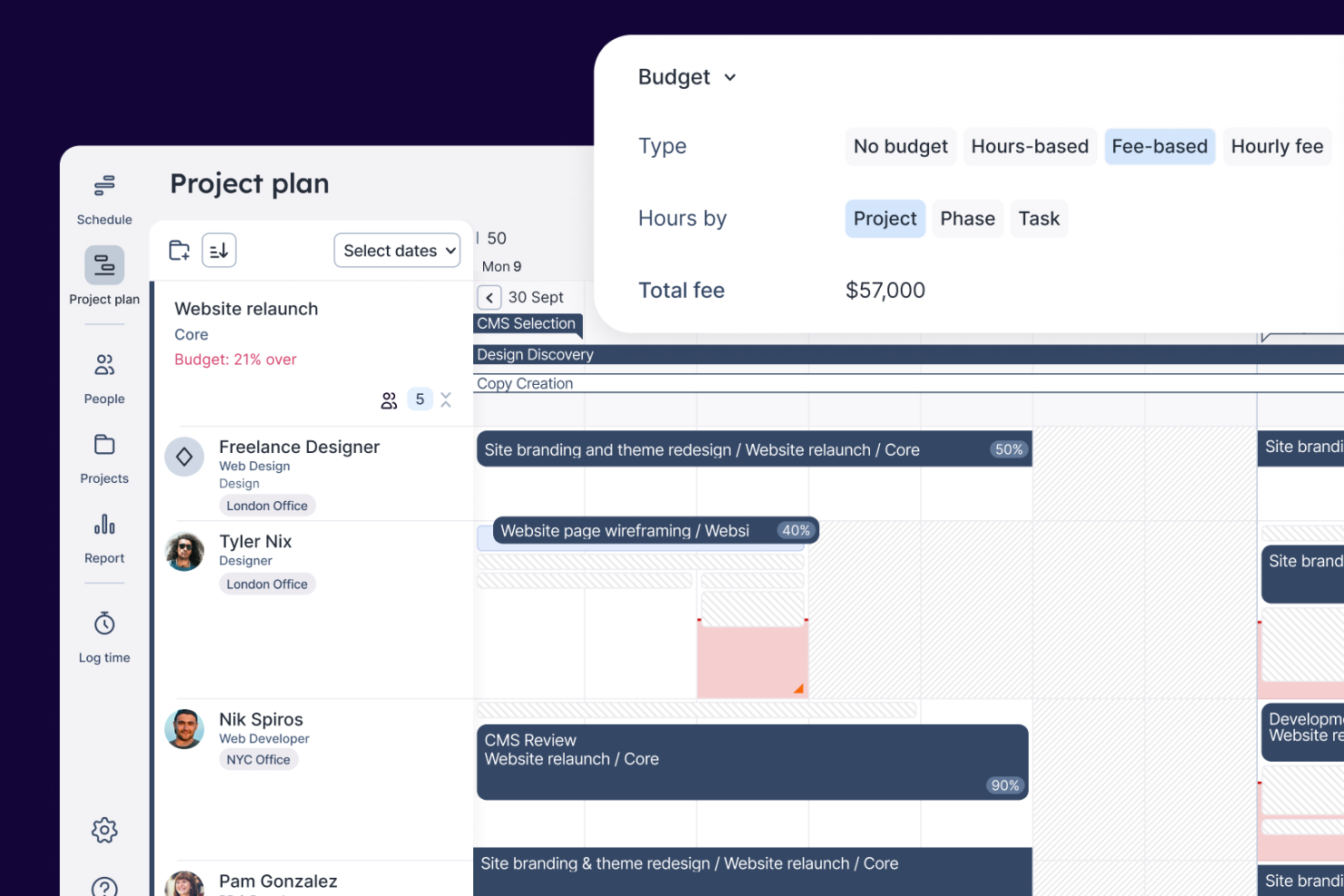
Float is a resource management platform for agencies that brings together project scheduling, team capacity planning, time tracking, and financial forecasting in one workspace.
Who Is Float Best For?
Float is a good fit for creative and digital agencies that need to manage team schedules and project budgets in one place.
Why I Picked Float
Float earns its spot on my shortlist because it ties resourcing decisions directly to financial outcomes in a way most scheduling tools don't. I use Float's budget tracking to compare planned costs against actuals in real time—so if a project is drifting over budget mid-delivery, I can see it before it becomes a problem. I also like the project cost estimation feature, which lets me model staffing scenarios using real bill rates and cost rates before a project kicks off, so margin is built into the plan from day one, not calculated after the fact.
Float Key Features
- Visual resource scheduling: Allocate work by hours or percentages on a drag-and-drop schedule, with live over-capacity warnings and utilization indicators.
- Time off management: Set custom leave policies, approval workflows, and auto-assigned regional holidays so availability is always accurate in the schedule.
- Pre-filled timesheets: Float auto-populates timesheets from scheduled allocations, with automated reminders and timesheet locking to protect data integrity.
- Utilization reporting: Track billable vs. non-billable hours across roles, teams, and projects to monitor how your team's time is actually being spent.
Float Integrations
Float offers native integrations with Slack, Google Calendar, Outlook, Microsoft Teams, Asana, Jira, Trello, and QuickBooks, and connects with Zapier. An API is available for custom integrations.
Pros and Cons
Pros:
- Live dashboards forecast utilization and margins
- Over-capacity warnings prevent burnout
- Visual schedule shows team capacity at a glance
Cons:
- Basic skills matching for staffing decisions
- No built-in task or project management
New Product Updates from Float.com

Float Adds Rate Cards and Multi-Currency Billing
Float introduced centralized rate cards to standardize bill rates across projects and added multi-currency support to bill clients consistently across regions. For more information, visit Float's official site.

Best for resource planning and forecasting
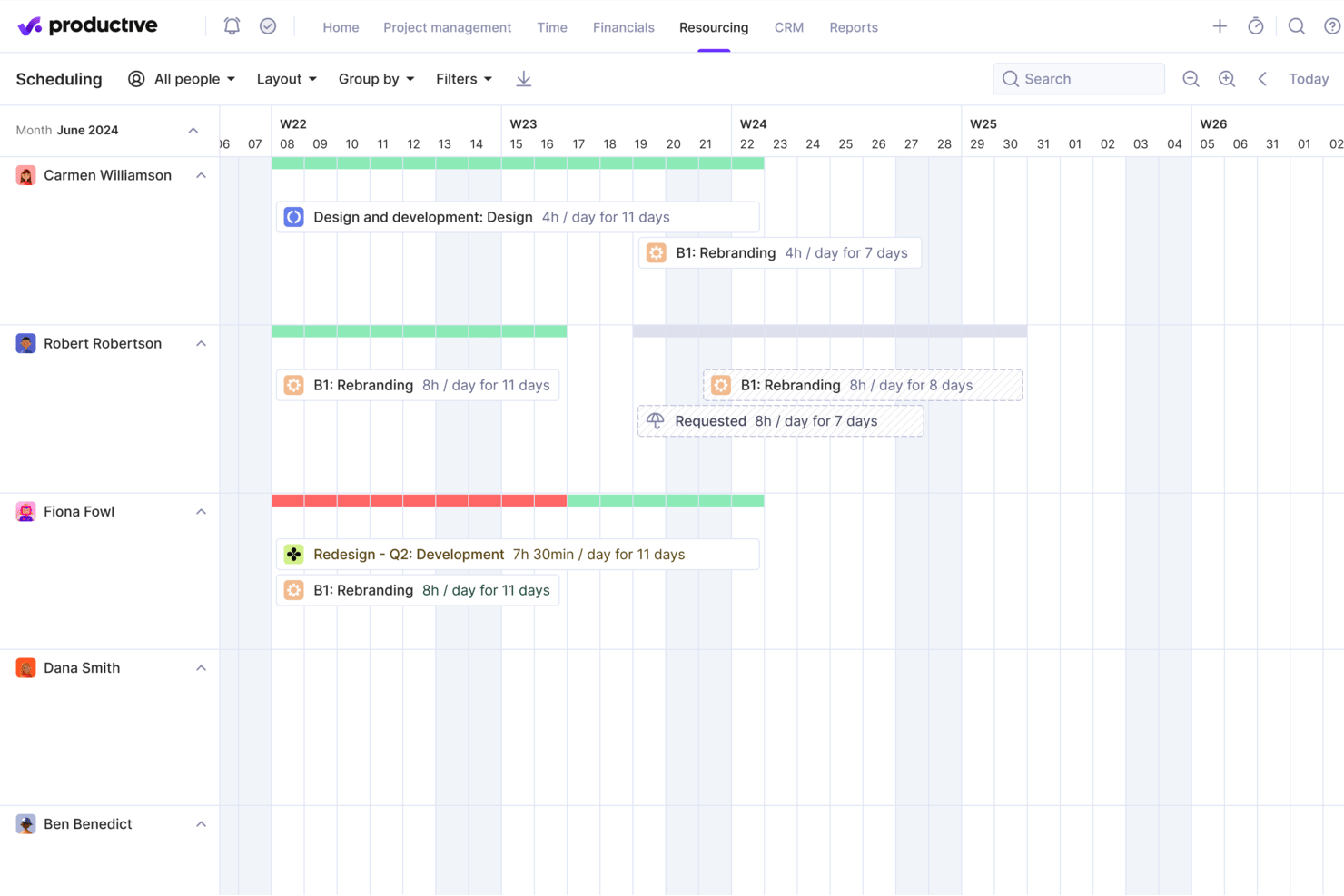
Productive is an agency resource management platform that brings together resource planning, forecasting, project tracking, budgeting, and time tracking in one system.
Who Is Productive Best For?
Productive is built for agencies and professional services teams that need to manage people, projects, and budgets in one place.
Why I Picked Productive
Productive earns its spot on my shortlist because of how tightly its resource planning and forecasting features connect to real financial outcomes. I like that the resource planner shows team availability, time off, and capacity in one view—so when I'm deciding whether to take on a new project, I can see exactly who has room and who's already stretched. The Scenario Builder lets me model different scheduling and pricing outcomes before committing to a plan. I can also track billable utilization by person, team, or month, and Productive flags budget overruns before they occur.
Productive Key Features
- Project templates: Duplicate tasks, subtasks, descriptions, and assignees from a saved template to spin up new projects.
- Budget phase management: Split large, long-term project budgets into separate phases to manage complex, multi-stage client work.
- Time approval workflows: Review submitted time entries, mark hours as billable or non-billable, and request changes before approving.
- Automated budget alerts: Set custom warnings to trigger when a project hits a defined percentage of its budget spend.
Productive Integrations
Productive offers native integrations with Slack, Xero, QuickBooks, Google Calendar, and HubSpot, and connects with Zapier. An API is available for custom integrations.
Pros and Cons
Pros:
- Per-client P&L shows account profitability
- Allocates staff by skills and seniority
- Heatmaps flag overbooked and available team members
Cons:
- Too many modules for scheduling-only teams
- Budget accuracy depends on strict time logging
New Product Updates from Productive
Productive Adds Voice Dictation, Slack Connector, Proposals, and Overtime
Productive adds voice dictation, a Slack Connector, proposal controls, and overtime tracking. These updates support faster AI interactions, client proposals, and time management. For more information, visit Productive’s official site.

Scoro
Best for real-time operations management
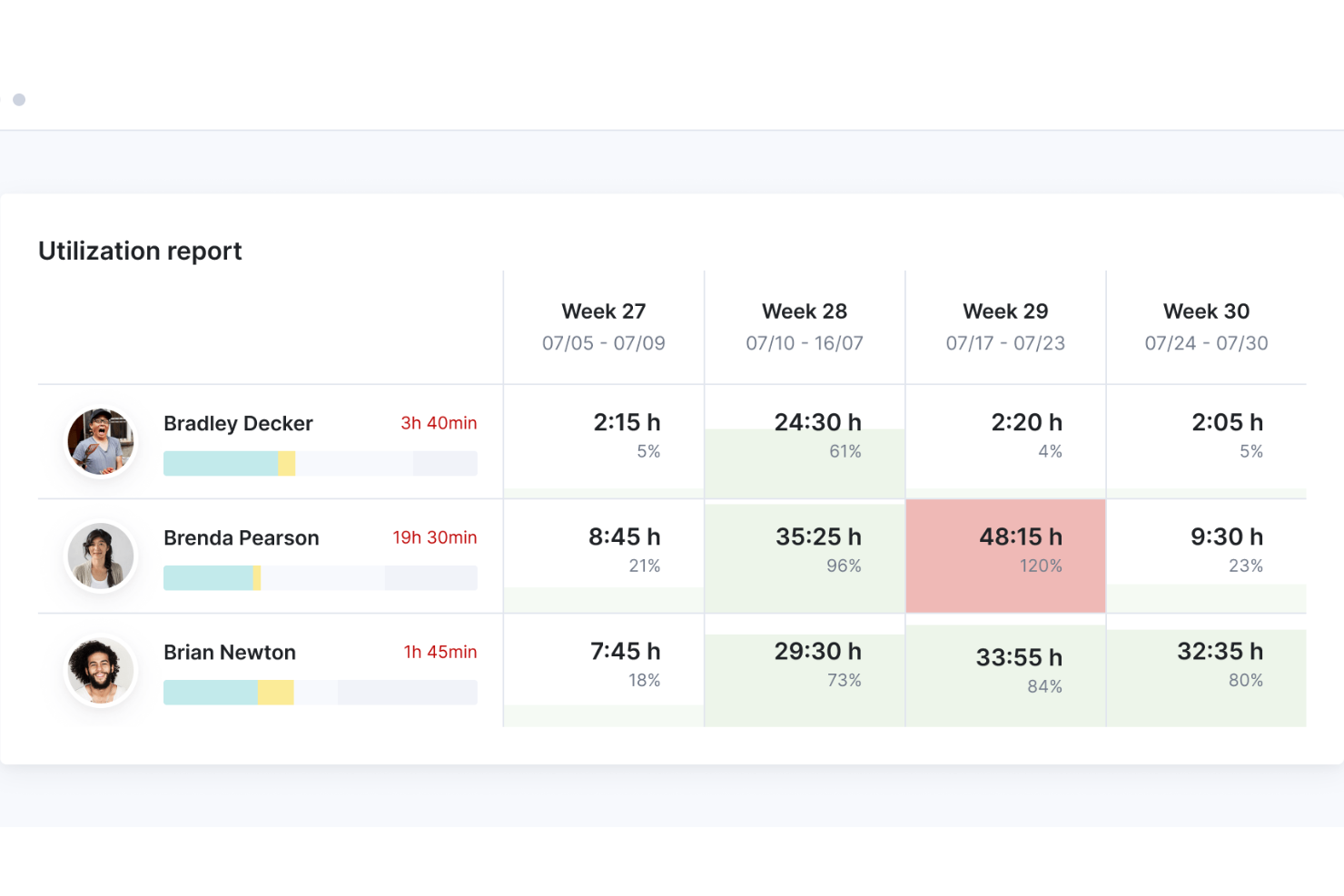
Scoro is an agency resource management platform that brings together project planning, resource scheduling, time tracking, budgeting, and collaboration tools in one system.
Who Is Scoro Best For?
Scoro is a good fit for mid-sized agencies and professional services firms that need a single platform to manage projects, people, and finances together.
Why I Picked Scoro
I've included Scoro in my top picks because of how well it connects real-time data across every layer of agency operations. What I like most is the live dashboard and reporting setup—you can track budget burn, team utilization, and project profitability without pulling data from separate tools. The utilization heatmap is particularly useful: it shows you at a glance who's overbooked and who has capacity, so you can rebalance workloads before a deadline slips. I also find the "Quoted vs Actual" view genuinely useful for ops leaders who need to catch margin issues mid-project, not after the invoice goes out.
Scoro Key Features
- Gantt chart scheduling: Visualize project timelines and task dependencies with drag-and-drop Gantt charts that update as work progresses.
- Retainer management: Track recurring client work, budgets, and hours within dedicated retainer views to keep ongoing engagements on schedule.
- Invoicing automation: Auto-generate invoices directly from approved quotes, with built-in payment processing via Stripe integration.
- Customizable dashboards: Build role-specific dashboards that surface the project health metrics, tasks, and financial data most relevant to each team member.
Scoro Integrations
Scoro offers native integrations with Google Workspace, Microsoft 365, Xero, QuickBooks, Sage, Exact, and Azure. An API is available for custom integrations.
Pros and Cons
Pros:
- Quote-to-invoice tracking in one platform
- Retainer management for recurring client work
- Tentative bookings reserve staff for pending pitches
Cons:
- Lacks creative proofing and asset management
- No campaign or media planning tools
New Product Updates from Scoro

Scoro Adds Time Mobile App and ELI Improvements
Scoro adds the Scoro Time mobile app for iOS/Android to track time anywhere and expands ELI with attachments, smarter filtering, and trigger-based actions. For more information, visit Scoro's official site.

Accelo
Best for integrated sales and resource planning
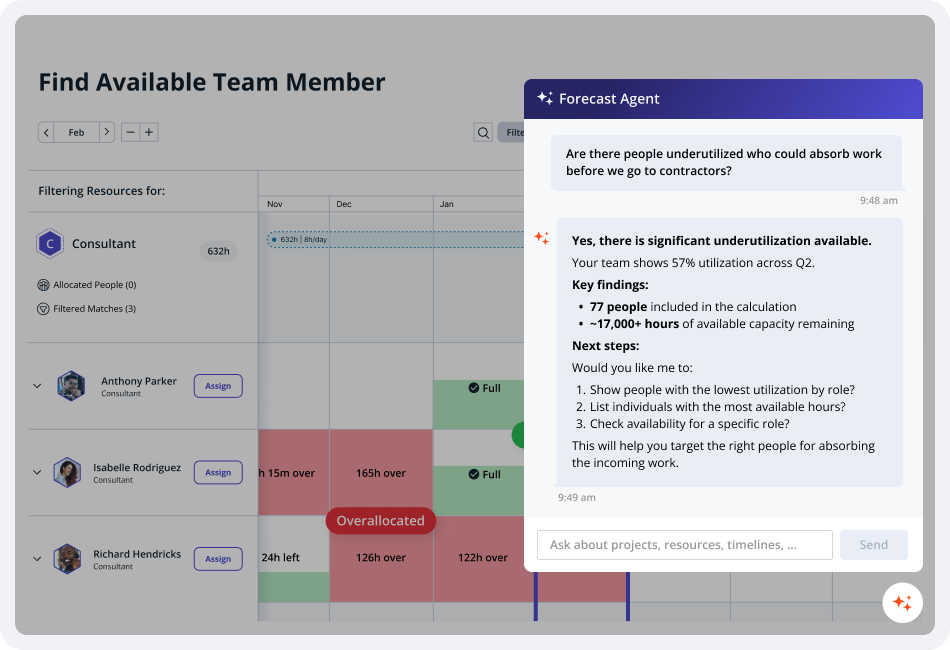
Built for agencies and professional services firms, Accelo is a PSA platform that covers the full client lifecycle—from pipeline and quoting through project delivery, resource scheduling, and billing.
Who Is Accelo Best For?
Accelo is a strong fit for mid-size digital agencies, IT consultancies, and professional services firms that need one platform to manage client work from sale through invoice.
Why I Picked Accelo
I picked Accelo for integrated sales and resource planning because it's one of the few platforms that connects your sales pipeline directly to capacity forecasting. It uses AI to model both tentative and confirmed work, forecast future demand, and help you align hiring, resources, and delivery before projects are won. This gives agency leaders a clear view of future capacity so they can decide whether to take on new work without relying on guesswork.
Accelo Key Features
- AI-assisted resource scheduling: Recommends the best-fit team members for tasks based on skills, availability, and workload.
- Sales-to-project automation: Converts won opportunities into projects, carrying over client, budget, and work details to reduce manual setup.
- Retainer management: Tracks recurring client engagements, logs change orders, and monitors retainer performance against agreed scope.
- Profitability dashboards: Displays real-time project, client, and team profitability to help monitor margins and financial performance.
Accelo Integrations
Accelo integrates with Google Workspace, Microsoft 365, Xero, QuickBooks Online, HubSpot, Salesforce, Mailchimp, Slack, and Zapier. An API is available for custom integrations.
Pros and Cons
Pros:
- Automated time capture logs billable hours
- Forecasts future resource demand
- Sales-to-delivery handoff is built in
Cons:
- Reporting customization is limited
- UI feels dated and loads slowly
New Product Updates from Accelo

Accelo Rebuilds Mobile App for Project and Time Management
Accelo rebuilds its mobile app with task management, new work creation, and mobile timesheets for Forecast customers. This helps teams keep project and time data current while working away from a desktop. For more information, visit Accelo’s official site.

Best for agency resource and capacity planning
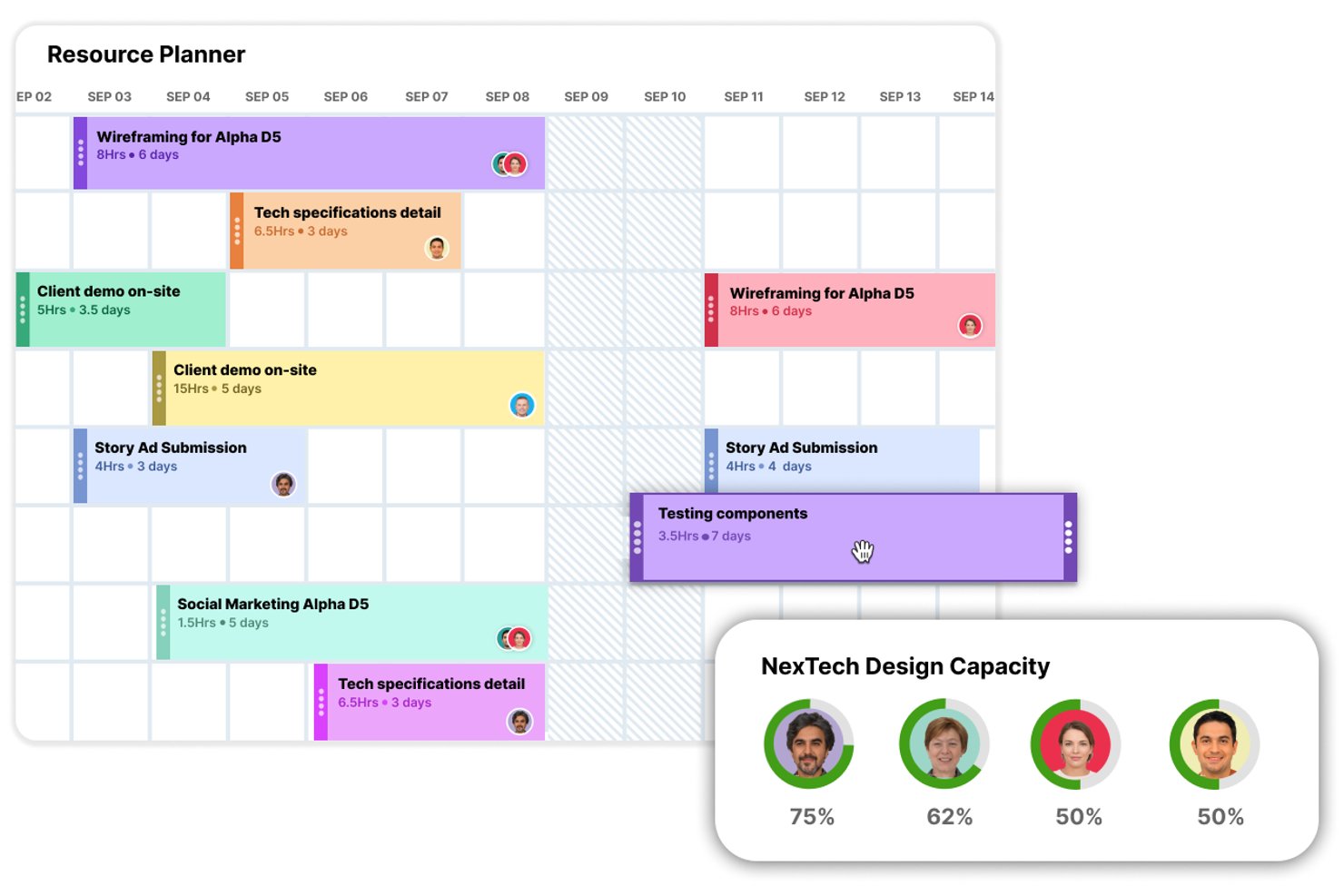
Screendragon is an agency resource management platform for project-based teams that need workflow automation, resource scheduling, and capacity planning in one system.
Who Is Screendragon Best For?
Screendragon is a strong fit for mid-to-large agencies and in-house creative teams that need to manage complex, multi-project workloads across large teams.
Why I Picked Screendragon
I picked Screendragon as one of the best because of how well it handles capacity planning at scale. What I find genuinely useful is the ability to toggle between task-based, hour-based, and percentage-based resource views—so when I'm juggling multiple client projects, I can instantly see where my team is overloaded without digging through spreadsheets. I also like the one-click auto-assignment feature, which matches team members to projects based on skills and availability rather than gut instinct. It also includes built-in demand forecasting, which lets me model future workload and spot resourcing gaps before they become a problem.
Screendragon Key Features
- Flexible filters and role-based views: Drill down by department, skill set, region, or custom role to find the right people for any project.
- Integrated timesheets and project data: Link resourcing directly to live project plans and timesheet data for a unified view of team performance.
- Digital approval workflow management: Capture decisions, comments, and markups centrally, with version comparison and an automated audit trail.
- No-code visual workflow builder: Design custom workflows from scratch or use templates, with full control over process logic and automation rules.
Screendragon Integrations
Screendragon offers native integrations with Microsoft 365, Google Workspace, Slack, Jira, Salesforce, SAP, Oracle, and Adobe Creative Cloud. An API is available for custom integrations.
Pros and Cons
Pros:
- Budgets tracked against live project plans
- Client brief intake with automatic routing
- Demand forecasting by skills and availability
Cons:
- Configuration changes often need vendor support
- Built for enterprises, overkill for small agencies
New Product Updates from Screendragon
Screendragon Unveils New AI Hub
Screendragon introduced AI Hub, a new capability that lets teams build and manage AI agents directly within workflows. The update helps marketing teams automate tasks, maintain governance controls, and scale AI-driven operations more efficiently. For more information, visit Screendragon's official site.

Wrike
Best for robust project management features
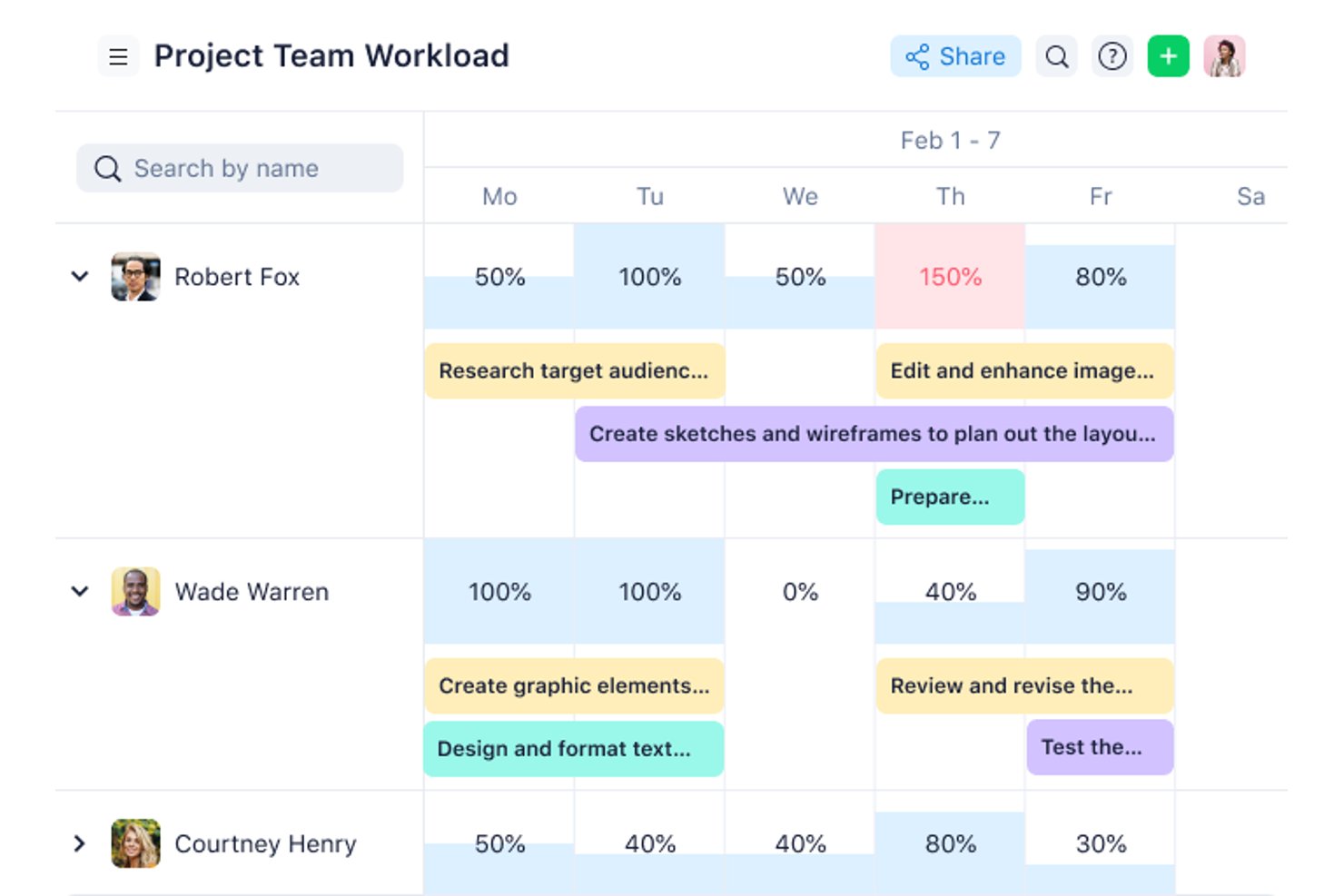
Wrike is a project and resource management platform for agencies that brings together task tracking, workload planning, time tracking, and team collaboration in one workspace.
Who Is Wrike Best For?
Wrike is a good fit for mid-size to large agencies that need a structured, scalable platform to manage complex projects across multiple teams.
Why I Picked Wrike
I included Wrike on my shortlist because it packs a lot of project management depth into a single platform. I particularly like the Gantt chart scheduling, which lets my team map out task dependencies across multiple concurrent client projects and immediately see how a timeline shift on one project ripples into another. I rely on the resource bookings feature—I can reserve a team member by role, estimate hours, and check their availability before committing them to a new project. Wrike's effort management lets me assign effort estimates at the task level, which makes workload forecasting across a full project portfolio much more accurate.
Wrike Key Features
- Custom project views: Switch between Board, Table, Gantt, Calendar, and Chart views to visualize project progress in the format that works best for your team.
- Scrum boards: Manage Agile workflows with backlog prioritization, sprint planning, and real-time collaboration on shared Scrum boards.
- External request forms: Collect and route incoming work requests from clients or non-Wrike users directly into your project workspace.
- User activity reports: Pull on-demand audit reports to track what each team member has created or changed across your account.
Wrike Integrations
Wrike offers hundreds of integrations through its built-in connectors and marketplace, including tools like Google Workspace, Microsoft 365, Salesforce, and Slack. It also supports Zapier and provides an API for custom integrations.
Pros and Cons
Pros:
- Workload charts rebalance team capacity in real time
- Request forms turn into project briefs automatically
- Guest reviewers approve client work in-app
Cons:
- Workload view lacks long-term capacity forecasting
- No project profitability or margin tracking
New Product Updates from Wrike
Wrike Expands Gantt Planning, Approvals, and AI Work Intake
Wrike adds cross-project Gantt dependencies, flexible approval routing, and AI work intake through Wrike MCP. These updates give teams more control over planning, decision-making, and incoming work. For more information, visit Wrike’s official site.

Best for simple capacity planning needs
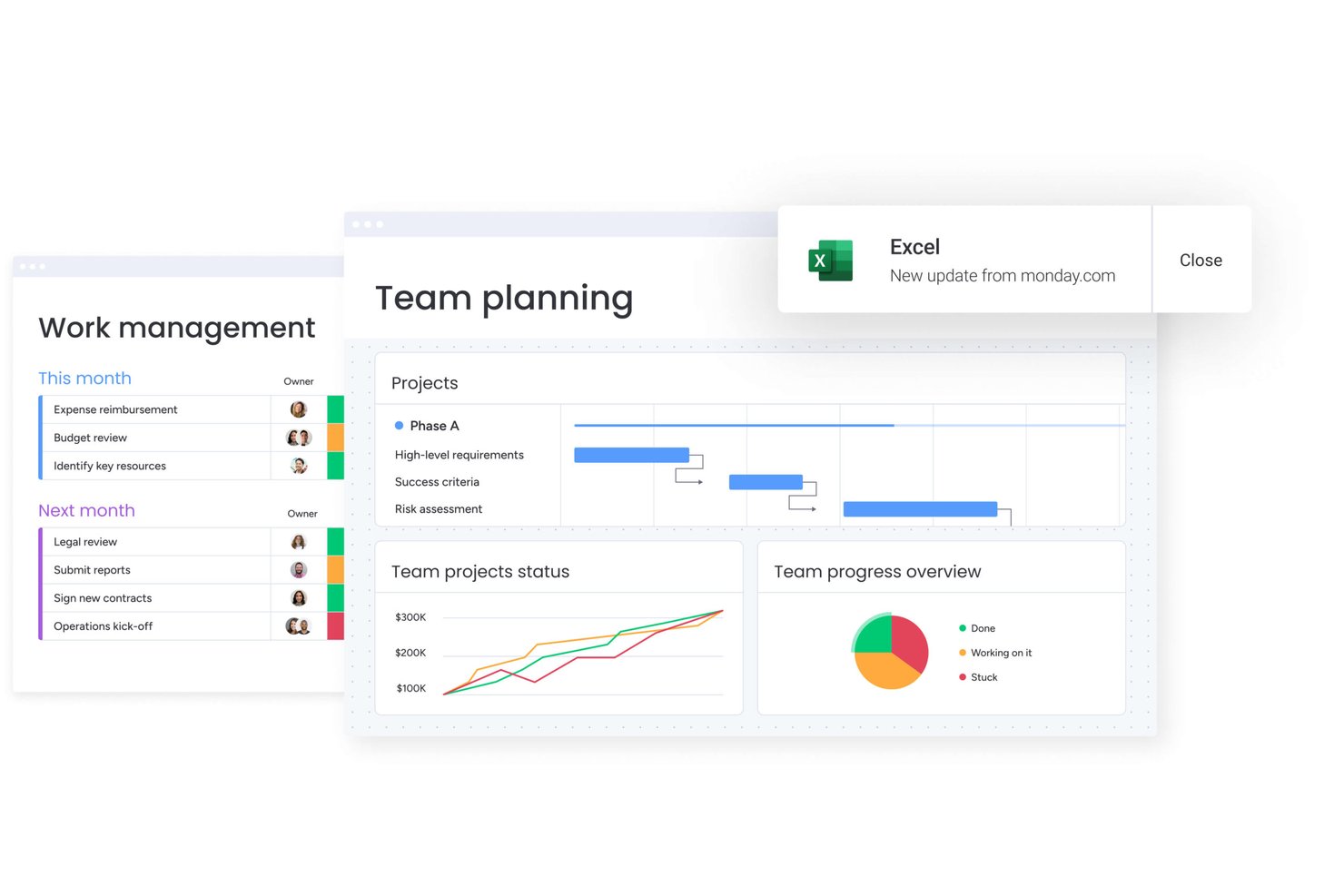
monday AI Workspace is a work management platform that combines project planning, resource scheduling, capacity tracking, and AI-powered workflow automation across teams and client projects.
Who Is monday AI Workspace Best For?
monday AI Workspace suits mid-sized agencies and operations teams that want an adaptable work OS without the complexity of a purpose-built resource management platform.
Why I Picked monday AI Workspace
I picked monday AI Workspace because its Capacity Manager aggregates workload data across multiple Resource Planners, giving my team a single view of who's overbooked and who has room. When I assign a new client project, I can filter the Resource Directory by role, skill set, or location to find the right person fast. Placeholder roles also let me flag staffing gaps before a project is even confirmed, which keeps pipeline planning from becoming reactive.
monday AI Workspace Key Features
- AI-powered workflow automation: Automates routine project updates, status changes, and assignments based on custom triggers and conditions.
- Customizable dashboard views: Offers visual widgets for timelines, Gantt charts, workloads, and project health, all configurable to agency preferences.
- Integrated time tracking column: Lets users log hours directly on tasks for better visibility across client project boards.
- Resource Directory: Stores searchable staff profiles including skills, roles, location, and availability in a central place.
monday AI Workspace Integrations
monday AI Workspace offers hundreds of native integrations through its built-in integrations and marketplace, including Slack, Google Workspace, Microsoft 365, Jira, Dropbox, Zoom, HubSpot, Salesforce, GitHub, and Outlook. It also supports Zapier and provides an API for custom integrations.
Pros and Cons
Pros:
- AI automates routine task assignment and updates
- Placeholder roles support pre-project staffing planning
- Visual capacity planning across multiple client projects
Cons:
- Reporting lacks agency-specific utilization KPIs natively
- Not purpose-built for billable rate tracking
New Product Updates from monday AI Workspace
monday AI Workspace Adds Human Approval Routing
monday AI Workspace adds a human-in-the-loop approval block to AI Workflows, sending approval requests and routing workflow paths based on responses. For more information, visit monday AI Workspace's official site.

Kantata
Best for people-centric resourcing
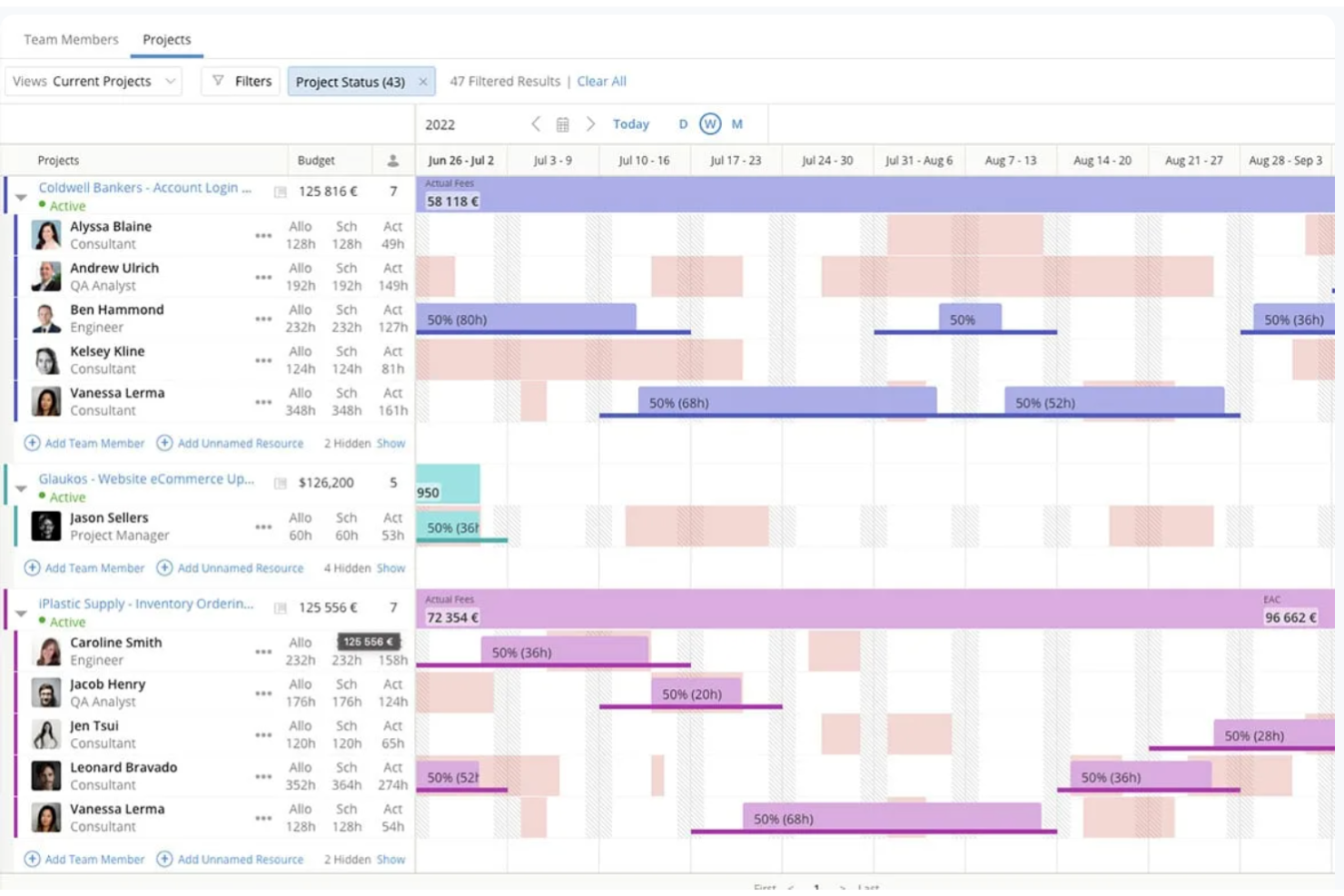
Kantata is an agency resource management platform designed for project-based businesses that need resource planning, project management, time tracking, and analytics in one system.
Who Is Kantata Best For?
Kantata is a good fit for professional services firms and agencies that need to manage complex, people-driven projects across multiple clients and workstreams.
Why I Picked Kantata
I picked Kantata as one of the best because of how deliberately it's built around people as the core unit of delivery. Where most resource management tools treat headcount as a scheduling variable, Kantata's resource management and forecasting module lets my team see availability by skill set, identify gaps before they become blockers, and shift people across projects in real time. That level of granularity matters when you're juggling multiple client engagements with overlapping timelines. I also like that Kantata's AI Expertise Engine learns from past project data to surface smarter staffing recommendations over time, so resourcing decisions get sharper the longer you use the platform.
Kantata Key Features
- Time and expense tracking: Log billable hours and expenses directly within projects, with built-in automation to keep records accurate and finance teams on schedule for period close.
- Financial management: Connect project delivery to invoicing, revenue recognition, and margin tracking in one place, with real-time visibility into costs and profitability.
- Kantata Pulse: Collect client and employee sentiment data alongside operational metrics to monitor project health and catch delivery risks before they escalate.
- Generative AI project assistant: Automatically draft status reports, executive updates, and project case studies by pulling from live project data.
Kantata Integrations
Kantata offers native integrations with Salesforce, Slack, Jira, HubSpot, QuickBooks, Xero, Microsoft 365, Google Workspace, Expensify, and NetSuite. An API is available for custom integrations.
Pros and Cons
Pros:
- Compares multiple resource plans side by side
- Skills inventory flags gaps before projects start
- Forecasts staffing needs from the sales pipeline
Cons:
- Limited customization of project views
- Recommendations depend on well-maintained skills data
New Product Updates from Kantata

Kantata Adds Access Group Change History
Kantata adds Access Groups History, letting account administrators track changes to group details, membership, and permissions in Recent History. The update also makes these events available through the Subscribed Events API for broader monitoring. For more information, visit Kantata’s official site.
 .
Best for client-facing project collaboration
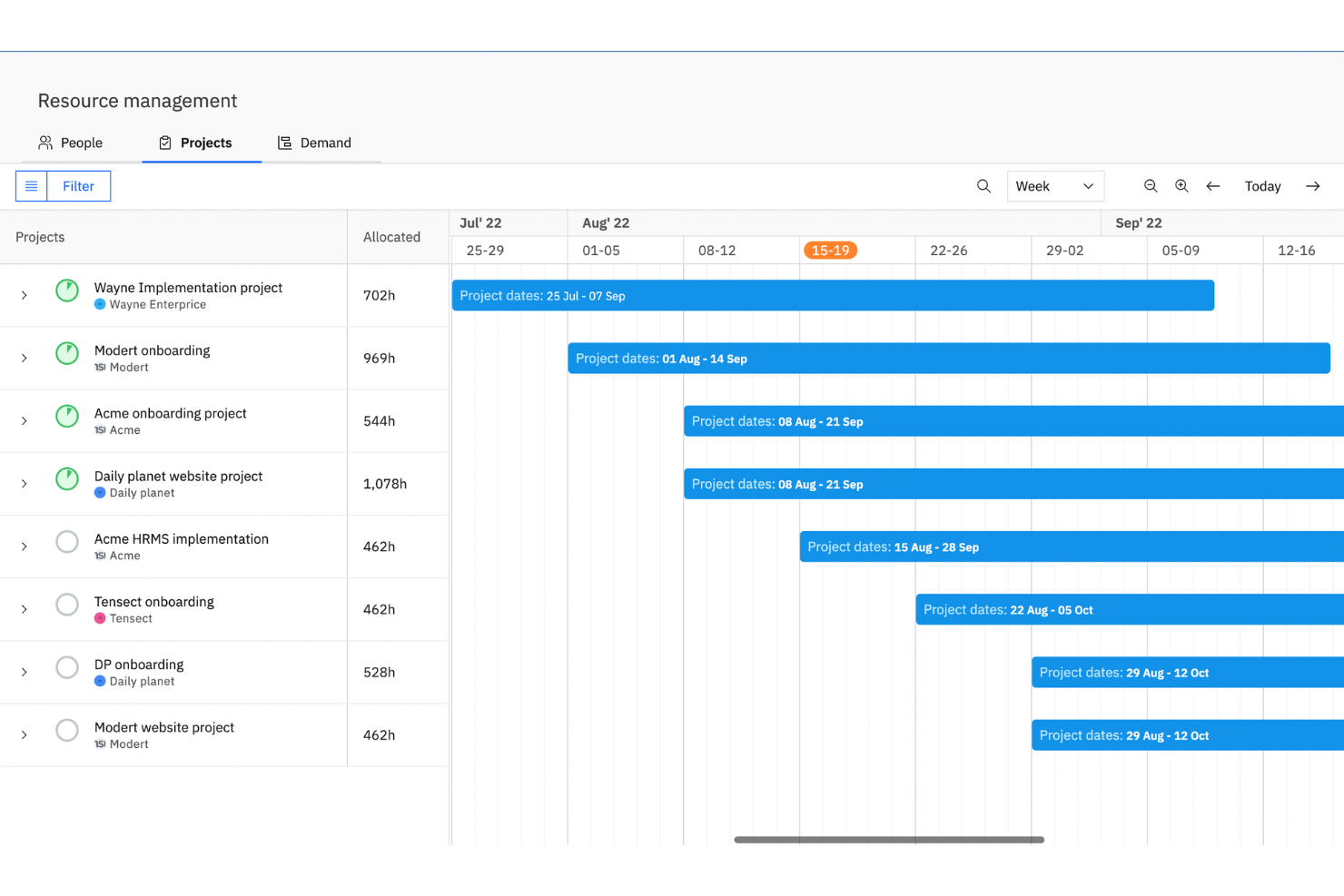
Rocketlane is a professional services automation platform that combines resource planning, capacity management, time tracking, client portals, and project delivery tools in a single workspace.
Who Is Rocketlane Best For?
Rocketlane is a strong fit for professional services and SaaS implementation teams that manage structured, client-facing project delivery at scale.
Why I Picked Rocketlane
I've included Rocketlane in my top picks because its branded client portal goes well beyond basic project sharing. Clients get a single hub where they can view project plans, access files, respond to tasks, and track progress without needing a Rocketlane login. I also like that the portal is fully white-labeled, so your team's branding stays front and center throughout the entire engagement, not just at kickoff. When you're managing multiple client projects simultaneously, that shared workspace cuts down on the back-and-forth email chains that slow delivery down.
Rocketlane Key Features
- Resource planning: Assign team members to projects based on availability, skills, and workload across your portfolio.
- Time tracking: Log hours directly within tasks and submit timesheets for manager approval without leaving the platform.
- Project templates: Build reusable project blueprints with pre-set tasks, timelines, and assignees to standardize delivery.
- Budget tracking: Monitor project spend against forecasts with margin tracking and rate card management built in.
Rocketlane Integrations
Rocketlane offers native integrations with Slack, Salesforce, HubSpot, Jira, Google Calendar, Outlook, and Zapier. An API is available for custom integrations.
Pros and Cons
Pros:
- Built-in timesheet tracking per project task
- Reusable project templates speed up onboarding
- Client portal gives customers direct project visibility
Cons:
- Switching between multiple projects feels slow
- Reporting filters lack advanced customization options
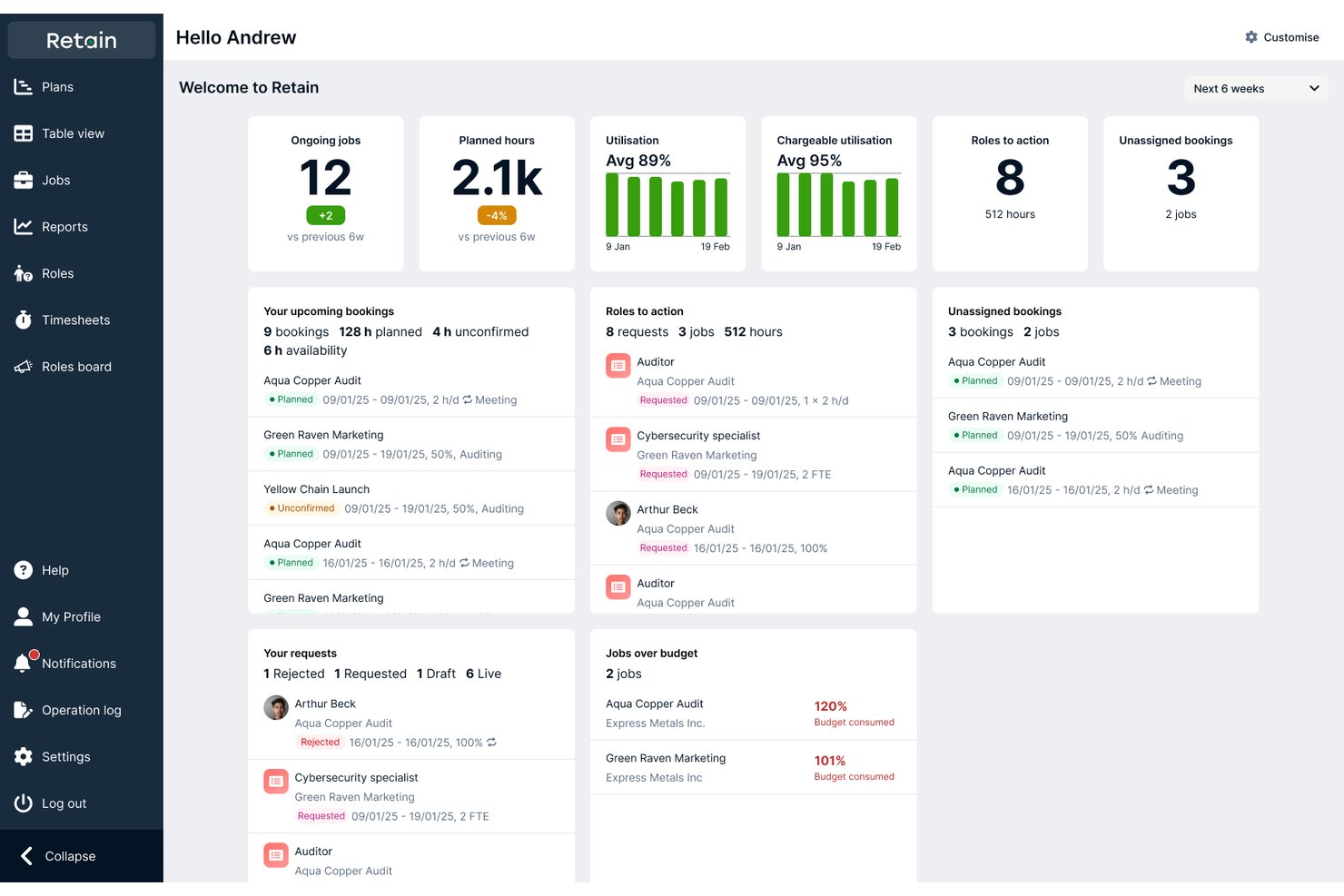
Retain International is an enterprise resource management platform that connects scheduling, skills intelligence, capacity planning, and operational reporting across projects, teams, and departments.
Who Is Retain International Best For?
Retain International is a strong fit for enterprise teams in professional services that need a self-hosted, on-premise resource planning solution with deep security and compliance controls.
Why I Picked Retain International
I picked Retain International as one of the best because it's the only tool on this list that offers a fully on-premise deployment option, which matters when your agency handles sensitive client data and can't route it through a third-party cloud. I especially like the Skills+ framework, which gives you access to up to 30,000 industry skills you can tailor to your own roles, so matching people to projects is based on actual capability, not just job titles. The scenario planning workspace lets you compare staffing strategies side by side on revenue, cost, and profit before any assignments are confirmed.
Retain International Key Features
- Availability heatmap: Displays each resource's capacity over time so you can spot overallocation and open gaps at a glance.
- Booking-change request routing: When a planner lacks direct edit access, Retain automatically creates a change request and routes it to the relevant managers for approval.
- Billable vs. non-billable utilization reporting: Measures chargeable and non-chargeable time at both individual and group levels, with filters for timeframes, divisions, and teams.
- AI resource suggestions: Recommends candidates for open project roles based on skills, availability, experience, and historical project data.
Retain International Integrations
Retain International integrations include Microsoft 365, Outlook, Salesforce, Workday, SAP, Oracle, Bamboo HR, and Microsoft Dynamics 365. It also offers a token-authenticated API plus middleware support for MuleSoft and Azure Logic Apps.
Pros and Cons
Pros:
- On-premise deployment suits sensitive client work
- Future staffing views help anticipate demand peaks
- Reviewers value cross-project workload visibility
Cons:
- Booking changes lack bulk-update shortcuts
- Conflicting bookings can be hard to spot
Outras opções
Eis mais algumas opções interessantes que não foram incluídas na minha lista dos melhores softwares de gestão de recursos para agências:
- Saviom
For scheduling unlicensed staff
- Runn
For drag-and-drop resource allocation
- Smartsheet
For agency project and portfolio management
- Resource Guru
For capacity planning reports
- Teamwork.com
For role-based planning of potential work
- Ravetree
For custom project workflows
- Float
For staffing work before names are known
- Parallax
For predictive resource intelligence
- Planview
For resourcing tied to quote-to-cash
- Birdview PSA
For agency client-data security


How I Evaluate Agency Resource Management Software
I split my evaluation into three parts, weighting core functionality most: schedule people across projects, see who's booked or free, and forecast demand against capacity. Next, I look for standout features like capacity heatmaps. Finally, I consider agency-aware onboarding and pricing that flexes with headcount.
Core Functionality (Table Stakes For This List)
When I'm selecting tools for my list, I score each one on a scale from 0 (does not offer the functionality) to 5 (excels in this area) for each core functionality listed below. I then convert the total into a percentage to help assess each tool's overall fit, with extra weight on any functionalities I’ve deemed essential.
- Resource Scheduling (Essential): I look for shared timelines that let managers assign people across projects and spot clashes when client deadlines overlap.
- Capacity & Utilization (Essential): I check whether teams can see booked and available time, with utilization rates that reveal overbooking or unused capacity.
- Skills & Role Matching: I look for skill and role filters that help managers find the right designer or developer for a project.
- Demand Forecasting: I assess whether forecasts compare upcoming capacity needs with both confirmed work and likely pipeline projects.
- Billable Time Tracking: I check whether teams can distinguish billable from non-billable allocations and report the split across projects or clients.
- Scenario Planning: I look for ways to model staffing changes and see their effect on other assignments before committing to a new plan.
Once I have a list of tools that meet the criteria, I consider what sets each platform apart.
Differentiating Factors (What Sets Vendors Apart)
Here's how I compare and contrast different vendors:
Standout Features
I look for capacity heatmaps that color-code workloads across weeks or quarters so a traffic manager can spot an overloaded designer before a deadline crunch hits. I also check whether the tool rolls up utilization and margin data at the client-account level, not just per project, since agency profitability decisions happen at the account layer. Native two-way syncs with accounting and PM platforms like QuickBooks or Asana matter too, because manual budget reconciliation is where forecast accuracy falls apart.
Beyond Features
I check whether pricing scales for freelance-heavy teams, since per-seat models punish agencies that ramp contractors during busy seasons. Role-based permissions also matter—agencies juggling competing client accounts need data walls so one client's budget details never leak to another's team. I look for native CRM and HRIS connectors too, because syncing pipeline forecasts and PTO data into one availability calendar cuts out the manual re-entry that wrecks forecast accuracy.
Perguntas frequentes sobre software de gestão de recursos para agências
Vejamos algumas das perguntas mais frequentes sobre software de gestão de recursos.
Porque é que as agências precisam de software de gestão de recursos?
Compreender de que forma recursos como pessoas, dinheiro e tecnologia estão a ser utilizados atualmente e poderão ser utilizados no futuro na sua organização permite-lhe prever com precisão oportunidades futuras. Quando conquista uma nova conta ou projeto, o software de gestão de recursos pode ajudá-lo a compreender a capacidade dos seus recursos e a trabalhar dentro dos orçamentos e do calendário do projeto. Isto garante que entrega o trabalho de uma forma que maximiza a rentabilidade. As empresas de serviços profissionais recorrem frequentemente a ferramentas especializadas de gestão de recursos para simplificar a distribuição da força de trabalho, acompanhar as finanças dos projetos e manter a visibilidade em vários projetos em simultâneo.
Quais são as principais funcionalidades do software de gestão de recursos para agências?
As funcionalidades mais comuns dos sistemas de gestão de agências orientados para recursos incluem:
- Controlo do tempo e folhas de horas
- Criação de fluxos de trabalho
- Painéis personalizados
- Agendamento através de arrastar e largar
- Integrações com outras ferramentas de comunicação, contabilidade e gestão de projetos
- Aprovações automatizadas
- Quadros Kanban personalizados, gráficos de Gantt e outros elementos visuais
- Acompanhamento de marcos
- Notificações em pontos-chave do ciclo de vida do projeto
Quais são os benefícios da utilização da gestão de recursos nas agências?
Numa agência, um planeamento eficaz dos recursos pode contribuir para muitos resultados positivos:
- Reduz o risco de esgotamento da equipa (e mantém os colaboradores satisfeitos!)
- Permite acompanhar as despesas para garantir que se mantém dentro do orçamento
- Ajuda a gerir o aumento descontrolado do âmbito e a manter a rentabilidade perante a mudança
- Prepara a sua equipa para aproveitar novas oportunidades de crescimento sem sacrificar o equilíbrio entre a vida profissional e pessoal
Como humanizar a alocação de recursos do projeto para melhorar a cultura de uma agência?
A alocação de recursos não se resume aos números. Quando entrevistámos Morgan Megannety para o podcast The Digital Project Manager, disse-nos:
“Para mim, a parte mais interessante é evitar que as pessoas sofram de esgotamento. Associar competências a tarefas. Compreender o que as pessoas… precisam de fazer para… continuarem interessadas na sua carreira.”
Como escolher software de gestão de recursos?
Pode escolher software de gestão de recursos colocando a si próprio determinadas perguntas, como:
- Preciso de um software dedicado?
- Quero uma solução baseada na nuvem ou instalada localmente?
- Tem as integrações de que preciso para tirar o máximo partido do software que utilizo atualmente?
- O preço compensa as funcionalidades que vou obter?
Temos todas as respostas a estas perguntas no nosso guia do comprador de software de gestão de recursos.