

Os 10 melhores softwares de gestão de projetos jurídicos em 2026

10 Lista restrita do melhor software de gestão de projetos jurídicos


O software de gestão de projetos jurídicos é fundamental para gerir eficazmente processos e projetos no seu escritório de advogados. A ferramenta certa pode ajudá-lo a melhorar a comunicação, reforçar a colaboração e concluir projetos dentro do prazo e do âmbito definidos.
Eis as minhas escolhas para o melhor software de gestão de projetos jurídicos. Recorri à minha experiência na gestão de projetos jurídicos para analisar e avaliar várias opções de software, para que possa encontrar a melhor escolha para as suas necessidades.
Why Trust Our Software Recommendations
Our team has been testing and reviewing software since 2012. As project managers ourselves, we know how difficult—and important—it is to choose the right software.
For this guide, we evaluated tools using hands-on testing and independent research, scoring tools using our selection criteria. We also draw on insights from industry thought leaders and practicing project management experts.
Our reviews reflect our human editorial judgment, not a sales pitch.
Expert reviewers:
Tabela de comparação de software de gestão de projetos jurídicos
Esta tabela de comparação resume os detalhes de preços das minhas principais escolhas de software de gestão de projetos jurídicos:
| Tool | Best For | Trial Info | Price | ||
|---|---|---|---|---|---|
| 1 | Best for a user-friendly experience | 7-day free trial + free demo available | From $59/user/month | Website | |
| 2 | Best for scalable legal project workflows | Free plan + 14-day trial + demo available | From $10/user/month (billed annually) | Website | |
| 3 | Best for tracking hours and billing on legal work | 14-day free trial + free plan + free demo available | From $39.97/month (billed annually) | Website | |
| 4 | Best for AI-driven legal workflow automation | Free plan + trial + demo available | From $10.99/user/month (billed annually) | Website | |
| 5 | Best for automating matter workflow triggers | Free trial + free demo available | Pricing upon request | Website | |
| 6 | Best for court-deadline-driven matter tracking | Free demo available | Pricing upon request | Website | |
| 7 | Best for built-in trust accounting compliance | 10-day free trial + free demo available | From $49/user/month | Website | |
| 8 | Best for matter-specific workflow templates | Free demo available | Pricing upon request | Website | |
| 9 | Best for external counsel collaboration at scale | Free demo available | Pricing upon request | Website | |
| 10 | Best for spreadsheet-style matter tracking | 30-day free trial + demo available | From $9/user/month (billed annually) | Website |


Análises do melhor software de gestão de projetos jurídicos
Eis as minhas análises detalhadas dos prós e contras, das funcionalidades e dos melhores casos de utilização de cada ferramenta, para que possa tomar uma decisão informada para o seu escritório de advogados.

Best for a user-friendly experience

PracticePanther is a customizable legal practice management software designed to simplify workflow and enhance efficiency for law firms.
Why I Picked PracticePanther: I chose PracticePanther for its customization capabilities. Its interface and flexible customization options make it ideal for law firms looking for tailored solutions for their practice management needs.
Standout features & integrations:
Features include case management, time tracking, billing, client portals, and document management.
Integrations include Dropbox, Google Drive, One Drive, Lawmatics, Jubilee, and Zapier.
Pros and Cons
Pros:
- Complete integration with popular legal and financial tools.
- User-friendly interface with intuitive navigation.
- Extensive customization options for tailored practice management solutions.
Cons:
- Limited advanced reporting capabilities.
- Steeper learning curve for new users.
New Product Updates from PracticePanther

PracticePanther Expands eCheck Payments and Invoice Fund Controls
PracticePanther expands payment controls with client eCheck collection and account-level choices for applying retainers and credits. These updates give firms more flexibility when collecting payments and deciding which funds cover an invoice. For more information, visit PracticePanther’s official site.
 .

Wrike
Best for scalable legal project workflows

Wrike is a project management software designed to help legal teams manage complex projects with efficiency. It offers tools for task coordination, document management, and in-platform collaboration, making it especially useful for firms handling multi-departmental or high-volume legal matters.
Why I Picked Wrike: I chose Wrike for its ability to support scalable workflows and complex legal project structures. Legal teams can create unlimited workflows, use project blueprints, and benefit from real-time dashboards that give visibility into progress across multiple matters. Additionally, Wrike’s built-in time-tracking capabilities help teams manage billing and invoicing accurately while keeping stakeholders aligned. Its in-platform communication tools also make collaboration with external parties straightforward and secure.
Standout Features & Integrations
Features include customizable request forms for standardizing approvals, project methodologies like Agile and Waterfall for structured case management, and real-time dashboards to monitor legal project performance.
Integrations include Salesforce, Jira, GitHub, MS Teams, Slack, Power BI, Google Sheets, Miro, Microsoft Dynamics 365, Google Workspace, Zoom, Dropbox, and more.
Pros and Cons
Pros:
- Robust task management capabilities
- Highly customizable dashboards
- Many integrations available
Cons:
- Can be tricky to learn how to customize the platform
- Advanced resource planning features limited to higher tier plans
New Product Updates from Wrike
Wrike Expands Gantt Planning, Approvals, and AI Work Intake
Wrike adds cross-project Gantt dependencies, flexible approval routing, and AI work intake through Wrike MCP. These updates give teams more control over planning, decision-making, and incoming work. For more information, visit Wrike’s official site.

Best for tracking hours and billing on legal work
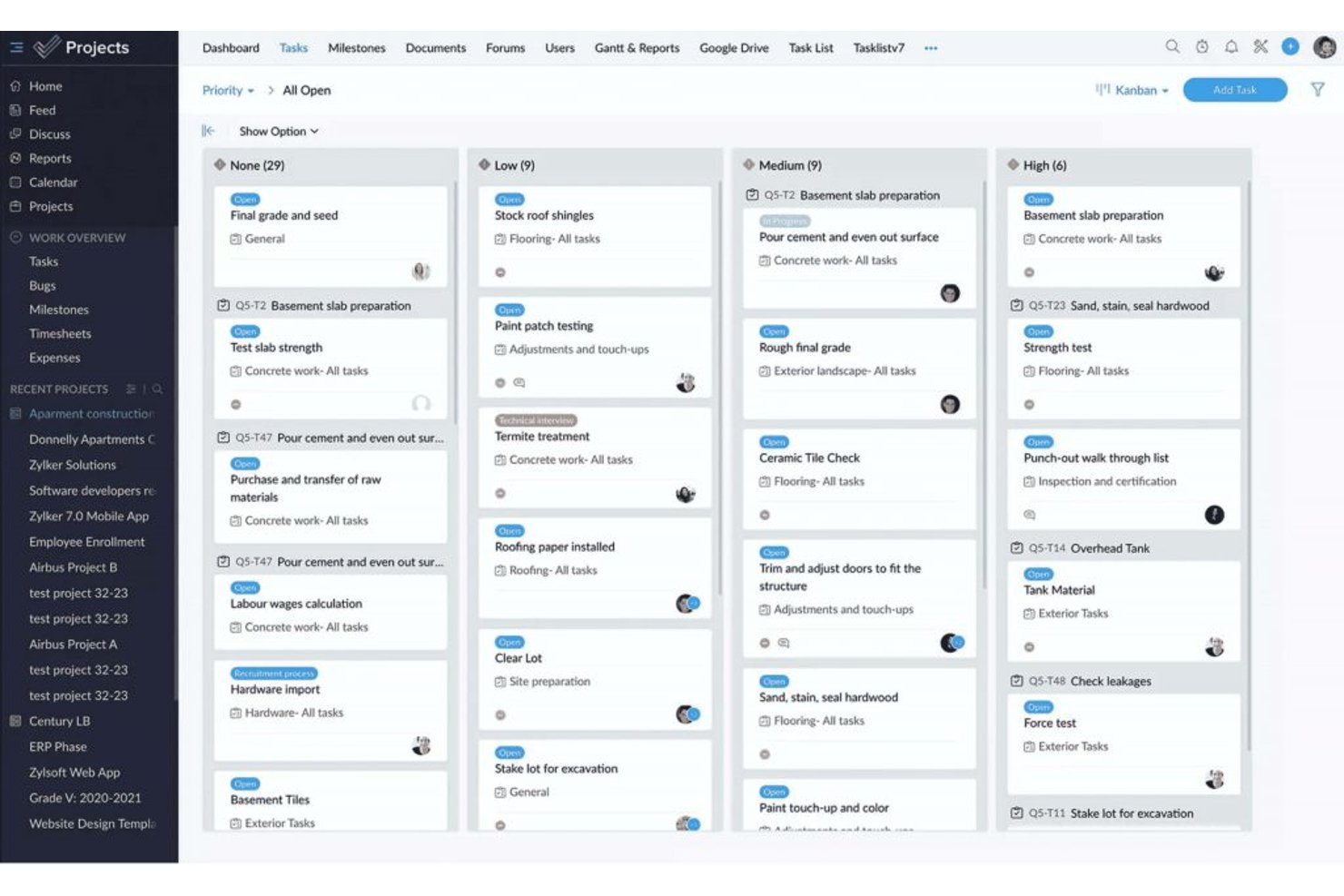
ProProfs Project is a project management tool that covers task planning, time tracking, team collaboration, and client billing across projects.
Who Is ProProfs Project Best For?
ProProfs Project suits small legal teams and solo practitioners who need straightforward time tracking and client billing without a steep learning curve.
Why I Picked ProProfs Project
I picked ProProfs Project as one of the best because it handles the two things legal teams lose the most time to: logging billable hours and turning those hours into client invoices. You can track time against specific tasks, compare actual hours to your estimates, and generate invoices directly from project data, so billing a client after a matter closes takes minutes rather than a manual reconciliation effort. Profitability reports then show margin, daily spend, and accumulated cost in one view.
ProProfs Project Key Features
- Task dependencies and baselines: Set task dependencies and capture baseline dates to compare original schedules against actual progress.
- Custom project templates: Build reusable templates from scratch or convert an existing project into a template for future matters.
- Guest client access: Add clients as guest users with configurable permissions to view updates, comment, and see estimated costs.
- Resource utilization reports: Review how team members are allocated across projects with dedicated resource and time-by-user reporting.
ProProfs Project Integrations
ProProfs Project has documented native integrations with Google Calendar, Google Drive, Dropbox, and Box. It also offers a REST API and webhooks for custom connections, but no native legal DMS, practice management, or e-billing integrations are documented.
Pros and Cons
Pros:
- Profitability reports connect hours and costs
- Reusable templates help repeat matter setup
- Billable-hour tracking supports client billing
Cons:
- No documented AFA tracking or alerts
- No legal-specific matter lifecycle controls

Asana
Best for AI-driven legal workflow automation
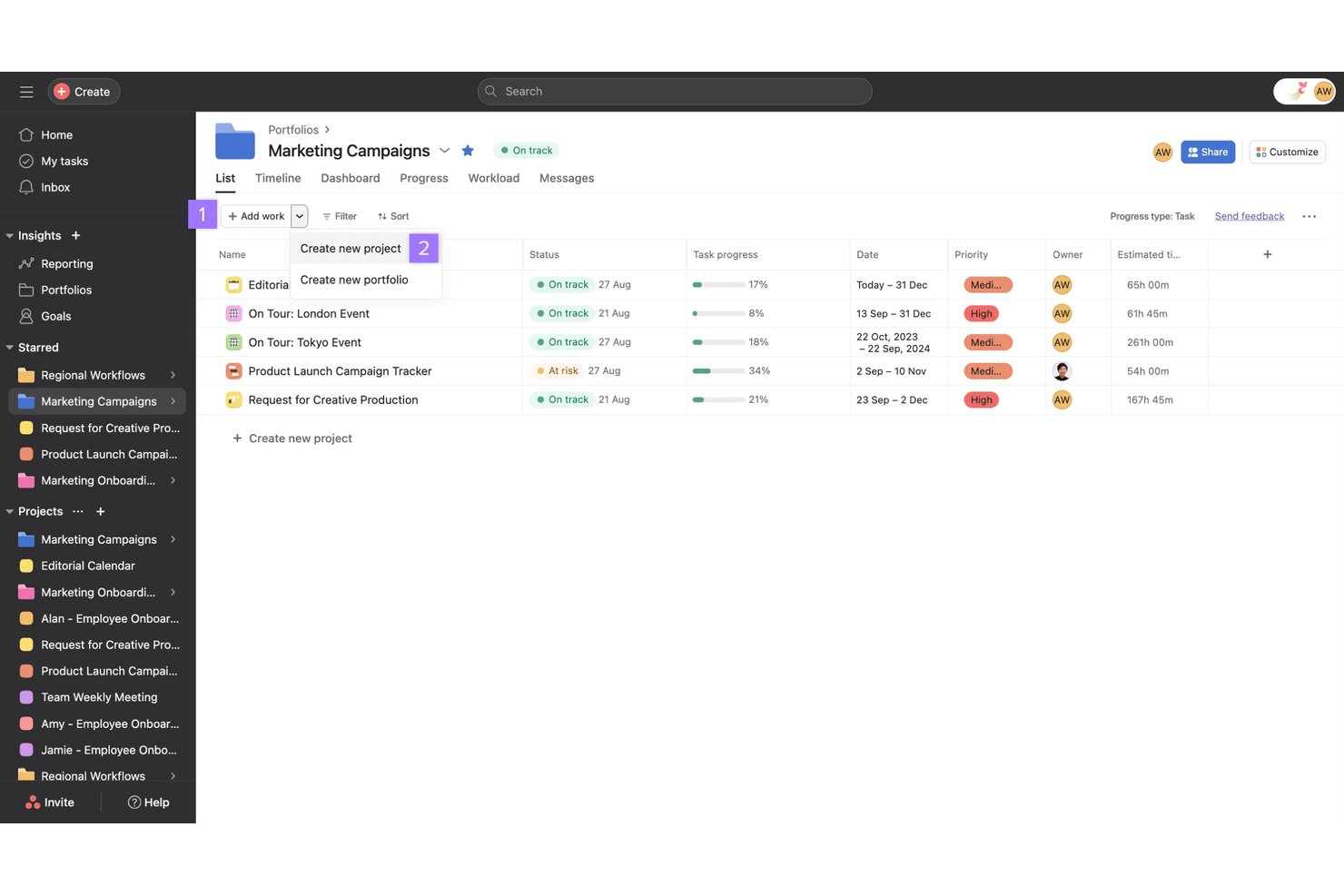
Asana is a work management platform that combines AI-powered workflow automation, task and project tracking, resource management, and reporting—adapted by legal teams for matter workflows, capacity planning, and cross-functional process standardization.
Who Is Asana Best For?
Asana works well for legal operations teams and small law firms that want to build structured matter workflows without investing in purpose-built legal software.
Why I Picked Asana
I've included Asana in my top picks because its AI Studio lets legal teams build no-code workflows that catch real operational problems, like tracking repeatedly moved due dates and surfacing patterns in workflow delays. I love that Keystone Law Group used it to build 50+ legal workflow templates with subtasks and estimated completion times, automating handoffs so the next person in a probate workflow gets notified automatically. That kind of AI-driven process standardization is difficult to replicate in generic project tools.
Asana Key Features
- Project views: Switch between list, board, calendar, timeline, and Gantt views to track matter progress across different stages.
- Intake forms with branching logic: Collect structured work requests and route them automatically based on submitter answers.
- Portfolio dashboards: View progress, health, and budget rollups across multiple matters or projects in one place.
- Workload visibility: See each team member's assigned work and capacity so you can redistribute tasks before someone gets overloaded.
Asana Integrations
Asana offers 100+ free marketplace integrations, including Everlaw, Google Drive, Microsoft 365, Slack, Jira Cloud, Salesforce, Tableau, and Power BI. It also supports Zapier, REST APIs, webhooks, client libraries, and an MCP Server for custom integrations.
Pros and Cons
Pros:
- Legal templates automate probate handoffs
- AI workflows flag recurring deadline slippage
- Reviewers value visible owners and deadlines
Cons:
- No court rules or conflict checks
- No AFA or fixed-fee tracking

Filevine
Best for automating matter workflow triggers
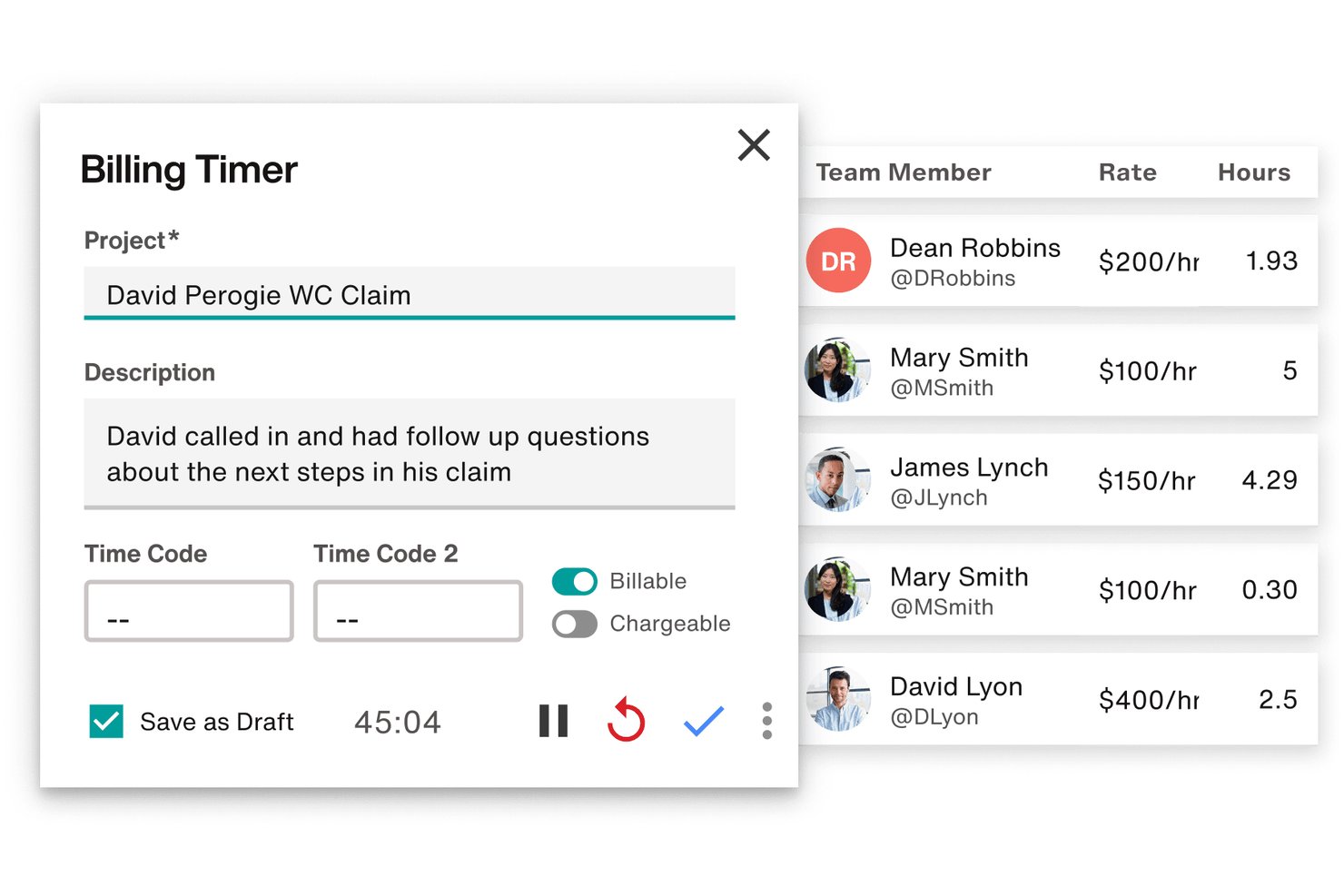
Filevine is a legal case and matter management platform that centralizes task tracking, deadline chains, document assembly, billing, and client communication across matters.
Who Is Filevine Best For?
Filevine works well for plaintiff-side and mid-size law firms that need to automate task triggers across high-volume caseloads.
Why I Picked Filevine
I picked Filevine as one of the best because its taskflow engine does something I genuinely find rare: it triggers entire task chains automatically when a matter changes phase or when a staff member clicks an action button. In a high-volume plaintiff firm, that means the moment a case moves from intake to active litigation, follow-up tasks get assigned to the right role without anyone building a to-do list manually. I also like that deadline chains calculate dependent dates from a single anchor date, including branching options for alternative scheduling scenarios.
Filevine Key Features
- Centralized case workspace: Anchors emails, calendar events, time entries, documents, and case notes directly to their matter files in one place.
- Client Portal: Gives clients secure, branded access to matter status, documents, communications, and invoices, with configurable billing and translation options.
- Conflict check section: Searches contacts across projects and your organization to surface potential conflicts, with results showing project roles, names, and phases.
- LEDES-compliant billing: Generates LEDES-formatted billing files and supports time entries, expense tracking, invoice management, and integrations with tools like QuickBooks and SurePoint.
Filevine Integrations
Filevine lists over 2,000 potential integrations, including QuickBooks, SurePoint, Soluno, Outlook, Microsoft Teams, Slack, and Google Calendar. It also supports API endpoints, webhooks, and Zapier for custom connectivity.
Pros and Cons
Pros:
- Reusable taskflows support repeatable matter processes
- Keeps case documents, notes, and communications together
- Automates role-assigned tasks when matter phases change
Cons:
- Search and activity feeds can obscure case details
- Workflow setup can demand substantial configuration effort

Best for court-deadline-driven matter tracking
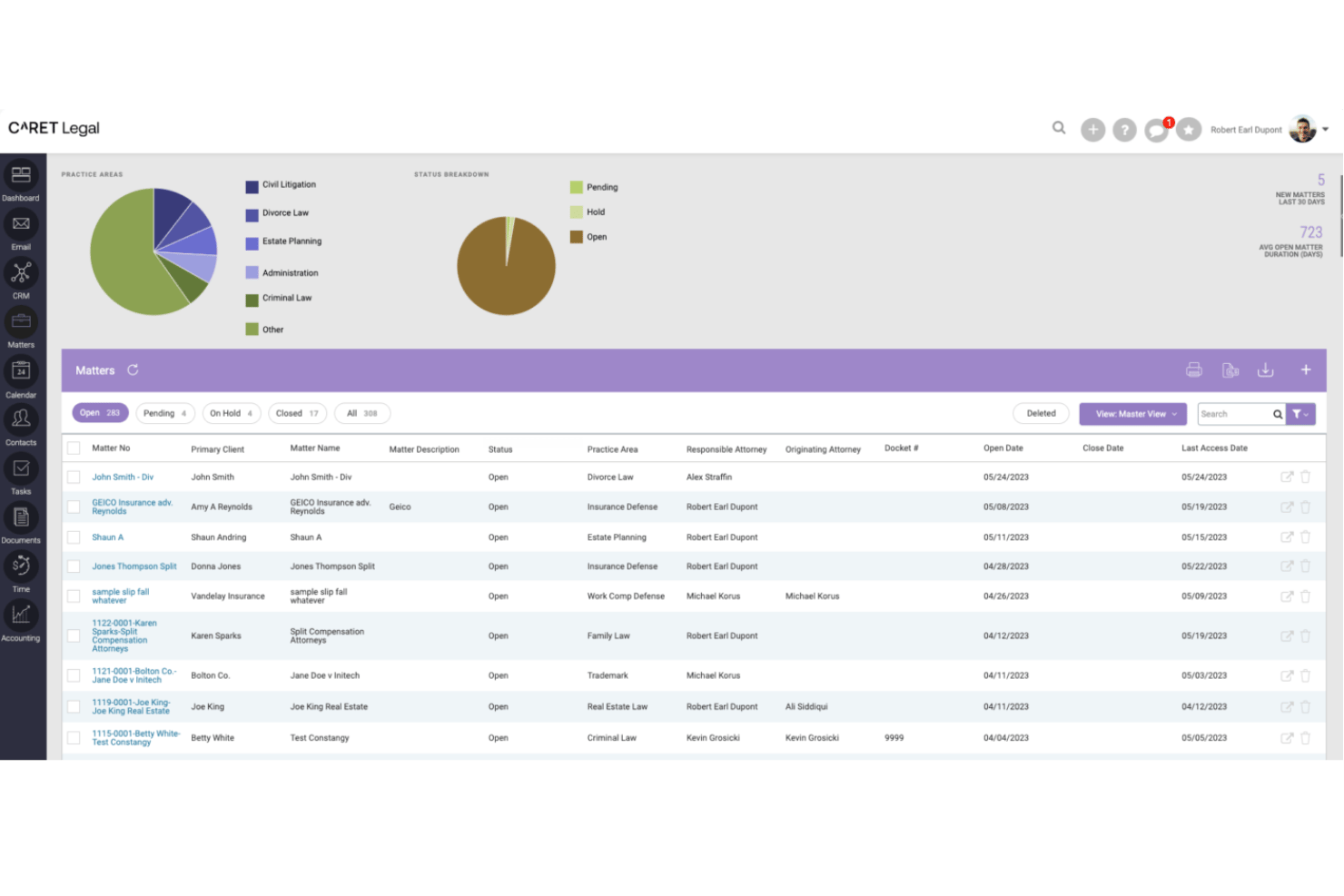
CARET Legal is a legal practice management platform that combines matter tracking, automated workflows, court-deadline calculation, billing, LEDES invoicing, conflict checking, and document management for law firms.
Who Is CARET Legal Best For?
CARET Legal suits law firms that need court-deadline-driven matter tracking built into their billing, workflows, and document management.
Why I Picked CARET Legal
I picked CARET Legal as one of the best because its Court Rules engine does something I haven't seen handled this cleanly elsewhere: it calculates matter deadlines directly from your selected venue and rule set, then reschedules dependent events automatically when a trigger date changes. Pair that with workflow templates that support dependencies, parallel steps, and matter-role assignment, and you get a system where court-driven timelines actually flow into day-to-day task coordination without manual reconciliation.
CARET Legal Key Features
- LEDES task code budgeting: Track matter spend by UTBMS activity codes to monitor billing against budget thresholds at the matter level.
- Enhanced conflict check: Search leads and matters using Boolean syntax with AND, OR, NOT, and wildcards, with results linked directly to records.
- Group-based matter permissions: Assign user groups to specific matters so only authorized staff can view or access sensitive matter content.
- Client portal with invoice delivery: Share documents and send invoices directly to clients through a branded portal, with credit card payment supported via CARET Pay.
CARET Legal Integrations
CARET Legal lists integrations with NetDocuments, Microsoft 365, Google Workspace, QuickBooks Online, Lawmatics, and CARET Pay. It also offers an API for custom integrations.
Pros and Cons
Pros:
- Matter records centralize documents, billing, communications
- Workflow automation clarifies task ownership
- Court-rule dates reschedule dependent events automatically
Cons:
- Email and calendar sync glitches disrupt work
- Reviewers report accounting and invoicing bugs

CosmoLex
Best for built-in trust accounting compliance
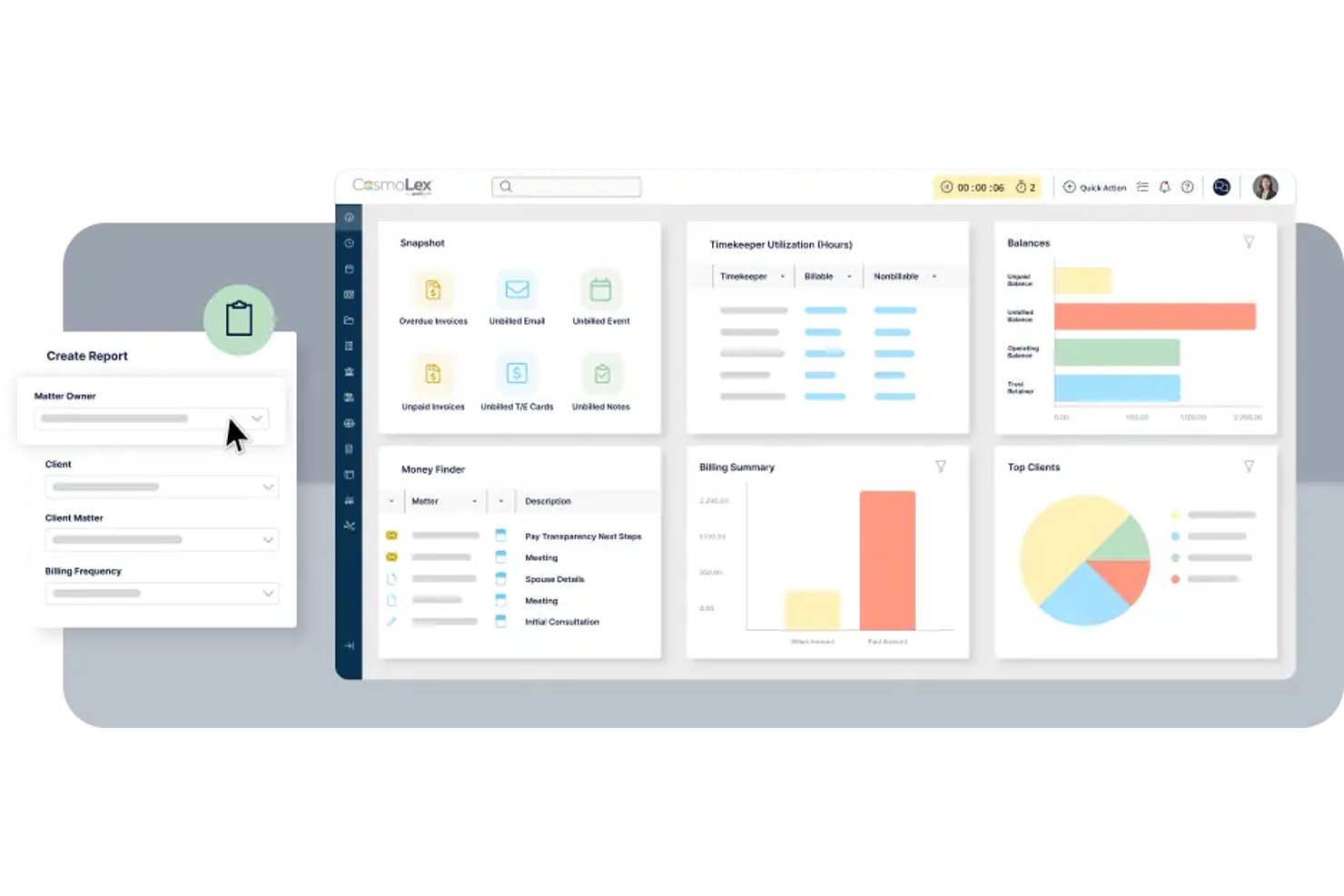
CosmoLex is a cloud-based legal practice management platform that combines matter management, task workflows, time tracking, billing, and firm accounting—including trust accounting—in a single system for law firms.
Who Is CosmoLex Best For?
CosmoLex suits small to mid-sized law firms that need billing, trust accounting, and matter management in one place without stitching together separate tools.
Why I Picked CosmoLex
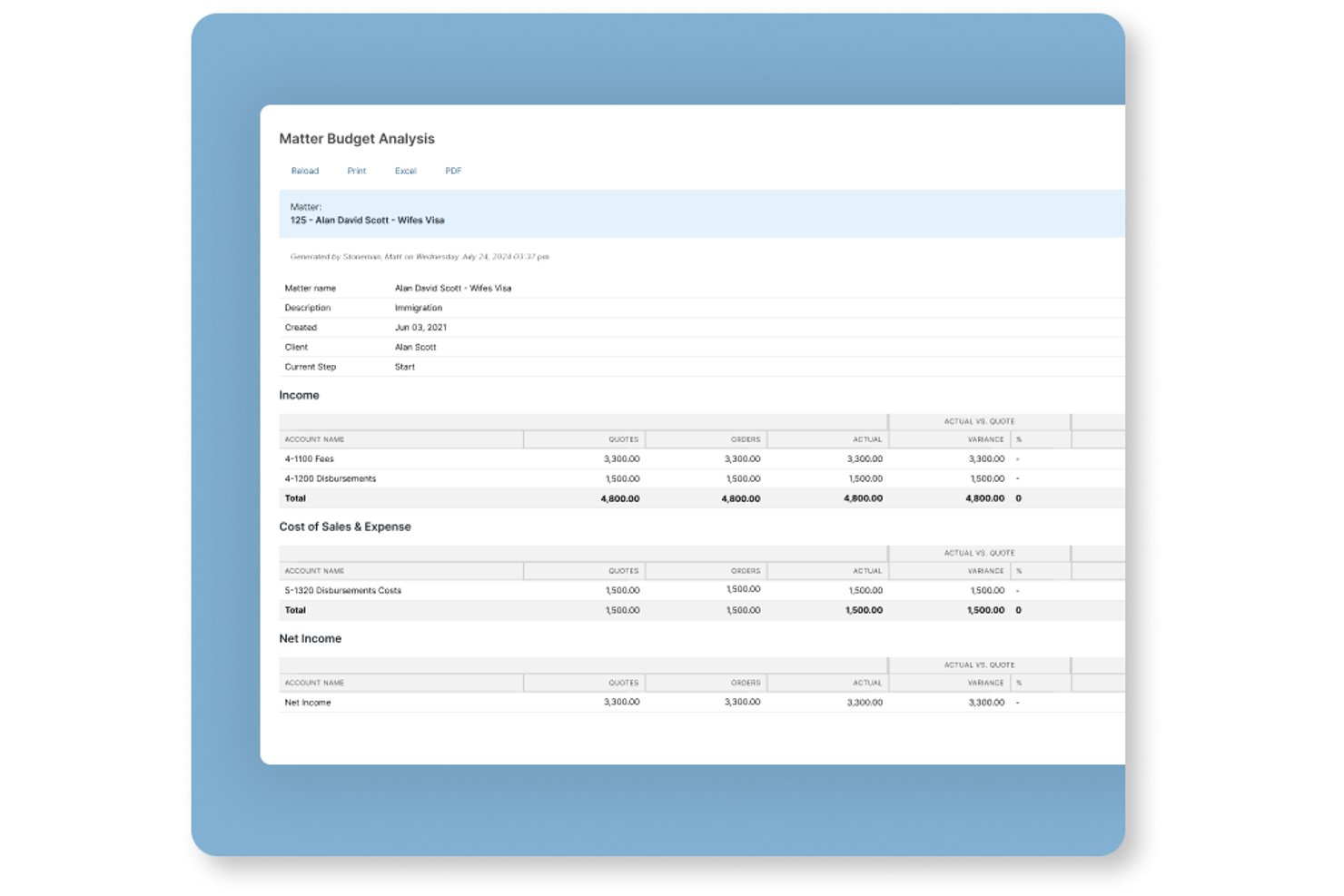
I picked CosmoLex as one of the best because trust accounting compliance is baked directly into the platform rather than bolted on as an afterthought. Every client retainer flows into a separate trust ledger with automatic bookkeeping, and the three-way reconciliation reports are built to satisfy bar compliance requirements without manual prep work. I also like that matter budgets connect directly to billing data, so you can see fee performance by timekeeper or matter type without exporting to a separate tool.
CosmoLex Key Features
- Workflow automation: Create and save practice-area workflows with task dependencies, assignees, priorities, and calculated due dates, then apply them to any matter.
- Matter status boards: View and manage deadlines and matter progress across active matters from a visual status board.
- Financial productivity reporting: Track billed fees, collected amounts, hours worked, effective rates, and billing productivity by timekeeper, matter owner, or area of law.
- Conflict check tool: Search contacts to surface potential conflicts and their relationships to other matters before opening a new client file.
CosmoLex Integrations
CosmoLex offers integrations with Microsoft 365, Microsoft Outlook, Google Calendar, NetDocuments, Dropbox, OneDrive, Google Drive, Box, QuickBooks Online, and LawPay. It also provides a REST API and supports Zapier.
Pros and Cons
Pros:
- Matter reports connect fees, hours, and timekeepers
- Trust ledgers and three-way reconciliations stay connected
- Repeatable workflows generate assigned, dependency-aware tasks
Cons:
- Reviewers report limited analysis and forecasting reports
- No capacity views for balancing attorney workloads

Best for matter-specific workflow templates
Actionstep is a law firm practice management platform that combines matter management, workflow automation, document handling, time tracking, billing, and client portal tools in one system.
Who Is Actionstep Best For?
Actionstep is a strong fit for mid-sized law firms that want to build and automate matter-specific workflows across multiple practice areas from a single platform.
Why I Picked Actionstep
I picked Actionstep as one of the best because its matter-type system lets you build fully customized workflow templates for each practice area, right down to task sequences, folder structures, document templates, and billing arrangements. One Capterra reviewer described running over 50 workflows with checklists and deadlines to standardize tax-litigation processes, which shows how deep the templating goes. I also like that certified implementation partners tailor those configurations to your firm's specific workflows before you go live.
Actionstep Key Features
- Client portal: Share matter updates, documents, and billing with clients through a dedicated portal built into the platform.
- Time tracking: Run multiple timers simultaneously and record notes against matters from different screens or the mobile app.
- Conflict check: Scan for potential conflicts of interest directly within the platform before opening a new matter.
- Resource and workload reporting: View utilization and productivity data across your team to monitor workload and identify bottlenecks.
Actionstep Integrations
Actionstep offers native integrations with Microsoft Outlook and Office 365, Gmail, iManage, InfoTrack Australia, and LawToolBox, plus marketplace integrations such as First AML and Lexidesk. It provides a REST API, REST Hooks, and Zapier for custom connectivity.
Pros and Cons
Pros:
- Client portal simplifies document exchange
- Centralized matter records improve team visibility
- Matter-specific workflows automate repeatable tasks
Cons:
- Workflow configuration takes time and effort
- Reporting dashboards can be hard to customize

HighQ
Best for external counsel collaboration at scale
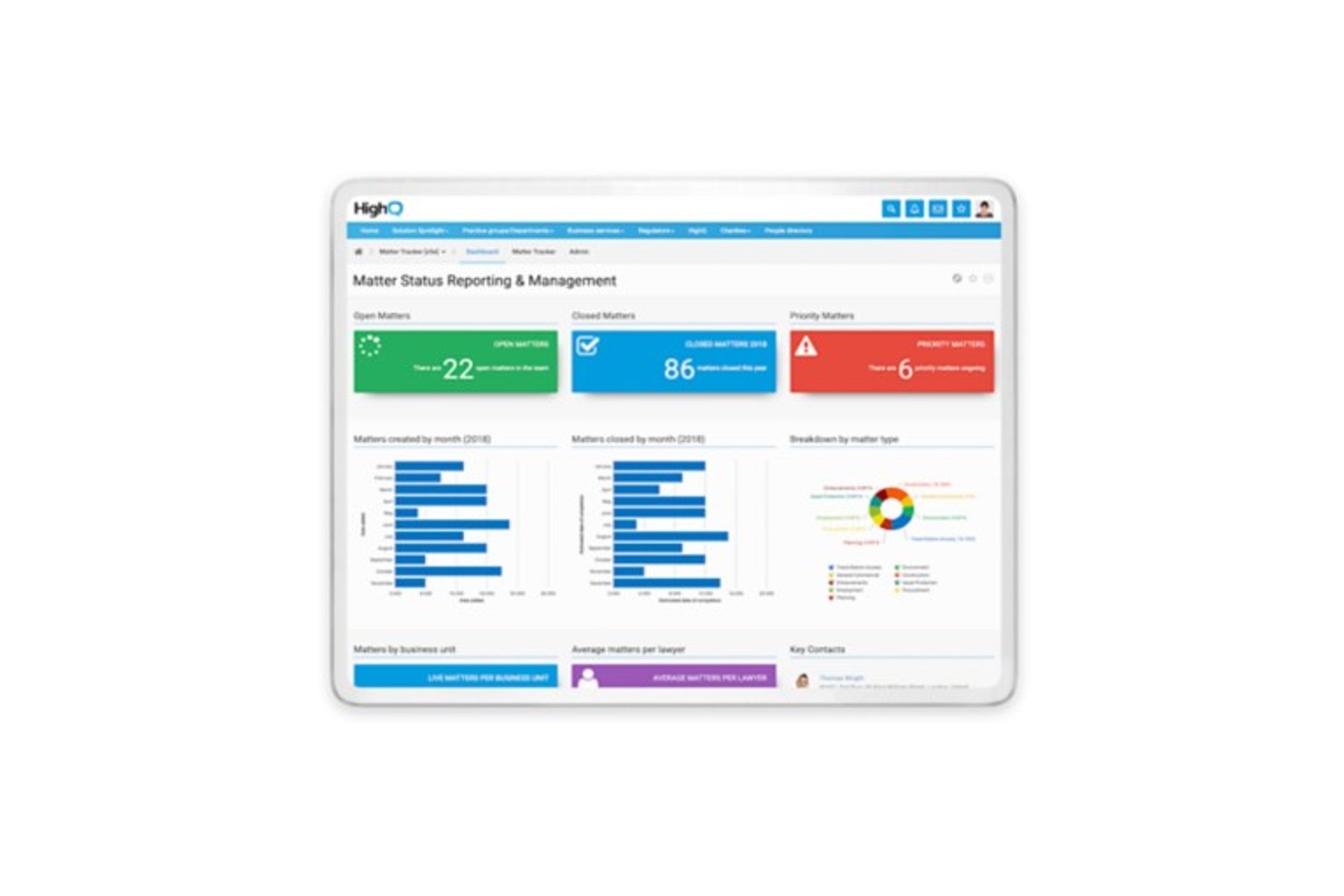
HighQ is a cloud-based legal collaboration platform from Thomson Reuters that combines secure document sharing, client portals, matter management, task tracking, and workflow automation for law firms and corporate legal departments.
Who Is HighQ Best For?
HighQ fits corporate legal departments and law firms that need to coordinate large volumes of matters and documents with outside counsel across a secure, centralized platform.
Why I Picked HighQ
I've included HighQ in my top picks because it's one of the few platforms built specifically around the reality of coordinating legal work across internal teams and outside counsel at scale. Client portals give external counsel secure, real-time access to matter status and shared documents, while the Extranet model bundles five external user seats per internal licence. I also like the site template library, which lets teams spin up structured matter sites with task lists, folder hierarchies, and workflow rules already in place.
HighQ Key Features
- Spend-vs-budget dashboards: Monitor legal spend against budgets in real time, with automated alerts when projects approach or exceed thresholds.
- Virtual data rooms: Store, categorize, and collaborate on deal and matter documents in a centralized, secure environment.
- Granular user permissions: Control access at the site, folder, and document level, with activity tracking and digital rights management across internal and external users.
- iSheets and smart forms: Capture and manage structured matter data using configurable spreadsheet-style data sheets and intake forms built directly into matter sites.
HighQ Integrations
HighQ documents integrations with SharePoint, iManage, NetDocuments, eDocs, Microsoft Office, Google Workspace, Active Directory, and SQL through connectors and partner solutions. It also provides an API for custom integrations.
Pros and Cons
Pros:
- Dashboards track matter status, spend, and risk
- Reusable templates standardize recurring legal workflows
- Secure portals coordinate outside counsel on matters
Cons:
- Complex setup and dated interface slow adoption
- AFA tracking and budget variance remain undocumented

Smartsheet
Best for spreadsheet-style matter tracking
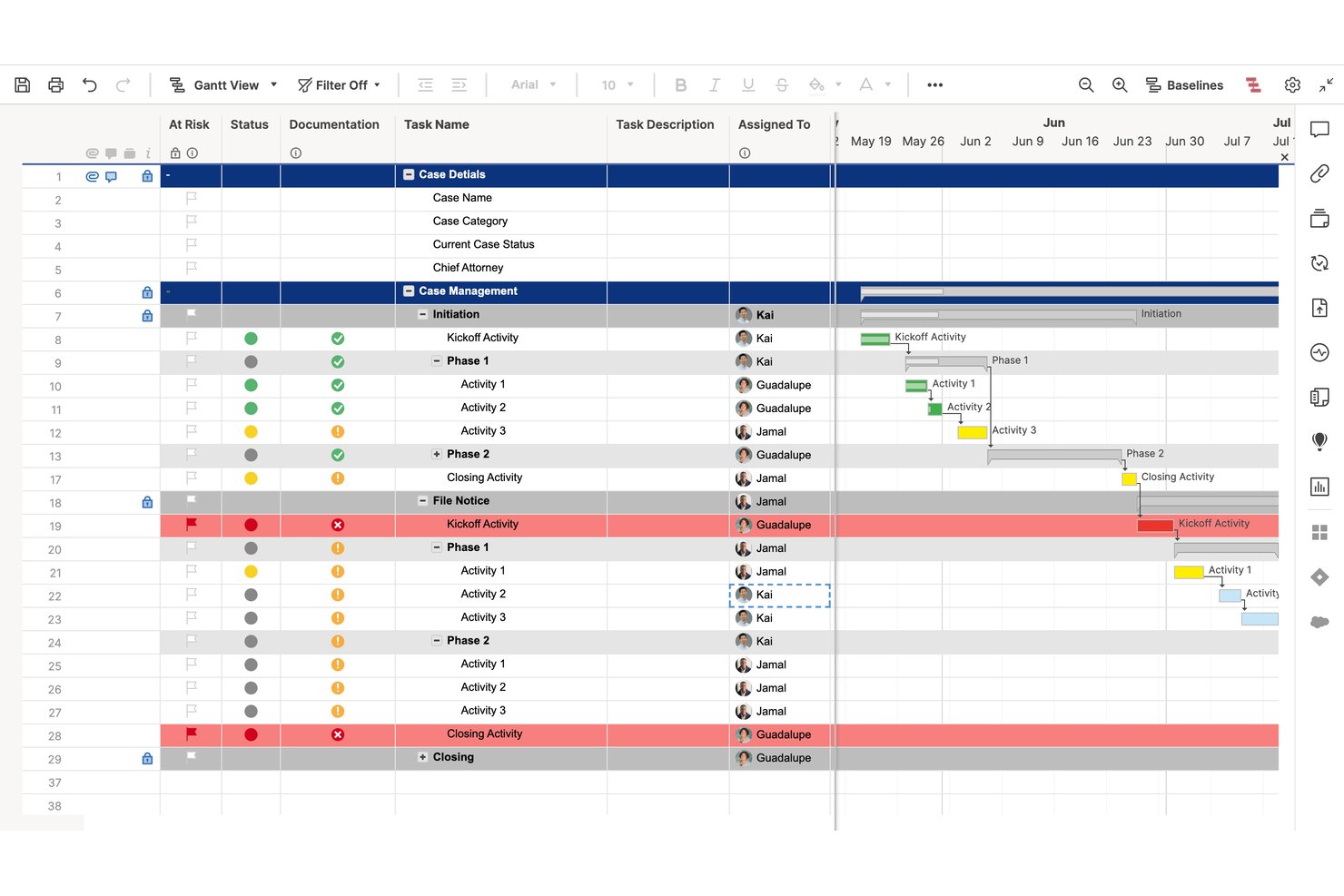
Smartsheet is a spreadsheet-style work management platform that combines project tracking, task management, automated workflows, resource allocation, and reporting across Gantt, grid, board, and timeline views—with legal case management templates built in.
Who Is Smartsheet Best For?
Smartsheet suits legal teams and law firms that already work in spreadsheets and want to manage matters, track workloads, and automate workflows without switching to an unfamiliar interface.
Why I Picked Smartsheet
I've included Smartsheet in my top picks because legal teams already living in spreadsheets don't have to relearn how to work—they just start tracking matters in a grid they already understand. The Legal Case Management Template structures case phases, associated tasks, start and due dates, and completion percentages out of the box, so you're not building from scratch. I also like that Resource Management layers workload heatmaps and capacity planning on top of that familiar grid, giving you attorney-level visibility across multiple active matters at once.
Smartsheet Key Features
- Legal Case Management Template: A pre-built template that tracks case phases, start and due dates, task completion percentages, and document storage in one shared grid.
- Automated workflow builder: A trigger-and-condition workflow tool that automates reminders, approval requests, row moves, and status alerts across active matters.
- Granular permission levels: Sheet-level access controls that let you set viewer, commenter, editor, or admin permissions for each team member or external collaborator.
- Multi-sheet reporting: A report builder that pulls data from multiple sheets into a single consolidated view for cross-matter status tracking.
Smartsheet Integrations
Smartsheet offers 175+ integrations, including Jira Software, Power BI, Salesforce, Slack, Microsoft Teams, Google Drive, and DocuSign. It also provides an API for custom integrations and Data Shuttle for scheduled CSV and XLSX imports.
Pros and Cons
Pros:
- Shared dashboards clarify attorney workloads
- Legal templates structure case phases and tasks
- Spreadsheet-style matter tracking feels familiar
Cons:
- No jurisdiction-specific court deadline engine
- No automated matter profitability analysis
New Product Updates from Smartsheet

Smartsheet Adds Non-Plan User Management in Admin Center
Smartsheet adds a Non plan users tab to the Seat types and true-up page in Admin Center. This lets system admins review non-plan users and add them to the plan or remove them from the organization in one place. For more information, visit Smartsheet’s official site.
Outro software de gestão de projetos jurídicos
Eis algumas ferramentas adicionais de gestão de projetos jurídicos que não entraram na minha lista principal. Consulte-as se não encontrou acima o que procura.
- Zoho Projects
For Zoho ecosystem budget tracking
- monday AI Workspace
For AI-driven project collaboration
- Onit SimpleLegal
For corporate legal spend and matter ops
- Clio Manage
For cloud-based matter and client portals
- Litify
For high-volume practice workflow automation
- Mitratech TeamConnect
For enterprise legal spend and matter control


Análises relacionadas de software de gestão de projetos
Se ainda não encontrou o que procura, consulte estas ferramentas relacionadas de gestão de projetos que testámos e analisámos.
- Software de gestão de projetos
- Software de gestão de recursos
- Software de automatização de fluxos de trabalho
- Software de gestão de tarefas
- Ferramentas de colaboração
- Criador de gráficos de Gantt
How I Evaluate Legal Project Management Software
I split my evaluation into three parts, with the most weight on core functionality: tracking matter budgets against spend and assigning tasks with deadlines and status. Next, I look for standout features such as court-rule deadline calculation. Finally, I consider beyond-feature factors like onboarding, support, and pricing value.
Core Functionality (Table Stakes For This List)
When I'm selecting tools for my list, I score each one on a scale from 0 (does not offer the functionality) to 5 (excels in this area) for each core functionality listed below. I then convert the total into a percentage to help assess each tool's overall fit, with extra weight on any functionalities I’ve deemed essential.
- Matter Tracking (Essential): I look for matter timelines, phases, milestones, and task links that make progress visible across complex work.
- Budget & Fee Tracking (Essential): I assess whether teams can compare budgets with actual costs and track fixed fees or AFAs as work progresses.
- Task & Workflow Management: I check for assigned owners, deadlines, dependencies, and status updates across repeatable work such as contract reviews.
- Resource & Workload Planning: I look for views of assignments across active matters to help legal teams spot overloaded staff and rebalance work.
- Legal Workflow Templates: I consider whether editable templates cover recurring legal processes, so teams can standardize steps without losing flexibility.
- Reporting & Analytics: I evaluate whether reports show matter status, budget performance, and workload trends across teams.
Once I have a list of tools that meet the criteria, I consider what sets each platform apart.
Differentiating Factors (What Sets Vendors Apart)
Here's how I compare and contrast different vendors:
Standout Features
I check whether a tool includes a court rules engine that auto-calculates filing and response deadlines based on jurisdiction-specific procedural rules—missing a statutory deadline is a risk no workflow board can fix. I also evaluate conflict check support during matter intake, since flagging overlapping parties early prevents ethical issues downstream. Native DMS integration with systems like iManage or NetDocuments matters too; generic file storage won't cut it when teams need version-controlled documents tied directly to matter records.
Beyond Features
I check whether a vendor offers ethical walls and granular access controls, since firms handling litigation need to segregate sensitive matter data from unauthorized staff. Integration with existing practice management and e-billing systems matters too—duplicate data entry between timekeeping and project tracking kills adoption. I also evaluate onboarding and change management support, because legal teams often resist new workflows and vendor-led training directly affects how quickly a rollout sticks.
Como escolher software de gestão de projetos jurídicos
É fácil perder-se em listas extensas de funcionalidades e estruturas de preços complexas. Para o ajudar a manter o foco enquanto percorre o seu processo específico de seleção de software, eis uma lista de verificação dos fatores a ter em conta:
| Fator | O que considerar |
|---|---|
| Escalabilidade | O software acompanhará o crescimento do seu escritório? Certifique-se de que consegue lidar com um aumento do volume de processos e com a expansão da equipa. |
| Integrações | Verifique se se liga às ferramentas que já utiliza, como sistemas de faturação e de gestão de documentos. |
| Personalização | Pode adaptar os fluxos de trabalho e os painéis de controlo para corresponderem aos processos e às preferências do seu escritório? |
| Facilidade de utilização | O software é intuitivo para a sua equipa? Procure uma interface fácil de utilizar que minimize a necessidade de formação. |
| Orçamento | Enquadra-se no seu plano financeiro? Considere tanto os custos iniciais como quaisquer taxas de subscrição recorrentes. |
| Medidas de segurança | Os dados dos seus clientes e os ficheiros dos processos estão protegidos? Procure encriptação e conformidade com as normas jurídicas. |
| Suporte | Terá acesso a suporte fiável? Considere a disponibilidade do serviço de apoio ao cliente e das opções de formação. |
| Relatórios | Oferece funcionalidades abrangentes de elaboração de relatórios? Certifique-se de que consegue acompanhar facilmente o progresso e os resultados dos processos. |
Tendências do software de gestão de projetos jurídicos
Eis algumas das tendências mais relevantes que estão a moldar o software de gestão de projetos jurídicos.
- Análise com recurso a IA: O software de gestão de projetos jurídicos disponibiliza cada vez mais funcionalidades de IA, como análises avançadas e informações preditivas. Estes algoritmos de IA analisam dados históricos de processos para identificar padrões, prever resultados e otimizar a alocação de recursos.
- Melhores ferramentas de colaboração: As funcionalidades de colaboração do software de gestão de projetos jurídicos incentivam a comunicação e o trabalho em equipa entre profissionais do setor jurídico. Os fornecedores disponibilizam funcionalidades cada vez mais sofisticadas de edição de documentos em tempo real, atribuição de tarefas e conversação.
- Integração com ferramentas de pesquisa jurídica: O software de gestão de projetos jurídicos integra-se cada vez mais com plataformas de pesquisa jurídica para simplificar o processo de pesquisa e melhorar a sua tomada de decisões. Pode tomar decisões mais informadas ao aceder a jurisprudência, legislação e regulamentação relevantes no software.
- Acessibilidade em dispositivos móveis: Com a crescente utilização de dispositivos móveis no setor jurídico, o software de gestão de projetos jurídicos disponibiliza frequentemente aplicações móveis e interfaces Web responsivas. Isto permite-lhe gerir processos, comunicar com clientes e acompanhar horas faturáveis em qualquer lugar.
- Melhorias na cibersegurança: À medida que as preocupações com a segurança dos dados continuam a aumentar, os fornecedores de software de gestão de projetos jurídicos estão a implementar medidas de cibersegurança robustas para proteger informações sensíveis dos clientes. Funcionalidades como comunicações encriptadas, autenticação multifator e armazenamento seguro de documentos ajudam a garantir que os dados confidenciais permanecem protegidos.
O que é o software de gestão de projetos jurídicos?
O software de gestão de projetos jurídicos é uma plataforma centralizada para organizar informações relacionadas com processos, acompanhar prazos e marcos e colaborar com membros da equipa e clientes.
Os profissionais do setor jurídico e os escritórios de advogados utilizam-no para gerir e supervisionar projetos e processos jurídicos, comunicar com clientes, organizar documentos e atribuir tarefas. O software é essencial para simplificar os fluxos de trabalho, melhorar a produtividade e garantir que os projetos jurídicos são concluídos de forma eficaz e dentro dos prazos definidos.
Funcionalidades do software de gestão de projetos jurídicos
Eis as principais funcionalidades a procurar num software de gestão de projetos jurídicos.
- Gestão de processos e documentos: Permite-lhe gerir processos desde o início até à resolução, bem como melhorar a produtividade e a organização.
- Ferramentas de comunicação com clientes: As funcionalidades centralizadas de comunicação e partilha de documentos ajudam a manter a satisfação e a transparência para com os clientes.
- Registo do tempo: Permite uma faturação precisa, uma compensação justa pelos serviços prestados e uma maior rentabilidade.
- Gestão e armazenamento de documentos: Simplifica a recuperação de documentos, promove a colaboração entre os membros da equipa e ajuda a manter a conformidade com os regulamentos de segurança dos dados.
- Faturação e emissão de faturas: Ajuda a melhorar a gestão do fluxo de caixa, a minimizar erros de faturação e a melhorar a saúde financeira do seu escritório.
- Gestão de calendários e prazos: Ajuda a concluir tarefas atempadamente e a manter uma progressão eficiente dos processos.
- Acompanhamento e atribuição de tarefas: Esta funcionalidade melhora a responsabilização e a priorização de tarefas.
- Relatórios e análises: Permite-lhe tomar decisões com base em dados concretos, identificar áreas a melhorar e otimizar as operações do escritório.
- Acessibilidade em dispositivos móveis: Permite-lhe gerir tarefas a partir de qualquer lugar, melhorando a flexibilidade e a produtividade.
- Modelos: Estruturas ou formatos pré-concebidos que podem ser utilizados como ponto de partida para novos documentos ou projetos.
- Linhas cronológicas: Representações visuais da ordem cronológica dos eventos ou tarefas num projeto ajudam-no a manter-se organizado.
- Interface intuitiva: Uma interface fácil de utilizar e navegar promove um ambiente de trabalho produtivo.
- Notificações: Os alertas que informam os utilizadores sobre eventos ou atualizações importantes podem ajudar no planeamento e na organização.
- Planeamento de projetos: Deve ser possível definir o âmbito, os objetivos e as etapas necessárias para concluir um projeto. Isto mantém os prazos e os projetos no bom caminho.
- Atualizações do estado: O software deve ajudá-lo a fornecer atualizações regulares sobre o progresso das tarefas ou dos projetos, para que possa manter todas as partes interessadas informadas.
- Listas de tarefas: Incluem listas de tarefas que têm de ser concluídas por si e pela sua equipa.
- Automatização de fluxos de trabalho: O software deve permitir-lhe automatizar tarefas repetitivas nos seus fluxos de trabalho para acelerar os processos.
Vantagens do software de gestão de projetos jurídicos
Eis as principais vantagens da implementação de um software de gestão de projetos jurídicos.
- Organização melhorada: O software de gestão de projetos jurídicos ajuda a manter a organização e a cumprir prazos, centralizando as informações dos processos, os prazos, os documentos e as comunicações.
- Colaboração melhorada: O software incentiva a colaboração entre os membros da equipa, permitindo trabalhar em conjunto de forma eficaz em assuntos jurídicos, partilhar documentos e comunicar atualizações em tempo real.
- Maior produtividade: Com funcionalidades como a atribuição de tarefas, os fluxos de trabalho automatizados e o registo do tempo, o software de gestão de projetos jurídicos ajuda a gerir a carga de trabalho de forma mais eficiente, concluir tarefas mais rapidamente e obter melhores resultados para os clientes.
- Melhor comunicação com os clientes: O software de gestão de projetos jurídicos permite uma comunicação transparente com os clientes, proporcionando-lhes acesso a atualizações dos processos, documentos e relatórios de progresso. Isto promove relações mais sólidas com os clientes e gera confiança.
- Melhor conformidade: O software de gestão de projetos jurídicos ajuda as organizações a manter a conformidade com os requisitos regulamentares. Também reduz o risco de erros ou omissões, garantindo que todos os processos jurídicos e a documentação são geridos corretamente.
Custos e preços do software de gestão de projetos jurídicos
Apresento abaixo as opções de planos, os preços e as funcionalidades comuns.
| Tipo de plano | Preço médio | Funcionalidades comuns |
|---|---|---|
| Gratuito | $0 | Gestão básica de tarefas, armazenamento limitado de documentos |
| Padrão | $30/utilizador/mês | Gestão de tarefas, armazenamento de documentos, ferramentas de colaboração |
| Profissional | $50/utilizador/mês | Gestão avançada de tarefas, automatização de documentos, elaboração de relatórios |
| Empresarial | Preços personalizados | Fluxos de trabalho personalizáveis, elaboração avançada de relatórios, acesso à API |
Perguntas frequentes sobre o software de gestão de projetos jurídicos
O software de gestão de projetos jurídicos é adequado para profissionais em prática individual ou pequenos escritórios de advogados?
Sim, muitas soluções de software de gestão de projetos jurídicos oferecem planos adaptados a profissionais em prática individual e pequenos escritórios de advogados. Estas soluções disponibilizam funcionalidades essenciais a preços acessíveis, para responder às necessidades e requisitos específicos de equipas mais pequenas.
Em que difere o software de gestão de projetos jurídicos do software genérico de gestão de projetos?
Embora o software genérico de gestão de projetos possa oferecer funcionalidades abrangentes adequadas a vários setores, o software de gestão de projetos jurídicos foi concebido especificamente para responder às necessidades e aos fluxos de trabalho únicos dos profissionais do setor jurídico. Oferece funcionalidades especializadas, como a gestão de documentos jurídicos e ferramentas de comunicação com os clientes.
O software de gestão de projetos jurídicos pode ser integrado com outro software jurídico?
Sim, muitas soluções de software de gestão de projetos jurídicos oferecem integrações com aplicações de software jurídico populares, como ferramentas de faturação jurídica, gestão de escritórios e descoberta eletrónica. Isto simplifica a troca de dados e a automatização dos fluxos de trabalho.
O software de gestão de projetos jurídicos é baseado na nuvem ou instalado localmente?
A maioria das soluções modernas de software de gestão de projetos jurídicos é baseada na nuvem, permitindo aceder aos dados e trabalhar a partir de qualquer lugar com ligação à Internet. No entanto, algumas soluções podem disponibilizar opções de instalação local para organizações com requisitos específicos de segurança ou conformidade.
Como escolher o software de gestão de projetos jurídicos adequado para o meu escritório de advogados?
Ao escolher uma solução de software de gestão de projetos jurídicos, considere fatores como a dimensão e o orçamento do escritório, as funcionalidades específicas de que necessita, a facilidade de utilização, o apoio ao cliente e as capacidades de integração. Também é útil aproveitar os períodos de teste gratuitos ou as demonstrações para testar o software antes de tomar uma decisão.