

Os 10 Melhores Softwares de Gestão de Projetos de Contabilidade para 2026

10 Melhor software de gestão de projetos de contabilidade: seleção


O software de gestão de projetos de contabilidade permite-lhe acompanhar os dados financeiros, os orçamentos e o progresso dos projetos em tempo real, para que possa manter os orçamentos e os calendários sob controlo e tomar decisões fundamentadas do início ao fim. Sem a ferramenta certa, não terá uma visão clara dos custos, das faturas e da rentabilidade dos projetos, e é provável que o seu projeto ultrapasse o orçamento.
Utilizei os meus mais de 15 anos de experiência na gestão de projetos para testar e avaliar, na prática, dezenas de ferramentas de software de gestão de projetos de contabilidade. Com tantas opções disponíveis, escolher a mais adequada pode rapidamente tornar-se avassalador.
Leia abaixo a minha análise de cada ferramenta, das principais funcionalidades e dos casos de utilização, para encontrar a ferramenta certa que o ajude a acompanhar a utilização do orçamento, as despesas dos projetos e a faturação, para que possa manter os projetos (e a sua organização) rentáveis.
Why Trust Our Software Recommendations
Our team has been testing and reviewing software since 2012. As project managers ourselves, we know how difficult—and important—it is to choose the right software.
For this guide, we evaluated tools using hands-on testing and independent research, scoring tools using our selection criteria. We also draw on insights from industry thought leaders and practicing project management experts.
Our reviews reflect our human editorial judgment, not a sales pitch.
Expert reviewers:
Tabela comparativa de software de gestão de projetos de contabilidade
Esta tabela comparativa resume os detalhes de preços das minhas principais escolhas de software de gestão de projetos de contabilidade:
| Tool | Best For | Trial Info | Price | ||
|---|---|---|---|---|---|
| 1 | Best for invoicing and billing | 14-day free trial | From $17/user/month | Website | |
| 2 | Best with AI-powered profitability insights | 14-day free trial | From $10/user/month (billed annually) | Website | |
| 3 | Best for managing accounting firm client work | Free demo available | From $79/user/month | Website | |
| 4 | Best for tracking expenses vs total budget | Free plan + 14-day free trial + free demo available | From $9.99/user/month (billed annually) | Website | |
| 5 | Best for tracking multiple accounts | Free demo available | From £1,200/month | Website | |
| 6 | Best for enterprises | Free demo available | Pricing upon request | Website | |
| 7 | Best for client and resource management features | Free plan + free trial + free demo available | From $39/user/month | Website | |
| 8 | Best for construction job costing and GL sync | Not available | Pricing upon request | Website | |
| 9 | Best for WIP visibility at accounting firms | Free demo available | From $20/user/month | Website | |
| 10 | Best for professional services automation | Free demo available | Pricing upon request | Website |


Análises do melhor software de gestão de projetos de contabilidade
Apresentamos abaixo resumos detalhados das minhas escolhas para o melhor software de gestão de projetos de contabilidade. Abordo as principais funcionalidades, vantagens e desvantagens, integrações e casos de utilização ideais de cada ferramenta, para o ajudar a encontrar a opção mais adequada.

Scoro
Best for invoicing and billing

Scoro is a versatile work management software designed to enhance business operations by integrating project management, CRM, billing, and reporting into one platform.
Why I picked Scoro: The software offers real-time financial insights, allowing users to track project profitability and manage budgets effectively. Its automated invoicing and expense tracking capabilities simplify the financial aspects of project management, ensuring accuracy and reducing manual work.
Furthermore, Scoro’s integrated billing and cost management features are specifically beneficial for project management. The software allows for tracking of billable and non-billable hours, ensuring accurate client billing. Its cost management tools also help monitor and control project expenses, preventing budget overruns.
Scoro Standout Features & Integrations
Features include reporting and analytics for your agency's operations as a whole (rather than just per-project), which provides insights into progress, results, and future outlook in financials and agency performance. The tool also includes automatic retainer invoicing so you get paid faster and stay profitable.
Integrations include Google Calendar, Xero, QuickBooks, Sage Intacct, Exact Online, Expensify, Stripe, Jira, HubSpot, Salesforce, Google Drive, Dropbox, Okta, Azure AD, and Zapier.
Pros and Cons
Pros:
- Comprehensive features for end-to-end business management
- Good resource management capabilities
- Real-time tracking of projects and team progress
Cons:
- Mobile app could be more robust
- Customization options may present an initial learning curve
New Product Updates from Scoro

Scoro Adds Time Mobile App and ELI Improvements
Scoro adds the Scoro Time mobile app for iOS/Android to track time anywhere and expands ELI with attachments, smarter filtering, and trigger-based actions. For more information, visit Scoro's official site.

Best with AI-powered profitability insights
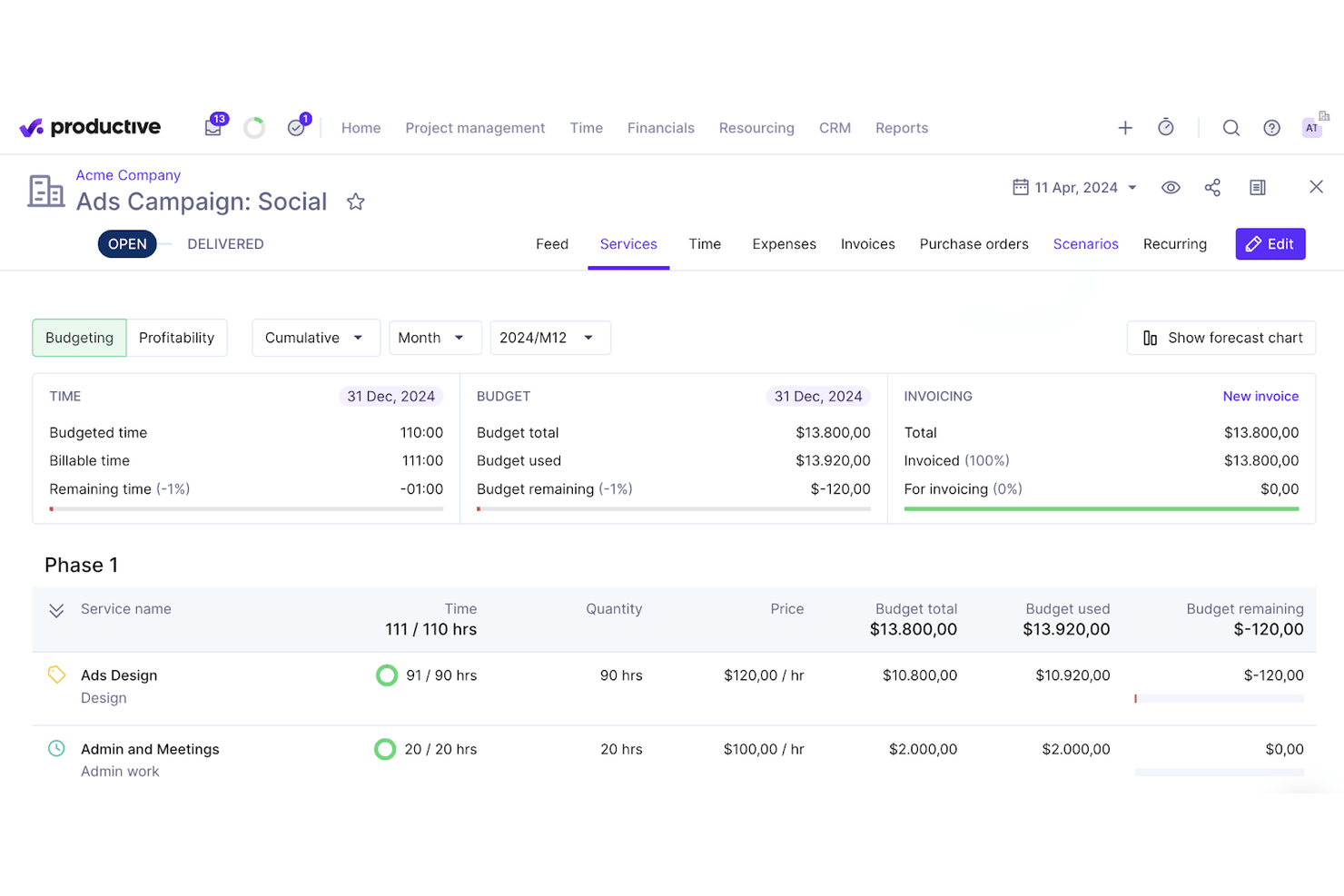
Productive is a professional services automation platform that combines project management, resource planning, time tracking, budgeting, invoicing, and AI-powered financial reporting in a single system built for service-based firms.
Who Is Productive Best For?
Productive is a strong fit for mid-market accounting firms and client accounting services practices managing multiple client engagements, billable staff, and project budgets simultaneously.
Why I Picked Productive
Productive earns its spot on my shortlist because of how tightly it connects time, budget, and profitability data at the project level. I love that its AI Reporting surfaces margin insights by client, service, or resource without me having to build custom reports from scratch. The Scenario Builder lets me model revenue forecasts before committing to staffing decisions, so I can see the financial impact of adding or removing headcount on a client account before it happens.
Productive Key Features
- Resource planning: Assign staff, track availability, and adjust workloads across multiple client projects.
- Time off management: Monitor team leave and automate approvals to ensure accurate capacity planning.
- Billing and invoicing: Generate client-ready invoices from tracked billable hours and expenses.
- Advanced reporting: Build and export custom project, financial, and utilization reports for firm-wide insights.
Productive Integrations
Productive offers over 15 native integrations, including QuickBooks Online, Xero, Sage, Slack, Jira, Google Calendar, HubSpot CRM, Personio, BambooHR, Gusto, Rippling, and Microsoft Outlook. An API is available for custom integrations.
Pros and Cons
Pros:
- Built-in client portal for document sharing
- AI-powered profitability and revenue analytics
- Resource planning with real-time utilization charts
Cons:
- Limited tax preparation functionality
- No prebuilt accounting workflow templates
New Product Updates from Productive
Productive Adds Voice Dictation, Slack Connector, Proposals, and Overtime
Productive adds voice dictation, a Slack Connector, proposal controls, and overtime tracking. These updates support faster AI interactions, client proposals, and time management. For more information, visit Productive’s official site.

Karbon
Best for managing accounting firm client work
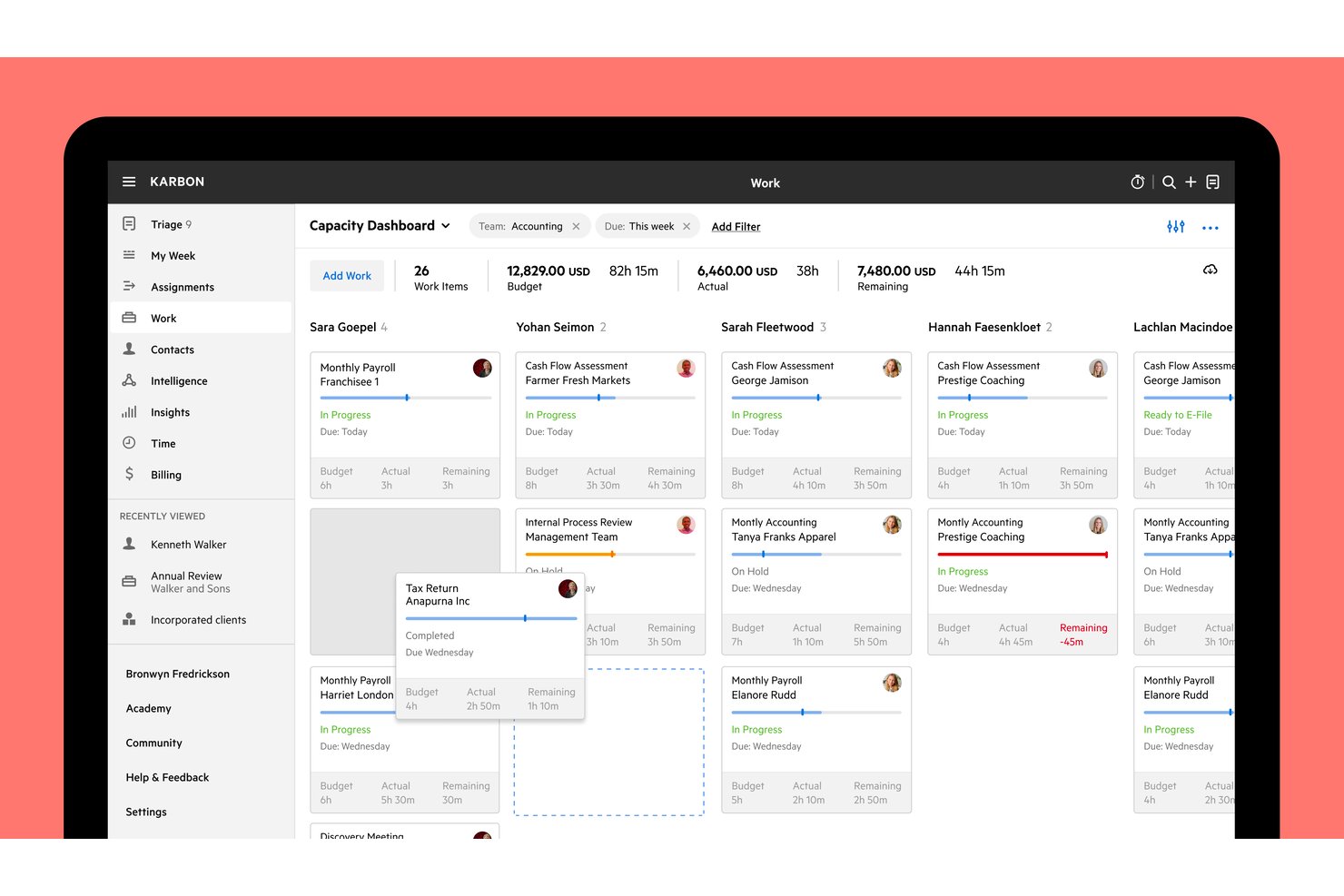
Karbon is accounting practice management software built specifically for accounting firms, combining client work tracking, integrated email management, time and billing, workflow automation, and WIP reporting in one platform.
Who Is Karbon Best For?
Karbon is built for accounting firms that need to manage client work, billing, and team workflows in one place.
Why I Picked Karbon
Karbon earns its spot on my shortlist because it's purpose-built around how accounting firms actually run client work. I love that WIP and realization reporting live inside the same workspace as project tracking, so I can see which engagements are over budget and what's still unbilled without switching tools. Recurring work templates with filing deadlines let my team automate the entire scheduling cycle for tax season deliverables, linking each new work item to the right client folder automatically.
Karbon Key Features
- Client portal: Gives clients a dedicated space to complete requests, upload documents, and view outstanding tasks linked directly to active work items.
- Engagement letter builder: Creates proposals with services, pricing, terms, and digital signatures, then converts signed engagements into work plans automatically.
- Kai AI daily briefing: Surfaces a start-of-day summary of unread emails, blocked work, overdue items, and open client requests in one view.
- Granular user permissions: Controls access to billing, dollar amounts, timesheets, contact data, and reporting separately for each team member.
Karbon Integrations
Karbon offers 80+ native integrations, including QuickBooks Online Accountant, Xero, ProConnect, Dext, Dropbox, Microsoft SharePoint, and Google Drive. Its API and webhooks support custom connections, and Zapier is also available.
Pros and Cons
Pros:
- Recurring templates organize deadlines and requests
- WIP and budget reporting support oversight
- Client work and email stay contextualized
Cons:
- Some clients find portal tasks unintuitive
- Workflow setup takes time and precision

Best for tracking expenses vs total budget
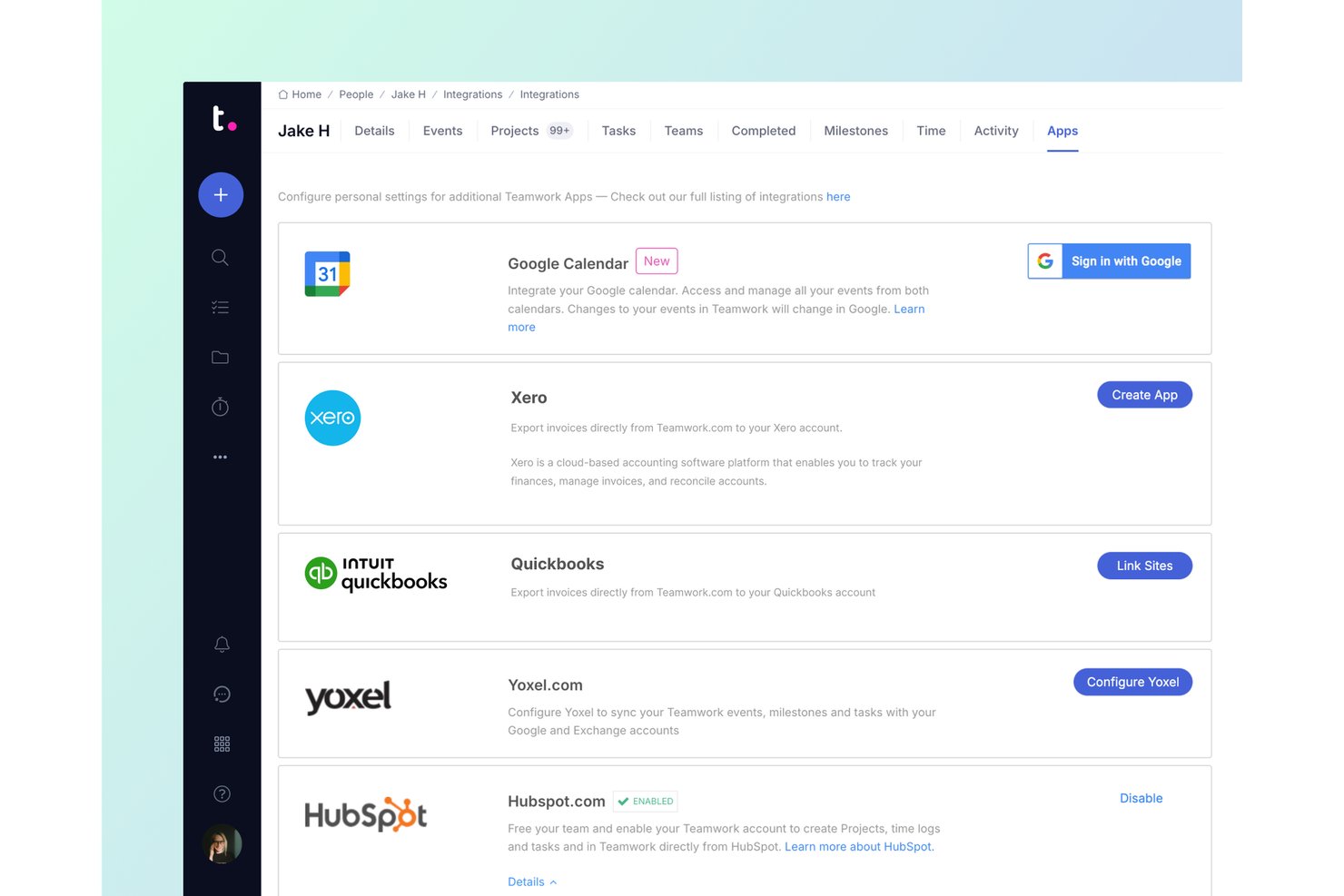
Teamwork.com is a project management platform built for client work that combines project tracking, time tracking, budget management, invoicing, and profitability reporting.
Who Is Teamwork.com Best For?
Teamwork.com is a strong fit for professional services teams that need to track project expenses against total budgets while managing client billing and time in one place.
Why I Picked Teamwork.com
I picked Teamwork.com as one of the best because it's the only tool on my list that lets you track expenses directly against a total project budget, giving you a live view of cost versus budget in the project header as spending accumulates. I especially like its Profitability report, which calculates margin as billable hours multiplied by rates, minus logged costs and eligible expenses, so you can see exactly where a project is bleeding money before it's too late. The budget-threshold notifications also mean you don't have to check in manually to know when a project is approaching its limit.
Teamwork.com Key Features
- Native time tracking: Log billable and non-billable time using timers, timesheets, and reminders directly within projects.
- Client invoicing: Build invoices from logged time and expenses, or create fixed-price invoices with optional purchase-order numbers.
- Custom billable rates: Set cost and billable rates per team member, role, project, or client to support varied pricing structures.
- QuickBooks Online integration: Export project invoices to QuickBooks Online and stream billable-time details in real time with the Advanced integration.
Teamwork.com Integrations
Teamwork.com offers 150+ integrations, including native QuickBooks Online, Xero Online, Xero File, NetSuite, Harvest, FreshBooks Classic, and Blinksale connections. Its API and webhooks support custom integrations.
Pros and Cons
Pros:
- Reviewers praise unified client project workflows
- Connects billable hours directly to invoices
- Tracks expenses against project budgets
Cons:
- Client file exchange gaps frustrate accounting firms
- Financial reports are plan-gated and delayed

Best for tracking multiple accounts
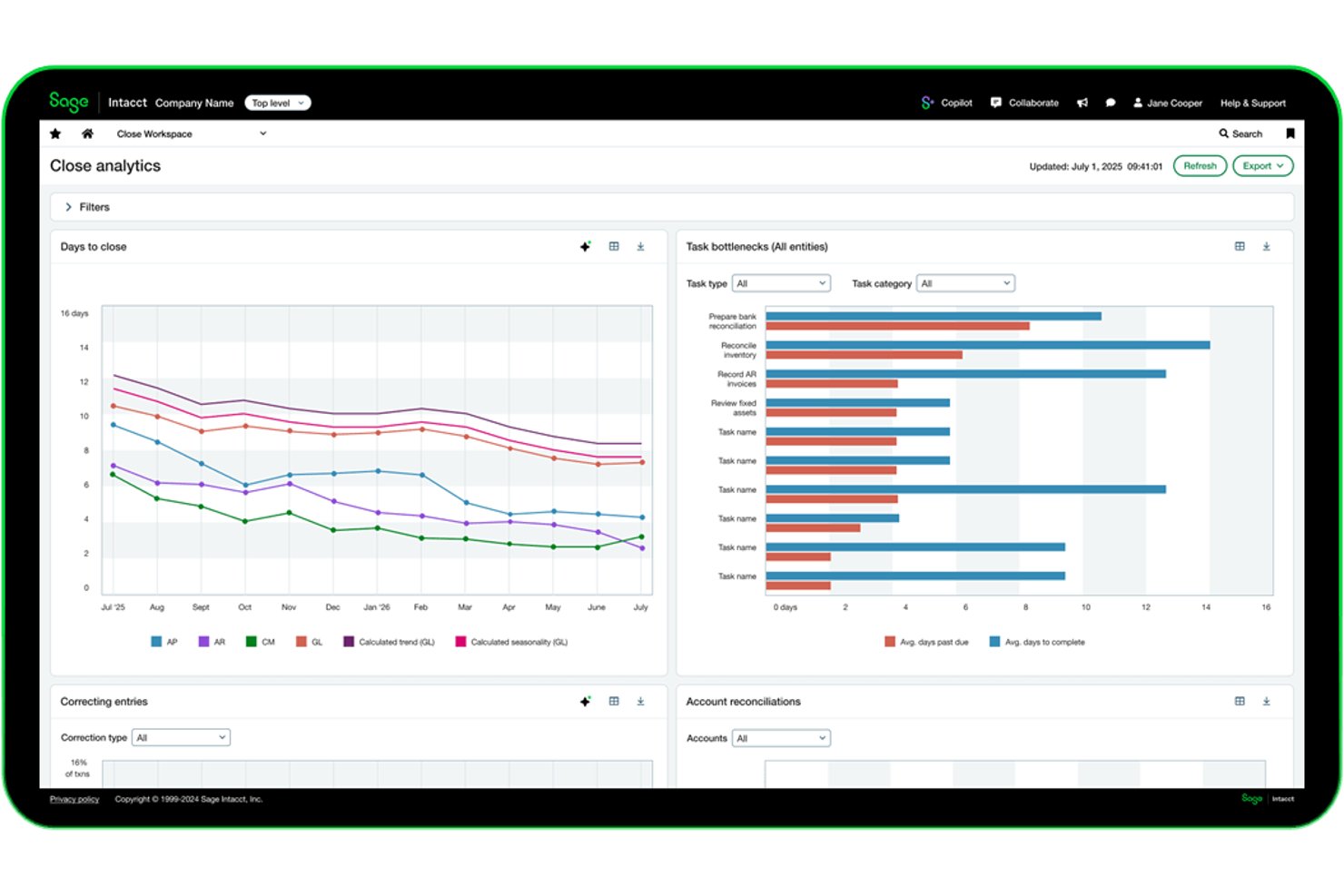
Sage Intacct is a cloud-based financial management and accounting platform that covers project budgeting, multi-entity reporting, project costing and billing, time tracking, and revenue recognition across multiple client engagements.
Who Is Sage Intacct Best For?
Sage Intacct suits finance managers at mid-sized, project-based businesses who need to track budgets, costs, and billing across multiple concurrent client engagements.
Why I Picked Sage Intacct
I picked Sage Intacct as one of the best because it genuinely shines when you're juggling finances across multiple concurrent client accounts. Its multi-entity reporting gives you a consolidated view across all your projects while still letting you drill into individual entity-level data in real time. I also love how project billing lets you combine different billing terms, like time and materials on one engagement and fixed fees on another, into a single consolidated invoice.
Sage Intacct Key Features
- AI-assisted timesheet suggestions: Sage Intelligent Time pulls from your calendar, emails, and work activity to propose timesheet entries for review before submission.
- Dimension-based reporting: Tag transactions with multiple dimensions to slice financial and project data across clients, departments, or business entities.
- Revenue recognition scheduling: Separate revenue recognition schedules from billing schedules, using milestones, percentage completion, or project completion methods.
- Automated allocations: Automatically split costs across projects, departments, or entities using predefined rules to support organisational performance analysis.
Sage Intacct Integrations
Sage Intacct offers marketplace integrations with Salesforce, HubSpot, Tipalti, Expensify, Stripe, GoCardless, and Shopify, with over 100 connected apps and business tools. REST, Web Services, and Zapier integrations support custom connectivity.
Pros and Cons
Pros:
- Project dashboards show real-time budget variances
- Supports mixed billing across client projects
- Consolidates multi-entity financial reporting
Cons:
- Migration and setup can require outside help
- Timesheet suggestions still require manual review

Best for enterprises

NetSuite's project management platform is part of a larger suite of enterprise management tools, making it a good solution for mid-size and larger teams.
Why I picked Oracle NetSuite: In some cases, NetSuite's large suite of tools may be overkill for accounting projects and teams. However, I picked this platform because it offers some functions that aren't available in other tools and may be ideal for enterprises or even fast-growing accounting start-ups that are looking at an enterprise future. When it comes to projects, NetSuite supports both agile and traditional methodologies for high levels of flexibility.
Some of the features that make NetSuite unique on this list include idea management, prioritization, templates, and workflows designed around popular agile methods. Accounting teams that are part of larger organizations can use this platform to work well with other departments and external stakeholders. NetSuite can be more expensive than other tools on the list and may require more in-house tech support, which is another reason it tends to work better for larger organizations.
Tool Standout Features and Integrations
Features include analytics and reporting features that provide comprehensive insights into resource utilization, so you can identify inefficiencies and make informed decisions. The tool’s integrated financial and operational dashboards also give you a unified view of costs, timelines, and resources.
Integrations include all compatible NetSuite software products. You may also be able to use third-party tools to connect other apps.
Pros and Cons
Pros:
- Customizable processes
- Works for larger enterprises
- Robust project management
Cons:
- Limited customer and tech support
- Steep learning curve
- Relatively expensive

Ravetree
Best for client and resource management features

Ravetree is an all-in-one work management platform that covers not just project management, but client management and resource planning, too.
Why I picked Ravetree: This software made my list because of its capacity to centralize various aspects of your work management. In addition to project planning and task management tools, it also offers a built-in CRM, customer portals, and resource allocation features. For accounting firms and accountants working with multiple clients, this makes it a good choice.
Project management features specifically include breaking projects into tasks that can then be assigned to specific team members, and outlined with action items and checklists. You can also save your project plans as templates for reuse. Team members receive notifications regarding their upcoming tasks, and you can keep an eye on resource utilization with a timeline view. Time tracking is also included, allowing you to break down your estimates vs. time spent on specific projects and tasks. This data can then be used to inform your future planning.
Ravetree Standout Features & Integrations
Features include a suite of capabilities to help teams better collaborate, like board views and workflows that you can customize to better support the way your team works and hands off tasks to each other. The tool also includes a forecasting feature that you can use to determine project budgets based on required resources and time.
Integrations include Box, Dropbox, Facebook, HubSpot, Instagram, Github, Google Drive, Gmail, OneDrive, Outlook, QuickBooks, and Stripe.
Pros and Cons
Pros:
- Video and chat support
- Project, resource, and finance management in one
- Personalized onboarding
Cons:
- Limited internal communication tools
- Large feature set comes with a learning curve

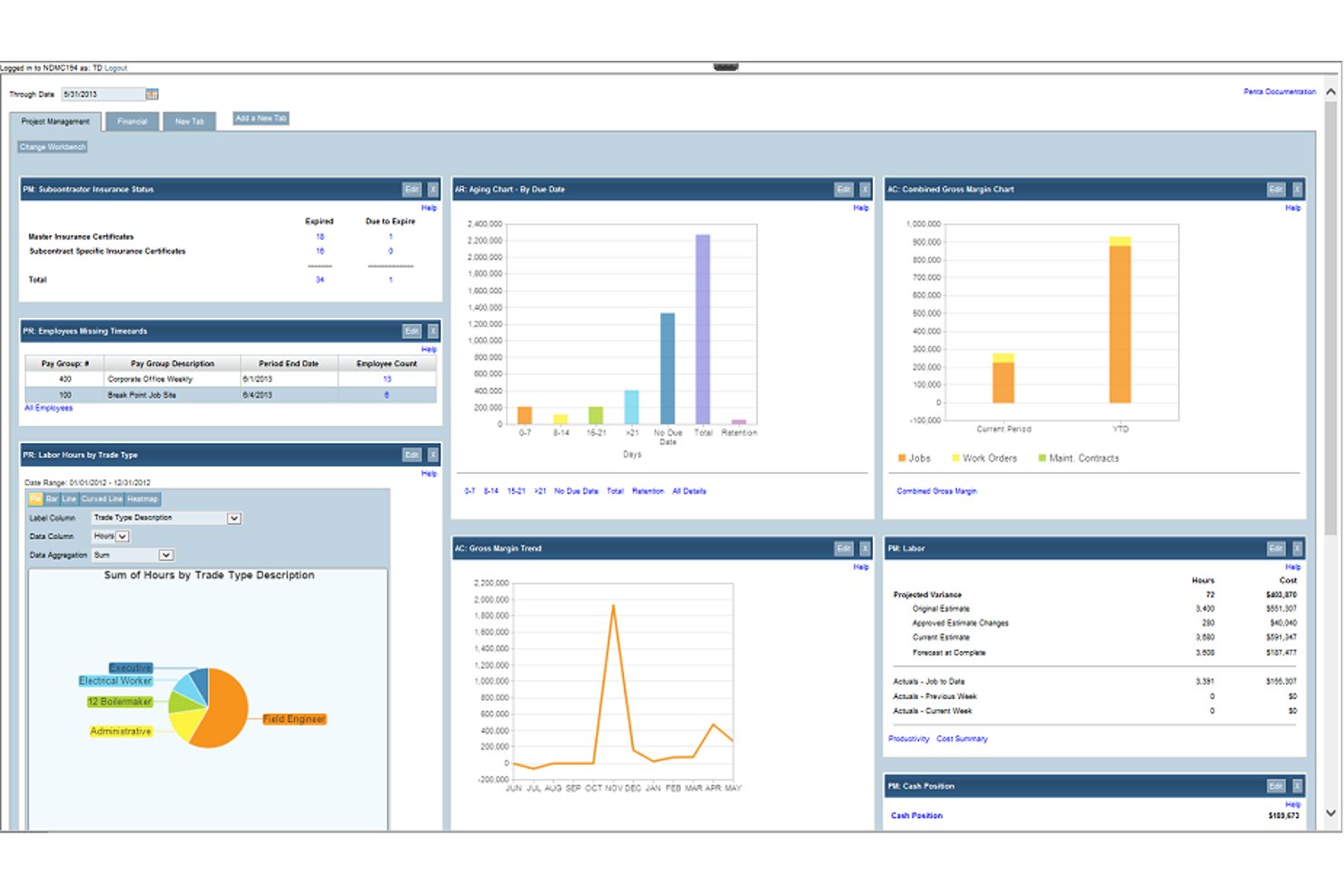
PENTA Project Accounting is a construction ERP that brings together job costing, financial management, payroll, field service, and GL integration in a single platform for contractors.
Who Is PENTA Project Accounting Best For?
PENTA Project Accounting is built for mid-sized to large contractors who need job costing, payroll, and GL management in one connected system.
Why I Picked PENTA Project Accounting
I picked PENTA Project Accounting as one of the best because its job costing and GL sync work together in a way that's hard to replicate without a construction-specific ERP. Job costs from payroll, AP, AR, and purchasing hit the general ledger in real time the moment timecards are approved, so there's no manual reconciliation step. I also like that you can compare actuals against estimates at the job, phase, or cost-code level, with automated forecast-at-complete updating continuously as costs come in.
PENTA Project Accounting Key Features
- Multi-level financial reporting: Drill down across parent/child job hierarchies to view financial performance at any level of your project structure.
- Prevailing wage and multi-union payroll: Automatically applies configured wage rules, fringe-by-fringe calculations, and union reciprocity rules to payroll runs.
- Intelligent field service dispatching: Schedules and assigns technicians based on skills, location, and real-time availability directly within the platform.
- PentaConnect APIs: Open APIs let you connect Penta to external systems, with named integrations including Procore, SAP Concur, and Avalara AvaTax.
PENTA Project Accounting Integrations
PENTA Project Accounting offers documented integrations with Procore, SAP Concur, Avalara AvaTax, Hyland OnBase, REQUORDIT, DTI, Rhumbix, and XOi Vision. PentaConnect APIs support custom integrations.
Pros and Cons
Pros:
- Profitability reporting spans jobs and contracts
- Real-time forecasting flags cost overruns early
- Job-cost visibility links spending to project status
Cons:
- Clean financial exports can require multiple reports
- Slow loading delays time and cost review

BigTime
Best for WIP visibility at accounting firms
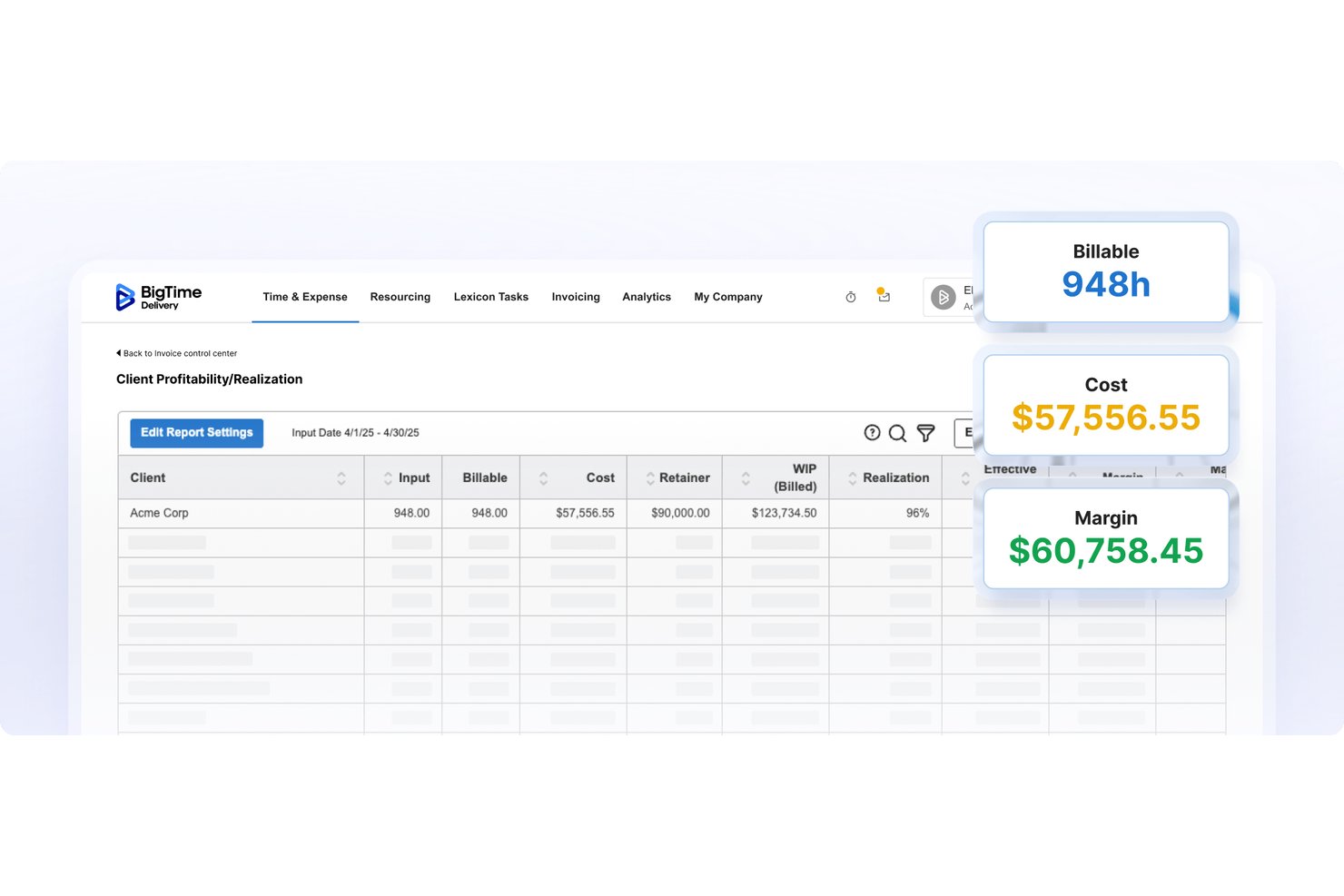
BigTime is a professional services automation platform built for accounting firms that combines time tracking, project budgeting, WIP reporting, invoicing, and accounting system integration in one place.
Who Is BigTime Best For?
BigTime is a strong fit for accounting firms that need to track billable time, manage engagement budgets, and keep WIP visible across multiple client projects.
Why I Picked BigTime
BigTime earns its spot on my shortlist because of how it surfaces WIP across every engagement in one place. I particularly like the real-time dashboards for realization, utilization, and unbilled work, which let accounting firm partners see exactly where time has been logged but not yet invoiced. The budget-versus-actuals tracking ties each engagement fee to actual submitted time and expenses, so nothing slips through before billing. That level of WIP visibility is genuinely rare in tools built for accounting firm workflows.
BigTime Key Features
- Multi-level approvals: Lets you configure approval workflows for time, expenses, and invoices across staff, project leads, and partners before billing.
- QuickBooks and Sage Intacct integration: Syncs time entries and invoices bidirectionally with your accounting system to keep project and financial data aligned.
- Resource demand and capacity planning: Maps staff availability, skills, and cost rates against project demand so you can allocate the right people before conflicts arise.
- Client portal payments: Gives clients a secure landing page to schedule and process invoice payments directly, with card data handled by a Level 1 PCI-compliant processor.
BigTime Integrations
BigTime offers native integrations with QuickBooks Online and QuickBooks Desktop, plus integrations with Sage Intacct, Xero, NetSuite, Lacerte, and Microsoft Business Central. Its REST API supports custom integrations.
Pros and Cons
Pros:
- Project time entries feed billing
- Budget-to-actual reporting helps flag overruns
- Engagement-level WIP surfaces unbilled work
Cons:
- Invoice calculations and payment balances sometimes misreport
- Custom reports can take extra work

Accelo
Best for professional services automation

Accelo is a cloud-based client work management platform designed for professional service businesses, including accounting firms. It integrates various business processes—such as project management, time tracking, and billing—into a single system.
Why I picked Accelo: Accelo offers built-in time tracking that automatically records time spent on emails, meetings, and tasks, ensuring accurate billing without manual entry. This feature helps your team focus on client work while maintaining precise records for invoicing. It also automates various other tasks, like converting quotes to projects and billing.
Additionally, Accelo provides a secure client portal where clients can access quotes, retainer usage, and billing history. This transparency enhances client trust and reduces the need for back-and-forth communications, allowing your team to concentrate on delivering quality services.
Accelo Standout Features & Integrations
Features include robust reporting tools that capture data across the entire client journey, offering a comprehensive view of your firm's financial health. Custom triggers allow you to automate workflows tailored to your team's specific processes, increasing efficiency. The platform also supports recurring work management.
Integrations include Google Workspace, Microsoft 365, Microsoft Exchange & Microsoft Outlook, Xero, QuickBooks Online, HubSpot, Mailchimp, Salesforce, Zapier, Microsoft Power BI, Expensify, Gusto, and Google Analytics.
Pros and Cons
Pros:
- Customizable to fit various project workflows
- Real-time insights into business and project performance
- Automated time tracking features
Cons:
- Could offer more integrations
- No free trial to test out the platform
New Product Updates from Accelo

Accelo Rebuilds Mobile App for Project and Time Management
Accelo rebuilds its mobile app with task management, new work creation, and mobile timesheets for Forecast customers. This helps teams keep project and time data current while working away from a desktop. For more information, visit Accelo’s official site.
Outro software de gestão de projetos de contabilidade
Eis mais algumas opções que não entraram na minha lista principal, mas que continuam a merecer a sua consideração.
- ProWorkflow
For cost tracking and invoicing
- Kantata
For stakeholder collaboration
- FreshBooks
For billing clients by project time and costs
- TaxDome
For automating tax firm workflows
- Financial Cents
For time-to-invoice billing at accounting firms
- Firm360
For accounting firm WIP and realization tracking
- Canopy
For accounting firm WIP and billing
- Slash
For spend management and analytics
- Accounting Seed
For Salesforce-native project billing


Análises relacionadas de software de gestão de projetos
Se ainda não encontrou aqui o que procura, consulte estas ferramentas estreitamente relacionadas com o software de gestão de projetos de contabilidade que testámos e avaliámos.
- Software de gestão de projetos
- Software de gestão de recursos
- Software de controlo de tempo
- Software de gestão de tarefas
- Ferramentas de produtividade
- Software de acompanhamento de projetos
- Ferramentas de inteligência empresarial (BI)
- Ferramentas de faturação para agências digitais
- Melhor software de gestão de projetos com faturação
- Software de gestão de projetos para contabilistas
How I Evaluate Accounting Project Management Software
I split my evaluation into three parts, with the most weight on core functionality: tracking budgets against actual costs and syncing project finances with accounting systems. Next, I look for differentiators such as WIP reporting and client portals. Finally, I consider support, accounting-specific onboarding, and pricing flexibility.
Core Functionality (Table Stakes For This List)
When I'm selecting tools for my list, I score each one on a scale from 0 (does not offer the functionality) to 5 (excels in this area) for each core functionality listed below. I then convert the total into a percentage to help assess each tool's overall fit, with extra weight on any functionalities I’ve deemed essential.
- Project Budgeting & Costing (Essential): I look for budget-versus-actual tracking that flags cost variances as project hours and expenses accumulate.
- Accounting Integration (Essential): I check whether project costs, invoices, and payments sync with the general ledger, reducing duplicate entry across systems.
- Time Tracking & Billing: I assess whether logged hours and expenses can flow into client invoices with rates and approval steps applied.
- Profitability Reporting: I look for project and client margin reports that help spot when delivery costs are outpacing fees.
- Multi-Project Oversight: I evaluate consolidated views that let finance teams compare budgets, costs, and billing across active engagements.
- Resource & Expense Allocation: I check whether teams can assign staff hours and categorized expenses to specific projects or tasks.
Once I have a list of tools that meet the criteria, I consider what sets each platform apart.
Differentiating Factors (What Sets Vendors Apart)
Here's how I compare and contrast different vendors:
Standout Features
I check whether a tool offers WIP and realization reporting, since knowing how much unbilled work is sitting across engagements directly shapes cash flow decisions. Compliance calendar automation also matters—I look for tools that roll over recurring filing deadlines year to year without manual re-entry. Staff utilization benchmarking rounds out the picture by letting you compare individual workloads against firm targets, which is essential for planning around seasonal surges like tax season.
Beyond Features
I evaluate how well each tool's licensing handles seasonal staff swings, since accounting firms regularly onboard temporary preparers and shouldn't pay full-seat prices year-round. Ecosystem connectivity matters just as much—I check for two-way sync with tax prep software and payment processors to prevent reconciliation headaches. I also look at vendor-provided migration support, because moving years of historical client and billing data from a legacy system without dedicated help usually means lost records.
Como escolher um software de gestão de projetos de contabilidade
É fácil perder-se em listas extensas de funcionalidades e estruturas de preços complexas. Para o ajudar a manter-se concentrado enquanto desenvolve o seu processo específico de seleção de software, eis uma lista de fatores a ter em conta:
| Fator | O que considerar |
|---|---|
| Escalabilidade | Certifique-se de que o software consegue acompanhar o crescimento da sua empresa e lidar com mais utilizadores, projetos e dados sem comprometer o desempenho. |
| Integrações | Procure ferramentas que se integrem com as suas ferramentas de contabilidade, o seu sistema ERP e outros sistemas empresariais essenciais, para evitar a introdução manual de dados. |
| Personalização | Escolha um software que lhe permita adaptar fluxos de trabalho, painéis e relatórios às necessidades e preferências específicas da sua equipa. |
| Facilidade de utilização | Opte por uma interface intuitiva com uma navegação simples, para que a sua equipa possa adotá-la rapidamente sem formação extensa. |
| Orçamento | Encontre uma solução que esteja de acordo com o seu orçamento e que ofereça um equilíbrio entre funcionalidades essenciais e valor a longo prazo. Esteja atento a custos ocultos. |
| Medidas de segurança | Verifique se o software dispõe de funcionalidades de segurança robustas, como encriptação de dados e permissões de utilizador, para proteger as suas informações financeiras. |
| Ferramentas de elaboração de relatórios | Certifique-se de que o software disponibiliza relatórios personalizáveis para acompanhar o progresso dos projetos e o desempenho financeiro. |
| Opções de suporte | Confirme se o fornecedor oferece apoio ao cliente fiável através de vários canais, como chat em direto, e-mail ou telefone, para que possa resolver rapidamente os problemas. |
O que é um software de gestão de projetos contabilísticos?
O software de gestão de projetos contabilísticos é uma ferramenta que permite acompanhar as finanças e gerir projetos em simultâneo. Contabilistas, gestores de projetos e proprietários de empresas utilizam-no para gerir orçamentos, despesas e faturação, mantendo-se a par dos prazos dos projetos.
Com funcionalidades para acompanhar as finanças e as tarefas dos projetos num único local, pode ver exatamente para onde está a ir o seu dinheiro e tomar decisões mais informadas sobre os projetos e as finanças em cada etapa. Este tipo de software ajuda a melhorar os seus processos financeiros, a reduzir o risco de erros e a garantir que os dados financeiros estão sincronizados com o progresso dos projetos.
Funcionalidades do software de gestão de projetos contabilísticos
Ao selecionar um software de gestão de projetos contabilísticos, esteja atento às seguintes funcionalidades essenciais:
- Gestão de tarefas: Ajuda a melhorar os fluxos de trabalho dos seus projetos e a atribuir, acompanhar e definir prioridades para as tarefas dos membros da equipa. Inclui também automatizações de fluxos de trabalho, que podem reduzir algumas tarefas manuais e repetitivas ao executá-las por si.
- Acompanhamento do tempo: Esta funcionalidade permite monitorizar as horas faturáveis e não faturáveis, para uma faturação precisa e uma gestão eficaz dos custos dos projetos.
- Ferramentas de orçamentação: A ferramenta deve ajudá-lo a definir limites financeiros, acompanhar despesas e comparar os gastos reais com os orçamentos.
- Afetação de recursos: Permite garantir que os membros da equipa, os materiais e os equipamentos são utilizados de forma eficiente em vários projetos.
- Faturação automatizada: Permite simplificar a faturação através de modelos pré-configurados, faturas recorrentes e integração com sistemas de contabilidade.
- Partilha de documentos: O software deve permitir um acesso seguro e centralizado aos ficheiros relacionados com os projetos, para melhorar a colaboração.
- Relatórios: A ferramenta deve permitir gerar informações sobre o desempenho, os custos e a rentabilidade dos projetos, para apoiar a tomada de decisões baseada em dados.
- Painéis personalizáveis: Deve ser possível adaptar vistas, relatórios e painéis para obter rapidamente acesso a métricas relevantes e aos detalhes dos projetos.
- Integrações com terceiros: Muitas equipas que trabalham por projetos beneficiam da utilização de software de gestão de projetos que se integra com o QuickBooks e com outras ferramentas, como sistemas ERP e plataformas de comunicação, para criar fluxos de trabalho coesos.
- Acompanhamento da conformidade: Esta funcionalidade ajuda a garantir o cumprimento dos regulamentos financeiros e das normas do setor através da automatização das verificações de conformidade.
Perguntas frequentes sobre software de gestão de projetos de contabilidade
Eis algumas respostas a perguntas comuns sobre software de gestão de projetos de contabilidade.
A gestão de projetos é útil para contabilistas?
Sim. A gestão de projetos financeiros é útil para contabilistas de várias formas, incluindo:
- A possibilidade de gerir e planear todas as diferentes contas que tratam num determinado momento.
- A possibilidade de cumprir prazos rigorosos, especialmente durante a época fiscal.
- Colaborar com outras pessoas do escritório para concluir projetos atempadamente e ter toda a documentação relevante num só lugar.
- Monitorizar vários projetos de relance através de painéis.
Quais são as principais funcionalidades do software de gestão de projetos para contabilistas?
Cada empresa ou equipa de contabilidade tem necessidades diferentes, mas há algumas funcionalidades principais comuns que são importantes na maioria dos casos.
- Opções de modelos personalizados: Os modelos ajudam a evitar começar o trabalho de projeto do zero, o que aumenta a produtividade ao longo de todo o projeto.
- Ferramentas de relatórios: O software de contabilidade de projetos deve ter várias opções para extrair dados sobre projetos — e exportá-los para outros programas —, ajudando os responsáveis pelos projetos e as partes interessadas a manterem-se informados.
- Registo de horas: Os contabilistas sabem que tempo é dinheiro, e a capacidade de registar o tempo dedicado aos projetos com precisão é fundamental ao faturar os clientes.
- Opções de painéis: Os painéis visuais que incluem tabelas, gráficos e outras informações permitem que as equipas e a liderança compreendam o desempenho dos projetos de relance.
- Ferramentas de colaboração: As equipas trabalham melhor em conjunto quando podem comunicar rapidamente de várias formas, partilhar e delegar tarefas e manter-se mutuamente informadas sobre o progresso, os desafios ou os passos seguintes.