

De 10 beste prosjektstyringsprogrammene for arkitekter i 2026

10 Kortliste over den beste programvaren for prosjektstyring innen arkitektur


Å lede arkitektprosjekter er en balansegang – mellom å håndtere designpresisjon, kundens forventninger og regulatoriske krav. Uten de riktige verktøyene er det lett at tidsplaner sprekker, budsjetter løper løpsk og kommunikasjonsproblemer fører til forsinkelser. Det er her prosjektstyringsprogramvare skreddersydd for arkitekter kommer inn. Men med så mange tilgjengelige alternativer kan det være overveldende å finne det som passer best for firmaet ditt.
Jeg har testet og analysert de ledende verktøyene som er utviklet for arkitektteam, og vurdert funksjonene, brukervennligheten og bransjespesifikke funksjonaliteten deres. I denne listen går jeg gjennom den beste prosjektstyringsprogramvaren for arkitekter, slik at du kan velge den riktige løsningen for å holde prosjektene dine i god flyt.
Hvorfor du kan stole på våre programvareanbefalinger
Teamet vårt har testet og anmeldt programvare siden 2012. Vi er selv prosjektledere, så vi vet hvor vanskelig og hvor viktig det er å velge riktig programvare.
I denne guiden har vi vurdert verktøyene gjennom praktisk testing og uavhengig research og gitt dem poeng ut fra våre utvelgelseskriterier. Vi bygger også på innsikt fra ledende eksperter i bransjen og erfarne prosjektledere.
Anmeldelsene våre bygger på vår egen redaksjonelle vurdering. De er ikke et salgsargument.
Ekspertanmeldere:
Sammenligningstabell over prosjektstyringsprogramvare for arkitekter
Her er en tabell du kan bruke til å sammenligne alle verktøyene vi nettopp har gjennomgått i oversiktene.
| Tool | Best For | Trial Info | Price | ||
|---|---|---|---|---|---|
| 1 | Best for phase-by-phase fee and profit tracking | 14-day free trial | From $17/user/month | Website | |
| 2 | Best for fee tracking and invoicing | 14-day free trial | From $10/user/month (billed annually) | Website | |
| 3 | Best for time and fee tracking in AEC firms | Free demo available | Pricing upon request | Website | |
| 4 | Best for affordable multi-project team collaboration | Free plan + 15-day free trial + free demo available | From $4/user/month (billed annually) | Website | |
| 5 | Best for cross-team workload and approval tracking | 14-day free trial | Pricing upon request | Website | |
| 6 | Best for billing from tracked hours | Free plan available; 14-day free trial | From $9.99/user/month (billed annually) | Website | |
| 7 | Best for tracking fees and profit by phase | Free demo available | Pricing upon request | Website | |
| 8 | Best for construction-phase billing and approvals | 30-day free trial | From $49/month (billed annually) | Website | |
| 9 | Best for client portal and project billing | Free trial available | From $29/user/month (billed annually) | Website | |
| 10 | Best for phase-based time and fee tracking | Free demo available | From $45/month | Website |


Oversikt over den beste prosjektstyringsprogramvaren for arkitekter
Her er min vurdering av de viktigste funksjonene og det beste bruksområdet for listen min over beste prosjektstyringsprogramvare for arkitekter.

Scoro
Best for phase-by-phase fee and profit tracking
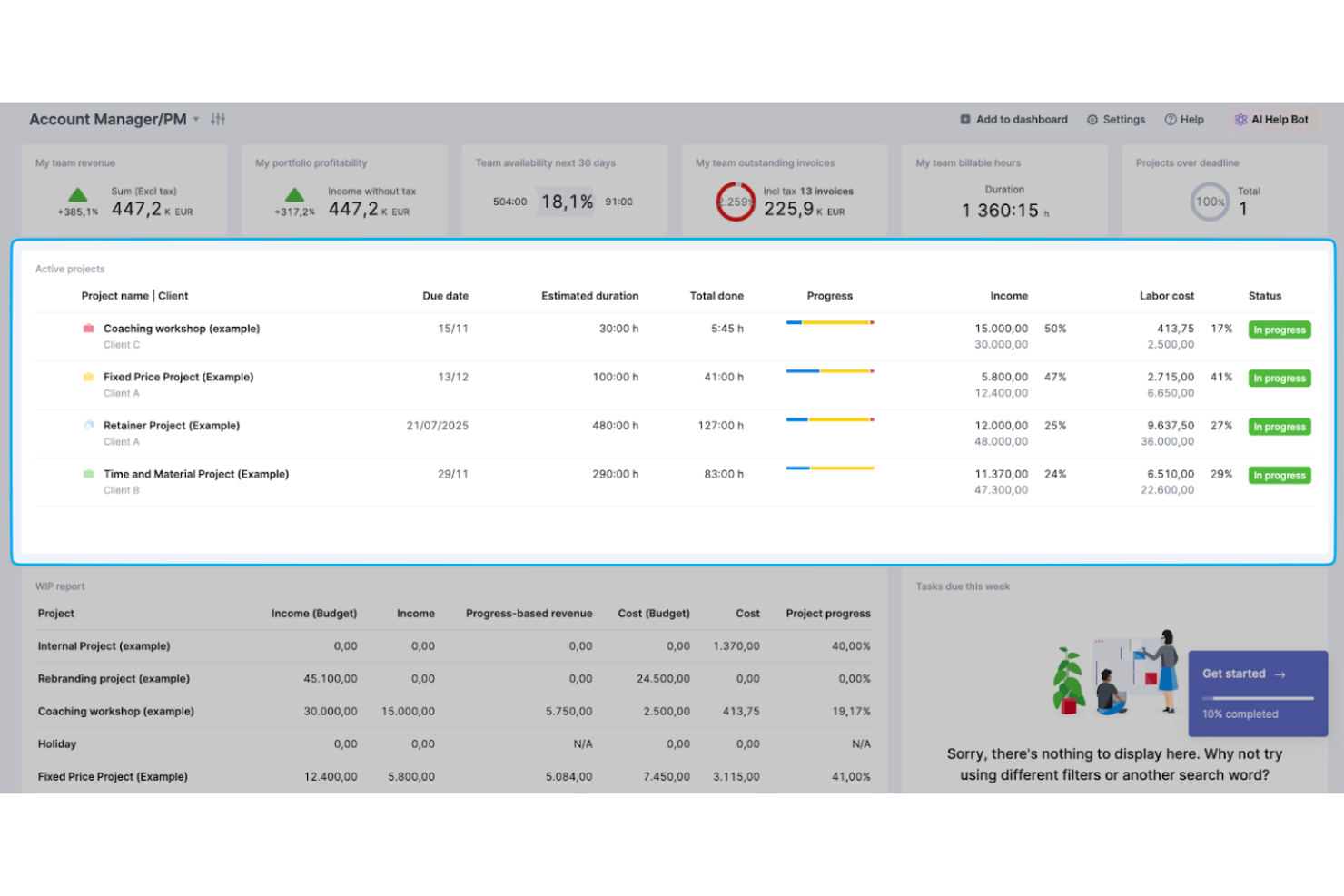
Scoro is a professional services automation platform that combines project phase planning, time tracking, resource scheduling, budgeting, and invoicing in one system.
Who Is Scoro Best For?
Scoro is a strong fit for architecture firm principals and operations managers who need to track fees, costs, and profitability across multiple project phases in one place.
Why I Picked Scoro
I've included Scoro in my top picks because it's the only tool on this list that lets you price each project phase by role and rate, then tracks actual time and cost against that estimate as work progresses. When a phase flips from Schematic Design to Construction Documents, I can see earned revenue, remaining budget, and forecasted profit margin all in one view. Scoro also rolls those figures up to portfolio level, so principals can spot which projects are eroding margin before the damage is done.
Scoro Key Features
- Resource capacity heatmaps: Visual workload heatmaps show who's available or overbooked across all active projects, so you can allocate staff without creating bottlenecks.
- Project templates with phase bundles: Reusable templates include predefined phases and linked task bundles, letting you spin up new projects with consistent structure.
- Utilization and time analysis: Time is broken down by client, project, activity, and billable status, giving you a full picture of how your team's hours are being spent.
- Milestone-split and recurring invoicing: Invoices can be issued against project milestones, split across billing periods, or set to recur automatically for retainer engagements.
Scoro Integrations
Scoro offers native integrations with Xero, QuickBooks, Sage Intacct, Exact Online, Google Drive, Dropbox, BambooHR, Slack, Jira, and Stripe. It also provides a REST API, webhooks, MCP server, and Zapier for custom connectivity.
Pros and Cons
Pros:
- Capacity views help balance project workloads
- Time entries connect budgets and client billing
- Phase-level fee tracking exposes margin drift
Cons:
- Portal collaboration lacks formal approval workflows
- No native BIM or CAD connection
New Product Updates from Scoro

Scoro Adds Time Mobile App and ELI Improvements
Scoro adds the Scoro Time mobile app for iOS/Android to track time anywhere and expands ELI with attachments, smarter filtering, and trigger-based actions. For more information, visit Scoro's official site.

Best for fee tracking and invoicing
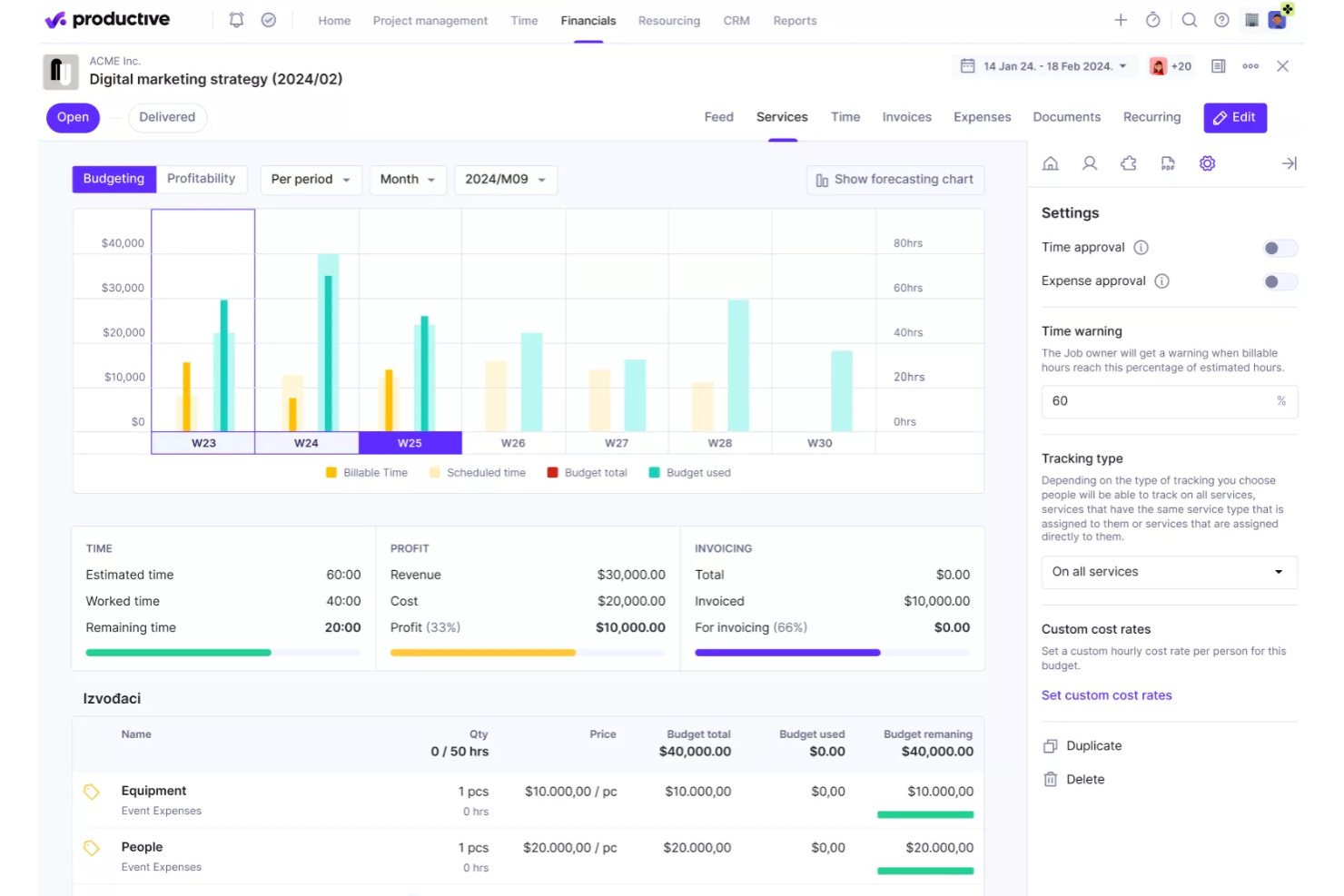
Productive is a professional services management platform that combines project and task management, time tracking, resource planning, budget monitoring, and invoicing in one place.
Who Is Productive Best For?
Productive is a strong fit for architecture and professional services firms that need tight control over project fees, budgets, and invoicing across multiple concurrent client engagements.
Why I Picked Productive
I picked Productive as one of the best because it keeps fee tracking and invoicing tightly connected to the actual work happening in a project. I like that you can set budget overrun limits at the service level, so your team gets stopped (or flagged) before a fixed-fee engagement quietly bleeds over scope. Milestone billing lets you create future-dated draft invoices tied to specific phases, and payment sync with tools like Xero or QuickBooks reflects what's been collected without manual reconciliation.
Productive Key Features
- Resource planner: View team capacity, availability, and workload across multiple concurrent projects in a single visual layout.
- Project timeline layouts: Visualize work using Gantt, calendar, or timeline views with milestones and task dependencies.
- Client collaborator access: Invite clients to tasks and projects at no extra seat cost, with filtered, permission-controlled visibility.
- Budget profitability tracking: Monitor planned revenue, actual costs, and real-time profitability at the project and service level.
Productive Integrations
Productive offers native integrations with Xero, QuickBooks, Google Calendar, Slack, and Jira, plus connections to Sage and NetSuite. It provides a REST-style API with webhooks and connects to over 1,000 apps via Zapier.
Pros and Cons
Pros:
- Clients can join project task discussions
- Time, fees, and profitability stay connected
- Cross-project capacity and workload visibility
Cons:
- No drawing-focused version control or markups
- No architecture-specific design phase workflows
New Product Updates from Productive
Productive Adds Voice Dictation, Slack Connector, Proposals, and Overtime
Productive adds voice dictation, a Slack Connector, proposal controls, and overtime tracking. These updates support faster AI interactions, client proposals, and time management. For more information, visit Productive’s official site.

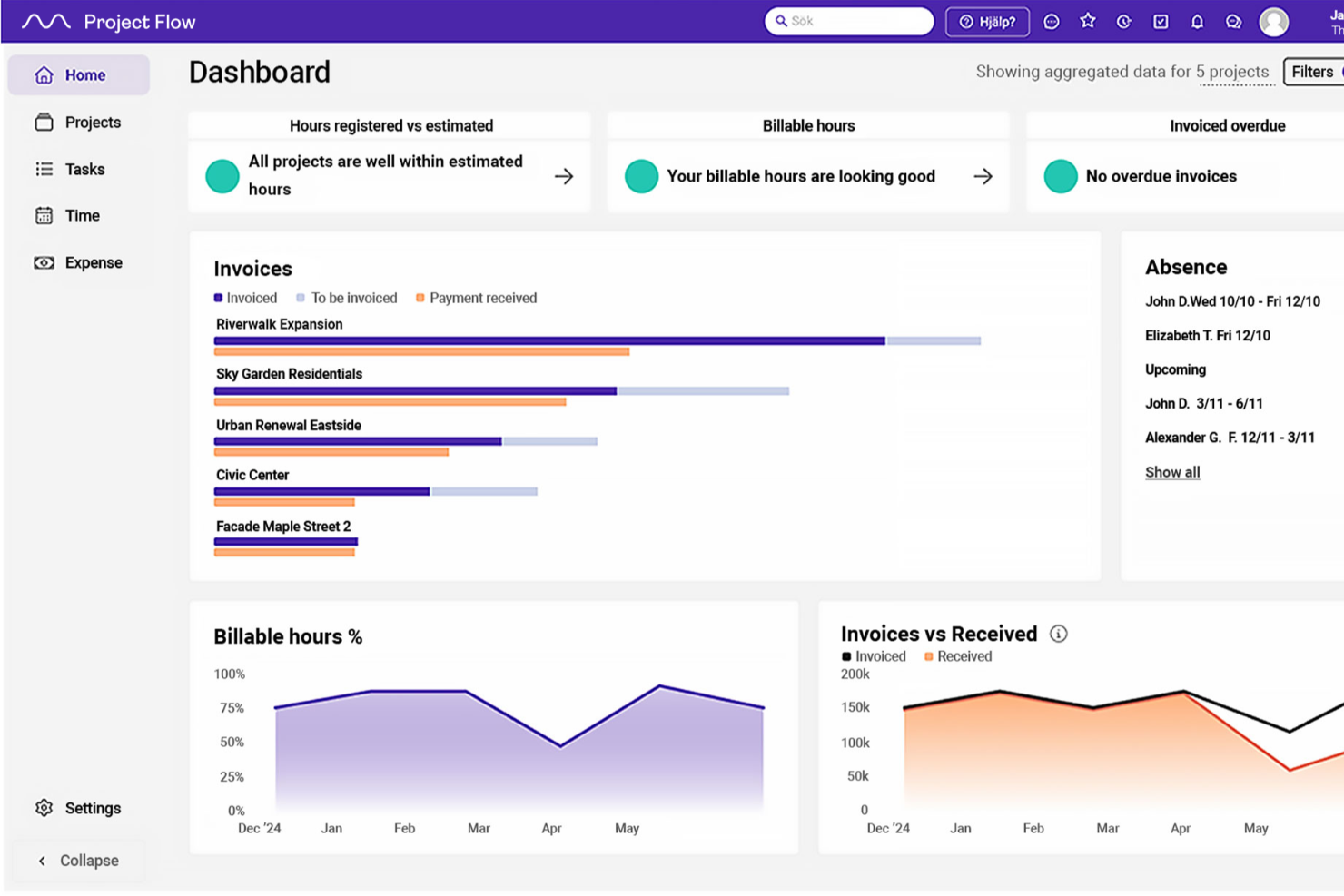
Project Flow by Milient is a project management platform built for architecture and engineering firms that combines project planning, time tracking, resource scheduling, budget monitoring, and invoicing in one system.
Who Is Project Flow by Milient Best For?
Project Flow is a strong fit for architecture and engineering firms that need tight control over billable hours, fee tracking, and invoicing across multiple concurrent projects.
Why I Picked Project Flow by Milient
I've included Project Flow by Milient in my top picks because it handles the financial side of architecture work with a level of detail that most project tools don't get close to. The project overview compares hours worked against billable hours in real time, flags overages automatically, and feeds directly into invoicing, so nothing slips through at billing time. I also like that fee calculation accounts for contract type, time, and costs, which mirrors how AEC firms actually price work.
Project Flow by Milient Key Features
- Resource allocation views: Calendar-based workload and utilization views let you assign work by role and availability across multiple concurrent projects.
- Mobile time and expense logging: The mobile app lets users register project hours and upload expense receipts directly from their phones.
- Quality system with checklists: Built-in checklists, non-conformity tracking, and risk assessment tools support project quality processes.
- Analytics dashboard: Provides portfolio-level reporting on business KPIs, actuals, potential revenue, and forecasts across projects.
Project Flow Integrations
Project Flow offers native integrations with Sage, Xero, AccountsIQ, QuickBooks, and Access. It also provides an open REST API for custom integrations.
Pros and Cons
Pros:
- Connects project hours with invoicing and follow-up
- Helps allocate staff across concurrent projects
- Tracks hours against project plans and fees
Cons:
- No documented drawing version control or sharing
- Time reporting can require extra steps

Best for affordable multi-project team collaboration
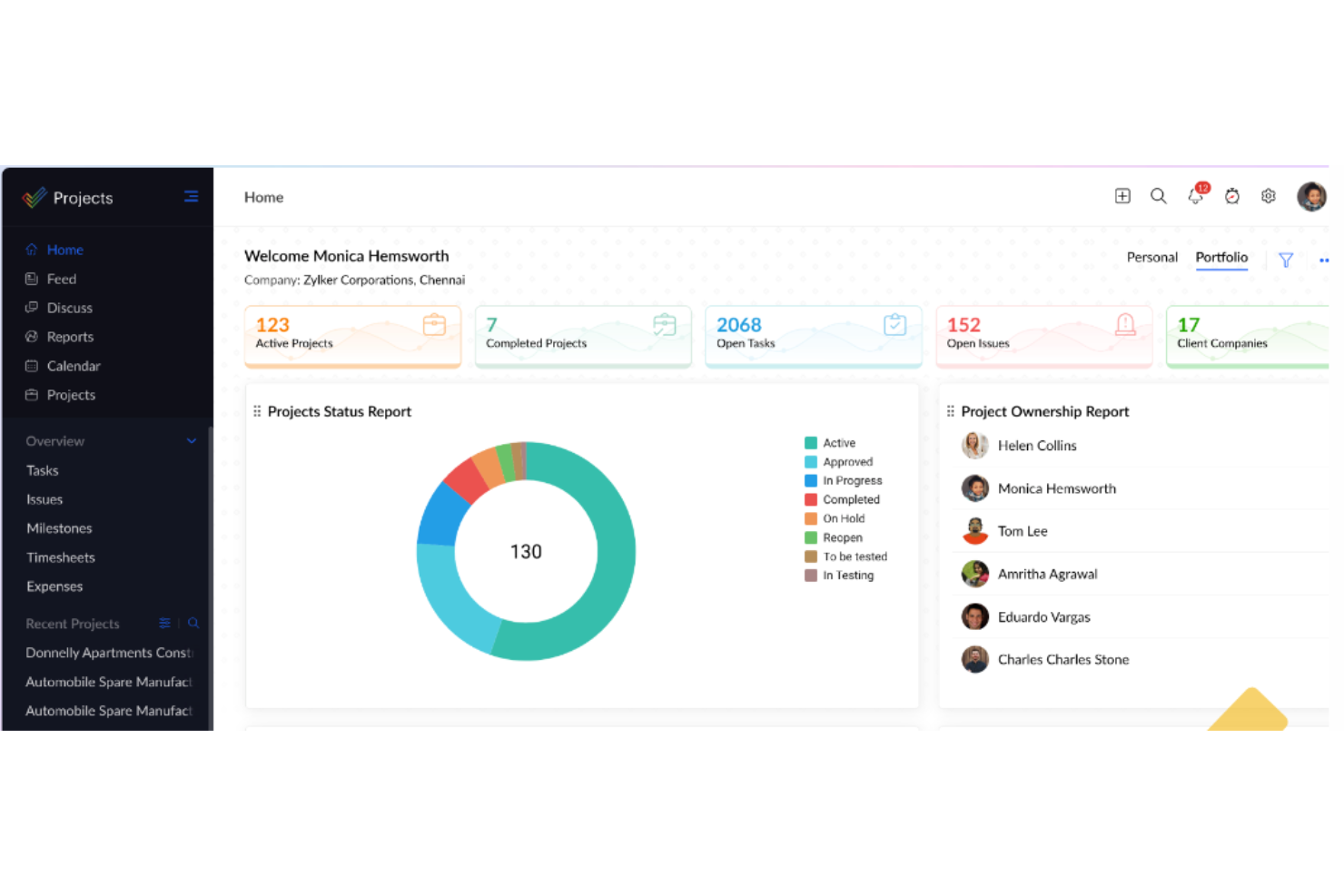
Zoho Projects is a cloud-based project management tool that combines task tracking, Gantt charts, phase management, workload scheduling, time logging, budget tracking, and document management across multiple concurrent projects.
Who Is Zoho Projects Best For?
Zoho Projects suits small to mid-sized firms running multiple concurrent projects who need solid task tracking, time logging, and resource allocation without a high per-seat cost.
Why I Picked Zoho Projects
I've included Zoho Projects in my top picks because it handles multi-project resource scheduling at a price point that genuinely surprises me. When I'm tracking staff across concurrent projects, the global workload report gives me bar, heatmap, and timeline views so I can spot over-allocation instantly and reassign tasks without leaving the report. Paired with phase-level budget tracking and planned-versus-actual cost alerts, it covers the core financial visibility architects need without requiring a premium-tier tool.
Zoho Projects Key Features
- Phase-based budgeting: Set project budgets at the phase level and track planned versus actual costs with threshold alerts and overrun notifications.
- Client user permissions: Add external client users to projects with customizable, per-user permissions that control access to specific phases, files, and forums.
- File version control: Upload, organize, and version project documents in folders with check-out functionality to prevent conflicting edits.
- Blueprint task automation: Design structured task workflows that automatically assign team members, update fields, and notify stakeholders as task statuses change.
Zoho Projects Integrations
Zoho Projects has 50+ marketplace integrations, including native integrations with Zoho Books, Zoho Invoice, Zoho WorkDrive, Google Drive, Microsoft SharePoint, Microsoft Teams, Slack, Dropbox, and Box. It also offers a REST API, webhooks, and Zapier.
Pros and Cons
Pros:
- Time logs help track billable design work
- Reviewers praise milestone tracking and Gantt schedules
- Cross-project workload views expose allocation gaps
Cons:
- Client sharing lacks documented consultant approval workflows
- No preset architectural stages or phase dependencies
New Product Updates from Zoho Projects
Zoho Projects Adds CodeX Scripts for Custom Modules
Zoho Projects now supports CodeX Scripts for custom modules, enabling conditional logic and rules for creating, updating, and deleting records. For more information, visit Zoho Projects' official site.
 .

Wrike
Best for cross-team workload and approval tracking
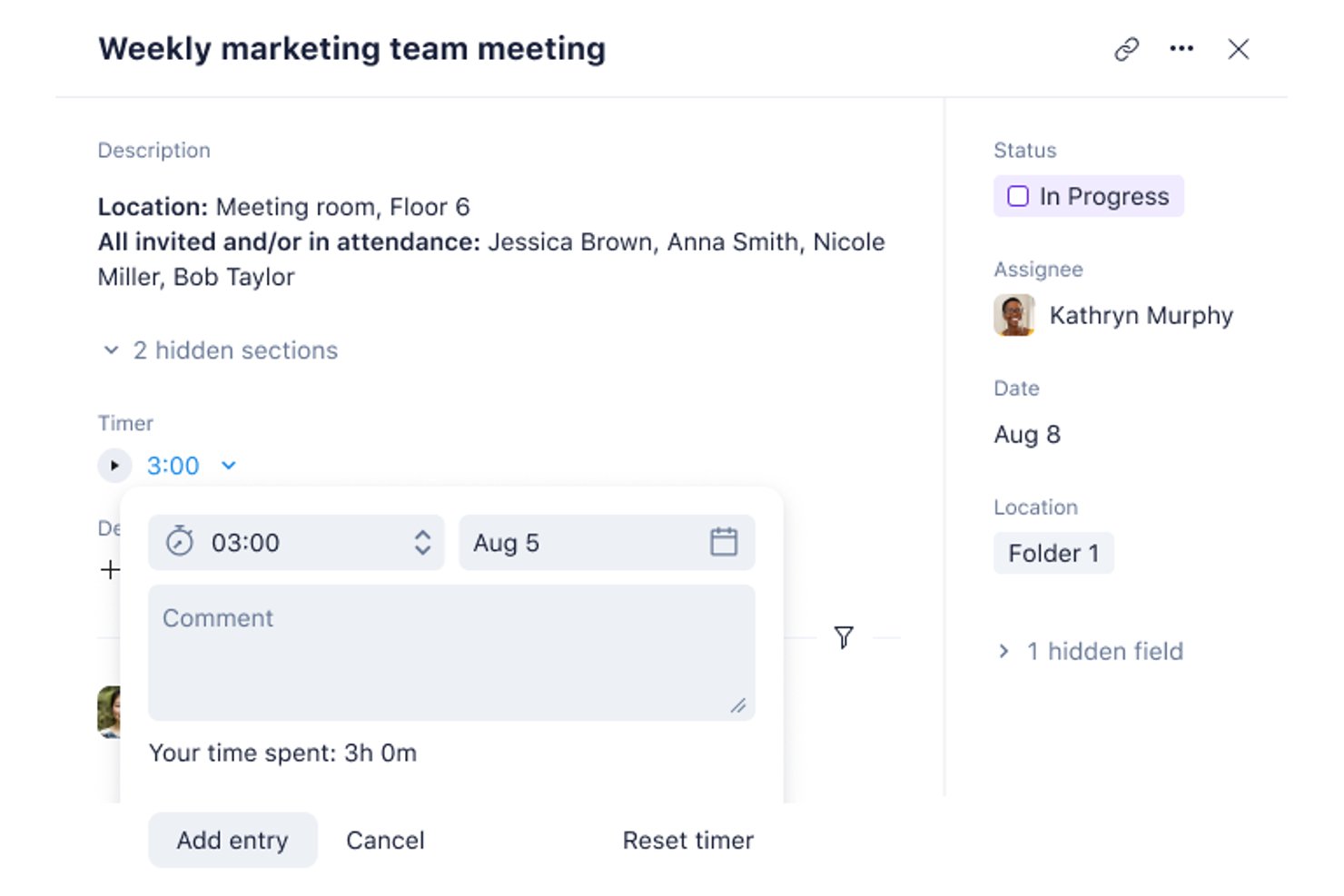
Wrike is a work management platform that combines Gantt-based project scheduling, workload and resource planning, visual proofing, and cross-team approval workflows to help architecture studios coordinate multi-disciplinary project delivery.
Who Is Wrike Best For?
Wrike suits studio operations managers and multi-disciplinary design teams that need to coordinate workloads, approvals, and external collaboration across several concurrent projects.
Why I Picked Wrike
I've included Wrike in my top picks because it handles cross-team workload visibility and structured approval routing better than most general-purpose tools I've tested. When you're juggling multiple concurrent projects, the Resources view shows exactly who's over capacity by user or job role across your whole portfolio. Paired with guest review workflows that let clients approve files without a Wrike account, it keeps sign-offs moving without pulling external stakeholders into your workspace.
Wrike Key Features
- Interactive Gantt charts: View project timelines, set milestones, and map finish-to-start and other task dependencies across design phases.
- Reusable project blueprints: Save folder, task, and project structures as templates to standardize recurring workflows across engagements.
- Visual proofing tools: Add markup and feedback directly to attached files and compare original versions with updated ones side by side.
- Dynamic request forms: Route internal and external work requests to a central location while capturing the details needed to kick off a project.
Wrike Integrations
Wrike lists 400+ integrations, including QuickBooks, NetSuite, Google Sheets, Microsoft Excel, OneDrive, Dropbox, Adobe Creative Cloud, Bynder, and MediaValet. It also provides a REST API, webhooks, OAuth 2.0, and an MCP Server for custom connections.
Pros and Cons
Pros:
- Reusable phase structures support repeatable delivery
- Guest approvals keep client sign-offs moving
- Cross-project workload visibility
Cons:
- Initial workflow setup takes planning
- Budgeting and invoicing need separate systems
New Product Updates from Wrike

Wrike Redesigns AI Agent Builder
Wrike redesigns its AI Agent Builder with a side-by-side setup, Scopes, sentence-style triggers and actions, and clearer filters. These changes make it easier to configure, test, and manage agent behavior. For more information, visit Wrike’s official site.

Best for billing from tracked hours
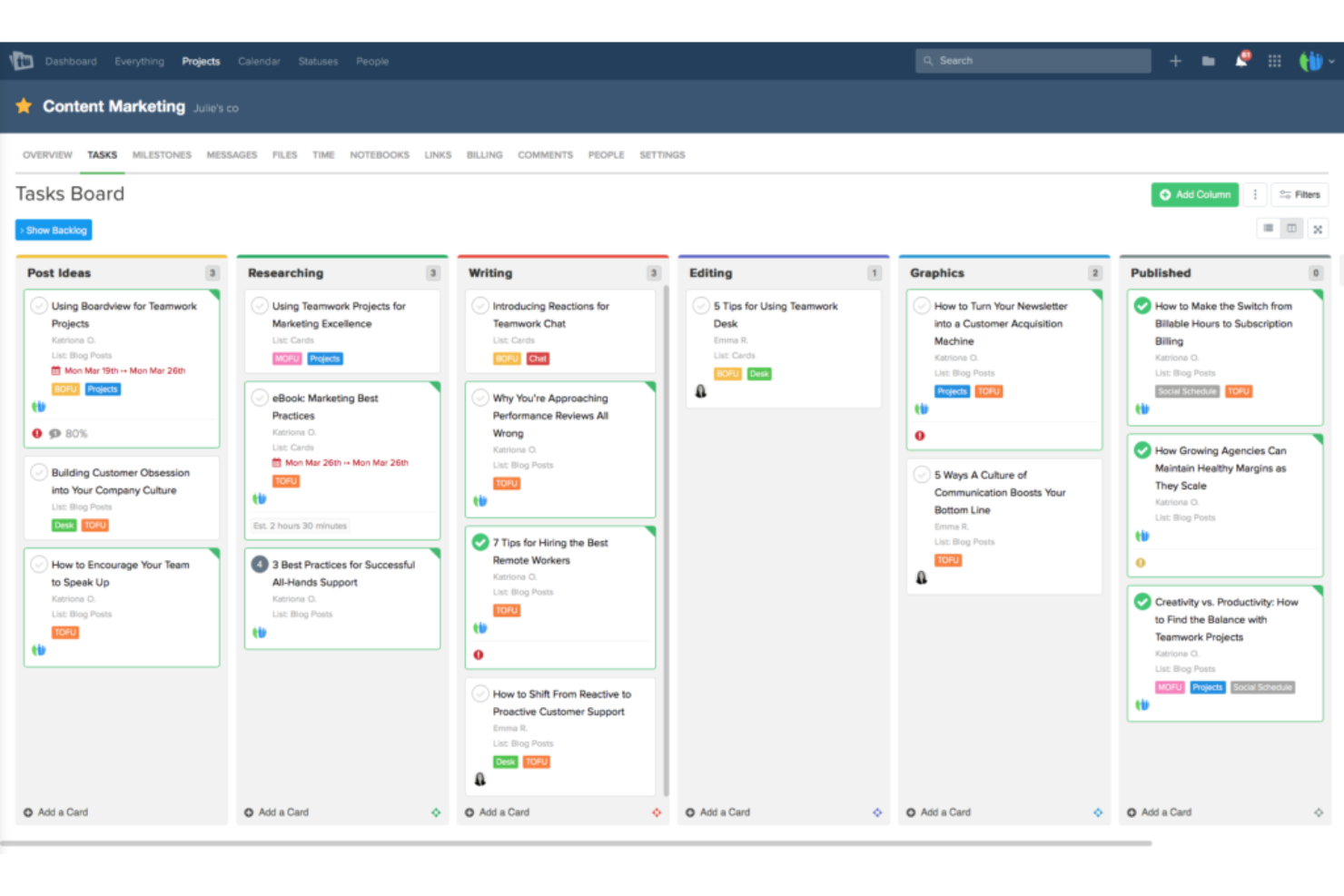
Teamwork.com is a project management platform built for client work that combines task planning, time tracking, resource scheduling, budgeting, and client collaboration tools in one place.
Who Is Teamwork.com Best For?
Teamwork.com is a strong fit for client-facing teams that need to turn logged hours directly into invoices without jumping between tools.
Why I Picked Teamwork.com
I've included Teamwork.com in my top picks because it closes the gap between logged hours and client invoices better than most tools I've tested. When your team logs billable time against tasks, you can generate an invoice directly from those hours without reformatting data or jumping to a separate billing tool. I also like that you can set different billable rates per person, role, or project, which matters when a principal and a junior architect are both billing to the same job.
Teamwork.com Key Features
- Client proofing and approvals: Invite clients by email to review, annotate, and approve deliverables directly within the platform, without requiring a paid account.
- Resource scheduling with role-based placeholders: Plan capacity across projects using role placeholders before specific team members are assigned.
- Workload and capacity management: View team availability and identify over-allocated staff across concurrent projects in a single scheduling view.
- File versioning: Upload and track multiple versions of project files, with comments tied to each version separately.
Teamwork.com Integrations
Teamwork.com lists 150+ integrations, including QuickBooks, NetSuite, Xero, Google Drive, SharePoint, Dropbox, Slack, and Microsoft Teams. It also offers an API, webhooks, an MCP server, and Zapier for custom connectivity.
Pros and Cons
Pros:
- Capacity views help balance concurrent studio projects
- Proofing keeps client approvals with deliverables
- Billable hours connect directly to client invoicing
Cons:
- No dedicated BIM or drawing workflows
- No built-in architecture design-phase templates

Accelo
Best for tracking fees and profit by phase
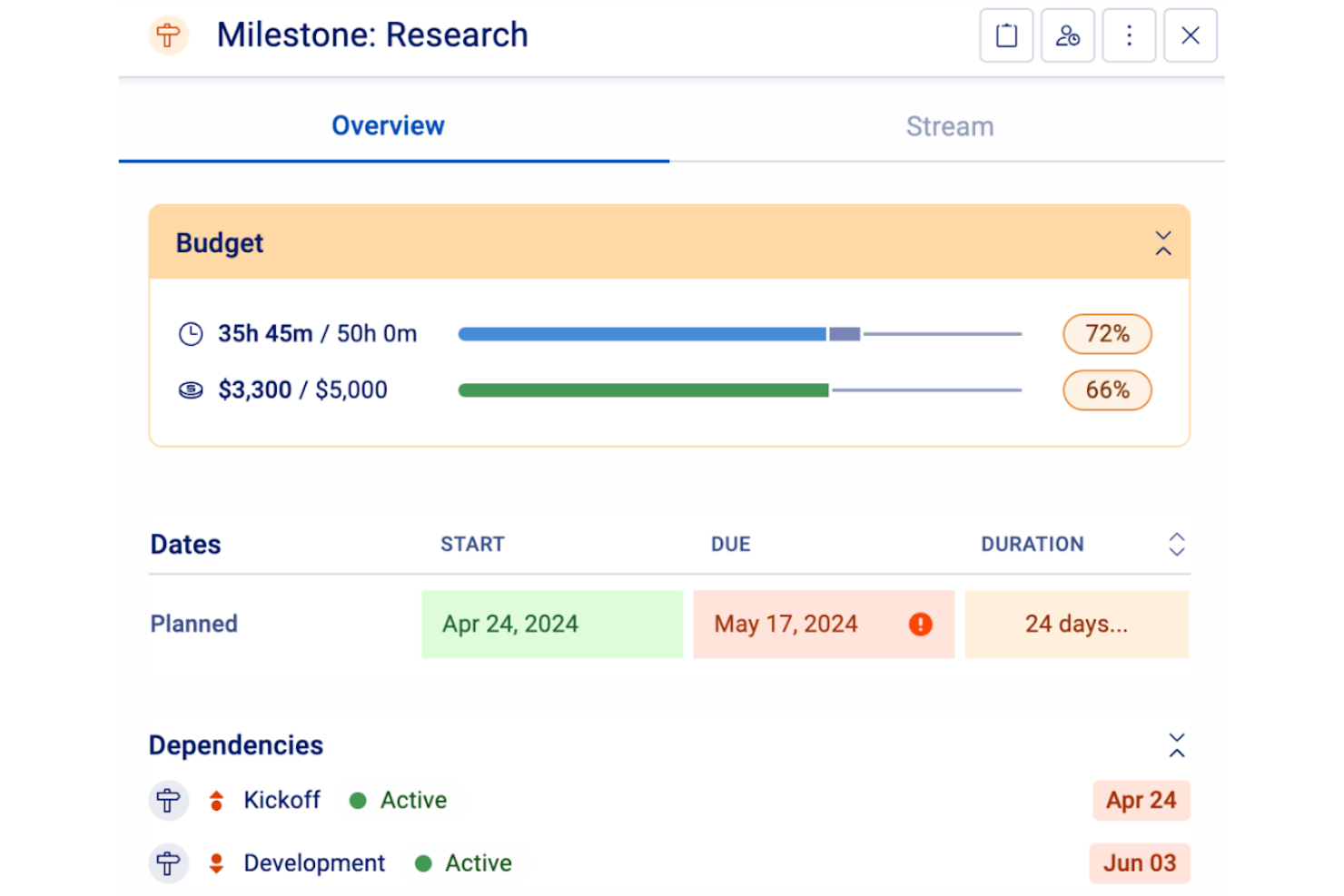
Accelo is a professional services automation platform that connects project management, time tracking, resource scheduling, and financial reporting—including phase-level budget monitoring and profitability analysis—in a single system.
Who Is Accelo Best For?
Accelo suits architecture firms and professional services studios that bill by phase and need tight control over fees, margins, and profitability across concurrent projects.
Why I Picked Accelo
I picked Accelo as one of the best because it gives architecture firms a direct line of sight into fees and profitability at the phase level, which is exactly where budget conversations get hard. I love that you can track budget consumption in real time as each phase progresses, flag variances before they become write-offs, and generate invoices directly from logged project activity. The Profitability Dashboard then lets you cut that data by project type, client, or phase, so you always know where your margins are holding and where they aren't.
Accelo Key Features
- Resource scheduling: Assign architects and designers to project phases using visual capacity planning with soft and hard allocations.
- Skills-based resource recommendations: AI evaluates team skills, availability, workload, and past performance to suggest the best fit for each phase.
- Client workspace: Clients access a branded portal to view project timelines, milestones, and deliverables via secure magic links.
- Accounting integrations: Sync invoices, payments, and billing data directly with QuickBooks, Xero, and Sage Intacct.
Accelo Integrations
Accelo offers integrations with QuickBooks, Xero, Sage Intacct, Microsoft 365, Google Workspace, Jira, and Slack. It supports REST, Forms API, webhooks, OAuth 2.0, and Zapier for custom connectivity.
Pros and Cons
Pros:
- Client signoffs capture comments and approvals
- Staff allocation flags capacity gaps across projects
- Phase budgets expose fee overruns early
Cons:
- Project setup can take months to settle
- Drawing files lack documented version histories
New Product Updates from Accelo

Accelo Rebuilds Mobile App for Project and Time Management
Accelo rebuilds its mobile app with task management, new work creation, and mobile timesheets for Forecast customers. This helps teams keep project and time data current while working away from a desktop. For more information, visit Accelo’s official site.

Best for construction-phase billing and approvals

Contractor Foreman is a construction management platform built for contractors that covers project scheduling, job costing, client communication, document management, submittal approvals, and AIA-style billing.
Who Is Contractor Foreman Best For?
Contractor Foreman is a good fit for architects who take a hands-on role during construction administration and need client approvals, AIA-style billing, and submittal workflows in one place.
Why I Picked Contractor Foreman
I picked Contractor Foreman as one of the best because it handles the billing and approval workflows that define construction administration for architects. When a contractor submits shop drawings, I can route them through an external approval portal where engineers, consultants, and owner representatives review, approve, or reject with comments, all without emailing files back and forth. I also like that AIA-style progress invoicing ties directly to a Schedule of Values, so billing reflects actual construction milestones rather than manual estimates.
Contractor Foreman Key Features
- Gantt-chart scheduling: Build project schedules with critical-path tracking, baseline comparisons, and progress updates using a visual Gantt interface.
- Daily logs: Record jobsite activity, including crew presence, weather, materials, and safety notes, directly from the field.
- PDF markup and measurement: Annotate drawings, take measurements, and save them to plans from both desktop and mobile.
- Budget vs. actual reporting: Generate detailed job-cost reports comparing contract amounts, budgets, invoiced totals, time-card costs, and expenses.
Contractor Foreman Integrations
Contractor Foreman connects with 50+ systems, including native integrations for QuickBooks Online, QuickBooks Desktop, Microsoft Project, Google Calendar, Outlook Calendar, Gusto, Stripe, CompanyCam, and SweetPay. Zapier is also supported.
Pros and Cons
Pros:
- Job-cost reports compare budgets and actuals
- Submittal approvals include consultant comments
- Client portal earns positive client feedback
Cons:
- Cross-project staffing visibility draws user criticism
- Manual scheduling lacks architecture-phase templates

Ravetree
Best for client portal and project billing

Ravetree is a work management platform for architecture firms that brings together project phase tracking, time and fee tracking, resource planning, client portals, and billing in a single system.
Who Is Ravetree Best For?
Ravetree is a strong fit for architecture firms and AEC teams that need client billing, phase-based fee tracking, and client collaboration in one platform.
Why I Picked Ravetree
I've included Ravetree in my top picks because it handles client billing and project financials in a way that feels built for architecture work specifically. I can invoice by phase or by a percentage of the total project budget, and time logs tie directly to those phases so estimates-versus-actuals are always visible. The client portal lets clients review files, approve deliverables, and submit requests without needing their own seat, which keeps the approval loop tight without adding overhead.
Ravetree Key Features
- Resource timeline: View team utilization by day, week, or month, with time off and holidays factored into availability calculations.
- Gantt chart with dependencies: Visualize project schedules and set finish-to-start, start-to-finish, and finish-to-finish task dependencies.
- Retainer billing automation: Automatically generate retainer renewal invoices and recurring project templates on a weekly, monthly, or quarterly cycle.
- Portfolio view: Group multiple projects together to see aggregated budgets, time logs, and task metrics across your workload.
Ravetree Integrations
Native integrations include QuickBooks, Xero, Google Calendar, Outlook Calendar, Google Drive, Dropbox, and Box. Ravetree also provides an OpenAPI 3 API for custom integrations.
Pros and Cons
Pros:
- Resource views clarify workload across concurrent projects
- Client approvals keep project reviews in one place
- Phase budgets connect time, fees, and invoices
Cons:
- No documented CAD or BIM drawing markup
- Mobile field workflows are less complete than desktop

Monograph
Best for phase-based time and fee tracking
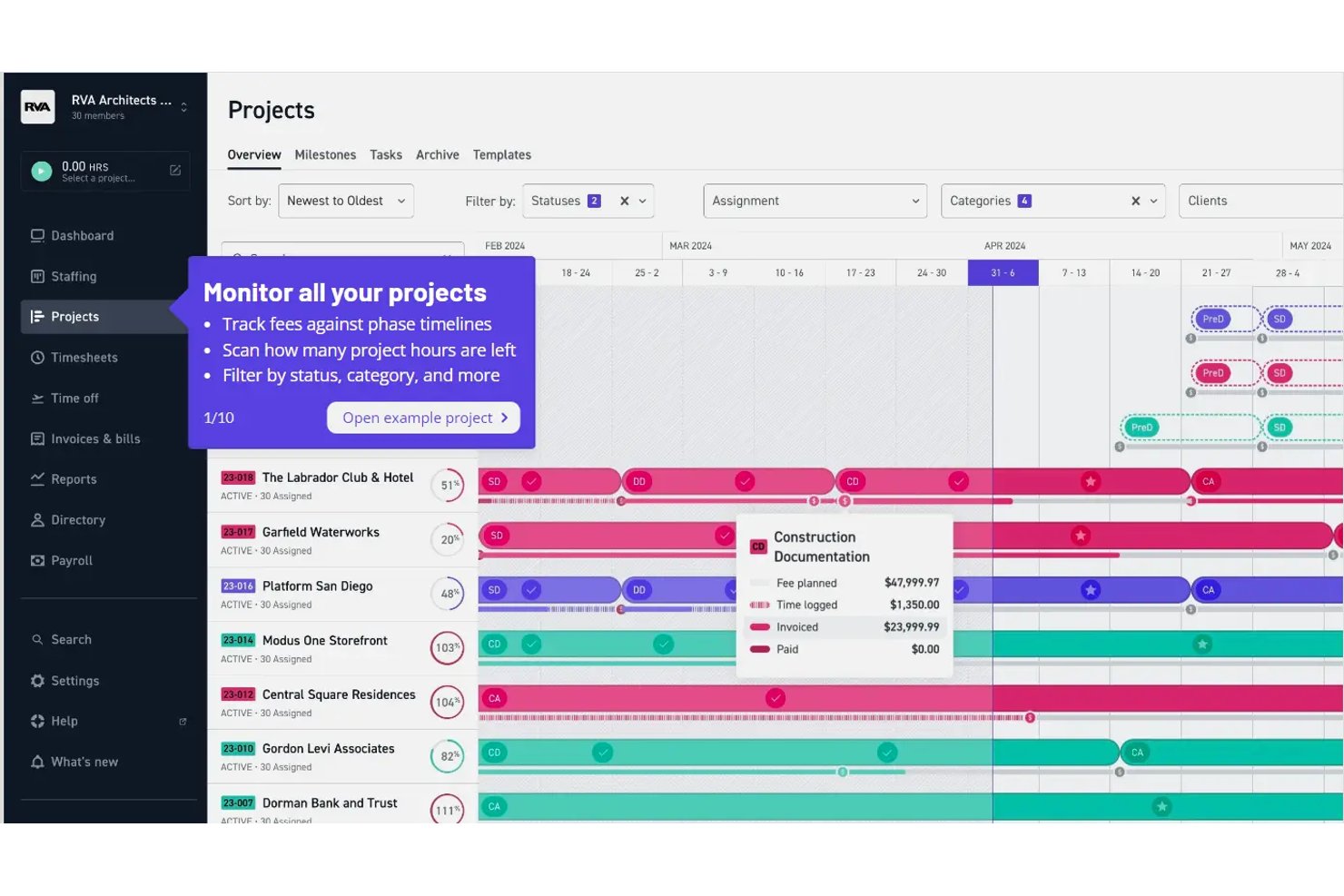
Monograph is firm management software built specifically for architecture and engineering practices, combining project planning, phase tracking, staffing, time tracking, invoicing, and financial reporting in one platform.
Who Is Monograph Best For?
Monograph is a strong fit for architecture and engineering firms that need to track project phases, fees, and staff workloads in one place.
Why I Picked Monograph
I picked Monograph as one of the best because it's built specifically around how architecture and engineering firms actually structure work: by phase. The Money Gantt tracks logged hours against each phase's fee budget in real time, so I can see a schematic design phase running hot before it becomes a billing problem. The Project Financials Report then breaks this down by role and rate, showing billable versus non-billable time and invoice status, all without leaving the platform.
Monograph Key Features
- Linked phase scheduling: Connect project phases so that shifting one phase's end date automatically cascades date changes through all succeeding phases.
- Staffing People view: See each team member's allocated hours against their available capacity across weekly, monthly, or quarterly timeframes.
- AI Budget Builder: Generate a proposed phase-by-phase budget with fee types, roles, and rates directly from contract information.
- Client View portal: Give clients a read-only window into project phases, Gantt progress, invoice status, and proposals, with built-in proposal acceptance.
Monograph Integrations
Monograph offers one documented native integration with QuickBooks Online for syncing invoices, bills, expenses, payments, and project costs. No additional native integrations or public API are documented.
Pros and Cons
Pros:
- Staffing views show workloads across projects
- Money Gantt connects logged hours to budgets
- Linked phases automatically shift succeeding dates
Cons:
- Staffing hours often need manual rebalancing
- File hub lacks drawing markup and version control
Annen prosjektstyringsprogramvare for arkitekter
Her er noen flere alternativer som ikke kom med på topplisten, men som likevel er verdt å vurdere.
- ArchiOffice
For A&E time, billing, and fee tracking
- Paymo
For time-to-invoice project tracking
- ProWorkflow
For fee tracking and client reporting
- Workzone
For juggling multiple client projects at once
- Projectworks
For financial oversight in architecture
- Bonsai Agency Software
For client billing and fee tracking
- GoodDay
For adapting workflows to any design phase
- Unanet
For AE-specific ERP and fee tracking
- Deltek Ajera
For A&E project and billing in one place
- WorkflowMax
For time and fee tracking by job phase


How I Evaluate Project Management Software for Architects
I split my evaluation into three parts, giving core functionality the most weight: track design phases and fees against budgets, and coordinate staff workloads. Next, I look for features such as Revit-linked BIM/CAD files. Finally, I consider AEC-aware onboarding, support, and pricing that fits firm size.
Core Functionality (Table Stakes For This List)
When I'm selecting tools for my list, I score each one on a scale from 0 (does not offer the functionality) to 5 (excels in this area) for each core functionality listed below. I then convert the total into a percentage to help assess each tool's overall fit, with extra weight on any functionalities I’ve deemed essential.
- Project Phase Tracking (Essential): I look for phase templates and progress tracking across schematic design, design development, construction documents, and construction administration.
- Time & Fee Tracking (Essential): I assess whether teams can log billable hours by project or phase and compare fees and time spent against budgets.
- Staff Scheduling: I check for workload and availability views that help managers spot conflicts when assigning staff across concurrent projects.
- Document Management: I look for organized project files, drawing version history, and links to tasks or phases, especially when teams revise documents.
- Client & Consultant Collaboration: I evaluate whether external partners can access relevant updates, exchange files, comment, and approve deliverables within the project workflow.
- Budget & Billing: I check whether teams can monitor project costs and budgets, then connect billing or invoices to project progress or milestones.
Once I have a list of tools that meet the criteria, I consider what sets each platform apart.
Differentiating Factors (What Sets Vendors Apart)
Here's how I compare and contrast different vendors:
Standout Features
I look for BIM/CAD integration that links Revit or AutoCAD files directly to project tasks, so drawing updates stay connected to the timeline without manual re-uploads. Mobile field access matters just as much—I check whether project architects can log punch lists and RFIs offline from a job site, then sync when they're back online. I also evaluate multi-project profitability rollups that aggregate utilization and realization rates across the entire studio, giving principals a single view of margin health firm-wide.
Beyond Features
I check how easily each platform onboards external consultants and contractors. Architects coordinate with structural engineers, MEP firms, and specialty subs on every project, so flexible guest licensing and compatibility with tools like Procore or Bluebeam matter. I also evaluate whether accounting integrations—QuickBooks, Deltek, or similar—sync time and billing data without duplicate entry, since disconnected financials undermine any profitability reporting the PM tool produces. Finally, firm size scalability counts: a five-person studio shouldn't need enterprise admin overhead, but the upgrade path should be clear when a second office opens.
Slik velger du prosjektstyringsprogramvare for arkitekter
Det er lett å gå seg vill i lange funksjonslister og komplekse prismodeller. For å hjelpe deg med å holde fokus mens du går gjennom den unike prosessen med å velge programvare, har jeg laget en sjekkliste over faktorer du bør ha i bakhodet:
| Faktor | Hva du bør vurdere |
|---|---|
| Skalerbarhet | Forsikre deg om at verktøyet kan vokse sammen med teamet ditt. Se etter alternativer som støtter flere brukere og prosjekter uten problemer. |
| Integrasjoner | Kontroller om programvaren kobler seg til verktøyene du allerede bruker, for eksempel CAD-programmer, e-post og skylagring. |
| Tilpasningsmuligheter | Se etter alternativer som lar deg tilpasse arbeidsflyter, oversikter og rapporter etter teamets spesifikke behov. |
| Brukervennlighet | Velg et verktøy med et intuitivt grensesnitt som teamet raskt kan lære seg, slik at nedetiden begrenses. |
| Budsjett | Ta hensyn til totalkostnaden, inkludert eventuelle ekstra gebyrer for flere funksjoner, brukere eller kundestøtte. |
| Sikkerhetstiltak | Forsikre deg om at programvaren har sterke tiltak for databeskyttelse, slik at prosjektene og kundeinformasjonen din holdes trygge. |
| Mobil tilgang | Hvis teamet ditt arbeider ute på byggeplassen, bør du vurdere verktøy med god støtte for mobilapper, slik at dere har tilgang på farten. |
| Støttetjenester | Se etter plattformer som tilbyr omfattende støtte, inkludert veiledninger, direktechat og telefonstøtte. |
Ærlig talt er det mye å sette seg inn i – og det er stort press for å få det riktig. Derfor vil jeg foreslå at du bruker vår rådgivningstjeneste for prosjektstyringsprogramvare for å få hjelp med å lage en kortliste over prosjektstyringsverktøy som passer godt for deg og organisasjonens spesifikke behov.
Trender innen prosjektstyringsprogramvare for arkitekter
I arbeidet med undersøkelsen hentet jeg inn utallige produktoppdateringer, pressemeldinger og utgivelseslogger fra ulike leverandører av prosjektstyringsprogramvare for arkitekter. Her er noen av trendene som vokser frem, og som jeg følger med på:
- BIM-integrasjon: Integrasjon av bygningsinformasjonsmodellering (BIM) blir stadig vanligere, slik at arkitekter kan arbeide direkte med 3D-modeller i prosjektstyringsverktøyene sine. Dette hjelper teamene med å visualisere prosjekter bedre og ta mer informerte beslutninger.
- Sporing av bærekraft: Verktøy begynner å inkludere funksjoner for sporing av bærekraftsmålinger, som energibruk og materialinnkjøp. Denne trenden drives av den økende etterspørselen etter miljøvennlig design og byggeskikk.
- Støtte for utvidet virkelighet (AR): Noen leverandører integrerer AR for å gjøre det mulig for arkitekter å visualisere design i virkelige omgivelser. Dette gir en ny måte å presentere ideer for kunder på og gjøre justeringer før byggingen starter.
- Avanserte samarbeidsverktøy: Forbedrede samarbeidsfunksjoner, som samtidig redigering og videokonferanser i plattformen, blir stadig mer standard. Disse hjelper team med å arbeide effektivt sammen, særlig når de befinner seg på ulike steder. Du kan også se nærmere på samarbeidsverktøy i sanntid for å lære mer om standardfunksjoner i bransjen.
- Dataanalyse og innsikt: Prosjektstyringsverktøy tilbyr mer avansert analyse for å hjelpe team med å ta datadrevne beslutninger. Dette omfatter sporing av prosjektresultater og prognoser for fremtidige trender, noe som gir arkitekter verdifull innsikt.
Hva er prosjektstyringsprogramvare for arkitekter?
Prosjektstyringsprogramvare for arkitekter er et spesialisert verktøy tilpasset behovene ved planlegging og gjennomføring av arkitektprosjekter. Det integrerer funksjoner for designutvikling, oppgavehåndtering, ressursfordeling, kundeoppfølging og samarbeid med ulike interessenter. Denne programvaren ivaretar de unike aspektene ved arkitektarbeid, fra idé til bygging.
Fordelene med denne programvaren omfatter økt effektivitet ved håndtering av komplekse arkitektprosjekter, bedre koordinering mellom teammedlemmer og mer effektive kundekommunikasjonsprosesser. Den tilbyr effektiv budsjettsporing, sentralisert dokumenthåndtering og tidsbesparende funksjoner. Ved å bruke denne programvaren kan arkitekter opprettholde høye kvalitetsstandarder, håndtere risiko effektivt og sikre en smidig fremdrift i prosjektene fra det første designet til den endelige ferdigstillelsen.
Funksjoner i prosjektstyringsprogramvare for arkitekter
Når du velger prosjektstyringsprogramvare for arkitekter, bør du se etter følgende viktige funksjoner:
- BIM-integrasjon: Gjør det mulig å arbeide med 3D-modeller direkte i verktøyet, noe som bidrar til visualisering og informerte beslutninger.
- Sporing av bærekraft: Overvåker miljøvennlige målinger som energibruk og materialinnkjøp for å støtte bærekraftig designpraksis.
- Avanserte samarbeidsverktøy: Tilbyr samtidig redigering og videokonferanser i sanntid, noe som forbedrer kommunikasjonen og produktiviteten i teamet.
- Oppgavehåndtering: Hjelper med å organisere, tildele og overvåke oppgaver for å sikre at prosjektene holder tidsplanen.
- Tidsregistrering: Selv om du kan innføre beste praksis for tidsregistrering, registrerer det riktige verktøyet tiden som brukes på oppgaver, noe som bidrar til ressursstyring og prosjektplanlegging.
- Tilpassbare kontrollpaneler: Gjør det mulig for brukere å tilpasse arbeidsområdet etter spesifikke prosjektbehov og preferanser.
- Mobiltilgang: Gir tilgang til prosjektinformasjon på farten, noe som er nyttig for team som arbeider på byggeplassen.
- Lagring av ressurser – Programvaren bør la deg lagre og samle ulike visuelle ressurser, videoressurser og tekstressurser digitalt. På samme måte som programvare for digital ressursforvaltning.
- Dataanalyse og innsikt: Analyserer prosjektresultater og forutsier trender, noe som gir verdifull innsikt for beslutningstaking.
- Verktøy for sikkerhetsstyring: Sikrer samsvar med sikkerhetsforskrifter, noe som er avgjørende for prosjekter knyttet til bygg og anlegg.
- Budsjettering og regnskap – Tilbyr verktøy for håndtering av fakturering, sporing av fakturerbare timer og timelister. Hvis funksjonaliteten er begrenset, kan den suppleres med programvare for prosjektbudsjettering.
- Kundeportal: Gir kundene tilgang til prosjektoppdateringer og dokumenter, noe som forbedrer åpenheten og kommunikasjonen.
Vanlige spørsmål om prosjektledelse for arkitekter
Nedenfor går jeg gjennom noen viktige spørsmål og svar om programvare for prosjektledelse for arkitekter.
Hvilken programvare bruker arkitekter?
Arkitekter i arkitektfirmaer og andre AEC-firmaer bruker en rekke ulike typer programvare, som programvare for prosjektplanlegging (Trello, Asana, Basecamp), regnskapsprogramvare for arkitekter (Quickbooks, Sage) og/eller designprogramvare (AutoCAD, Rino 3D, Sketchup).
Hva er prosjektledelse innen arkitektur?
Arkitekturprosjekter er en kategori for seg – komplekse og flerdimensjonale. De kombinerer teknisk presisjon med estetisk visjon, for ikke å glemme funksjonalitet. I motsetning til mer lineære prosjekter er arkitektarbeid tett knyttet til lokale forskrifter, miljøpåvirkning og lokalsamfunnets kontekst. Det krever tett samarbeid med et tverrfaglig team som inkluderer arkitekter, ingeniører, entreprenører og kunder.
Her er noen av de unike aspektene ved å lede arkitekturprosjekter:
- Prosjektbudsjetter: Selvfølgelig kan budsjetter og prosjektomfang endres i alle bransjer. Men ingeniørfirmaer må ta hensyn til ikke bare innledende kostnader, men også langsiktige vedlikeholdskostnader og driftsutgifter.
- Komplekse arbeidsflyter: Evnen til å effektivisere arbeidsflyter er avgjørende, fordi flere personer med ulike spesialområder må kunne gå inn i og ut av prosjektet på forskjellige tidspunkter. Samarbeidsverktøy i en prosjektstyringsløsning (som fildeling og automatiserte Slack-varsler) er også svært nyttige for dette aspektet.
- Juridisk og forskriftsmessig samsvar: Arkitekturprosjekter må følge et komplekst nettverk av byggeforskrifter, reguleringsbestemmelser og sikkerhetsforskrifter som er unike for hvert sted. Det er viktig at disse tas med i planleggingen og gjennom hver milepæl i prosjektet, og at fremtidige endringer i forskriftene også vurderes.
Hva er forskjellen mellom prosjektstyringsprogramvare for arkitekter og prosjektstyringsprogramvare for bygg og anlegg?
Prosjektstyringsprogramvare for arkitekter fokuserer på designsamarbeid, dokumentdeling og arbeidsflytstyring som er spesifikk for arkitekturprosessen. Prosjektstyringsprogramvare for bygg og anlegg er derimot rettet mot gjennomføring av prosjekter på byggeplassen, inkludert planlegging, ressursallokering, budsjettoppfølging og overholdelse av sikkerhetsstandarder. Den viktigste forskjellen ligger i hvem verktøyene primært er laget for: arkitekter eller byggeledere.
Hva er forskjellen mellom prosjektstyringsprogramvare for arkitekter og prosjektstyringsprogramvare for ingeniører?
Prosjektstyringsprogramvare for arkitekter legger vekt på designsamarbeid, tegningstyring og kundegodkjenninger. Prosjektstyringsprogramvare for ingeniører fokuserer mer på teknisk oppgaveoppfølging, beregninger, samsvar med krav og koordinering mellom tverrfaglige team. Selv om begge håndterer tidsplaner og ressurser, er verktøyene tilpasset ulike arbeidsflyter – kreativ design kontra teknisk gjennomføring.