



Scoro Vs. BigTime: Full Comparison and Reviews for 2026



Your projects are piling up, the billing is a mess, and every spreadsheet you open raises more questions than it answers. Before you lose another quarter to the chaos, it's time to find the platform that can finally bring your service delivery under control.
You want a professional services automation software that actually helps your team stay organized, keep clients happy, and stop projects from slipping through the cracks. Maybe you’re stuck between Scoro and BigTime—two top contenders with different approaches to tracking time, managing projects, and handling billing. If you’re tired of juggling too many spreadsheets and need more visibility into your service delivery, you’re in the right place.
In this article, you’ll get a clear head-to-head comparison of Scoro and BigTime. I’ll walk you through each tool’s pros and cons, ideal use cases, pricing, security practices, and what it’s really like to use them—so you can pick the best fit for your team.
Scoro vs. BigTime: An Overview
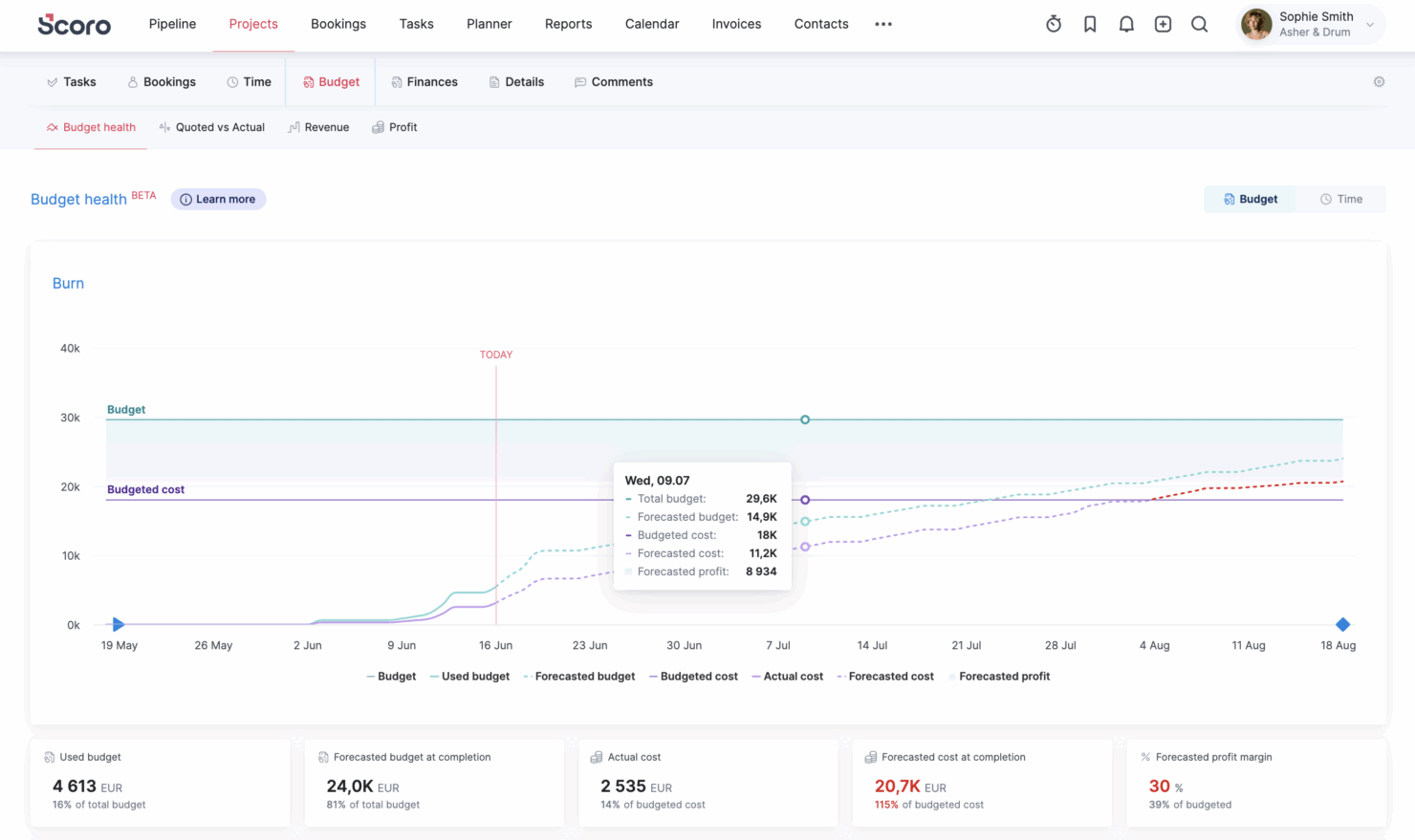
Scoro


BigTime

Why Trust Our Software Recommendations
Our team has been testing and reviewing software since 2012. As project managers ourselves, we know how difficult—and important—it is to choose the right software.
For this guide, we evaluated tools using hands-on testing and independent research, scoring tools using our selection criteria. We also draw on insights from industry thought leaders and practicing project management experts.
Our reviews reflect our human editorial judgment, not a sales pitch.
Expert reviewers:
Scoro vs. BigTime Pricing Comparison
| Scoro | BigTime | |
|---|---|---|
| Free Trial | 14-day free trial | Free demo available |
| Pricing | From $17/user/month | From $20/user/month |
Scoro Vs. BigTime Pricing & Hidden Costs
Scoro uses a transparent, per-seat, modular, mix-and-match approach based on core apps that unlocks more flexibility as you add more core apps to your subscription. With Scoro, you can also access a free trial that allows you to test the software out before committing. BigTime also uses tiered plans, but its pricing is less transparent and typically requires contacting sales to understand exact costs. Both tools may still involve extra fees for onboarding, training, setup, premium support, additional users, or advanced features.
To choose the right pricing model, start by mapping your must-have features and the number of users you’ll need in the first year or two. Think about which advanced tools you’ll actually use, and watch for hidden costs like premium integrations and onboarding. Ask both vendors for a complete breakdown of what’s included in each plan and total costs over 12–24 months based on your projected needs, not just today’s requirements.
Scoro vs. BigTime Feature Comparison
| Scoro | BigTime | |
|---|---|---|
| API | ||
| Billing/Invoicing | ||
| Budgeting | ||
| CRM Integration | ||
| Dashboards | ||
| Data Export | ||
| Data Import | ||
| Document Management | ||
| Expense Tracking | ||
| External Integrations | ||
| Financial Analysis | ||
| Forecasting | ||
| Gantt Charts | ||
| Inventory Tracking | ||
| Multi-Currency | ||
| Multi-User | ||
| Notifications | ||
| Project Management | ||
| Resource Management | ||
| Scheduling | ||
| Status Notifications | ||
| Task Scheduling/Tracking | ||
| Time Management | ||
| Workflow Management |
Scoro Vs. BigTime Integrations
| Integration | Scoro | BigTime |
|---|---|---|
| QuickBooks | ✅ | ✅ |
| Xero | ✅ | ✅ |
| Sage Intacct | ✅ | ✅ |
| Jira | ✅ | ✅ |
| Slack | ✅ | ✅ |
| HubSpot | ✅ | ✅ |
| Salesforce | ✅ | ✅ |
| Lacerte | ❌ | ✅ |
| Trello | ✅ | ✅ |
| Dropbox | ✅ | ❌ |
| API | ✅ | ✅ |
| Zapier | ✅ | ✅ |
Both platforms cover many of the same major integrations, including key tools for accounting, collaboration, and workflow management. Since both Scoro and BigTime offer API access and Zapier connectivity, most integration gaps can be filled, but Scoro’s extensive integration marketplace could be the tiebreaker for teams that want more flexibility across their wider tech stack.
Scoro Vs. BigTime Security, Compliance & Reliability
| Factor | Scoro | BigTime |
|---|---|---|
| Data Encryption | Utilizes SSL/HTTPS encryption for every transaction, and AES-256 encryption for data at rest. | encrypts data in transit via TLS 1.2 and encrypts all data at rest and all backups with SHA-256 encryption. |
| Regulatory Compliance | GDPR and ISO 27001 certified. | SOC 1 Type II certified, PCI and GDPR compliant. |
| Access Controls | Role-based permissions and SSO options for managing user access. | Project & role-based access, customizable user permissions, and SSO. |
| Uptime Guarantees | Promises 99.95% availability with transparent system status updates. | 99.9% uptime with 24/7/365 monitoring and protection. |
Both Scoro and BigTime take security, compliance, and reliability seriously, but they emphasize different strengths. Scoro stands out for ISO 27001 certification, GDPR alignment, regional data hosting options, and a higher published availability commitment, making it a strong fit for teams that work across markets or care about data location. BigTime makes a strong case for firms that prioritize SOC 2 Type II-certified infrastructure, audit trails, SSO/SAML, role-based permissions, encryption, and e-invoicing support. I’d choose Scoro if uptime, international data controls, and ISO-backed security are top priorities; I’d choose BigTime if SOC 2 documentation, auditability, and finance-oriented compliance workflows matter more.
Scoro Vs. BigTime Ease of Use
| Factor | Scoro | BigTime |
|---|---|---|
| User Interface | Clean, modern layout with easy navigation and customizable dashboards. | Simple interface focused on fast data entry and easy navigation. |
| Onboarding | Small teams can use self-guided resources or add expert consultations, while larger teams receive workflow planning, configuration, data migration, training, or fully customized support. | Guided onboarding sessions with a dedicated customer success manager. |
| Support Access | Live chat and responsive customer service via email, plus a rich help center. | Responsive customer support team via live chat and email, and an extensive knowledge base. |
| Training Resources | Self-serve webinars and resource library, frequently updated. | Webinars, BigTime Academy, and the help center. |
BigTime may feel slightly easier to adopt at first, especially for teams focused on time tracking, billing, and straightforward project workflows. Scoro can take slightly more time to configure and learn, but users often value the visibility, reporting, and connected workflows it brings once it’s set up. I’d choose BigTime for faster adoption in billing-focused teams, while Scoro is a strong fit for teams that want a broader system for managing projects, finances, and business performance in one place.
Scoro vs BigTime: Pros & Cons
Scoro
- Excellent multi-entity and multi-currency support for international businesses.
- Deep two-way accounting integrations.
- Scoro is highly-customizable with different permission sets, user-based menus, and settings.
- User interface can feel cluttered for new users (although this can be fixed by creating simplified views via permission sets).
- Some users find the learning curve steep for advanced features.
- Lack of built-in chat/messaging and weaker real-time collaboration features compared to others.
BigTime
- You can easily track time and expenses in one place, making project management straightforward.
- The platform offers detailed reporting, giving you insights into your team's productivity.
- Customer support is responsive and helpful, ensuring your team can resolve issues quickly.
- Some users find the interface a bit dated compared to newer tools.
- Customization options might feel limited if you're used to more flexible platforms.
- Initial setup and onboarding can be time-consuming for larger teams.
Best Use Cases for Scoro and BigTime
Scoro
- Agencies Scoro connects the sales pipeline, creative delivery, and billing in one place, so agencies can quote, resource, and invoice client work without switching tools.
- Consultancies Scoro's quoting matrix breaks down deliverables by role, hours, and cost, giving consultancies real-time margin and utilization visibility across multi-entity, multi-currency operations.
- Architecture FIrms Scoro ties project phases, budgets, and time tracking together so architecture firms can monitor scope creep and protect fee-based project margins in real time.
- IT Services With Jira integration and effortless time logging from calendars or tasks, Scoro gives IT consultancies clear visibility into billable utilization, project profit, and progress as work gets delivered.
- Event Management Scoro handles multi-currency event quoting, purchase orders for vendors, and phase-based Gantt planning, so event agencies can track supplier costs and protect margins across simultaneous productions.
- Engineering FIrms Scoro unifies resourcing, cost tracking, and reporting across teams and offices, helping engineering firms forecast capacity and keep multi-phase projects profitable.
- Software Development Through native Jira sync, Scoro lets developers keep working in their existing tools while worklogs flow back automatically for accurate reporting, invoicing, and profitability tracking.
BigTime
- Consulting Firms BigTime’s detailed billing and time tracking features ensure you bill clients accurately and optimize your project management.
- Engineering Companies You can benefit from BigTime’s robust project tracking capabilities, helping you manage resources and timelines effectively.
- Accounting Teams BigTime’s precise expense tracking and reporting features help you maintain financial accuracy and streamline client billing.
- Legal Services With its focus on accurate time and billing, BigTime helps legal teams track billable hours efficiently.
- Financial Services You’ll find BigTime invaluable for its comprehensive reporting tools, aiding in financial analysis and decision-making.
- Project Managers BigTime’s project management features allow you to oversee multiple projects, ensuring deadlines and resources are managed well.
Who Should Use Scoro, And Who Should Use BigTime?
Scoro is a strong fit for project-based agencies, companies based in multiple regions, consultancies, and professional services firms that want one connected platform for managing sales, projects, resources, billing, and reporting. Its all-in-one setup is especially useful for teams that want clearer visibility from pipeline to profitability without stitching together multiple tools.
BigTime is a good fit for professional services firms that want a finance-focused PSA for scoping, time and expense tracking, resourcing, invoicing, and reporting. It may be especially appealing to accounting, consulting, engineering, architecture, and IT services teams that want to improve billing accuracy, speed up invoicing, and keep project finances easier to track.
Differences Between Scoro and BigTime
| Scoro | BigTime | |
|---|---|---|
| Automation Tools | Offers advanced workflow automation and recurring tasks to streamline operations. | Provides automation for routine billing and time tracking, but fewer workflow triggers. |
| Industry Focus | Strong fit for agencies, consultancies, architecture and engineering firms, IT teams, and software/service businesses that want one connected operating system. | Strong fit for accounting, architecture, consulting, engineering, and IT services firms that want to manage project financials, billable work, and delivery workflows. |
| Learning Curve | More advanced functionality results in a longer onboarding period for new users. | Prioritizes fast setup and intuitive tools with less intimidation for first-time PSA users. |
| Pricing | Uses modular pricing built from eight core apps you can mix and match, rather than one fixed package. Combinations start from $17/user/month. | Uses tiered plans but most plans still push users toward requesting a demo for full pricing and package details. |
| Visit ScoroOpens new window | Read BigTime ReviewOpens new window |
Similarities Between Scoro and BigTime
| Invoicing & Billing | Both offer integrated tools for creating invoices, tracking payments, and managing billing cycles directly from your project workspace. |
|---|---|
| Project Management | Both allow you to create, assign, and track projects and tasks across client engagements, with visibility into progress and deadlines for your team. |
| Time Tracking | Each platform helps teams log billable and non-billable hours using built-in timers or timesheet entry, making client invoicing and reporting easier. |
| User Permissions | You can customize user roles and permissions to control access to projects, financials, and sensitive client data in both systems. |
| Visit ScoroOpens new window Read BigTime ReviewOpens new window | |