

De 10 beste programvarene for automatisering av KI-arbeidsflyter, vurdert i 2026

Kortliste over den beste programvaren for automatisering av AI-arbeidsflyter


Den beste programvaren for automatisering av AI-arbeidsflyter eliminerer manuelle, repetitive oppgaver (som statusoppdateringer, dataregistrering, godkjenninger og oppgavetildelinger), slik at du kan fokusere på arbeid med stor innvirkning. Utfordringer som endrede tidsfrister, team som ikke er samkjørte, spredte verktøy og manuelle overleveringer kan føre til oversette avhengigheter og stillestående fremdrift, men AI-arbeidsflytverktøy kan hjelpe deg med å håndtere dette.
Jeg har selv testet og vurdert dusinvis av verktøy for å finne de mest effektive og pålitelige plattformene. Med utgangspunkt i min erfaring med optimalisering av arbeidsflyter har jeg satt sammen denne listen for å hjelpe deg med å velge programvare for automatisering som er praktisk, skalerbar og utviklet for å støtte reell prosjektgjennomføring.
Why Trust Our Software Recommendations
Our team has been testing and reviewing software since 2012. As project managers ourselves, we know how difficult—and important—it is to choose the right software.
For this guide, we evaluated tools using hands-on testing and independent research, scoring tools using our selection criteria. We also draw on insights from industry thought leaders and practicing project management experts.
Our reviews reflect our human editorial judgment, not a sales pitch.
Expert reviewers:
Sammenligningstabell for programvare for automatisering av AI-arbeidsflyter
Denne sammenligningstabellen oppsummerer prisopplysningene for mine beste utvalg av programvare for automatisering av AI-arbeidsflyter:
| Tool | Best For | Trial Info | Price | ||
|---|---|---|---|---|---|
| 1 | Best for generative AI project planning | 14-day free trial | Pricing upon request | Website | |
| 2 | Best for real-time profitability insights | 14-day free trial | From $10/user/month (billed annually) | Website | |
| 3 | Best for client interaction management | Free demo available | From $5,000/year (billed annually) | Website | |
| 4 | Best for AI-driven workflow management | Free demo available | Pricing upon request | Website | |
| 5 | Best with 1,000+ prebuilt connectors | 30-day free trial | Pricing upon request | Website | |
| 6 | Best for enterprise integrations | Free plan available | From $100/month | Website | |
| 7 | Best for custom workflow creation | Free trial available | From €20/month (billed annually) | Website | |
| 8 | Best for easy process documentation | Free demo available | Pricing upon request | Website | |
| 9 | Best for task automation | 7-day free trial | From $4.60/user/month (billed annually) | Website | |
| 10 | Best for marketing teams | Free demo available | Pricing upon request | Website |


Vurderinger av den beste programvaren for automatisering av AI-arbeidsflyter
\u003cspan style=\u0022font-weight: 400\u0022\u003eLes min detaljerte oppsummering av hvert av mine utvalgte verktøy blant den beste programvaren for automatisering av AI-arbeidsflyter. Jeg gjennomgår viktige funksjoner, fordeler \u0026 ulemper, integrasjoner og bruksområder, slik at du kan finne det som passer best.\u003c/span\u003e

Wrike
Best for generative AI project planning

Wrike streamlines team workflows by using AI to automate planning and daily tasks. This tool is particularly appealing to businesses aiming to automate routine tasks and focus on strategic initiatives. By leveraging Wrike's capabilities, you can address challenges in resource allocation, team collaboration, and project planning, ensuring your projects run smoothly and efficiently.
Why I Picked Wrike
I picked Wrike for its innovative use of generative AI, which transforms how you handle project planning and communication. Its AI features generate project plans, translate comments, and summarize meetings, aligning perfectly with the needs of teams looking to automate redundant tasks. Additionally, Wrike's customizable request forms and real-time dashboards offer the flexibility to adapt workflows to your specific requirements, enhancing overall efficiency.
Wrike Key Features
In addition to generative AI, Wrike offers:
- Mind Mapping: Allows your team to visualize project ideas and plans, fostering creativity and clarity in planning stages.
- Unlimited Workflows: Provides the flexibility to create as many workflows as needed, tailoring them to different projects or departments.
- Project Blueprints: Enables you to standardize project processes, ensuring consistency and efficiency across recurring tasks.
- Multiple Visualization Options: Offers various ways to view project data, such as Gantt charts and Kanban boards, aiding in better project tracking and management.
Wrike Integrations
Integrations include NetSuite, QuickBooks, Jira, Google Workspace, Salesforce, Microsoft Teams, Slack, Adobe Creative Cloud, Dropbox, and Box.
Pros and Cons
Pros:
- Automates routine tasks, enhancing project efficiency
- Improves team collaboration with shared workflows
- Provides real-time task tracking and updates
Cons:
- Users report unintuitive interface
- The platform and automations take time to learn and set up
New Product Updates from Wrike
Wrike Adds Klaxoon MCP Integration
Wrike’s Klaxoon MCP integration is now generally available, enabling AI agents to navigate between Wrike tasks and attached whiteboards, read task context, and manage whiteboard attachments via API. For more information, visit Wrike's official site.

Best for real-time profitability insights
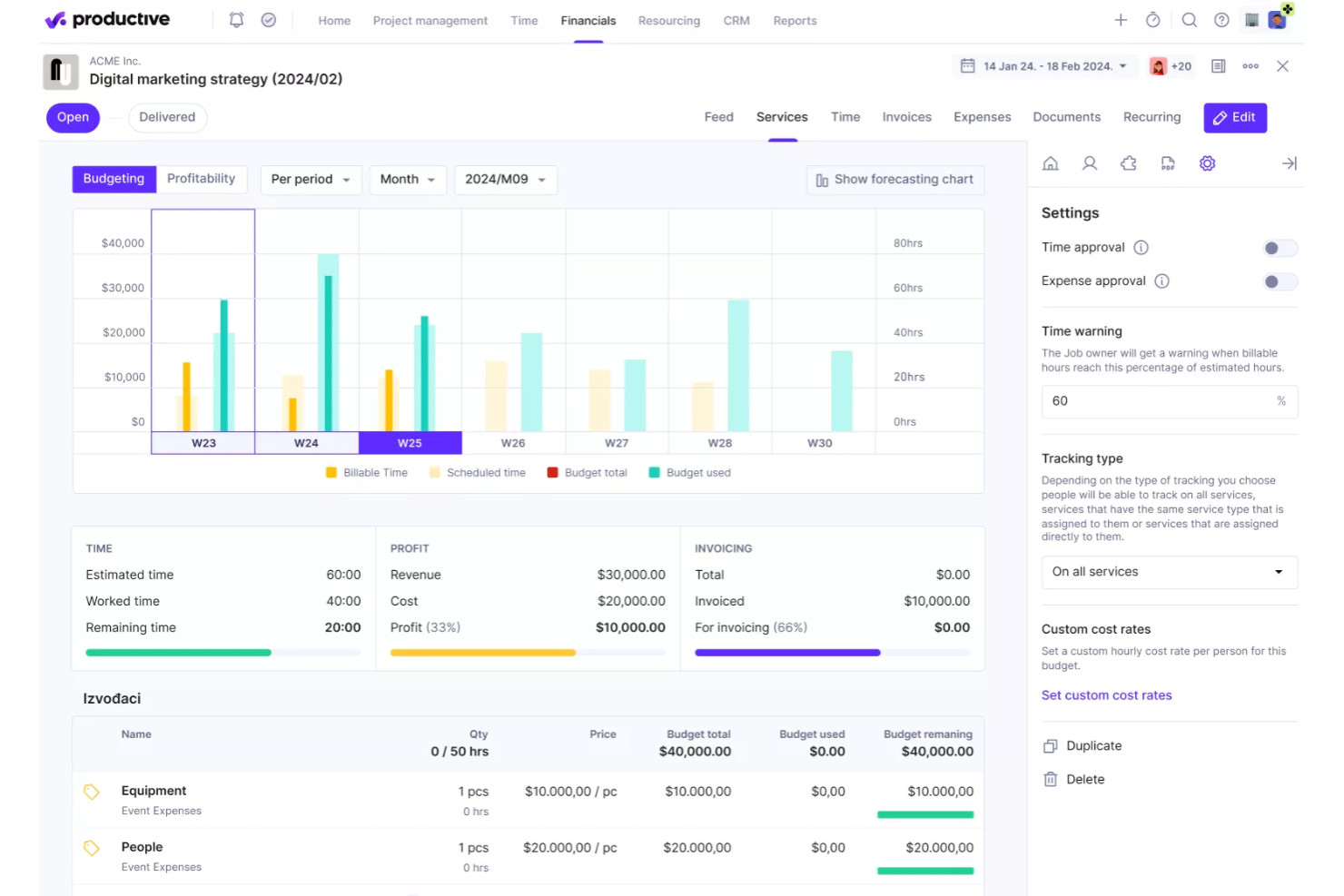
Productive is designed to help agencies streamline operations by combining project management, resource planning, and financial tracking in one platform. With features that support real-time profitability insights, it allows teams to monitor project budgets, utilization, and revenue performance while managing workflows more efficiently. This makes it a practical choice for organizations that want better visibility into both their operational processes and financial outcomes.
Why I Picked Productive
I picked Productive for its real-time profitability insights, which allow teams to monitor project margins, budgets, and financial performance as work progresses. This helps agencies understand whether projects are profitable and make adjustments before issues impact revenue. The platform also supports resource planning to ensure projects are staffed with the right team members based on availability and workload. In addition, Productive includes automated reporting and forecasting tools that help teams analyze performance data and plan future work more effectively.
Productive Key Features
In addition to real-time profitability insights, some other features of Productive include:
- Gantt Charts: Visualize project timelines and dependencies to improve planning and execution.
- Time Tracking: Monitor billable and non-billable hours directly linked to project budgets.
- Invoicing: Automate invoice creation based on tracked time and project budgets.
- Sales CRM: Manage client interactions and sales pipelines within the platform.
Productive Integrations
Integrations include QuickBooks, HubSpot, Slack, Xero, Jira, and Google Calendar. An API and Zapier connection are also available for additional integrations.
Pros and Cons
Pros:
- Flexible configuration supports different agency workflows and operational needs
- Clear dashboards improve team collaboration and project performance monitoring
- Project visibility tools help teams track budgets, progress, and resource usage
Cons:
- Reporting tools require manual configuration to generate detailed project insights
- Interface layout can feel overwhelming when managing large numbers of projects
New Product Updates from Productive
Productive Adds Voice Dictation, Slack Connector, Proposals, and Overtime
Productive adds voice dictation, a Slack Connector, proposal controls, and overtime tracking. These updates support faster AI interactions, client proposals, and time management. For more information, visit Productive’s official site.

Moxo
Best for client interaction management

Moxo is a client interaction management platform that helps improve client communication and engagement, operational efficiency, and project collaboration. It serves industries like finance, real estate, and legal services.
Why I picked Moxo: It excels in managing client interactions and is ideal if you need efficient communication channels. The platform provides secure messaging and document sharing features to keep client data safe. You can set up client portals as centralized hubs for communication and collaboration. Moxo's task management tools keep your team organized and help them stay responsive to client needs.
Standout features & integrations:
Features include digital forms that capture client input, task automation that reduces manual tasks, and the ability to track progress with built-in dashboards.
Integrations include Salesforce, Slack, Box, Docusign, QuickBooks, and HubSpot.
Pros and Cons
Pros:
- Strong client engagement tools
- Centralized communication hub
- Secure client portals
Cons:
- Learning curve for new users
- Limited customization options

Best for AI-driven workflow management

Screendragon is a no-code workflow management platform that uses AI and automation to simplify complex business processes. It’s ideal for marketing, operations, and enterprise teams that need to manage multiple projects, approvals, and resources without getting bogged down by manual tasks. By combining visual workflow design with intelligent automation, it helps teams stay efficient and focused on strategic work.
Why I picked Screendragon: I picked Screendragon for its strong AI-driven workflow management capabilities. The platform uses embedded AI agents to automate repetitive tasks and manage complex workflows end-to-end. I also liked how it combines no-code flexibility with enterprise-grade security, so you can build and scale workflows that match your organization’s exact needs. If your team handles high-volume approvals or global campaigns, Screendragon can help reduce manual effort while maintaining visibility and control.
Standout features & integrations:
Features include a visual workflow builder for creating custom automations, digital approval management that speeds up decision-making, and workflow analytics that provide real-time insights into team performance.
Integrations include Jira, Google Drive, Box, Adobe, OneDrive, Salesforce, Microsoft Dynamics 365, SAP, and NetSuite.
Pros and Cons
Pros:
- Enterprise-ready with strong security
- AI agents automate complex tasks
- Customizable no-code workflow builder
Cons:
- Steep learning curve for new users
- Setup can take time
New Product Updates from Screendragon
Screendragon Unveils New AI Hub
Screendragon introduced AI Hub, a new capability that lets teams build and manage AI agents directly within workflows. The update helps marketing teams automate tasks, maintain governance controls, and scale AI-driven operations more efficiently. For more information, visit Screendragon's official site.

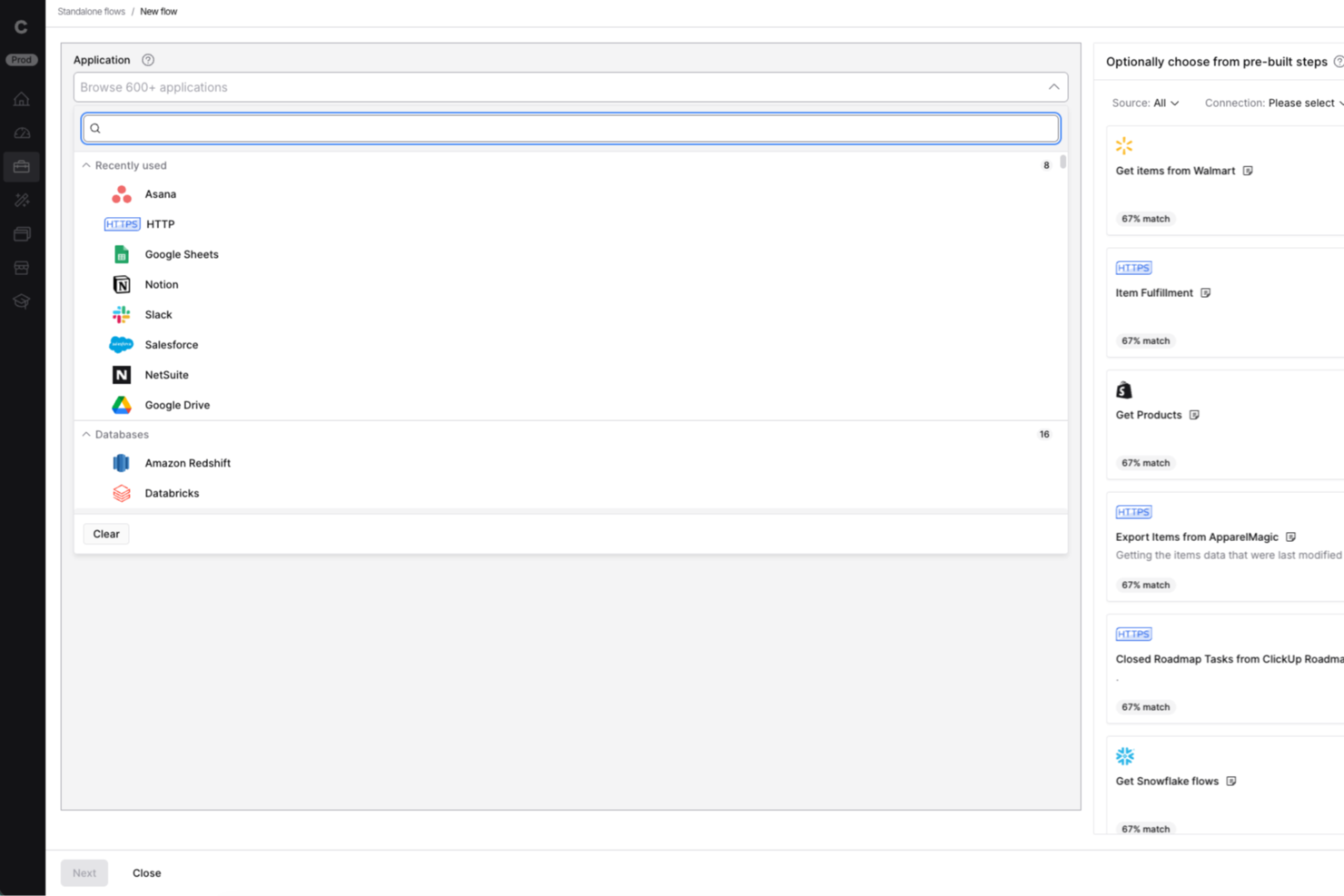
Celigo is an ai workflow automation platform built for IT teams and operations leaders who need to connect apps, automate complex business processes, and manage integrations at scale across their organization.
Who Is Celigo Best For?
IT teams and operations leaders at mid-sized to large enterprises who need to automate and orchestrate workflows across multiple business systems.
Why I Picked Celigo
I picked Celigo as one of the best because its library of 1,000+ prebuilt connectors lets my team automate workflows across dozens of SaaS apps without custom development. I can quickly connect Salesforce, NetSuite, Shopify, and more, then orchestrate data flows between them. This saves us weeks on integration projects and lets us focus on optimizing business processes instead of building connectors from scratch.
Celigo Key Features
- AI-powered error management: Automatically detects, flags, and helps resolve integration errors in real time.
- Visual flow builder: Lets you design, map, and automate workflows using a drag-and-drop interface.
- Role-based access controls: Assigns permissions and restricts access to sensitive workflows and data.
- Workflow monitoring dashboard: Provides real-time visibility into process status, throughput, and performance metrics.
Celigo Integrations
Integrations include Salesforce, Microsoft Dynamics 365 Business Central, Oracle NetSuite, Walmart, SAP, Snowflake, Acumatica, ADP, Adobe, and 3M.
Pros and Cons
Pros:
- Real-time monitoring and error alerting included
- SOC 2 Type II and GDPR compliance features
- Built-in data transformation and mapping tools
Cons:
- Limited AI-specific automation templates
- Advanced features require higher-tier pricing
New Product Updates from Celigo
Celigo Adds SuiteTax and Variant Publishing for Shopify–NetSuite
Celigo adds NetSuite SuiteTax support and variant-level sales channel publishing to its Shopify–NetSuite integration. These updates improve tax handling and give merchants more control over how product variants are published. For more information, visit Celigo’s official site.
 .
.
Workato
Best for enterprise integrations

Workato is an integration platform as a service (iPaaS) for enterprise users across IT, finance, HR, and marketing. You can use it to automate business processes, integrate your apps, and improve operational efficiency.
Why I picked Workato: It offers enterprise-grade integrations, which makes it suitable for large organizations. The platform offers a no-code interface with over 1200 pre-built connectors. You can automate complex workflows and manage APIs, and the ability to create custom AI assistants and agents adds flexibility to your operations.
Standout features & integrations:
Features include version control so you can manage changes safely, role-based access to support cross-functional teams, and granular error monitoring to help you resolve failures.
Integrations include Salesforce, Slack, HubSpot, Marketo, ServiceNow, NetSuite, QuickBooks, Microsoft Dynamics 365, Zendesk, and Jira.
Pros and Cons
Pros:
- Custom agent creation
- No-code automation platform
- Extensive pre-built connectors
Cons:
- Can be complex for small teams
- Limited customer support hours

n8n
Best for custom workflow creation

n8n is an AI workflow automation platform for technical teams like IT, security, development, and sales. It helps you build multi-step AI agents and integrate various applications to perform business functions like employee onboarding and security incident management.
Why I picked n8n: The platform's flexibility in custom workflow creation sets it apart. Users can build workflows using either the visual interface or code, which makes it adaptable to different skill levels. It supports over 500 integrations, so you can connect various tools, and the option for self-hosting or a cloud solution adds more versatility.
Standout features & integrations:
Features include a visual workflow builder that simplifies complex tasks, support for both no-code and code-savvy users, and the ability to run and debug workflows efficiently.
Integrations include Google Sheets, Slack, MySQL, HubSpot, Salesforce, GitHub, Jira, Airtable, Trello, and Microsoft Teams.
Pros and Cons
Pros:
- Extensive integration capabilities
- Low-code and self-hosting options
- Flexible workflow creation
Cons:
- Can be complex for beginners
- Requires technical knowledge

Best for easy process documentation

Process Street is a compliance operations platform that helps you automate and track business processes. It's ideal for operations, compliance, and HR teams in industries like healthcare and technology. The platform centralizes compliance documentation and transforms policies with AI-powered workflows.
Why I picked Process Street: It excels in simplifying process documentation and makes it easy for teams to manage standard operating procedures. Its standout features include centralized policy management and real-time task visibility. The platform's AI-driven workflows also help you improve operational efficiency.
Standout features & integrations:
Features include workflow automation that simplifies repetitive tasks, project management capabilities to keep your team organized, and AI tools that transform manual processes.
Integrations are not listed publicly on Process Street’s website.
Pros and Cons
Pros:
- Compliance monitoring
- Centralized policy management
- Easy process documentation
Cons:
- Some integrations need improvement
- Limited customization options

TimeHero
Best for task automation

TimeHero is a task management and automation tool for teams that want to boost productivity and manage tasks efficiently. You can use it to automate scheduling and task management and optimize your workflows.
Why I picked TimeHero: It focuses on task automation and is a great choice for teams that want to streamline their work processes. The platform can automatically schedule tasks based on priorities and deadlines to help your team stay on track. Its predictive scheduling adjusts tasks dynamically as priorities change. TimeHero's collaborative features keep everyone informed and aligned on the project goals.
Standout features & integrations:
Features include workload forecasting that helps you see team capacity, project planning tools that link tasks to larger goals, and visual timelines for tracking progress in real time.
Integrations include Google Calendar, Gmail, Trello, Slack, Asana, Evernote, and Basecamp.
Pros and Cons
Pros:
- Boosts team communication
- Collaborative tools
- Automatic task rescheduling
Cons:
- Limited customization options
- Initial setup can be time-consuming

Best for marketing teams
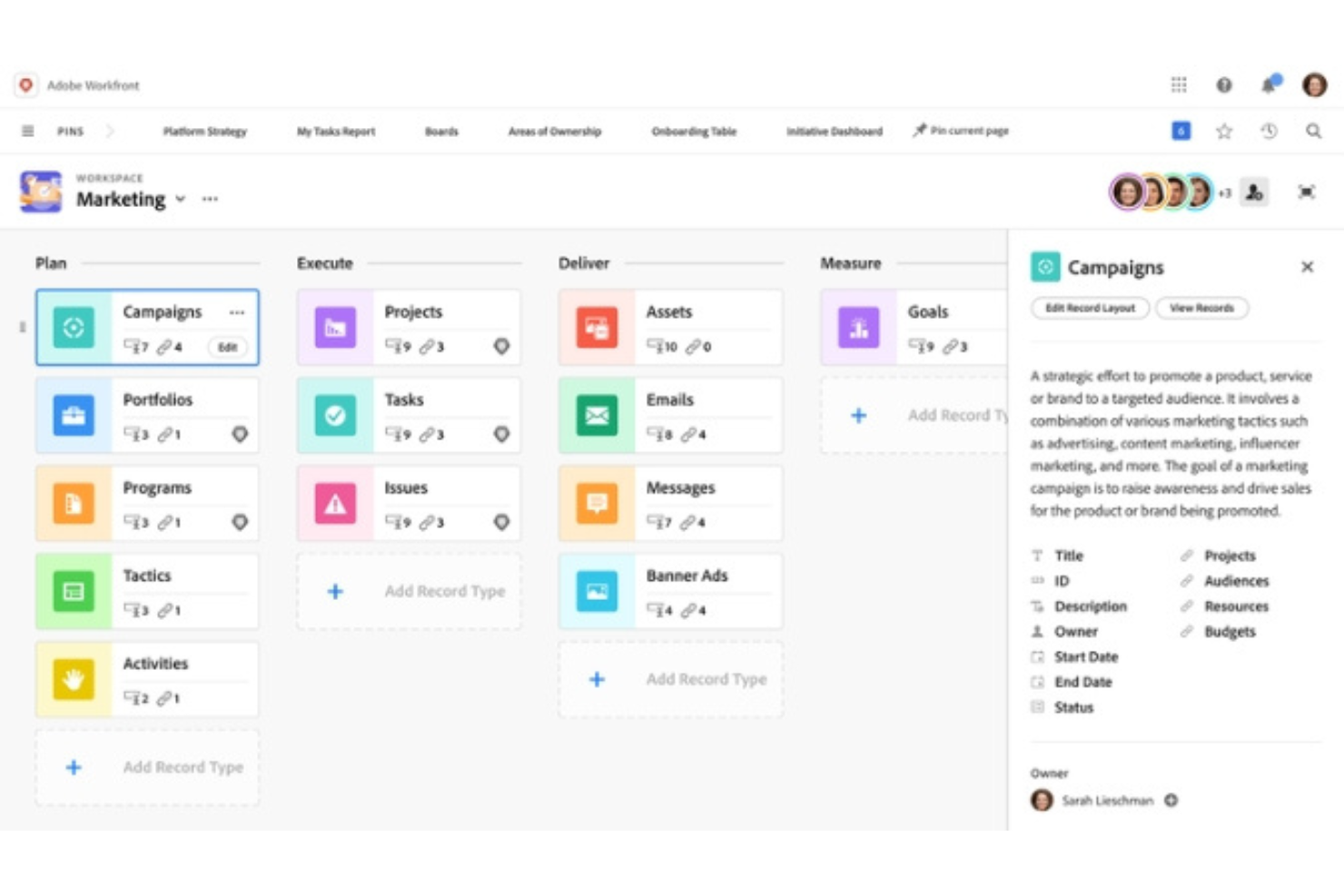
Adobe Workfront is a project management platform for marketing teams and creative professionals. It helps you manage projects, workflows, and collaboration across departments.
Why I picked Adobe Workfront: It caters to marketing teams with features that support creative project management. The platform provides customizable dashboards to visualize project progress, and you can assign tasks, set deadlines, and track performance. The integration with Creative Cloud helps maintain a smooth workflow for creative professionals.
Standout features & integrations:
Features include portfolio management tools that connect projects to objectives, resource scheduling that helps balance workloads, and approval paths that keep creative work moving.
Integrations include Adobe Creative Cloud, Microsoft Teams, Slack, and Figma.
Pros and Cons
Pros:
- Performance reporting tools
- Efficient task management
- Customizable dashboards
Cons:
- High resource consumption
- Complex setup for beginners
Annen programvare for automatisering av AI-arbeidsflyter
\u003cspan style=\u0022font-weight: 400\u0022\u003eHer er noen flere alternativer for programvare for automatisering av AI-arbeidsflyter som ikke kom med på kortlisten min, men som likevel er verdt å se nærmere på:\u003c/span\u003e
- Tonkean
For operations teams
- Camunda
For BPMN and DMN modeling
- Jitterbit
For data integration tasks
- Forms On Fire
For mobile data collection
- elvex
For AI-powered knowledge workflows
- Miro
For visual collaboration
- Jotform Workflows
For no-code workflow customization
- GoodDay
For task dependency management
- Kissflow
For workflow optimization
- Parabola.io
For data-heavy workflows
- Asana
For managing cross-functional projects
- Zapier
For simple app-to-app automations
- ClickUp
For customizing workflow views
- monday.com
For visual task management


How I Evaluate AI Workflow Automation Software
Every tool on this list needs to do more than bolt on an AI label—I look for platforms where AI drives real outcomes, like auto-generating status reports or flagging at-risk sprints before they derail. I split my evaluation into core functionality every tool must have to qualify and differentiating factors that separate the best fits from the rest.
Core Functionality (Table Stakes For This List)
When I'm selecting tools for my list, I rank each one on a scale from 0 (does not offer the functionality) to 5 (excels in this area) for each core functionality listed below. Then, I calculate the tool's total score into a percentage. Each tool needs to achieve a minimum total score of 65% to be considered for inclusion.
- AI-Assisted Workflow Builder: I evaluate whether the platform lets you describe a workflow in plain language and get a usable automation back, like typing "assign QA tasks when dev marks a ticket done."
- Project Task Automation: Each tool should automate core PM actions like creating subtasks, reassigning work when priorities shift, or updating status fields across dependent tasks.
- Trigger-Based Conditional Logic: I look for event-driven triggers paired with branching logic, such as kicking off a risk review workflow when a milestone slips past its planned date.
- Native PM Integrations: The tool needs to connect with platforms teams already use. I check for depth of integration with tools like Jira, Asana, ClickUp, Slack, and Google Workspace.
- Generative AI Outputs: I evaluate whether AI can produce useful project artifacts within workflows, like drafting a sprint summary from completed tickets or generating stakeholder update emails.
- Predictive Intelligence: The platform should surface forward-looking insights, such as flagging resource bottlenecks or forecasting delivery risk based on velocity trends and historical data.
Once I have a list of tools that meet the criteria, I consider what sets each platform apart.
Differentiating Factors (What Sets Vendors Apart)
Here's how I compare and contrast different vendors:
Standout Features
Autonomous AI agents set tools apart. I look for platforms where an agent can triage requests, route tasks, and update stakeholders on its own. That kind of hands-off coordination saves PMs hours each week. A conversational interface matters too—PMs should be able to type "show me blocked tasks this sprint" and get answers without building a report. Prebuilt PM templates for sprint kickoffs or risk reviews help teams get running in minutes rather than configuring workflows from scratch.
Beyond Features
AI transparency is a big deal when workflows make decisions on your behalf. I check whether a platform shows why it flagged a deadline as at-risk or reassigned a task, and whether it offers approval gates before AI actions execute. Security and data governance matter just as much—I evaluate controls over what project data AI models can access and whether the vendor supports SOC 2 Type II and regional data residency. Pricing structures also get close attention, since AI-heavy usage can drive costs up fast if token consumption or workflow runs aren't priced predictably.
Slik velger du programvare for automatisering av AI-arbeidsflyter
Det er lett å gå seg vill i lange funksjonslister og kompliserte prisstrukturer. For å hjelpe deg med å velge riktig programvare for automatisering av AI-arbeidsflyter, får du her en sjekkliste over faktorer du bør ha i mente:
| Faktor | Hva du bør vurdere |
|---|---|
| Skalerbarhet | Kan programvaren vokse sammen med virksomheten din? Vurder om den støtter flere brukere og arbeidsflyter uten problemer. Sjekk om den kan håndtere økt datamengde på en effektiv måte. |
| Integrasjoner | Kan den kobles til de eksisterende verktøyene dine (for eksempel regnskapsprogramvare eller et CRM-verktøy)? Sørg for at den tilbyr innebygde integrasjoner med de viktigste programvaresystemene dine. Unngå verktøy som krever kostbare tredjepartsløsninger for integrasjon. |
| Tilpasningsmuligheter | Kan du tilpasse den til arbeidsflytene dine? Se etter programvare som tillater endringer uten at du trenger en utvikler. Sjekk om den støtter egendefinerte felt og grensesnitt. |
| Brukervennlighet | Er grensesnittet intuitivt for teamet ditt? Unngå verktøy med en bratt læringskurve. Test navigasjonen og brukeropplevelsen før du bestemmer deg. |
| Implementering og oppstart | Hvor raskt kan teamet ditt komme i gang? Vurder opplæringsmateriellet og støtten som tilbys under oppstarten. Se etter interaktive veiledninger og opplæringsprogrammer. |
| Kostnad | Passer den inn i budsjettet ditt? Sammenlign prisplaner og se etter skjulte gebyrer. Vurder verdien som tilbys i grunnleggende planer, sammenlignet med premiumalternativer. |
| Sikkerhetstiltak | Er dataene dine beskyttet? Sørg for at programvaren overholder bransjestandarder som GDPR. Sjekk om den tilbyr kryptering og rollebaserte tilgangskontroller. |
| Tilgjengelig kundestøtte | Er hjelp tilgjengelig når du trenger det? Se etter kundestøtte døgnet rundt og korte responstider. Sjekk om de tilbyr flere kanaler for kundestøtte, som chat og telefon. |
Hva er programvare for automatisering av AI-arbeidsflyter?
Programvare for automatisering av AI-arbeidsflyter er et verktøy som automatiserer repetitive oppgaver og prosesser ved hjelp av kunstig intelligens. Det brukes vanligvis av prosjektledere, IT-fagfolk og driftsteam for å øke effektiviteten og redusere manuelle og rutinemessige oppgaver.
Funksjoner som oppgaveautomatisering, sanntidsanalyse og integrasjoner med eksisterende verktøy hjelper deg med å administrere arbeidsflyter, forbedre produktiviteten og holde teamene samkjørte. Alt i alt sparer disse verktøyene deg for tid, slik at du kan fokusere på mer strategiske oppgaver.
Funksjoner i programvare for automatisering av AI-arbeidsflyter
Når du velger programvare for automatisering av AI-arbeidsflyter, bør du se etter følgende viktige funksjoner:
- Oppgaveautomatisering: Automatiserer repetitive oppgaver og frigjør tid til mer strategisk arbeid.
- Sanntidsanalyse: Gir innsikt i arbeidsflytens ytelse og hjelper deg med å ta datadrevne beslutninger.
- Tilpassbare arbeidsflyter: Lar deg tilpasse prosessene slik at de dekker virksomhetens spesifikke behov, uten at du trenger en utvikler.
- Integrasjoner: Kobler seg til eksisterende verktøy for å opprettholde en jevn informasjonsflyt på tvers av plattformer.
- Skalerbarhet: Støtter vekst ved å håndtere økt datamengde og flere brukere sømløst.
- Sikkerhetstiltak: Beskytter sensitive data med kryptering og tilgangskontroller basert på roller.
- Samarbeidsverktøy: Forbedrer kommunikasjon og koordinering i teamet med funksjoner som delte arbeidsområder og chat.
- Mobiltilgang: Lar teammedlemmer administrere arbeidsflyter og oppgaver fra mobile enheter.
- Brukervennlig grensesnitt: Gjør løsningen enkel å bruke med et intuitivt design og reduserer læringskurven for nye brukere.
- Ytelsesrapportering: Gir detaljerte rapporter for å følge med på produktiviteten og identifisere områder som kan forbedres.
Fordeler med programvare for automatisering av AI-arbeidsflyter
Implementering av programvare for automatisering av AI-arbeidsflyter gir flere fordeler for teamet og virksomheten din. Her er noen av fordelene du kan se frem til:
- Økt effektivitet: Automatiserer repetitive oppgaver, slik at teamet ditt kan fokusere på mer verdifullt arbeid.
- Bedre beslutningstaking: Gir sanntidsanalyse som hjelper deg med å ta informerte valg basert på data.
- Bedre samarbeid: Tilbyr verktøy som forbedrer kommunikasjon og koordinering i teamet.
- Skalerbarhet: Støtter virksomhetens vekst ved å håndtere mer data og flere brukere på en enkel måte.
- Tidsbesparelser: Reduserer manuelt arbeid og frigjør tid til strategiske initiativer.
- Bedre datasikkerhet: Holder sensitiv informasjon beskyttet med sterke sikkerhetstiltak.
- Fleksibilitet: Tilpassbare arbeidsflyter lar deg tilpasse prosessene etter virksomhetens skiftende behov.
Kostnader og priser for programvare for automatisering av AI-arbeidsflyter
Kostnadene for programvare for automatisering av AI-arbeidsflyter varierer basert på funksjoner, teamstørrelse, tillegg og mer. Her er vanlige abonnementer, gjennomsnittspriser og typiske funksjoner som inngår i løsninger for automatisering av AI-arbeidsflyter:
Sammenligningstabell for abonnementer for programvare for automatisering av AI-arbeidsflyter
| Abonnementstype | Gjennomsnittspris | Vanlige funksjoner |
|---|---|---|
| Gratisabonnement | $0/user/month | Grunnleggende oppgaveautomatisering, begrensede appintegrasjoner og brukerstøtte fra fellesskapet. |
| Personlig abonnement | $5-$25/user/month | Oppgaveautomatisering, grunnleggende rapportering, flere integrasjoner og brukerstøtte via e-post. |
| Bedriftsabonnement | $30-$75/user/month | Avansert arbeidsflytautomatisering, sanntidsanalyse, bedre sikkerhet og brukerstøtte via chat. |
| Virksomhetsabonnement | $100+/user/month | Tilpassbare arbeidsflyter, dedikert brukerstøtte, fullstendige integrasjoner og avansert analyse. |
Vanlige spørsmål om programvare for automatisering av AI-arbeidsflyter
Her er svarene på vanlige spørsmål om programvare for automatisering av AI-arbeidsflyter:
Hva er vanlige utfordringer ved implementering av verktøy for automatisering av AI-arbeidsflyter?
Vanlige utfordringer omfatter integrasjon med eksisterende systemer og motstand mot endringer blant teammedlemmer. Du kan møte en læringskurve, så opplærings- og støtteressurser er avgjørende. Sørg for at målene dine er tydelige, slik at du kan tilpasse programvaren til forretningsprosessene dine.
Hvordan forbedrer programvare for automatisering av AI-arbeidsflyter produktiviteten?
Programvare for automatisering av AI-arbeidsflyter øker produktiviteten ved å automatisere repetitive oppgaver, slik at teamet ditt kan fokusere på strategisk arbeid. Den gir sanntidsanalyser, slik at du kan ta informerte beslutninger, og samarbeidsverktøyene bidrar til å knytte sammen ulike avdelinger og effektivisere kommunikasjonen.
Hvilke bransjer har størst nytte av programvare for automatisering av AI-arbeidsflyter?
Bransjer som finans, helsevesen og produksjon har nytte av verktøy for automatisering av AI-arbeidsflyter. Disse sektorene håndterer store mengder repetitive oppgaver og databehandling, så automatisering er avgjørende for effektiviteten. Programvaren bidrar til å effektivisere prosesser, redusere feil og forbedre etterlevelsen av regelverk.
Hvordan kan programvare for automatisering av AI-arbeidsflyter forbedre datasikkerheten?
Verktøy for automatisering av AI-arbeidsflyter kan bidra til å styrke datasikkerheten ved hjelp av kryptering og rollebaserte tilgangskontroller. Det sørger for at bare autoriserte brukere får tilgang til sensitiv informasjon. Regelmessige oppdateringer og samsvar med bransjestandarder som GDPR beskytter data ytterligere mot datainnbrudd og uautorisert tilgang.
Hva bør du ta hensyn til under onboardingprosessen?
Under onboarding bør du vurdere tilgjengeligheten av opplæringsressurser som veiledninger og webinarer. Se etter interaktive produktomvisninger og støtte fra leverandøren for å gjøre overgangen enklere. Sørg for at teamet ditt forstår programvarens funksjoner og fordeler, slik at dere kan utnytte potensialet maksimalt og integrere den effektivt i den daglige driften.