

De 10 beste programvareløsningene for prosjektprognoser, vurdert for 2026

Kortliste over den beste programvaren for prosjektprognoser


Programvare for prosjektprognoser kan hjelpe deg med å forutsi prosjektresultater mer nøyaktig, håndtere forventninger effektivt og anslå fremtidig prosjektresultat basert på eksisterende data og trender, men det er utfordrende å velge det ideelle verktøyet.
Med min omfattende ekspertise som programvareekspert og prosjektleder har jeg vurdert og kortlistet flere verktøy som det er verdt å investere tid og penger i. Se mine utvalgte alternativer nedenfor, sammen med forklaringer på hvorfor jeg valgte hvert av dem, og hvilke fordeler og ulemper de har.
Why Trust Our Software Recommendations
Our team has been testing and reviewing software since 2012. As project managers ourselves, we know how difficult—and important—it is to choose the right software.
For this guide, we evaluated tools using hands-on testing and independent research, scoring tools using our selection criteria. We also draw on insights from industry thought leaders and practicing project management experts.
Our reviews reflect our human editorial judgment, not a sales pitch.
Expert reviewers:
Sammenligningstabell for programvare for prosjektprognoser
Denne sammenligningstabellen oppsummerer prisopplysningene for mine beste utvalgte programmer for prosjektprognoser:
| Tool | Best For | Trial Info | Price | ||
|---|---|---|---|---|---|
| 1 | Best for professional services revenue forecasting | 14-day free trial | From $17/user/month | Website | |
| 2 | Best for agency resource forecasting | Free demo available | Pricing upon request | Website | |
| 3 | Best for AI-driven project forecasting | 14-day free trial | Pricing upon request | Website | |
| 4 | Best for familiar project management tools | 30-day free trial | From $10/user/month (billed annually) | Website | |
| 5 | Best for cross-functional decision making | Free demo available | Pricing upon request | Website | |
| 6 | Best for integrated planning solutions | Free demo available | Pricing upon request | Website | |
| 7 | Best for workforce planning | Free demo available | Pricing upon request | Website | |
| 8 | Best for real-time financial modeling | Free demo available | Price upon request | Website | |
| 9 | Best for complex scenario modeling | 30-day free trial | Pricing upon request | Website | |
| 10 | Best for advanced analytics in large enterprises | Not available | Pricing upon request. | Website |


Oversikt over de 10 beste programmene for prosjektprognoser
Her finner du mine grundige analyser og omfattende oversikter over hver programvare for prosjektprognoser. Jeg har dekket fordeler og ulemper, viktige funksjoner og optimale bruksområder for å hjelpe deg med å finne det riktige alternativet.

Scoro
Best for professional services revenue forecasting
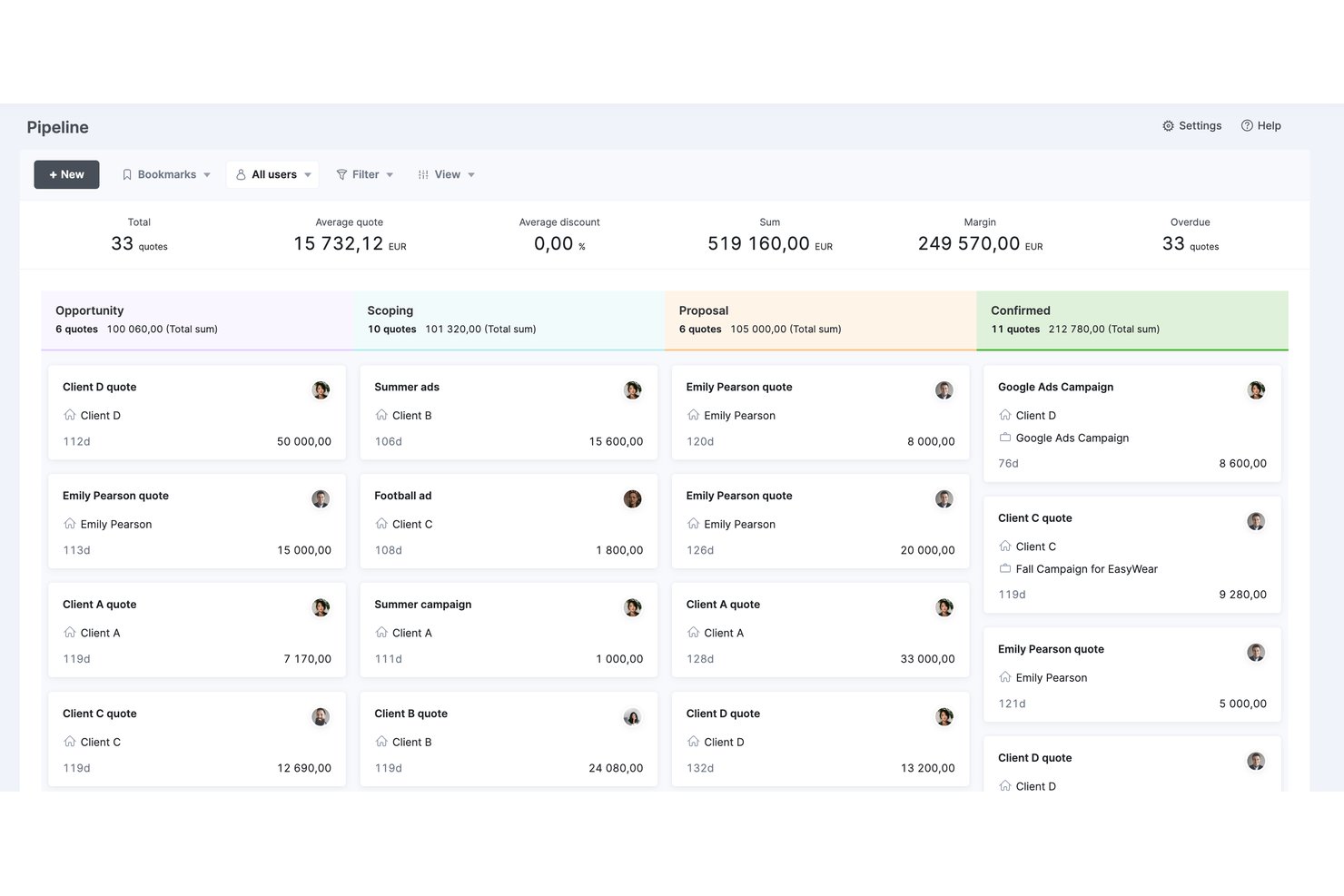
Scoro is a professional services automation (PSA) platform that integrates project delivery, resource planning, time tracking, budget forecasting, and revenue reporting in a single tool.
Who Is Scoro Best For?
Scoro is a strong fit for professional services firms—consultancies, agencies, and IT service providers—that need to connect pipeline revenue, resource capacity, and project profitability in one place.
Why I Picked Scoro
I've included Scoro in my top picks because it connects pipeline revenue to resource capacity in a way most project forecasting tools don't. Specifically, the pipeline view links CRM-stage opportunities to staffing forecasts before a contract is signed, so you're never caught scrambling when a deal closes. Pair that with real-time profitability tracking at the project and service-line level, and you get revenue forecasting that's genuinely useful for professional services firms managing multiple client engagements at once.
Scoro Key Features
- Utilization heatmaps: Visual maps of individual and role-level workload help you spot overloaded or underutilized team members across projects.
- Quoted vs. actuals reporting: Side-by-side comparison of estimated versus recorded hours and costs on past projects to sharpen future estimates.
- Tentative bookings: Soft-reserve team capacity for unconfirmed pipeline work, then convert to fixed allocations once a deal closes.
- ELI AI assistant: Natural language queries surface project financials, billable hours, and utilization data on demand without manual report building.
Scoro Integrations
Scoro offers native integrations with Xero, QuickBooks, Sage Intacct, Exact Online, HubSpot, Salesforce, Jira, BambooHR, Google Workspace, Microsoft 365, and Slack. It also supports 80+ marketplace apps, Zapier, and an Open API for custom integrations.
Pros and Cons
Pros:
- AI-powered assistant for instant report generation
- Real-time profitability and budget burn tracking
- Pipeline-linked forecasting from CRM to delivery
Cons:
- No formal earned value management metrics
- No dedicated scenario or what-if modeling
New Product Updates from Scoro

Scoro Adds Time Mobile App and ELI Improvements
Scoro adds the Scoro Time mobile app for iOS/Android to track time anywhere and expands ELI with attachments, smarter filtering, and trigger-based actions. For more information, visit Scoro's official site.

Best for agency resource forecasting
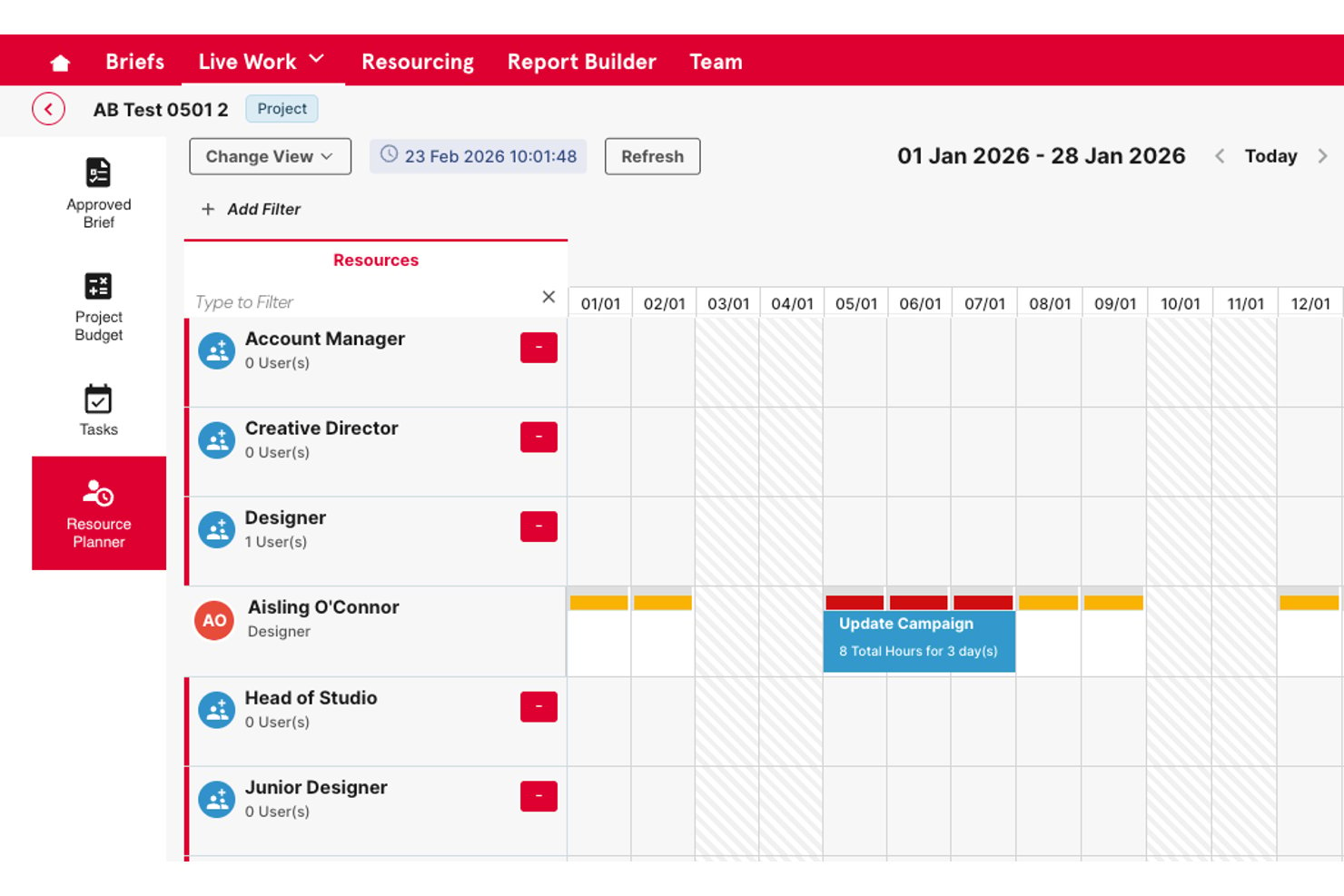
Screendragon is an enterprise work management platform for marketing teams and agencies that combines resource capacity planning, budget tracking, workflow automation, and approval management in one system.
Who Is Screendragon Best For?
It's a strong fit for mid-to-large creative agencies and enterprise in-house marketing teams managing high volumes of work across multiple clients or brand portfolios.
Why I Picked Screendragon
Screendragon earns its spot on my shortlist because of how it handles resource forecasting at the agency level. I like that it gives resource managers a forward-looking capacity view across every active project, so you can spot staffing gaps before they become delivery problems. The budget tracking layer ties directly into resource planning, meaning I can see utilization and cost burn in the same view rather than toggling between disconnected tools.
Screendragon Key Features
- No-code workflow builder: Lets you design and automate project workflows without technical expertise.
- Granular permissions: Provides role-based access controls down to the field level for sensitive data management.
- Embedded approval workflows: Streamlines asset approvals with markup tools, side-by-side versioning, and centralized audit trails.
- Custom reporting dashboards: Enables building real-time, personalized dashboards to report on project and portfolio data.
Screendragon Integrations
Screendragon offers native integrations with HubSpot, Microsoft Power BI, Ziflow, Brandfolder, Workato, and Smartsheet. An API is available for custom integrations.
Pros and Cons
Pros:
- Configurable approval workflows for complex structures
- Budget tracking tied directly to resource planning
- Forward-looking capacity view across active projects
Cons:
- Reporting customization requires setup time
- Forecasting depth limited
New Product Updates from Screendragon
Screendragon Unveils New AI Hub
Screendragon introduced AI Hub, a new capability that lets teams build and manage AI agents directly within workflows. The update helps marketing teams automate tasks, maintain governance controls, and scale AI-driven operations more efficiently. For more information, visit Screendragon's official site.

Wrike
Best for AI-driven project forecasting

Wrike is a project management platform that helps teams plan, manage, and track projects with tools for task management, collaboration, and reporting. Its AI-powered features and forecasting tools make it particularly effective for teams needing visibility into project performance and future outcomes.
Why I Picked Wrike:
Wrike supports project forecasting through its Work Intelligence tool, which analyzes project data to predict risks and suggest next steps. Real-time dashboards and reporting provide insights into project performance, helping teams forecast timelines, budgets, and resource needs more accurately. Wrike’s flexibility with project views, including Gantt charts and Kanban boards, also helps visualize project progress and anticipate future requirements.
Wrike Standout Features & Integrations:
Features include AI-powered forecasting through predictive analytics, real-time dashboards for monitoring KPIs, and project views that support visualizing timelines and workloads. Wrike’s centralized Datahub integrates information from various sources, while mobile apps allow access to project data from anywhere.
Integrations include 400+ pre-built native connections, including Microsoft, Google, Dropbox, Salesforce, and Marketo.
Pros and Cons
Pros:
- Easily visualize workflow performance
- Individuals and teams can track workloads
- In-app chat to reduce switch cost for collaboration
Cons:
- Limited to 10 workflows per space
- Not suitable for small organizations
New Product Updates from Wrike
Wrike Adds Klaxoon MCP Integration
Wrike’s Klaxoon MCP integration is now generally available, enabling AI agents to navigate between Wrike tasks and attached whiteboards, read task context, and manage whiteboard attachments via API. For more information, visit Wrike's official site.
Best for familiar project management tools

Microsoft Project offers comprehensive tools for project scheduling, portfolio management, and resource management. It is best for users seeking familiar, robust project management tools integrated within the Microsoft ecosystem.
Why I Picked Microsoft Project:
I selected Microsoft Project for this list due to its widespread recognition and integration within the Microsoft ecosystem, making it a go-to choice for many organizations already using Microsoft products. Its familiarity and depth in project management functionalities make it ideal for users looking for a comprehensive, integrated solution.
Microsoft Project Standout features & integrations:
Features include detailed project scheduling features, resource allocation tools, and built-in templates that help streamline project setup and tracking. The software's deep integration with Microsoft 365 enhances collaboration and reporting capabilities, making it easy to manage projects within a familiar framework.
Integrations include Microsoft Teams, Microsoft Excel, Microsoft Power BI, SharePoint, OneDrive, Azure DevOps, Dynamics 365, Outlook, PowerApps, and Yammer.
Pros and Cons
Pros:
- Familiar interface to many users
- Comprehensive project management features
- Deep integration with Microsoft 365
Cons:
- Annual commitment required
- Can be complex for small teams or simple projects
- Mainly suitable for users deep in the Microsoft ecosystem

Anaplan
Best for cross-functional decision making

Anaplan offers a cloud-based planning platform that connects data, people, and plans across any business. It excels in cross-functional decision making with its collaborative approach.
Why I Picked Anaplan:
I selected Anaplan for this list because of its strong capabilities in connecting various functions within an organization to streamline planning and decision-making processes. Its platform supports a collaborative approach, making it ideal for businesses that rely on synchronized decision making across multiple departments.
Anaplan Standout features & integrations:
Features include Hyperblock technology, which allows for real-time calculations and adjustments across large datasets, facilitating rapid scenario planning and forecasting. Its extensive integration capabilities ensure that it can connect seamlessly with existing business systems, enhancing data accuracy and decision quality.
Integrations include Salesforce, Google Sheets, Microsoft Excel, Oracle, SAP, Tableau, Power BI, Slack, Workday, and ServiceNow.
Pros and Cons
Pros:
- Extensive integration options
- Robust scenario planning and forecasting capabilities
- Enables real-time cross-functional collaboration
Cons:
- Pricing details are not transparent
- May require substantial training
- Can be complex to implement
Jedox
Best for integrated planning solutions
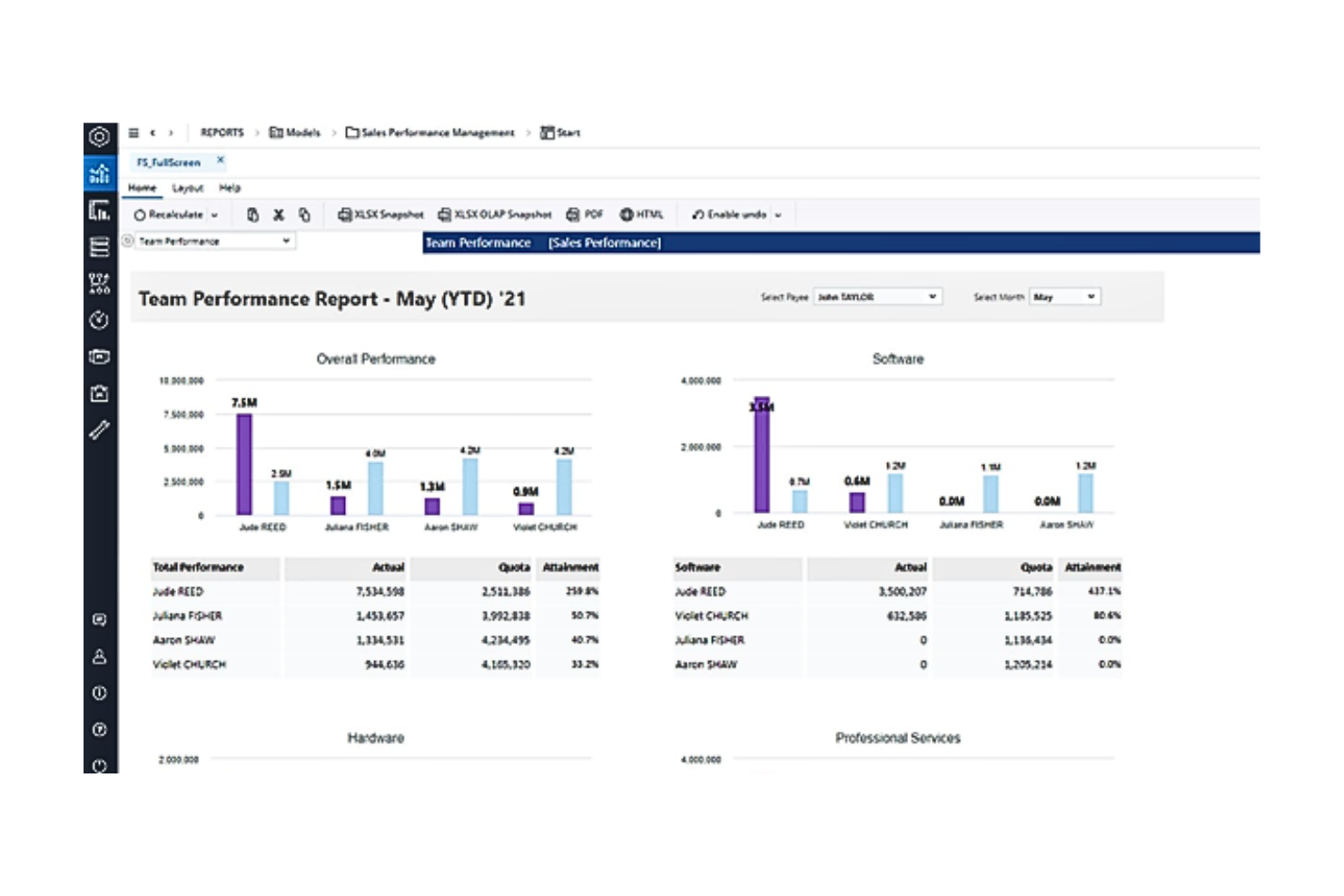
Jedox streamlines enterprise performance management with robust integrated planning and analytics tools. It excels in offering a unified solution for complex, multi-departmental planning needs.
Why I Picked Jedox:
I chose Jedox for this list because it provides a comprehensive suite of tools that facilitate integrated planning across various business functions, making it stand out from other project forecasting software. It's particularly effective for organizations that require a seamless flow of data across departments to inform strategic decisions and forecasting.
Jedox Standout features & integrations:
Features include strong capabilities in data integration, collaboration, and reporting. The platform supports scenario planning and what-if analyses, which are essential for dynamic and uncertain environments. Its robust integration with major IT systems simplifies the complexity of enterprise-wide planning processes.
Integrations include Microsoft Excel, Salesforce, SAP, Oracle, Qlik, Tableau, Power BI, Google Sheets, Microsoft Dynamics, and IBM Cognos.
Pros and Cons
Pros:
- Strong collaborative planning tools
- Powerful what-if analysis features
- Extensive integration capabilities
Cons:
- Setup may require significant IT resources
- Pricing information not transparent
- High learning curve for new users

Best for workforce planning

Workday Adaptive Planning provides cloud-based software for business planning, including sophisticated tools for budgeting, forecasting, and particularly, workforce planning. It excels in workforce planning through its ability to model and manage personnel expenses deeply integrated with operational plans.
Why I Picked Workday Adaptive Planning:
I chose Workday Adaptive Planning for this list because of its comprehensive workforce planning features that are deeply integrated with financial and business planning capabilities. Its strong focus on managing personnel resources and costs makes it the best option for companies that need detailed and dynamic workforce management.
Workday Adaptive Planning Standout features & integrations:
Features include robust modeling capabilities that allow organizations to forecast and plan for hiring needs, salary increases, and other workforce-related expenses. It integrates seamlessly with major HR and financial systems, providing a unified view of workforce analytics.
Integrations include Workday HCM, Microsoft Excel, Salesforce, SAP, Oracle, NetSuite, Slack, Google Cloud, Tableau, and Power BI.
Pros and Cons
Pros:
- Comprehensive modeling tools for various scenarios
- Seamless integration with HR and financial systems
- Detailed workforce planning capabilities
Cons:
- Setup and customization can be resource-intensive
- Pricing can be on the higher side
- May require a steep learning curve


Cube Software simplifies financial planning, analysis, and reporting. Cube is distinguished for real-time financial modeling due to its robust integration with existing data sources and immediate update capabilities.
Why I Picked Cube Software:
I chose Cube Software for this list because it stands out in delivering real-time data capabilities, crucial for dynamic and fast-paced financial environments. Its strength in seamlessly integrating with multiple data systems makes it ideal for real-time financial modeling. This capability ensures financial teams can rely on the most current data for making strategic decisions.
Cube Software Standout features & integrations:
Features include user-friendly interface and powerful data consolidation features, which simplify complex financial processes. The platform's capability to integrate data in real-time allows for more accurate forecasting and budgeting. Notably, its direct integrations with commonly used financial systems enhance its utility.
Integrations include Salesforce, QuickBooks, Xero, NetSuite, Microsoft Excel, Google Sheets, Oracle, SAP, Slack, and Workday.
Pros and Cons
Pros:
- Robust data consolidation tools
- User-friendly interface
- Real-time data integration
Cons:
- Limited customization options for smaller businesses
- May require initial setup assistance
- Pricing transparency is lacking


IBM Planning Analytics automates planning, budgeting, forecasting, and analysis processes, enhancing the precision of financial insights. It is best for complex scenario modeling due to its powerful analytics and simulation capabilities.
Why I Picked IBM Planning Analytics:
I selected IBM Planning Analytics for its advanced analytical tools and flexibility in handling complex financial and operational data. Its ability to perform multi-dimensional scenario analysis makes it ideal for organizations that face complex planning challenges and require detailed forecasting and modeling.
IBM Planning Analytics Standout features & integrations:
Features include a powerful in-memory database that allows for instant scenario analysis and what-if modeling, helping organizations plan for various outcomes. It also offers a user-friendly workspace that supports drag-and-drop functionality for easy modeling. Integration with various data sources is streamlined, enabling effective data consolidation and management.
Integrations include IBM Cognos, Microsoft Excel, Salesforce, SAP, Oracle, Microsoft SQL Server, Google Cloud, Amazon Redshift, Tableau, and Power BI.
Pros and Cons
Pros:
- User-friendly interface for complex analytics
- Real-time data processing with in-memory technology
- In-depth scenario modeling capabilities
Cons:
- Complexity of features requires a learning curve
- Minimum seat requirement may exclude smaller teams
- Higher cost compared to some competitors


SAP Cloud Analytics provides comprehensive data solutions, enabling deep insights and decision-making support across large enterprises. It excels in managing complex data environments and delivering sophisticated analytical capabilities.
Why I Picked SAP Cloud Analytics:
I selected SAP Cloud Analytics for its robust data processing and analytics capabilities, which are ideal for large enterprises with complex data needs. It stands out due to its powerful integration with SAP’s ecosystem and its ability to handle massive datasets, making it the best choice for organizations requiring advanced analytics.
SAP Cloud Analytics Standout features & integrations:
Features include advanced data visualization, real-time analytics, and machine learning capabilities, which empower businesses to transform raw data into actionable insights. It integrates deeply within the SAP ecosystem, enhancing its utility by leveraging existing business systems for seamless data flow and analysis.
Integrations include SAP ERP, SAP S/4HANA, SAP BW, SAP HANA, Microsoft Office, Salesforce, Google BigQuery, Oracle Database, IBM DB2, and Amazon Redshift.
Pros and Cons
Pros:
- Suitable for handling complex, large-scale data sets
- Robust integration with SAP products
- Comprehensive advanced analytics capabilities
Cons:
- Requires familiarity with SAP products for best use
- Higher cost likely reflective of advanced features
- Can be complex to implement
Andre programmer for prosjektprognoser du bør vurdere
Her er noen andre alternativer jeg kortlistet, men som ikke kom med på topplisten. Disse er absolutt også verdt å se nærmere på.
- 4castplus
For construction budget tracking
- Runn
For agency project forecasting
- Planview
For enterprise portfolio management
- Smartsheet
Good for spreadsheet-like project management
- Zoho Projects
Good for comprehensive small business management
- Forecast
For AI-driven project automation
- Domo
Good for business intelligence integrations
- Prophix
Good for automated financial processes
- ClickUp
Good for one-app productivity solution
- Jira
Good for agile software development teams
- Asana
Good for task visualization and tracking
- monday.com
Good for workflow customization across teams


How I Evaluate Project Forecasting Software
I split my evaluation into two layers: the core forecasting capabilities—like EAC tracking and capacity modeling—every tool must offer, and the differentiators that set the best platforms apart.
Core Functionality (Table Stakes For This List)
When I'm selecting tools for my list, I rank each one on a scale from 0 (does not offer the functionality) to 5 (excels in this area) for each core functionality listed below. Then, I calculate the tool's total score into a percentage. Each tool needs to achieve a minimum total score of 65% to be considered for inclusion.
- Timeline & Schedule Forecasting: I evaluate whether the tool can project milestone and completion dates forward based on live progress, not just a static Gantt chart you manually re-baseline every week.
- Resource Capacity Forecasting: The tool should forecast future resource demand against available capacity so you can spot staffing gaps before a new sprint or project phase kicks off.
- Cost & Budget Forecasting: I look for EAC, ETC, and margin projections that update as actuals flow in, giving finance and PMO leads a real-time view of where a project's budget is heading.
- Scenario & What-If Modeling: I check whether you can model trade-offs like shifting a launch date or reallocating headcount and compare outcomes side by side before committing to a path.
- Historical Data & Trend Analysis: Past velocity, burn rates, and estimation accuracy should feed into current forecasts so each new project benefits from lessons the organization has already learned.
- Forecast Dashboards & Reporting: I look for configurable, role-based dashboards that let a PMO director view portfolio-level forecast roll-ups while a project lead drills into task-level variance.
Once I have a list of tools that meet the criteria, I consider what sets each platform apart.
Differentiating Factors (What Sets Vendors Apart)
Here's how I compare and contrast different vendors:
Standout Features
Monte Carlo simulation support is a major differentiator. Tools that run probabilistic models give you confidence-weighted delivery dates instead of a single optimistic target. I also evaluate AI-driven risk prediction, where the platform flags projects trending toward overrun before you'd catch it in a status meeting. For professional services teams, pipeline forecasting matters. Being able to layer weighted pre-sales deals into your capacity plan helps you staff proactively rather than scrambling once contracts close.
Beyond Features
Integrations matter a lot here. A forecasting tool that doesn't sync with your PM platform—whether that's Jira, MS Project, or Smartsheet—forces manual data entry that erodes forecast accuracy fast. I also evaluate industry fit, since a tool built for construction CPM scheduling works very differently from one designed for agile software delivery. Implementation complexity is worth checking too. Forecasting tools often require configuring rate cards, resource pools, and baseline rules, so I look at how much setup effort is realistic for your team size.
Slik velger du programvare for prosjektprognoser
Mens du arbeider med din egen unike prosess for valg av programvare, bør du ha følgende punkter i tankene:
- Skalerbarhet: Programvare for prosjektprognoser må kunne vokse sammen med virksomheten din. Kan den håndtere økende datamengder og mer komplekse prosjektporteføljer etter hvert som organisasjonen utvider seg?
- Integrasjonsmuligheter: Sørg for at programvaren integreres med de eksisterende systemene dine (f.eks. ERP, CRM og andre prosjektstyringsverktøy). Dette hjelper deg med å opprettholde datakonsistens og forbedre arbeidsflytprosessene dine.
- Tilpasningsmuligheter: Se etter programvare som kan tilpasses de spesifikke behovene i bransjen og virksomheten din. Du bør kunne skreddersy funksjoner som rapportformater og visninger av kontrollpaneler.
- Sanntidsdata: Programvaren bør gi sanntidsinnsikt som lar deg ta beslutninger i tide. Dette er avgjørende i bransjer der forholdene endrer seg raskt (f.eks. teknologi og produksjon), og forsinkelser kan bli kostbare og påvirke prosjektets suksess.
- Brukeropplevelse: Vurder hvor lang tid det tar å lære programvaren, og hvor brukervennlig den er. Alle, fra prosjektlederen til teammedlemmene, bør oppleve den som tilgjengelig og enkel å bruke. Dette kan øke bruksfrekvensen og bidra til å gjøre dataregistreringen mer nøyaktig.
Trender innen programvare for prosjektprognoser i 2026
Programvare for prosjektprognoser fortsetter å utvikle seg raskt på grunn av økende kompleksitet i prosjekter og behovet for mer dynamiske og presise planleggingsverktøy. Her er en oversikt over de viktigste trendene:
Integrasjon av kunstig intelligens og maskinlæring
- Trend: Prediktive analysefunksjoner som bruker algoritmer for kunstig intelligens og maskinlæring, blir stadig mer utbredt. Dette kan gi mer nøyaktige prognoser og risikovurderinger.
- Forbedret funksjonalitet: Disse teknologiene gjør det mulig for programvaren å lære av data fra tidligere prosjekter, noe som bidrar til bedre ressursfordeling og tidsplanprognoser. Verktøy som IBM Planning Analytics leder an ved å tilby avanserte funksjoner for scenariomodellering.
Fokus på bærekraft
- Trend: Nye funksjoner som hjelper selskaper med å spore og håndtere miljøpåvirkningen fra prosjektene deres, blir utviklet i takt med at bærekraft blir prioritert.
- Forbedret funksjonalitet: Denne nyskapende funksjonaliteten hjelper organisasjoner med å oppfylle regulatoriske krav og nå bedriftens bærekraftsmål ved å planlegge prosjekter som både er effektive og miljøvennlige.
Manuell dataregistrering blir mindre viktig
- Trend: Behovet for manuell dataregistrering blir mindre etter hvert som funksjonene for dataintegrasjon blir mer avanserte gjennom automatisering og kunstig intelligens.
- Forbedret funksjonalitet: Denne endringen gjør at prosjektledere kan fokusere mer på strategiske beslutninger i stedet for å legge inn data.
Hva er programvare for prosjektprognoser?
Programvare for prosjektprognoser er et verktøy som er utviklet for å forutsi fremtidige resultater og ytelse for prosjekter basert på historiske data og løpende prosjektmålinger. Prosjektledere bruker den til å anslå prosjektkostnader, tidsplaner og ressursbehov.
Denne informasjonen hjelper deg med å ta informerte beslutninger, forutse potensielle tilbakeslag og tilpasse prosjektet til organisasjonens overordnede mål. Mer avanserte funksjoner omfatter prediktiv modellering, simulering av scenarier og datavisualisering.
Funksjoner
Her er de viktigste funksjonene du bør se etter i programvare for prosjektprognoser:
- Dataintegrasjon: Verktøyet bør kunne samle data fra ulike kilder og gi en helhetlig oversikt over prosjektbildet, slik at alle relevante data blir tatt med og er tilgjengelige.
- Prediktiv analyse: Se etter avanserte algoritmer som hjelper deg med å forutsi prosjektresultater ved hjelp av historiske data. Dette hjelper deg med å forutse problemer og ta informerte beslutninger.
- Risikoanalyse: Verktøyet bør inneholde funksjoner for å identifisere og vurdere prosjektrisikoer. Ved å forstå potensielle risikoer kan du være føre var og iverksette risikoreduserende tiltak.
- Ressursfordeling: Du bør kunne administrere personell og ressurser. Dette hjelper deg med å sørge for at ressursene brukes effektivt, redusere kostnader og unngå forsinkelser.
- Scenarioplanlegging: Verktøyet bør gjøre det mulig å simulere ulike prosjektscenarier. På denne måten kan du teste ulike tilnærminger og velge den optimale veien videre.
- Kostnadsprognoser: Se etter funksjoner for å utarbeide detaljerte økonomiske prognoser. Nøyaktige kostnadsprognoser er avgjørende for budsjettstyring og for å forhindre kostnadsoverskridelser.
- Rapportering i sanntid: Verktøyet bør gi innsikt i prosjektfremdriften og andre data som kan hjelpe deg med å holde prosjektene på rett spor, holde interessentene informert og foreta raske justeringer ved behov.
- Dashbord og visualiseringer: Se etter verktøy som tilbyr intuitive visninger av prosjektmålinger. Visuelle verktøy bidrar til å omforme komplekse data til innsikt som kan settes ut i praksis.
- Samarbeidsverktøy: Se etter funksjoner som legger til rette for kommunikasjon og samarbeid i teamet. Disse hjelper deg med å holde teammedlemmene samkjørte og bidra til å nå prosjektmålene.
- Tilpasningsmuligheter: Sørg for at du kan tilpasse programvaren til prosjektets spesifikke behov.
Fordeler
Her er fem viktige fordeler med programvare for prosjektprognoser:
- Bedre nøyaktighet i prognosene: Programvare for prosjektprognoser lar deg bruke historiske data og prediktiv analyse til å lage mer nøyaktige prognoser som reduserer risikoen for at prosjekter overskrider tids- og kostnadsrammer.
- Forbedret ressursstyring: Denne programvaren hjelper deg med å sørge for at menneskelige og materielle ressurser distribueres effektivt, noe som reduserer sløsing og øker produktiviteten gjennom hele prosjektets livssyklus.
- Økt smidighet: Med tilgang til sanntidsdata og verktøy for scenarioplanlegging kan du raskt justere strategiene dine som svar på endringer i prosjektets omfang, ressurser eller eksterne faktorer.
- Bedre risikohåndtering: Programvare for prosjektprognoser tilbyr verktøy for risikoanalyse og -vurdering, noe som hjelper deg og teamet ditt med å forutse potensielle problemer og iverksette tiltak for å redusere dem før de påvirker prosjektet.
- Datadrevet beslutningstaking: Ved å sentralisere prosjektdata og tilby avanserte rapporterings- og dashbordfunksjoner hjelper denne typen programvare deg og interessentene dine med å ta beslutninger basert på omfattende og oppdatert informasjon.
Kostnader og priser
Her er en tabell som viser typiske priser og abonnementer for programvare for prosjektprognoser:
| Plantype | Gjennomsnittspris | Vanlige funksjoner |
|---|---|---|
| Gratis | $0 | Grunnleggende prognoser, begrenset antall prosjekter, minimal brukerstøtte |
| Standard | $25/user/month | Prosjektoppfølging, budsjettprognoser, grunnleggende analyse |
| Profesjonell | $50/user/month | Avansert analyse, integrasjoner, utvidet brukerstøtte |
| Bedrift | Tilpasset pris | Tilpassede funksjoner, full integrasjon, dedikert brukerstøtte |
Sørg for å vurdere de totale eierkostnadene, inkludert ikke bare abonnementsavgifter, men også potensielle kostnader for implementering og opplæring. Å velge riktig abonnement innebærer ofte å balansere de nødvendige funksjonene mot det tilgjengelige budsjettet.
Vanlige spørsmål
Her er noen vanlige spørsmål jeg ofte får om programvare for prosjektprognoser.
Hvem bruker programvare for prosjektprognoser?
Denne typen programvare brukes vanligvis av prosjektledere, finansanalytikere, driftsledere og virksomhetsledere i en rekke bransjer.
Kan programvare for prosjektprognoser integreres med andre forretningsverktøy?
Ja, de fleste programmer for prosjektprognoser kan integreres med andre forretningssystemer, for eksempel ERP-er, CRM-er, HRM-systemer og andre. Dette bidrar til bedre dataflyt samt økt nøyaktighet og effektivitet i prosjektet.
Finnes det en gratisversjon av programvare for prosjektprognoser?
Ja, de fleste leverandører tilbyr gratis prøveperioder eller “freemium”-versjoner med begrensede funksjoner.