

10 beste programvarer for AI-drevet prosjektporteføljestyring i 2026

Kortliste over programvare for AI-basert prosjektporteføljestyring


Programvare for AI-basert prosjektporteføljestyring bruker kunstig intelligens til å hjelpe deg med å organisere, prioritere og følge opp flere prosjekter på tvers av organisasjonen. Hvis du ser etter måter å håndtere skiftende prioriteringer, oppdage risiko tidlig og holde interessenter samkjørte på, er disse verktøyene laget for deg.
I denne veiledningen finner du de beste AI-drevne plattformene som kan hjelpe teamet ditt med å ta bedre beslutninger, automatisere rutinearbeid og få et tydeligere bilde av hele prosjektporteføljen. Bruk denne listen til å sammenligne funksjoner og finne løsningen som passer best til arbeidsflyten og målene dine.
Why Trust Our Software Recommendations
Our team has been testing and reviewing software since 2012. As project managers ourselves, we know how difficult—and important—it is to choose the right software.
For this guide, we evaluated tools using hands-on testing and independent research, scoring tools using our selection criteria. We also draw on insights from industry thought leaders and practicing project management experts.
Our reviews reflect our human editorial judgment, not a sales pitch.
Expert reviewers:
Sammenligningstabell for programvare for AI-basert prosjektporteføljestyring
Denne sammenligningstabellen oppsummerer prisopplysningene for mine beste utvalgte løsninger for AI-basert prosjektporteføljestyring:
| Tool | Best For | Trial Info | Price | ||
|---|---|---|---|---|---|
| 1 | Best for agentic AI across the PMO lifecycle | Free demo available | Pricing upon request | Website | |
| 2 | Best for integrated portfolio scheduling | 14-day free trial + free demo available | From $10/user/month (billed annually) | Website | |
| 3 | Best for AI-powered risk identification | Free plan available | From $9/user/month (billed annually) | Website | |
| 4 | Best for profitability-focused portfolio insights | 14-day free trial | From $10/user/month (billed annually) | Website | |
| 5 | Best for predictive portfolio insights | Free demo available | Pricing upon request | Website | |
| 6 | Best for AI project performance tracking | Free plan available | From $4/user/month (billed annually) | Website | |
| 7 | Best for AI portfolio forecasting | Free demo available | Pricing upon request | Website | |
| 8 | Best for collaborative portfolio tracking | 30-day free trial | From $9/user/month (billed annually) | Website | |
| 9 | Best for end-to-end portfolio management | 14-day free trial | From $17/user/month | Website | |
| 10 | Best for real-time portfolio analytics | 14-day free trial | Pricing upon request | Website |


Anmeldelser av programvare for AI-basert prosjektporteføljestyring
Nedenfor finner du mine detaljerte oppsummeringer av programvaren for AI-basert prosjektporteføljestyring som kom med på kortlisten. Anmeldelsene mine gir en detaljert gjennomgang av funksjonene, egenskapene og integrasjonene til hver plattform, slik at du kan finne den beste løsningen for deg.

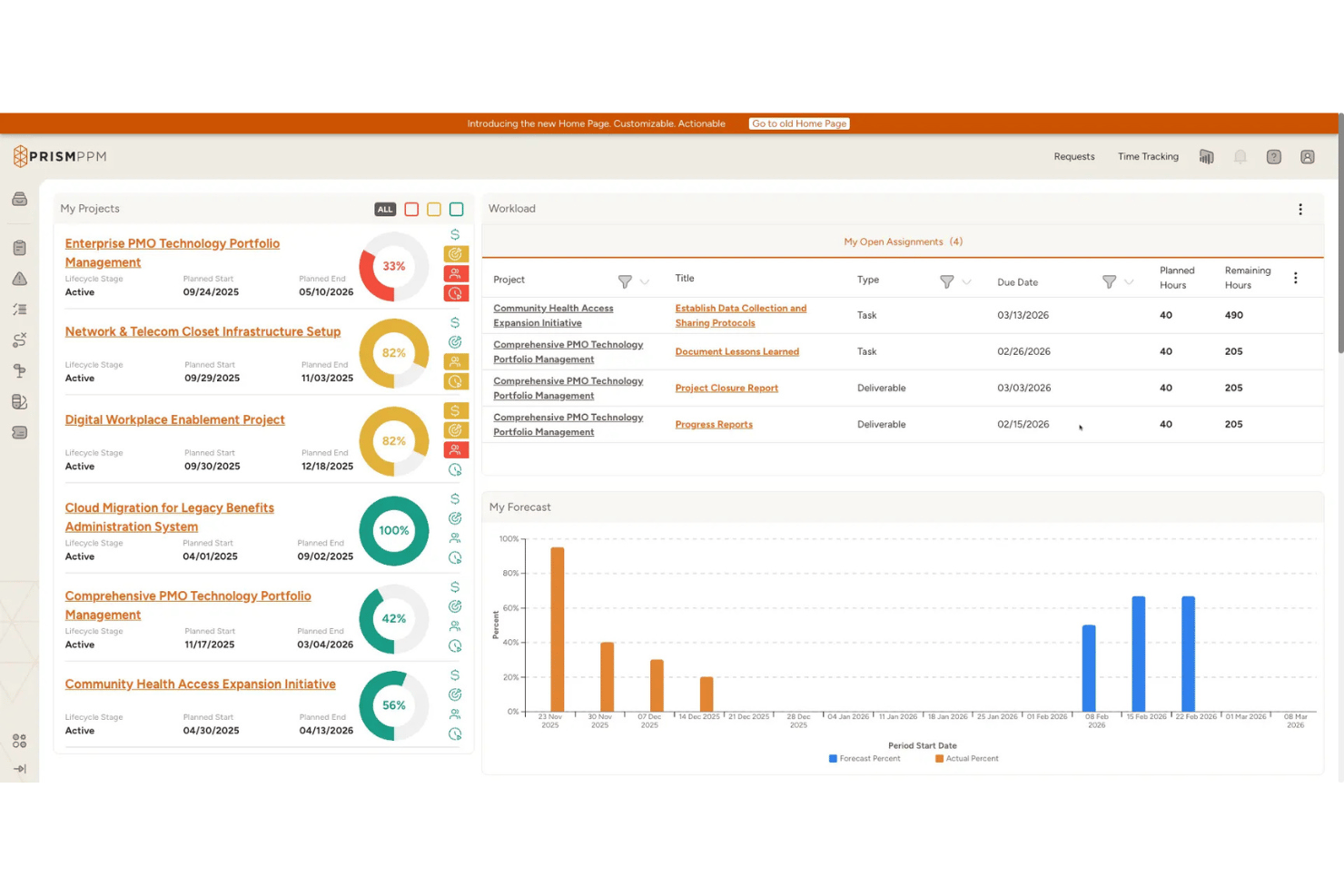
Prism PPM is an AI-powered project portfolio management platform built for PMOs, offering portfolio prioritization, resource optimization, scenario planning, risk analytics, and an agentic AI layer that autonomously executes multi-step actions across the portfolio lifecycle.
Who Is Prism PPM Best For?
Prism PPM is a strong fit for PMO directors and portfolio managers in mid-market organizations who need structured, AI-driven portfolio governance built on PMBOK best practices.
Why I Picked Prism PPM
Prism PPM earns its spot on my shortlist because its Agentic AI doesn't just surface insights—it autonomously executes multi-step actions across the portfolio lifecycle, which is rare at this price point. I'm particularly impressed by how the AI continuously re-prioritizes the project backlog using its Business Value Assessment scoring, factoring in strategic alignment, success probability, and forecasted ROI as conditions shift. Paired with AI-generated Portfolio Briefs that summarize risk, data hygiene, and alignment in one view, it gives PMO directors a genuinely proactive governance layer.
Prism PPM Key Features
- Strategy mapping: Links individual projects directly to organizational strategic pillars and OKRs, so your portfolio stays aligned to business goals.
- Benefits realization tracking: Baselines projects to measure earned value and track whether expected benefits materialize over time.
- Dependency management: Surfaces inter- and intra-project dependencies across programs to help you spot bottlenecks before they escalate.
- Data hygiene dashboard: Flags data quality gaps across the portfolio that could undermine reporting accuracy or AI-generated insights.
Prism PPM Integrations
Prism PPM’s documented connections include native bi-directional Jira sync, Power BI Gateway, Azure Databricks, Microsoft 365 tools such as Outlook, SharePoint, and OneDrive, plus Google Drive, Box, and Dropbox. Its API supports custom integrations.
Pros and Cons
Pros:
- Data hygiene dashboard flags reporting risks
- AI continuously reprioritizes project backlog
- Agentic AI executes multi-step portfolio actions
Cons:
- Narrow selection of native integration options
- AI features limited to higher-tier plans

Celoxis
Best for integrated portfolio scheduling

Celoxis is a project portfolio management platform for teams that need integrated project tracking, resource management, financial management, and customizable reporting in one system.
Who Is Celoxis Best For?
Project managers and PMOs at mid-sized to large organizations who need unified project, resource, and financial management in one platform.
Why I Picked Celoxis
I picked Celoxis as one of the best because I can manage project portfolios and financials in one place without switching tools. I use its built-in financial tracking to monitor budgets, costs, and revenue across multiple projects. My team relies on its customizable dashboards to visualize portfolio health and drill into financial metrics at a glance.
Celoxis Key Features
- AI-powered project risk analysis: Flags potential risks and delays using predictive analytics.
- Resource allocation engine: Assigns resources based on skills, availability, and workload.
- Custom workflow automation: Lets you automate approvals, notifications, and task assignments.
- Client portal: Provides external stakeholders with real-time project visibility and collaboration.
Celoxis Integrations
Celoxis offers native integrations with Jira, Salesforce, Microsoft Project, Google Drive, Excel, Outlook, Slack, QuickBooks, and Trello. An API is available for custom integrations.
Pros and Cons
Pros:
- Resource allocation engine with workload balancing
- Highly configurable dashboards and reports
- AI-powered project risk and delay analysis
Cons:
- Limited agile project management features
- No built-in time tracking for external users

Best for AI-powered risk identification
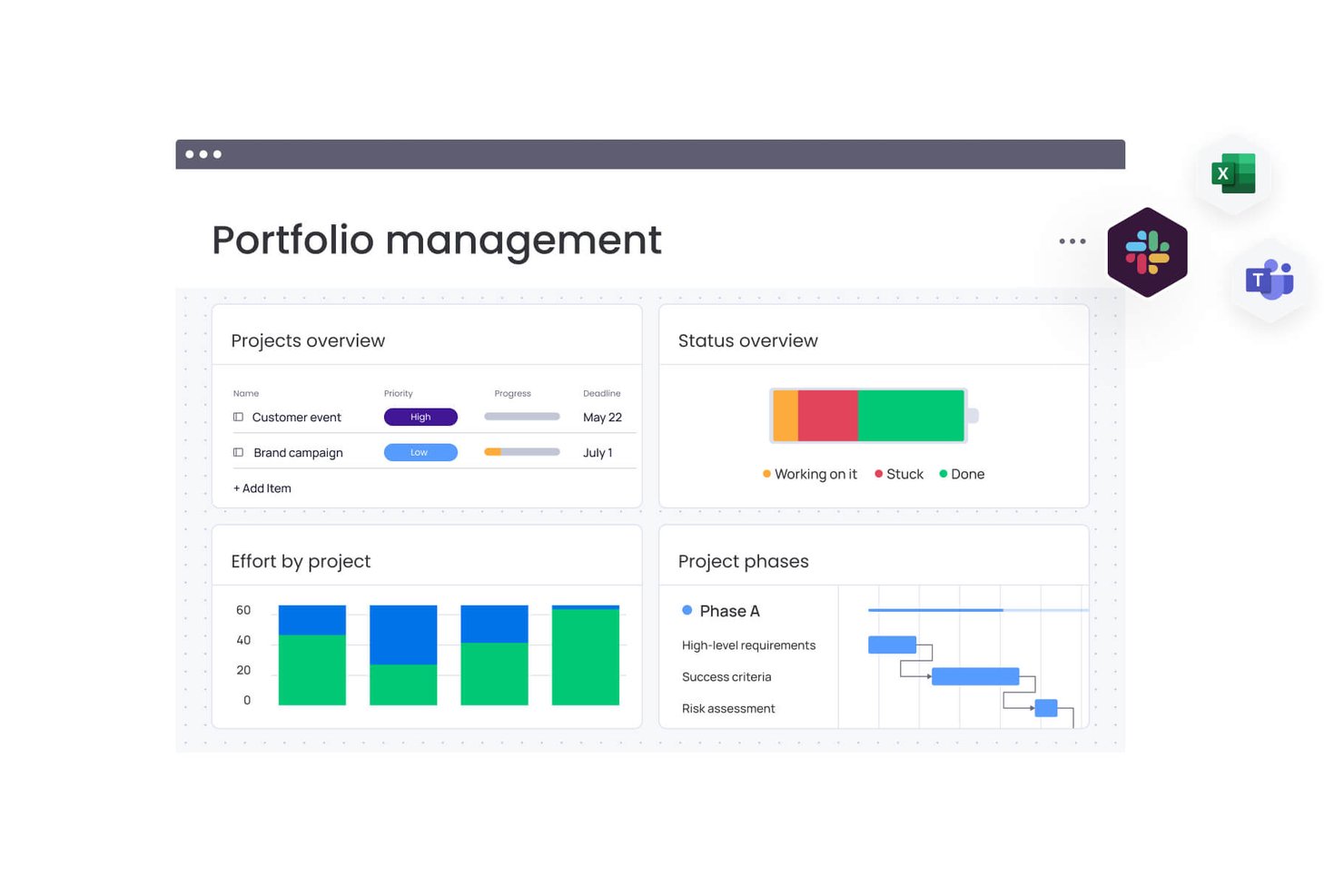
monday AI Workspace is an AI-powered work management platform that combines portfolio management, predictive risk analytics, resource optimization, and generative AI assistance across multi-project environments.
Who Is monday AI Workspace Best For?
It's a strong fit for enterprise PMO teams and portfolio managers overseeing multiple concurrent projects who need AI-driven risk visibility at scale.
Why I Picked monday AI Workspace
monday AI Workspace earns its spot on my shortlist because of how its AI risk analyzers work at the portfolio level. I like that the platform scans across all active projects simultaneously, detecting patterns like repeated vendor delays or cost overruns before they escalate. Risk alerts surface directly in the portfolio dashboard, so my team can act without switching context.
monday AI Workspace Key Features
- AI portfolio dashboards: Real-time, multi-project dashboards aggregate key KPIs, health scores, and progress indicators across your entire project portfolio.
- Generative AI assistant (Sidekick): Embedded AI copilot generates status updates, summaries, and answers natural language queries about portfolio data.
- Resource management module: Enables AI-driven resource allocation, capacity planning, and workload balancing across all portfolio projects.
- AI-powered scenario analysis: Lets you model what-if scenarios, compare portfolio alternatives, and visualize project trade-offs using machine learning.
monday AI Workspace Integrations
monday AI Workspace offers native integrations with Slack, Microsoft Excel, Google Drive, Microsoft Outlook, Jira, Gmail, Google Calendar, Dropbox, GitHub, and HubSpot CRM. It also supports Zapier and provides an API for custom integrations.
Pros and Cons
Pros:
- Robust resource allocation and workload balancing
- AI assistant generates project summaries and reports
- Real-time portfolio health and risk alerts
Cons:
- True portfolio features require enterprise plan
- Scenario modeling capabilities are limited
New Product Updates from monday AI Workspace
monday AI Workspace Adds Human Approval Routing
monday AI Workspace adds a human-in-the-loop approval block to AI Workflows, sending approval requests and routing workflow paths based on responses. For more information, visit monday AI Workspace's official site.

Best for profitability-focused portfolio insights
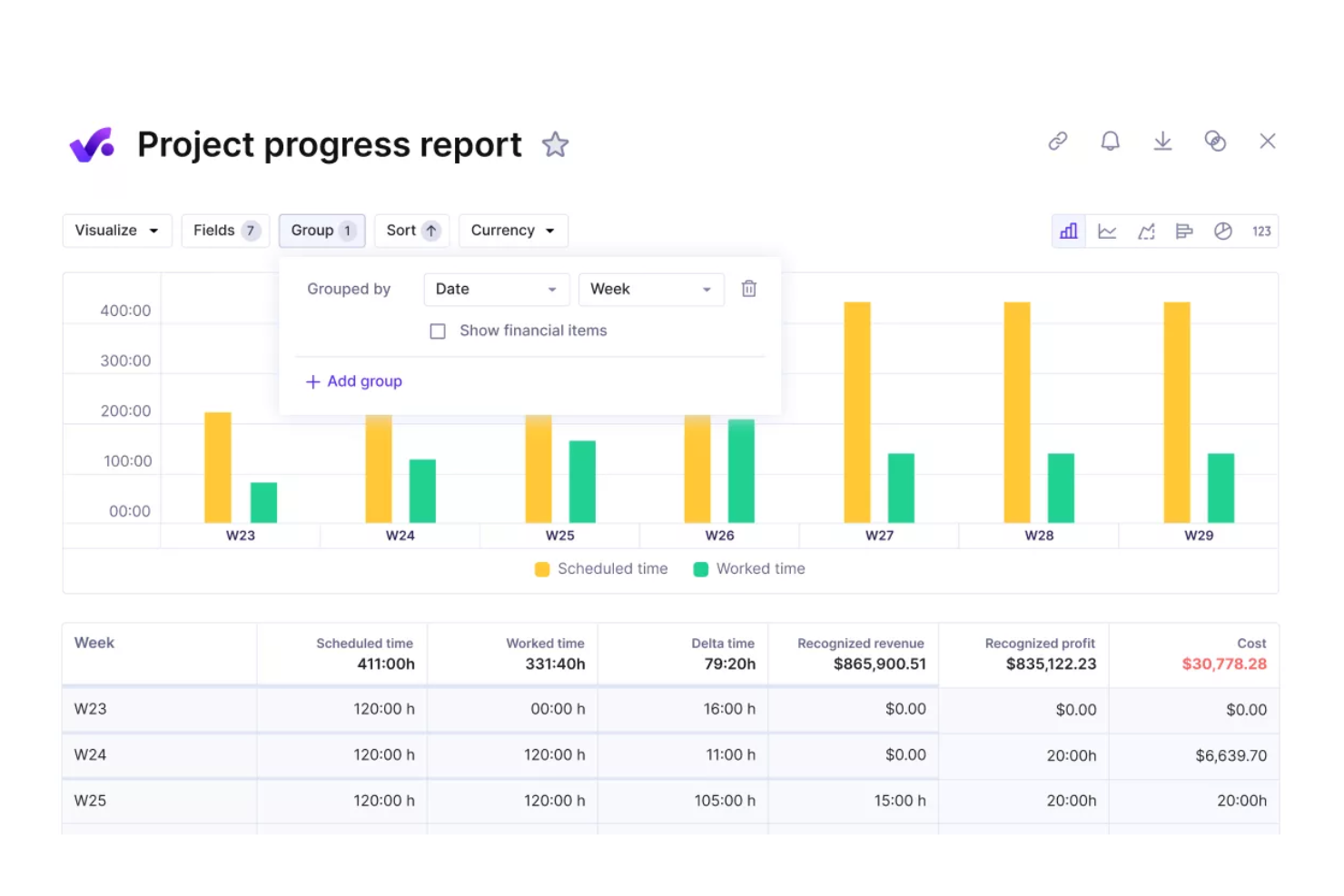
Productive is an agency management platform for project portfolio management that combines project budgeting, time tracking, resource planning, and client collaboration in one system.
Who Is Productive Best For?
Agencies and professional services teams that need unified project, budgeting, and resource management.
Why I Picked Productive
I picked Productive as one of the best because I rely on its PPM software capabilities to manage budgets, allocate resources, and track project progress in real time. My project teams use it to monitor billable hours, collaborate with clients, and keep communication and approvals in one place, which helps maintain visibility and control across multiple projects.
Productive Key Features
- Task management: Organize, assign, and track tasks across projects.
- Custom reporting: Build and export detailed reports on project data.
- Document storage: Store and share files directly within each project.
- Time off tracking: Manage team availability and vacation schedules.
Productive Integrations
Productive offers native integrations with Slack, Xero, QuickBooks, Google Calendar, HubSpot, and Jira. An API is available for custom integrations.
Pros and Cons
Pros:
- Built-in invoicing linked to project milestones
- Customizable project templates for repeatable workflows
- Portfolio-level budgeting with real-time updates
Cons:
- Resource allocation lacks advanced AI suggestions
- No native scenario planning for portfolios
New Product Updates from Productive
Productive Adds Voice Dictation, Slack Connector, Proposals, and Overtime
Productive adds voice dictation, a Slack Connector, proposal controls, and overtime tracking. These updates support faster AI interactions, client proposals, and time management. For more information, visit Productive’s official site.

Forecast
Best for predictive portfolio insights
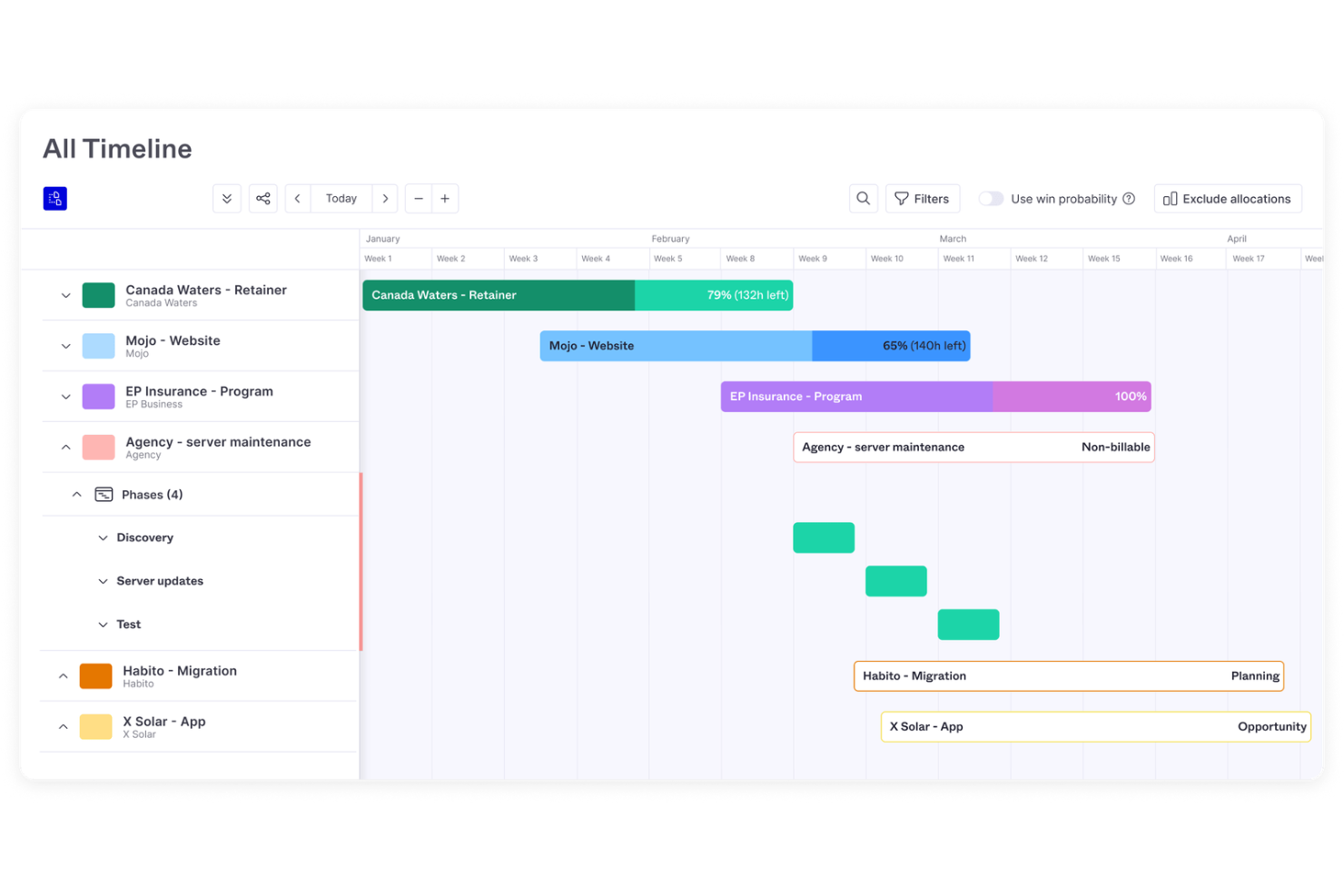
Forecast is an AI-driven project portfolio management platform that combines resource planning, financial tracking, project scheduling, and real-time analytics for teams managing multiple projects.
Who Is Forecast Best For?
Project managers and operations leads at mid-sized to large professional services firms.
Why I Picked Forecast
I picked Forecast as one of the best because I rely on its AI-powered project portfolio view to surface real-time resource and financial insights across all my projects. I use its dynamic heatmaps and utilization charts to spot bottlenecks and reallocate resources quickly. The platform’s automated financial forecasting helps me keep budgets and margins visible as projects evolve.
Forecast Key Features
- Task automation: Automates repetitive project management actions using AI.
- Custom project templates: Lets you standardize workflows across multiple projects.
- Role-based permissions: Controls access to sensitive project and financial data.
- Integrated time tracking: Captures billable and non-billable hours within each project.
Forecast Integrations
Forecast offers native integrations with Jira Cloud, Trello, Azure DevOps, GitHub, GitLab, Salesforce, HubSpot, Slack, QuickBooks, and Xero. It also connects with Zapier and provides an API for custom integrations.
Pros and Cons
Pros:
- Scenario modeling for resource allocation decisions
- Automated risk alerts for project portfolios
- Real-time utilization tracking across all projects
Cons:
- Gantt chart functionality is limited
- No advanced agile sprint management

GoodDay
Best for AI project performance tracking
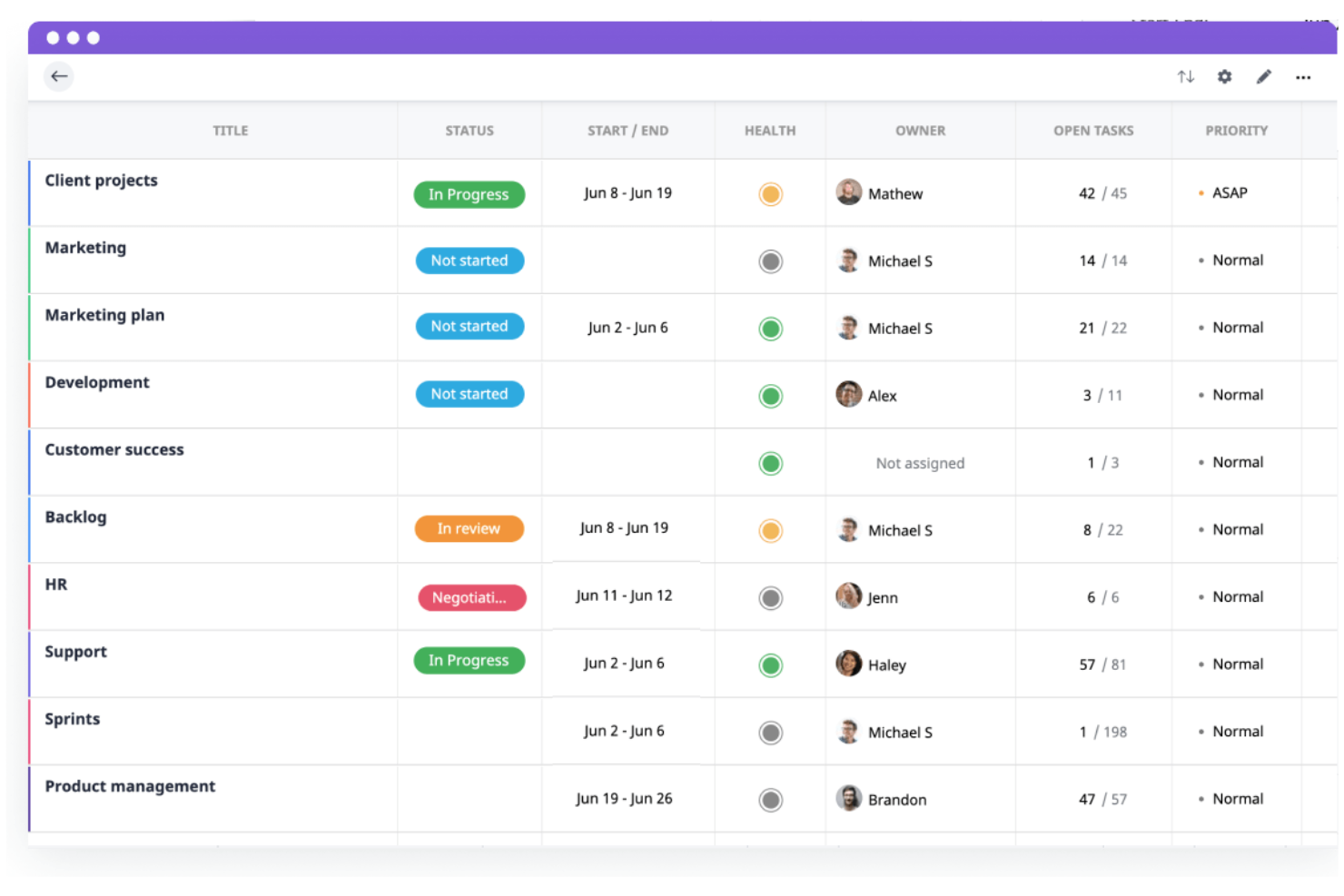
GoodDay is a project and work management platform for teams that want customizable workflows, visual project tracking, and integrated task, time, and resource management in one system.
Who Is GoodDay Best For?
Teams in mid-sized companies that need customizable project workflows and visual management tools.
Why I Picked GoodDay
I picked GoodDay as one of the best because I rely on its flexible workflow builder and visual project tracking to manage complex project portfolios. I use its customizable dashboards to monitor project health and progress at a glance. My team benefits from the ability to tailor work structures and automate recurring processes, which fits our need for adaptable project management.
GoodDay Key Features
- AI-powered project insights: Surface trends and risks across your project portfolio.
- Resource allocation calendar: Lets you assign and balance workloads visually.
- Built-in time tracking: Tracks time spent on tasks and projects automatically.
- Document management: Stores, organizes, and shares project files within the platform.
GoodDay Integrations
GoodDay offers native integrations with Google Workspace, Microsoft 365, Slack, Trello, Jira, GitHub, GitLab, Dropbox, and Zapier. An API is available for custom integrations.
Pros and Cons
Pros:
- Supports resource allocation and workload balancing
- Supports unlimited projects on all paid plans
- Built-in OKR tracking for strategic alignment
Cons:
- Portfolio scenario planning not currently supported
- Resource management lacks predictive AI tools
Best for AI portfolio forecasting
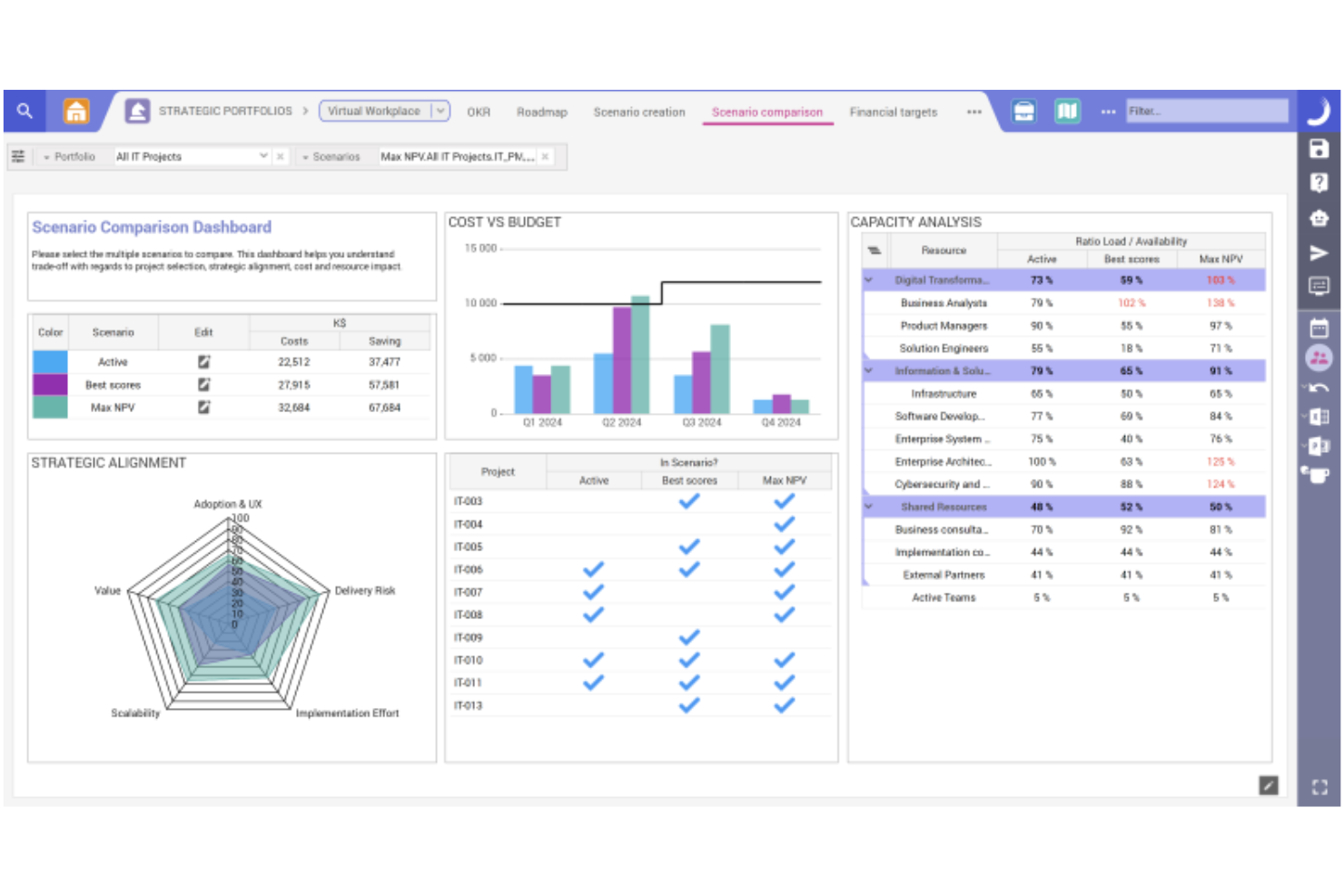
Planisware is an AI project portfolio management platform that brings together forecasting, scenario modeling, resource planning, and analytics for organizations managing complex project portfolios.
Who Is Planisware Best For?
Large enterprises and PMOs are managing complex, multi-project portfolios across industries like engineering, pharmaceuticals, and energy.
Why I Picked Planisware
I picked Planisware as one of the best because its AI-driven forecasting and scenario planning let me model multiple portfolio outcomes and adjust strategies quickly. I use its scenario comparison tools to evaluate resource impacts and project timelines side by side. The platform’s analytics help me spot risks and optimize project sequencing across large, complex portfolios.
Planisware Key Features
- Resource capacity planning: Allocate and balance resources across multiple projects and portfolios.
- Automated project scheduling: Generate and update project schedules based on real-time data and dependencies.
- Portfolio dashboard: Visualize project status, KPIs, and portfolio health in a single interface.
- Financial tracking: Monitor budgets, costs, and forecasts for all projects within your portfolio.
Planisware Integrations
Native integrations are not currently listed. The tool supports integrations via API for custom connections.
Pros and Cons
Pros:
- Detailed financial tracking and forecasting features
- Strong resource capacity and allocation tools
- Advanced scenario modeling for portfolio planning
Cons:
- Reporting customization options are sometimes restrictive
- Implementation requires significant time investment

Best for collaborative portfolio tracking
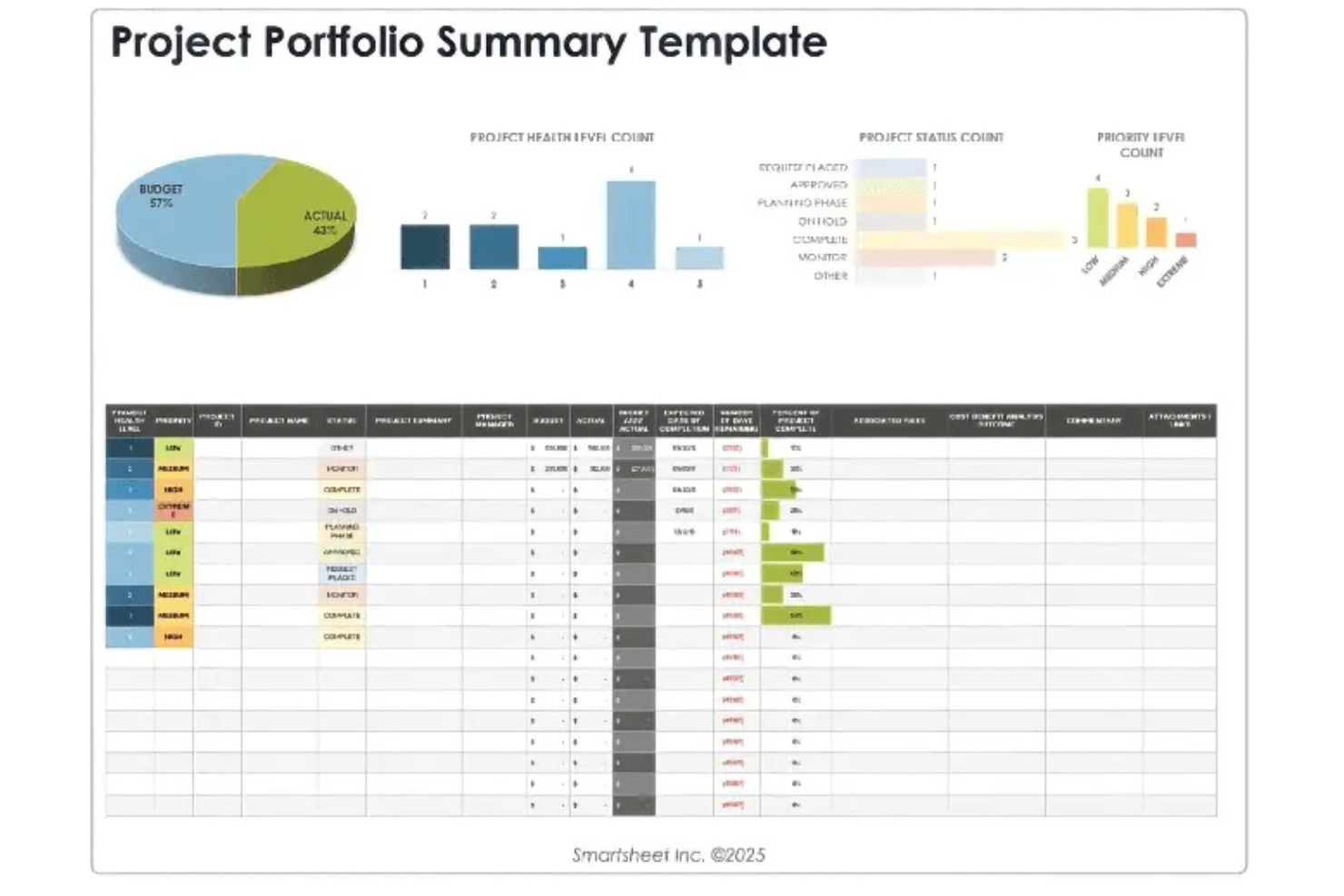
Smartsheet is a project portfolio management platform that combines grid, card, and Gantt views with workflow automation, resource management, and reporting tools for managing complex project portfolios.
Who Is Smartsheet Best For?
Project management teams at mid-sized and enterprise organizations who need flexible portfolio tracking and workflow automation.
Why I Picked Smartsheet
I picked Smartsheet as one of the best because I can switch between grid, card, and Gantt views to manage complex project portfolios the way my team prefers. I use its workflow automation to reduce manual updates and keep project data current. I rely on its flexible reporting tools to track portfolio status and share updates with stakeholders.
Smartsheet Key Features
- Resource management module: Allocate, monitor, and adjust team workloads across projects.
- Portfolio roll-up dashboards: Aggregate project data for high-level portfolio visibility.
- Automated approval workflows: Route requests and approvals through custom logic.
- Document attachment support: Attach files directly to rows for centralized access.
Smartsheet Integrations
Smartsheet offers native integrations with Google Workspace, Microsoft 365, Slack, Salesforce, Jira, DocuSign, Box, Dropbox, Tableau, and Zapier. An API is available for custom integrations.
Pros and Cons
Pros:
- Supports cross-team collaboration in real time
- Visual dashboards for tracking project health
- AI automations for project updates and alerts
Cons:
- No built-in scenario modeling for portfolios
- Automation limits on lower-tier plans
New Product Updates from Smartsheet

Smartsheet Adds Non-Plan User Management in Admin Center
Smartsheet adds a Non plan users tab to the Seat types and true-up page in Admin Center. This lets system admins review non-plan users and add them to the plan or remove them from the organization in one place. For more information, visit Smartsheet’s official site.

Scoro
Best for end-to-end portfolio management
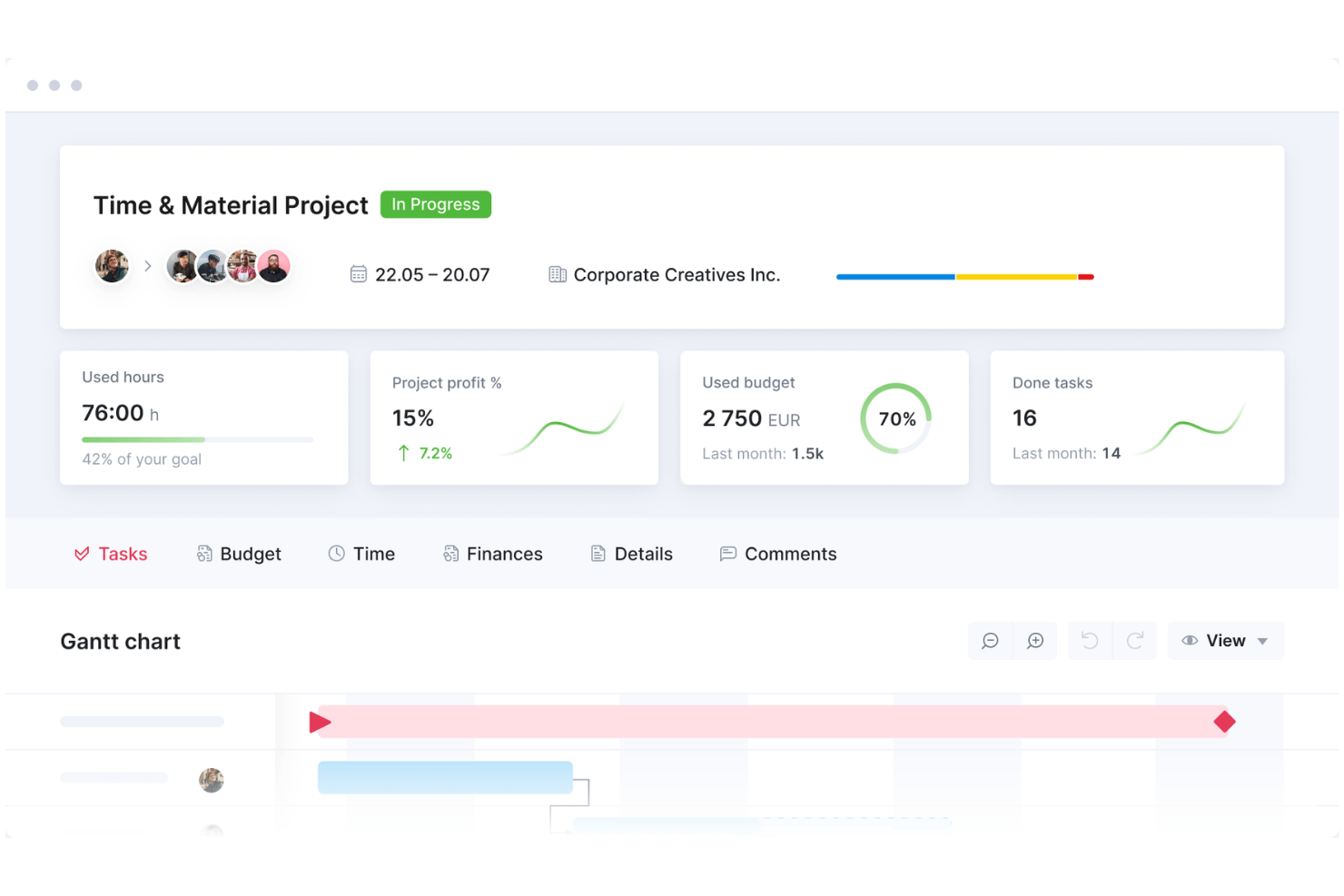
Scoro is a project portfolio management platform that brings together project planning, time tracking, billing, resource scheduling, and reporting in a single workspace.
Who Is Scoro Best For?
Professional services teams and agencies that need unified project, billing, and reporting tools.
Why I Picked Scoro
I picked Scoro as one of the best because I rely on its unified workspace to manage projects, time, and billing without switching tools. I use its built-in reporting to track project profitability and resource utilization in real time. My team benefits from integrated quoting and invoicing, which keeps our project financials tightly connected to delivery.
Scoro Key Features
- Task board: Lets you organize and prioritize tasks visually for each project.
- Calendar integration: Syncs project schedules with Google Calendar and Outlook.
- Custom fields: Allows you to tailor project data capture to your workflow.
- Permission management: Controls user access to sensitive project information.
Scoro Integrations
Scoro offers native integrations with Google Calendar, MS Exchange, Xero, Sage, Exact, Jira, and Azure. An API is available for custom integrations.
Pros and Cons
Pros:
- Custom fields for tailored project data
- Combines project, billing, and reporting in one platform
- Real-time project profitability tracking
Cons:
- No built-in AI-driven forecasting tools
- Limited agile board and sprint management
New Product Updates from Scoro

Scoro Adds Time Mobile App and ELI Improvements
Scoro adds the Scoro Time mobile app for iOS/Android to track time anywhere and expands ELI with attachments, smarter filtering, and trigger-based actions. For more information, visit Scoro's official site.

Wrike
Best for real-time portfolio analytics

Wrike is a project portfolio management platform that offers customizable workspaces, advanced reporting, workflow automation, and resource management for teams managing multiple projects.
Who Is Wrike Best For?
Project managers and PMOs at mid-sized to large organizations who need customizable workspaces and advanced reporting for complex project portfolios.
Why I Picked Wrike
I picked Wrike as one of the best because I can tailor workspaces for each project portfolio and set up advanced reporting dashboards that track KPIs across multiple teams. I use its custom request forms to standardize project intake and automate approvals. My team relies on Wrike’s resource management tools to balance workloads and avoid bottlenecks.
Wrike Key Features
- AI-powered project risk prediction: Flags potential project delays using machine learning.
- Interactive Gantt charts: Lets you visualize timelines and dependencies for multiple projects.
- Time tracking tools: Tracks billable and non-billable hours within each project.
- Document version control: Stores, shares, and manages file versions directly in project folders.
Wrike Integrations
Wrike offers hundreds of native integrations through its built-in integrations and marketplace, including Google Workspace, Dropbox, GitHub, Adobe Creative Cloud, and Zoom. It also supports Zapier and provides an API for custom integrations.
Pros and Cons
Pros:
- Portfolio-level dashboards with real-time analytics
- Custom request forms for project intake
- AI-powered work intelligence for risk prediction
Cons:
- Resource management lacks granular forecasting
- AI features limited to enterprise plans
New Product Updates from Wrike
Wrike Adds Klaxoon MCP Integration
Wrike’s Klaxoon MCP integration is now generally available, enabling AI agents to navigate between Wrike tasks and attached whiteboards, read task context, and manage whiteboard attachments via API. For more information, visit Wrike's official site.
Annen programvare for AI-basert prosjektporteføljestyring
Her er noen flere alternativer innen programvare for AI-basert prosjektporteføljestyring som ikke kom med på kortlisten, men som likevel er verdt å undersøke:
- Epicflow
For resource-focused portfolio planning
- Kantata
For resource optimization in portfolios
- Planview
For centralized portfolio visibility
- Asana
For visual portfolio tracking
- Profit.co
For OKR-driven portfolio tracking
- Oracle Primavera
For construction portfolio planning
- ServiceNow
For enterprise IT portfolio management
- Deltek
For services portfolio management
- ClickUp
For customizable portfolio workspaces
- PPM Express
For real-time portfolio insights
- ITONICS
For innovation portfolio management
- Cora Systems
For centralized enterprise portfolios
- ValueOps
For strategic portfolio management
- Triskell
For flexible portfolio management


How I Evaluate AI Project Portfolio Management Software
To earn a spot on my list, a tool can't just brand itself as AI-powered—I look for platforms where the AI actually changes how a PMO prioritizes work, allocates resources, or anticipates problems across an active portfolio. I break my evaluation into two layers: the core functionality a tool must offer to qualify, and the differentiating factors that set one vendor apart from another.
Core Functionality (Table Stakes For This List)
When I'm selecting tools for my list, I rank each one on a scale from 0 (does not offer the functionality) to 5 (excels in this area) for each core functionality listed below. Then, I calculate the tool's total score into a percentage. Each tool needs to achieve a minimum total score of 65% to be considered for inclusion.
- AI Portfolio Prioritization: I evaluate how the tool scores and ranks projects against strategic goals, looking for ML-driven models that go beyond manual weighting or static formulas.
- Predictive Risk Analytics: The platform should flag likely delays or budget overruns before they happen, using patterns from historical and real-time project data.
- Intelligent Resource Optimization: I check whether the AI can balance workloads and match skills across a multi-project portfolio, not just show who's available.
- Scenario Planning & Simulation: I look for what-if modeling that lets PMO leaders test trade-offs, like shifting funding between programs or delaying a launch.
- Multi-Project Portfolio Dashboards: Real-time, portfolio-level views with health scores and drill-downs matter here, not just single-project status boards stitched together.
- Generative AI Assistance: I evaluate whether the tool offers an AI copilot that can draft status reports, surface insights, or answer natural language questions about portfolio data.
Once I have a list of tools that meet the criteria, I consider what sets each platform apart.
Differentiating Factors (What Sets Vendors Apart)
Here's how I compare and contrast different vendors:
Standout Features
Cross-portfolio dependency mapping is a big one for me. When a delayed infrastructure project quietly pushes back three downstream launches, I want the tool to surface that risk automatically. Financial forecasting AI also earns attention—I look for models that project cost-to-completion and ROI across programs, not just at the individual project level. Benefits realization tracking rounds this out by helping PMO leaders prove whether delivered projects actually generated the value that justified their prioritization.
Beyond Features
Integration depth matters a lot here. A PPM tool that can't pull live data from Jira, Smartsheet, or your ERP leaves portfolio managers reconciling spreadsheets instead of making decisions. I also evaluate AI governance—specifically whether the vendor offers explainability into how its models generate recommendations and where your data resides. Implementation timelines round out my assessment. I look for vendors that provide prebuilt portfolio templates and methodology frameworks so a PMO can start seeing AI-driven insights within weeks, not quarters.
Slik velger du programvare for AI-basert prosjektporteføljestyring
Det er lett å gå seg vill i lange funksjonslister og komplekse prismodeller. For å hjelpe deg med å holde fokus mens du går gjennom den unike prosessen din for valg av programvare, får du her en sjekkliste over faktorer du bør ta hensyn til:
| Faktor | Hva bør du vurdere? |
|---|---|
| Skalerbarhet | Vil plattformen håndtere dagens og fremtidens prosjektvolum, teamstørrelse og datakompleksitet? |
| Integrasjoner | Kan den kobles til de viktigste verktøyene dine, for eksempel CRM-, ERP- og kommunikasjonsplattformer? |
| Tilpasningsmuligheter | Kan du tilpasse arbeidsflyter, dashbord og rapporter slik at de samsvarer med organisasjonens prosesser? |
| Brukervennlighet | Vil teamet ditt ta i bruk verktøyet raskt, eller vil grensesnittet gjøre det daglige arbeidet tregere? |
| Implementering og innføring | Hvor lang tid vil det ta å komme i gang, og hvilke ressurser eller hvilken støtte trenger du? |
| Kostnad | Er prisnivåene tydelige, og samsvarer de med budsjettet og den forventede bruken over tid? |
| Sikkerhetstiltak | Oppfyller programvaren organisasjonens krav til personvern, tilgangskontroll og samsvar? |
| Tilgjengelig kundestøtte | Er det tilgjengelig rask kundestøtte i regionen og tidssonen din, og gjennom kanalene du foretrekker? |
Hva er programvare for AI-basert prosjektporteføljestyring?
Programvare for AI-basert prosjektporteføljestyring bruker kunstig intelligens til å hjelpe organisasjoner med å administrere flere prosjekter, prioritere initiativer og samkjøre arbeidet med forretningsmålene. Disse verktøyene utvider tradisjonelle verktøy for porteføljestyring og prosjektstyring med avanserte AI-funksjoner som forbedrer planlegging og gjennomføring.
De støtter strategisk planlegging, bygger dynamiske veikart og veileder prosjektgjennomføringen gjennom hele prosjektets livssyklus. Ved å gi oversikt over ressurser, risikoer og resultater hjelper de teammedlemmer med å samarbeide mer effektivt og identifisere områder for risikoredusering.
Samlet sett gir disse plattformene en enhetlig oversikt over prosjekter, noe som hjelper ledere med å optimalisere porteføljer og ta smartere, datadrevne beslutninger.
Funksjoner
Når du velger programvare for AI-prosjektporteføljestyring, bør du se etter følgende nøkkelfunksjoner:
- AI-drevet prognostisering: Bruker maskinlæring til å forutsi prosjekttidslinjer, ressursbehov og budsjettresultater basert på historiske data og sanntidsdata.
- Porteføljedashbord: Gir en enhetlig, visuell oversikt over alle prosjekter og viser status, risikoer og fremdrift med et øyekast for bedre beslutningstaking.
- Automatisert ressursallokering: Tildeler dynamisk personer og ressurser til prosjekter basert på tilgjengelighet, ferdigheter og arbeidsbelastning, slik at behovet for manuell planlegging reduseres.
- Scenarioplanlegging: Lar deg modellere ulike prosjekt- eller porteføljestrategier for å se mulige konsekvenser før du tar beslutninger.
- Identifisering av risikoer og varsler: Overvåker prosjektdata for å flagge nye risikoer eller flaskehalser og sender proaktive varsler til interessenter.
- Integrert økonomioppfølging: Fører oversikt over budsjetter, utgifter og prognoser på tvers av prosjekter, slik at du kan styre kostnader og marginer i sanntid.
- Tilpassbare arbeidsflyter: Lar deg tilpasse prosjektfaser, godkjenningsprosesser og oppgavestrukturer etter organisasjonens behov.
- Innebygde integrasjoner: Kobler seg direkte til andre forretningsverktøy som CRM, ERP og kommunikasjonsplattformer for å sentralisere data og arbeidsflyter.
- Rollebaserte tillatelser: Kontrollerer tilgangen til sensitiv informasjon og handlinger, slik at de riktige personene kan se og gjøre det som er passende for rollen deres.
Fordeler
Implementering av programvare for AI-prosjektporteføljestyring gir flere fordeler for teamet og virksomheten din. Her er noen av fordelene du kan se frem til:
- Smartere ressursallokering: AI-drevne verktøy hjelper deg med å tildele personer og ressurser der det er størst behov, slik at flaskehalser og overbooking reduseres.
- Raskere, datadrevne beslutninger: Sanntidsdashbord og prognoser gir deg innsikten du trenger for å prioritere prosjekter og justere planer raskt.
- Forbedret risikostyring: Automatiserte varsler og funksjoner for risikoidentifisering hjelper deg med å oppdage problemer tidlig og reagere før de eskalerer.
- Større oversikt over porteføljen: Enhetlige dashbord og rapporter lar deg se status, helsetilstand og økonomi for alle prosjekter på ett sted.
- Mer nøyaktig budsjettering: Integrert økonomioppfølging og AI-drevne prognoser hjelper deg med å styre kostnader og forutsi resultater med større sikkerhet.
- Mer forutsigbar prosjektleveranse: Tilpassbare arbeidsflyter og maler standardiserer prosessene, noe som gjør det enklere å levere prosjekter til rett tid og innenfor avtalt omfang.
- Bedre samsvar med virksomhetens mål: Scenarioplanlegging og strategiske dashbord sikrer at prosjektporteføljen støtter organisasjonens mål.
Kostnader og priser
Valg av programvare for AI-prosjektporteføljestyring krever en forståelse av de ulike prismodellene og abonnementene som er tilgjengelige. Kostnadene varierer basert på funksjoner, teamstørrelse, tillegg og mer. Tabellen nedenfor oppsummerer vanlige abonnementer, gjennomsnittsprisene deres og typiske funksjoner som er inkludert i programvareløsninger for AI-prosjektporteføljestyring:
Sammenligningstabell for programvare for AI-prosjektporteføljestyring
| Abonnementstype | Gjennomsnittspris | Vanlige funksjoner |
|---|---|---|
| Gratisabonnement | $0 | Grunnleggende prosjektoppfølging, begrenset antall brukere, enkle dashbord og e-poststøtte. |
| Privatabonnement | $10-$25/bruker/måned | Tilgang for én bruker, grunnleggende prosjektstyringsfunksjoner, enkel rapportering og begrensede integrasjoner. |
| Forretningsabonnement | $30-$60/bruker/måned | Tilgang for flere brukere, avanserte dashbord, ressursallokering, AI-prognostisering og standardintegrasjoner. |
| Virksomhetsabonnement | $70-$150/bruker/måned | Ubegrenset antall brukere, tilpassede arbeidsflyter, avansert sikkerhet, dedikert støtte samt fullstendig API-støtte og integrasjoner. |
Vanlige spørsmål om programvare for AI-prosjektporteføljestyring
Her er svar på vanlige spørsmål om programvare for AI-prosjektporteføljestyring:
Hvordan forbedrer AI prosjektporteføljestyringen?
AI forbedrer prosjektporteføljestyringen ved å automatisere ressursallokering, synliggjøre innsikt i sanntid og forutsi risikoer eller forsinkelser. Dette hjelper deg med å ta raskere og mer informerte beslutninger og reduserer manuelt arbeid på tvers av porteføljen.
Kan programvare for AI-prosjektporteføljestyring integreres med de eksisterende verktøyene mine?
Ja, de fleste løsninger tilbyr integrasjoner eller API-er for tilkobling til verktøy som CRM, ERP og kommunikasjonsplattformer. Kontroller alltid integrasjonsalternativene for å sikre en problemfri dataflyt og unngå manuell dataregistrering.
Hvilke typer organisasjoner har størst nytte av programvare for AI-prosjektporteføljestyring?
Organisasjoner som håndterer flere komplekse prosjekter – særlig de med distribuerte team eller skiftende prioriteringer – ser størst nytte. Dette omfatter teknologiselskaper, konsulentselskaper og virksomheter med tverrfunksjonelt prosjektarbeid.
Er det vanskelig å implementere programvare for AI-prosjektporteføljestyring?
Implementeringen varierer, men mange plattformer tilbyr støtte ved oppstart, maler og opplæringsressurser. Se etter løsninger med veiledet oppsett og responsiv brukerstøtte for å hjelpe teamet ditt raskt i gang.
Hvor sikker er programvare for AI-prosjektporteføljestyring?
De fleste leverandører tilbyr sikkerhet på bedriftsnivå, inkludert datakryptering, tilgangskontroller og samsvarssertifiseringer. Gå alltid gjennom leverandørens sikkerhetsdokumentasjon for å sikre at den oppfyller organisasjonens standarder.