

10 beste programmer for prosesskartlegging vurdert i 2026

Kortliste over den beste programvaren for prosesskartlegging


Det kan være en stor utfordring å finne riktig programvare for prosesskartlegging. Du ønsker et verktøy som passer behovene til teamet ditt og forenkler komplekse arbeidsflyter, slik at du blir veiledet tydelig og effektivt gjennom hvert trinn.
Jeg har testet og vurdert mange programvareløsninger for å hjelpe deg med å ta det riktige valget, og målet mitt er å gi en objektiv og grundig vurdering av de beste alternativene på markedet, samlet på ett sted.
I denne artikkelen finner du innsikt i hva som gjør hvert verktøy unikt. Enten du ser etter et brukervennlig grensesnitt eller bestemte funksjoner, har jeg det du trenger. La oss sette i gang!
Hvorfor du kan stole på våre programvareanbefalinger
Teamet vårt har testet og anmeldt programvare siden 2012. Vi er selv prosjektledere, så vi vet hvor vanskelig og hvor viktig det er å velge riktig programvare.
I denne guiden har vi vurdert verktøyene gjennom praktisk testing og uavhengig research og gitt dem poeng ut fra våre utvelgelseskriterier. Vi bygger også på innsikt fra ledende eksperter i bransjen og erfarne prosjektledere.
Anmeldelsene våre bygger på vår egen redaksjonelle vurdering. De er ikke et salgsargument.
Ekspertanmeldere:
Sammenligningstabell for programvare for prosesskartlegging
Denne sammenligningstabellen oppsummerer prisdetaljene for mine beste utvalgte programmer for prosesskartlegging:
| Tool | Best For | Trial Info | Price | ||
|---|---|---|---|---|---|
| 1 | Best for 7,000+ process mapping templates use | Free plan + 14-day free trial available | From $8/user/month (billed annually) | Website | |
| 2 | Best for AI-powered workflow management | Free plan | Pricing upon request | Website | |
| 3 | Best for real-time collaboration | Free demo + free plan available | From $9.99/user/month (billed annually) | Website | |
| 4 | Best for visual diagram variety | Free plan available | From $5/month (billed annually) | Website | |
| 5 | Best for beginners | Free demo available | From $99/user/year (billed annually) | Website | |
| 6 | Best for agile teams who also map user stories | Free demo + 30-day free trial available | From $6/month | Website | |
| 7 | Best open-source process mapping solution | Free plan + free trial available | Pricing upon request | Website | |
| 8 | Best for low-code AI-powered process automation | Free demo available | Pricing upon request | Website | |
| 9 | Best for technical enterprise users | Free demo + 30-day free trial available | From $245/license | Website | |
| 10 | Best for compliance tracking | Free demo + 30-day free trial available | Pricing upon request | Website |

Vurderinger av den beste programvaren for prosesskartlegging
Nedenfor finner du detaljerte sammendrag av produktene som kom med på kortlisten min over den beste programvaren for prosesskartlegging. Vurderingene mine gir en detaljert gjennomgang av de viktigste funksjonene, fordelene og ulempene, integrasjonene og de ideelle bruksområdene for hvert verktøy, slik at du kan finne det som passer best.

Miro
Best for 7,000+ process mapping templates use
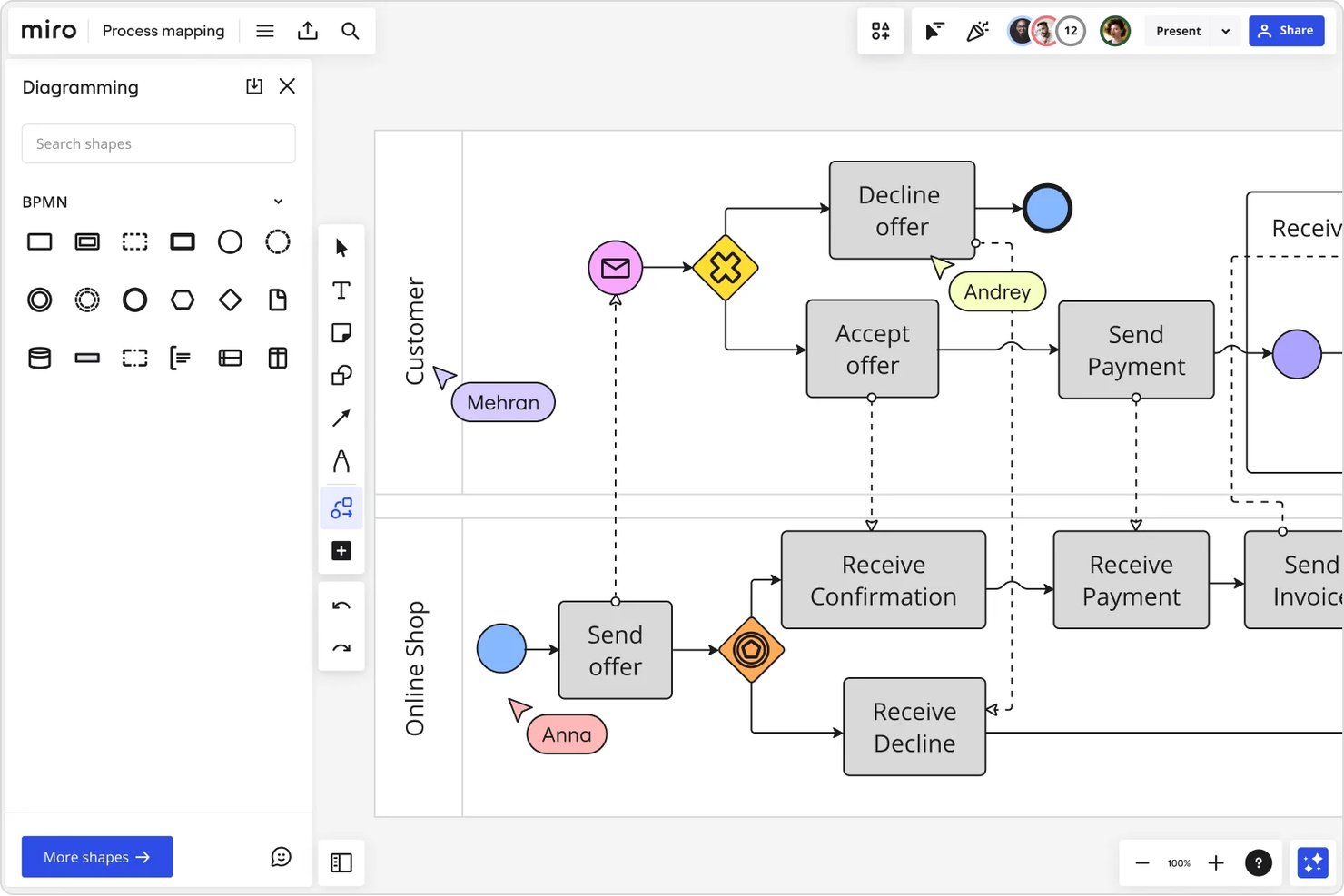
Miro is a visual collaboration platform that combines an infinite canvas, BPMN and UML diagramming, swimlane mapping, and AI-assisted flowchart creation for cross-functional process documentation.
Who Is Miro Best For?
Miro is a strong fit for enterprise and mid-market teams — particularly business analysts and PMO leads — who run frequent cross-functional workshops and process design sessions.
Why I Picked Miro
Miro earns its spot on my shortlist because of the sheer depth of its template library. With 7,000+ process mapping templates, I can pull up a BPMN swimlane or value stream map in seconds rather than building from scratch. What I find especially useful is that 80+ of those templates come with AI Sidekicks already embedded, so they actively guide the mapping session rather than just serving as a blank starting point.
Miro Key Features
- Advanced diagramming canvas: Supports infinite zoom, smart connectors, and auto-alignment for complex process maps.
- BPMN and UML notation libraries: Includes industry-standard shapes for technical mapping and swimlane diagrams.
- Real-time multiplayer collaboration: Enables multiple users to edit, comment, and review boards at once, complete with version history.
- Two-way integrations with project management tools: Natively connects with Jira, Asana, Azure DevOps, and Microsoft Teams for seamless workflow updates.
Miro Integrations
Miro offers 100+ native integrations, including Jira, Asana, ClickUp, Confluence, Azure DevOps, Microsoft 365, Google Workspace, Slack, Zoom, Airtable, and Zapier. An API is available for custom integrations.
Pros and Cons
Pros:
- Infinite canvas handles complex, multi-level process maps
- AI auto-generates maps from text prompts
- 7,000+ templates accelerate process documentation
Cons:
- Boards get slow with very large process diagrams
- BPMN validation is less rigorous than dedicated tools
New Product Updates from Miro
Miro Adds Japan Data Residency for Enterprise Customers
Miro has introduced Japan data residency for enterprise customers, offering in-region storage for production data, backups, and metadata, plus in-region compute infrastructure. For more information, visit Miro's official site.
Pipefy
Best for AI-powered workflow management
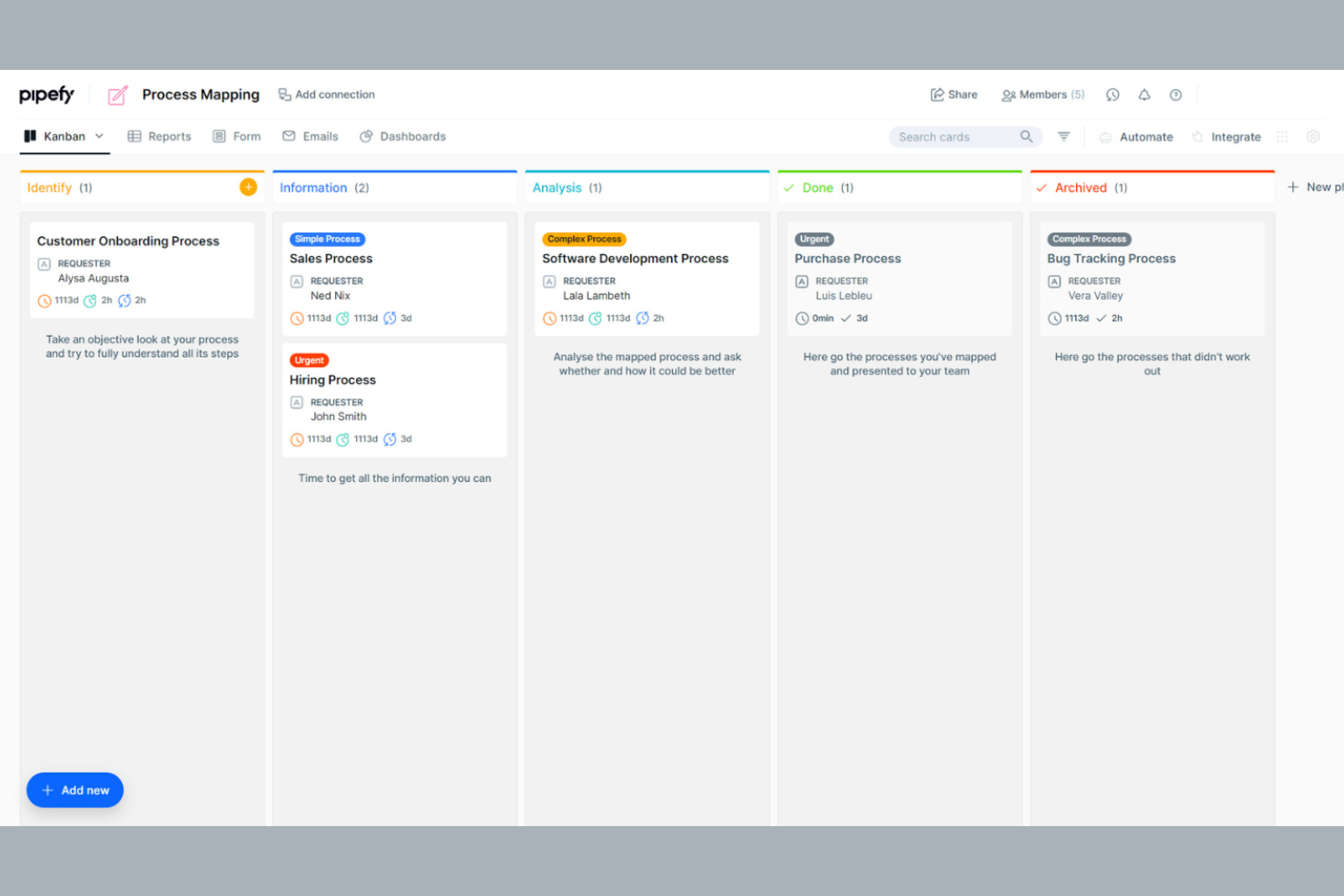
Pipefy is a workflow automation tool that caters to teams looking to optimize their business processes. It is ideal for businesses that need to manage tasks, track progress, and tighten operations across departments. The platform offers a user-friendly interface and customizable workflows to suit various business needs.
Why I picked Pipefy: Pipefy excels in workflow management, offering a variety of tools that support you in improving team efficiency.
Standout Features and Integrations:
Features include customizable templates that support step-by-step documentation of your processes and workflow automation tools to help you eliminate repetitive tasks. You can also track progress in real time, giving you visibility into your team's operations.
Integrations include Slack, Trello, Asana, Google Drive, Dropbox, Salesforce, Zendesk, HubSpot, and more.
Pros and Cons
Pros:
- Kanban-style task visualization
- Automation tools to reduce manual tasks
- Native AI Agent orchestration
Cons:
- Manual logic mapping
- Limited advanced features
Mural
Best for real-time collaboration
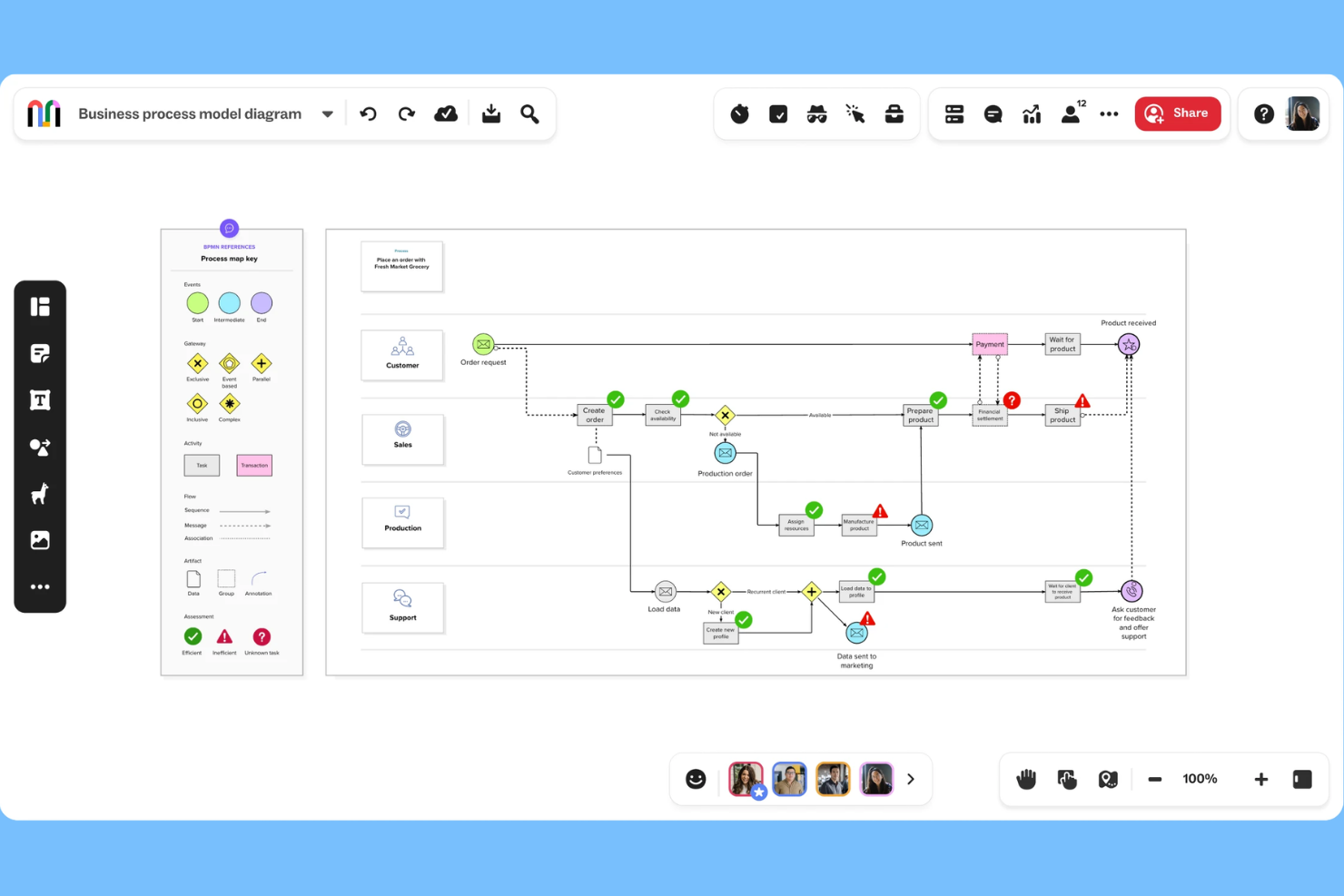
Mural is an online process mapping tool designed for teams looking to collaborate in real-time. It serves organizations aiming to improve workflows, design processes, and identify bottlenecks. Mural offers a user-friendly platform with customizable templates and drag-and-drop functionality.
Why I picked Mural: Mural excels in real-time collaboration, making it perfect for team members who need to work together to map their process steps. The intuitive design helps teams quickly adapt and integrate Mural into their workflow.
Standout Features and Integrations:
Features include an extensive library of templates that cater to various process mapping needs, helping you get started quickly. The drag-and-drop functionality makes customizing maps simple, and you can also embed or export your maps in multiple formats.
Integrations include Microsoft Teams, Google Drive, Dropbox, Slack, Asana, Trello, Confluence, GitHub, Zoom, and more.
Pros and Cons
Pros:
- Excels at real-time collaboration
- Infinite virtual whiteboard space
- Intuitive visual platform
Cons:
- Options can be overwhelming for beginners
- Limited features in free version

Creately
Best for visual diagram variety
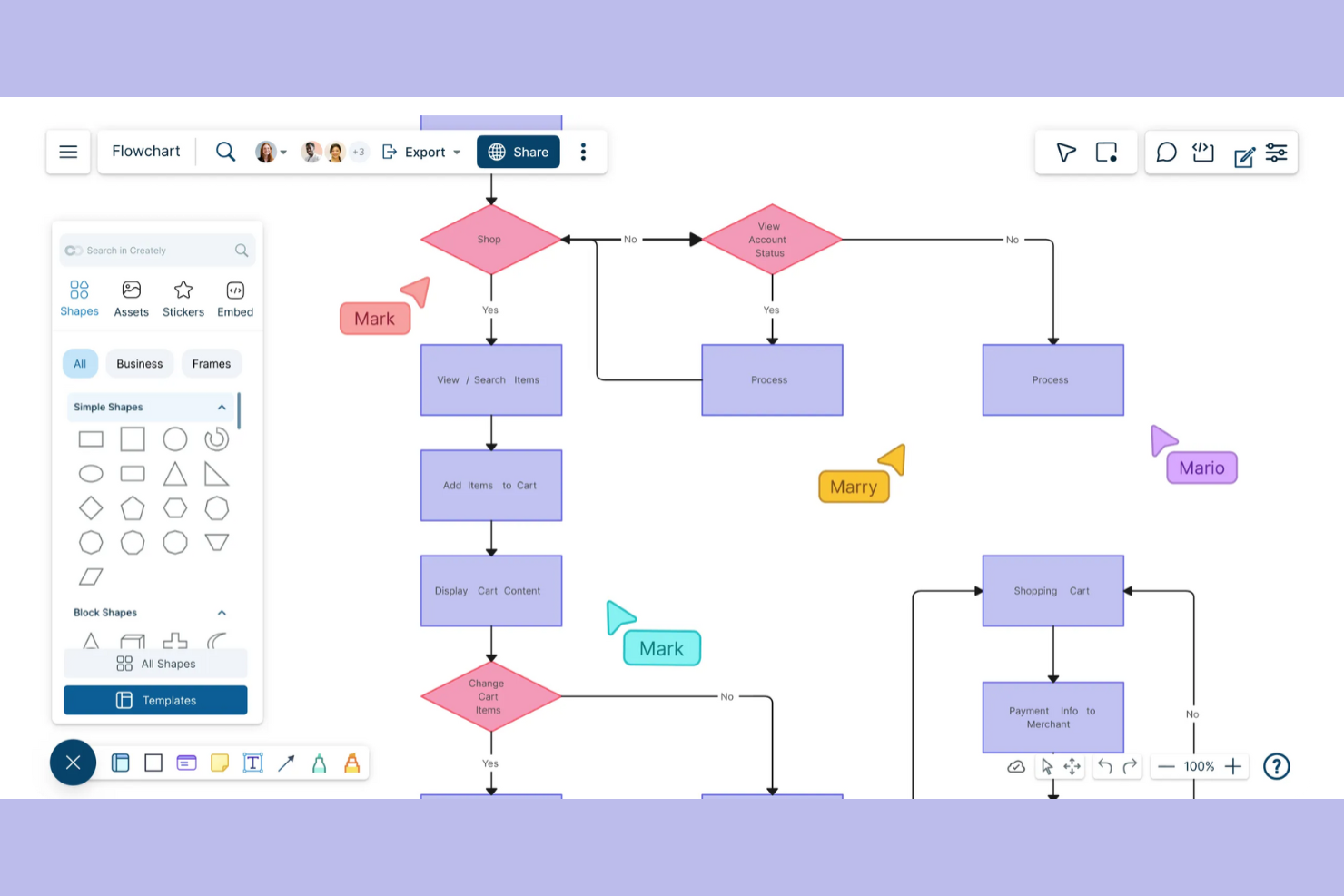
Creately helps teams build detailed process maps and flowcharts with real-time collaboration. It's designed for users who want to visually organize complex information and collaborate with others in real-time.
Why I picked Creately: Creately excels at creating visual diagrams, which is ideal for teams creating detailed visual representations. It provides an intuitive drag-and-drop interface, making diagramming straightforward and efficient.
Standout Features and Integrations:
Features include a vast library of templates that you can customize to fit your needs and real-time collaboration tools that support your team in working together to get the details right.
Integrations include Slack, Microsoft Teams, Confluence, and more.
Pros and Cons
Pros:
- Contextual in-app commenting
- One-click "Infinite Canvas" expansion
- Supports multiple diagram types
Cons:
- SVG and PDF export require a paid plan
- Occasional performance issues

Best for beginners

SmartDraw is designed to make the creation of professional diagrams quick and easy. It's aimed at users who want automatic formatting and familiar sharing options.
Why I picked SmartDraw: SmartDraw simplifies process mapping with its intuitive design, making it ideal for beginners. The software supports collaboration by allowing teams to work on shared maps, and integrations with platforms like Google Drive and Dropbox make it easy to share and store diagrams.
Standout Features and Integrations:
Features include automatic formatting, a variety of sharing and export options, and customizable templates. These features make getting started less intimidating and ensure your diagrams look professional with minimal effort. Enterprise licensing options are also available for larger organizations.
Integrations include Google Drive, Dropbox, Box, OneDrive, Confluence, Microsoft Teams, Trello, and more.
Pros and Cons
Pros:
- Ribbon UI Wide range of templates
- Familiar Microsoft-style
- Automatic diagram adjustments
Cons:
- Limited customization in templates
- Shared storage is limited on lower tiers

Best for agile teams who also map user stories
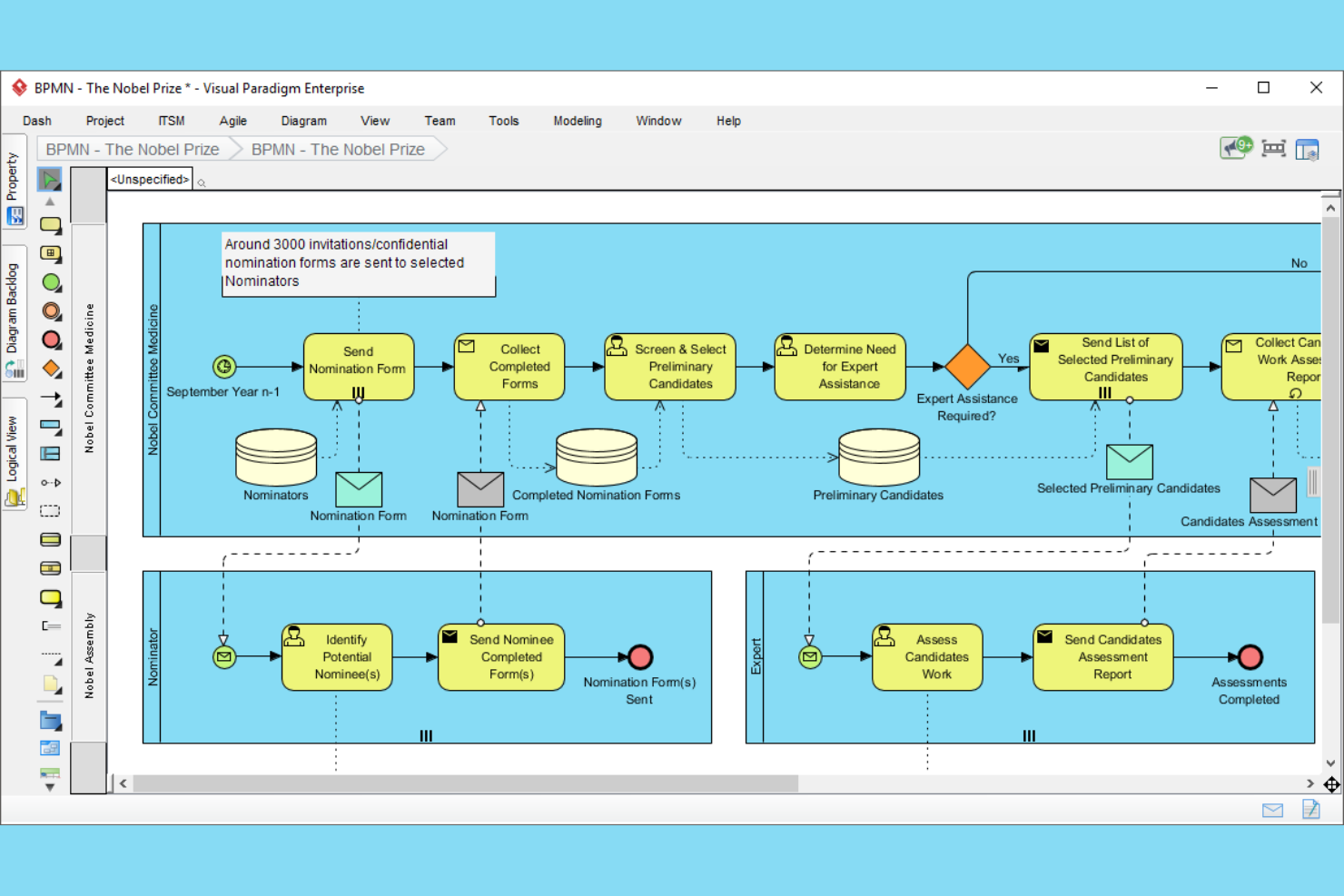
Visual Paradigm is a tool designed for agile teams that need to manage and map user stories as well as processes. It's ideal for software development teams looking to improve their agile processes. The platform offers tools for user story mapping, process modeling, and team collaboration.
Why I picked Visual Paradigm: Visual Paradigm is tailored for agile teams, providing tools that support agile methodologies. The tool's collaboration features support real-time team interaction, ensuring everyone stays on the same page. Its business process model features allow you to refine workflows to suit agile practices.
Standout Features and Integrations:
Features include a user story mapping tool as well as a process modeling tool to help you visualize and optimize every aspect of your projects. You can also use its real-time collaboration tools to keep your team aligned and focused.
Integrations include Jira, Confluence, and more.
Pros and Cons
Pros:
- Includes user story mapping tool
- Integrated Post-it toolset
- Supports agile methodologies
Cons:
- Configuration can be time-consuming
- Requires agile knowledge

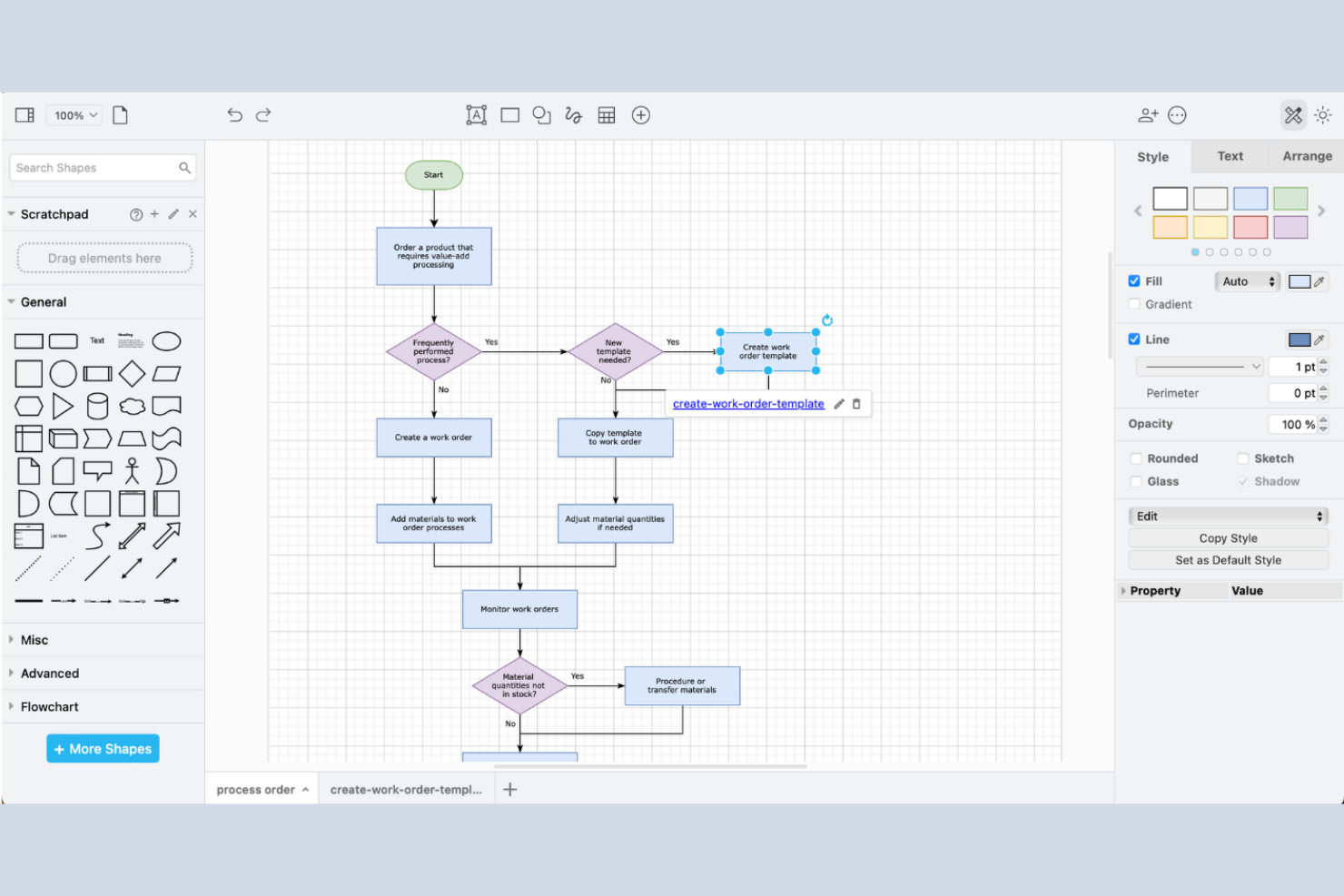
draw.io is a versatile diagramming tool that caters to individuals and teams looking for a cost-effective solution for creating process maps and diagrams. The platform offers an intuitive interface and a variety of diagramming options.
Why I picked draw.io: draw.io is ideal for those seeking a free solution for process mapping. The tool provides a user-friendly interface that simplifies the diagram creation process. You can access various shapes and templates to customize your diagrams.
Standout Features and Integrations:
Features include an extensive library of shapes and templates that you can use to create detailed diagrams. The tool offers offline functionality so you’re not dependent on an internet connection for basic tasks. You can also export diagrams in multiple formats to suit your needs.
Integrations include Google Drive, OneDrive, Dropbox, GitHub, GitLab, Confluence, and more.
Pros and Cons
Pros:
- Supports multiple file formats
- Works offline effectively
- Open source and no cost
Cons:
- Lacks dedicated customer support
- Browser-based rendering limits
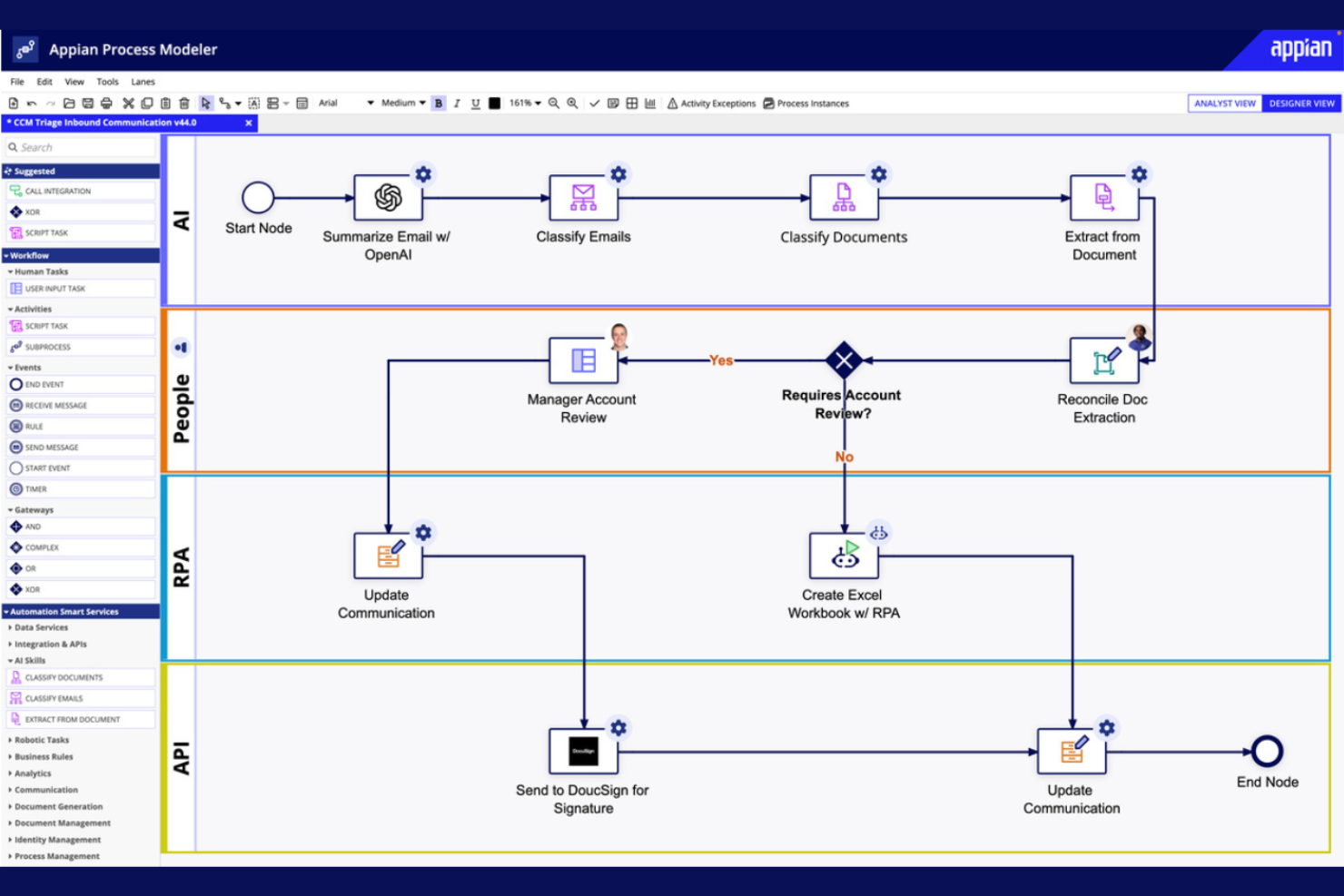
Appian is a low-code development platform designed for businesses that want to create applications quickly and efficiently. It's ideal for organizations looking to increase operational efficiency without extensive coding expertise. The platform offers tools for process automation, application development, and workflow management.
Why I picked Appian: Appian allows you to automate processes with minimal coding, reducing development time significantly. The platform's drag-and-drop interface makes it accessible to users with varying technical skills.
Standout Features and Integrations:
Features include a drag-and-drop interface that simplifies the creation of applications. The platform supports process automation to help you optimize workflows. You can also use its real-time analytics to monitor and improve process performance.
Integrations are not publicly listed.
Pros and Cons
Pros:
- Instant operational visibility
- High-speed app delivery
- Low-code development platform
Cons:
- Some processes are RAM-intensive
- Standardized low-code components

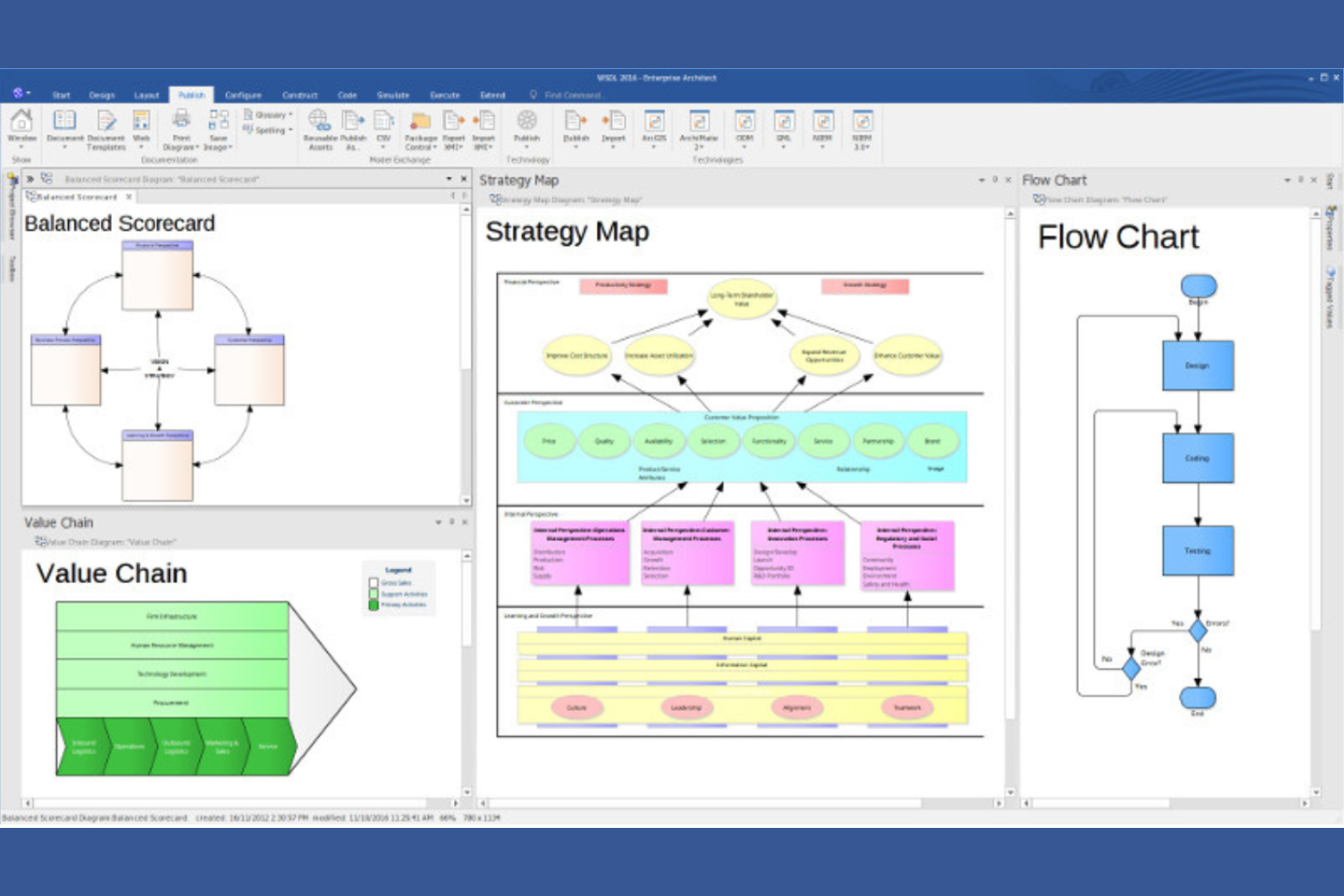
Enterprise Architect serves large organizations needing detailed modeling and visualization of complex systems. It's designed for enterprise architects and business analysts focused on aligning IT infrastructure with business goals. The platform supports a wide array of modeling languages and standards.
Why I picked Enterprise Architect: The tool provides a detailed modeling environment that supports UML, BPMN, and SysML, which are essential for complex system design. Its collaboration tools help your team work together on large-scale projects efficiently.
Standout Features and Integrations:
Features include a repository structure that supports version control and project management. The tool offers extensive reporting options to help you keep stakeholders informed. You can also use visual modeling tools to design and analyze complex systems.
Integrations include Microsoft Teams, SharePoint, Azure DevOps, Jira, Confluence, ServiceNow, and more.
Pros and Cons
Pros:
- Scalable for large enterprises
- Extensive reporting capabilities
- Supports multiple modeling languages
Cons:
- Non-standard UI layout
- Requires technical expertise
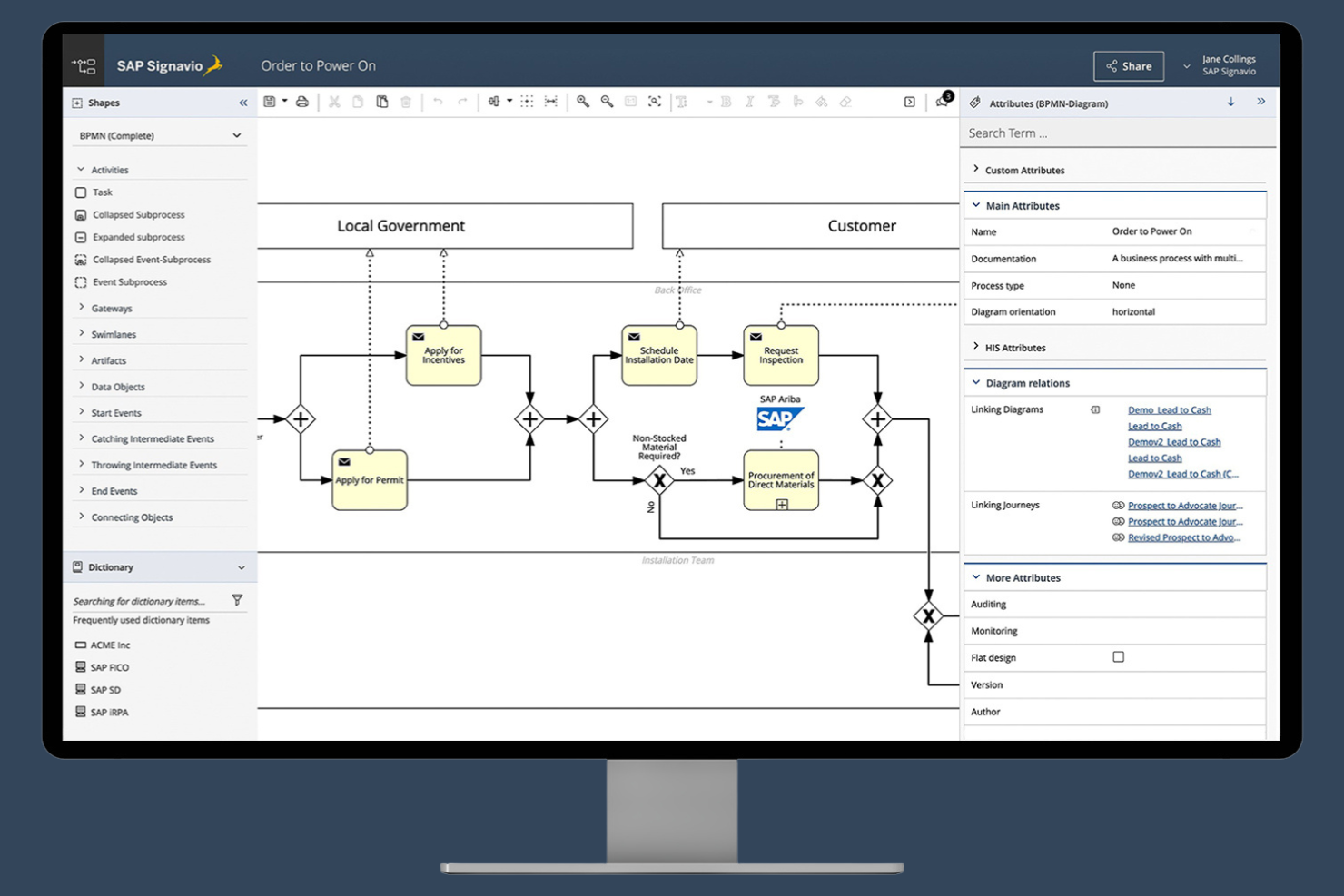
SAP Signavio Process Modeler is a process modeling tool that focuses on process optimization and compliance. It's used by organizations that require precise process documentation and analysis to ensure compliance with industry standards. The platform offers tools for modeling, analyzing, and optimizing business processes, enabling a culture of continuous improvement.
Why I picked SAP Signavio Process Modeler: SAP Signavio Process Modeler excels in compliance tracking, making it valuable for teams that need to maintain industry standards. It provides detailed process documentation to help you track and manage compliance requirements, as well as collaboration features to help your team brainstorm and improve compliance processes.
Standout Features and Integrations:
Features include a collaborative workspace that supports team engagement and real-time analytics to help you monitor and improve process efficiency. You can also access customizable reporting tools to generate detailed compliance reports.
Integrations include SAP Cloud ALM and more.
Pros and Cons
Pros:
- Engages teams in process optimization
- Built-in compliance governance
- Customizable reporting tools
Cons:
- Not ideal if you don’t use other SAP products
- Pricing details are not transparent
Annen programvare for prosesskartlegging
Her er noen flere alternativer for programvare for prosesskartlegging som ikke kom med på kortlisten min, men som likevel er verdt å ta en titt på:
- Bizagi Modeler
For process automation on the Bizagi platform
- Lucidchart
For visual collaboration
- Nintex
For process automation
- Process Street
For workflow documentation
- Kissflow
For project management


How I Evaluate Process Mapping Software
I evaluate process mapping tools in two layers: the core diagramming and notation support a tool must have to qualify, and the differentiators—like simulation or PM integrations—that set tools apart.
Core Functionality (Table Stakes For This List)
When I'm selecting tools for my list, I rank each one on a scale from 0 (does not offer the functionality) to 5 (excels in this area) for each core functionality listed below. Then, I calculate the tool's total score into a percentage. Each tool needs to achieve a minimum total score of 65% to be considered for inclusion.
- Diagramming Canvas: I look for a responsive drag-and-drop canvas with smart connectors and auto-alignment, since mapping a 40-step sprint workflow with clunky snapping is painful.
- BPMN & Notation Support: Formal notation matters when your process maps need to be read by external auditors or partner teams, so I check for BPMN 2.0 and swimlane support.
- Pre-Built Process Templates: A solid template library saves hours when you're mapping common workflows like change requests or release management instead of starting from scratch.
- Real-Time Collaboration: I evaluate whether multiple editors can co-author a single map with live cursors, comments, and @mentions—especially important for distributed project teams.
- Process Documentation & Metadata: Each step in a map should support custom fields like owners, descriptions, and linked documents so the map doubles as a living process reference.
- Export & Integration Options: I check for export to Visio, PDF, SVG, and PNG, plus native connections to PM tools like Jira, Asana, or Monday so maps stay close to execution.
Once I have a list of tools that meet this criteria, I consider what sets each platform apart.
Differentiating Factors (What Sets Vendors Apart)
Here's how I compare and contrast different vendors:
Standout Features
AI-assisted mapping is a big differentiator for teams documenting dozens of workflows at once. Tools that generate diagrams from text descriptions or imported documents cut setup time dramatically. I also evaluate process simulation capabilities, which let you model scenarios like adding a review gate before deployment to see how it impacts cycle time. Version control and governance matter when multiple teams own overlapping processes and you need branching, change tracking, and approval workflows to keep maps accurate over time.
Beyond Features
Integration depth with your existing PM stack is one of the first things I check. A process map loses value if it lives in isolation from Jira boards or Confluence pages where work actually happens. Pricing and licensing flexibility also matter here—I look at whether a vendor offers viewer-only seats so stakeholders can review maps without inflating your per-user costs. For teams in regulated environments, I evaluate SSO/SAML support, role-based access controls, and SOC 2 or ISO 27001 compliance to ensure sensitive process documentation stays protected.
Slik velger du programvare for prosesskartlegging
Det er lett å gå seg vill i lange funksjonslister og komplekse prismodeller. For å hjelpe deg med å holde fokus mens du går gjennom den unike prosessen din for valg av programvare, får du her en sjekkliste over faktorer du bør ha i tankene:
| Faktor | Hva bør du vurdere? |
|---|---|
| Skalerbarhet | Kan programvaren vokse med virksomheten din? Se etter alternativer som støtter et økende antall brukere og prosesser uten problemer. Tenk på fremtidig vekst og om verktøyet kan håndtere den. |
| Integrasjoner | Kan den kobles til de eksisterende verktøyene dine? Kontroller kompatibiliteten med de nåværende systemene dine, for eksempel CRM-, ERP- eller prosjektstyringsverktøy, for å unngå avbrudd i arbeidsflyten. |
| Tilpasningsmuligheter | Kan du tilpasse programvaren etter behovene dine? Se etter verktøy som lar deg endre arbeidsflyter, maler og oversikter slik at de passer til de unike prosessene dine. |
| Brukervennlighet | Er den brukervennlig for teamet ditt? Vurder læringskurven og om teamet raskt kan ta den i bruk uten omfattende opplæring. |
| Implementering og oppstart | Hvor smidig er oppsettprosessen? Vurder hvor mye tid og hvilke ressurser som kreves for å komme i gang. Se etter verktøy med veiledet oppstart og god brukerstøtte. |
| Kostnad | Passer den inn i budsjettet ditt? Sammenlign prismodeller – månedlig kontra årlig, per bruker kontra fast pris. Vær oppmerksom på skjulte gebyrer eller kostnader som kanskje ikke er åpenbare. |
| Sikkerhetstiltak | Er dataene dine beskyttet? Sørg for at programvaren oppfyller bransjestandarder for databeskyttelse, for eksempel kryptering og regelmessige sikkerhetsrevisjoner. |
| Tilgjengelig brukerstøtte | Er det hjelp tilgjengelig når du trenger det? Vurder leverandørens supportkanaler og åpningstider. Se etter døgnåpen brukerstøtte hvis teamet ditt arbeider i ulike tidssoner. |
Hva er programvare for prosesskartlegging?
Programvare for prosesskartlegging bidrar til å visualisere og organisere arbeidsflyter og prosesser. Det er et verktøy som vanligvis brukes av fagpersoner som forretningsanalytikere, prosjektledere og driftsledere for å forbedre effektiviteten og oversikten.
Dra-og-slipp-grensesnitt, samarbeid i sanntid og maler som kan tilpasses, gjør det enklere å opprette og administrere prosesskart. Alt i alt forenkler disse verktøyene komplekse prosesser og forbedrer kommunikasjonen i teamet.
Funksjoner
Når du velger programvare for prosesskartlegging, bør du se etter følgende viktige funksjoner:
- Dra-og-slipp-grensesnitt: Gjør det mulig for brukere å opprette og endre prosesskart uavhengig av teknisk ferdighetsnivå, noe som forbedrer tilgjengeligheten.
- Samarbeid i sanntid: Gjør det mulig for flere brukere å arbeide med det samme prosesskartet samtidig, noe som forbedrer kommunikasjonen og effektiviteten i teamet.
- Maler som kan tilpasses: Tilbyr forhåndsutformede maler for prosesskart som kan tilpasses spesifikke forretningsbehov, slik at du sparer tid og arbeid.
- Integrasjonsmuligheter: Kobler til andre forretningsverktøy som CRM- og ERP-systemer, noe som sikrer uavbrutt dataflyt og reduserer manuell inntasting.
- Støtte for automatisering: Reduserer repetitive oppgaver, slik at brukerne kan fokusere på mer strategisk arbeid og øke produktiviteten.
- Analyse og rapportering: Gir innsikt i prosessytelsen og hjelper brukerne med å identifisere flaskehalser og optimalisere arbeidsflyter.
- Skalerbarhet: Støtter virksomheter i vekst ved å gjøre det mulig å øke antallet brukere og prosesser uten at det går ut over ytelsen.
- Sikkerhetstiltak: Sikrer databeskyttelse gjennom kryptering og samsvar med bransjestandarder, noe som gir trygghet.
- Brukervennlig navigasjon: Gjør det enkelt for brukerne å finne og få tilgang til funksjoner, reduserer læringskurven og fremmer bruk.
Fordeler
Programvare for prosesskartlegging gir flere fordeler for teamet og virksomheten din. Her er noe av det du kan se frem til:
- Forbedret effektivitet: Automatiseringsverktøy reduserer manuelle oppgaver, slik at teamet ditt kan fokusere på aktiviteter med høyere verdi.
- Bedre samarbeid: Funksjoner for samarbeid i sanntid sikrer at alle har samme informasjon, noe som forbedrer teamarbeidet og kommunikasjonen.
- Bedre oversikt over prosesser: Maler som kan tilpasses, og dra-og-slipp-grensesnitt bidrar til å visualisere arbeidsflyter, slik at prosessene blir tydeligere for alle involverte.
- Bedre beslutningsgrunnlag: Dokumentasjon av prosessene dine muliggjør analyse og rapportering som kan gi innsikt i ytelsen, og hjelper teamet ditt med å identifisere områder som kan forbedres.
- Tidsbesparelser: Brukervennlig navigasjon og maler som kan tilpasses, gjør det raskere å opprette og endre prosesskart.
Kostnader og priser
Valg av programvare for prosesskartlegging krever en forståelse av de ulike prismodellene og abonnementene som er tilgjengelige. Alternativene omfatter gratis programvare for prosesskartlegging, samt personlige abonnementer, bedriftsabonnementer og virksomhetsabonnementer. Kostnadene varierer basert på funksjoner, teamstørrelse, tillegg og mer.
Tabellen nedenfor oppsummerer vanlige abonnementer, gjennomsnittsprisene deres og typiske funksjoner som er inkludert i programvareløsninger for prosesskartlegging:
Sammenligningstabell for abonnementer på programvare for prosesskartlegging
| Abonnementstype | Gjennomsnittspris | Vanlige funksjoner |
|---|---|---|
| Gratisabonnement | $0 | Grunnleggende diagramoppretting, begrensede maler og brukerstøtte fra fellesskapet. |
| Personlig abonnement | $5-$25/bruker/måned | Avanserte maler, grunnleggende integrasjoner og begrensede automatiseringsfunksjoner. |
| Bedriftsabonnement | $25-$50/bruker/måned | Fullstendige integrasjoner, samarbeid i sanntid samt verktøy for analyse og rapportering. |
| Virksomhetsabonnement | $50-$100/bruker/måned | Arbeidsflyter som kan tilpasses, avansert sikkerhet, dedikert brukerstøtte og ubegrenset antall brukere. |
Vanlige spørsmål om programvare for prosesskartlegging
Her er svar på vanlige spørsmål om programvare for prosesskartlegging:
Hva brukes programvare for prosesskartlegging til?
Programvare for prosesskartlegging brukes til å visualisere og dokumentere arbeidsflyter og prosesser. Den hjelper teamet ditt med å forstå hvordan oppgaver henger sammen, og med å identifisere områder som kan forbedres. Ved å opprette visuelle diagrammer kan du se flaskehalser og ineffektivitet, noe som gjør det enklere å forenkle driften og øke produktiviteten.
Kan programvare for prosesskartlegging integreres med andre verktøy?
Ja, det meste av programvaren for prosesskartlegging kan integreres med andre verktøy, for eksempel CRM-systemer, apper for prosjektstyring og skylagringstjenester. Denne integrasjonen sikrer en informasjonsflyt på tvers av plattformer, reduserer manuell dataregistrering og forbedrer effektiviteten. Sjekk programvarens integrasjonsmuligheter for å sikre at den dekker teamets spesifikke behov.
Passer programvare for prosesskartlegging for små bedrifter?
Ja, programvare for prosesskartlegging passer for små bedrifter. Den hjelper små team med å organisere arbeidsflyter og forbedre effektiviteten uten behov for omfattende ressurser. Mange programvarealternativer tilbyr prisplaner som passer mindre budsjetter, slik at du kan dra nytte av avanserte funksjoner uten en stor investering.
Hvordan velger jeg riktig programvare for prosesskartlegging for teamet mitt?
For å velge riktig programvare for prosesskartlegging bør du vurdere teamets spesifikke behov og arbeidsflyter. Ta hensyn til faktorer som brukervennlighet, integrasjonsmuligheter og skalerbarhet. Test ulike alternativer med gratis prøveperioder for å se hvilket som passer best med prosessene dine. Prioriter verktøy som tilbyr funksjonene du trenger, til en pris som passer budsjettet ditt.