

10 beste AI-verktøy for forretningsprosessstyring vurdert i 2026

Kortliste over de beste AI BPM-verktøyene


De beste AI BPM-verktøyene (forretningsprosessstyring) bruker kunstig intelligens til å automatisere repetitive oppgaver, identifisere flaskehalser og optimalisere arbeidsflyter, slik at du kan redusere forsinkelser, forhindre manuelle feil og øke gjennomføringsevnen uten å måtte følge opp godkjenninger eller lete etter statusoppdateringer. Når arbeidsflyter er avhengige av regneark, verktøy som ikke er integrert med hverandre eller utdaterte prosesser, sliter teamene med ujevne overleveringer, dårlig oversikt og stillestående fremdrift.
Jeg har personlig testet over 30 AI BPM-plattformer i reelle forretningsmiljøer for å vurdere hvor godt de tilpasser seg endrede inndata, automatiserer beslutninger og skalerer på tvers av team og avdelinger. Fokuset mitt har vært på praktiske, målbare forbedringer i ytelsen, ikke på overdrivelser.
I denne veiledningen går jeg gjennom de mest effektive AI BPM-verktøyene som er tilgjengelige i dag, slik at du kan finne den riktige løsningen for å effektivisere driften og ta smartere beslutninger med mindre oppfølging.
Why Trust Our Software Recommendations
Our team has been testing and reviewing software since 2012. As project managers ourselves, we know how difficult—and important—it is to choose the right software.
For this guide, we evaluated tools using hands-on testing and independent research, scoring tools using our selection criteria. We also draw on insights from industry thought leaders and practicing project management experts.
Our reviews reflect our human editorial judgment, not a sales pitch.
Expert reviewers:
Sammenligningstabell for AI BPM-verktøy
Denne sammenligningstabellen oppsummerer prisopplysningene for mine beste utvalgte AI BPM-verktøy.
| Tool | Best For | Trial Info | Price | ||
|---|---|---|---|---|---|
| 1 | Best for secure multi-party workflows | Free demo available | From $5,000/year (billed annually) | Website | |
| 2 | Best for AI-powered natural language app creation | Free demo available | $40/user/month | Website | |
| 3 | Best for AI-powered resource allocation | Free plan available; 14-day free trial | From $9/user/month (billed annually) | Website | |
| 4 | Best with prebuilt connectors | 30-day free trial | Pricing upon request | Website | |
| 5 | Best for AI document processing | Free trial available + free demo | Pricing upon request | Website | |
| 6 | Best for AI-driven process documentation | Free plan + free demo available | From $12/seat/month (billed annually) | Website | |
| 7 | Best for customizable BPM solutions | Free demo available | Pricing upon request | Website | |
| 8 | Best for checklist-based workflows | Free demo available | Pricing upon request | Website | |
| 9 | Best for developer-friendly BPM | 30-day free trial | Pricing upon request | Website | |
| 10 | Best for cloud integration processes | 30-day free trial | From $99/month | Website |


Anmeldelser av de beste AI BPM-verktøyene
Nedenfor finner du mine detaljerte sammendrag av de beste AI BPM-verktøyene som kom med på kortlisten min. Anmeldelsene mine gir en detaljert gjennomgang av de viktigste funksjonene, fordelene & ulempene, integrasjonene og ideelle bruksområdene for hvert verktøy, slik at du kan finne det beste for deg.

Moxo
Best for secure multi-party workflows
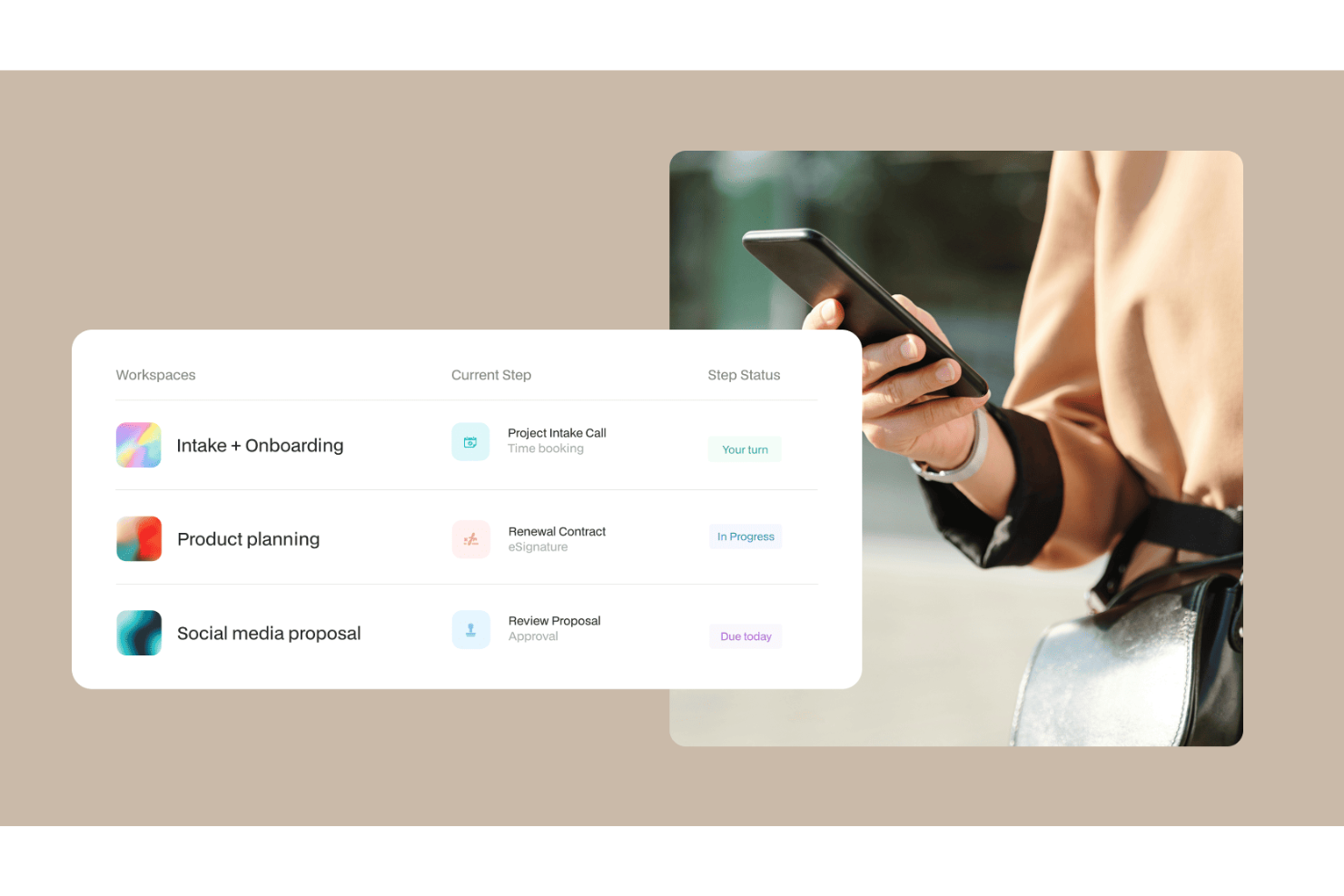
Moxo is an AI-powered business process management platform that combines workflow orchestration, AI agents, multi-party coordination, and client interaction management in a single environment.
Who Is Moxo Best For?
Moxo is a strong fit for professional services firms in finance, legal, and consulting that run structured, multi-party client processes.
Why I Picked Moxo
I picked Moxo as one of the best because of how seriously it treats security across every layer of a multi-party process. When a workflow involves external clients, third-party vendors, and internal teams, access control matters: Moxo's granular role-based permissions ensure each participant sees only what's relevant to their step. On top of that, every action, document, decision, and message is logged in a detailed audit trail with timestamps, which is essential in regulated industries like financial services or legal. Add SOC 2 Type II certification, GDPR compliance, and a 7+ year audit trail, and you get a platform built for processes where security isn't optional.
Moxo Key Features
- AI workflow agents: Moxo's AI agents handle tasks like document validation, data extraction, and step routing without requiring manual handoffs.
- Conditional workflow branching: Build flows with parallel paths, rework loops, and rule-based routing so the right action triggers at the right step automatically.
- Native eSignatures and forms: Collect signatures, approvals, and structured data directly within workflow steps using built-in form and eSign tools.
- SLA timers and escalations: Set deadlines on individual workflow steps and configure automatic escalations when tasks are overdue.
Moxo Integrations
Moxo offers native data sync connectors with Salesforce, HubSpot, Microsoft Dynamics, Zoho, Wealthbox, Redtail, Filevine, Global Relay, Smarsh, Xero, and Follow Up Boss. It also supports file uploads from Google Drive, Dropbox, Box, and OneDrive, calendar sync with Google Calendar and Outlook, and integration actions with DocuSign and Jumio that can be embedded directly into workflow steps. Moxo connects with Zapier and provides a REST API and webhooks for custom integrations.
Pros and Cons
Pros:
- AI agents handle routing and follow-ups
- SOC 2 Type II and GDPR compliant
- Built-in eSignatures, forms, and approvals per step
Cons:
- Limited internal project management depth
- No built-in time tracking for tasks

Best for AI-powered natural language app creation
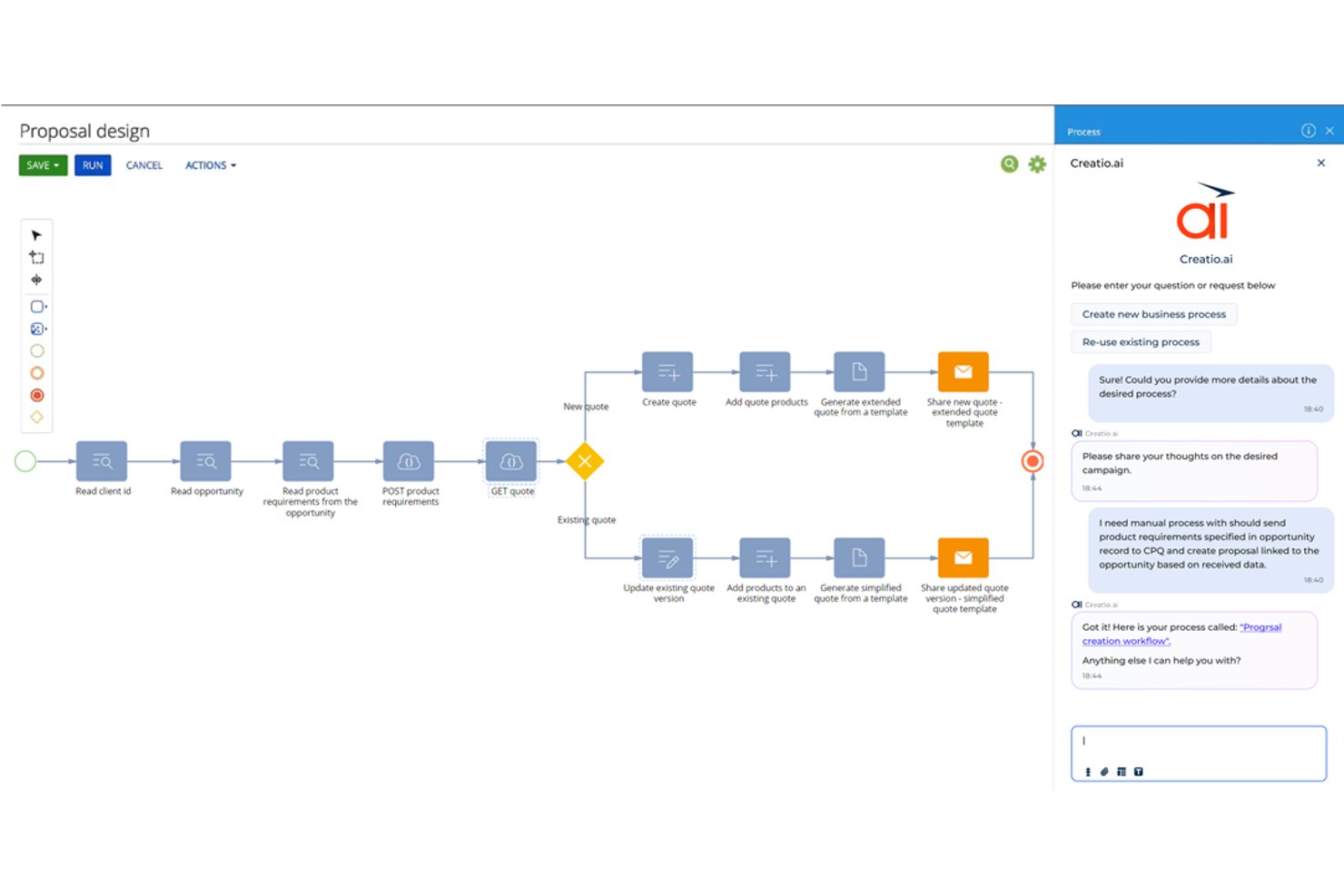
Creatio Studio is a no-code AI BPM platform that combines BPMN-based process modeling, agentic workflow automation, and AI-assisted application development in a unified visual environment.
Who Is Creatio Studio Best For?
Creatio Studio is a strong fit for operations and process managers at mid-to-large enterprises who need to automate complex workflows without relying heavily on developer resources.
Why I Picked Creatio Studio
I picked Creatio Studio as one of the best because its natural language app creation genuinely changes how process work gets done. Instead of manually mapping every workflow in a designer, I can describe a process in plain text, and the platform generates BPMN-structured flows automatically. Its AI-driven process generation pairs with an AI-assisted UI/UX tool, so my team goes from process idea to deployed application without writing a single line of code.
Creatio Studio Key Features
- BPMN 2.0 process designer: Build and edit complex business processes visually using standard BPMN notation.
- Reusable component marketplace: Access hundreds of ready-made connectors, apps, and templates from the Creatio Marketplace.
- No-code governance automation: Enforce compliance and manage data governance across all automated workflows.
- Multi-channel integration support: Connect with leading email, CRM, communication, and analytics platforms using native connectors.
Creatio Studio Integrations
Creatio Studio offers native integrations with Power BI, Microsoft 365, Twilio, WhatsApp, Zoom, Formstack, Avaya, and more. An API is available for custom integrations.
Pros and Cons
Pros:
- Broad marketplace for no-code components
- Advanced process modeling with AI assistance
- Natural language to BPMN workflow generation
Cons:
- Steep learning curve for complex workflows
- Advanced process mining requires third-party add-ons
New Product Updates from Creatio AI Studio
Creatio Studio Expands AI App-Building Capabilities
Creatio Studio adds expanded AI coding agents, AI-generated pivot tables, and built-in analytics for generated apps. These updates let users build more UI, logic, and reporting components from natural-language prompts. For more information, visit Creatio Studio’s official site.

Best for AI-powered resource allocation
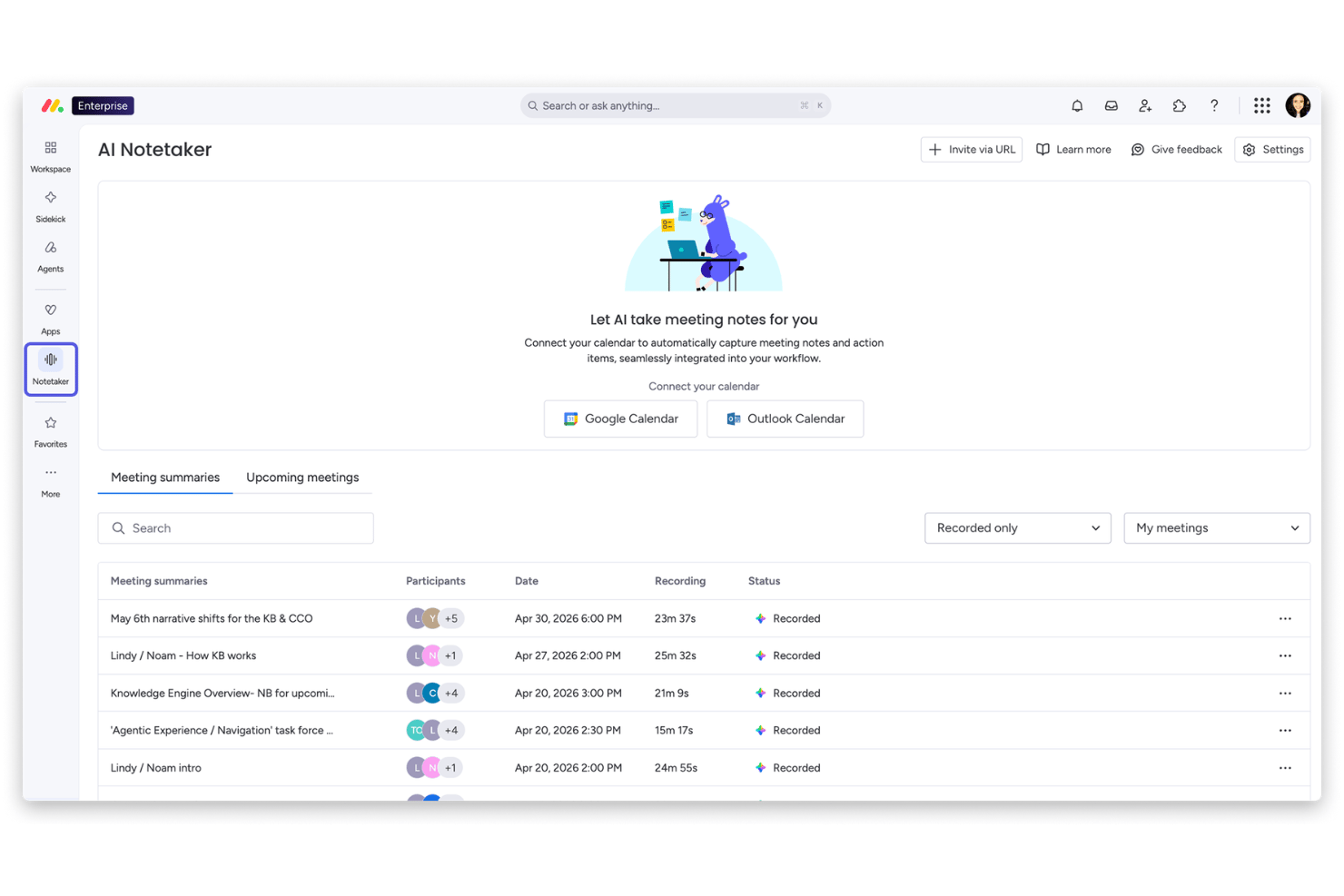
monday AI Workspace is an AI-powered work management platform that combines workflow automation, agentic AI, cross-functional process orchestration, and resource management to help teams plan, track, and execute projects at scale.
Who Is monday AI Workspace Best For?
It's a strong fit for mid-size to enterprise teams where PMO directors and operations managers need to coordinate work across multiple departments and project pipelines simultaneously.
Why I Picked monday AI Workspace
I picked monday AI Workspace as one of the best because its AI-powered Resource Management module flags over-allocation before it becomes a delivery problem. The AI analyzes live project data across boards to surface capacity conflicts, so my team can rebalance workloads without waiting for a status meeting to catch the issue. Paired with Portfolio Management's real-time health snapshots, I can see exactly where people and priorities are stretched across every active initiative.
monday AI Workspace Key Features
- Sidekick AI assistant: An AI-powered copilot available on every board for real-time process support and workflow queries.
- AI workflow builder: Create, orchestrate, and automate workflows across teams using drag-and-drop logic with AI-powered triggers.
- Portfolio management: Visualize project health, risks, and milestones across initiatives using cross-project dashboards.
- MCP for external AI tools: Connect and manage external AI solutions alongside monday-native workflows for broader automation.
monday AI Workspace Integrations
monday AI Workspace offers native integrations with Slack, Gmail, Google Calendar, Microsoft Teams, GitHub, Dropbox, Trello, Salesforce, and HubSpot. It also supports Zapier and provides an API for custom integrations.
Pros and Cons
Pros:
- AI sidekick answers workflow questions in context
- Process automation includes natural language workflow builder
- AI detects resource constraints before deadlines slip
Cons:
- Process mining features are limited compared to peers
- No formal BPMN modeling for complex processes
New Product Updates from monday AI Workspace
monday AI Workspace Adds Human Approval Routing
monday AI Workspace adds a human-in-the-loop approval block to AI Workflows, sending approval requests and routing workflow paths based on responses. For more information, visit monday AI Workspace's official site.

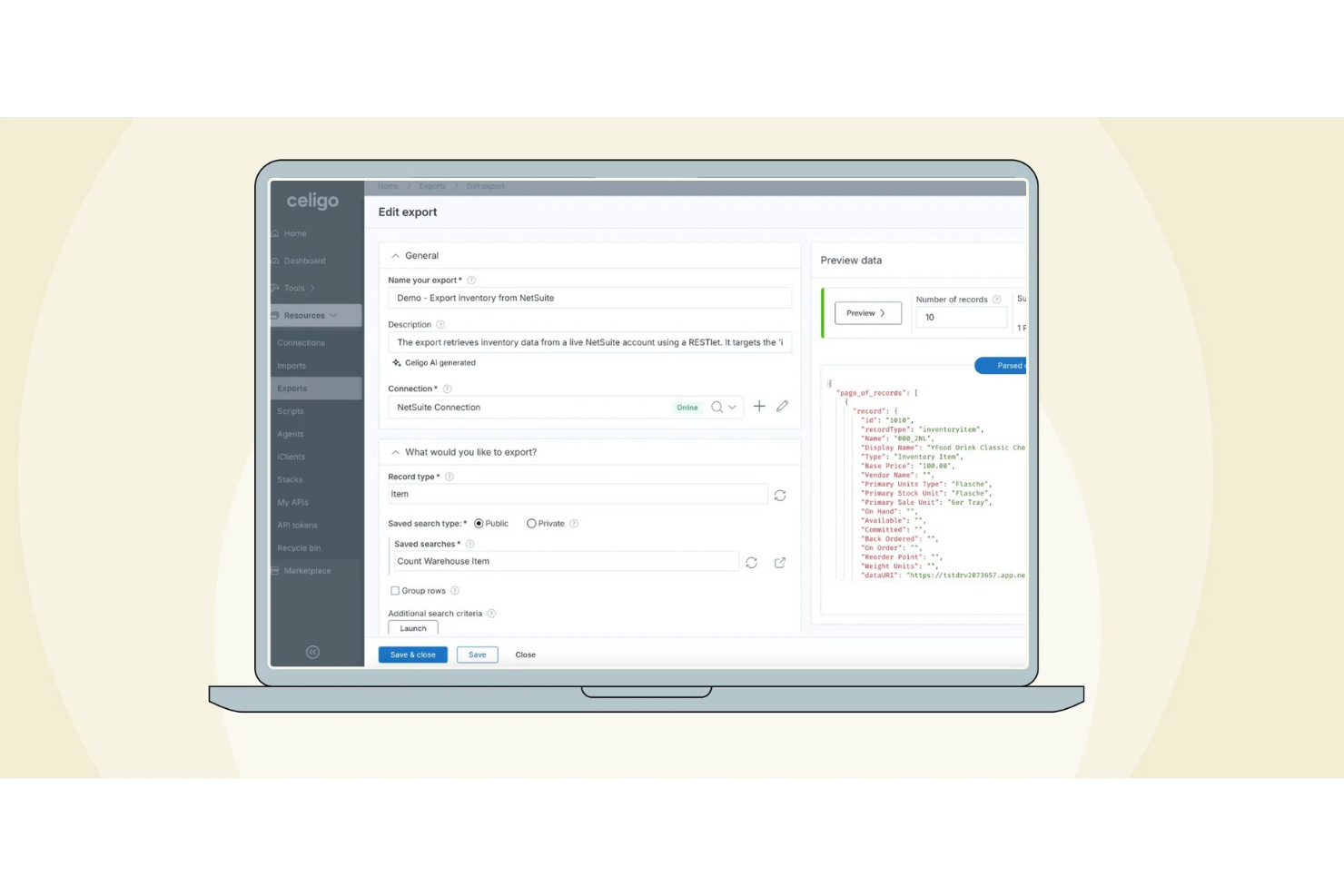
Celigo is an AI-powered business process automation platform that combines workflow orchestration, integration, and process monitoring for teams managing complex digital operations.
Who Is Celigo Best For?
Celigo is a good fit for IT and operations teams at mid-sized to large enterprises that need to automate and connect business processes across multiple cloud applications.
Why I Picked Celigo
I picked Celigo as one of the best because I rely on its extensive library of prebuilt connectors for major apps like Salesforce, NetSuite, and Shopify. My team is able to quickly automate cross-platform workflows without building custom integrations from scratch. I like that we can map data fields visually and deploy new automations in hours, not weeks.
Celigo Key Features
- AI-guided error management: Get automated suggestions and resolutions for integration errors as they occur.
- Visual workflow builder: Design, edit, and manage business process automations with a drag-and-drop interface.
- Role-based access controls: Set granular permissions for users and teams to manage integrations securely.
- Real-time process monitoring: Track workflow status and integration health with live dashboards and alerts.
Celigo Integrations
Celigo offers 1,000+ native integrations, including Salesforce, Microsoft Dynamics 365 Business Central, Oracle NetSuite, SAP, Snowflake, Acumatica, Walmart, ADP, Adobe, and 3PL providers. Universal connectors are available for custom integrations using protocols like HTTP, FTP, JDBC, AS2, and GraphQL.
Pros and Cons
Pros:
- Built-in compliance features for regulated industries
- Supports complex, multi-step workflow automations
- Real-time monitoring dashboard for integration health
Cons:
- Initial setup can be time-consuming for large projects
- Occasional delays in connector updates for new app versions
New Product Updates from Celigo
Celigo Adds SuiteTax and Variant Publishing for Shopify–NetSuite
Celigo adds NetSuite SuiteTax support and variant-level sales channel publishing to its Shopify–NetSuite integration. These updates improve tax handling and give merchants more control over how product variants are published. For more information, visit Celigo’s official site.
 .
.
TrailHQ
Best for AI document processing

Nanonets is an AI-driven document processing platform designed to automate data extraction and simplify document workflows. It serves businesses across various industries, offering AI capabilities to increase accuracy and efficiency in handling documents.
Why I picked Nanonets: Nanonets excels in AI document processing, making it easy for your team to automate data extraction from documents. Its AI features include machine learning algorithms that improve accuracy over time. The platform's ability to handle various document types allows you to process invoices, receipts, and more efficiently. With its focus on reducing manual data entry, Nanonets helps your team save time and minimize errors.
Standout Features & Integrations:
Features include custom model creation that lets you tailor AI models to your specific needs. The platform supports multiple document formats, ensuring versatility in document handling. Batch processing capabilities allow you to handle large volumes of documents quickly.
Integrations include Zapier, QuickBooks, Salesforce, Google Drive, Dropbox, Slack, HubSpot, Microsoft Excel, Airtable, and Asana.
Pros and Cons
Pros:
- Reduces manual data entry
- Supports multiple document formats
- Improves accuracy with machine learning
Cons:
- Requires setup for custom models
- Higher cost for small businesses

Scribe
Best for AI-driven process documentation

Scribe is an AI-powered documentation tool designed for operations, sales, HR, and IT teams to create and manage guides and tutorials efficiently. It offers AI-generated content and real-time documentation to simplify the documentation process.
Why I picked Scribe: Scribe is ideal for AI-driven process documentation, offering features like AI-generated content and real-time documentation. It automatically updates linked documents, which helps keep your guides current. Its automatic updates help keep content accurate as workflows evolve, and AI-generated text fills in descriptions for clearer explanations across real-world use cases.
Standout Features & Integrations:
Features include real-time documentation that captures processes as you work. AI-generated content helps create guides quickly, saving you time. Automatic updates for linked documents ensure your guides stay current without extra effort.
Integrations include Microsoft Office, Google Workspace, Slack, Jira, Salesforce, Trello, Asana, Confluence, monday.com, and Zendesk.
Pros and Cons
Pros:
- Quick capture of on-screen steps
- AI text generation for guides
- Auto-updates linked documents
Cons:
- Limited offline functionality
- Complex interface

Quixy
Best for customizable BPM solutions

Quixy is a no-code BPM and application development platform that helps teams build workflows, automate processes, and support digital transformation across industries.
Why I picked Quixy: Quixy is ideal for creating customizable BPM solutions with its no-code platform that empowers your team to build applications without technical skills. Its AI features help automate repetitive tasks, saving time and reducing errors. The platform's flexibility allows you to tailor workflows to fit your specific business needs. You can easily adapt processes as your business grows, ensuring long-term scalability.
Standout Features & Integrations:
Features include a drag-and-drop interface that simplifies app building for non-technical users. Workflow automation ensures your team can focus on critical tasks instead of repetitive ones. Real-time analytics provide insights into process efficiency, helping you make informed decisions.
Integrations include Microsoft Teams, Slack, Google Workspace, Salesforce, Zapier, Dropbox, OneDrive, QuickBooks, Trello, and Mailchimp.
Pros and Cons
Pros:
- Real-time analytics for process efficiency
- Flexible workflows for various industries
- No-code platform for easy app creation
Cons:
- Limited advanced customization options
- May require initial workflow planning

Best for checklist-based workflows

Process Street is a business process automation tool tailored for teams that need to document and automate workflows efficiently. It serves industries looking to simplify recurring tasks, leveraging AI to boost operational productivity.
Why I picked Process Street: Process Street excels in checklist-based workflows, providing a simple yet effective way to manage recurring tasks. Its AI capabilities automate routine processes, reducing the workload on your team. The platform allows you to create dynamic checklists that adapt to different scenarios. This flexibility ensures your team can handle tasks efficiently, regardless of changes in workflow requirements.
Standout Features & Integrations:
Features include conditional logic that lets you create dynamic checklists based on task requirements. The drag-and-drop editor makes it easy to design workflows without technical skills. Task assignments and due dates ensure accountability within your team.
Integrations include Zapier, Slack, Google Workspace, Salesforce, Microsoft Teams, Dropbox, OneDrive, Trello, Asana, and HubSpot.
Pros and Cons
Pros:
- Automates routine processes
- Simple drag-and-drop workflow editor
- Flexible dynamic checklists
Cons:
- Limited customization for unique needs
- May lack advanced features for complex workflows

Best for developer-friendly BPM

Camunda is a developer-focused BPM and orchestration platform built around BPMN and DMN standards. It supports end-to-end automation across distributed systems.z
Why I picked Camunda Platform: Camunda Platform is ideal for developer-friendly BPM because it provides technical teams with full control over workflow logic, microservice orchestration, and automation at scale. Its modeling tools, event-driven engine, and natural language form design features support complex business initiatives across industries
Standout Features & Integrations:
Features BPMN/DMN modeling, a decision engine, real-time monitoring, and support for both orchestration and multi-system workflows.
Integrations include Apache Kafka, Spring Boot, Elasticsearch, Microsoft Azure, AWS, Kubernetes, Docker, Java, Node.js, and Python.
Pros and Cons
Pros:
- Real-time process visibility
- Flexible architecture
- Standards-based modeling
Cons:
- May be complex for non-developers
- Requires technical expertise for setup

Boomi
Best for cloud integration processes

Boomi is an integration platform as a service (iPaaS) that helps businesses connect applications, data, and people across various environments. It serves organizations looking to improve data flow and automate business processes with AI-driven insights.
Why I picked Boomi: Boomi is tailored for cloud integration processes, offering a unified platform to connect your applications and data with ease. Its AI capabilities help automate complex workflows, reducing manual effort for your team. Boomi's low-code interface allows you to build integrations quickly without extensive technical skills. Real-time data synchronization ensures your systems are always up-to-date, enhancing operational efficiency.
Standout Features & Integrations:
Features include a low-code development environment that simplifies building integrations. Real-time data synchronization keeps your systems updated and aligned. The platform's pre-built connectors help you connect various applications with ease.
Integrations include Salesforce, SAP, NetSuite, Microsoft Dynamics 365, Workday, Google Cloud, AWS, Oracle, Slack, and ServiceNow.
Pros and Cons
Pros:
- Wide connector ecosystem
- Real-time data syncing
- Low-code integration builder
Cons:
- May need technical support for complex setups
- Requires initial setup time
Andre AI BPM-verktøy
Her er noen flere AI BPM-verktøy som ikke kom med på kortlisten min, men som likevel er verdt å se nærmere på:
- Gluu
For team collaboration on processes
- Pipedrive
For sales pipeline automation
- Decisions Workflow Manager
For no-code workflow automation
- Rierino
For retail process optimization
- Wrike
For real-time collaborative editing
- Qntrl
For workflow orchestration
- Kintone
For custom app building
- Prime BPM
For process mapping and analysis


How I Evaluate AI BPM Tools
Every tool on this list needs to go beyond slapping an "AI" label onto a basic workflow builder—I look for platforms where AI actually surfaces bottlenecks, predicts risks, or autonomously routes work across project pipelines. I split my evaluation into two layers: the core BPM functionality a tool must have to qualify, and the differentiators that separate good options from great ones.
Core Functionality (Table Stakes For This List)
When I'm selecting tools for my list, I rank each one on a scale from 0 (does not offer the functionality) to 5 (excels in this area) for each core functionality listed below. Then, I calculate the tool's total score into a percentage. Each tool needs to achieve a minimum total score of 65% to be considered for inclusion.
- Process Modeling & Mapping: I check whether a tool supports BPMN 2.0 or equivalent standards for designing workflows, like mapping a multi-stage approval chain across departments.
- AI-Driven Workflow Automation: The ability to go beyond static if/then rules matters here—I look for AI that learns routing patterns or auto-assigns tasks from historical data.
- Process Mining & Analytics: I evaluate how well each platform analyzes execution data to flag bottlenecks, like identifying where handoffs between engineering and QA consistently stall.
- Predictive Insights & Recommendations: Tools should forecast outcomes like SLA breaches or timeline slippage and suggest corrective actions before issues escalate.
- Generative AI Assistance: I look for practical GenAI features such as natural language process creation or AI copilots that help PMs query process data conversationally.
- Integration & Orchestration: A tool's connector library and API depth determine whether it fits into real tech stacks—I check for links to tools like Jira, SAP, and Slack.
Once I have a list of tools that meet this criteria, I consider what sets each platform apart.
Differentiating Factors (What Sets Vendors Apart)
Here's how I compare and contrast different vendors:
Standout Features
Process simulation and digital twins are a big differentiator—I look for tools that let you model "what-if" scenarios before pushing changes to a live delivery pipeline. No-code AI builders also matter, especially for PMOs where analysts need to create automations without waiting on engineering. I evaluate whether a platform offers real-time process intelligence with anomaly detection, so teams catch SLA risks as they emerge rather than in a retrospective.
Beyond Features
AI governance is a factor I weigh carefully—I check whether a platform provides audit trails and explainability for AI-driven decisions, which matters when PMO leaders need to justify automated routing or risk scores to leadership. Implementation timelines also vary widely; I look for vendors that offer prebuilt process templates so teams aren't building from scratch. Pricing transparency around AI usage is worth evaluating too, since hidden compute or token-based costs can quietly inflate total cost of ownership at scale.
Slik velger du AI BPM-verktøy
Det er lett å gå seg vill i lange funksjonslister og kompliserte prisstrukturer. For å hjelpe deg med å holde fokus mens du arbeider deg gjennom den unike programvareutvelgelsen din, får du her en sjekkliste over faktorer du bør ha i tankene:
| Faktor | Hva bør vurderes |
|---|---|
| Skalerbarhet | Vil verktøyet vokse med teamet ditt? Vurder brukerbegrensninger og datakapasitet. Sørg for at det kan håndtere økte arbeidsflytbehov etter hvert som virksomheten vokser. |
| Integrasjoner | Kan det kobles til de eksisterende systemene dine? Se etter enkel integrasjon med programvaren du allerede bruker, for eksempel CRM- eller ERP-systemer, for å unngå siloer i arbeidsflyten. |
| Tilpasningsmuligheter | Kan du tilpasse verktøyet etter behovene dine? Sørg for at du kan justere arbeidsflyter, felt og kontrollpaneler slik at de passer til prosessene dine, uten tekniske ferdigheter. |
| Brukervennlighet | Vil teamet ditt ta det i bruk uten problemer? Se etter intuitive grensesnitt og minimale opplæringskrav for å sikre rask innføring og effektivitet. |
| Implementering og oppstart | Hvor raskt kan du komme i gang? Undersøk om det finnes tilgjengelige ressurser som veiledninger, maler og brukerstøtte for å forenkle oppsettprosessen. |
| Kostnad | Passer det inn i budsjettet ditt? Sammenlign prisplaner og vurder skjulte kostnader som tillegg eller brukeravgifter. Sørg for at det gir god verdi for funksjonene som tilbys. |
| Sikkerhetstiltak | Hvor sikre er dataene dine? Sørg for at verktøyet følger standarder for databeskyttelse og tilbyr kryptering, tilgangskontroller for brukere og regelmessige revisjoner. |
| Tilgjengelig brukerstøtte | Får du hjelp når du trenger det? Se etter brukerstøtte døgnet rundt, flere kontaktmetoder og et responsivt brukerstøtteteam som kan løse problemer raskt. |
Hva er AI BPM-verktøy?
AI BPM-verktøy er programvareløsninger som automatiserer og optimaliserer forretningsprosesser ved hjelp av kunstig intelligens. Fagpersoner som prosjektledere, driftsteam og forretningsanalytikere bruker disse verktøyene til å forbedre effektiviteten og ta datadrevne beslutninger.
Automatiserte arbeidsflyter, prediktiv analyse og sanntidsdatabehandling bidrar til å identifisere flaskehalser, forbedre beslutningstakingen og redusere manuelle oppgaver. Samlet sett sparer disse verktøyene tid og øker produktiviteten ved å forenkle komplekse prosesser.
Funksjoner
Når du velger AI BPM-verktøy, bør du se etter følgende nøkkelfunksjoner:
- Automatiserte arbeidsflyter: Forenkler repetitive oppgaver ved å automatisere dem, slik at teamet ditt sparer tid.
- Prediktiv analyse: Bruker kunstig intelligens til å forutsi resultater og trender, slik at du kan ta informerte beslutninger.
- Sanntidsdatabehandling: Gir umiddelbar innsikt i driften, slik at du raskt kan gjøre justeringer.
- Tilpassbare kontrollpaneler: Lar deg tilpasse grensesnittet etter behovene og preferansene dine for arbeidsflyten.
- AI-drevet innsikt: Tilbyr dataanalyse og anbefalinger for å forbedre effektivitet og ytelse.
- Integrasjonsmuligheter: Sikrer enkel tilkobling til eksisterende systemer og bidrar til en sammenhengende arbeidsflyt.
- Prosesskartlegging: Visualiserer arbeidsflyter for bedre forståelse og optimalisering av forretningsprosesser.
- Oppfølging av regelverk: Overvåker og sikrer etterlevelse av regulatoriske standarder, noe som reduserer risikoen.
- Automatiserte beslutninger: Automatiserer komplekse beslutningsprosesser og reduserer behovet for manuell inngripen.
- Tilgangskontroller for brukere: Administrerer tillatelser og tilgang til sensitive data, noe som styrker sikkerheten.
Fordeler
Implementering av AI BPM-verktøy gir flere fordeler for teamet og virksomheten din. Her er noen av fordelene du kan se frem til:
- Økt effektivitet: Automatiserer repetitive oppgaver og frigjør tid til mer strategisk arbeid.
- Bedre beslutningstaking: Bruker prediktiv analyse til å gi innsikt, slik at du kan ta informerte valg.
- Bedre datanøyaktighet: Reduserer feil ved manuell dataregistrering ved å automatisere databehandlingen.
- Større fleksibilitet: Tilpassbare arbeidsflyter tilpasser seg virksomhetens behov og sikrer at prosessene oppfyller kravene dine.
- Bedre etterlevelse: Følger automatisk opp regulatoriske standarder og reduserer risikoen for manglende etterlevelse.
- Skalerbarhet: Støtter vekst ved å håndtere økte datamengder og brukerbehov uten at ytelsen svekkes.
- Kostnadsbesparelser: Reduserer driftskostnadene ved å automatisere prosesser og minimere manuelt arbeid.
Kostnader og priser
Valg av AI BPM-verktøy krever en forståelse av de ulike prismodellene og planene som er tilgjengelige. Kostnadene varierer basert på funksjoner, teamstørrelse, tillegg og mer. Tabellen nedenfor oppsummerer vanlige planer, gjennomsnittsprisene deres og typiske funksjoner som er inkludert i AI BPM-verktøyløsninger:
Sammenligningstabell for AI BPM-verktøy
| Abonnementstype | Gjennomsnittlig pris | Vanlige funksjoner |
|---|---|---|
| Gratisabonnement | $0 | Grunnleggende arbeidsflytautomatisering, begrensede integrasjoner og standard kundestøtte. |
| Privatabonnement | $15-$499/bruker/måned | Tilpassbare instrumentpaneler, oppgavehåndtering og grunnleggende analyse. |
| Bedriftsabonnement | $30-$500/bruker/måned | Avansert analyse, KI-drevet innsikt, flere integrasjoner og prioritert kundestøtte. |
| Storbedriftsabonnement | $70-$6000/bruker/måned | Ubegrenset antall brukere, dedikert kontoadministrasjon, avanserte sikkerhetsfunksjoner og samsvarssporing. |
Vanlige spørsmål om AI BPM-verktøy
Her er noen svar på vanlige spørsmål om AI BPM-verktøy:
Hvordan integreres AI BPM-verktøy med eksisterende systemer?
AI BPM-verktøy integreres med eksisterende systemer gjennom API-er og forhåndsbygde koblinger. Før du kjøper, bør du sjekke om verktøyet støtter integrasjon med programvaren du allerede bruker, for eksempel CRM-, ERP- eller regnskapssystemer. Dette sikrer rask og enkel dataflyt og reduserer behovet for manuell dataregistrering. Hvis teamet ditt bruker spesialutviklede applikasjoner, bør du se etter verktøy som tilbyr fleksible API-alternativer. Testing av integrasjonene i en prøveperiode kan hjelpe deg med å vurdere kompatibilitet og ytelse.
Kan AI BPM-verktøy forbedre samsvarshåndteringen?
Ja, AI BPM-verktøy kan forbedre samsvarshåndteringen ved å automatisere overvåkings- og rapporteringsoppgaver. De sporer endringer i regelverket og sikrer at prosessene dine oppfyller gjeldende standarder. Konfigurer varsler og meldinger for å holde teamet informert om samsvarsproblemer. Noen verktøy tilbyr revisjonsspor, noe som gjør det enklere å gjennomgå tidligere handlinger og beslutninger. Oppdater samsvarsinnstillingene regelmessig slik at de samsvarer med regelverket i utvikling.
Hva bør jeg vurdere når jeg skalerer AI BPM-verktøy?
Når du skalerer AI BPM-verktøy, bør du vurdere brukergrenser, datakapasitet og ytelse under belastning. Sørg for at verktøyet kan håndtere økte arbeidsflytkrav etter hvert som virksomheten vokser. Gå gjennom prisnivåene for å forstå kostnadene ved å legge til brukere eller funksjoner. Sjekk om leverandøren tilbyr skalerbar infrastruktur, for eksempel skybaserte løsninger, for å imøtekomme vekst. Testing av skalerbarheten i prøveperioden kan gi innsikt i potensielle utfordringer.