

I 10 migliori strumenti di gestione dei progetti per i team da remoto nel 2026

10 Elenco dei migliori strumenti di gestione dei progetti per team da remoto


Esistono apparentemente innumerevoli soluzioni per la gestione dei progetti che dichiarano di aiutare i team da remoto, quindi capire quale sia la migliore per te è difficile. Vuoi riunire i tuoi team su un'unica piattaforma dove possano collaborare proprio come se fossero nella stessa stanza, ma devi capire quale strumento sia più adatto. Ci penso io! In questo post semplifico le cose, sfruttando la mia esperienza nella valutazione di centinaia di diversi strumenti per la gestione dei progetti e la mia esperienza in aziende orientate al lavoro da remoto, per offrirti questo elenco dei migliori strumenti di gestione dei progetti per team da remoto.
Perché fidarsi dei nostri consigli sui software
Il nostro team testa e recensisce software dal 2012. In quanto project manager noi stessi, sappiamo quanto sia difficile — e importante — scegliere il software giusto.
Per questa guida, abbiamo valutato gli strumenti attraverso test pratici e ricerche indipendenti, assegnando un punteggio agli strumenti in base ai nostri criteri di selezione. Ci basiamo inoltre sulle competenze di leader di pensiero del settore e di professionisti attivi nella gestione dei progetti.
Le nostre recensioni riflettono il nostro giudizio editoriale umano, non un discorso di vendita.
Revisori esperti:
Tabella comparativa degli strumenti di gestione dei progetti per team da remoto
Usa la tabella qui sotto per confrontare i dettagli dei prezzi dei miei migliori strumenti di gestione dei progetti per team da remoto.
| Tool | Best For | Trial Info | Price | ||
|---|---|---|---|---|---|
| 1 | Il miglior strumento PM remoto per integrazioni di terze parti | Prova gratuita di 14 giorni | A partire da $6/utente/mese | Website | |
| 2 | Ideale per team agili | Versione gratuita fino a 5 utenti. | Da $9.80/utente/mese | Website | |
| 3 | Ideale per la gestione remota dei portafogli di progetto | Prova gratuita + demo gratuita disponibili | A partire da $10/utente/mese (fatturazione annuale) | Website | |
| 4 | Ideale per flussi di lavoro di agenzie aziendali | Demo gratuita disponibile | Prezzi su richiesta | Website | |
| 5 | Ideale per automazione delle attività e personalizzazione | Prova gratuita di 15 giorni + piano gratuito + demo gratuita disponibile | Da $4/utente/mese (fatturato annualmente) | Website | |
| 6 | La migliore lavagna collaborativa per team remoti | Piano gratuito disponibile | A partire da $8/utente/mese | Website | |
| 7 | Ideale per la gestione visiva delle attività nei team remoti | Piano gratuito + demo gratuita disponibile | Da $3.99/postazione/mese (fatturazione annuale) | Website | |
| 8 | Miglior strumento per team con sistemi operativi misti | Versione gratuita per un massimo di 3 progetti | A partire da $8,25/utente/mese | Website | |
| 9 | Miglior strumento di gestione progetti da remoto per la registrazione dello schermo | Versione gratuita con funzionalità limitate | Da $5/utente/mese | Website | |
| 10 | Ideale per creare flussi di lavoro progetto personalizzati | Prova gratuita di 30 giorni | A partire da $24/utente/mese | Website |


Recensioni dei migliori strumenti di gestione dei progetti per team da remoto
Di seguito trovi i miei riepiloghi dettagliati dei migliori strumenti di gestione dei progetti per team da remoto che sono entrati nel mio elenco. Le mie recensioni offrono uno sguardo approfondito alle caratteristiche principali, ai pro \u0026 contro, alle integrazioni e ai casi d’uso ideali di ogni strumento, per aiutarti a trovare quello più adatto a te.

Il miglior strumento PM remoto per integrazioni di terze parti
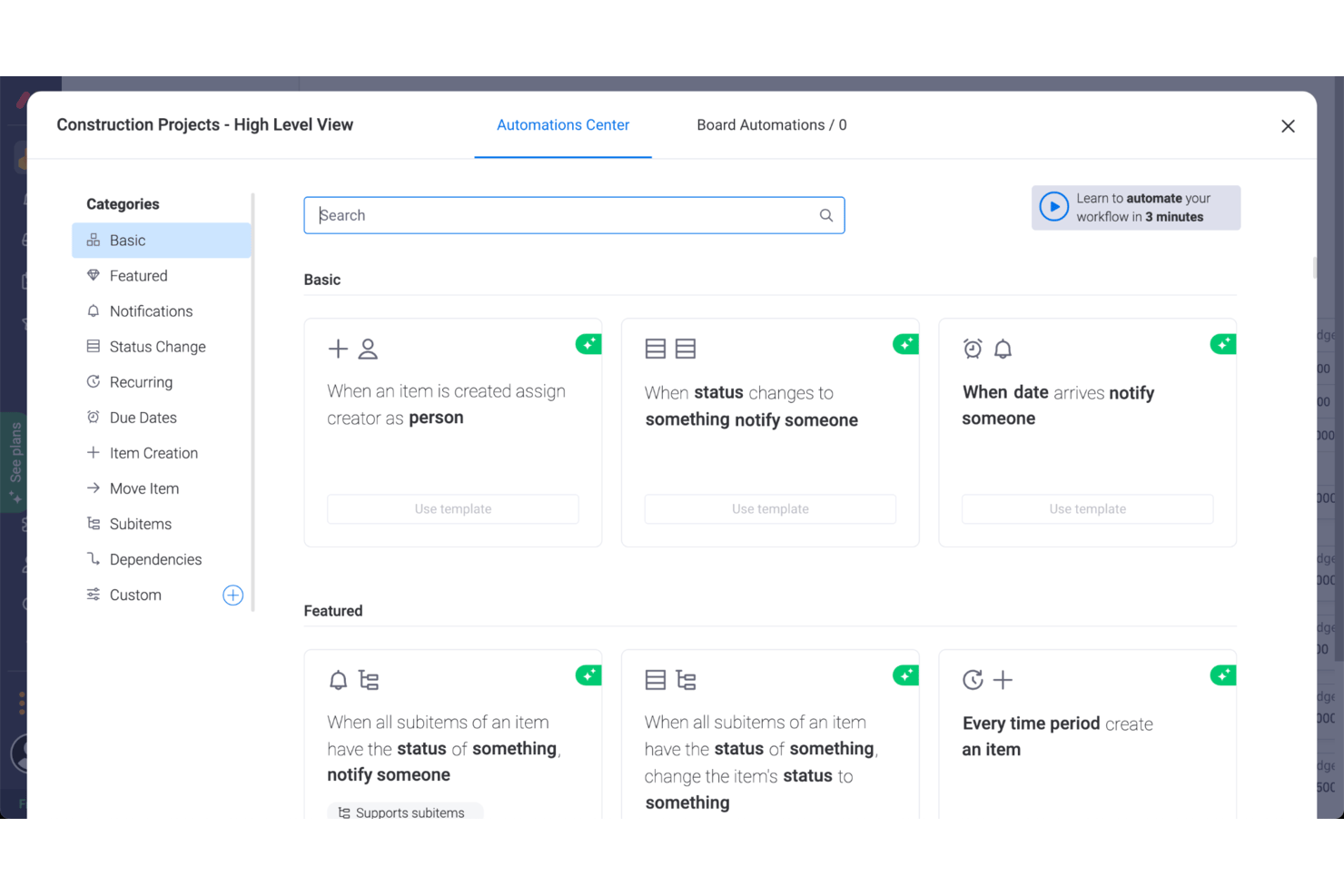
Utilizzato da oltre 100.000 team, monday AI Workspace offre una serie di strumenti per pianificare, tracciare e consegnare il lavoro da remoto per diversi progetti. I team che lavorano fuori sede avranno probabilmente una raccolta di app di cui hanno bisogno quotidianamente e monday AI Workspace risponde con centinaia di integrazioni di terze parti tra cui scegliere. Si collega alle app più comuni, come Slack e Microsoft, così come a software più di nicchia come Eventbrite.
monday AI Workspace ha un costo a partire da $9/utente/mese e include una prova gratuita di 14 giorni. Viene offerto un piano gratuito fino a 2 utenti.
Pros and Cons
Pros:
- Eccellenti funzionalità collaborative
- Organizzazione semplice tramite trascinamento delle attività
- Molto facile invitare altri, condividere le timeline e assegnare compiti
Cons:
- Le migliori funzionalità sono riservate alle versioni Standard o Pro
- Le automazioni non sono completamente personalizzabili
- Nessuna identificazione o assistenza sui colli di bottiglia
New Product Updates from monday AI Workspace
monday AI Workspace Adds Human Approval Routing
monday AI Workspace adds a human-in-the-loop approval block to AI Workflows, sending approval requests and routing workflow paths based on responses. For more information, visit monday AI Workspace's official site.

Wrike
Ideale per team agili
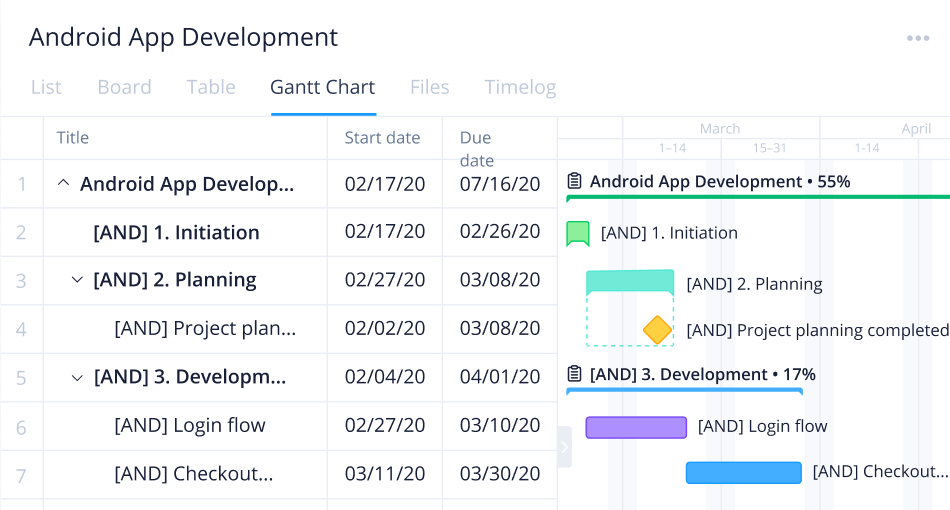
Wrike è uno strumento di gestione dei progetti ideale per team da cinque a un numero illimitato di utenti distribuiti in diverse sedi. Gli strumenti di project management di Wrike forniscono ai team che lavorano in fusi orari diversi un hub digitale di informazioni con collaborazione in tempo reale e comunicazione da remoto.
Gli strumenti di gestione dei progetti di Wrike sono facili da apprendere e includono elenchi di attività, sottoattività, pianificazioni e flussi di lavoro condivisi che aiutano nella gestione quotidiana delle mansioni. Wrike offre una navigazione semplice con spazi, cartelle e attività distinti, così come tra dashboard, calendari, report, notifiche e il flusso di messaggi.
Wrike dispone di un centro assistenza dedicato con formazione interattiva, video, una guida introduttiva e una comunità attiva. Lo strumento offre inoltre modelli per supportare i processi organizzativi standard.
Wrike offre oltre 400 integrazioni native preconfigurate che rendono possibile la gestione remota dei progetti. Le integrazioni di Wrike includono i software di gestione dei file più popolari di Microsoft, Google e Dropbox, insieme a software per le vendite e il marketing come Salesforce e Marketo.
Pros and Cons
Pros:
- Varietà di viste di progetto per rispondere alle diverse esigenze degli utenti
- Modellizzazione delle attività olistica e completa
- Facilità d'uso e di configurazione
Cons:
- Il sistema di commenti dovrebbe essere più evidente
- Le funzionalità migliori sono limitate al piano Business
New Product Updates from Wrike
Wrike Adds Klaxoon MCP Integration
Wrike’s Klaxoon MCP integration is now generally available, enabling AI agents to navigate between Wrike tasks and attached whiteboards, read task context, and manage whiteboard attachments via API. For more information, visit Wrike's official site.

Celoxis
Ideale per la gestione remota dei portafogli di progetto

Celoxis è un software completo di Project Portfolio Management (PPM) particolarmente adatto alle esigenze dei team remoti. La piattaforma include funzionalità di gestione dei progetti, delle risorse, del tempo, finanziarie e dei flussi di lavoro. Può essere utilizzata per progetti complessi, prodotti e strutture di team articolate.
Il software offre un set completo di strumenti di gestione dei progetti. I diagrammi di Gantt consentono di pianificare i progetti su una timeline chiara, offrendo a tutti i membri del team una panoramica ad alto livello di ciò che sta per accadere. È anche possibile aggiungere dipendenze tra le attività di diversi progetti, mantenendo tutto collegato e accurato.
Oltre alla gestione dei progetti, il software offre la gestione delle risorse. Ai dipendenti possono essere assegnate attività non solo in base alla loro disponibilità, ma anche considerando la loro posizione e il loro orario. Questa funzione è utile per i team remoti che lavorano in aree diverse, con festività differenti, gestendo permessi e accomodando vari orari e fusi orari.
Il software si integra con altri strumenti tra cui Google Drive, Microsoft Excel, Microsoft Project, Jira, Slack, Salesforce, Google Calendar, Outlook, Evernote e QuickBooks Online. Sono inoltre disponibili integrazioni aggiuntive tramite un account Zapier a pagamento.
I piani a pagamento di Celoxis partono da $25 per utente, al mese. È disponibile anche una prova gratuita di 30 giorni.
Pros and Cons
Pros:
- Gestione delle risorse e contabilità di progetto incluse
- Workflow personalizzabili disponibili
- Gestione delle richieste e degli input inclusa
Cons:
- Piuttosto complesso, richiede tempo per imparare
- Minimo 5 utenti

Ideale per flussi di lavoro di agenzie aziendali
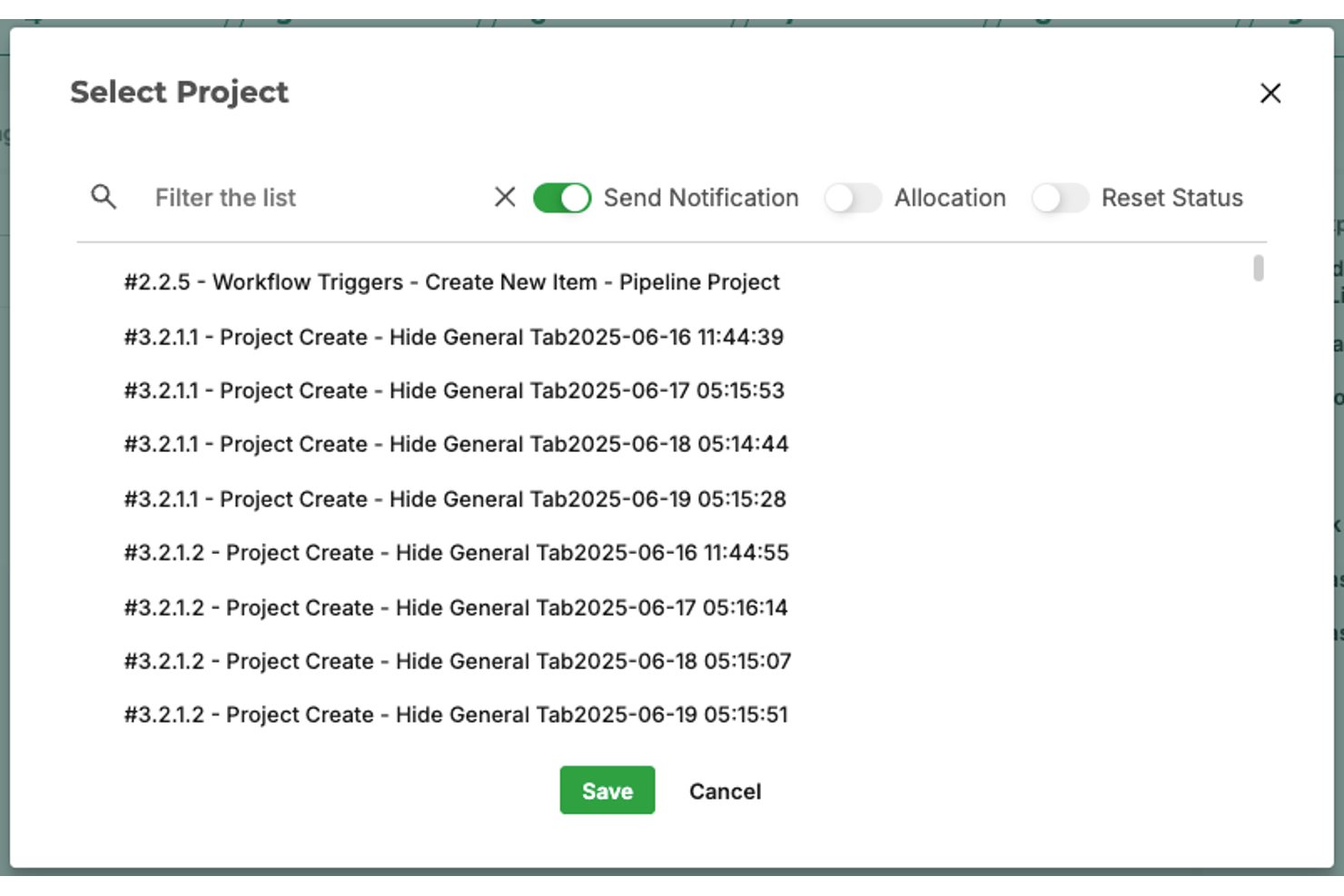
Screendragon è una piattaforma senza codice per la gestione dei flussi di lavoro e dei progetti, progettata per i team di marketing aziendale e delle agenzie, che combina moduli dinamici, approvazioni automatizzate, gestione delle risorse e reportistica in tempo reale in un unico spazio di lavoro basato sul cloud.
Per chi è più adatto Screendragon?
Screendragon è particolarmente adatto ai team di marketing aziendale e alle grandi agenzie creative che gestiscono elevati volumi di progetti tra team distribuiti a livello globale.
Perché ho scelto Screendragon
Screendragon si è guadagnato un posto nella mia selezione perché apprezzo il modo in cui gestisce il caos delle approvazioni che i team delle agenzie aziendali devono affrontare tra diversi fusi orari. Il mio team può annotare documenti, grafiche e file video direttamente sulla piattaforma, confrontare le versioni affiancate e monitorare ogni modifica tramite un registro di controllo automatizzato. Il generatore di flussi di lavoro senza codice mi consente inoltre di progettare instradamenti specifici per ogni area geografica, così un elemento di una campagna che passa attraverso la revisione legale, del marchio e del cliente non viene mai sepolto in una conversazione via e-mail.
Funzionalità principali di Screendragon
- Editor di flussi di lavoro senza codice: Crea e adatta flussi di lavoro complessi per le agenzie senza ricorrere a risorse di sviluppo, utilizzando un generatore visuale.
- Moduli dinamici: Raccogli e instrada le informazioni sui progetti tramite moduli personalizzabili che attivano flussi di lavoro automatizzati.
- Autorizzazioni basate sui ruoli: Assegna livelli di accesso dettagliati e diritti di approvazione ai membri del team, ai clienti o ai partner esterni.
- Dashboard dei progetti in tempo reale: Visualizza lo stato dei progetti e le tappe fondamentali tra team globali con dashboard personalizzabili e aggiornate.
Integrazioni di Screendragon
Screendragon offre integrazioni native con Google Drive, Box, OneDrive, Adobe Creative Cloud, Jira, Trello, Salesforce, HubSpot, Microsoft 365 e Smartsheet. Si connette inoltre a Zapier e dispone di un'API per integrazioni personalizzate.
Pros and Cons
Pros:
- Verifica integrata degli elementi tra team distribuiti
- Instradamento automatizzato delle approvazioni tra diversi fusi orari
- Altamente configurabile per flussi di lavoro aziendali complessi
Cons:
- Nessuna funzionalità dedicata per la messaggistica video asincrona
- La configurazione richiede molto tempo
New Product Updates from Screendragon
Screendragon Unveils New AI Hub
Screendragon introduced AI Hub, a new capability that lets teams build and manage AI agents directly within workflows. The update helps marketing teams automate tasks, maintain governance controls, and scale AI-driven operations more efficiently. For more information, visit Screendragon's official site.

Ideale per automazione delle attività e personalizzazione
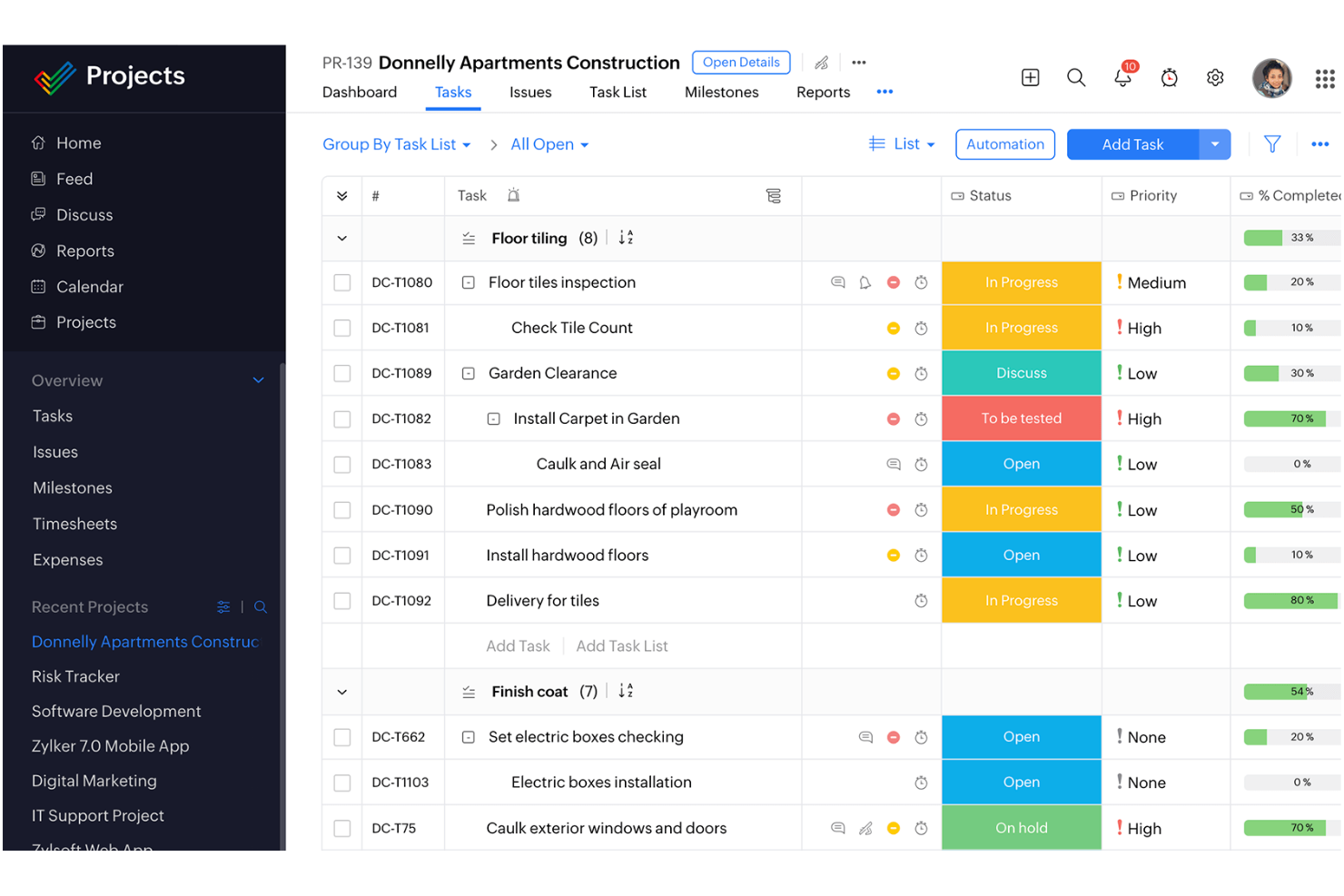
Per i team remoti che cercano uno strumento di project management volto a migliorare la produttività e favorire la collaborazione, Zoho Projects rappresenta una soluzione interessante. Pensato per settori come edilizia, sviluppo software e marketing, risponde alle esigenze specifiche delle workforce distribuite offrendo strumenti che semplificano la gestione delle attività e ottimizzano la comunicazione. Grazie a funzionalità progettate per affrontare le complessità del lavoro da remoto, Zoho Projects aiuta il tuo team a rimanere organizzato e concentrato, garantendo il completamento dei progetti nei tempi stabiliti e nei limiti previsti.
Perché ho scelto Zoho Projects
Ho scelto Zoho Projects per la sua integrazione fluida tra gestione delle attività e collaborazione del team, fondamentale per i team remoti. La funzione di automazione delle attività consente di automatizzare i compiti ripetitivi, liberando tempo per attività più strategiche. Inoltre, le opzioni di personalizzazione dei progetti permettono di adattare flussi di lavoro e campi alle esigenze specifiche del team, assicurando che i processi siano perfettamente allineati agli obiettivi del progetto. Queste caratteristiche, unite all’attenzione alla privacy e alla sicurezza, rendono Zoho Projects una scelta ideale per i team remoti che desiderano potenziare le proprie capacità di gestione progetti.
Caratteristiche principali di Zoho Projects
Oltre ad automazione e personalizzazione delle attività, Zoho Projects offre:
- Diagrammi di Gantt: Visualizza la pianificazione dei progetti e le dipendenze per organizzare e gestire meglio il carico di lavoro del team.
- Monitoraggio del tempo: Tieni traccia delle ore fatturabili e gestisci i carichi di lavoro con facilità, garantendo responsabilità tra i membri del team remoto.
- Gestione dei problemi: Identifica e risolvi rapidamente i problemi di progetto per mantenere slancio e qualità.
- Accesso mobile: Resta connesso con il tuo team e gestisci i progetti ovunque ti trovi con le app mobili per iOS e Android.
Integrazioni di Zoho Projects
Le integrazioni includono Zoho CRM, Slack, GitHub, Microsoft Teams, Google Drive, Dropbox, Microsoft OneDrive, Box, Zapier e Trello. È disponibile una API per integrazioni personalizzate.
Pros and Cons
Pros:
- Piattaforma centralizzata che migliora la visibilità su tutti i progetti
- Offre report e analisi dettagliati per approfondimenti sui progetti
- Facilita la collaborazione tramite un portale clienti avanzato
Cons:
- Prestazioni rallentate nella gestione di progetti grandi o complessi
- Le opzioni di personalizzazione sono meno flessibili rispetto ai concorrenti
New Product Updates from Zoho Projects
Zoho Projects Adds CodeX Scripts for Custom Modules
Zoho Projects now supports CodeX Scripts for custom modules, enabling conditional logic and rules for creating, updating, and deleting records. For more information, visit Zoho Projects' official site.
 .
.
Miro
La migliore lavagna collaborativa per team remoti
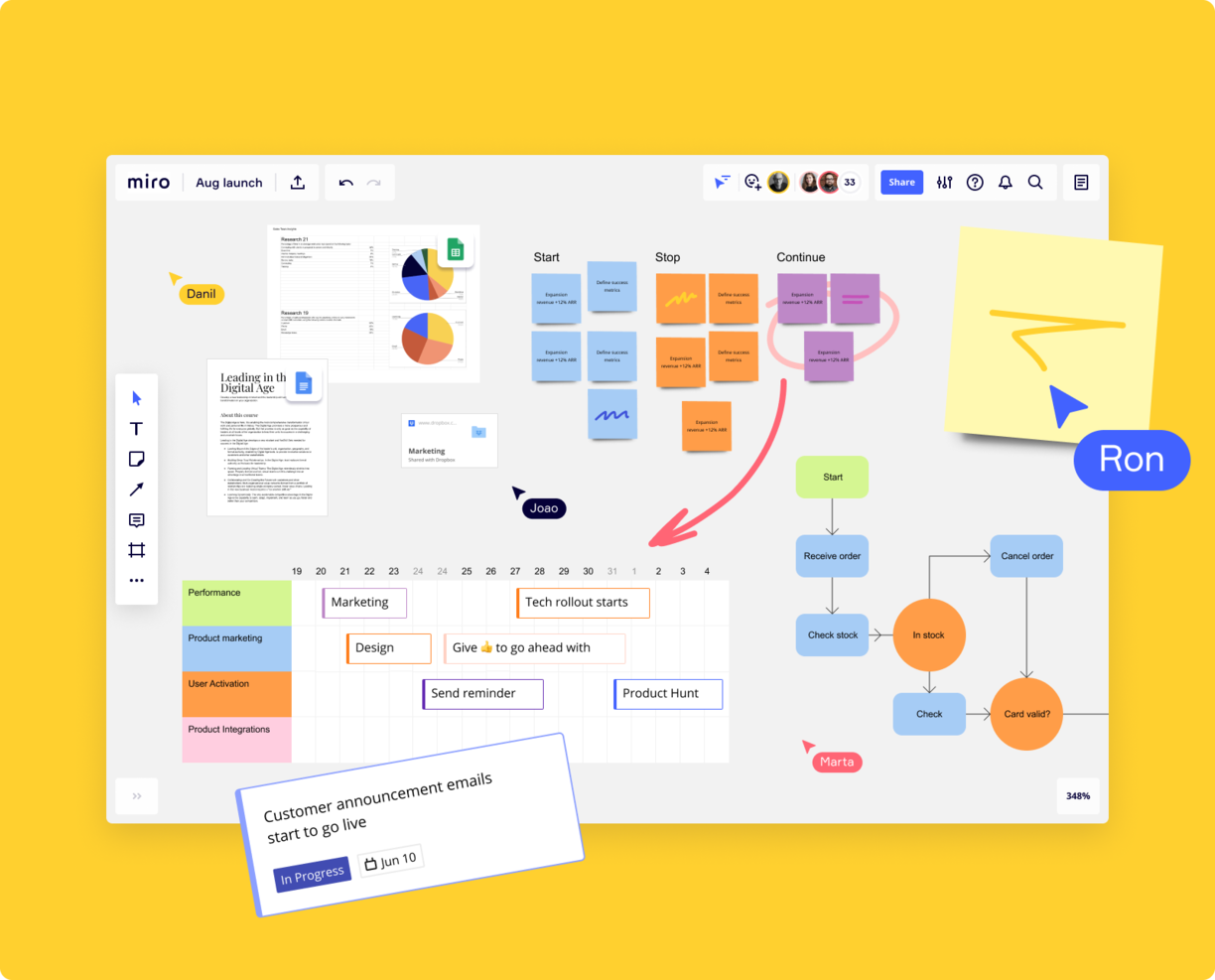
Miro è una lavagna online completa progettata per i team remoti, che offre un'ampia gamma di oltre 1.000 modelli per diverse attività di gestione dei progetti. La sua tela infinita consente ai team uno spazio illimitato per brainstorming e mappatura dei progetti, supportando molteplici modalità di espressione delle idee, inclusi dati numerici, immagini, video ed elementi di brand.
Grazie alla funzione Miro Assist, la piattaforma può generare idee e percorsi a partire da suggerimenti iniziali, facilitando il brainstorming collaborativo. Inoltre, Miro permette la collaborazione asincrona, adattandosi a orari e abitudini di lavoro diversi, grazie a funzionalità come commenti e reazioni. La piattaforma si integra perfettamente negli ambienti di lavoro ibridi, offrendo display interattivi e accesso da mobile, risultando così una scelta adatta per i team che desiderano collaborare a distanza.
Miro si integra con una vasta suite di strumenti, tra cui Zoom, Figma, Asana, Microsoft Teams, Jira, Slack, Monday.com, Confluence, Google Drive, Box, Airtable, Notion, Azure e Webex. Alcune integrazioni sono disponibili solo per i piani a pagamento.
Miro è gratuito per un numero illimitato di membri con un massimo di 3 board modificabili. I piani a pagamento partono da $8/utente/mese (fatturati annualmente).
Pros and Cons
Pros:
- Funzionalità di comunicazione integrate per una collaborazione efficace
- Configurazione intuitiva e semplice
- Piano gratuito disponibile per sempre
Cons:
- La versione gratuita non permette l'esportazione in pdf ad alta qualità
- Lo zoom può essere scattoso su progetti di grandi dimensioni
- Account visitatori/ospiti disponibili solo nei piani a pagamento
New Product Updates from Miro
Miro Adds Japan Data Residency for Enterprise Customers
Miro has introduced Japan data residency for enterprise customers, offering in-region storage for production data, backups, and metadata, plus in-region compute infrastructure. For more information, visit Miro's official site.

Plaky
Ideale per la gestione visiva delle attività nei team remoti

Plaky è un software di gestione progetti che eccelle nella gestione visiva delle attività. Essendo una piattaforma basata su cloud, è ideale per team remoti che lavorano su una vasta gamma di dispositivi, inclusi dispositivi Apple, Android e PC. Nel complesso, aiuta i team a restare allineati offrendo piena visibilità sui flussi di lavoro, le assegnazioni delle attività e le scadenze di progetto.
Una caratteristica distintiva è la possibilità di personalizzare le bacheche di progetto utilizzando template predefiniti o creando tutto da zero. Questo permette agli utenti di creare campi personalizzati, sotto-attività e altre note importanti per mantenere tutti i membri del team aggiornati su uno specifico compito o sul processo di progetto. Puoi accedere a diverse visualizzazioni di progetto, come un semplice elenco, una bacheca Kanban o un diagramma di Gantt, per rimanere aggiornato sullo stato delle attività e sul progresso complessivo del progetto. Plaky facilita anche la comunicazione tra i membri del team remoto, consentendo di commentare e menzionare direttamente su una certa attività.
Plaky si integra con Clockify per aiutare a tracciare il tempo impiegato sulle attività e con Pumble per favorire la comunicazione in tempo reale tra i team.
Il software è gratuito con utenti e progetti illimitati. I piani a pagamento con funzioni più avanzate partono da $3.99/utente/mese (fatturazione annuale).
Pros and Cons
Pros:
- Template di gestione progetti personalizzabili per diversi casi d’uso
- Supporta flussi di lavoro agili
- Il piano gratuito consente utenti e progetti illimitati
Cons:
- Integrazioni limitate
- Limiti di archiviazione per file

Miglior strumento per team con sistemi operativi misti
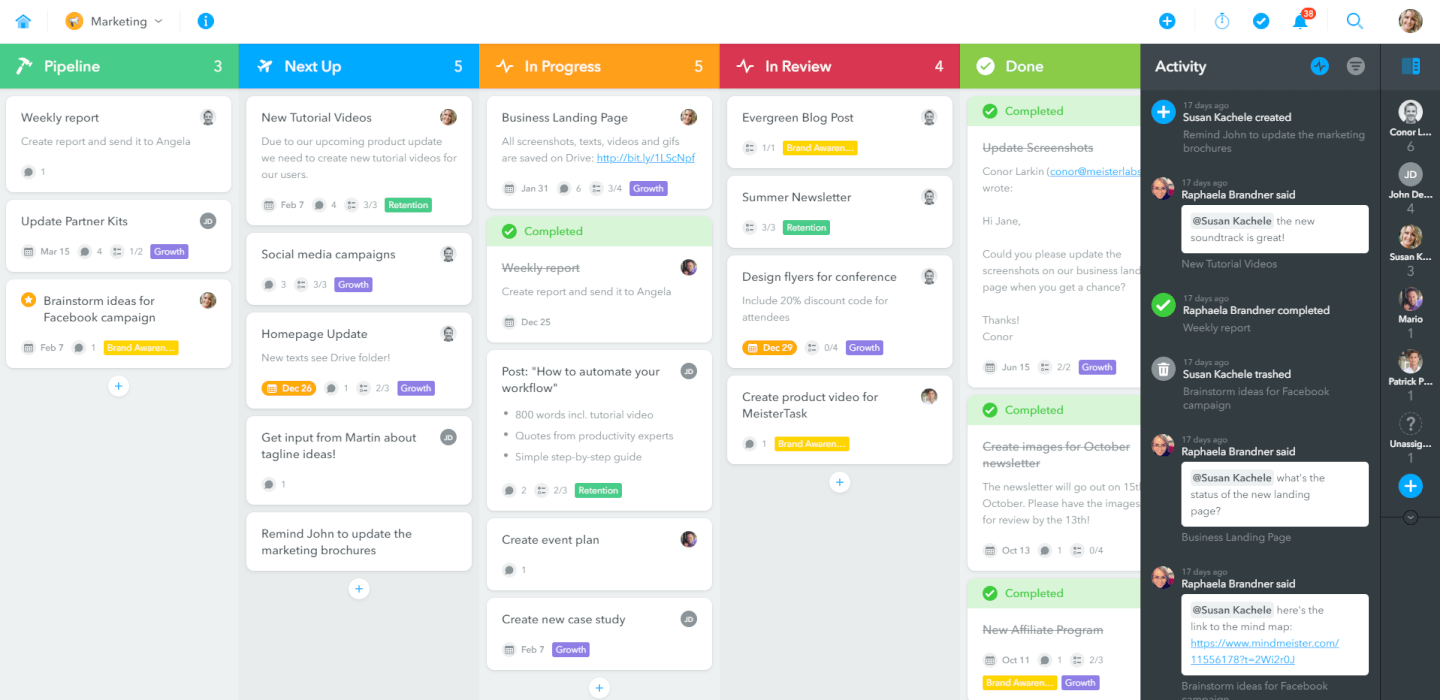
MeisterTask gestisce tutto, dalla gestione delle attività individuali alla pianificazione progettuale globale, con un'interfaccia facile da usare. I team remoti possono essere sparsi su diversi tipi di dispositivi, ma questo non è un problema per MeisterTask, che funziona su iOS, Android, Mac e Windows. Le loro app per dispositivi intelligenti non sono da meno, con una valutazione di 4,7 stelle sul Google Play Store al momento della stesura di questo testo. Sono stati anche scelti come Scelta dell'Editore sull'App Store di iOS.
MeisterTask parte da $8,25/utente/mese e offre una versione gratuita per un massimo di 3 progetti.
Pros and Cons
Pros:
- Accesso a bacheche di progetto illimitate
- Gestione molto semplice di più progetti contemporaneamente
- Interfaccia intuitiva e facile da usare
Cons:
- Dopo aver caricato un file in un'attività, non può essere scaricato immediatamente
- Allegati di file limitati a 200 MB per file
- Timeline e campi personalizzati sono riservati agli account Business

ClickUp
Miglior strumento di gestione progetti da remoto per la registrazione dello schermo
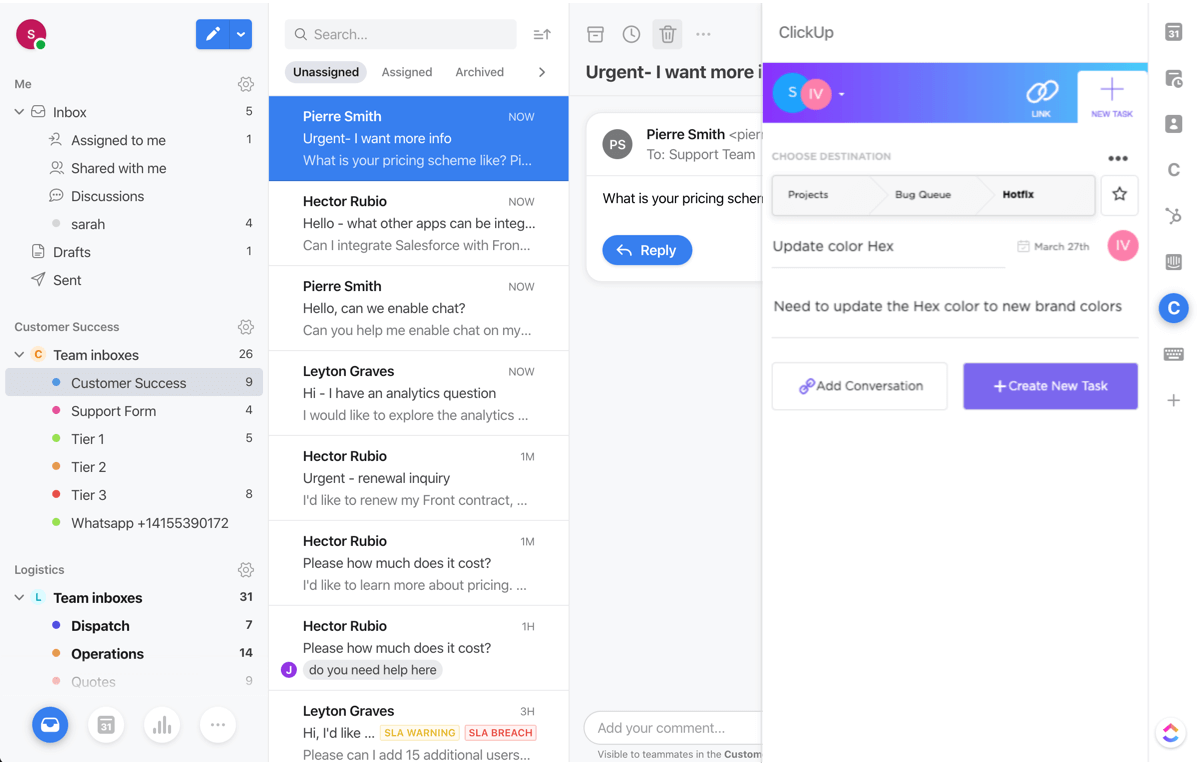
ClickUp è uno strumento solido per la gestione di progetti da remoto che offre attività, documenti, chat, obiettivi e tutto ciò che ci si aspetta da un'applicazione PM moderna. Dove ClickUp si distingue è nelle sue funzionalità intuitive di registrazione dello schermo integrate, che permettono di mostrare processi e condividere dati ovunque si trovi il tuo team. Puoi persino incorporare le tue registrazioni direttamente nelle chat di gruppo, rendendo la condivisione dello schermo praticamente senza sforzo.
ClickUp parte da $5/utente/mese e offre una versione gratuita con funzionalità limitate.
New Product Updates from ClickUp
ClickUp Adds Meetings Hub, Super Agent Templates, and ZoomInfo Integration
ClickUp adds a searchable Meetings Hub, new ways to clone and template Super Agents, and a ZoomInfo integration through the App Center. These updates improve meeting retrieval, agent reuse, and access to sales intelligence. For more information, visit ClickUp’s official site.
Kintone
Ideale per creare flussi di lavoro progetto personalizzati
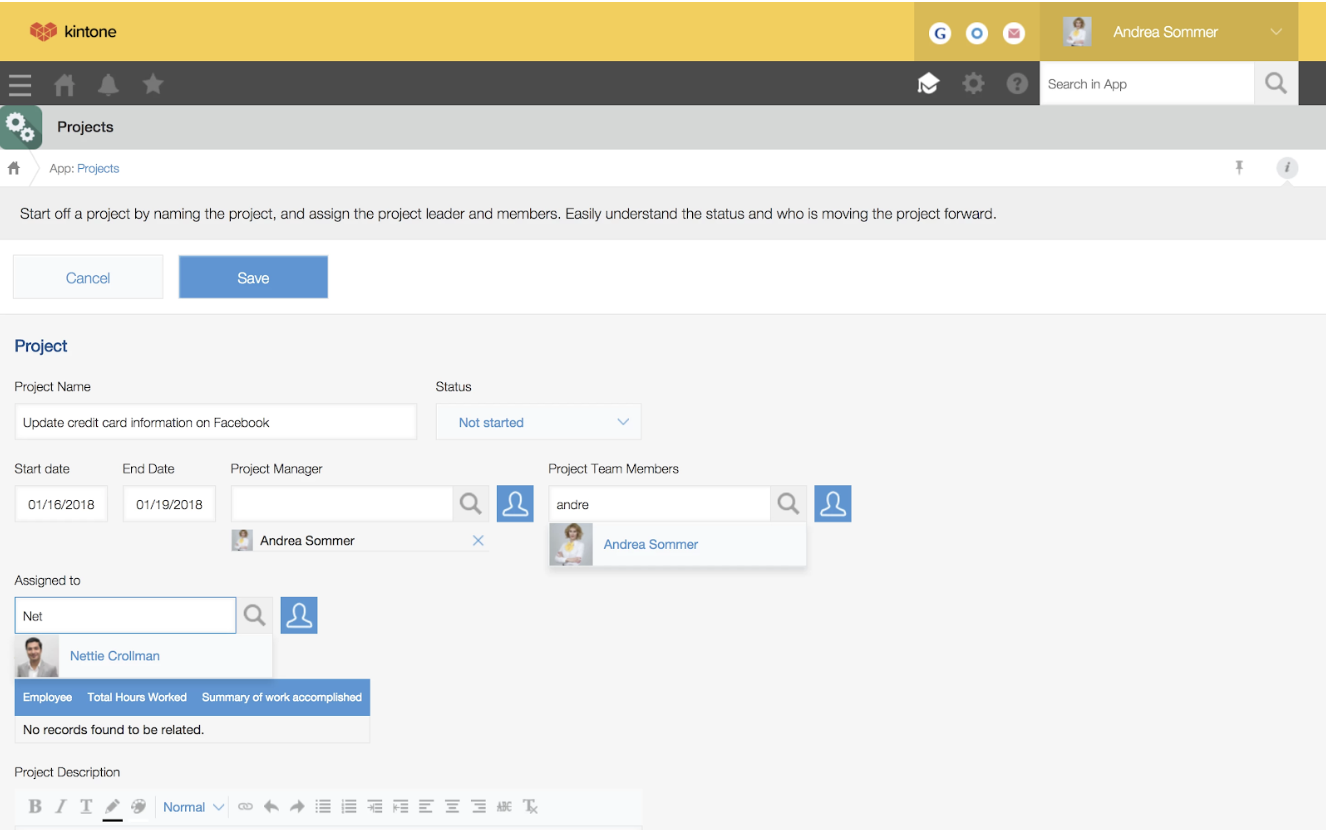
Kintone è una piattaforma personalizzabile per la pianificazione dei progetti utilizzata dai team di Volvo Trucks North America, Japan Airlines, Shiseido e oltre 23.000 organizzazioni in tutto il mondo. Il loro approccio unico alla gestione di progetti e attività consente di creare una vasta gamma di 'app' personalizzabili, partendo da zero, utilizzando modelli o importando i tuoi fogli di calcolo esistenti, per la gestione dei dati, dei processi aziendali e dei flussi di lavoro. Le app di Kintone possono essere personalizzate per la gestione dei progetti, CRM per le vendite, database clienti, note spese, liste di cose da fare condivise, gestione delle attrezzature, feedback sui prodotti e molto altro.
Le app possono essere create da zero, con modelli o da fogli di calcolo esistenti per la gestione dei dati, dei processi aziendali e dei flussi di lavoro. Le app di Kintone possono essere personalizzate per la gestione dei progetti, CRM per le vendite, database clienti, note spese, liste di cose da fare condivise, gestione delle attrezzature, feedback sui prodotti e molto altro.
Kintone ti permette di creare app per la gestione agile dei progetti trascinando e rilasciando gli elementi che desideri vedere nella pagina: campi di testo avanzati, campi data, menu a tendina, campi numerici con calcoli integrati, spazi per allegati, menu di selezione di utenti o gruppi, dati collegati da altre app, tabelle, e molto altro. La tua soluzione per la gestione agile dei progetti può avere l'aspetto e il funzionamento che preferisci.
Ciò che rende Kintone particolarmente adatto alla gestione agile dei progetti è il fatto che consente ai project manager di monitorare ogni aspetto del proprio progetto, dalle singole attività ai dati, ai flussi di lavoro e alle comunicazioni, e di utilizzare i risultati per perfezionare rapidamente i processi. Poiché gli utenti finali sono anche i progettisti dell'app, i feedback sono immediati, continui e attuabili.
Kintone ti consente di ampliare le sue funzionalità sia con plugin nativi gratuiti realizzati dal team di Kintone, sia con integrazioni ad altri strumenti come Slack, Gmail, Google Calendar, Outlook, Tableau, Dropbox, Salesforce, HubSpot, Eventbrite, WordPress, QuickBooks, MailChimp e molti altri tramite un piano a pagamento con Zapier o tramite integrazioni API.
Kintone costa $24/utente/mese con un requisito minimo di 5 utenti. È disponibile una prova gratuita di 30 giorni (senza carta di credito richiesta) e tariffe scontate per enti non profit ed educatori. Il team di Kintone offre inoltre la creazione gratuita di un'app personalizzata all'interno del processo di prova gratuita.
Altri strumenti di gestione dei progetti
Ecco alcune opzioni aggiuntive di strumenti di gestione dei progetti per team da remoto che non sono entrate nel mio elenco, ma che vale comunque la pena valutare:
- Workzone
Ideale per collaborazione e gestione delle attività
- Teamwork.com
Migliore piattaforma per il lavoro con i clienti
- Bonsai Agency Software
Ideale per agenzie, società di consulenza e aziende di servizi professionali
- ProjectManager
Il miglior software per team remoti che utilizzano metodologie di progetto ibride
- Ravetree
La migliore gestione di progetti da remoto per aziende di servizi professionali
- Height
Ideale per strumenti di reportistica e analisi avanzati
- Smartsheet
Miglior strumento di project management da remoto per rappresentanti di vendita
- Productive
Ideale per monitorare le prestazioni dell'agenzia
- Hubstaff
Miglior strumento PM gratuito per team remoti
- Hive
Miglior strumento da remoto per le agenzie
- GoodDay
Ideale per visualizzazioni di progetto diversificate
- Kantata
Ideale per la business intelligence (BI)
- Kissflow
Il miglior software di project management semplice per team da remoto
- Hub Planner by Milient
Ideale per aziende di medie e grandi dimensioni
- PathPro
Ideale per la collaborazione trasparente tra team


Come valuto gli strumenti di gestione dei progetti per team remoti
Se uno strumento non gestisce passaggi asincroni, scadenze consapevoli dei fusi orari o visibilità distribuita, non viene inserito nell'elenco—poi guardo cosa distingue i migliori dal resto.
Funzionalità di base (Requisiti fondamentali per questa lista)
Quando seleziono gli strumenti per la mia lista, valuto ciascuno su una scala da 0 (non offre la funzionalità) a 5 (eccelle in quest'area) per ogni funzionalità di base elencata di seguito. In seguito, calcolo il punteggio totale dello strumento in percentuale. Ogni strumento deve raggiungere un punteggio totale minimo del 65% per essere preso in considerazione.
- Gestione di attività e progetti: Esamino come ogni strumento gestisce la creazione delle attività, l'assegnazione, le dipendenze e il monitoraggio dello stato—come, ad esempio, se un project manager può mappare catene di sotto-attività in uno sprint senza perdere il contesto.
- Viste multiple del progetto: I team lavorano in modo diverso, quindi verifico la varietà di viste—Kanban, Gantt, timeline, calendario—e se il passaggio tra esse mantiene filtri e raggruppamenti.
- Collaborazione in tempo reale: Valuto le funzionalità collaborative contestuali come commenti a thread, @menzioni e allegati di file sulle attività, poiché thread dispersi su Slack non dovrebbero sostituire la discussione a livello di progetto.
- Pianificazione tra fusi orari: Il modo in cui uno strumento gestisce scadenze e notifiche consapevoli dei fusi orari è cruciale quando il tuo designer a Berlino e il tuo sviluppatore a Manila condividono una data di consegna.
- Integrazioni con terze parti: Controllo la presenza di connessioni native agli strumenti principali per il lavoro da remoto come Slack, Microsoft Teams, Google Workspace, GitHub e Zoom, oltre all'accesso alle API per flussi di lavoro personalizzati.
- Accesso e permessi cloud-based: Ogni strumento dovrebbe offrire app web e mobile con autorizzazioni basate sui ruoli e accesso ospite, così i collaboratori esterni possono unirsi a un progetto senza vedere l'intero spazio di lavoro.
Dopo aver stilato una lista di strumenti che soddisfano questi criteri, prendo in considerazione ciò che distingue ciascuna piattaforma.
Fattori differenzianti (Cosa distingue i fornitori)
Ecco come confronto e metto a contrasto diversi fornitori:
Caratteristiche distintive
L'automazione dei flussi di lavoro è un grande elemento di differenziazione—cerco regole senza codice che assegnano automaticamente le attività o modificano gli stati quando ci sono passaggi di consegne, riducendo lo scambio di informazioni che rallenta i team asincroni. Anche le viste di carico di lavoro e capacità sono importanti perché un project manager deve vedere chi è sovraccarico prima di distribuire il lavoro tra fusi orari diversi. Funzionalità di intelligenza artificiale come riepiloghi di thread e aggiornamenti auto-generati aiutano i colleghi che si svegliano con decine di notifiche a recuperare in pochi minuti invece che in ore.
Oltre le funzionalità
Sicurezza e conformità hanno un peso importante quando il tuo team è distribuito in più regioni—verifico la certificazione SOC 2 Type II, SSO e opzioni di residenza dei dati che aiutano a rispettare i requisiti locali. Il supporto all'onboarding conta molto, in particolare risorse fruibili in modo asincrono come template e academy a cui i team distribuiti possono accedere secondo i propri tempi. Valuto anche i modelli di prezzi per l'accesso di ospiti e collaboratori esterni, poiché i team remoti invitano regolarmente collaboratori esterni che non dovrebbero costare come una licenza piena.
Come scegliere gli strumenti di gestione dei progetti per team da remoto
È facile perdersi in lunghi elenchi di funzionalità e strutture tariffarie complesse. Per aiutarti a rimanere concentrato mentre affronti il tuo esclusivo processo di selezione del software, ecco una lista di fattori da tenere a mente:
| Fattore | Cosa considerare |
|---|---|
| Scalabilità | Lo strumento può crescere insieme al tuo team? Considera come gestisce l'aumento degli utenti o dei progetti. Cerca prezzi flessibili e una capacità sufficiente per soddisfare le esigenze future. |
| Integrazioni | Si collega agli strumenti che già utilizzi? Verifica la presenza di integrazioni native con i software già usati dal tuo team, per evitare l'inserimento manuale dei dati e migliorare l'efficienza del flusso di lavoro. |
| Possibilità di personalizzazione | Quanto è flessibile lo strumento per i tuoi flussi di lavoro? Assicurati di poter adattare i pannelli di controllo, i campi e i processi alle esigenze specifiche del tuo team senza troppe difficoltà. |
| Semplicità d'uso | L'interfaccia è intuitiva per il tuo team? Cerca uno strumento con un design facile da usare, per ridurre al minimo i tempi di formazione e aumentare l'adozione. |
| Implementazione e inserimento | Quanto velocemente puoi iniziare? Valuta la disponibilità di risorse formative, il supporto per la migrazione e la semplicità della configurazione, così da accelerare il processo di inserimento. |
| Costo | Il prezzo rientra nel tuo budget? Confronta il costo con le funzionalità offerte e fai attenzione ai costi nascosti o agli extra costosi. |
| Misure di sicurezza | I tuoi dati sono protetti? Verifica la conformità agli standard del settore, la crittografia dei dati e i controlli di accesso degli utenti, per assicurarti che le tue informazioni siano al sicuro. |
| Disponibilità dell'assistenza | Quali opzioni di assistenza sono disponibili? Considera se è disponibile un'assistenza 24 ore su 24, 7 giorni su 7 e se soddisfa le esigenze del tuo team per ricevere aiuto rapidamente in caso di problemi. |
Cosa sono gli strumenti di gestione dei progetti?
Gli strumenti di gestione dei progetti sono piattaforme digitali che aiutano a organizzare il lavoro, monitorare i progressi e comunicare con il team, anche se tutti lavorano in luoghi diversi. I project manager, i team da remoto e i freelance utilizzano questi strumenti per tenere sotto controllo le attività, condividere file e collaborare in tempo reale. Rendono più semplice portare avanti i progetti e mantenere tutti aggiornati, indipendentemente dal luogo in cui ci si trova.
Funzionalità
Quando selezioni gli strumenti di gestione dei progetti per i team da remoto, presta attenzione alle seguenti funzionalità chiave:
- Gestione delle attività: Organizza e assegna le attività ai membri del team, semplificando il monitoraggio dei progressi e delle scadenze.
- Condivisione dei file: Consente ai team di caricare e condividere documenti, assicurando che tutti abbiano accesso alle informazioni più aggiornate.
- Comunicazione in tempo reale: Favorisce la messaggistica istantanea e le videochiamate, aiutando i membri del team a rimanere connessi e a collaborare in modo efficiente.
- Monitoraggio del tempo: Monitora le ore dedicate alle attività, contribuendo alla definizione del budget del progetto e all'assegnazione delle risorse.
- Dashboard personalizzabili: Consentono agli utenti di personalizzare il proprio spazio di lavoro per visualizzare informazioni e metriche pertinenti.
- Automazioni: Riducono le attività ripetitive automatizzando i flussi di lavoro e aumentando efficienza e produttività.
- Diagrammi di Gantt: Visualizzano le tempistiche e le dipendenze del progetto, semplificando la pianificazione e la gestione di progetti complessi.
- Gestione delle risorse: Monitora la disponibilità e il carico di lavoro del team, assicurando un utilizzo efficace delle risorse.
- Strumenti per la gestione del budget: Aiutano a gestire i costi del progetto e a monitorare le spese per rimanere entro il budget.
- Misure di sicurezza: Proteggono i dati mediante crittografia e controlli degli accessi, assicurando che le informazioni sensibili rimangano protette.
Vantaggi
L'implementazione di strumenti di gestione dei progetti per i team da remoto offre numerosi vantaggi al team e all'azienda. Eccone alcuni:
- Migliore collaborazione: Le funzionalità di comunicazione in tempo reale e condivisione dei file mantengono i membri del team connessi e informati, migliorando il lavoro di squadra.
- Aumento della produttività: La gestione delle attività e le automazioni aiutano a stabilire le priorità del lavoro e a ridurre le attività manuali, liberando tempo per iniziative più importanti.
- Migliore assegnazione delle risorse: Gli strumenti di gestione delle risorse assicurano un carico di lavoro equilibrato per il team, prevenendo l'esaurimento professionale e ottimizzando l'efficienza.
- Maggiore visibilità sul progetto: I diagrammi di Gantt e le dashboard personalizzabili offrono una visione chiara dei progressi e delle tempistiche del progetto, favorendo decisioni migliori.
- Controllo dei costi: Gli strumenti per la gestione del budget e il monitoraggio del tempo aiutano a controllare le spese e a rimanere entro il budget, riducendo la pressione finanziaria.
- Sicurezza dei dati: Le misure di sicurezza proteggono le informazioni sensibili, assicurando che i dati aziendali rimangano al sicuro.
- Flessibilità e scalabilità: Le funzionalità personalizzabili consentono al team di adattare lo strumento a esigenze specifiche, mentre la scalabilità assicura che cresca insieme all'azienda.
Costi & Prezzi
La scelta degli strumenti di gestione dei progetti per i team da remoto richiede la comprensione dei vari modelli e piani tariffari disponibili. I costi variano in base alle funzionalità, alle dimensioni del team, ai componenti aggiuntivi e ad altri fattori. La tabella seguente riassume i piani più comuni, i relativi prezzi medi e le funzionalità generalmente incluse nelle soluzioni di gestione dei progetti per i team da remoto:
Tabella comparativa dei piani per gli strumenti di gestione dei progetti per i team da remoto
| Tipo di piano | Prezzo medio | Funzionalità comuni |
|---|---|---|
| Piano gratuito | $0 | Gestione di base delle attività, condivisione dei file e integrazioni limitate. |
| Piano personale | $5-$15/user/month | Gestione avanzata delle attività, più integrazioni e reportistica di base. |
| Piano aziendale | $20-$50/user/month | Strumenti di collaborazione avanzati, flussi di lavoro personalizzati e analisi dettagliate. |
| Piano aziendale avanzato | $60-$100/user/month | Funzionalità di sicurezza avanzate, assistenza dedicata e opzioni di personalizzazione completa. |
Strumenti di gestione dei progetti per team da remoto: domande frequenti
Ecco alcune risposte alle domande più comuni sugli strumenti di gestione dei progetti per team da remoto:
Come posso mantenere la responsabilità del team quando si lavora da remoto?
Quando il tuo team è distribuito, avrai bisogno di un sistema condiviso in cui tutti registrino chiaramente su cosa stanno lavorando e qual è la scadenza. Incoraggia aggiornamenti regolari durante i check-in, collegati al tuo strumento, così da non dover fare affidamento soltanto sulle e-mail di aggiornamento dello stato. Crea una routine in cui tutti esaminano insieme i progressi, così nessuno passa inosservato.
Gli strumenti per team da remoto possono contribuire a ridurre l'eccesso di riunioni?
Sì — utilizzando uno spazio di lavoro centrale in cui attività, traguardi e ostacoli siano visibili, puoi ridurre il numero di aggiornamenti reattivi. Invece di chiamate improvvisate del tipo “Qual è lo stato?”, il team può consultare lo strumento e portare nelle riunioni solo i problemi reali. Con il tempo noterai un minor numero di riunioni che avrebbero potuto essere sostituite da un aggiornamento nello strumento.
Come posso gestire le differenze di fuso orario in un ambiente di lavoro da remoto?
Quando i membri si trovano in più fusi orari, avrai bisogno di strumenti che supportino gli aggiornamenti asincroni e la visibilità senza che tutti siano online contemporaneamente. Incoraggia l’uso di dashboard condivise (o bacheche) che mostrino chi è il prossimo, cosa è in attesa e cosa è bloccato, così nessuno rimane fermo ad aspettare che qualcun altro acceda.
Quali sono le insidie più comuni quando un team da remoto utilizza strumenti di gestione dei progetti?
Un problema frequente è la “deriva dello strumento”: le persone finiscono per utilizzare altri canali (chat, e-mail) invece dello strumento e la tua unica fonte di verità scompare. Un altro rischio è la scarsa adozione: se lo strumento sembra troppo complesso o confuso, le persone torneranno alle vecchie abitudini. Inoltre, lo strumento potrebbe offrire una visibilità eccessiva o insufficiente, creando confusione su chi fa cosa.
Come posso aiutare un team da remoto ad adottare senza problemi un nuovo strumento di gestione dei progetti?
Inizia con una fase pilota: scegli un progetto, definisci chiaramente le aspettative su come utilizzerete lo strumento e raccogli i feedback. Forma il team spiegando come lo utilizzerete (cosa registrare e come visualizzare gli aggiornamenti). Monitora chi non accede o non aggiorna le informazioni e intervieni tempestivamente: l’adozione è più facile quando individui subito chi non utilizza lo strumento.
Come posso mantenere lo slancio nell'uso dello strumento dopo il lancio iniziale?
Anche dopo che le attività sembrano procedere senza problemi, dovrai rivedere periodicamente l’utilizzo dello strumento. Verifica se le attività vengono ancora aggiornate, se gli stati sono accurati e se le persone ritengono che lo strumento aggiunga valore. Celebra i risultati concreti — quando lo strumento ha contribuito a evitare una scadenza mancata o ha fornito maggiore chiarezza — per mantenere il team coinvolto.