I 10 migliori software di pianificazione delle risorse basati sul web per il 2026

10 Elenco dei migliori software web per la pianificazione delle risorse


Il software web per la pianificazione delle risorse semplifica il processo di pianificazione e gestione dei membri del team e delle altre risorse durante tutto il ciclo di vita del progetto. Sono disponibili molti strumenti, ma trovare quello più adatto dipende dalle esigenze specifiche della tua organizzazione e dei tuoi progetti.
Ho elencato le mie scelte per i migliori strumenti web per la pianificazione delle risorse, per aiutarti a semplificare la tua scelta. Ho compilato questo elenco basandomi sulla mia esperienza personale con decine di diversi strumenti di pianificazione delle risorse durante il periodo in cui ho lavorato come responsabile di progetto.
Perché fidarsi dei nostri consigli sui software
Il nostro team testa e recensisce software dal 2012. In quanto project manager noi stessi, sappiamo quanto sia difficile — e importante — scegliere il software giusto.
Per questa guida, abbiamo valutato gli strumenti attraverso test pratici e ricerche indipendenti, assegnando un punteggio agli strumenti in base ai nostri criteri di selezione. Ci basiamo inoltre sulle competenze di leader di pensiero del settore e di professionisti attivi nella gestione dei progetti.
Le nostre recensioni riflettono il nostro giudizio editoriale umano, non un discorso di vendita.
Revisori esperti:
Cos'è il software web per la pianificazione delle risorse?
Il software web per la pianificazione delle risorse è uno strumento online che aiuta aziende e organizzazioni a gestire e allocare risorse come sale riunioni, attrezzature e personale. È accessibile tramite Internet e offre una piattaforma per pianificare, monitorare e ottimizzare l'utilizzo delle risorse. Questo software include in genere funzionalità per verificare la disponibilità delle risorse, effettuare prenotazioni e gestire le prenotazioni.
Gli strumenti web per la pianificazione delle risorse aiutano a ridurre gli sprechi e i tempi di inattività. La natura online del software consente di accedervi facilmente da qualsiasi luogo. Offre inoltre informazioni sull'utilizzo delle risorse per supportare la pianificazione e il processo decisionale. È utile quando si hanno risorse condivise e necessità di pianificazione complesse.
Tabella comparativa dei software web per la pianificazione delle risorse
Utilizza questa tabella comparativa per esaminare fianco a fianco i miei migliori software web per la pianificazione delle risorse.
| Tool | Best For | Trial Info | Price | ||
|---|---|---|---|---|---|
| 1 | Ideale per team di produzione | Prova gratuita disponibile | Da $49/utente/mese (fino a 10 utenti) | Website | |
| 2 | Ideale per la gestione delle risorse centrata sulle persone | 10 giorni di prova gratuita | From $39/user/month | Website | |
| 3 | Ideale per la pianificazione delle risorse durante i cicli di vita dei progetti | Prova gratuita di 14 giorni | A partire da $19.90/utente/mese | Website | |
| 4 | Ideale per le integrazioni | Prova gratuita di 14 giorni | A partire da $6/utente/mese o piano gratuito per 2 utenti con funzionalità limitate | Website | |
| 5 | Ideale per progetti di onboarding dei clienti | Prova gratuita + demo gratuita disponibili | Da $19/utente/mese (fatturato annualmente) | Website | |
| 6 | Ideale per l'automazione dei flussi di lavoro | Prova gratuita di 14 giorni | Da $5/utente/mese | Website | |
| 7 | Migliore gestione integrata di tempo e risorse | Prova gratuita di 7 giorni disponibile | Da $9/utente/mese (fatturato annualmente) | Website | |
| 8 | Ideale per aziende di servizi professionali | Piano gratuito + demo gratuita disponibile | Da $9/utente/mese (fatturazione annuale) | Website | |
| 9 | Ideale per la gestione del portafoglio progetti | Piano gratuito fino a 10 utenti | A partire da $25/mese fino a 20 utenti | Website | |
| 10 | Ideale per la previsione e la pianificazione | Demo gratuita disponibile | Prezzo su richiesta | Website |


Panoramica dei 10 migliori software web per la pianificazione delle risorse
Ecco una breve descrizione di ciascun software online per la pianificazione delle risorse, del suo caso d’uso migliore, di alcune funzionalità degne di nota e di schermate che offrono una panoramica dell’interfaccia.

MRPeasy
Ideale per team di produzione

MRPeasy è una piattaforma cloud di pianificazione delle risorse di produzione (MRP) che copre la programmazione della produzione, la pianificazione della forza lavoro, la gestione dell'inventario e la pianificazione della capacità per produttori di piccole e medie dimensioni.
Per chi è più adatto MRPeasy?
MRPeasy è particolarmente indicato per aziende manifatturiere di piccole e medie dimensioni che hanno bisogno di una pianificazione strutturata della produzione e delle risorse senza la complessità tipica delle soluzioni enterprise.
Perché ho scelto MRPeasy
MRPeasy è stato progettato appositamente per il modo in cui i team di produzione pianificano e monitorano le risorse. Apprezzo il fatto che colleghi la programmazione della produzione direttamente alle distinte base e ai cicli di lavoro, così quando arriva un nuovo ordine il sistema può generare automaticamente una pianificazione basata su capacità reale e disponibilità dei materiali. Il diagramma di Gantt drag-and-drop consente di riprioritizzare rapidamente le lavorazioni in caso di guasto a un macchinario o di ritardo di un fornitore. Il calendario principale di produzione (MPS) permette inoltre al mio team di pianificare l'utilizzo delle risorse con mesi di anticipo, funzionalità che molti strumenti di pianificazione generici non offrono.
Caratteristiche principali di MRPeasy
- Pianificazione delle postazioni di lavoro: Assegna le operazioni di produzione a postazioni specifiche con limiti di capacità definiti e turni di lavoro prestabiliti.
- Monitoraggio delle ore lavorate: Registra le ore effettive lavorate su ciascun ordine direttamente dal reparto produttivo.
- Pianificazione dei fabbisogni di magazzino: Calcola automaticamente il fabbisogno di materiali in base agli ordini di produzione programmati e ai livelli di stock correnti.
- Report e statistiche: Monitora gli indicatori di performance produttiva (KPI) tra cui tassi di evasione ordini, utilizzo delle risorse e costi di produzione.
New Product Updates from MRPeasy
MRPeasy Adds Stocktake for Physical Inventory Counts
MRPeasy adds Stocktake for planning, conducting, and documenting physical inventory counts. This supports both full warehouse counts and cycle counts for selected items. For more information, visit MRPeasy’s official site.
 .
.
Kantata
Ideale per la gestione delle risorse centrata sulle persone

Kantata è una piattaforma di automazione per i servizi professionali che integra pianificazione delle risorse, gestione dei progetti, monitoraggio finanziario e business intelligence in un unico sistema basato sul web.
Per chi è ideale Kantata?
Kantata è particolarmente adatta per aziende di servizi professionali di medie e grandi dimensioni—come società di consulenza, marketing e servizi IT—che devono gestire una pianificazione complessa delle risorse su più progetti per diversi clienti.
Perché ho scelto Kantata
Kantata tratta le persone come unità centrale della pianificazione delle risorse, non solo come slot da riempire. La scheda Membri del Team nella Risorsa Centro offre una cronologia incentrata sulla persona che mostra il carico di lavoro totale, la disponibilità e lo stato di sovraccarico di ciascun individuo su tutti i progetti attivi. Apprezzo anche la funzione Consigli di Risorse, che individua risorse nominate più adatte per sostituire segnaposti anonimi in base a competenze, capacità e ruolo. Questa combinazione di visibilità a livello individuale e assegnazione supportata dall'intelligenza artificiale rende Kantata davvero diversa rispetto agli strumenti che si limitano a mostrare la disponibilità a livello di progetto o di ruolo.
Caratteristiche principali di Kantata
- Previsione delle risorse: Modella le necessità di capacità future in tutta la pipeline dei progetti utilizzando la pianificazione della domanda per ruolo e la proiezione delle risorse nominate.
- Gestione delle competenze: Mantieni un inventario ricercabile delle competenze per ciascun membro del team così da abbinare le persone giuste ai progetti giusti in base alle specifiche competenze.
- Monitoraggio di ore e spese: Registra le ore fatturabili e non fatturabili direttamente sulle attività di progetto, con flussi di approvazione integrati nella piattaforma.
- Monitoraggio finanziario dei progetti: Controlla budget, margini e dati effettivi a livello di progetto in tempo reale insieme ai dati di pianificazione.
New Product Updates from Kantata

Kantata Adds Access Group Change History
Kantata adds Access Groups History, letting account administrators track changes to group details, membership, and permissions in Recent History. The update also makes these events available through the Subscribed Events API for broader monitoring. For more information, visit Kantata’s official site.
 .
.
Scoro
Ideale per la pianificazione delle risorse durante i cicli di vita dei progetti
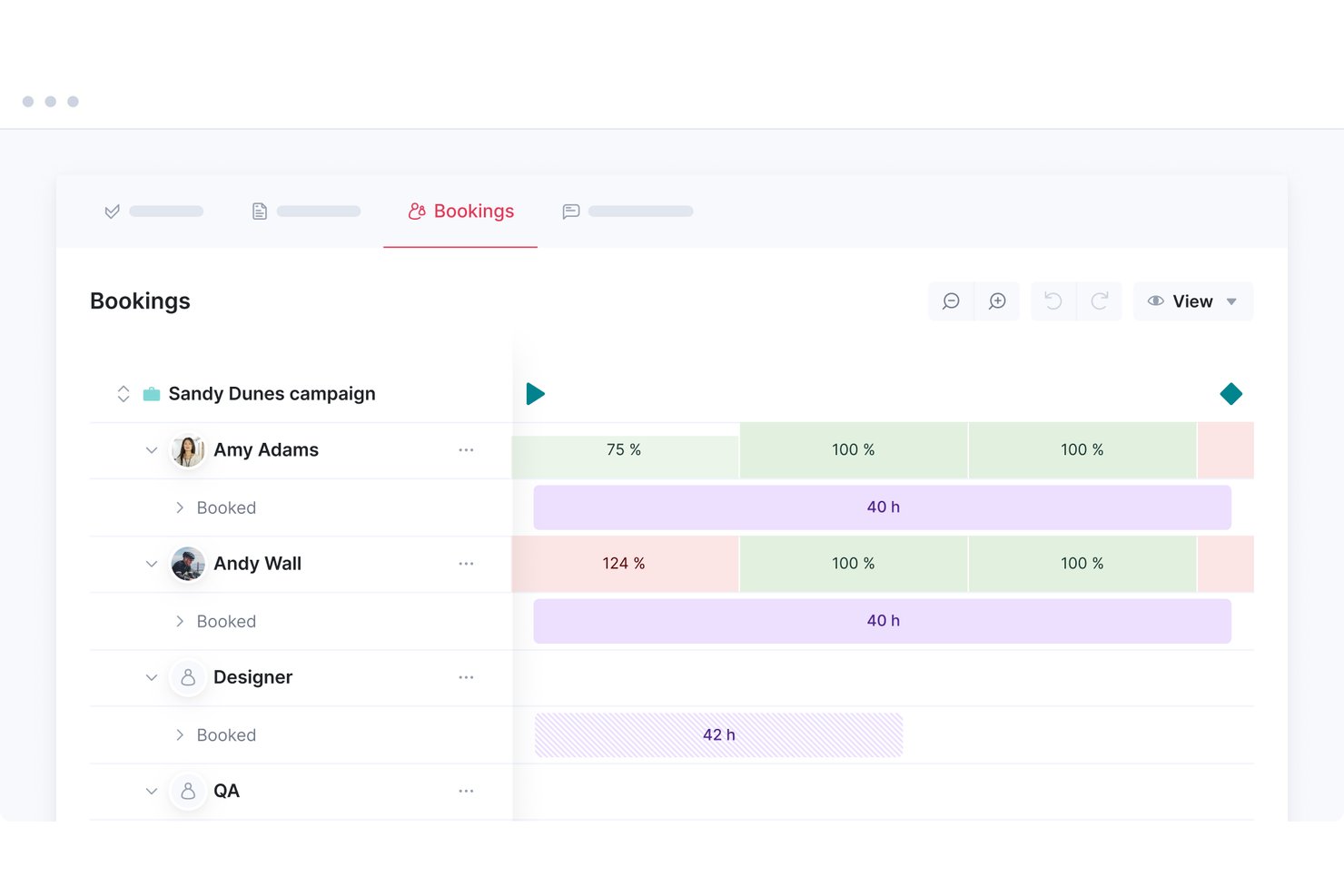
Scoro è una piattaforma di automazione dei servizi professionali che combina la pianificazione delle risorse, la gestione dei progetti, il monitoraggio del tempo, la creazione di preventivi e la reportistica finanziaria in un unico spazio di lavoro basato sul web.
Per chi è più indicato Scoro?
Scoro è particolarmente adatto ai team che offrono servizi professionali—agenzie, società di consulenza e fornitori di servizi gestiti—che hanno bisogno di collegare direttamente la pianificazione delle risorse ai dati finanziari dei progetti in un unico luogo.
Perché ho scelto Scoro
Ho incluso Scoro tra le mie scelte principali perché è l'unico strumento di questo elenco che collega direttamente la pianificazione delle risorse ai dati finanziari dei progetti durante l'intero ciclo di vita. Apprezzo in particolare il modulo Prenotazioni, che consente di riservare la capacità del team a livello di progetto prima ancora che le attività siano definite, per poi aggiungere una mappa di calore in tempo reale che segnala immediatamente i sovraccarichi. Se a questo si aggiungono i segnaposto basati sui ruoli per la pianificazione del flusso di lavoro e la riprogrammazione automatica quando cambiano le dipendenze, si ottiene un ambiente di pianificazione progettato per il modo in cui opera realmente il settore dei servizi professionali.
Funzionalità principali di Scoro
- Prenotazioni provvisorie: Riserva la capacità del team per i progetti in fase di acquisizione prima che siano confermati, quindi converte le allocazioni temporanee in prenotazioni fisse quando un progetto viene approvato.
- Visibilità del tempo a 360°: Confronta il tempo prenotato, pianificato ed effettivamente registrato per ogni membro del team, così da evidenziare lacune nella pianificazione e variazioni nei progetti attivi.
- Sincronizzazione automatica delle assenze: Le integrazioni con BambooHR e Google Calendar importano direttamente nel pianificatore delle risorse le assenze approvate e gli eventi di assenza dall'ufficio.
- Assistente IA ELI: Interroga i dati operativi in linguaggio naturale—ad esempio sulle ore fatturabili o sul consumo del budget—e genera report senza doverli creare manualmente.
Integrazioni di Scoro
Scoro offre oltre 45 integrazioni native, tra cui BambooHR, Google Calendar, Microsoft Outlook, Salesforce, Slack e Azure Active Directory. Supporta inoltre connessioni personalizzate tramite la sua API REST e Zapier.
Pros and Cons
Pros:
- La mappa di calore in tempo reale segnala immediatamente i conflitti tra le risorse
- La reportistica finanziaria è direttamente collegata alla pianificazione
- La pianificazione degli scenari supporta le prenotazioni provvisorie dei progetti
Cons:
- Il requisito minimo di utenti potrebbe escludere i team più piccoli
- Non è l'ideale per i team che necessitano di strumenti essenziali
New Product Updates from Scoro

Scoro Adds Time Mobile App and ELI Improvements
Scoro adds the Scoro Time mobile app for iOS/Android to track time anywhere and expands ELI with attachments, smarter filtering, and trigger-based actions. For more information, visit Scoro's official site.

Ideale per le integrazioni
monday AI Workspace è una piattaforma di gestione del lavoro potenziata dall'IA che unisce la programmazione dei progetti, il monitoraggio dei carichi di lavoro e l'allocazione delle risorse a uno degli ecosistemi d'integrazione più ampi del settore.
Per Chi è Ideale monday AI Workspace?
È particolarmente indicato per team di medie e grandi dimensioni che già utilizzano molteplici strumenti e hanno bisogno di un hub centrale per coordinare progetti, persone e carichi di lavoro senza dover ricostruire l’infrastruttura tecnologica.
Perché ho scelto monday AI Workspace
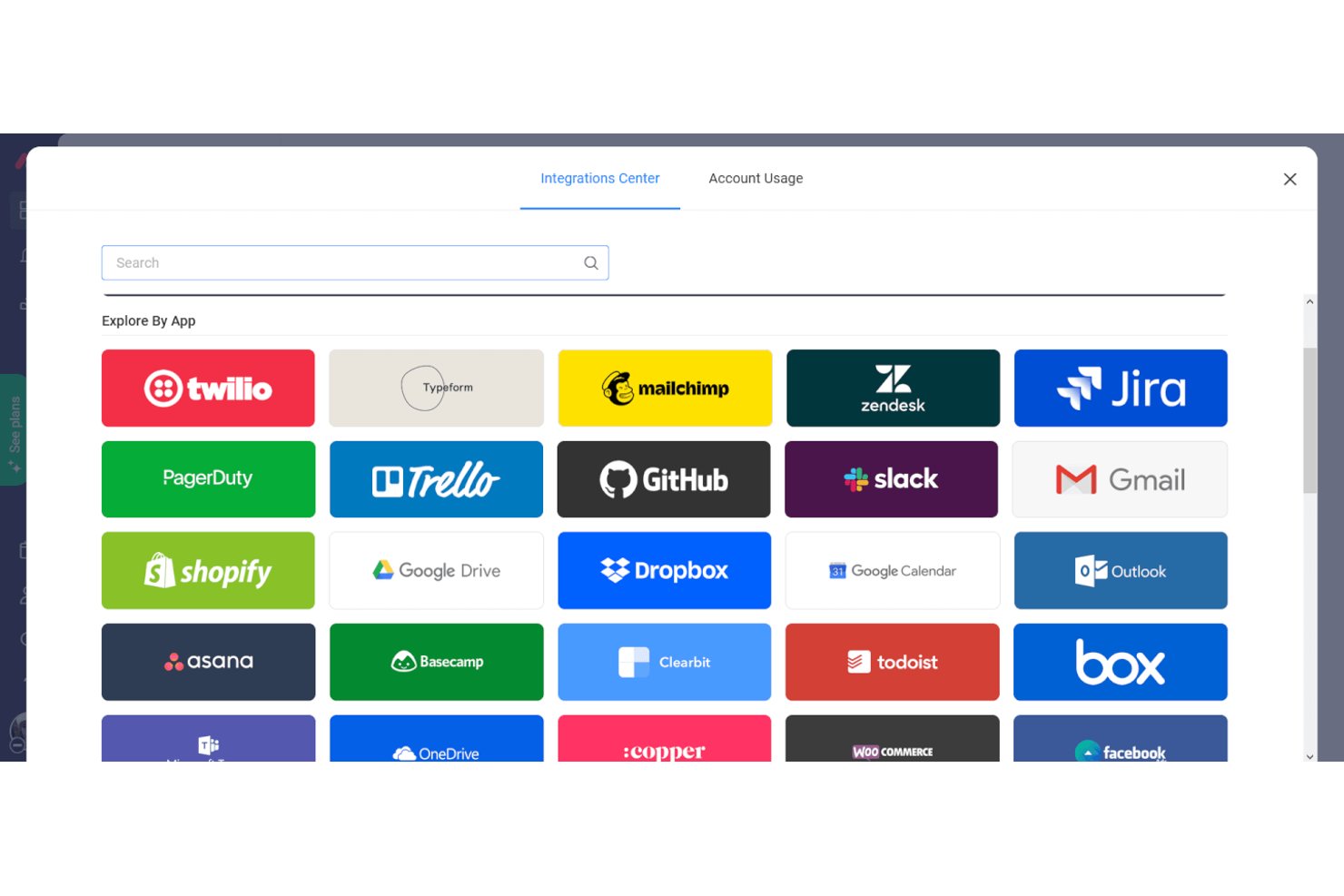
Ho inserito monday AI Workspace nella mia shortlist per la qualità con cui il suo ecosistema d'integrazione si collega agli strumenti utilizzati dai team che gestiscono molte risorse. Apprezzo soprattutto la sincronizzazione bidirezionale con Google Calendar, che mantiene il lavoro programmato visibile su più piattaforme senza aggiornamenti manuali. L’integrazione con Jira è altrettanto utile: la capacità ingegneristica tracciata negli sprint confluisce direttamente nella vista Carico di Lavoro, così non devo più conciliare la disponibilità tra due sistemi ogni volta che cambiano le priorità degli sprint.
Caratteristiche Principali di monday AI Workspace
- Vista carico di lavoro: Visualizza la capacità del team e le assegnazioni individuali con indicatori visivi colorati in caso di potenziale sovraccarico.
- Modulo di gestione delle risorse: Centralizza i dati della forza lavoro e consente una pianificazione avanzata delle capacità, disponibile nel piano Enterprise.
- Permessi e controlli di accesso: Permette di impostare ruoli utente dettagliati, livelli di condivisione e autorizzazioni di accesso per diversi progetti e team.
- Dashboard personalizzabili: Crea visualizzazioni e report in tempo reale su capacità, utilizzo e monitoraggio dei progetti.
Integrazioni di monday AI Workspace
monday AI Workspace offre centinaia di integrazioni native e app tramite marketplace, inclusi Slack, Jira, Google Workspace, Microsoft 365, Salesforce, HubSpot, Zoom, Trello, Zendesk, Asana e si collega con Zapier. È disponibile un’API per integrazioni personalizzate.
Pros and Cons
Pros:
- La vista carico di lavoro segnala visivamente i sovraccarichi
- Board altamente personalizzabili che si adattano alle esigenze di pianificazione
- L'automazione riduce gli aggiornamenti manuali della programmazione
Cons:
- Strumenti avanzati di gestione delle risorse solo nel piano Enterprise
- Non è progettato specificatamente per la pianificazione delle risorse
New Product Updates from monday AI Workspace
monday AI Workspace Adds Human Approval Routing
monday AI Workspace adds a human-in-the-loop approval block to AI Workflows, sending approval requests and routing workflow paths based on responses. For more information, visit monday AI Workspace's official site.

Ideale per progetti di onboarding dei clienti

Rocketlane è una piattaforma PSA alimentata dall'IA progettata per servizi professionali e team di delivery orientati al cliente, che combina esecuzione dei progetti, pianificazione delle risorse, gestione finanziaria e un portale condiviso per i clienti in un unico sistema.
Per chi è ideale Rocketlane?
Rocketlane è particolarmente adatto ai team di servizi professionali nelle aziende SaaS B2B che gestiscono progetti strutturati e rivolti ai clienti.
Perché ho scelto Rocketlane
Ho scelto Rocketlane come uno dei migliori strumenti per i progetti di onboarding dei clienti perché è uno dei pochi strumenti di pianificazione delle risorse creati avendo i flussi di lavoro per l'onboarding al centro. Apprezzo molto il fatto che combini la pianificazione delle risorse con un portale condiviso per i clienti, così posso assegnare i membri del team ai compiti di onboarding e dare ai clienti visibilità diretta su ciò che devono completare. I modelli di progetto dinamici sono particolarmente utili: posso configurare flussi di compiti condizionali che si adattano automaticamente in base al tipo di cliente o al livello del prodotto, in modo che ogni progetto di onboarding parta con la giusta struttura fin dal primo giorno.
Funzionalità principali di Rocketlane
- Limiti di utilizzo: Imposta policy relative a massime allocazioni, corrispondenza delle competenze e limiti di costo che Rocketlane applica in tempo reale per evitare sovrapposizioni di lavoro.
- Agenti di allocazione Nitro: Agenti IA monitorano continuamente tempistiche, ruoli e allocazioni, suggerendo poi il team ideale in base a disponibilità, carico di lavoro e competenze.
- Monitoraggio finanziario in tempo reale: Monitora i margini di progetto, i rischi di budget e l'impatto sui ricavi direttamente all'interno del flusso di lavoro di delivery mano a mano che il lavoro procede.
- Rilevamento ore con controllo IA: Registra ore fatturabili e non fatturabili con un controllo incorporato dell'IA che segnala schede orarie incomplete o in ritardo prima che creino problemi di fatturazione.
Integrazioni di Rocketlane
Rocketlane offre integrazioni native con Slack, Salesforce, Jira, HubSpot, Google Calendar e Outlook Calendar, e si collega con Zapier e Workato. È inoltre disponibile un'API per integrazioni personalizzate.
Pros and Cons
Pros:
- Portale rivolto al cliente con visibilità condivisa del progetto
- Allocazioni provvisorie per pianificazione risorse in via preventiva
- Rilevamento delle ore integrato a livello di compito
Cons:
- I report mancano di filtri avanzati e formule
- Troppe notifiche senza controlli granulari
New Product Updates from Rocketlane

Rocketlane Introduces Governance and Workforce Agents
Rocketlane introduces Governance Agents and Workforce Agents to automate delivery processes and recurring tasks. These updates help teams enforce rules and streamline project execution. For more information, visit Rocketlane’s official site.
 .
.
ClickUp
Ideale per l'automazione dei flussi di lavoro

ClickUp è una piattaforma di gestione progetti e pianificazione delle risorse basata sul web che combina gestione delle attività, pianificazione del carico di lavoro, programmazione delle tempistiche e automazione dei flussi di lavoro in un unico spazio di lavoro.
Per chi è ClickUp?
ClickUp è particolarmente adatto a team digitali e tecnologici di medie dimensioni che gestiscono più progetti tra gruppi cross-funzionali e necessitano di pianificazione delle risorse insieme alla gestione quotidiana delle attività.
Perché ho scelto ClickUp
Ho scelto ClickUp tra i migliori per l'automazione dei flussi di lavoro perché le sue automazioni si collegano direttamente alla modalità con cui le risorse vengono programmate e riassegnate nel tempo. Apprezzo molto il fatto che si possano impostare assegnatari dinamici—così quando un'attività passa a una nuova fase, la responsabilità viene trasferita automaticamente a chi ha attivato l'azione, invece che a un nome predefinito. Questo è importante quando la struttura del team cambia durante il progetto. ClickUp Brain ti permette di descrivere un'automazione in linguaggio naturale e la crea per te, quindi il mio team può impostare assegnazioni di attività basate su trigger, cambi di stato e regole di pianificazione senza aprire un pannello di configurazione.
Caratteristiche principali di ClickUp
- Vista carico di lavoro: Vedi i compiti assegnati a ciascun membro del team fianco a fianco e trascina le attività tra gli assegnatari per bilanciare la capacità giornaliera o settimanale.
- Vista timeline: Pianifica le attività su un calendario visivo, regola la durata trascinando e raggruppa il lavoro per assegnatario per individuare eventuali vuoti di pianificazione.
- Monitoraggio del tempo: Registra le ore direttamente sulle attività usando un timer integrato, aggiungi voci manuali e imposta stime di tempo per confrontare la capacità con i dati effettivi.
- Stati personalizzati delle attività: Definisci stati specifici per ogni fase del progetto per riflettere come il lavoro avanza realmente nel flusso di pianificazione del team.
New Product Updates from ClickUp
ClickUp Adds Meetings Hub, Super Agent Templates, and ZoomInfo Integration
ClickUp adds a searchable Meetings Hub, new ways to clone and template Super Agents, and a ZoomInfo integration through the App Center. These updates improve meeting retrieval, agent reuse, and access to sales intelligence. For more information, visit ClickUp’s official site.

Migliore gestione integrata di tempo e risorse
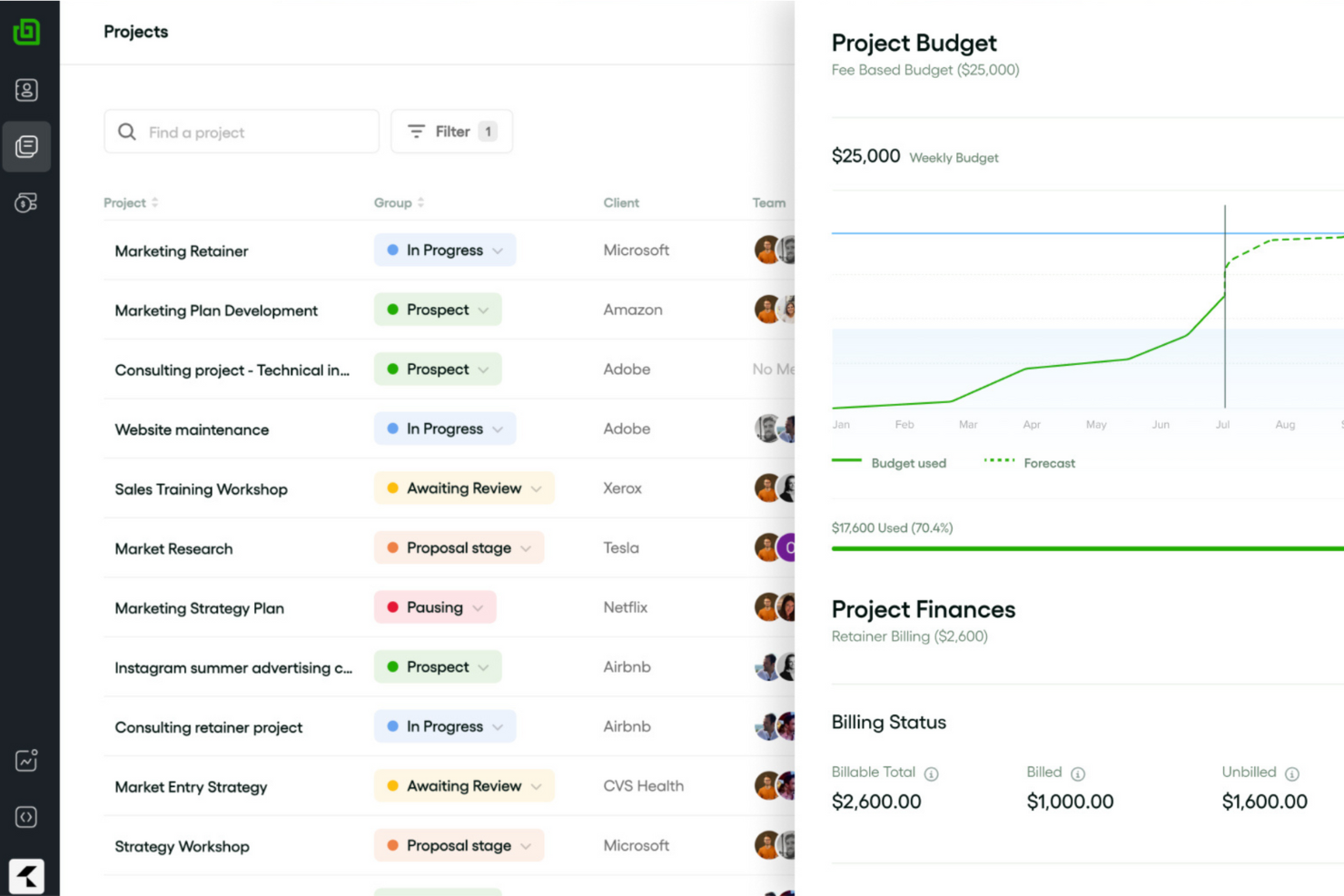
Bonsai Agency Software è una piattaforma tutto-in-uno progettata per migliorare le operazioni aziendali di agenzie, società di consulenza e fornitori di servizi professionali. Riunisce in un unico sistema integrato la gestione dei clienti, il monitoraggio dei progetti, la supervisione finanziaria e la collaborazione del team.
Una delle caratteristiche principali che rende Bonsai una scelta solida sono le sue capacità di pianificazione e previsione delle risorse. Puoi assegnare il lavoro in base alla capacità del tuo team e monitorare l'utilizzo, assicurando che i progetti vengano distribuiti in modo appropriato senza sovraccaricare nessun membro. Inoltre, Bonsai consente di prevedere la carenza di personale prima dell'avvio di nuovi progetti, permettendoti così di assumere proattivamente o adeguare le risorse per soddisfare le richieste in arrivo.
Un'altra funzione preziosa è rappresentata dagli strumenti di rilevamento del tempo e fogli presenza di Bonsai. Il tuo team può facilmente registrare le ore spese sulle varie attività, offrendoti una visione chiara dell'avanzamento dei progetti, dei contributi individuali e della capacità complessiva. Questo monitoraggio in tempo reale aiuta a supervisionare i carichi di lavoro e assicura che i progetti rimangano nei tempi previsti e nel budget.
Le integrazioni includono Gmail, Google Calendar, Zapier, Slack, QuickBooks Online, Calendly, ClickUp, Trello, Google Drive, Google Sheets, Xero e HubSpot.

Birdview
Ideale per aziende di servizi professionali
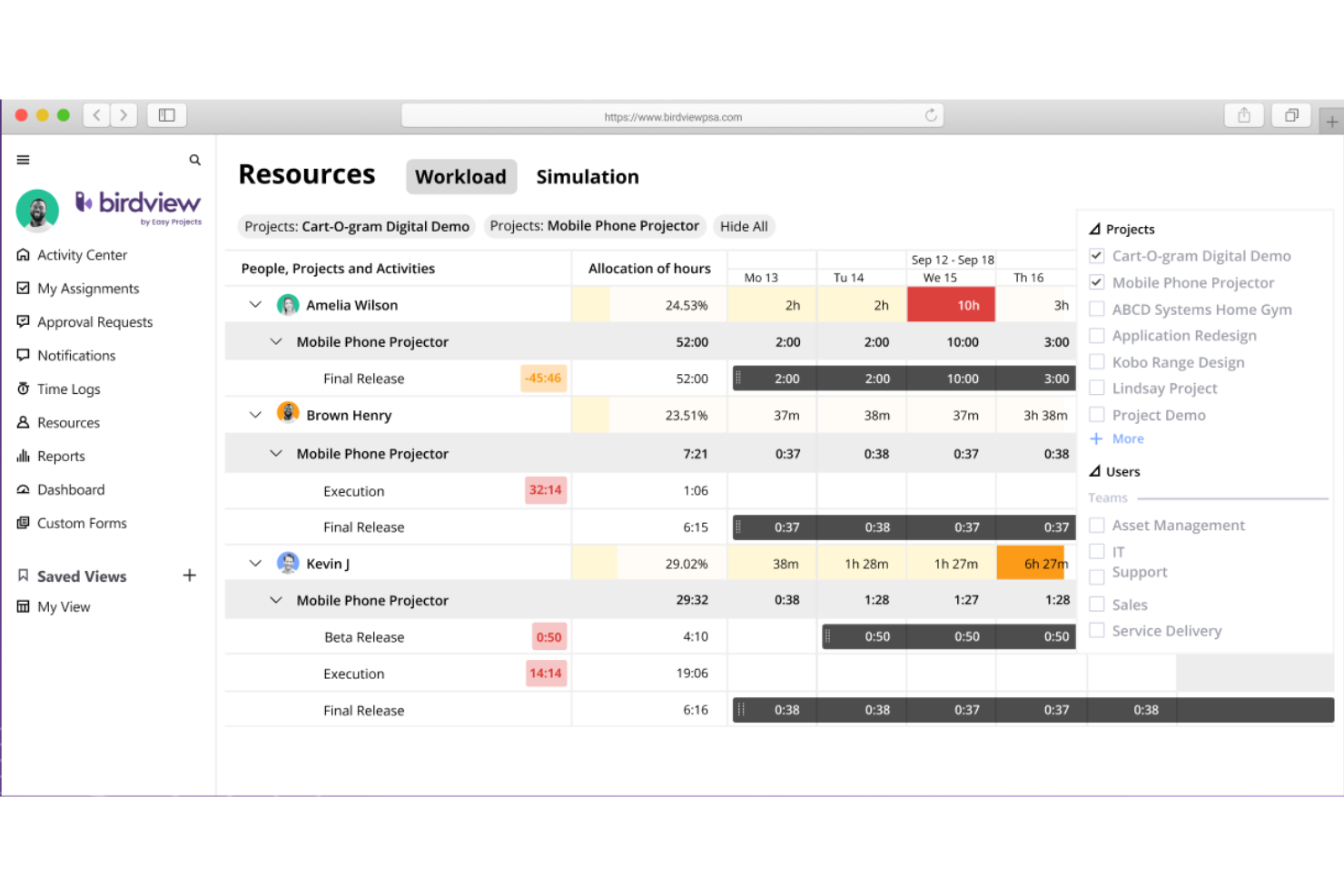
Birdview è una piattaforma web per la gestione di progetti, risorse e aspetti finanziari che combina pianificazione delle risorse, programmazione della capacità, gestione del carico di lavoro, monitoraggio del tempo e fatturazione in un unico sistema.
Per chi è ideale Birdview?
Birdview è particolarmente indicato per aziende di servizi professionali di medie dimensioni che hanno la necessità di gestire risorse, progetti e fatturazione in un'unica soluzione.
Perché ho scelto Birdview
Ho incluso Birdview tra le mie scelte principali perché è uno dei pochi strumenti di pianificazione risorse progettato per il ciclo di erogazione dei servizi professionali. L’assegnazione risorse basata su ruoli e competenze ti consente di trovare membri del team disponibili in base a ruolo, set di competenze e disponibilità ancora prima dell’avvio di un progetto, invece di correre ai ripari durante l’esecuzione. Apprezzo anche la Simulazione del Carico delle Risorse, che modella la domanda futura di capacità rispetto ai carichi di lavoro attuali, così da capire se il tuo team può gestire nuovi incarichi prima di accettarli.
Funzionalità principali di Birdview
- Visualizzazione del carico di lavoro: Un cronoprogramma codificato a colori evidenzia a colpo d’occhio i membri del team sovraccarichi o sottoutilizzati nei progetti attivi.
- Calendario assenze e disponibilità: Tiene traccia delle ferie approvate e dei giorni festivi per far sì che le assegnazioni delle risorse riflettano sempre la reale disponibilità.
- Monitoraggio del tempo: Registra le ore fatturabili e non fatturabili direttamente su attività e progetti per una fatturazione accurata ai clienti e reportistica interna.
- Visione delle risorse a livello di portfolio: Visualizza l’allocazione delle risorse sull’intero portafoglio progetti in un’unica schermata consolidata.

Ganttic
Ideale per la gestione del portafoglio progetti
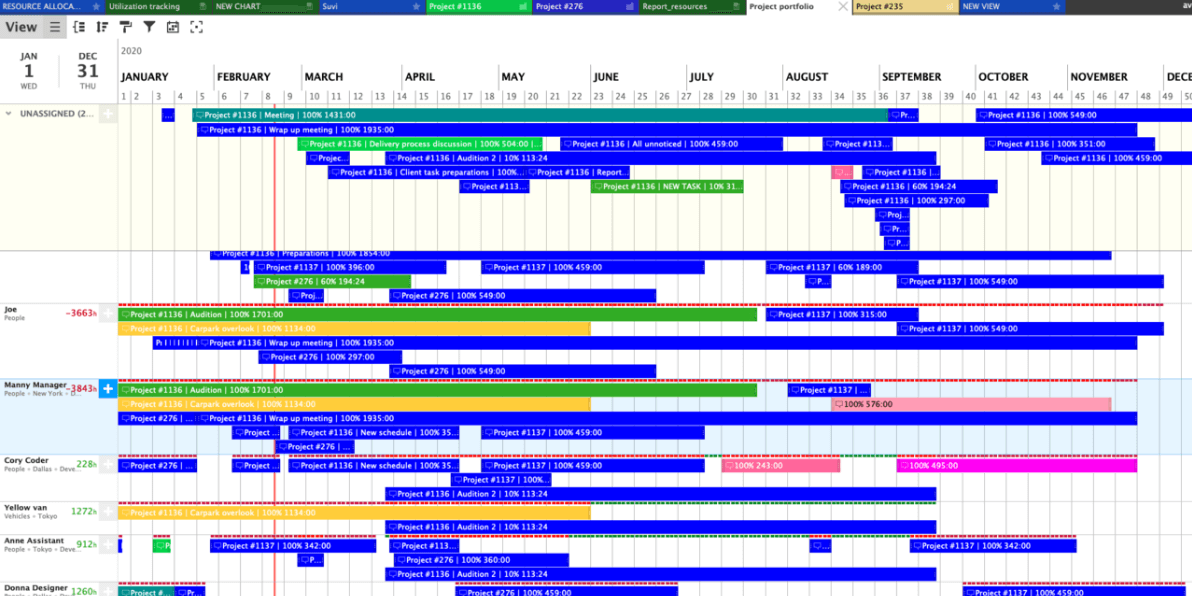
Ganttic è un software di pianificazione delle risorse basato su web che consente di programmare persone, attrezzature e altre risorse tra più progetti utilizzando diagrammi di Gantt drag-and-drop, monitoraggio dell'utilizzo, bilanciamento del carico di lavoro e gestione del portafoglio progetti.
Per chi è più adatto Ganttic?
Ganttic è particolarmente indicato per project manager e responsabili delle risorse in aziende di medie dimensioni che devono coordinare risorse condivise tra più progetti simultanei.
Perché ho scelto Ganttic
Ho incluso Ganttic tra le mie migliori scelte perché è uno dei pochi strumenti di pianificazione delle risorse che tratta realmente la gestione del portafoglio come una funzionalità di primo piano, e non come un'aggiunta secondaria. Puoi passare da un diagramma di Gantt delle risorse, a una vista portfolio di tutti i progetti, fino alla struttura analitica del lavoro di un singolo progetto senza perdere il contesto. Apprezzo anche la possibilità di elaborare piani di progetto prima di assegnare le risorse, così da individuare limiti di capacità e lacune di risorse nel portafoglio prima che un progetto parta. Le dipendenze tra portafogli consentono di prioritizzare le attività tra i vari progetti: una funzionalità utilissima per i team che gestiscono una dozzina di flussi di lavoro contemporaneamente.
Caratteristiche principali di Ganttic
- Pianificazione delle attività tramite drag-and-drop: Assegna e riprogramma le attività direttamente su una linea temporale visiva spostandole tra risorse e date.
- Report sull’utilizzo delle risorse: Genera report personalizzati che mostrano la percentuale di carico di lavoro di ciascuna risorsa su qualsiasi periodo selezionato.
- Campi dati personalizzati: Aggiungi attributi personalizzati a risorse, attività o progetti per filtrare e raggruppare la programmazione come preferisci.
- Attività ricorrenti: Imposta attività che si ripetono secondo una pianificazione definita, per gestire impegni continui delle risorse senza reinserimenti manuali.

Parallax
Ideale per la previsione e la pianificazione
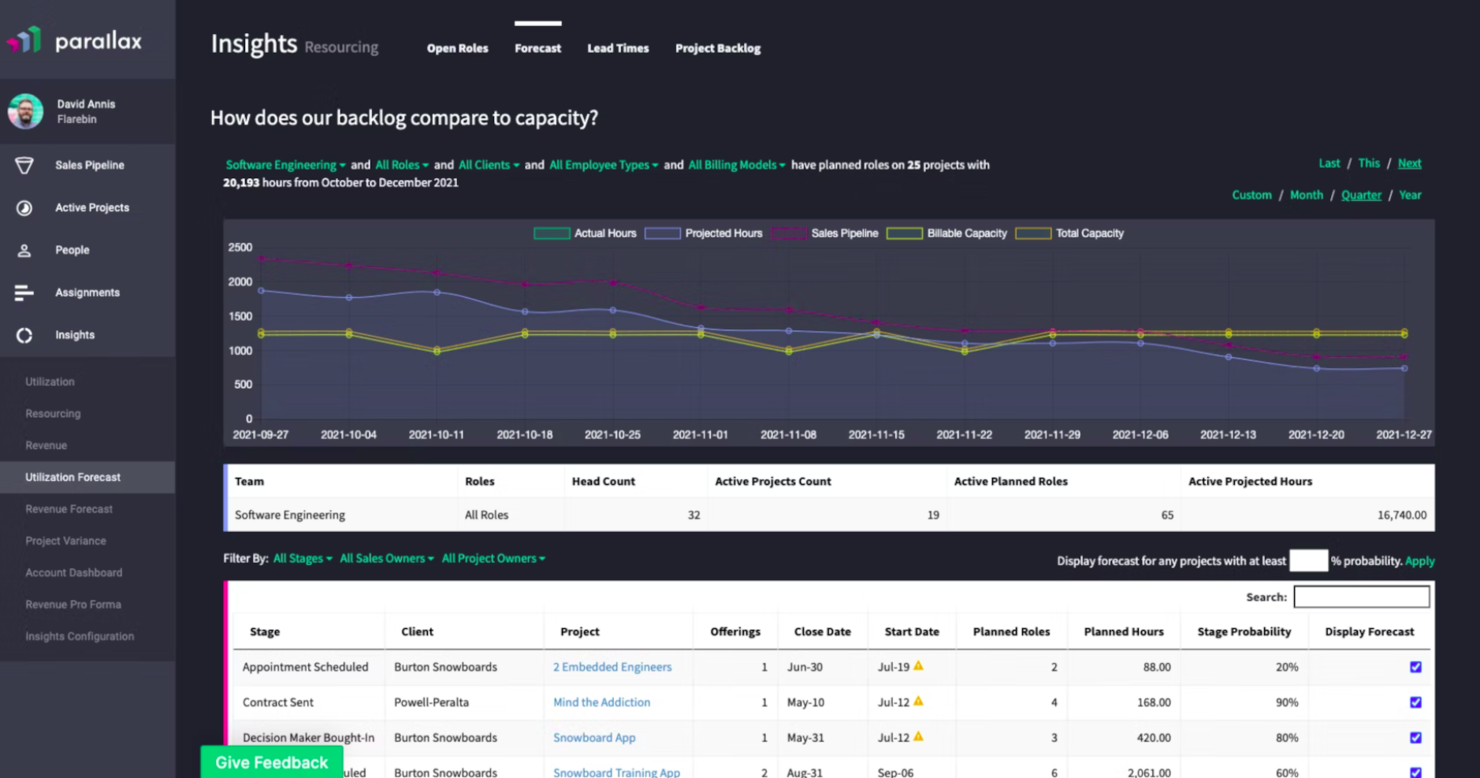
Parallax è una piattaforma web per la pianificazione e la previsione delle risorse, pensata per i team di servizi professionali. Copre la pianificazione della capacità, l'allocazione delle risorse, la previsione del personale, il monitoraggio dei margini e la definizione dei prezzi di progetto.
Per chi è ideale Parallax?
Parallax è particolarmente adatto ad agenzie digitali, società di consulenza e aziende di servizi professionali che devono allineare la gestione del personale e dei progetti ai risultati finanziari.
Perché ho scelto Parallax
Ho incluso Parallax tra le mie migliori scelte perché apprezzo molto il modo in cui individua i rischi relativi a capacità, ricavi e margini prima che si presentino problemi. La funzione Staffing Foresight permette al mio team di prevedere le esigenze di risorse con mesi di anticipo, consentendoci di prendere decisioni sull'assunzione sulla base di dati reali e non su intuizioni dell'ultimo minuto. Faccio inoltre affidamento su Pricing Insights, che utilizza le prestazioni dei progetti passati e la cronologia dei clienti per aiutare il mio team a proporre prezzi che tutelino i margini fin dall'inizio.
Funzionalità principali di Parallax
- Allocazione delle risorse: Assegna i membri del team ai progetti in base al ruolo, alla disponibilità e alle competenze, su tutto il portafoglio.
- Monitoraggio dell'utilizzo: Controlla in tempo reale il tempo fatturabile e non fatturabile del team per individuare situazioni di sovra- o sotto-utilizzo.
- Gestione del pipeline: Collega il tuo pipeline commerciale alla pianificazione delle risorse per rendere visibile la domanda di progetti futuri prima che inizino.
- Reportistica personalizzata: Crea report sulle prestazioni dei progetti, sui margini e sulla capacità del team utilizzando filtri adattati alla tua azienda.
Altre opzioni per la pianificazione delle risorse
Ecco alcune altre opzioni che non sono entrate nella mia lista principale, ma che vale la pena prendere in considerazione.
- Silverbucket
Ideale per la mappatura delle competenze e la visibilità sull'utilizzo
- eResource Scheduler
Ideale per allocare le risorse giuste
- Resource Guru
Ideale per prevenire la sovra-allocazione delle risorse
- Smartsheet
Ideale per la reportistica sull'utilizzo
- Productive
Ideale per le agenzie
- Celoxis
Gestione delle risorse con avvisi di sovraccarico e dashboard dinamiche
- Wrike
Ideale per il monitoraggio del tempo
- Float.com
Ideale per la riallocazione delle risorse
- Saviom
La migliore soluzione per la pianificazione multidimensionale delle risorse
- Runn
Ideale per team IT e di sviluppo software
- Hub Planner by Milient
Ideale per la pianificazione dei team, gestione della capacità e richiesta di lavoro
- Planview
Ideale per i servizi professionali


Recensioni correlate di software web per la pianificazione delle risorse
Se non hai ancora trovato quello che cerchi, dai un'occhiata a questi strumenti strettamente correlati che abbiamo testato e valutato.
- Software per la gestione dei progetti
- Software per la gestione delle risorse
- Software per l'automazione dei flussi di lavoro
- Software per il monitoraggio del tempo
- Software per la gestione delle attività
- Software per la pianificazione dei progetti
- Strumenti per la pianificazione delle risorse
- Alternative a Redmine
Cómo evalúo las alternativas a Expensify
Divido mi evaluación en dos capas: la base que toda herramienta debe cubrir—captura de recibos, flujos de aprobación, sincronización contable—y los diferenciadores que separan la mejor opción del resto.
Funcionalidad básica (indispensables para esta lista)
Al seleccionar herramientas para mi lista, califico cada una en una escala de 0 (no ofrece la funcionalidad) a 5 (destaca en esta área) para cada funcionalidad básica listada a continuación. Luego, calculo el puntaje total de la herramienta en porcentaje. Cada herramienta necesita lograr un puntaje total mínimo de 75% para ser considerada para su inclusión.
- Captura de recibos y OCR: Evalúo cuán bien cada herramienta extrae nombres de comerciantes, montos, fechas y partidas desde una foto—especialmente recibos de taxi arrugados o notas de restaurante desvanecidas.
- Flujos de reporte de gastos: La enrutación de aprobación multinivel es importante aquí. Busco reglas configurables, como informes que superen cierto monto sean enviados automáticamente a un director financiero en vez de al jefe directo.
- Gestión de tarjetas corporativas: Ya sea que la plataforma emita sus propias tarjetas o extraiga datos de los principales bancos, verifico la visibilidad en tiempo real de transacciones y la capacidad de establecer límites de gasto por empleado o por categoría.
- Reembolsos a empleados: Observo cómo cada herramienta gestiona los pagos por depósito directo para gastos de bolsillo, incluyendo soporte para reembolsos en varias monedas para equipos distribuidos.
- Integraciones contables y con ERP: Me centro en la sincronización de la herramienta con plataformas como QuickBooks, Xero, NetSuite o Sage—específicamente, si mapea códigos GL personalizados y envía asientos contables automáticamente.
- Controles de políticas y cumplimiento: Evalúo la capacidad de cada plataforma para señalar gastos fuera de política al enviar, mantener trazabilidad de auditoría y cumplir reglas de retención de recibos que resistan revisiones fiscales.
Una vez que tengo una lista de herramientas que cumplen estos criterios, considero qué distingue a cada plataforma.
Factores diferenciadores (lo que distingue a los proveedores)
Así es como comparo y contrasto diferentes proveedores:
Características destacadas
La categorización basada en IA es un gran diferenciador. Herramientas como Brex y Ramp utilizan aprendizaje automático para codificar automáticamente los gastos en las cuentas GL correctas, lo que ahorra horas durante el cierre de mes. También considero si una plataforma abarca gestión de pagos y automatización de cuentas por pagar, ya que consolidar facturas de proveedores y gastos de empleados en un solo lugar simplifica la conciliación. La integración con reservas de viaje es importante para equipos que viajan con frecuencia y se benefician de datos de itinerario que entran directamente en los reportes de gastos.
Más allá de las características
El modelo de precios aquí es fundamental. Algunas plataformas como Brex y Ramp compensan sus costos SaaS a través del ingreso por intercambio de tarjetas, mientras que otras cobran por usuario—lo que impacta distinto con 50 empleados frente a 500. También evalúo la escalabilidad: una herramienta que funciona para una startup de entidad única puede fallar cuando se agregan subsidiarias o equipos internacionales. Certificaciones de seguridad como SOC 2 Tipo II y PCI DSS son relevantes, especialmente cuando la plataforma almacena imágenes de recibos y procesa datos bancarios de reembolso.
Come scegliere un software basato sul Web per la pianificazione delle risorse
È facile perdersi in lunghi elenchi di funzionalità e strutture tariffarie complesse. Per aiutarti a rimanere concentrato mentre affronti il tuo esclusivo processo di selezione del software, ecco una lista di controllo dei fattori da tenere a mente:
| Fattore | Cosa considerare |
|---|---|
| Scalabilità | Assicurati che il software possa crescere insieme alla tua squadra. Cerca opzioni che supportino utenti, progetti e risorse aggiuntivi senza compromettere le prestazioni. |
| Integrazioni | Verifica se si integra con gli strumenti che la tua squadra utilizza già, come piattaforme di gestione dei progetti, CRM o applicazioni di comunicazione. |
| Personalizzazione | Scegli una soluzione che ti consenta di adattare visualizzazioni, report e regole di pianificazione alle esigenze e alle preferenze specifiche della tua squadra. |
| Facilità d'uso | Scegli un'interfaccia intuitiva che riduca la curva di apprendimento. Prova le versioni demo per assicurarti che la tua squadra possa adattarsi rapidamente senza una formazione approfondita. |
| Budget | Cerca prezzi trasparenti in linea con il tuo budget. Considera costi nascosti come l'avvio, gli aggiornamenti o i limiti di utilizzo. |
| Misure di sicurezza | Verifica che lo strumento disponga di solide misure di protezione dei dati, come crittografia, autorizzazioni degli utenti e conformità a standard quali GDPR o ISO 27001. |
| Collaborazione | Cerca funzionalità come calendari condivisi, aggiornamenti in tempo reale e accesso basato sui ruoli per supportare le esigenze di collaborazione della tua squadra. |
| Strumenti di reportistica | Cerca un software con report e analisi dettagliati che ti aiutino a monitorare l'utilizzo delle risorse, prevedere le necessità e ottimizzare le pianificazioni. |
Tendenze nei software basati sul Web per la pianificazione delle risorse
Nella mia ricerca ho raccolto innumerevoli aggiornamenti di prodotto, comunicati stampa e registri delle versioni di diversi fornitori di software basati sul Web per la pianificazione delle risorse. Ecco alcune delle tendenze emergenti che sto tenendo d'occhio:
- Analisi basate sull'IA: I fornitori offrono funzionalità di IA in grado di prevedere la disponibilità delle risorse, ottimizzare le pianificazioni e segnalare potenziali conflitti prima che si verifichino. Ad esempio, alcuni strumenti di gestione delle risorse basati sull'IA offrono suggerimenti per riallocare le risorse durante i periodi di picco della domanda.
- Previsione delle risorse: Gli strumenti avanzati di previsione, che aiutano gli utenti a prevedere le future esigenze di risorse sulla base dei dati storici e delle tempistiche dei progetti futuri, stanno diventando sempre più diffusi. Ciò è particolarmente utile per le aziende con carichi di lavoro variabili o domanda stagionale.
- Visibilità tra le squadre: Un numero crescente di piattaforme pone l'accento sulla visibilità tra più squadre, reparti o progetti. Puoi vedere facilmente come vengono allocate le risorse a livello organizzativo per evitare prenotazioni eccessive e assicurarti che l'utilizzo sia equo.
- Metriche di sostenibilità: Alcuni software includono ora strumenti per monitorare l'impatto ambientale dell'utilizzo delle risorse, come il consumo energetico o le emissioni legate ai viaggi. Questo potrebbe interessarti se hai obiettivi di sostenibilità rigorosi.
- Funzionalità di ludicizzazione: Per incoraggiare l'adozione da parte degli utenti, i fornitori aggiungono elementi ludici come distintivi dei risultati, monitoraggio dei progressi e ricompense per il raggiungimento degli obiettivi di pianificazione. Questo rende l'apprendimento e l'utilizzo del software più coinvolgenti.
Funzionalità principali dei software per la pianificazione delle risorse
- Reportistica e analisi: Ti offre la possibilità di analizzare i dati di analisi aziendale e compilare report da condividere con colleghi e parti interessate.
- Automazione dei flussi di lavoro: Ti consente di migliorare i flussi di lavoro automatizzando le attività ripetitive.
- Previsione: Ti permette di anticipare le esigenze future, così da poter modificare la pianificazione delle risorse in base al variare della domanda.
- Gestione del portafoglio: Ti consente di gestire e monitorare più progetti, oltre ad assicurarti che tutti i progetti vengano completati in tempo.
Costi e prezzi dei software basati sul Web per la pianificazione delle risorse
La tabella seguente riassume i piani più comuni, i relativi prezzi medi e le funzionalità tipicamente incluse nelle soluzioni software basate sul Web per la pianificazione delle risorse:
Tabella comparativa dei piani per i software basati sul Web per la pianificazione delle risorse
| Tipo di piano | Prezzo medio | Funzionalità comuni |
|---|---|---|
| Piano gratuito | $0 | Strumenti di pianificazione di base, accesso limitato degli utenti, integrazioni limitate e assistenza di base. |
| Piano personale | $5-$25/utente/mese | Gestione delle risorse individuali, visualizzazioni del calendario, reportistica di base e assistenza via e-mail. |
| Piano aziendale | $30-$60/utente/mese | Accesso multiutente, strumenti di pianificazione avanzati, integrazioni con app di terze parti e reportistica del team. |
| Piano per grandi aziende | $75-$150/utente/mese | Integrazioni personalizzate, assistenza dedicata, analisi avanzate, sicurezza rafforzata e risorse illimitate. |