

I 10 migliori software di gestione delle risorse per consulenti del 2026

Migliori software di gestione delle risorse per consulenti: elenco


La scelta del software di gestione delle risorse più adatto può aiutare i consulenti a monitorare e assegnare il tempo e le competenze del team, migliorare la visibilità sui carichi di lavoro e sulla disponibilità, gestire le complessità della pianificazione tra diversi progetti e migliorare il processo decisionale e la pianificazione. Trovare uno strumento in grado di svolgere tutte queste funzioni in modo adatto alle proprie esigenze può richiedere molto tempo ed essere frustrante. In qualità di project manager digitale esperto, posso guidarti nel processo di selezione, fornirti consigli professionali sugli strumenti e aiutarti a trovare il software di gestione delle risorse più adatto alle tue esigenze.
Perché fidarsi dei nostri consigli sui software
Il nostro team testa e recensisce software dal 2012. In quanto project manager noi stessi, sappiamo quanto sia difficile — e importante — scegliere il software giusto.
Per questa guida, abbiamo valutato gli strumenti attraverso test pratici e ricerche indipendenti, assegnando un punteggio agli strumenti in base ai nostri criteri di selezione. Ci basiamo inoltre sulle competenze di leader di pensiero del settore e di professionisti attivi nella gestione dei progetti.
Le nostre recensioni riflettono il nostro giudizio editoriale umano, non un discorso di vendita.
Revisori esperti:
Tabella comparativa dei software di gestione delle risorse per consulenti
| Tool | Best For | Trial Info | Price | ||
|---|---|---|---|---|---|
| 1 | Ideale per monitorare la redditività delle agenzie | Prova gratuita di 14 giorni + demo gratuita disponibile | A partire da $10/mese (fatturato annualmente) | Website | |
| 2 | Ideale per la gestione della capacità con vista sui margini | Prova gratuita di 30 giorni disponibile | Da $7/utente programmato/mese | Website | |
| 3 | Ideale per l’abbinamento delle risorse in base alle competenze | Demo gratuita disponibile | Prezzo su richiesta | Website | |
| 4 | Ideale per report completi sull'utilizzo delle risorse | Prova gratuita di 14 giorni + demo gratuita disponibile | Da $19,90/utente/mese (fatturazione annuale) | Website | |
| 5 | Ideale per la visibilità in tempo reale delle risorse | Prova gratuita di 14 giorni + piano gratuito disponibile | Da $10/utente/mese (fatturato annualmente) | Website | |
| 6 | Ideale per la pianificazione unificata delle risorse | Prova gratuita di 30 giorni | Da $5/utente/mese (fatturazione annuale) | Website | |
| 7 | Ideale per la gestione delle risorse incentrata sulle persone | Non disponibile | Prezzo su richiesta | Website | |
| 8 | Ideale per allineare risorse e budget | Prova gratuita di 21 giorni + demo gratuita disponibile | Da $17.10/utente/mese (fatturato annualmente) | Website | |
| 9 | Ideale per servizi professionali | Demo gratuita disponibile | Prezzo su richiesta | Website | |
| 10 | Ideale per la gestione di tempo e risorse | Prova gratuita di 7 giorni disponibile | $15/user/month | Website |


Recensioni dei migliori software di gestione delle risorse per consulenti
Qui ho raccolto le panoramiche dei miei 10 migliori software di gestione delle risorse per consulenti, per aiutarti a scoprire i punti di forza e i limiti di ogni strumento. Ogni panoramica offre informazioni sulle caratteristiche principali, sulle funzionalità e sugli scenari d’uso ideali dello strumento, aiutandoti a trovare quello perfetto per il tuo team.

Ideale per monitorare la redditività delle agenzie
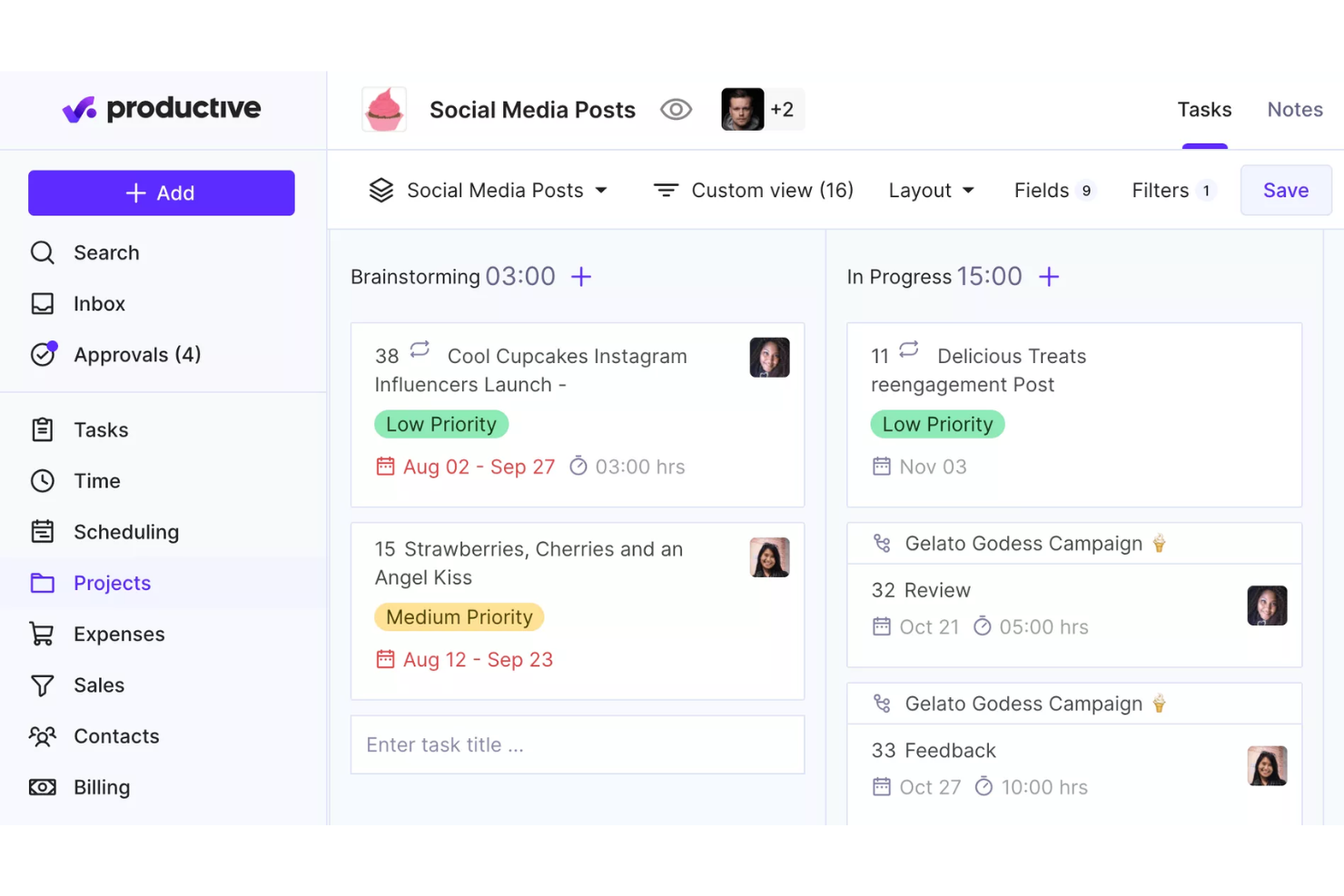
Productive è una piattaforma di gestione delle risorse per consulenti che riunisce pianificazione dei progetti, programmazione delle risorse, monitoraggio del tempo, definizione del budget e fatturazione in un unico sistema.
Per chi è più adatto Productive?
Productive è una soluzione adatta alle agenzie di consulenza e alle aziende di servizi professionali che devono gestire le risorse, monitorare il tempo fatturabile e controllare la redditività dei progetti in un unico luogo.
Perché ho scelto Productive
Productive si è guadagnato un posto nella mia lista ristretta grazie al modo in cui collega strettamente l'allocazione delle risorse ai risultati finanziari. Apprezzo molto il fatto che, quando il mio team registra il tempo dedicato a un progetto, quelle ore confluiscano direttamente nella visualizzazione del budget, permettendomi di vedere i margini di profitto in tempo reale invece di dover attendere i report di fine mese. Il modulo per la gestione del budget consente di impostare avvisi personalizzati prima che un progetto esaurisca il proprio budget, aiutando a individuare gli sforamenti prima che diventino un problema. La reportistica basata sull'intelligenza artificiale genera su richiesta analisi dettagliate della redditività per progetto, così non devo passare ore a estrarre dati dai fogli di calcolo.
Funzionalità principali di Productive
- Visualizzazione del carico di lavoro: Visualizza a colpo d'occhio il carico di attività di ogni membro del team e riassegna il lavoro direttamente dalla stessa schermata.
- Previsione dei ricavi: Prevedi i ricavi futuri sulla base delle trattative commerciali attive e dei piani attuali delle risorse, con suddivisioni dell'utilizzo per persona o team.
- Creazione di scenari: Modella diversi risultati finanziari modificando prezzi, spese e allocazione delle risorse prima di impegnarti in un piano.
- Flusso di approvazione del tempo: Esamina le registrazioni del tempo inviate, contrassegna le ore come fatturabili o non fatturabili e richiedi modifiche ai membri del team prima che le registrazioni vengano finalizzate.
Integrazioni di Productive
Productive offre integrazioni native con Jira, HubSpot, Xero, Google Calendar, Sage, Gmail, Microsoft Outlook, Slack, BugHerd e QuickBooks. Si collega inoltre a Zapier e fornisce un'API aperta per integrazioni personalizzate.
Pros and Cons
Pros:
- Interfaccia intuitiva
- Pannelli di controllo personalizzabili
- Accessibilità del portale clienti
Cons:
- Interfaccia di reportistica complessa
- Limitazioni nell'archiviazione
New Product Updates from Productive
Productive Adds Voice Dictation, Slack Connector, Proposals, and Overtime
Productive adds voice dictation, a Slack Connector, proposal controls, and overtime tracking. These updates support faster AI interactions, client proposals, and time management. For more information, visit Productive’s official site.

Ideale per la gestione della capacità con vista sui margini

Float è una piattaforma di gestione delle risorse per consulenti che unisce pianificazione visiva, gestione della capacità e monitoraggio in tempo reale del carico di lavoro in un'unica interfaccia.
Per chi è ideale Float?
Float è adatto a team di consulenza e agenzie che devono gestire persone su più progetti contemporaneamente.
Perché ho scelto Float
Float merita un posto nella mia lista dei preferiti per il modo in cui collega direttamente la pianificazione della capacità alla visibilità sul margine di progetto. Utilizzo i report di Float per monitorare la redditività in tempo reale—non solo al termine del progetto—così posso vedere l’impatto sul margine mentre il lavoro è ancora in corso e adeguare il personale prima che un progetto sfori il budget. La vista di pianificazione della capacità include indicatori di utilizzo e avvisi di sovraccarico insieme alla reale disponibilità di ogni persona, inclusi i giorni di assenza, il che significa che non rischio di assegnare qualcuno al 120% solo perché risulta in programma. Mi piace anche il fatto che Float mi permetta di impostare costi e tariffe per ruolo, così ogni decisione di allocazione delle risorse che prendo ha un peso finanziario che posso effettivamente vedere.
Funzionalità principali di Float
- Pianificazione drag-and-drop: Assegna il lavoro in ore o percentuali e modifica le assegnazioni direttamente su una timeline visiva senza dover ricostruire il piano da zero.
- Pianificazione provvisoria: Segna le assegnazioni come provvisorie per riservare capacità a lavori non confermati senza bloccare le assegnazioni confermate.
- Timesheet precompilati: Float inserisce automaticamente le assegnazioni programmate nei timesheet, così il team deve solo confermare o modificare, senza dover inserire le ore da capo.
- Tag personalizzati e viste salvate: Filtra il piano per ruolo, competenza o progetto usando tag personalizzati, quindi salva quelle viste per accedervi rapidamente durante la revisione delle risorse.
Integrazioni di Float
Float offre integrazioni native con Asana, Jira, Google Calendar, Karbon e Aprimo Productivity Management, e si collega con Zapier. È disponibile un'API per integrazioni personalizzate.
Pros and Cons
Pros:
- La pianificazione visiva migliora la gestione delle risorse
- Il monitoraggio in tempo reale migliora la visibilità sulla redditività
- Impostazioni personalizzate supportano flussi di lavoro flessibili
Cons:
- Accesso limitato tramite app mobile nativa
- Nessuna gestione dei task integrata
New Product Updates from Float.com

Float Adds Rate Cards and Multi-Currency Billing
Float introduced centralized rate cards to standardize bill rates across projects and added multi-currency support to bill clients consistently across regions. For more information, visit Float's official site.

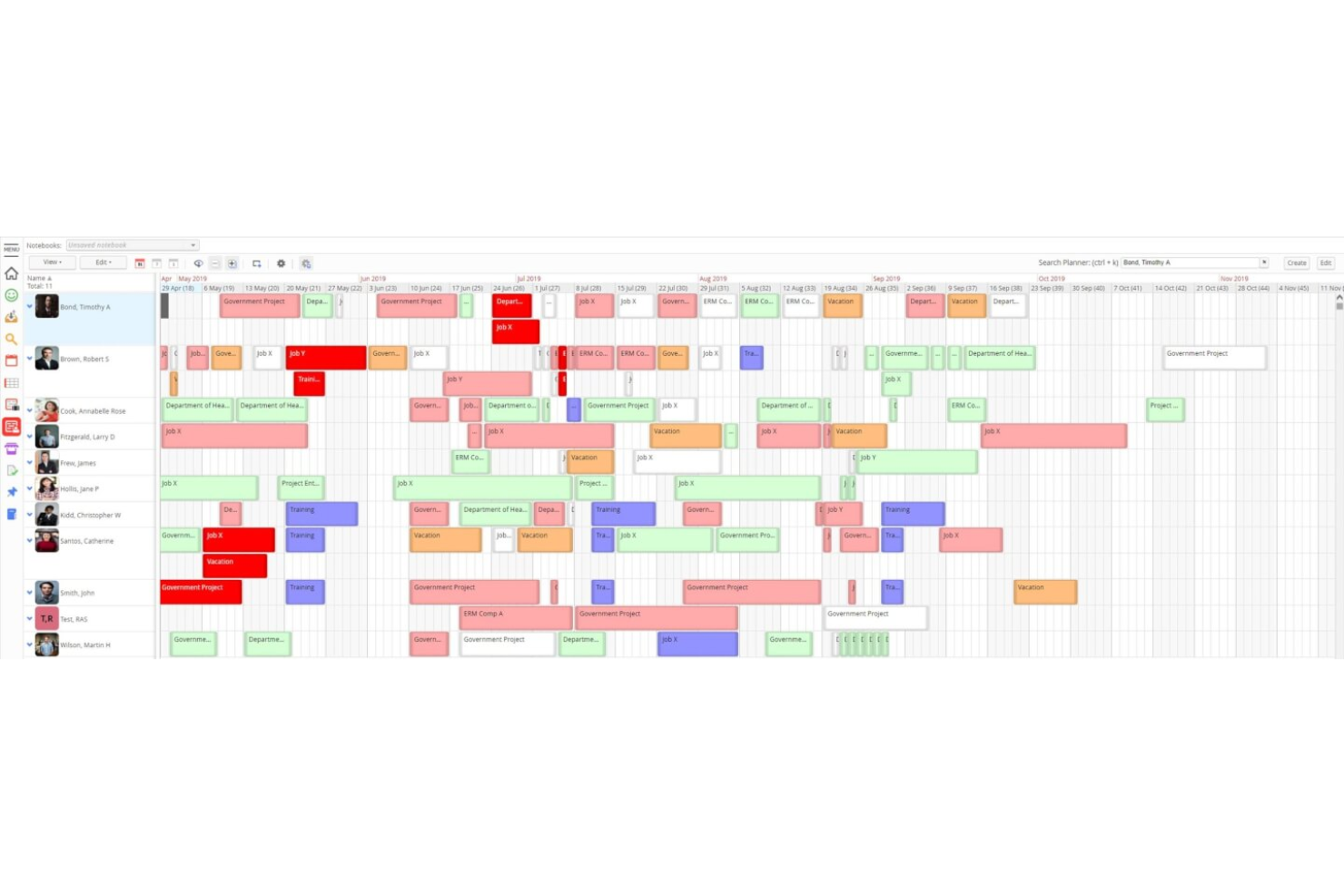
Retain è una piattaforma per la pianificazione delle risorse progettata per le aziende di servizi professionali che combina assegnazione delle risorse in base alle competenze, pianificazione delle capacità, monitoraggio della saturazione e programmazione multi-sede in un'unica interfaccia.
Per chi è ideale Retain?
Retain è particolarmente adatto per aziende di servizi professionali di medie e grandi dimensioni nei settori consulenza, contabilità o tecnologia, che devono gestire la pianificazione di risorse complesse su più team.
Perché ho scelto Retain
Ho scelto Retain tra i migliori perché il suo modulo Skills+ offre ai team di consulenza un modo realmente strutturato per abbinare persone e progetti. Si collega a una libreria di oltre 30.000 competenze di settore alimentata da Lightcast, evitandomi di dover creare una tassonomia da zero. L’abbinamento di idoneità tramite intelligenza artificiale suggerisce poi il consulente più adatto in base a queste competenze, offrendo risultati trasparenti sui quali posso effettivamente fare affidamento per assegnare le risorse ai clienti.
Funzionalità principali di Retain
- Mappa di disponibilità: Visualizza la capacità di ciascun consulente nel tempo con indicatori colorati per risorse sovraccariche, completamente occupate e disponibili.
- Dashboard di saturazione: Monitora le ore fatturabili e non fatturabili del team per seguire gli obiettivi di saturazione e individuare carenze di capacità.
- Timesheet integrati: Registra e approva le ore direttamente sulla piattaforma, mantenendo i consuntivi collegati alla pianificazione delle risorse.
- Previsione dei ricavi: Collega l’allocazione delle risorse alla previsione di ricavi e ai costi di erogazione sui progetti in corso.
Integrazioni di Retain
Retain offre integrazioni tecnologicamente agnostiche che collegano i dati di pianificazione delle risorse tra sistemi HR, CRM e finance, con integrazioni native tra cui BambooHR, Salesforce, SAP, Oracle, Oracle NetSuite OpenAir, Workday, Microsoft Dynamics 365 e SugarCRM. Supporta inoltre l’orchestrazione dei flussi di lavoro attraverso piattaforme come Microsoft Logic Apps ed è disponibile un’API aperta per integrazioni personalizzate.
Pros and Cons
Pros:
- Visione multi-sede della forza lavoro
- Ricerca delle competenze per assegnare consulenti ai progetti
- La codifica colori dei tipi di prenotazione aiuta a pianificare con chiarezza
Cons:
- La reportistica integrata richiede manipolazione manuale dei dati
- La scadenza delle sessioni interrompe il lavoro di pianificazione attivo

Scoro
Ideale per report completi sull'utilizzo delle risorse

Scoro è una piattaforma di gestione delle risorse per consulenti che unisce pianificazione dei progetti, rilevazione dei tempi, programmazione delle risorse e gestione finanziaria in un unico sistema.
Per chi è ideale Scoro?
Scoro è adatto a società di consulenza e team di servizi professionali che necessitano di gestire progetti, tracciare ore fatturabili e monitorare l'utilizzo delle risorse in un'unica soluzione.
Perché ho scelto Scoro
Scoro si guadagna un posto nella mia selezione grazie alla profondità dei suoi report sull'utilizzo delle risorse, che vanno ben oltre una semplice percentuale su una dashboard. Il report sull'utilizzo mostra una mappa di calore delle ore di ciascun membro del team—codificata a colori, così puoi vedere subito chi è sovraccarico in rosso e chi ha capacità in verde. Posso passare il mouse sopra il riepilogo di un individuo per ottenere un'analisi dettagliata di ciò su cui sta lavorando, rendendo facile individuare un eccesso di servizio su un cliente specifico prima che intacchi i margini. Scoro collega anche direttamente l'utilizzo alle previsioni di fatturato, così posso vedere in che modo le prenotazioni attuali e i progetti imminenti influenzeranno capacità e profittabilità allo stesso tempo.
Funzionalità principali di Scoro
- Pianificazione con diagramma di Gantt: Visualizza le tempistiche dei progetti e le dipendenze tra attività con diagrammi di Gantt drag-and-drop che si aggiornano in tempo reale.
- Confronto tra budget preventivato e reale: Confronta i budget pianificati con i costi del lavoro e le spese effettive durante l'avanzamento dei progetti.
- Gestione dei contratti ricorrenti: Monitora il lavoro ricorrente per i clienti, controlla i budget dei contratti e registra il tempo sulle allocazioni mensili.
- Dashboard personalizzabili: Crea dashboard specifiche per ruolo che mostrano le metriche di salute dei progetti più rilevanti per ciascun membro del team.
Integrazioni Scoro
Scoro offre integrazioni native con Google Workspace, Microsoft 365, Xero, QuickBooks, Sage ed Exact, e fornisce un'API per integrazioni personalizzate. Ulteriori integrazioni sono disponibili attraverso lo Scoro Marketplace.
Pros and Cons
Pros:
- Monitoraggio in tempo reale di progetti e risorse
- Funzionalità CRM integrata
- Ottime capacità di gestione finanziaria
Cons:
- L'app mobile è meno completa rispetto alla versione web
- Può essere necessario del tempo per imparare a personalizzare la piattaforma
New Product Updates from Scoro

Scoro Adds Time Mobile App and ELI Improvements
Scoro adds the Scoro Time mobile app for iOS/Android to track time anywhere and expands ELI with attachments, smarter filtering, and trigger-based actions. For more information, visit Scoro's official site.

Wrike
Ideale per la visibilità in tempo reale delle risorse

Wrike è una piattaforma di gestione dei progetti e delle risorse per consulenti che combina pianificazione dei progetti, monitoraggio del carico di lavoro, registrazione delle ore e collaborazione del team in un unico spazio di lavoro.
Per chi è Wrike?
Wrike è adatto a team di consulenza di medie e grandi dimensioni che gestiscono più progetti per clienti contemporaneamente e che hanno bisogno di una visibilità centralizzata su carichi di lavoro e scadenze.
Perché ho scelto Wrike
Ho incluso Wrike tra le mie migliori scelte per l’efficacia con cui le sue prenotazioni delle risorse e le visualizzazioni del carico di lavoro si integrano per offrire ai team di consulenza un quadro in tempo reale di chi sta facendo cosa su ogni progetto attivo. Quando osservo un team che gestisce cinque incarichi contemporaneamente, posso usare le prenotazioni delle risorse per riservare ore a uno specifico membro del team o a un ruolo, controllare la loro disponibilità rispetto allo sforzo stimato e individuare conflitti prima che diventino problemi di consegna. La funzione di gestione dello sforzo mi permette di impostare le ore previste a livello di attività, rendendo molto più facile prevedere quando un progetto sarà completato e verificare se il consulente assegnato ha effettivamente la capacità necessaria. Questa combinazione di prenotazione, monitoraggio dello sforzo e dashboard in tempo reale rende Wrike davvero utile per la visibilità sulle risorse—non solo per il monitoraggio dei progetti.
Caratteristiche principali di Wrike
- Visualizzazioni progetto personalizzabili: Passa tra viste Gantt, Bacheca, Tabella, Calendario e Grafico per visualizzare le tempistiche dei progetti e lo stato delle attività su tutti gli incarichi clienti.
- Bacheche Scrum: Gestisci flussi di lavoro Agile con priorità al backlog, pianificazione degli sprint e monitoraggio dei progressi in tempo reale su bacheche Scrum condivise.
- Report attività utente: Genera rapporti di audit on-demand che tracciano le azioni di ciascun utente, così puoi monitorare la proprietà delle attività e la responsabilità all’interno del team.
- Agenti AI: Implementa agenti AI senza codice per gestire attività come l’assegnazione automatica delle risorse e riepiloghi degli aggiornamenti di stato sui progetti attivi.
Integrazioni di Wrike
Wrike offre centinaia di integrazioni tramite il suo sistema integrato e il marketplace, inclusi strumenti come Google Workspace, Microsoft 365, Salesforce e Slack. Supporta anche Zapier e fornisce un’API per integrazioni personalizzate.
Pros and Cons
Pros:
- Solide funzionalità di gestione delle attività
- Dashboard altamente personalizzabili
- Numerose integrazioni disponibili
Cons:
- Può essere difficile imparare a personalizzare la piattaforma
- Le funzioni avanzate di pianificazione delle risorse sono limitate ai piani di livello superiore
New Product Updates from Wrike

Wrike Adds Quick Search to Table View
Wrike adds Quick Search to Table View with full-table search across titles, descriptions, and fields, plus highlighted matches. This helps users find tasks faster in large tables. For more information, visit Wrike’s official site.

Ideale per la pianificazione unificata delle risorse
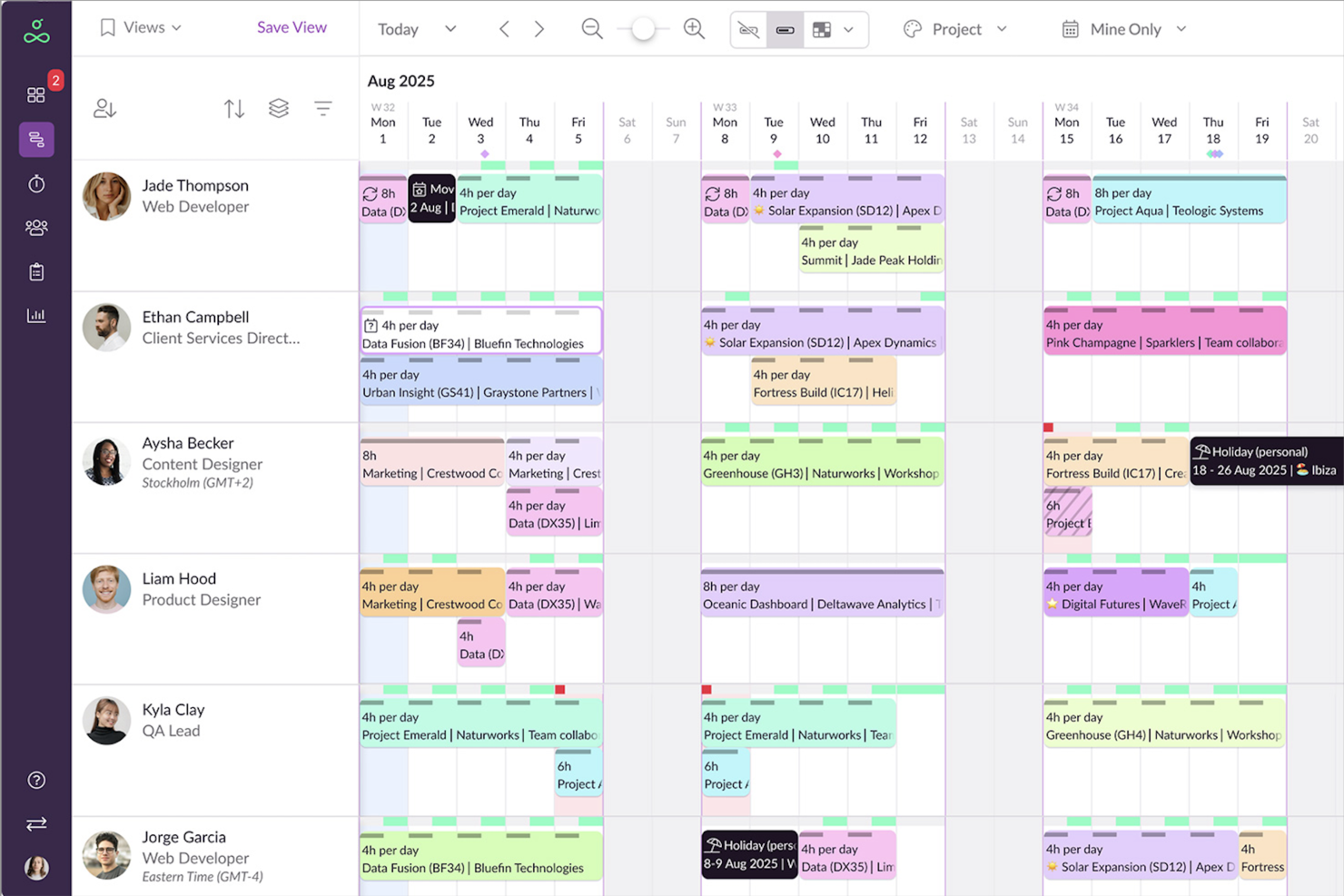
Resource Guru è una piattaforma di gestione delle risorse per consulenti che necessitano di una pianificazione centralizzata, monitoraggio della disponibilità in tempo reale e pianificazione della capacità su più progetti e team.
Per chi è più adatto Resource Guru?
Resource Guru è ideale per team di consulenza e agenzie che gestiscono la pianificazione e la disponibilità di persone, progetti e clienti.
Perché ho scelto Resource Guru
Resource Guru si guadagna un posto nella mia shortlist per la sua eccellente gestione della pianificazione unificata di persone, attrezzature e sale riunioni da una singola vista calendario. Apprezzo in particolare il sistema di gestione dei conflitti: quando due progetti richiedono lo stesso consulente, Resource Guru segnala immediatamente il conflitto e consente di aggiungere la prenotazione a una lista d’attesa fino alla sua risoluzione, invece di procedere al doppio booking. Utilizzo anche la vista heatmap, che colora il carico di lavoro di ogni membro del team così da vedere subito chi è sovraccarico e chi ha ancora capacità senza dover controllare ogni agenda. Il sistema drag-and-drop per riprogrammare le prenotazioni è molto utile quando un cliente cambia le esigenze a progetto in corso.
Funzionalità chiave di Resource Guru
- Report sull’utilizzo: Traccia le ore fatturabili vs. non fatturabili e monitora i tassi di utilizzo tra persone, progetti e clienti con report personalizzabili.
- Timesheet suggeriti automaticamente: I timesheet importano il lavoro direttamente dal calendario, così ciascun membro può registrare le ore settimanali con un solo clic.
- Prenotazioni provvisorie: Segna le prenotazioni come provvisorie per pianificare lavori non ancora confermati e trasformale in definitive non appena il progetto è assicurato.
- Campi personalizzati: Tagga le risorse con competenze, ruoli o altri attributi e filtra la pianificazione per trovare la persona giusta per ogni progetto.
Integrazioni di Resource Guru
Resource Guru offre integrazioni native con Outlook Calendar, Google Calendar, Jira, Asana, Slack, Microsoft Teams, Google Sheets, Salesforce, Workday e Basecamp. Si collega anche con Zapier e offre una API per integrazioni personalizzate.
Pros and Cons
Pros:
- Interfaccia intuitiva per una facile pianificazione delle risorse
- Gestione efficace dei conflitti per evitare sovrapposizioni
- Dashboard e report personali per una migliore visibilità delle risorse
Cons:
- Funzionalità avanzate limitate per la gestione di progetti complessi
- Dipendenza da servizi esterni come Zapier per integrazioni aggiuntive
New Product Updates from Resource Guru

Resource Guru Adds More Control Over Calendar Sync
Resource Guru adds more control over Google and Outlook Calendar sync, including source calendar selection and destination calendar options. These updates help users manage external events and Resource Guru bookings with less clutter. For more information, visit Resource Guru’s official site.
 .
.
Kantata
Ideale per la gestione delle risorse incentrata sulle persone

Kantata è una piattaforma di gestione delle risorse per consulenti che riunisce pianificazione dei progetti, assegnazione delle risorse, previsione e rilevazione delle ore lavorate in un unico sistema.
Per chi è ideale Kantata?
Kantata è adatta a medie e grandi aziende di servizi professionali che devono gestire una pianificazione complessa delle risorse su più progetti e team.
Perché ho scelto Kantata
Kantata si guadagna un posto tra le migliori della mia lista perché è una delle poche piattaforme PSA costruite attorno all'idea che le persone siano il vero prodotto. Ciò che apprezzo di più è l’abbinamento delle risorse basato sulle competenze—puoi cercare nel tuo network di talenti specifiche abilità, certificazioni o esperienze di progetto passate per trovare la persona giusta per un ruolo, invece di occupare semplicemente una posizione in base alla disponibilità. In aggiunta, la visibilità in tempo reale della capacità di tutto il team ti permette di vedere chi è sovraccarico, chi ha margine operativo e dove la richiesta supera l’offerta prima che diventi un problema. L’AI Expertise Engine apprende dagli incarichi precedenti per suggerire raccomandazioni di staffing sempre più intelligenti nel tempo, caratteristica particolarmente utile quando si gestisce una vasta squadra di consulenti su più progetti in contemporanea.
Caratteristiche principali di Kantata
- Gestione finanziaria dei progetti: Monitora costi, margini e fatturazione dei progetti in una vista unificata insieme ai dati di delivery.
- Kantata Pulse: Raccogli dati in tempo reale su sentiment di clienti e dipendenti direttamente dalla piattaforma per monitorare lo stato di salute dei progetti.
- Assistente di progetto con AI generativa: Redigi automaticamente report sullo stato, aggiornamenti per i dirigenti e casi studio dei progetti utilizzando i dati live dei progetti.
- Strumenti di preventivazione e definizione dello scope: Crea preventivi accurati e collega i dati di scope alle risorse e agli aspetti finanziari prima dell’avvio di un progetto.
Integrazioni di Kantata
Kantata offre integrazioni native con Avalara, NetSuite, Slack, Sage, Microsoft 365, Xero, HubSpot, Expensify, Jira, Bamboo HR e Concur.
Pros and Cons
Pros:
- Report e metriche personalizzabili
- Funzionalità di gestione della capacità
- Pianificazione e programmazione delle risorse automatizzata
Cons:
- Il processo di configurazione può richiedere assistenza
- Possibile curva di apprendimento per le funzionalità avanzate
New Product Updates from Kantata

Kantata Adds Access Group Change History
Kantata adds Access Groups History, letting account administrators track changes to group details, membership, and permissions in Recent History. The update also makes these events available through the Subscribed Events API for broader monitoring. For more information, visit Kantata’s official site.
 .
.
Ideale per allineare risorse e budget
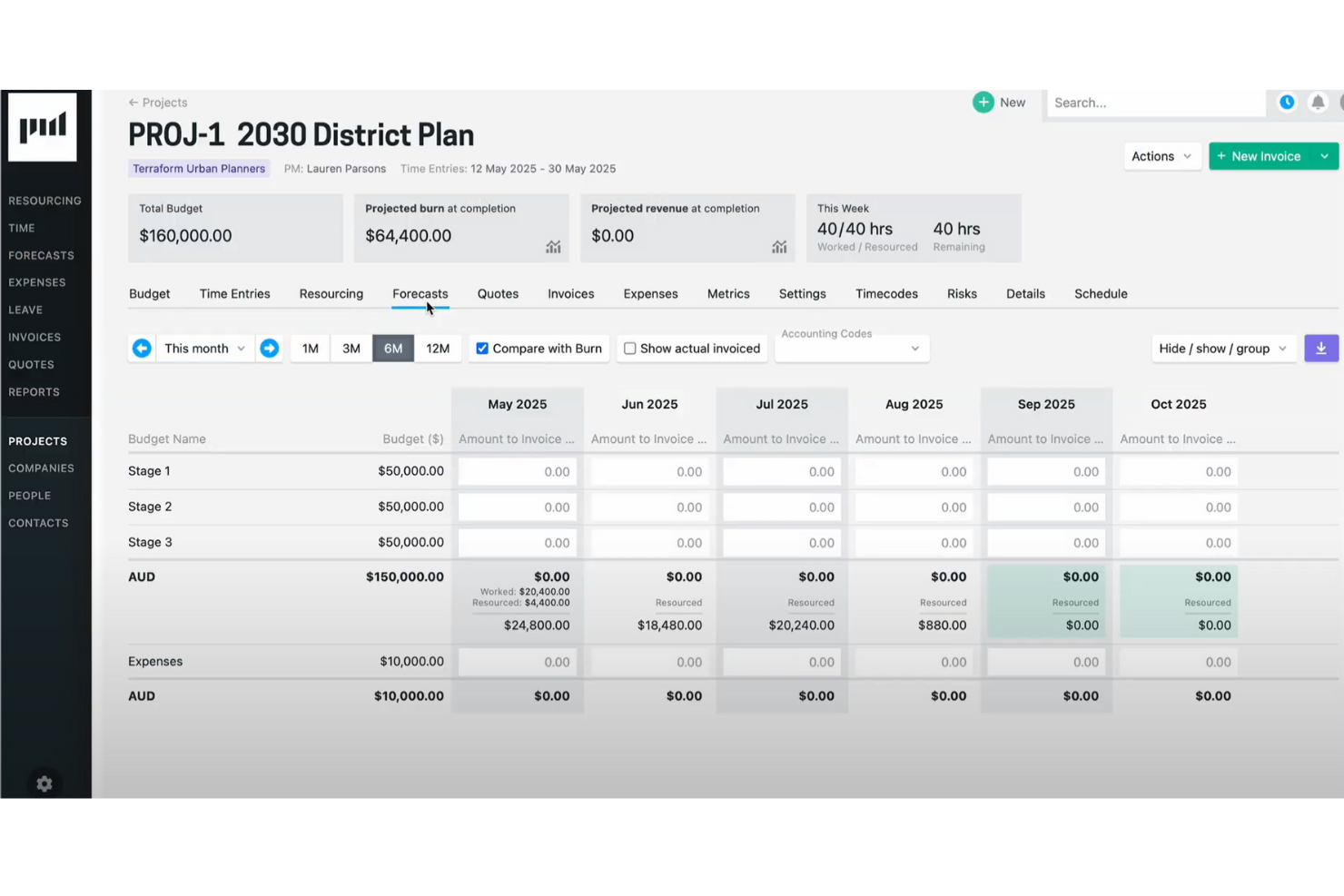
Projectworks è una piattaforma di gestione delle risorse pensata per i consulenti che unisce pianificazione dei progetti, programmazione delle risorse, rilevazione delle ore lavorate e gestione finanziaria in un unico sistema.
Per chi è ideale Projectworks?
Projectworks è particolarmente adatto a studi di servizi professionali—soprattutto team di consulenza, ingegneria e servizi IT—che hanno bisogno di gestire progetti, personale e finanze in un unico luogo.
Perché ho scelto Projectworks
Ho scelto Projectworks per la sua stretta connessione tra la pianificazione delle risorse e la gestione finanziaria dei progetti. La maggior parte degli strumenti tratta questi aspetti separatamente—programmi le persone in un posto e monitori i budget altrove. Con Projectworks, quando assegno un consulente a un progetto, quei dati sulle risorse si riversano direttamente nella previsione finanziaria, così posso vedere il consumo previsto, il margine e i ricavi in tempo reale. Mi piace anche il report di Previsione Finanziaria, che mostra lo sforzo previsto insieme alle spese attuali, permettendomi di individuare sforamenti di budget prima che si verifichino.
Funzionalità Principali di Projectworks
- Monitoraggio dell'utilizzo: Tieni traccia delle ore fatturabili e non fatturabili del team per vedere come il tempo dei consulenti si traduce in ricavi e margine di progetto.
- Gestione delle assenze: Monitora le assenze del team direttamente dalla vista delle risorse, ottenendo una panoramica completa della disponibilità quando pianifichi le assegnazioni di progetto.
- Fatturazione precompilata: Le ore e le spese approvate confluiscono direttamente nelle fatture ai clienti, supportando modelli di fatturazione a prezzo fisso, a tariffa, a tempo e spese e a somma forfettaria.
- Report personalizzati: Crea report su misura utilizzando i dati dei tuoi progetti per evidenziare metriche come WIP, margine di progetto ed utilizzo in base alle esigenze specifiche della tua azienda.
Integrazioni di Projectworks
Projectworks offre integrazioni native con Xero, QuickBooks, BambooHR e Microsoft 365. È disponibile un'API per integrazioni personalizzate.
Pros and Cons
Pros:
- Progettato per aziende di servizi professionali
- Funzionalità robuste di gestione progetti e finanze
- Collega la scelta dello staff alla redditività del progetto
Cons:
- Potrebbe risultare troppo complesso per i team piccoli
- Curva di apprendimento per impostare report avanzati

BQE Core
Ideale per servizi professionali
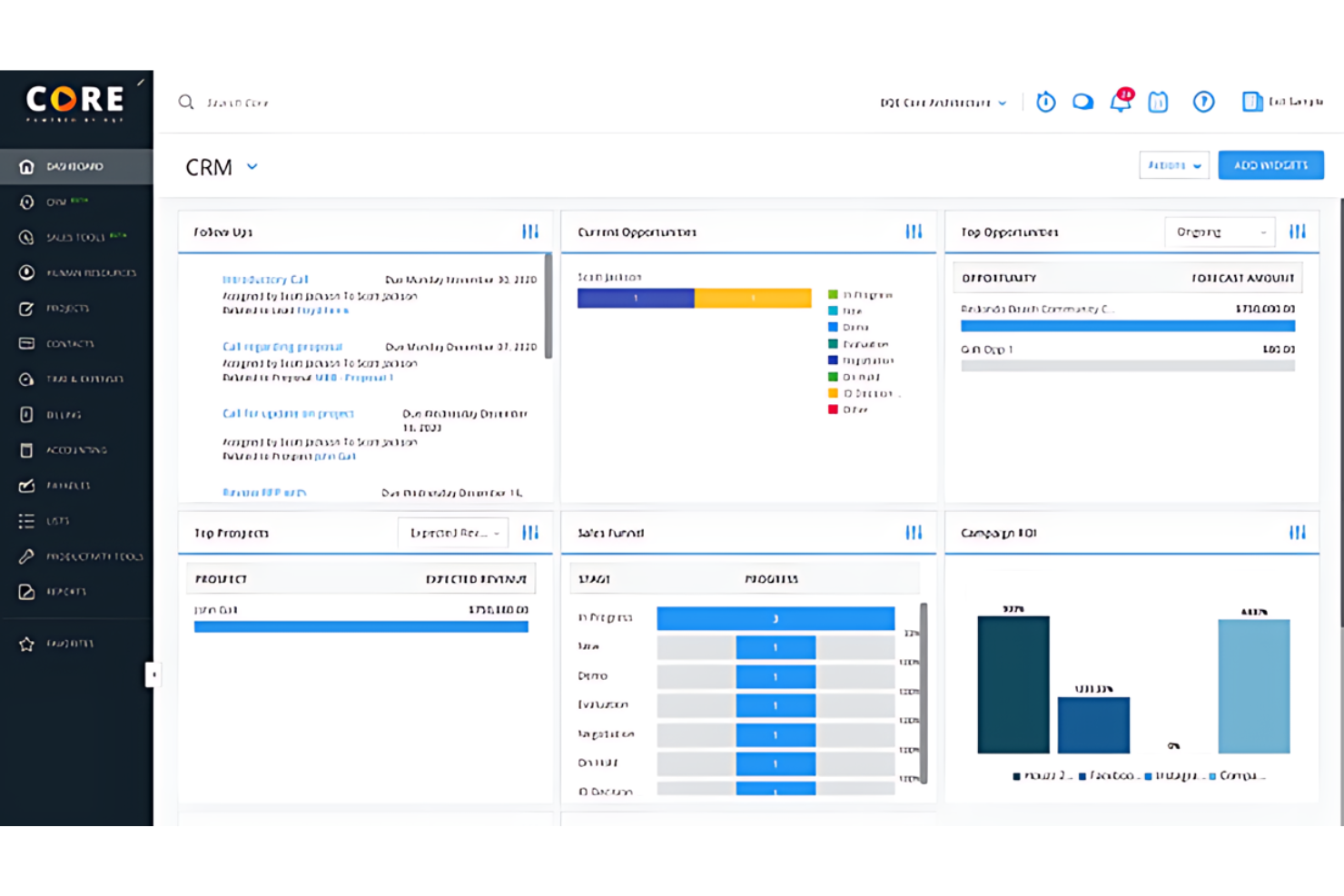
BQE Core è una piattaforma di gestione delle risorse per consulenti che riunisce in un unico sistema la gestione dei progetti, delle ore e delle spese, la fatturazione e la reportistica.
Per chi è ideale BQE Core?
BQE Core è particolarmente adatto per studi di servizi professionali—come architettura, ingegneria e consulenza—che necessitano di gestire progetti, risorse e fatturazione in un'unica soluzione.
Perché ho scelto BQE Core
Ho incluso BQE Core nella mia selezione perché è una delle poche piattaforme di gestione delle risorse progettate specificamente per i servizi professionali, e non adattate da uno strumento generico per progetti. Apprezzo molto la funzione di pianificazione delle risorse che utilizza visualizzazioni in stile Gantt per mostrare l'utilizzo e la capacità di ciascun membro del team su tutti i progetti attivi in contemporanea—così, quando arriva un nuovo incarico di consulenza, puoi vedere esattamente chi è disponibile e se la sua seniority corrisponde al budget del progetto. Utilizzo il monitoraggio della fatturabilità per assicurarmi che i consulenti raggiungano i propri obiettivi senza sforare, collegando direttamente le decisioni di staffing ai margini di profitto. Poiché le registrazioni delle ore, le allocazioni delle risorse e la fatturazione sono tutte nello stesso sistema, non è necessario riconciliare i dati tra strumenti diversi.
Funzionalità chiave di BQE Core
- Dashboard Project Center: Monitora programmi dei progetti, traguardi, attività, deliverable e pagamenti delle fatture da un'unica interfaccia con suddivisioni per fase.
- Fatturazione batch: Genera e invia automaticamente fatture in blocco su più progetti utilizzando uno dei 20 modelli di fatturazione standard.
- Ripartizione della fattura su più parti: Crea una sola fattura che copra tutti i tipi di contratto—ad ore, a tariffa fissa, costi più margine, costo unitario e percentuale—e suddividila tra più clienti.
- Previsione della capacità: Visualizza come evolvono le richieste di personale futuro per determinare se assumere o accettare ulteriori progetti.
Integrazioni BQE Core
BQE Core offre integrazioni native con QuickBooks, DocuSign, Power BI, Xero, Google e Microsoft. Si connette anche con Zapier per accedere a centinaia di ulteriori integrazioni e fornisce un'API aperta per integrazioni personalizzate.
Pros and Cons
Pros:
- Progettato specificamente per servizi professionali come architettura e ingegneria
- Funzionalità complete per gestione progetti e controllo finanziario
- Ampie opzioni di personalizzazione e integrazione
Cons:
- La struttura dei prezzi può essere complessa e i livelli superiori possono risultare costosi
- Potrebbe avere una curva di apprendimento a causa delle sue numerose funzionalità

Hello Bonsai
Ideale per la gestione di tempo e risorse

Bonsai Consulting Software è una piattaforma di gestione delle risorse pensata per i consulenti, che riunisce in un unico spazio la gestione dei progetti, il monitoraggio del tempo, l’allocazione delle risorse e la gestione dei clienti.
A chi è destinato Bonsai Consulting Software?
Bonsai Consulting Software è la soluzione ideale per consulenti freelance e piccole società di consulenza che necessitano di una piattaforma completa per gestire il lavoro con i clienti, il tempo e i progetti.
Perché ho scelto Bonsai Consulting Software
Bonsai Consulting Software si è guadagnato un posto tra le mie scelte grazie alla stretta integrazione tra le sue funzionalità di monitoraggio del tempo e allocazione delle risorse e la salute finanziaria effettiva di un progetto. Apprezzo che timer a un clic e fogli presenze settimanali alimentino direttamente fatturazione e report di utilizzo, eliminando la riconciliazione manuale tra ciò che il team registra e ciò che viene fatturato. La vista sulle risorse consente di vedere la capacità del team a colpo d’occhio e di assegnare le persone ai progetti prima che sorgano conflitti: un aspetto cruciale quando gestisco diversi incarichi clienti contemporaneamente. Il cruscotto budget vs. consuntivo mostra la redditività in tempo reale, permettendomi di individuare tempestivamente l’espansione incontrollata della portata anziché accorgermene a progetto chiuso.
Funzionalità principali di Bonsai Consulting Software
- Portale clienti: Offri ai clienti un hub sicuro dove visualizzare proposte, fatture, stato dei progetti e file condivisi, senza continui scambi di email.
- CRM pipeline di vendita: Acquisisci, qualifica e converti lead utilizzando una pipeline integrata, collegata direttamente alla creazione di accordi e progetti.
- Fatturazione e gestione dei pagamenti: Genera fatture personalizzate, automatizza i promemoria per i pagamenti e accetta pagamenti online direttamente dalla piattaforma.
- Automazione dei flussi di lavoro: Attiva azioni automatiche su anagrafiche clienti, progetti e attività per ridurre il lavoro amministrativo ripetitivo man mano che il carico di lavoro cresce.
Integrazioni di Bonsai Consulting Software
Bonsai Consulting Software offre integrazioni native con QuickBooks, Calendly e Zapier. È disponibile un’API per integrazioni personalizzate.
Pros and Cons
Pros:
- Automazioni per attività ripetitive
- Portali clienti per la gestione delle relazioni
- Funzionalità CRM con profili dettagliati
Cons:
- Mancano funzionalità avanzate di comunicazione
- App mobile essenziale
Altri software di gestione delle risorse per consulenti
Di seguito trovi un elenco di altri software di gestione delle risorse per consulenti che non sono entrati nella lista dei migliori, ma che vale comunque la pena prendere in considerazione.
- Parallax
Ideale per la creazione automatica dei piani risorse
- Mosaic
Ideale per insight guidati dall'IA
- eResource Scheduler
Ideale per report di risorse e finanziari
- Birdview PSA
Ideale per la gestione olistica
- Screendragon
Migliore per la pianificazione di risorse e carichi di lavoro per consulenti
- GoodDay
Ideale per spazi di lavoro personalizzabili
- Saviom
Ideale per l’ottimizzazione delle risorse
- Runn
Ideale per la pianificazione in tempo reale
- Hub Planner by Milient
Ideale per la pianificazione drag-and-drop


Software di gestione dei progetti correlati
Se non hai ancora trovato quello che cerchi, dai un'occhiata a questi altri strumenti correlati che abbiamo testato e valutato:
- Software di gestione dei progetti
- Software di gestione delle risorse
- Software di automazione dei flussi di lavoro
- Software di gestione delle attività
- Creatore di diagrammi di Gantt
- Software di pianificazione dei progetti
- Alternative a Resource Guru
Come valuto i software per la gestione delle risorse
Divido la valutazione in tre parti, attribuendo il peso maggiore alle funzionalità di base: assegnare le persone ai progetti e mostrare la capacità rispetto agli impegni. In seguito, cerco funzionalità distintive, come la pianificazione degli scenari per confrontare i piani di assegnazione del personale. Infine, considero l'avvio, l'assistenza, le integrazioni, la sicurezza e i prezzi.
Funzionalità di base (Requisiti imprescindibili per questo elenco)
Quando seleziono gli strumenti per il mio elenco, assegno a ciascuno un punteggio su una scala da 0 (non offre la funzionalità) a 5 (eccelle in quest'area) per ogni funzionalità di base elencata di seguito. Converto quindi il totale in una percentuale per contribuire a valutare l'adeguatezza complessiva di ciascuno strumento, attribuendo un peso aggiuntivo alle funzionalità che ho ritenuto essenziali.
- Pianificazione e assegnazione delle risorse (Essenziale): cerco sequenze temporali o calendari che assegnino le persone a progetti, ruoli e attività nell'arco di periodi di consegna sovrapposti.
- Capacità e disponibilità (Essenziale): verifico se le squadre possono confrontare le ore disponibili con il lavoro assegnato e individuare le prossime situazioni di sovrassegnazione.
- Gestione del carico di lavoro: valuto le visualizzazioni delle squadre, le mappe di calore e gli strumenti di riassegnazione per bilanciare i carichi di lavoro tra progetti simultanei.
- Monitoraggio dell'utilizzo: cerco report pianificati rispetto ai consuntivi, inclusi l'utilizzo della squadra e del progetto, nonché quello fatturabile o non fatturabile.
- Previsioni e pianificazione della domanda: valuto previsioni che utilizzano piani di progetto, opportunità in fase di acquisizione o dati storici per evidenziare future carenze di personale.
- Corrispondenza basata su competenze e ruoli: verifico se i responsabili possono filtrare o abbinare le persone in base a competenze, ruoli, esperienza e disponibilità.
Una volta ottenuto un elenco di strumenti che soddisfano i criteri, considero ciò che distingue ciascuna piattaforma.
Fattori distintivi (Ciò che differenzia i fornitori)
Ecco come confronto e metto in evidenza le differenze tra i vari fornitori:
Funzionalità distintive
Inizio dalla modellazione degli scenari. Verifico se uno strumento mi consente di creare piani di assegnazione del personale affiancati, basati su scenari ipotetici, prima di confermare le assegnazioni: è utile quando arriva un nuovo progetto e devo capire in che modo spostare una persona da un incarico influisca su altri tre. Valuto anche i report finanziari e sui margini, verificando in particolare se i costi delle risorse e le tariffe di fatturazione confluiscono nei budget dei progetti aggiornati in tempo reale, così da poter individuare l'erosione dei margini durante l'esecuzione anziché a posteriori. È importante anche la visibilità sul tempo disponibile: cerco pannelli di controllo che mettano in evidenza i membri della squadra sottoutilizzati, così da poter riassegnare i talenti prima che il tempo di inattività diventi un problema di costi.
Oltre le funzionalità
Verifico quanto bene ciascuno strumento si colleghi ai sistemi di gestione dei progetti, finanziari e delle risorse umane già utilizzati dalla squadra. Una piattaforma come Resource Guru o Kantata, che si sincronizza con l'insieme degli strumenti esistenti, fa risparmiare ore di inserimento duplicato dei dati. Valuto anche il supporto durante l'avvio, perché la migrazione degli inventari delle competenze, delle tariffe di costo e delle regole di disponibilità in un nuovo strumento è il punto in cui la maggior parte delle implementazioni si blocca. Infine, verifico se i report sono sufficientemente configurabili per destinatari diversi: un direttore dell'ufficio di gestione dei progetti ha bisogno di visualizzazioni dell'utilizzo a livello di portafoglio, mentre un responsabile operativo vuole una suddivisione dei margini per progetto da poter condividere con un cliente.
Come scegliere un software di gestione delle risorse per consulenti
Mentre porti avanti il tuo esclusivo processo di selezione del software, tieni presenti i seguenti aspetti:
- Comprensione delle esigenze specifiche: prima di scegliere un software per la gestione delle risorse, identifica le tue esigenze specifiche. Ciò include comprendere le dimensioni del tuo team, la complessità dei tuoi progetti e i tipi di risorse che devi gestire. Ad esempio, un consulente che gestisce più team in diverse sedi avrà bisogno di un software con funzionalità complete per la pianificazione e l'allocazione.
- Capacità di integrazione: cerca un software che possa connettersi facilmente agli strumenti che utilizzi attualmente, come sistemi CRM, software di contabilità o piattaforme di comunicazione. Questa considerazione è particolarmente importante per i consulenti che si affidano a una suite di strumenti e devono garantire la coerenza dei dati tra essi.
- Scalabilità: con la crescita della tua attività di consulenza, il software dovrebbe essere in grado di stare al passo. È importante scegliere una soluzione che possa crescere insieme alla tua attività, gestendo più risorse, progetti e utenti senza cali nelle prestazioni. Ad esempio, una piccola società di consulenza che prevede di espandersi nei prossimi anni trarrà vantaggio da un software in grado di gestire un carico di lavoro crescente.
- Esperienza utente: il software dovrebbe essere intuitivo per garantire che tutti i membri del team possano utilizzarlo efficacemente. I consulenti lavorano spesso con team eterogenei, quindi un software con un'interfaccia intuitiva favorirà una rapida adozione e ridurrà al minimo il tempo dedicato alla formazione. Al contrario, un sistema complesso può comportare una curva di apprendimento ripida e generare resistenza da parte del team.
- Assistenza clienti e formazione: una buona assistenza clienti e materiali formativi completi possono influire notevolmente sulla corretta implementazione e sull'utilizzo del software. Considera il livello di assistenza fornito dal fornitore del software, inclusi disponibilità e tempi di risposta. Questo è particolarmente importante per i consulenti che potrebbero aver bisogno di assistenza immediata per soddisfare le esigenze dei clienti o rispettare le scadenze dei progetti.
Tendenze nei software per la gestione delle risorse per consulenti
Poiché il settore della consulenza continua a evolversi, i software per la gestione delle risorse stanno diventando sempre più essenziali per favorire un lavoro efficiente. Diverse tendenze chiave stanno plasmando la tecnologia per la gestione delle risorse, offrendo ai consulenti soluzioni innovative per gestire le proprie risorse in modo più efficace.
- Integrazione con l'IA per l'analisi predittiva: i software per la gestione delle risorse integrano sempre più l'IA per offrire analisi predittive. Questo è un esempio di come gli strumenti di IA per consulenti possano aiutare i consulenti ad anticipare le esigenze dei progetti e ad allocare le risorse in modo più efficace.
- Maggiore attenzione alla collaborazione in tempo reale: molti software pongono ora l'accento sulle funzionalità che supportano la collaborazione in tempo reale tra i team. Questa tendenza è determinata dalla necessità per i consulenti di lavorare in modo sincronizzato, indipendentemente dalla loro posizione.
- Personalizzazione e flessibilità avanzate: si è inoltre registrato un orientamento verso soluzioni per la gestione delle risorse più personalizzabili e flessibili, che consentono ai consulenti di adattare il software ai requisiti e ai flussi di lavoro specifici dei progetti.
- Accessibilità da dispositivi mobili e integrazione cloud: gli strumenti per la gestione delle risorse si concentrano sempre più sull'accessibilità da dispositivi mobili e sull'integrazione cloud. Ciò consente ai consulenti di gestire le risorse in qualsiasi momento e ovunque si trovino.
- Sostenibilità e ottimizzazione delle risorse: inoltre, i software offrono ora funzionalità per la sostenibilità e l'ottimizzazione delle risorse, con l'obiettivo di aiutare i consulenti a ridurre gli sprechi e migliorare l'efficienza.
Che cos'è il software per la gestione delle risorse per consulenti?
Il software per la gestione delle risorse per consulenti è progettato per aiutare gli utenti a gestire e allocare le proprie risorse in modo efficiente. Le società di consulenza e i consulenti indipendenti lo utilizzano generalmente per pianificare, monitorare e gestire le risorse umane e materiali nell'ambito di più progetti. Le funzionalità principali includono la previsione del fabbisogno di risorse, la programmazione del personale sui progetti, il monitoraggio della disponibilità e dell'utilizzo delle risorse e l'analisi dei dati sulle prestazioni per ottimizzare la pianificazione futura delle risorse. Questo software può essere essenziale per i consulenti che devono bilanciare le esigenze di più clienti e garantire un utilizzo efficiente delle risorse.
Funzionalità dei software per la gestione delle risorse per consulenti
Quando scegli il software per la gestione delle risorse più adatto ai consulenti, è importante selezionare uno strumento che garantisca una supervisione efficace dei progetti e un'allocazione efficiente delle risorse, rispondendo al contempo alle esigenze specifiche della consulenza. Di seguito sono riportate alcune funzionalità essenziali per la gestione delle risorse da ricercare:
- Visibilità in tempo reale: questa funzionalità può offrire informazioni immediate sulle risorse disponibili. È fondamentale per prendere decisioni informate e rispondere rapidamente ai cambiamenti nelle esigenze dei progetti.
- Monitoraggio delle competenze: questa funzionalità può aiutarti a comprendere le competenze del tuo team. Conoscere le capacità a tua disposizione consente di abbinare efficacemente i requisiti del progetto alle persone giuste.
- Previsione: questa funzionalità può aiutarti ad anticipare le esigenze di risorse per i progetti futuri. Previsioni accurate aiutano a prevenire colli di bottiglia e un utilizzo eccessivo o insufficiente del personale, garantendo un carico di lavoro equilibrato.
- Pianificazione della capacità: questa funzionalità ti aiuta a gestire il carico di lavoro del tuo team. In questo modo eviti di sovraccaricare il personale, una situazione che può portare all'esaurimento e a una riduzione della produttività.
- Integrazione con la gestione dei progetti: questa funzionalità ti aiuta a collegare la pianificazione delle risorse alle tempistiche dei progetti. Questa integrazione è essenziale per allineare l'allocazione delle risorse alle tappe fondamentali e alle scadenze del progetto.
- Monitoraggio del tempo: gli strumenti di monitoraggio del tempo, come i fogli presenze, possono aiutarti a controllare il tempo dedicato alle varie attività e ai progetti. Il monitoraggio del tempo è fondamentale per la precisione della fatturazione, per tenere traccia delle ore fatturabili e non fatturabili e per comprendere la redditività del progetto.
- Report e analisi: questa funzionalità può aiutarti ad accedere a report dettagliati e analisi delle prestazioni. Queste informazioni sono necessarie per valutare l'efficienza dell'utilizzo delle risorse e prendere decisioni basate sui dati.
- Strumenti di collaborazione: questa funzionalità può aiutarti a facilitare la comunicazione e il lavoro di squadra tra i consulenti. Una collaborazione efficace è fondamentale per il successo di qualsiasi progetto e garantisce che tutti i membri del team siano allineati.
- Accessibilità da dispositivi mobili: questa funzionalità può aiutarti a gestire le risorse ovunque ti trovi. L'accesso da dispositivi mobili consente inoltre ai consulenti di aggiornare e controllare lo stato delle proprie risorse da qualsiasi luogo, una possibilità particolarmente utile per chi viaggia frequentemente.
- Personalizzazione: questa funzionalità può aiutarti ad adattare il software alle esigenze specifiche della tua azienda. La personalizzazione garantisce che il software si integri con i processi e i flussi di lavoro unici della tua attività di consulenza.
Vantaggi del software di gestione delle risorse per i consulenti
Il software di gestione delle risorse offre una piattaforma unificata per l'ottimizzazione delle risorse e la pianificazione dei progetti, aiutando i consulenti a migliorare la propria efficienza operativa. Ecco alcuni dei principali vantaggi dell'utilizzo di un software di gestione delle risorse per i consulenti:
- Pianificazione efficiente delle risorse: il software può offrire visibilità in tempo reale sui carichi di lavoro e sulla disponibilità dei dipendenti, consentendo una distribuzione efficace delle attività e prevenendo sia la prenotazione eccessiva sia il sottoutilizzo dei consulenti.
- Previsioni accurate e pianificazione della capacità: i consulenti possono anticipare i futuri requisiti di risorse e identificare potenziali ostacoli ai progetti, consentendo alle organizzazioni di adeguare la propria forza lavoro in risposta alle fluttuazioni del mercato e mantenere lo slancio del progetto.
- Migliore allocazione delle risorse: una matrice delle competenze in tempo reale integrata nel software garantisce che i consulenti vengano assegnati ai progetti in base alle loro competenze, migliorando la qualità del progetto e aumentando le probabilità di successo.
- Informazioni aziendali preziose: grazie alla grande quantità di dati e metriche, il software di gestione delle risorse offre informazioni che aiutano i responsabili a individuare le irregolarità e a gestire proattivamente i costi dei progetti, favorendo il processo decisionale strategico e migliorando la gestione dei progetti.
- Integrazione con altri sistemi e flussi di lavoro: la possibilità di integrarsi con altri sistemi semplifica il carico di lavoro amministrativo centralizzando la raccolta e l'analisi dei dati, ottimizzando così i processi di elaborazione delle paghe e fatturazione e riducendo i ritardi amministrativi.
Investendo in un software di gestione delle risorse dotato di funzionalità complete, i consulenti possono migliorare l'utilizzo delle risorse, la pianificazione strategica e il successo complessivo dei progetti.
Costi e prezzi del software di gestione delle risorse per i consulenti
Comprendere i costi e i prezzi del software di gestione delle risorse è fondamentale per i consulenti che desiderano massimizzare il ritorno sull'investimento. Data l'ampia varietà di modelli di prezzo disponibili sul mercato, è importante valutare ciò che ogni opzione offre in termini di funzionalità e scalabilità. Di seguito, fornisco una breve panoramica dei vari piani tariffari e degli aspetti relativi ai costi del software di gestione delle risorse, per aiutarti a scegliere la soluzione più adatta al tuo budget e alle tue esigenze.
Ecco una panoramica dei piani tariffari più comuni per il software di gestione delle risorse destinato ai consulenti.
Tabella comparativa dei piani del software di gestione delle risorse per i consulenti
| Tipo di piano | Prezzo medio | Funzionalità comuni |
| Gratuito | $0 | Pianificazione di base delle risorse, Progetti limitati, Reportistica di base |
| Base | $10 - $20/utente/mese | Pianificazione avanzata, Monitoraggio del tempo, Analisi di base |
| Professionale | $20 - $40/utente/mese | Pianificazione avanzata delle risorse, Collaborazione in tempo reale, Suite completa per la gestione dei progetti |
| Aziendale | Prezzo personalizzato | Integrazioni personalizzate, Funzionalità di sicurezza avanzate, Configurazione iniziale e assistenza personalizzate |
Quando selezioni un piano, è importante considerare le esigenze specifiche della tua attività di consulenza, come il numero di utenti, la complessità dei progetti e il livello di assistenza necessario. Spesso è consigliabile cercare una prova gratuita per valutare il software scelto prima di impegnarsi completamente. In base alle tue esigenze, puoi iniziare con un piano base per contenere i costi oppure scegliere un piano professionale per usufruire di funzionalità più estese.
Domande frequenti sui software di gestione delle risorse per consulenti
Ecco alcune domande frequenti che mi vengono poste sui software di gestione delle risorse per consulenti.
Il software di gestione delle risorse è adatto a società di consulenza di tutte le dimensioni?
Il software di gestione delle risorse è adatto a società di consulenza di tutte le dimensioni. Le società più piccole possono trarre vantaggio da una migliore organizzazione ed efficienza, mentre quelle più grandi possono gestire in modo più efficace progetti complessi e team multipli. La cosa fondamentale è scegliere una soluzione software in linea con le dimensioni, la complessità e le esigenze aziendali specifiche della società.
In che modo il software di gestione delle risorse gestisce i cambiamenti nell'ambito o nelle risorse di un progetto?
Il software di gestione delle risorse include generalmente funzionalità che consentono di apportare facilmente modifiche ai piani di progetto e all’allocazione delle risorse. Gli utenti possono aggiornare i programmi, riassegnare le attività e riallocare le risorse secondo necessità per adeguarsi ai cambiamenti nell’ambito o nella disponibilità del progetto. Questa flessibilità aiuta i consulenti a mantenere il controllo sui progetti e a rispondere rapidamente a qualsiasi cambiamento.
Sono disponibili opzioni gratuite di software di gestione delle risorse per consulenti?
Sono disponibili diverse opzioni gratuite di software di gestione delle risorse che offrono funzionalità di base adatte a consulenti singoli o piccoli team. Tuttavia, queste versioni gratuite possono presentare limitazioni in termini di numero di progetti, utenti o livello di assistenza fornito. I consulenti dovrebbero valutare se le opzioni gratuite soddisfano le loro esigenze o se investire in una soluzione a pagamento sarebbe più vantaggioso nel lungo periodo.
Il software di gestione delle risorse può migliorare la soddisfazione dei clienti?
Assolutamente! Ottimizzando l’allocazione delle risorse e migliorando le tempistiche dei progetti con software di gestione delle risorse progettato per i servizi professionali, puoi ottenere risultati migliori più rapidamente, aumentando significativamente la soddisfazione dei clienti. Questo approccio semplificato garantisce un utilizzo delle risorse nel modo più efficiente possibile, riducendo al minimo i tempi di inattività e i ritardi.
In che modo il software di gestione delle risorse può aiutare a gestire gli sforamenti dei progetti?
Il software di gestione delle risorse può aiutarti a monitorare in tempo reale l’avanzamento del progetto e l’allocazione delle risorse, consentendoti di individuare e affrontare potenziali sforamenti prima che diventino costosi. Fornendo una visione completa dell’utilizzo delle risorse e delle tappe fondamentali del progetto, il software di gestione delle risorse permette ai consulenti di modificare i programmi, ridistribuire le risorse e intraprendere tempestivamente azioni correttive. Questa gestione proattiva aiuta a rispettare i budget e le tempistiche dei progetti, impedendo che piccoli problemi si trasformino in gravi battute d’arresto.
Posso personalizzare il software di gestione delle risorse in base alle mie esigenze specifiche?
Molte opzioni software consentono di personalizzare le funzionalità in base alle esigenze specifiche della tua attività di consulenza, migliorandone l’usabilità e l’efficacia. Questa personalizzazione può spaziare dalla modifica delle interfacce utente all’integrazione di flussi di lavoro e processi specifici in linea con le tue pratiche di consulenza. Inoltre, spesso puoi aggiungere o modificare i campi dati, creare report personalizzati e regolare le autorizzazioni e i controlli di accesso per adattarli alla struttura unica del tuo team.