

I 10 migliori software aziendali di gestione dei progetti con IA recensiti nel 2026

La migliore selezione di software di gestione dei progetti aziendali basato sull'IA


Il software di gestione dei progetti basato sull'IA aiuta a eliminare le incomprensioni e a ridurre le conversazioni sovrapposte, segnalando tempestivamente i rischi, gestendo le attività di routine e fornendo dashboard e aggiornamenti sullo stato in tempo reale, così puoi monitorare i progressi e i colli di bottiglia dei tuoi progetti.
Durante la mia esperienza di test di queste piattaforme, ho visto come le funzionalità di IA possano produrre un impatto misurabile, ad esempio riducendo la durata delle riunioni, gli errori manuali e i tempi di completamento delle attività, mantenendo al contempo sotto controllo i progetti complessi.
In questo elenco analizzo gli strumenti che si distinguono, descrivendone le principali funzionalità di IA e le integrazioni, oltre al modo in cui supportano il tuo flusso di lavoro, illustrando come possono aiutare il tuo team a pianificare con una programmazione intelligente, a eseguire le attività con una gestione automatizzata e ad adattarsi segnalando i rischi e suggerendo modifiche.
Perché fidarsi dei nostri consigli sui software
Il nostro team testa e recensisce software dal 2012. In quanto project manager noi stessi, sappiamo quanto sia difficile — e importante — scegliere il software giusto.
Per questa guida, abbiamo valutato gli strumenti attraverso test pratici e ricerche indipendenti, assegnando un punteggio agli strumenti in base ai nostri criteri di selezione. Ci basiamo inoltre sulle competenze di leader di pensiero del settore e di professionisti attivi nella gestione dei progetti.
Le nostre recensioni riflettono il nostro giudizio editoriale umano, non un discorso di vendita.
Revisori esperti:
Tabella comparativa dei software di gestione dei progetti aziendali basati sull'IA
Questa tabella comparativa riassume i dettagli dei prezzi delle mie migliori selezioni di software di gestione dei progetti aziendali basati sull’IA.
| Tool | Best For | Trial Info | Price | ||
|---|---|---|---|---|---|
| 1 | Ideale per la definizione delle priorità dei progetti basata sull'intelligenza artificiale | Piano gratuito + prova gratuita di 14 giorni + demo gratuita disponibile | A partire da $10/utente/mese (con fatturazione annuale) | Website | |
| 2 | Ideale per dashboard di progetto personalizzabili | Prova gratuita + demo gratuita disponibile | Da $10/utente/mese (fatturato annualmente) | Website | |
| 3 | Ideale per l'automazione dei progetti AI | Piano gratuito disponibile | Da $9/utente/mese (fatturazione annuale) | Website | |
| 4 | La scelta migliore per l'erogazione di servizi professionali basata sull'IA | Demo gratuita disponibile | Prezzi su richiesta | Website | |
| 5 | Ideale per i riepiloghi delle riunioni generati dall'IA | Piano gratuito disponibile | A partire da $10.99/utente/mese (con fatturazione annuale) | Website | |
| 6 | Ideale per la prioritizzazione delle attività tramite IA | Piano gratuito disponibile | A partire da $7/utente/mese (fatturato annualmente) | Website | |
| 7 | Ideale per la pianificazione della capacità delle risorse basata sull'IA | Demo gratuita disponibile | Da €5/licenza/mese (fatturato annualmente) | Website | |
| 8 | Ideale per informazioni sul portafoglio basate sui dati dei piani in tempo reale | Versione di prova gratuita disponibile | Da $10/utente/mese (fatturato annualmente) | Website | |
| 9 | Best for AI-drevet levering av profesjonelle tjenester | Gratis demo tilgjengelig | Pris oppgis på forespørsel | Website | |
| 10 | Ideale per ampie integrazioni con app aziendali | Prova gratuita di 30 giorni | Da $9/utente/mese (fatturato annualmente) | Website |


Recensione dei migliori software di gestione dei progetti aziendali basati sull'IA
Di seguito trovi i miei riepiloghi dettagliati dei migliori software di gestione dei progetti aziendali basati sull’IA inclusi nella mia selezione. Le mie recensioni offrono una panoramica dettagliata delle funzionalità principali, dei pro e dei contro, delle integrazioni e dei casi d’uso ideali di ogni strumento, per aiutarti a trovare quello più adatto a te.

Wrike
Ideale per la definizione delle priorità dei progetti basata sull'intelligenza artificiale

Wrike è un software di gestione dei progetti basato sull'intelligenza artificiale, progettato per le aziende che desiderano aumentare la produttività e ottimizzare i flussi di lavoro. Questo strumento è particolarmente indicato per settori come marketing, IT e finanza, dove gestire progetti complessi e coordinare squadre numerose può essere difficile. Sfruttando le funzionalità di intelligenza artificiale di Wrike, le squadre possono automatizzare le attività ripetitive, definire le priorità dei progetti e ottenere informazioni preziose, aiutandole a superare la difficoltà di gestire numerose responsabilità e scadenze.
Perché ho scelto Wrike
Ho scelto Wrike per le sue straordinarie funzionalità di intelligenza artificiale, pensate per soddisfare le esigenze della gestione dei progetti aziendali. Wrike Copilot funge da assistente basato sull'intelligenza artificiale, aiutando la squadra a definire le priorità dei progetti e a identificare i rischi in modo efficiente. Inoltre, l'integrazione di Wrike con strumenti di intelligenza artificiale come Microsoft Copilot migliora ulteriormente la collaborazione e il processo decisionale. Queste funzionalità sono particolarmente utili per le squadre che desiderano ottimizzare l'allocazione delle risorse e semplificare i flussi di lavoro in un ambiente dinamico.
Funzionalità principali di Wrike
Oltre alle funzionalità di intelligenza artificiale, Wrike offre una vasta gamma di strumenti per supportare le esigenze di gestione dei progetti.
- Flussi di lavoro personalizzabili: Adatta i flussi di lavoro ai processi e ai requisiti specifici della squadra, consentendo una gestione fluida delle attività.
- Modelli di progetto: Crea modelli riutilizzabili per i progetti ricorrenti, garantendo coerenza e risparmiando tempo nella configurazione dei progetti.
- Comunicazione nella piattaforma: Favorisci la collaborazione direttamente all'interno della piattaforma, mantenendo tutte le interazioni e gli aggiornamenti della squadra in un unico luogo.
- Monitoraggio del tempo: Tieni traccia con precisione del tempo dedicato alle attività per migliorare la fatturazione e la gestione delle risorse.
Integrazioni di Wrike
Le integrazioni includono Microsoft Teams, Slack, Salesforce, Dropbox, Google Drive, Box, GitHub, Adobe Creative Cloud, Microsoft OneDrive e Jira.
Pros and Cons
Pros:
- L'intelligenza artificiale supporta la definizione delle priorità dei progetti aziendali
- Flussi di lavoro altamente personalizzabili per le squadre
- Ampie integrazioni per le grandi organizzazioni
Cons:
- Curva di apprendimento iniziale ripida
- Le funzionalità avanzate di intelligenza artificiale hanno un costo maggiore
New Product Updates from Wrike

Wrike Redesigns AI Agent Builder
Wrike redesigns its AI Agent Builder with a side-by-side setup, Scopes, sentence-style triggers and actions, and clearer filters. These changes make it easier to configure, test, and manage agent behavior. For more information, visit Wrike’s official site.

Celoxis
Ideale per dashboard di progetto personalizzabili
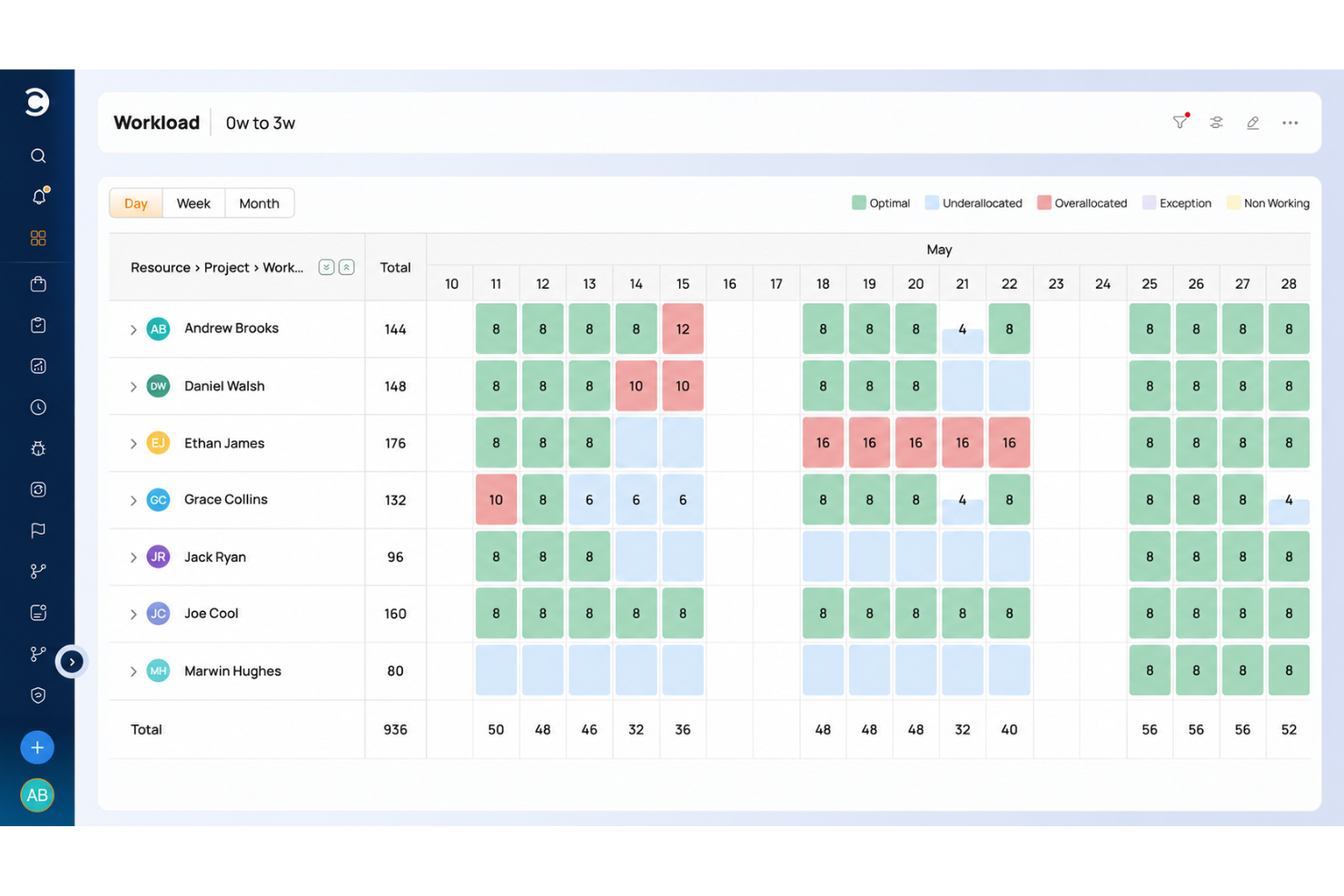
Celoxis è una piattaforma di gestione progetti aziendali potenziata dall'IA che combina il monitoraggio dei portafogli, la pianificazione delle risorse, la contabilità di progetto, la gestione dei rischi e strumenti di collaborazione con i clienti in un unico sistema.
Per chi è più adatto Celoxis?
Celoxis è particolarmente indicato per aziende di medie e grandi dimensioni che gestiscono ambienti complessi e multi-progetto tra team nei reparti IT, servizi professionali o operativi.
Perché ho scelto Celoxis
Ho scelto Celoxis come uno dei migliori perché le sue capacità di dashboard sostituiscono ciò per cui la maggior parte dei team si rivolgerebbe a uno strumento BI dedicato. Adoro il fatto che sia possibile costruire molteplici dashboard condivise con widget personalizzabili, e quasi qualsiasi report può essere fissato direttamente in una dashboard e ridimensionato secondo necessità. I grafici personalizzati con analisi approfondite sono particolarmente utili: puoi cliccare su un grafico ed eseguire azioni collettive sui record senza lasciare la vista.
Funzionalità chiave di Celoxis
- Assistente AI (Lex): Un assistente AI integrato che analizza i dati di progetto in tempo reale, segnala i rischi e risponde a comandi in linguaggio naturale.
- Pianificazione dinamica delle risorse: Assegna e gestisci le risorse su più progetti con grafici di carico che mostrano disponibilità, allocazione e conflitti per ruolo o persona.
- Contabilità di progetto: Tieni traccia di budget, costi e ricavi a livello di attività o di progetto, con report di margine e redditività integrati.
- Gestione del portafoglio: Visualizza e gestisci più progetti in un unico ambiente di portafoglio, con indicatori aggregati di stato e monitoraggio delle milestone.
Integrazioni Celoxis
Celoxis offre integrazioni native con Google Drive, Microsoft Excel, Microsoft Project, Jira, QuickBooks Online e Salesforce, oltre al supporto SSO tramite Okta, OneLogin e SAML 2.0. Sono disponibili numerose altre connessioni tramite Zapier, ed è presente un'API per integrazioni personalizzate.
Pros and Cons
Pros:
- Reportistica e analisi integrate a livello BI
- Supporta modelli a tariffa oraria e a prezzo fisso
- Grafici a bolle del portafoglio in linea con la strategia
Cons:
- App mobile poco fluida e limitata
- Configurazione complessa dei modelli che rallenta l'onboarding

Ideale per l'automazione dei progetti AI
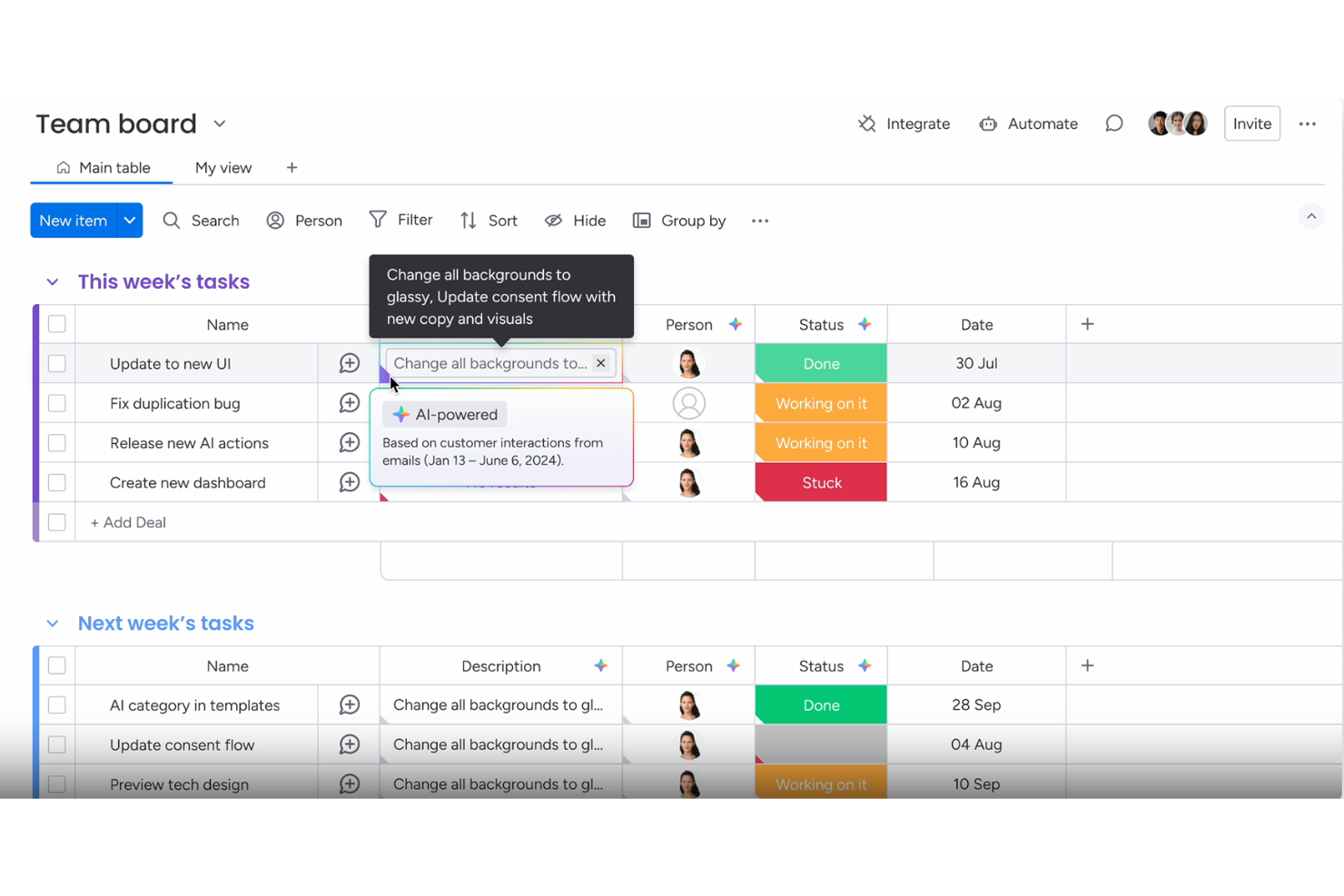
Per le aziende che cercano una soluzione di automazione dei progetti con l'IA, monday.com offre una piattaforma che aiuta i team a gestire progetti, attività e risorse in un unico spazio di lavoro. Il sistema supporta i team di diversi dipartimenti come marketing, IT e operations, aiutandoli a organizzare il lavoro e mantenere i progetti in movimento. Grazie all'automazione assistita dall'IA, agli strumenti di workflow e alle bacheche personalizzabili, monday.com aiuta le imprese a coordinare le attività, monitorare i progressi e migliorare la collaborazione tra team numerosi.
Perché ho scelto monday.com
Ho scelto monday.com perché supporta i team nell’automazione dei progetti AI nella gestione dei progetti aziendali. La piattaforma aiuta ad automatizzare le attività, organizzare i flussi di lavoro e gestire grandi progetti che coinvolgono più team. Le sue funzionalità di IA assistono nella pianificazione delle tempistiche, nel monitoraggio delle dipendenze e nell'organizzazione del lavoro di progetto, aiutando i team a coordinare le attività e tenere traccia dei progressi. Queste capacità aiutano le aziende a gestire progetti complessi mantenendo sempre la visibilità su attività, risorse e fasi di progetto.
Caratteristiche principali di monday.com
Oltre all'automazione dei progetti AI, monday.com offre:
- Dashboard: Personalizza le dashboard per ottenere una panoramica in tempo reale dell'avanzamento dei progetti e della performance del team.
- Diagrammi di Gantt: Visualizza le tempistiche dei progetti e le dipendenze per ottimizzare l’allocazione delle risorse.
- Integrazioni: Connettiti senza problemi con oltre 850 app per migliorare i flussi di lavoro e la collaborazione.
Integrazioni di monday.com
Le integrazioni includono Slack, Google Drive, Trello, Salesforce, Microsoft Teams, Zoom, HubSpot, QuickBooks, Shopify e Dropbox.
Pros and Cons
Pros:
- Le funzionalità di IA assistono nella sintesi delle attività, automazione e generazione di contenuti
- Le funzionalità di automazione aiutano a snellire i flussi di lavoro ripetitivi
- Le opzioni di integrazione con strumenti popolari migliorano la connettività dei flussi di lavoro
Cons:
- Alcune funzionalità avanzate sono disponibili solo nei piani di livello superiore
- Il prezzo può essere elevato per piccole imprese o startup
New Product Updates from monday AI Workspace
monday AI Workspace Adds Human Approval Routing
monday AI Workspace adds a human-in-the-loop approval block to AI Workflows, sending approval requests and routing workflow paths based on responses. For more information, visit monday AI Workspace's official site.

Forecast
La scelta migliore per l'erogazione di servizi professionali basata sull'IA
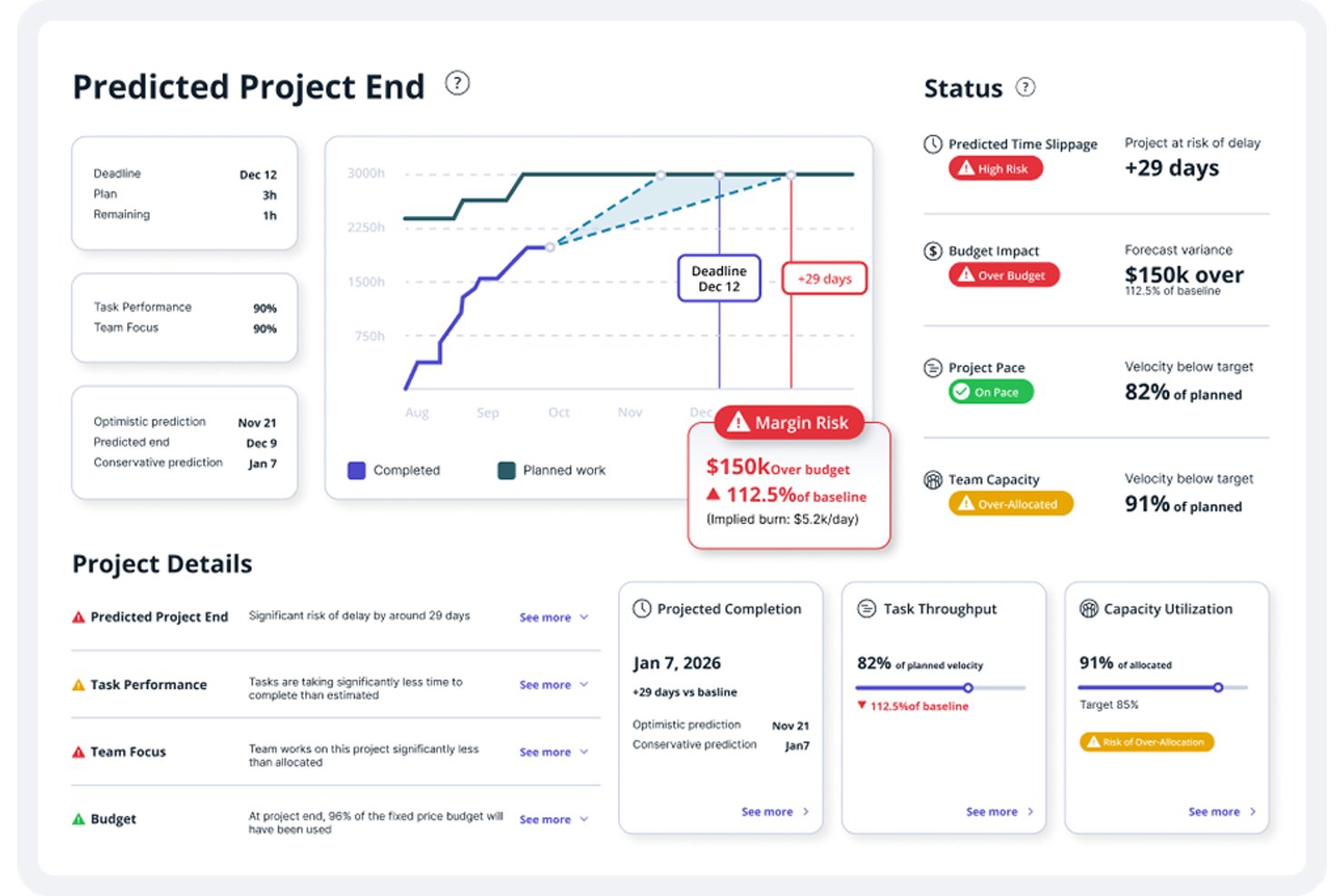
Accelo è una piattaforma di automazione dei servizi professionali basata sull'IA che riunisce gestione dei progetti, pianificazione delle risorse, previsione della capacità, monitoraggio del tempo e gestione finanziaria in un unico sistema.
Per chi è più adatto Forecast?
Forecast è particolarmente adatto alle aziende di servizi professionali—agenzie, società di consulenza e team di servizi gestiti—che necessitano di una pianificazione delle risorse basata sull'IA e della gestione finanziaria dei progetti in un'unica piattaforma integrata.
Perché ho scelto Forecast
Forecast si è guadagnato un posto nella mia selezione perché è progettato specificamente per l'erogazione di servizi professionali basata sull'IA, in un modo che la maggior parte degli strumenti aziendali di gestione dei progetti non offre. Sono particolarmente colpito dal modo in cui la sua IA collega i suggerimenti sulle risorse direttamente alla domanda della pipeline, consentendo di modellare la capacità rispetto al lavoro provvisorio prima ancora che un preventivo diventi un progetto attivo. Si distinguono anche i suoi avvisi relativi al superamento dei tempi delle attività: il modello valuta lo storico dell'assegnatario, il tempo registrato e il contesto del progetto per segnalare le attività a rischio prima che le scadenze vengano disattese.
Funzionalità principali di Forecast
- Pianificazione della domanda basata sulla pipeline: Modella il lavoro confermato e provvisorio rispetto alla capacità disponibile prima che le opportunità diventino progetti attivi.
- Connettore MCP: Collega i dati di Accelo a Claude, ChatGPT, Gemini o Copilot Studio per query e analisi in linguaggio naturale.
- Monitoraggio del budget e del margine del progetto: Confronta le prestazioni pianificate con quelle effettive relativamente a tempo, servizi, spese e materiali man mano che il lavoro procede.
- Automazione dei flussi di lavoro basata su trigger: Crea automaticamente attività, aggiorna gli stati, invia e-mail o assegna escalation al lavoro quando vengono soddisfatte le condizioni configurate.
Integrazioni di Forecast
Forecast offre integrazioni con Jira, GitHub, GitLab, Azure DevOps, Microsoft 365, Slack, HubSpot, Salesforce, QuickBooks e Xero. Supporta inoltre API RESTful e API dei moduli, oltre a connessioni MCP per Claude, ChatGPT, Gemini e Copilot Studio.
Pros and Cons
Pros:
- Visibilità chiara sul carico di lavoro e sulla disponibilità del team
- Flussi di lavoro unificati per clienti, progetti e fatturazione
- Pianificazione della capacità basata sull'IA rispetto alla pipeline provvisoria
Cons:
- I report possono essere difficili da personalizzare
- I moduli complessi rendono più difficili la configurazione e la navigazione

Asana
Ideale per i riepiloghi delle riunioni generati dall'IA
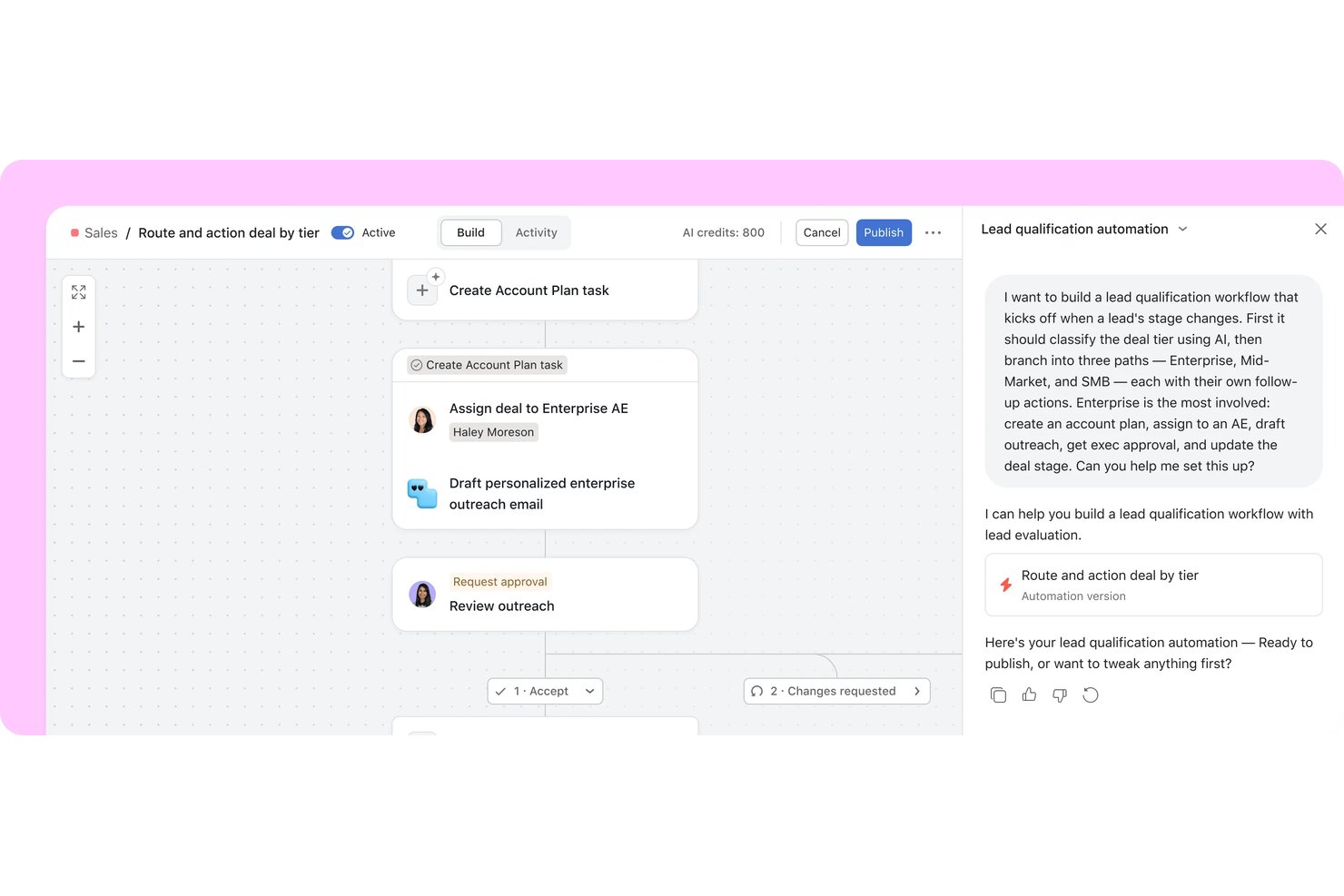
Asana è una piattaforma aziendale per la gestione del lavoro che riunisce agenti IA e team umani in un piano condiviso, combinando la gestione del portafoglio, flussi di lavoro automatizzati, monitoraggio degli obiettivi e assegnazione delle attività assistita dall'IA nei progetti interfunzionali.
Per chi è più adatta Asana?
Asana è particolarmente adatta ai team PMO aziendali e ai responsabili del portafoglio che devono coordinare il lavoro interfunzionale, collegare la realizzazione dei progetti agli obiettivi aziendali e mantenere allineati i team distribuiti su più iniziative.
Perché ho scelto Asana
Ho scelto Asana come una delle migliori soluzioni per la capacità di Asana Dash di gestire efficacemente le attività successive alle riunioni. Dopo una conversazione su Slack o una chiamata Zoom, Dash collega le decisioni ai progetti attivi e assegna automaticamente le attività da svolgere al compagno IA appropriato. Mi piace anche il fatto che AI Studio consenta di creare flussi di lavoro per la raccolta delle richieste, classificandole, applicando regole SLA e segnalando gli ostacoli senza scrivere una sola riga di codice.
Funzionalità principali di Asana
- Monitoraggio degli obiettivi: Collega gli obiettivi aziendali, del team e individuali ai progetti e ai portafogli attivi, in modo che gli aggiornamenti sull'avanzamento vengano effettuati automaticamente man mano che il lavoro procede.
- Dashboard del portafoglio: Crea grafici personalizzati per attività, progetti e portafogli utilizzando grafici a barre, burnup, burndown, a ciambella e di altri tipi.
- AI Studio: Crea flussi di lavoro IA senza codice che classificano le richieste in ingresso, applicano regole SLA, segnalano gli ostacoli e assegnano il lavoro senza scrivere codice.
- Pianificazione della capacità: Visualizza e gestisci le assegnazioni individuali del personale tra progetti e portafogli utilizzando la percentuale di assegnazione, le ore stimate o il numero di dipendenti.
Integrazioni di Asana
Asana elenca oltre 270 integrazioni con app, tra cui Slack, Jira Cloud, ServiceNow, Salesforce, Microsoft 365 Copilot, ChatGPT, Claude, Gemini, Power BI e Zapier. Offre inoltre un'API REST, webhook, SCIM API, Audit Log API e un server MCP per integrazioni personalizzate.
Pros and Cons
Pros:
- Le viste del portafoglio chiariscono lo stato tra progetti
- Le regole dei flussi di lavoro standardizzano l'assegnazione ricorrente delle richieste
- I collegamenti agli obiettivi connettono la realizzazione agli obiettivi
Cons:
- L'IA riepiloga il lavoro, ma non prevede i ritardi
- I piani di capacità richiedono decisioni manuali sull'assegnazione del personale

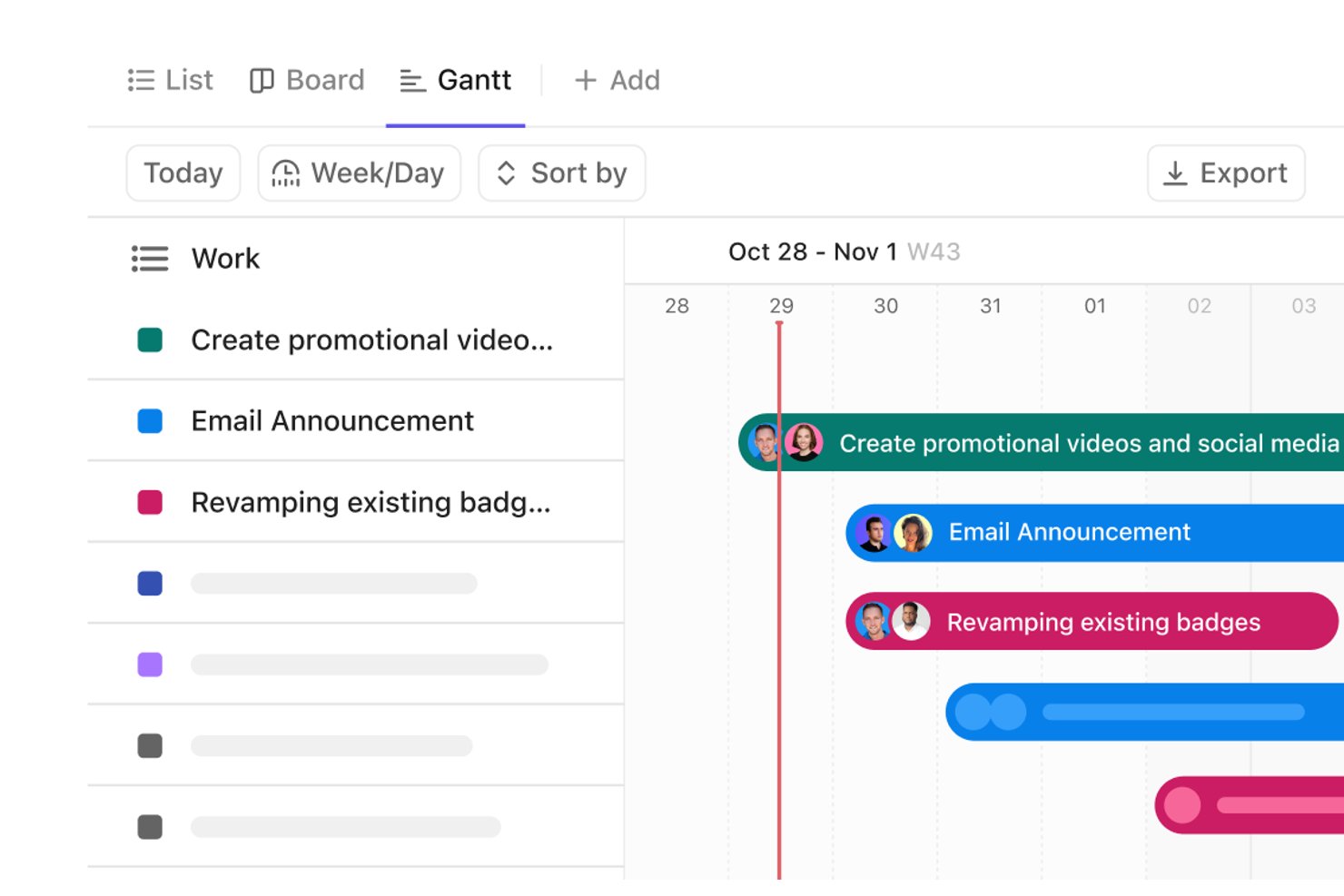
ClickUp è una piattaforma di gestione del lavoro basata sull'IA che unifica le attività dei progetti, il monitoraggio del portfolio, l'automazione dei flussi di lavoro e la collaborazione del team, con agenti IA, dashboard personalizzabili e mappatura delle dipendenze tra progetti integrati in un unico spazio di lavoro.
Per chi è più adatto ClickUp?
ClickUp è particolarmente adatto ai direttori degli uffici di gestione dei progetti e ai responsabili del portfolio che devono monitorare il lavoro di più team in un unico spazio di lavoro.
Perché ho scelto ClickUp
Ho incluso ClickUp tra le mie scelte principali perché la sua prioritizzazione delle attività tramite IA va oltre il semplice ordinamento: ClickUp Brain e Super Agents analizzano i dati del tuo spazio di lavoro per individuare le attività che richiedono attenzione, assegnare i responsabili e impostare le scadenze direttamente dalle conversazioni. Mi piace anche il fatto che le schede dashboard IA, come Riepilogo esecutivo IA e Aggiornamento del progetto IA, generino automaticamente rapporti sullo stato senza inserimento manuale. Le schede del portfolio raccolgono in tempo reale i progressi di più team, così non devi mai cercare un aggiornamento sullo stato.
Funzionalità principali di ClickUp
- Mappatura delle dipendenze nel diagramma di Gantt: Visualizza le relazioni tra le attività e i percorsi critici tra i team, con la riprogrammazione automatica delle attività successive quando cambiano le dipendenze.
- Visualizzazione del carico di lavoro: Visualizza la capacità e le assegnazioni del team in un unico luogo, utilizzando il numero di attività o le stime temporali, con riassegnazione tramite trascinamento.
- Automazioni dei flussi di lavoro: Imposta regole di attivazione e azione per assegnare attività, aggiornare gli stati e attivare automaticamente i passaggi di consegne tra i progetti.
- Controlli di governance aziendale: Gestisci gli accessi con ruoli personalizzati, SSO, SCIM, SAML, registri di audit e opzioni di residenza dei dati nei piani Enterprise.
Integrazioni di ClickUp
ClickUp offre oltre 1.000 integrazioni, comprese integrazioni native con Slack, Microsoft Teams, GitHub, GitLab, HubSpot, Google Drive, Dropbox, Zoom e Tableau. Fornisce inoltre un'API pubblica, MCP Server, webhook, OAuth e Zapier.
Pros and Cons
Pros:
- Le dashboard del portfolio tra team rendono visibile lo stato dei progetti
- Le automazioni riducono la gestione ricorrente dei passaggi di consegne
- Visualizzazioni flessibili che si adattano a flussi di lavoro distinti
Cons:
- La configurazione dello spazio di lavoro richiede una progettazione intenzionale del flusso di lavoro
- Le visualizzazioni della capacità non chiariscono le assegnazioni sovrapposte

Can Do
Ideale per la pianificazione della capacità delle risorse basata sull'IA

Can Do è una piattaforma di gestione dei progetti e delle risorse basata sull'IA che combina la pianificazione del portafoglio, la gestione delle capacità e delle risorse basata sulle competenze, l'analisi dei rischi e la simulazione di scenari tra reparti, aziende e sedi.
Per chi è più adatto Can Do?
Can Do è particolarmente adatto ai direttori dei PMO e ai responsabili di portafoglio delle aziende medio-grandi che necessitano di una pianificazione della capacità delle risorse assistita dall'IA su più progetti, reparti e sedi.
Perché ho scelto Can Do
Ho incluso Can Do tra le mie scelte principali perché la sua pianificazione della capacità delle risorse basata sull'IA va ben oltre i semplici grafici del carico di lavoro. Apprezzo in particolare Watermodel, una simulazione brevettata che determina se le attività parallele possono essere realisticamente eseguite contemporaneamente, tenendo conto di buffer e ritardi prima che venga modificato un singolo piano operativo. L'IA analizza inoltre competenze, disponibilità e carico di lavoro tra reparti e sedi per segnalare i sovraccarichi e consigliare risorse alternative, così i conflitti di capacità vengono individuati a livello di portafoglio anziché a metà sprint.
Funzionalità principali di Can Do
- Abbinamento delle risorse basato sulle competenze: Definisci le competenze e i ruoli richiesti per le attività, quindi individua i membri del team le cui competenze e disponibilità corrispondono a tali esigenze.
- Pianificazione ibrida dei progetti: Combina la programmazione classica basata sulle pietre miliari e l'esecuzione agile all'interno di un singolo progetto, inclusa la pianificazione degli sprint con connessione a Jira.
- Gestione della domanda: Integra le richieste di progetto nella pianificazione assegnando loro un punteggio in base a budget, disponibilità delle risorse e probabilità di approvazione prima di impegnare le risorse.
- Monitoraggio dei rischi: Tieni sotto controllo i rischi inseriti manualmente insieme alle valutazioni dei rischi generate dall'IA a livello di portafoglio, progetto e pacchetto di lavoro.
Integrazioni di Can Do
Can Do dispone di un'integrazione nativa documentata con Jira, oltre a integrazioni con SAP, Personio, Salesforce, SharePoint e Microsoft Power BI. La sua API REST supporta integrazioni personalizzate, definite singolarmente e che potrebbero comportare costi aggiuntivi.
Pros and Cons
Pros:
- Meno colli di bottiglia nelle risorse tra i progetti
- L'IA consiglia alternative quando i carichi di lavoro entrano in conflitto
- Watermodel simula buffer e ritardi nella programmazione
Cons:
- Nessun sistema nativo di gestione dei ticket o flusso di lavoro basato su trigger
- I report di stato automatizzati richiedono un modulo BI separato

Ideale per informazioni sul portafoglio basate sui dati dei piani in tempo reale
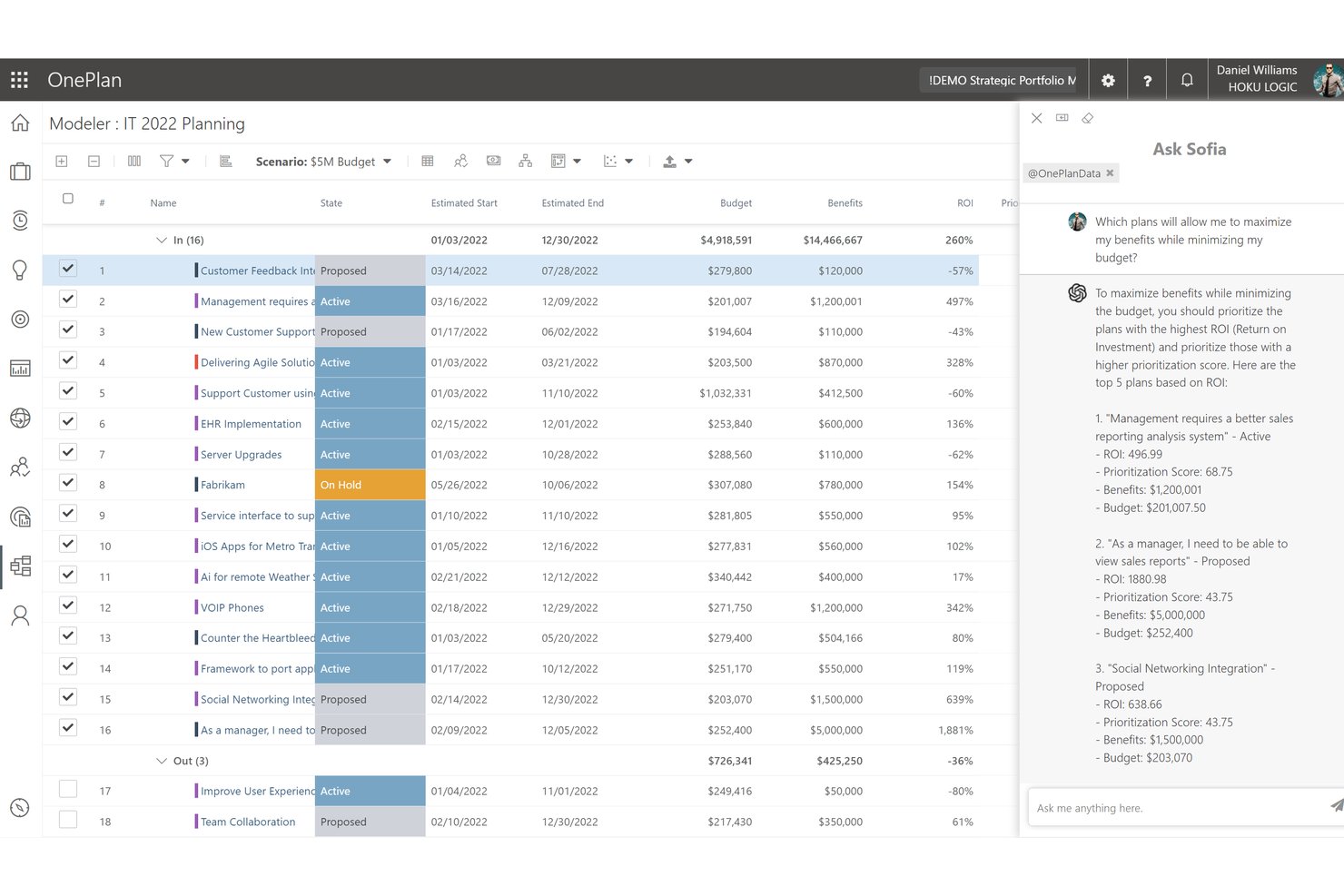
OnePlan è una piattaforma di gestione del portafoglio di progetti aziendali basata sull'intelligenza artificiale che combina pianificazione strategica, modellazione del portafoglio, gestione delle risorse, monitoraggio finanziario e un assistente IA in linguaggio naturale chiamato Sofia GPT.
Per chi è più adatta Sofia GPT (OnePlan)?
OnePlan è particolarmente adatta ai direttori degli uffici di gestione dei progetti (PMO) e ai responsabili di portafoglio delle organizzazioni che utilizzano prevalentemente strumenti Microsoft e hanno bisogno di un'unica piattaforma per collegare strategia, capacità delle risorse ed esecuzione dei progetti.
Perché ho scelto Sofia GPT (OnePlan)
Ho scelto Sofia GPT come una delle migliori soluzioni perché collega un assistente IA in linguaggio naturale direttamente ai dati aggiornati del portafoglio, permettendoti di porre una domanda come 'quali progetti sono a rischio in questo trimestre?' e ricevere una risposta basata sui dati effettivi di risorse, budget e OKR di OnePlan. Apprezzo particolarmente il modo in cui Sofia può generare un registro dei rischi ordinato per priorità con strategie di mitigazione oppure evidenziare gli scostamenti di budget all'interno del portafoglio, senza dover prima creare un rapporto. Abbinando questa funzione ai confronti affiancati degli scenari del modellatore del portafoglio, si ottiene un livello di IA davvero utile applicato a una governance del portafoglio di livello aziendale.
Funzionalità principali di Sofia GPT (OnePlan)
- Modellazione degli scenari di portafoglio: Confronta scenari di investimento affiancati utilizzando vincoli come budget, impegno previsto e benefici attesi per valutare i compromessi.
- Pannelli di controllo analitici Power BI: Accedi a pannelli di controllo interattivi predefiniti con navigazione dettagliata dai riepiloghi del portafoglio fino a programmi, progetti ed epiche.
- Modello di autorizzazioni a tre livelli: Controlla l'accesso a livello di gruppo di sicurezza aziendale, tipo di piano e singolo piano, con ruoli di collaboratore, proprietario e lettore.
- Integrazioni con Azure DevOps e Jira: Sincronizza gli elementi di lavoro da Azure DevOps e Jira nei portafogli OnePlan per mantenere la visibilità a livello di esecuzione insieme alla pianificazione strategica.
Integrazioni di Sofia GPT (OnePlan)
OnePlan offre integrazioni con Azure DevOps, Jira, ServiceNow, Power BI e strumenti Microsoft, tra cui Microsoft Project e Microsoft Teams. Il piano aziendale include un'API per le integrazioni personalizzate ed è supportato anche da Zapier.
Pros and Cons
Pros:
- Consolida lo stato del portafoglio per la dirigenza
- Collega la domanda di risorse ai piani dei progetti
- Adatta la governance e la definizione delle priorità ai processi del team
Cons:
- La gerarchia dei pannelli di controllo e le esportazioni dei rapporti frustrano i revisori
- I portafogli grandi e complessi possono compromettere le prestazioni

Best for AI-drevet levering av profesjonelle tjenester
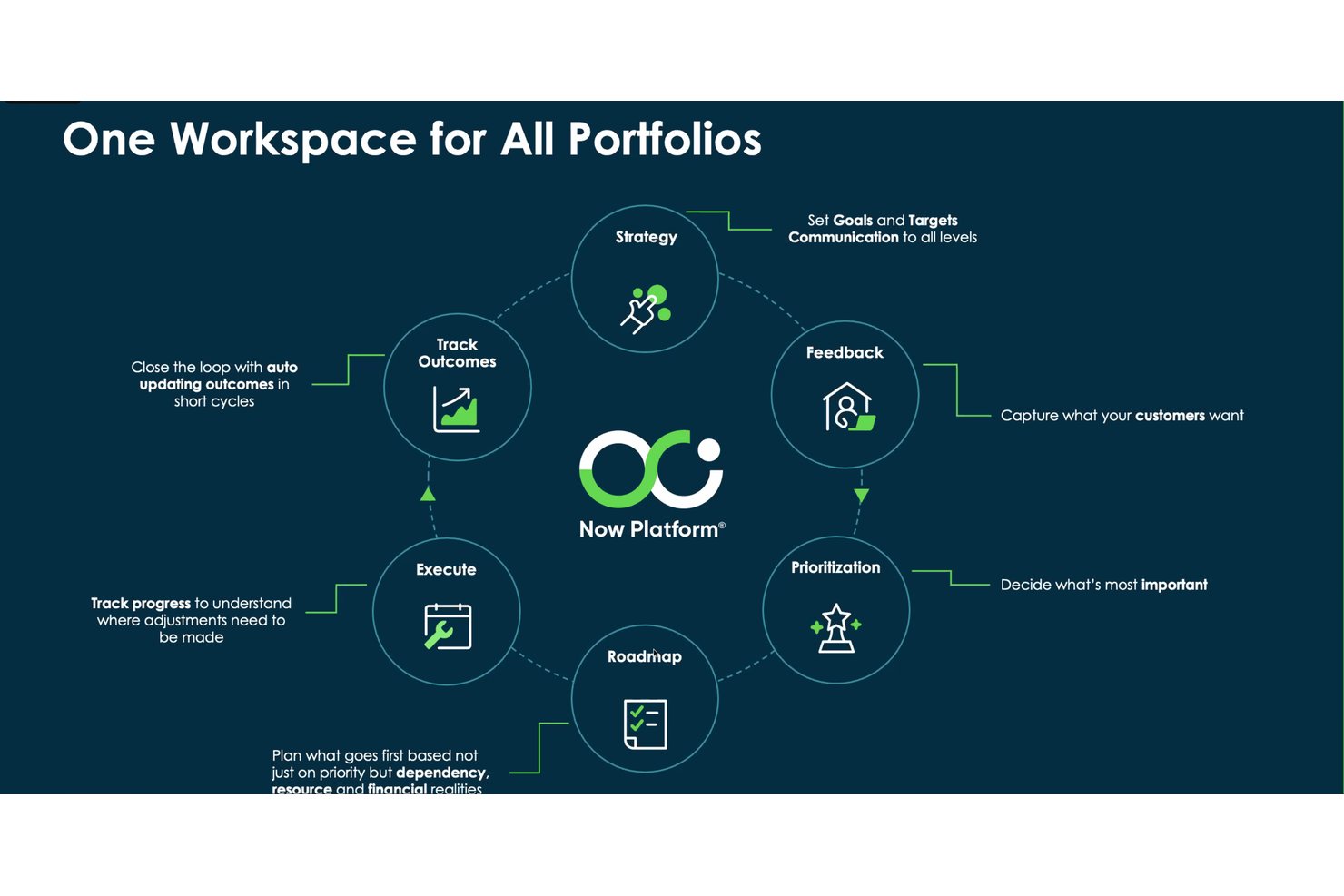
Accelo er en AI-drevet plattform for automatisering av profesjonelle tjenester som samler prosjektstyring, ressursplanlegging, kapasitetsprognoser, tidsregistrering og økonomistyring i ett enkelt system.
Hvem passer Forecast best for?
Forecast passer godt for virksomheter innen profesjonelle tjenester – byråer, konsulentselskaper og team for administrerte tjenester – som trenger AI-drevet ressursplanlegging og prosjektøkonomi i én sammenkoblet plattform.
Hvorfor jeg valgte Forecast
Forecast får en plass på kortlisten min fordi løsningen er spesialutviklet for AI-drevet levering av profesjonelle tjenester på en måte de fleste prosjektstyringsverktøy for større virksomheter ikke er. Jeg er spesielt imponert over hvordan AI-en kobler ressursanbefalinger direkte til etterspørselen i salgspipelinen, slik at du kan modellere kapasitet opp mot foreløpig arbeid før et tilbud blir til et aktivt prosjekt. Varslene om oppgaver som overskrider estimert tidsbruk, skiller seg også ut: Modellen vurderer historikken til den som er tildelt oppgaven, registrert tid og prosjektkontekst for å flagge oppgaver med risiko før tidsfristene forskyves.
Viktige funksjoner i Forecast
- Etterspørselsplanlegging basert på salgspipeline: Modeller forpliktet og foreløpig arbeid opp mot tilgjengelig kapasitet før muligheter blir aktive prosjekter.
- MCP-tilkobling: Koble Accelo-data til Claude, ChatGPT, Gemini eller Copilot Studio for spørringer og analyser på naturlig språk.
- Sporing av prosjektbudsjett og margin: Sammenlign planlagt og faktisk ytelse på tvers av tid, tjenester, utgifter og materialer etter hvert som arbeidet skrider frem.
- Arbeidsflytautomatisering basert på utløsere: Opprett automatisk oppgaver, oppdater statuser, send e-poster eller eskaler arbeid når konfigurerte betingelser er oppfylt.
Forecast-integrasjoner
Forecast tilbyr integrasjoner med Jira, GitHub, GitLab, Azure DevOps, Microsoft 365, Slack, HubSpot, Salesforce, QuickBooks og Xero. Løsningen støtter også RESTful- og Forms-API-er samt MCP-tilkoblinger for Claude, ChatGPT, Gemini og Copilot Studio.
Pros and Cons
Pros:
- Tydelig oversikt over arbeidsbelastning og teamets tilgjengelighet
- Samlede arbeidsflyter for kunder, prosjekter og fakturering
- AI-informert kapasitetsplanlegging opp mot foreløpig arbeid i salgspipelinen
Cons:
- Rapporter kan være vanskelige å tilpasse
- Omfattende moduler gjør oppsett og navigering mer krevende

Smartsheet
Ideale per ampie integrazioni con app aziendali
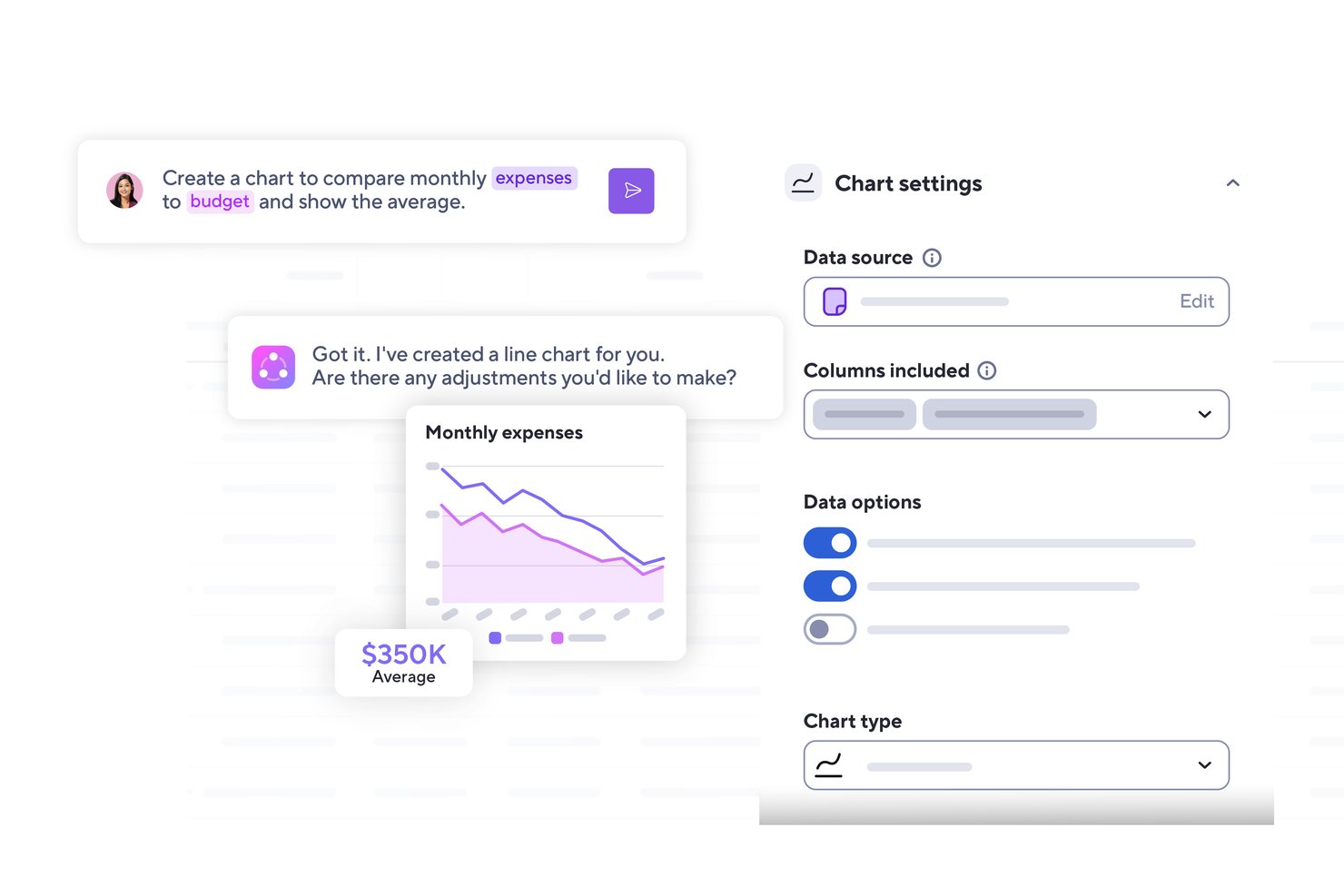
Smartsheet è una piattaforma di gestione del lavoro alimentata dall'IA che combina monitoraggio dei progetti, supervisione del portafoglio, automazione dei flussi di lavoro, dashboard di reportistica e pianificazione delle risorse per i team aziendali.
Per chi è più indicato Smartsheet?
Smartsheet è particolarmente adatto ai team PMO aziendali e ai responsabili del portafoglio che devono collegare progetti distribuiti su un'ampia gamma di strumenti esistenti, come Jira, Salesforce e ServiceNow.
Perché ho scelto Smartsheet
Ho scelto Smartsheet come uno dei migliori perché nessun altro strumento di questo elenco si collega nativamente a una gamma così ampia di sistemi aziendali. Con oltre 175 integrazioni che includono Jira, Salesforce, ServiceNow e Workday, oltre alla sincronizzazione bidirezionale tramite connettori dedicati, i dati dei tuoi progetti rimangono aggiornati tra gli strumenti che i tuoi team già utilizzano. Apprezzo anche il fatto che il server MCP consenta di interrogare i dati di Smartsheet direttamente da Claude, Gemini o Microsoft Copilot, trasformando il tuo spazio di lavoro IA esistente in un livello di intelligence di progetto in tempo reale.
Funzionalità principali di Smartsheet
- Colonne intelligenti: Categorizza, riepiloga, traduci o analizza automaticamente il sentiment tra le righe dei dati dei fogli utilizzando l'IA.
- Centro di controllo: Automatizza la creazione dei progetti, aggrega la reportistica e gestisci le modifiche a livello di portafoglio tra strutture di progetto standardizzate.
- Generatore di dashboard IA: Genera una dashboard personalizzabile per le parti interessate a partire da una descrizione in linguaggio naturale delle metriche e delle fonti di dati desiderate.
- Pianificazione di scenari: Confronta fianco a fianco fino a tre scenari ipotetici, modificando date, assegnazioni e allocazioni prima di applicare le modifiche ai fogli attivi.
Integrazioni di Smartsheet
Smartsheet offre oltre 175 integrazioni, tra cui Jira Software, Salesforce, ServiceNow, Workday, Power BI, Tableau, Microsoft Teams e Slack. La sua API REST/JSON supporta integrazioni personalizzate e Zapier la collega a più di 3.000 app.
Pros and Cons
Pros:
- Le dashboard del portafoglio consolidano lo stato dei progetti
- L'automazione riduce le attività ripetitive di follow-up
- I fogli flessibili si adattano a flussi di lavoro diversi
Cons:
- I report avanzati richiedono tempo per essere configurati
- L'app mobile sembra meno efficace rispetto alla versione desktop
New Product Updates from Smartsheet

Smartsheet Adds Non-Plan User Management in Admin Center
Smartsheet adds a Non plan users tab to the Seat types and true-up page in Admin Center. This lets system admins review non-plan users and add them to the plan or remove them from the organization in one place. For more information, visit Smartsheet’s official site.
Altri software di gestione dei progetti aziendali basati sull'IA
Ecco altre opzioni di software di gestione dei progetti aziendali basati sull’IA che non sono entrate nella mia selezione, ma che vale comunque la pena prendere in considerazione:
- Kantata
Ideale per l'assegnazione del personale basata sull'IA nelle aziende di servizi
- Planview
Ideale per la pianificazione di scenari del portafoglio basata sull'intelligenza artificiale
- Jira
Ideale per i team IT che monitorano il lavoro di sviluppo su larga scala
- Adobe Workfront
Ideale per il lavoro gestito dall'IA in tutti i portafogli creativi
- Notion
Ideale per la documentazione del team potenziata dall'IA


Come valuto i software di gestione progetti aziendali con AI
Includo solo gli strumenti in cui l’IA va oltre il semplice slogan di marketing—se l’IA non fa davvero risparmiare ore ai responsabili PMO nella pianificazione, previsione o reportistica, non viene considerata. Divido la mia valutazione tra la funzionalità di base che ogni piattaforma aziendale deve offrire e i fattori che differenziano un buon prodotto da uno eccellente.
Funzionalità di base (Requisiti fondamentali per questa lista)
Quando seleziono gli strumenti per la mia lista, valuto ciascuno su una scala da 0 (non offre la funzionalità) a 5 (eccelle in quest’area) per ogni funzionalità di base elencata di seguito. Poi, calcolo il punteggio totale dello strumento in percentuale. Ogni strumento deve ottenere un punteggio minimo totale del 65% per essere preso in considerazione.
- Automazione delle attività tramite IA: Cerco IA in grado di generare e assegnare attività da un brief o un prompt, non semplici trigger basati su regole mascherate da intelligenza.
- Analisi predittiva dei rischi: Ogni strumento dovrebbe fornire previsioni basate sui dati su tempistiche di consegna e budget, non solo segnalare attività già scadute.
- Assegnazione intelligente delle risorse: Valuto se l’IA consiglia l’assegnazione dei team in base a input reali come competenze, disponibilità e carico di lavoro tra i progetti.
- Reportistica generativa e insight: La piattaforma deve generare su richiesta riepiloghi in linguaggio naturale e aggiornamenti di stato a partire dai dati di progetto in tempo reale.
- Gestione portafoglio progetti aziendali: Verifico la presenza di viste multi-progetto con dipendenze trasversali, dashboard aggregate e controlli di governance che funzionino su centinaia di progetti.
- Sicurezza aziendale e integrazioni: SSO, permessi basati sui ruoli, log di audit e connettori nativi con strumenti come Jira, Salesforce, ServiceNow o SAP sono ciò che cerco in questa categoria.
Una volta ottenuta la lista degli strumenti che soddisfano questi criteri, considero cosa distingue ogni piattaforma.
Fattori di differenziazione (Cosa distingue i fornitori)
Ecco come confronto e metto a confronto diversi fornitori:
Caratteristiche distintive
La creazione di progetti con linguaggio naturale è un grande elemento distintivo—voglio che un direttore PMO descriva il lancio di un prodotto tramite un prompt e ottenga un piano completo con traguardi, dipendenze e responsabili. Anche la conversione delle riunioni AI in attività aggiunge valore reale, estraendo elementi d’azione e scadenze direttamente dai resoconti registrati alle standup nel piano di progetto. Valuto anche se uno strumento collega l’esecuzione agli OKR strategici, valutando in tempo reale il contributo di ogni progetto agli obiettivi aziendali.
Oltre le funzionalità
La privacy dei dati e la governance dell’IA sono fondamentali per le aziende. Guardo se i fornitori sono trasparenti su come i dati dei progetti addestrano i loro modelli e se offrono controlli di esclusione o implementazioni private. La profondità delle integrazioni è un altro fattore chiave—una piattaforma che si connette in modo bidirezionale con Jira, ServiceNow e Salesforce si integra molto meglio di una che si affida solo a Zapier. Valuto anche il costo totale di proprietà, verificando che il prezzo cresca in modo prevedibile all’aumentare di team, progetti e utilizzo dell’IA.
Come scegliere un software di gestione dei progetti aziendali basato sull'IA
È facile perdersi in lunghi elenchi di funzionalità e strutture di prezzo complesse. Per aiutarti a rimanere concentrato mentre affronti il tuo processo di selezione del software, unico per le tue esigenze, ecco una lista di fattori da tenere a mente:
| Fattore | Cosa considerare |
|---|---|
| Scalabilità | Il software può crescere insieme alla tua squadra? Considera i limiti degli utenti e i prezzi per i livelli superiori. Assicurati che sia in grado di gestire una maggiore complessità dei progetti con l'espansione della tua organizzazione. |
| Integrazioni | Si integra con gli strumenti che utilizzi attualmente? Verifica la compatibilità con il tuo ecosistema software esistente per garantire un flusso di dati fluido ed evitare il trasferimento manuale dei dati. |
| Personalizzazione | Puoi adattare il software ai tuoi flussi di lavoro? Cerca opzioni per personalizzare i pannelli di controllo, i report e i processi in base alle esigenze specifiche della tua squadra. |
| Facilità d'uso | L'interfaccia è intuitiva per la tua squadra? Valuta la curva di apprendimento e considera se sarà necessaria una formazione affinché la tua squadra diventi rapidamente operativa. |
| Implementazione e inserimento iniziale | Quanto tempo richiederà la configurazione? Valuta le risorse necessarie per l'implementazione e la formazione. Cerca strumenti con processi di inserimento iniziale semplici e assistenza disponibile durante la transizione. |
| Costo | Rientra nel tuo budget? Confronta i modelli di prezzo, inclusi i costi per utente e le commissioni aggiuntive. Considera i costi a lungo termine e gli eventuali sconti per gli impegni annuali. |
| Misure di sicurezza | Soddisfa i tuoi standard di sicurezza? Assicurati che lo strumento sia conforme agli standard di settore come il GDPR o alle certificazioni ISO, soprattutto se gestisci dati sensibili. |
| Disponibilità dell'assistenza | L'assistenza è disponibile quando ne hai bisogno? Verifica gli orari di supporto, i canali disponibili come chat o telefono e le recensioni degli utenti sulla rapidità di risposta dell'assistenza, per assicurarti di avere supporto quando si verificano problemi. |
Che cos'è il software di gestione dei progetti aziendali basato sull'IA?
Il software PM aziendale basato sull'IA è un tipo specializzato di software di gestione dei progetti che aiuta le organizzazioni a gestire i progetti utilizzando l'intelligenza artificiale per automatizzare e migliorare diversi processi. Questi strumenti sono generalmente utilizzati da responsabili di progetto, responsabili delle squadre e altri professionisti che desiderano migliorare l'efficienza e il processo decisionale.
La pianificazione automatizzata, l'analisi predittiva e l'assegnazione intelligente delle attività aiutano a ottimizzare le risorse, prevedere i risultati dei progetti e mantenere l'allineamento all'interno delle squadre. Nel complesso, questi strumenti offrono un valore significativo riducendo il lavoro manuale e supportando la pianificazione strategica.
Funzionalità
Quando selezioni un software di gestione dei progetti aziendali basato sull'IA, presta attenzione alle seguenti funzionalità chiave:
- Pianificazione automatizzata: Utilizza l'IA per organizzare automaticamente attività e riunioni, automatizzando la gestione del calendario per riservare gli orari ottimali per le riunioni e i periodi di concentrazione, riducendo gli scambi necessari per la pianificazione.
- Analisi predittiva: Analizza i dati per prevedere le tempistiche dei progetti e i potenziali rischi, stimando le tempistiche dei progetti con l'analisi predittiva e modificando i piani in base al carico di lavoro o agli indicatori di rischio.
- Assegnazione intelligente delle attività: Assegna automaticamente le attività in base alle competenze e alla disponibilità dei membri della squadra, assegnando le attività in base alla disponibilità e alle competenze in tempo reale e massimizzando l'utilizzo della capacità della squadra.
- Informazioni basate sull'IA: Fornisce informazioni utili e raccomandazioni, offrendo informazioni basate sui dati, ad esempio rischi segnalati e previsioni delle tendenze, affinché i manager possano apportare modifiche proattive.
- Automazione dei flussi di lavoro: Automatizza attività e processi ripetitivi, delegando all'IA la pianificazione ordinaria e la creazione di report, così la tua squadra può dedicare più tempo al lavoro strategico e ad alta priorità.
- Collaborazione in tempo reale: Consente ai membri della squadra di lavorare insieme in tempo reale, centralizzando i riepiloghi delle riunioni e gli aggiornamenti sullo stato in pannelli di controllo condivisi o chat, garantendo che tutti rimangano allineati.
- Pannelli di controllo personalizzabili: Consente agli utenti di creare visualizzazioni personalizzate dei dati dei progetti, offrendo ai manager visibilità tramite pannelli di controllo generati dall'IA e avvisi sui rischi, così da poter identificare tempestivamente i problemi.
- Monitoraggio del tempo: Monitora il tempo dedicato ad attività e progetti, fornendo dati per semplificare i flussi di lavoro automatizzando le attività ripetitive e riducendo il passaggio da uno strumento all'altro.
Vantaggi
L'implementazione di un software di gestione dei progetti aziendali basato sull'IA offre diversi vantaggi alla tua squadra e alla tua azienda. Eccone alcuni che puoi aspettarti:
- Maggiore efficienza: La pianificazione e l'assegnazione automatizzate delle attività riducono il carico di lavoro manuale, liberando tempo per attività più strategiche.
- Migliore processo decisionale: Gli insight basati sull'IA e l'analisi predittiva offrono raccomandazioni supportate dai dati, fornendo analisi predittive e informazioni utili per orientare la riassegnazione delle attività o la modifica delle scadenze.
- Collaborazione potenziata: Le funzionalità di collaborazione in tempo reale garantiscono che tutti siano sempre aggiornati, registrando automaticamente gli appunti delle riunioni e le attività da svolgere, per poi distribuirli ai membri del team interessati tramite spazi di lavoro condivisi.
- Migliore utilizzo delle risorse: L'assegnazione intelligente delle attività ottimizza l'utilizzo delle competenze e della disponibilità dei membri del team, utilizzando l'IA per suggerire la riallocazione delle risorse e segnalando quando i membri del team sono utilizzati al di sotto o al di sopra della loro capacità.
- Riduzione degli errori: L'automazione dei flussi di lavoro riduce al minimo gli errori umani automatizzando le attività ripetitive e standardizzando i flussi di lavoro con modelli di liste di controllo basati sull'IA e logica condizionale per ridurre l'errore umano.
- Risparmio di tempo: Il monitoraggio del tempo e i processi automatizzati generano report sulla produttività che evidenziano i colli di bottiglia, i periodi di inattività e le opportunità di automazione.
- Viste personalizzabili: I dashboard personalizzati consentono agli utenti di concentrarsi sui dati più rilevanti, migliorando la loro capacità di monitorare i progressi e le prestazioni.
Costi e prezzi
La scelta di un software di gestione dei progetti aziendali basato sull'IA richiede la comprensione dei vari modelli e piani tariffari disponibili. I costi variano in base alle funzionalità, alle dimensioni del team, ai componenti aggiuntivi e ad altri fattori. La tabella seguente riassume i piani più comuni, i relativi prezzi medi e le funzionalità generalmente incluse nelle soluzioni software di gestione dei progetti aziendali basate sull'IA:
Tabella comparativa dei piani per software di gestione dei progetti aziendali basati sull'IA
| Tipo di piano | Prezzo medio | Funzionalità comuni |
| Piano gratuito | $0 | Gestione di base delle attività, spazio di archiviazione limitato e supporto della community. |
| Piano personale | $5-$15/utente/mese | Gestione delle attività, integrazioni di base e funzionalità di automazione limitate. |
| Piano aziendale | $16-$30/utente/mese | Monitoraggio avanzato dei progetti, integrazioni potenziate e supporto prioritario. |
| Piano per grandi aziende | $31-$60/utente/mese | Flussi di lavoro personalizzabili, insight basati sull'IA, supporto dedicato e funzionalità di sicurezza. |
Domande frequenti sul software aziendale di gestione dei progetti basato sull'AI
Ecco alcune risposte alle domande comuni sul software aziendale di gestione dei progetti basato sull’AI:
In che modo il software aziendale di gestione dei progetti basato sull'AI migliora l'efficienza della gestione dei progetti?
L’AI migliora l’efficienza della gestione dei progetti automatizzando le attività ripetitive, prevedendo i rischi dei progetti e fornendo informazioni basate sui dati. Ad esempio, l’AI può automatizzare la pianificazione e l’assegnazione delle attività, delegando all’AI il lavoro ripetitivo di pianificazione e inserimento dei dati, così il team può concentrarsi sulle attività ad alto impatto. L’analisi predittiva aiuta a prevedere i potenziali colli di bottiglia e ad adeguare i piani di conseguenza.
Analizzando i dati dei progetti, gli strumenti di AI possono fornire informazioni utili per il processo decisionale, utilizzando l’analisi predittiva e il rilevamento precoce dei rischi per adeguare proattivamente le tempistiche prima che si verifichino ritardi.
Il software aziendale di gestione dei progetti basato sull'AI può integrarsi con il software esistente?
Sì, la maggior parte degli strumenti di AI per la gestione dei progetti aziendali è progettata per integrarsi con software esistenti come sistemi CRM, piattaforme di comunicazione e soluzioni di archiviazione dei dati. Verifica la compatibilità con il tuo attuale ecosistema tecnologico per garantire un flusso di dati senza interruzioni. Le integrazioni comuni includono Slack per la comunicazione, Salesforce per il CRM e Google Drive per l’archiviazione dei file.
Le integrazioni non solo si collegano senza problemi agli strumenti che già utilizzi, come Slack, Google Drive o i sistemi CRM, mantenendo i flussi di lavoro connessi e automatici, ma rendono anche più semplice per il team adottare il nuovo software.
Il software aziendale di gestione dei progetti basato sull'AI è sicuro?
Sì, gli strumenti di AI per la gestione dei progetti danno priorità alla sicurezza offrendo funzionalità come la crittografia dei dati, l’autenticazione degli utenti e la conformità a standard di settore come il GDPR. Quando valuti gli strumenti, considera le misure di sicurezza che implementano per proteggere i tuoi dati. Cerca soluzioni che offrano controlli dettagliati degli accessi e verifiche di sicurezza periodiche.
Assicurarsi che il software soddisfi i requisiti di sicurezza della tua organizzazione è fondamentale, soprattutto se gestisci informazioni sensibili.
Come posso misurare il ROI del software di gestione dei progetti basato sull'AI?
Per misurare il ROI del software di gestione dei progetti basato sull’AI, monitora metriche come il tempo risparmiato, gli aumenti di produttività e i tassi di completamento dei progetti. Calcola i risparmi sui costi derivanti dalla riduzione del lavoro manuale e dal miglioramento dell’efficienza. Ad esempio, se l’AI automatizza la pianificazione, quantifica le ore risparmiate e traducile in valore monetario.
Inoltre, valuta i miglioramenti nella collaborazione del team e nel processo decisionale per misurare il ROI monitorando metriche come il tempo risparmiato, la riduzione delle riunioni e il numero di attività automatizzate nei tuoi progetti.
In che modo il software aziendale di gestione dei progetti basato sull'AI può aiutare i team a prevenire i rischi?
Monitora le attività in corso e segnala le attività bloccate, i ritardi imprevisti o i picchi di carico di lavoro. Gli avvisi tempestivi aiutano ad agire prima che piccoli problemi si trasformino in ostacoli rilevanti. Sfruttando l’AI, questo software fornisce analisi predittive per prevedere potenziali rischi come sforamenti del budget o slittamenti delle tempistiche, analizzando i dati storici e attuali dei progetti.
Inoltre, può rilevare proattivamente i primi segnali di rischio, come l’ampliamento incontrollato dell’ambito o l’emergere di colli di bottiglia, analizzando automaticamente le comunicazioni degli sviluppatori e gli aggiornamenti dei progetti alla ricerca di parole chiave che segnalano problemi