

I 10 migliori software di gestione dei progetti finanziari per il 2026

Elenco dei migliori strumenti software per la gestione dei progetti finanziari


Gestire progetti digitali senza una visibilità in tempo reale sui costi porta direttamente a sforamenti del budget e margini ridotti. Il software per la gestione finanziaria dei progetti risolve questo problema combinando il monitoraggio standard delle attività con il controllo del budget in tempo reale, i registri delle spese e le previsioni dei profitti, così sai sempre qual è l'esatta situazione delle tue entrate.
Ho testato decine di piattaforme per trovare gli strumenti che gestiscono le tariffe di fatturazione, il monitoraggio del tempo e la reportistica finanziaria insieme ai flussi di lavoro quotidiani del team. Leggi la mia selezione dei migliori strumenti per 2026 per trovare la piattaforma giusta per il tuo team e mantenere redditizi i tuoi progetti.
Perché fidarsi dei nostri consigli sui software
Il nostro team testa e recensisce software dal 2012. In quanto project manager noi stessi, sappiamo quanto sia difficile — e importante — scegliere il software giusto.
Per questa guida, abbiamo valutato gli strumenti attraverso test pratici e ricerche indipendenti, assegnando un punteggio agli strumenti in base ai nostri criteri di selezione. Ci basiamo inoltre sulle competenze di leader di pensiero del settore e di professionisti attivi nella gestione dei progetti.
Le nostre recensioni riflettono il nostro giudizio editoriale umano, non un discorso di vendita.
Revisori esperti:
Tabella comparativa dei software per la gestione finanziaria dei progetti
Questa tabella comparativa riassume i dettagli sui prezzi delle mie migliori selezioni di software per la gestione finanziaria dei progetti:
| Tool | Best For | Trial Info | Price | ||
|---|---|---|---|---|---|
| 1 | Ideale per aziende di servizi professionali | Prova gratuita di 14 giorni + demo gratuita disponibile | I piani combinati partono da $17/utente/mese | Website | |
| 2 | Ideale per il monitoraggio della redditività dei progetti di agenzia | Prova gratuita di 14 giorni + demo gratuita disponibile | Da $10/mese (fatturazione annuale) | Website | |
| 3 | Ideale per il monitoraggio dei budget | Prova gratuita di 14 giorni + piano gratuito disponibile | Da $10/utente/mese | Website | |
| 4 | Ideale per il monitoraggio integrato del portafoglio | Prova gratuita + demo gratuita disponibili | Da $10/utente/mese (fatturazione annuale) | Website | |
| 5 | Ideale per il monitoraggio del budget in tempo reale | Demo gratuita disponibile | Prezzo su richiesta | Website | |
| 6 | Ideale per il controllo finanziario con monitoraggio del tempo | Prova gratuita di 15 giorni + piano gratuito + demo gratuita disponibile | Da $4/utente/mese (fatturazione annuale) | Website | |
| 7 | Ideale per la gestione di programmi di fatturazione complessi | Prova gratuita disponibile | Da $16/utente/mese (fatturazione annuale) | Website | |
| 8 | Ideale per integrazione nativa con Office e Teams | Prova gratuita di 30 giorni | Da $10/utente/mese (fatturato annualmente) | Website | |
| 9 | Ideale per la gestione degli studi contabili | Prova gratuita di 14 giorni + demo gratuita disponibile | A partire da $19/mese (fatturato annualmente) | Website | |
| 10 | Ideale per il monitoraggio dell'onboarding dei progetti | Prova gratuita + demo gratuita disponibili | Da $19/utente/mese (fatturazione annuale) | Website |


Recensioni dei migliori software per la gestione finanziaria dei progetti
Di seguito trovi i miei riepiloghi dettagliati dei migliori software per la gestione finanziaria dei progetti che sono entrati nella mia selezione. Le mie recensioni offrono uno sguardo approfondito sulle funzionalità principali, sui vantaggi & svantaggi, sulle integrazioni e sui casi d’uso ideali di ogni strumento, per aiutarti a trovare quello più adatto a te.

Scoro
Ideale per aziende di servizi professionali
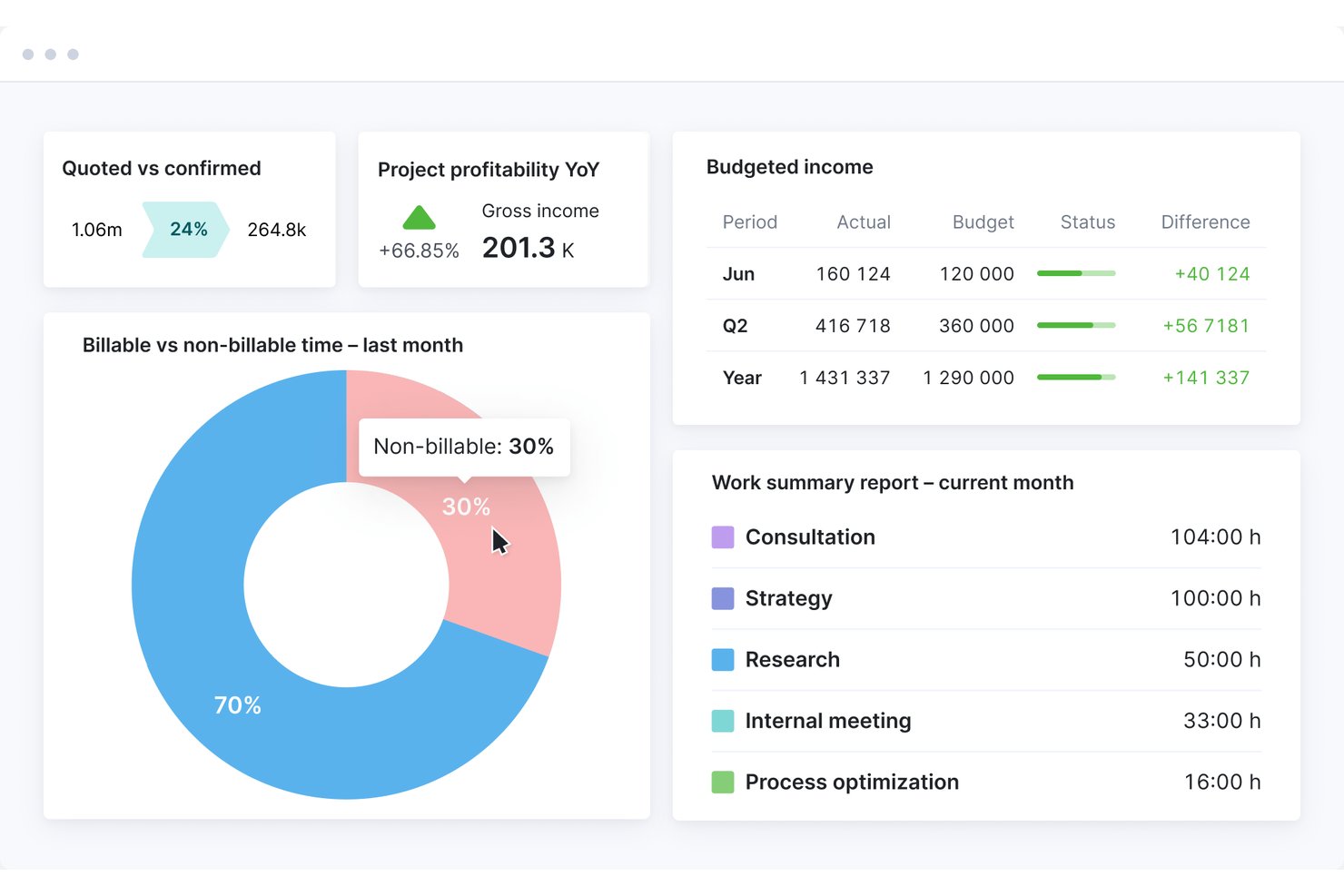
Scoro è una piattaforma di automazione per i servizi professionali che combina la definizione del budget dei progetti, il monitoraggio dei costi, la gestione del tempo e della fatturazione, le previsioni dei ricavi e la reportistica sulla redditività in un unico sistema dall'inizio alla fine.
Per chi è più adatto Scoro?
Scoro è adatto ad agenzie, società di consulenza e altre aziende di servizi basati su progetti con 10–500 dipendenti che necessitano di uno stretto controllo sulle finanze dei progetti e sulla fatturazione ai clienti.
Perché ho scelto Scoro
Scoro si è guadagnato un posto nella mia lista dei migliori strumenti per il modo in cui collega strettamente i preventivi ai dati finanziari dei progetti. Mi piace poter creare un preventivo utilizzando la matrice di stima, suddividendo le consegne per ruolo e impegno, e sapere che gli stessi dati confluiscono direttamente nel monitoraggio del budget e nella reportistica sulla redditività. I modelli di ricavo del progetto (a tariffa fissa, T&M con tetto massimo, T&M senza tetto massimo) consentono al mio team di monitorare come dovrebbero maturare i ricavi rispetto a quanto è stato effettivamente consegnato, senza riconciliazioni manuali.
Funzionalità principali di Scoro
- Pianificatore della capacità delle risorse: Consente di assegnare, visualizzare e modificare in tempo reale i carichi di lavoro e la disponibilità del team nei diversi progetti.
- Supporto multivaluta: Permette di gestire fatturazione internazionale, reportistica e transazioni con i clienti in più valute, con conversioni accurate.
- Automazione del riconoscimento dei ricavi: Applica regole a tariffa fissa, a tempo e materiali oppure regole personalizzate per automatizzare il riconoscimento dei ricavi dei progetti.
- Portale clienti: Offre ai clienti un accesso sicuro per esaminare i budget dei progetti, approvare le fatture e monitorare online lo stato finanziario.
Integrazioni di Scoro
Scoro offre integrazioni native con QuickBooks, Xero, Sage Intacct, Exact Online, Stripe, Expensify, Envoice e Finbite, oltre a collegarsi con Zapier. È inoltre disponibile un'API per le integrazioni personalizzate.
Pros and Cons
Pros:
- Monitora la redditività dei progetti in tempo reale
- Modelli di fatturazione nativi per T&M e a tariffa fissa
- I preventivi confluiscono direttamente nei budget dei progetti
Cons:
- Configurazione più complessa per strutture organizzative articolate
- I pannelli di controllo dei report offrono opzioni limitate di analisi dettagliata
New Product Updates from Scoro

Scoro Adds Time Mobile App and ELI Improvements
Scoro adds the Scoro Time mobile app for iOS/Android to track time anywhere and expands ELI with attachments, smarter filtering, and trigger-based actions. For more information, visit Scoro's official site.

Ideale per il monitoraggio della redditività dei progetti di agenzia
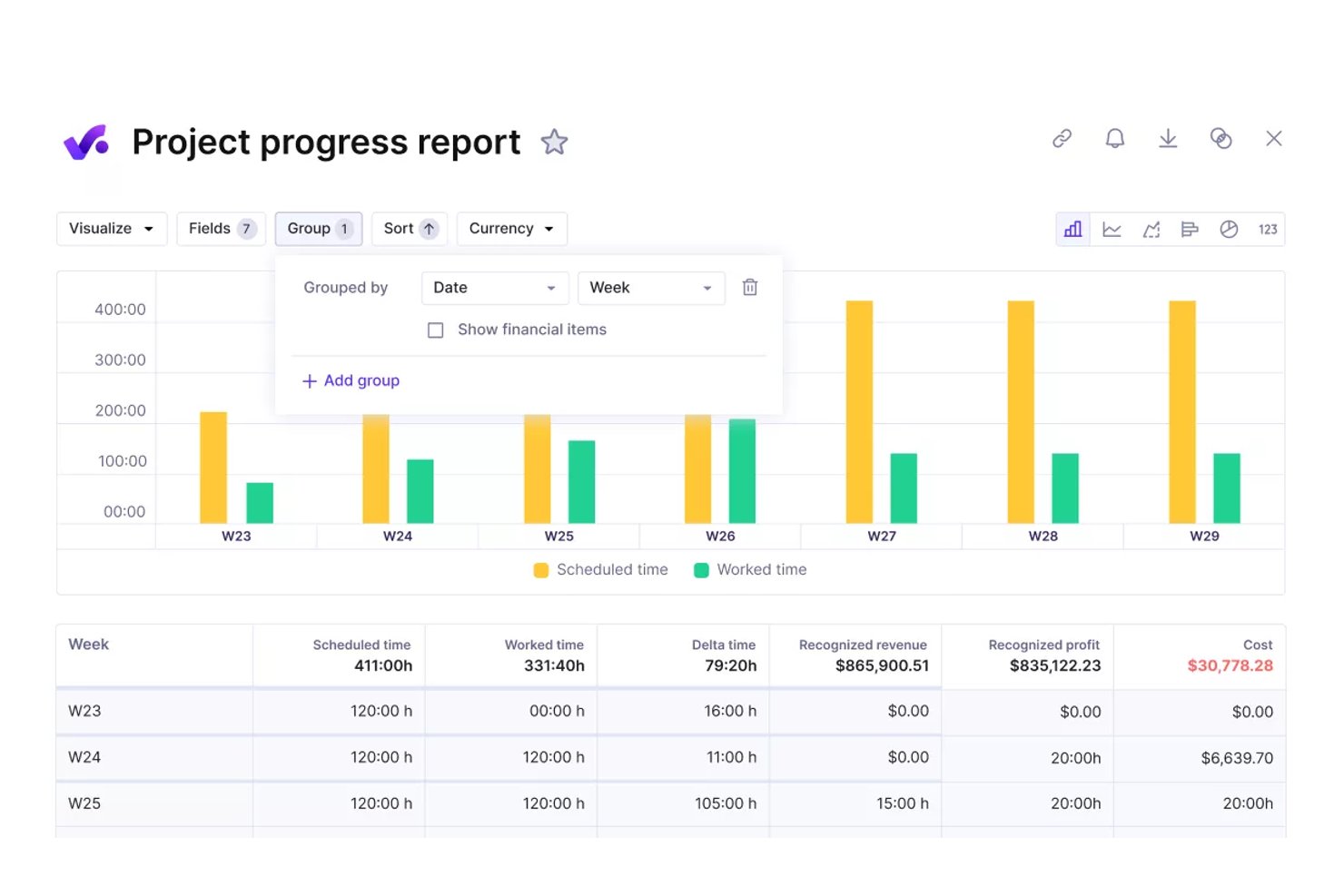
Productive è una piattaforma di gestione per agenzie che combina budgeting di progetto, monitoraggio della redditività in tempo reale, gestione di tempi e fatturazione, pianificazione delle risorse e report finanziari in un unico sistema pensato per team di agenzie e servizi professionali.
Per chi è ideale Productive?
Productive si adatta ad agenzie e società di consulenza in crescita — tipicamente con 20 o più persone — che hanno bisogno di andare oltre i fogli di calcolo e gestire le finanze dei progetti insieme alle operazioni in un'unica soluzione.
Perché ho scelto Productive
Productive si guadagna un posto tra i migliori della mia lista perché collega direttamente i tassi di costo basati sugli stipendi e l'allocazione dei costi generali ad ogni budget di progetto. Ogni ora registrata aggiorna istantaneamente il margine di redditività del progetto, così posso vedere quali incarichi stanno realmente generando profitti senza riconciliazione manuale. La funzione di ripartizione dei costi generali distribuisce automaticamente i costi di struttura e il tempo non fatturabile sui budget attivi, cosa che la maggior parte dei software per agenzie semplicemente trascura.
Funzionalità principali di Productive
- Scenario builder: Simula gli esiti dei progetti e testa scenari finanziari prima di assegnare risorse.
- Gestione e fatturazione degli abbonamenti: Gestisci abbonamenti ricorrenti con strumenti integrati per la programmazione e la generazione di fatture.
- Libreria di report avanzata: Accedi a report predefiniti e personalizzabili focalizzati su finanze, utilizzo e performance dei progetti.
- Integrazioni contabili native: Sincronizza i dati bidirezionalmente con piattaforme come QuickBooks Online, Xero ed Exact per una gestione finanziaria centralizzata.
Integrazioni Productive
Productive offre integrazioni native con QuickBooks Online, Xero, Exact, e-conomic, Fortnox, Twinfield e Zapier. È disponibile un'API per integrazioni personalizzate.
Pros and Cons
Pros:
- Monitoraggio in tempo reale della spesa per fase di progetto
- Utilizzo delle risorse collegato direttamente alle finanze del progetto
- Analisi dei margini a livello di portfolio su più clienti
Cons:
- Automazione per il riconoscimento dei ricavi non disponibile nativamente
- Meno indicato per strutture di progetto non da agenzia
New Product Updates from Productive
Productive Adds Voice Dictation, Slack Connector, Proposals, and Overtime
Productive adds voice dictation, a Slack Connector, proposal controls, and overtime tracking. These updates support faster AI interactions, client proposals, and time management. For more information, visit Productive’s official site.

Wrike
Ideale per il monitoraggio dei budget
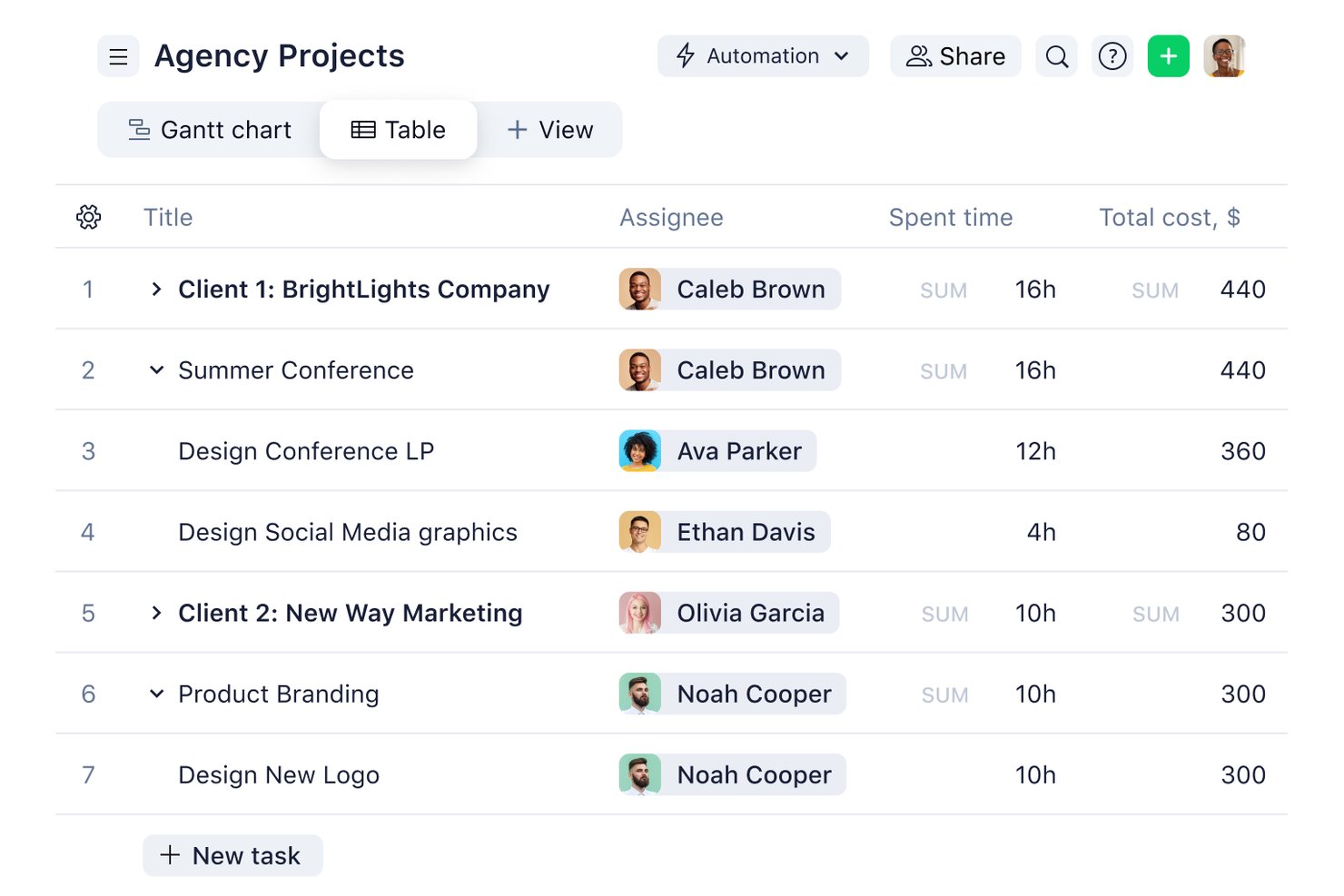
Wrike è una piattaforma di gestione del lavoro che combina pianificazione dei progetti, monitoraggio delle attività, rilevamento del tempo e controllo del budget con report finanziari a livello di portafoglio su progetti e team.
Per chi è Wrike?
Wrike è adatto a team di servizi professionali di medie e grandi dimensioni che necessitano di gestione dei progetti e monitoraggio finanziario in un'unica piattaforma.
Perché ho scelto Wrike
Wrike si guadagna un posto nella mia shortlist per il modo in cui gestisce il monitoraggio dei budget sia a livello di progetto che di portafoglio. Imposto tariffe orarie personalizzate per ruolo o utente individuale e Wrike calcola automaticamente le tariffe previste rispetto a quelle effettive man mano che viene registrato il lavoro. Ciò che trovo particolarmente utile è la vista in tempo reale dei campi finanziari, che mostra la variazione del budget tra i progetti senza alcun lavoro manuale su fogli di calcolo.
Funzionalità principali di Wrike
- Intelligenza del lavoro basata su AI: Gli agenti AI individuano rischi di progetto e generano approfondimenti per la pianificazione finanziaria e operativa.
- Cruscotti personalizzabili: Crea visualizzazioni basate sul ruolo per dati finanziari, stati di progetto e analisi di portafoglio.
- Pianificazione della capacità delle risorse: Visualizza e assegna le risorse del team per ottimizzare il carico di lavoro e la redditività.
- Integrazioni native con sistemi contabili: Connettiti con QuickBooks, NetSuite e altri per una sincronizzazione bidirezionale dei dati finanziari.
Integrazioni Wrike
Wrike offre centinaia di integrazioni tramite le sue integrazioni integrate e il marketplace, includendo strumenti come Google Workspace, Microsoft 365, Salesforce e Slack. Supporta anche Zapier e mette a disposizione un API per integrazioni personalizzate.
Pros and Cons
Pros:
- Monitoraggio dei budget in tempo reale sui portafogli di progetto
- Tariffe orarie personalizzabili per ruolo o utente
- Report finanziari dettagliati a livello di portafoglio
Cons:
- Funzionalità finanziarie avanzate disponibili solo in piani di fascia alta
- Nessuna generazione nativa di fatturazione o nota per il cliente
New Product Updates from Wrike

Wrike Adds Quick Search to Table View
Wrike adds Quick Search to Table View with full-table search across titles, descriptions, and fields, plus highlighted matches. This helps users find tasks faster in large tables. For more information, visit Wrike’s official site.

Celoxis
Ideale per il monitoraggio integrato del portafoglio

Celoxis è una piattaforma di gestione progetti e portafogli con contabilità integrata, monitoraggio del budget, previsione dei ricavi, supporto multi-valuta, gestione di tempi e spese, e analisi del valore guadagnato per progetti e portafogli.
Per chi è ideale Celoxis?
Celoxis è particolarmente adatto a team di medie e grandi dimensioni che gestiscono più progetti contemporaneamente, dove la visibilità finanziaria e la reportistica trasversale sono fattori chiave per una consegna di successo.
Perché ho scelto Celoxis
Ho incluso Celoxis tra le mie scelte principali perché il monitoraggio del portafoglio è realmente integrato nella piattaforma centrale, e non aggiunto come funzionalità accessoria. Posso monitorare scadenze, budget, margini e KPI personalizzati da un'unica dashboard di portafoglio, completamente navigabile, senza dover esportare dati o cambiare strumenti. Trovo particolarmente utile la funzione di analisi degli scenari, che mi permette di simulare diverse combinazioni di portafoglio sulla base di metriche personalizzate e della capacità delle risorse prima di prendere una decisione finale.
Funzionalità principali di Celoxis
- Analisi del valore guadagnato: Calcola in tempo reale l'indice di efficienza dei costi (CPI) e l'indice di efficienza della pianificazione (SPI) per misurare lo stato del progetto rispetto alla baseline.
- Monitoraggio di tempi e spese: Rileva le ore fatturabili e non fatturabili con timesheet intelligenti e flussi di approvazione multilivello che si integrano direttamente nei costi di progetto.
- Previsione dei ricavi: Stima i ricavi attesi, i costi e i margini di profitto sia dei singoli progetti che dell’intero portafoglio, grazie a modelli finanziari integrati.
- Monitoraggio dei costi delle risorse: Imposta le tariffe per ogni risorsa e controlla le spese reali rispetto ai costi di lavoro pianificati su tutti i progetti attivi.
Integrazioni di Celoxis
Celoxis offre integrazioni native con Jira, Salesforce, Trello, Zendesk, Okta, Microsoft Project, Slack, Outlook, Google Drive e altro, oltre a un'API disponibile per integrazioni personalizzate.
Pros and Cons
Pros:
- Gestione del valore guadagnato integrata per la previsione
- Supporta la fatturazione oraria e a prezzo fisso
- Riepilogo di budget e rischi a livello di portafoglio
Cons:
- L’accesso da dispositivi mobili necessita miglioramenti
- I template di progetto complessi richiedono molto tempo per la configurazione

Ideale per il monitoraggio del budget in tempo reale
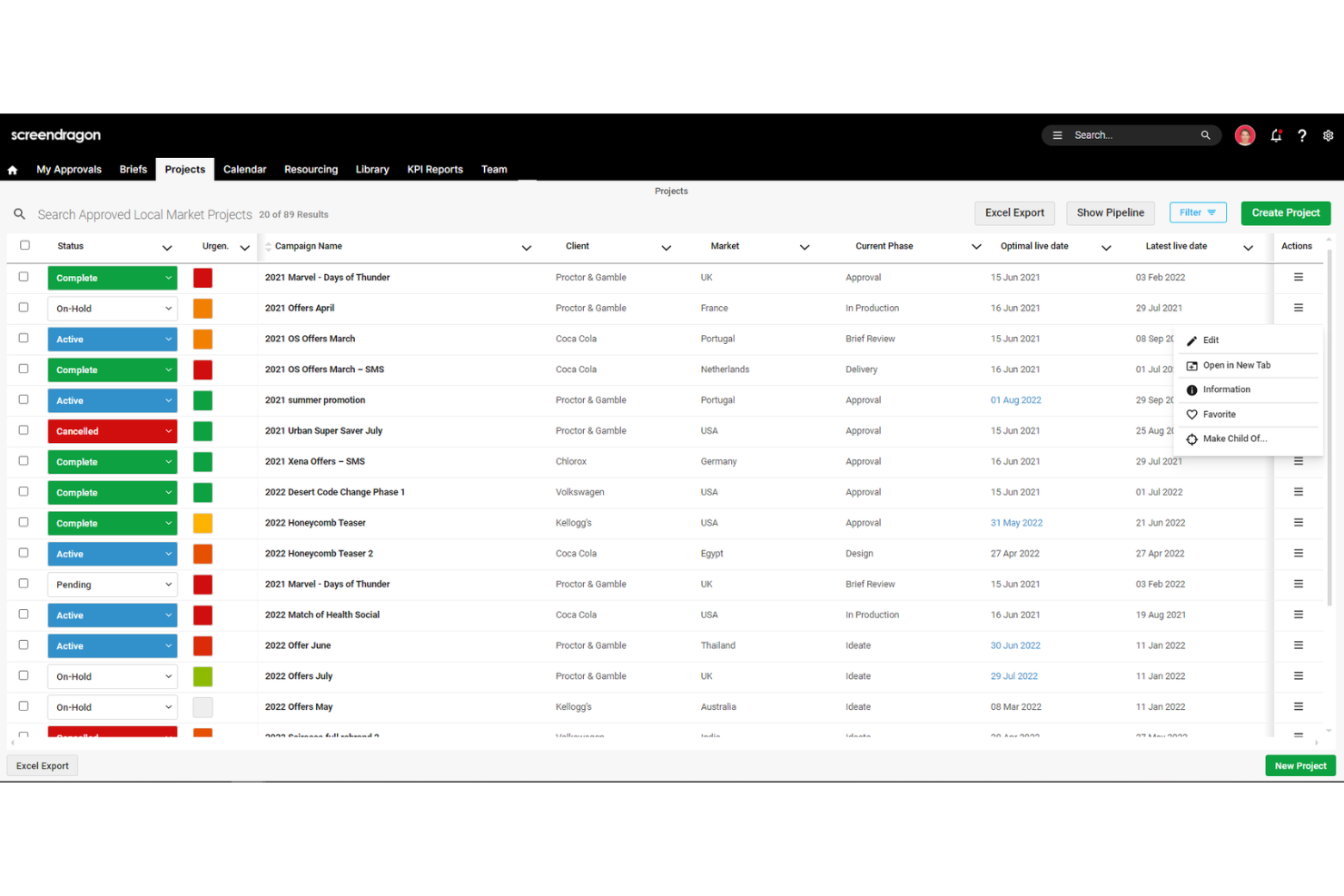
Screendragon è una piattaforma di gestione del lavoro progettata per team di marketing, agenzie e servizi professionali.
Perché ho scelto Screendragon:
Apprezzo le sue capacità complete di gestione del budget. La piattaforma consente di confrontare in tempo reale i costi stimati, assegnati a budget e quelli effettivi, offrendo una visione chiara della salute finanziaria del progetto. Questa funzionalità aiuta a individuare tempestivamente eventuali sforamenti di budget, consentendo di adottare misure correttive per mantenere i progetti in linea. Un altro motivo per cui mi piace Screendragon è il suo strumento integrato di gestione delle risorse. Offre una panoramica a 360 gradi della capacità delle risorse, aiutandoti a capire quanto nuovo lavoro il tuo team può gestire e a individuare colli di bottiglia prima che diventino dei problemi.
Funzionalità principali & integrazioni:
Le funzionalità includono flussi di lavoro configurabili che automatizzano l'assegnazione dei compiti e le approvazioni, riducendo l'intervento manuale e velocizzando le tempistiche dei progetti. Inoltre, lo strumento di revisione online della piattaforma permette la collaborazione in tempo reale su diversi tipi di media, semplificando il processo di revisione e garantendo feedback tempestivi.
Le integrazioni includono MS Power BI, Slack, MS Teams, Zapier, Google Drive, Trello, Microsoft 365, Box, Jira, Microsoft OneDrive e PeopleSoft.
Pros and Cons
Pros:
- Integra vari strumenti come la gestione dei progetti e il controllo del budget
- Ottime funzionalità di pianificazione delle risorse
- Piattaforma personalizzabile sulle tue esigenze specifiche
Cons:
- La profondità della piattaforma può risultare un po' complessa
- Configurazione lunga e impegnativa
New Product Updates from Screendragon
Screendragon Unveils New AI Hub
Screendragon introduced AI Hub, a new capability that lets teams build and manage AI agents directly within workflows. The update helps marketing teams automate tasks, maintain governance controls, and scale AI-driven operations more efficiently. For more information, visit Screendragon's official site.

Ideale per il controllo finanziario con monitoraggio del tempo
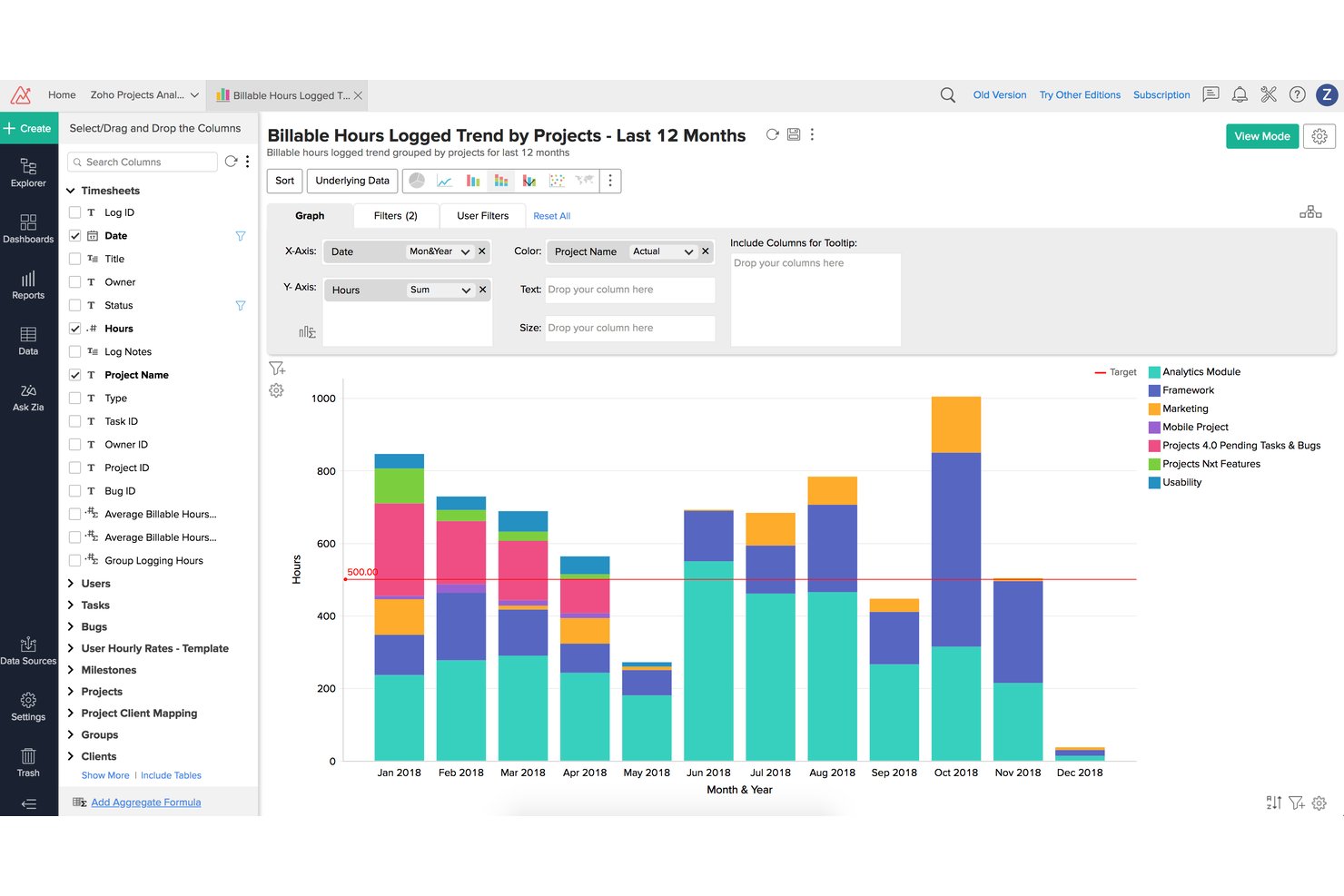
Zoho Projects è una piattaforma di gestione progetti che combina pianificazione delle attività, monitoraggio del tempo, budgeting, gestione del valore guadagnato (EVM) e integrazione con la fatturazione per supportare il controllo finanziario su tutti i progetti.
Per chi è migliore Zoho Projects?
È una soluzione ideale per team di servizi professionali di piccole e medie dimensioni che già utilizzano l'ecosistema Zoho e necessitano di un monitoraggio delle ore strettamente collegato alla fatturazione dei clienti.
Perché ho scelto Zoho Projects
Ho inserito Zoho Projects nella mia lista perché collega in modo preciso le ore lavorate ai risultati finanziari. Apprezzo il fatto che il modulo EVM integrato calcoli EAC, ETC e CPI direttamente dai dati dei timesheet, offrendo una vera visibilità sulle varianze senza dover esportare in un foglio di calcolo. Le approvazioni multi-livello dei timesheet permettono di assicurare l’accuratezza della fatturazione prima che le ore entrino in fattura.
Caratteristiche principali di Zoho Projects
- Dashboard di portafoglio: Fornisce una panoramica unificata dello stato e della situazione finanziaria di più progetti in un unico luogo.
- Gestione delle baseline di progetto: Consente di impostare e confrontare diverse baseline per monitorare le variazioni di pianificazione e budget.
- Ruoli e profili personalizzati: Permette un controllo granulare degli accessi per responsabili di progetto, finanza e clienti.
- Integrazione nativa con Zoho Books e Zoho Invoice: Si sincronizza con gli strumenti di contabilità Zoho per un flusso di dati finanziari in tempo reale.
Integrazioni di Zoho Projects
Zoho Projects offre integrazioni native con Zoho Books, Zoho Invoice, Zoho CRM, Slack, Google Drive, Microsoft Teams, GitHub, Bitbucket, Google Calendar e Zapier. È disponibile un'API per integrazioni personalizzate.
Pros and Cons
Pros:
- Metriche EVM calcolate direttamente dai timesheet
- Approvazioni multi-livello dei timesheet garantiscono accuratezza di fatturazione
- Monitoraggio delle baseline di budget integrato tra le fasi
Cons:
- Personalizzazione dei report limitata per esigenze complesse
- Le funzionalità EVM sono disponibili solo nei piani di livello superiore
New Product Updates from Zoho Projects
Zoho Projects Adds CodeX Scripts for Custom Modules
Zoho Projects now supports CodeX Scripts for custom modules, enabling conditional logic and rules for creating, updating, and deleting records. For more information, visit Zoho Projects' official site.
 .
.
VOGSY
Ideale per la gestione di programmi di fatturazione complessi
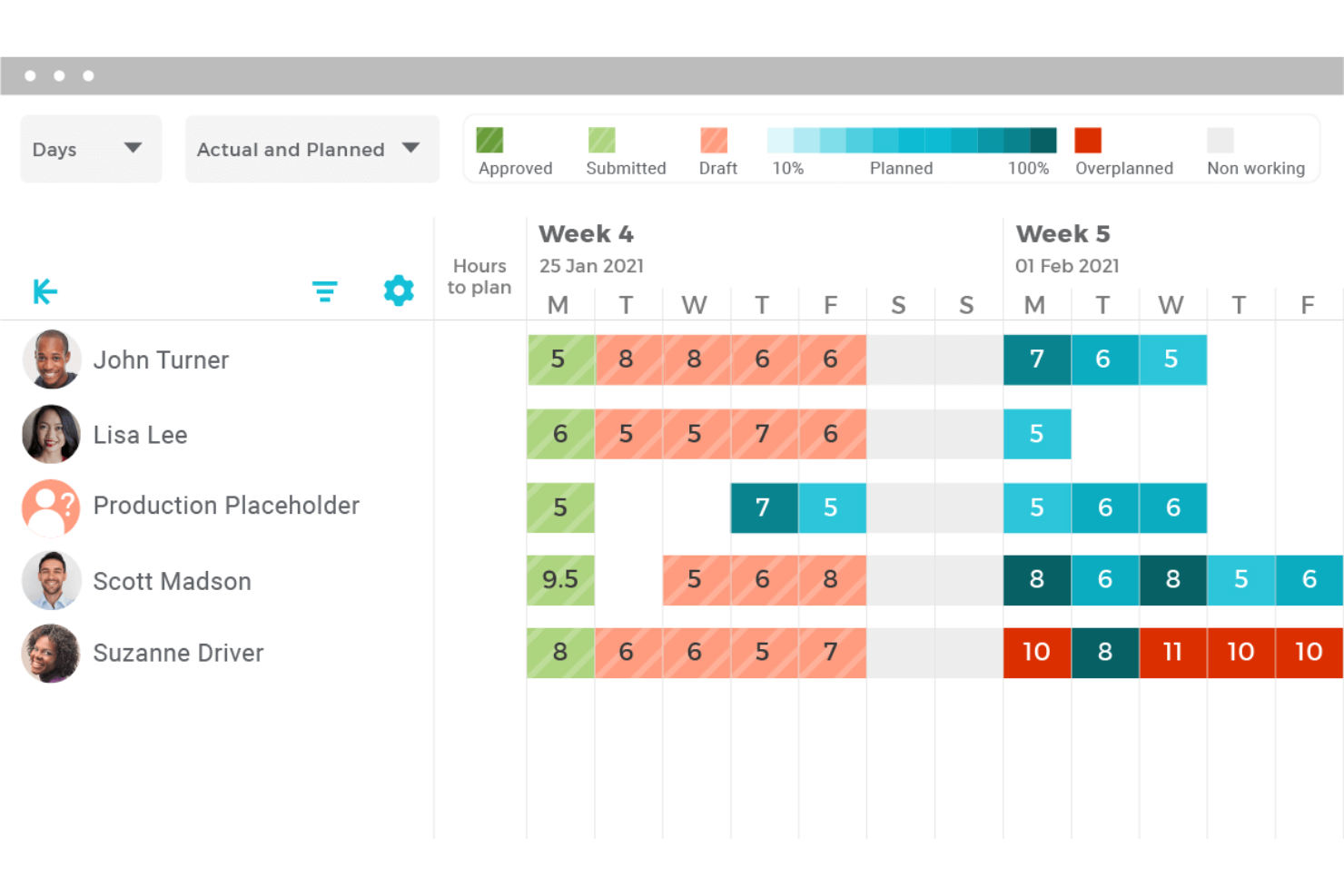
VOGSY è una piattaforma di automazione per i servizi professionali che combina contabilità di progetto, fatturazione, gestione delle risorse, rilevazione delle ore e reportistica finanziaria per organizzazioni basate sui servizi.
Per chi è ideale VOGSY?
VOGSY è particolarmente adatto a società di servizi professionali di medie dimensioni che gestiscono portafogli di progetti multi-entità o multi-valuta con team distribuiti.
Perché ho scelto VOGSY
VOGSY si è guadagnato un posto tra i migliori nella mia lista grazie alla sua capacità di gestire una complessità di fatturazione che metterebbe in crisi la maggior parte degli strumenti di project management. Apprezzo il fatto che un singolo progetto possa includere più modelli di fatturazione contemporaneamente, combinando soluzioni a ore, a prezzo fisso e basate su licenza per diversi deliverable. Il livello di contabilità di progetto di VOGSY collega poi queste strutture di fatturazione direttamente alla reportistica P&L multi-valuta, garantendo così la visibilità dei margini in tempo reale senza ritardi rispetto all'attività di fatturazione.
Funzionalità principali di VOGSY
- Pianificazione della capacità delle risorse: Modella e gestisci l'allocazione delle risorse, i tassi di utilizzo e i vincoli di capacità tra diversi team di progetto.
- Supporto multi-valuta e multi-entità: Gestisci portafogli di progetti globali con supporto nativo per varie valute, regimi fiscali ed entità legali differenti.
- Integrazioni bidirezionali con ERP/contabilità: Sincronizza i dati con sistemi come Xero, QuickBooks, Oracle e Sage per una visione finanziaria unificata dei progetti.
- Permessi basati sui ruoli: Controlla la visibilità finanziaria e le approvazioni in base all'utente, al progetto o al segmento di clientela.
Integrazioni VOGSY
VOGSY offre integrazioni native con Xero, QuickBooks Online, Sage, Oracle, Tally, Wave, ABSS, Omie e Datev. È disponibile una API aperta per integrazioni personalizzate.
Pros and Cons
Pros:
- Modelli di fatturazione misti per singolo progetto
- Visibilità dei margini in tempo reale collegata direttamente alle fatture
- Progettato nativamente per la fatturazione dei servizi professionali
Cons:
- Poco adatto a settori diversi dai servizi professionali
- Le dashboard dei report non sono altamente personalizzabili
New Product Updates from VOGSY
VOGSY Adds Velocity Agent Verdicts for Quote Approvals
VOGSY adds Velocity agent verdicts for quote approval requests with risk levels, margin checks, discount analysis, and reasoning. This helps approvers assess quote risk before making a final decision. For more information, visit VOGSY’s official site.
 .
.
Ideale per integrazione nativa con Office e Teams
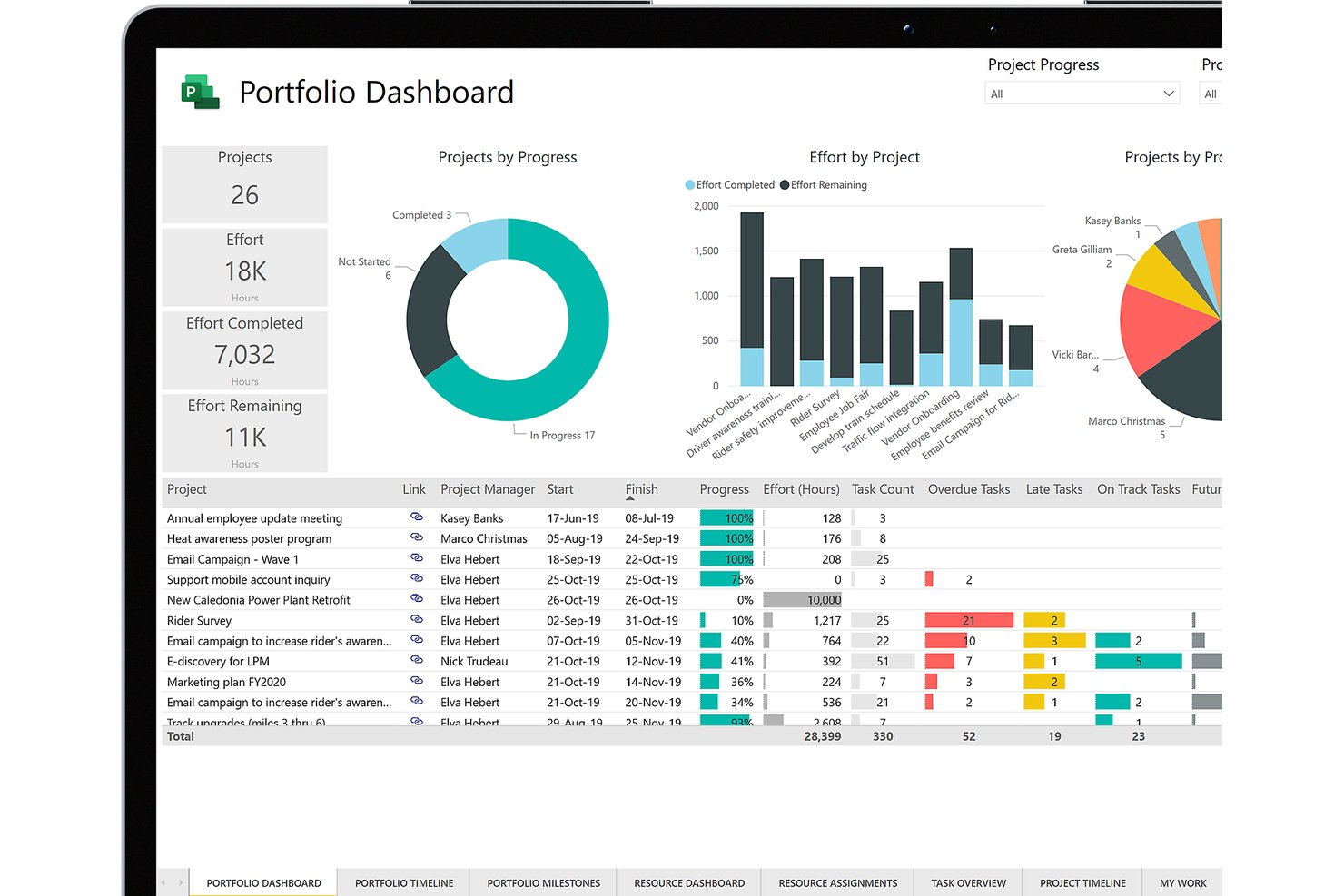
Microsoft Project è una piattaforma di gestione dei progetti che combina pianificazione delle attività, gestione delle risorse, monitoraggio dei costi, budgeting dei baseline e analisi del valore acquisito su portafogli di progetti.
Per Chi è Ideale Microsoft Project?
Microsoft Project è particolarmente adatto a direttori PMO aziendali e grandi organizzazioni che già utilizzano l’ecosistema Microsoft 365 e che necessitano di una supervisione dei progetti a livello di portafoglio.
Perché Ho Scelto Microsoft Project
Microsoft Project si è guadagnato il suo posto nella mia selezione grazie all’integrazione naturale del monitoraggio dei costi negli strumenti che il mio team utilizza quotidianamente. Apprezzo molto il fatto che i baseline di budget e l’analisi del valore acquisito si integrino direttamente nelle dashboard di Power BI senza esportazioni manuali, offrendo al mio team una visibilità in tempo reale delle variazioni di costo su tutto il portafoglio. L’integrazione con Teams mantiene le discussioni di budget e la condivisione dei file legate direttamente alle attività di progetto, così nulla viene perso tra un aggiornamento di pianificazione e una discussione sui costi.
Caratteristiche Principali di Microsoft Project
- Pianificazione tramite diagramma di Gantt: Visualizza e gestisci le tempistiche dei progetti, le dipendenze e le milestone con diagrammi di Gantt interattivi.
- Pianificazione della capacità delle risorse: Assegna, bilancia e monitora i carichi di lavoro sui team di progetto per prevenire sovra o sotto-utilizzo delle risorse.
- Monitoraggio dei baseline: Definisci diversi baseline di budget e pianificazione per confrontare le prestazioni pianificate e reali in qualsiasi fase.
- Dashboard di reportistica a livello di portafoglio: Consolida dati finanziari e di stato per diversi progetti, consentendo una supervisione centralizzata personalizzabile.
Integrazioni di Microsoft Project
Microsoft Project offre integrazioni native in tutto l’ecosistema Microsoft, inclusi Microsoft 365, Teams, Power BI, SharePoint e Azure. È disponibile un’API per integrazioni personalizzate.
Pros and Cons
Pros:
- Analisi del valore acquisito integrata nella piattaforma
- Budgeting con baseline e monitoraggio delle variazioni inclusi
- Visibilità dei costi a livello di portafoglio su più progetti
Cons:
- Mancanza di funzionalità native per fatturazione o rendicontazione ai clienti
- Configurazione complessa necessaria per flussi di reportistica finanziaria

Ideale per la gestione degli studi contabili
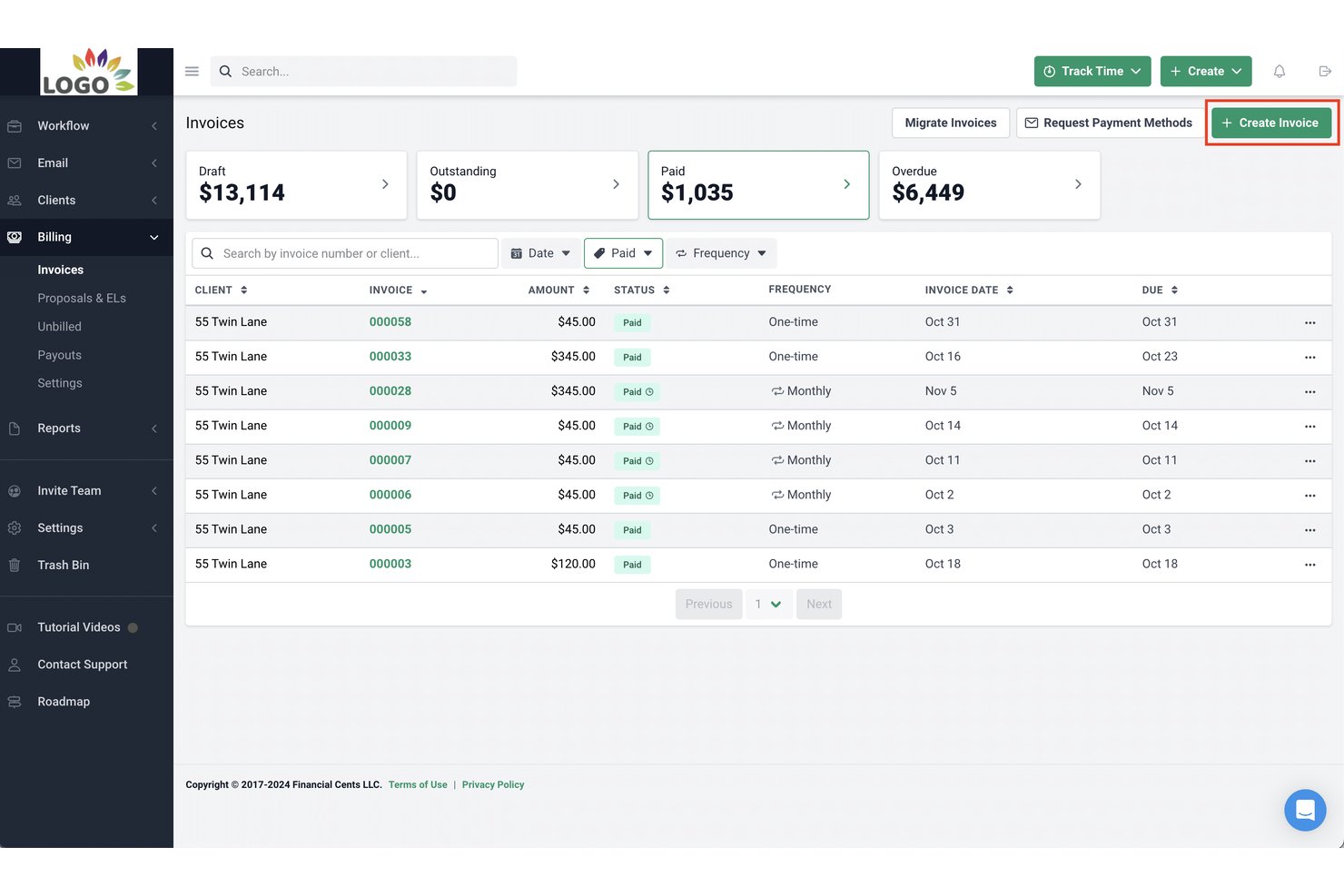
Financial Cents è una piattaforma di gestione per studi contabili che unisce monitoraggio del flusso di lavoro dei clienti, gestione di tempi e fatturazione, emissione di fatture e reportistica sulla redditività per piccoli studi di contabilità e consulenza fiscale.
Per Chi È Meglio Financial Cents?
Financial Cents è pensato per piccoli studi di contabilità, consulenza fiscale e tenuta della contabilità — tipicamente team da 2 a 30 persone — che necessitano di gestire il lavoro ricorrente dei clienti in un unico posto.
Perché Ho Scelto Financial Cents
Ho scelto Financial Cents tra i migliori perché è l’unico strumento qui progettato specificamente intorno alle modalità con cui gli studi contabili gestiscono il lavoro dei clienti. Le oltre 250 schede di flusso di lavoro preimpostate riguardano contabilità, fisco e paghe già pronte all’uso, senza dover configurare nulla da zero. Apprezzo anche il Validatore AI di File, che controlla ogni file caricato dal cliente rispetto alla richiesta, al periodo contabile e ai dettagli del cliente, segnalando in tempo reale i documenti relativi ad anni o conti errati non appena arrivano.
Funzionalità Principali di Financial Cents
- Integrazione CRM clienti: Sincronizza le informazioni dei clienti con QuickBooks Online per collegare in un unico posto schede, documenti e fatture.
- Portale clienti senza password: Offre un portale sicuro e personalizzato per lo scambio di documenti e la firma elettronica senza necessità di password per i clienti.
- Dashboard di reportistica e capacità: Visualizza in tempo reale la capacità del team, lo stato dei progetti e metriche di redditività a livello cliente.
- Modelli contabili preimpostati: Include oltre 250 modelli pronti per flussi di lavoro di contabilità, fisco e CAS.
Integrazioni con Financial Cents
Financial Cents offre un’integrazione nativa con QuickBooks Online e fornisce un’API per integrazioni personalizzate.
Pros and Cons
Pros:
- Rilevamento dei tempi collegato alla fatturazione dei clienti
- Modelli di flusso di lavoro ricorrenti per attività di contabilità
- Visibilità in tempo reale sulla redditività per cliente
Cons:
- Profondità limitata nella gestione del budget per progetti non contabili
- Nessun supporto multivaluta per team globali

Rocketlane
Ideale per il monitoraggio dell'onboarding dei progetti
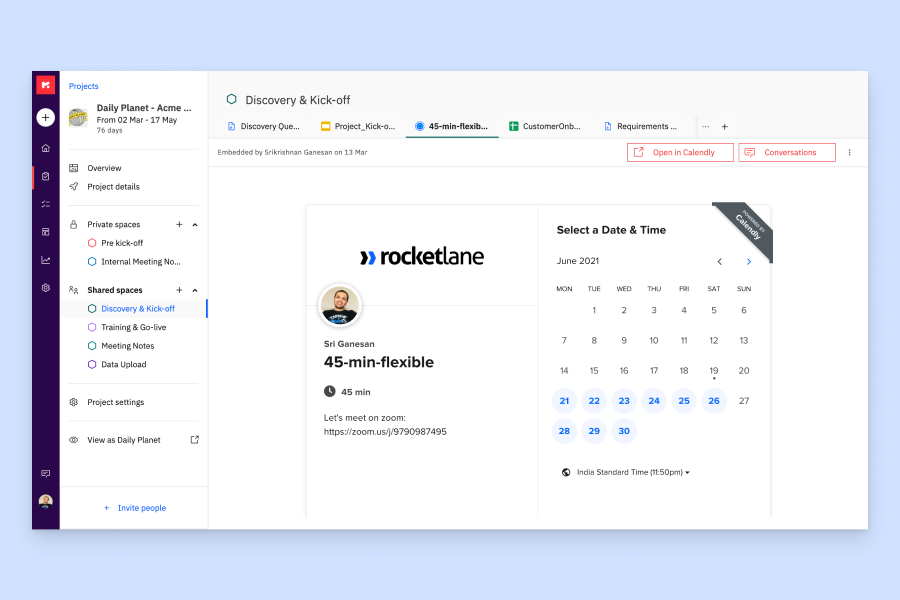
Rocketlane è una piattaforma di automazione per i servizi professionali (PSA) alimentata dall'IA che copre consegna dei progetti, gestione delle risorse, monitoraggio finanziario, portali clienti e rilevamento delle ore in un unico sistema.
Per chi è Rocketlane?
Rocketlane è particolarmente adatto per i team di servizi professionali di aziende B2B SaaS che hanno bisogno di gestire la consegna di progetti rivolti ai clienti insieme alla pianificazione finanziaria e delle risorse.
Perché ho scelto Rocketlane
Ho scelto Rocketlane tra i migliori per il monitoraggio dell'onboarding dei progetti perché è stato progettato da zero per il lavoro di implementazione rivolto ai clienti, e non adattato da uno strumento di project management generico. Mi piace come la funzione di avanzamento delle milestone fornisca al mio team una visione in tempo reale se ogni onboarding sia sulla buona strada o stia iniziando a deviare, così possiamo correggere la rotta prima che una scadenza sfugga di mano. Il Nitro Project Architect trasforma il SOW direttamente in un piano progetto strutturato e pronto per l'esecuzione, il che significa che non dobbiamo ricostruire da zero lo stesso piano per ogni nuovo cliente. Il portale dedicato ai clienti inoltre mantiene gli stakeholder esterni responsabili dei propri compiti senza che il mio team debba rincorrerli via email.
Caratteristiche principali di Rocketlane
- Budgeting dei progetti: Imposta budget a livello di progetto e monitora in tempo reale la spesa stimata rispetto a quella effettiva per attività e risorse.
- Rilevamento ore e timesheet: Registra ore fatturabili e non fatturabili direttamente sulle attività di progetto, con flussi di approvazione dei timesheet integrati.
- Tariffe orarie: Definisci tariffe di fatturazione basate sul ruolo o specifiche di progetto per calcolare con precisione ricavi e margini in tutto il portfolio.
- Report sull'utilizzo delle risorse: Visualizza capacità e utilizzo del tuo team per identificare sovraccarichi o tempi morti prima che incidano sulla consegna.
Integrazioni Rocketlane
Rocketlane offre integrazioni native con Slack, Salesforce, Jira, HubSpot, Google Calendar e Outlook Calendar, e si collega con Zapier e Workato per un'automazione più ampia dei flussi di lavoro. È disponibile anche un'API per integrazioni personalizzate.
Pros and Cons
Pros:
- Funzionalità finanziarie integrate con viste sulla redditività a livello di progetto
- Il portale clienti offre visibilità in tempo reale sul progetto
- L'IA genera automaticamente documenti di consegna e passaggio di consegne
Cons:
- La reportistica personalizzata non prevede campi formula calcolati
- L'app mobile ha capacità di modifica limitate
New Product Updates from Rocketlane

Rocketlane Introduces Governance and Workforce Agents
Rocketlane introduces Governance Agents and Workforce Agents to automate delivery processes and recurring tasks. These updates help teams enforce rules and streamline project execution. For more information, visit Rocketlane’s official site.
 .
.Altri software per la gestione finanziaria dei progetti
Ecco alcune ulteriori opzioni per la gestione finanziaria dei progetti che non sono entrate nella mia selezione, ma che vale comunque la pena valutare:
- ProProfs Project
Il migliore con strumenti di fatturazione cliente semplici
- Bonsai Agency Software
Ideale per agenzie e società di consulenza
- Jetpack Workflow
Ideale per l’efficienza negli studi di contabilità
- Adobe Workfront
Ideale per l'automazione del lavoro
- Tempo Portfolio Manager
Ideale per la pianificazione predittiva
- Ravetree
Ideale per la fatturazione e le spese
- Harvest
Ideale per il monitoraggio intuitivo del tempo
- Clarizen
Ideale per la gestione del lavoro aziendale
- Smartsheet
Ideale per la gestione scalabile dei progetti
- ProWorkflow
Ideale per l'integrazione della gestione finanziaria


Come Valuto i Software di Gestione Finanziaria dei Progetti
Divido la mia valutazione tra requisiti di base—come la capacità di uno strumento di tracciare la variazione di budget nelle diverse fasi di un progetto—e fattori differenzianti che distinguono le migliori opzioni dalle altre.
Funzionalità Principali (Essenziali per Questa Lista)
Quando seleziono gli strumenti per la mia lista, valuto ciascuno su una scala da 0 (non offre la funzionalità) a 5 (eccelle in quest'area) per ogni funzionalità fondamentale elencata sotto. Successivamente calcolo il punteggio totale dello strumento in percentuale. Ogni strumento deve ottenere un punteggio totale minimo del 65% per essere preso in considerazione all'inserimento.
- Budget di Progetto: Cerco budget multilivello suddivisi per fasi, categorie di costo e allocazioni a livello di attività, non solo un importo totale assegnato all’intero progetto.
- Monitoraggio Costi e Spese: Sono essenziali le visualizzazioni in tempo reale tra budget e consuntivo, soprattutto se costi di manodopera, materiali e subappaltatori gravano sullo stesso progetto.
- Gestione di Tempo e Fatturazione: Valuto se uno strumento supporta schede tariffarie configurabili, la distinzione tra attività fatturabili e non, e la fatturazione collegata ai progetti per incarichi T&M.
- Previsioni Finanziarie & EAC: Gli strumenti dovrebbero calcolare automaticamente le stime a completamento e da completare man mano che arrivano i consuntivi, senza affidarsi ad aggiornamenti manuali su fogli di calcolo.
- Report su Redditività e Margini: Controllo la presenza di dashboard P&L a livello progetto e la possibilità di aggregare i dati relativi ai margini su tutto il portafoglio di progetti attivi.
- Integrazione con Sistemi Contabili: Cerco una sincronizzazione nativa con piattaforme come QuickBooks, Xero o NetSuite—le sole esportazioni in CSV non bastano per i team finanziari.
Una volta ottenuta una lista di strumenti che soddisfano i criteri, considero cosa rende unica ogni piattaforma.
Fattori Differenzianti (Cosa Distingue i Fornitori)
Ecco come confronto diversi fornitori:
Funzionalità Distintive
Il riconoscimento dei ricavi è fondamentale—cerco strumenti che automatizzano calendari basati su percentuale di completamento o su milestone, così i team finanziari non devono fare riconciliazioni manuali a fine mese. Il supporto multi-valuta e multi-entità è inoltre importante per chi gestisce progetti oltre confine, dove è routine fatturare in una valuta e fare report in un’altra. La pianificazione della capacità delle risorse completa il quadro, collegando i costi del personale direttamente ai margini di progetto e aiutando i responsabili PMO a fare assegnazioni più intelligenti prima che un progetto sfori il budget.
Oltre le Funzionalità
L’ecosistema di integrazioni è una considerazione chiave—verifico se uno strumento si collega nativamente a piattaforme contabili come QuickBooks o NetSuite, oltre a sistemi CRM e paghe, poiché i dati finanziari di progetto raramente vivono isolati. Anche la compatibilità con settori specifici influenza la mia valutazione. Uno strumento pensato per studi di consulenza con fatturazione T&M funziona molto diversamente da uno progettato per l’edilizia con contratti cost-plus. Infine, verifico come si struttura il prezzo—se per utente, per progetto, o per entità—per assicurarmi che il modello funzioni per team dove finanziari e project manager condividono la piattaforma.
Come scegliere un software per la gestione finanziaria dei progetti
È facile perdersi in lunghi elenchi di funzionalità e strutture tariffarie complesse. Per aiutarti a rimanere concentrato mentre affronti il tuo esclusivo processo di selezione del software, ecco una lista di controllo dei fattori da tenere a mente:
| Fattore | Cosa considerare |
| Scalabilità | Assicurati che lo strumento possa gestire un numero maggiore di progetti, utenti e dati man mano che il tuo team cresce. Cerca prezzi flessibili e livelli di utilizzo differenziati. |
| Integrazioni | Verifica che il software si colleghi facilmente agli strumenti che già utilizzi, come QuickBooks, Excel o il tuo CRM, così da non duplicare il lavoro. |
| Personalizzazione | Dovresti poter adattare report, dashboard e flussi di lavoro alle esigenze di monitoraggio finanziario del tuo team. |
| Facilità d'uso | L'interfaccia dello strumento dovrebbe essere abbastanza intuitiva da consentire al tuo team di iniziare a utilizzarlo senza molta formazione o frustrazione. |
| Budget | Considera il costo totale, inclusi componenti aggiuntivi e tariffe per gli utenti. Scegli un software che rientri nel tuo budget senza rinunciare alle funzionalità essenziali. |
| Misure di sicurezza | Verifica che la piattaforma utilizzi la crittografia, l'accesso basato sui ruoli e i registri di controllo per proteggere i dati finanziari sensibili. |
| Strumenti di reportistica | Avrai bisogno di un accesso semplice ai dati in tempo reale e di report finanziari personalizzabili che ti aiutino a prendere decisioni informate. |
| Opzioni di assistenza | Se sorgono problemi, è utile avere accesso alla chat dal vivo, a un centro assistenza o a un supporto dedicato che possa aiutarti a riprendere il controllo. |
Tendenze dei software per la gestione finanziaria dei progetti
Nella mia ricerca, ho raccolto innumerevoli aggiornamenti dei prodotti, comunicati stampa e registri delle versioni di diversi fornitori di software per la gestione finanziaria dei progetti. Ecco alcune delle tendenze emergenti che sto tenendo d’occhio:
- Previsioni basate sull’intelligenza artificiale: sempre più strumenti utilizzano l’apprendimento automatico per prevedere i costi dei progetti, i ritardi e il fabbisogno di risorse. Questo ti aiuta a prendere decisioni più rapidamente sulla base delle tendenze nei tuoi dati, anziché affidarti a supposizioni.
- Adeguamenti del budget in tempo reale: alcuni software ora supportano modifiche al budget in tempo reale basate sulla spesa effettiva. Puoi aggiornare i piani finanziari senza aspettare i report di fine mese.
- Monitoraggio dettagliato dei costi: ora i team possono monitorare i costi a un livello più dettagliato, per attività, fase o membro del team. Questo rende più semplice individuare le spese eccessive e adeguare i piani in tempo reale.
- Pianificazione degli scenari integrata: sempre più piattaforme consentono di simulare scenari finanziari ipotetici per vedere come scelte diverse potrebbero influire sul budget. Questo ti aiuta a pianificare sia i risultati migliori sia quelli peggiori.
- Pannelli di controllo finanziari più visivi: i dati finanziari vengono presentati in modi più chiari e interattivi. Puoi visualizzare tendenze, progressi e problemi senza esportare fogli di calcolo o creare report personalizzati.
Che cos’è un software per la gestione finanziaria dei progetti?
Il software per la gestione finanziaria dei progetti è uno strumento specializzato progettato per gestire e monitorare gli aspetti finanziari dei progetti. Viene utilizzato dai responsabili di progetto, dai team finanziari e dai portatori di interesse per pianificare, controllare e monitorare i costi e i budget dei progetti.
Il software include funzionalità per la definizione del budget, le previsioni, il monitoraggio delle spese e la reportistica finanziaria. È essenziale per gli utenti che devono mantenere il controllo finanziario sui progetti, assicurandosi che i costi rimangano entro il budget e che gli obiettivi finanziari vengano raggiunti. In settori come quello della produzione, il software per la gestione finanziaria dei progetti può anche aiutare a gestire i costi di produzione, i pagamenti ai fornitori e la pianificazione delle risorse, allineando le spese operative agli obiettivi del progetto.
Funzionalità dei software per la gestione finanziaria dei progetti
Quando selezioni un software per la gestione finanziaria dei progetti, presta attenzione alle seguenti funzionalità chiave:
- Controlli delle autorizzazioni: ti consente di gestire chi può visualizzare o modificare i dati finanziari, proteggendo le informazioni sensibili.
- Monitoraggio del budget: ti consente di impostare, monitorare e adeguare i budget dei progetti in tempo reale per evitare spese eccessive.
- Registrazione delle spese: permette al tuo team di registrare e classificare i costi, così puoi vedere dove vengono destinati i fondi.
- Strumenti per la fatturazione: ti aiutano a creare, inviare e monitorare le fatture associate a specifici traguardi del progetto o alle ore lavorate.
- Allocazione dei costi delle risorse: assegna valori finanziari ai membri del team, agli strumenti o al tempo, così puoi monitorare i costi effettivi del progetto.
- Strumenti di previsione: utilizzano i dati passati per stimare la spesa futura e aiutarti a pianificare in anticipo.
- Report finanziari personalizzati: ti consentono di creare report su misura per le tue esigenze, così puoi condividere informazioni utili con i portatori di interesse.
- Integrazione del monitoraggio del tempo: collega le ore registrate ai budget e alla fatturazione per una contabilità accurata dei progetti.
- Supporto per più valute: ti consente di gestire budget e fatture in valute diverse per i progetti internazionali.
- Registro di controllo: monitora tutte le modifiche finanziarie e le approvazioni per garantire responsabilità e conformità.
Vantaggi dei software per la gestione finanziaria dei progetti
L’implementazione di un software per la gestione finanziaria dei progetti offre diversi vantaggi al tuo team e alla tua azienda. Eccone alcuni:
- Registri di controllo più solidi: le modifiche finanziarie registrate e la cronologia delle approvazioni favoriscono la conformità e la responsabilità.
- Un controllo migliore del budget: il monitoraggio e gli avvisi in tempo reale ti aiutano a individuare tempestivamente le spese eccessive e a rimanere entro il budget.
- Cicli di fatturazione più rapidi: gli strumenti di fatturazione integrati accelerano l’invio delle fatture e la ricezione dei pagamenti.
- Previsioni migliorate: i dati storici e l’analisi delle tendenze rendono più semplice pianificare i costi futuri dei progetti.
- Maggiore visibilità: i pannelli di controllo e i report mostrano esattamente come vengono spesi i tuoi fondi nei diversi progetti.
- Report più accurati: i report finanziari personalizzati riducono gli errori manuali e forniscono dati affidabili.
- Pianificazione delle risorse più semplice: gli strumenti di allocazione dei costi aiutano ad abbinare le risorse ai budget in modo più efficace.
Costi e prezzi del software per la gestione dei progetti finanziari
La scelta di un software per la gestione dei progetti finanziari richiede la comprensione dei vari modelli e piani tariffari disponibili. I costi variano in base alle funzionalità, alle dimensioni del team, ai componenti aggiuntivi e ad altri fattori. La tabella seguente riepiloga i piani più comuni, i relativi prezzi medi e le funzionalità tipicamente incluse nelle soluzioni software per la gestione dei progetti finanziari:
Tabella di confronto dei piani per il software per la gestione dei progetti finanziari
| Tipo di piano | Prezzo medio | Funzionalità comuni |
| Gratuito | $0 | Gestione di base delle attività, elenchi di cose da fare, calendario integrato, numero limitato di utenti |
| Individuale | $3.66 al mese | Bacheche avanzate, maggiore spazio di archiviazione, assistenza clienti migliorata, integrazioni di terze parti |
| Piccole imprese | $8.90 al mese/utente | Visualizzazione con diagramma di Gantt, documenti incorporati, automazione, maggiore assistenza, integrazione con altri strumenti |
| Medie imprese | $16.88 al mese/utente | Sicurezza avanzata, utenti illimitati, report in tempo reale, varie visualizzazioni dei progetti |
| Aziendale | Da concordare | Autorizzazioni personalizzate, report avanzati, assistenza prioritaria, set completo di funzionalità, criterio relativo al numero minimo di utenti |
Domande frequenti sul software di gestione finanziaria dei progetti
Quali tipi di dati e analisi offre il software di gestione finanziaria dei progetti?
\u003cspan data-term-id=\u002259704103\u0022\u003eLa gestione finanziaria dei progetti \u003c/span\u003e\u003cspan data-term-id=\u002259704103\u0022\u003eofferta dal software\u003c/span\u003e\u003cspan data-term-id=\u002259704103\u0022\u003e include\u003c/span\u003e il monitoraggio del budget, la rendicontazione delle spese, le previsioni finanziarie e l’analisi della redditività dei progetti. Questi strumenti offrono informazioni sui costi della manodopera, sulle tariffe dei costi e sui margini dei progetti. Le analisi avanzate includono un pannello di controllo del portafoglio per monitorare i KPI, tenere sotto controllo la rilevazione dei ricavi, valutare gli accordi a compenso fisso e generare rapporti sulle ore per mantenere i progetti entro il budget.
Quanto è facile aggiornare il piano nel software di gestione finanziaria dei progetti e chi apporta le modifiche?
L’aggiornamento dei piani nel software di gestione finanziaria dei progetti è generalmente semplice, poiché la maggior parte delle soluzioni moderne è progettata per facilitare le modifiche ai piani, ai budget e alle tempistiche dei progetti. Gli utenti autorizzati, come i responsabili di progetto e gli analisti finanziari, possono apportare modifiche; inoltre, il software spesso include registri di controllo e log delle modifiche per garantire la responsabilità.
Quali attività sono necessarie per ottenere il massimo beneficio dal software di gestione finanziaria dei progetti?
Per massimizzare i vantaggi del software di gestione finanziaria dei progetti è necessario stabilire obiettivi finanziari chiari, aggiornare e rivedere costantemente i dati finanziari e utilizzare report e analisi per prendere decisioni. Anche una formazione efficace del team e l’integrazione del software con altri sistemi aziendali sono attività fondamentali per sfruttare appieno il potenziale del software.
In che modo il software di gestione finanziaria dei progetti differisce dalle altre soluzioni di gestione dei progetti?
Il software di gestione finanziaria dei progetti si concentra sugli aspetti finanziari della gestione dei progetti, come la definizione del budget, il monitoraggio dei costi e la rendicontazione finanziaria, a differenza delle soluzioni generiche di gestione dei progetti, che possono concentrarsi sull’assegnazione delle attività e sulla pianificazione. Questa specializzazione consente una gestione finanziaria più dettagliata all’interno dei progetti.
In che modo il software di gestione finanziaria dei progetti aiuterà a risolvere i tre principali problemi attualmente presenti nei progetti?
Il software di gestione finanziaria dei progetti affronta problemi comuni come il superamento del budget, l’allocazione inefficiente delle risorse e la scarsa visibilità finanziaria. Fornisce strumenti accurati per la definizione del budget, il monitoraggio dei costi in tempo reale e le previsioni finanziarie, consentendo ai responsabili di progetto di monitorare le prestazioni finanziarie e affrontare proattivamente i problemi.
Quale tipo di assistenza e formazione offre il software di gestione finanziaria dei progetti?
L’assistenza e la formazione per il software di gestione finanziaria dei progetti possono includere centri assistenza online, guide per gli utenti e assistenza clienti tramite telefono, email o chat dal vivo. I fornitori possono offrire webinar, tutorial online e sessioni di formazione in presenza, oltre a forum della community per l’interazione tra gli utenti. La disponibilità e la qualità di questi servizi sono considerazioni importanti nella scelta del software.
Come si integra il software di gestione finanziaria dei progetti con altri sistemi aziendali?
Il software di gestione finanziaria dei progetti può integrarsi con \u003ca href=\u0022https://thedigitalprojectmanager.com/tools/best-project-accounting-software/\u0022\u003eil software di contabilità dei progetti\u003c/a\u003e, i sistemi CRM, i sistemi ERP e il software per le risorse umane. Queste integrazioni facilitano il trasferimento continuo dei dati finanziari, riducono l’inserimento manuale dei dati e limitano gli errori. Ad esempio, l’integrazione con il software di contabilità può semplificare la fatturazione e il monitoraggio delle spese, mentre l’integrazione con il CRM può offrire informazioni finanziarie sui progetti dei clienti.