

I 10 migliori software per la collaborazione recensiti per il 2026

10 Elenco dei migliori software per la collaborazione


Con così tante soluzioni software per la collaborazione disponibili, capire quale sia quella giusta per te è difficile. Sai di voler semplificare e migliorare il modo in cui i tuoi team comunicano e lavorano insieme, ma devi capire quale strumento sia il migliore. Ci penso io!
In questo articolo ti aiuterò a scegliere facilmente, condividendo le mie esperienze personali nell’utilizzo di decine di diversi strumenti per la collaborazione con team e progetti di grandi dimensioni, insieme alle mie scelte dei migliori software per la collaborazione.
Perché fidarsi dei nostri consigli sui software
Il nostro team testa e recensisce software dal 2012. In quanto project manager noi stessi, sappiamo quanto sia difficile — e importante — scegliere il software giusto.
Per questa guida, abbiamo valutato gli strumenti attraverso test pratici e ricerche indipendenti, assegnando un punteggio agli strumenti in base ai nostri criteri di selezione. Ci basiamo inoltre sulle competenze di leader di pensiero del settore e di professionisti attivi nella gestione dei progetti.
Le nostre recensioni riflettono il nostro giudizio editoriale umano, non un discorso di vendita.
Revisori esperti:
Tabella comparativa dei migliori software per la collaborazione
Ecco una comoda tabella che contiene tutti i dettagli necessari per confrontare queste opzioni fianco a fianco.
| Tool | Best For | Trial Info | Price | ||
|---|---|---|---|---|---|
| 1 | Ideale per il rilevamento dei rischi nei progetti tramite IA | Piano gratuito disponibile | Da $9/utente/mese (fatturato annualmente) | Website | |
| 2 | Ideale per la collaborazione nella gestione versatile dei progetti | Prova gratuita di 14 giorni + piano gratuito disponibile | Da $10/utente/mese (fatturazione annuale) | Website | |
| 3 | Ideale per la condivisione delle conoscenze | Demo gratuita disponibile | Prezzo su richiesta | Website | |
| 4 | La migliore per il design thinking | Piano gratuito disponibile | Da $8/membro/mese (fatturato annualmente) | Website | |
| 5 | Migliore piattaforma di comunicazione per piccoli team | Piano gratuito + demo gratuita disponibile | Da $6,67/utente/mese (fatturazione annuale) | Website | |
| 6 | Miglior strumento di collaborazione per la gestione delle attività di team | Prova gratuita + piano gratuito + demo gratuita disponibili | A partire da $13/utente/mese (fatturato annualmente) | Website | |
| 7 | Ideale per centralizzare la conoscenza aziendale | Prova gratuita di 14 giorni + piano gratuito disponibile | Da $6/utente/mese (fatturazione annuale) | Website | |
| 8 | Ideale per la messaggistica di team | Prova gratuita di 30 giorni + piano gratuito disponibile | Da $4.50/utente/mese (fatturato annualmente) | Website | |
| 9 | Ideale per la gestione aziendale su più dispositivi | Piano gratuito disponibile | Da $11,95/mese | Website | |
| 10 | Ideale per il product management | Prova gratuita di 15 giorni + piano gratuito + demo gratuita disponibili | Da $15/maker/mese (fatturato annualmente) | Website |


Recensioni dei migliori software per la collaborazione
Puoi utilizzare le semplici panoramiche di ciascuno strumento qui sotto per capire perché ho scelto queste opzioni e in che modo si distinguono dagli altri software per la collaborazione.

Ideale per il rilevamento dei rischi nei progetti tramite IA
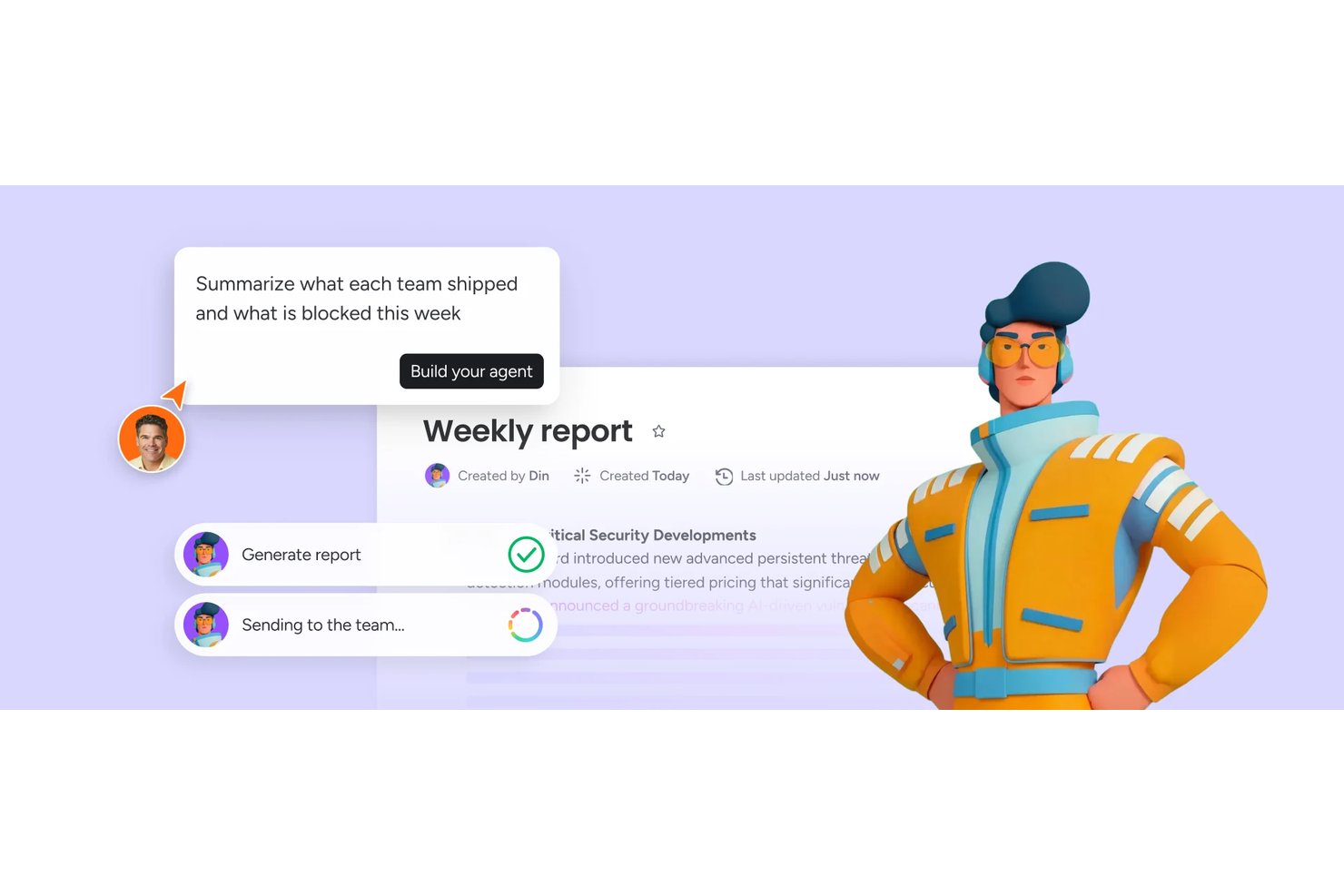
monday AI Workspace è una piattaforma di gestione del lavoro alimentata dall'IA che riunisce il monitoraggio delle attività, la pianificazione dei progetti, la collaborazione tra team e i flussi di lavoro automatizzati su board, documenti e dashboard personalizzabili.
Per chi è ideale monday AI Workspace?
È una soluzione ideale per project manager e responsabili di team trasversali in aziende di medie e grandi dimensioni che gestiscono più flussi di lavoro tra diversi reparti.
Perché ho scelto monday AI Workspace
Ho inserito monday AI Workspace tra le mie scelte preferite per il modo in cui gestisce il rilevamento dei rischi basato sulle dipendenze tra progetti in tempo reale. Quando il mio team collega le attività tramite la colonna Dipendenze, l'IA di monday monitora tali connessioni e segnala se un ritardo mette a rischio le consegne successive prima che il problema diventi serio. Utilizzo anche le dashboard di portafoglio basate sull'IA per monitorare i rischi su più progetti contemporaneamente, senza dover scavare manualmente tra le singole board.
Funzionalità chiave di monday AI Workspace
- Board e flussi di lavoro personalizzabili: Crea board visive con colonne, righe e automazioni adattate ai processi del tuo team.
- Viste multiple dei progetti: Passa da Kanban, Gantt, timeline e calendario per monitorare il lavoro secondo le tue preferenze.
- Caricamento di file e documenti collaborativi: Allega file, modifica documenti in co-editing e gestisci asset direttamente dalle singole attività o dalle board.
- Notifiche in tempo reale e feed delle attività: Resta aggiornato con avvisi in-app, su mobile ed email per menzioni, aggiornamenti e cambiamenti nelle workspace.
Integrazioni di monday AI Workspace
monday.com offre centinaia di integrazioni native tramite funzionalità integrate e nel suo marketplace, tra cui Slack, Salesforce, HubSpot, Google Workspace, Microsoft 365, Jira, GitHub, Trello, Dropbox e Zoom. Supporta inoltre Zapier e offre un'API per integrazioni personalizzate.
Pros and Cons
Pros:
- L'IA segnala i rischi di progetto prima che si aggravino
- Layout e viste delle board altamente personalizzabili
- Co-editing in tempo reale su documenti e board
Cons:
- Le automazioni richiedono piani di livello superiore per essere sbloccate
- Il volume delle notifiche può sovraccaricare i team distribuiti
New Product Updates from monday AI Workspace
monday AI Workspace Adds Human Approval Routing
monday AI Workspace adds a human-in-the-loop approval block to AI Workflows, sending approval requests and routing workflow paths based on responses. For more information, visit monday AI Workspace's official site.

Wrike
Ideale per la collaborazione nella gestione versatile dei progetti
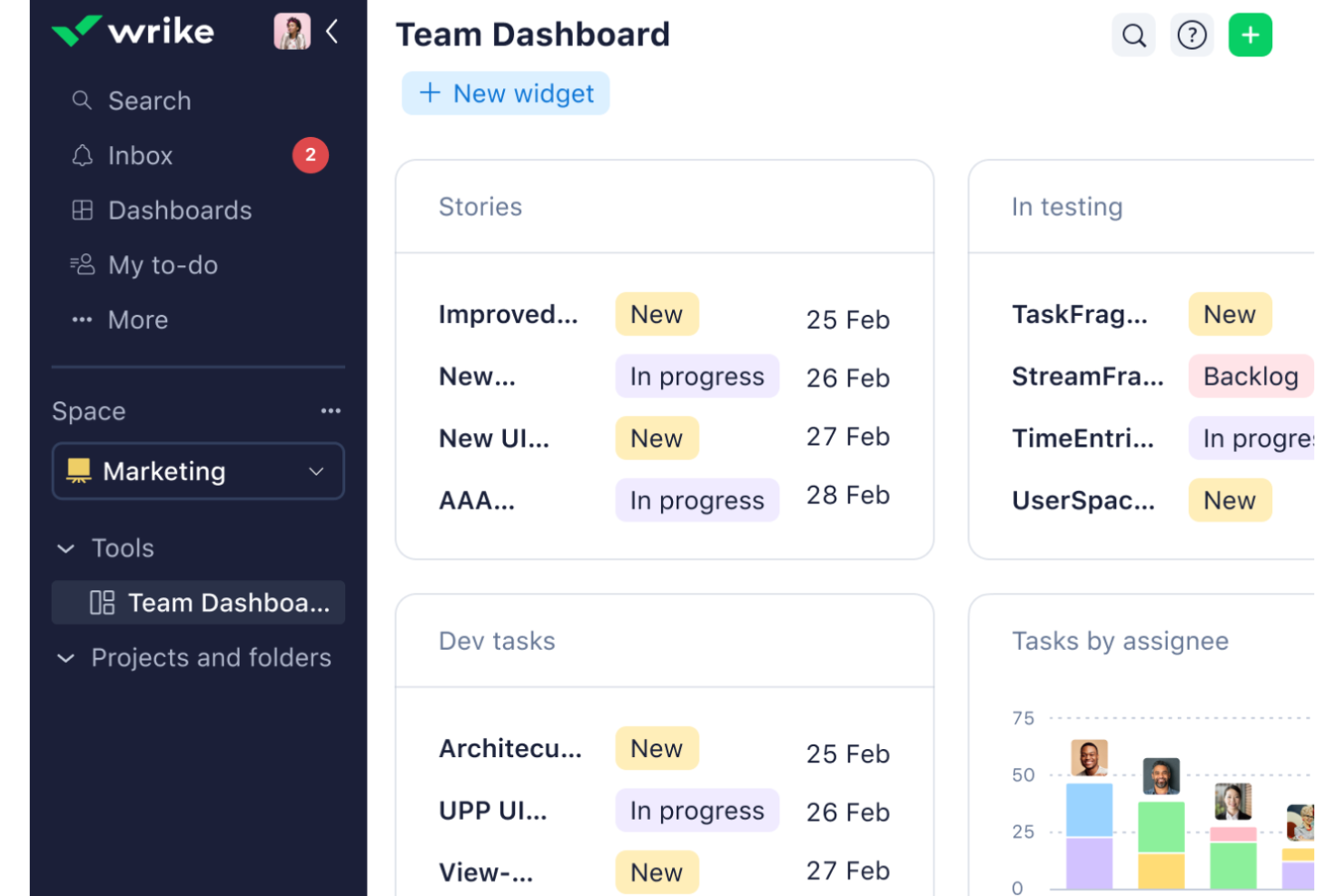
Wrike è una piattaforma completa per la gestione del lavoro che offre un'ampia gamma di funzionalità e integrazioni. Con un focus sulla gestione dei progetti, dei flussi di lavoro, delle attività e delle risorse, Wrike propone una piattaforma collaborativa versatile adatta a diversi team e settori.
Perché ho scelto Wrike: Le sue caratteristiche distintive includono strumenti di collaborazione in tempo reale, come aggiornamenti delle attività, condivisione di file e commenti all'interno della piattaforma. Offre inoltre una vasta gamma di opzioni personalizzabili che supportano diversi flussi di lavoro. Grazie a dashboard condivisi e ai diagrammi di Gantt interattivi, Wrike garantisce una visibilità completa delle tempistiche e delle attività di progetto, consentendo ai team di allinearsi sugli obiettivi, monitorare i progressi e allocare efficacemente le risorse.
In generale, Wrike si distingue come uno strumento di project management versatile perché non solo favorisce la comunicazione fluida e la gestione delle attività, ma offre anche funzionalità avanzate di reporting e allocazione delle risorse, che sono essenziali per gestire efficacemente progetti complessi.
Caratteristiche principali e integrazioni di Wrike
Caratteristiche includono diagrammi di Gantt, automazione, pianificazione delle risorse di progetto, bacheche Kanban, approvazioni, tipi di elementi personalizzati, revisione, cross-tagging, dashboard personalizzate e moduli di richiesta dinamici.
Le integrazioni includono Amazon S3, Google Drive, Slack, BambooHR, Gmail, ADP Workforce Now, Bitbucket, Cisco, Expensify, DocuSign, Stripe, Zendesk e oltre 400 altre.
Pros and Cons
Pros:
- Estese opzioni di personalizzazione
- Capacità di integrazione robuste
- Ampia gamma di funzionalità per la gestione dei progetti
Cons:
- Curva di apprendimento per i nuovi utenti
- Prezzo più elevato per funzionalità avanzate o team più numerosi
New Product Updates from Wrike
Wrike Adds Klaxoon MCP Integration
Wrike’s Klaxoon MCP integration is now generally available, enabling AI agents to navigate between Wrike tasks and attached whiteboards, read task context, and manage whiteboard attachments via API. For more information, visit Wrike's official site.
Axero
Ideale per la condivisione delle conoscenze

Axero offre una piattaforma completa per la creazione di intranet, centri di conoscenza e portali aziendali pensati per la forza lavoro moderna e mobile. Facilita la collaborazione attraverso comunicazioni semplificate e la condivisione delle conoscenze, distinguendosi per le sue funzionalità basate sull’intelligenza artificiale, incluso il suo bot alimentato dall’IA, Copilot.
Perché ho scelto Axero: Questo software facilita la condivisione delle conoscenze sia attraverso spazi pubblici che privati. Questi possono essere configurati sia in ambienti intranet che extranet, risultando adatti alla collaborazione tra stakeholder interni ed esterni. Le piattaforme di condivisione delle conoscenze possono essere gestite e mantenute completamente come wiki.
Sono disponibili moltissimi strumenti di comunicazione diversi, dalla chat dal vivo ai post sul blog, ai forum, ai sondaggi e persino alle trasmissioni di massa. La possibilità di commentare e mettere 'mi piace' rende l’esperienza più coinvolgente, permettendo alle persone di condividere pensieri e opinioni.
Caratteristiche e integrazioni distintive di Axero
Funzionalità includono sondaggi e questionari, flussi di attività, forum di discussione, commenti, notifiche, box dei suggerimenti, chat dal vivo, condivisione video, pulsanti 'mi piace', @Menziioni, email di massa e altro ancora.
Integrazioni includono Outlook 365, Sharepoint, OneDrive, Microsoft Teams, Google Workspace, Slack, Zoom, Dropbox, Box, Unsplash e Twilio, tra gli altri.
Pros and Cons
Pros:
- Può essere utilizzato per la condivisione della conoscenza interna ed esterna
- Adatta alle esigenze delle grandi organizzazioni
- Altamente flessibile e personalizzabile per diversi contesti
Cons:
- Le integrazioni non sono incluse nel piano base
- È necessario tempo per familiarizzare con tutte le funzionalità

Miro
La migliore per il design thinking
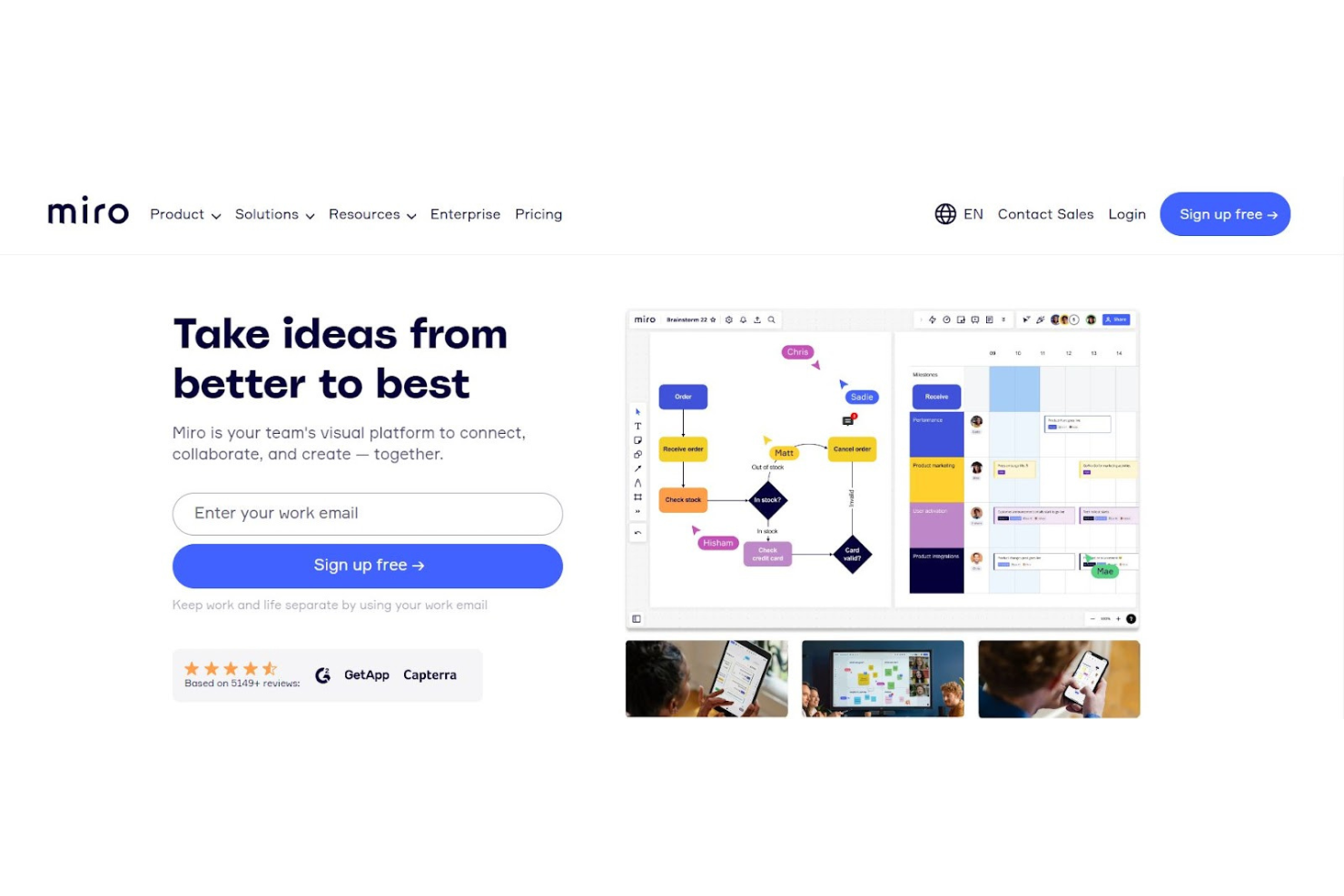
Miro è progettato per facilitare efficacemente la collaborazione del team, in particolare per chi lavora con il design thinking, il coaching agile e la progettazione UX/UI. Integra una gamma di strumenti per la pianificazione dei progetti, inclusi diagrammi di Gantt, matrici RACI, bacheche Kanban e mappe user story, in un unico spazio visivo. Ciò consente ai team di condividere facilmente idee e feedback attraverso funzionalità come commenti taggati, videochiamate e chat nelle board, semplificando la comunicazione e le discussioni sui progetti.
Perché ho scelto Miro: La canvas infinita della piattaforma offre ai team uno spazio ampio per il brainstorming e l’ideazione collettiva, supportando una varietà di modalità di espressione delle idee come numeri, immagini, video ed elementi del brand. Miro Assist può inoltre generare idee e percorsi partendo da semplici prompt, aiutando a stimolare il pensiero creativo e la risoluzione dei problemi.
Inoltre, le integrazioni di Miro con strumenti di project management come Jira e Asana aiutano a facilitare una collaborazione senza soluzione di continuità collegando le fasi di pianificazione ed esecuzione dei progetti. Questo focus sul lavoro di squadra e l’integrazione può rendere Miro uno strumento prezioso per riunire idee e prospettive diverse, stimolando l’innovazione nei progetti di design.
Caratteristiche e integrazioni principali di Miro
Funzionalità includono mind mapping, monitoraggio delle attività, mappatura delle user story, PI planning, workshop online, brainwriting, sessioni a tempo, post-it digitali, videoconferenze, Talktrack per spiegare processi in modo asincrono, uno strumento Planner, webinar, condivisione di risorse, visualizzazione dei dati, modelli personalizzabili e foto dei dipendenti.
Integrazioni includono Google Drive, Jira, Asana, Slack, Trello, Google Workspace, Confluence, Notion, DropBox Business, Zoom e GitHub.
Pros and Cons
Pros:
- Interfaccia e design semplici
- Molto facile da usare
- Nessuna curva di apprendimento
Cons:
- Troppe cose su una sola board possono causare rallentamenti
- Funziona meglio con un trackpad
New Product Updates from Miro
Miro Adds Japan Data Residency for Enterprise Customers
Miro has introduced Japan data residency for enterprise customers, offering in-region storage for production data, backups, and metadata, plus in-region compute infrastructure. For more information, visit Miro's official site.
Zulip
Migliore piattaforma di comunicazione per piccoli team
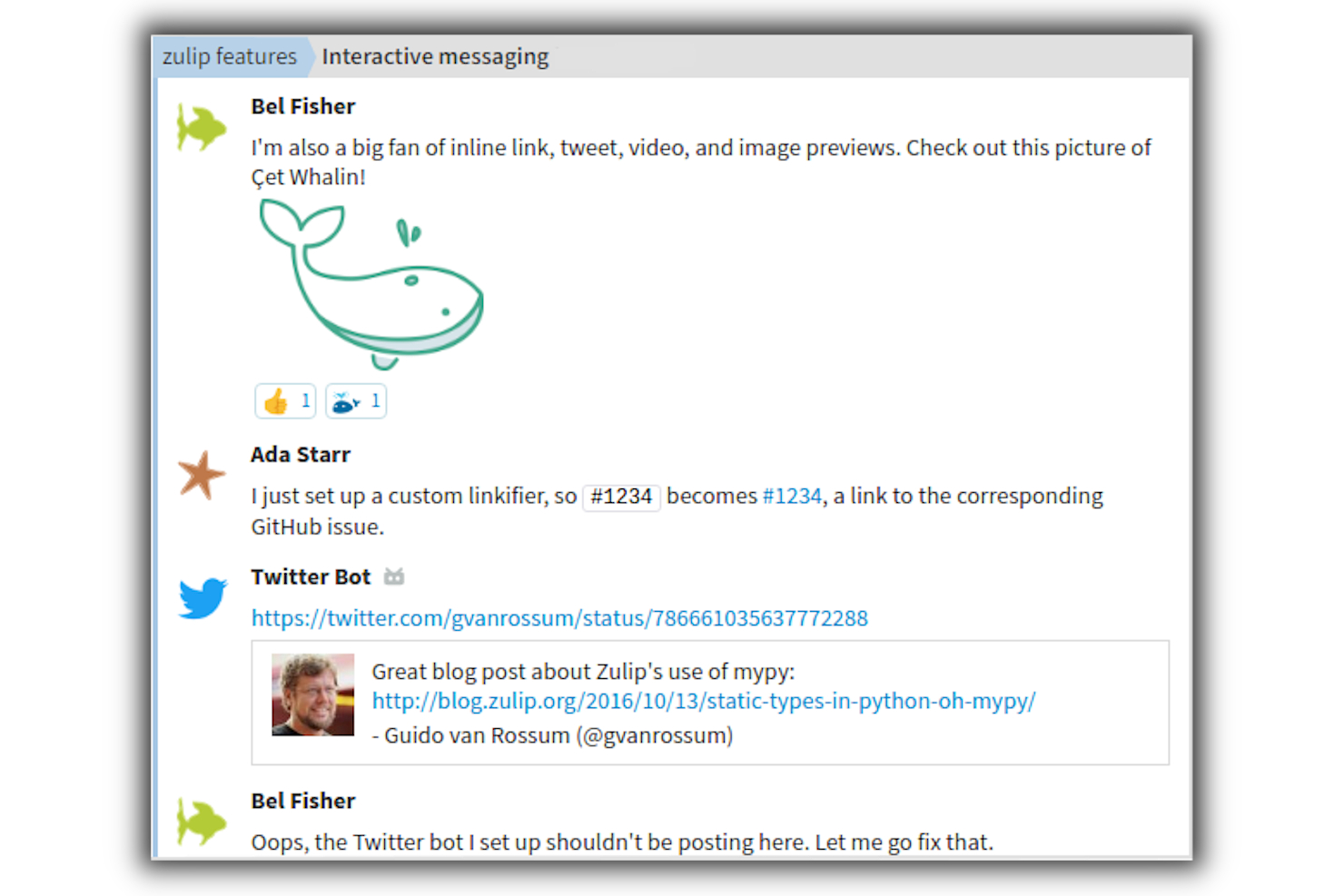
Zulip è una solida applicazione open-source di chat di gruppo che combina l'immediatezza di uno strumento di messaggistica istantanea con i vantaggi collaborativi delle conversazioni threadate. Rilasciata sotto licenza Apache, l'app offre istanze ospitate, pur mettendo a disposizione una varietà di funzionalità e capacità che gli utenti abituati a software come Slack si aspetterebbero.
L'app offre più stream, che funzionano proprio come le stanze di chat o i canali. Questa funzione è particolarmente utile per i team che collaborano su attività e progetti, poiché consente loro di comunicare direttamente e in tempo reale con le persone coinvolte nel progetto.
La potente applicazione di chat di Zulip è compatibile con molteplici piattaforme, tra cui Windows, Mac, Linux, Android e iOS. Permette ai membri del team di collaborare da qualsiasi piattaforma, sia che utilizzino un PC desktop, un Mac o qualsiasi dispositivo mobile come uno smartphone o un tablet.
Funzionalità e integrazioni distintive di Zulip
Le funzionalità includono @menzioni, incorporamento di immagini, registrazione dei messaggi, notifiche altamente configurabili, reazioni emoji e caricamento di file.
Le integrazioni comprendono oltre 120 integrazioni native, tra cui Airbrake, Basecamp, Asana, Dropbox, Flock, GitHub, Jenkins, Mailchimp, Slack e Trello. Inoltre, è possibile collegarsi a migliaia di applicazioni tramite Zapier.

Miglior strumento di collaborazione per la gestione delle attività di team

MeisterTask è uno strumento di gestione delle attività progettato per migliorare la collaborazione e la gestione dei compiti all'interno dei team. Si concentra su elevati tassi di adozione, riduzione dei rischi per la sicurezza e diminuzione del volume di email e riunioni, elementi che contribuiscono a un ritorno sull'investimento significativo e a una maggiore tranquillità per le aziende che vogliono massimizzare il potenziale del proprio team.
Perché ho scelto MeisterTask: Ho incluso MeisterTask perché la funzione di configurazione rapida della piattaforma permette ai team di iniziare rapidamente a utilizzare lo strumento con un onboarding minimo. Inoltre, grazie alla sua ampia gamma di funzionalità e all'ambiente strutturato, si è distinto come una soluzione completa per la collaborazione su progetti.
Il software offre anche capacità di automazione per azioni ripetitive, liste di controllo multiple all'interno delle attività per un monitoraggio dettagliato dei progressi, pianificazione ricorrente delle attività per incarichi regolari, tracciamento del tempo per l'analisi della produttività, campi personalizzati per la raccolta di informazioni su misura, statistiche e report completi per conoscere le prestazioni del team, gestione dei ruoli e dei permessi per il controllo degli accessi e integrazioni con altri strumenti per centralizzare i flussi di lavoro.
Caratteristiche e integrazioni distintive di MeisterTask
Le funzionalità includono una vasta gamma di strumenti collaborativi come discussioni, note, strumenti per la condivisione di note, assegnazione dei compiti e osservatori, tracciamento di attività e sotto-attività, relazioni tra compiti, tag ed elenchi di controllo. Le loro bacheche Kanban offrono anche un sistema di gestione del flusso di lavoro visivo in cui le attività sono rappresentate come schede spostabili tra colonne personalizzabili, agevolando il monitoraggio dell'avanzamento e la priorità delle attività.
Le integrazioni includono MindMeister, Google e Outlook Calendars, Microsoft Teams, Slack, GitHub, ZenDesk, Microsoft Outlook e Gmail, PomoDone e Zapier.
Pros and Cons
Pros:
- Scadenze e promemoria mantengono i dipendenti al passo
- Interfaccia intuitiva e rapida da apprendere
- Solida gamma di funzionalità di project management incluse
Cons:
- Integrazioni disponibili limitate
- Nessun calendario interno al software

Nuclino
Ideale per centralizzare la conoscenza aziendale

Nuclino è una piattaforma collaborativa per la gestione della conoscenza che centralizza il sapere, i documenti e i progetti del tuo team.
Perché ho scelto Nuclino: Lo strumento dispone di un motore di ricerca che tu e il tuo team potete utilizzare per trovare qualsiasi informazione relativa all’azienda o al business. Nuclino è progettato per funzionare come spazio di lavoro unificato per individui e gruppi. Ti permette di organizzare le conoscenze, condividere idee con i colleghi e gestire diversi compiti e progetti.
Oltre al suo motore di ricerca, Nuclino è dotato anche di una funzione di scrittura e di un’interfaccia intuitiva. Tutte le sue funzionalità sono pensate per aiutarti a migliorare il processo di creazione della conoscenza, facilitare la condivisione e la collaborazione all’interno del tuo team e dell’azienda.
Nuclino è una soluzione multipiattaforma, il che significa che tu e il tuo team potete utilizzare l’app sia da computer che da dispositivi mobili, indipendentemente dal sistema operativo utilizzato. Permette al tuo team di collaborare e apprendere ovunque vi troviate.
Caratteristiche distintive e integrazioni di Nuclino
Funzionalità includono configurazione rapida, ricerca istantanea, scorciatoie da tastiera, spazi di lavoro privati, allegati tramite trascinamento, modifiche in tempo reale da parte degli altri membri del team e una visualizzazione a schede per aiutare a seguire gli elementi all’interno di un flusso di lavoro.
Integrazioni comprendono oltre 40 app come Zendesk, HipChat e Jira Software, oltre ad altre applicazioni esterne che possono migliorare l’efficienza generale dei flussi di lavoro e dei processi del tuo team.

Flock
Ideale per la messaggistica di team
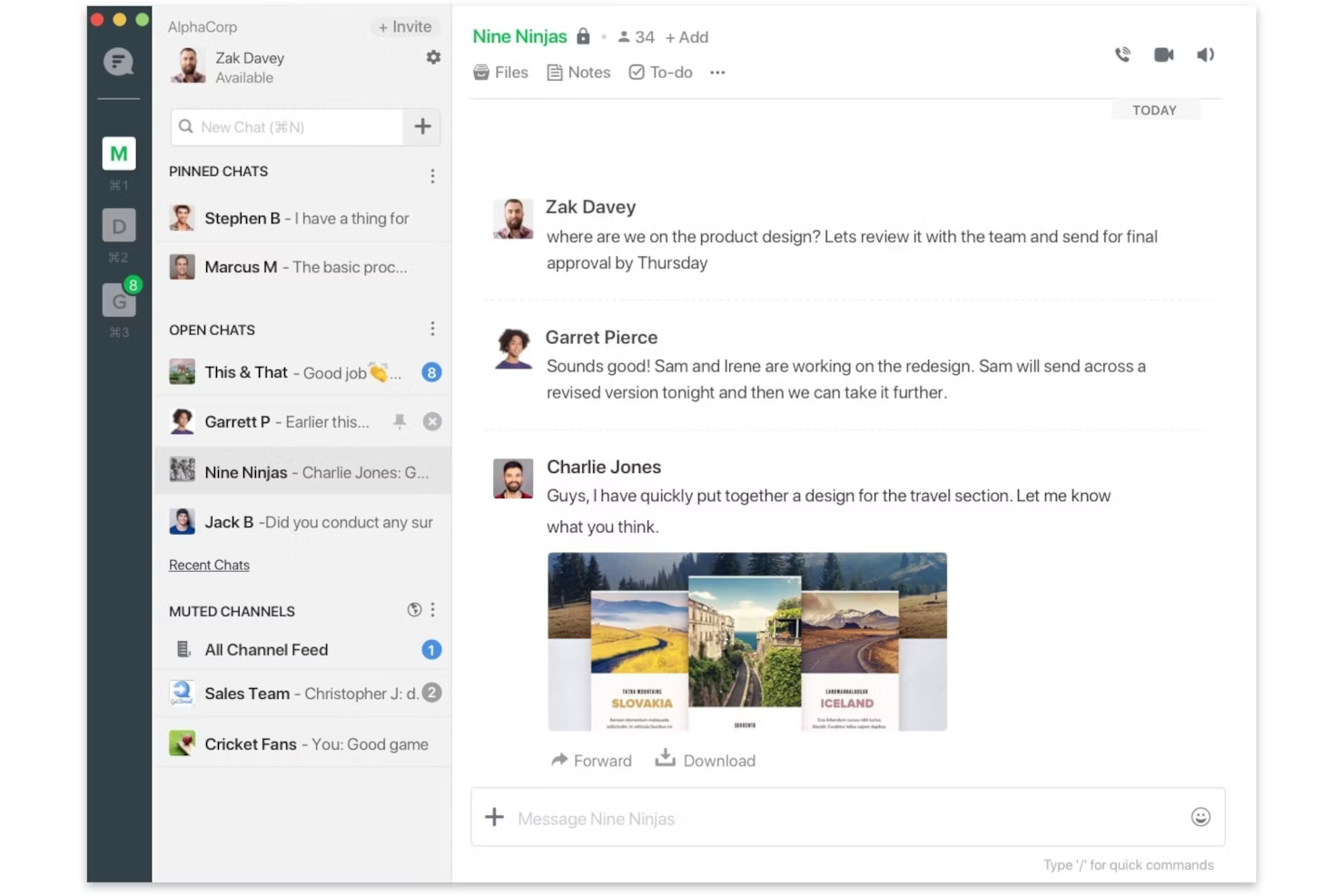
Flock è un'app di messaggistica aziendale collaborativa che facilita la gestione dei progetti tramite comunicazione basata su chat, supportando messaggi diretti e di gruppo con opzioni di canali privati e pubblici.
Perché ho scelto Flock: Quando si tratta di collaborazione, Flock funziona come previsto, offrendo strumenti e funzionalità tra cui la possibilità di taggare colleghi o membri del team nella sezione dei commenti, caricare file e documenti, impostare promemoria e scadenze, e caricare file multimediali come videoclip e immagini. L'app dispone anche di una lista di cose da fare e di una funzione di ricerca che permette di trovare file o commenti specifici nelle conversazioni e nei thread di discussione. Consente inoltre di creare team, progetti e attività, oltre a impostare promemoria via email per avvisare i membri del team di menzioni, cambiamenti di stato del progetto e altre comunicazioni rilevanti.
Le funzioni di chiamata audio e video di Flock possono essere programmate e vengono facilmente effettuate direttamente dall'applicazione, mentre la condivisione dello schermo offre agli utenti la possibilità di mostrare ai colleghi a cosa stanno lavorando in tempo reale. Questa piattaforma collaborativa scalabile consente anche la condivisione di snippet di codice, la creazione di sondaggi e discussioni di gruppo.
Funzionalità e integrazioni principali di Flock
Funzionalità includono messaggistica testuale, chiamate audio e video, condivisione dello schermo, sondaggi, promemoria e condivisione di file.
Integrazioni includono collegamenti ad altre app tramite il suo app store. Queste includono Zoom, Google Drive, Giphy, Asana, Trello, Mailchimp, Jira, OpsGenie, Sentry e Jenkins. Inoltre, si può collegare a migliaia di app utilizzando un abbonamento a pagamento tramite Zapier.
Pros and Cons
Pros:
- Le integrazioni sono semplici da configurare
- Si possono effettuare chiamate audio/video nello strumento
- Aggiungi liste di cose da fare e scadenze direttamente nelle chat
Cons:
- Le notifiche sono lente sull'app mobile
- Le email di messaggi persi possono riempire la casella di posta
Avaza
Ideale per la gestione aziendale su più dispositivi
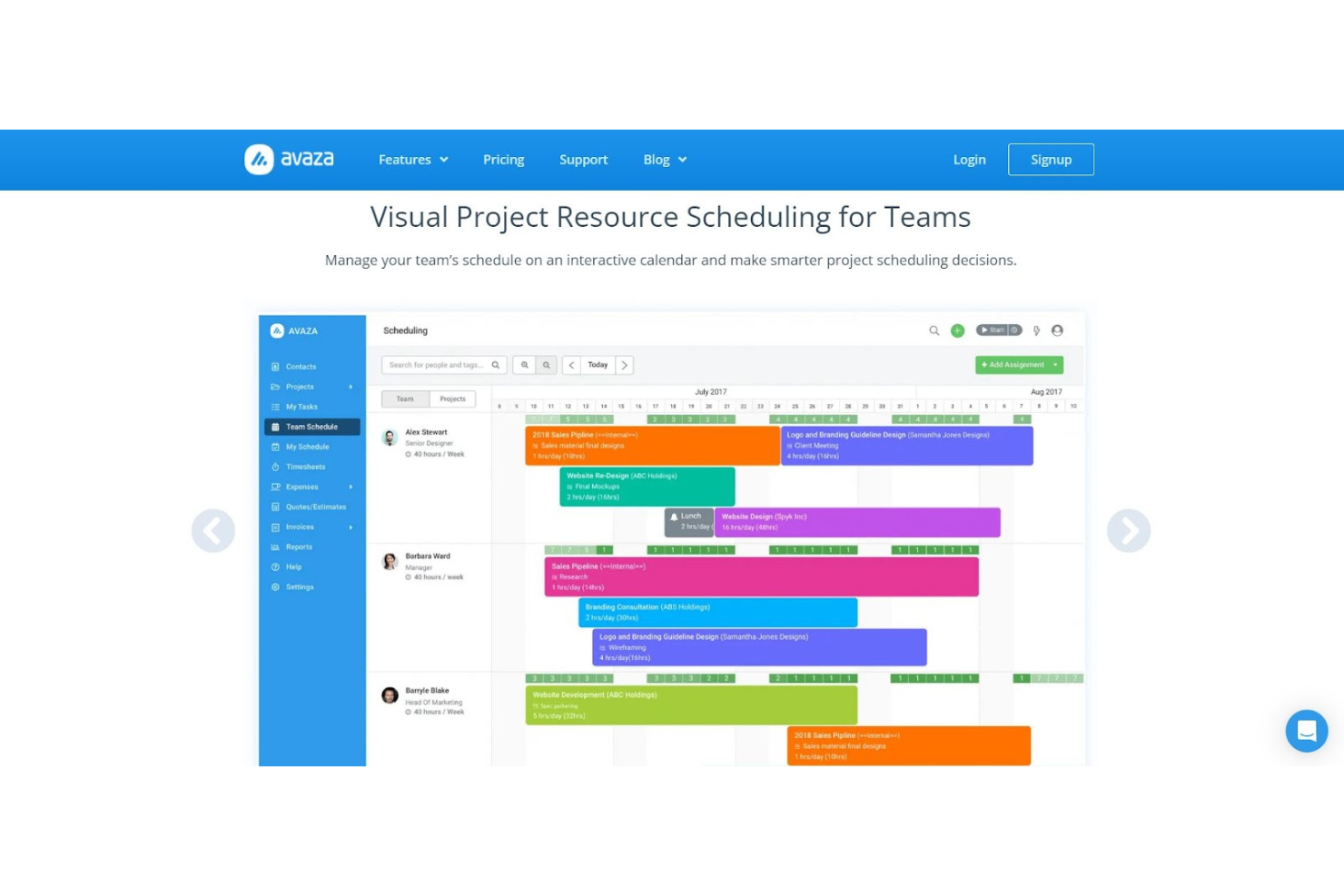
Se cerchi strumenti di collaborazione e gestione aziendale che funzionino su dispositivi mobili, laptop e tablet, Avaza ha sviluppato il design reattivo di cui hai bisogno per garantire al tuo team di lavorare ovunque si trovi. Con funzionalità per la pianificazione delle risorse, la gestione dei progetti, la gestione delle spese e il supporto clienti, questa è una soluzione tutto-in-uno ottimizzata per il lavoro da mobile.
Con Avaza, il tuo team può visualizzare più facilmente tutto ciò che deve essere fatto per un progetto o un cliente. Con viste d'insieme tramite bacheche Kanban, diagrammi di Gantt e visualizzazione a elenco per tutto, dalla pianificazione delle risorse e il monitoraggio delle attività alla gestione del tempo e ai pagamenti online, tutti i membri del team possono lavorare in modo più efficiente.
Avaza punta ad aiutare le aziende di qualsiasi dimensione a risparmiare tempo in ogni aspetto delle loro operazioni. Strumenti per la comunicazione interna e soluzioni di condivisione file assicurano tracciamento, analisi e report accurati, così come una fatturazione più rapida e pagamenti online veloci.
Caratteristiche e integrazioni principali di Avaza
Funzionalità includono chat di squadra unificata, monitoraggio delle spese, gestione progetti, fatturazione, pianificazione delle risorse, fatturazione automatica, sincronizzazione del calendario, monitoraggio dei costi rispetto al completamento, previsione attività, gestione dei rischi, discussioni/forum, gestione multi-sede e accesso remoto.
Integrazioni includono Zapier, Zero, QuickBooks, SharpSpring, Stripe, Google Workspace, Trello, Basecamp, Zendesk e Insightly.
Pros and Cons
Pros:
- Navigazione e interfaccia semplici
- Molto facile da usare
- Ottimo rapporto qualità-prezzo
Cons:
- L'importazione dei dati può causare rallentamenti

Productboard
Ideale per il product management

Se la gestione delle tue attività ruota molto intorno ai clienti, Productboard potrebbe fare al caso tuo. Non solo consente al tuo team di portare i prodotti sul mercato più velocemente, ma dà anche priorità al feedback dei clienti per aiutarti a migliorare ciò che vendi e assicurarti di soddisfare le esigenze degli utenti.
Con funzionalità come roadmap di prodotto basate su template predefiniti e feedback centralizzato dai clienti, il tuo team può rimanere aggiornato sui nuovi piani e strategie man mano che i prodotti si evolvono. Questo strumento di gestione dei progetti offre una visione olistica di tutte le idee e gli obiettivi che circolano in ufficio per colmare il divario tra il team di prodotto e la comunità dei clienti.
I piani base di Productboard sono ideali per piccole e medie imprese, ma offrono anche un livello completamente diverso di strumenti di collaborazione online per esigenze aziendali di livello enterprise. La loro piattaforma flessibile e scalabile ti permette di sviluppare prodotti migliori più velocemente, riducendo i rischi sia per le grandi che per le piccole imprese.
Caratteristiche principali e integrazioni di Productboard
Funzionalità includono pianificazione delle attività, metodologie agili, gestione degli incarichi, brainstorming, portale clienti, report personalizzabili, condivisione di file, visualizzazione delle tempistiche, calendario marketing, monitoraggio della percentuale di completamento, pianificazione dei progetti e aggiornamenti in tempo reale.
Integrazioni includono Slack, Typeform, Intercom, Zendesk, Trello, Salesforce Sales Cloud, Zapier, Microsoft Azure, Gong.io e Drift.
Pros and Cons
Pros:
- Funzionalità integrate che danno priorità alla pianificazione
- Aggiungi nuove funzionalità su richiesta del cliente
- Interfaccia utente pulita e intuitiva
Cons:
- Servono più integrazioni per il tracciamento dei ticket
- Reportistica minima disponibile
Altri software per la collaborazione
Ecco alcune altre opzioni che non sono entrate nell’elenco dei migliori software per la collaborazione:
- Workplace from Meta
Ideale per la comunicazione aziendale a livello globale
- ReviewStudio
Ideale per il proofing online
- Elium
Ideale per garantire che le conoscenze aziendali siano sempre prontamente disponibili
- Next Matter
Ideale per gestire flussi di lavoro complessi e trasversali alle funzioni aziendali
- Stackfield
Ideale per la crittografia a conoscenza zero
- Notion
Ideale per mantenere una base di conoscenza centrale su più argomenti
- Project.co
Ideale per coinvolgere i clienti nel completamento delle attività
- Ziflow
Ideale per la gestione dei feedback interni
- Connecteam
Ideale per la comunicazione rapida con squadre operative e lavoratori da remoto
- Celoxis
Ideale per analisi avanzate dei costi e delle performance di progetto


Recensioni correlate sui software per la gestione dei progetti
Se non hai ancora trovato qui quello che cerchi, dai un’occhiata a queste altre recensioni di strumenti per la gestione dei progetti che abbiamo selezionato per te:
- Software per la gestione dei progetti
- Software per la gestione delle risorse
- Software per l’automazione dei flussi di lavoro
- Software per il monitoraggio del tempo
- Software per la gestione delle attività
- Strumenti per la collaborazione
- Software per la sincronizzazione dei file
- Strumenti per la collaborazione asincrona
- Strumenti per la collaborazione conformi all’HIPAA
- Software per la raccolta dei documenti
Come Valuto il Software di Collaborazione
Quando i team di progetto si affidano a strumenti separati solo per condividere file, chattare e monitorare il lavoro, suddivido la mia valutazione in due livelli: requisiti di base e i fattori che differenziano le varie opzioni.
Funzionalità Principali (Requisiti Minimi per Questa Lista)
Quando seleziono gli strumenti per la mia lista, valuto ciascuno su una scala da 0 (non offre la funzionalità) a 5 (eccelle in quest'area) per ciascuna delle funzionalità principali elencate di seguito. Quindi, calcolo il punteggio totale dello strumento in percentuale. Ogni strumento deve ottenere un punteggio totale minimo del 75% per essere preso in considerazione.
- Collaborazione in Tempo Reale: Verifico se più membri del team possono modificare contemporaneamente la stessa bacheca, documento o vista attività con cursori live e sincronizzazione istantanea.
- Messaggistica di Team e Comunicazione: In questo caso sono importanti i commenti tra conversazioni collegati a specifici compiti o deliverable, non solo una finestra di chat generica aggiunta lateralmente.
- Spazi di Lavoro Condivisi: Valuto come ogni strumento organizza progetti, file e conversazioni in spazi centralizzati che team di prodotto, design ed engineering possono navigare.
- Condivisione File e Co-Editing: Cerco la modifica di documenti nativa o integrata, così i team possono collaborare su specifiche o brief senza dover passare ad un'app separata.
- Assegnazione e Tracciamento delle Attività: Lo strumento dovrebbe permettere di assegnare responsabili, impostare scadenze e visualizzare l'avanzamento tra diversi formati come bacheche Kanban, liste o diagrammi di Gantt.
- Notifiche e Feed di Attività: Gli avvisi personalizzabili sono fondamentali—valuto se puoi filtrare le notifiche per progetto, menzione o cambio di stato per evitare il sovraccarico della casella di posta.
Una volta che ho una lista di strumenti che soddisfano questi criteri, considero cosa rende unica ogni piattaforma.
Fattori di Differenziazione (Cosa Distingue i Fornitori)
Ecco come confronto i diversi fornitori:
Funzionalità Distintive
Le funzionalità di automazione rappresentano un grande elemento differenziante. Cerco builder di workflow no-code che innescano passaggi di consegna delle attività quando cambia uno stato, come l'assegnazione automatica del controllo QA quando uno sviluppatore marca un ticket come completato. Anche l'assistenza basata sull'AI sta rapidamente prendendo piede. Strumenti che riassumono lunghe discussioni o generano aggiornamenti di stato dall'attività recente fanno risparmiare davvero tempo nei cicli di reportistica. Valuto anche dashboard interprogetto, poiché i responsabili PMO che gestiscono più flussi di lavoro necessitano di una vista aggregata su scadenze, blocchi e carichi di lavoro in un unico posto.
Oltre le Funzionalità
La profondità delle integrazioni è importante. Verifico se uno strumento si connette nativamente con l'ecosistema PM più ampio—Jira, Slack, Google Workspace, Microsoft 365—in modo che i team non debbano ricopiare gli aggiornamenti tra piattaforme. Anche la trasparenza dei prezzi è un fattore che considero; alcuni fornitori riservano le funzionalità principali di collaborazione ai livelli enterprise, rendendo così difficile la valutazione per i team in crescita. Prendo in considerazione anche il supporto all'onboarding, in particolare i template predefiniti per workflow Agile o Scrum, poiché questi fanno risparmiare settimane nell'adozione quando si implementa una nuova piattaforma su più team.
Come scegliere un software per la collaborazione
È facile perdersi in lunghi elenchi di funzionalità e strutture tariffarie complesse. Per aiutarti a rimanere concentrato mentre affronti il tuo esclusivo processo di selezione del software, ecco una checklist dei fattori da tenere a mente:
| Fattore | Cosa considerare |
| Scalabilità | Assicurati che il software possa crescere insieme al tuo team, gestendo più utenti, progetti o dati con l'espansione delle tue esigenze. |
| Integrazioni | Cerca un'integrazione perfetta con gli strumenti che il tuo team utilizza già, come Slack, Zoom o diverse app per la gestione dei progetti. |
| Personalizzazione | Verifica se puoi adattare l'interfaccia, i flussi di lavoro o le funzionalità del software alle esigenze specifiche del tuo team. |
| Facilità d'uso | Il software dovrebbe essere intuitivo e rapido da imparare, riducendo i tempi di inserimento e garantendo l'adozione da parte del team. |
| Budget | Valuta i prezzi del software in base alle dimensioni del tuo team, le commissioni nascoste e se le funzionalità offerte rientrano nel tuo budget. |
| Misure di sicurezza | Verifica che il software soddisfi gli standard di conformità e includa una solida crittografia dei dati per proteggere le tue informazioni sensibili. |
| Opzioni di supporto | Assicurati che sia disponibile un'assistenza clienti affidabile, come una chat dal vivo o un account manager dedicato, per risolvere rapidamente i problemi. |
| Accesso da dispositivi mobili | Assicurati che il software offra un'app mobile completa per collaborare in movimento. |
Tendenze nei software di collaborazione per il 2025
Durante la mia ricerca, ho raccolto innumerevoli aggiornamenti dei prodotti, comunicati stampa e registri delle versioni di diversi fornitori di software per la collaborazione. Ecco alcune delle tendenze emergenti che sto monitorando:
- Analisi basate sull'IA: I fornitori stanno aggiungendo strumenti di IA per analizzare la comunicazione del team e fornire suggerimenti attuabili, come la definizione delle priorità delle attività o il rilevamento dei colli di bottiglia. Ad esempio, alcuni strumenti offrono ora riepiloghi delle riunioni generati dall'IA o informazioni sull'equilibrio del carico di lavoro del team.
- Collaborazione asincrona: Un numero sempre maggiore di strumenti si concentra sul supporto al lavoro asincrono con funzionalità come aggiornamenti video, opzioni per feedback differiti e notifiche flessibili. Questo sta diventando essenziale per i team da remoto e globali che lavorano in fusi orari diversi.
- Integrazione della realtà virtuale (VR): Alcune piattaforme stanno esplorando l'uso della VR per riunioni virtuali o sessioni di brainstorming. Questi strumenti immersivi creano un senso di presenza condivisa, che può aiutare a replicare le interazioni di persona per i team da remoto.
- Focus sul benessere dei dipendenti: I software di collaborazione stanno iniziando a integrare funzionalità come pause preimpostate, limitazioni alle notifiche fuori dall'orario di lavoro e sondaggi periodici. Questi strumenti mirano a ridurre il burnout e a mantenere il coinvolgimento dei dipendenti senza sovraccaricarli.
- Soluzioni specifiche per settore: I fornitori stanno adattando le loro piattaforme a settori come sanità, istruzione o servizi creativi. Queste versioni includono in genere modelli, flussi di lavoro e funzionalità di conformità specializzati per soddisfare meglio le esigenze di nicchia.
Che cos'è un software di collaborazione?
Un software di collaborazione è uno strumento progettato per aiutare le persone a lavorare insieme in modo più efficace. Consente ai membri del team di comunicare, condividere file, gestire attività e coordinarsi sui progetti, indipendentemente dalla loro posizione.
Gli strumenti di collaborazione semplificano il lavoro di gruppo, assicurando che tutti siano aggiornati e possano contribuire in modo efficiente, aumentando la produttività e facilitando il completamento degli obiettivi di gruppo. In sostanza, fungono da spazio di lavoro digitale che colma il divario tra i diversi membri del team, consentendo un lavoro di squadra e una collaborazione migliori.
Funzionalità dei software di collaborazione
Nell'odierno ambiente di lavoro frenetico, soprattutto con la diffusione dei team da remoto, scegliere gli strumenti di collaborazione giusti è fondamentale per garantire una comunicazione efficace del team, migliorare la produttività e raggiungere gli obiettivi dei progetti nei tempi previsti e rispettando il budget. Qui elenco le funzionalità più importanti da considerare quando si scelgono strumenti di collaborazione in grado di soddisfare queste esigenze.
- Comunicazione in tempo reale: consente ai membri del team di scambiarsi informazioni istantaneamente. Questa funzionalità è essenziale per favorire un ambiente collaborativo in cui le domande ricevono risposta tempestivamente, garantendo che i progetti procedano senza ritardi.
- Gestione delle attività e dei progetti: consente di organizzare e monitorare attività e progetti. È fondamentale per mantenere i team allineati alle tempistiche e agli obiettivi dei progetti, aiutando a identificare tempestivamente i potenziali colli di bottiglia.
- Condivisione e collaborazione sui documenti: facilita la condivisione, la modifica e la gestione dei documenti in una posizione centralizzata. Questa funzionalità ottimizza i flussi di lavoro consentendo ai membri del team di lavorare contemporaneamente sui documenti e riducendo il tempo dedicato alle revisioni.
- Integrazione con altri strumenti: supporta la connessione fluida con altri strumenti software. Questa integrazione è fondamentale per automatizzare i flussi di lavoro e ridurre la necessità di passare da un'applicazione all'altra, risparmiando tempo e diminuendo gli errori.
- Accessibilità da dispositivi mobili: offre la possibilità di lavorare ovunque e da qualsiasi dispositivo. Questa funzionalità garantisce che i membri del team possano rimanere connessi e produttivi anche quando non sono alla propria scrivania.
- Videoconferenze: fornisce una piattaforma per riunioni faccia a faccia, indipendentemente dalla posizione. È importante per mantenere i rapporti umani tra i membri del team e favorire una comunicazione più efficace rispetto ai soli metodi basati sul testo.
- Funzionalità di sicurezza: include la crittografia end-to-end e l'autenticazione a due fattori per proteggere le informazioni sensibili. Considerando le crescenti preoccupazioni relative alla sicurezza dei dati, soprattutto negli ambienti di lavoro da remoto, queste funzionalità sono essenziali per garantire la riservatezza dei dettagli dei progetti.
- Personalizzazione e flessibilità: consente di adattare lo strumento alle esigenze specifiche di un progetto o di un team. Questa flessibilità, che rappresenta spesso un punto di forza dei software di collaborazione a codice sorgente aperto, è fondamentale per adattarsi a flussi di lavoro e processi specifici, garantendo che lo strumento migliori la produttività anziché ostacolarla.
- Analisi e reportistica: fornisce informazioni sull'avanzamento dei progetti e sulle prestazioni del team. Questa funzionalità è preziosa per i responsabili di progetto, che possono monitorare le tempistiche, allocare le risorse in modo efficiente e prendere decisioni informate per mantenere i progetti in linea con i piani.
Vantaggi dei software di collaborazione
Ecco cinque vantaggi principali offerti dai software di collaborazione, particolarmente utili per gli aspiranti responsabili di progetto che desiderano sfruttare la tecnologia per ottenere risultati migliori dai propri progetti.
- Comunicazione migliorata del team: facilita canali di comunicazione chiari e continui. Questo vantaggio garantisce che tutti i membri del team siano allineati, riducendo i malintesi e consentendo di risolvere rapidamente eventuali problemi, mantenendo così i progetti in efficienza.
- Maggiore efficienza dei progetti: ottimizza l'assegnazione e il monitoraggio delle attività. Utilizzando un software di collaborazione, i responsabili di progetto possono assegnare facilmente le attività, monitorare i progressi e modificare le scadenze secondo necessità, assicurando che i progetti vengano completati entro le tempistiche e con le risorse assegnate.
- Centro informazioni centralizzato: offre un'unica fonte affidabile per i documenti e le comunicazioni del progetto. Questa centralizzazione elimina la necessità di un numero eccessivo di e-mail e riunioni, facendo risparmiare tempo e riducendo il rischio di perdere informazioni o di utilizzare informazioni obsolete, circostanze che possono compromettere l'avanzamento del progetto.
- Migliore gestione delle risorse: fornisce strumenti per monitorare le risorse e distribuire i carichi di lavoro. Grazie a queste informazioni, i responsabili di progetto possono prendere decisioni informate sull'allocazione delle risorse, assicurandosi che nessun membro del team sia sovraccarico e che i progetti non siano privi di personale sufficiente, con conseguenti carichi di lavoro più equilibrati e sostenibili.
- Maggiore flessibilità e scalabilità: si adatta alle esigenze di team di qualsiasi dimensione, che lavorino da qualsiasi luogo. I software di collaborazione consentono ai team di rimanere connessi e produttivi indipendentemente dalla loro posizione fisica, facilitando l'espansione o la riduzione delle attività in base al cambiamento delle esigenze del progetto, senza sacrificare l'efficienza o la comunicazione.
Costi e prezzi dei software di collaborazione
Scegliere il software di collaborazione giusto è una decisione fondamentale per chi acquista software, soprattutto per chi ha poca o nessuna esperienza. I software di collaborazione offrono diverse opzioni di piano per soddisfare le esigenze, le dimensioni e i budget dei vari team, analogamente a quanto avviene con i software per l'inserimento dei clienti, che offrono diversi livelli per rispondere alle varie esigenze aziendali.
In genere, questi piani vanno dalle versioni gratuite, pensate per i team più piccoli o per chi desidera testare il software, ai pacchetti più avanzati e ricchi di funzionalità, destinati alle organizzazioni più grandi con esigenze complesse di gestione dei progetti. Di seguito viene fornita una panoramica delle opzioni di piano e dei prezzi più comuni per aiutarti a prendere una decisione.
Tabella comparativa dei piani per i software di collaborazione
| Tipo di piano | Prezzo medio | Funzionalità comuni |
|---|---|---|
| Gratuito | $0 | Gestione di base delle attività, spazio di archiviazione limitato, collaborazione del team |
| Base | $5-10 /utente/mese | Gestione avanzata delle attività, maggiore spazio di archiviazione, integrazioni di base |
| Standard | $10-15 /utente/mese | Suite completa per la gestione dei progetti, spazio di archiviazione illimitato, integrazioni avanzate |
| Premium | $20-30 /utente/mese | Reportistica sofisticata, assistenza prioritaria, funzionalità personalizzate |
| Enterprise | Contattaci per conoscere i prezzi | Funzionalità personalizzabili, sicurezza di livello aziendale, assistenza personale |
Quando prendi in considerazione un piano, dovresti valutare le dimensioni del team, la complessità dei tuoi progetti e qualsiasi esigenza specifica relativa alla collaborazione e alla gestione dei progetti. È inoltre consigliabile iniziare con un piano gratuito o a costo ridotto per valutare l'efficacia del software prima di scegliere un'opzione più costosa.

E adesso?
Se stai cercando un software per la collaborazione, contatta gratuitamente un consulente di SoftwareSelect per ricevere consigli.
Dovrai compilare un modulo e fare una breve conversazione durante la quale analizzeranno nel dettaglio le tue esigenze. In seguito riceverai una selezione ristretta di software da valutare. Ti accompagneranno persino durante l'intero processo di acquisto, comprese le trattative sul prezzo.