

I 10 migliori software di automazione dei flussi di lavoro con IA recensiti nel 2026

Elenco dei migliori software di automazione dei flussi di lavoro con IA


I migliori software di automazione dei flussi di lavoro con IA eliminano le attività manuali e ripetitive (come gli aggiornamenti dello stato, l'inserimento dei dati, le approvazioni e l'assegnazione delle attività), consentendoti di concentrarti sul lavoro ad alto impatto. Problemi come scadenze che cambiano, team non allineati, strumenti frammentati e passaggi manuali possono causare dipendenze non gestite e bloccare i progressi, ma gli strumenti per i flussi di lavoro con IA possono aiutarti ad affrontarli.
Ho testato e recensito personalmente decine di strumenti per individuare le piattaforme più efficienti e affidabili. Sulla base della mia esperienza nell'ottimizzazione dei flussi di lavoro, ho selezionato questo elenco per aiutarti a scegliere un software di automazione pratico, scalabile e progettato per supportare l'esecuzione reale dei progetti.
Perché fidarsi dei nostri consigli sui software
Il nostro team testa e recensisce software dal 2012. In quanto project manager noi stessi, sappiamo quanto sia difficile — e importante — scegliere il software giusto.
Per questa guida, abbiamo valutato gli strumenti attraverso test pratici e ricerche indipendenti, assegnando un punteggio agli strumenti in base ai nostri criteri di selezione. Ci basiamo inoltre sulle competenze di leader di pensiero del settore e di professionisti attivi nella gestione dei progetti.
Le nostre recensioni riflettono il nostro giudizio editoriale umano, non un discorso di vendita.
Revisori esperti:
Tabella comparativa dei software di automazione dei flussi di lavoro con IA
Questa tabella comparativa riassume i dettagli sui prezzi delle mie migliori selezioni di software di automazione dei flussi di lavoro con IA:
| Tool | Best For | Trial Info | Price | ||
|---|---|---|---|---|---|
| 1 | Ideale per la pianificazione di progetti con IA generativa | Prova gratuita di 14 giorni + piano gratuito disponibile | A partire da $10/utente/mese (fatturazione annuale) | Website | |
| 2 | Ideale per approfondimenti in tempo reale sulla redditività | Prova gratuita di 14 giorni + demo gratuita disponibile | Da $10/mese (fatturato annualmente) | Website | |
| 3 | Ideale per la gestione delle interazioni con i clienti | Piano gratuito + prova gratuita + demo gratuita disponibili | A partire da $99/mese | Website | |
| 4 | Ideale per la gestione dei flussi di lavoro guidata dall'IA | Demo gratuita disponibile | Prezzo su richiesta | Website | |
| 5 | Ideale per l’ottimizzazione dei flussi di lavoro | Demo gratuita disponibile | A partire da $2.500/mese (fatturazione annuale) | Website | |
| 6 | Ideale per oltre 1.000 connettori predefiniti | Demo gratuita disponibile | Prezzi su richiesta | Website | |
| 7 | Ideale per integrazioni aziendali | Demo gratuita disponibile | Prezzo su richiesta | Website | |
| 8 | Ideale per la creazione di flussi di lavoro personalizzati | Prova gratuita disponibile | A partire da $20/mese (fatturato annualmente) | Website | |
| 9 | Ideale per una documentazione dei processi semplice | Prova gratuita di 14 giorni + demo gratuita disponibile | Prezzo su richiesta | Website | |
| 10 | Ideale per l'automazione delle attività | Prova gratuita di 7 giorni | Da $4.60/utente/mese (fatturato annualmente) | Website |


Recensioni dei migliori software di automazione dei flussi di lavoro con IA
Leggi il mio riepilogo dettagliato di ciascuna delle mie scelte tra i migliori software di automazione dei flussi di lavoro con IA. Analizzo funzionalità principali, vantaggi e svantaggi, integrazioni e casi d’uso, così puoi trovare la soluzione più adatta.

Wrike
Ideale per la pianificazione di progetti con IA generativa
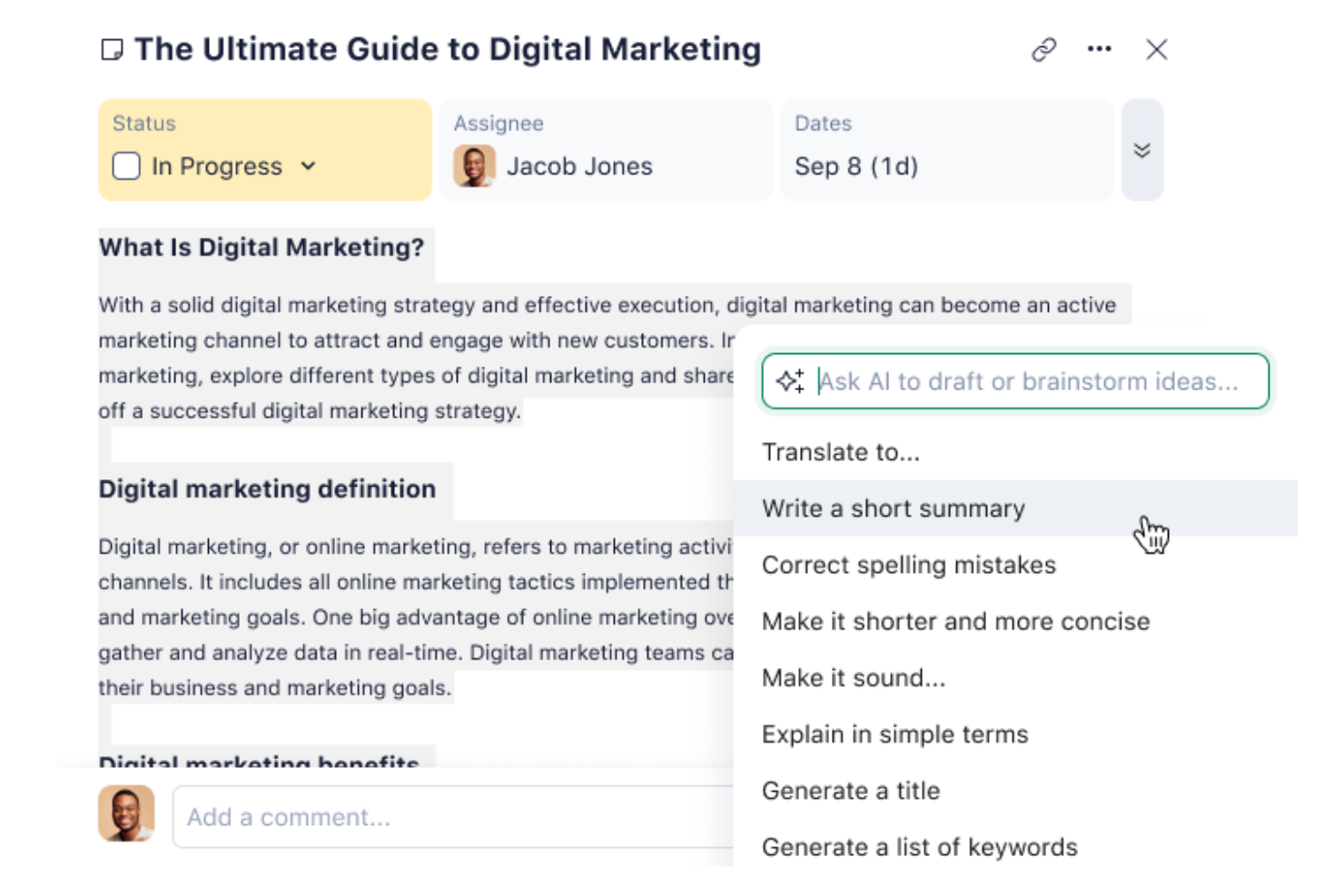
Wrike semplifica i flussi di lavoro del tuo team utilizzando l'IA per automatizzare la pianificazione e le attività quotidiane. Questo strumento è particolarmente interessante per le aziende che desiderano automatizzare le attività di routine e concentrarsi su iniziative strategiche. Sfruttando le capacità di Wrike, puoi affrontare le sfide nell'allocazione delle risorse, nella collaborazione tra team e nella pianificazione dei progetti, assicurando che i tuoi progetti si svolgano senza intoppi ed in modo efficiente.
Perché ho scelto Wrike
Ho scelto Wrike per il suo uso innovativo dell'IA generativa, che trasforma il modo in cui gestisci la pianificazione dei progetti e la comunicazione. Le sue funzionalità di intelligenza artificiale generano piani di progetto, traducono i commenti e riassumono le riunioni, allineandosi perfettamente alle esigenze dei team che desiderano automatizzare le attività ridondanti. Inoltre, i moduli di richiesta personalizzabili e le dashboard in tempo reale di Wrike offrono la flessibilità necessaria per adattare i flussi di lavoro alle tue esigenze specifiche, migliorando l'efficienza complessiva.
Caratteristiche principali di Wrike
Oltre all'IA generativa, Wrike offre:
- Mind Mapping: consente al tuo team di visualizzare idee e piani di progetto, favorendo creatività e chiarezza nelle fasi di pianificazione.
- Flussi di lavoro illimitati: offre la flessibilità di creare quanti flussi di lavoro sono necessari, adattandoli ai diversi progetti o reparti.
- Blueprint dei progetti: ti permette di standardizzare i processi di progetto, assicurando coerenza ed efficienza nelle attività ricorrenti.
- Opzioni di visualizzazione multiple: propone diversi modi di visualizzare i dati di progetto, come diagrammi di Gantt e bacheche Kanban, favorendo un migliore monitoraggio e gestione dei progetti.
Integrazioni Wrike
Le integrazioni includono NetSuite, QuickBooks, Jira, Google Workspace, Salesforce, Microsoft Teams, Slack, Adobe Creative Cloud, Dropbox e Box.
Pros and Cons
Pros:
- Fornisce monitoraggio e aggiornamenti delle attività in tempo reale
- Migliora la collaborazione del team con flussi di lavoro condivisi
- Automatizza le attività di routine, migliorando l’efficienza dei progetti
Cons:
- La piattaforma e le automazioni richiedono tempo per essere apprese e configurate
- Gli utenti segnalano un'interfaccia poco intuitiva
New Product Updates from Wrike
Wrike Adds Klaxoon MCP Integration
Wrike’s Klaxoon MCP integration is now generally available, enabling AI agents to navigate between Wrike tasks and attached whiteboards, read task context, and manage whiteboard attachments via API. For more information, visit Wrike's official site.

Ideale per approfondimenti in tempo reale sulla redditività

Productive è progettato per aiutare le agenzie a semplificare le operazioni combinando gestione dei progetti, pianificazione delle risorse e monitoraggio finanziario in un'unica piattaforma. Grazie a funzionalità che offrono approfondimenti in tempo reale sulla redditività, consente ai team di monitorare i budget di progetto, l'utilizzo e le performance dei ricavi, gestendo i flussi di lavoro in modo più efficiente. Questo lo rende una scelta pratica per le organizzazioni che desiderano una migliore visibilità sia sui processi operativi che sui risultati finanziari.
Perché ho scelto Productive
Ho scelto Productive per i suoi approfondimenti in tempo reale sulla redditività, che permettono ai team di monitorare i margini di progetto, i budget e le performance finanziarie durante l'avanzamento del lavoro. Questo aiuta le agenzie a comprendere se i progetti sono redditizi e ad apportare modifiche prima che eventuali problemi possano influire sui ricavi. La piattaforma supporta anche la pianificazione delle risorse, garantendo che i progetti siano gestiti con i membri del team adeguati in base a disponibilità e carico di lavoro. Inoltre, Productive include strumenti di reportistica e previsione automatizzati che aiutano i team ad analizzare i dati sulle performance e pianificare il lavoro futuro in modo più efficace.
Funzionalità principali di Productive
Oltre agli approfondimenti sulla redditività in tempo reale, alcune altre funzionalità di Productive includono:
- Diagrammi di Gantt: Visualizza le tempistiche dei progetti e le dipendenze per migliorare la pianificazione e l'esecuzione.
- Monitoraggio del tempo: Tieni traccia delle ore fatturabili e non fatturabili collegate direttamente ai budget di progetto.
- Fatturazione: Automatizza la creazione delle fatture in base al tempo tracciato e ai budget dei progetti.
- CRM per le vendite: Gestisci le interazioni con i clienti e le pipeline di vendita direttamente sulla piattaforma.
Integrazioni di Productive
Le integrazioni includono QuickBooks, HubSpot, Slack, Xero, Jira e Google Calendar. Sono disponibili anche un'API e una connessione Zapier per ulteriori integrazioni.
Pros and Cons
Pros:
- Gli strumenti di visibilità dei progetti aiutano i team a tracciare budget, avanzamento e uso delle risorse
- Cruscotti chiari migliorano la collaborazione del team e il monitoraggio delle performance di progetto
- Configurazione flessibile che supporta diversi flussi di lavoro e necessità operative delle agenzie
Cons:
- La disposizione dell'interfaccia può risultare complessa quando si gestiscono numerosi progetti
- Gli strumenti di reportistica richiedono una configurazione manuale per ottenere approfondimenti dettagliati sui progetti
New Product Updates from Productive
Productive Adds Voice Dictation, Slack Connector, Proposals, and Overtime
Productive adds voice dictation, a Slack Connector, proposal controls, and overtime tracking. These updates support faster AI interactions, client proposals, and time management. For more information, visit Productive’s official site.

Moxo
Ideale per la gestione delle interazioni con i clienti
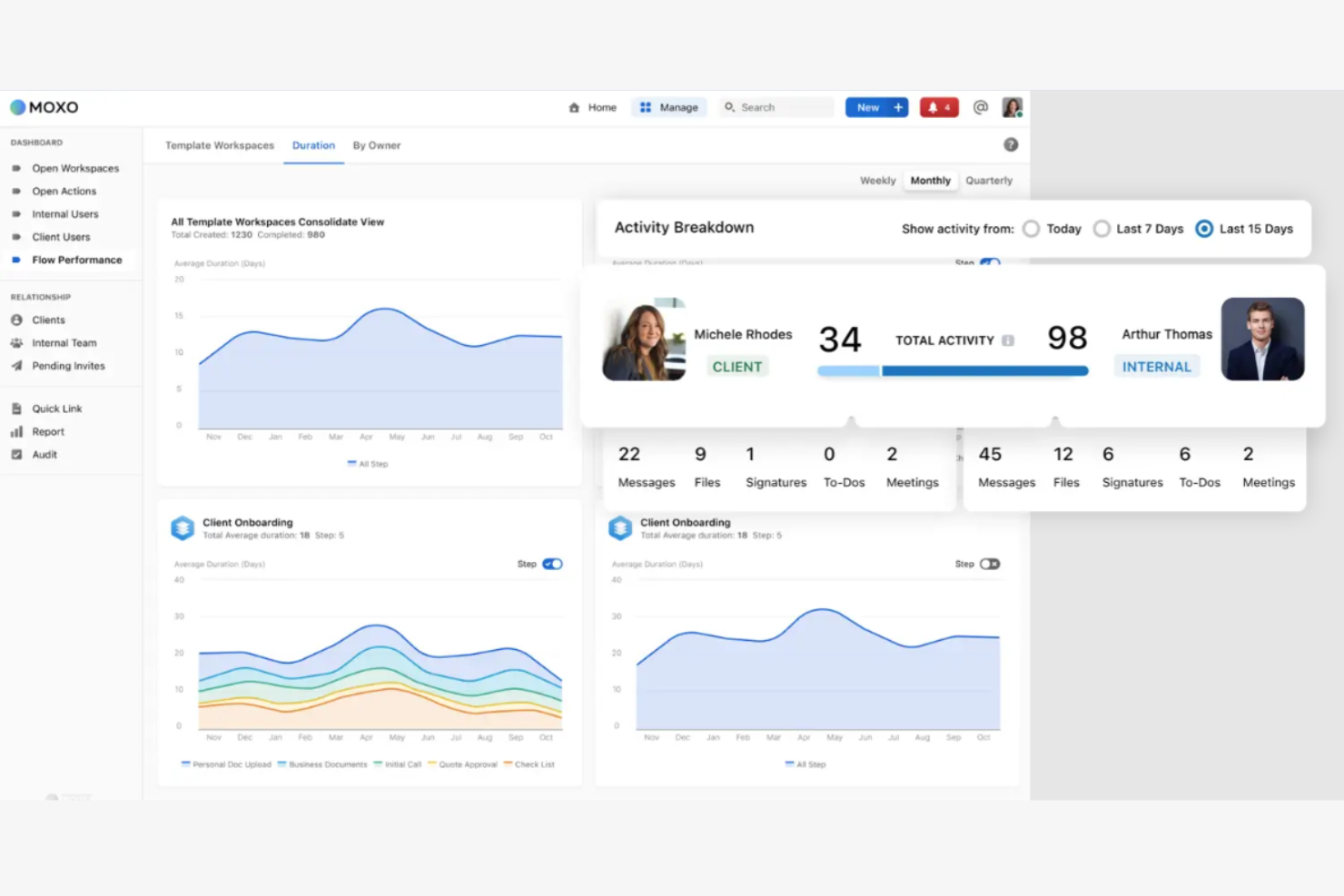
Moxo è una piattaforma di gestione delle interazioni con i clienti che aiuta a migliorare la comunicazione e il coinvolgimento dei clienti, l'efficienza operativa e la collaborazione nei progetti. Serve settori come la finanza, il real estate e i servizi legali.
Perché ho scelto Moxo: Si distingue nella gestione delle interazioni con i clienti ed è ideale se hai bisogno di canali di comunicazione efficienti. La piattaforma offre funzionalità di messaggistica sicura e condivisione di documenti per mantenere i dati dei clienti al sicuro. Puoi configurare portali cliente come hub centralizzati per la comunicazione e la collaborazione. Gli strumenti di gestione delle attività di Moxo mantengono il tuo team organizzato e reattivo alle esigenze dei clienti.
Caratteristiche e integrazioni principali:
Le funzionalità includono moduli digitali per raccogliere i dati dei clienti, automazione delle attività che riduce i compiti manuali e la possibilità di monitorare i progressi tramite dashboard integrate.
Le integrazioni includono Salesforce, Slack, Box, Docusign, QuickBooks e HubSpot.
Pros and Cons
Pros:
- Portali cliente sicuri
- Hub centralizzato di comunicazione
- Strumenti avanzati per il coinvolgimento dei clienti
Cons:
- Opzioni di personalizzazione limitate
- Curva di apprendimento per i nuovi utenti

Ideale per la gestione dei flussi di lavoro guidata dall'IA

Screendragon è una piattaforma di gestione dei flussi di lavoro no-code che utilizza l'intelligenza artificiale e l'automazione per semplificare processi aziendali complessi. È ideale per i team di marketing, operazioni e grandi aziende che devono gestire più progetti, approvazioni e risorse senza essere ostacolati da attività manuali. Combinando la progettazione visuale dei flussi di lavoro con l'automazione intelligente, aiuta i team a rimanere efficienti e concentrati su compiti strategici.
Perché ho scelto Screendragon: Ho scelto Screendragon per le sue solide capacità di gestione dei flussi di lavoro guidate dall'IA. La piattaforma utilizza agenti IA incorporati per automatizzare le attività ripetitive e gestire flussi di lavoro complessi dall'inizio alla fine. Mi è anche piaciuto come unisca la flessibilità no-code con la sicurezza di livello enterprise, così puoi creare e scalare flussi di lavoro che si adattano perfettamente alle esigenze della tua organizzazione. Se il tuo team si occupa di molte approvazioni o campagne globali, Screendragon può aiutare a ridurre il lavoro manuale mantenendo visibilità e controllo.
Funzionalità e integrazioni principali:
Le funzionalità includono un builder visuale di flussi di lavoro per creare automazioni personalizzate, gestione digitale delle approvazioni che accelera il processo decisionale e analisi dei flussi di lavoro che offrono insight in tempo reale sulle prestazioni del team.
Le integrazioni includono Jira, Google Drive, Box, Adobe, OneDrive, Salesforce, Microsoft Dynamics 365, SAP e NetSuite.
Pros and Cons
Pros:
- Builder di flussi di lavoro no-code personalizzabile
- Agenti IA automatizzano compiti complessi
- Pronto per l'uso enterprise con elevata sicurezza
Cons:
- La configurazione può richiedere tempo
- Curva di apprendimento ripida per i nuovi utenti
New Product Updates from Screendragon
Screendragon Unveils New AI Hub
Screendragon introduced AI Hub, a new capability that lets teams build and manage AI agents directly within workflows. The update helps marketing teams automate tasks, maintain governance controls, and scale AI-driven operations more efficiently. For more information, visit Screendragon's official site.
Kissflow
Ideale per l’ottimizzazione dei flussi di lavoro
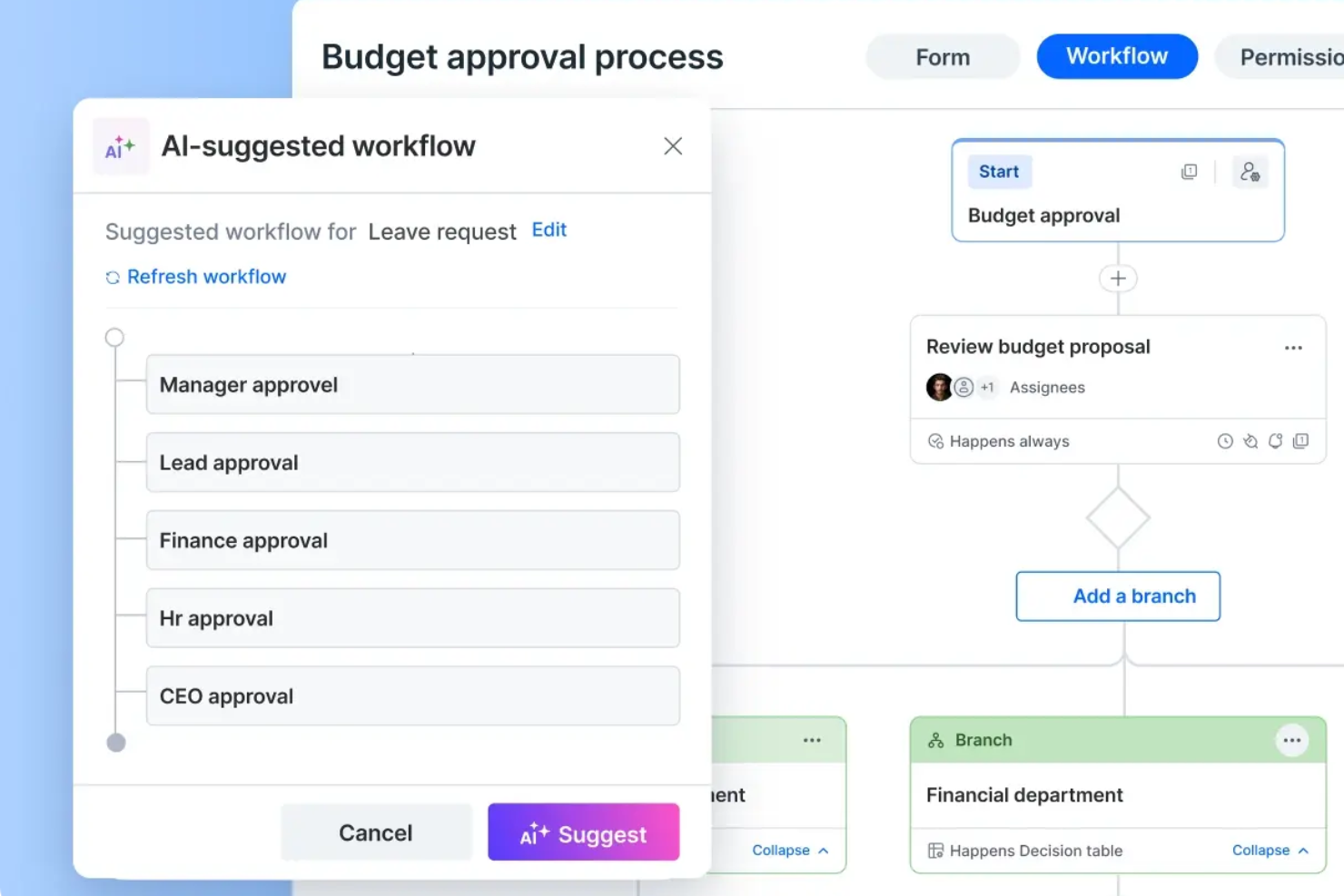
Kissflow si presenta come una soluzione versatile per i team che desiderano aumentare l'efficienza operativa grazie all'automazione dei flussi di lavoro basata sull'IA. La sua piattaforma low-code/no-code permette agli utenti di diversi settori, dall'assistenza sanitaria alla finanza, di sviluppare applicazioni interne e automatizzare processi complessi senza la necessità di ampie conoscenze di programmazione.
Perché ho scelto Kissflow
Ho scelto Kissflow per le sue funzionalità di intelligenza artificiale, fondamentali per qualsiasi team che voglia automatizzare e ottimizzare in modo intelligente i flussi di lavoro. La piattaforma sfrutta modelli di apprendimento automatico e analisi predittive per ottimizzare l'esecuzione dei processi, garantendo un'assegnazione dinamica delle attività e un utilizzo efficiente delle risorse. Inoltre, le sue funzionalità di automazione cognitiva riducono l'intervento manuale, permettendoti di concentrarti su iniziative strategiche anziché su attività di routine.
Funzionalità principali di Kissflow
Oltre alle funzioni IA, ho trovato utili per il tuo team anche queste altre caratteristiche:
- Costruttori di App e Processi: Questi strumenti ti consentono di creare flussi di lavoro personalizzati in base alle esigenze specifiche della tua azienda.
- Orchestrazione dei Flussi di Lavoro: Questa funzione garantisce un'assegnazione delle attività e una gestione dei processi fluida in tutta l'organizzazione.
- Bacheche e Visualizzazioni Progetto: Bacheche flessibili e più modalità di visualizzazione dei progetti (come Kanban o lista) per aiutare i team a monitorare il lavoro e le priorità.
- Modelli: Con modelli specifici per settore, puoi implementare rapidamente soluzioni allineate alle migliori pratiche del tuo ambito.
Integrazioni di Kissflow
Le integrazioni includono Slack, Google Workspace, Microsoft Teams, QuickBooks, Salesforce, Zapier, Dropbox, DocuSign, Jira e Trello.
Pros and Cons
Pros:
- La progettazione drag-and-drop dei flussi di lavoro consente agli utenti non tecnici di automatizzare i processi con facilità.
- Le funzionalità low-code/no-code permettono ai team di creare flussi di lavoro e app senza dipendere dagli sviluppatori.
- L’accesso via cloud consente ai team di lavorare da remoto e approvare le attività ovunque si trovino.
Cons:
- La personalizzazione profonda limitata rende più difficile creare flussi altamente specializzati.
- La modifica dei flussi di lavoro dopo l’approvazione può essere limitante o richiedere un riavvio.

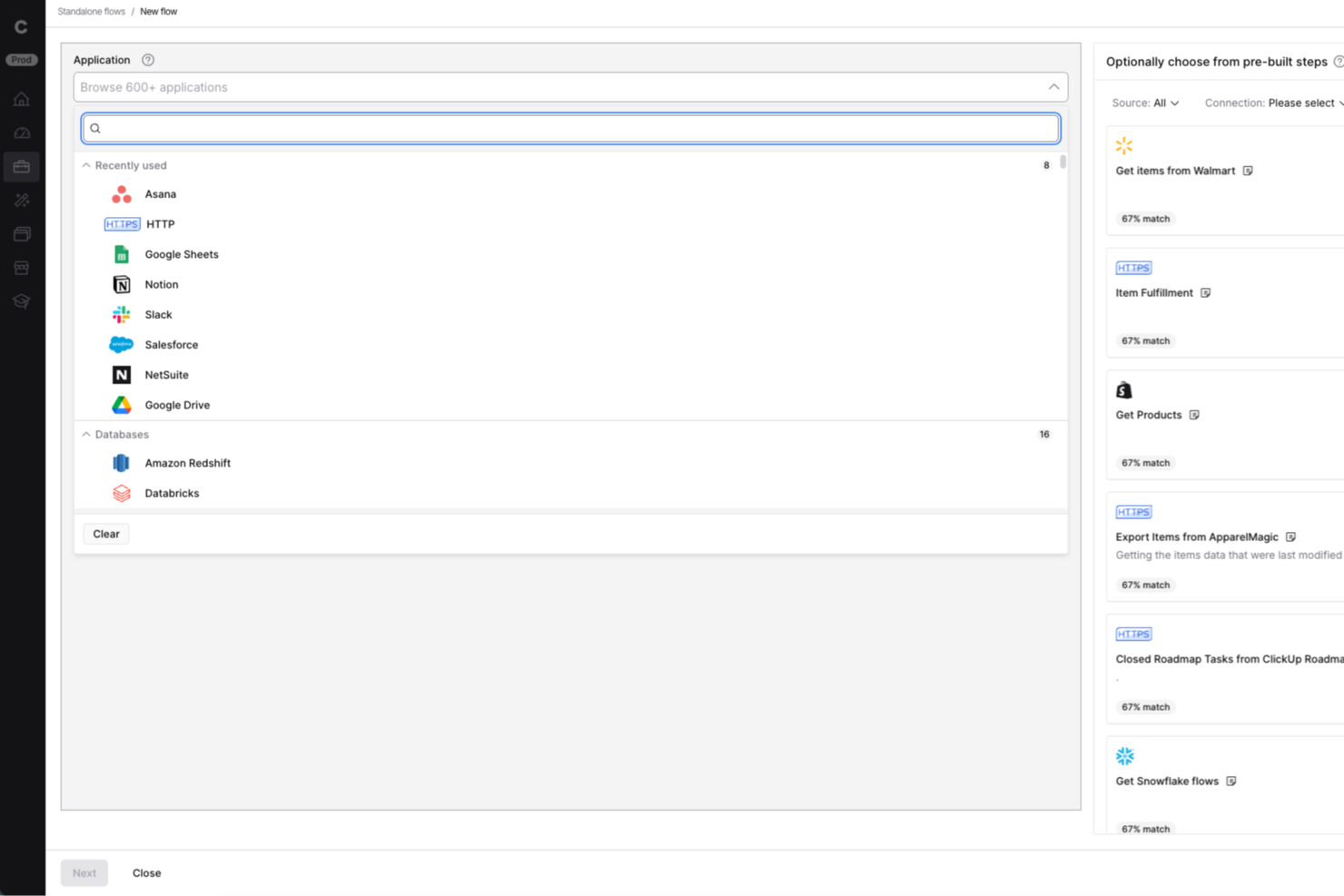
Celigo è una piattaforma di automazione dei flussi di lavoro basata su AI, progettata per team IT e responsabili delle operazioni che necessitano di collegare app, automatizzare processi aziendali complessi e gestire integrazioni su vasta scala all'interno della loro organizzazione.
Per chi è ideale Celigo?
Team IT e responsabili delle operazioni in aziende di medie e grandi dimensioni che devono automatizzare e orchestrare flussi di lavoro tra diversi sistemi aziendali.
Perché ho scelto Celigo
Ho scelto Celigo tra i migliori perché la sua libreria con oltre 1.000 connettori predefiniti consente al mio team di automatizzare i flussi di lavoro tra decine di app SaaS senza sviluppo personalizzato. Posso collegare rapidamente Salesforce, NetSuite, Shopify e altri, poi orchestrare i flussi di dati tra loro. Questo ci fa risparmiare settimane sui progetti di integrazione e ci permette di concentrarci sull'ottimizzazione dei processi aziendali invece che sulla creazione di connettori da zero.
Caratteristiche principali di Celigo
- Gestione degli errori basata su AI: Rileva, segnala e aiuta a risolvere automaticamente gli errori di integrazione in tempo reale.
- Editor visuale dei flussi: Consente di progettare, mappare e automatizzare i flussi di lavoro tramite un'interfaccia drag-and-drop.
- Controlli di accesso basati su ruoli: Assegna permessi e limita l'accesso a flussi di lavoro e dati sensibili.
- Dashboard di monitoraggio dei flussi di lavoro: Fornisce visibilità in tempo reale su stato dei processi, throughput e metriche di performance.
Integrazioni di Celigo
Le integrazioni includono Salesforce, Microsoft Dynamics 365 Business Central, Oracle NetSuite, Walmart, SAP, Snowflake, Acumatica, ADP, Adobe e 3M.
Pros and Cons
Pros:
- Strumenti integrati per la trasformazione e la mappatura dei dati
- Funzionalità di conformità SOC 2 Type II e GDPR
- Monitoraggio in tempo reale e avvisi sugli errori inclusi
Cons:
- Le funzionalità avanzate richiedono un piano di fascia superiore
- Modelli di automazione specifici per AI limitati
New Product Updates from Celigo
Celigo Adds SuiteTax and Variant Publishing for Shopify–NetSuite
Celigo adds NetSuite SuiteTax support and variant-level sales channel publishing to its Shopify–NetSuite integration. These updates improve tax handling and give merchants more control over how product variants are published. For more information, visit Celigo’s official site.
 .
.
Workato
Ideale per integrazioni aziendali

Workato è una piattaforma di integrazione come servizio (iPaaS) pensata per utenti aziendali nei reparti IT, finanza, risorse umane e marketing. Puoi utilizzarla per automatizzare i processi aziendali, integrare le tue applicazioni e migliorare l'efficienza operativa.
Perché ho scelto Workato: Offre integrazioni di livello enterprise, rendendola adatta a grandi organizzazioni. La piattaforma propone un'interfaccia no-code con oltre 1200 connettori preconfigurati. Puoi automatizzare flussi di lavoro complessi e gestire API; la possibilità di creare assistenti e agenti AI personalizzati aggiunge flessibilità alle tue operazioni.
Funzionalità e integrazioni principali:
Funzionalità come il controllo delle versioni permettono di gestire le modifiche in sicurezza, l'accesso basato sui ruoli supporta team interfunzionali e il monitoraggio granulare degli errori aiuta a risolvere le anomalie.
Integrazioni includono Salesforce, Slack, HubSpot, Marketo, ServiceNow, NetSuite, QuickBooks, Microsoft Dynamics 365, Zendesk e Jira.
Pros and Cons
Pros:
- Ampia gamma di connettori preconfigurati
- Piattaforma di automazione senza codice
- Creazione di agenti personalizzati
Cons:
- Orari di supporto clienti limitati
- Può essere complesso per piccoli team

n8n
Ideale per la creazione di flussi di lavoro personalizzati
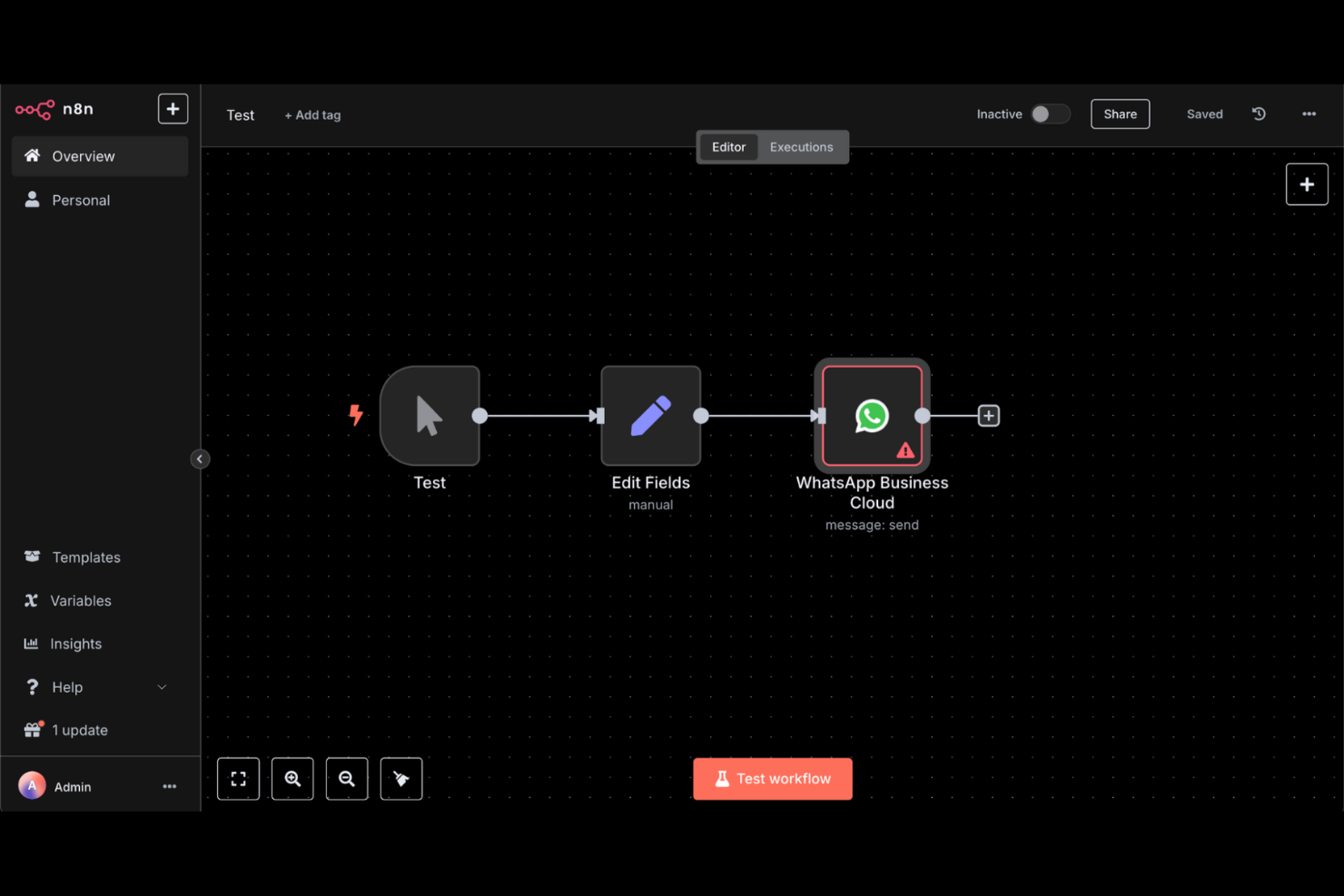
n8n è una piattaforma di automazione dei flussi di lavoro con intelligenza artificiale progettata per team tecnici come IT, sicurezza, sviluppo e vendite. Ti aiuta a creare agenti AI multi-step e integrare varie applicazioni per eseguire funzioni aziendali quali l'onboarding dei dipendenti e la gestione degli incidenti di sicurezza.
Perché ho scelto n8n: La flessibilità nella creazione di flussi di lavoro personalizzati distingue questa piattaforma. Gli utenti possono creare flussi di lavoro sia tramite l'interfaccia visuale sia con il codice, rendendola adattabile a diversi livelli di competenza. Supporta oltre 500 integrazioni, consentendo di collegare numerosi strumenti, e l'opzione di self-hosting o soluzione cloud aggiunge ulteriore versatilità.
Funzionalità e integrazioni principali:
Le funzionalità comprendono un costruttore visuale di flussi di lavoro che semplifica attività complesse, supporto sia per utenti senza codice che per programmatori, e la capacità di eseguire ed effettuare il debug dei flussi di lavoro in modo efficiente.
Le integrazioni includono Google Sheets, Slack, MySQL, HubSpot, Salesforce, GitHub, Jira, Airtable, Trello e Microsoft Teams.
Pros and Cons
Pros:
- Creazione di flussi di lavoro flessibile
- Opzioni low-code e self-hosting
- Capacità di integrazione estese
Cons:
- Richiede conoscenze tecniche
- Può essere complesso per i principianti

Ideale per una documentazione dei processi semplice
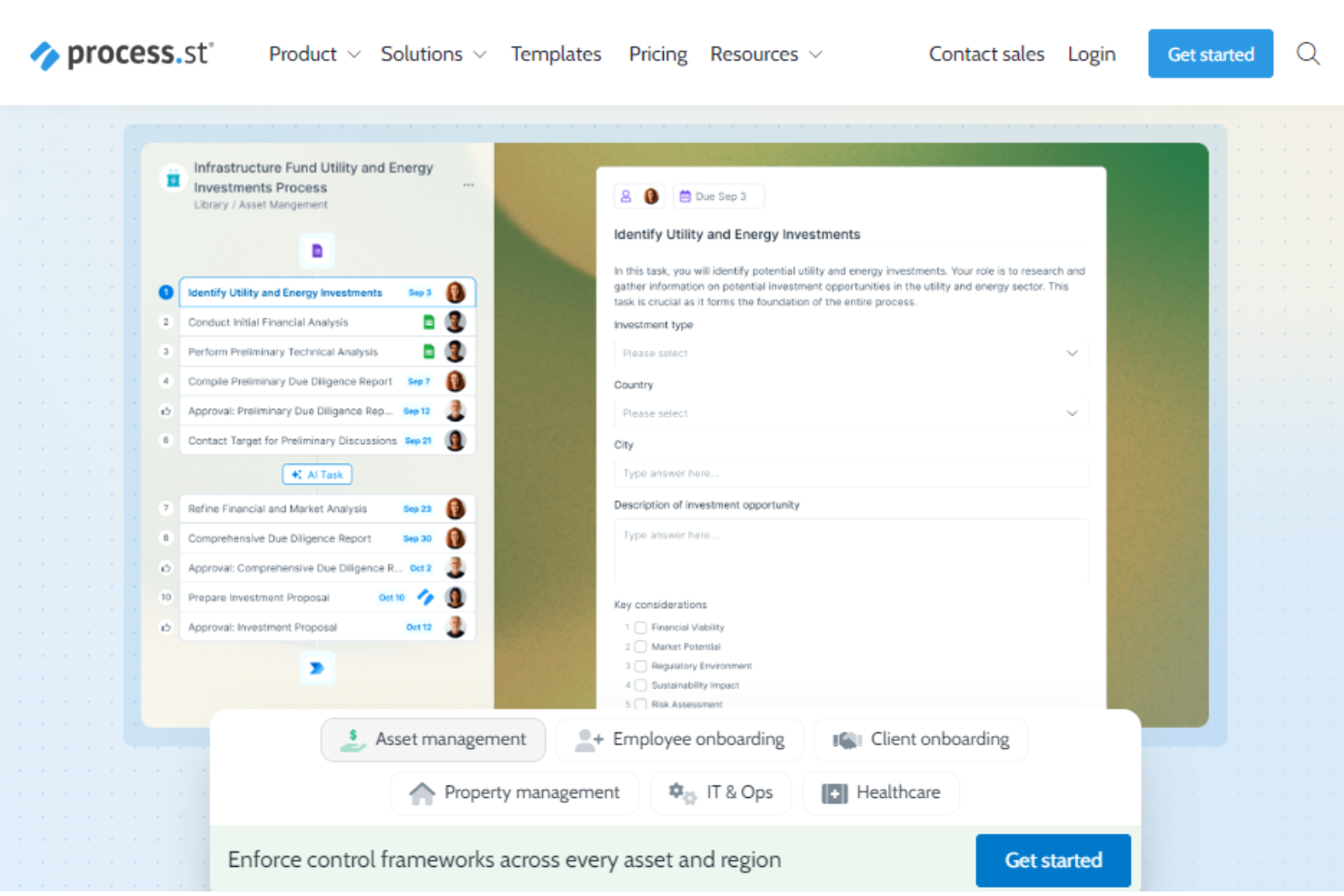
Process Street è una piattaforma di gestione della conformità che aiuta ad automatizzare e monitorare i processi aziendali. È ideale per i team delle operazioni, della conformità e delle risorse umane in settori come la sanità e la tecnologia. La piattaforma centralizza la documentazione di conformità e trasforma le procedure con flussi di lavoro potenziati dall'IA.
Perché ho scelto Process Street: Si distingue per la semplificazione della documentazione dei processi e rende facile per i team gestire le procedure operative standard. Le sue caratteristiche principali includono la gestione centralizzata delle policy e la visibilità in tempo reale delle attività. I flussi di lavoro guidati dall’IA della piattaforma ti aiutano inoltre a migliorare l’efficienza operativa.
Caratteristiche principali & integrazioni:
Caratteristiche includono l'automazione dei flussi di lavoro per semplificare le attività ripetitive, funzionalità di gestione progetti per mantenere il team organizzato e strumenti di IA che trasformano i processi manuali.
Le integrazioni non sono elencate pubblicamente sul sito web di Process Street.
Pros and Cons
Pros:
- Documentazione dei processi semplice
- Gestione centralizzata delle policy
- Monitoraggio della conformità
Cons:
- Opzioni di personalizzazione limitate
- Alcune integrazioni devono essere migliorate

TimeHero
Ideale per l'automazione delle attività

TimeHero è uno strumento di gestione delle attività e automazione progettato per i team che desiderano aumentare la produttività e gestire le attività in modo efficiente. Puoi utilizzarlo per automatizzare la pianificazione e la gestione delle attività e ottimizzare i tuoi flussi di lavoro.
Perché ho scelto TimeHero: Si concentra sull'automazione delle attivitàed è un'ottima scelta per i team che desiderano semplificare i propri processi di lavoro. La piattaforma può pianificare automaticamente le attività in base a priorità e scadenze per aiutare il tuo team a restare al passo. La sua pianificazione predittiva adatta dinamicamente le attività man mano che le priorità cambiano. Le funzionalità collaborative di TimeHero mantengono tutti informati e allineati sugli obiettivi del progetto.
Funzionalità principali e integrazioni:
Le funzionalità comprendono la previsione del carico di lavoro che ti aiuta a valutare la capacità del team, strumenti di pianificazione dei progetti che collegano le attività a obiettivi più ampi e cronologie visive per monitorare i progressi in tempo reale.
Le integrazioni includono Google Calendar, Gmail, Trello, Slack, Asana, Evernote e Basecamp.
Pros and Cons
Pros:
- Riprogrammazione automatica delle attività
- Strumenti collaborativi
- Migliora la comunicazione del team
Cons:
- La configurazione iniziale può richiedere tempo
- Opzioni di personalizzazione limitate
Altri software di automazione dei flussi di lavoro con IA
Ecco alcune altre opzioni di software di automazione dei flussi di lavoro con IA che non sono entrate nel mio elenco, ma che vale comunque la pena prendere in considerazione:
- Adobe Workfront
Ideale per team di marketing
- Tonkean
Ideale per team operativi
- Camunda
Ideale per la modellazione BPMN e DMN
- Jitterbit
Ideale per attività di integrazione dei dati
- Forms On Fire
Ideale per la raccolta dati mobile
- elvex
Ideale per flussi di lavoro della conoscenza alimentati dall'IA
- Miro
Ideale per la collaborazione visiva
- Jotform Workflows
Ideale per la personalizzazione di flussi di lavoro senza codice
- GoodDay
Ideale per la gestione delle dipendenze tra le attività
- Parabola.io
Ideale per flussi di lavoro basati su grandi quantità di dati


Come Valuto i Software di Automazione dei Flussi di Lavoro con l’AI
Ogni strumento in questo elenco deve fare molto di più che aggiungere una semplice etichetta AI—cerco piattaforme in cui l’AI generi risultati concreti, come la creazione automatica di report di stato o la segnalazione di sprint a rischio prima che deraglino. Suddivido la mia valutazione in funzionalità di base che ogni strumento deve avere per qualificarsi e fattori di differenziazione che separano le migliori soluzioni dal resto.
Funzionalità di Base (Requisiti Minimi per Questo Elenco)
Quando seleziono gli strumenti per il mio elenco, valuto ciascuno su una scala da 0 (non offre la funzionalità) a 5 (eccelle in questo ambito) per ogni funzionalità di base elencata di seguito. Successivamente, calcolo il punteggio totale dello strumento in percentuale. Ogni strumento deve raggiungere un punteggio minimo totale del 65% per essere considerato per l’inclusione.
- Costruttore di Flussi di Lavoro Assistito dall’AI: Valuto se la piattaforma consente di descrivere un flusso di lavoro in linguaggio naturale e ottenere un’automazione pronta all’uso, come digitare "assegna attività di QA quando lo sviluppatore segna un ticket come completato."
- Automazione delle Attività di Progetto: Ogni strumento dovrebbe automatizzare le attività principali di PM, come la creazione di sottocompiti, la riassegnazione dei lavori quando le priorità cambiano o l’aggiornamento dei campi di stato tra attività dipendenti.
- Logica Condizionale Basata su Trigger: Cerco trigger guidati da eventi abbinati a logiche ramificate, come l’avvio di un flusso di revisione dei rischi quando una milestone supera la data pianificata.
- Integrazioni Native con Strumenti PM: Lo strumento deve connettersi con le piattaforme già utilizzate dai team. Controllo la profondità dell’integrazione con strumenti come Jira, Asana, ClickUp, Slack e Google Workspace.
- Output Generati dall’AI: Valuto se l’AI può produrre artefatti utili all’interno dei flussi, come la stesura di un riassunto sprint dai ticket completati o la generazione di email di aggiornamento per gli stakeholder.
- Intelligenza Predittiva: La piattaforma dovrebbe offrire informazioni previsionali, come evidenziare colli di bottiglia nelle risorse o prevedere rischi nella consegna in base a trend di velocità e dati storici.
Una volta che ho un elenco di strumenti che soddisfano i criteri, considero ciò che distingue ciascuna piattaforma.
Fattori di Differenziazione (Cosa Distingue i Fornitori)
Ecco come confronto e metto a paragone i diversi fornitori:
Funzionalità Distintive
Agenti AI autonomi distinguono gli strumenti. Cerco piattaforme in cui un agente sia in grado di gestire richieste, instradare attività e aggiornare gli stakeholder autonomamente. Questo tipo di coordinamento senza intervento diretto fa risparmiare ore ogni settimana ai PM. Anche un’interfaccia conversazionale è importante—i PM dovrebbero poter digitare "mostrami le attività bloccate di questo sprint" e ricevere risposte senza dover costruire un report. Modelli PM preimpostati per l’avvio sprint o la revisione dei rischi aiutano i team a partire in pochi minuti anziché configurare i flussi da zero.
Oltre le Funzionalità
La trasparenza dell’AI è fondamentale quando i flussi decidono al posto tuo. Verifico se una piattaforma mostra il motivo per cui ha segnalato una scadenza come a rischio o ha riassegnato un’attività, e se offre approvazioni prima dell’esecuzione delle azioni dell’AI. Anche sicurezza e governance dei dati sono importanti—valuto i controlli su quali dati di progetto possono essere consultati dai modelli AI e se il fornitore supporta SOC 2 Type II e residenza regionale dei dati. Anche le strutture di prezzo meritano molta attenzione, dato che un uso intensivo dell’AI può far lievitare i costi rapidamente se il consumo di token o le esecuzioni dei flussi non sono tariffati in modo prevedibile.
Come scegliere un software di automazione dei flussi di lavoro con IA
È facile perdersi in lunghi elenchi di funzionalità e strutture tariffarie complesse. Per aiutarti a scegliere il software di automazione dei flussi di lavoro con IA più adatto, ecco un elenco di fattori da tenere a mente:
| Fattore | Cosa considerare |
|---|---|
| Scalabilità | Il software può crescere insieme alla tua attività? Verifica se supporta utenti e flussi di lavoro aggiuntivi senza problemi. Controlla se è in grado di gestire in modo efficiente un volume di dati maggiore. |
| Integrazioni | Si collega agli strumenti che già utilizzi (ad esempio, software di contabilità o strumenti CRM)? Assicurati che offra integrazioni native con i tuoi principali sistemi software. Evita gli strumenti che richiedono costose soluzioni di terze parti per l'integrazione. |
| Personalizzazione | Puoi adattarlo ai tuoi flussi di lavoro? Cerca un software che consenta di apportare modifiche senza dover ricorrere a uno sviluppatore. Verifica se supporta campi e interfacce personalizzati. |
| Facilità d'uso | L'interfaccia è intuitiva per il tuo team? Evita gli strumenti con una curva di apprendimento ripida. Testa la navigazione e l'esperienza utente prima di impegnarti. |
| Implementazione e inserimento | Quanto rapidamente può il tuo team diventare operativo? Valuta i materiali di formazione e il supporto offerto durante l'inserimento. Verifica la disponibilità di guide interattive e tutorial. |
| Costo | Rientra nel tuo budget? Confronta i piani tariffari e verifica l'eventuale presenza di costi nascosti. Considera il valore offerto dai piani base rispetto alle opzioni premium. |
| Misure di sicurezza | I tuoi dati sono protetti? Assicurati che il software sia conforme agli standard di settore come il GDPR. Verifica la presenza di crittografia e controlli degli accessi basati sui ruoli. |
| Disponibilità dell'assistenza | L'aiuto è disponibile quando ne hai bisogno? Cerca opzioni di assistenza 24 ore su 24, 7 giorni su 7 e tempi di risposta rapidi. Verifica se sono disponibili più canali di assistenza, come chat e telefono. |
Che cos'è un software di automazione dei flussi di lavoro con IA?
Il software di automazione dei flussi di lavoro basato sull'intelligenza artificiale è uno strumento che automatizza attività e processi ripetitivi utilizzando l'intelligenza artificiale. Viene comunemente utilizzato da project manager, professionisti IT e team operativi per aumentare l'efficienza e ridurre le attività manuali e di routine.
Funzionalità come l'automazione delle attività, l'analisi in tempo reale e le integrazioni con gli strumenti esistenti aiutano a gestire i flussi di lavoro, migliorare la produttività e mantenere i team allineati. Nel complesso, questi strumenti fanno risparmiare tempo, consentendo di concentrarsi su attività più strategiche.
Funzionalità del software di automazione dei flussi di lavoro basato sull'intelligenza artificiale
Quando scegli un software di automazione dei flussi di lavoro basato sull'intelligenza artificiale, presta attenzione alle seguenti funzionalità chiave:
- Automazione delle attività: automatizza le attività ripetitive e libera tempo per il lavoro più strategico.
- Analisi in tempo reale: fornisce informazioni sulle prestazioni del flusso di lavoro e aiuta a prendere decisioni basate sui dati.
- Flussi di lavoro personalizzabili: consente di adattare i processi alle proprie esigenze aziendali specifiche senza bisogno di uno sviluppatore.
- Integrazioni: si connette agli strumenti esistenti per mantenere un flusso regolare di informazioni tra le piattaforme.
- Scalabilità: supporta la crescita gestendo senza problemi un volume maggiore di dati e utenti aggiuntivi.
- Misure di sicurezza: protegge i dati sensibili con la crittografia e controlli degli accessi basati sui ruoli.
- Strumenti di collaborazione: migliorano la comunicazione e il coordinamento del team con funzionalità come spazi di lavoro condivisi e chat.
- Accesso da dispositivi mobili: consente ai membri del team di gestire flussi di lavoro e attività dai dispositivi mobili.
- Interfaccia intuitiva: offre facilità d'uso grazie a un design intuitivo e riduce la curva di apprendimento per i nuovi utenti.
- Report sulle prestazioni: offre report dettagliati per monitorare la produttività e individuare le aree di miglioramento.
Vantaggi del software di automazione dei flussi di lavoro basato sull'intelligenza artificiale
L'implementazione di un software di automazione dei flussi di lavoro basato sull'intelligenza artificiale offre diversi vantaggi al team e all'azienda. Ecco alcuni dei risultati che puoi aspettarti:
- Maggiore efficienza: automatizza le attività ripetitive, consentendo al team di concentrarsi sul lavoro più importante.
- Migliore processo decisionale: fornisce analisi in tempo reale per aiutare a prendere decisioni informate basate sui dati.
- Migliore collaborazione: offre strumenti che migliorano la comunicazione e il coordinamento all'interno del team.
- Scalabilità: supporta la crescita aziendale gestendo facilmente un numero maggiore di dati e utenti.
- Risparmio di tempo: riduce il lavoro manuale e libera tempo per le iniziative strategiche.
- Maggiore sicurezza dei dati: mantiene protette le informazioni sensibili con solide misure di sicurezza.
- Flessibilità: i flussi di lavoro personalizzabili consentono di adattare i processi alle esigenze aziendali in evoluzione.
Costi e prezzi del software di automazione dei flussi di lavoro basato sull'intelligenza artificiale
I costi del software di automazione dei flussi di lavoro basato sull'intelligenza artificiale variano in base alle funzionalità, alle dimensioni del team, ai componenti aggiuntivi e ad altri fattori. Ecco i piani più comuni, i prezzi medi e le funzionalità tipicamente incluse nelle soluzioni di automazione dei flussi di lavoro basate sull'intelligenza artificiale:
Tabella di confronto dei piani per il software di automazione dei flussi di lavoro basato sull'intelligenza artificiale
| Tipo di piano | Prezzo medio | Funzionalità comuni |
|---|---|---|
| Piano gratuito | $0/user/month | Automazione di base delle attività, integrazioni limitate con le app e assistenza della community. |
| Piano personale | $5-$25/user/month | Automazione delle attività, report di base, più integrazioni e assistenza via e-mail. |
| Piano aziendale | $30-$75/user/month | Automazione avanzata dei flussi di lavoro, analisi in tempo reale, maggiore sicurezza e assistenza via chat. |
| Piano aziendale avanzato | $100+/user/month | Flussi di lavoro personalizzabili, assistenza dedicata, integrazioni complete e analisi avanzate. |
Domande frequenti sul software di automazione dei flussi di lavoro con IA
\u003cspan style=\u0022font-weight: 400\u0022\u003eEcco le risposte alle domande comuni sul software di automazione dei flussi di lavoro con IA:\u003c/span\u003e
Quali sono le difficoltà comuni nell'implementazione degli strumenti di automazione dei flussi di lavoro con IA?
\u003cspan style=\u0022font-weight: 400\u0022\u003eTra le difficoltà comuni rientrano l’integrazione con i sistemi esistenti e la resistenza al cambiamento da parte dei membri del team. Potreste dover affrontare una curva di apprendimento, quindi le risorse per la formazione e il supporto sono fondamentali. Assicuratevi che i vostri obiettivi siano chiari, così da poter allineare il software ai vostri processi aziendali.\u003c/span\u003e
In che modo il software di automazione dei flussi di lavoro con IA migliora la produttività?
\u003cspan style=\u0022font-weight: 400\u0022\u003eIl software di automazione dei flussi di lavoro con IA aumenta la produttività automatizzando le attività ripetitive, permettendo al team di concentrarsi sul lavoro strategico. Fornisce analisi in tempo reale per consentire di prendere decisioni informate, mentre gli strumenti di collaborazione aiutano a collegare i diversi reparti e a semplificare la comunicazione.\u003c/span\u003e
Quali settori traggono i maggiori vantaggi dal software di automazione dei flussi di lavoro con IA?
\u003cspan style=\u0022font-weight: 400\u0022\u003eSettori come quello finanziario, sanitario e manifatturiero traggono vantaggio dagli strumenti di automazione dei flussi di lavoro con IA. Questi settori gestiscono grandi volumi di attività ripetitive ed elaborazione di dati, quindi l’automazione è essenziale per l’efficienza. Il software contribuisce a semplificare i processi, ridurre gli errori e migliorare la conformità.\u003c/span\u003e
In che modo il software di automazione dei flussi di lavoro con IA può migliorare la sicurezza dei dati?
\u003cspan style=\u0022font-weight: 400\u0022\u003eGli strumenti di automazione dei flussi di lavoro con IA possono contribuire a rafforzare la sicurezza dei dati tramite la crittografia e i controlli degli accessi basati sui ruoli. Garantiscono che solo gli utenti autorizzati possano accedere alle informazioni sensibili. Gli aggiornamenti regolari e la conformità agli standard di settore come il GDPR proteggono ulteriormente i dati da violazioni e accessi non autorizzati.\u003c/span\u003e
Cosa bisogna considerare durante il processo di onboarding?
\u003cspan style=\u0022font-weight: 400\u0022\u003eDurante l’onboarding, valutate la disponibilità di risorse per la formazione, come tutorial e webinar. Verificate la presenza di tour interattivi del prodotto e del supporto del fornitore per facilitare la transizione. Assicuratevi che il team comprenda le funzionalità e i vantaggi del software, così da sfruttarne al massimo il potenziale e integrarlo efficacemente nelle operazioni quotidiane.\u003c/span\u003e