

10 migliori strumenti alternativi a Paymo per i team di progetto nel 2026

Elenco delle migliori alternative a Paymo


Se hai notato che Paymo non è lo strumento più adatto ai tuoi progetti, sono disponibili molte alternative a Paymo che possono aiutarti a pianificare e assegnare il lavoro di progetto, monitorare il tempo e fatturare ai tuoi clienti.
Paymo potrebbe non disporre di funzionalità fondamentali per il tuo caso d'uso, quindi ho utilizzato la mia esperienza come responsabile di progetto per testare e recensire decine di alternative e aiutarti a trovare un sostituto. In ogni caso, ecco i miei principali consigli per le migliori alternative a Paymo.
Che cos'è Paymo?
Paymo è un'applicazione per la gestione dei progetti progettata per aiutare freelance, startup e piccole e medie imprese a gestire i progetti dall'avvio alla fatturazione. Funziona come uno strumento multifunzionale che migliora l'assegnazione delle attività, il monitoraggio del tempo e la gestione finanziaria all'interno di un'unica piattaforma.
Perché fidarsi dei nostri consigli sui software
Il nostro team testa e recensisce software dal 2012. In quanto project manager noi stessi, sappiamo quanto sia difficile — e importante — scegliere il software giusto.
Per questa guida, abbiamo valutato gli strumenti attraverso test pratici e ricerche indipendenti, assegnando un punteggio agli strumenti in base ai nostri criteri di selezione. Ci basiamo inoltre sulle competenze di leader di pensiero del settore e di professionisti attivi nella gestione dei progetti.
Le nostre recensioni riflettono il nostro giudizio editoriale umano, non un discorso di vendita.
Revisori esperti:
Tabella di confronto delle alternative a Paymo
Questa tabella di confronto riassume i dettagli sui prezzi delle mie migliori alternative a Paymo:
| Tool | Best For | Trial Info | Price | ||
|---|---|---|---|---|---|
| 1 | Ideale per centralizzare conoscenze e flussi di lavoro | Piano gratuito disponibile | Da $10/utente/mese (fatturato annualmente) | Website | |
| 2 | Ideale per la comunicazione tra team da remoto | Prova gratuita + piano gratuito + demo gratuita disponibili | Da $13/utente/mese (fatturato annualmente) | Website | |
| 3 | Ideale per costruire relazioni con i clienti | Piano gratuito disponibile | Da $39/mese (fatturato annualmente) | Website | |
| 4 | Ideale per la gestione unificata dei progetti | Prova gratuita di 14 giorni + demo gratuita disponibile | Da $45/mese (fatturato annualmente) | Website | |
| 5 | Ideale per la gestione del lavoro con i clienti | Prova gratuita di 30 giorni + demo gratuita disponibile | A partire da $9.99/utente/mese (fatturato annualmente) | Website | |
| 6 | Ideale per strumenti di collaborazione integrati | Prova gratuita di 14 giorni | A partire da $9/utente/mese (fatturati annualmente) | Website | |
| 7 | Ideale per consolidare i dati di progetto | Prova gratuita di 30 giorni + piano gratuito + demo gratuita disponibile | Da $11,20/utente/mese (fatturato annualmente) | Website | |
| 8 | Ideale per l'organizzazione visiva dei progetti | Piano gratuito disponibile | Da $5/utente/mese (fatturazione annuale) | Website | |
| 9 | Ideale per la gestione dei progetti in team | Prova gratuita di 14 giorni + demo gratuita disponibile | Da $19,90/utente/mese (fatturazione annuale) | Website | |
| 10 | Ideale per una gestione versatile delle attività | Prova gratuita di 15 giorni + piano gratuito + demo gratuita disponibile | Da $4/utente/mese (fatturazione annuale) | Website |
Recensioni delle migliori alternative a Paymo
Ecco la mia analisi dettagliata e la panoramica di ogni alternativa a Paymo. Analizzo vantaggi e svantaggi, funzionalità e casi d’uso ideali per ogni strumento.

Notion
Ideale per centralizzare conoscenze e flussi di lavoro
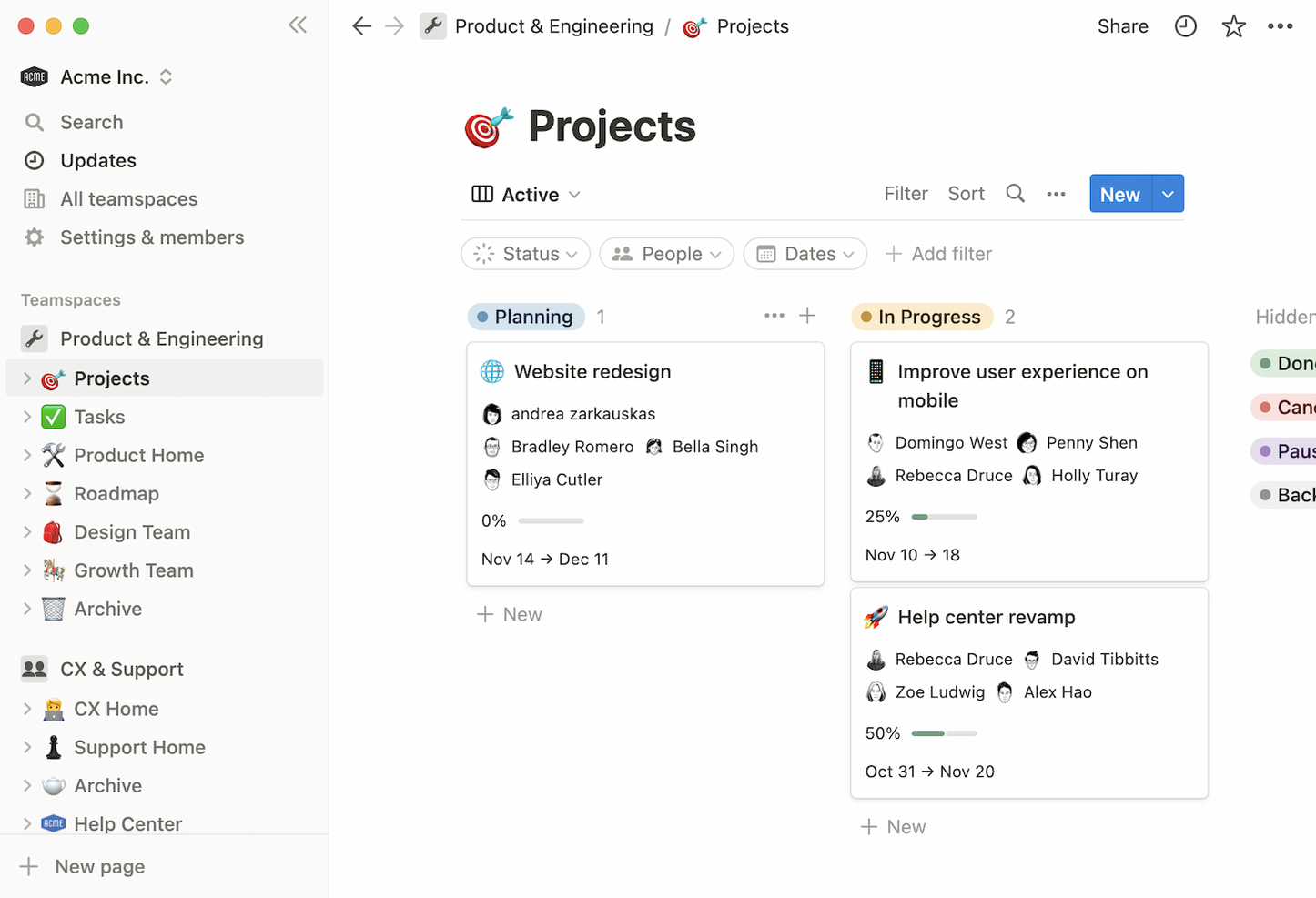
Notion è uno spazio di lavoro tutto-in-uno per prendere appunti, gestire la conoscenza, gestire progetti e collaborare. È ideale per centralizzare conoscenze e flussi di lavoro poiché combina documenti, database, bacheche Kanban, wiki e calendari in un'unica piattaforma coesa.
Perché è una buona alternativa a Paymo: Notion va oltre la gestione tradizionale dei progetti integrando ampie funzionalità di gestione della conoscenza. Offre un ambiente flessibile e personalizzabile dove i team possono creare flussi di lavoro e database interconnessi, aumentando produttività e collaborazione.
Funzionalità e integrazioni principali:
Funzionalità includono presa di appunti, database, bacheche Kanban, wiki, calendari, gestione delle attività, promemoria, incorporamento di documenti, collaborazione in tempo reale, supporto per contenuti multimediali, modelli e viste personalizzabili.
Integrazioni includono Jira, Slack, GitHub, Asana, Google Drive, Trello, Zapier, Figma, Webex e IFTTT.
Pros and Cons
Pros:
- Piattaforma versatile che combina diversi strumenti
- Ampia galleria di modelli per diversi casi d'uso
- API robusta per integrazioni personalizzate
Cons:
- Può risultare opprimente per i nuovi utenti a causa dell'ampia gamma di funzionalità
- L'app desktop potrebbe non essere reattiva quanto la versione web

Ideale per la comunicazione tra team da remoto
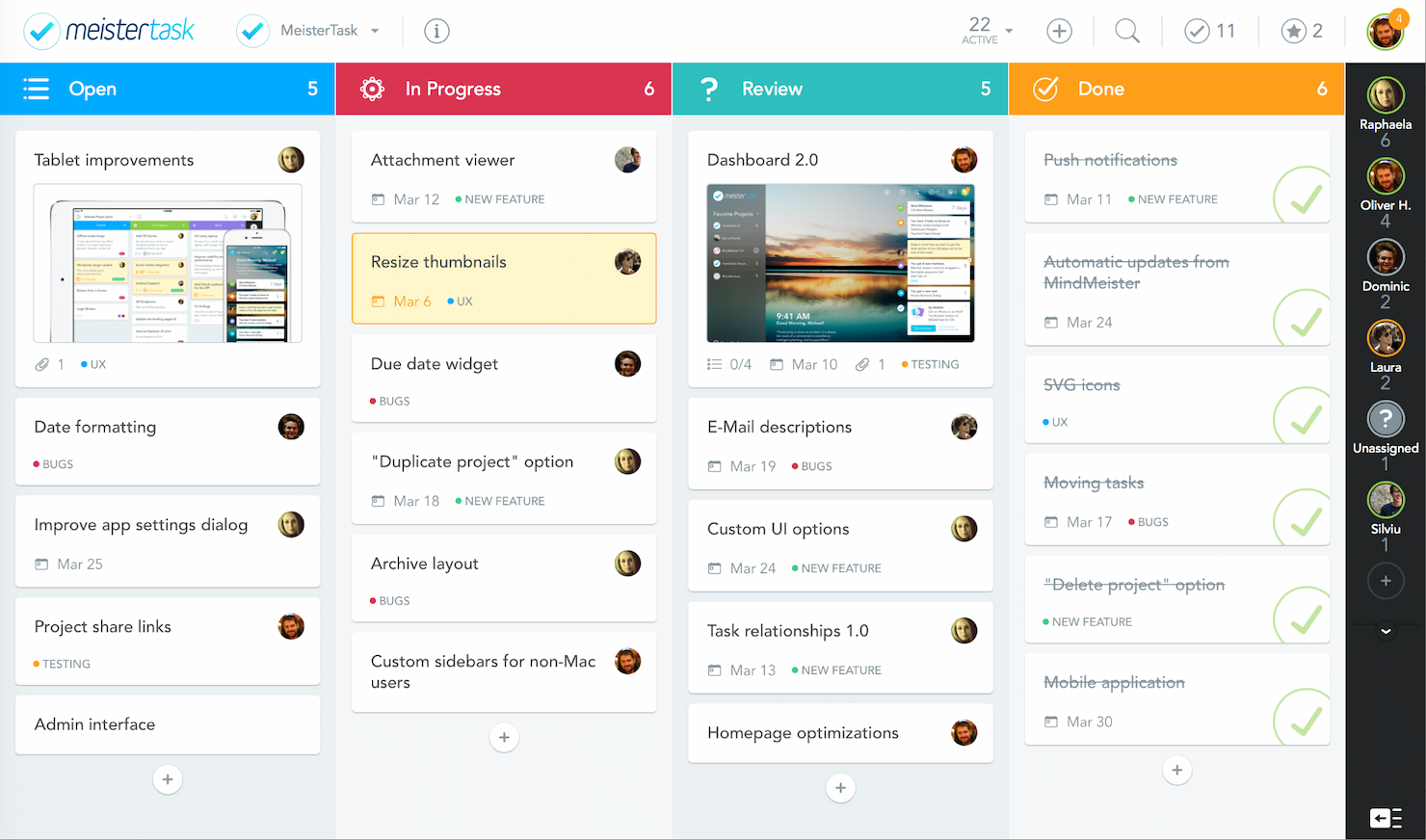
MeisterTask è uno strumento di gestione delle attività specializzato nella gestione visiva dei progetti. È progettato per aiutare i team a semplificare i flussi di lavoro e migliorare la collaborazione, rendendolo una scelta ideale per gestire in modo efficace i flussi di lavoro del team.
Perché è una buona alternativa a Paymo: MeisterTask offre un approccio più visivo, intuitivo e personalizzabile alla gestione dei flussi di lavoro. Le sue bacheche in stile Kanban permettono ai team di visualizzare le attività e l'avanzamento in modo chiaro e organizzato, migliorando la produttività individuale e di gruppo.
Funzionalità principali e integrazioni:
Le funzionalità includono gestione delle attività con dashboard personalizzabili, bacheche Kanban, monitoraggio del tempo, automazione delle attività ricorrenti, modelli di progetto, strumenti di collaborazione e comunicazione in tempo reale, allegati di file e ampie opzioni di personalizzazione dei flussi di lavoro.
Le integrazioni includono Slack, GitHub, Zendesk, MindMeister, G Suite, Microsoft Teams e Harvest.
Pros and Cons
Pros:
- Bacheche Kanban visivamente intuitive
- Flussi di lavoro personalizzabili e funzionalità di automazione
- Integrazione con MindMeister per una pianificazione dei progetti avanzata
Cons:
- Capacità di reportistica e analisi limitate
- Può richiedere una configurazione aggiuntiva per flussi di lavoro complessi

Nifty
Ideale per costruire relazioni con i clienti

Nifty è uno strumento di gestione dei progetti che semplifica i cicli di progetto e automatizza la reportistica sull'avanzamento. Eccelle nella costruzione di relazioni con i clienti grazie alle sue funzionalità collaborative.
Perché è una buona alternativa a Paymo: Nifty combina la gestione dei progetti con funzionalità di gestione della relazione con i clienti, offrendo un approccio più integrato alla gestione delle comunicazioni con i clienti e agli aggiornamenti sui progetti. Questa combinazione aiuta le agenzie a ottimizzare i processi e a mantenere una comunicazione chiara e costante con i clienti, fondamentale per costruire relazioni solide.
Caratteristiche e integrazioni principali:
Funzionalità includono gestione dei progetti, assegnazione di task, monitoraggio delle milestone, collaborazione sui documenti, thread di discussione, gestione del tempo e timesheet, Kanban board, diagrammi di Gantt, integrazione con il calendario, strumenti di reportistica, definizione degli obiettivi e automazione degli aggiornamenti di progetto.
Integrazioni includono Google Drive, Dropbox, Slack e Zoom.
Pros and Cons
Pros:
- Strumenti completi per la comunicazione con i clienti
- Chat integrata e funzionalità di messaggistica diretta
- Capacità di gestione progetti flessibile
Cons:
- Curva di apprendimento per i nuovi utenti a causa dell'ampia gamma di funzionalità
- Opzioni di personalizzazione limitate per report e dashboard

ProofHub
Ideale per la gestione unificata dei progetti
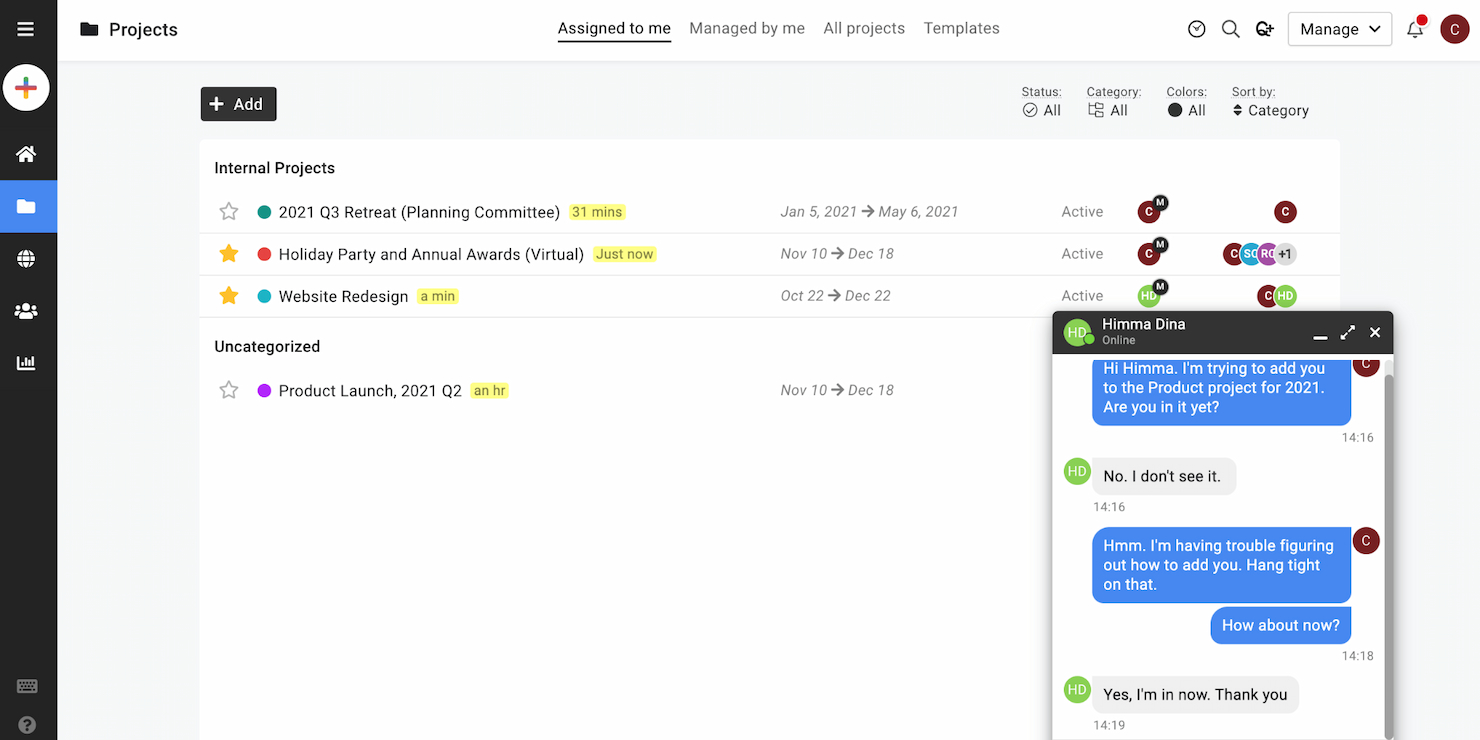
ProofHub è un sistema di gestione dei progetti che integra molteplici funzionalità come l'assegnazione dei compiti, la pianificazione, la condivisione di documenti e la comunicazione su un'unica piattaforma centralizzata. È progettato per fungere da unica fonte di verità per i team di progetto, riducendo la necessità di dover gestire strumenti diversi.
Perché è una buona alternativa a Paymo: ProofHub integra più funzionalità di project management in una sola piattaforma. L'avanzata suite di strumenti elimina la frammentazione tipicamente causata dall'uso di più sistemi separati. Questo approccio unificato è particolarmente utile per i team che desiderano semplificare il monitoraggio e la comunicazione nei progetti.
Funzionalità e integrazioni principali:
Le funzionalità includono gestione delle attività, diagrammi di Gantt, bacheche Kanban, modelli di progetto, monitoraggio del tempo, discussioni, condivisione di file, note, gestione del calendario, strumenti di reporting, ruoli personalizzati, strumento di revisione e approvazione dei file, white labeling, restrizioni IP e accesso da app mobile.
Le integrazioni includono Slack, Box, Dropbox, Google Calendar, Google Drive, One Drive, FreshBooks e QuickBooks.
Pros and Cons
Pros:
- Prezzo fisso senza tariffa per utente
- Offre un set completo di strumenti per la gestione dei progetti
- Si integra con le applicazioni di terze parti più diffuse
Cons:
- Non viene menzionata la presenza di funzionalità avanzate di analisi o reportistica
- Alcuni utenti potrebbero necessitare di più spazio di archiviazione rispetto ai limiti previsti

Ideale per la gestione del lavoro con i clienti
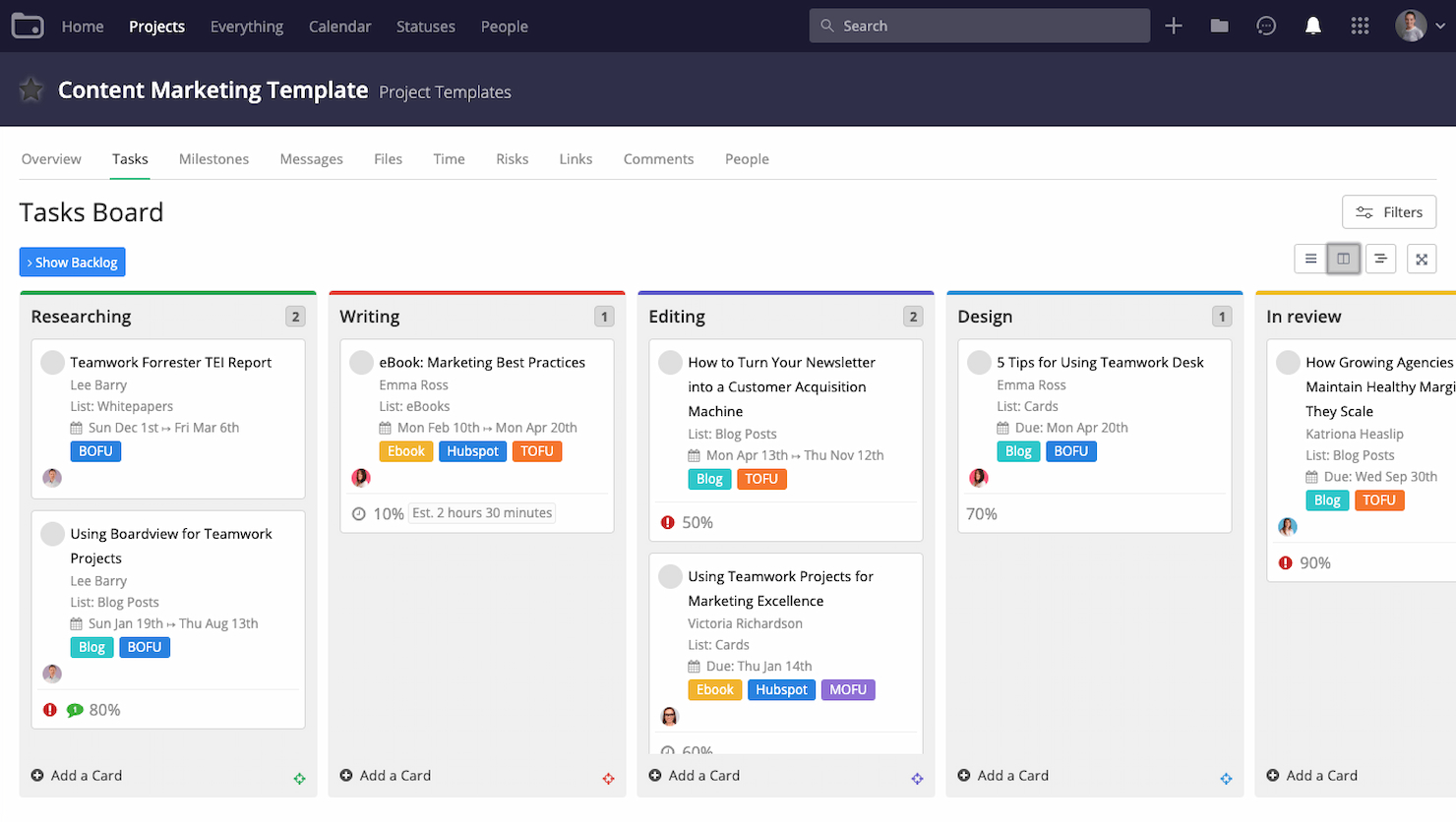
Teamwork è una piattaforma di project management progettata per semplificare il lavoro con i clienti. È ideale per la gestione del lavoro dei clienti grazie al suo avanzato set di funzionalità pensate appositamente per le aziende di servizi ai clienti.
Perché è una buona alternativa a Paymo: Teamwork offre strumenti superiori per la gestione del lavoro con i clienti, soprattutto in ambienti in cui l’interazione e il feedback del cliente sono importanti. Fornisce portali integrati per i clienti, rendendo più semplice condividere aggiornamenti, raccogliere feedback e mantenere la trasparenza della comunicazione con i clienti. Questo focus sulla collaborazione con il cliente garantisce che tutti gli stakeholder siano allineati durante tutto il ciclo di vita del progetto.
Caratteristiche principali & integrazioni:
Le funzionalità includono gestione delle attività, monitoraggio dei progetti, tracker del tempo, impostazione delle milestone, diagrammi di Gantt, gestione del carico di lavoro, registro dei rischi, bacheche dei messaggi, condivisione dei file, fatturazione, collaborazione in tempo reale, strumenti di reportistica e accesso da mobile.
Le integrazioni includono Slack, componente aggiuntivo Microsoft Office, Harvest, HubSpot, Google Drive, EstimateX, Skyvia, Atarim e Feedbucket.
Pros and Cons
Pros:
- Pensato per le aziende di servizi ai clienti
- Funzionalità complete di monitoraggio del tempo e gestione delle risorse
- Ampia gamma di integrazioni native
Cons:
- Personalizzazione dei report limitata
- Possibili problemi di prestazioni con grandi quantità di dati
Redbooth
Ideale per strumenti di collaborazione integrati

Redbooth è uno strumento di gestione dei progetti progettato per aiutare i team a organizzare le attività e migliorare la comunicazione, garantendo che i progetti vengano completati in modo efficiente. Offre funzionalità come assegnazione delle attività, monitoraggio delle scadenze e spazi di lavoro collaborativi, tutti accessibili tramite le sue applicazioni web e mobili.
Perché è una buona alternativa a Paymo: Le capacità di gestione delle attività di Redbooth lo rendono una valida alternativa a Paymo. Puoi creare attività, assegnarle ai membri del team, impostare le scadenze e monitorare i progressi all'interno di uno spazio di lavoro centralizzato. Questa configurazione mantiene tutti allineati e consapevoli delle proprie responsabilità. Inoltre, Redbooth offre diverse visualizzazioni—come elenco, bacheca e cronologia—per visualizzare le attività e le tempistiche dei progetti, permettendoti di scegliere il formato più adatto al tuo flusso di lavoro. Offre anche potenti strumenti di collaborazione, come riunioni video integrate e conversazioni in thread.
Funzionalità e integrazioni principali:
Le funzionalità includono la priorità delle attività, il monitoraggio del tempo, la condivisione di file, sotto-attività, attività ricorrenti, modelli di progetto, diagrammi di Gantt, bacheche Kanban, integrazione del calendario, notifiche, ruoli e permessi utente e registri delle attività.
Le integrazioni includono Box, Google Drive, Dropbox, Okta, Zapier, Redbooth per Gmail, Outlook, Chrome, Slack, WebEx Teams, TestLodge e HubStaff.
Pros and Cons
Pros:
- Molteplici opzioni di visualizzazione delle attività
- Spazi di lavoro personalizzabili
- Strumenti di comunicazione integrati
Cons:
- Potrebbe offrire analisi più avanzate
- Spazio di archiviazione limitato nei piani più economici
Podio
Ideale per consolidare i dati di progetto
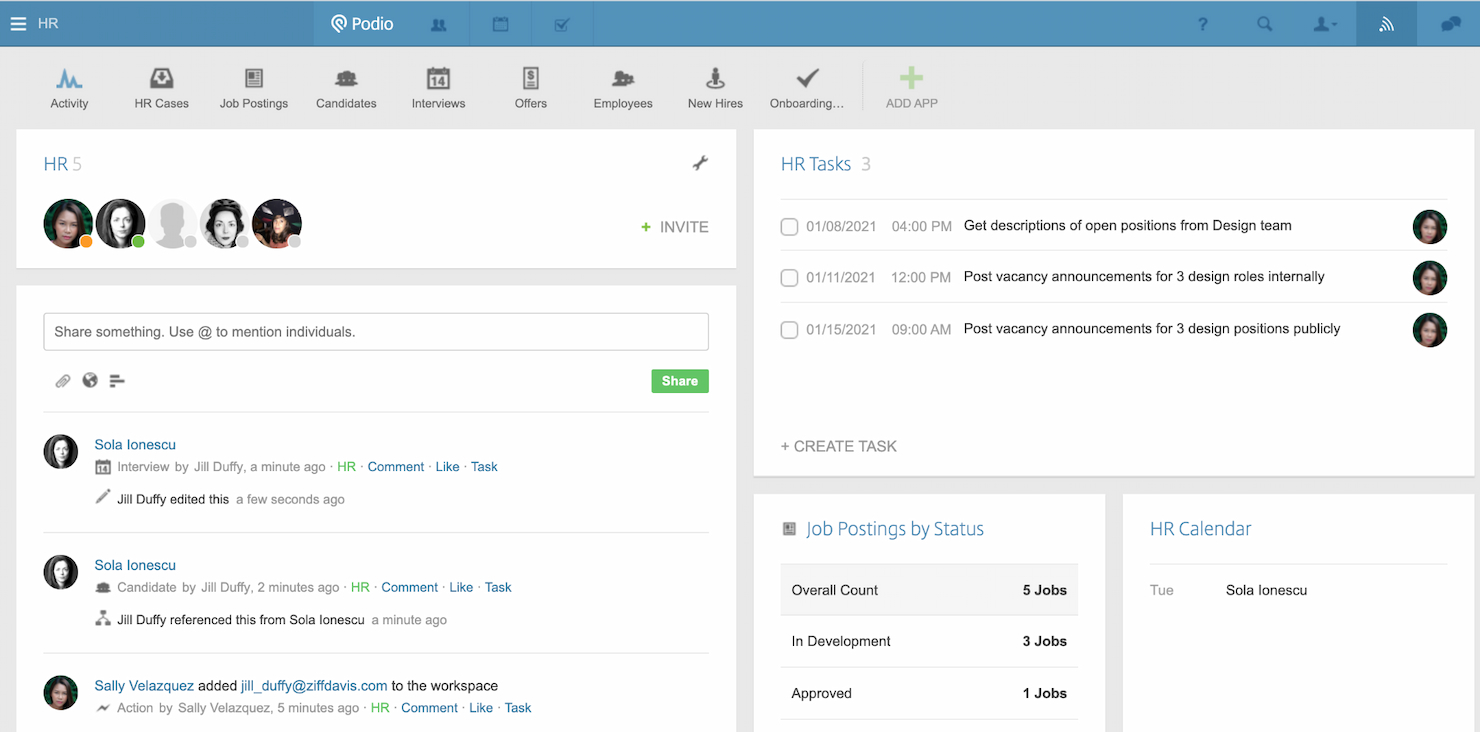
Podio è un servizio di collaborazione basato su cloud che consente agli utenti di strutturare una varietà di processi aziendali e flussi di lavoro. È l’ideale per consolidare i dati di progetto perché offre una piattaforma lavorativa personalizzabile che può essere adattata alle specifiche esigenze di gestione dei dati e dei flussi di lavoro di qualsiasi team.
Perché è una buona alternativa a Paymo: Podio fornisce un elevato grado di personalizzazione, permettendo ai team di creare i propri flussi di lavoro e gestire i dati di progetto in modo che si allinei ai loro processi unici. La sua capacità di adattarsi a diversi bisogni aziendali lo rende una valida alternativa a Paymo, soprattutto per chi desidera uno strumento di project management su misura per le proprie necessità.
Funzionalità e integrazioni principali:
Funzionalità includono gestione delle attività, app per workspace personalizzabili, automazione dei flussi di lavoro, visualizzazione dei dati, strumenti di collaborazione sociale, condivisione di file, chat integrata, integrazione con il calendario, dashboard personalizzati, accesso per utenti esterni e portafogli di progetto.
Integrazioni includono Google Drive, Dropbox, Microsoft Office 365, Slack e GoToMeeting.
Pros and Cons
Pros:
- Piattaforma altamente personalizzabile per vari flussi di lavoro
- Piano gratuito disponibile fino a cinque utenti
- Si integra con applicazioni di terze parti per funzionalità estese
Cons:
- Può risultare costoso per piccole aziende e singoli proprietari
- Alcuni utenti trovano il sistema e l’infrastruttura datati

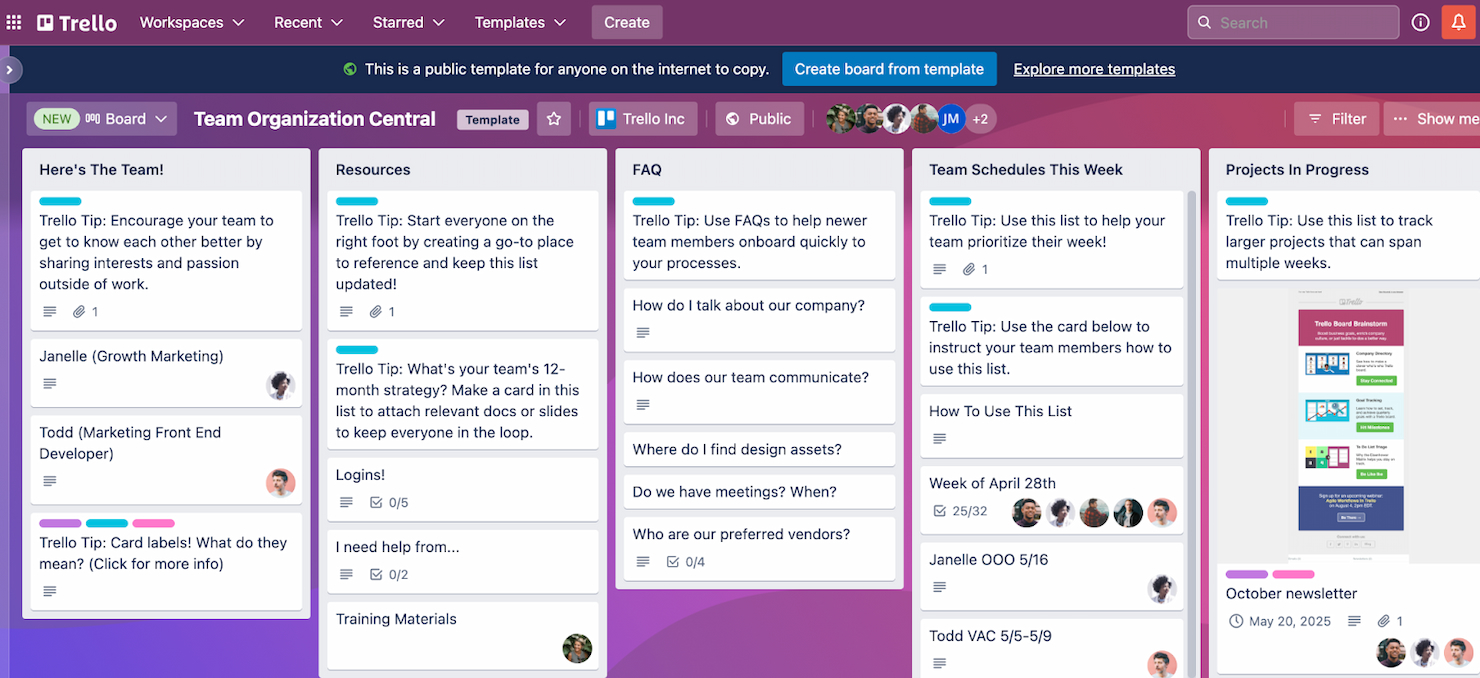
Trello è uno strumento di gestione progetti visivo che utilizza bacheche, liste e schede per organizzare attività e progetti. È particolarmente indicato per i team che fanno affidamento sull'organizzazione visiva per mantenere chiarezza e ottimizzare i flussi di lavoro, risultando eccellente nella gestione di progetti dove gli elementi visivi sono fondamentali.
Perché è una buona alternativa a Paymo: Trello offre un approccio visivo unico alla gestione dei progetti che si distingue dagli strumenti tradizionali basati su liste. La sua interfaccia intuitiva e la flessibilità nella configurazione delle bacheche lo rendono un'ottima alternativa per i team che danno priorità all'organizzazione visiva e alla facilità d'uso.
Caratteristiche principali e integrazioni:
Le caratteristiche includono creazione di bacheche, ordinamento delle schede, assegnazione di scadenze, integrazione di checklist, strumenti di collaborazione, etichettatura e categorizzazione, allegati di file, flussi di lavoro personalizzabili, accesso da dispositivi mobili e desktop, notifiche automatiche e registrazione delle attività.
Le integrazioni includono Slack, Google Drive, Dropbox, Box, OneDrive, Salesforce, Evernote, Mailchimp, GitHub, Zapier, Clockify, Confluence e Jira.
Pros and Cons
Pros:
- Interfaccia visiva intuitiva
- Configurazione flessibile per diversi tipi di progetto
- Ampia gamma di integrazioni
Cons:
- Può diventare dispersivo con grandi volumi di attività
- Mancano alcune funzionalità approfondite di project management presenti in altri strumenti


Scoro è un software di gestione del lavoro che ottimizza i progetti e semplifica la creazione dei preventivi. È ideale per una gestione avanzata delle attività grazie alla capacità di integrare diversi aspetti del lavoro in un'unica piattaforma.
Perché è una valida alternativa a Paymo: Scoro offre una suite completa di strumenti, in particolare per la gestione delle relazioni con i clienti (CRM) e delle finanze, integrate direttamente con le funzionalità di gestione dei progetti. Questa integrazione di diverse funzioni aziendali lo rende perfetto per le aziende che cercano una soluzione tutto-in-uno per gestire le proprie operazioni.
Funzionalità e integrazioni principali:
Le funzionalità includono gestione dei progetti, programmazione delle attività, rilevazione dei tempi, fatturazione e gestione delle fatture, controllo del budget, gestione delle relazioni con i clienti, gestione dei preventivi, reportistica avanzata, personalizzazione dei cruscotti, allocazione delle risorse e gestione del calendario.
Le integrazioni comprendono Google Calendar, Microsoft Exchange, Jira, QuickBooks, Xero, Exact Online, Sage Intacct, Stripe, Expensify e HubSpot.
Pros and Cons
Pros:
- Set di funzionalità completo per una gestione del lavoro end-to-end
- Dati e reportistica in tempo reale per decisioni informate
- Integrazioni native con popolari strumenti aziendali
Cons:
- Funzionalità mobile limitate
- Configurazione iniziale complessa

Ideale per una gestione versatile delle attività
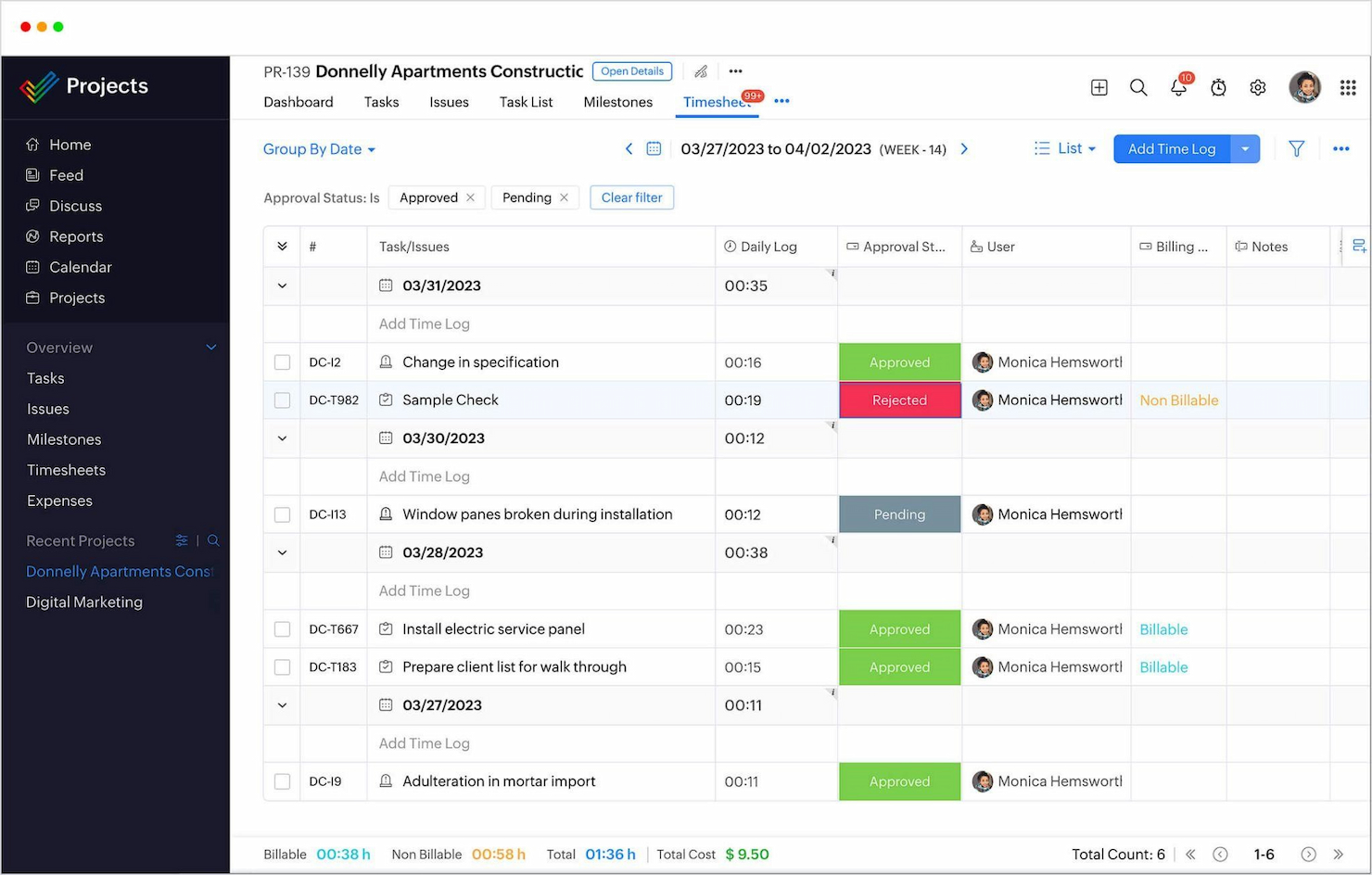
Zoho Projects è uno strumento di gestione progetti basato su cloud che consente ai team di pianificare, monitorare e collaborare sui progetti. È uno dei migliori grazie alle sue funzionalità avanzate che coprono vari aspetti della gestione dei progetti.
Perché è una buona alternativa a Paymo: Zoho Projects offre un set solido di strumenti di gestione progetti a un prezzo competitivo. La sua versatilità nella gestione delle attività lo rende una delle principali alternative a Paymo, soprattutto per i team che cercano una soluzione dettagliata in grado di adattarsi al loro flusso di lavoro.
Caratteristiche e integrazioni principali:
Le funzionalità includono gestione delle attività, monitoraggio delle milestone, diagrammi di Gantt, monitoraggio del tempo, tracciamento dei problemi, condivisione dei documenti, strumenti di collaborazione, forum di progetto, report personalizzabili, allocazione delle risorse e gestione del budget.
Le integrazioni includono Zoho CRM, Zoho Meeting, Zoho Sprints, Zoho Books & Invoice, Zoho People, Zoho Flow, Zoho Analytics, Zoho Desk, Zoho Directory, Zapier, Zendesk, Microsoft Teams, Office 365, Slack, ServiceNow, Dropbox, SharePoint, GitHub, BitBucket e GitLab.
Pros and Cons
Pros:
- Funzionalità complete per la gestione di attività e progetti
- Personalizzabile per adattarsi a varie esigenze di progetto
- Forte integrazione con l’ecosistema Zoho e strumenti di terze parti
Cons:
- L’interfaccia può risultare complessa per i nuovi utenti
- La personalizzazione richiede tempo per essere configurata correttamente
New Product Updates from Zoho Projects
Zoho Projects Adds CodeX Scripts for Custom Modules
Zoho Projects now supports CodeX Scripts for custom modules, enabling conditional logic and rules for creating, updating, and deleting records. For more information, visit Zoho Projects' official site.
 .
.Altre alternative a Paymo
Ecco alcune ulteriori alternative a Paymo che ho selezionato. Dai un’occhiata se non hai trovato quello che cercavi sopra.
- Asana
Ideale per la gestione flessibile dei progetti
- Basecamp
Ideale per la comunicazione centralizzata
- monday AI Workspace
Ideale per la pianificazione visiva dei progetti


Recensioni correlate sui software per la gestione dei progetti
Se non hai ancora trovato quello che cerchi qui, dai un'occhiata a questi altri strumenti correlati che abbiamo testato e valutato:
- Software per la gestione dei progetti
- Software per la gestione delle risorse
- Software per l'automazione dei flussi di lavoro
- Software per il monitoraggio del tempo
- Software per la gestione delle attività
- Strumenti di collaborazione
- Creatore di diagrammi di Gantt
- Strumenti per la produttività
- Software per il monitoraggio dei progetti
- Software per la pianificazione dei progetti
Come Valuto le Alternative a Paymo
Esamino due livelli: i requisiti fondamentali — gestione delle attività, monitoraggio del tempo, fatturazione ai clienti — che ogni alternativa valida deve soddisfare, e i fattori che distinguono le opzioni più forti.
Funzionalità Essenziali (Requisiti Minimi per Questa Lista)
Quando seleziono gli strumenti per la mia lista, valuto ognuno su una scala da 0 (non offre la funzionalità) a 5 (eccelle in quest’area) per ogni funzionalità essenziale elencata qui sotto. Poi calcolo il punteggio totale dello strumento in percentuale. Ogni strumento deve ottenere un punteggio minimo totale del 75% per essere preso in considerazione.
- Gestione di Progetti e Attività: Verifico se è possibile strutturare il lavoro attraverso diverse visualizzazioni come bacheche, diagrammi di Gantt e calendari — specialmente per gestire progetti di clienti sovrapposti con dipendenze.
- Monitoraggio del Tempo Integrato: Ogni alternativa dovrebbe permettere al team di registrare le ore sulle singole attività, tramite timer in tempo reale o schede orarie manuali, così il tempo fatturabile rimane associato al progetto giusto.
- Fatturazione: Cerco la possibilità di trasferire direttamente le ore monitorate in una fattura per il cliente con tariffe personalizzabili, visto che questo flusso di lavoro è il motivo principale per cui i team adottano strumenti come Paymo.
- Collaborazione del Team: Commenti, condivisione di file e menzioni @ nelle attività sono importanti qui — soprattutto per team distribuiti che coordinano revisioni sui deliverable senza dover passare a un’altra app.
- Gestione Risorse e Carico di Lavoro: Valuto se lo strumento offre visibilità su chi è sovraccarico e chi ha disponibilità, essenziale quando si deve allocare personale su più account attivi contemporaneamente.
- Report e Analisi: La piattaforma dovrebbe mostrare lo stato del progetto, l’utilizzo del tempo e i dati di budget in dashboard filtrabili — non solo esportazioni grezze da sistemare in un foglio di calcolo.
Una volta ottenuta una lista di strumenti che soddisfano questi criteri, considero cosa distingue ogni piattaforma.
Fattori di Differenziazione (Cosa Distingue i Fornitori)
Ecco come confronto i diversi fornitori:
Funzionalità Distintive
I portali per i clienti sono un grande elemento distintivo — cerco strumenti che consentano ai clienti di consultare lo stato dei progetti o approvare i deliverable senza dover acquistare una licenza. Il monitoraggio di spese e budget è altrettanto importante, specialmente quando si gestiscono progetti a tariffa fissa e serve visibilità in tempo reale sulla redditività prima di superare il budget. Per le agenzie che lavorano su base continuativa, valuto se la piattaforma supporta cicli di fatturazione ricorrenti cosicché non sia necessario ricreare la stessa fattura ogni mese.
Oltre le Funzionalità
La struttura dei prezzi è uno degli aspetti che valuto subito — alcuni strumenti inseriscono il monitoraggio del tempo o la fatturazione solo nei piani superiori, il che è controproducente per freelance e piccole agenzie. Esamino inoltre la profondità dell’integrazione con piattaforme contabili come QuickBooks e Xero, dato che la maggior parte dei team necessita che le ore registrate confluiscano nei flussi finanziari senza inserimenti manuali. Anche l’idoneità alla dimensione del team è importante. Uno strumento pensato per portafogli aziendali può risultare eccessivo per una consulenza di cinque persone, quindi cerco piattaforme che scalino dal singolo utente ai team di media dimensione.
Perché cercare un'alternativa a Paymo
Ecco alcuni motivi comuni per cui potresti aver bisogno di un'alternativa a Paymo:
- Stai cercando funzionalità più avanzate: Potresti aver bisogno di strumenti di gestione dei progetti più sofisticati di quelli offerti da Paymo, soprattutto per attività e progetti complessi che richiedono funzionalità avanzate.
- Il tuo team ha bisogno di integrazioni migliori: Potresti aver bisogno di integrazioni migliori con altri software essenziali per migliorare l'efficienza del flusso di lavoro e la sincronizzazione dei dati.
- Potresti avere un budget limitato: Le considerazioni sui costi potrebbero spingerti a cercare alternative con soluzioni o strutture tariffarie più convenienti.
- Hai bisogno di un'interfaccia utente più intuitiva: Potresti trovare l'interfaccia di Paymo meno intuitiva o facile da usare e cercare un'esperienza utente più fluida e accessibile.
- Hai esigenze funzionali specifiche: La necessità di determinate funzionalità o capacità che Paymo non offre potrebbe spingerti a esplorare altri strumenti di gestione dei progetti che soddisfano più direttamente i tuoi requisiti specifici.
Funzionalità principali di Paymo
Ecco alcune delle funzionalità principali di Paymo, per aiutarti a mettere a confronto ciò che offrono le soluzioni alternative:
- Gestione delle attività: Ti consente di creare, assegnare e organizzare le attività con priorità e scadenze, così il tuo team rimane concentrato sugli obiettivi.
- Monitoraggio del tempo: Offre strumenti per monitorare le ore di lavoro tramite inserimenti manuali o timer, mantenendo accurati la fatturazione e gli approfondimenti.
- Fatturazione e preventivi: Ti consente di generare preventivi e convertirli in fatture per migliorare il processo di fatturazione e aiutarti a ricevere i pagamenti tempestivamente.
- Collaborazione del team: Offre funzionalità come i commenti sulle attività e la condivisione dei file, così il tuo team può comunicare efficacemente all'interno della piattaforma.
- Pianificazione delle risorse: Offre uno strumento di pianificazione visivo per gestire la disponibilità e il carico di lavoro del team e mantenere ottimale l'allocazione delle risorse.
- Diagrammi di Gantt: Ti aiuta a visualizzare le tempistiche e le dipendenze del progetto, consentendoti di pianificare e monitorare efficacemente i progressi.
- Revisione e controllo delle versioni dei file: Ti consente di esaminare e approvare i file di progettazione con feedback dettagliati e di tenere traccia di tutte le versioni per garantire la precisione.
- Accesso da dispositivi mobili: Offre app mobili per iOS e Android, così puoi gestire i progetti, monitorare il tempo e fatturare i clienti ovunque ti trovi.
- Integrazioni: Si collega a diverse applicazioni di terze parti integrando nel tuo flusso di lavoro gli strumenti che già utilizzi.
- Dashboard personalizzabili: Ti consente di adattare il tuo spazio di lavoro per visualizzare le informazioni più rilevanti e concentrarti su ciò che conta di più.