

I 10 migliori software di gestione dei progetti con fatturazione per il 2026

10 Migliori software di gestione dei progetti con fatturazione: selezione


Con così tante soluzioni di gestione dei progetti disponibili, capire quali dispongano di funzionalità per supportare la gestione finanziaria dei tuoi progetti è difficile. Sai di voler semplificare il monitoraggio dell’avanzamento e delle spese dei progetti, offrendo al contempo un processo fluido per creare e gestire le fatture, ma devi capire quale strumento sia il migliore per farlo. Ci penso io! In questo articolo ti aiuterò a rendere semplice la tua scelta, condividendo le mie selezioni dei migliori software di gestione dei progetti con strumenti di fatturazione, basate sulle mie esperienze personali con decine di diversi strumenti di gestione dei progetti e con grandi team e progetti.
Perché fidarsi dei nostri consigli sui software
Il nostro team testa e recensisce software dal 2012. In quanto project manager noi stessi, sappiamo quanto sia difficile — e importante — scegliere il software giusto.
Per questa guida, abbiamo valutato gli strumenti attraverso test pratici e ricerche indipendenti, assegnando un punteggio agli strumenti in base ai nostri criteri di selezione. Ci basiamo inoltre sulle competenze di leader di pensiero del settore e di professionisti attivi nella gestione dei progetti.
Le nostre recensioni riflettono il nostro giudizio editoriale umano, non un discorso di vendita.
Revisori esperti:
Tabella comparativa dei software di gestione dei progetti con fatturazione
La tabella seguente confronta i dettagli dei prezzi dei migliori software di gestione dei progetti con fatturazione che ho selezionato.
| Tool | Best For | Trial Info | Price | ||
|---|---|---|---|---|---|
| 1 | Ideale per la fatturazione globale centralizzata | Prova gratuita di 14 giorni + demo gratuita disponibile | A partire da $19.90/utente/mese (fatturato annualmente) | Website | |
| 2 | Ideale per agenzie che operano a livello globale | Prova gratuita di 14 giorni + demo gratuita disponibile | Da $10/mese (fatturato annualmente) | Website | |
| 3 | Miglior rilevamento ore e fogli presenze per una fatturazione semplice | Prova gratuita di 14 giorni + piano gratuito disponibile | Da $10/utente/mese (fatturazione annuale) | Website | |
| 4 | Ideale per la gestione dei timesheet | Prova gratuita di 15 giorni + piano gratuito + demo gratuita disponibile | A partire da $4/utente/mese (fatturazione annuale) | Website | |
| 5 | Ideale per generare fatture personalizzate con il marchio | Piano gratuito + prova gratuita di 30 giorni + demo gratuita disponibile | A partire da $6/utente/mese (con fatturazione annuale) | Website | |
| 6 | Ideale per flussi di lavoro di fatturazione basati su traguardi | Prova gratuita + demo gratuita disponibili | Da $19/utente/mese (fatturazione annuale) | Website | |
| 7 | La migliore integrazione con il tuo attuale sistema di project management | 14 giorni di prova gratuita | From $8.50/user/month | Website | |
| 8 | Ideale per la previsione finanziaria | Prova gratuita di 14 giorni. | A partire da $999/mese come costo di base + $99/utente/mese | Website | |
| 9 | Ideale per comunicazione e collaborazione | Piano gratuito disponibile | A partire da $9.95/utente/mese | Website | |
| 10 | Ideale per le agenzie | Prova gratuita di 7 giorni disponibile | Da $9/utente/mese (fatturazione annuale) | Website |


Recensione dei migliori software di gestione dei progetti con fatturazione
Di seguito trovi i miei riepiloghi dettagliati dei migliori software di gestione dei progetti con fatturazione inclusi nella mia selezione. Le mie recensioni offrono uno sguardo approfondito alle funzionalità principali, ai pro e contro, alle integrazioni e ai casi d’uso ideali di ogni strumento, per aiutarti a trovare quello più adatto a te.

Scoro
Ideale per la fatturazione globale centralizzata
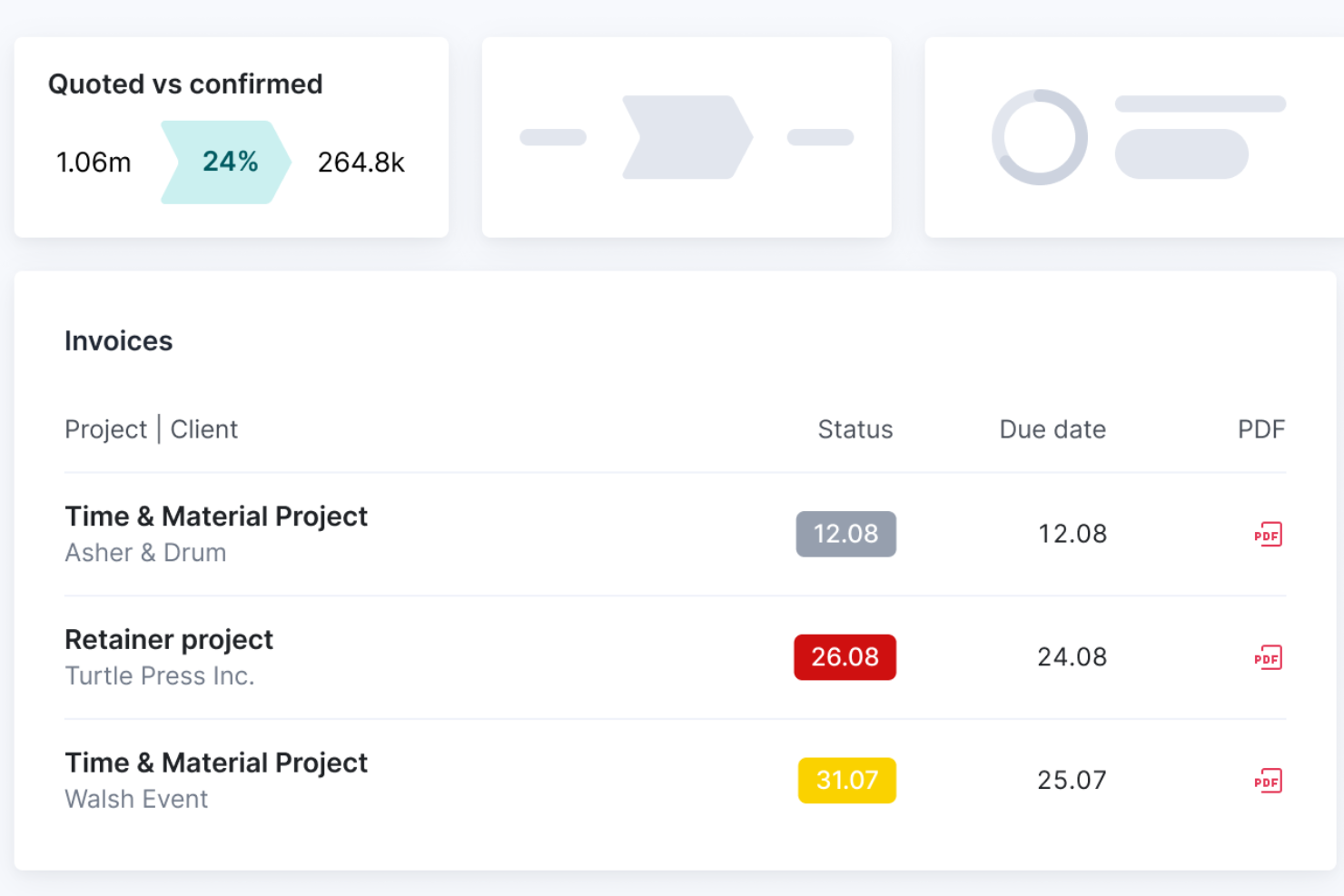
Scoro è una piattaforma di gestione progetti e fatturazione che riunisce pianificazione, monitoraggio del tempo, preventivazione, fatturazione e gestione finanziaria in un unico sistema.
Per chi è ideale Scoro?
Scoro è una soluzione adatta per team di servizi professionali – come agenzie, società di consulenza e aziende IT – che necessitano di gestire progetti e fatturazione dei clienti in un unico luogo.
Perché ho scelto Scoro
Scoro si guadagna un posto nella mia lista di preferiti per la capacità con cui gestisce la fatturazione su più mercati e entità. Apprezzo in particolare il supporto alla fatturazione multi-valuta, che permette al mio team di fatturare clienti in diversi paesi senza cambiare strumento o convertire manualmente gli importi. Per agenzie o società con filiali internazionali, ogni entità può gestire le proprie finanze in modo indipendente pur alimentando i report a livello di gruppo. Trovo inoltre la funzione di previsione della fatturazione davvero utile: mostra esattamente quanto è già stato fatturato e cosa è ancora da incassare, evitando sorprese a fine mese.
Funzionalità principali di Scoro
- Diagrammi di Gantt: Visualizza le tempistiche dei progetti e le dipendenze tra le attività con barre colorate che si aggiornano man mano che il lavoro avanza.
- Monitoraggio del budget preventivato vs. reale: Confronta i budget pianificati con i costi e le spese effettivi in tempo reale durante l'esecuzione dei progetti.
- Prenotazione risorse: Prenota provvisoriamente il tempo dei membri del team prima dell'avvio dei progetti, con possibilità di regolazione tramite drag-and-drop.
- Report di utilizzo: Visualizza una mappa di calore del carico di lavoro di ciascun membro del team per individuare immediatamente sovraccarichi o disponibilità.
Integrazioni di Scoro
Scoro offre integrazioni native con Google Workspace, Microsoft 365, Xero, QuickBooks, Sage ed Exact, e fornisce un'API per integrazioni personalizzate.
New Product Updates from Scoro

Scoro Adds Time Mobile App and ELI Improvements
Scoro adds the Scoro Time mobile app for iOS/Android to track time anywhere and expands ELI with attachments, smarter filtering, and trigger-based actions. For more information, visit Scoro's official site.

Ideale per agenzie che operano a livello globale

Productive è una piattaforma di project management progettata per le agenzie che riunisce pianificazione dei progetti, tracciamento del tempo, budgeting, fatturazione e gestione delle risorse in un unico sistema.
Per chi è più adatto Productive?
Productive è ideale per agenzie di tutte le dimensioni che gestiscono progetti per clienti, ore fatturabili e fatturazione in più valute o su mercati internazionali.
Perché ho scelto Productive
Productive si guadagna un posto nella mia selezione grazie all'ottima gestione della complessità finanziaria propria delle agenzie che operano su più mercati. Apprezzo in particolare il supporto alla fatturazione multivaluta, che consente al mio team di creare fatture in qualsiasi valuta e registrare spese in una valuta diversa dal budget del progetto. Questo è davvero un elemento distintivo per le agenzie che fatturano clienti in Europa, Nord America e oltre da un unico account. Utilizzo anche il supporto multi-filiale per tenere la contabilità di ogni sede organizzata separatamente, senza dover ricorrere a strumenti o account differenti per ciascun ufficio.
Funzionalità principali di Productive
- Modelli di progetto: Duplica attività, sottoattività, descrizioni e assegnatari da un modello salvato per avviare rapidamente nuovi progetti per i clienti.
- Workflow di approvazione del tempo: Esamina le voci di tempo inserite, segna le ore come fatturabili o non fatturabili e richiedi modifiche prima che incidano sul budget.
- Reportistica alimentata da AI: Chiedi all'AI di generare report su redditività, utilizzo o ricavi, oppure scegli tra oltre 50 modelli di report preimpostati.
- Cruscotti di budget in tempo reale: Trasforma qualsiasi report in un widget per dashboard per monitorare costi, profitti e ore lavorate sui progetti in un colpo d'occhio.
Integrazioni di Productive
Productive offre integrazioni native con Xero, QuickBooks, Slack, Google Calendar e HubSpot e si collega con Zapier. È disponibile un'API per integrazioni personalizzate.
New Product Updates from Productive
Productive Adds Voice Dictation, Slack Connector, Proposals, and Overtime
Productive adds voice dictation, a Slack Connector, proposal controls, and overtime tracking. These updates support faster AI interactions, client proposals, and time management. For more information, visit Productive’s official site.

Wrike
Miglior rilevamento ore e fogli presenze per una fatturazione semplice

Wrike è una piattaforma di gestione dei progetti pensata per i team che necessitano di monitoraggio delle attività, rilevazione delle ore, fogli presenze, personalizzazione dei flussi di lavoro e funzionalità di fatturazione tutte in un unico posto.
Per Chi È Wrike La Scelta Migliore?
Wrike è particolarmente adatto per team di medie e grandi dimensioni nei servizi professionali, marketing e consulenza che devono tenere traccia delle ore fatturabili su più progetti.
Perché Ho Scelto Wrike
Wrike merita il suo posto nella mia shortlist per il modo in cui le sue funzionalità di rilevazione delle ore e fogli presenze si collegano alla gestione della fatturazione nei progetti. Mi piace che sia possibile registrare le ore tramite un timer in tempo reale direttamente in un'attività oppure inserirle manualmente in un secondo momento—così nulla va perso anche se qualcuno dimentica di avviare il timer. Una funzione di fatturazione che spicca è il flusso di approvazione dei fogli presenze: i manager possono esaminare, approvare e bloccare i fogli presenze su base settimanale o mensile prima di esportarli per la fatturazione o le paghe. Trovo poi davvero utile il report sulle ore fatturabili vs non fatturabili: il mio team può estrarre un report che separa le ore dedicate ai clienti dal lavoro interno, il che consente di creare una fattura precisa molto più velocemente.
Funzionalità Principali di Wrike
- Vista diagramma di Gantt: Visualizza le tempistiche dei progetti, le dipendenze tra attività e le tappe fondamentali tramite un diagramma di Gantt interattivo drag and drop.
- Moduli di richiesta personalizzati: Crea moduli dinamici di raccolta richieste che generano automaticamente task, progetti o flussi di lavoro al momento dell'invio.
- Prenotazione risorse: Riserva membri del team su specifici progetti, stima le ore necessarie e verifica la disponibilità prima di assegnare attività.
- Automazione tramite IA: Usa il linguaggio naturale per costruire regole di automazione senza codice che fanno avanzare le attività lungo i diversi stadi del flusso di lavoro.
Integrazioni Wrike
Wrike offre centinaia di integrazioni sia integrate che tramite il marketplace, inclusi strumenti come Google Workspace, Microsoft 365, Salesforce e Slack. Supporta anche Zapier e mette a disposizione un'API per integrazioni personalizzate.
New Product Updates from Wrike

Wrike Adds Quick Search to Table View
Wrike adds Quick Search to Table View with full-table search across titles, descriptions, and fields, plus highlighted matches. This helps users find tasks faster in large tables. For more information, visit Wrike’s official site.

Ideale per la gestione dei timesheet
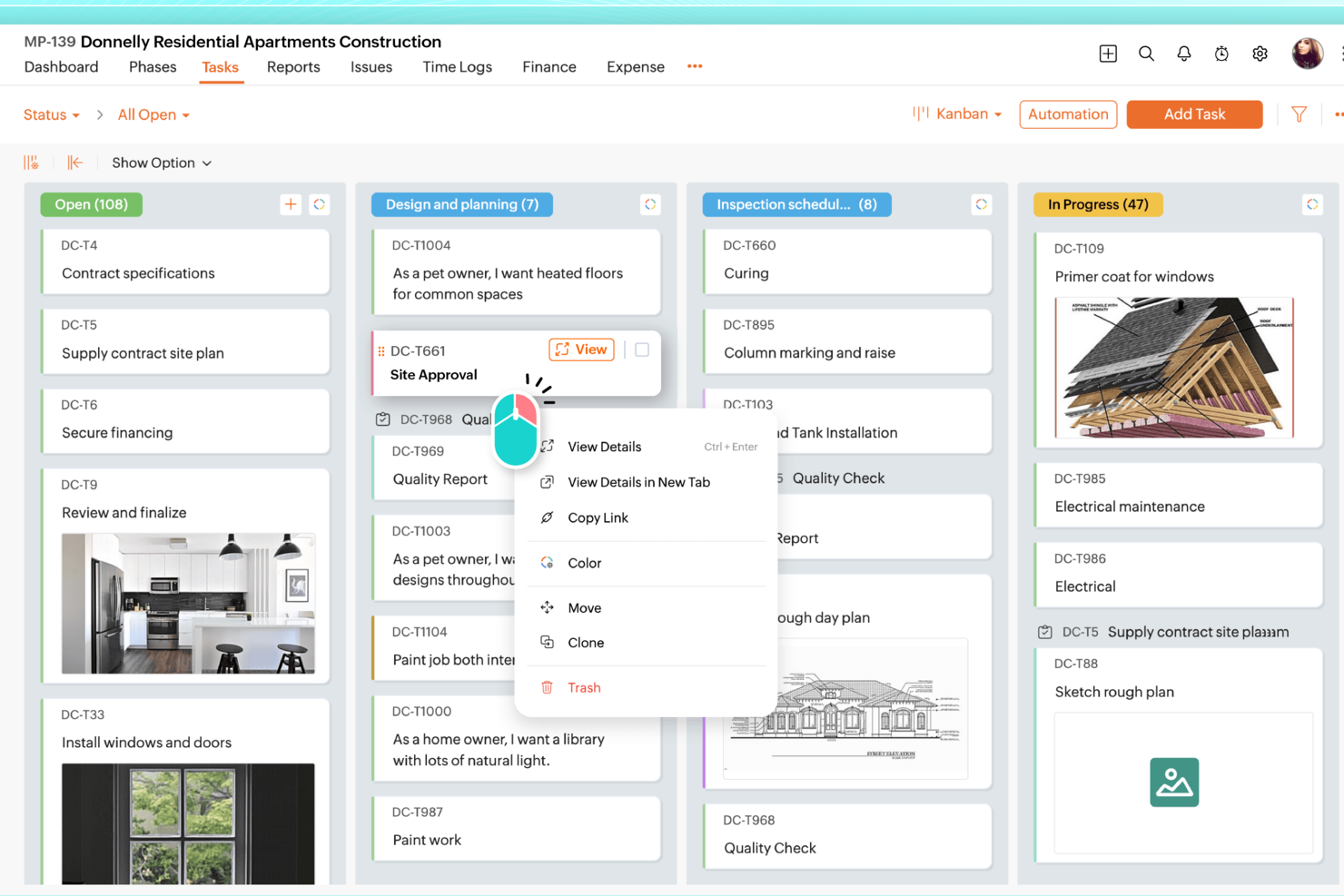
Zoho Projects è una piattaforma di gestione progetti che unisce tracciamento delle attività, monitoraggio del tempo, allocazione delle risorse e integrazioni per la fatturazione, ideale per team che gestiscono progetti per i clienti.
Per chi è ideale Zoho Projects?
Zoho Projects è particolarmente adatto a piccoli e medi team che già utilizzano l'ecosistema Zoho e che devono gestire progetti per i clienti con necessità di monitoraggio del tempo e fatturazione.
Perché ho scelto Zoho Projects
Zoho Projects si guadagna un posto tra le mie scelte grazie all’eccellente integrazione del suo modulo timesheet che collega direttamente le ore registrate alla fatturazione. Mi piace la possibilità di impostare ore fatturabili e non fatturabili a livello di attività, facilitando la distinzione tra lavoro per i clienti e attività interne. La vista timesheet offre al mio team un registro chiaro di chi ha lavorato su cosa e per quanto tempo, e questi dati confluiscono in Zoho Invoice senza necessità di reinserimento manuale. Per i team che lavorano su progetti per i clienti, questa tracciabilità tra ore registrate e fatture generate è davvero difficile da replicare nella maggior parte degli strumenti standalone.
Funzionalità principali di Zoho Projects
- Diagramma di Gantt: Visualizza le tempistiche dei progetti, mappa le dipendenze tra attività e riprogramma le attività direttamente dalla vista grafica.
- Automazione dei flussi di lavoro Blueprint: Crea flussi di lavoro dettagliati in cui i campi si aggiornano automaticamente e i membri del team vengono notificati man mano che il lavoro progredisce tra le varie fasi.
- Monitoraggio del budget: Tieni sotto controllo in tempo reale la differenza tra costi pianificati ed effettivi, con previsione di budget basata sul livello di avanzamento.
- Gestione delle risorse: Visualizza il carico di lavoro di ciascun membro del team e riassegna le attività in caso di carico eccessivo o insufficiente.
Integrazioni di Zoho Projects
Zoho Projects offre integrazioni native con Zoho Invoice, Zoho CRM, Zoho Books, Google Drive, Dropbox, GitHub, Bitbucket, Slack, Microsoft Teams e Zapier. È disponibile anche un'API per integrazioni personalizzate.
Pros and Cons
Pros:
- Forte integrazione con Zoho Invoice
- Supporto integrato per il monitoraggio del tempo
- Ampia compatibilità con l'ecosistema Zoho
Cons:
- La fatturazione richiede un'app Zoho esterna
- L'interfaccia può risultare complessa
New Product Updates from Zoho Projects
Zoho Projects Adds CodeX Scripts for Custom Modules
Zoho Projects now supports CodeX Scripts for custom modules, enabling conditional logic and rules for creating, updating, and deleting records. For more information, visit Zoho Projects' official site.
 .
.
actiTIME
Ideale per generare fatture personalizzate con il marchio
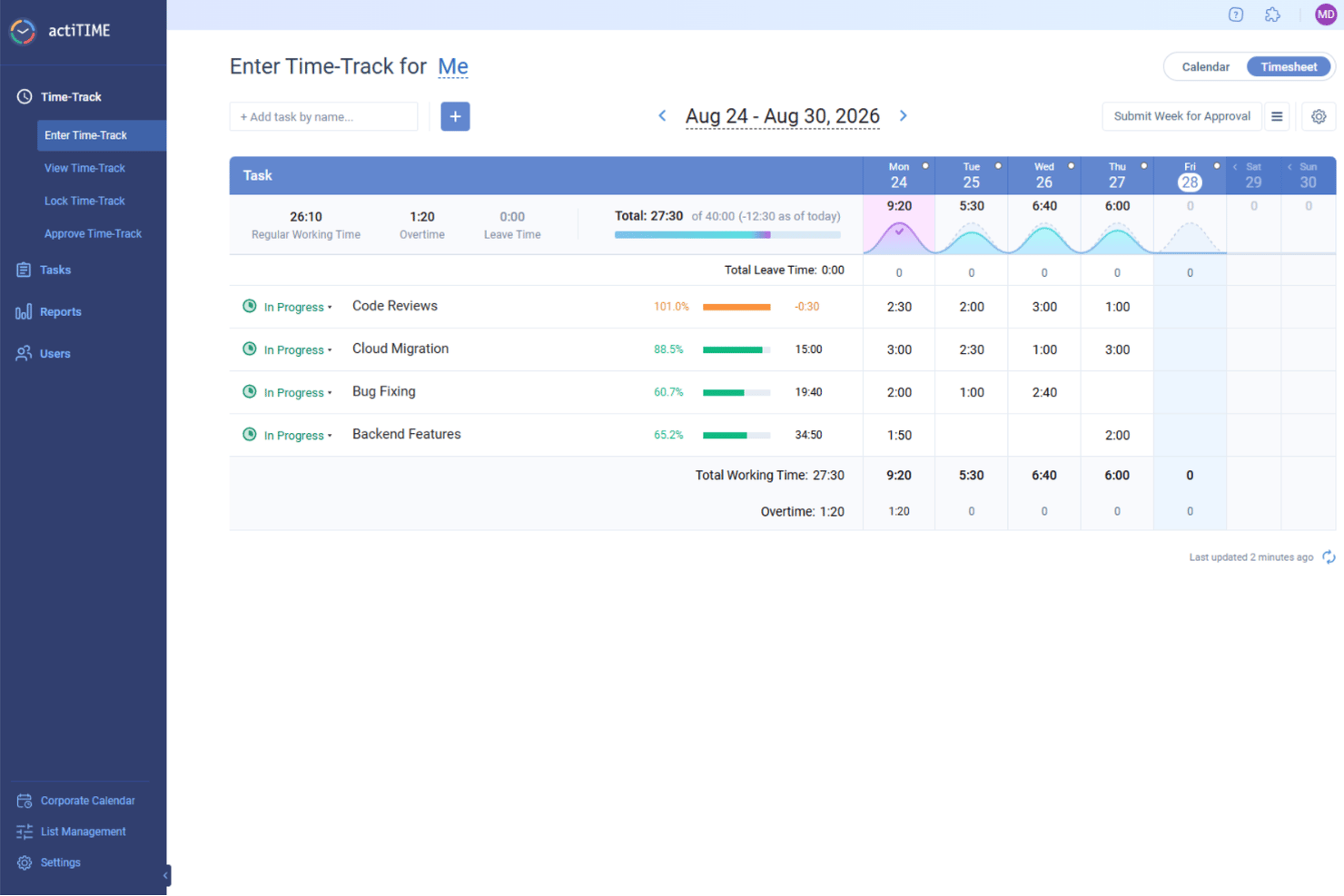
actiTIME è una piattaforma per la gestione dei progetti e il monitoraggio del tempo che consente di gestire i progetti, monitorare le ore fatturabili e generare fatture dai dati registrati.
Per chi è più indicato actiTIME?
actiTIME è una soluzione adatta a liberi professionisti e aziende di servizi di piccole e medie dimensioni che fatturano i clienti in base alle ore registrate.
Perché ho scelto actiTIME
actiTIME si è guadagnato un posto nella mia rosa di soluzioni preferite grazie allo stretto collegamento tra la generazione delle fatture e i dati di monitoraggio del tempo già presenti nel sistema. Apprezzo il fatto che, quando arriva il momento di fatturare un cliente, possa trasferire direttamente le ore fatturabili registrate in una fattura PDF senza dover reinserire manualmente i dati. Il livello di personalizzazione del marchio è particolarmente utile per il lavoro rivolto ai clienti: è possibile aggiungere il logo, il nome e l'indirizzo dell'azienda a ogni fattura, dando al documento un aspetto curato e professionale invece di quello di una semplice esportazione generica. Apprezzo anche la possibilità di aggiungere direttamente alla fattura sconti, imposte, messaggi facoltativi e termini di pagamento, così il documento contiene tutte le informazioni necessarie al cliente per capire cosa gli viene addebitato e perché.
Funzionalità principali di actiTIME
- Stime del tempo per le attività: Imposta le ore stimate per le singole attività e confrontale con il tempo effettivo registrato per gestire la pianificazione del carico di lavoro.
- Visualizzazione Kanban: Visualizza l'avanzamento del progetto e individua i colli di bottiglia spostando le attività tra colonne personalizzate corrispondenti agli stati del flusso di lavoro.
- Monitoraggio di permessi retribuiti e assenze: Monitora in un unico luogo per tutto il team i saldi dei permessi retribuiti, i giorni di malattia, le regole di maturazione e le date di blocco.
- Configurazione delle tariffe di fatturazione: Imposta tariffe orarie di fatturazione individuali per tipo di attività per calcolare automaticamente gli importi fatturabili nei diversi progetti.
Integrazioni di actiTIME
actiTIME offre integrazioni native con QuickBooks e mette a disposizione un'API per integrazioni personalizzate.
New Product Updates from actiTIME

actiTIME Visual Hour Indicator and Time-Track Report Redesign
actiTIME adds a wave-style hour indicator to the Timesheet and Calendar views and refreshes the Time-Track report for smoother navigation and clearer visuals. For more information, visit actiTIME's official site.

Ideale per flussi di lavoro di fatturazione basati su traguardi
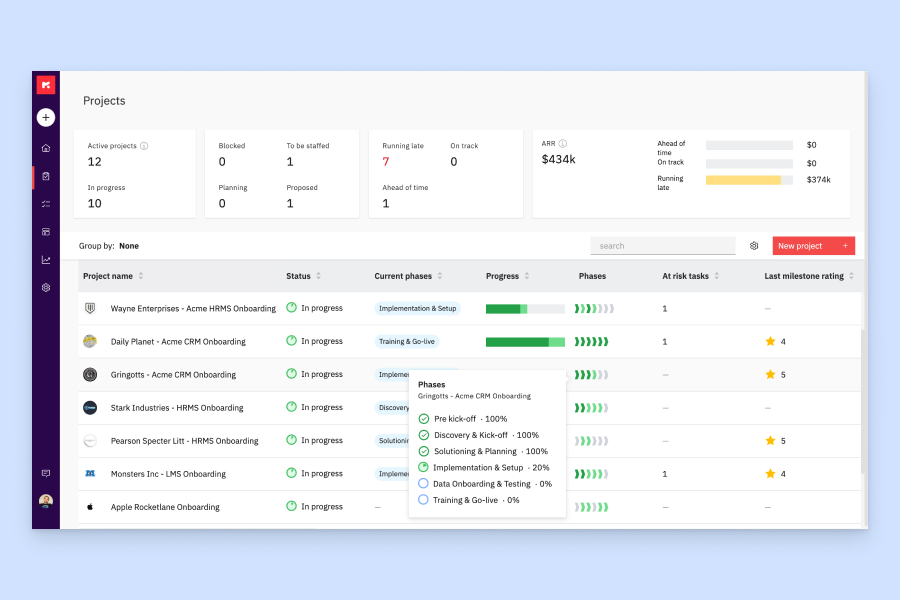
Rocketlane è una piattaforma di automazione dei servizi professionali (PSA) basata sull'IA che combina gestione dei progetti, gestione delle risorse, monitoraggio finanziario e strumenti per il portale clienti in un unico sistema.
Per Chi è Ideale Rocketlane?
Rocketlane è particolarmente indicato per i team di servizi professionali presso aziende SaaS B2B che hanno bisogno di gestire onboarding dei clienti, consegna dei progetti e fatturazione in un'unica piattaforma.
Perché Ho Scelto Rocketlane
Ho scelto Rocketlane tra i migliori per l'integrazione stretta tra la fatturazione e la reale consegna dei progetti. Quando un traguardo viene contrassegnato come completato, confluisce direttamente in una fattura pronta per il cliente senza bisogno di controlli manuali o riconciliazioni. Apprezzo anche il fatto che Rocketlane supporti diversi modelli di riconoscimento dei ricavi, inclusi quelli basati su traguardi, tempo o percentuale di avanzamento, così i team possono allineare il metodo di fatturazione a quello di consegna. La panoramica in tempo reale di quanto è stato fatturato, in sospeso o pagato permette di gestire facilmente il flusso di cassa su tutto il portafoglio progetti.
Funzionalità Principali di Rocketlane
- Monitoraggio del tempo e approvazione dei timesheet: Registra le ore fatturabili per attività e progetti, con flusso di approvazione prima che il tempo venga incluso nelle fatture.
- Listini tariffari: Definisci tariffe personalizzate in base al ruolo o al tipo di risorsa, applicate automaticamente nella creazione delle fatture di progetto.
- Gestione delle spese: Acquisisci e categorizza le spese di progetto affinché possano essere incluse nelle fatture cliente insieme a tempo e traguardi.
- Monitoraggio del budget di progetto: Monitora in tempo reale la differenza tra budget previsto e spese effettive a livello di progetto per garantire l'accuratezza della fatturazione.
Integrazioni di Rocketlane
Rocketlane offre integrazioni native con Slack, Salesforce, Jira, HubSpot, Google Calendar e Outlook Calendar. Inoltre, si collega con Zapier e Workato per un'automazione dei flussi di lavoro più ampia. È anche disponibile un'API per integrazioni personalizzate.
Pros and Cons
Pros:
- Trigger per fatture a traguardo e ricorrenti integrati
- Catene di approvazione delle fatture configurabili a più livelli
- Supporta fatturazione multi-valuta e multi-imposta
Cons:
- I filtri avanzati nei report sono limitati
- Solo sette integrazioni native con terze parti disponibili
New Product Updates from Rocketlane

Rocketlane Introduces Governance and Workforce Agents
Rocketlane introduces Governance Agents and Workforce Agents to automate delivery processes and recurring tasks. These updates help teams enforce rules and streamline project execution. For more information, visit Rocketlane’s official site.
 .
.
Everhour
La migliore integrazione con il tuo attuale sistema di project management

Everhour è una piattaforma di gestione progetti e fatturazione che collega il monitoraggio del tempo, la gestione del budget e la fatturazione direttamente agli strumenti di project management che già utilizzi.
Per chi è ideale Everhour?
Everhour è particolarmente adatto a team di piccole e medie dimensioni che già utilizzano uno strumento di project management e necessitano di integrare la rilevazione del tempo e la fatturazione.
Perché ho scelto Everhour
Ho scelto Everhour come uno dei migliori per la profondità con cui si integra negli strumenti PM già usati dal tuo team. Invece di chiedere agli ingegneri di aprire un'app separata, Everhour mostra i controlli del monitoraggio del tempo direttamente all’interno delle attività di Asana, delle issue di Jira, dei ticket di Linear e delle schede di ClickUp. Ho visto quanto fa la differenza per i team di sviluppo: quando uno sviluppatore clicca su 'Start' su una issue di Linear, il timer si avvia in Everhour senza nessun cambio di contesto. Il tempo tracciato confluisce poi direttamente nelle fatture, senza bisogno di trasferire manualmente i dati tra PM e ciclo di fatturazione. Le notifiche di budget al 75%, 90% e 100% della spesa di progetto ti danno inoltre un chiaro segnale prima che l’aumento del perimetro lavori eroda i tuoi margini senza che te ne accorga.
Caratteristiche principali di Everhour
- Monitoraggio tempo fatturabile vs. non fatturabile: Contrassegna le singole attività come fatturabili o meno, così solo le ore corrette vengono aggiunte alle fatture dei clienti.
- Approvazione e blocco dei timesheet: Invia i timesheet per l’approvazione del responsabile e blocca le registrazioni dopo un certo periodo per evitare modifiche retroattive.
- Vista pianificazione risorse: Visualizza in un’unica timeline interattiva le ore pianificate, la disponibilità e il carico di lavoro del team su tutti i progetti.
- Monitoraggio spese con allegati delle ricevute: Registra le spese per categoria, allega le ricevute e aggiungile direttamente alle fatture insieme alle ore lavorate.
Integrazioni Everhour
Everhour offre integrazioni native con Asana, Trello, Jira, Basecamp, ClickUp, GitHub, GitLab, Notion, Todoist e QuickBooks. È disponibile anche un’API per integrazioni personalizzate.

NetSuite
Ideale per la previsione finanziaria
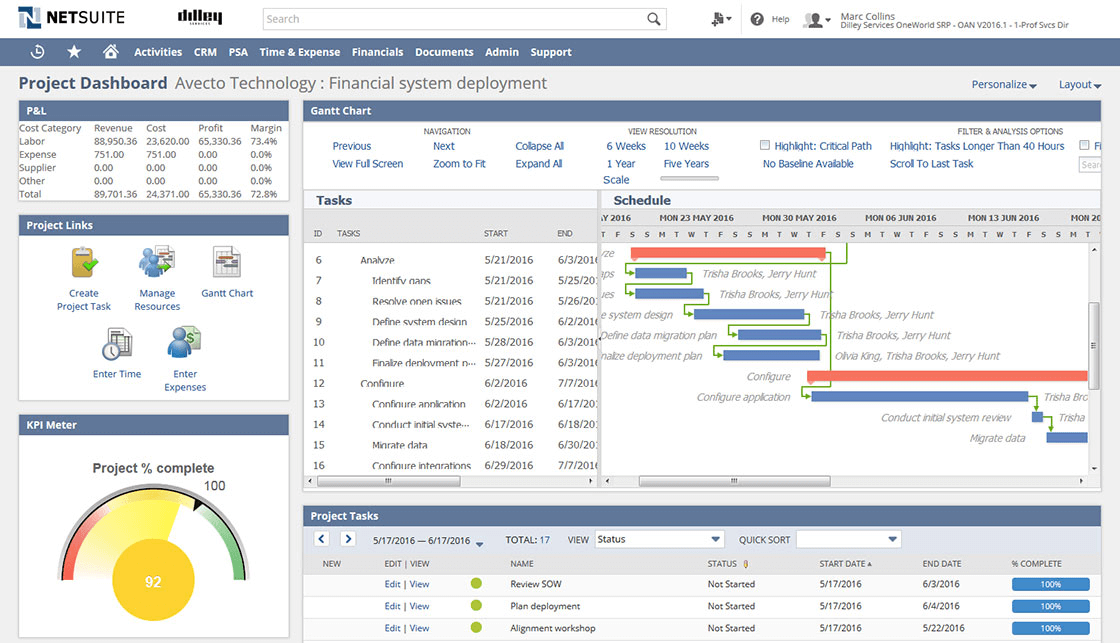
NetSuite è una piattaforma cloud per la gestione dei progetti e la fatturazione che unisce in un unico sistema il monitoraggio dei progetti, la gestione delle risorse, la fatturazione e strumenti finanziari avanzati.
Per chi è ideale NetSuite?
NetSuite è particolarmente adatto per aziende di medie e grandi dimensioni che devono gestire progetti insieme a operazioni finanziarie complesse su una piattaforma unica.
Perché ho scelto NetSuite
NetSuite merita un posto nella mia shortlist grazie al forte legame tra i suoi strumenti di previsione finanziaria e l'attività reale dei progetti. NetSuite Planning and Budgeting utilizza la previsione multivariata guidata dall’AI per analizzare contemporaneamente diversi fattori aziendali—così, quando prevedo i ricavi di un progetto, non considero una sola variabile in isolamento. La funzione di pianificazione e modellazione degli scenari è utile: posso eseguire analisi 'what if' su dimensioni come cliente, prodotto o sede per vedere come i cambiamenti nell’ambito del progetto influenzano flussi di cassa e proiezioni di guadagno. Il report budget vs. consuntivo in SuiteProjects importa automaticamente dati di timesheet e spese appena vengono inseriti, offrendo al mio team una panoramica in tempo reale della situazione finanziaria di ogni progetto.
Caratteristiche principali di NetSuite
- Automazione della creazione dei progetti: Creazione automatica di nuovi progetti dagli ordini di vendita fatturati e utilizzo di modelli con budget preconfigurati, flussi di approvazione e regole di fatturazione per standardizzare la consegna.
- Gestione delle risorse: Assegnazione delle risorse ai progetti in base a competenze, disponibilità ed esperienza, con cronologia del progetto in tempo reale che si aggiorna durante lo sviluppo.
- Gestione delle spese: Automazione della reportistica, invio e approvazione delle spese, con integrazione diretta nella contabilità di progetto e nella fatturazione.
- Cruscotti di monitoraggio del progetto: Visualizzazione di diagrammi di Gantt, KPI e stato di salute del progetto in un colpo d’occhio, con aggiornamenti automatici mentre i membri inseriscono i dati a livello di attività.
Integrazioni di NetSuite
NetSuite offre integrazioni native con Salesforce, Shopify, Magento, Avalara e prodotti Oracle e mette a disposizione un’API per integrazioni personalizzate.
Avaza
Ideale per comunicazione e collaborazione
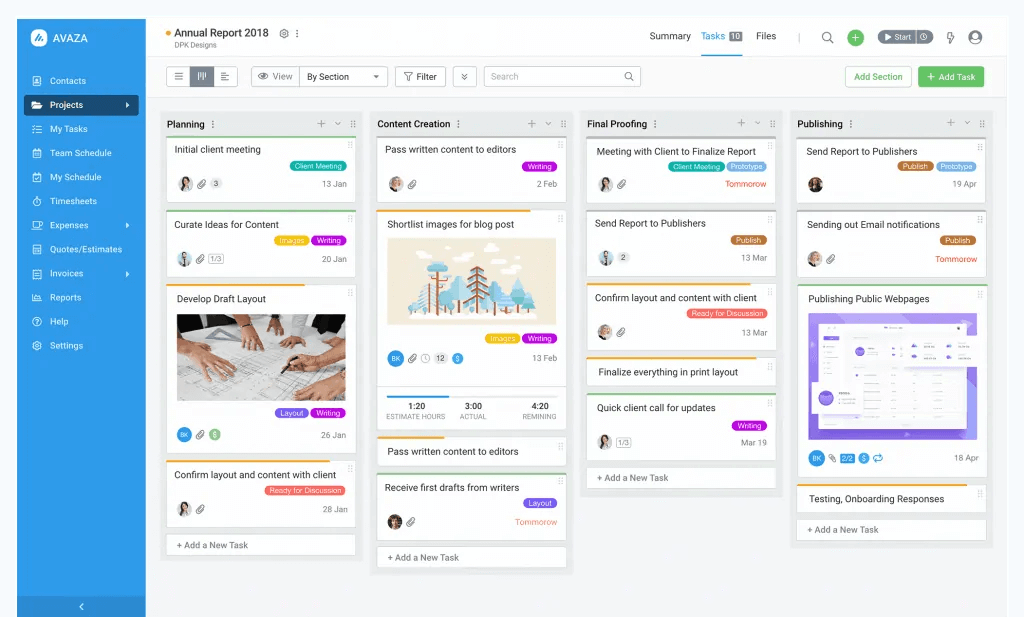
Avaza è una piattaforma di gestione progetti e fatturazione che riunisce in un unico spazio di lavoro il monitoraggio delle attività, la rilevazione delle ore, la gestione delle spese e la fatturazione ai clienti.
Per chi è ideale Avaza?
Avaza è adatto a piccole e medie imprese di servizi—come agenzie, società di consulenza e studi professionali—che necessitano di gestire progetti dei clienti e fatturazione in un unico posto.
Perché ho scelto Avaza
Avaza si guadagna un posto nella mia selezione grazie al modo in cui gestisce la comunicazione senza toglierti dal contesto del progetto. Mi piace molto che le discussioni sulle attività vivano direttamente all'interno della posta della chat insieme ai messaggi diretti e alle conversazioni nei canali—così, quando il mio team discute una consegna, quella conversazione rimane collegata all'attività e non si perde in un canale generale. Avaza Chat supporta anche i canali specifici per progetto, il che significa che il mio team può mantenere separate le discussioni sui progetti dei clienti da quelle interne. I clienti possono essere invitati direttamente nei progetti per collaborare e approvare i fogli ore, riducendo le email avanti e indietro che rallentano la fatturazione.
Funzionalità chiave di Avaza
- Fatture ricorrenti: Imposta una programmazione per inviare automaticamente le fatture ai clienti a intervalli regolari, con campi dinamici che si compilano automaticamente con dettagli come il periodo di fatturazione.
- Fatturazione da foglio ore: Inserisci le ore non ancora fatturate direttamente in una fattura, con opzioni per raggruppare i fogli ore per progetto, categoria, utente o attività.
- Visualizzazioni Kanban, elenco e Gantt: Passa tra diverse visualizzazioni delle attività per pianificare e monitorare il lavoro nel formato che meglio si adatta al tuo progetto o team.
- Monitoraggio delle spese: Registra le spese su più categorie, aggiungi ricarichi e allega ricevute digitalizzate dal tuo telefono prima di inserirle nelle fatture per i clienti.
Integrazioni Avaza
Avaza offre integrazioni native con Xero, QuickBooks Online, Slack e Stripe, e si collega a Zapier. È disponibile un'API per integrazioni personalizzate.

Ideale per le agenzie

Bonsai Agency Software è una piattaforma di gestione progetti progettata per le agenzie che riunisce il monitoraggio dei progetti, la fatturazione, la rilevazione del tempo, le proposte e il CRM clienti in un unico sistema.
Per chi è più adatto Bonsai Agency Software?
Bonsai Agency Software è particolarmente indicato per agenzie creative e digitali di piccole e medie dimensioni che hanno bisogno di gestire progetti dei clienti e fatturazione in un unico posto.
Perché ho scelto Bonsai Agency Software
Bonsai Agency Software merita un posto nella mia lista perché è uno dei pochi strumenti di project management costruiti specificamente intorno alle reali modalità di lavoro delle agenzie. Mi piace il fatto che la piattaforma colleghi direttamente la definizione dell'ambito progetto all'allocazione delle risorse: puoi definire l'ambito del progetto, convertirlo in ore assegnate al team e monitorare i margini di budget in tempo reale mentre il lavoro procede. Questo significa che l'aumento dell'ambito viene rilevato immediatamente nei numeri, non alla fine del mese. Utilizzo anche la fatturazione integrata insieme al monitoraggio del tempo, così le ore fatturabili confluiscono direttamente nelle fatture dei clienti senza bisogno di inserimenti manuali dei dati.
Funzionalità principali di Bonsai Agency Software
- Fatturazione ricorrente: Imposta cicli di fatturazione automatici per clienti con contratti a forfait, in modo che le fatture vengano inviate puntualmente senza intervento manuale.
- Portale clienti: Offri ai clienti uno spazio personalizzato e sicuro in cui visualizzare lo stato dei progetti, le fatture e i documenti condivisi in un unico luogo.
- Pipeline di vendita: Monitora i lead attraverso fasi personalizzabili del funnel di vendita e converti gli accordi conclusi direttamente in progetti, contratti e fatture.
- Allocazioni provvisorie: Assegna risorse a progetti potenziali prima che siano confermati, per poi finalizzare o modificare le prenotazioni man mano che si definisce l'ambito del progetto.
Integrazioni Bonsai Agency Software
Bonsai Agency Software offre integrazioni native con QuickBooks, Calendly e Zapier. È disponibile un'API per integrazioni personalizzate.
Altri software di gestione dei progetti con fatturazione
Ecco alcuni software aggiuntivi di gestione dei progetti con opzioni di fatturazione che non sono stati inclusi nella mia selezione, ma che vale comunque la pena prendere in considerazione:
- Zoho Invoice
Ideale per chi già utilizza l’ecosistema di app Zoho
- FinancialForce
Ideale per utenti Salesforce
- Ravetree
Ideale per la fatturazione e la gestione dei clienti
- Harvest
Il miglior software PM gratuito con fatturazione
- Plutio
Ideale per freelance e imprenditori
- Taimer
Ideale per i servizi professionali
- Cenchu Passion App
Software di gestione delle attività di progetto con funzione di rilevamento del tempo
- Hubstaff
Ideale per automatizzare la fatturazione e monitorare lo stato
- Accelo
Miglior sistema integrato di fatturazione e monitoraggio della redditività
- ProWorkflow
Ideale per generare fatture dai progetti
- VOGSY
Ideale per la fatturazione di abbonamenti, contratti di mantenimento, rate
- GoodDay
Ideale per team di progetto che necessitano di fatturazione integrata
- Kantata
Ideale per le sue capacità di gestione finanziaria


Come Valuto la Fatturazione nei Software di Project Management
La mia valutazione si articola su due livelli: ciò che uno strumento deve necessariamente fare—come fatturare i clienti a partire dalle ore tracciate—e ciò che rende alcuni strumenti particolarmente interessanti.
Funzionalità Core (Requisiti Minimi per Questa Lista)
Quando seleziono gli strumenti per la mia lista, assegno a ciascuno un punteggio da 0 (non offre la funzionalità) a 5 (eccelle in quest'area) per ogni funzionalità core elencata di seguito. Poi, calcolo il punteggio totale come percentuale. Ogni strumento deve raggiungere un punteggio minimo totale del 65% per essere preso in considerazione.
- Creazione e Personalizzazione delle Fatture: Verifico se sia possibile creare fatture personalizzate, pronte per il cliente, con voci di dettaglio, tasse e sconti direttamente all'interno dello strumento di project management.
- Fatturazione di Ore e Spese: Le ore tracciate e le spese registrate devono confluire nelle voci delle fatture—senza dover ricopiare i dati dai timesheet in un altro strumento di fatturazione.
- Modelli di Fatturazione Basati sul Progetto: Cerco il supporto per tariffazione oraria, importo fisso, a milestone e a forfait, dato che la maggior parte delle agenzie gestisce più tipi di contratto contemporaneamente.
- Monitoraggio di Budget e Redditività: Ogni strumento dovrebbe collegare il fatturato delle fatture ai budget di progetto, così puoi vedere quanto è già stato fatturato rispetto al non ancora fatturato e il margine per progetto.
- Gestione dei Clienti e dei Pagamenti: Valuto come i clienti ricevono e pagano le fatture—tramite gateway integrati come Stripe o PayPal, oppure tramite portale dedicato al cliente.
- Integrazioni Contabili: È importante la sincronizzazione dei dati delle fatture con strumenti come QuickBooks o Xero, dunque considero la profondità dell'integrazione e se la sincronizzazione sia unidirezionale o bidirezionale.
Una volta che ho un elenco di strumenti che soddisfano i criteri, prendo in considerazione ciò che distingue ciascuna piattaforma.
Fattori Differenzianti (Cosa Distingue i Fornitori)
Ecco come confronto diversi fornitori:
Funzionalità Distintive
La fatturazione in più valute è importante quando i progetti coinvolgono diverse regioni—cerco strumenti che gestiscano la conversione di valuta e le normative fiscali locali senza necessità di workaround manuali. I flussi di approvazione rappresentano un altro elemento distintivo, soprattutto per le agenzie dove è necessario che il responsabile amministrativo approvi le bozze delle fatture prima che arrivino al cliente. Valuto anche le funzionalità di riconoscimento dei ricavi, poiché collegare i ricavi riconosciuti alle milestone di consegna offre ai responsabili PMO una visione molto più chiara della salute del progetto rispetto alle sole date di emissione fattura.
Oltre le Funzionalità
La struttura dei prezzi qui conta molto—verifico se la fatturazione sia inclusa nel piano base o se sia sbloccata solo su un livello premium, poiché questo cambia il costo reale per i team più piccoli. Valuto anche l'aderenza alle esigenze dell'acquirente in base al modello di team. Uno strumento creato per un'agenzia creativa di dieci persone può risultare eccessivo per un consulente singolo, e viceversa. Anche la sicurezza merita attenzione, in particolare le autorizzazioni basate sui ruoli che mantengono i dati di fatturazione visibili solo ai responsabili finanziari mentre i team di progetto restano concentrati sulla consegna.
Come scegliere un software di gestione dei progetti con fatturazione
È facile perdersi in lunghi elenchi di funzionalità e strutture di prezzo complesse. Per aiutarti a rimanere concentrato mentre affronti il tuo particolare processo di selezione del software, ecco una lista di controllo dei fattori da tenere a mente:
| Fattore | Cosa considerare |
|---|---|
| Scalabilità | Il software può crescere insieme alla tua azienda? Considera il numero di progetti e utenti che prevedi di avere in futuro e assicurati che lo strumento possa gestirli. |
| Integrazioni | Il software si connette ai tuoi sistemi esistenti? Verifica se si integra con strumenti come il tuo CRM, la posta elettronica o il software di contabilità. |
| Personalizzazione | Puoi adattare lo strumento ai tuoi flussi di lavoro? Cerca opzioni per personalizzare campi, pannelli di controllo e rapporti in base ai tuoi processi. |
| Facilità d’uso | L’interfaccia è intuitiva? Un aspetto semplice aiuta il tuo team ad adattarsi rapidamente senza una formazione approfondita. |
| Implementazione e avvio | Quanto tempo sarà necessario per iniziare? Valuta la facilità di configurazione del software e il supporto disponibile durante il processo di avvio. |
| Costo | Il prezzo rientra nel tuo budget? Considera il costo totale, comprese eventuali commissioni nascoste o i costi per utenti o funzionalità aggiuntivi. |
| Misure di sicurezza | In che modo il software protegge i tuoi dati? Cerca crittografia, copie di sicurezza regolari e conformità agli standard di protezione dei dati. |
Che cos’è la fatturazione nella gestione dei progetti?
I software di gestione dei progetti con fatturazione combinano le funzionalità di gestione dei progetti con strumenti di gestione finanziaria, come fogli presenze e monitoraggio delle ore fatturabili, analisi del flusso di cassa e strumenti di fatturazione.
Questo tipo di software include generalmente funzionalità per la pianificazione dei progetti, la gestione delle attività, la collaborazione e il monitoraggio del tempo, consentendo agli utenti di gestire e monitorare in modo efficiente vari aspetti di un progetto.
I piccoli team, i freelance e le startup traggono grandi vantaggi dal suo utilizzo. Questi gruppi hanno normalmente vincoli di budget e altri ambiti in cui devono investire il proprio denaro, invece di pagare tre o quattro strumenti per servizi professionali diversi.
Funzionalità
Quando selezioni un software di gestione dei progetti con fatturazione, presta attenzione alle seguenti funzionalità chiave:
- Misure di sicurezza: Proteggono i dati sensibili dei progetti e quelli finanziari tramite crittografia e backup regolari.
- Gestione delle attività: Organizza le attività e le assegna ai membri del team, contribuendo a mantenere i progetti in linea con i piani.
- Monitoraggio del tempo: Monitora il tempo dedicato alle attività, garantendo una fatturazione accurata e informazioni dettagliate sulla produttività.
- Generazione delle fatture: Crea e invia le fatture direttamente dal software, semplificando il processo di fatturazione.
- Dashboard personalizzabili: Consentono agli utenti di personalizzare la propria visualizzazione per accedere rapidamente ai dati importanti dei progetti.
- Monitoraggio del budget: Tiene sotto controllo le spese dei progetti e garantisce che rimangano entro il budget assegnato.
- Funzionalità di integrazione: Si connette con altri strumenti, come i CRM e i software di contabilità, per garantire un flusso continuo dei dati.
- Supporto per più valute: Semplifica la fatturazione per i clienti di diversi Paesi, consentendo di gestire varie valute.
- Strumenti di reportistica: Forniscono informazioni dettagliate e analisi sulle prestazioni dei progetti e sulla situazione finanziaria.
- Funzionalità di collaborazione: Migliorano la comunicazione del team e la condivisione dei file all'interno della piattaforma.
- Portali per i clienti: Consentono ai clienti di visualizzare fatture, spese e tempo monitorato e possono permettere i pagamenti online.
Vantaggi
L'implementazione di un software di gestione dei progetti con fatturazione offre diversi vantaggi al tuo team e alla tua azienda. Eccone alcuni che puoi aspettarti:
- Organizzazione migliorata: La gestione delle attività e le dashboard personalizzabili aiutano a mantenere i progetti organizzati e nei tempi previsti.
- Fatturazione accurata: Il monitoraggio del tempo e la generazione delle fatture garantiscono che ai clienti venga addebitato correttamente il lavoro svolto.
- Collaborazione migliorata: Gli strumenti di comunicazione integrati facilitano la condivisione di idee e aggiornamenti tra i membri del team.
- Maggiore controllo finanziario: Il monitoraggio del budget e gli strumenti di reportistica forniscono informazioni sui costi dei progetti e sulla loro situazione finanziaria.
- Flussi di lavoro semplificati: Le funzionalità di integrazione si collegano ad altri strumenti per ridurre l'inserimento manuale dei dati e gli errori.
- Portata globale: Il supporto per più valute consente di gestire facilmente i clienti internazionali.
- Sicurezza dei dati: Le misure di sicurezza proteggono i dati dei tuoi progetti e quelli finanziari dagli accessi non autorizzati.
Costi e prezzi
La scelta di un software di gestione dei progetti con fatturazione richiede la comprensione dei vari modelli e piani tariffari disponibili. I costi variano in base alle funzionalità, alle dimensioni del team, ai componenti aggiuntivi e ad altri fattori. La tabella seguente riassume i piani più comuni, i relativi prezzi medi e le funzionalità tipicamente incluse nelle soluzioni di gestione dei progetti con fatturazione:
Tabella comparativa dei piani per software di gestione dei progetti con fatturazione
| Tipo di piano | Prezzo medio | Funzionalità comuni |
|---|---|---|
| Piano gratuito | $0 | Gestione di base delle attività, progetti limitati e supporto di base. |
| Piano personale | $5-$25/utente/mese | Gestione delle attività, monitoraggio del tempo, generazione delle fatture e integrazioni limitate. |
| Piano aziendale | $30-$50/utente/mese | Reportistica avanzata, monitoraggio del budget, integrazioni migliorate e funzionalità di collaborazione. |
| Piano per grandi aziende | $60-$100/utente/mese | Dashboard personalizzabili, supporto per più valute, misure di sicurezza avanzate e supporto dedicato. |
Domande frequenti sul software di gestione dei progetti con fatturazione
Ecco alcune risposte alle domande più comuni sul software di gestione dei progetti con fatturazione:
Quali integrazioni dovrei cercare?
Quando selezioni uno strumento di gestione dei progetti con fatturazione, considera le integrazioni con il monitoraggio del tempo e il software CRM, come Hubspot, Harvest, Pipedrive e Salesforce, oltre a piattaforme di comunicazione come Slack e Teams.
In che modo i dashboard personalizzabili possono migliorare il software di gestione dei progetti con fatturazione?
I dashboard personalizzabili ti consentono di adattare la visualizzazione per concentrarti sui dati più rilevanti. Questa personalizzazione ti aiuta ad accedere rapidamente allo stato dei progetti, alle informazioni di fatturazione e alle prestazioni del team, permettendo di prendere decisioni più consapevoli e di supervisionare i progetti in modo più efficiente.
Perché il supporto multivaluta è importante nel software di gestione dei progetti con fatturazione?
Il supporto multivaluta è fondamentale se lavori con clienti internazionali. Ti consente di fatturare in valute diverse senza conversioni manuali, garantendo accuratezza e professionalità nel processo di fatturazione. Questa funzionalità ti aiuta a soddisfare le esigenze dei clienti in tutto il mondo, ampliando la tua portata sul mercato.