

10 TimeCamp-Alternativen für die Zeiterfassung im Team im Jahr 2026

Beste Alternativen zu Timecamp – Auswahlliste


Die Verwaltung von Projekten kann komplex sein, und die richtigen Tools zu finden, die Ihrem Team helfen, den Überblick zu behalten, ist entscheidend. Wenn Sie Timecamp verwenden, aber das Gefühl haben, dass es Ihre Anforderungen nicht erfüllt, sind Sie nicht allein. Viele Projektmanager suchen nach Alternativen, wenn sie mehr Flexibilität, bessere Funktionen oder einen anderen Ansatz benötigen.
Meiner Erfahrung nach kann die Erkundung neuer Softwareoptionen frische Perspektiven für Ihre Arbeitsabläufe eröffnen. Ich habe verschiedene Projektmanagement-Tools unabhängig getestet und bewertet, um Ihnen unvoreingenommene Einblicke zu bieten.
In diesem Artikel finden Sie eine sorgfältig zusammengestellte Liste von Timecamp-Alternativen, die Ihren spezifischen Anforderungen entsprechen könnten. Ganz gleich, ob Sie eine bessere Zeiterfassung, bessere Integrationen oder einzigartige Funktionen benötigen – ich habe das Richtige für Sie. Sehen wir uns die passenden Projektmanagement-Tools für Sie und Ihr Team an.
Was ist Timecamp?
Timecamp ist ein Tool für Produktivität und Projektmanagement, das Teams dabei unterstützt, ihre Arbeitszeit zu erfassen und Projekte effizient zu verwalten. Fachleute wie Projektmanager, Teamleiter und Freiberufler verwenden Timecamp typischerweise, um Einblicke in die Zeitverteilung und die Produktivität der Mitarbeiter zu gewinnen.
Die einfache Zeiterfassung, detaillierte Berichterstattung und Rechnungsstellung helfen bei der Verwaltung von Aufgaben, der Verbesserung der Effizienz und dem Verständnis der Anforderungen an die Projektbudgetierung. Insgesamt bietet Timecamp eine unkomplizierte Möglichkeit, die Produktivität zu steigern und den Projektfortschritt zu verfolgen.
Zusammenfassung der besten Timecamp-Alternativen
Diese Vergleichstabelle fasst die Preisdetails meiner besten Timecamp-Alternativen zusammen und hilft Ihnen dabei, die besten Projektmanagement-Tools für Ihr Budget und Ihre geschäftlichen Anforderungen zu finden.
| Tool | Best For | Trial Info | Price | ||
|---|---|---|---|---|---|
| 1 | Am besten für die Zeiterfassung von Außen- und Remote-Teams geeignet | 14-tägige kostenlose Testversion + kostenlose Demo verfügbar | Ab $3.99/Benutzer/Monat (jährliche Abrechnung) | Website | |
| 2 | Am besten für kleine Teams | Kostenloser Tarif + 7-tägige kostenlose Testversion verfügbar | Ab $3.99/Benutzer/Monat (jährlich abgerechnet) | Website | |
| 3 | Am besten für automatische Zeiterfassung | Kostenlose 14-tägige Testversion + kostenlose Demo verfügbar | Ab $9/Nutzer/Monat (jährlich abgerechnet) | Website | |
| 4 | Am besten für Einblicke in die Projektrentabilität | Kostenloser Tarif + 14-tägige kostenlose Testversion + kostenlose Demo verfügbar | Ab $4/Nutzer/Monat (jährlich abgerechnet) | Website | |
| 5 | Beste Lösung für Prozessautomatisierung | 14-tägige kostenlose Testversion + kostenloser Tarif | Preise auf Anfrage | Website | |
| 6 | Am besten für die Rechnungsstellung in mehreren Währungen geeignet | Kostenloser Tarif verfügbar + 14-tägige kostenlose Testversion | Ab $5.83/Nutzer/Monat (jährliche Abrechnung) | Website | |
| 7 | Am besten für Analysen ortsferner Teams | 14-tägige kostenlose Testversion + kostenlose Demo verfügbar | Ab $6.67/Nutzer/Monat (jährlich abgerechnet) | Website | |
| 8 | Am besten für Kalenderintegration geeignet | Kostenlose Testversion + kostenloser Tarif + Demo verfügbar | Ab 30 $/Monat (jährliche Abrechnung) | Website | |
| 9 | Am besten für integrierte Rechnungsstellung geeignet | Kostenloser Tarif + 30-tägige kostenlose Testversion verfügbar | Ab $9/Benutzer/Monat (jährlich abgerechnet) | Website | |
| 10 | Am besten für anpassbare Berichte geeignet | Kostenloser Tarif + 30-tägige kostenlose Testversion + kostenlose Demo verfügbar | Ab $9/Nutzer/Monat (jährlich abgerechnet) | Website |

Warum Sie unseren Software-Empfehlungen vertrauen können
Unser Team testet und bewertet Software seit 2012. Als Projektmanager wissen wir selbst, wie schwierig – und wichtig – es ist, die richtige Software auszuwählen.
Für diesen Leitfaden haben wir Tools mithilfe von praktischen Tests und unabhängiger Recherche bewertet und dabei unsere Bewertungskriterien angewendet. Zudem greifen wir auf Erkenntnisse von Branchenvordenkern und praktizierenden Projektmanagement-Experten zurück.
Unsere Bewertungen spiegeln unser menschliches redaktionelles Urteilsvermögen wider, keine Verkaufsstrategie.
Expertenprüfer:
Bewertungen der besten Timecamp-Alternativen
Nachfolgend finden Sie meine ausführlichen Zusammenfassungen der besten Timecamp-Alternativen, die es in meine Auswahlliste geschafft haben. Meine Bewertungen bieten einen detaillierten Einblick in die wichtigsten Funktionen, Vor- und Nachteile, Integrationen und idealen Anwendungsfälle jedes Tools, damit Sie das beste für sich finden.

Am besten für die Zeiterfassung von Außen- und Remote-Teams geeignet
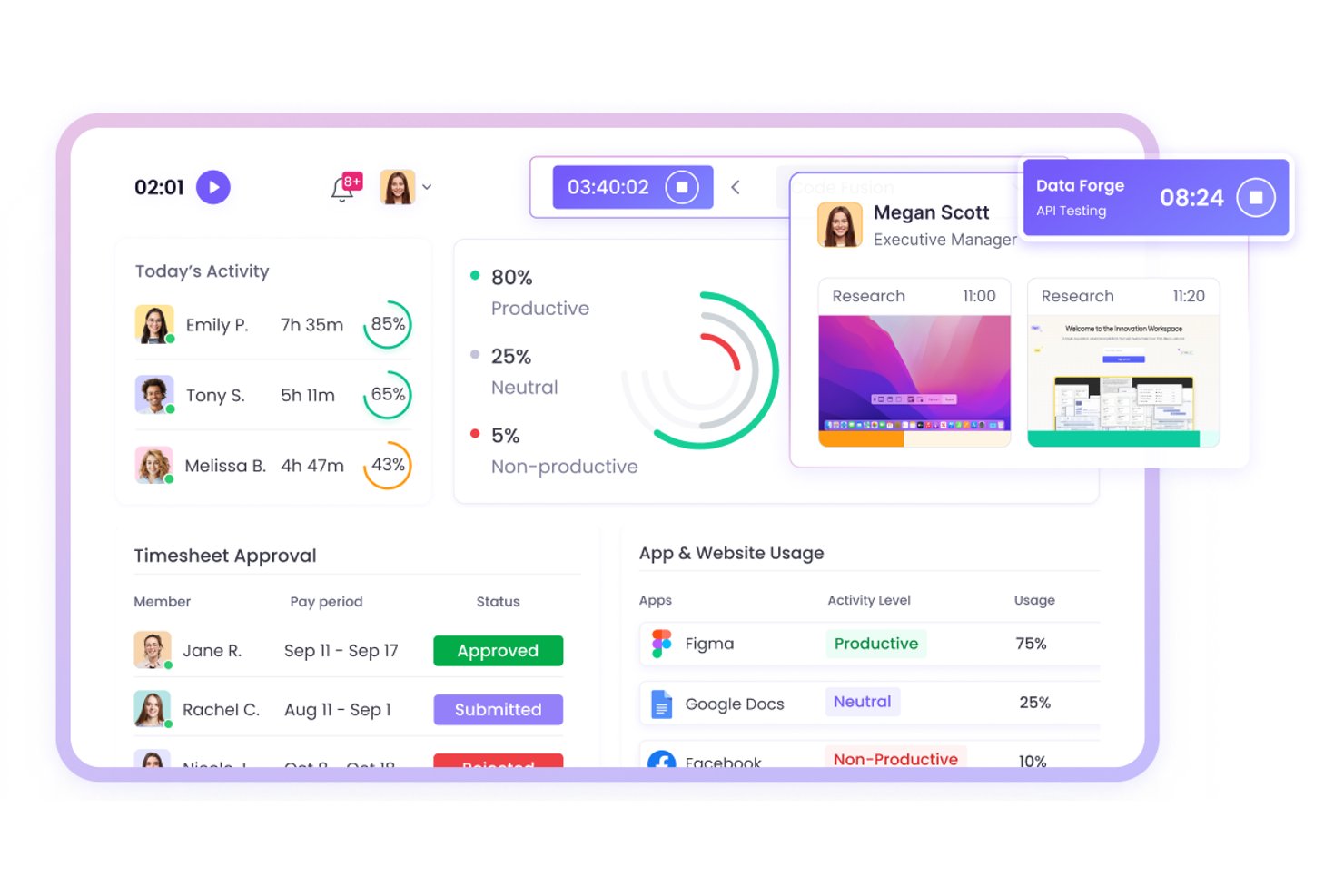
WebWork Time Tracker ist eine Zeiterfassungssoftware für verteilte und im Außendienst tätige Teams, die Projektmanager dabei unterstützt, Arbeitszeiten, Aktivitäten und den Projektfortschritt bei dezentralen Arbeitsabläufen zu überwachen.
Für wen eignet sich WebWork Time Tracker am besten?
WebWork Time Tracker eignet sich für Projektmanager, die Außendienstmitarbeiter und verteilte Remote-Teams koordinieren und Einblick in Arbeitszeiten, Aktivitäten und den Projektfortschritt benötigen.
Warum WebWork Time Tracker eine gute Timecamp-Alternative ist
Ich habe WebWork Time Tracker ausgewählt, weil die Software die Zeiterfassung für Außen- und Remote-Teams mit Screenshots und Aktivitätsüberwachung unterstützt. Mein Team kann Arbeitszeiten an verschiedenen Einsatzorten überprüfen, Projektaktivitäten kontrollieren und die erfasste Zeit mit dem Fortschritt vergleichen. Die GPS-Ortung hilft außerdem dabei, mobile Arbeit bestimmten Standorten zuzuordnen.
Wichtige Funktionen von WebWork Time Tracker
- Automatische Zeiterfassung: Erfasst die für zugewiesene Aufgaben und Projekte aufgewendete Zeit.
- Anwesenheitserfassung: Protokolliert Arbeitsbeginn, Arbeitsende, Pausen und Überstunden.
- Produktivitätsberichte: Erstellt Berichte zu Arbeitszeiten, Anwesenheit und Projektdaten.
- Aufgabenverwaltung: Ermöglicht Teams, Aufgaben zu erstellen, Prioritäten festzulegen und Status zu verfolgen.
Integrationen von WebWork Time Tracker
WebWork Time Tracker bietet native Integrationen mit Jira, Asana, Trello, ClickUp, Slack, Google Workspace, Microsoft Teams, Freshdesk und QuickBooks. Die Software lässt sich außerdem mit Zapier und Make verbinden und stellt eine öffentliche API sowie Webhooks für benutzerdefinierte Integrationen bereit.
Pros and Cons
Pros:
- GPS-Ortung verknüpft Arbeitszeiten im Außendienst mit Standorten
- Screenshots unterstützen die Überprüfung von Remote-Arbeit
- Berichte zu Anwesenheit und Überstunden unterstützen die Prüfung der Lohnabrechnung
Cons:
- Häufige Screenshots können datenschutzbewusste Teams beunruhigen
- Die mobile Ortung kann den Akku von Geräten schnell entladen

Clockify
Am besten für kleine Teams

Clockify ist eine Zeiterfassungssoftware für Freiberufler und Teams, die die Produktivität von Mitarbeitenden überwachen und Projekte ohne Budgetbeschränkungen verwalten müssen. Sie hilft Ihnen, Arbeitsstunden zu erfassen, Aufgaben zu verwalten und den Projektfortschritt effizient zu analysieren.
Warum es eine gute Alternative zu TimeCamp ist: Ich habe Clockify ausgewählt, weil es kleinen Teams eine zugängliche Möglichkeit bietet, Projektstunden zu erfassen und wöchentliche Stundenzettel ohne hohe Anschaffungskosten zu verwalten. Die grundlegenden Zeiterfassungsfunktionen bieten einen klaren Überblick über Projektzeiträume und die tägliche Teamleistung, ohne kleinere Unternehmen in teure Softwaretarife zu zwingen. Dadurch eignet es sich ideal für Führungskräfte, die eine grundlegende Übersicht und Arbeitsnachweise benötigen und gleichzeitig die Softwarekosten niedrig halten möchten.
Herausragende Funktionen und Integrationen:
Zu den Funktionen gehören Projektmanagement-Tools, kostenlose Zeiterfassung und die Erfassung abrechenbarer Stunden. Diese Funktionen helfen Ihnen, eine genaue Zeiterfassung und Kundenabrechnung sicherzustellen. Clockify bietet außerdem detaillierte visuelle Berichte zur Analyse der Teamproduktivität.
Zu den Integrationen gehören Asana, Trello, Jira, QuickBooks, monday.com, Basecamp, GitHub, Salesforce und mehr.
Pros and Cons
Pros:
- Kostengünstige Zeiterfassung für kleine Budgets
- Für Teamgrößen jeder Art geeignet
- Detaillierte Berichte verfügbar
Cons:
- Grundlegendes Projektmanagement
- Erfordert eine Internetverbindung

Timely
Am besten für automatische Zeiterfassung
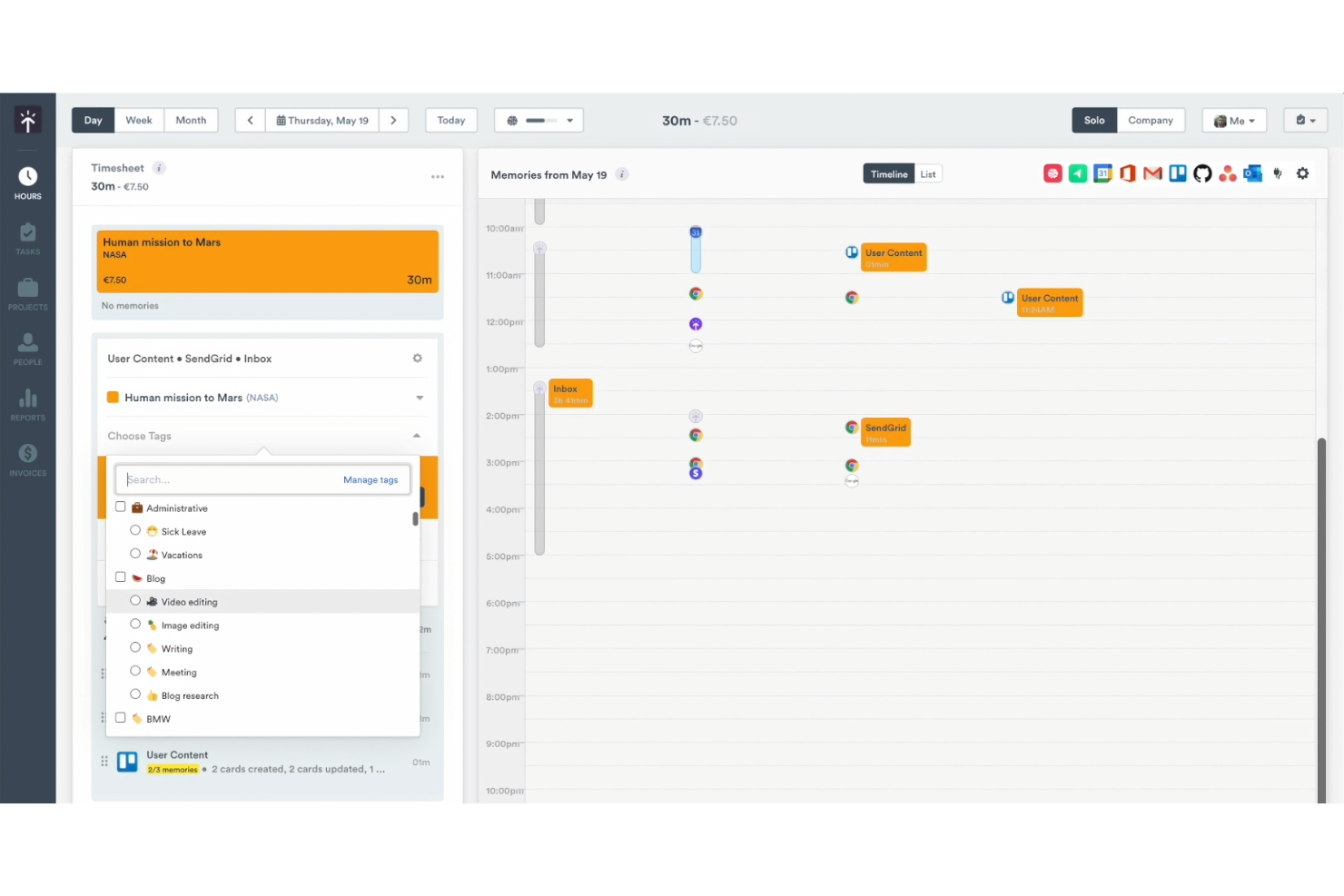
Timely ist ein Zeitmanagement-Tool für Teams und Freelancer, die ihre Zeiterfassung automatisieren möchten. Es hilft Ihnen, Arbeitsstunden genau zu erfassen und den Projektfortschritt effizienter zu verwalten.
Warum Timely eine gute Timecamp-Alternative ist: Timely bietet eine automatische Zeiterfassung, wodurch die manuelle Eingabe entfällt und eine präzise Datenerfassung gewährleistet wird. Der Aktivitäts-Tracker zeichnet alle Aktivitäten auf Ihrem Computer auf und bietet so einen umfassenden Überblick über Ihre Arbeit. Sie können erfasste Stunden einfach überprüfen und genehmigen, wodurch das Projektmanagement reibungsloser wird. Diese Automatisierung der Zeiterfassung macht Timely zu einer herausragenden Option für alle, die Einfachheit und Genauigkeit suchen.
Herausragende Funktionen und Integrationen:
Zu den Funktionen gehören ein Aktivitäts-Tracker, Projekt-Dashboards und Zeitberichte. Diese Zeiterfassungsfunktionen verschaffen Ihnen einen klaren Überblick über Ihre Arbeitsstunden. Timely bietet außerdem eine Zeitleiste, die Ihren Arbeitstag visuell darstellt und Ihnen hilft, Ihren Zeitplan besser zu verwalten.
Zu den Integrationen gehören Asana, Google Calendar und weitere.
Pros and Cons
Pros:
- Automatische Zeiterfassung
- Umfangreiche Funktionen zur Aktivitätsüberwachung
- Geeignet für Freelancer
Cons:
- Abhängig von der Erfassung der Computernutzung
- Begrenzte Möglichkeiten zur manuellen Eingabe

My Hours
Am besten für Einblicke in die Projektrentabilität
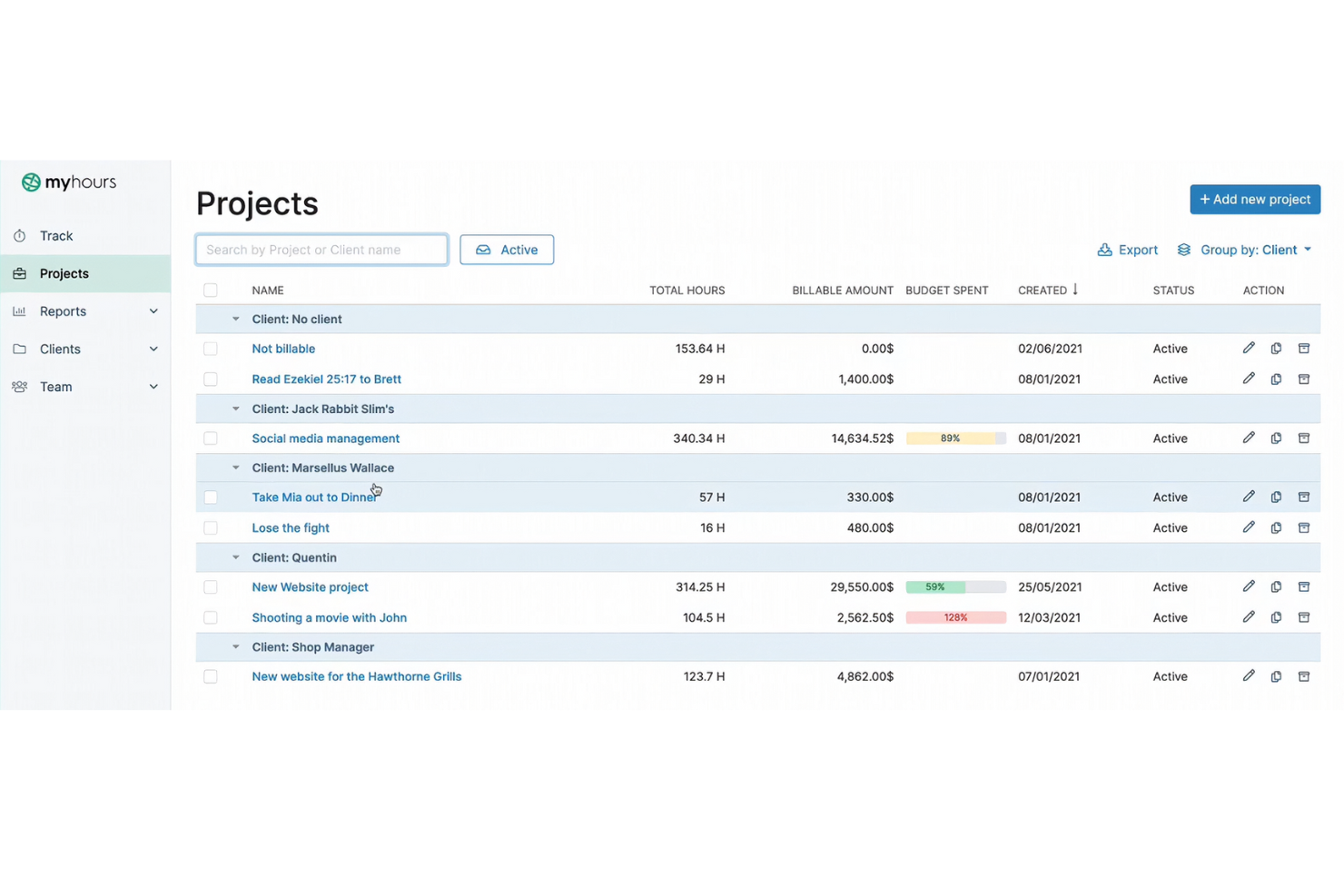
My Hours ist eine Zeiterfassungssoftware für Freiberufler und kleine Teams, die Projektbudgets und Arbeitszeiten verwalten müssen. Sie hilft Ihnen dabei, Zeiten zu erfassen, Aufgaben zu verwalten und Projektkosten effizient zu analysieren.
Warum My Hours eine gute Alternative zu TimeCamp ist: My Hours bietet detaillierte Berichte mit Einblicken in die Projektrentabilität, sodass Sie sehen können, welche Projekte am lohnendsten sind. Die Software ermöglicht es Ihnen, abrechenbare und nicht abrechenbare Stunden zu erfassen, wodurch Sie ein klares Bild der Projektkosten erhalten. Sie können Projektbudgets festlegen und Benachrichtigungen erhalten, wenn Sie sich den Grenzen nähern. Dieser Fokus auf finanzielle Einblicke ist eine wichtige Funktion, die Ihnen hilft, fundierte Entscheidungen über Projektprioritäten zu treffen.
Hervorstechende Funktionen und Integrationen:
Zu den Funktionen gehören Rechnungsstellung, detaillierte Berichterstattung und Aufgabenverwaltung. Diese Funktionen helfen Ihnen, die Kontrolle über Ihre Projektbudgets und die Produktivität Ihres Teams zu behalten. My Hours bietet außerdem anpassbare Stundenzettel für eine genaue Zeiterfassung.
Zu den Integrationen gehören Trello, Asana, Slack, Zapier, Jira, monday.com und weitere.
Pros and Cons
Pros:
- Erfassung abrechenbarer und nicht abrechenbarer Stunden
- Budgetbenachrichtigungen verfügbar
- Anpassbare Stundenzettel
Cons:
- Einarbeitungszeit für neue Benutzer
- Möglicherweise nicht für Großunternehmen geeignet

Beste Lösung für Prozessautomatisierung
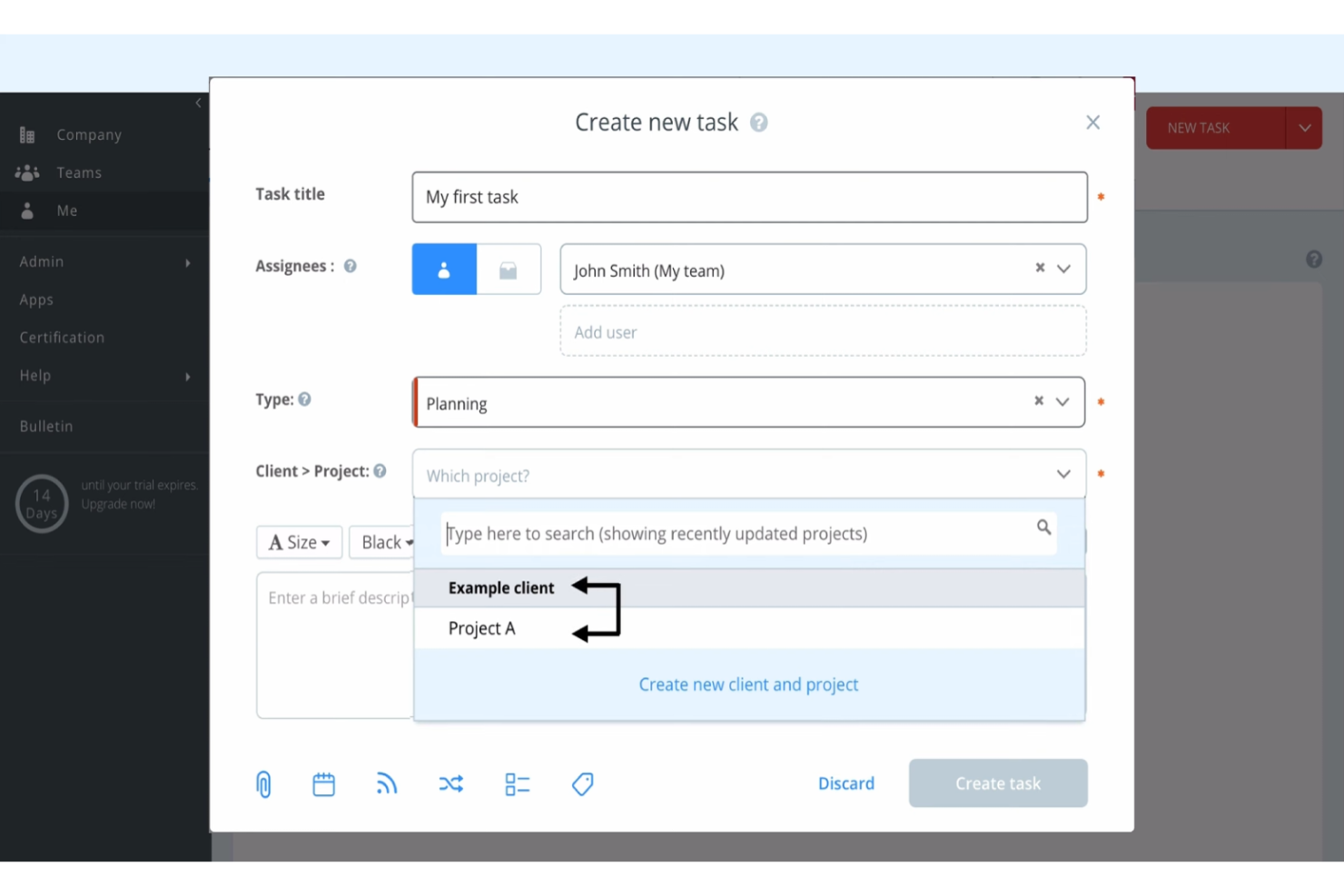
Runrun.it ist eine Lösung zur Projektverwaltung und Zeiterfassung für Teams, die die Produktivität ihres Teams steigern und Arbeitsabläufe effizient verwalten möchten. Sie hilft Ihnen, Aufgaben zu organisieren, Zeit zu erfassen und Prozesse zu automatisieren, um die Teamleistung zu verbessern.
Warum Runrun.it eine gute Timecamp-Alternative ist: Runrun.it bietet Funktionen zur Prozessautomatisierung, mit denen Sie wiederkehrende Aufgaben automatisieren und Arbeitsabläufe optimieren können. Die Software ermöglicht es Ihnen, automatisierte Warnungen und Benachrichtigungen einzurichten, damit Ihr Team informiert bleibt. Sie können außerdem benutzerdefinierte Workflows verwenden, um sicherzustellen, dass Aufgaben in der richtigen Reihenfolge abgeschlossen werden. Dieser Fokus auf die Automatisierung von Prozessen macht Runrun.it zu einer hervorragenden Wahl für Teams, die ihre Effizienz steigern möchten.
Herausragende Funktionen und Integrationen:
Funktionen umfassen Aufgabenverwaltung und Zeiterfassung. Diese Funktionen helfen Ihnen, die Produktivität Ihres Teams und die Zeitpläne Ihrer Projekte zu überwachen. Runrun.it bietet außerdem visuelle Dashboards, die einen klaren Überblick über den Projektfortschritt ermöglichen.
Integrationen sind nicht öffentlich aufgeführt.
Pros and Cons
Pros:
- Prozessautomatisierung verfügbar
- Benutzerdefinierte Workflows unterstützt
- Visuelle Dashboards verfügbar
Cons:
- Erfordert Einrichtungszeit
- Keine mobile App
TMetric
Am besten für die Rechnungsstellung in mehreren Währungen geeignet
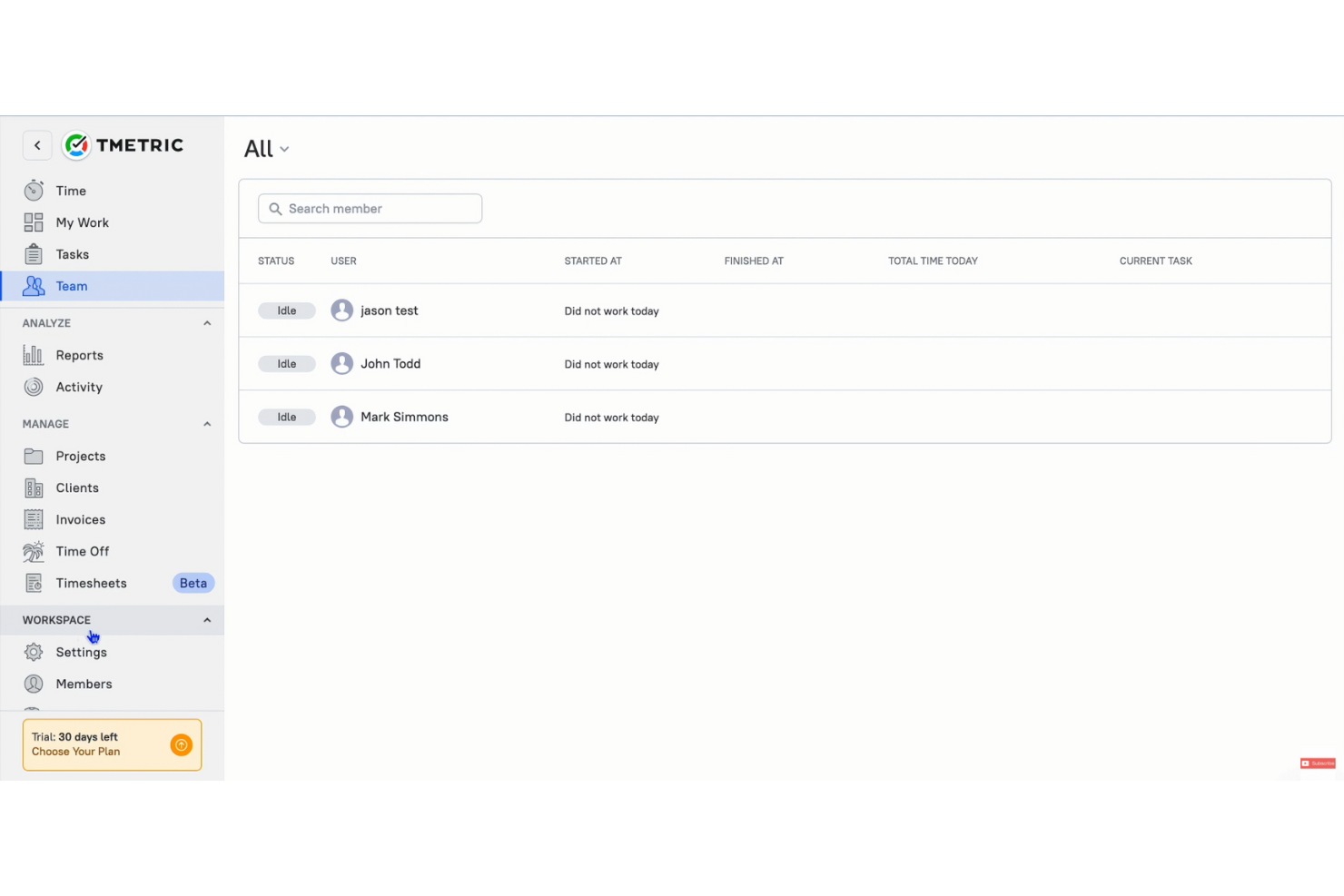
TMetric ist eine Zeiterfassungslösung und ein Produktivitätstool für Freiberufler, kleine Unternehmen und Remote-Teams, die Arbeitszeiten und Abrechnungen effizient verwalten möchten, unabhängig davon, ob sie die Desktop-App oder die mobile App verwenden. Es hilft Ihnen, Zeiten zu erfassen, Aufgaben zu verwalten und die Kundenabrechnung zu erleichtern.
Warum TMetric eine gute Timecamp-Alternative ist: TMetric bietet Rechnungsstellung in mehreren Währungen und erleichtert damit Unternehmen die Arbeit mit internationalen Kunden. Die Rechnungsfunktion ermöglicht es Ihnen, Rechnungen zu erstellen und zu versenden, und unterstützt die Rechnungsstellung in mehreren Währungen, wodurch globale Transaktionen erleichtert werden. Sie können abrechenbare Stunden genau erfassen und problemlos in Rechnungen umwandeln. Dieser Fokus auf die Unterstützung mehrerer Währungen macht TMetric zu einer praktischen Wahl für Unternehmen, die grenzüberschreitend tätig sind.
Herausragende Funktionen und Integrationen:
Zu den Funktionen gehören Projektmanagement, detaillierte Berichte und die Erfassung von Abwesenheiten. Diese Funktionen helfen Ihnen, die Produktivität Ihres Teams und das Projektmanagement unter Kontrolle zu halten. TMetric bietet außerdem Tools zur Budgetverwaltung, damit Ihre Projekte finanziell auf Kurs bleiben.
Zu den Integrationen gehören Asana, Trello, Slack, Jira, GitHub, Bitbucket, monday.com, GitLab und weitere.
Pros and Cons
Pros:
- Rechnungsstellung in mehreren Währungen
- Tools zur Projektbudgetierung
- Einfaches Projektmanagement
Cons:
- Grundlegende Berichtsoptionen
- Einschränkungen der mobilen App

Am besten für Analysen ortsferner Teams
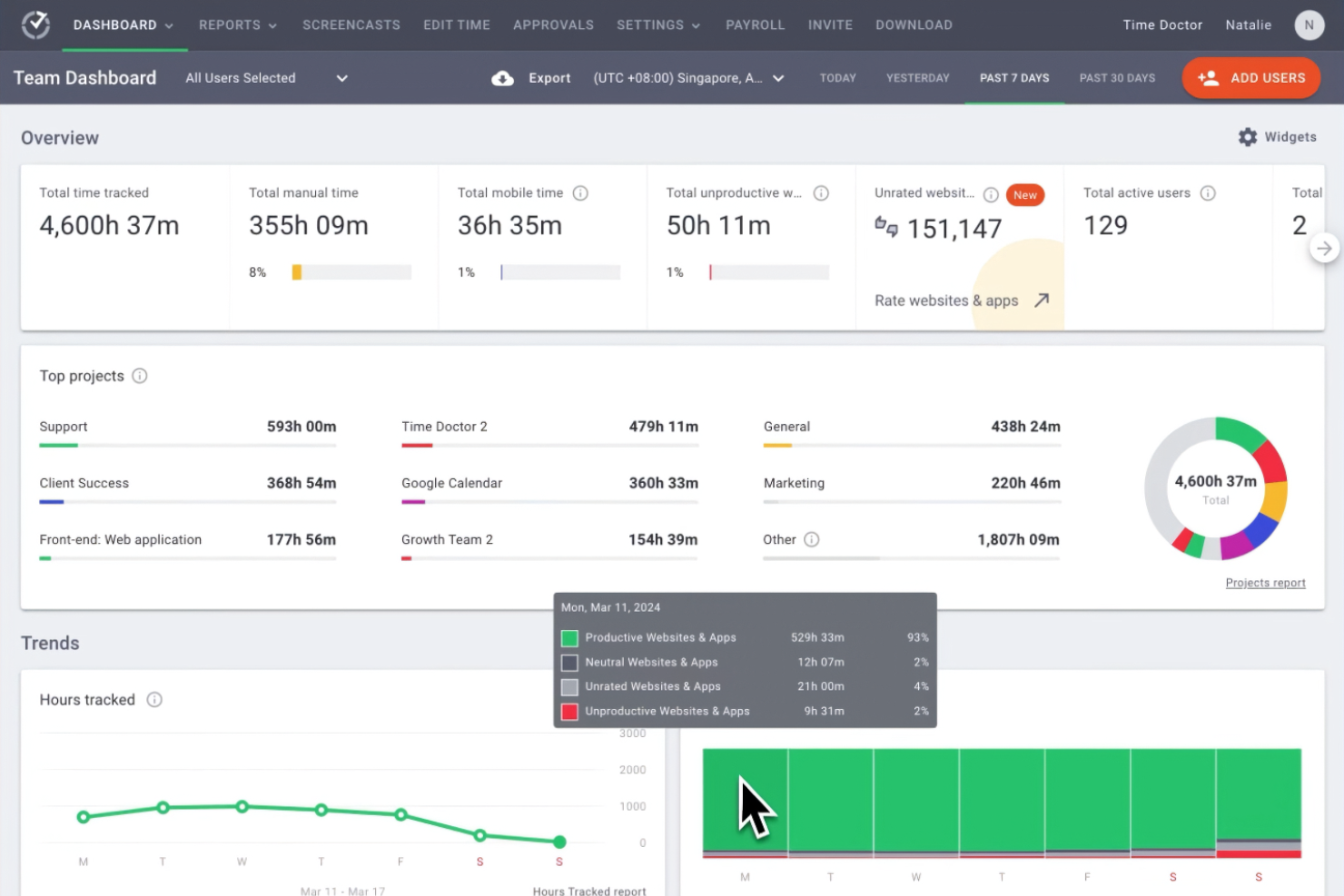
Time Doctor ist eine Komplettsoftware zur Zeiterfassung, die auf Unternehmen und ortsferne Teams zugeschnitten ist, die ihre Gesamtproduktivität verbessern möchten. Sie bietet Managern und Teamleitern Einblicke darin, wie die Arbeitszeit der Mitarbeiter über verschiedene Projekte hinweg verwendet wird.
Warum Time Doctor eine gute Timecamp-Alternative ist: Time Doctor ist eine Zeiterfassungs-App mit erweiterten Analysefunktionen, die sich auf die Leistung ortsferner Teams konzentriert. Zu den Zeiterfassungsfunktionen gehört die Überwachung in Echtzeit. Die Ablenkungswarnungen sorgen dafür, dass Ihr Team auf seine Aufgaben fokussiert bleibt. Darüber hinaus bietet die Bildschirmaufnahme von Time Doctor einen klaren Überblick über die Produktivität der Mitarbeiter und unterstützt damit das Alleinstellungsmerkmal (USP) des Tools im Bereich der Analysen ortsferner Teams.
Herausragende Funktionen und Integrationen:
Zu den Funktionen gehören Zeiterfassung mit Bildschirmaufnahmen, Ablenkungswarnungen und die Überwachung der Mitarbeiter in Echtzeit. Diese Funktionen helfen Ihnen, die Produktivität aufrechtzuerhalten und Ihr Team fokussiert zu halten. Die Software bietet außerdem detaillierte Berichte, mit denen Sie Arbeitsmuster analysieren können.
Zu den Integrationen gehören Asana, Trello, Jira, monday.com, Basecamp 3, Salesforce, Wrike und weitere.
Pros and Cons
Pros:
- Produktivitätsüberwachung in Echtzeit
- Bildschirmaufnahmen
- Ablenkungswarnungen
Cons:
- Eingeschränkte Offline-Erfassung
- Grundlegende Projektmanagement-Funktionen
Am besten für Kalenderintegration geeignet
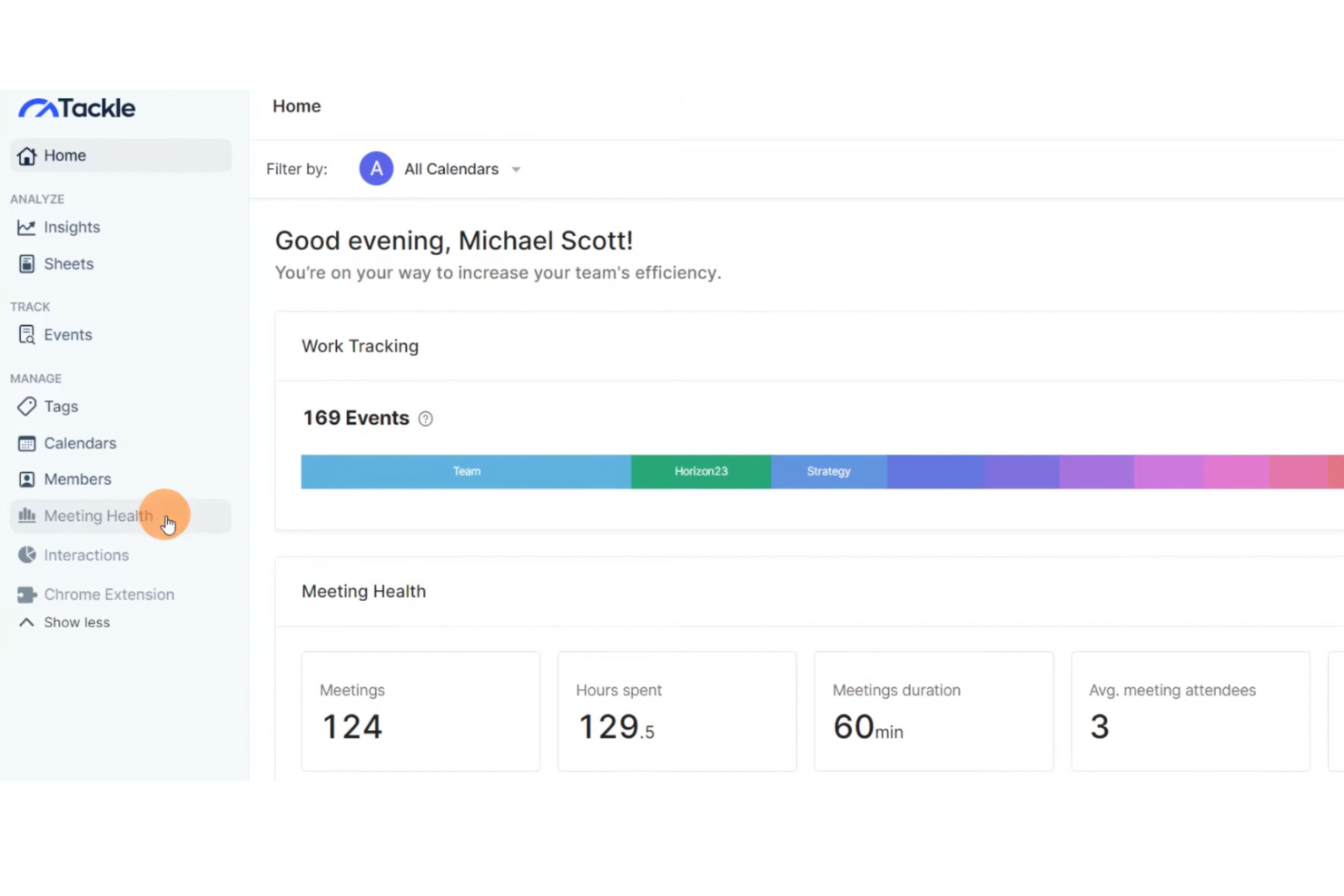
Tackle ist ein Zeitmanagement-Tool für Fachkräfte und Teams, die ihre Terminplanung und Produktivitätsüberwachung optimieren möchten. Es hilft Ihnen, Kalenderdaten in umsetzbare Erkenntnisse umzuwandeln, um das Zeit- und Aufgabenmanagement zu verbessern.
Warum Tackle eine gute Timecamp-Alternative ist: Tackle bietet eine nahtlose Kalenderintegration, mit der Sie Ihren Zeitplan effizient synchronisieren und analysieren können – sowohl in der Desktop-App als auch in der mobilen App. Diese Funktion ermöglicht eine Produktivitätsüberwachung, mit der Sie verfolgen können, wie Ihre Zeit auf verschiedene Aktivitäten verteilt ist, sodass Sie Muster leicht erkennen und Anpassungen zur Steigerung der Produktivität vornehmen können. Der Fokus von Tackle auf die Kalenderintegration stellt sicher, dass Ihre Terminplanung mit Ihren Produktivitätszielen übereinstimmt.
Herausragende Funktionen und Integrationen:
Zu den Funktionen gehören die automatische Zeiterfassung, Datenvisualisierung und personalisierte Erkenntnisse. Diese Funktionen helfen Ihnen, Ihre Produktivitätsmuster besser zu verstehen. Tackle bietet außerdem eine benutzerfreundliche Oberfläche, um die Verwaltung Ihres Zeitplans zu vereinfachen.
Zu den Integrationen gehören Google Kalender sowie die Möglichkeit, Daten in Google Tabellen und Excel zu exportieren.
Pros and Cons
Pros:
- Native Kalenderintegration
- Automatische Zeiterfassung
- Benutzerfreundliche Oberfläche
Cons:
- Eingeschränkte erweiterte Funktionen
- Kann eine Ersteinrichtung erfordern


Harvest ist eine Lösung für Zeiterfassung und Rechnungsstellung für Freiberufler, kleine Unternehmen und Teams, die ihre Zeit und Finanzen effizient verwalten möchten. Damit können Sie Arbeitsstunden für Projekte erfassen, Rechnungen erstellen und Budgets verwalten.
Warum Harvest eine gute Timecamp-Alternative ist: Harvest bietet eine integrierte Rechnungsstellung, mit der Sie direkt aus Zeiteinträgen und Ausgaben Rechnungen erstellen können. Diese Funktion vereinfacht die Abrechnung mit Kunden und gewährleistet korrekte Beträge. Sie können erfasste Arbeitsstunden problemlos in Rechnungen umwandeln, wodurch die Finanzverwaltung übersichtlich bleibt. Der Fokus von Harvest auf der Kombination aus genauer Zeiterfassung und Rechnungsstellung ermöglicht einen nahtlosen Übergang von der Projektarbeit zur Kundenabrechnung.
Hervorzuhebende Funktionen und Integrationen:
Funktionen umfassen die Erfassung von Ausgaben, die Verwaltung von Projektbudgets und detaillierte Berichte. Diese Funktionen helfen Ihnen, die Projektkosten zu überwachen und sicherzustellen, dass Sie innerhalb des Budgets bleiben. Harvest bietet außerdem die Genehmigung von Stundenzetteln, um die Teamverwaltung zu optimieren.
Integrationen umfassen Asana, Trello, Slack, Jira, QuickBooks Online, Basecamp, Stripe, PayPal, Xero, Google Calendar und mehr.
Pros and Cons
Pros:
- Integrierte Rechnungsstellung
- Geeignet für kleine Unternehmen
- Einfache Erfassung von Ausgaben
Cons:
- Abhängig von einer genauen Zeiterfassung
- Unbegrenzte Projekte nur in kostenpflichtigen Tarifen

Toggl
Am besten für anpassbare Berichte geeignet
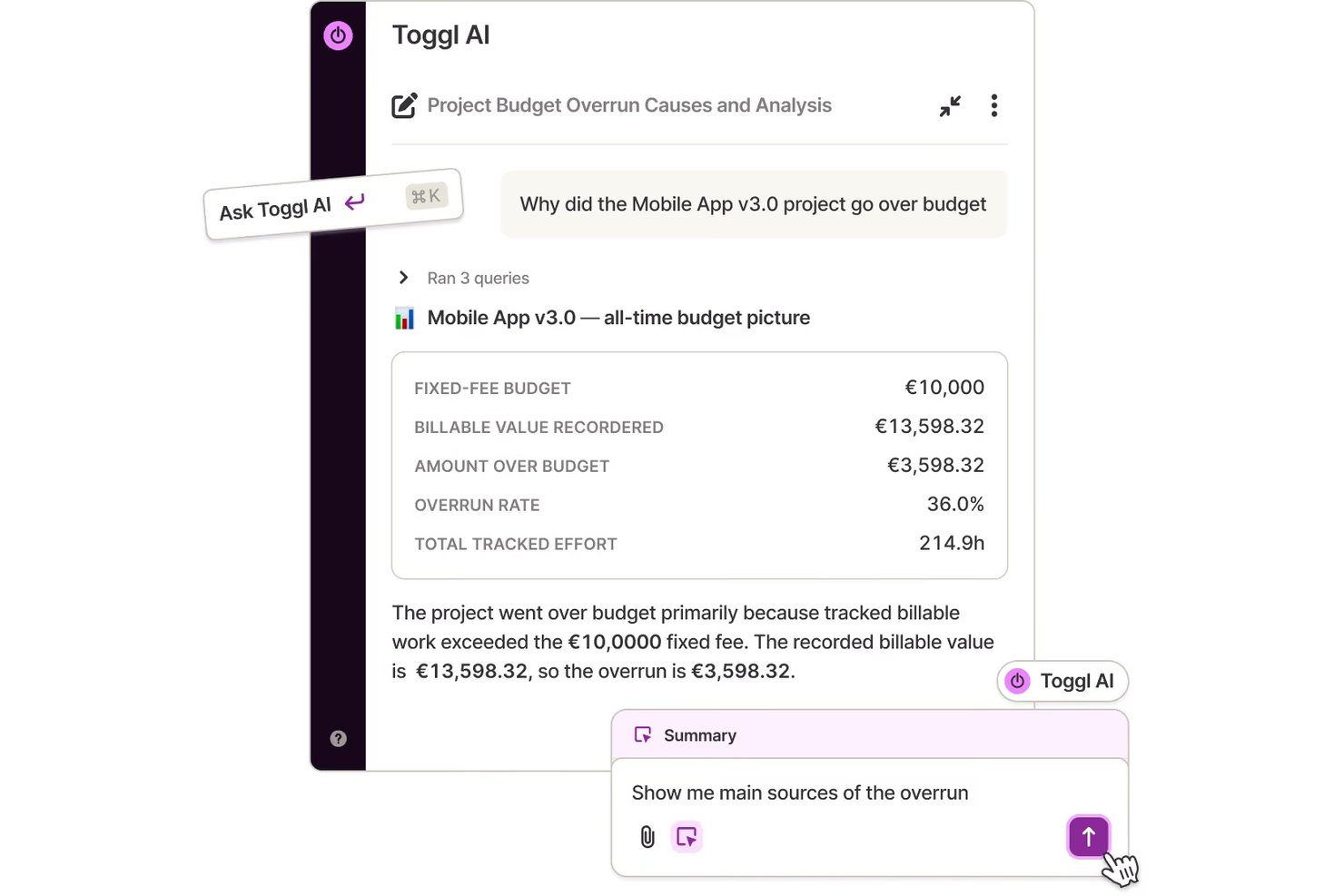
Toggl ist ein Zeiterfassungstool für Freiberufler, kleine Unternehmen und Teams, die ihre Produktivität steigern möchten. Es bietet Einblicke darin, wie Zeit für verschiedene Projekte aufgewendet wird, und verbessert dadurch die Effizienz des Projektmanagements.
Warum Toggl eine gute TimeCamp-Alternative ist: Toggl bietet Anpassungsmöglichkeiten bei der Berichterstellung, sodass Sie Zeitberichte auf Ihre spezifischen Bedürfnisse zuschneiden können. Die einfache Benutzeroberfläche erleichtert die Zeiterfassung, ohne dass Sie sich in Details verlieren. Sie können detaillierte Berichte erstellen, die sich auf die für Sie wichtigsten Kennzahlen konzentrieren. Die Flexibilität von Toggl Track bei der Anpassung von Zeitberichten hilft Ihnen, Erkenntnisse zu gewinnen, die unmittelbar für die Produktivität Ihres Teams relevant sind.
Herausragende Funktionen und Integrationen:
Zu den Funktionen gehören die Erkennung von Leerlaufzeiten und die Verfolgung des Projektfortschritts. Diese Funktionen helfen Ihnen, die Produktivität Ihres Teams effektiver zu verwalten. Toggl bietet außerdem Erinnerungen, um eine kontinuierliche Zeiterfassung sicherzustellen.
Zu den Integrationen gehören Asana, Trello, Slack, Jira, Google Calendar, Todoist, Basecamp, GitHub, Evernote, QuickBooks Online und weitere.
Pros and Cons
Pros:
- Mobile App für Android und iOS
- Geeignet für kleine Teams
- Erschwingliche kostenpflichtige Tarife
Cons:
- Unbegrenzte Nutzer werden nicht unterstützt
- Keine Funktionen zur Rechnungsstellung
Weitere Timecamp-Alternativen
Hier sind einige weitere Timecamp-Alternativen, die es nicht in meine Auswahlliste geschafft haben, aber dennoch einen Blick wert sind:
- Monitask
Am besten für die Mitarbeiterüberwachung
- Hubstaff
Am besten für GPS-Ortungsfunktionen geeignet
- Buddy Punch
Am besten für die Mitarbeitereinsatzplanung
- Tick's Time Tracking
Am besten für die einfache Verfolgung von Projektbudgets


Cómo evalúo las alternativas a TimeCamp
Analizo cada alternativa a TimeCamp en dos niveles: los requisitos básicos, como los presupuestos a nivel de proyecto y las tarifas facturables, y luego los factores que realmente diferencian a las herramientas.
Funcionalidad principal (requisitos básicos para esta lista)
Al seleccionar herramientas para mi lista, clasifico cada una en una escala de 0 (no ofrece la funcionalidad) a 5 (sobresale en esta área) para cada funcionalidad principal indicada a continuación. Después, convierto la puntuación total de la herramienta en un porcentaje. Cada herramienta debe alcanzar una puntuación total mínima del 65 % para ser considerada para su inclusión.
- Seguimiento del tiempo: Compruebo si una herramienta ofrece temporizadores, entrada manual y algún tipo de automatización —como la detección de aplicaciones en segundo plano de Toggl Track o las alertas de inactividad de Clockify— para que los equipos no tengan que reconstruir sus hojas de horas de memoria al final de la semana.
- Organización de proyectos y tareas: Cada herramienta debería permitir vincular las entradas de tiempo con proyectos, tareas y clientes específicos, de la misma forma en que Harvest vincula las horas registradas con elementos de línea a nivel de tarea en lugar de agruparlo todo en un único conjunto.
- Horas facturables y facturación: Evalúo cómo gestiona cada plataforma las etiquetas de facturable y no facturable, las tarifas personalizadas por proyecto o miembro del equipo y si puede generar o exportar facturas directamente a partir del tiempo registrado.
- Seguimiento del presupuesto y la rentabilidad: Las herramientas obtienen mejores valoraciones cuando permiten establecer presupuestos de horas o costes por proyecto y mostrar el progreso en tiempo real, algo especialmente útil para los equipos de agencias que controlan los márgenes de varios proyectos de clientes al mismo tiempo.
- Informes y análisis: Busco informes personalizables que vayan más allá de las hojas de horas sin procesar, incluidos filtros por cliente, intervalo de fechas o miembro del equipo, además de opciones de exportación como CSV y PDF para las actualizaciones dirigidas a las partes interesadas.
- Gestión de equipos y recursos: El soporte multiusuario con permisos basados en roles, aprobaciones de hojas de horas y vistas de carga de trabajo o capacidad es importante en este caso, especialmente para los responsables que gestionan equipos multifuncionales en varios proyectos simultáneos.
Una vez que tengo una lista de herramientas que cumplen estos criterios, considero qué diferencia a cada plataforma.
Factores diferenciadores (qué distingue a los proveedores)
Así es como comparo y contrasto los distintos proveedores:
Funciones destacadas
El seguimiento automático de la actividad es muy importante para mí: herramientas como Hubstaff y Toggl Track pueden registrar aplicaciones y URL en segundo plano, lo que evita que los equipos tengan que reconstruir su jornada a posteriori. También evalúo hasta qué punto llegan las integraciones de gestión de proyectos de una plataforma, ya que una sincronización bidireccional con Jira o Asana es mucho más útil que una conexión básica unidireccional. Los análisis de productividad completan el conjunto y ayudan a los responsables a detectar patrones de concentración y señalar el exceso de trabajo antes de que se convierta en un problema de retención.
Más allá de las funciones
La estructura de precios es muy importante en este caso: un trabajador independiente que evalúa Toggl Track tiene necesidades muy diferentes de las de una agencia de 50 personas que analiza Harvest, por lo que compruebo si los planes escalan sin obligar prematuramente a los equipos a contratar niveles empresariales. La cobertura de la plataforma es otro factor que valoro, ya que los equipos de campo y remotos necesitan aplicaciones móviles y seguimiento sin conexión que se sincronice cuando vuelvan a estar conectados. Para los equipos que gestionan datos confidenciales de clientes, también reviso aspectos básicos de seguridad como SSO, 2FA y el cumplimiento del RGPD.
Warum nach einer Alternative zu Timecamp suchen?
Timecamp ist zwar eine gute Wahl für Produktivitäts- und Projektmanagement-Software, aber es gibt mehrere Gründe, warum manche Nutzer nach alternativen Lösungen suchen. Sie suchen möglicherweise aus folgenden Gründen nach einer Alternative zu Timecamp:
- Sie benötigen fortschrittlichere Funktionen für die Berichterstattung
- Ihr Team benötigt bessere Optionen für die Skalierbarkeit
- Sie suchen nach verbesserten Tools für die Zusammenarbeit
- Sie benötigen Software mit Offline-Funktionen
- Ihr Team hat Schwierigkeiten mit der Benutzeroberfläche
- Sie benötigen flexiblere Preispläne
Wenn Sie sich in einem dieser Punkte wiedererkennen, sind Sie hier genau richtig. Meine Liste enthält mehrere Produktivitäts- und Projektmanagement-Softwareoptionen, die besser für Teams geeignet sind, die mit diesen Herausforderungen von Timecamp konfrontiert sind und nach alternativen Lösungen suchen.
Funktionen
Hier sind einige der wichtigsten Funktionen von Timecamp, die Ihnen helfen, die Angebote alternativer Lösungen gegenüberzustellen und zu vergleichen:
- Zeiterfassung: Bietet sowohl eine automatische als auch eine manuelle Erfassung, damit Sie Arbeitszeiten präzise dokumentieren können.
- Überwachung der Belegschaft: Erfasst die Aktivitätsniveaus der Mitarbeitenden und die Produktivität Ihres Teams – ideal für die Verwaltung von Remote-Teams.
- Anwesenheitserfassung: Verwaltet Anwesenheit, Überstunden und Abwesenheitsanträge, um die Lohnabrechnung zu vereinfachen.
- Integrationen: Ist mit mehr als 100 Tools kompatibel, darunter Software für Projektmanagement und Rechnungsstellung, und lässt sich so in Ihren Arbeitsablauf integrieren.
- Analysen: Erstellt detaillierte Berichte zur Zeitnutzung, zu Budgetvergleichen und zur Produktivität der Mitarbeitenden, um die Entscheidungsfindung zu unterstützen.
- Abrechnung und Rechnungsstellung: Erfasst abrechenbare Stunden und erstellt Rechnungen auf Grundlage der erfassten Zeit, sodass sich die Abrechnung von Kunden leicht verwalten lässt.
- Verwaltungsrollen: Ermöglicht die Festlegung von Benutzerberechtigungen und die Erstellung individueller Rollen für eine bessere Zugriffskontrolle.
- Tags und Screenshots: Verwendet Tags zur Klassifizierung und optionale Screenshots für mehr Transparenz bei der Überwachung.
- Genehmigungen und Ausgaben: Ermöglicht Mitarbeitenden, Arbeitszeitnachweise zur Genehmigung einzureichen und projektbezogene Ausgaben zu erfassen.
- Individuelle Services: Bietet Optionen für das selbst gehostete Bereitstellen und individuelle Integrationen, um spezifischen geschäftlichen Anforderungen gerecht zu werden.
Wie geht es weiter:
Wenn Sie gerade Produktivitäts- und Projektmanagementsoftware recherchieren, wenden Sie sich für kostenlose Empfehlungen an eine SoftwareSelect-Beratungsperson.
Sie füllen ein Formular aus und führen ein kurzes Gespräch, in dem auf die Besonderheiten Ihrer Anforderungen eingegangen wird. Anschließend erhalten Sie eine Auswahlliste von Software zur Prüfung. Außerdem werden Sie während des gesamten Kaufprozesses unterstützt, einschließlich der Preisverhandlungen.