

10 beste Google-Workspace-Alternativen für Teams im Jahr 2026

Auswahlliste der besten Google-Workspace-Alternativen


Als Projektmanager hängt Ihr täglicher Erfolg davon ab, komplexe Teams organisiert und produktiv zu halten. Cloudbasierte Produktivitätstools sind zwar oft eine unverzichtbare Hilfe bei der Verwaltung von Aufgaben und der plattformübergreifenden Kommunikation, doch Google Workspace passt nicht immer perfekt. Ganz gleich, ob Sie an die Grenzen der nativen Tools von Google stoßen oder eine engere Integration mit spezialisierter Software benötigen: Die richtige Google-Workspace-Alternative zu finden, ist entscheidend, um Ihre geschäftlichen Standards weiterzuentwickeln.
In diesem Leitfaden habe ich die führenden Softwarelösungen, die die Lücken von Google Workspace schließen, unabhängig geprüft. Meine Liste konzentriert sich eher auf leistungsstarkes Projektmanagement und Zusammenarbeit als auf traditionelle CRM-Systeme. Dennoch bietet jede Empfehlung Integrationen von Drittanbietern, damit Ihre Kundendaten verbunden bleiben.
Ganz gleich, ob Sie einen vollständigen Ersatz für die Suite oder eine spezialisierte Web-App suchen, die Ihren Arbeitsablauf auf Microsoft- oder Apple-Geräten optimiert: Diese Google-Workspace-Alternativen sollen Ihnen das Arbeitsleben erleichtern und Ihr Team effizienter machen.
Was ist Google Workspace?
Google Workspace, früher bekannt als G Suite, ist ein cloudbasiertes Produktivitätstool, das Teams dabei unterstützt, innerhalb und außerhalb des Google-Ökosystems effektiv zusammenzuarbeiten und zu kommunizieren. Es wird von Fachleuten aus verschiedensten Branchen eingesetzt, darunter Projektmanager, Marketingfachleute, kleine Unternehmen und Pädagogen, da es die Produktivität und die Zusammenarbeit im Team steigern kann.
Tools wie Google Docs, Google Sheets und Google Meet unterstützen die Erstellung von Dokumenten, die Datenverwaltung und die Kommunikation. Diese Funktionen helfen Ihnen und Ihrem Team, organisiert und verbunden zu bleiben. Insgesamt bietet Google Workspace eine vielseitige Plattform, die sich an unterschiedliche geschäftliche Anforderungen anpasst, und ist damit ein wertvolles Hilfsmittel zur Verbesserung der Effizienz am Arbeitsplatz.
Zusammenfassung der besten Google-Workspace-Alternativen
Diese Vergleichstabelle fasst die Preisdetails meiner wichtigsten Google-Workspace-Alternativen zusammen und hilft Ihnen dabei, die beste Lösung für Ihr Budget und Ihre geschäftlichen Anforderungen zu finden.
| Tool | Best For | Trial Info | Price | ||
|---|---|---|---|---|---|
| 1 | Ideal für anpassbare Aufgaben-Boards | Kostenloser Tarif verfügbar | Ab $5/Nutzer/Monat | Website | |
| 2 | Am besten für die Integration von Office-Apps geeignet | Kostenloser Tarif verfügbar | Ab 21 $/Nutzer/Monat (jährliche Abrechnung) | Website | |
| 3 | Am besten für Wissensmanagement | Kostenlose Demo verfügbar | Preise auf Anfrage | Website | |
| 4 | Am besten für Projektmanagementfunktionen | Kostenloser Tarif + kostenlose Demo verfügbar | Ab $7/Benutzer/Monat (jährlich abgerechnet) | Website | |
| 5 | Am besten für die Offline-Aufgabenverwaltung geeignet | Kostenloser Tarif verfügbar | Kostenlos nutzbar | Website | |
| 6 | Am besten für sichere Zusammenarbeit geeignet | Kostenlose Demo verfügbar | Preise auf Anfrage | Website | |
| 7 | Am besten geeignet für die Integration von Teamnachrichten | Kostenloser Tarif + kostenlose Demo verfügbar | Ab $7.25/Nutzer/Monat (jährlich abgerechnet) | Website | |
| 8 | Ideal für Arbeitsmanagement | 30-tägige kostenlose Testversion | Ab $9/Nutzer/Monat (jährlich abgerechnet) | Website | |
| 9 | Ideal für das Projektmanagement in Unternehmen | 14-tägige kostenlose Testversion + kostenloser Tarif verfügbar | Ab $10/Nutzer/Monat (jährlich abgerechnet) | Website | |
| 10 | Am besten für Videokonferenzen | Kostenloser Tarif verfügbar | Ab $14.16/Benutzer/Monat (jährlich abgerechnet) | Website |


Warum Sie unseren Software-Empfehlungen vertrauen können
Unser Team testet und bewertet Software seit 2012. Als Projektmanager wissen wir selbst, wie schwierig – und wichtig – es ist, die richtige Software auszuwählen.
Für diesen Leitfaden haben wir Tools mithilfe von praktischen Tests und unabhängiger Recherche bewertet und dabei unsere Bewertungskriterien angewendet. Zudem greifen wir auf Erkenntnisse von Branchenvordenkern und praktizierenden Projektmanagement-Experten zurück.
Unsere Bewertungen spiegeln unser menschliches redaktionelles Urteilsvermögen wider, keine Verkaufsstrategie.
Expertenprüfer:
Bewertungen der besten Google-Workspace-Alternativen
Nachfolgend finden Sie meine ausführlichen Zusammenfassungen der besten Google-Workspace-Alternativen, die es in meine Auswahlliste geschafft haben. Meine Bewertungen bieten einen detaillierten Überblick über die wichtigsten Funktionen, Vor- und Nachteile, Integrationen und idealen Einsatzmöglichkeiten jedes Tools, damit Sie die beste Lösung für Ihre Bedürfnisse finden.
Ideal für anpassbare Aufgaben-Boards
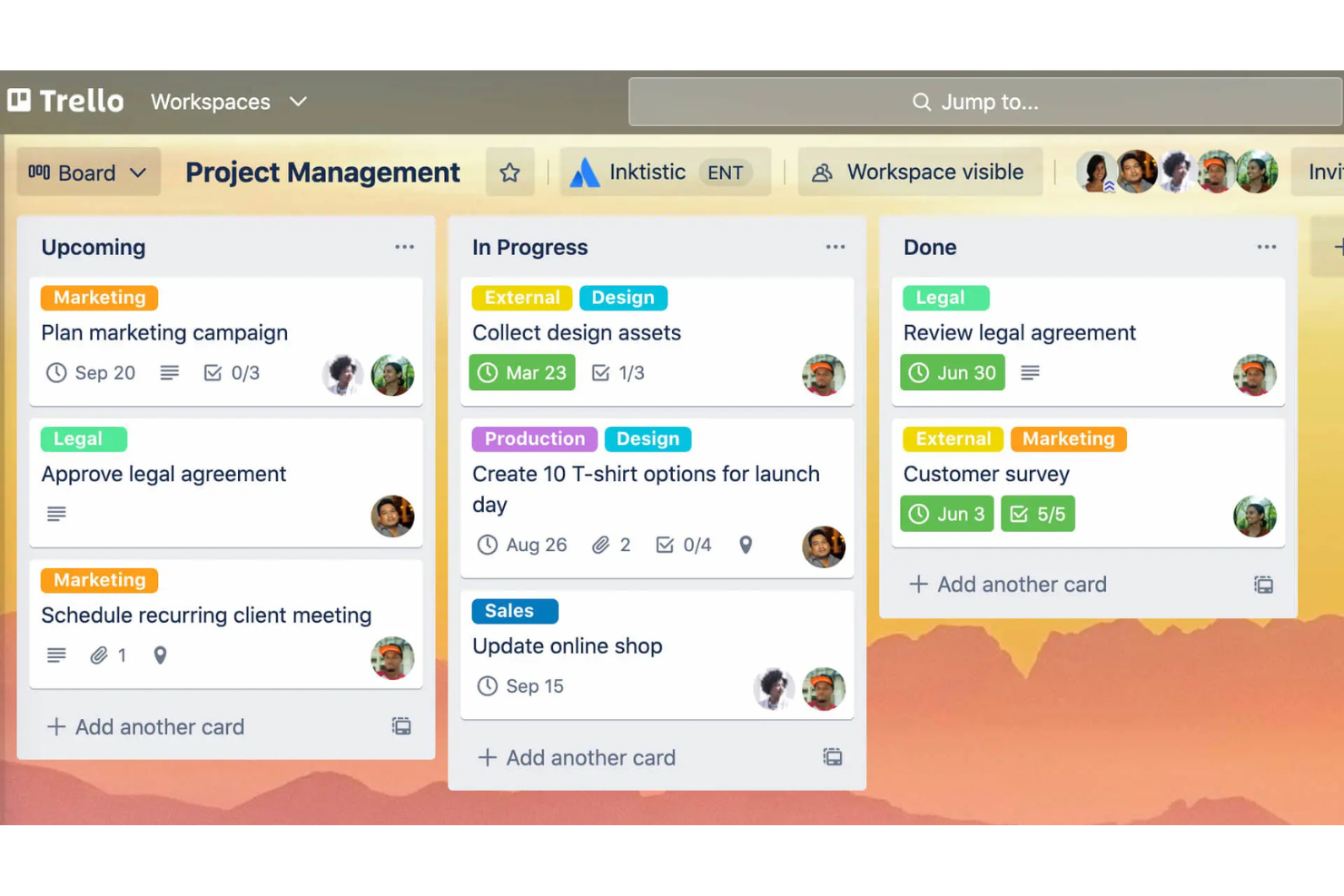
Atlassian Trello ist ein Projektmanagement-Tool, das für seinen benutzerfreundlichen visuellen Ansatz zur Organisation von Aufgaben mithilfe von Boards, Listen und Karten bekannt ist. Es ist bei Teams jeder Größe beliebt, die Projekte und Aufgaben effektiv verwalten müssen.
Warum es eine gute Alternative zu Google Workspace ist: Atlassian Trello bietet anpassbare Aufgaben-Boards, die auf die spezifischen Anforderungen Ihres Teams zugeschnitten werden können, im Gegensatz zum stärker standardisierten Ansatz von Google Workspace. Sie können Boards erstellen, die auf verschiedene Projekte zugeschnitten sind, wodurch Sie bei der Aufgabenverwaltung flexibel bleiben. Mit der Drag-and-Drop-Funktion lassen sich Aufgaben einfach zwischen verschiedenen Phasen verschieben. Die visuelle Oberfläche von Atlassian Trello hilft Ihnen und Ihrem Team, den Gesamtüberblick zu behalten und den Fortschritt auf einen Blick zu verfolgen.
Herausragende Funktionen und Integrationen:
Zu den Funktionen gehören das Hinzufügen von Fälligkeitsdaten und Checklisten zu Aufgaben, farbcodierte Labels zur einfachen Kategorisierung sowie die Möglichkeit, Dateien direkt an Karten anzuhängen. Sie können auch Butler, das integrierte Automatisierungstool von Atlassian Trello, verwenden, um sich wiederholende Aufgaben zu automatisieren. Eine weitere Funktion sind die Power-Ups, die die Funktionalität des Boards durch zusätzliche Tools und Integrationen erweitern.
Zu den Integrationen gehören Slack, Google Drive, Dropbox, Microsoft Teams, Evernote, Jira, GitHub, Salesforce, Mailchimp, Zendesk und weitere.
Pros and Cons
Pros:
- Anpassbare Aufgaben-Boards
- Visuelle Projektverfolgung
- Einfaches Verschieben von Aufgaben
Cons:
- Keine integrierte Zeiterfassung
- Nicht für komplexe Projekte geeignet

Am besten für die Integration von Office-Apps geeignet
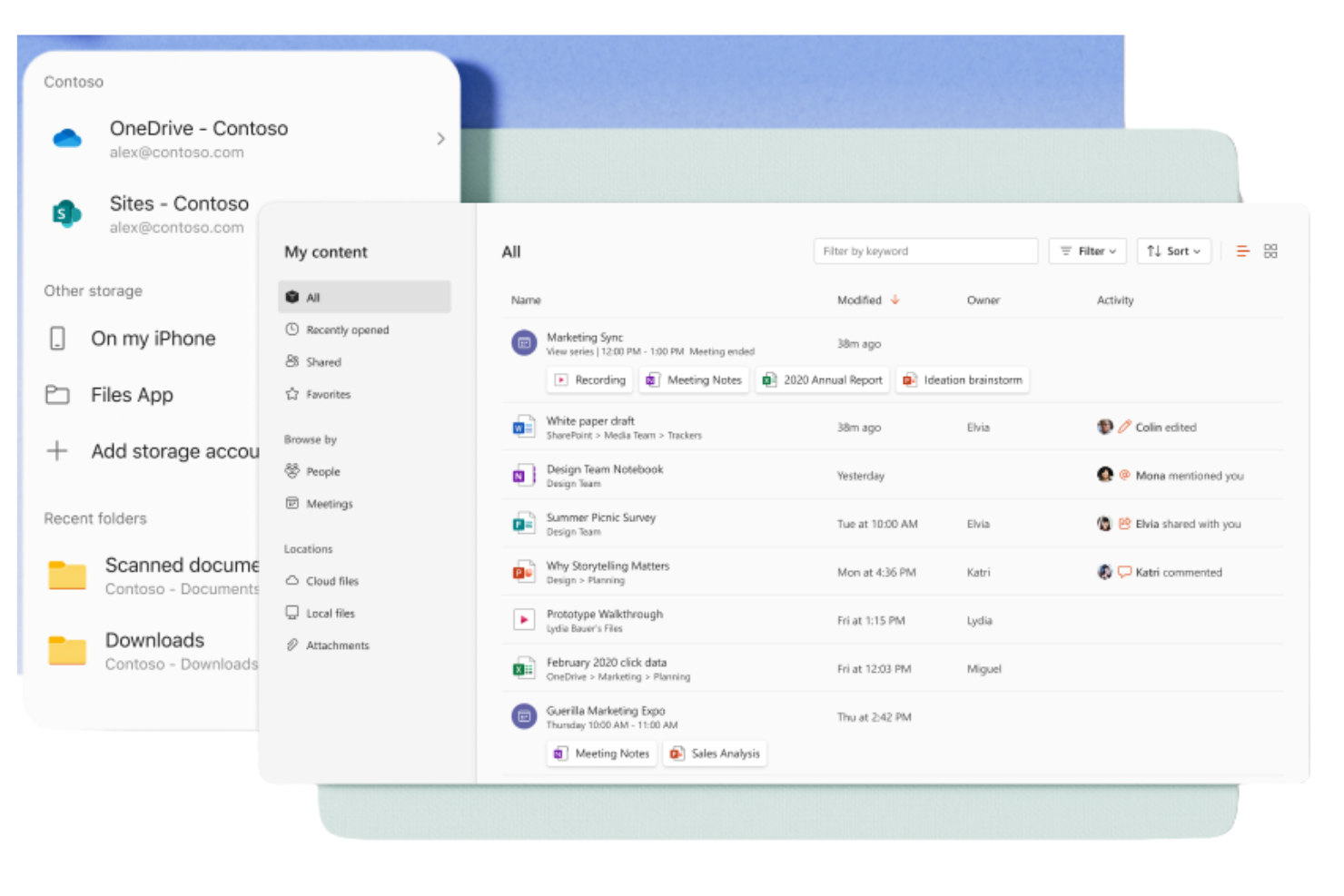
Microsoft 365 Copilot ist eine abonnementbasierte Suite von Produktivitätstools für Unternehmen und Einzelpersonen, die sie beim Erstellen, Zusammenarbeiten und Kommunizieren unterstützt. Sie wird häufig von Fachleuten verwendet, die für alltägliche geschäftliche Aufgaben Zugriff auf Windows-Anwendungen wie Word, Excel und PowerPoint benötigen.
Warum es eine gute Alternative zu Google Workspace ist: Microsoft 365 Copilot bietet eine nahtlose Integration in Office-Apps und eine vertraute Umgebung für Nutzer, die stark auf diese Tools angewiesen sind. Dank des Cloud-Speichers über OneDrive können Sie problemlos auf Dokumente zugreifen und sie teilen. Die Suite umfasst außerdem Microsoft Teams für Kommunikation und Zusammenarbeit und bietet damit eine umfassende Lösung für geschäftliche Anforderungen. Die leistungsstarken Sicherheitsfunktionen sorgen dafür, dass Ihre Daten jederzeit geschützt sind.
Herausragende Funktionen und Integrationen:
Zu den Funktionen gehören erweiterte Möglichkeiten zur Datenanalyse mit Excel-Tabellen, die Ihrem Team helfen können, fundierte Entscheidungen zu treffen. Die Suite bietet außerdem anpassbare Vorlagen in Word und PowerPoint, mit denen Sie professionelle Dokumente und Präsentationen erstellen können. Darüber hinaus bietet Outlook eine integrierte Lösung für E-Mail und Kalender, mit der Sie organisiert bleiben.
Zu den Integrationen gehören Salesforce, Atlassian Trello, Asana, Dropbox, Zoom, Slack, Adobe Acrobat, GitHub, LinkedIn, DocuSign und weitere.
Pros and Cons
Pros:
- Vertraute Benutzeroberfläche für Microsoft-Office-Nutzer
- Leistungsstarke Zusammenarbeit an Dokumenten
- Umfassende Sicherheitsfunktionen
Cons:
- Uneinheitliche Ausgabequalität
- Erfordert OneDrive für Excel

Guru
Am besten für Wissensmanagement
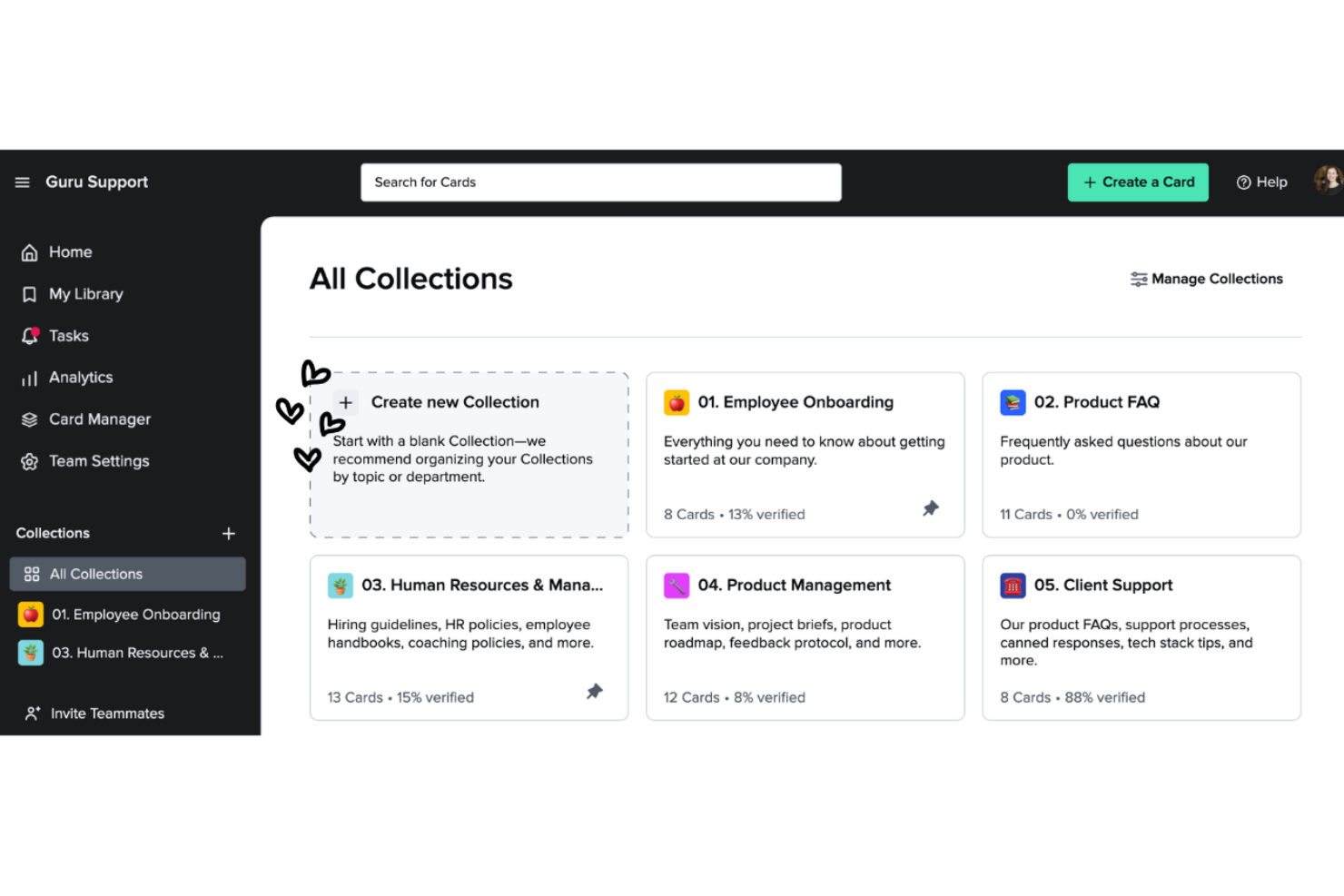
Guru ist ein Wissensmanagement-Tool, das Teams dabei unterstützt, Informationen effizient zu erfassen, zu organisieren und abzurufen. Es ist bei Unternehmen beliebt, die ihren Teams einfachen Zugriff auf wichtiges Wissen und wichtige Ressourcen ermöglichen müssen.
Warum es eine gute Alternative zu Google Workspace ist: Guru bietet Wissensmanagement-Funktionen, die über die Dokumentenspeicherung von Google Workspace hinausgehen. Mit dem kartenbasierten System können Sie Informationen erstellen und kategorisieren, um sie schnell abzurufen. Die Verifizierungsfunktion hält das Wissen Ihres Teams aktuell und korrekt. Echtzeit-Updates und Benachrichtigungen halten alle über die neuesten Änderungen auf dem Laufenden und fördern die Zusammenarbeit.
Herausragende Funktionen und Integrationen:
Zu den Funktionen gehört eine Browsererweiterung, mit der Sie direkt über Ihren Webbrowser auf Informationen zugreifen und diese erfassen können. So lässt sich Wissen einfach sammeln und speichern. Die Analysefunktion bietet Einblicke in die Nutzung der Wissensdatenbank durch Ihr Team und hilft Ihnen dabei, Lücken und Verbesserungsbereiche zu identifizieren. Außerdem können Sie von den KI-gestützten Vorschlägen profitieren, die Ihnen bei Bedarf relevante Informationen anbieten.
Zu den Integrationen gehören Slack, Microsoft Teams, Salesforce, Zendesk, Intercom, Chrome, Outlook, Google Workspace, Zapier und weitere.
Pros and Cons
Pros:
- Effektive Wissensorganisation
- Echtzeit-Updates
- Die Verifizierung gewährleistet die Genauigkeit
Cons:
- Formatierungsoptionen sind begrenzt
- Erfordert kontinuierliche Pflege

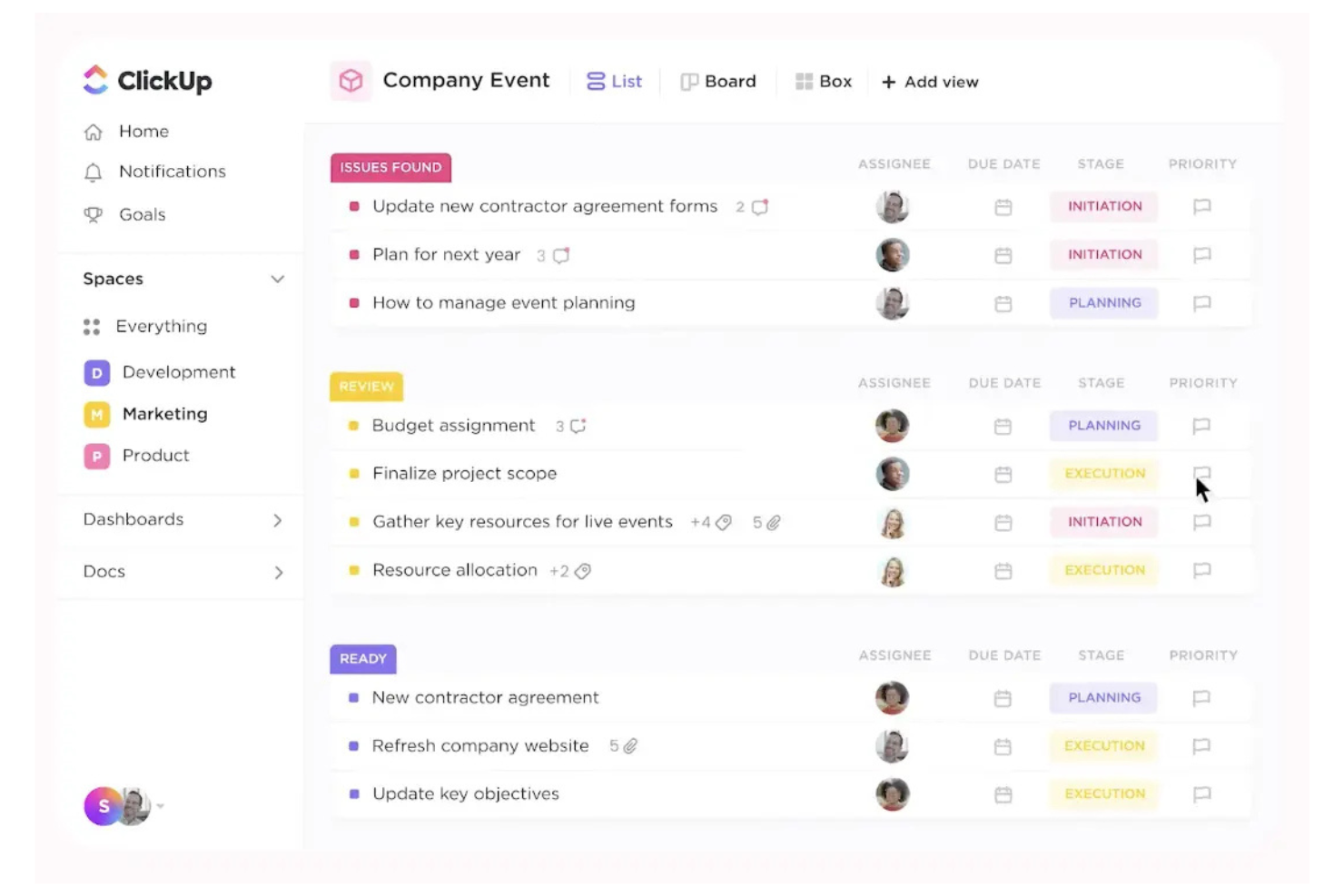
ClickUp ist ein Projektmanagement-Tool für Teams und Unternehmen jeder Größe, das dabei hilft, Aufgaben, Projekte und Arbeitsabläufe zu organisieren. Es bietet eine Vielzahl von Funktionen, die das Projektmanagement optimieren und die Produktivität steigern.
Warum es eine gute Alternative zu Google Workspace ist: ClickUp bietet umfangreiche Projektmanagementfunktionen, die über das hinausgehen, was Google Workspace bietet. Mit der Aufgabenverwaltung können Sie Aufgaben einfach zuweisen und verfolgen, und anpassbare Dashboards ermöglichen es Ihnen, den Projektfortschritt so anzuzeigen, wie es für Sie am besten geeignet ist. Mit der Zielfestlegung von ClickUp kann sich Ihr Team auf gemeinsame Ziele ausrichten, sodass alle auf dem gleichen Stand bleiben.
Herausragende Funktionen und Integrationen:
Funktionen umfassen die Zeiterfassung, mit der Sie überwachen können, wie viel Zeit für Aufgaben aufgewendet wird. Mit der Dokumentenverwaltung können Sie Dokumente direkt innerhalb der Plattform erstellen und speichern. Sie können Mindmaps verwenden, um Ideen und Pläne visuell zu organisieren und so eine bessere Projektplanung zu unterstützen. Zu den Funktionen des Standardtarifs gehören Kanban-Boards und Support rund um die Uhr.
Integrationen umfassen Slack, Google Drive, Dropbox, Microsoft Teams, Zoom, GitHub, Atlassian Trello, Salesforce, Zapier und mehr.
Pros and Cons
Pros:
- Detaillierte Aufgabenverwaltung
- Effektive Funktionen zur Zielfestlegung
- Für große Teams skalierbar
Cons:
- Gelegentliche Leistungsprobleme
- Lernaufwand für erweiterte Funktionen

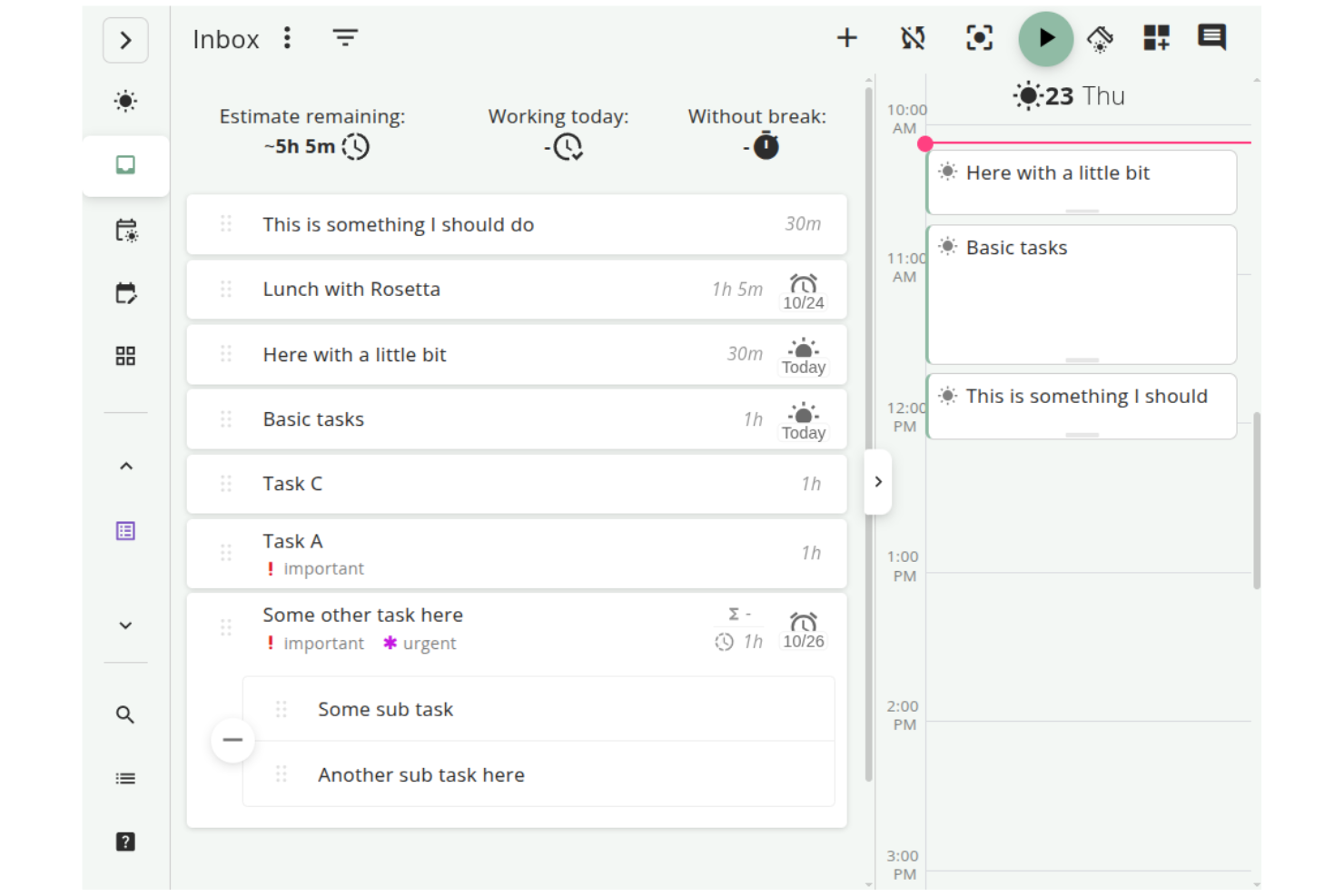
Super Productivity ist ein Open-Source-Aufgabenmanager, der Aufgabenverwaltung, Zeiterfassung und Notizen integriert und für Entwickler, Freiberufler und andere Fachkräfte entwickelt wurde. Der Fokus liegt darauf, die Produktivität zu steigern und gleichzeitig die Privatsphäre der Nutzer zu schützen, indem die Daten offline gespeichert werden.
Warum es eine gute Alternative zu Google Workspace ist: Im Gegensatz zu Google Workspace, das stark auf cloudbasierte Dienste setzt, bietet Super Productivity eine Offline-Aufgabenverwaltung, schützt Ihre Privatsphäre und gibt Ihnen die vollständige Kontrolle über Ihre Daten. Mit Funktionen wie anpassbaren Boards können Sie Aufgaben so organisieren, wie es Ihrem Arbeitsablauf entspricht. Der Fokusmodus und der Pomodoro-Timer helfen Ihnen, während der Arbeitssitzungen konzentriert zu bleiben. Darüber hinaus erleichtern die Zeiterfassung mit einem Klick und die detaillierte Arbeitsprotokollierung die Überwachung Ihrer Produktivität. Außerdem ist die Anwendung mit Linux kompatibel.
Herausragende Funktionen und Integrationen:
Zu den Funktionen gehören eine anpassbare Aufgabenverwaltung mit Optionen für Teilaufgaben und Fälligkeitsdaten, mit denen Sie Ihren Arbeitsablauf individuell gestalten können. Die Kalenderintegration bietet eine detaillierte Tagesübersicht, die Ihnen bei einer effektiven Planung hilft. Mit dem Pluginsystem können Sie zusätzliche Funktionen hinzufügen und die Anwendung an Ihre Bedürfnisse anpassen.
Zu den Integrationen gehören GitHub, GitLab, Jira und weitere.
Pros and Cons
Pros:
- Hochgradig anpassbare Arbeitsabläufe
- Starker Datenschutz und Offline-Nutzung
- Detaillierte Aufgabenverwaltung
Cons:
- Eingeschränkte Teamzusammenarbeit
- Keine integrierte Cloud-Synchronisierung

Cisco Webex ist eine Plattform für Videokonferenzen und Zusammenarbeit, die von Unternehmen und Bildungseinrichtungen für virtuelle Besprechungen, Webinare und die Teamzusammenarbeit genutzt wird. Sie bietet Werkzeuge für die Fernkommunikation und ist daher für Teams unverzichtbar, die zuverlässige und sichere Verbindungen benötigen.
Warum es eine gute Alternative zu Google Workspace ist: Cisco Webex bietet Sicherheitsfunktionen, die Besprechungen sicher und privat halten, und hebt sich dadurch von den allgemeinen Werkzeugen von Google Workspace ab. Durch die Ende-zu-Ende-Verschlüsselung bleiben Ihre Kommunikationen vertraulich. Die Plattform unterstützt HD-Video und -Audio und ermöglicht dadurch klare und effektive Besprechungen. Darüber hinaus macht die Möglichkeit, Veranstaltungen im großen Maßstab abzuhalten, die Plattform vielseitig für verschiedene geschäftliche Anforderungen.
Herausragende Funktionen und Integrationen:
Zu den Funktionen gehören anpassbare Besprechungsanordnungen, mit denen Sie Videostreams nach Ihren Vorlieben anordnen können. Die Plattform bietet außerdem eine Technologie zur Geräuschunterdrückung, die dabei hilft, Ablenkungen durch Hintergrundgeräusche während Anrufen zu minimieren. Der Cisco Webex Assistant erstellt Transkriptionen in Echtzeit und macht das Anfertigen von Notizen einfacher und effizienter.
Zu den Integrationen gehören Microsoft Teams, Salesforce, Google Workspace, Slack, ServiceNow, Atlassian Trello, Dropbox, Zendesk, Asana und mehr.
Pros and Cons
Pros:
- Starke Sicherheitsfunktionen
- Hochwertiges Video und Audio
- Technologie zur Geräuschunterdrückung
Cons:
- Für die Einrichtung sind technische Kenntnisse erforderlich
- Die Benutzeroberfläche kann überladen wirken

Slack
Am besten geeignet für die Integration von Teamnachrichten
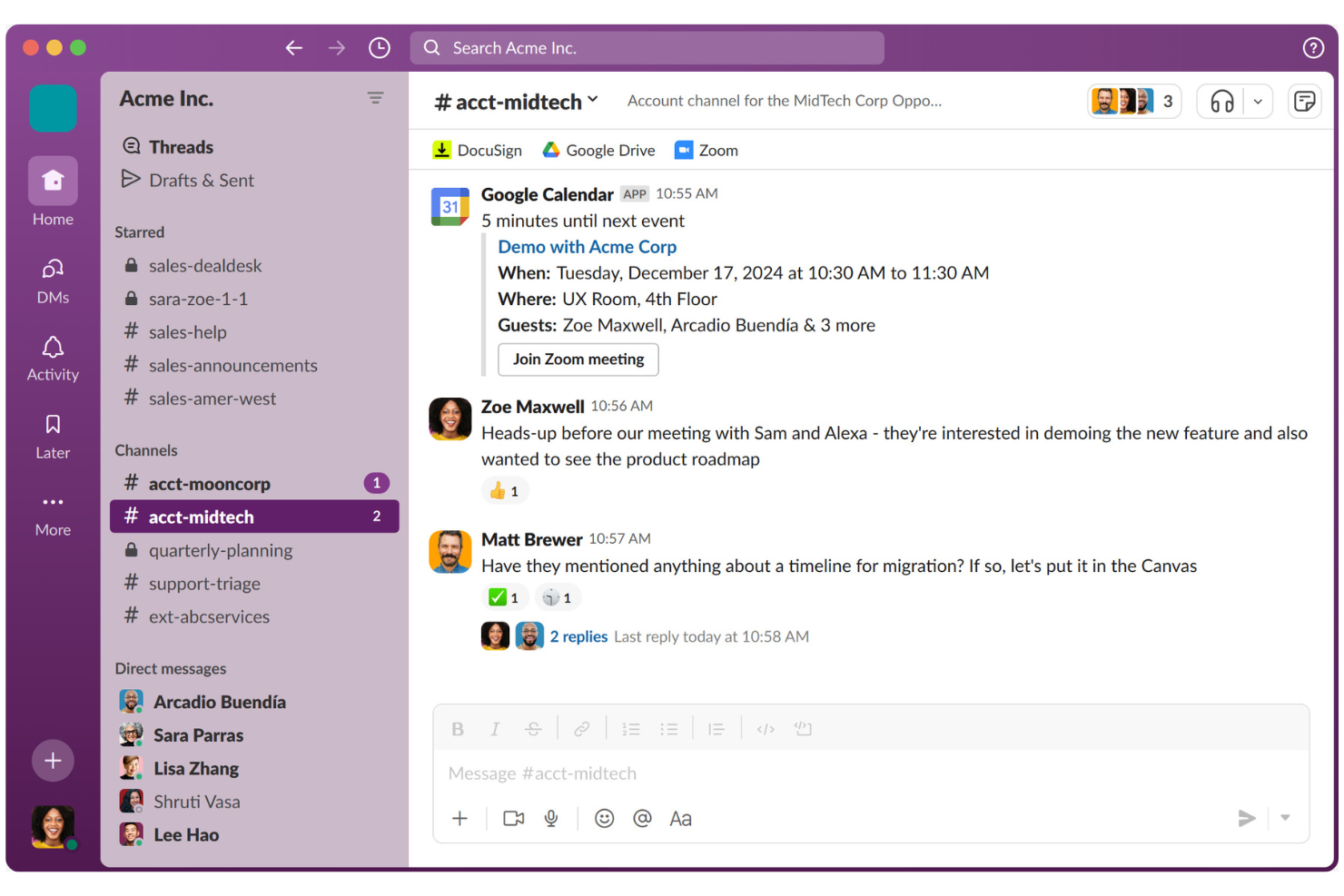
Slack ist eine Kollaborationsplattform, die Teams dabei unterstützt, effizient zu kommunizieren und zusammenzuarbeiten. Sie wird von Unternehmen jeder Größe häufig für Nachrichten, den Dateiaustausch und die Organisation der Teamkommunikation verwendet.
Warum es eine gute Alternative zu Google Workspace ist: Im Gegensatz zum stärker dokumentenorientierten Ansatz von Google Workspace zeichnet sich Slack durch die Integration von Teamnachrichten aus. Mit Kanälen können Sie Diskussionen nach Themen oder Projekten organisieren, wodurch die Kommunikation klar und strukturiert bleibt. Slack Connect ermöglicht die Zusammenarbeit mit externen Partnern und erweitert so Ihr Kommunikationsnetzwerk. Mit Funktionen wie Kurzbesprechungen für schnelle Audio-/Videoanrufe bleibt Ihr Team verbunden und reaktionsfähig.
Herausragende Funktionen und Integrationen:
Zu den Funktionen gehört die Möglichkeit, mithilfe des Workflow-Editors benutzerdefinierte Arbeitsabläufe zu erstellen, wodurch sich Routineaufgaben automatisieren lassen. Sie können außerdem die Canvas-Funktion von Slack zur Erstellung und Freigabe von Dokumenten verwenden. Darüber hinaus unterstützen KI-gestützte Tools dabei, Gespräche zusammenzufassen und wichtige nächste Schritte zu ermitteln.
Zu den Integrationen gehören Google Drive, Microsoft 365 Copilot, Dropbox, Salesforce, Zoom, Asana, Atlassian Trello, GitHub, Zendesk und weitere.
Pros and Cons
Pros:
- Hervorragende Nachrichtenfunktionen
- Starke externe Zusammenarbeit
- Erstellung benutzerdefinierter Arbeitsabläufe
Cons:
- Die mobile Synchronisierung kann fehlerhaft sein
- Benachrichtigungen können ablenken

Ideal für Arbeitsmanagement
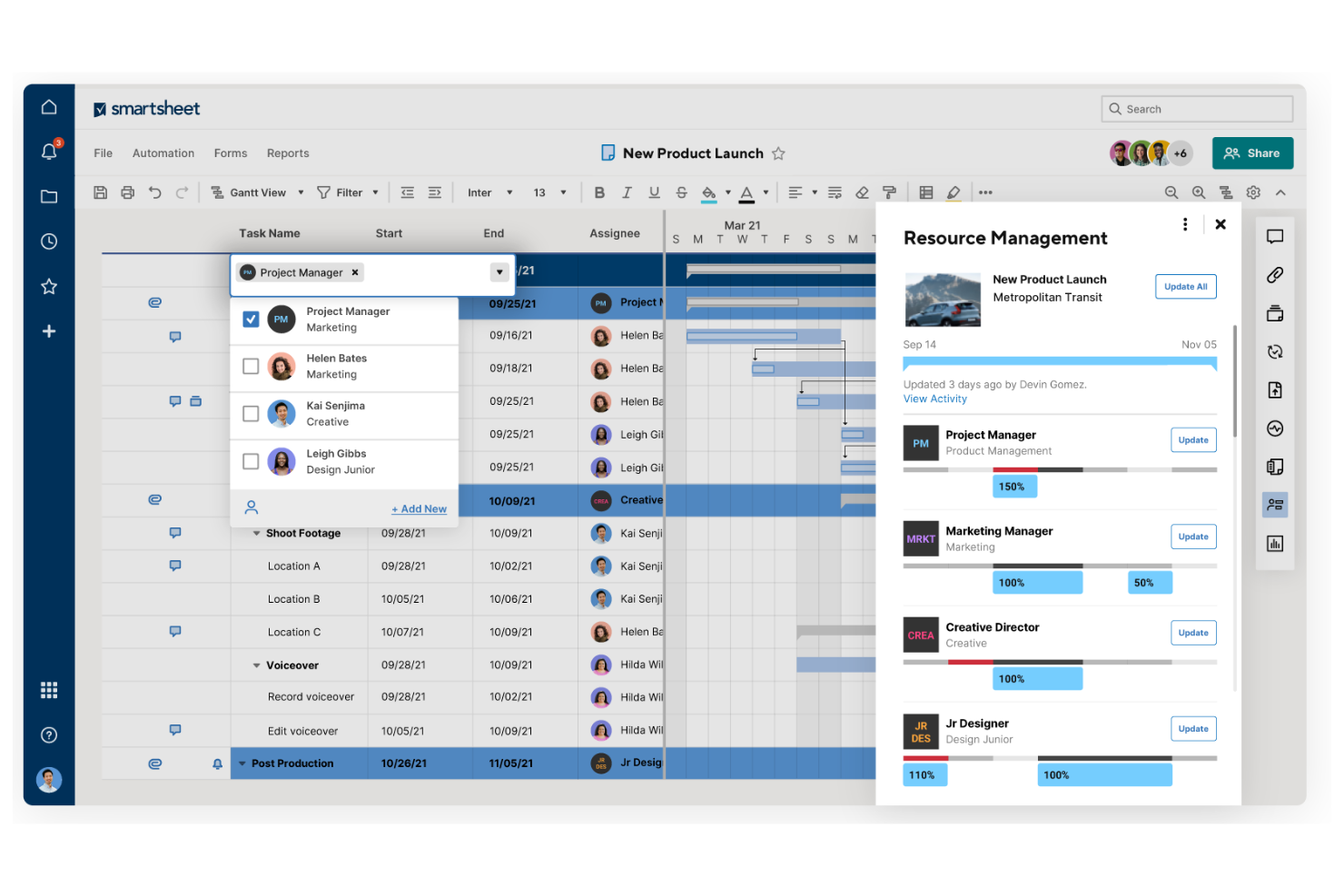
Smartsheet ist eine Plattform für Arbeitsmanagement und Automatisierung, die von Teams und Organisationen zum Planen, Erfassen, Verwalten und Berichten von Arbeitsabläufen genutzt wird. Sie ist eine beliebte Projektmanagementplattform und eignet sich gut für Teams, die ein flexibles Werkzeug zur Nachverfolgung und Verwaltung von Projekten benötigen.
Warum es eine gute Alternative zu Google Workspace ist: Smartsheet bietet Funktionen für das Arbeitsmanagement, die einen strukturierteren Ansatz als Google Workspace ermöglichen. Mit seiner rasterbasierten Oberfläche können Sie Aufgaben und Projekte effizient organisieren. Die Automatisierungsfunktionen der Plattform tragen dazu bei, manuelle Arbeit zu reduzieren, sodass sich Ihr Team auf wichtigere Aufgaben konzentrieren kann. Die Berichtswerkzeuge von Smartsheet liefern Einblicke in den Projektfortschritt und helfen Ihnen, datengestützte Entscheidungen zu treffen.
Herausragende Funktionen und Integrationen:
Funktionen umfassen die Möglichkeit, benutzerdefinierte Formulare zur Datenerfassung zu erstellen, wodurch das Sammeln von Informationen aus Ihrem Team vereinfacht wird. Die Plattform bietet Ansichten in Form von Gantt-Diagrammen, mit denen sich Projektzeitpläne und Abhängigkeiten leicht visualisieren lassen. Sie können außerdem Dashboards verwenden, um wichtige Kennzahlen und Projektstatus in Echtzeit zu verfolgen.
Integrationen umfassen Microsoft Teams, Slack, Google Workspace, Salesforce, Jira, Box, Dropbox, DocuSign, ServiceNow, Tableau und mehr.
Pros and Cons
Pros:
- Flexible Werkzeuge für das Arbeitsmanagement
- Leistungsstarke Automatisierungsfunktion
- Effektive Projektverfolgung
Cons:
- In der mobilen Version fehlen Gantt-Ansichten
- Die Kosten steigen durch Zusatzmodule
New Product Updates from Smartsheet
Smartsheet Adds Column Duplication Without Data
Smartsheet now lets you duplicate columns in table view without copying cell data, while retaining column properties like type, formatting, validation, and dropdown/contact options. For more information, visit Smartsheet's official site.

Wrike
Ideal für das Projektmanagement in Unternehmen
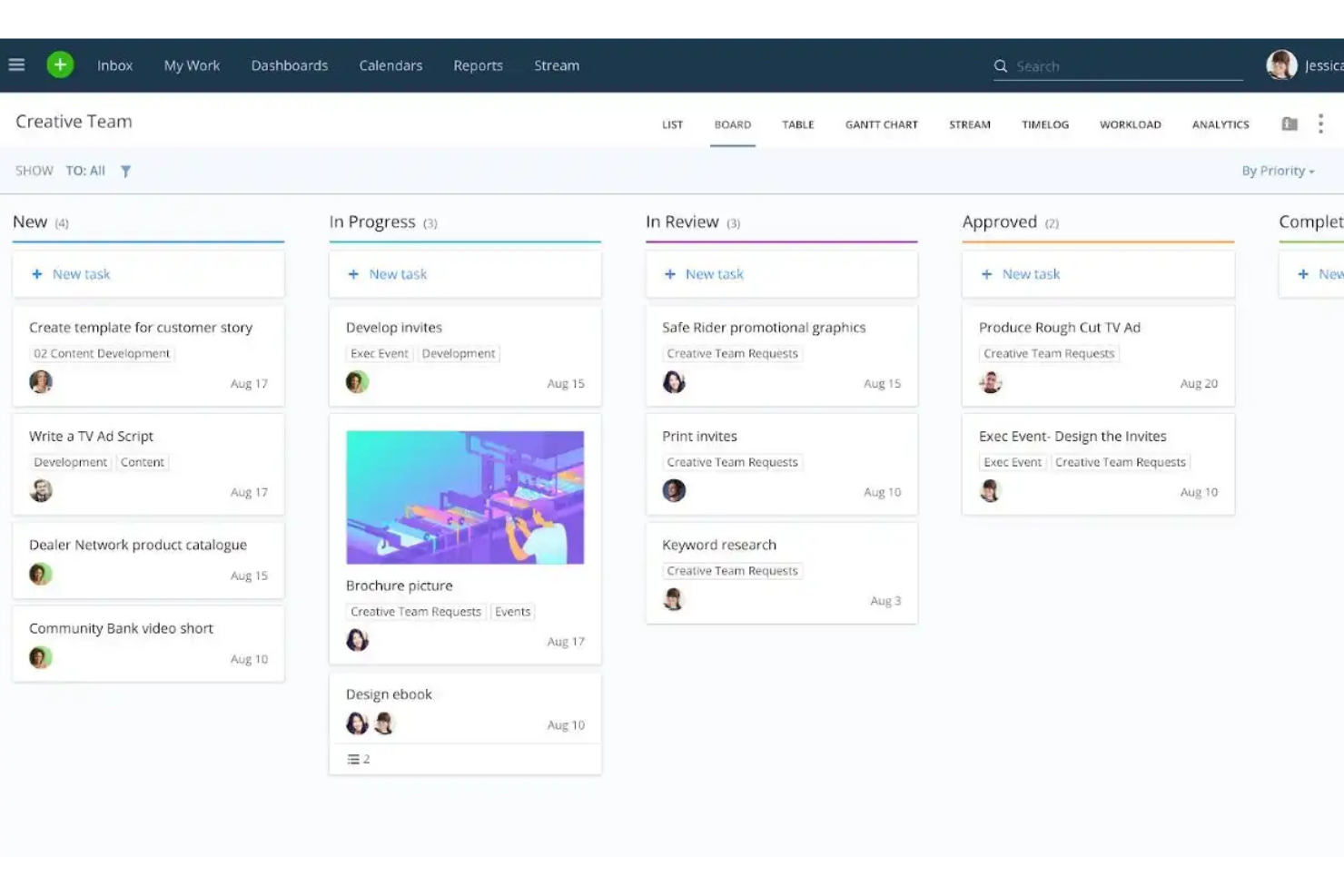
Wrike ist eine Projektmanagement- und Kollaborationsplattform für Teams und Unternehmen, die Aufgaben, Projekte und Arbeitsabläufe effizient verwalten müssen. Sie wird von Fachleuten genutzt, die ein zentralisiertes Tool zur Planung, Ausführung und Nachverfolgung des Projektfortschritts benötigen.
Warum es eine gute Alternative zu Google Workspace ist: Wrike bietet Funktionen für das Projektmanagement in Unternehmen, die mehr Tiefe bieten als die grundlegenden Tools von Google Workspace. Gantt-Diagramme helfen Ihnen, Projektzeitpläne und Abhängigkeiten übersichtlich zu visualisieren, und das Auslastungsmanagement-Modul der Plattform unterstützt Sie dabei, Ressourcen effektiv auf Ihr Team zu verteilen. Darüber hinaus liefert die Echtzeitberichterstattung Einblicke in die Projektleistung und ermöglicht datengestützte Entscheidungen. Sowohl eine kostenlose Version als auch kostenpflichtige Tarife sind verfügbar.
Hervorstechende Funktionen und Integrationen:
Zu den Funktionen gehören benutzerdefinierte Anfrageformulare, die den Erfassungsprozess vereinfachen und Ihrem Team helfen, alle erforderlichen Informationen von Anfang an zu erfassen. Mit der Zeiterfassungsfunktion können Sie überwachen, wie lange Aufgaben dauern, und so die Produktivitätsanalyse unterstützen. Außerdem können Sie Übersichten erstellen, um wichtige Kennzahlen und Projektaktualisierungen auf einen Blick anzuzeigen.
Zu den Integrationen gehören Microsoft Teams, Salesforce, Google Drive, Slack, Dropbox, Box, Adobe Creative Cloud, Tableau und mehr.
Pros and Cons
Pros:
- Umfangreiche Projektmanagement-Tools
- Effektive Ressourcenverteilung
- Echtzeit-Projektverfolgung
Cons:
- Einige Funktionen sind in Menüs verborgen
- Häufige unangekündigte Änderungen der Benutzeroberfläche
New Product Updates from Wrike

Wrike Adds Quick Search to Table View
Wrike adds Quick Search to Table View with full-table search across titles, descriptions, and fields, plus highlighted matches. This helps users find tasks faster in large tables. For more information, visit Wrike’s official site.

Zoom
Am besten für Videokonferenzen

Zoom ist eine Videokommunikationsplattform, die von Unternehmen, Bildungseinrichtungen und Einzelpersonen häufig für virtuelle Besprechungen und Webinare genutzt wird. Sie ermöglicht die Zusammenarbeit und Kommunikation in Echtzeit über Video-, Audio- und Chatfunktionen.
Warum es eine gute Alternative zu Google Workspace ist: Zoom bietet eine dedizierte Plattform für Videokonferenzen, die spezialisierter ist als die allgemeinen Kommunikationstools von Google Workspace. Mit Funktionen wie HD-Video und -Audio kann Ihr Team klare und effektive Besprechungen abhalten. Breakout-Räume ermöglichen kleinere Gruppendiskussionen innerhalb größerer Besprechungen und verbessern so die Zusammenarbeit.
Herausragende Funktionen und Integrationen:
Funktionen umfassen virtuelle Hintergründe, mit denen Sie Ihre Besprechungsumgebung individuell gestalten und ihr eine professionelle Note verleihen können. Gastgebersteuerungen ermöglichen es Ihnen, Teilnehmer effektiv zu verwalten und Besprechungen reibungslos durchzuführen. Zoom bietet außerdem Webinare und große Besprechungen für bis zu Tausende von Teilnehmern und ist damit vielseitig für unterschiedliche Anforderungen einsetzbar.
Integrationen umfassen Microsoft Teams, Slack, Salesforce, Google Calendar, Outlook, Dropbox, HubSpot, Calendly, Zapier, Asana und mehr.
Pros and Cons
Pros:
- Hochwertiges Video und Audio
- Vielseitige Besprechungsoptionen
- Effektive Gastgebersteuerungen
Cons:
- Kann erhebliche Bandbreite verbrauchen
- Sicherheitsbedenken in der Vergangenheit
Weitere Google-Workspace-Alternativen
Hier sind einige weitere Google-Workspace-Alternativen, die es nicht in meine Auswahlliste geschafft haben, die Sie sich aber dennoch ansehen sollten:
- Obsidian
Am besten für die persönliche Wissensverwaltung
- Routine
Am besten für integrierte Aufgaben- und Kalenderverwaltung
- Zoho Workplace
Am besten für die kostengünstige Migration zu einer Komplettlösung


So bewerte ich Alternativen zu Google Workspace
Ich unterteile meine Bewertung in grundlegende Anforderungen – Echtzeit-Dokumente, geschäftliche E-Mail, Cloud-Speicher – und die Unterscheidungsmerkmale, die eine Plattform für einen Wechsel besonders interessant machen.
Kernfunktionalität (Grundvoraussetzungen für diese Liste)
Wenn ich Tools für meine Liste auswähle, bewerte ich jedes auf einer Skala von 0 (bietet die Funktion nicht an) bis 5 (hervorragend in diesem Bereich) hinsichtlich der unten aufgeführten Kernfunktionen. Anschließend rechne ich die Gesamtpunktzahl des Tools in einen Prozentsatz um. Jedes Tool muss mindestens einen Gesamtwert von 65 % erreichen, um in Betracht gezogen zu werden.
- Dokumenten-Kollaboration: Ich prüfe, ob Teams Dokumente, Tabellen und Präsentationen in Echtzeit gemeinsam bearbeiten können – einschließlich Kommentaren, Versionshistorie und Änderungsverfolgung.
- Cloud-Speicher & Dateifreigabe: Der Speicherplatz, die Ordnerstruktur und die Freigaberechte jeder Plattform sind entscheidend – besonders für Teams, die Ergebnisse an externe Partner weitergeben.
- Geschäftliche E-Mail & Kalender: Ich achte auf E-Mails mit eigener Domain und freigegebene Kalender samt Planungstools, da die meisten Projektteams täglich darauf angewiesen sind.
- Team-Kommunikation: Eingebaute Chats, Videoanrufe oder Kanäle halten die Kommunikation nah an der Arbeit. Plattformen wie Zoho Workplace und Microsoft 365 bieten das nativ an.
- Aufgaben- & Projektübersicht: Ich prüfe, ob die Plattform zuweisbare Aufgaben, Fälligkeitsdaten oder Projektansichten bietet – Funktionen, die Produktivitätstools mit tatsächlicher Auslieferung verbinden.
- Integration von Drittanbietern: Die Anbindung an Tools wie Jira, Asana oder Slack über native Integrationen oder eine offene API ist unerlässlich, um sich nahtlos in den bestehenden Projektmanagement-Stack einzufügen.
Sobald ich eine Liste von Tools habe, die diese Kriterien erfüllen, schaue ich, wodurch sich jede Plattform abhebt.
Unterscheidungsmerkmale (Was die Anbieter auszeichnet)
So vergleiche und differenziere ich verschiedene Anbieter:
Herausragende Funktionen
KI-gestützte Assistenten bieten hier echten Mehrwert – ich bevorzuge Plattformen, bei denen Künstliche Intelligenz Dokumente entwerfen, Threads zusammenfassen oder Aufgaben automatisch aus Notizen generieren kann. Kunden- und Gastportale sind wichtig, wenn Teams externe Partner beliefern. Plattformen wie Notion und Zoho Workplace erlauben begrenzten externen Zugang, ohne dass zusätzliche kostenpflichtige Nutzer erforderlich sind. Auch No-Code Automatisierungs-Generatoren sind einen Blick wert, da sie Genehmigungsprozesse auslösen oder Aufgaben über verschiedene Tools hinweg automatisieren und so eigenständige Workflow-Apps ersetzen können.
Über die Funktionen hinaus
Die Migrationsfreundlichkeit bewerte ich als Erstes – wer von Google Workspace umsteigt, muss meist jahrelange Dateien, E-Mails und Ordnerstrukturen mitnehmen. Plattformen wie Microsoft 365 und Zoho Workplace bieten spezielle Importwerkzeuge, mit denen sich dieser Wechsel reibungsloser gestalten lässt. Auch die Preismodelle unterscheiden sich stark; ich prüfe, ob Gast- oder externer Zugang kostenpflichtige Nutzerplätze erfordert, da Projektteams oft externe Auftragnehmer einbinden. Sicherheitszertifizierungen wie SOC 2 und DSGVO-Konformität sind ebenso wichtig, insbesondere für Teams, die sensible Projektdaten grenzüberschreitend verwalten.
Warum nach einer Google-Workspace-Alternative suchen?
Google Workspace ist zwar eine gute Wahl für ein cloudbasiertes Produktivitätstool, doch es gibt mehrere Gründe, warum einige Nutzer nach alternativen Lösungen suchen. Sie könnten aus folgenden Gründen nach einer Google-Workspace-Alternative suchen:
- Sie benötigen bessere Datenschutzkontrollen
- Ihr Team benötigt fortschrittlichere Funktionen
- Sie haben Integrationsprobleme mit anderen Tools
- Sie wünschen sich mehr Anpassungsmöglichkeiten
- Ihr Unternehmen benötigt lokales Hosting von Daten
- Sie suchen eine kostengünstigere Lösung
Wenn Sie sich in einem dieser Punkte wiedererkennen, sind Sie hier genau richtig. Meine Liste enthält mehrere cloudbasierte Optionen für Produktivitätstools, die besser für Teams geeignet sind, die mit diesen Herausforderungen im Google-Ökosystem konfrontiert sind und nach alternativen Lösungen suchen.
Funktionen
Hier sind einige der wichtigsten Funktionen von Google Workspace, mit denen Sie vergleichen können, was alternative Lösungen bieten:
- Professionelle E-Mail: Bietet den E-Mail-Dienst Gmail und E-Mail-Hosting mit benutzerdefinierten Domainnamen und geschäftlichen E-Mail-Adressen, um die Glaubwürdigkeit Ihrer Marke zu steigern.
- Dateiverwaltung: Bietet über Google Drive sichere Optionen zur Speicherung und Freigabe von Dateien für Ihr Team.
- Videokonferenzen: Nutzt Google Meet für die Zusammenarbeit in Echtzeit und Videokonferenzen. Wenn Sie den Teil von Google Workspace ersetzen möchten, der auf Besprechungen entfällt, vergleichen Sie Alternativen zu Google Meet.
- App-Integration: Lässt sich nahtlos in externe Anwendungen integrieren, um Ihre Arbeitsabläufe zu verbessern.
- Administrationsverwaltung: Bietet über die Administratorkonsole eine zentrale Kontrolle über Benutzerkonten und Sicherheitseinstellungen.
- Datensicherheit: Bewahrt Geschäftsdaten mithilfe von Google Vault zu Sicherheitszwecken auf und verfolgt sie. Außerdem werden verschiedene Authentifizierungsprotokolle unterstützt.
- Website-Erstellung: Ermöglicht die einfache Entwicklung von Websites mit Google Sites ohne Programmierkenntnisse.
- Automatisierung: Automatisiert Aufgaben, um Ihre Geschäftsprozesse effizienter zu gestalten.
- Gerätekompatibilität: Ist für die Nutzung mit verschiedenen Browsern und Betriebssystemen optimiert, einschließlich Android und macOS, insbesondere in Verbindung mit Google Chrome.
- Zusammenarbeit in Echtzeit: Ermöglicht mehreren Benutzern, Dokumente gleichzeitig zu bearbeiten, und verbessert dadurch die Teamarbeit.
Wie geht es weiter:
Wenn Sie gerade cloudbasierte Produktivitätstools recherchieren, kontaktieren Sie kostenlos einen Berater von SoftwareSelect und erhalten Sie Empfehlungen.
Sie füllen ein Formular aus und führen ein kurzes Gespräch, in dem Ihre spezifischen Anforderungen besprochen werden. Anschließend erhalten Sie eine Vorauswahl an Software, die Sie prüfen können. Die Berater unterstützen Sie sogar während des gesamten Kaufprozesses, einschließlich der Preisverhandlungen.