

10 Best Project Management Software For Architects In 2026

10 Best Architecture Project Management Software Shortlist


Managing architectural projects is a balancing act—juggling design precision, client expectations, and regulatory requirements. Without the right tools, it’s easy for timelines to slip, budgets to spiral, and communication gaps to derail progress. That’s where project management software tailored for architects comes in. But with so many options available, finding the best fit for your firm can be overwhelming.
I’ve tested and analyzed the leading tools designed for architecture teams, evaluating their features, usability, and industry-specific functionality. In this list, I’ll walk you through the best project management software for architects, helping you choose the right solution to keep your projects running smoothly.
Why You Can Trust Us
We’ve been testing and reviewing project management software since 2012. As project managers ourselves, we know how critical and difficult it is to make the right decision when selecting software.
We invest in deep research to help our audience make better software purchasing decisions. We’ve tested more than 2,000 tools for different project management use cases and written over 1,000 comprehensive software reviews. Learn how we stay transparent & our software review methodology.
The Best Project Management Software For Architects Comparison Chart
Here is a table you can use to compare all the tools we just covered in the overviews.
| Tool | Best For | Trial Info | Price | ||
|---|---|---|---|---|---|
| 1 | Best for detailed project planning | Free demo available | Pricing upon request | Website | |
| 2 | Best for budgeting & invoicing features | 14-day free trial + free demo available | From $10/month (billed annually) | Website | |
| 3 | Best for mid-size and enterprise organizations | 14-day free trial + free plan available | From $10/user/month (billed annually) | Website | |
| 4 | Best for resource management and planning | 14-day free trial | From $9.99/user/month (billed annually) | Website | |
| 5 | Best for financial oversight in architecture | 21-day free trial + free demo available | From $17.10/user/month (billed annually) | Website | |
| 6 | Best project management, estimate, and invoicing solution | 30-day free trial + free demo available | From $39/month (billed annually) | Website | |
| 7 | Best for project management and resource allocation | 14-day free trial available | From $9/user/month (billed annually) | Website | |
| 8 | The must-have planning software for architecture firms | Free demo | Pricing upon request | Website | |
| 9 | Best with built-in client management tools | Free trial + free demo available | From $29/user/month | Website | |
| 10 | Best for an all-in-one solution | Not available | Pricing upon request | Website |

-

Celoxis
Visit WebsiteThis rating combines scores from multiple user review sites to reflect overall customer sentiment about the product.4.5 -
Accelo
Visit WebsiteThis rating combines scores from multiple user review sites to reflect overall customer sentiment about the product.4.4 -
Wrike
Visit WebsiteThis rating combines scores from multiple user review sites to reflect overall customer sentiment about the product.4.3




Overviews Of The Best Project Management Software For Architects
Here’s my take on the key features and best use case for my list of best project management software for architects.

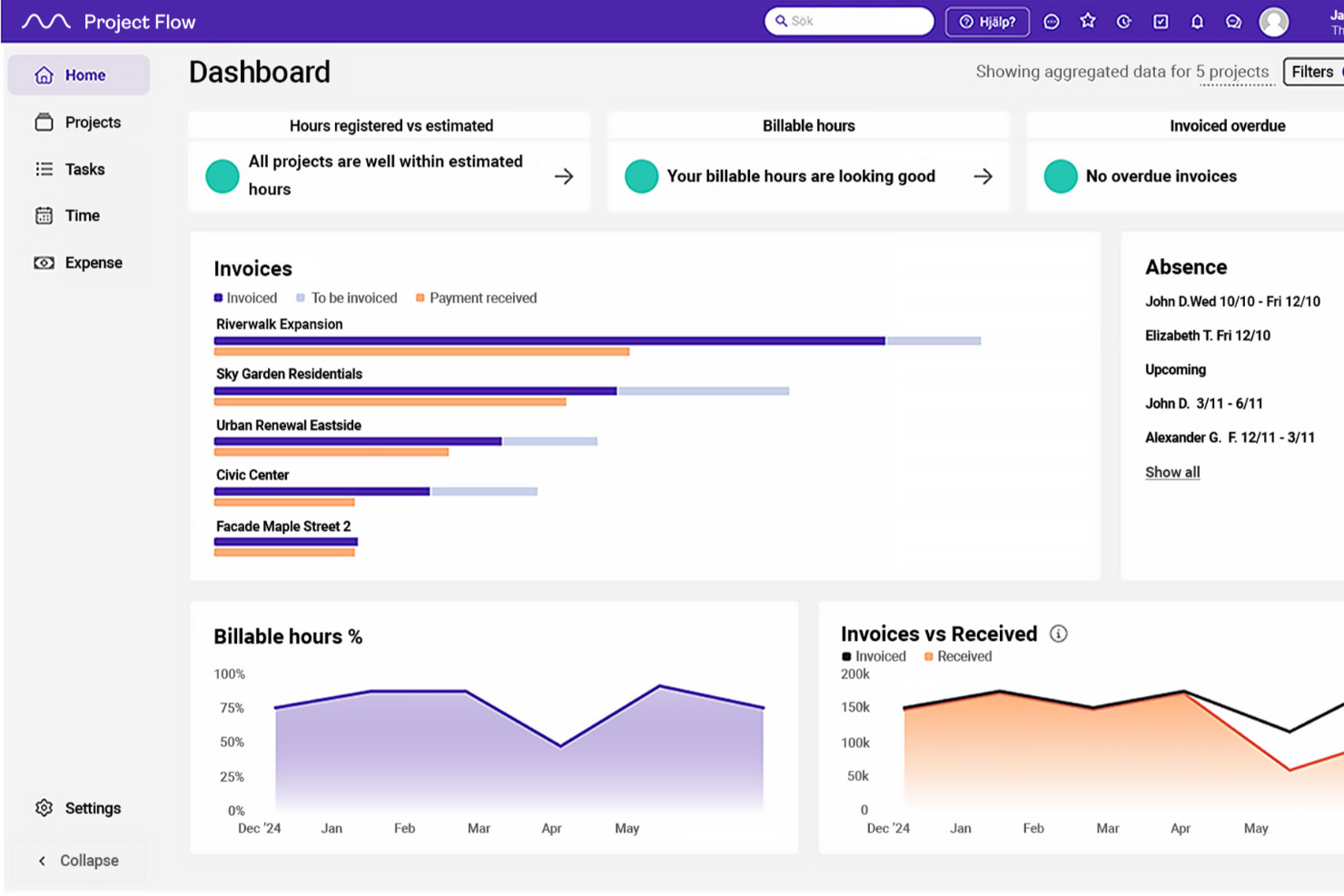
Project Flow by Milient is designed for architecture firms and design professionals who need to manage complex projects, coordinate teams, and keep every phase of their architectural workflow organized from planning to delivery.
Who Is Project Flow by Milient Best For?
Project Flow by Milient is a strong fit for small to mid-sized architecture and engineering firms that need structured project oversight across multiple concurrent projects.
Why I Picked Project Flow by Milient
Project Flow by Milient earns its spot on my shortlist because of how well it handles the layered complexity of architectural project planning. I like that it lets you break projects down into detailed phases, tasks, and subtasks with dependencies, which mirrors how architecture projects unfold across design, documentation, and construction stages. My team can track progress at a granular level without losing sight of the overall project timeline. The built-in resource planning tools show who is allocated to each active project.
Project Flow by Milient Key Features
- Timekeeping: Log hours directly against project tasks and phases, with manager visibility into time consumption across the team.
- Offer builder: Create project quotes inside the platform and convert them into live projects with a single click.
- Quality assurance checklists: Attach checklists and non-conformity tracking directly to projects to manage quality standards at each stage.
- Invoicing: Generate invoices based on registered project time and expenses without re-entering data manually.
Project Flow by Milient Integrations
Integrations include Microsoft Teams, Slack, Outlook, Google Calendar, Power BI, SharePoint, Tripletex, Visma, Xero, and QuickBooks.
Pros and Cons
Pros:
- Integrated features like checklists and non-conformity tracking
- Centralized knowledge management
- Covers the full project lifecycle—from proposal to invoicing
Cons:
- May be niche for broader teams
- Geographically focused integrations

Best for budgeting & invoicing features

Productive is a project management platform for architecture firms and creative agencies that need to manage projects, resources, and finances in one place, helping teams coordinate tasks, track time, and keep projects profitable.
Who Is Productive Best For?
Productive suits small to mid-sized architecture firms that need a single platform to manage both project delivery and financial operations.
Why I Picked Productive
Productive earns its spot on my shortlist because of how tightly its budgeting and invoicing features connect to actual project activity. I like that you can build budgets using flexible billing types—fixed price, time & materials, or non-billable—and split large architecture projects into separate budget phases. That's genuinely useful when you're managing a multi-phase build where design, documentation, and construction administration each carry different fee structures. I also use the real-time profitability tracking to see budget burn as time gets logged, so I'm not waiting until the end of the month to find out a project went over.
Productive Key Features
- Resource planning: Schedule team members across projects and visualize capacity to avoid overbooking on concurrent architecture projects.
- Time tracking: Log billable and non-billable hours directly against tasks and projects with built-in timers or manual entry.
- Project task management: Organize work into tasks, subtasks, and dependencies to map out phased deliverables across a project lifecycle.
- Custom reporting: Build reports across projects, people, and financials to surface workload distribution and project performance data.
Productive Integrations
Integrations include Jira, HubSpot, Xero, Google Calendar, Sage, Gmail, Microsoft Outlook, Slack, BugHerd, and QuickBooks.
Pros and Cons
Pros:
- Comprehensive features for financial management and reporting
- Robust resource planning features
- Customizable dashboard and reporting
Cons:
- Could have more integrations
- Initial setup and onboarding can be time-consuming
New Product Updates from Productive

Productive Adds Agent Triggers, Teams Integration, and Time Controls
Productive adds automated agent triggers, broader AI file support, Microsoft Teams integration, Resource Planner improvements, and new time entry controls. These updates expand automation while improving scheduling, collaboration, and time tracking. For more information, visit Productive’s official site.

Wrike
Best for mid-size and enterprise organizations
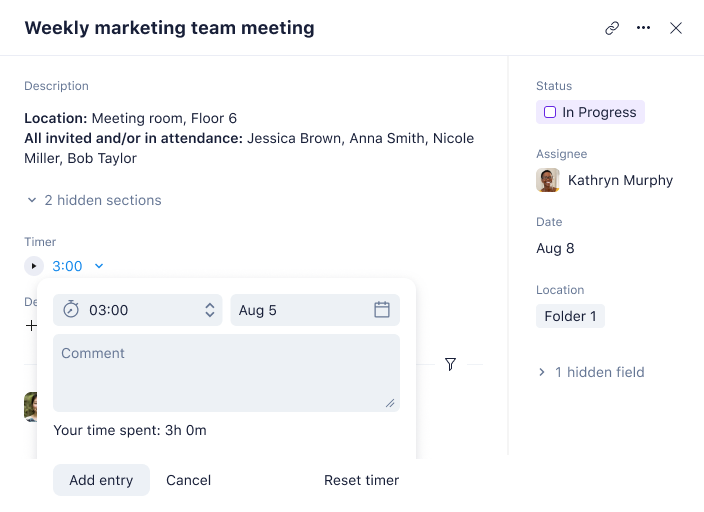
Wrike is a collaborative work management platform designed for creative agencies to plan, manage, and complete work at scale.
Project management features include custom workflows, custom dashboards, process streamlining, and collaboration functionalities such as discussion boards, document management, and version control.
One feature Wrike is missing is billing and invoicing capabilities, although it does have a time tracking tool built-in.
Wrike offers a free plan with limited features and a free trial for paid plans.
New Product Updates from Wrike

Wrike Inbox Adds Search and Notification Filters
Wrike Inbox adds search across Incoming, Sent, and Archive, along with filters for Approvals and @mentions. The update helps users find specific notifications faster and apply bulk actions only to matched results. For more information, visit Wrike’s official site.
 .
.
Best for resource management and planning
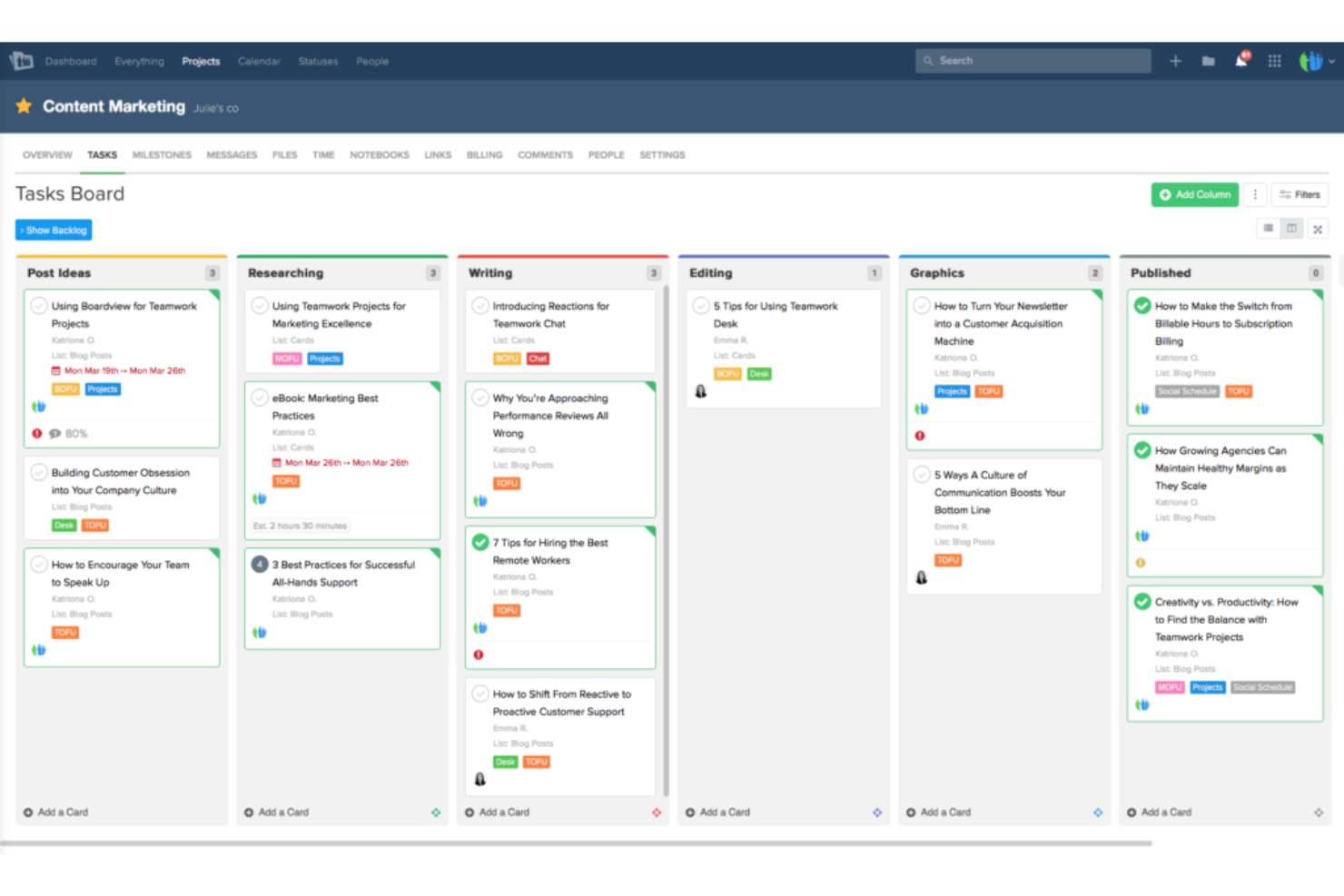
Teamwork.com gives architecture firms and design teams a project management platform built to handle complex timelines, resource allocation, and client collaboration, helping you keep every phase of your projects organized and on track.
Who Is Teamwork.com Best For?
Teamwork.com is a strong fit for small to mid-sized architecture firms that need to manage multiple concurrent projects across cross-functional teams.
Why I Picked Teamwork.com
I picked Teamwork.com as one of the best because of how well its resource management tools map to the way architecture firms actually run projects. The Workload Planner gives you a real-time view of who's available and who's stretched thin, so you can redistribute tasks across your team before a deadline slips. I also like the Resource Scheduler for long-term forecasting—you can block out capacity for upcoming project phases, like schematic design or construction documentation, without locking in firm assignments before a contract is signed. The tentative projects feature is especially useful here, letting you scenario plan around potential work so you're never caught understaffed when a new commission comes through.
Teamwork.com Key Features
- Gantt charts: Visualize project timelines, set task dependencies, and adjust schedules across multiple project phases with a drag-and-drop interface.
- Time tracking: Log billable and non-billable hours directly against tasks and projects to support accurate client invoicing and budget monitoring.
- Milestones: Set and track key project checkpoints, like design approvals or permit submissions, to keep deliverables on schedule.
- Client permissions: Give clients controlled access to specific project areas so they can review progress and files without seeing internal team activity.
Teamwork.com Integrations
Integrations include Slack, Microsoft Office, Google Drive, Dropbox, Box, Jira, Harvest, Xero, BugHerd, and ChatGPT.

Best for financial oversight in architecture

Projectworks is a project management platform designed for architecture firms and consultancies that need to manage project budgets, resources, and timelines while keeping a close eye on financial performance.
Who Is Projectworks Best For?
Projectworks is a strong fit for small to mid-sized architecture and engineering firms that bill by the hour and need tight control over project finances.
Why I Picked Projectworks
Projectworks earned a spot on my shortlist for its financial oversight across the project lifecycle. I particularly like the real-time financial reporting, which tracks project margin, budget burn, and WIP all in one dashboard—so I can see exactly where a project stands financially without digging through spreadsheets. The forecasting tools are also useful: I can see projected revenue and margin by project or by person, which helps detect budget overruns earlier. For architecture firms billing hourly across multiple concurrent projects, that level of visibility is hard to replicate in a general-purpose tool.
Projectworks Key Features
- Resource scheduling: Assign team members to projects and visualize capacity across your entire firm in a single timeline view.
- Time tracking: Log billable and non-billable hours directly against project phases to keep timesheets accurate and audit-ready.
- Project phase management: Break projects into distinct phases with individual budgets and deadlines to track progress at a granular level.
- Invoicing: Generate invoices directly from tracked time and expenses, with support for fixed-fee and time-and-materials billing models.
Projectworks Integrations
Integrations include Xero, QuickBooks, MYOB, Jira, Azure DevOps, HubSpot, Salesforce, 12d Synergy, Employment Hero, and Microsoft Outlook.
Pros and Cons
Pros:
- Forecasting tools anticipate future project gaps
- Resource planning helps maximize staff utilization
- Real-time financial visibility supports informed decisions
Cons:
- Limited offline functionality for field staff
- No built-in design tools for architects
Best project management, estimate, and invoicing solution

Contractor Foreman is built for architects and construction professionals who need a single platform to manage projects, track estimates, handle invoicing, and keep all project documents organized from design through completion.
Who Is Contractor Foreman Best For?
Contractor Foreman is a good fit for small to mid-sized architecture and construction firms that need to manage the full project lifecycle without juggling multiple tools.
Why I Picked Contractor Foreman
I picked Contractor Foreman as one of the best because it covers the full financial arc of a project in one place—from estimate to invoice—without requiring separate tools for each step. I like that estimates are built from a cost-items database with individual markups, then converted into a project and later into an invoice without re-entering data. Change orders are handled just as cleanly: once a CO is approved, it automatically updates the contract amount and feeds into the job costing reports, so my team always has an accurate picture of the revised budget. The client portal lets clients review and approve estimates, sign change orders, and pay invoices online.
Contractor Foreman Key Features
- Gantt (CPM) scheduling: Build and manage timelines with a critical-path Gantt chart to sequence tasks and track dependencies.
- Daily logs: Record weather, site visitors, safety notes, materials used, and crew activity from the app while on site.
- RFI and notices: Send requests for information and schedule or compliance notices directly from the app; each communication is automatically documented.
- Submittals: Generate and track submittals to get materials and specifications approved before installation, keeping the project on schedule.
Contractor Foreman Integrations
Integrations include QuickBooks, Google Calendar, Outlook 365, MS Project, Gusto, WePay, Angi Leads (Home Advisor), and Google Drive.

Birdview
Best for project management and resource allocation

Birdview is a project management platform for architecture firms and project-based teams that coordinate complex workflows, manage resources, and keep projects on track from planning through delivery.
Who Is Birdview Best For?
Birdview suits mid-sized architecture and professional services firms managing multiple concurrent projects with clear visibility into team capacity and workload.
Why I Picked Birdview
I picked Birdview as one of the best because of how well its project management and resource allocation tools work together in a single platform. When you're running multiple architecture projects at once—each with different phases, deadlines, and team members—Birdview's resource planning lets you book people in advance based on their availability, role, and skills, so you're not scrambling to staff a design review at the last minute. I also like the "What-If" analysis feature, which lets you model capacity scenarios before committing resources to a new project. On the project side, Gantt charts, Kanban boards, and table views give your team the flexibility to track work the way that makes sense for each phase of delivery.
Birdview Key Features
- Budget tracking: Monitor estimated vs. actual costs across tasks and projects as work progresses.
- Client portal: Give clients and stakeholders a dedicated space to review, approve, and annotate project deliverables.
- Time tracking and timesheets: Log hours against specific tasks to monitor effort and identify where time is being spent.
- AI assistant: Generate project plans from a project name, predict timelines, and find suitable candidates for tasks.
Birdview Integrations
Integrations include Office 365, MS Teams, Jira, ServiceNow, QuickBooks, Adobe Creative Cloud, SharePoint, MS Excel, MS Project, and MS Outlook.

Mosaic
The must-have planning software for architecture firms

Mosaic is a project management platform built for architecture and engineering teams who need to plan projects, allocate resources, and track progress across complex design workflows.
Who Is Mosaic Best For?
Mosaic is a strong fit for small to mid-sized architecture and engineering firms that need tighter control over project planning and resource allocation.
Why I Picked Mosaic
Mosaic earns its spot on my shortlist because it's purpose-built for architecture and engineering firms in a way that general project management tools simply aren't. I particularly like the AI Team Builder, which assembles project teams based on actual availability and skill sets rather than gut instinct. I also use the budget management tools to track fee-based and hourly work side by side, with time variance analysis that shows estimated vs. actuals in real time. When scope creep hits mid-project, that visibility makes it much easier to have an informed conversation with the client.
Mosaic Key Features
- Project timeline view: Visualize project phases and milestones across your entire portfolio on a single Gantt-style timeline.
- Utilization tracking: Monitor team utilization rates in real time to identify over- and under-allocated staff across active projects.
- Role-based planning: Assign work by role rather than individual, making it easier to plan ahead before specific team members are confirmed.
- Reporting dashboards: Access pre-built reports covering project health, financial performance, and team workload in one place.
Mosaic Integrations
Integrations include Asana, BQE Core, Deltek Ajera, Deltek Vantagepoint, Deltek Costpoint, Deltek PIM, Dynamics 365 Project Operations, GitHub, Google Calendar, and QuickBooks Online.

Ravetree
Best with built-in client management tools

Ravetree is a project management platform designed for architecture firms and creative agencies that need to manage projects, resources, and client communications in one place.
Who Is Ravetree Best For?
Ravetree is a strong fit for small to mid-sized architecture firms that need a single platform to manage both project delivery and client relationships.
Why I Picked Ravetree
Ravetree earns its spot on my shortlist because the built-in CRM connects directly to projects, tasks, files, and billing—so I'm not jumping between tools to track a client relationship and a live project at the same time. I particularly like the deals pipeline, where winning a deal can automatically trigger a new project from a template, which cuts out a lot of manual setup when onboarding a new architecture client. The client portal is another feature I find genuinely useful—clients can view real-time project updates, submit requests, approve files, and communicate via comment feeds without needing a separate login to another platform.
Ravetree Key Features
- Resource scheduling: Assign team members to tasks and projects based on availability using a visual scheduling interface.
- Time tracking: Log billable and non-billable hours directly against tasks and projects for accurate invoicing.
- Budget management: Set project budgets, track expenses, and monitor spend against estimates in real time.
- Document management: Store, organize, and share project files with version control and team-level access permissions.
Ravetree Integrations
Integrations include Harvest, Toggl, Todoist, Microsoft Excel, Trello, Resource Guru, monday.com, Favro, and Asana.


Deltek Ajera is built for architecture and engineering firms that need to manage projects, resources, and finances in one place, helping teams handle project delivery, billing, and reporting without juggling multiple systems.
Who Is Deltek Ajera Best For?
Deltek Ajera is a good fit for small to mid-sized architecture and engineering firms that want project management and accounting tools under one roof.
Why Choose Deltek Ajera
Deltek Ajera is one of the few tools purpose-built for architecture and engineering firms that covers the full project lifecycle in a single system. What I like most is the Project Command Center, which lets my team manage budgets, track resource allocation, and monitor project health all from one dashboard—without switching between a project tool and a separate accounting platform. The Schedule Manager is another feature I use regularly; it lets you assign staff to specific project phases, spread budgets across date ranges, and adjust workloads as timelines shift. When time entries flow directly into billing and financial reporting, there's no manual reconciliation between systems.
Deltek Ajera Key Features
- Time and expense tracking: Log billable and non-billable hours directly against project phases and tasks for accurate client invoicing.
- Project accounting: Manage accounts payable, accounts receivable, and general ledger within the same platform as your project data.
- Real-time dashboards: View up-to-date project financials, utilization rates, and profitability metrics without running manual reports.
- Client invoicing: Generate invoices based on project type, contract terms, and tracked time entries directly from project records.
Deltek Ajera Integrations
Integrations include Deltek Vantagepoint CRM, Deltek ArchiSnapper, and Deltek PIM.
Other Project Management Software for Architects
Here are a few more that didn’t make the top list but are still worth your consideration.
- Taimer
For CRM capabilities
- Factor A/E
For AIA-aligned project workflows
- Miro
For collaborative whiteboards for all stakeholders
- ClickUp
With resource and workflow management tools
- monday AI Workspace
For automation capabilities
- Teamhood
For visualizing project progress
- Workzone
For multi-project oversight
- Scoro
For project-wide visibility
- Zoho Projects
For dynamic team collaboration
- Accelo
For project delivery from quote to cash


How I Evaluate Project Management Software for Architects
I split my evaluation into baseline criteria—like phase-based fee tracking and RFI workflows—and the differentiators that separate a good fit from the right fit for an architecture firm.
Core Functionality (Table Stakes For This List)
When I'm selecting tools for my list, I rank each one on a scale from 0 (does not offer the functionality) to 5 (excels in this area) for each core functionality listed below. Then, I calculate the tool's total score into a percentage. Each tool needs to achieve a minimum total score of 55% to be considered for inclusion.
- AEC Project Phase Tracking: I check whether a tool structures projects around real architectural phases like SD, DD, CD, and CA rather than forcing you to jerry-rig generic task boards.
- Time & Fee Tracking: Each tool should let you log hours against specific phases and fee types, whether your firm bills fixed-fee, hourly, or percentage-of-construction.
- Resource Planning & Allocation: I look for staff scheduling that shows who's available across concurrent projects so principals can spot overloaded designers before deadlines slip.
- Document & Drawing Management: Version control for drawing sets, specs, and submittals matters here—I evaluate how each tool handles markups and keeps superseded files from causing coordination errors.
- Client & Consultant Collaboration: External stakeholders like structural engineers and MEP consultants need access to share deliverables and approvals without requiring a full user license.
- Financial Reporting & Invoicing: I look at whether you can generate phase-based or AIA-formatted invoices and pull profitability reports at the project level to catch fee overruns early.
Once I have a list of tools that meet the criteria, I consider what sets each platform apart.
Differentiating Factors (What Sets Vendors Apart)
Here's how I compare and contrast different vendors:
Standout Features
BIM and CAD integration is a big differentiator. I evaluate whether a tool syncs with Revit or AutoCAD so drawing data flows into your PM workspace without manual uploads. Consultant coordination matters just as much when your firm manages structural, MEP, and civil sub-consultants on a single project. I look for platforms that track each consultant's scope, deliverables, and fees in one place. Field tools for site visits and punch lists also stand out during CA, especially for teams capturing observation reports on mobile.
Beyond Features
Firm size fit shapes my evaluation significantly. A five-person studio needs a different tool than a 200-person multi-office practice, so I consider whether each platform scales without forcing small teams into enterprise overhead. AEC ecosystem integrations also weigh heavily—I check for connections to QuickBooks, Deltek, Bluebeam, and cloud storage platforms where drawing sets actually live. Pricing transparency rounds out my review. I look at whether per-seat or per-project models align with how architecture firms staff and bill work across fluctuating project loads.
How to Choose Project Management Software for Architects
It’s easy to get bogged down in long feature lists and complex pricing structures. To help you stay focused as you work through your unique software selection process, here’s a checklist of factors to keep in mind:
| Factor | What to Consider |
|---|---|
| Scalability | Ensure the tool can grow with your team. Look for options that support additional users and projects without a hitch. |
| Integrations | Check if the software connects with tools you already use like CAD programs, email, and cloud storage. |
| Customizability | Look for options to tailor workflows, dashboards, and reports to fit your team’s specific needs. |
| Ease of Use | Choose a tool with an intuitive interface that your team can learn quickly, minimizing downtime. |
| Budget | Consider the total cost, including any extra fees for additional features, users, or support. |
| Security Safeguards | Ensure the software has strong data protection measures to keep your projects and client information safe. |
| Mobile Access | If your team works on-site, consider tools with strong mobile app support for on-the-go access. |
| Support Services | Look for platforms offering comprehensive support, including tutorials, live chat, and phone support. |
Honestly, it's a lot to digest—and there's a lot of pressure to get it right so I'd suggest using our project management software advisory service to help you shortlist project manager tools that'll be a good fit for you and your organization's specific needs.
Trends in Project Management Software for Architects
In my research, I sourced countless product updates, press releases, and release logs from different project management software for architects vendors. Here are some of the emerging trends I’m keeping an eye on:
- BIM integration: Building Information Modeling (BIM) integration is becoming more common, allowing architects to work directly with 3D models within their project management tools. This helps teams visualize projects better and make more informed decisions.
- Sustainability tracking: Tools are starting to include features for tracking sustainability metrics, like energy use and material sourcing. This trend is driven by the growing demand for eco-friendly designs and construction practices.
- Augmented reality (AR) support: Some vendors are incorporating AR to allow architects to visualize designs in real-world settings. This offers a new way to present ideas to clients and make adjustments before construction begins.
- Advanced collaboration tools: Enhanced collaboration features, like real-time co-editing and video conferencing within the platform, are becoming standard. These help teams work together efficiently, especially when they're spread across different locations. You can also check out real-time collaboration tools to learn more about industry standard features.
- Data analytics and insights: Project management tools are offering more advanced analytics to help teams make data-driven decisions. This includes tracking project performance and predicting future trends, providing architects with valuable insights.
What Is Project Management Software For Architects?
Project management software for architects is a specialized tool tailored to the needs of architectural project planning and execution. It integrates features for design development, task management, resource allocation, client interaction, and collaboration with various stakeholders. This software caters to the unique aspects of architectural work, covering everything from concept to construction.
The benefits of this software include enhanced efficiency in managing complex architectural projects, improved coordination among team members, and streamlined client communications. It offers effective budget tracking, centralized document management, and time-saving capabilities. By using this software, architects can maintain high-quality standards, manage risks effectively, and ensure the smooth progression of their projects from initial design to final completion.
Features of Project Management Software for Architects
When selecting project management software for architects, keep an eye out for the following key features:
- BIM integration: Allows users to work with 3D models directly within the tool, aiding in visualization and informed decision-making.
- Sustainability tracking: Monitors eco-friendly metrics like energy use and material sourcing to support sustainable design practices.
- Advanced collaboration tools: Offers real-time co-editing and video conferencing, enhancing team communication and productivity.
- Task management: Helps organize, assign, and monitor tasks to ensure projects stay on schedule.
- Time tracking: Although you can implement time tracking best practices, the right tool tracks time spent on tasks, aiding in resource management and project planning.
- Customizable dashboards: Allows users to tailor their workspace to fit specific project needs and preferences.
- Mobile access: Provides on-the-go access to project information, useful for teams working on-site.
- Asset storage – The software should let you digitally store and compile different visual, video, and text assets. Similar to digital asset management software.
- Data analytics and insights: Analyzes project performance and predicts trends, offering valuable insights for decision-making.
- Safety management tools: Ensures compliance with safety regulations, crucial for construction-related projects.
- Budgeting and accounting – Provides tools to manage invoicing, billable hours tracking, and timesheets. If limited, can be complemented with project budget software.
- Client portal: Gives clients access to project updates and documents, improving transparency and communication.
FAQs About Project Management for Architects
I’ll cover off some essential questions and answers about architect project management software below.
What software do architects use?
Architects at architecture firms and other AEC firms will use a range of software, like project scheduling software (Trello, Asana, Basecamp), accounting for architects (Quickbooks, Sage), and/or design software (AutoCAD, Rino 3D, Sketchup).
What is architecture project management?
Architecture projects are a breed of their own—complex and multidimensional. They bring together technical precision with aesthetic vision, not to mention functionality. Unlike more linear projects, architectural work intertwines with local regulations, environmental impact, and community context. It requires close collaboration with a multi-expertise team, including architects, engineers, contractors, and clients.
Here are a few of the unique aspects of managing architecture projects:
- Project budgets: Of course, budgets and project scopes can change in any industry. But engineering firms need to consider not just upfront costs, but long-term costs of maintenance and operating expenses.
- Complex workflows: The ability to streamline workflows is essential, because multiple people with different specialties will need to jump in and out of the project at different times. Collaboration tools in a project management solution (like file sharing and automated Slack notifications) are also super helpful for this element.
- Legal and regulatory compliance: Architecture projects must adhere to a complex web of building codes, zoning laws, and safety regulations unique to each location. It’s important that these are accounted for from the planning stage through each project milestone, and that future changes to regulations are also considered.
What's the difference between project management software for architects and construction project management software?
Project management software for architects focuses on design collaboration, document sharing, and workflow management specific to the architectural process. Construction project management software, on the other hand, is geared towards on-site project execution, including scheduling, resource allocation, budget tracking, and compliance with safety standards. The key difference lies in the primary user focus: architects versus construction managers.
What's the difference between project management software for architects and engineering project management software?
Project management software for architects emphasizes design collaboration, drawing management, and client approvals. Engineering project management software focuses more on technical task tracking, calculations, compliance, and coordination among multidisciplinary teams. While both manage timelines and resources, their tools are tailored to different workflows—creative design vs. technical execution.
What's Next?
If you're in the process of researching project management software for architects, connect with a SoftwareSelect advisor for free recommendations.
You fill out a form and have a quick chat where they get into the specifics of your needs. Then you'll get a shortlist of software to review. They'll even support you through the entire buying process, including price negotiations.