

2026’nın En İyi 10 Masaüstü Proje Yönetimi Yazılımı Seçkisi

10 En İyi Masaüstü Proje Yönetimi Yazılımları Kısa Listesi


Projeleri etkili bir şekilde yönetmek çoğu zaman doğru araçlara sahip olmaya bağlıdır. Masaüstü proje yönetimi yazılımı, sürekli internet bağlantısına ihtiyaç duymadan projelerinizi planlamak, takip etmek ve teslim etmek için güvenilir bir yol sunar. Kararlılığa, gizliliğe veya verileriniz üzerinde daha fazla kontrole ihtiyaç duyanlar için idealdir.
Bu makalede, günümüzde kullanılabilen en iyi masaüstü proje yönetimi yazılımlarından seçtiklerimi paylaşacağım. Her seçeneği kullanılabilirlik, özellikler ve modern proje yöneticilerinin ihtiyaçlarını ne ölçüde karşıladığı temelinde değerlendirdim.
Bu makalede seçeneklerinize kısaca göz atabilir, ayrıntıları karşılaştırabilir ve sonunda hangi masaüstü yazılımının sizin için en uygun olduğuna karar verebilirsiniz.
Why Trust Our Software Recommendations
Our team has been testing and reviewing software since 2012. As project managers ourselves, we know how difficult—and important—it is to choose the right software.
For this guide, we evaluated tools using hands-on testing and independent research, scoring tools using our selection criteria. We also draw on insights from industry thought leaders and practicing project management experts.
Our reviews reflect our human editorial judgment, not a sales pitch.
Expert reviewers:
Masaüstü Proje Yönetimi Yazılımları Karşılaştırma Tablosu
Bu karşılaştırma tablosu, en iyi masaüstü proje yönetimi yazılımı seçimlerim için fiyatlandırma ayrıntılarını özetlemektedir:
Score legend (out of 5)
- Excellent 4.5–5
- Good 4–4.4
- Average 3–3.9
- Below average 2–2.9
- Poor 1–1.9
| Tool | Starting Price | Website | |||||||
|---|---|---|---|---|---|---|---|---|---|
| Best for Gantt scheduling in a cloud-synced app | 2.8 out of 5 | 3 | 4 | 4 | 4 | 1 | 1 | $9/user/month Free plan + 14-day free trial available | Book Demo |
| Best for Gantt depth and critical path tracking | 3.3 out of 5 | 3 | 4 | 5 | 5 | 2 | 1 | $10/user/month Free plan + 14-day trial available | Book Demo |
| Best for agency financials alongside project tracking | 3.2 out of 5 | 4 | 4 | 4 | 4 | 2 | 1 | $10/user/month 14-day free trial + demo available | Book Demo |
| Best for Gantt scheduling on a subscription budget | — | 3 | 5 | 5 | 4 | 1 | — | Pricing upon request Free plan + 15-day trial + demo available | Website |
| Best for MS Project file compatibility on desktop | 4.3 out of 5 | 4 | 4 | 5 | 4 | 5 | 4 | $10.99/user/month 14-day free trial | Website |
| Best for one-time licensed, offline-first scheduling | 4.5 out of 5 | 4 | 4 | 5 | 5 | 4 | 5 | £679.99 one-time purchase Not available | Website |
| Best for Mac-native Gantt and critical path planning | 4.5 out of 5 | 4 | 4 | 5 | 5 | 4 | 5 | $16.99 / month 30 days free trial | Website |
| Best for large-scale CPM scheduling offline | 4.8 out of 5 | 5 | 5 | 5 | 5 | 4 | 5 | $125/user/month Free demo available | Website |
| Best for Mac-native critical path scheduling | 4.3 out of 5 | 4 | 3 | 5 | 5 | 4 | 5 | $199.99/year 14-day free trial | Website |
| Best for compliance-driven CPM scheduling | 4.5 out of 5 | 5 | 5 | 4 | 5 | 4 | 4 | Pricing upon request Free demo available | Website |


En İyi Masaüstü Proje Yönetimi Yazılımları İncelemeleri
Aşağıda, her proje yönetimi çözümünün masaüstü ortamındaki dikkat çekici özelliklerini öne çıkaran kısa bir açıklama ve kullanıcı arayüzü hakkında fikir vermesi için ekran görüntüleri yer almaktadır.

Best for Gantt scheduling in a cloud-synced app
monday.com is a project management platform that helps teams organize, track, and execute work efficiently. It caters to businesses of all sizes, offering tools to manage workflows, projects, and collaborative tasks. Overall, the software simplifies complex processes with customizable boards and automation.
Why I picked monday.com: monday.com delivers a desktop experience nearly identical to its browser version, ensuring your team has a consistent workflow across devices. Its customizable boards allow you to tailor task tracking to match your project needs. Automation features can also save you time by handling repetitive tasks, such as status updates or notifications. You can additionally visualize your work in multiple views, including timelines, Gantt charts, and Kanban boards, to gain better insights into your progress.
monday.com Standout Features & Integrations:
Features include built-in time tracking to help your team monitor how long tasks take and identify inefficiencies. The software also supports resource management tools that allow you to allocate workloads and track team capacity. Additionally, the platform's dashboard functionality pulls data from multiple boards into one view for better overall project visibility.
Integrations include project management apps like Slack, Google Drive, Gmail, Google Calendar, Jira, GitHub, Trello, Dropbox, Typeform and many more, accessible through a paid plan with Zapier.
Pros and Cons
Pros:
- Consistent desktop and browser experience
- Advanced search for locating tasks quickly
- Automation reduces repetitive administrative tasks
Cons:
- Boards can become cluttered with large projects
- Learning curve for setting up custom automations
New Product Updates from monday AI Workspace
monday AI Workspace Adds Human Approval Routing
monday AI Workspace adds a human-in-the-loop approval block to AI Workflows, sending approval requests and routing workflow paths based on responses. For more information, visit monday AI Workspace's official site.

Wrike
Best for Gantt depth and critical path tracking

Wrike is a collaborative project management tool designed for teams to organize tasks, manage workflows, and track progress in real time. It’s particularly suitable for businesses looking to enhance team productivity and simplify task management processes.
Why I picked Wrike: Wrike provides a desktop platform that allows you to open multiple tabs at once, enabling better multitasking compared to its browser interface. You can quickly switch between projects, dashboards, and tasks without losing context. The desktop app also minimizes distractions by consolidating all your tools in one place, improving focus for you and your team. This setup is ideal for teams balancing complex workflows or managing multiple projects simultaneously.
Wrike Standout Features & Integrations:
Features include task automation to reduce repetitive work and AI-powered risk predictions to help you identify potential bottlenecks. The software also includes dynamic request forms to streamline project intake and advanced workload management tools to prevent team burnout.
Integrations include Microsoft Teams, Google Drive, Slack, Salesforce, Box, Dropbox, Zoom, OneDrive, Jira, and Adobe Creative Cloud.
Pros and Cons
Pros:
- Flexible permissions for different team roles
- Real-time updates across all devices
- Centralized file management system
Cons:
- No built-in chat feature for quick team discussions
- Limited native storage for attachments
New Product Updates from Wrike

Wrike Adds Advanced Filters to Chart View
Wrike introduces new default filters in Chart view, including relative dates, exclusion conditions, multiple filters per field, and status group filtering. These updates help teams refine project data and reporting. For more information, visit Wrike’s official site.

Best for agency financials alongside project tracking

Productive is a comprehensive work management platform designed to help agencies plan, track, and deliver projects while managing team resources effectively. It offers tools to streamline workflows, monitor progress, and ensure project profitability.
Why I picked Productive: Productive provides an all-in-one solution for managing agency work, from project planning to financial tracking. You can use features like resource scheduling to optimize team workloads and time tracking to monitor billable hours. The platform also includes profitability reports that show how projects are performing financially in real time. Collaboration tools keep your team connected, and built-in invoicing simplifies billing for completed work.
Productive Standout Features & Integrations:
Features include resource utilization dashboards to see team availability and workload at a glance. Profitability tracking helps you measure the financial performance of individual projects, while advanced time tracking ensures accurate billing. Task and project templates simplify repetitive workflows for quicker setups.
Integrations include Slack, QuickBooks, Xero, Zapier, Jira, Google Drive, Dropbox, Harvest, HubSpot, and Trello.
Pros and Cons
Pros:
- Custom project and task templates save time
- Visual dashboards for resource utilization and availability
- Simplified setup for recurring tasks and projects
Cons:
- Time tracking requires consistent manual input
- Reporting may lack granularity for niche metrics
New Product Updates from Productive
Productive Adds Email and Calendar Integrations for Agents
Productive adds Gmail, Outlook, Google Calendar, and Outlook Calendar connectors for its AI agents. These integrations let agents manage emails and create calendar events directly within Productive. For more information, visit Productive’s official site.

Best for Gantt scheduling on a subscription budget
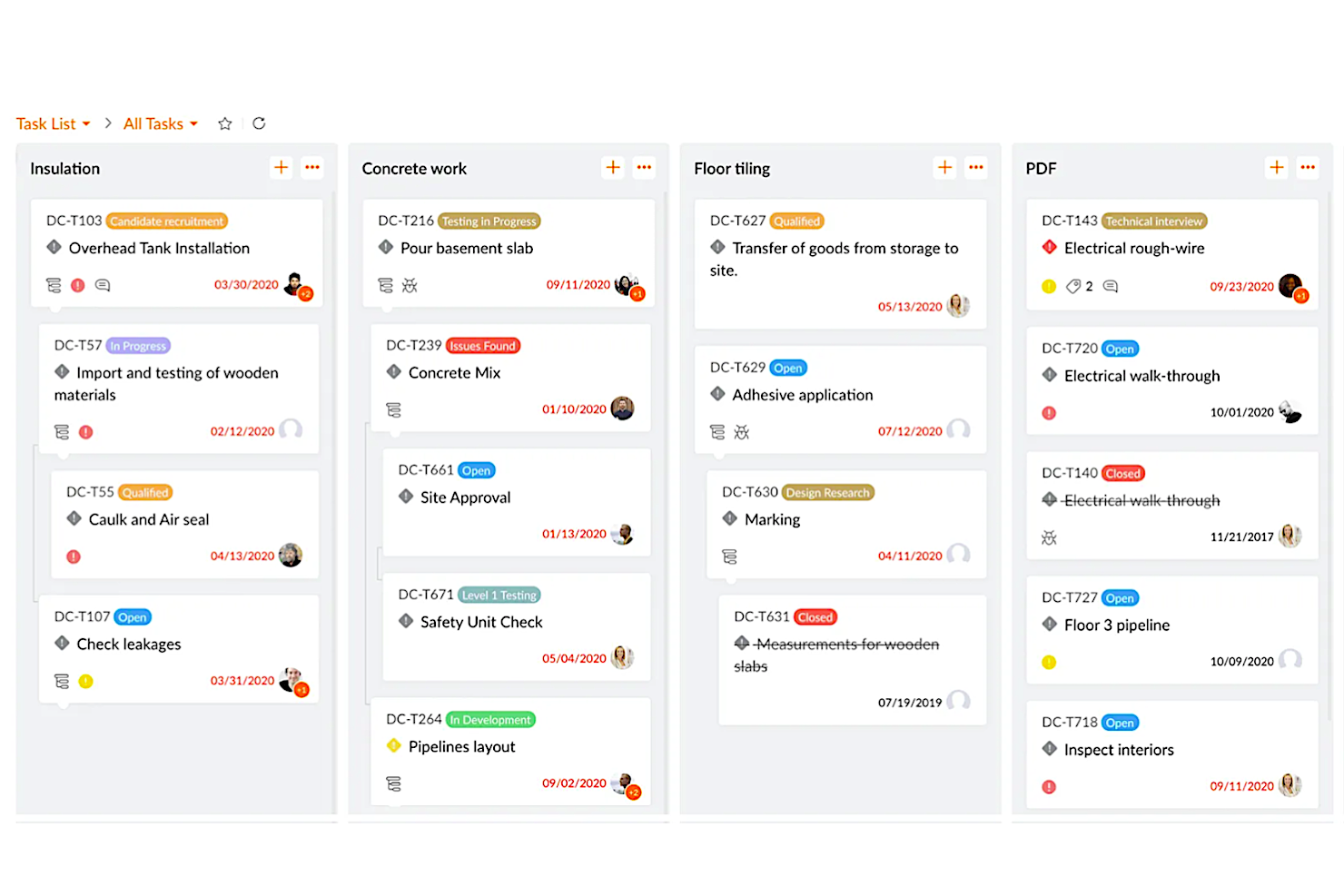
Zoho Projects is a project management tool designed to help teams plan, track, and execute projects effectively. It provides a comprehensive platform for organizing workflows, monitoring progress, and enhancing team collaboration.
Why I picked Zoho Projects: Zoho Projects offers a visual interface with Gantt charts, task boards, and resource management tools to help your team stay on top of every project. You can assign tasks, set milestones, and track progress using customizable workflows. The platform's built-in time tracking and timesheets make it easy to monitor billable hours and project timelines. Moreover, collaboration features like forums and feeds keep your team connected, making it a great choice for teams looking for an all-in-one project management solution.
Zoho Projects Standout Features & Integrations:
Features include task automation to reduce repetitive work and baseline reports to compare planned versus actual progress. You can also use dependencies to link tasks and avoid scheduling conflicts and advanced time logging for better resource allocation.
Integrations include Slack, Microsoft Teams, Google Drive, Dropbox, Zapier, Zoho CRM, Zoho Books, Trello, Asana, and GitHub.
Pros and Cons
Pros:
- Task dependencies prevent scheduling conflicts
- Advanced time logging helps allocate resources
- User-friendly interface with drag-and-drop functionality
Cons:
- Some features require extensive configuration to implement
- Lacks built-in advanced analytics or dashboards
New Product Updates from Zoho Projects

Zoho Projects Adds QuickBooks Online and Xero Integrations
Zoho Projects now connects with QuickBooks Online and Xero, bringing project work and accounting workflows closer together. Manage project-related billing and financial tasks with fewer app switches. For more information, visit Zoho Projects’ official site.
 .

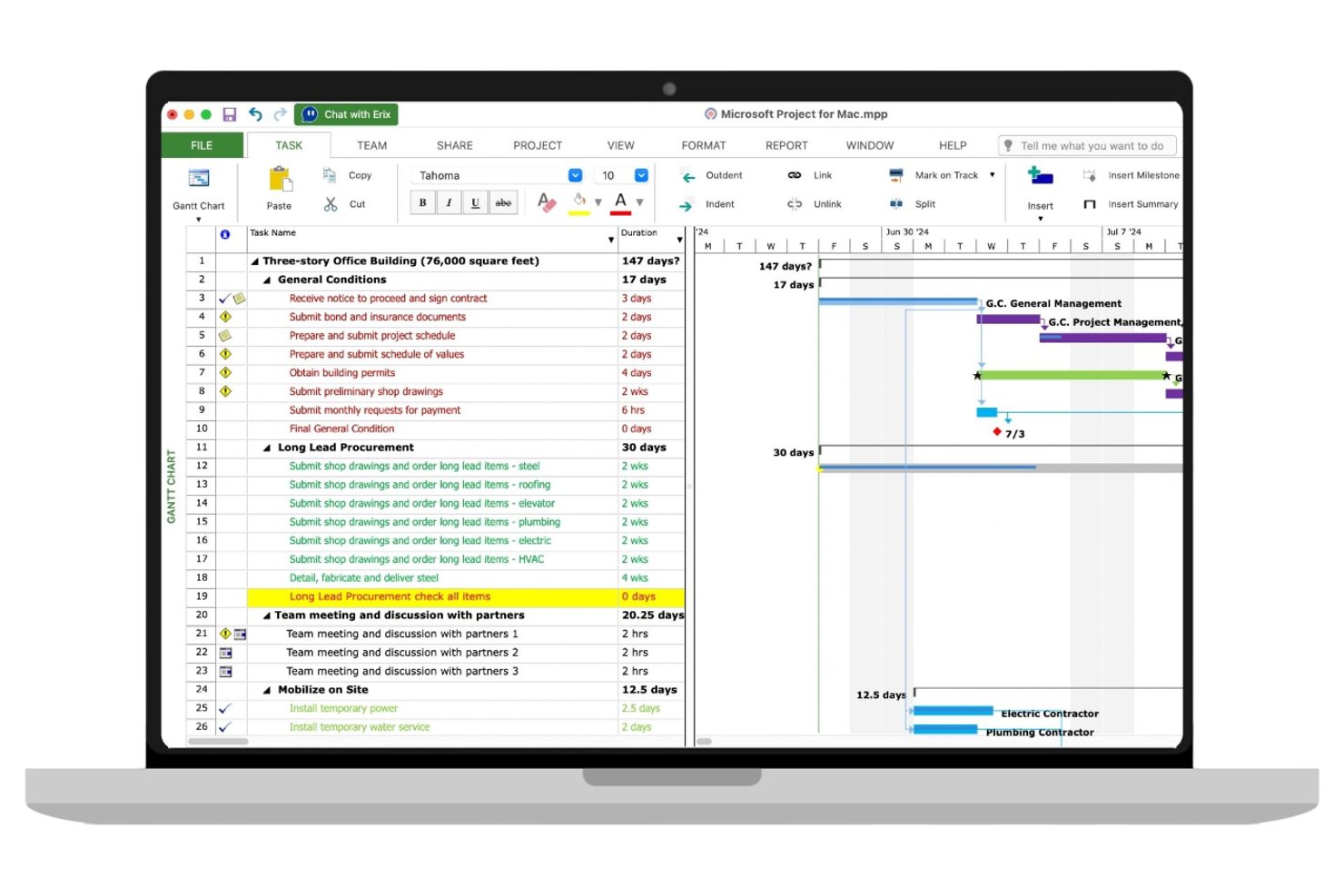
Project Plan 365 is a desktop project management app for Windows and Mac that offers Gantt scheduling, critical path tracking, resource management, and native .MPP file support across local, cloud, and mobile environments.
Who Is Project Plan 365 Best For?
Project Plan 365 is a strong fit for project managers and IT teams that need to open, edit, and share native .MPP files on Windows or Mac without paying for a full MS Project license.
Why I Picked Project Plan 365
I've included Project Plan 365 in my top picks because it's the only desktop app I've found that opens, edits, and saves native .MPP files on both Windows and Mac without converting them first. If your team shares files with stakeholders who use MS Project, that compatibility alone eliminates a constant source of friction. I also like that it runs fully offline after a single activation, and its scheduling engine covers critical path, baselines, and resource leveling without needing a cloud connection.
Project Plan 365 Key Features
- Silent MSI install: Deploy the app across Windows machines via command-line switches, with options to remove cloud connectors and restrict files to local storage only.
- Multi-format view library: Switch between Network Diagram, Team Planner, Calendar, Task Usage, and Leveling Gantt views within the same project file.
- Baseline tracking: Set or clear baselines for the whole project or selected tasks, capturing around 20 data points including cost, work, duration, and start/finish dates.
- Free read-only access: Invite up to 5 (Standard) or 10 (Business) viewers per subscription at no extra cost, so stakeholders can review files without needing a paid seat.
Project Plan 365 Integrations
Project Plan 365 integrates with Google Drive, Dropbox, Box, OneDrive, SharePoint Online, Project Server, Project Online, and Basecamp. It also imports files from Smartsheet, MindManager, and XMind.
Pros and Cons
Pros:
- Baselines and critical-path views aid schedule reviews
- Offline scheduling after initial activation
- Native .MPP editing on Windows and Mac
Cons:
- Scheduling omits backward planning and field formulas
- Older reviews report save and Gantt glitches
Best for one-time licensed, offline-first scheduling
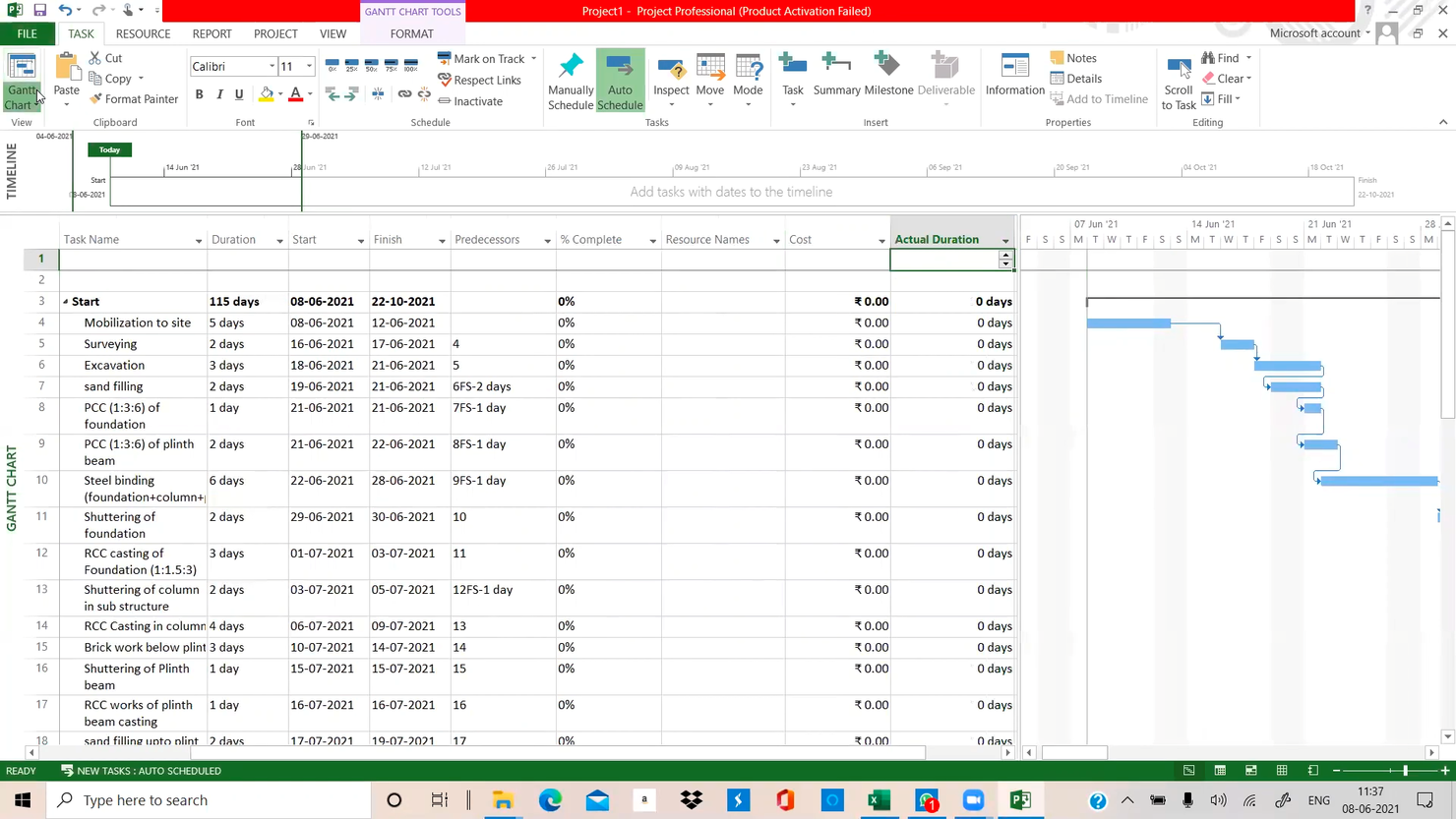
Microsoft Project is a Windows desktop project management application that covers Gantt chart scheduling, critical path analysis, resource leveling, baseline tracking, and multi-project management through a perpetual, locally installed licence.
Who Is Microsoft Project Best For?
Microsoft Project is a strong fit for project managers and IT teams running complex, multi-phase projects who need deep scheduling control without depending on a cloud subscription.
Why I Picked Microsoft Project
Microsoft Project earns its spot on my shortlist because no other desktop tool matches its depth for offline, one-time-licensed scheduling. I've run multi-phase plans with up to 11 saved baselines and used the Tracking Gantt to compare actual progress against each one without needing a single cloud connection. Resource leveling is where it really pulls ahead: you can set precise leveling rules that automatically delay or split tasks to resolve overallocations across a large team, all stored in a local .mpp file you fully own.
Microsoft Project Key Features
- Automatic scheduling: Project calculates start and end dates based on task dependencies, so your plan updates across the board when anything changes.
- Critical path highlighting: The tool identifies the longest sequence of dependent tasks and flags which ones directly control your project's finish date.
- Team Planner view: A visual, drag-and-drop interface shows each team member's assignments across time, making it easy to spot gaps and overallocations at a glance.
- Master project linking: You can consolidate multiple .mpp files into a single master project to track cross-project dependencies and resource conflicts from one place.
Microsoft Project Integrations
Microsoft Project integrates with Microsoft 365, Teams, Excel, Power BI, and SharePoint. Project Professional 2024 syncs with Project Online and Project Server, while XML import and export supports custom data exchange.
Pros and Cons
Pros:
- Levels overloaded resources with configurable rules
- Tracks up to 11 baselines locally
- Handles complex schedules and large plans reliably
Cons:
- Shared .mpp files complicate concurrent editing
- Dense scheduling controls take time to master

Best for Mac-native Gantt and critical path planning
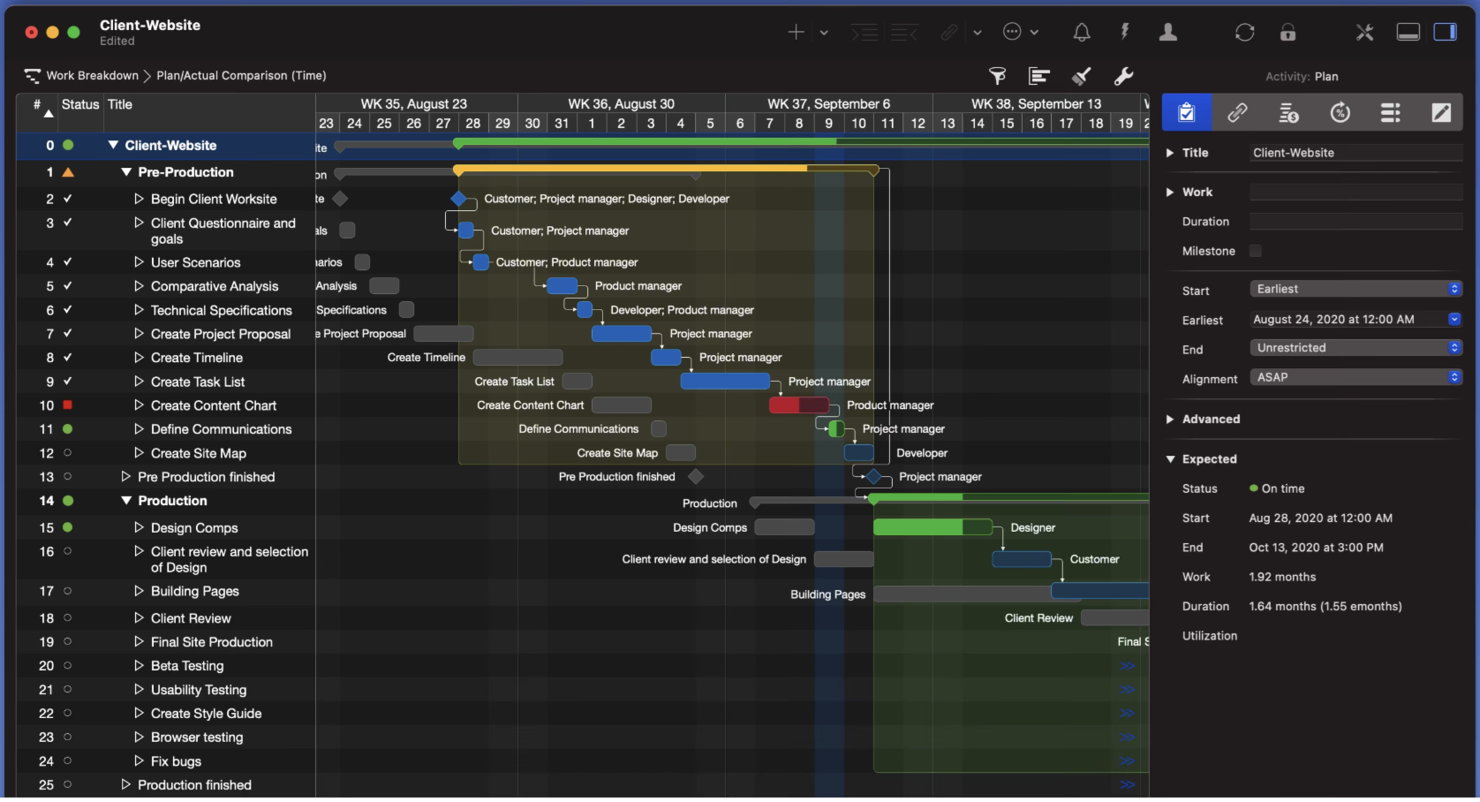
Merlin Project is a Mac-native desktop project management app that combines Gantt chart scheduling, critical path tracking, resource leveling, Kanban boards, and multi-project coordination across Mac, iPad, and iPhone.
Who Is Merlin Project Best For?
Merlin Project is a strong fit for project managers and operations managers who work entirely within the Apple ecosystem and need deep scheduling control without depending on a web-based tool.
Why I Picked Merlin Project
Merlin Project earns its spot on my shortlist because it's the most complete Mac-native Gantt and critical path tool I've seen built specifically for the Apple ecosystem. I love how the critical path recalculates automatically as you log progress, whether you're updating tasks on the Gantt or checking off cards on the Kanban board. The dynamic baseline is also a standout detail: every activity is tracked from the start with no manual setup, so I can compare current progress against any point in the project's history.
Merlin Project Key Features
- Mind map to work breakdown structure: Convert a mind map into a fully structured project plan with a single click, complete with tasks, phases, and hierarchy.
- MagicSync collaboration: Multiple users can edit the same project file simultaneously through iCloud Drive or Dropbox, with changes merging automatically without conflict files.
- Multi-project master documents: Combine several project files into one master document with linked subprojects that update in both directions, giving you a consolidated resource and timeline view.
- MS Project file import: Open native MPP files from Microsoft Project versions 2003 through 2016, as well as MS Project XML and MPX formats.
Merlin Project Integrations
Merlin Project has documented connections with iCloud Drive, Dropbox, Apple Contacts, Apple Calendar, and Apple Mail. It also imports MPP files, exports Microsoft Project XML, and supports SFTP and WebDAV publishing.
Pros and Cons
Pros:
- Users praise mind-map-to-Gantt conversion
- Automatic baselines preserve schedule history
- Project files work fully offline
Cons:
- Complex schedules can overwhelm new users
- No Windows or browser-based access

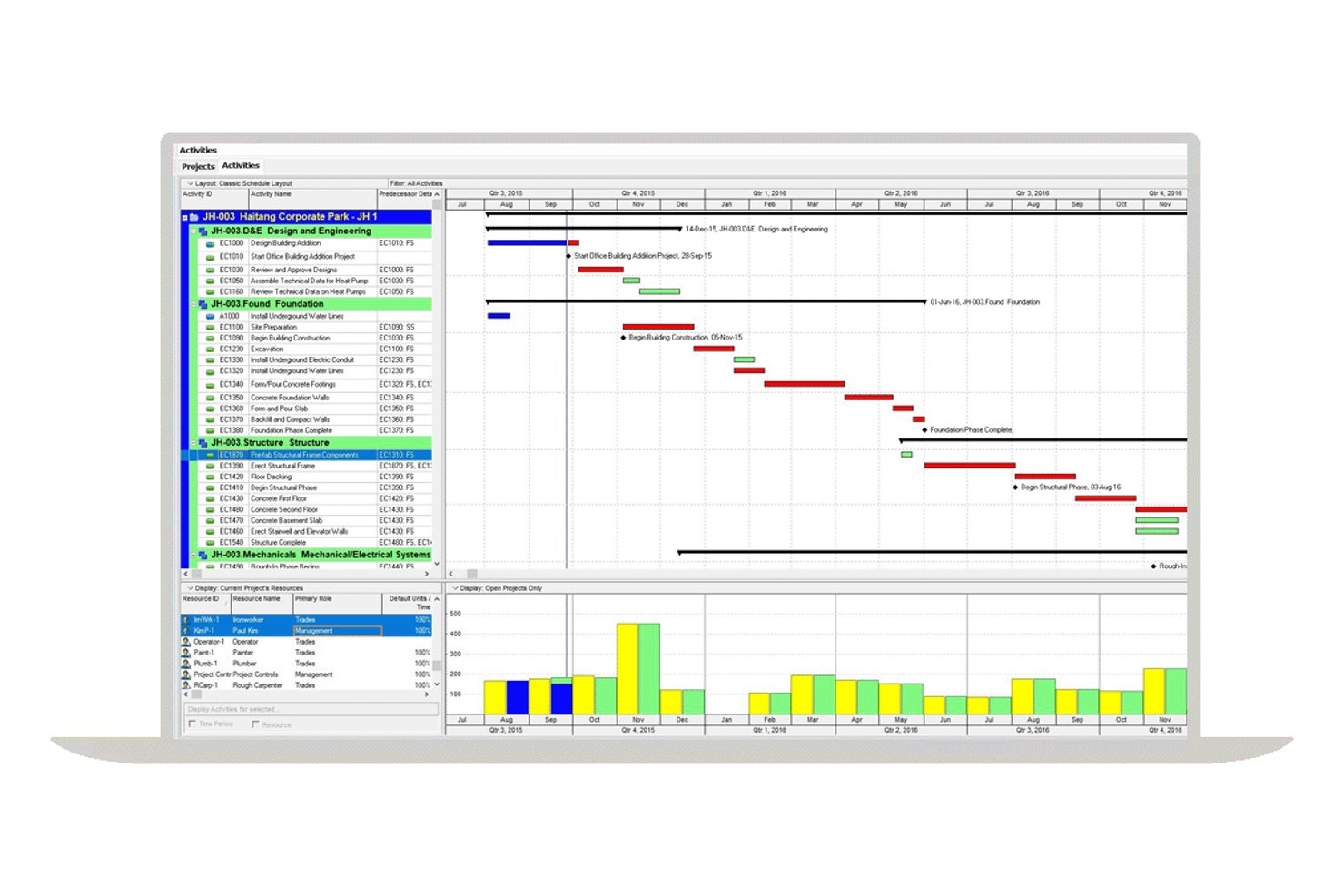
Oracle Primavera P6 is a Windows-based desktop project management tool built around CPM scheduling, WBS, resource leveling, and multi-project planning across an Enterprise Project Structure.
Who Is Oracle Primavera P6 Best For?
Oracle Primavera P6 is built for project managers and operations managers overseeing large, multi-project programs where CPM scheduling depth and offline data control aren't optional.
Why I Picked Oracle Primavera P6
Oracle Primavera P6 earns its spot on my shortlist because no other desktop tool matches its depth of CPM scheduling for large, multi-project programs. I particularly like its Enterprise Project Structure, which lets you open, schedule, and level resources across multiple projects simultaneously from a single Windows client. Its standalone SQLite mode is a genuine offline solution: all project data lives in one local file, no server required, which matters when you're managing a capital project on a site with unreliable connectivity.
Oracle Primavera P6 Key Features
- WBS (work breakdown structure): Organize projects into hierarchical work packages and deliverables that tie directly to your CPM schedule.
- Activity codes: Tag and filter activities across projects using customizable codes to sort, group, and report on work your way.
- Global change: Apply bulk edits to activity data across your schedule using conditional logic, without updating records one at a time.
- XER file import/export: Move complete project data, including resources and roles, between P6 installations using Oracle's native XER format.
Oracle Primavera P6 Integrations
Oracle Primavera P6 supports integrations with Microsoft Project, Microsoft Excel, P6 EPPM, Oracle Primavera Cloud through Primavera Gateway, and Primavera Unifier. Its API supports custom integrations when connected to Oracle XE or SQL Server standalone databases.
Pros and Cons
Pros:
- Compare baseline schedules against current progress
- Level shared resources across open projects
- Work offline in a standalone SQLite file
Cons:
- Dense interface slows first-time schedule setup
- Standalone SQLite restricts workgroup collaboration

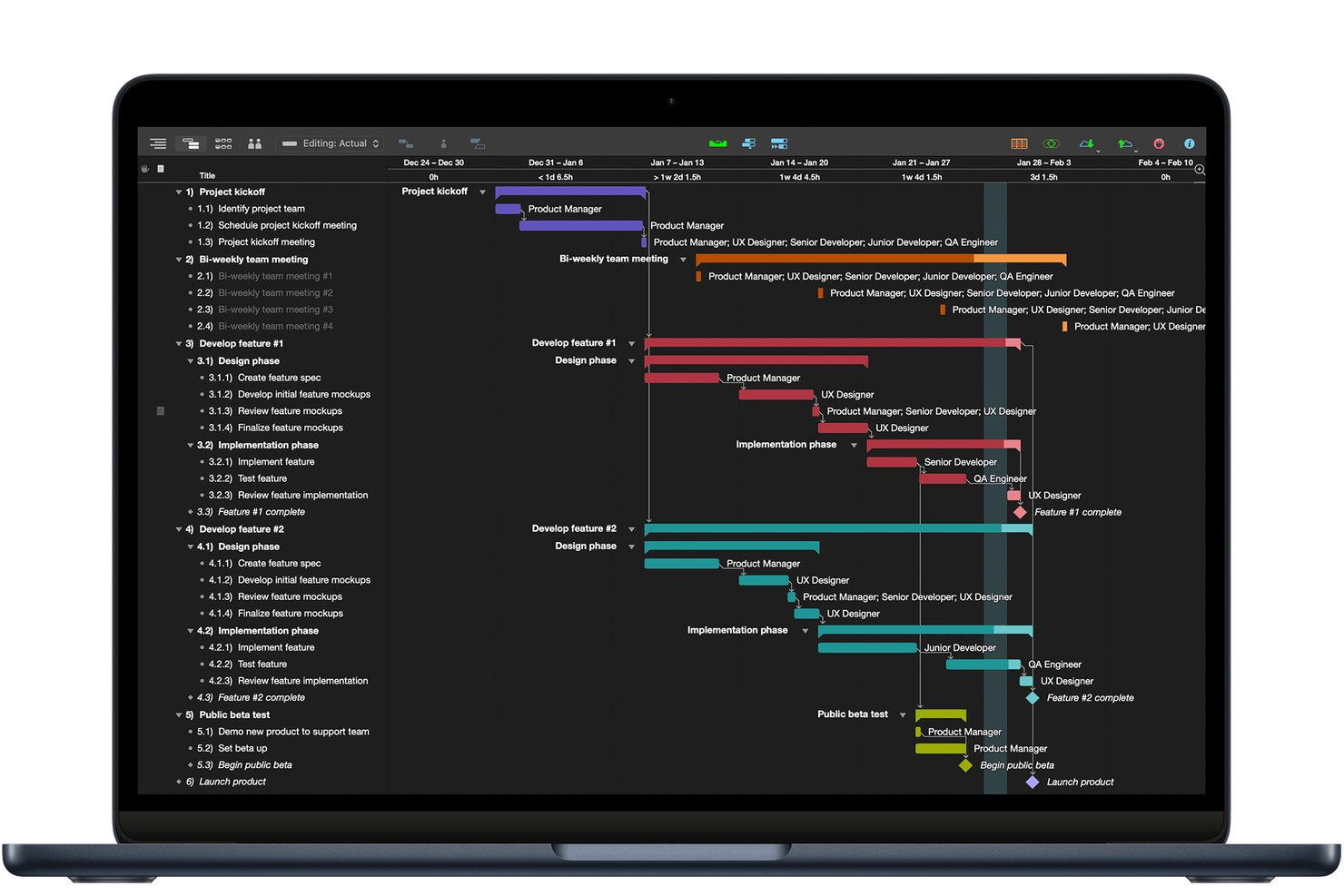
OmniPlan is a Mac-native desktop project management app built around Gantt charts, critical path scheduling, resource leveling, and multi-baseline tracking.
Who Is OmniPlan Best For?
OmniPlan is a strong fit for Mac-based project managers who need deep scheduling control—critical path, resource leveling, and baselines—without relying on a browser or cloud platform.
Why I Picked OmniPlan
OmniPlan earns its spot on my shortlist because it's the only native Mac app I've found that gives you a full critical path scheduling engine without a browser in sight. I like how it automatically highlights the critical path on your Gantt chart, shows float for every task, and lets you compare progress against multiple saved baselines, which matters when plans shift mid-project. Resource leveling runs automatically too, so if a team member is overbooked, OmniPlan redistributes the load without you having to hunt through the schedule manually.
OmniPlan Key Features
- Monte Carlo simulation: Runs probability-based risk forecasting to estimate how likely your project is to finish on time, using best-case and worst-case effort ranges.
- Multi-project dashboard: Displays a portfolio view of all published projects alongside team workload in a single Mac interface, available in the Pro edition.
- Microsoft Project file support: Imports and exports .mpp and XML files, letting you exchange schedules with teams or clients who use Microsoft Project.
- Change tracking: Logs edits from collaborators in a sidebar where you can review, accept, or reject each change before it's applied to the project.
OmniPlan Integrations
OmniPlan integrates with iCloud Drive, Box, Git, WebDAV, Omni Sync Server, CalDAV, and Google Calendar, while Pro supports Microsoft Project MPP/XML files. It has no native Jira or Slack integrations.
Pros and Cons
Pros:
- Baselines help compare plans against progress
- Automatic resource leveling balances assigned workloads
- Detailed Gantt charts clarify schedule dependencies
Cons:
- Collaboration requires publishing instead of live editing
- Apple-only apps exclude Windows-based teams

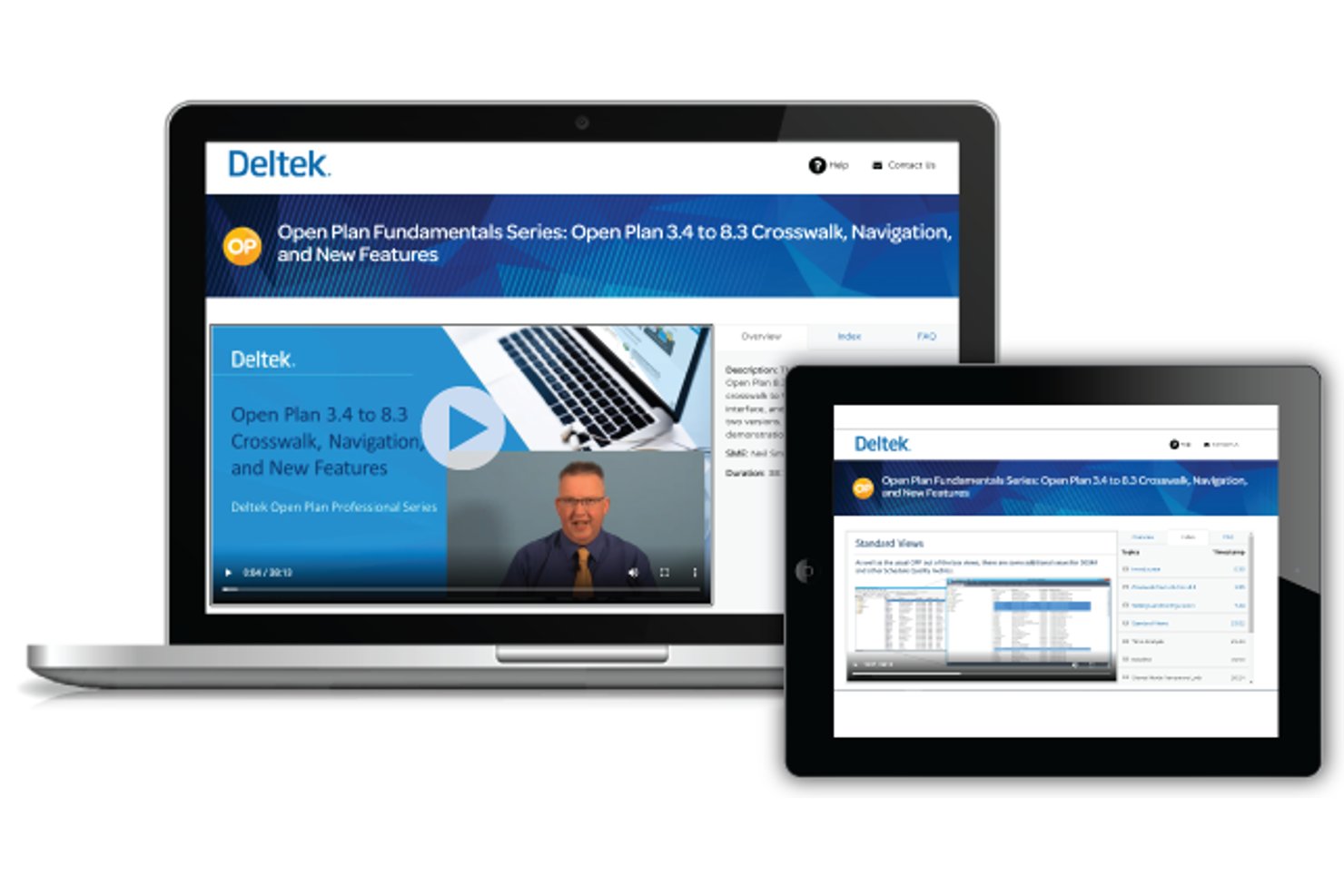
Deltek Open Plan is a Windows desktop scheduling application built around CPM methodology, offering multi-project tracking, resource-constrained leveling, Monte Carlo risk analysis, and DCMA compliance checks.
Who Is Deltek Open Plan Best For?
Deltek Open Plan is a strong fit for project managers in government contracting, aerospace, and defense who need rigorous CPM scheduling with built-in compliance checks.
Why I Picked Deltek Open Plan
I've included Deltek Open Plan in my top picks because it's the only desktop scheduling tool I know that has DCMA 14-point compliance checks built directly into the scheduling engine. For government contracting or aerospace programs where schedule health is auditable, that's a real differentiator. I also like that Monte Carlo risk analysis and resource-constrained leveling run natively, so you're not stitching together separate tools to manage risk and capacity on complex, multi-project programs.
Deltek Open Plan Key Features
- Master/subproject rollups: Nest subprojects under a master project to roll up schedules, resources, and progress across a full program portfolio.
- Jira import: Map and import Jira data directly into Open Plan, with field-level control and an import preview and log.
- Multiple baseline storage: Save and compare multiple schedule baselines, including a Performance Measurement Baseline, with role-based access and a full audit history.
- Batch processing: Run time analysis, resource scheduling, and risk analysis across several projects simultaneously rather than one at a time.
Deltek Open Plan Integrations
Deltek Open Plan has native integrations with Microsoft Project, Project Server, Oracle Primavera P6, Jira, and Deltek Cobra. It also offers REST APIs and an MCP server for custom integrations.
Pros and Cons
Pros:
- Resource leveling spans multiple projects
- Built-in DCMA schedule health checks
- Runs offline with local Access storage
Cons:
- Database setup burdens small teams
- Reviewers report sluggish, hard-to-navigate screens
Diğer Masaüstü Proje Yönetimi Yazılımları
İşte en üst sıralarda yer alamayan ancak yine de değerlendirmenize değer olan diğer araçlar.
- ClickUp
For subscription-based Gantt with AI task flagging
- Smartsheet
For Google Workspace-connected scheduling
- RationalPlan
For PMBOK-aligned one-time licensed scheduling
- Hive
For Gantt and critical path via desktop app
- ProjectLibre
For free, offline MS Project file scheduling
- Asta Powerproject
For construction schedule planning and control
- Milestones Professional
For one-time licensed schedule reporting
- FastTrack Schedule
For one-time-buy Gantt and critical path
- GanttProject
For free, offline Gantt scheduling
- ConceptDraw PROJECT
For one-time licensed multi-project tracking


How I Evaluate Desktop Project Management Software
I split my evaluation into three parts, giving the most weight to core functionality: working offline and mapping tasks, dates, and dependencies. Next, I weigh standout features such as critical-path scheduling. Finally, I consider factors beyond features, including licensing, support, and control of locally stored project data.
Core Functionality (Table Stakes For This List)
When I'm selecting tools for my list, I score each one on a scale from 0 (does not offer the functionality) to 5 (excels in this area) for each core functionality listed below. I then convert the total into a percentage to help assess each tool's overall fit, with extra weight on any functionalities I’ve deemed essential.
- Local Desktop Operation (Essential): I look for a native desktop app that can open and update schedules offline, then sync changes when a connection returns.
- Task & Schedule Management (Essential): I check that tasks have dates and dependencies, and that linked work can shift when a predecessor slips during a release plan.
- Gantt Chart Views: For overlapping launch work, I assess whether the chart makes dependencies, milestones, and schedule changes easy to read and adjust.
- Resource Allocation: I look for assignments and workload views that reveal when the same designer or engineer is booked across concurrent tasks.
- Local Storage & Export: I assess whether teams can keep project files on a device or network drive and export usable schedules for handoffs.
- Multi-Project Tracking: I check whether separate projects can be opened or compared together, especially when a lead tracks deadlines across client workstreams.
Once I have a list of tools that meet the criteria, I consider what sets each platform apart.
Differentiating Factors (What Sets Vendors Apart)
Here's how I compare and contrast different vendors:
Standout Features
I look for a critical path engine that recalculates automatically when dates shift, since missing one delayed predecessor can silently push a launch. Baseline comparison matters just as much—I check whether I can snapshot a schedule early on and overlay actual progress to spot slippage before a status meeting. I also evaluate file compatibility, especially MPP and XML support, because most stakeholders still exchange schedules in those formats. A perpetual license option is a plus for teams that want predictable costs without recurring fees.
Beyond Features
I evaluate whether project data stays fully under your organization's control—on local drives or private network shares—since teams in regulated industries often can't send schedules to third-party servers. Licensing structure matters too: a perpetual license can save money over years, but I check upgrade and multi-seat costs to avoid surprises during version migrations. I also consider how teams share files offline, looking for check-in/check-out or local server sync so two planners don't overwrite each other's work on the same schedule.
Masaüstü Proje Yönetimi Yazılımı Nasıl Seçilir?
Uzun özellik listeleri ve karmaşık fiyatlandırma yapıları arasında kaybolmak kolaydır. Kendinize özgü yazılım seçimi sürecinizde ilerlerken odaklanmanıza yardımcı olmak için göz önünde bulundurmanız gereken faktörleri aşağıda sıraladım:
| Faktör | Dikkat Edilmesi Gerekenler |
| Ölçeklenebilirlik | Yazılım, ekibinizin değişen ihtiyaçlarıyla birlikte gelişebilir mi? |
| Entegrasyonlar | Yazılım, mevcut araçlarınızla sorunsuz bir şekilde entegre oluyor mu? |
| Özelleştirilebilirlik | Yazılımı ekibinizin özel iş akışlarına uyacak şekilde özelleştirebilir misiniz? |
| Kullanım Kolaylığı | Ekibiniz yazılımı kullanmaya ne kadar hızlı adapte olabilir? |
| Bütçe | Aracın fiyatlandırma yapısı uzun vadeli ihtiyaçlarınız için sürdürülebilir mi? |
| Güvenlik Önlemleri | Yazılım, verilerinizin gerektirdiği düzeyde güvenlik sunuyor mu? |
| İş Birliği | Yazılım, verimli ekip çalışmasını ve iletişimi destekliyor mu? |
| Raporlama | Yazılım, ekibinizin ilerlemeyi takip etmek için ihtiyaç duyduğu içgörüleri sağlıyor mu? |
Masaüstü Proje Yönetimi Yazılımlarındaki Trendler
Araştırmam sırasında farklı masaüstü proje yönetimi yazılımı sağlayıcılarının sayısız ürün güncellemesini, basın bültenini ve sürüm günlüğünü inceledim. Takip ettiğim yeni ortaya çıkan trendlerden bazıları şunlar:
- Hibrit Dağıtım Seçenekleri: Kullanıcılar, araçlarına nasıl erişecekleri konusunda giderek daha fazla esneklik arıyor. Tedarikçiler, çevrim içi veya çevrim dışı çalışırken sorunsuz bir deneyim sunmak için bulut tabanlı ve çevrim dışı modlar arasında geçiş yapabilen Windows masaüstü yönetim yazılımları sunuyor.
- Özelleştirilebilir Panolar: Kullanıcıların çalışma alanlarını kendi ihtiyaçlarına göre düzenlemelerine olanak tanıyan masaüstü araçlarına yönelik talep artıyor. Kullanıcılar, düzenleri değiştirmekten önemli verileri önceliklendirmeye kadar bilgisayar masaüstü yönetimi deneyimleri üzerinde daha fazla kontrol istiyor. Bu eğilim, özelleştirilebilir panoların olmazsa olmaz olduğu açık kaynaklı proje yönetimi yazılımlarında özellikle belirgin.
- Yapay Zekâ Destekli Proje Planlama: Daha akıllı zamanlama ve kaynak tahsisi için yapay zekâ, masaüstü proje uygulamalarında yerini alıyor. Bu artık yalnızca bir gösteriş unsuru değil; yapay zekânın optimize edilmiş zaman çizelgeleri ve görev bağımlılıkları önerdiği Windows proje yönetimi araçlarında bir özellik haline geliyor.
- Güvenlik Odaklı Özellikler: Veri güvenliğiyle ilgili endişeler arttıkça masaüstü yönetim paketleri, daha güçlü şifreleme ve erişim denetimi içerecek şekilde gelişiyor. Örneğin hem dizüstü bilgisayar yönetimi yazılımları hem de bilgisayar yönetimi yazılımları artık çok faktörlü kimlik doğrulama ve güvenli dosya paylaşımı seçenekleri sunuyor.
- İş Birliğine Dayalı Masaüstü Teknolojisi: Entegrasyonlar bir trend olmasa da ekiplerin masaüstü proje yönetimi yazılımları içindeki iş birliği yapma biçimi değişiyor. Masaüstü yönetimi çözümleri içindeki gerçek zamanlı geri bildirim gibi yeni özellikler, ekiplerin iletişim için ayrı araçlara ihtiyaç duymadan birlikte çalışmasına olanak tanıyor ve iş birliğini doğrudan masaüstünden daha verimli hale getiriyor.
Masaüstü proje yönetimi yazılımı nedir?
Masaüstü proje yönetimi yazılımı, projeleri planlamanıza, düzenlemenize ve yönetmenize yardımcı olan, bilgisayara yüklenen bir bilgisayar uygulamasıdır. Genellikle görev yönetimi, zamanlama, kaynak tahsisi, iş birliği araçları ve çevrim dışı erişim gibi özellikler içerir.
Masaüstü proje yönetimi yazılımı, projeleri doğrudan masaüstü ortamınızdan kontrol etmek için merkezi bir araç görevi görür ve tarayıcı tabanlı çözümlere kıyasla daha hızlı performans ve yanıt verme süresi sunabilir – büyük ve karmaşık proje verileriyle çalışırken idealdir.
Masaüstü Proje Yönetimi Yazılımının Özellikleri?
Masaüstü yazılımına sahip bir proje yönetimi uygulamasının bulut tabanlı çözümlerle aynı özelliklere sahip olmasını bekleriz. Bu proje planlama araçlarında bulabileceğiniz özelliklerden bazıları şunlardır.
- Entegrasyonlar: Yazılımın diğer platformlara bağlanması. Örneğin Google uygulamaları.
- Görev yönetimi: Proje görevlerini önceliklendirme ve takip etme, ayrıca görevleri proje iş akışı içinde taşıma olanağı.
- İletişim: Ekip üyelerinin ekip iş birliğini birden fazla proje genelinde artırmak, dosya paylaşımına erişmek ve daha fazlasını yapmak için iletişim kurabileceği proje yönetimi sistemi içindeki bir alan.
- Otomasyonlar: Yazılımın sizin adınıza işlemleri tetiklemesine olanak tanıyarak tekrarlanan görevleri kolaylaştırmanızı sağlayan özellik.
- Görünümler: Bilgilerinizi görev listesi, Gantt şeması, kanban panosu ve takvim görünümü dahil olmak üzere farklı şekillerde gösteren çalışma alanları.
- Kaynak yönetimi: Ekibimizin iş yükünü veya örneğin kaç projeye atandıklarını görebildiğimiz özellik. Küçük ekipler muhtemelen bu özellik olmadan idare edebilir, ancak büyük ekipler için durum aynı değildir.
- Proje şablonları: Projeleriniz için başlangıç noktası olarak kullanılabilecek, önceden hazırlanmış içerik.
- Erişim Denetimi: Yalnızca doğru kişilerin görevleri düzenlemesi için kullanıcı bazında izinler belirleme olanağı. Bu, örneğin serbest çalışanları yönetmeye yardımcı olabilir.
- Panolar: Projelerinizin genel ilerlemesini izleyebileceğiniz platform içindeki bölüm.
- Zaman yönetimi: Bireysel görevleri ve zaman çizelgelerini takip etmenize, bunların teslimatlarınız üzerindeki etkisini ölçmenize yardımcı olan modül.
Masaüstü Proje Yönetimi Yazılımının Faydaları
Masaüstü proje yönetimi yazılımını uygulamak, ekibiniz ve işletmeniz için çeşitli faydalar sağlar. Yararlanabileceğiniz avantajlardan bazıları şunlardır:
- Geliştirilmiş odaklanma: Masaüstü teknolojisini kullanarak tarayıcı tabanlı araçların neden olduğu dikkat dağıtıcı unsurları azaltabilir ve görevlerinize tamamen odaklanabilirsiniz.
- Çevrimdışı erişilebilirlik: Windows yönetim çözümleriyle internet bağlantısı olmadan da çalışmaya devam edebilir, nerede olursanız olun projelerinizin planlandığı şekilde ilerlemesini sağlayabilirsiniz.
- Geliştirilmiş güvenlik: Bilgisayar masaüstü yönetim yazılımı, yerel depolama ve erişim üzerinde daha iyi denetim sağlayarak hassas verilerinizi daha güvenli tutar ve bulut depolamayla ilişkili riskleri azaltır.
- Özelleştirilebilir çalışma alanları: Masaüstü yönetim araçları arayüzünüzü düzenlemenize olanak tanır; böylece arayüzü ekibinizin veya bireysel projelerinizin özel ihtiyaçlarına kolayca uyarlayabilirsiniz.
- Daha hızlı performans: Bilgisayar yönetim yazılımları, birçok bulut tabanlı alternatife göre daha akıcı çalışarak verilere ve araçlara daha hızlı erişim sunar.
- Daha düşük maliyetler: Windows için birçok açık kaynaklı proje yönetimi yazılımı seçeneği ücretsiz olarak sunulur; böylece güçlü proje planlama özelliklerinden yararlanırken masrafları azaltabilirsiniz.
- Güvenilir yedeklemeler: Masaüstü yazılımıyla dosyalarınız ve proje verileriniz doğrudan bilgisayarınıza kaydedilebilir; bu da veri kurtarma ve yedeklemeler üzerinde daha fazla denetim sahibi olmanızı sağlar.
Masaüstü Proje Yönetimi Yazılımının Maliyetleri ve Fiyatlandırması
Masaüstü proje yönetimi yazılımı seçmek, mevcut çeşitli fiyatlandırma modelleri ve planlarının anlaşılmasını gerektirir. Maliyetler özelliklere, ekip büyüklüğüne, eklentilere ve daha fazlasına göre değişir. Aşağıdaki tablo, masaüstü proje yönetimi yazılımı çözümlerinde yaygın olarak sunulan planları, ortalama fiyatlarını ve genellikle dâhil edilen özellikleri özetlemektedir:
| Plan Türü | Ortalama Fiyat | Yaygın Özellikler |
| Ücretsiz Plan | $0 | Temel görev yönetimi, sınırlı depolama ve tek kullanıcı erişimi. |
| Kişisel Plan | $5-$15/kullanıcı/ay | Görev takibi, özelleştirilebilir iş akışları ve sınırlı proje şablonları. |
| İşletme Planı | $20-$40/kullanıcı/ay | Ekip iş birliği araçları, gelişmiş raporlama, zaman takibi ve daha fazla depolama. |
| Kurumsal Plan | $50-$100/kullanıcı/ay | Öncelikli destek, geliştirilmiş güvenlik özellikleri, sınırsız proje ve entegrasyonlar. |
SSS
Masaüstü proje yönetimi yazılımı hakkında sık sorulan bazı soruların yanıtları burada yer almaktadır: