2026’nın En İyi 10 Kaynak Yönetimi Yazılımı (10+ Test Edildi)

10 En İyi Kaynak Yönetimi Yazılımları Kısa Listesi


Kaynak yönetimi yazılımı, proje ekibinizi ve diğer kaynaklarınızı yönetmenize yardımcı olarak ekibinizin zamanını ve kullanımını optimize etmenizi, projeleri zamanında ve bütçe dahilinde tamamlamanızı sağlar. Doğru araç olmadan bütçe kısıtlamaları, planlama çakışmaları ve kimin ne üzerinde veya ne zaman çalıştığına dair bilgi eksikliğiyle karşı karşıya kalırsınız.
Proje yönetimindeki yıllarım boyunca kaynak planlamasında ters gidebilecek her şeyi gördüm. Kaynak yönetimi araçları, bu sorunları çözmek için gereken zamanı ve çabayı azaltır. Bu doğrultuda, en iyi kaynak yönetimi yazılımları için seçimlerimi aşağıda bulabilirsiniz. Her birini inceledim ve yaygın kaynak planlama zorluklarını giderip gideremeyeceğini değerlendirdim; böylece projeleriniz ve ekipleriniz için en uygun seçeneği bulabilirsiniz.
Why Trust Our Software Recommendations
Our team has been testing and reviewing software since 2012. As project managers ourselves, we know how difficult—and important—it is to choose the right software.
For this guide, we evaluated tools using hands-on testing and independent research, scoring tools using our selection criteria. We also draw on insights from industry thought leaders and practicing project management experts.
Our reviews reflect our human editorial judgment, not a sales pitch.
Expert reviewers:
Kaynak Yönetimi Yazılımı & Araçları Karşılaştırma Tablosu
Aşağıda kısa listemde yer alan her aracın fiyatlarını ve teknik özelliklerini karşılaştırın.
| Tool | Best For | Trial Info | Price | ||
|---|---|---|---|---|---|
| 1 | Best AI powered Resource Management for Professional Services firms | Free demo available | Pricing upon request | Website | |
| 2 | Best resource planning and capacity forecasting | 14-day free trial | From $10/user/month (billed annually) | Website | |
| 3 | Best for resource planning & capacity management | 60-day free trial + free demo available | Pricing upon request | Website | |
| 4 | Best for multi-departmental complex organisations | Free demo available | Pricing upon request | Website | |
| 5 | Best for forecasting team utilization | 14-day free trial | From $17/user/month | Website | |
| 6 | Best for resourcing with financial visibility | Free trial available | From $7/scheduled user/month | Website | |
| 7 | Best for real-time team capacity planning | 30-day free trial available | From $7/resource/month | Website | |
| 8 | Best for people-centric resourcing | Not available | Pricing upon request | Website | |
| 9 | Best for capacity planning on a low per-seat cost | Free plan available | From $9.50/user/month (billed annually) | Website | |
| 10 | Best for resource visibility with heatmaps | Free trial available | From $5/user/month | Website |


En İyi Kaynak Yönetimi Yazılımı İncelemeleri
Aşağıda en iyi kaynak yönetimi yazılımları ve araçları için seçimlerimi bulabilirsiniz. Ekran görüntüleri, öne çıkan özellikler, entegrasyonlar ve bazı artıları ve eksileri de dahil olmak üzere her birinin ayrıntılı bir özetini sundum.

Dayshape
Best AI powered Resource Management for Professional Services firms

Dayshape is AI-powered resource management software for professional services. Its automated decision making, workflows and controls transform the way teams plan, budget, and deliver engagements.
Why I picked Dayshape: The software makes it easy to assign the right person, at the right time, through assisted and automated scheduling. Unique AI functionality eliminates time-consuming processes and gives confidence that decisions are fair and objective, while gantt and availability views provide a clear view of utilization and resourcing options. Three levels of AI make the solution scalable as a firm’s resource management processes mature over time.
A suitability score is created for every resource based on customizable criteria such as grade, skills, availability, utilization, and location to ensure a best-match resource allocation. Configurable dashboards also provide at-a-glance views of capacity levels for accurate forecasting and immediate clash resolution.
Project managers can roll-forward or build and request resources for plans in the same system resource managers staff the project. The live engagement financials feature uses your timekeeping and billing system data to flag performance metrics falling below thresholds, to stay on budget and avoid overruns and write-offs.
Dayshape Standout Features & Integrations
Features include AI-powered resource suitability scoring that evaluates potential matches for assignments based on criteria like skills, availability, and location to ensure optimal resource alignment with project needs. Additionally, Dayshape’s self-serve assignment functionality empowers team members to manage their own schedules within defined parameters, increasing autonomy while maintaining resource planning accuracy.
Integrations happen seamlessly with your existing ERP, HR, business intelligence or practice management systems. Dayshape eliminates duplicate effort and streamlines the engagement lifecycle end to end for maximum profit, and employee retention.

Best resource planning and capacity forecasting

Productive is a versatile platform that offers tools to simplify planning and team collaboration for agencies. It helps businesses handle multiple workflows and enables efficient tracking and allocation of resources across projects. The platform also caters to teams in service-oriented industries who need precision in resource planning and project delivery.
Why I Picked Productive
Productive provides advanced forecasting tools that help your agency plan and allocate resources effectively. Its capacity planning feature lets you monitor workloads and team availability, helping you make better decisions about upcoming projects.
Moreover, the platform's time tracking and profitability insights give you a clear picture of where resources are being used. You can also adjust schedules and reallocate team members on the go to maintain productivity and balance.
Productive Key Features
There are also several other features that make Productive a strong choice for resource management.
- Time Tracking: This feature lets your team log work hours directly into the system and get precise data for billing and analysis.
- Budget Management: You can manage project budgets with ease, track expenses and revenue, and maintain financial oversight.
- Invoicing: You can create and send invoices directly from the platform, which streamlines the billing process for your projects.
- Task Management: This feature helps you organize tasks with deadlines and priorities and keep your team aligned with project goals.
Productive Integrations
Integrations include Slack, QuickBooks Online, Xero, Zapier, HubSpot, Jira, Microsoft Teams, Google Workspace, Asana, and Trello.
Pros and Cons
Pros:
- Built-in time management can bill multiple business entities
- Plenty of custom tags to choose from
- Quite easy to set up collaborative tasks
Cons:
- Invoicing and quotation features are limited
- Mobile app could be faster/more responsive
New Product Updates from Productive
Productive Adds Email and Calendar Integrations for Agents
Productive adds Gmail, Outlook, Google Calendar, and Outlook Calendar connectors for its AI agents. These integrations let agents manage emails and create calendar events directly within Productive. For more information, visit Productive’s official site.
Saviom
Best for resource planning & capacity management
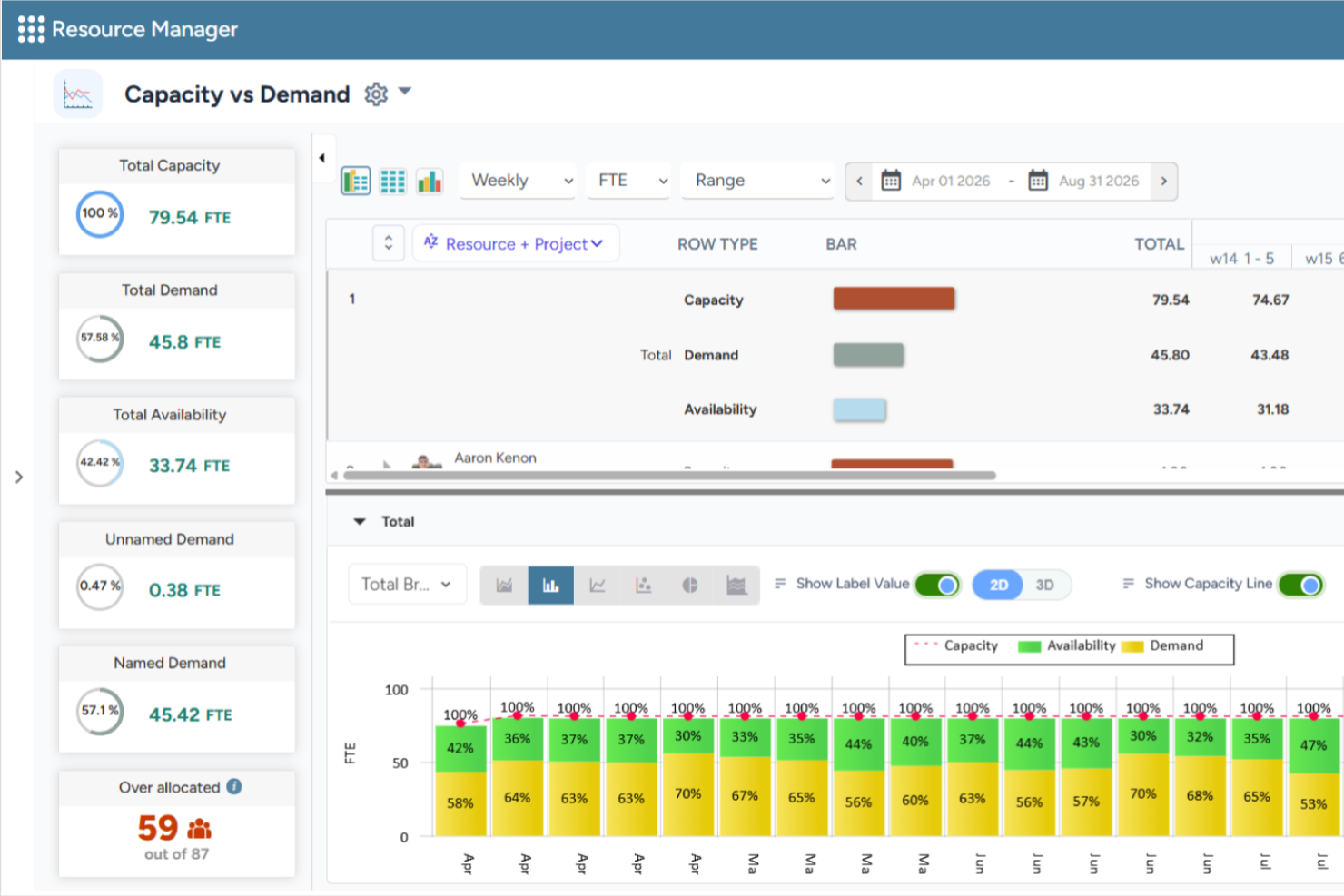
Saviom is a configurable and scalable resource management software built to combat the resourcing challenges across all industries. It can align resource capacity to changing demands for current and future projects in the pipeline. The platform also helps organizations forecast resource demand, optimize utilization, and support long-term workforce planning across complex project portfolios.
Why I Picked Saviom
I chose Saviom for its suite of advanced features, such as multidimensional scheduling, capacity planning, real-time optimization, talent planning, time management, and business intelligence reports. Its configurable software architecture can be customized and scaled up to meet the specific business requirements. Role-specific dashboards also enable various stakeholders to fast-track decision-making across matrix boundaries. I also like that it includes scenario modeling capabilities, allowing teams to compare different resource plans before making changes, as well as resource financial planning tools that help forecast resource costs and support staffing decisions.
Saviom Key Features
In addition to scheduling and forecasting capabilities, Saviom offers several other valuable features for resource management.
- Resource Capacity Planning: Forecast future resource demand, compare it against available capacity, and identify potential shortages or excess capacity before they impact project delivery.
- Scenario Modeling: Compare multiple staffing and project scenarios before applying changes to live resource plans.
- Talent Planning: Proactively address skill shortages, forecast demand, maintain an updated skill inventory, and ensure teams are prepared for current and future projects.
- Reports, Analytics & Dashboards: Access customizable real-time business intelligence reports and dashboards that provide visibility into resource utilization, availability, and key workforce metrics.
Saviom Integrations
Integrations are available with popular business applications, although specific examples aren't mentioned.
Pros and Cons
Pros:
- Flexible real-time reports, analytics, & dashboards
- Highly configurable & customizable resource management
- Multidimensional forecasting and capacity planning
Cons:
- Extensive features mean steep learning curve
- Less suited for small companies

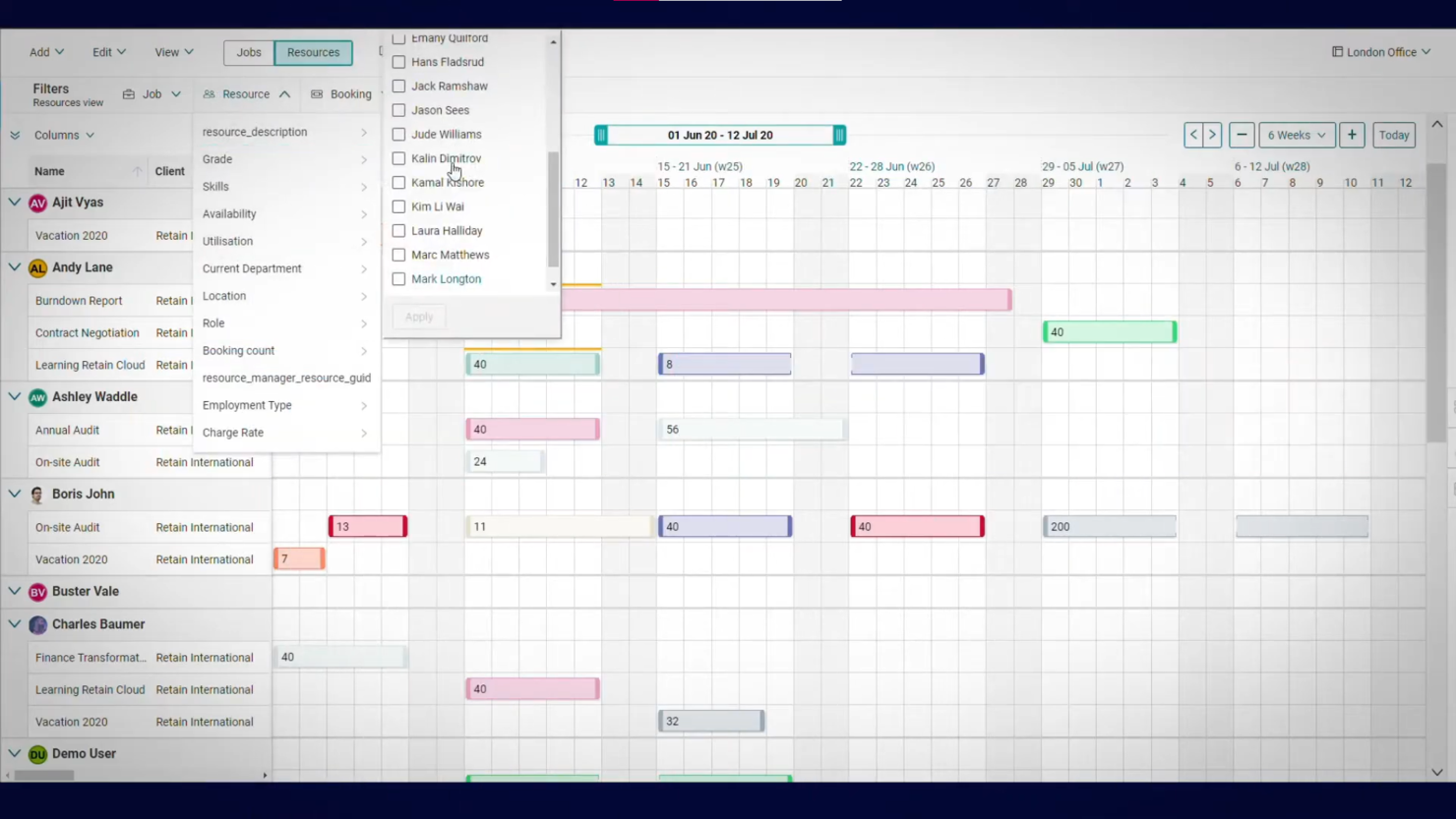
Demand forecasting is key to planning, and this is an area where Retain International stands out. The forecasting dashboard shows you how resource availability will change over time. You can use this information to allocate resources where they are needed most.
Why I Picked Retain: I like how intuitive the software is to use. The different features are simple to navigate, and the reporting and forecasting views make gaining insight easy.
There are both self-hosted and cloud versions of the software. If you choose the former, you’ll need to host the software on your own server. But once it’s up and running, you can still access the tool anywhere via the web or Android and iOS apps.
Retain Standout Features & Integrations
Features include a sophisticated forecasting dashboard that not only visualizes future resource availability but also incorporates scenario planning, allowing managers to model and prepare for potential changes in demand. Its leave management system is also seamlessly integrated with resource scheduling to ensure accurate capacity calculations and avoid unexpected shortfalls.
Integrations are not listed publicly on their site but seem to be available according to their pricing chart.

Scoro
Best for forecasting team utilization

Scoro is a resource management software that provides a suite of tools to assist businesses in managing their projects, finances, and resources within a single system.
Why I Picked Scoro
I like the platform's robust features that allow users to plan and prioritize work, distribute tasks with a drag-and-drop planner or Kanban task board, and manage time with shared calendars, timesheets, and a built-in time tracker. Scoro also enables monitoring of billable and non-billable hours and ensures accountability for time spent on client work.
Furthermore, the platform has comprehensive forecasting tools that allow managers to gain a clearer view of current capacity levels, shortages, deadlines, and planned events and vacations. This foresight helps avoid over or under-utilization of staff, leading to better workload balance and increased employee satisfaction.
Scoro Key Features
Scoro offers several other features that cater to your comprehensive resource management needs.
- Task Management: Assign and prioritize tasks based on team skills and availability to ensure the right people are on the right projects.
- Project Tracking: Monitor project progress in real time to keep deadlines and budgets under control.
- Reporting and Analytics: Generate detailed reports to track resource utilization and project performance.
- Collaboration Tools: Centralize team communication and file sharing to reduce back-and-forth emails.
Scoro Integrations
Integrations include HubSpot, Google Calendar, Microsoft Exchange, Xero, QuickBooks, Sage Intacct, Expensify, Stripe, Jira, Slack, Asana, Dropbox, PayPal, and Zapier.
Pros and Cons
Pros:
- AI-powered insights help decision-making
- Comprehensive view of team utilization
- Automated invoices
Cons:
- Limited support for languages other than English
- Learning curve for first time users
New Product Updates from Scoro

Scoro Adds Time Mobile App and ELI Improvements
Scoro adds the Scoro Time mobile app for iOS/Android to track time anywhere and expands ELI with attachments, smarter filtering, and trigger-based actions. For more information, visit Scoro's official site.

Best for resourcing with financial visibility

Float.com is a resource management software that helps professional services teams allocate, scope, and report on client work to improve their profitability. You get the context and data you need to match the right people to the right projects when resourcing client work.
Why I Picked Float.com
I picked Float for its fast, visual scheduling and delivery insights. You can see utilization, cost, and billable rates at a glance while planning work. Color-coded drag-and-drop allocations, keyboard shortcuts, and hour or percentage views make resource planning intuitive. It also flags conflicts like over-allocations, tentative work, or time off. Float helps teams forecast capacity and track the revenue, cost, and margin impact of resourcing decisions while providing visibility into project delivery and team utilization.
Float.com Key Features
In addition to its standout visual scheduling and real-time capacity tracking, Float offers several other features that can help you with resource management.
- Time Tracking: Your team can log hours directly into the platform, which provides accurate insights into time spent on various tasks and helps you improve project estimations.
- Project Forecasting: Float's forecasting tools let you predict project timelines and budgets, so you have a clear understanding of future resource needs and potential financial outcomes.
- Role and Skill Tracking: People's roles, skills, and availability live in Float and update in real time.
- Financial Insights: Manage project budgets, track margins, forecast revenue, and gain visibility into the financial impact of resource allocation decisions.
Float.com Integrations
Integrations include Google Calendar, Outlook Calendar, Slack, Jira, Asana, Teamwork, and Trello. Float also has a Zapier app that lets connect to a library of 1,000+ apps like your favorite project management systems or your CRM.
Pros and Cons
Pros:
- 24/7 AI chat with weekday human support
- Strong resourcing context and data
- Mobile app for iOS and Android
Cons:
- Time tracking requires you to get a higher plan
- Updating staff/personnel list takes time
New Product Updates from Float.com

Float Adds Rate Cards and Multi-Currency Billing
Float introduced centralized rate cards to standardize bill rates across projects and added multi-currency support to bill clients consistently across regions. For more information, visit Float's official site.

Runn
Best for real-time team capacity planning
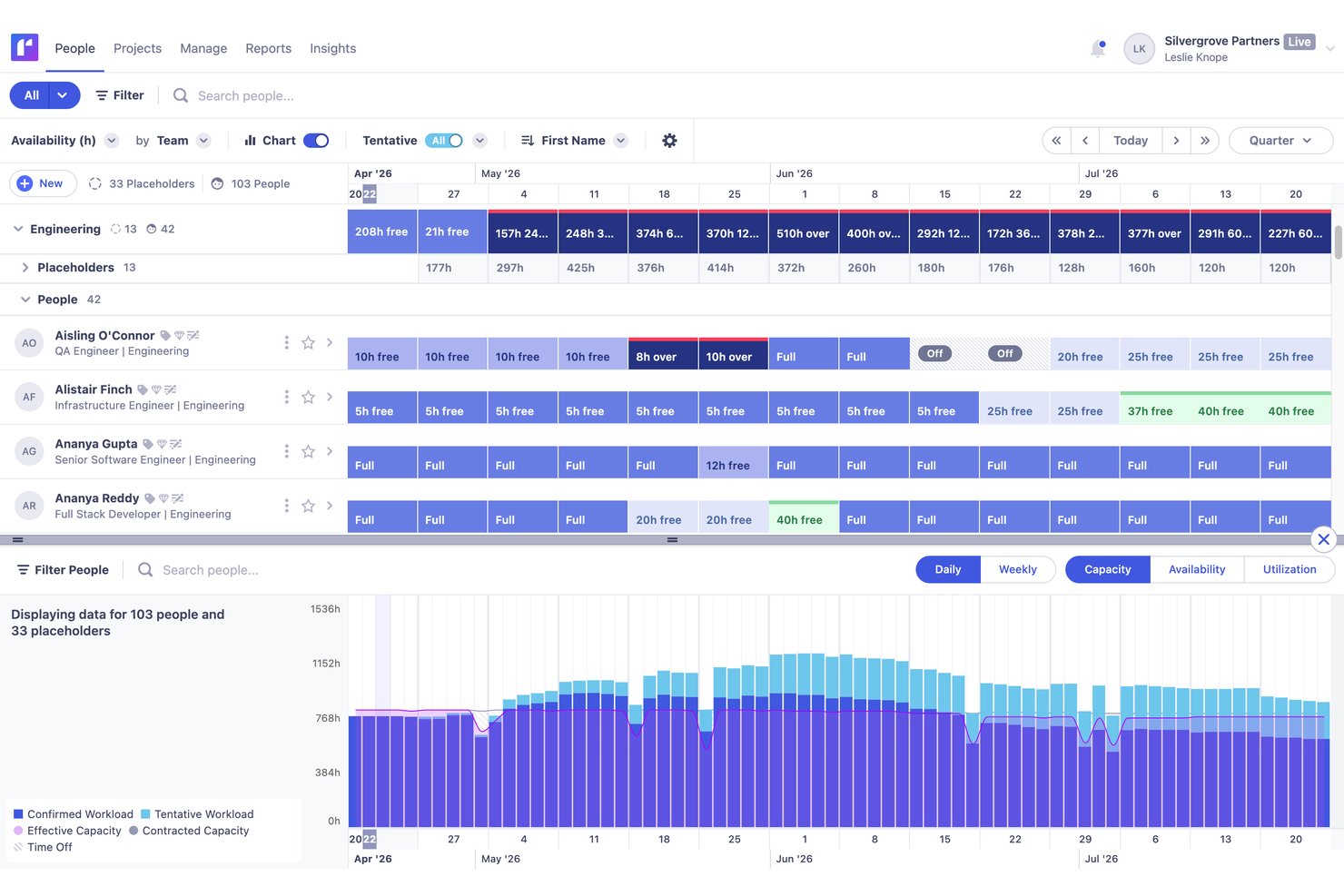
Runn is a resource management platform purpose-built around visual scheduling, real-time capacity planning, utilization tracking, and financial forecasting for project-based teams.
Who Is Runn Best For?
Runn is a strong fit for project-based teams—especially in professional services, agencies, and PMOs—that need a dedicated tool for visual scheduling and real-time capacity planning.
Why I Picked Runn
Runn earns its spot on my shortlist because it's purpose-built for real-time capacity planning in a way that broader project tools simply aren't. I love how Runn's capacity charts surface over- and underallocation the moment you adjust a schedule, so you're never working from stale data. SmartMatch AI is genuinely useful here too, recommending best-fit people based on skills and live availability rather than making you manually cross-reference profiles.
Runn Key Features
- Scenario planning: Create and compare unlimited what-if staffing and project scenarios to evaluate the impact of changes before committing to a plan.
- Native timesheets: Log time daily or weekly, track billable vs. non-billable hours, and compare planned time against actuals to sharpen future forecasts.
- Financial forecasting: Connect resource allocations to budgets, rate cards, and margin projections with support for both fixed-price and time-and-materials billing models.
- Placeholder resources: Add unnamed future hires to your schedule so capacity forecasts reflect real hiring plans, not just your current team.
Runn Integrations
Runn lists 13+ HRIS integrations, including BambooHR, Workday, HiBob, Gusto, and ADP Workforce Now, plus integrations with Harvest, Clockify, and Jira. It also supports custom integrations through its public API and Zapier.
Pros and Cons
Pros:
- AI-powered resource matching based on skills
- Unlimited scenario planning for resource modeling
- Real-time capacity versus demand visibility
Cons:
- Permission controls limited for complex organizations
- No native mobile app available

Kantata
Best for people-centric resourcing
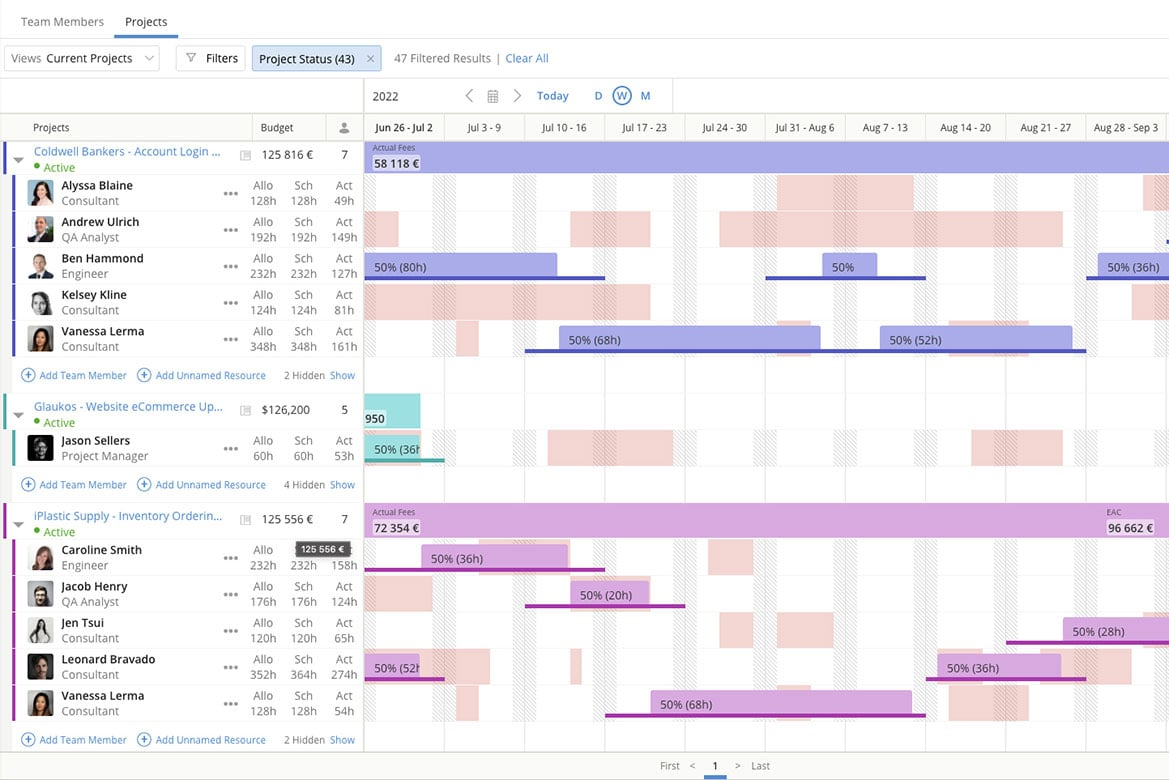
Kantata is a resource management platform built for professional services teams and agencies. Unlike generic tools, it unifies resourcing, financials, and project delivery while keeping people at the center of staffing decisions.
I recently spoke with Daniel Vasilevski, the director & owner of Pro Electrical, about how he uses Kantata with his team. He uses this tool because of the "resource planning dashboard that displays the availability of all team members for different jobs in one interface," he says. "During a large job...a sudden storm triggered 8 urgent callouts across different suburbs," he says. "Using the resource planning dashboard...I could see where each of my 14 electricians was and reassign 4 of them...without derailing the project," he explains. This had major benefits: "This...reduced client wait times from...more than a day down to under four hours. It also saved nearly $3,500 in overtime since the workload was evenly distributed," he says.
Why I Picked Kantata
What appeals to me about Kantata is how its resource management module helps leaders make staffing decisions that prioritize people as much as project needs. The platform provides real-time visibility into capacity and utilization, so you can balance workloads and ensure the right team members are assigned to the right tasks. Its skills-based resource planning also makes it easier to identify gaps, align talent with demand, and create opportunities for employee growth. This people-centric approach not only optimizes efficiency but also supports long-term team engagement.
Kantata Key Features
Kantata offers several other functionalities that make it a valuable tool for resource management.
- Project Time Tracking: This feature lets your team to accurately track time and resources so you can make informed adjustments to project plans.
- Team Collaboration Tools: These tools help improve communication among team members, coordination, and project outcomes.
- Business Intelligence Tools: You get real-time analysis and reporting so you can identify trends and make data-driven decisions.
- Visual Project Planning Tools: This features offers visual representations of tasks and timelines to improve understanding and engagement among your team.
Kantata Integrations
Integrations include Salesforce, SAP, Jira, Xero, BambooHR, Slack, Worday, QuickBooks, HubSpot, and NetSuite.
Pros and Cons
Pros:
- Resourcing fully integrated with master planning
- Good reporting functionality for resource data
- Easy capacity management
Cons:
- Advanced features available only in premier and enterprise plans
- Custom reports can be difficult to create without training
New Product Updates from Kantata

Kantata Adds Access Group Change History
Kantata adds Access Groups History, letting account administrators track changes to group details, membership, and permissions in Recent History. The update also makes these events available through the Subscribed Events API for broader monitoring. For more information, visit Kantata’s official site.
 .

Teamhood
Best for capacity planning on a low per-seat cost
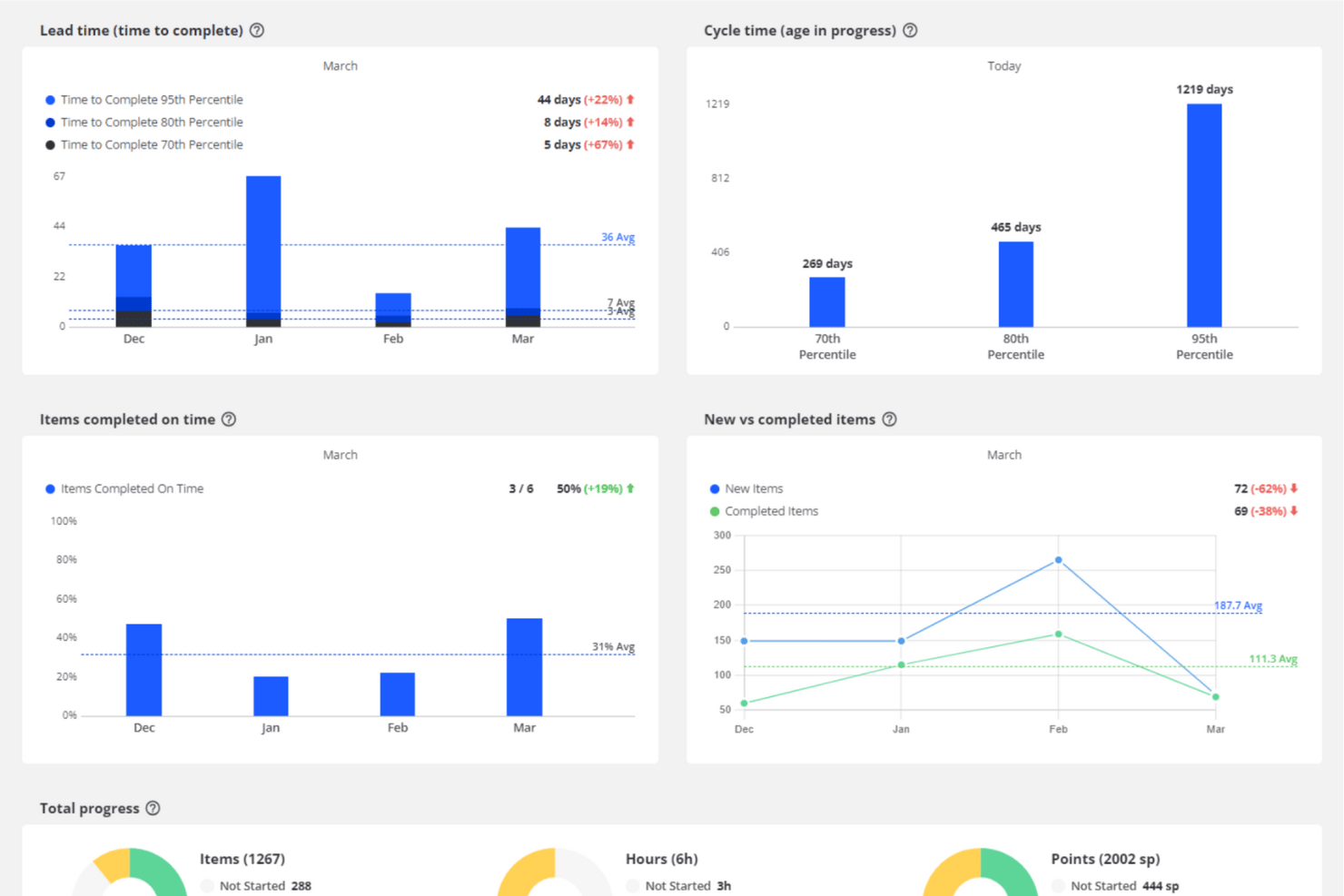
Teamhood is a project and resource management platform that combines capacity planning, visual scheduling, workload balancing, and time tracking across multiple projects simultaneously.
Who Is Teamhood Best For?
Teamhood fits operations managers and team leads at small-to-mid-sized companies running multiple projects simultaneously who need solid capacity planning without paying premium per-seat prices.
Why I Picked Teamhood
I've included Teamhood in my top picks because it puts genuine capacity planning features in a single $6/user/month plan, where most competitors lock this behind tiers costing three times as much. I like how the schedule view shows every project in one place, grouped by person, with red overload indicators that immediately flag who's over capacity across concurrent workstreams. Reserved hours let you hold capacity for an upcoming project before its tasks even exist, which is a practical advantage when you're juggling a pipeline of overlapping work.
Teamhood Key Features
- Gantt dependencies with baseline comparison: Set task dependencies that automatically reschedule follow-on work, and compare the current timeline against a saved baseline to track schedule drift.
- Reserved hours: Block capacity for upcoming projects before any tasks exist, so you can hold time for work that's still in the pipeline.
- Personal page: Each team member gets a view of their open work across all projects, their time off, and four weeks of booked hours compared to their capacity.
- Custom roles and granular permissions: Assign permissions down to specific capacity actions, with access controlled per view across the workspace.
Teamhood Integrations
Teamhood Classic offers five documented native integrations: Google Calendar, Outlook Calendar, Slack, Microsoft Teams, and Azure DevOps. The new Teamhood includes REST API and webhooks, while Classic supports Zapier.
Pros and Cons
Pros:
- Detailed planning adjusts around time off
- Reserved hours protect upcoming project capacity
- Cross-project schedule reveals capacity clashes
Cons:
- Forecasting lacks pipeline or historical projections
- No skills-based resource matching

Best for resource visibility with heatmaps

Resource Guru is a resource management software designed to help teams schedule, plan, and track time across projects and resources. It caters to industries like agencies, construction, engineering, and IT, offering a centralized platform for coordinating people, equipment, and meeting spaces.
I recently spoke with Trond Nyland, the CEO and owner of Todus.no AS, about his use of Resource Guru "to assign tasks to several e-commerce and real estate projects." To him, "what stood out was how easy it was to see who was available at a glance." This had a few benefits for his team. "It helped us meet deadlines without putting too much stress on the team," he says.
Why I Picked Resource Guru
I chose Resource Guru for its mix of flexibility and accuracy in scheduling. The platform handles people, equipment, and meeting rooms in a single view, making it easier to plan across different resource types without juggling multiple tools. Advanced custom fields and filters mean you can tailor the setup to reflect skills, locations, or other attributes, while approval workflows and clash management features reduce the risk of double-booking or overlooked requests.
What really sets Resource Guru apart for me is its focus on visibility. The heatmap views give you an instant read on availability, so you can see at a glance where capacity is tight or underused. Personalized dashboards and daily summary emails keep the right information in front of each team member so you can make quick, confident resourcing decisions without drowning in data.
Resource Guru Key Features
In addition to resource scheduling and time tracking, Resource Guru has several other features that can help with resource management efficiency.
- Calendar View: This feature provides a visual overview of all scheduled projects and tasks, so you can quickly assess team availability and project timelines.
- Custom Fields: You can tailor Resource Guru to fit your specific needs by adding custom fields to categorize and manage resources according to your unique criteria.
- Project Reporting: Get insights into project performance with detailed reports that help you analyze resource utilization and project progress.
- Leave Management: You can easily manage and track team members' time off and plan around absences without disrupting project workflows.
Resource Guru Integrations
Integrations include Google Sheets, Jira Software, Smartsheet, Asana, monday.com, Basecamp, Microsoft Outlook, Clockify, Google Calendar, Slack, Microsoft Teams, and Teamwork.
Pros and Cons
Pros:
- Heatmaps for quick capacity insights
- Daily resource summary emails
- Comprehensive resource usage reporting tools
Cons:
- Limited reporting depth compared to larger enterprise tools
- Unable to sort resources by experience level
New Product Updates from Resource Guru

Resource Guru Adds More Control Over Calendar Sync
Resource Guru adds more control over Google and Outlook Calendar sync, including source calendar selection and destination calendar options. These updates help users manage external events and Resource Guru bookings with less clutter. For more information, visit Resource Guru’s official site.
 .
Diğer Kaynak Yönetimi Yazılımı İncelemeleri
Yukarıda aradığınızı bulamadıysanız, ihtiyacınıza uygun olabilecek birkaç yazılım aracı daha aşağıda yer alıyor.
- monday AI Workspace
For simple workload planning
- Acuity PPM
For project portfolio resource management
- Microsoft Project
For Microsoft users
- Rocketlane
For unified collaboration with clients
- Forecast
For AI-driven resource optimization
- Anaplan
For scenario planning
- Meisterplan
For role-based resource allocation
- ActiveCollab
For built-in invoicing
- Adobe Workfront
For strategic resource allocation
- Bonsai Agency Software
For workload optimization
- Birdview
For simulating resource loading
- Schedule It
For scheduling work shifts
- Polaris PSA By Replicon
For combined PSA and PPM functionality
- Planview AdaptiveWork
Enterprise-grade resource management tool
- elapseit
For its features that support kickstart to invoice
- PSOhub
RM that integrates with CRMs
- ProjectManager
For resource monitoring via project dashboards
- Parallax
For predictive resource management
- Planview Vantage
For the PMO level
- Apache OFBiz
For commerce-based resource planning
- Silverbucket
For project-based work
- eResource Scheduler
Built-in financial module
- SAP Job Scheduling and Resource Allocation
For agile project management


Kaynak Yönetimi Araçlarının Videolu Tanıtımı
Kaynak yönetimi yazılımı hakkındaki videomuza göz atın!


İlgili Kaynak Yönetimi Yazılımı İncelemeleri
Aradığınızı hâlâ bulamadıysanız, test edip değerlendirdiğimiz diğer ilgili araçlara göz atın:
- İş Akışı Otomasyon Yazılımı
- Zaman Takibi Yazılımı
- Görev Yönetimi Yazılımı
- İş Birliği Araçları
- Gantt Şeması Oluşturucu
- Medya Kaynak Yönetimi Yazılımı
- Verimlilik Araçları
- Kaynak Planlama Yazılımı
- Ücretsiz Kaynak Yönetimi Yazılımı
- Pazarlama Kaynak Yönetimi Yazılımı
- Kaynak Rezervasyon Yazılımı
- Ajans Kaynak Yönetimi Yazılımı
- Açık Kaynaklı Kaynak Yönetimi Yazılımı
- Web Tabanlı Kaynak Planlama Yazılımı
- Envanter Kaynak Yönetimi Araçları
How I Evaluate Resource Management Software
I split my evaluation into three parts, with core functionality carrying the most weight: schedule people across projects, see available capacity, and balance workloads. Next, I consider differentiators such as scenario planning and skills-based matching. Finally, I look beyond features at onboarding, support, and pricing fit.
Core Functionality (Table Stakes For This List)
When I'm selecting tools for my list, I score each one on a scale from 0 (does not offer the functionality) to 5 (excels in this area) for each core functionality listed below. I then convert the total into a percentage to help assess each tool's overall fit, with extra weight on any functionalities I’ve deemed essential.
- Resource Scheduling (Essential): I look for a visual schedule that assigns people to projects over time and reveals clashes when two plans need the same specialist.
- Capacity Visibility (Essential): The view should compare each person’s available capacity with committed work, so I can spot a team-wide shortfall before a project starts.
- Workload Management: I check whether managers can rebalance assignments when a launch slips or one designer carries several urgent deliverables.
- Utilization Tracking: I assess whether reports compare planned with actual time and separate billable from non-billable work across projects.
- Demand Forecasting: I look for forecasts that use project plans or pipeline data to flag staffing gaps before likely work enters delivery.
- Skills Matching: I consider whether filters connect skills and roles to availability, such as finding an available engineer with the right platform experience.
Once I have a list of tools that meet the criteria, I consider what sets each platform apart.
Differentiating Factors (What Sets Vendors Apart)
Here's how I compare and contrast different vendors:
Standout Features
Scenario modeling is the first thing I check. When a client project slips or a new deal closes early, I need to compare two or three staffing plans side by side before moving anyone. I also look at how well a tool surfaces bench time alongside financial reporting—knowing who's underutilized only helps if I can see the margin impact of reassigning them to a billable project.
Beyond Features
I check whether a tool connects to the PM, HRIS, and financial systems a team already runs on. If resource data lives in a silo, planners end up re-keying rates and availability into spreadsheets—exactly what the software should replace. I also evaluate how well each platform scales. A ten-person studio and a multi-department consultancy need different permission models and licensing structures, so I look at role-based access controls and whether pricing grows predictably as headcount rises.
Kaynak Yönetimi Yazılımı Nasıl Seçilir?
Uzun özellik listeleri ve karmaşık fiyatlandırma yapıları arasında kaybolmak kolaydır. Benzersiz yazılım seçimi süreciniz üzerinde çalışırken odağınızı korumanıza yardımcı olmak için göz önünde bulundurmanız gereken faktörleri içeren bir kontrol listesi hazırladık:
| Faktör | Göz Önünde Bulundurulması Gerekenler |
|---|---|
| Ölçeklenebilirlik | Yazılımın ekibinizle birlikte büyüyebildiğinden emin olun. Performans veya kullanılabilirlikten ödün vermeden artan kaynakları, kullanıcıları ve projeleri yönetebilen seçenekleri arayın. |
| Entegrasyonlar | Yazılımın, ekibinizin hâlihazırda kullandığı proje yönetimi platformları, CRM'ler veya muhasebe yazılımları gibi araçlarla sorunsuz şekilde entegre olup olmadığını kontrol edin. |
| Özelleştirilebilirlik | İş akışlarınızı, izinlerinizi ve raporlamanızı ekibinizin özel ihtiyaçlarına ve sektör gereksinimlerine uyacak şekilde düzenlemenize olanak tanıyan bir yazılım seçin. |
| Kullanım Kolaylığı | Ekibinizin hayal kırıklığı yaşamadan hızlı bir şekilde benimseyebilmesi için sezgisel bir arayüze ve kısa bir öğrenme sürecine sahip bir platformu tercih edin. |
| Bütçe | Fiyatlandırmanın yazılım bütçenizle uyumlu olduğundan emin olun. Abonelik ücretleri, eklentiler ve olası ölçeklendirme maliyetleri dâhil olmak üzere toplam maliyetleri göz önünde bulundurun. |
| Güvenlik Önlemleri | Ekibinizin hassas verilerini korumak için şifreleme, erişim denetimleri ve düzenli güncellemeler gibi güçlü güvenlik özelliklerine sahip yazılımlara öncelik verin. |
| Destek Seçenekleri | Kendi kendine yardım için bilgi tabanına veya topluluk forumuna erişimin yanı sıra sohbet, e-posta veya telefon gibi kanallar üzerinden güvenilir müşteri desteği sunan seçenekleri arayın. |
| Raporlama Araçları | Kaynak kullanımını analiz etmenize ve zaman içinde verimliliği artırmanıza yardımcı olacak ayrıntılı raporlama özelliklerinin yazılımda bulunup bulunmadığını değerlendirin. |
Entegrasyonların neden özellikle önemli olduğunu vurgulamak gerekir:
Bu araçlarla ilgili her zaman sınırlamalar vardır. Bazen yazılımın yerel olarak karşılayamadığı olmazsa olmaz gereksinimleriniz olur ve insanlar entegrasyonlar veya geçici çözümler aramaya o zaman başlar.

Kaynak Yönetimi Yazılımındaki Trendler
Araştırmam sırasında farklı kaynak yönetimi yazılımı sağlayıcılarından sayısız ürün güncellemesi, basın bülteni ve sürüm kaydı inceledim. Takip ettiğim bazı yeni trendler şunlar:
- Yapay zekâ destekli kaynak tahsisi: Yazılım araçları yapay zekâ özelliklerini uyguluyor; bu özellikler personel ihtiyaçlarını öngörebiliyor ve beceri setlerine, uygunluk durumuna ve proje önceliklerine göre kaynak atayabiliyor. Bu, ekiplerin karmaşık projelerde aşırı tahsis, yetersiz kullanım ve darboğazlardan kaçınmasına yardımcı olur.
- Senaryo planlama ve modelleme: “Ya şöyle olursa?” senaryolarını test etmeye yönelik özellikler standart hâle geliyor. Bu araçlar riskleri yönetmenize ve planları hızlıca ayarlamanıza, ayrıca etkin projeleri aksatmadan son tarihleri değiştirmek veya kaynakları yeniden tahsis etmek gibi değişikliklerin etkisini görselleştirmenize olanak tanır.
- Beceri haritalama ve gelişim takibi: Platformlar, ekip üyelerinin becerilerini haritalamanıza ve zaman içindeki gelişimlerini takip etmenize olanak tanıyan özellikleri entegre ediyor. Doğru kişilerin doğru görevlere atanmasını sağlayabilir ve ekibin mesleki gelişimini destekleyebilirsiniz.
- Gerçek zamanlı iş yükü analizleri: Canlı panolar, ekip iş yükleri ve kapasitesi hakkında anında görünürlük sağlayabilir ve statik raporlara duyulan ihtiyacın yerini alabilir. Dengesizlikleri hızlıca belirleyebilir ve projelerin sorunsuz ilerlemesini sağlamak için atamaları ayarlayabilirsiniz.
- Sürdürülebilirlik ve çevresel takip: Kaynak yönetimi araçları sürdürülebilirlik ölçütlerini takip etmeye yönelik özellikler sunmaya başlıyor. Bu, işletmenizin israfı azaltmasına ve çevresel etkisini iyileştirmesine yardımcı olabilir.
Kaynak Yönetimi Yazılımı Nedir?
Kaynak yönetimi yazılımı, proje amaçlarını ve hedeflerini desteklemek üzere kaynakları (personel, ekipman ve malzemeler gibi) tahsis etmenize, planlamanıza ve en iyi şekilde kullanmanıza yardımcı olan bir araçtır. Temel amacı, proje görevlerini bütçe ve takvim dâhilinde tamamlamak için doğru kaynakların doğru zamanda, doğru miktarlarda ve doğru konumlarda kullanılabilir olmasını sağlamaktır.
Uzmanlaşmış ekipleri yönetiyorsanız ürün geliştirme veya inşaat projelerinde teknik personeli, araçları ve son tarihleri yönetmek için mühendislik kaynak yönetimi yazılımı gibi bir varyanta ihtiyaç duyabilirsiniz.
Kaynak Yönetimi Yazılımının Özellikleri
Kaynak yönetimi yazılımı seçerken aşağıdaki temel özelliklere dikkat edin:
- Kaynak planlama: Ekip üyelerinin doğru zamanda doğru işlerle çalışması için kişileri, varlıkları veya zaman bloklarını farklı projelere hızlıca tahsis edin.
- Kapasite planlama: Ekibinizin ne kadar işi kaldırabileceğini bir bakışta görün, iş yüklerinin gerçekçi olmasını sağlayarak tükenmişlikten kaçınmalarına yardımcı olun ve ekip üyelerinin yeterince kullanılmadığı fırsatları belirleyin.
- Proje takibi: Hangi kaynakların hangi projelere atandığını, işlerin nasıl ilerlediğini ve son tarihlerin planlandığı gibi devam edip etmediğini kolayca izleyerek ileride karşılaşabileceğiniz sürprizlerden kaçının.
- Zaman çizelgesi görselleştirmesi: Gantt şemaları, takvimler veya diğer görsel zaman çizelgeleri çatışmaları, çakışmaları ve ekip üyelerinin uygunluğunu belirlemenize yardımcı olur.
- Kullanım raporlaması: Kaynaklarınızın ne kadar meşgul olduğunu anında kontrol edin, hiç kimsenin aşırı çalışmadığından veya yeterince kullanılmadığından emin olun ve tükenmişliği önlemek için iş yüklerini dengeleyin.
- Beceri takibi: Ekibinizin becerileri ve sertifikalarıyla ilgili güncel bir envanter tutun ve kişileri yalnızca uygunluk durumlarına göre değil, gerçek uzmanlıklarına göre projelerle eşleştirin.
- Bütçe yönetimi: Harcamaları proje veya kaynak bütçelerine göre takip edin, maliyetleri kontrol altında tutun ve her kaynağı güvenle gerekçelendirin.
- Zaman takibi: Görevlerde veya projelerde çalışılan saatleri kaydedin, gerçek harcanan zamanı tahminlerle karşılaştırın ve müşterilere kolayca fatura keserek gelecekteki projeleri öngörün.
- İzin kontrolleri: Hassas bilgileri güvende tutmak ve yanlışlıkla yapılan değişiklikleri önlemek için kaynak atamalarını kimlerin görüntüleyebileceğini, düzenleyebileceğini veya onaylayabileceğini belirleyin.
Kaynak Yönetimi Yazılımında Yaygın Yapay Zekâ Özellikleri
Yukarıda listelenen standart kaynak yönetimi yazılımı özelliklerinin yanı sıra, bu çözümlerin çoğu aşağıdaki gibi yapay zekâ özelliklerini de bünyesine katıyor:
- Otomatik kaynak tahsisi: Yapay zekâ, en uygun kaynakları önermek veya otomatik olarak atamak ve manuel tahminleri azaltmak için proje gereksinimlerini, teslim tarihlerini ve personel uygunluğunu analiz eder.
- Öngörücü kapasite tahmini: Yapay zekâ, geçmiş verileri kullanarak gereğinden fazla veya yetersiz kaynağa sahip olabileceğiniz dönemleri tahmin eder; böylece sorunlar ortaya çıkmadan önce işe alımları veya atamaları ayarlayabilirsiniz.
- Akıllı çakışma tespiti: Yapay zekâ, olası zamanlama çakışmalarını veya aşırı kaynak tahsislerini sorun haline gelmeden önce tespit eder ve sorunların önüne geçebilmeniz için proaktif uyarılar gönderir.
- Akıllı beceri eşleştirme: Yapay zekâ, ekibinizin profillerini inceler ve doğru yetenekleri her proje veya görevle otomatik olarak eşleştirir.
- Otomatik raporlama: Yapay zekâ tarafından oluşturulan raporlar kullanım, kapasite ve maliyet verilerini bir araya getirerek kaynak verilerinizi kolayca anlamanızı sağlar.
Kaynak Yönetimi Yazılımının Faydaları
Kaynak planlama yazılımı kullanmanın beş temel faydası şunlardır:
- Verimli kaynak tahsisi: Kaynakların uygunluğu ve iş yükü hakkında içgörüler sunan kaynak planlama yazılımı, kaynakların en uygun şekilde tahsis edilmesini sağlamanıza, darboğazları en aza indirmenize ve üretkenliği en üst düzeye çıkarmanıza yardımcı olur.
- Gerçek zamanlı görünürlük: Kaynak tahsisi ve proje ilerlemesiyle ilgili gerçek zamanlı güncellemeler sayesinde proje zaman çizelgelerini ve kaynak kullanımını daha iyi görebilirsiniz. Bu, bilinçli kararlar almanızı ve proaktif düzenlemeler yapmanızı sağlar.
- Geliştirilmiş planlama ve tahmin: Kaynak tahsisi programları, geçmiş verileri ve kaynak eğilimlerini analiz ederek doğru planlama ve tahmin yapmayı kolaylaştırır; gelecekteki kaynak ihtiyaçlarını öngörmenize ve kaynakları etkili bir şekilde tahsis etmenize yardımcı olur.
- Daha iyi iş birliği ve iletişim: Kaynak bilgilerini merkezileştiren ve ekip üyeleri arasındaki iş birliğine olanak tanıyan yazılım, daha iyi iletişimi, koordinasyonu ve kaynakların proje hedefleriyle uyumunu destekler. Bu da daha iyi proje sonuçlarına yol açar.
- Optimize edilmiş proje performansı: Kaynak kullanım yazılımı, doğru kaynakların doğru zamanda hazır bulunmasını sağlayarak, gecikmeleri azaltarak ve projenin teslim hızını ve kalitesini artırarak proje performansını optimize etmenize yardımcı olur.
Kaynak Yönetimi Yazılımı Maliyetleri ve Fiyatlandırması
Aşağıda, hangi plan türünün sizin için uygun olduğunu belirlemenize yardımcı olmak amacıyla yaygın kaynak yönetimi yazılımı planı türlerinin, ortalama fiyatlarının ve genellikle dahil edilen özelliklerin bir dökümü yer almaktadır:
| Plan Türü | Ortalama Fiyat | Yaygın Özellikler |
|---|---|---|
| Ücretsiz | $0 | Temel kaynak planlama, sınırlı proje sayısı, temel raporlama |
| Temel | $10 - $20/kullanıcı/ay | Daha iyi planlama, zaman takibi, temel analizler |
| Profesyonel | $20 - $40/kullanıcı/ay | Gelişmiş kaynak planlama, gerçek zamanlı iş birliği, eksiksiz proje yönetimi paketi |
| Kurumsal | Özel Fiyatlandırma | Özel entegrasyonlar, gelişmiş güvenlik özellikleri, kişiselleştirilmiş başlangıç ve destek |
Gerekirse planınızı her zaman yükseltebilirsiniz. Şirketinizin fiyatlandırma planını yükseltmek isteyebileceği yaygın durumlar şunlardır:
- Ekip büyüklüğündeki artış: Ekip mevcut planın sınırlarını aşacak şekilde büyüdüğünde ek kullanıcı lisanslarına veya koltuklara ihtiyaç duyabilirsiniz.
- Proje karmaşıklığının artması: Projeler daha karmaşık hale geldiğinde, geliştirilmiş raporlama ve analizler gibi gelişmiş özelliklere ihtiyaç duyarsınız.
- Daha iyi destek ihtiyacı: İşlerin sorunsuz ilerlemesini ve sorunların hızlı bir şekilde çözülmesini sağlamak için 7/24 destek veya özel müşteri yöneticileri gibi daha yüksek düzeyde müşteri desteğine ihtiyaç duyabilirsiniz.
- Daha fazla depolama alanı talebi: Proje dosyaları, belgeler ve veriler oluşturdukça mevcut planınızın depolama kapasitesi yetersiz hale geldiğinde, daha fazla depolama alanı sunan bir plana yükseltmeniz gerekir.
- Entegrasyonlar ve özelleştirme: Diğer yazılımlarla daha fazla entegrasyona ihtiyaç duyduğunuzda veya yalnızca daha üst düzey planlarda sunulan özelleştirme seçeneklerini kullanmanız gerektiğinde yükseltme yapmanız gerekir.
Kaynak Yönetimi Yazılımı Sıkça Sorulan Sorular
Kaynak yönetimi ve kaynak yönetimi yazılımı hakkında sık sorulan soruların yanıtlarını bulun.
Kaynak yönetimi için hâlâ elektronik tabloları kullanabilir miyim?
Hayır, kaynak yönetimi için elektronik tabloları kullanmamalısınız; çünkü bu, kaynak takibini yavaş, manuel ve hataya açık hâle getirir. Özel kaynak yönetimi araçları iş yüklerini izlemenize, daha fazla görünürlük elde etmenize ve değişiklikleri yönetmenize yardımcı olur. Bu platformlar ayrıca kaynak tahsisi gibi süreçleri otomatikleştirebilir, uygunluğu bir bakışta gösterebilir ve sizinle ekibiniz için raporlamayı kolaylaştırabilir.
Jira kaynak yönetimi için kullanılabilir mi ve sınırlamaları nelerdir?
Evet, Jira’da görevleri ve atamaları takip edebilirsiniz; ancak kaynak yönetimi özellikleri sınırlıdır. Kullanım oranı veya kapasite için yerleşik görünümler sunmaz ve daha gelişmiş planlama için eklentiler ya da entegrasyonlar kullanmanız gerekir. Özel bir kaynak yönetimi aracı çok daha etkilidir.
Bu yazılım seçenekleri uzaktan çalışan ekipler arasındaki iş birliğini nasıl kolaylaştırır?
Kaynak yönetimi araçları, herkesin kimin ne yaptığını ve bunu ne zaman yaptığını net bir şekilde görmesini sağlar. Bu, uzaktan çalışma için özellikle yararlıdır. Paylaşılan takvimler, gerçek zamanlı güncellemeler ve merkezi iletişim gibi özellikler karmaşayı azaltmaya ve dağınık ekiplerin uyum içinde çalışmasını sağlamaya yardımcı olur. Ekip üyeleri işleri birbirlerine kolayca devredebilir ve ilerlemeyi takip edebilir.
Kâr amacı gütmeyen kuruluşlar için esnek fiyatlandırma seçenekleri veya indirimler var mı?
Evet, bazı kaynak yönetimi yazılımı sağlayıcıları kâr amacı gütmeyen kuruluşlara indirimler veya özel fiyatlandırma kademeleri sunar. Uygun olup olmadığınızı öğrenmek ve kuruluşunuz adına başvurmak için sağlayıcıların web sitelerini kontrol edin veya doğrudan satış ekibiyle iletişime geçin.
Kaynak yönetimi yazılımında hangi entegrasyonları aramalıyım?
Proje yönetimi yazılımı (ör. Asana, Trello), takvimler, iletişim platformları (ör. Slack, Microsoft Teams) ve İK veya zaman takip yazılımı gibi hâlihazırda kullandığınız araçlarla entegrasyonlar arayın. Entegrasyonlar zamandan tasarruf etmenizi, manuel güncellemeleri azaltmanızı ve kaynak uygunluğuna ilişkin bütünsel bir görünüm elde etmenizi sağlayabilir.
Kaynak yönetimi yazılımı ekip tükenmişliğini önlemeye nasıl yardımcı olur?
Bu araçlar iş yüklerini takip etmenizi sağlar; böylece birinin tükenmişlik riski taşıdığı veya üzerinde gereğinden fazla iş olduğu durumları fark edebilirsiniz. Projeler arasındaki tahsisi görebilir, izinleri yönetebilir ve görevleri dengeleyebilirsiniz. Gerçek zamanlı verilere erişim, görevleri yeniden dağıtmanıza ve ekibiniz için daha sağlıklı çalışma alışkanlıklarını teşvik etmenize yardımcı olur.
Kaynak yönetimi yazılımını uygularken en sık yapılan hatalar nelerdir?
Kaynak yönetimi yazılımını uygularken kaçınmanız gereken yaygın hatalar arasında ekip eğitimini atlamak, ayarları özelleştirmemek ve kaynak verilerini güncel tutmamak yer alır. Ayrıca, tüm kilit paydaşları sürece dâhil etmemek düşük benimsemeye yol açabilir. Aracınızdan en iyi şekilde yararlanmak için net bir işe alıştırma süreci oluşturun, sorumlulukları belirleyin ve verileri düzenli olarak güncelleyin.
Kaynak yönetimi yazılımı için yapay zekâ özelliklerine yatırım yapmaya değer mi?
Evet, kaynak yönetimi yazılımı için yapay zekâ özelliklerine yatırım yapmaya değer. Yapay zekâ destekli özellikler planlamayı otomatikleştirebilir, talebi öngörebilir ve en uygun kaynak tahsisini önerebilir. Ekibiniz karmaşık planlamalarla veya değişen önceliklerle ilgileniyorsa yapay zekâ zamandan tasarruf etmenizi ve doğruluğu artırmanızı sağlayabilir. Sırf popüler olduğu için kullanmak yerine, iş akışlarınız ve kullanım amacınızla uyumlu olduğundan emin olun.